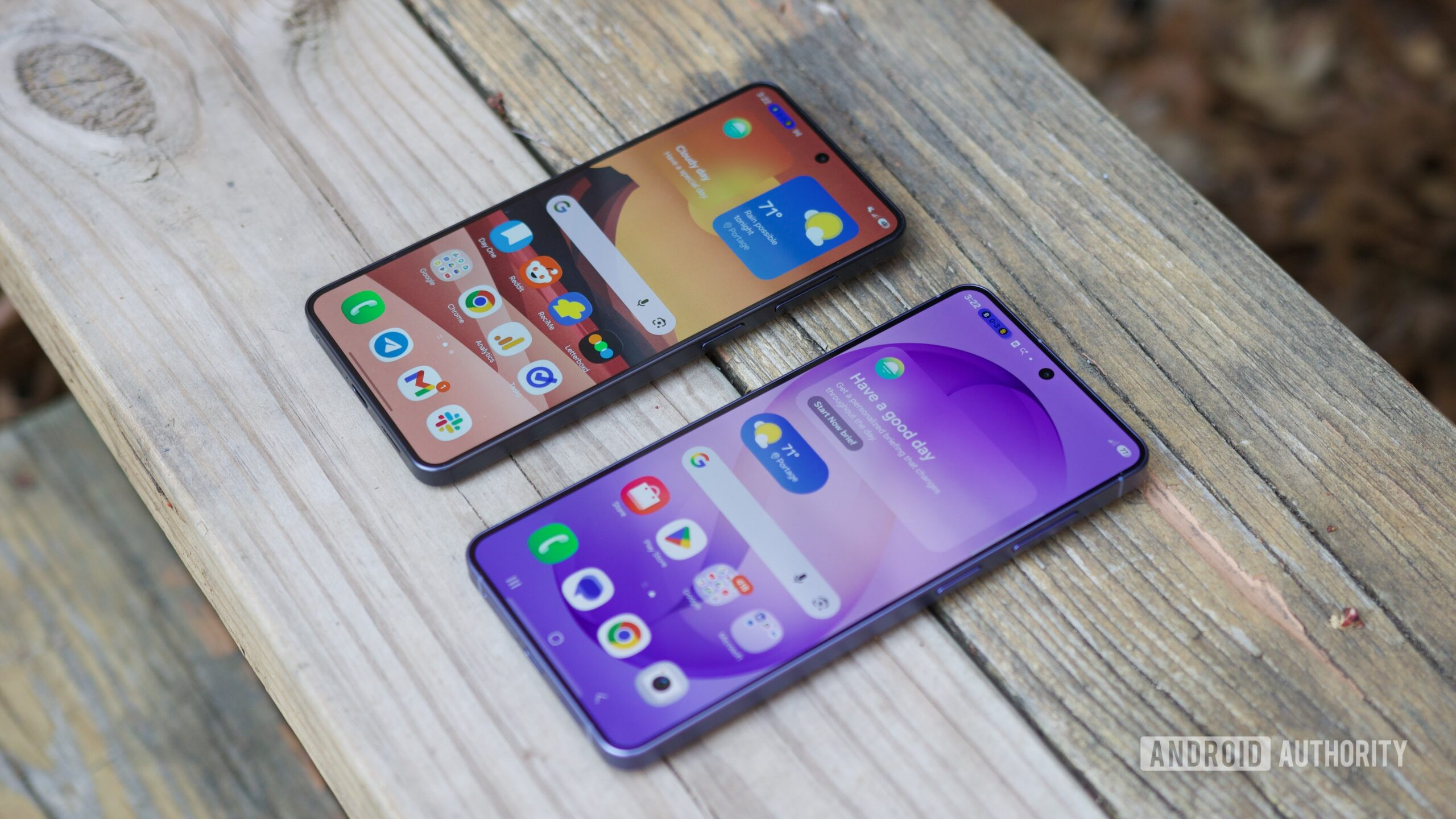
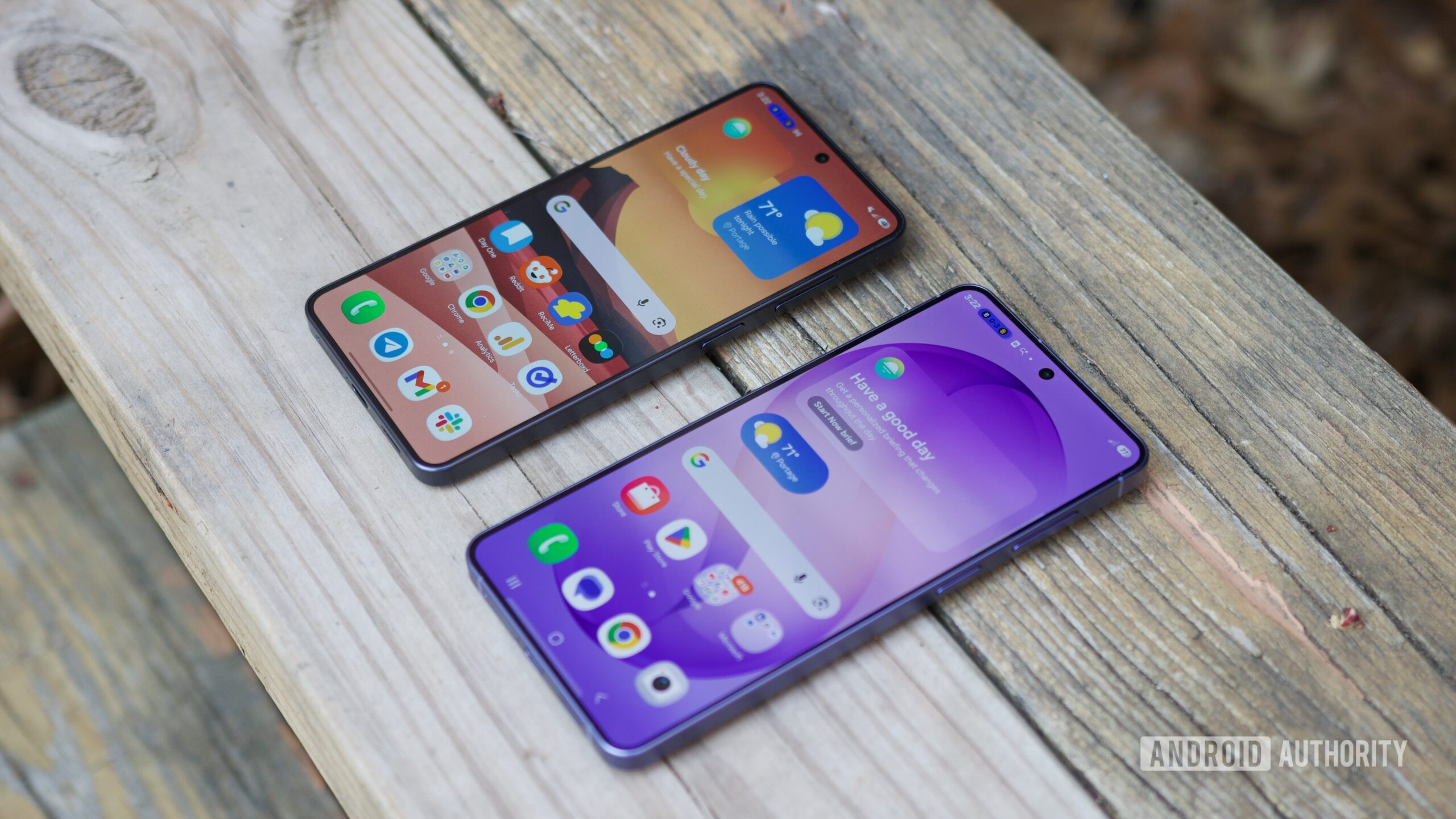
A Korean outlet reports that Samsung will use an in-house M2700 modem in some Galaxy S27 models.
This modem will apparently deliver better power efficiency and faster data speeds than the Exynos modem in some S26 models.
It’s believed that some Galaxy S28 models could get an M2800 modem that’s even more efficient than the S27 modem.
Samsung has long offered Exynos or Snapdragon chipsets in its flagship phones, with the former being paired with a Samsung modem. Now, a Korean publication has encouraging news if you’re worried about efficiency and data speeds on the Galaxy S27 series.
The Elec reports (h/t: SamMobile) that Samsung will use a so-called M2700 modem in the Galaxy S27 series. This will ostensibly be restricted to the Exynos variants. The outlet claims that this is an external modem built on a 4nm manufacturing process, much like the Exynos Modem 5410 (also known as the Shannon 5410) seen in some Galaxy S26 series models.
Flipkart, the Walmart-owned Indian e-commerce giant, is preparing to challenge India’s food-delivery duopoly of Zomato and Swiggy. It is entering a fiercely competitive market that has defeated even previous attempts by Amazon and Google to break in.
The Bengaluru-based company is testing its food-delivery service internally and has expanded the trial from a few hundred employees to upwards of 8,000, according to two people familiar with the matter. It has also deployed a dedicated fleet of riders through its logistics arm, Ekart, separate from the riders who handle its quick-commerce deliveries, as it prepares for a public launch.
The employee-only service appears as a separate tab on Flipkart’s main shopping app, alongside its Minutes quick-commerce offering and travel bookings, TechCrunch has learned. It draws on restaurants listed through ONDC, a government-backed network that connects online buyers and sellers across different platforms, as well as restaurants that Flipkart signed up directly.
Riders wearing jerseys bearing the “Eat-in by Minutes” branding have also begun fulfilling orders on the streets of Bengaluru, the southern Indian city where Flipkart is headquartered.
As Flipkart expands its food-delivery operations, it is entering a market that the brokerage firm Bernstein estimates is growing 18% to 20% a year. Online delivery, though, still accounts for just over 15% of India’s broader food-services industry. Zomato, owned by Eternal, and Swiggy together serve an estimated 85 million to 95 million paying customers a year, per Bernstein. That figure shows how dominant the two are, and how much room newcomers have to grow online food ordering in the world’s most populous country, which has more than a billion internet subscriptions.
Flipkart is not the only company trying to shake up India’s food-delivery market. Ride-hailing company Rapido, which has already given Uber and its Indian rival Ola a tough fight, has been expanding Ownly, its food-delivery service that charges restaurants zero commission. Meanwhile, Swiggy has launched Toing, a separate app aimed at customers looking for cheaper meals. Both moves reflect growing pressure on the industry’s existing pricing model and the commissions that restaurants pay.
“Monopoly is bad, but duopoly is more pathetic,” said Sagar Daryani, president of the New Delhi-headquartered National Restaurant Association of India, which represents over 500,000 restaurants nationwide. “What one does, the other follows suit.”
Daryani argued that restaurants have long needed alternatives to the two dominant platforms.
Daryani sees one important difference between Flipkart and the companies that tried food delivery before it. Zomato and Swiggy built their businesses around delivering meals before expanding into quick commerce. Flipkart is doing the reverse, using its established e-commerce business and growing quick-commerce operations as a springboard into food delivery.
“Flipkart’s quick commerce benefit will get passed on to food delivery, so it will be leaner, more efficient,” Daryani told TechCrunch.
Restaurants are also hoping that new entrants will bring down the cost of selling meals online. Daryani, also co-founder and CEO of the dumpling chain Wow! Momo Foods, said Flipkart has proposed a base commission of about 10%, compared with the 20% to 25% that restaurants typically pay Zomato and Swiggy.
Commissions are only part of the expense, though. Once advertising, discounts, and other promotional costs are factored in, restaurants can end up spending 40% to 50% of an order’s value on the established platforms, Daryani told TechCrunch. He expects Flipkart to keep that total cost closer to 15% to 16%, which could mean restaurants keep more money from each order.
Nonetheless, getting restaurants on board is one thing and winning over customers is another. Bernstein estimates that new entrants could save customers just ₹20 to ₹30 (around 20–30 cents) per order by operating more efficiently, which may not be enough to draw customers away from Zomato and Swiggy. The two incumbents could also offer deeper discounts to keep them.
Flipkart is not planning to stay in Bengaluru for long. The company has told restaurants that it expects to launch its food-delivery service publicly by the end of October and to expand to five or six cities by the end of this year, Daryani told TechCrunch.
The food-delivery push also comes as Flipkart’s long-awaited stock-market listing remains uncertain. Chief Executive Kalyan Krishnamurthy (pictured above) recently declined to give a timetable for an IPO, even as the company continues to expand into businesses that could bring customers back to its app more frequently.
Flipkart’s expansion comes as competition in India’s e-commerce market intensifies. Quick-commerce platforms that started by delivering groceries in minutes now sell even the latest iPhones and other discretionary purchases, putting them in more direct competition with Flipkart and Amazon.
Flipkart did not respond to a request for comments.
When you purchase through links in our articles, we may earn a small commission. This doesn’t affect our editorial independence.
Google claims its newest AI model, Gemini 4 Argon, just beat Minecraft — no human help required.
In a research paper posted Oct. 15, Google DeepMind researchers said a team of four Gemini 4 Argon agents defeated the Ender Dragon, the game’s final boss. The agents started in a freshly generated survival world on Easy difficulty and were given a single goal: kill the dragon. It took them 27 hours and 14 minutes. Along the way, the AI players died 605 times, mostly to monsters.
The researchers say this is the first time AI agents have beaten Minecraft from start to finish using only standard tools, with no game-specific help built by humans. Researchers watched the run on a live dashboard and could have stepped in at any point, but they say they never needed to.
However, Google is upfront about the limits. The game ran on Easy, which meant that monster attacks dealt less damage to the AI players. Because the AI agents play the game through code rather than on a screen, they have access to information that a human player would not. For example, the AI agents knew what blocks were hidden behind other blocks, making the “mining” part of the game rather insignificant. Plus, given Gemini 4 Argon’s training base, the AI agents knew the optimal strategies for playing the game.
Mashable Light Speed
It’s impressive, but nowhere near what humans can do. The researchers note that the record for beating Minecraft in a random world is under seven minutes.
One may ask, why make an AI play Minecraft? The researchers argue that the skills involved, like working as a team, bouncing back from mistakes, and sticking with a goal for more than a day, are the same ones AI agents need for real-world work. According to Google, the run costs about $520 in model usage at Argon’s introductory API price.
Making a frontier AI model play a video game is actually a common benchmark used by many companies when testing. The Pokémon games specifically have captured the zeitgeist in the AI industry for a while now, but Minecraft is now catching on too. As Google’s research points out, two community projects have recently reported beating the dragon with AI, including one using Anthropic’s Claude Opus 5.
According to an order of dismissal in one of the cases, the overall settlement was approved by a California probate court in July, and the court tasked a referee to hear out all the issues pertaining to each individual settlement. On October 11, a day before Character.AI declared bankruptcy, the referee approved each settlement.
The Tech Justice Law Project and Social Media Victims Law Center, which represented plaintiffs in many of the lawsuits, declined to comment.
Despite losing key staff after the Google transaction and, according to the current CEO, struggled with profitability “at all times,” Character.AI continued to develop AI tools, including “real-time audio-driven FaceTime-style video generation with fictional characters,” according to the current CEO’s declaration.
In August 2025, Character.AI worked with an investment banker to try to find either a strategic buyer or investor. According to the bankruptcy filings, Character.AI and the banker received “consistent feedback” that its product and user base were “impressive,” but that the surrounding litigation and “regulatory overhang” made it unbuyable.
That November, Character.AI learned that a coalition of state attorneys general had started investigating the company. When the company filed for bankruptcy, the number of states and territories involved in the multistate investigation had climbed to 46.
According to a notice of interest filed in the bankruptcy proceedings by the National Association of Attorneys General on behalf of 40 states, those states’ investigations uncovered “serious issues” with Character.AI, including screenshots of Character.AI chatbots encouraging minors to hide their self-harm injuries and kill their parents.
A spokesperson for Character.AI says that the filing “is not an accurate portrayal of the safety of our platform.”
The filings say that Character.AI was in the process of negotiating with the states over how to address the issues they identified, but did not reach any agreements before declaring bankruptcy.
If the deal is completed and approved by the courts, Disney will have both Character.AI’s staff and much of its technology stack, but will be able to sidestep the ongoing legal issues that contributed to Character.AI’s downfall, including the multistate investigation.
The states who filed a notice of interest in the bankruptcy have made it clear that they reserve their rights to challenge any bankruptcy plan, potentially setting up a fight over the ultimate outcome of the bankruptcy.
“It’s bad for society to let companies exercise control without responsibility,” says Newman. “And that’s what it looks like.”
For Hellraiser fans, Saber Interactive’s video game from earlier this month is the franchise’s first bit of life in years. Amid a solid reception, creator Clive Barker doesn’t plan on letting the Cenobite madness stop there.
As he told horror outlet Dread Central, the game’s “a wake-up call. It says to get your ideas warmed over so you can go back into existing worlds in a brand new way.” And as far as that goes, Barker’s got “many” he’d like to see happen, which is why he’s “planning to keep my fingers in that pie. […] I’d love to have another go and explore.”
The last Hellraiser movie was Hulu’s 2022 reboot, and there’s been no movement on that TV show announced for HBO. Both of those were announced in 2019, and it Barker got the rights back the following year. (He signed story and character rights away before the original 1987 movie even came out.) He was candid about the films’ decline, which he blamed less on the creative talent and more on the Hollywood system milking the franchise.
“Many of [those] movies made by the Weistein brothers were created simply to hold onto the rights. Over time they spent less and less on them. A lot of amazing creative people got worked over as a consequence,” Barker said. “The compromises you have to make and the battles you have to have are totally exhausting, unnecessary, and not something I will entertain ever again.”
Notably, Barker said he’s got a good amount of Hellraiser ideas for film and “other media.” Comics have come out this year and next, so fans won’t be completely left wanting until such a time they hear news of another movie or even the TV show.
For years, Voicemod has given people a way to change their voices online, which they’ve done for any number of benign reasons — for game players with feminine-pitched voices to avoid harassment, for those with damaged vocal cords to simulate their former voices, for anonymity or even just for fun. Now the company has a new product to bring its voice-changing tech on the go in a physical device that magnetically clips on the back of phones.
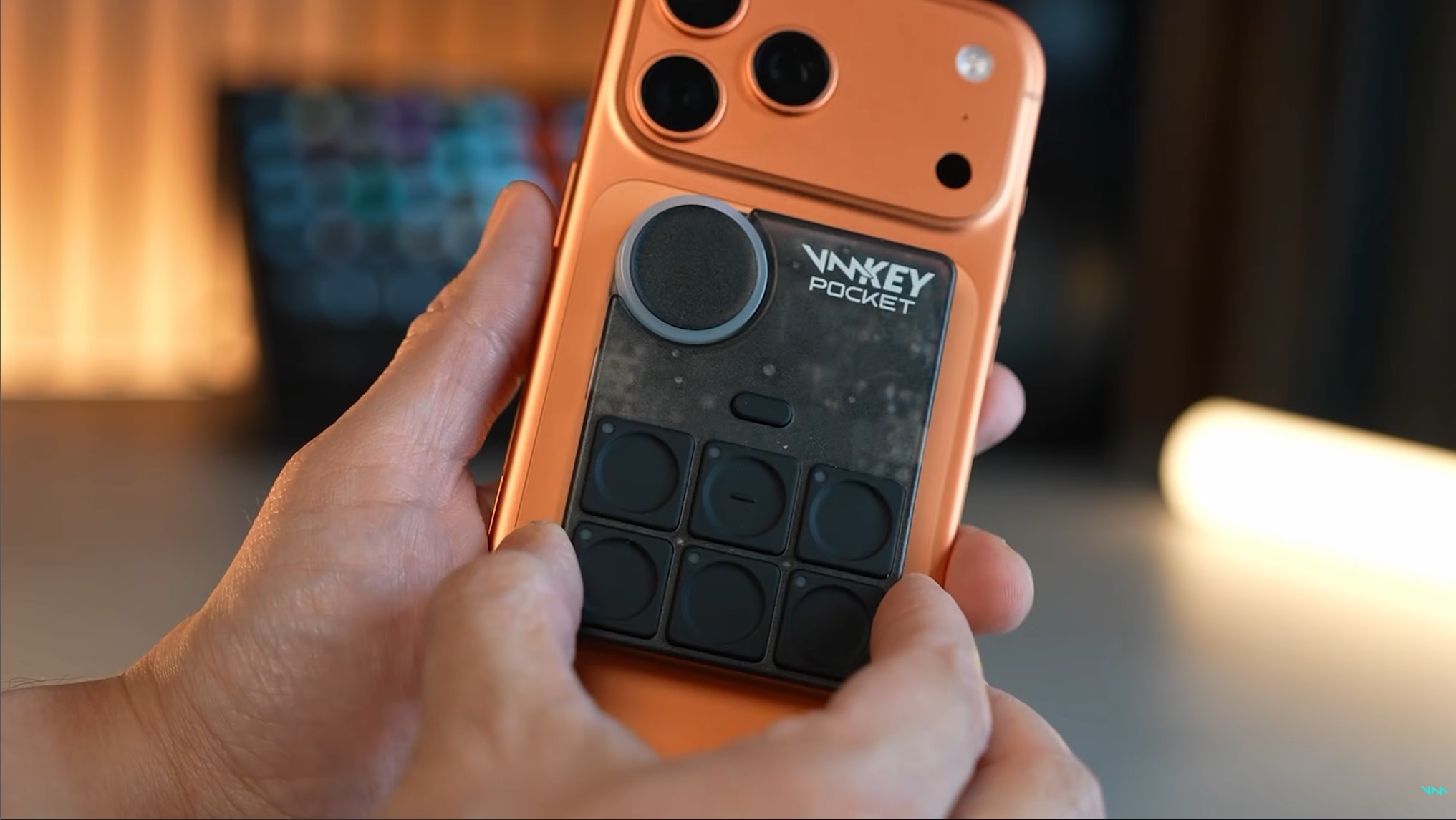
The Voicemod Key Pocket, available to preorder now for $130, is a small soundboard about the size of a magnetic battery and serves as a controller interface for the company’s voice-changing apps. The half-dozen buttons on the back of the device can be used to switch between voices or audio effects while streaming or playing games, while the wheel adjusts volume of the projected voice.
The Key Pocket works in tandem with the Voicemod app, but all voice processing is done locally and in real time separate from games and streaming apps in order to maximize privacy as well as performance, according to a Voicemod statement. The Voicemod app provides access to over 200 original voices made by the company, over 76,000 voices made by the service’s community and over 800,000 sounds and memes made by users.
The Key Pocket is a versatile gizmo, with an LED wheel at the top-left corner for toggling voices and checking sound setup, while programmable trigger buttons enable swapping between voices and soundboard playback. The device supports wired and Bluetooth wireless headsets, has USB passthrough charging and clips securely to the back of phones with MagSafe-compatible magnets.
Beyond phones, the Key Pocket works on tablets and consoles, including PS4 and PS5, Xbox Series X/S, Nintendo Switch 2 and the Meta Quest 2, 3 and 3S headsets. It can plug into USB-C, wired 3.5mm ports or connect via Bluetooth.
There are plenty of reasons folks might want to change their voice, from goofing off with friends to avoiding harassment when gaming online — a sad reality for gamers with feminine voices. It’s also an accessibility boon for people who have health conditions or other circumstances leading them to want to change their vocal timbre and pitch.
These days, changing voices can be cause for concern, especially with artificial-intelligence scams spoofing the voices of loved ones to extort money. But when I sat down at Mobile World Congress 2026 earlier this year to chat with Voicemod’s Daniel Pearson, vice president of marketing, and Alex Bordanova, chief product and technology officer, they explained how it aligned with the ethos of the company. The Key Pocket is the result of years of Voicemod’s work to support the idea that one’s online voice is as much an expression of identity as their visual look.
“Everyone has their digital visual appearance where they tweak their cosmetics and skins, but when it comes to voice, it’s kind of been left out, right? It’s this missing half of digital identity,” said Pearson.
As voice-changing tech makes its way into Fortnite, Arc Raiders, Marvel Rivals and other spaces for online third spaces, people are opening up to the idea that their personal expression isn’t just limited to how they’re seen, but also how they’re heard — or as Pearson calls it, their “sonic identity.”
Voicemod
When voice becomes a way to express identity
In our earlier chat, Pearson and Bordanova laid out what Voicemod meant to its community, with the latter describing one memorable story from last October’s TwitchCon 2025. A woman approached him explaining that she was a streamer who lost her voice for about six months but was able to make up for it with Voicemod’s tech.
“She used an AI voice, because that was enough to turn something audible out of just very nuanced sounds that she could project,” Bordanova said.
It spurred discussion about ways the Voicemod team might preserve the community’s voices — a vault, say, to future-proof their voices in the event that health or injury might limit their speaking.
The Voicemod creators don’t just see its tech as just to alter voices for fun or privacy — they see it as an expression machine, one that reflects who you are online. That comes in the form of a voice tweaked to a desired pitch and timbre, but also more abstract communication, like a soundboard. Yes, the signature toy of radio shock jocks from yesteryear is an aspect of expression, too, especially among a community where sounds take on specific meanings.
“It’s giving you the capacity to react and expand by giving extra context that you and your friends understand, but the normies don’t,” said Pearson.
“[Gamers] are social beings, they don’t want to have the default skin. They want to have their own skin customized,” Pearson said. “If the game just gives you 5-10 skins, you’re gonna want the next one, you want to differentiate yourself.”
The company’s Voicelab enables further voice tweaking with fun effects. One could, if they wanted, change their voice to sound like they were wearing a helmet in a cave inside a volcano — wacky but evocative sonic context placing the person in a specific space and circumstance. It enhances expression and storytelling and uses AI to do it. But not the AI you’re thinking of.
AI has been at the heart of Voicemod — but not generative AI
There’s no denying that technological advancement has enabled voice generation, but Voicemod came long before that. It was founded 14 years ago, using digital sound processing to alter voices, launching first on an iPhone 3GS, Bordanova explained.
What their tech enabled that traditional DSP could not is changing the timbre of the voice — its tone, color and personality. Using math, Voicemod’s tech could change a vocal signal in ways that would simulate changing the human organs that naturally shape one’s voice, like elongating or shrinking the vocal cords or altering the width of your throat or nose.
More traditional AI powered Voicemod’s older methods of voice changing, which improved thanks to technological developments. The company’s advantage was to be one of the first to invest heavily in AI’s use in voice changing, Bordanova said.
“There was something unique, something very special, that would evolve us from being a voice changer to having fun with friends online, into giving real utility for a 24/7 use case,” Bordanova said.
What he clarifies is that Voicemod’s tech isn’t based on generative AI, unlike the tech behind voice processing tricks like Google’s live translation. Instead, their language models are around 20 megabytes in weight, and take about a week to train. Unlike the immense large language models used in generative AI, Voicemod’s are small enough to fully download on phones and other client-side devices. They can be consulted immediately on device for 42 millisecond latency, rather than need to go to the cloud.
That doesn’t mean they’ll never use LLMs — but the use case they’re envisioning is as a glorified assistant helping people find the right toggles and settings to get the voice they want from existing choices.
“You can type, I want the voice of SpongeBob and the LLM would pick the right effect and parameters and just create the voice for us,” Bordanova said.
Voicemod
Expression on the go, through your phone to your digital life
Back in March at MWC 2026, I chatted with Bordanova and Pearson when they brought out a prototype for the Key Pocket, the follow-up to the company’s earlier Voicemod Key, a dongle device that aimed to help change voices for console play. Even in its cruder form, the Key Pocket felt special.
As even the prototype was MagSafe compatible, I clipped it to the back of my own iPhone 15 Pro Max. Even if the device wasn’t far enough along to be usable with software, I could still simulate how it would feel in action with my phone rotated sideways, as if I had it active while gaming. The row of buttons rested below my fingers, easy to press if I wanted to tweak my voice or trigger vocal or sound effects. The volume wheel was nice and accessible. If I was streaming or chatting with my friends, the Key Pocket would be a nice accessory to have.
While a lot of gaming happens at home on PC and console, mobile gaming is a huge sector. The Key Pocket is a neat tool for gamers who either play on the go or who opt to play on phones for other reasons — possibly because they can’t afford pricey bigger platforms, which have only gotten more expensive since the RAM shortage. Odds are good that the phone in many gamers’ pockets can play the games they want, and the Key Pocket could help with their so-called sonic identity.
Voicemod’s goal goes beyond the Key Pocket to eventually integrate their tech at a system level, so that anyone booting up a computer or phone could use the tens of thousands of voices created by the Voicemod community (along with the filters and sound effects) to modify their aural appearance anywhere on the device.
“The last frontier is to get rid of the hardware,” Bordanova said.
Expanding Voicemod’s tech across a device’s software and apps would broaden its appeal — imagine not just customizing your voice in games and voice chats with friends, but work Zooms and other calls. Having the same options and interface available everywhere you could use your voice would open up possibilities for folks who’ve never thought about tweaking their voices.
But any mobile gamer will tell you that external controls make a world of difference compared to on-screen digital buttons. Integrating voice tech into the back end of devices is good, but having the Key Pocket soundboard at the touch of your fingers is a far more tactile and responsive set of controls. For streamers and presenters on the go who rely on exact timing, the Key Pocket is a neat solution. Sometimes all you need is an attractively designed gadget to expose folks to new tech possibilities — and in this case, the potential to express themselves online in a way they may not have considered before.
David Lumb
Managing Editor, Mobile
David Lumb is a managing editor for the mobile team, covering mobile and gaming spaces. Before CNET, he covered tech, gaming, and culture for TechRadar, Engadget, Popular Mechanics, NBC Asian America, Increment, Fast Company and others. As a true Californian, he lives for coffee, beaches and burritos.
See full bio
A quick step removes the small chance of anything going wrong and requiring more of your time.
Mikhail Artamonov/Shutterstock
If your phone has a SIM tray, it’s not something you likely open often, but there are still reasons to. You may be switching to an MVNO to save money, or maybe you’re temporarily swapping out your normal SIM for a cheaper local carrier when travelling. In some cases, your carrier will send you a replacement card if yours is damaged.
Most of today’s smartphones let you switch SIMs with the phone on, so you don’t need to switch your device off for the process. But there are modest benefits if you do, and for something so quick, it’s better to be safe if you have a few minutes.
How to replace the SIM
We’re talking about physical SIM cards, which you have to remove from your phone by hand. eSIM replacement should be as simple as using a QR code, carrier app or direct transfer between different smartphones. Most eSIM-compatible phones can store many eSIMS, though only a few can be active at once.
Physical SIM card replacement involves these steps:
Optionally, power down your phone or enable airplane mode.
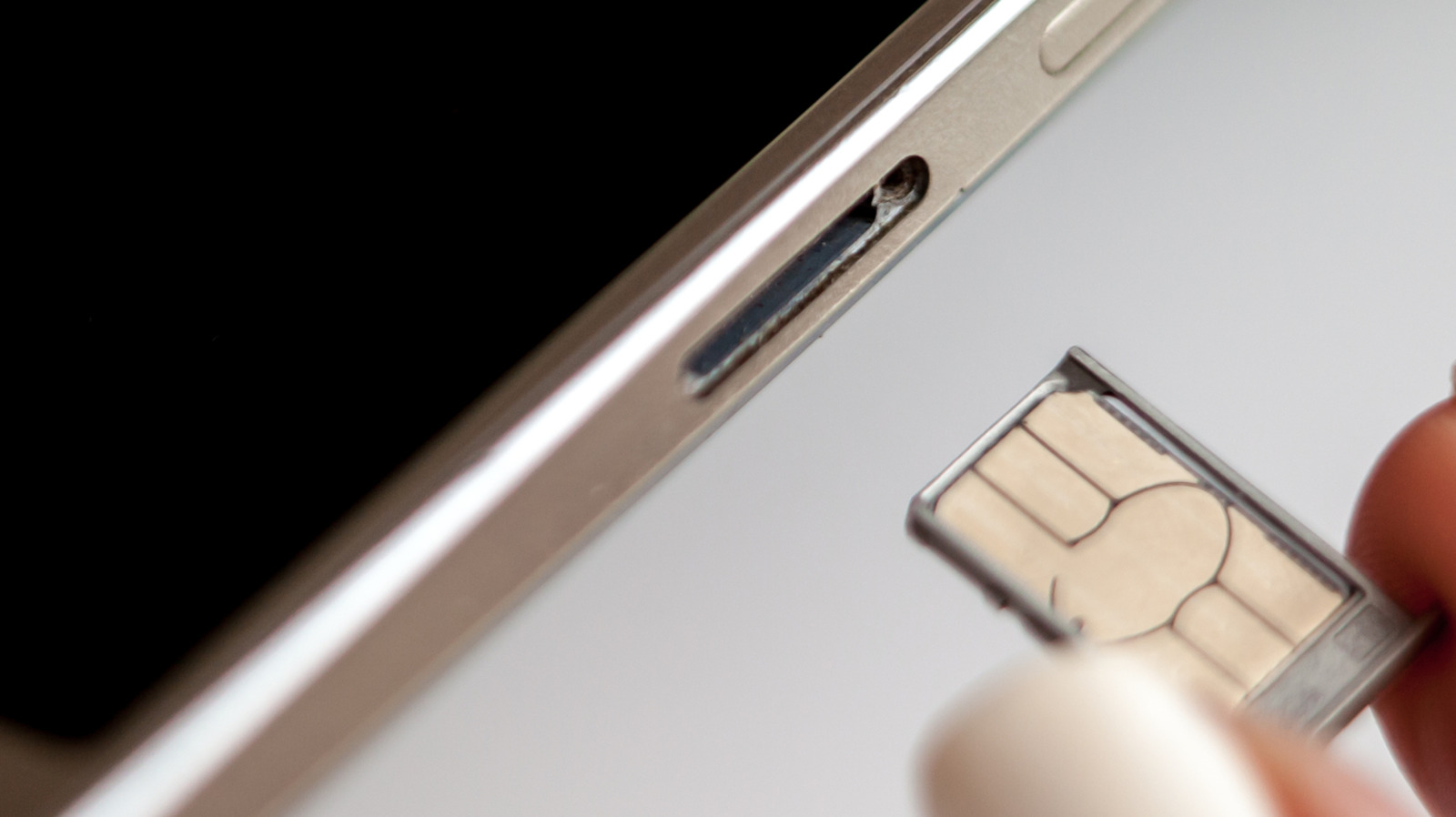
Pop the tray out, usually by gently pushing a paperclip or SIM ejector tool into the ejection pinhole on the phone.
Change the card, ensuring you use the correct card size.
Pop the tray back into place.
Enter your PIN or restart if the phone requests it.
If you have a dual-SIM phone that supports two physical cards, check which SIM you intend to swap before you begin.
While many argue eSIM is a superior technology because it requires no moving parts, others still appreciate the convenience and relative privacy true SIM cards provide. They make it easy to install and use over-the-counter pay-as-you-go SIM-based accounts, for example.
The small potential risks of SIM replacement
PeopleImages/Shutterstock
Most potential dangers of SIM replacement are physical. You might accidentally insert dirt, grime or moisture into the SIM tray, or force a larger card into a smaller slot incorrectly. You could also break the SIM tray so it no longer aligns correctly, or otherwise harm the card. A damaged SIM card or one incorrectly inserted may cause the phone to continue trying (and failing) to create a network connection, draining its battery and causing it to overheat.
Most people never encounter these problems, since slowing down and being careful does the trick. In most cases, your phone will take a moment to read the new SIM and find the network. Then it will be available for service, subject to account setup requirements.
The benefit of turning your phone off before swapping the SIM is minor. It forces your phone to look at the fresh information provided on the new card when it powers on again, helping register your device on its new network more quickly by reading the new carrier settings. This reduces the chance you’ll encounter a software-based “network error” message when you swap.
More to think about when swapping SIMs
Before the 2010s, SIM slots were usually located underneath a phone’s removable battery, which obviously required powering off the device to access. Over time, as removable batteries became less common, SIM trays were moved to the outside of phones. Early models using this setup would often show a network error if you swapped SIMs while the phone was on, but they quickly became hot-swappable and this was no longer a problem.
You don’t even need to switch your device off completely to make the phone refresh its carrier settings from the card. You’ll get a similar result if you turn on airplane mode, wait 30 seconds before swapping the SIM and turn airplane mode off again once the new SIM is inserted. This should prevent any carrier hiccups during the process.
A warning on SD cards
Unlike the iPhone, some Android devices still include a microSD card slot. In some cases, this is in the same tray as the SIM, though placement varies. If this is the case for you, as when ejecting an external drive, it’s important to unmount the microSD card before removing the SIM to prevent losing data. On Samsung devices: open the My Files app, find the SD Card, tap the three-dot menu next to it and choose Unmount. Search the Settings app or check online documentation if you’re not sure how this works for your device.
So while the benefits are slight, switching off your phone when replacing the SIM can prevent software-related glitches. If you don’t want to power down, use airplane mode instead. And in case you encounter a network error after swapping, always try restarting your device first.
Multiple states are working to legalize backyard solar setups.
After Utah, nine other states have legalized it, or are working on bills for plug-in solar.
24 other states are stalled but already working on legislation.
Plug-in solar systems are easy to set up and can save consumers money on their power bills, but they’re still illegal in many states. Utah was the first to legalize backyard and plug-in solar, but other states have since caught on, and more are working on their own pathway to legalization.
As we’ve covered before, these plug-in solar setups (also commonly called “backyard solar”) are plug-and-play systems consisting of one or more solar panels, an inverter, and a battery. The system connects to a home’s standard 120-volt outlet, automatically routing solar-generated electricity from the battery to the nearest running appliance.
What states have legalized plug-in solar?
Ten states have already legalized backyard and plug-in solar systems, so residents there can already purchase and install systems like the EcoFlow Stream in their homes. Here’s the current status of the states that have already successfully passed legislation, legalizing such devices for consumer use.
State
Legislation status
Utah
House bill 340: Effective May 2025
Virginia
House bill 395, Senate bill 250: Effective January 1, 2027
Colorado
House bill 26-1007: Effective August 12, 2026
Vermont
House bill 598, Senate bill 202: Effective July 1, 2026
New Hampshire
Senate bill 540: Effective January 1, 2027
Maine
Legislative document 1730: Effective July 29, 2026
What states are working to legalize plug-in solar?
About two dozen states are still in the process of legalizing plug-in solar. Some bills have stalled until the next legislative session reconvenes in 2027, while others are going through committee hearings.
Balcony solar bills H.5175 and S3143 are advancing in Massachusetts, and the SUNNY Act is pending governor approval in New York. Bills in other states like Michigan, Ohio, Pennsylvania, Rhode Island, South Carolina, and Washington, DC have reached committee hearings.
Most states have stalled plug-in solar bills until the next legislative session in 2027, including Alaska, Arizona, Delaware, Hawaii, Idaho, Illinois, Indiana, Iowa, Minnesota, Missouri, North Carolina, and Oklahoma.
Unfortunately, plug-in solar bills have failed in Georgia, New Mexico, Oregon, Washington, and Wyoming, so if you live in one of those states, these kinds of devices are technically illegal to operate. This doesn’t mean that it won’t eventually clear the legislative slate in these states, but lawmakers will need to file a new bill to reintroduce them after making necessary revisions.
Can I set up my solar panels if my state legalizes plug-in solar?
Whether you can immediately set up your balcony solar panels or not after the systems are legalized in your state will depend on your home situation.
Generally speaking, the bills in question focus on preventing utility companies from blocking plug-in solar projects. These bills can’t preempt bans on these systems by landlords or HOAs, though supplementary bills have been introduced in some states to include protections for HOAs and landlords.
Why is plug-in solar illegal?
Plug-in solar is illegal because the electrical systems in traditional American homes aren’t designed to receive power from a standard wall outlet. Rooftop solar systems are professionally installed and designed so the energy harvested by the panels flows through a circuit breaker and into your outlets. Plug-in solar, in turn, introduces electricity directly into an outlet, bypassing the electrical panel.
In a plug-in solar setup, nearby appliances draw energy supplied by the breaker and the solar inverter, but the wiring could carry more current than the breaker alone would allow before it trips. But it’s not solely about safety.
Installing your own solar panels means less reliance on local utilities. These companies are the biggest regulatory obstacle for plug-in or balcony solar setups. Their rules and regulations on solar energy are designed for rooftop panels, not plug-and-play systems, so legislation should push utility companies to change that.
There’s also the elephant in the room: utilities would make less money off their services if plug-in solar becomes widely popular. When consumers purchase less electricity, they contribute less to grid costs.
Maria Diaz is a staff writer with a passion for home automation, smart home devices, and tablets. With a background in graphic design, photography, and filmmaking, she has a bachelor’s in Mass Communication and experience in journalism and film.
See full bio
Verizon plans to charge customers $10 per month for the iPhone Handoff feature that Apple added in iOS 27. iPhone Handoff allows one phone number to be shared across two separate iPhones.
Verizon will support iPhone Handoff, giving customers the flexibility to use a single Verizon phone number seamlessly across two compatible iPhone models. Whether using the pocketable iPhone Duo on the go or iPhone 18 Pro for work, customers can switch active status between devices at any time while keeping full access to Verizon’s 5G network. iPhone Handoff will be available from Verizon for $10/month on compatible iPhones models running iOS 27.
With iPhone Handoff, users can switch between a main iPhone and a companion iPhone at will, though a phone number can only be active on one iPhone at a time. Verizon says support is “coming soon,” and Apple previously said Verizon would adopt the feature before the end of the year.
U.S. carrier T-Mobile already supports iPhone Handoff, but charges just $5 per month for the feature. AT&T, the third major U.S. carrier, recently suggested it has no imminent plans to support iPhone Handoff.
U.K. carrier EE also said this week that it will soon support iPhone Handoff. Customers who have EE’s Full Works Plus plan will get iPhone Handoff free, while other EE users can get it for £5 per month.
Deutsche Telekom in Germany is the only other carrier that’s added iPhone Handoff support so far. It costs €6.95 per month, but the carrier includes it for free in the MagentaMobil L and XL plans.
Apple has begun inviting selected members of the media to a product launch experience in Los Angeles on Wednesday, October 28, according to Bloomberg’s Mark Gurman.
In a post on X, Gurman described the gathering as an “all-day product launch experience” for touchscreen MacBooks, a new iPad mini, and Macs equipped with M6 chips.
Gurman previously reported that Apple would introduce the…
Apple has an unreleased iPad mini Smart Folio listed on its French regulatory website, hinting that a new iPad mini is coming. The case’s A3632 model number doesn’t match current or past iPad mini cases.
Apple appears to have added the case to its website recently, and it’s listed alongside iPhone 18 Pro accessories added in September.
The listing doesn’t include any iPad mini specs, but…
Apple’s $1,999 iPhone Duo asks buyers to pay more for a folding screen while accepting almost 40 compromises compared with the iPhone 18 Pro and iPhone 18 Pro Max, spanning camera capabilities, everyday usability, and ownership costs.
At equivalent storage capacities, the iPhone Duo costs $800 more than the iPhone 18 Pro and $700 more than the Pro Max. Its main attraction is a radically…
Among the major vendors that listed Discover-Tech as a “certified” or “verified” vendor were Google and the advertising industry association IAB Europe. The Israeli firm also used European General Data Protection Regulation (GDPR) consent frameworks to target users within the European Union. Discover-Tech has served ads through major networks such as Google, Yandex, and Beeswax.
Google and IAB Europe have since removed Discover-Tech from their ad vendor registries, and Google further terminated Discover-Tech’s access to its ad exchange platforms. Beeswax has removed Discover-Tech from its ad buying platform. Fellow ad platform Vungle (Liftoff) paused Discover-Tech’s access while conducting a review, and Eskimi blocked Discover-Tech’s accounts and domains.
Thursday’s report said that Discover-Tech ad impressions have appeared on government and national-security-linked networks throughout the world: NATO, United Nations networks, European lawmaking bodies, critical infrastructure providers in Australia, and armed forces and government agencies in Norway and Sweden.
“Discover-Tech’s mass abuse, privacy invasion, and facilitation for mercenary spyware attacks illustrates structural flaws with the online advertising system, which failed to detect or prevent the abuse documented in this report,” Citizen Lab said.
The research lab said that the mercenary malware installed through AdFection was developed and distributed by Candiru (rebranded as “Integrity Labs”). Under the arrangement with Discover-Tech, targets with specific profiles of interest to the Candiru customers received ads that carried JavaScript or other code that connected to Candiru’s control servers. In response, those servers delivered an exploit that served the zero-click payload when the ad appeared on an individual’s device.
The research doesn’t describe the vulnerabilities exploited in the zero-click attacks or the final malware that was installed in them. It’s likely they were zero-days that have been fixed after Citizen Lab discovered the campaign. Citizen Lab didn’t immediately respond to questions.
Messages sent to Discover-Tech and Candiru went unanswered.
Citizen Lab called on advertisers and government officials to take concrete action to proactively prevent campaigns like AdFection. Beyond that, the researchers said users can reduce the risk of being infected by installing ad blockers, resetting mobile advertising ID in iOS and Android settings (it’s unclear why the researchers didn’t advise turning off personalized ads altogether), and installing ad-blocking software on home or office networks. As always, installing updates in a timely manner is also a must.