The Rainbird Community Forum is now LIVE


We’ve opened a new space for people who are building, learning, and working with deterministic AI, and we’d like you to be part of it.

The Rainbird Community Forum is a space for people who are learning, building, and working with deterministic AI – developers, engineers, product and implementation roles, and anyone who wants to go deeper and learn by doing.

We know how valuable it is to have a place where you can ask real questions, explore ideas openly, and learn from people who are facing similar challenges. 

In the forum, you can:

  • Ask for help with technical and implementation challenges
  • Learn from peers and from the Rainbird team
  • Share feedback, ideas, and early experiments
  • Stay close to the product and the research work we’re exploring

For us, progress means learning together, exchanging ideas openly, and building with intention. This forum is part of our commitment to co-creation, transparency, and growing a thoughtful, technically curious community around deterministic AI.

If you’re building, learning, or you’re simply curious about where this space is going, we’d be glad to welcome you.

Click here to join the Rainbird Community Forum

How to Access Ministral 3 models with an API


Blog thumbnail - Ministral

How to Access Ministral 3 via API

TL;DR

Ministral 3 is a family of open-weight, reasoning-optimized models available in both 3B and 14B variants. The models support multimodal reasoning, native function and tool calling, and a huge 256K token context window, all released under an Apache 2.0 license.

You can run Ministral 3 directly on Clarifai using the Playground for interactive testing or integrate it into your applications through Clarifai’s OpenAI-compatible API.

This guide explains the Ministral 3 architecture, how to access it through Clarifai, and how to choose the right variant for your production workloads.

Introduction

Modern AI applications increasingly depend on models that can reason reliably, maintain long context, and integrate cleanly into existing tools and APIs. While closed-source models have historically led in these capabilities, open-source alternatives are rapidly closing the gap. 

Among globally available open models, Ministral 3 ranks alongside DeepSeek and the GPT OSS family at the top tier. Rather than targeting leaderboard performance on benchmarks, Ministral prioritises performances that matter in production, such as generating structured outputs, processing large documents, and executing function calls within live systems.

This makes Ministral 3 well-suited for the demands of real enterprise applications, as organisations are increasingly adopting open-weight models for their transparency, deployment flexibility, and ability to run across diverse infrastructure setups, from cloud platforms to on-premise systems.

Ministral 3 Architecture

Ministral 3 is a family of dense, edge-optimised multimodal models designed for efficient reasoning, long-context processing, and local or private deployment. The family currently includes 3B and 14B parameter models, each available in base, instruct, and reasoning variants.

Ministral 3 14B

The largest model in the Ministral family is a dense, reasoning-post-trained architecture optimised for math, coding, STEM, and other multi-step reasoning tasks. It combines a ~13.5B-parameter language model with a ~0.4B-parameter vision encoder, enabling native text and image understanding. The 14B reasoning variant achieves 85% accuracy on AIME ’25, delivering state-of-the-art performance within its weight class while remaining deployable on realistic hardware. It supports context windows of up to 256k tokens, making it suitable for long documents and complex reasoning workflows.

Ministral 3 3B

The 3B model is a compact, reasoning-post-trained variant designed for highly efficient deployment. It pairs a ~3.4B-parameter language model with a ~0.4B-parameter vision encoder (~4B total parameters), providing multimodal capabilities. Like the 14B model, it supports 256k-token context lengths, enabling long-context reasoning and document analysis on constrained hardware.

Key Technical Features

  • Multimodal Capabilities: All Ministral 3 models use a hybrid language-and-vision architecture, allowing them to process text and images simultaneously for tasks such as document understanding and visual reasoning.
  • Long-Context Reasoning: Reasoning variants support up to 256k tokens, enabling extended conversations, large document ingestion, and multi-step analytical workflows.
  • Efficient Inference: The models are optimised for edge and private deployments. The 14B model runs in BF16 on ~32 GB VRAM, while the 3B model runs in BF16 on ~16 GB VRAM, with quantised versions requiring significantly less memory.
  • Agentic Workflows: Ministral 3 is designed to work well with structured outputs, function calling, and tool-use, making it suitable for automation and agent-based systems.
  • License: All Ministral 3 variants are released under the Apache 2.0 license, enabling unrestricted commercial use, fine-tuning, and customisation.

Pretraining Benchmark Performance

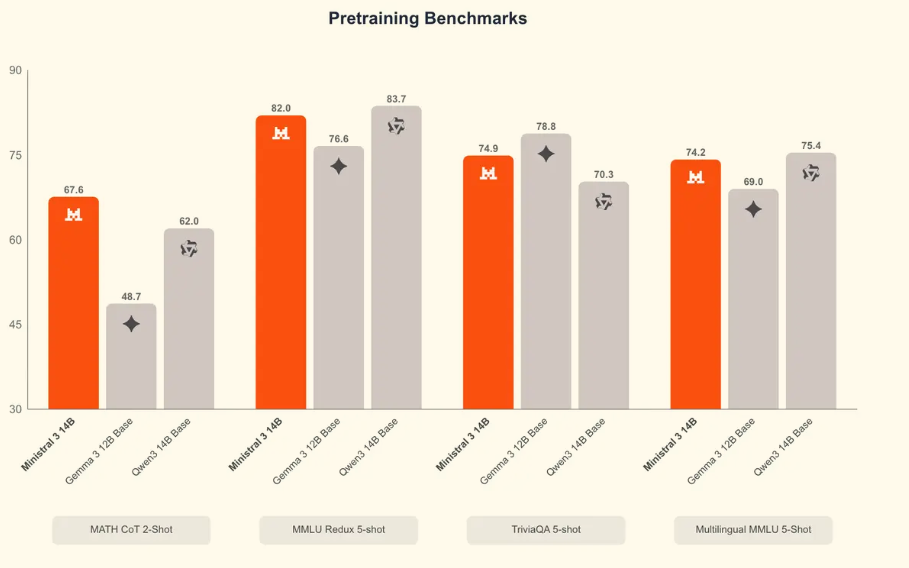
Ministral 3 14B demonstrates strong reasoning capabilities and multilingual performance compared to similarly sized open models, while maintaining competitive results on general knowledge tasks. It particularly excels in reasoning-heavy benchmarks and shows solid factual recall and multilingual understanding.


Benchmark

Ministral 3 14B

Gemma 3 12B Base

Qwen3 14B Base

Notes

MATH CoT

67.6

48.7

62.0

Strong lead on structured reasoning

MMLU Redux

82.0

76.6

83.7

Competitive general knowledge

TriviaQA

74.9

78.8

70.3

Solid factual recall

Multilingual MMLU

74.2

69.0

75.4

Strong multilingual performance


Accessing Ministral 3 via Clarifai

Prerequisites

Before runing  Ministral 3 with the Clarifai API, you’ll need to complete a few basic setup steps:

  1. Clarifai Account: Create a Clarifai account to access hosted AI models and APIs.
  2. Personal Access Token (PAT): All API requests require a Personal Access Token. You can generate or copy one from the Settings > Secrets section of your Clarifai dashboard.

For additional SDKs and setup guidance, refer to the Clarifai Quickstart documentation.

Using the API

The examples below use Ministral-3-14B-Reasoning-2512, the largest model in the Ministral 3 family. It is optimised for multi-step reasoning, mathematical problem solving, and long-context workloads, making it well-suited for long-document useecases and agentic applications. Here’s how to make your first API call to the model using different methods.

Python (OpenAI-Compatible)

Python (Clarifai SDK)

You can also use the Clarifai Python SDK for inference with more control over generation settings. Here’s how to make a prediction and generate streaming output using the SDK:

Node.js (Clarifai SDK)

Here’s how to perform inference with the Node.js SDK:

Playground

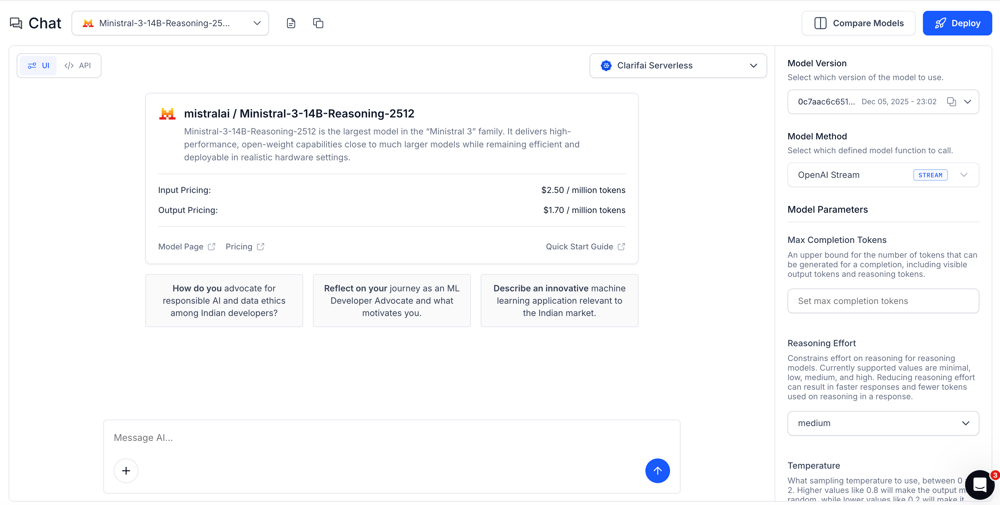
The Clarifai Playground lets you quickly experiment with prompts, structured outputs, reasoning workflows, and function calling without writing any code.

Visit the Playground and choose either:

  • Ministral-3-3B-Reasoning‑2512

Screenshot 2026-01-26 at 9.28.14 PM

  • Ministral-3-14B-Reasoning‑2512

Screenshot 2026-01-26 at 9.27.35 PM

Applications and Use Cases

Ministral 3 is designed for teams building intelligent systems that require strong reasoning, long-context understanding, and reliable structured outputs. It performs well across agentic, technical, multimodal, and business-critical workflows.

Agentic Application 

Ministral 3 is well suited for AI agents that need to plan, reason, and act across multiple steps. It can orchestrate tools and APIs using structured JSON outputs, which makes it reliable for automation pipelines where consistency matters. 

Long Context

Ministral 3 can analyze large documents using its extended 256K token context, making it effective for summarization, information extraction, and question answering over long technical texts. 

Multimodal Reasoning

Ministral 3 supports multimodal reasoning, allowing applications to combine text and visual inputs in a single workflow. This makes it useful for image-based queries, document understanding, or assistants that need to reason over mixed inputs.

Conclusion

Ministral 3 provides reasoning-optimized, open-weight models that are ready for production use. With a 256K token context window, multimodal inputs, native tool calling, and OpenAI-compatible API access through Clarifai, it offers a practical foundation for building advanced AI systems.

The 3B variant is ideal for low-latency, cost-sensitive deployments, while the 14B variant supports deeper analytical workflows. Combined with Apache 2.0 licensing, Ministral 3 gives teams flexibility, performance, and long-term control.

To get started, explore the models in the Clarifai Playground or integrate them directly into your applications using the API.


Use Cases, Benchmarks & Buying Tips


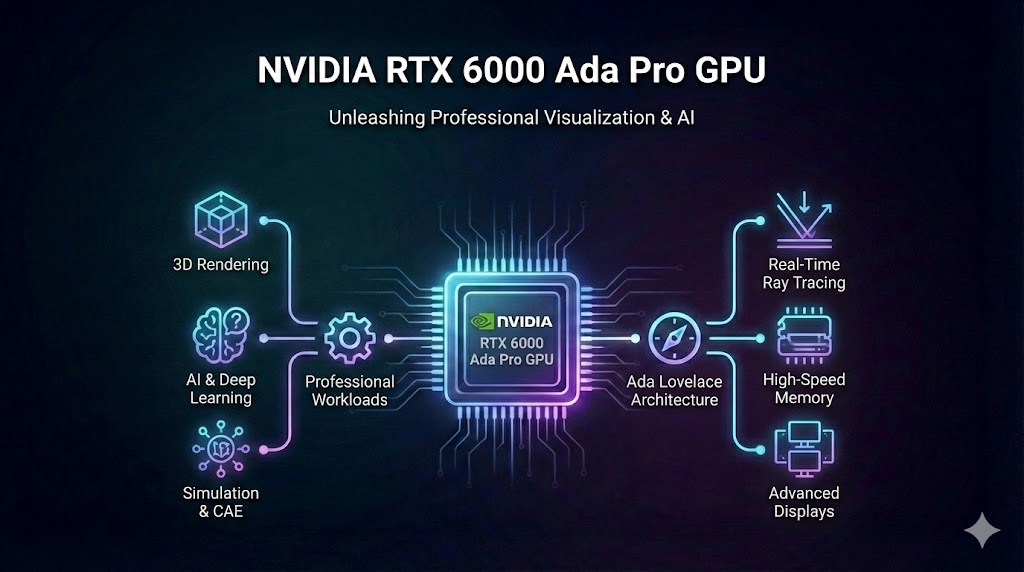
NVIDIA RTX 6000 Ada Pro GPU
In a world where generative AI, real‑time rendering, and edge computing are redefining industries, the choice of GPU can make or break a project’s success. NVIDIA’s RTX 6000 Ada Generation GPU stands at the intersection of cutting‑edge hardware and enterprise reliability. This guide explores how the RTX 6000 Ada unlocks possibilities across AI research, 3D design, content creation and edge deployment, while offering a decision framework for choosing the right GPU and leveraging Clarifai’s compute orchestration for maximum impact.

Quick Digest

  • What is the NVIDIA RTX 6000 Ada Pro GPU? The flagship professional GPU built on the Ada Lovelace architecture delivers 91.1 TFLOPS FP32, 210.6 TFLOPS of ray‑tracing throughput and 48 GB of ECC GDDR6 memory, combining third‑generation RT Cores and fourth‑generation Tensor Cores.
  • Why does it matter? Benchmarks show up to twice the performance of its predecessor (RTX A6000) across rendering, AI training and content creation.
  • Who should care? AI researchers, 3D artists, video editors, edge‑computing engineers and decision‑makers selecting GPUs for enterprise workloads.
  • How can Clarifai help? Clarifai’s compute orchestration platform manages training and inference across diverse hardware, enabling efficient use of the RTX 6000 Ada through GPU fractioning, autoscaling and local runners.

Understanding the NVIDIA RTX 6000 Ada Pro GPU

The NVIDIA RTX 6000 Ada Generation GPU is the professional variant of the Ada Lovelace architecture, designed to handle the demanding requirements of AI and graphics professionals. With 18,176 CUDA cores, 568 fourth‑generation Tensor Cores, and 142 third‑generation RT Cores, the card delivers 91.1 TFLOPS of single‑precision (FP32) compute and an impressive 1,457 TOPS of AI performance. Each core generation introduces new capabilities: the RT cores provide 2× faster ray–triangle intersection, while the opacity micromap engine accelerates alpha testing by 2× and the displaced micro‑mesh unit allows a 10× faster bounding volume hierarchy (BVH) build with significantly reduced memory overhead.

Beyond raw compute, the card features 48 GB of ECC GDDR6 memory with 960 GB/s bandwidth. This memory pool, paired with enterprise drivers, ensures reliability for mission‑critical workloads. The GPU supports dual AV1 hardware encoders and virtualization via NVIDIA vGPU profiles, enabling multiple virtual workstations on a single card. Despite its prowess, the RTX 6000 Ada operates at a modest 300 W TDP, offering improved power efficiency over previous generations.

Expert Insights

  • Memory and stability matter: Engineers emphasize that the ECC GDDR6 memory safeguards against memory errors during long training runs or rendering jobs.
  • Micro‑mesh & opacity micromaps: Research engineers note that micro‑mesh technology allows geometry to be represented with less storage, freeing VRAM for textures and AI models.
  • No NVLink, no problem? Reviewers observe that while the removal of NVLink eliminates direct VRAM pooling across GPUs, the improved power efficiency allows up to three cards per workstation without thermal issues. Multi‑GPU workloads now rely on data parallelism rather than memory pooling.

Performance Comparisons & Generational Evolution

Choosing the right GPU involves understanding how generations improve. The RTX 6000 Ada sits between the previous RTX A6000 and the upcoming Blackwell generation.

Comparative Specs

GPU

CUDA Cores

Tensor Cores

Memory

FP32 Compute

Power

RTX 6000 Ada

18,176

568 (4th‑gen)

48 GB GDDR6 (ECC)

91.1 TFLOPS

300 W

RTX A6000

10,752

336

48 GB GDDR6

39.7 TFLOPS

300 W

Quadro RTX 6000

4,608

576 (tensor)

24 GB GDDR6

16.3 TFLOPS

295 W

RTX PRO 6000 Blackwell (expected)

~20,480*

next‑gen

96 GB GDDR7

~126 TFLOPS FP32

TBA

Blackwell Ultra

dual‑die

next‑gen

288 GB HBM3e

15 PFLOPS FP4

HPC target

*Projected cores based on generational scaling; actual numbers may vary.

Benchmarks

Benchmarking firms have shown that the RTX 6000 Ada provides a step‑change in performance. In ray‑traced rendering engines:

  • OctaneRender: The RTX 6000 Ada is about 83 % faster than the RTX A6000 and nearly 3× faster than the older Quadro RTX 6000. Dual cards almost double throughput.
  • V‑Ray: The card delivers over twice the performance of the A6000 and ~4× the Quadro.
  • Redshift: Rendering times drop from 242 seconds (Quadro) and 159 seconds (A6000) to 87 seconds on a single RTX 6000 Ada; two cards cut this further to 45 seconds.

For video editing, the Ada GPU shines:

  • DaVinci Resolve: Expect ~45 % faster performance in compute‑heavy effects compared with the A6000.
  • Premiere Pro: GPU‑accelerated effects see up to 50 % faster processing over the A6000, and 80 % faster than competitor pro GPUs.

These improvements stem from the increased core counts, higher clock speeds, and architecture optimizations. However, the removal of NVLink means tasks needing more than 48 GB VRAM must adopt distributed workflows. The upcoming Blackwell generation promises even more compute with 96 GB memory and higher FP32 throughput, but release timelines may place it a year away.

Expert Insights

  • Power & cooling: Experts note that the RTX 6000 Ada’s improved efficiency enables up to three cards in a single workstation, offering scaling with manageable heat dissipation.
  • Generational planning: System architects recommend evaluating whether to invest in Ada now for immediate productivity or wait for Blackwell if memory and compute budgets require future proofing.
  • NVLink trade‑offs: Without NVLink, large scenes require either scene partitioning or out‑of‑core rendering; some enterprises pair the Ada with specialized networks to mitigate this.

Generative AI & Large‑Scale Model Training

Generative AI’s hunger for compute and memory makes GPU selection crucial. The RTX 6000 Ada’s 48 GB memory and robust tensor throughput enable training of large models and fast inference.

Meeting VRAM Demands

Generative AI models—especially foundation models—demand significant VRAM. Analysts note that tasks like fine‑tuning Stable Diffusion XL or 7‑billion‑parameter transformers require 24 GB to 48 GB of memory to avoid performance bottlenecks. Consumer GPUs with 24 GB VRAM may suffice for smaller models, but enterprise projects or experimentation with multiple models benefit from 48 GB or more. The RTX 6000 Ada strikes a balance by offering a single‑card solution with enough memory for most generative workloads while maintaining compatibility with workstation chassis and power budgets.

Real‑World Examples

  • Speed Read AI: This startup uses dual RTX 6000 Ada GPUs in Dell Precision 5860 towers to accelerate script analysis. With the cards’ large memory, they reduced script evaluation time from eight hours to five minutes, enabling developers to test ideas that were previously impractical.
  • Multi‑Modal Transformer Research: A university project running on an HP Z4 G5 with two RTX 6000 Ada cards achieved 4× faster training compared with single‑GPU setups and could train 7‑billion‑parameter models, shortening iteration cycles from weeks to days.

These cases illustrate how memory and compute scale with model size and emphasize the benefits of multi‑GPU configurations—even without NVLink. Adopting distributed data parallelism across cards allows researchers to handle massive datasets and large parameter counts.

Expert Insights

  • VRAM drives creativity: AI researchers observe that high memory capacity invites experimentation with parameter‑efficient tuning, LORA adapters, and prompt engineering.
  • Iteration speed: Reducing training time from days to hours changes the research cadence. Continuous iteration fosters breakthroughs in model design and dataset curation.
  • Clarifai integration: Leveraging Clarifai’s orchestration platform, researchers can schedule experiments across on‑prem RTX 6000 Ada servers and cloud instances, using GPU fractioning to allocate memory efficiently and local runners to keep data within secure environments.

3D Modeling, Rendering & Visualization

The RTX 6000 Ada is also a powerhouse for designers and visualization experts. Its combination of RT and Tensor cores delivers real‑time performance for complex scenes, while virtualization and remote rendering open new workflows.

Real‑Time Ray‑Tracing & AI Denoising

The card’s third‑gen RT cores accelerate ray–triangle intersection and handle procedural geometry with features like displaced micro‑mesh. This results in real‑time ray‑traced renders for architectural visualization, VFX and product design. The fourth‑gen Tensor cores accelerate AI denoising and super‑resolution, further improving image quality. According to remote‑rendering providers, the RTX 6000 Ada’s 142 RT cores and 568 Tensor cores enable photorealistic rendering with large textures and complex lighting. Additionally, the micro‑mesh engine reduces memory usage by storing micro‑geometry in compact form.

Remote Rendering & Virtualization

Remote rendering allows artists to work on lightweight devices while heavy scenes render on server‑grade GPUs. The RTX 6000 Ada supports virtual GPU (vGPU) profiles, letting multiple virtual workstations share a single card. Dual AV1 encoders enable streaming of high‑quality video outputs to multiple clients. This is particularly useful for design studios and broadcast companies implementing hybrid or fully remote workflows. While the lack of NVLink prevents memory pooling, virtualization can allocate discrete memory per user, and GPU fractioning (available through Clarifai) can subdivide VRAM for microservices.

Expert Insights

  • Hybrid pipelines: 3D artists highlight the flexibility of sending heavy final‑render tasks to remote servers while iterating locally at interactive frame rates.
  • Memory‑aware design: The micro‑mesh approach encourages designers to create more detailed assets without exceeding VRAM limits.
  • Integration with digital twins: Many industries adopt digital twins for predictive maintenance and simulation; the RTX 6000 Ada’s ray‑tracing and AI capabilities accelerate these pipelines, and Clarifai’s orchestration can manage inference across digital twin components.

Video Editing, Broadcasting & Content Creation

Video editors, broadcasters and digital content creators benefit from the RTX 6000 Ada’s compute capabilities and encoding features.

Accelerated Editing & Effects

The card’s high FP32 and Tensor throughput enhances editing timelines and accelerates effects such as noise reduction, color correction and complex transitions. Benchmarks show ~45 % faster DaVinci Resolve performance over the RTX A6000, enabling smoother scrubbing and real‑time playback of multiple 8K streams. In Adobe Premiere Pro, GPU‑accelerated effects execute up to 50 % faster; this includes warp stabilizer, lumetri color and AI‑powered auto‑reframing. These gains reduce export times and free up creative teams to focus on storytelling rather than waiting.

Live Streaming & Broadcasting

Dual AV1 hardware encoders allow the RTX 6000 Ada to stream multiple high‑quality feeds simultaneously, enabling 4K/8K HDR live broadcasts with lower bandwidth consumption. Virtualization means editing and streaming tasks can coexist on the same card or be partitioned across vGPU instances. For studios running 120+ hour editing sessions or live shows, ECC memory ensures stability and prevents corrupted frames, while professional drivers minimize unexpected crashes.

Expert Insights

  • Real‑world reliability: Broadcasters emphasize that ECC memory and enterprise drivers allow continuous operation during live events; small errors that crash consumer cards are corrected automatically.
  • Multi‑platform streaming: Technical directors highlight how AV1 reduces bitrates by about 30 % compared with older codecs, allowing simultaneous streaming to multiple platforms without quality loss.
  • Clarifai synergy: Content creators can integrate Clarifai’s video models (e.g., scene detection, object tracking) into post‑production pipelines. Orchestration can run inference tasks on the RTX 6000 Ada in parallel with editing tasks, thanks to GPU fractioning.

Edge Computing, Virtualization & Remote Workflows

As industries adopt AI at the edge, the RTX 6000 Ada plays a key role in powering intelligent devices and remote work.

Industrial & Medical Edge AI

NVIDIA’s IGX platform brings the RTX 6000 Ada to harsh environments like factories and hospitals. The IGX‑SW 1.0 stack pairs the GPU with safety-certified frameworks (Holoscan, Metropolis, Isaac) and increases AI throughput to 1,705 TOPS—a seven‑fold boost over integrated solutions. This performance supports real‑time inference for robotics, medical imaging, patient monitoring and safety systems. Long‑term software support and hardware ruggedization ensure reliability.

Remote & Maritime Workflows

Edge computing also extends to remote industries. In a maritime vision project, researchers deployed HP Z2 Mini workstations with RTX 6000 Ada GPUs to perform real‑time computer‑vision analysis on ships, enabling autonomous navigation and safety monitoring. The GPU’s power efficiency suits limited power budgets onboard vessels. Similarly, remote energy installations or construction sites benefit from on‑site AI that reduces reliance on cloud connectivity.

Virtualization & Workforce Mobility

Virtualization allows multiple users to share a single RTX 6000 Ada via vGPU profiles. For example, a consulting firm uses mobile workstations running remote workstations on datacenter GPUs, giving clients hands‑on access to AI demos without shipping bulky hardware. GPU fractioning can subdivide VRAM among microservices, enabling concurrent inference tasks—particularly when managed through Clarifai’s platform.

Expert Insights

  • Latency & privacy: Edge AI researchers note that local inference on GPUs reduces latency compared with cloud, which is crucial for safety‑critical applications.
  • Long‑term support: Industrial customers stress the importance of stable software stacks and extended support windows; the IGX platform offers both.
  • Clarifai’s local runners: Developers can deploy models via AI Runners, keeping data on‑prem while still orchestrating training and inference through Clarifai’s APIs.

Decision Framework: Selecting the Right GPU

With many GPUs on the market, selecting the right one requires balancing memory, compute, cost and power. Here’s a structured approach for decision makers:

  1. Define workload and model size. Determine whether tasks involve training large language models, complex 3D scenes or video editing. High parameter counts or large textures demand more VRAM (48 GB or higher).
  2. Assess compute needs. Consider whether your workload is FP32/FP16 bound (numerical compute) or AI inference bound (Tensor core utilization). For generative AI and deep learning, prioritize Tensor throughput; for rendering, RT core count matters.
  3. Evaluate power and cooling constraints. Ensure the workstation or server can supply the required power (300 W per card) and cooling capacity; the RTX 6000 Ada allows multiple cards per system thanks to blower cooling.
  4. Compare cost and future proofing. While the RTX 6000 Ada provides excellent performance today, upcoming Blackwell GPUs may offer more memory and compute; weigh whether the current project needs justify immediate investment.
  5. Consider virtualization and licensing. If multiple users need GPU access, ensure the system supports vGPU licensing and virtualization.
  6. Plan for scale. For workloads exceeding 48 GB VRAM, plan for data‑parallel or model‑parallel strategies, or consider multi‑GPU clusters managed via compute orchestration platforms.

Decision Table

Scenario

Recommended GPU

Rationale

Fine‑tuning foundation models up to 7 B parameters

RTX 6000 Ada

48 GB VRAM supports large models; high tensor throughput accelerates training.

Training >10 B models or extreme HPC workloads

Upcoming Blackwell PRO 6000 / Blackwell Ultra

96–288 GB memory and up to 15 PFLOPS compute future‑proof large‑scale AI.

High‑end 3D rendering and VR design

RTX 6000 Ada (single or dual)

High RT/Tensor throughput; micro‑mesh reduces VRAM usage; virtualization available.

Budget‑constrained AI research

RTX A6000 (legacy)

Adequate performance for many tasks; lower cost; but ~2× slower than Ada.

Consumer or hobbyist deep learning

RTX 4090

24 GB GDDR6X memory and high FP32 throughput; cost‑effective but lacks ECC and professional support.

Expert Insights

  • Total cost of ownership: IT managers recommend factoring in energy costs, maintenance and driver support. Professional GPUs like the RTX 6000 Ada include extended warranties and stable driver branches.
  • Scale via orchestration: For large workloads, experts advocate using orchestration platforms (like Clarifai) to manage clusters and schedule jobs across on‑prem and cloud resources.

Integrating Clarifai Solutions for AI Workloads

Clarifai is a leader in low‑code AI platform solutions. By integrating the RTX 6000 Ada with Clarifai’s compute orchestration and AI Runners, organizations can maximize GPU utilization while simplifying development.

Compute Orchestration & Low‑Code Pipelines

Clarifai’s orchestration platform manages model training, fine‑tuning and inference across heterogeneous hardware—GPUs, CPUs, edge devices and cloud providers. It offers a low‑code pipeline builder that allows developers to assemble data processing and model‑evaluation steps visually. Key features include:

  • GPU fractioning: Allocates fractional GPU resources (e.g., half of the RTX 6000 Ada’s VRAM and compute) to multiple concurrent jobs, maximizing utilization and reducing idle time.
  • Batching & autoscaling: Automatically groups small inference requests into larger batches and scales workloads horizontally across nodes; this ensures cost efficiency and consistent latency.
  • Spot instance support & cost control: Clarifai orchestrates tasks on lower‑cost cloud instances when appropriate, balancing performance and budget.

These features are particularly valuable when working with expensive GPUs like the RTX 6000 Ada. By scheduling training and inference jobs intelligently, Clarifai ensures that organizations only pay for the compute they need.

AI Runners & Local Runners

The AI Runners feature lets developers connect models running on local workstations or private servers to the Clarifai platform via a public API. This means data can remain on‑prem for privacy or compliance while still benefiting from Clarifai’s infrastructure and features like autoscaling and GPU fractioning. Developers can deploy local runners on machines equipped with RTX 6000 Ada GPUs, maintaining low latency and data sovereignty. When combined with Clarifai’s orchestration, AI Runners provide a hybrid deployment model: the heavy training might occur on on‑prem GPUs while inference runs on auto‑scaled cloud instances.

Real‑World Applications

  • Generative vision models: Use Clarifai to orchestrate fine‑tuning of generative models on on‑prem RTX 6000 Ada servers while hosting the final model on cloud GPUs for global accessibility.
  • Edge AI pipeline: Deploy computer‑vision models via AI Runners on IGX‑based devices in industrial settings; orchestrate periodic re‑training in the cloud to improve accuracy.
  • Multi‑tenant services: Offer AI services to clients by fractioning a single GPU into isolated workloads and billing usage per inference call. Clarifai’s built‑in cost management helps track and optimize expenses.

Expert Insights

  • Flexibility & control: Clarifai engineers highlight that GPU fractioning reduces cost per job by up to 70 % compared with dedicated GPU allocations.
  • Secure deployment: AI Runners enable compliance‑sensitive industries to adopt AI without sending proprietary data to the cloud.
  • Developer productivity: Low‑code pipelines allow subject‑matter experts to build AI workflows without needing deep DevOps knowledge.

Emerging Trends & Future‑Proofing

The AI and GPU landscape evolves quickly. Organizations should stay ahead by monitoring emerging trends:

Next‑Generation Hardware

The upcoming Blackwell GPU generation is expected to double memory and significantly increase compute throughput, with the PRO 6000 offering 96 GB GDDR7 and the Blackwell Ultra targeting HPC with 288 GB HBM3e and 15 PFLOPS FP4 compute. Planning a modular infrastructure allows easy integration of these GPUs when they become available, while still leveraging the RTX 6000 Ada today.

Multi‑Modal & Agentic AI

Multi‑modal models that integrate text, images, audio and video are becoming mainstream. Training such models requires significant VRAM and data pipelines. Likewise, agentic AI—systems that plan, reason and act autonomously—will demand sustained compute and robust orchestration. Platforms like Clarifai can abstract hardware management and ensure compute is available when needed.

Sustainable & Ethical AI

Sustainability is a growing focus. Researchers are exploring low‑precision formats, dynamic voltage/frequency scaling, and AI‑powered cooling to reduce energy consumption. Offloading tasks to the edge via efficient GPUs like the RTX 6000 Ada reduces data center loads. Ethical AI considerations, including fairness and transparency, increasingly influence purchasing decisions.

Synthetic Data & Federated Learning

The shortage of high‑quality data drives adoption of synthetic data generation, often running on GPUs, to augment training sets. Federated learning—training models across distributed devices without sharing raw data—requires orchestration across edge GPUs. These trends highlight the importance of flexible orchestration and local compute (e.g., via AI Runners).

Expert Insights

  • Invest in orchestration: Experts predict that the complexity of AI workflows will necessitate robust orchestration to manage data movement, compute scheduling and cost optimization.
  • Stay modular: Avoid hardware lock‑in by adopting standards‑based interfaces and virtualization; this ensures you can integrate Blackwell or other GPUs when they launch.
  • Look beyond hardware: Success will hinge on combining powerful GPUs like the RTX 6000 Ada with scalable platforms—Clarifai among them—that simplify AI development and deployment.

Frequently Asked Questions (FAQs)

Q1: Is the RTX 6000 Ada worth it over a consumer RTX 4090?
A: If you need 48 GB of ECC memory, professional driver stability and virtualization features, the RTX 6000 Ada justifies its premium. A 4090 offers strong compute for single‑user tasks but lacks ECC and may not support enterprise virtualization.

Q2: Can I pool VRAM across multiple RTX 6000 Ada cards?
A: Unlike previous generations, the RTX 6000 Ada does not support NVLink, so VRAM cannot be pooled. Multi‑GPU setups rely on data parallelism rather than unified memory.

Q3: How can I maximize GPU utilization?
A: Platforms like Clarifai allow GPU fractioning, batching and autoscaling. These features let you run multiple jobs on a single card and automatically scale up or down based on demand.

Q4: What are the power requirements?
A: Each RTX 6000 Ada draws up to 300 W; ensure your workstation has adequate power and cooling. Blower‑style cooling allows stacking multiple cards in one system.

Q5: Are the upcoming Blackwell GPUs compatible with my current setup?
A: Detailed specifications are pending, but Blackwell cards will likely require PCIe Gen5 slots and may have higher power consumption. Modular infrastructure and standards‑based orchestration platforms (like Clarifai) help future‑proof your investment.


Conclusion

The NVIDIA RTX 6000 Ada Generation GPU represents a pivotal step forward for professionals in AI research, 3D design, video production and edge computing. Its high compute throughput, large ECC memory and advanced ray‑tracing capabilities empower teams to tackle workloads that were once confined to high‑end data centers. However, hardware is only part of the equation. Integrating the RTX 6000 Ada with Clarifai’s compute orchestration unlocks new levels of efficiency and flexibility—allowing organizations to leverage on‑prem and cloud resources, manage costs, and future‑proof their AI infrastructure. As the AI landscape evolves toward multi‑modal models, agentic systems and sustainable computing, a combination of powerful GPUs and intelligent orchestration platforms will define the next era of innovation.


Use Cases, Architecture & Buying Tips


Introduction – What Makes Nvidia GH200 the Star of 2026?

Quick Summary: What is the Nvidia GH200 and why does it matter in 2026? – The Nvidia GH200 is a hybrid superchip that merges a 72‑core Arm CPU (Grace) with a Hopper/H200 GPU using NVLink‑C2C. This integration creates up to 624 GB of unified memory accessible to both CPU and GPU, enabling memory‑bound AI workloads like long‑context LLMs, retrieval‑augmented generation (RAG) and exascale simulations. In 2026, as models grow larger and more complex, the GH200’s memory‑centric design delivers performance and cost efficiency not achievable with traditional GPU cards. Clarifai offers enterprise‑grade GH200 hosting with smart autoscaling and cross‑cloud orchestration, making this technology accessible for developers and businesses.

Artificial intelligence is evolving at breakneck speed. Model sizes are increasing from millions to trillions of parameters, and generative applications such as retrieval‑augmented chatbots and video synthesis require huge key–value caches and embeddings. Traditional GPUs like the A100 or H100 provide high compute throughput but can become bottlenecked by memory capacity and data movement. Enter the Nvidia GH200, often nicknamed the Grace Hopper superchip. Instead of connecting a CPU and GPU via a slow PCIe bus, the GH200 fuses them on the same package and links them through NVLink‑C2C—a high‑bandwidth, low‑latency interconnect that delivers 900 GB/s of bidirectional bandwidth. This architecture allows the GPU to access the CPU’s memory directly, resulting in a unified memory pool of up to 624 GB (when combining the 96 GB or 144 GB HBM on the GPU with 480 GB LPDDR5X on the CPU).

This guide offers a detailed look at the GH200: its architecture, performance, ideal use cases, deployment models, comparison to other GPUs (H100, H200, B200), and practical guidance on when and how to choose it. Along the way we will highlight Clarifai’s compute solutions that leverage GH200 and provide best practices for deploying memory‑intensive AI workloads.

Quick Digest: How This Guide Is Structured

  • Understanding the GH200 Architecture – We examine how the hybrid CPU–GPU design and unified memory system work, and why HBM3e matters.
  • Benchmarks & Cost Efficiency – See how GH200 performs in inference and training compared with H100/H200, and the effect on cost per token.
  • Use Cases & Workload Fit – Learn which AI and HPC workloads benefit from the superchip, including RAG, LLMs, graph neural networks and exascale simulations.
  • Deployment Models & Ecosystem – Explore on‑premises DGX systems, hyperscale cloud instances, specialist GPU clouds, and Clarifai’s orchestration features.
  • Decision Framework – Understand when to choose GH200 vs H100/H200 vs B200/Rubin based on memory, bandwidth, software and budget.
  • Challenges & Future Trends – Consider limitations (ARM software, power, latency) and look ahead to HBM3e, Blackwell, Rubin and new supercomputers.

Let’s dive in.


GH200 Architecture and Memory Innovations

Quick Summary: How does the GH200’s architecture differ from traditional GPUs? – Unlike standalone GPU cards, the GH200 integrates a 72‑core Grace CPU and a Hopper/H200 GPU on a single module. The two chips communicate via NVLink‑C2C delivering 900 GB/s bandwidth. The GPU includes 96 GB HBM3 or 144 GB HBM3e, while the CPU provides 480 GB LPDDR5X. NVLink‑C2C allows the GPU to directly access CPU memory, creating a unified memory pool of up to 624 GB. This eliminates costly data transfers and is key to the GH200’s memory‑centric design.

Hybrid CPU–GPU Fusion

At its core, the GH200 combines a Grace CPU and a Hopper GPU. The CPU features 72 Arm Neoverse V2 cores (or 72 Grace cores), delivering high memory bandwidth and energy efficiency. The GPU is based on the Hopper architecture (used in the H100) but may be upgraded to the H200 in newer revisions, adding faster HBM3e memory. NVLink‑C2C is the secret sauce: a cache‑coherent interface enabling both chips to share memory coherently at 900 GB/s – roughly 7× faster than PCIe Gen5. This design makes the GH200 effectively a giant APU or system‑on‑chip tailored for AI.

Unified Memory Pool

Traditional GPU servers rely on discrete memory pools: CPU DRAM and GPU HBM. Data must be copied across the PCIe bus, incurring latency and overhead. The GH200’s unified memory eliminates this barrier. The Grace CPU brings 480 GB of LPDDR5X memory with bandwidth of 546 GB/s, while the Hopper GPU includes 96 GB HBM3 delivering 4 000 GB/s bandwidth. The upcoming HBM3e variant increases memory capacity to 141–144 GB and boosts bandwidth by over 25 %. Combined with NVLink‑C2C, this provides a shared memory pool of up to 624 GB, enabling the GPU to cache massive datasets and key–value caches for LLMs without repeatedly fetching from CPU memory. NVLink is also scalable: NVL2 pairs two superchips to create a node with 288 GB HBM and 10 TB/s bandwidth, and the NVLink switch system can connect 256 superchips to act as one giant GPU with 1 exaflop performance and 144 TB unified memory.

HBM3e and Rubin Platform

The GH200 started with HBM3 but is already evolving. The HBM3e revision adds 144 GB of HBM for the GPU, raising effective memory capacity by around 50 % and increasing bandwidth from 4 000 GB/s to about 4.9 TB/s. This upgrade helps large models store more key–value pairs and embeddings entirely in on‑chip memory. Looking ahead, Nvidia’s Rubin platform (announced 2025) will introduce a new CPU with 88 Olympus cores, 1.8 TB/s NVLink‑C2C bandwidth and 1.5 TB LPDDR5X memory, doubling memory capacity over Grace. Rubin will also support NVLink 6 and NVL72 rack systems that reduce inference token cost by 10× and training GPU count by compared with Blackwell—a sign that memory‑centric design will continue to evolve.

Expert Insights

  • Unified memory is a paradigm shift – By exposing GPU memory as a CPU NUMA node, NVLink‑C2C eliminates the need for explicit data copying and allows CPU code to access HBM directly. This simplifies programming and accelerates memory‑bound tasks.
  • HBM3e vs HBM3 – The 50 % increase in capacity and 25 % increase in bandwidth of HBM3e significantly extends the size of models that can be served on a single chip, pushing the GH200 into territory previously reserved for multi‑GPU clusters.
  • Scalability via NVLink switch – Connecting hundreds of superchips via NVLink switch results in a single logical GPU with terabytes of shared memory—crucial for exascale systems like Helios and JUPITER.
  • Grace vs Rubin – While Grace offers 72 cores and 480 GB memory, Rubin will deliver 88 cores and up to 1.5 TB memory with NVLink 6, hinting that future AI workloads may require even more memory and bandwidth.

Performance Benchmarks & Cost Efficiency

Quick Summary: How does GH200 perform relative to H100/H200, and what does this mean for cost? – Benchmarks reveal that the GH200 delivers 1.4×–1.8× higher MLPerf inference performance per accelerator than the H100. In practical tests on Llama 3 models, GH200 achieved 7.6× higher throughput and reduced cost per token by 8× compared with H100. Clarifai reports a 17 % performance gain over H100 in their MLPerf results. These gains stem from unified memory and NVLink‑C2C, which reduce latency and enable larger batches.

MLPerf and Vendor Benchmarks

In Nvidia’s MLPerf Inference v4.1 results, the GH200 delivered up to 1.4× more performance per accelerator than the H100 on generative AI tasks. When configured in NVL2, two superchips achieved 3.5× more memory and 3× more bandwidth than a single H100, translating into better scaling for large models. Clarifai’s internal benchmarking confirmed a 17 % throughput improvement over H100 for MLPerf tasks.

Real‑World Inference (LLM and RAG)

In a widely shared blog post, Lambda AI compared GH200 to H100 for single‑node Llama 3.1 70B inference. GH200 delivered 7.6× higher throughput and 8× lower cost per token than H100, thanks to the ability to offload key–value caches to CPU memory. Baseten ran similar experiments with Llama 3.3 70B and found that GH200 outperformed H100 by 32 % because the memory pool allowed larger batch sizes. Nvidia’s technical blog on RAG applications showed that GH200 provides 2.7×–5.7× speedups compared with A100 across embedding generation, index build, vector search and LLM inference.

Cost‑Per‑Hour & Cloud Pricing

Cost is a critical factor. An analysis of GPU rental markets found that GH200 instances cost $4–$6 per hour on hyperscalers, slightly more than H100 but with improved performance, whereas specialist GPU clouds sometimes offer GH200 at competitive rates. Decentralised marketplaces may allow cheaper access but often limit features. Clarifai’s compute platform uses smart autoscaling and GPU fractioning to optimise resource utilisation, reducing cost per token further.

Memory‑Bound vs Compute‑Bound Workloads

While GH200 shines for memory‑bound tasks, it does not always beat H100 for compute‑bound kernels. Some compute‑intensive kernels saturate the GPU’s compute units and aren’t limited by memory bandwidth, so the performance advantage shrinks. Fluence’s guide notes that GH200 is not the right choice for simple single‑GPU training or compute‑only tasks. In such cases, H100 or H200 might deliver similar or better performance at lower cost.

Expert Insights

  • Cost per token matters – Inference cost isn’t just about GPU price; it’s about throughput. GH200’s ability to use larger batches and store key–value caches on CPU memory drastically cuts cost per token.
  • Batch size is the key – Larger unified memory allows bigger batches and reduces the overhead of reloading contexts, leading to massive throughput gains.
  • Balance compute and memory – For compute‑heavy tasks like CNN training or matrix multiplications, H100 or H200 may suffice. GH200 is targeted at memory‑bound workloads, so choose accordingly.

Use Cases and Workload Fit

Quick Summary: Which workloads benefit most from GH200? – GH200 excels in large language model inference and training, retrieval‑augmented generation (RAG), multimodal AI, vector search, graph neural networks, complex simulations, video generation, and scientific HPC. Its unified memory allows storing large key–value caches and embeddings in RAM, enabling faster response times and larger context windows. Exascale supercomputers like JUPITER employ tens of thousands of GH200 chips to simulate climate and physics at unprecedented scale.

Large Language Models and Chatbots

Modern LLMs such as Llama 3, Llama 2, GPT‑J and other 70 B+ parameter models require storing gigabytes of weights and key–value caches. GH200’s unified memory supports up to 624 GB of accessible memory, meaning that long context windows (128 k tokens or more) can be served without swapping to disk. Nvidia’s blog on multiturn interactions shows that offloading KV caches to CPU memory reduces time‑to‑first token by up to 14× and improves throughput compared with x86‑H100 servers. This makes GH200 ideal for chatbots requiring real‑time responses and deep context.

Retrieval‑Augmented Generation (RAG)

RAG pipelines integrate large language models with vector databases to fetch relevant information. This requires generating embeddings, building vector indices and performing similarity search. Nvidia’s RAG benchmark shows GH200 achieves 2.7× faster embedding generation, 2.9× faster index build, 3.3× faster vector search, and 5.7× faster LLM inference compared to A100. The ability to keep vector databases in unified memory reduces data movement and improves latency. Clarifai’s RAG APIs can run on GH200 to deploy chatbots with domain‑specific knowledge and summarisation capabilities.

Multimodal AI and Video Generation

The GH200’s memory capacity also benefits multimodal models (text + image + video). Models like VideoPoet or diffusion‑based video synthesizers require storing frames and cross‑modal embeddings. GH200’s memory can hold longer sequences and unify CPU and GPU memory, accelerating training and inference. This is especially valuable for companies working on video generation or large‑scale image captioning.

Graph Neural Networks and Recommendation Systems

Large recommender systems and graph neural networks handle billions of nodes and edges, often requiring terabytes of memory. Nvidia’s press release on the DGX GH200 emphasises that NVLink switch combined with multiple superchips enables 144 TB of shared memory for training recommendation systems. This memory capacity is crucial for models like Deep Learning Recommendation Model 3 (DLRM‑v3) or GNNs used in social networks and knowledge graphs. GH200 can drastically reduce training time and improve scaling.

Scientific HPC and Exascale Simulations

Outside AI, the GH200 plays a role in scientific HPC. The European JUPITER supercomputer, expected to exceed 90 exaflops, employs 24 000 GH200 superchips interconnected via InfiniBand, with each node using 288 Arm cores and 896 GB of memory. The high memory and compute density accelerate climate models, physics simulations and drug discovery. Similarly, the Helios and DGX GH200 systems connect hundreds of superchips via NVLink switches to form unified supernodes with exascale performance.

Expert Insights

  • RAG is memory‑bound – RAG workloads often fail on smaller GPUs due to limited memory for embeddings and indices; GH200 solves this by offering unified memory and near‑zero copy access.
  • Video generation needs large temporal context – GH200’s memory enables storing multiple frames and feature maps for high‑resolution video synthesis, reducing I/O overhead.
  • Graph workloads thrive on memory bandwidth – Research on GNN training shows GH200 provides 4×–7× speedups for graph neural networks compared with traditional GPUs, thanks to its memory capacity and NVLink network.

Deployment Options and Ecosystem

Quick Summary: Where can you access GH200 today? – GH200 is available via on‑premises DGX systems, cloud providers like AWS, Azure and Google Cloud, specialist GPU clouds (Lambda, Baseten, Fluence) and decentralised marketplaces. Clarifai offers enterprise‑grade GH200 hosting with features like smart autoscaling, GPU fractioning and cross‑cloud orchestration. NVLink switch systems allow multiple superchips to act as a single GPU with massive shared memory.

On‑Premise DGX Systems

Nvidia’s DGX GH200 uses NVLink switch to connect up to 256 superchips, delivering 1 exaflop of performance and 144 TB unified memory. Organisations like Google, Meta and Microsoft were early adopters and plan to use DGX GH200 systems for large model training and AI research. For enterprises with strict data‑sovereignty requirements, DGX boxes offer maximum control and high‑speed NVLink interconnects.

Hyperscaler Instances

Major cloud providers now offer GH200 instances. On AWS, Azure and Google Cloud, you can rent GH200 nodes at roughly $4–$6 per hour. Pricing varies depending on region and configuration; the unified memory reduces the need for multi‑GPU clusters, potentially lowering overall costs. Cloud instances are typically available in limited regions due to supply constraints, so early reservation is advisable.

Specialist GPU Clouds and Decentralised Markets

Companies like Lambda Cloud, Baseten and Fluence provide GH200 rental or hosted inference. Fluence’s guide compares pricing across providers and notes that specialist clouds may offer more competitive pricing and better software support than hyperscalers. Baseten’s experiments show how to run Llama 3 on GH200 for inference with 32 % better throughput than H100. Decentralised GPU marketplaces such as Golem or GPUX allow users to rent GH200 capacity from individuals or small data centres, although features like NVLink pairing may be limited.

Clarifai Compute Platform

Clarifai stands out by offering enterprise‑grade GH200 hosting with robust orchestration tools. Key features include:

  • Smart autoscaling: automatically scales GH200 resources based on model demand, ensuring low latency while optimising cost.
  • GPU fractioning: splits a GH200 into smaller logical partitions, allowing multiple workloads to share the memory pool and compute units efficiently.
  • Cross‑cloud flexibility: run workloads on GH200 hardware across multiple clouds or on‑premises, simplifying migration and failover.
  • Unified control & governance: manage all deployments through Clarifai’s console or API, with monitoring, logging and compliance built in.

These capabilities let enterprises adopt GH200 without investing in physical infrastructure and ensure they only pay for what they use.

Expert Insights

  • NVLink switch vs InfiniBand – NVLink switch offers lower latency and higher bandwidth than InfiniBand, enabling multiple GH200 modules to behave like a single GPU.
  • Cloud availability is limited – Due to high demand and limited supply, GH200 instances may be scarce on public cloud; working with specialist providers or Clarifai ensures priority access.
  • Compute orchestration simplifies adoption – Using Clarifai’s orchestration features allows engineers to focus on models rather than infrastructure, improving time‑to‑market.

Decision Guide: GH200 vs H100/H200 vs B200/Rubin

Quick Summary: How do you decide which GPU to use? – The choice depends on memory requirements, bandwidth, software support, power budget and cost. GH200 offers unified memory (96–144 GB HBM + 480 GB LPDDR) and high bandwidth (900 GB/s NVLink‑C2C), making it ideal for memory‑bound tasks. H100 and H200 are better for compute‑bound workloads or when using x86 software stacks. B200 (Blackwell) and upcoming Rubin promise even more memory and cost efficiency, but availability may lag. Clarifai’s orchestration can mix and match hardware to meet workload needs.

Memory Capacity & Bandwidth

  • H100 – 80 GB HBM and 2 TB/s memory bandwidth (HBM3). Memory is local to the GPU; data must be moved from CPU via PCIe.
  • H200 – 141 GB HBM3e and 4.8 TB/s bandwidth. A drop‑in replacement for H100 but still requires PCIe or NVLink bridging. Suitable for compute‑bound tasks needing more GPU memory.
  • GH200 – 96 GB HBM3 or 144 GB HBM3e plus 480 GB LPDDR5X accessible via 900 GB/s NVLink‑C2C, yielding a unified 624 GB pool.
  • B200 (Blackwell) – Rumoured to offer 208 GB HBM3e and 10 TB/s bandwidth; lacks unified CPU memory, so still reliant on PCIe or NVLink connections.
  • Rubin platform – Will feature an 88‑core CPU with 1.5 TB of LPDDR5X and 1.8 TB/s NVLink‑C2C bandwidth. NVL72 racks will drastically reduce inference cost.

Software Stack & Architecture

  • GH200 uses an ARM architecture (Grace CPU). Many AI frameworks support ARM, but some Python libraries and CUDA versions may require recompilation. Clarifai’s local runner solves this by providing containerised environments with the right dependencies.
  • H100/H200 run on x86 servers and benefit from mature software ecosystems. If your codebase heavily depends on x86‑specific libraries, migrating to GH200 may require additional effort.

Power Consumption & Cooling

GH200 systems can draw up to 1 000 W per node due to the combined CPU and GPU. Ensure adequate cooling and power infrastructure. H100 and H200 nodes typically consume less power individually but may require more nodes to match GH200’s memory capacity.

Cost & Availability

GH200 hardware is more expensive than H100/H200 upfront, but the reduced number of nodes required for memory‑intensive workloads can offset cost. Pricing data suggests GH200 rentals cost about $4–$6 per hour. H100/H200 may be cheaper per hour but need more units to host the same model. Blackwell and Rubin are not yet widely available; early adopters may pay premium pricing.

Decision Matrix

  • Choose GH200 when your workloads are memory‑bound (LLM inference, RAG, GNNs, huge embeddings) or require unified memory for efficient pipelines.
  • Choose H100/H200 for compute‑bound tasks like convolutional neural networks, transformer pretraining, or when using x86‑dependent software. H200 adds more HBM but still lacks unified CPU memory.
  • Wait for B200/Rubin if you need even larger memory or better cost efficiency and can handle delayed availability. Rubin’s NVL72 racks may be revolutionary for exascale AI.
  • Leverage Clarifai to mix hardware types within a single pipeline, using GH200 for memory‑heavy stages and H100/B200 for compute‑heavy phases.

Expert Insights

  • Unified memory changes the calculus – Consider memory capacity first; the unified 624 GB on GH200 can replace multiple H100 cards and simplify scaling.
  • ARM software is maturing – Tools like PyTorch and TensorFlow have improved support for ARM; containerised environments (e.g., Clarifai local runner) make deployment manageable.
  • HBM3e is a strong bridge – H200’s HBM3e memory provides some of GH200’s capacity benefits without new CPU architecture, offering a simpler upgrade path.

Challenges, Limitations and Mitigation

Quick Summary: What are the pitfalls of adopting GH200 and how can you mitigate them? – Key challenges include software compatibility on ARM, high power consumption, cross‑die latency, supply chain constraints and higher cost. Mitigation strategies involve using containerised environments (Clarifai local runner), right‑sizing resources (GPU fractioning), and planning for supply constraints.

Software Ecosystem on ARM

The Grace CPU uses an ARM architecture, which may require recompiling libraries or dependencies. PyTorch, TensorFlow and CUDA support ARM, but some Python packages rely on x86 binaries. Lambda’s blog warns that PyTorch must be compiled for ARM, and there may be limited prebuilt wheels. Clarifai’s local runner addresses this by packaging dependencies and providing pre‑configured containers, making it easier to deploy models on GH200.

Power and Cooling Requirements

A GH200 superchip can consume up to 900 W for the GPU and 1000 W for the full system. Data centres must ensure adequate cooling, power delivery and monitoring. Using smart autoscaling to spin down unused nodes reduces energy usage. Consider the environmental impact and potential regulatory requirements (e.g., carbon reporting).

Latency & NUMA Effects

While NVLink‑C2C offers high bandwidth, cross‑die memory access has higher latency than local HBM. Chips and Cheese’s analysis notes that the average latency increases when accessing CPU memory vs HBM. Developers should design algorithms to prioritise data locality: keep frequently accessed tensors in HBM and use CPU memory for KV caches and infrequently accessed data. Research is ongoing to optimise data placement and scheduling. explores LLVM OpenMP offload optimisations on GH200, providing insights for HPC workloads.

Supply Chain & Pricing

High demand and limited supply mean GH200 instances can be scarce. Fluence’s pricing comparison highlights that GH200 may cost more than H100 per hour but offers better performance for memory‑heavy tasks. To mitigate supply issues, work with providers like Clarifai that reserve capacity or use decentrised markets to offload non‑critical workloads.

Expert Insights

  • Embrace hybrid architecture – Use both H100/H200 and GH200 where appropriate; unify them via container orchestration to overcome supply and software limitations.
  • Optimise data placement – Keep compute‑intensive kernels on HBM; offload caches to LPDDR memory. Monitor memory bandwidth and latency using profiling tools.
  • Plan for long lead times – Pre‑order GH200 hardware or cloud reservations. Develop software in portable frameworks to ease transitions between architectures.

Emerging Trends & Future Outlook

Quick Summary: What’s next for memory‑centric AI hardware? – Trends include HBM3e memory, Blackwell (B200/GB200) GPUs, Rubin CPU platforms, NVLink‑6 and NVL72 racks, and the rise of exascale supercomputers. These innovations aim to further reduce inference cost and energy consumption while increasing memory capacity and compute density.

HBM3e and Blackwell

The HBM3e revision of GH200 already increases memory capacity to 144 GB and bandwidth to 4.9 TB/s. Nvidia’s next GPU architecture, Blackwell, features the B200 and server configurations like GB200 and GB300. These chips will increase HBM capacity to around 208 GB, provide improved compute throughput and may incorporate the Hopper or Rubin CPU for unified memory. According to Medium analyst Adrian Cockcroft, GH200 pairs an H200 GPU with the Grace CPU and can connect 256 modules using shared memory for improved performance.

Rubin Platform and NVLink‑6

Nvidia’s Rubin platform pushes memory‑centric design further by introducing an 88‑core CPU with 1.5 TB LPDDR5X and 1.8 TB/s NVLink‑C2C bandwidth. Rubin’s NVL72 rack systems will reduce inference cost by 10× and the number of GPUs needed for training by compared with Blackwell. We can expect mainstream adoption around 2026–2027, although early access may be limited to large cloud providers.

Exascale Supercomputers & Global AI Infrastructure

Supercomputers like JUPITER and Helios demonstrate the potential of GH200 at scale. JUPITER uses 24 000 GH200 superchips and is expected to deliver more than 90 exaflops. These systems will power research into climate change, weather prediction, quantum physics and AI. As generative AI applications such as video generation and protein folding require more memory, these exascale infrastructures will be crucial.

Industry Collaboration and Ecosystem

Nvidia’s press releases emphasise that major tech companies (Google, Meta, Microsoft) and integrators like SoftBank are investing heavily in GH200 systems. Meanwhile, storage and networking vendors are adapting their products to handle unified memory and high‑throughput data streams. The ecosystem will continue to expand, bringing better software tools, memory‑aware schedulers and cross‑vendor interoperability.

Expert Insights

  • Memory is the new frontier – Future platforms will emphasise memory capacity and bandwidth over raw flops; algorithms will be redesigned to exploit unified memory.
  • Rubin and NVLink 6 – These will likely enable multi‑rack clusters with unified memory measured in petabytes, transforming AI infrastructure.
  • Prepare now – Building pipelines that can run on GH200 sets you up to adopt B200/Rubin with minimal changes.

Clarifai Product Integration & Best Practices

Quick Summary: How does Clarifai leverage GH200 and what are best practices for users? – Clarifai offers enterprise‑grade GH200 hosting with features such as smart autoscaling, GPU fractioning, cross‑cloud orchestration, and a local runner for ARM‑optimised deployment. To maximise performance, use larger batch sizes, store key–value caches on CPU memory, and integrate vector databases with Clarifai’s RAG APIs.

Clarifai’s GH200 Hosting

Clarifai’s compute platform makes the GH200 accessible without needing to purchase hardware. It abstracts complexity through features:

  • Smart autoscaling provisions GH200 instances as demand increases and scales them down during idle periods.
  • GPU fractioning lets multiple jobs share a single GH200, splitting memory and compute resources to maximise utilisation.
  • Cross‑cloud orchestration allows workloads to run on GH200 across various clouds and on‑premises infrastructure with unified monitoring and governance.
  • Unified control & governance provides centralised dashboards, auditing and role‑based access, critical for enterprise compliance.

Clarifai’s RAG and embedding APIs are optimised for GH200 and support vector search and summarisation. Developers can deploy LLMs with large context windows and integrate external data sources without worrying about memory management. Clarifai’s pricing is transparent and typically tied to usage, offering cost‑effective access to GH200 resources.

Best Practices for Deploying on GH200

  1. Use large batch sizes – Leverage the unified memory to increase batch sizes for inference; this reduces overhead and improves throughput.
  2. Offload KV caches to CPU memory – Store key–value caches in LPDDR memory to free up HBM for compute; NVLink‑C2C ensures low‑latency access.
  3. Integrate vector databases – For RAG, connect Clarifai’s APIs to vector stores; keep indices in unified memory to accelerate search.
  4. Monitor memory bandwidth – Use profiling tools to detect memory bottlenecks. Data placement matters; high‑frequency tensors should stay in HBM.
  5. Adopt containerised environments – Use Clarifai’s local runner to handle ARM dependencies and maintain reproducibility.
  6. Plan cross‑hardware pipelines – Combine GH200 for memory‑intensive stages with H100/B200 for compute‑heavy stages, orchestrated via Clarifai’s platform.

Expert Insights

  • Memory‑aware design – Rethink your algorithms to exploit unified memory: pre‑allocate large buffers, reduce data copies and tune for NVLink bandwidth.
  • GPU sharing boosts ROI – Fractioning a GH200 across multiple workloads increases utilisation and lowers cost per job; this is especially useful for startups.
  • Clarifai’s cross‑cloud synergy – Running workloads across multiple clouds prevents vendor lock‑in and ensures high availability.

Frequently Asked Questions

Q1: Is GH200 available today and how much does it cost? – Yes. GH200 systems are available via cloud providers and specialist GPU clouds. Rental prices range from $4–$6 per hour depending on provider and region. Clarifai offers usage‑based pricing through its platform.

Q2: How does GH200 differ from H100 and H200? – GH200 fuses a CPU and GPU on one module with 900 GB/s NVLink‑C2C, creating a unified memory pool of up to 624 GB. H100 is a standalone GPU with 80 GB HBM, while H200 upgrades the H100 with 141 GB HBM3e. GH200 is better for memory‑bound tasks; H100/H200 remain strong for compute‑bound workloads and x86 compatibility.

Q3: Will I need to rewrite my code to run on GH200? – Most AI frameworks (PyTorch, TensorFlow, JAX) support ARM and CUDA. However, some libraries may need recompilation. Using containerised environments (e.g., Clarifai local runner) simplifies the migration.

Q4: What about power consumption and cooling? – GH200 nodes can consume around 1 000 W. Ensure adequate power and cooling. Smart autoscaling reduces idle consumption.

Q5: When will Blackwell/B200/Rubin be widely available? – Nvidia has announced B200 and Rubin platforms, but broad availability may arrive in late 2026 or 2027. Rubin promises 10× lower inference cost and 4× fewer GPUs compared to Blackwell. For most developers, GH200 will remain a flagship choice through 2026.

Conclusion

The Nvidia GH200 marks a turning point in AI hardware. By fusing a 72‑core Grace CPU with a Hopper/H200 GPU via NVLink‑C2C, it delivers a unified memory pool up to 624 GB and eliminates the bottlenecks of PCIe. Benchmarks show up to 1.8× more performance than the H100 and enormous improvements in cost per token for LLM inference. These gains stem from memory: the ability to keep entire models, key–value caches and vector indices on chip. While GH200 isn’t perfect—software on ARM requires adaptation, power consumption is high and supply is limited—it offers unparalleled capabilities for memory‑bound workloads.

As AI enters the era of trillion‑parameter models, memory‑centric computing becomes essential. GH200 paves the way for Blackwell, Rubin and beyond, with larger memory pools and more efficient NVLink interconnects. Whether you’re building chatbots, generating video, exploring scientific simulations or training recommender systems, GH200 provides a powerful platform. Partnering with Clarifai simplifies adoption: their compute platform offers smart autoscaling, GPU fractioning and cross‑cloud orchestration, making the GH200 accessible to teams of all sizes. By understanding the architecture, performance characteristics and best practices outlined here, you can harness the GH200’s potential and prepare for the next wave of AI innovation.


Use Cases, Models, Benchmarks & AI Scale


Introduction

The rapid growth of large language models (LLMs), multi‑modal architectures and generative AI has created an insatiable demand for compute. NVIDIA’s Blackwell B200 GPU sits at the heart of this new era. Announced at GTC 2024, this dual‑die accelerator packs 208 billion transistors, 192 GB of HBM3e memory and a 1 TB/s on‑package interconnect. It introduces fifth‑generation Tensor Cores supporting FP4, FP6 and FP8 precision with two‑times the throughput of Hopper for dense matrix operations. Combined with NVLink 5 providing 1.8 TB/s of inter‑GPU bandwidth, the B200 delivers a step change in performance—up to 4× faster training and 30× faster inference compared with H100 for long‑context models. Jensen Huang described Blackwell as “the world’s most powerful chip”, and early benchmarks show it offers 42 % better energy efficiency than its predecessor.

Quick Digest

Key question

AI overview answer

What is the NVIDIA B200?

The B200 is NVIDIA’s flagship Blackwell GPU with dual chiplets, 208 billion transistors and 192 GB HBM3e memory. It introduces FP4 tensor cores, second‑generation Transformer Engine and NVLink 5 interconnect.

Why does it matter for AI?

It delivers 4× faster training and 30× faster inference vs H100, enabling LLMs with longer context windows and mixture‑of‑experts (MoE) architectures. Its FP4 precision reduces energy consumption and memory footprint.

Who needs it?

Anyone building or fine‑tuning large language models, multi‑modal AI, computer vision, scientific simulations or demanding inference workloads. It’s ideal for research labs, AI companies and enterprises adopting generative AI.

How to access it?

Through on‑prem servers, GPU clouds and compute platforms such as Clarifai’s compute orchestration—which offers pay‑as‑you‑go access, model inference and local runners for building AI workflows.

The sections below break down the B200’s architecture, real‑world use cases, model recommendations and procurement strategies. Each section includes expert insights summarizing opinions from GPU architects, researchers and industry leaders, and Clarifai tips on how to harness the hardware effectively.

B200 Architecture & Innovations

How does the Blackwell B200 differ from previous GPUs?

Answer: The B200 uses a dual‑chiplet design where two reticle‑limited dies are connected by a 10 TB/s chip‑to‑chip interconnect. This effectively doubles the compute density within the SXM5 socket. Its 5th‑generation Tensor Cores add support for FP4, a low‑precision format that cuts memory usage by up to 3.5× and improves energy efficiency 25‑50×. Shared Memory clusters offer 228 KB per streaming multiprocessor (SM) with 64 concurrent warps to increase utilization. A second‑generation Transformer Engine introduces tensor memory for fast micro‑scheduling, CTA pairs for efficient pipelining and a decompression engine to accelerate I/O.

Expert Insights:

  • NVIDIA engineers note that FP4 triples throughput while retaining accuracy for LLM inference; energy per token drops from 12 J on Hopper to 0.4 J on Blackwell.
  • Microbenchmark studies show the B200 delivers 1.56× higher mixed‑precision throughput and 42 % better energy efficiency than the H200.
  • The Next Platform highlights that the B200’s 1.8 TB/s NVLink 5 ports scale nearly linearly across multiple GPUs, enabling multi‑GPU servers like HGX B200 and GB200 NVL72.
  • Roadmap commentary notes that future B300 (Blackwell Ultra) GPUs will boost memory to 288 GB HBM3e and deliver 50 % more FP4 performance—an important signpost for planning deployments.

Architecture details and new features

The B200’s architecture introduces several innovations:

  • Dual‑Chiplet Package: Two GPU dies are connected via a 10 TB/s interconnect, effectively doubling compute density while staying within reticle limits.
  • 208 billion transistors: One of the largest chips ever manufactured.
  • 192 GB HBM3e with 8 TB/s bandwidth: Eight stacks of HBM3e memory deliver eight terabytes per second of bandwidth. This bandwidth is critical for feeding large matrix multiplications and attention mechanisms.
  • 5th‑Generation Tensor Cores: Support FP4, FP6 and FP8 formats. FP4 cuts memory usage by up to 3.5× and offers 25–50× energy efficiency improvements.
  • NVLink 5: Provides 1.8 TB/s per GPU for peer‑to‑peer communication.
  • Second‑Generation Transformer Engine: Introduces tensor memory, CTA pairs and decompression engines, enabling dynamic scheduling and reducing memory access overhead.
  • L2 cache and shared memory: Each SM features 228 KB of shared memory and 64 concurrent warps, improving thread‑level parallelism.
  • Optional ray‑tracing cores: Provide hardware acceleration for 3D rendering when needed.

Creative Example: Imagine training a 70B‑parameter language model. On Hopper, the model would require multiple GPUs with 80 GB each, saturating memory and incurring heavy recomputation. The B200’s 192 GB HBM3e means the model fits into fewer GPUs. Combined with FP4 precision, memory footprints drop further, enabling more tokens per batch and faster training. This illustrates how architecture innovations directly translate to developer productivity.

Use Cases for NVIDIA B200

What AI workloads benefit most from the B200?

Answer: The B200 excels in training and fine‑tuning large language models, reinforcement learning, retrieval‑augmented generation (RAG), multi‑modal models, and high‑performance computing (HPC).

Pre‑training and fine‑tuning

  • Massive transformer models: The B200 reduces pre‑training time by compared with H100. Its memory allows long context windows (e.g., 128k‑tokens) without offloading.
  • Fine‑tuning & RLHF: FP4 precision and improved throughput accelerate parameter‑efficient fine‑tuning and reinforcement learning from human feedback. In experiments, B200 delivered 2.2× faster fine‑tuning of LLaMA‑70B compared with H200.

Inference & RAG

  • Long‑context inference: The B200’s dual‑die memory enables 30× faster inference for long context windows. This speeds up chatbots and retrieval‑augmented generation tasks.
  • MoE models: In mixture‑of‑experts architectures, each expert can run concurrently; NVLink 5 ensures low‑latency routing. A MoE model running on the GB200 NVL72 rack achieved 10× faster inference and one‑tenth the cost per token.

Multi‑modal & computer vision

  • Vision transformers (ViT), diffusion models and generative video require large memory and bandwidth. The B200’s 8 TB/s bandwidth keeps pipelines saturated.
  • Ray tracing for 3D generative AI: B200’s optional RT cores accelerate photorealistic rendering, enabling generative simulation and robotics.

High‑Performance Computing (HPC)

  • Scientific simulation: B200 achieves 90 TFLOPS of FP64 performance, making it suitable for molecular dynamics, climate modeling and quantum chemistry.
  • Mixed AI/HPC workloads: NVLink and NVSwitch networks create a coherent memory pool across GPUs for unified programming.

Expert Insights:

  • DeepMind & OpenAI researchers have noted that scaling context length requires both memory and bandwidth; the B200’s architecture solves memory bottlenecks.
  • AI cloud providers observed that a single B200 can replace two H100s in many inference scenarios.

Clarifai Perspective

Clarifai’s Reasoning Engine leverages B200 GPUs to run complex multi‑model pipelines. Customers can perform Retrieval‑Augmented Generation by pairing Clarifai’s vector search with B200‑powered LLMs. Clarifai’s compute orchestration automatically assigns B200s for training jobs and scales down to cost‑efficient A100s for inference, maximizing resource utilization.

Recommended Models & Frameworks for B200

Which models best exploit B200 capabilities?

Answer: Models with large parameter counts, long context windows or mixture‑of‑experts architectures gain the most from the B200. Popular open‑source models include LLaMA 3 70B, DeepSeek‑R1, GPT‑OSS 120B, Kimi K2 and Mistral Large 3. These models often support 128k‑token contexts, require >100 GB of GPU memory and benefit from FP4 inference.

  • DeepSeek‑R1: An MoE language model requiring eight experts. On B200, DeepSeek‑R1 achieved world‑record inference speeds, delivering 30 k tokens/s on a DGX system.
  • Mistral Large 3 & Kimi K2: MoE models that achieved 10× speed‑ups and one‑tenth cost per token when run on GB200 NVL72 racks.
  • LLaMA 3 70B and GPT‑OSS 120B: Dense transformer models requiring high bandwidth. B200’s FP4 support enables higher batch sizes and throughput.
  • Vision Transformers: Large ViT and diffusion models (e.g., Stable Diffusion XL) benefit from the B200’s memory and ray‑tracing cores.

Which frameworks and libraries should I use?

  • TensorRT‑LLM & vLLM: These libraries implement speculative decoding, paged attention and memory optimization. They harness FP4 and FP8 tensor cores to maximize throughput. vLLM runs inference on B200 with low latency, while TensorRT‑LLM accelerates high‑throughput servers.
  • SGLang: A declarative language for building inference pipelines and function calling. It integrates with vLLM and B200 for efficient RAG workflows.
  • Open source libraries: Flash‑Attention 2, xFormers, and Fused optimizers support B200’s compute patterns.

Clarifai Integration

Clarifai’s Model Zoo includes pre‑optimized versions of major LLMs that run out‑of‑the‑box on B200. Through the compute orchestration API, developers can deploy vLLM or SGLang servers backed by B200 or automatically fall back to H100/A100 depending on availability. Clarifai also provides serverless containers for custom models so you can scale inference without worrying about GPU management. Local Runners allow you to fine‑tune models locally using smaller GPUs and then scale to B200 for full‑scale training.

Expert Insights:

  • Engineers at major AI labs highlight that libraries like vLLM reduce memory fragmentation and exploit asynchronous streaming, offering up to 40 % performance uplift on B200 compared with generic PyTorch pipelines.
  • Clarifai’s engineers note that hooking models into the Reasoning Engine automatically selects the right tensor precision, balancing cost and accuracy.

Comparison: B200 vs H100, H200 and Competitors

How does B200 compare with H100, H200 and competitor GPUs?

The B200 offers the most memory, bandwidth and energy efficiency among current Nvidia GPUs, with performance advantages even when compared with competitor accelerators like AMD MI300X. The table below summarizes the key differences.

Metric

H100

H200

B200

AMD MI300X

FP4/FP8 performance (dense)

NA / 4.7 PF

4.7 PF

9 PF

~7 PF

Memory

80 GB HBM3

141 GB HBM3e

192 GB HBM3e

192 GB HBM3e

Bandwidth

3.35 TB/s

4.8 TB/s

8 TB/s

5.3 TB/s

NVLink bandwidth per GPU

900 GB/s

1.6 TB/s

1.8 TB/s

N/A

Thermal Design Power (TDP)

700 W

700 W

1,000 W

700 W

Pricing (cloud cost)

~$2.4/hr

~$3.1/hr

~$5.9/hr

~$5.2/hr

Availability (2025)

Widespread

mid‑2024

limited 2025

available 2024

Key takeaways:

  • Memory & bandwidth: The B200’s 192 GB HBM3e and 8 TB/s bandwidth dwarfs both H100 and H200. Only AMD’s MI300X matches memory capacity but at lower bandwidth.
  • Compute performance: FP4 throughput is double the H200 and H100, enabling 4× faster training. Mixed precision and FP16/FP8 performance also scale proportionally.
  • Energy efficiency: FP4 reduces energy per token by 25–50×; microbenchmark data show 42 % energy reduction vs H200.
  • Compatibility & software: H200 is a drop‑in replacement for H100, whereas B200 requires updated boards and CUDA 12.4+. Clarifai automatically manages these dependencies through its orchestration.
  • Competitor comparison: AMD’s MI300X has similar memory but lower FP4 throughput and limited software support. Upcoming MI350/MI400 chips may narrow the gap, but NVLink and software ecosystem keep B200 ahead.

Expert Insights:

  • Analysts note that B200 pricing is roughly 25 % higher than H200. For cost‑constrained tasks, H200 may suffice, especially where memory rather than compute is bottlenecked.
  • Benchmarkers highlight that B200’s performance scales linearly across multi‑GPU clusters due to NVLink 5 and NVSwitch.

Creative example comparing H200 and B200

Suppose you’re running a chatbot using a 70 B‑parameter model with a 64k‑token context. On an H200, the model barely fits into 141 GB of memory, requiring off‑chip memory paging and resulting in 2 tokens per second. On a single B200 with 192 GB memory and FP4 quantization, you process 60 k tokens per second. With Clarifai’s compute orchestration, you can launch multiple B200 instances and achieve interactive, low‑latency conversations.

Getting Access to the B200

How can you procure B200 GPUs?

Answer: There are several ways to access B200 hardware:

  1. On‑premises servers: Companies can purchase HGX B200 or DGX GB200 NVL72 systems. The GB200 NVL72 integrates 72 B200 GPUs with 36 Grace CPUs and offers rack‑scale liquid cooling. However, these systems consume 70–80 kW and require specialized cooling infrastructure.
  2. GPU Cloud providers: Many GPU cloud platforms offer B200 instances on a pay‑as‑you‑go basis. Early pricing is around $5.9/hr, though supply is limited. Expect waitlists and quotas due to high demand.
  3. Compute marketplaces: GPU marketplaces allow short‑term rentals and per‑minute billing. Consider reserved instances for long training runs to secure capacity.
  4. Clarifai’s compute orchestration: Clarifai provides B200 access through its platform. Users sign up, choose a model or upload their own container, and Clarifai orchestrates B200 resources behind the scenes. The platform offers automatic scaling and cost optimization—e.g., falling back to H100 or A100 for less‑demanding inference. Clarifai also supports local runners for on‑prem inference so you can test models locally before scaling up.

Expert Insights:

  • Data center engineers caution that B200’s 1 kW TDP demands liquid cooling; thus colocation facilities may charge higher fees【640427914440666†L120-L134】.
  • Cloud providers emphasize the importance of GPU quotas; booking ahead and using reserved capacity ensures continuity for long training jobs.

Clarifai onboarding tip

Signing up with Clarifai is straightforward:

  1. Create an account and verify your email.
  2. Choose Compute Orchestration > Create Job, select B200 as the GPU type, and upload your training script or choose a model from Clarifai’s Model Zoo.
  3. Clarifai automatically sets appropriate CUDA and cuDNN versions and allocates B200 nodes.
  4. Monitor metrics in the dashboard; you can schedule auto‑scale rules, e.g., downscale to H100 during idle periods.

GPU Selection Guide

How should you decide between B200, H200 and B100?

Answer: Use the following decision framework:

  1. Model size & context length: For models >70 B parameters or contexts >128k tokens, the B200 is essential. If your models fit in <141 GB and context <64k, H200 may suffice. H100 handles models <40 B or fine‑tuning tasks.
  2. Latency requirements: If you need sub‑second latency or tokens/sec beyond 50 k, choose B200. For moderate latency (10–20 k tokens/s), H200 provides a good trade‑off.
  3. Budget considerations: Evaluate cost per FLOP. B200 is about 25 % more expensive than H200; therefore, cost‑sensitive teams may use H200 for training and B200 for inference time‑critical tasks.
  4. Software & compatibility: B200 requires CUDA 12.4+, while H200 runs on CUDA 12.2+. Ensure your software stack supports the necessary kernels. Clarifai’s orchestration abstracts these details.
  5. Power & cooling: B200’s 1 kW TDP demands proper cooling infrastructure. If your facility cannot support this, consider H200 or A100.
  6. Future proofing: If your roadmap includes mixture‑of‑experts or generative simulation, B200’s NVLink 5 will deliver better scaling. For smaller workloads, H100/A100 remain cost‑effective.

Expert Insights:

  • AI researchers often prototype on A100 or H100 due to availability, then migrate to B200 for final training. Tools like Clarifai’s simulation allow you to test memory usage across GPU types before committing.
  • Data center planners recommend measuring power draw and adding 20 % headroom for cooling when deploying B200 clusters.

Case Studies & Real‑World Examples

How have organizations used the B200 to accelerate AI?

DeepSeek‑R1 world‑record inference

DeepSeek‑R1 is a mixture‑of‑experts model with eight experts. Running on a DGX with eight B200 GPUs, it achieved 30 k tokens per second and enabled training in half the time of H100. The model leveraged FP4 and NVLink 5 for expert routing, reducing cost per token by 90 %. This performance would have been impossible on previous architectures.

Mistral Large 3 & Kimi K2

These models use dynamic sparsity and long context windows. Running on GB200 NVL72 racks, they delivered 10× faster inference and one‑tenth cost per token compared with H100 clusters. The mixture‑of‑experts design allowed scaling to 15 or more experts, each mapped to a GPU. The B200’s memory ensured that each expert’s parameters remained local, avoiding cross‑device communication.

Scientific simulation

Researchers in climate modeling used B200 GPUs to run 1 km‑resolution global climate simulations previously limited by memory. The 8 TB/s memory bandwidth allowed them to compute 1,024 time steps per hour, more than doubling throughput relative to H100. Similarly, computational chemists reported a 1.5× reduction in time‑to‑solution for ab‑initio molecular dynamics due to increased FP64 performance.

Clarifai customer success

An e‑commerce company used Clarifai’s Reasoning Engine to build a product recommendation chatbot. By migrating from H100 to B200, the company cut response times from 2 seconds to 80 milliseconds and reduced GPU hours by 55 % through FP4 quantization. Clarifai’s compute orchestration automatically scaled B200 instances during traffic spikes and shifted to cheaper A100 nodes during off‑peak hours, saving cost without sacrificing quality.

Creative example illustrating power & cooling

Think of the B200 cluster as an AI furnace. Each GPU draws 1 kW, equivalent to a toaster oven. A 72‑GPU rack therefore emits roughly 72 kW—like running dozens of ovens in a single room. Without liquid cooling, components overheat quickly. Clarifai’s hosted solutions hide this complexity from developers; they maintain liquid‑cooled data centers, letting you harness B200 power without building your own furnace.

Emerging Trends & Future Outlook

What’s next after the B200?

Answer: The B200 is the first of the Blackwell family, and NVIDIA’s roadmap includes B300 (Blackwell Ultra) and future Vera/Rubin GPUs, promising even more memory, bandwidth and compute.

B300 (Blackwell Ultra)

The upcoming B300 boosts per‑GPU memory to 288 GB HBM3e—a 50 % increase over B200—by using twelve‑high stacks of DRAM. It also provides 50 % more FP4 performance (~15 PFLOPS). Although NVLink bandwidth remains 1.8 TB/s, the extra memory and clock speed improvements make B300 ideal for planetary‑scale models. However, it raises TDP to 1,100 W, demanding even more robust cooling.

Future Vera & Rubin GPUs

NVIDIA’s roadmap extends beyond Blackwell. The “Vera” CPU will double NVLink C2C bandwidth to 1.8 TB/s, and Rubin GPUs (likely 2026–27) will feature 288 GB of HBM4 with 13 TB/s bandwidth. The Rubin Ultra GPU may integrate four chiplets in an SXM8 socket with 100 PFLOPS FP4 performance and 1 TB of HBM4E. Rack‑scale VR300 NVL576 systems could deliver 3.6 exaflops of FP4 inference and 1.2 exaflops of FP8 training. These systems will require 3.6 TB/s NVLink 7 interconnects.

Software advances

  • Speculative decoding & cascaded generation: New decoding strategies like speculative decoding and multi‑stage cascaded models cut inference latency. Libraries like vLLM implement these techniques for Blackwell GPUs.
  • Mixture‑of‑Experts scaling: MoE models are becoming mainstream. B200 and future GPUs will support hundreds of experts per rack, enabling trillion‑parameter models at acceptable cost.
  • Sustainability & Green AI: Energy use remains a concern. FP4 and future FP3/FP2 formats will reduce power consumption further; data centers are investing in liquid immersion cooling and renewable energy.

Expert Insights:

  • The Next Platform emphasizes that B300 and Rubin are not just memory upgrades; they deliver proportional increases in FP4 performance and highlight the need for NVLink 6/7 to scale to exascale.
  • Industry analysts predict that AI chips will drive more than half of all semiconductor revenue by the end of the decade, underscoring the importance of planning for future architectures.

Clarifai’s roadmap

Clarifai is building support for B300 and future GPUs. Their platform automatically adapts to new architectures; when B300 becomes available, Clarifai users will enjoy larger context windows and faster training without code changes. The Reasoning Engine will also integrate Vera/Rubin chips to accelerate multi‑model pipelines.

FAQs

Q1: Can I run my existing H100/H200 workflows on a B200?

A: Yes—provided your code uses CUDA‑standard APIs. However, you must upgrade to CUDA 12.4+ and cuDNN 9. Libraries like PyTorch and TensorFlow already support B200. Clarifai abstracts these requirements through its orchestration.

Q2: Does B200 support single‑GPU multi‑instance GPU (MIG)?

A: No. Unlike A100, the B200 does not implement MIG partitioning due to its dual‑die design. Multi‑tenancy is instead achieved at the rack level via NVSwitch and virtualization.

Q3: What about power consumption?

A: Each B200 has a 1 kW TDP. You must provide liquid cooling to maintain safe operating temperatures. Clarifai handles this at the data center level.

Q4: Where can I rent B200 GPUs?

A: Specialized GPU clouds, compute marketplaces and Clarifai all offer B200 access. Due to demand, supply may be limited; Clarifai’s reserved tier ensures capacity for long‑term projects.

Q5: How does Clarifai’s Reasoning Engine enhance B200 usage?

A: The Reasoning Engine connects LLMs, vision models and data sources. It uses B200 GPUs to run inference and training pipelines, orchestrating compute, memory and tasks automatically. This eliminates manual provisioning and ensures models run on the optimal GPU type. It also integrates vector search, workflow orchestration and prompt engineering tools.

Q6: Should I wait for the B300 before deploying?

A: If your workloads demand >192 GB of memory or maximum FP4 performance, waiting for B300 may be worthwhile. However, the B300’s increased power consumption and limited early supply mean many users will adopt B200 now and upgrade later. Clarifai’s platform lets you transition seamlessly as new GPUs become available.

Conclusion

The NVIDIA B200 marks a pivotal step in the evolution of AI hardware. Its dual‑chiplet architecture, FP4 Tensor Cores and massive memory bandwidth deliver unprecedented performance, enabling 4× faster training and 30× faster inference compared with prior generations. Real‑world deployments—from DeepSeek‑R1 to Mistral Large 3 and scientific simulations—showcase tangible productivity gains.

Looking ahead, the B300 and future Rubin GPUs promise even larger memory pools and exascale performance. Staying current with this hardware requires careful planning around power, cooling and software compatibility, but compute orchestration platforms like Clarifai abstract much of this complexity. By leveraging Clarifai’s Reasoning Engine, developers can focus on innovating with models rather than managing infrastructure. With the B200 and its successors, the horizon for generative AI and reasoning engines is expanding faster than ever.


Types of Machine Learning Explained: Supervised, Unsupervised & More


Machine learning (ML) has become the beating heart of modern artificial intelligence, powering everything from recommendation engines to self‑driving cars. Yet not all ML is created equal. Different learning paradigms tackle different problems, and choosing the right type of learning can make or break a project. As a leading AI platform, Clarifai offers tools across the spectrum of ML types, from supervised classification models to cutting‑edge generative agents. This article dives deep into the types of machine learning, summarizes key concepts, highlights emerging trends, and offers expert insights to help you navigate the evolving ML landscape in 2026.

Quick Digest: Understanding the Landscape

ML Type

High‑Level Purpose

Typical Use Cases

Clarifai Integration

Supervised Learning

Learn from labeled examples to map inputs to outputs

Spam filtering, fraud detection, image classification

Pre‑trained image and text classifiers; custom model training

Unsupervised Learning

Discover patterns or groups in unlabeled data

Customer segmentation, anomaly detection, dimensionality reduction

Embedding visualizations; feature learning

Semi‑Supervised Learning

Leverage small labeled sets with large unlabeled sets

Speech recognition, medical imaging

Bootstrapping models with unlabeled data

Reinforcement Learning

Learn through interaction with an environment using rewards

Robotics, games, dynamic pricing

Agentic workflows for optimization

Deep Learning

Use multi‑layer neural networks to learn hierarchical representations

Computer vision, NLP, speech recognition

Convolutional backbones, transformer‑based models

Self‑Supervised & Foundation Models

Pre‑train on unlabeled data; fine‑tune on downstream tasks

Language models (GPT, BERT), vision foundation models

Mesh AI model hub, retrieval‑augmented generation

Transfer Learning

Adapt knowledge from one task to another

Medical imaging, domain adaptation

Model Builder for fine‑tuning and fairness audits

Federated & Edge Learning

Train and infer on decentralized devices

Mobile keyboards, wearables, smart cameras

On‑device SDK, edge inference

Generative AI & Agents

Create new content or orchestrate multi‑step tasks

Text, images, music, code; conversational agents

Generative models, vector store and agent orchestration

Explainable & Ethical AI

Interpret model decisions and ensure fairness

High‑impact decisions, regulated industries

Monitoring tools, fairness assessments

AutoML & Meta‑Learning

Automate model selection and hyper‑parameter tuning

Rapid prototyping, few‑shot learning

Low‑code Model Builder

Active & Continual Learning

Select informative examples; learn from streaming data

Real‑time personalization, fraud detection

Continuous training pipelines

Emerging Topics

Novel trends like world models and small language models

Digital twins, edge intelligence

Research partnerships

The rest of this article expands on each of these categories. Under each heading you’ll find a quick summary, an in‑depth explanation, creative examples, expert insights, and subtle integration points for Clarifai’s products.


Supervised Learning

Quick Summary: What is supervised learning?

Answer: Supervised learning is an ML paradigm in which a model learns a mapping from inputs to outputs using labeled examples. It’s akin to learning with a teacher: the algorithm is shown the correct answer for each input during training and gradually adjusts its parameters to minimize the difference between its predictions and the ground truth. Supervised methods power classification (predicting discrete labels) and regression (predicting continuous values), underpinning many of the AI services we interact with daily.

Inside Supervised Learning

At its core, supervised learning treats data as a set of labeled pairs (x,y)(x, y)(x,y), where xxx denotes the input (features) and yyy denotes the desired output. The goal is to learn a function f:X→Yf: X \to Yf:X→Y that generalizes well to unseen inputs. Two major subclasses dominate:

  • Classification: Here, the model assigns inputs to discrete categories. Examples include spam detection (spam vs. not spam), sentiment analysis (positive, neutral, negative), and image recognition (cat, dog, person). Popular algorithms range from logistic regression and support vector machines to deep neural networks. In Clarifai’s platform, classification manifests as pre‑built models for image tagging and face detection, with clients like West Elm and Trivago using these models to categorize product images or travel photos.
  • Regression: In regression tasks, the model predicts continuous values such as house prices or temperature. Techniques like linear regression, decision trees, random forests, and neural networks map features to numerical outputs. Regression is used in financial forecasting, demand prediction, and even to estimate energy consumption of ML models.

Supervised learning’s strength lies in its predictability and interpretability. Because the model sees correct answers during training, it often achieves high accuracy on well‑defined tasks. However, this performance comes at a cost: labeled data are expensive to obtain, and models can overfit when the dataset does not represent real‑world diversity. Label bias—where annotators unintentionally embed their own assumptions—can also skew model outcomes.

Creative Example: Teaching a Classifier to Recognize Clouds

Imagine you’re training an AI system to classify types of clouds—cumulus, cirrus, stratus—from satellite imagery. You assemble a dataset of 10,000 images labeled by meteorologists. A convolutional neural network extracts features like texture, brightness, and shape, mapping them to one of the three classes. With enough data, the model correctly identifies clouds in new weather satellite images, enabling better forecasting. But if the training set contains mostly daytime imagery, the model may struggle with night‑time conditions—a reminder of how crucial diverse labeling is.

Expert Insights

  • Data quality is paramount: Researchers caution that the success of supervised learning hinges on high‑quality, representative labels. Poor labeling can lead to biased models that perform poorly in the real world.
  • Classification vs. regression as sub‑types: Authoritative sources categorically distinguish classification and regression, underscoring their unique algorithms and evaluation metrics.
  • Edge deployment matters: Clarifai’s marketing AI interview notes that on‑device models powered by the company’s mobile SDK enable real‑time image classification without sending data to the cloud. This illustrates how supervised models can run on edge devices while safeguarding privacy.

Unsupervised Learning

Quick Summary: How does unsupervised learning find structure?

Answer: Unsupervised learning discovers hidden patterns in unlabeled data. Instead of receiving ground truth labels, the algorithm looks for clusters, correlations, or lower‑dimensional representations. It’s like exploring a new city without a map—you wander around and discover neighborhoods based on their character. Algorithms like K‑means clustering, hierarchical clustering, and principal component analysis (PCA) help detect structure, reduce dimensionality, and identify anomalies in data streams.

Inside Unsupervised Learning

Unsupervised algorithms operate without teacher guidance. The most common families are:

  • Clustering algorithms: Methods such as K‑means, hierarchical clustering, DBSCAN, and Gaussian mixture models partition data points into groups based on similarity. In marketing, clustering helps identify customer segments with distinct purchasing behaviors. In fraud detection, clustering flags transactions that deviate from typical spending patterns.
  • Dimensionality reduction: Techniques like PCA and t‑SNE compress high‑dimensional data into lower‑dimensional representations while preserving important structure. This is essential for visualizing complex datasets and speeding up downstream models. Autoencoders, a class of neural networks, learn compressed representations and reconstruct the input, enabling denoising and anomaly detection.

Because unsupervised learning doesn’t rely on labels, it excels at exploratory analysis and feature learning. However, evaluating unsupervised models is tricky: without ground truth, metrics like silhouette score or within‑cluster sum of squares become proxies for quality. Additionally, models can amplify existing biases if the data distribution is skewed.

Creative Example: Discovering Music Tastes

Consider a streaming service with millions of songs and listening histories. By applying K‑means clustering to users’ play counts and song characteristics (tempo, mood, genre), the service discovers clusters of listeners: indie enthusiasts, classical purists, or hip‑hop fans. Without any labels, the system can automatically create personalized playlists and recommend new tracks that match each listener’s taste. Unsupervised learning becomes the backbone of the service’s recommendation engine.

Expert Insights

  • Benefits and challenges: Unsupervised learning can uncover hidden structure, but evaluating its results is subjective. Researchers emphasize that clustering’s usefulness depends on domain expertise to interpret clusters.
  • Cross‑disciplinary impact: Beyond marketing, unsupervised learning powers genomics, astronomy, and cybersecurity by revealing patterns no human could manually label.
  • Bias risk: Without labeled guidance, models may mirror or amplify biases present in data. Experts urge practitioners to combine unsupervised learning with fairness auditing to mitigate unintended harms.
  • Clarifai pre‑training: In Clarifai’s platform, unsupervised methods pre‑train visual embeddings that help downstream classifiers learn faster and identify anomalies within large image sets.

Semi‑Supervised Learning

Quick Summary: Why mix labeled and unlabeled data?

Answer: Semi‑supervised learning bridges supervised and unsupervised paradigms. It uses a small set of labeled examples alongside a large pool of unlabeled data to train a model more efficiently than purely supervised methods. By combining the strengths of both worlds, semi‑supervised techniques reduce labeling costs while improving accuracy. They are particularly useful in domains like speech recognition or medical imaging, where obtaining labels is expensive or requires expert annotation.

Inside Semi‑Supervised Learning

Imagine you have 1,000 labeled images of handwritten digits and 50,000 unlabeled images. Semi‑supervised algorithms can use the labeled set to initialize a model and then iteratively assign pseudo‑labels to the unlabeled examples, gradually improving the model’s confidence. Key techniques include:

  • Self‑training and pseudo‑labeling: The model predicts labels for unlabeled data and retrains on the most confident predictions. This approach leverages the model’s own outputs as additional training data, effectively enlarging the labeled set.
  • Consistency regularization: By applying random augmentations (rotation, noise, cropping) to the same input and encouraging consistent predictions, models learn robust representations.
  • Graph‑based methods: Data points are connected by similarity graphs, and labels propagate through the graph so that unlabeled nodes adopt labels from their neighbors.

The appeal of semi‑supervised learning lies in its cost efficiency: researchers have shown that semi‑supervised models can achieve near‑supervised performance with far fewer labels. However, pseudo‑labels can propagate errors; therefore, careful confidence thresholds and active learning strategies are often employed to select the most informative unlabeled samples.

Creative Example: Bootstrapping Speech Recognition

Developing a speech recognition system for a new language is difficult because transcribed audio is scarce. Semi‑supervised learning tackles this by first training a model on a small set of human‑labeled recordings. The model then transcribes thousands of hours of unlabeled audio, and its most confident transcriptions are used as pseudo‑labels for further training. Over time, the system’s accuracy rivals that of fully supervised models while using only a fraction of the labeled data.

Expert Insights

  • Techniques and results: Articles describe methods such as self‑training and graph‑based label propagation. Researchers note that these approaches significantly reduce annotation requirements while preserving accuracy.
  • Domain suitability: Experts advise using semi‑supervised learning in domains where labeling is expensive or data privacy restricts annotation (e.g., healthcare). It’s also useful when unlabeled data reflect the true distribution better than the small labeled set.
  • Clarifai workflows: Clarifai leverages semi‑supervised learning to bootstrap models—unlabeled images can be auto‑tagged by pre‑trained models and then reviewed by humans. This iterative process accelerates deployment of custom models without incurring heavy labeling costs.

Reinforcement Learning

Quick Summary: How do agents learn through rewards?

Answer: Reinforcement learning (RL) is a paradigm where an agent interacts with an environment by taking actions and receiving rewards or penalties. Over time, the agent learns a policy that maximizes cumulative reward. RL underpins breakthroughs in game playing, robotics, and operations research. It is unique in that the model learns not from labeled examples but by exploring and exploiting its environment.

Inside Reinforcement Learning

RL formalizes problems as Markov Decision Processes (MDPs) with states, actions, transition probabilities and reward functions. Key components include:

  • Agent: The learner or decision maker that selects actions.
  • Environment: The world with which the agent interacts. The environment responds to actions and provides new states and rewards.
  • Policy: A strategy that maps states to actions. Policies can be deterministic or stochastic.
  • Reward signal: Scalar feedback indicating how good an action is. Rewards can be immediate or delayed, requiring the agent to reason about future consequences.

Popular algorithms include Q‑learning, Deep Q‑Networks (DQN), policy gradient methods and actor–critic architectures. For example, in the famous AlphaGo system, RL combined with Monte Carlo tree search learned to play Go at superhuman levels. RL also powers robotics control systems, recommendation engines, and dynamic pricing strategies.

However, RL faces challenges: sample inefficiency (requiring many interactions to learn), exploration vs. exploitation trade‑offs, and ensuring safety in real‑world applications. Current research introduces techniques like curiosity‑driven exploration and world models—internal simulators that predict environmental dynamics—to tackle these issues.

Creative Example: The Taxi Drop‑Off Problem

Consider the classic Taxi Drop‑Off Problem: an agent controlling a taxi must pick up passengers and drop them at designated locations in a grid world. With RL, the agent starts off wandering randomly, collecting rewards for successful drop‑offs and penalties for wrong moves. Over time, it learns the optimal routes. This toy problem illustrates how RL agents learn through trial and error. In real logistics, RL can optimize delivery drones, warehouse robots, or even traffic light scheduling to reduce congestion.

Expert Insights

  • Fundamentals and examples: Introductory RL articles explain states, actions and rewards and cite classic applications like robotics and game playing. These examples help demystify RL for newcomers.
  • World models and digital twins: Emerging research on world models treats RL agents as building internal simulators of the environment so they can plan ahead. This is particularly useful for robotics and autonomous vehicles, where real‑world testing is costly or dangerous.
  • Clarifai’s role: While Clarifai is not primarily an RL platform, its agentic workflows combine RL principles with large language models (LLMs) and vector stores. For instance, a Clarifai agent could optimize API calls or orchestrate tasks across multiple models to maximize user satisfaction.

Deep Learning

Quick Summary: Why are deep neural networks transformative?

Answer: Deep learning uses multi‑layer neural networks to extract hierarchical features from data. By stacking layers of neurons, deep models learn complex patterns that shallow models cannot capture. This paradigm has revolutionized fields like computer vision, speech recognition, and natural language processing (NLP), enabling breakthroughs such as human‑level image classification and AI language assistants.

Inside Deep Learning

Deep learning extends traditional neural networks by adding numerous layers, enabling the model to learn from raw data. Key architectures include:

  • Convolutional Neural Networks (CNNs): Designed for grid‑like data such as images. CNNs use convolutional filters to detect local patterns and hierarchical features. They power image classification, object detection, and semantic segmentation.
  • Recurrent Neural Networks (RNNs) and Long Short‑Term Memory (LSTM): Tailored for sequential data like text or time series. They maintain hidden states to capture temporal dependencies. RNNs underpin speech recognition and machine translation.
  • Transformers: A newer architecture using self‑attention mechanisms to model relationships within a sequence. Transformers achieve state‑of‑the‑art results in NLP (e.g., BERT, GPT) and are now applied to vision and multimodal tasks.

Despite their power, deep models demand large datasets and significant compute, raising concerns about sustainability. Researchers note that training compute requirements for state‑of‑the‑art models are doubling every five months, leading to skyrocketing energy consumption. Techniques like batch normalization, residual connections and transfer learning help mitigate training challenges. Clarifai’s platform offers pre‑trained vision models and allows users to fine‑tune them on their own datasets, reducing compute needs.

Creative Example: Fine‑Tuning a Dog Breed Classifier

Suppose you want to build a dog‑breed identification app. Training a CNN from scratch on hundreds of breeds would be data‑intensive. Instead, you start with a pre‑trained ResNet trained on millions of images. You replace the final layer with one for 120 dog breeds and fine‑tune it using a few thousand labeled examples. In minutes, you achieve high accuracy—thanks to transfer learning. Clarifai’s Model Builder provides this workflow via a user‑friendly interface.

Expert Insights

  • Compute vs. sustainability: Experts warn that the compute required for cutting‑edge deep models is growing exponentially, raising environmental and cost concerns. Researchers advocate for efficient architectures and model compression.
  • Interpretability challenges: Deep networks are often considered black boxes. Scientists emphasize the need for explainable AI tools to understand how deep models arrive at decisions.
  • Clarifai advantage: By offering pre‑trained models and automated fine‑tuning, Clarifai allows organizations to harness deep learning without bearing the full burden of massive training.

Self‑Supervised and Foundation Models

Quick Summary: What are self‑supervised and foundation models?

Answer: Self‑supervised learning (SSL) is a training paradigm where models learn from unlabeled data by solving proxy tasks—predicting missing words in a sentence or the next frame in a video. Foundation models build on SSL, training large networks on diverse unlabeled corpora to create general-purpose representations. They are then fine‑tuned or instruct‑tuned for specific tasks. Think of them as universal translators: once trained, they adapt quickly to new languages or domains.

Inside Self‑Supervised and Foundation Models

In SSL, the model creates its own labels by masking parts of the input. Examples include:

  • Masked Language Modeling (MLM): Used in models like BERT, MLM masks random words in a sentence and trains the model to predict them. The model learns contextual relationships without external labels.
  • Contrastive Learning: Pairs of augmented views of the same data point are pulled together in representation space, while different points are pushed apart. Methods like SimCLR and MoCo have improved vision feature learning.

Foundation models, often with billions of parameters, unify these techniques. They are pre‑trained on mixed data (text, images, code) and then adapted via fine‑tuning or instruction tuning. Advantages include:

  • Scale and flexibility: They generalize across tasks and modalities, enabling zero‑shot and few‑shot learning.
  • Economy of data: Because they learn from unlabeled corpora, they exploit abundant text and images on the internet.
  • Pluggable modules: Foundation models provide embeddings that power vector stores and retrieval‑augmented generation (RAG). Clarifai’s Mesh AI offers a hub of such models, along with vector database integration.

However, foundation models raise issues like bias, hallucination, and massive compute demands. In 2023, Clarifai highlighted a scaling law indicating that training compute doubles every five months, challenging the sustainability of large models. Furthermore, adopting generative AI requires caution around data privacy and domain specificity: MIT Sloan notes that 64 % of senior data leaders view generative AI as transformative yet stress that traditional ML remains essential for domain‑specific tasks.

Creative Example: Self‑Supervised Vision Transformer for Medical Imaging

Imagine training a Vision Transformer (ViT) on millions of unlabeled chest X‑rays. By masking random patches and predicting pixel values, the model learns rich representations of lung structures. Once pre‑trained, the foundation model is fine‑tuned to detect pneumonia, lung nodules, or COVID‑19 with only a few thousand labeled scans. The resulting system offers high accuracy, reduces labeling costs and accelerates deployment. Clarifai’s Mesh AI would allow healthcare providers to harness such models securely, with built‑in privacy protections.

Expert Insights

  • Clarifai’s perspective: Clarifai’s blog uses a cooking analogy to explain how self‑supervised models learn “recipes” from unlabeled data and later adapt them to new dishes, highlighting advantages like data abundance and the need for careful fine‑tuning.
  • Adoption statistics: According to MIT Sloan, 64 % of senior data leaders consider generative AI the most transformative technology, but experts caution to use it for everyday tasks while reserving domain‑specific tasks for traditional ML.
  • Responsible deployment: Experts urge careful bias assessment and guardrails when using large foundation models; Clarifai offers built‑in safety checks and vector store logging to help monitor usage.

Transfer Learning

Quick Summary: Why reuse knowledge across tasks?

Answer: Transfer learning leverages knowledge gained from one task to boost performance on a related task. Instead of training a model from scratch, you start with a pre‑trained network and fine‑tune it on your target data. This approach reduces data requirements, accelerates training, and improves accuracy, particularly when labeled data are scarce. Transfer learning is a backbone of modern deep learning workflows.

Inside Transfer Learning

There are two main strategies:

  • Feature extraction: Use the pre‑trained network as a fixed feature extractor. Pass your data through the network and train a new classifier on the output features. For example, a CNN trained on ImageNet can provide feature vectors for medical imaging tasks.
  • Fine‑tuning: Continue training the pre‑trained network on your target data, often with a smaller learning rate. This updates the weights to better reflect the new domain while retaining useful features from the source domain.

Transfer learning is powerful because it cuts training time and data needs. Researchers estimate that it reduces labeled data requirements by 80–90 %. It’s been successful in cross‑domain settings: applying a language model trained on general text to legal documents, or using a vision model trained on natural images for satellite imagery. However, domain shift can cause negative transfer when source and target distributions differ significantly.

Creative Example: Detecting Manufacturing Defects

A manufacturer wants to detect defects in machine parts. Instead of labeling tens of thousands of new images, engineers use a pre‑trained ResNet as a feature extractor and train a classifier on a few hundred labeled photos of defective and non‑defective parts. They then fine‑tune the network to adjust to the specific textures and lighting in their factory. The solution reaches production faster and with lower annotation costs. Clarifai’s Model Builder makes this process straightforward through a graphical interface.

Expert Insights

  • Force multiplier: Research describes transfer learning as a “force multiplier” because it drastically reduces labeling requirements and accelerates development.
  • Cross‑domain success: Case studies include using transfer learning for manufacturing defect detection and cross‑market stock prediction, demonstrating its versatility.
  • Fairness and bias: Experts emphasize that transfer learning can inadvertently transfer biases from source to target domain. Clarifai recommends fairness audits and re‑balancing strategies.

Federated Learning & Edge AI

Quick Summary: How does federated learning protect data privacy?

Answer: Federated learning trains models across decentralized devices while keeping raw data on the device. Instead of sending data to a central server, each device trains a local model and shares only model updates (gradients). The central server aggregates these updates to form a global model. This approach preserves privacy, reduces latency, and enables personalization at the edge. Edge AI extends this concept by running inference locally, enabling smart keyboards, wearable devices and autonomous vehicles.

Inside Federated Learning & Edge AI

Federated learning works through a federated averaging algorithm: each client trains the model locally, and the server computes a weighted average of their updates. Key benefits include:

  • Privacy preservation: Raw data never leaves the user’s device. This is crucial in healthcare, finance or personal communication.
  • Reduced latency: Decisions happen locally, minimizing the need for network connectivity.
  • Energy and cost savings: Decentralized training reduces the need for expensive centralized data centers.

However, federated learning faces obstacles:

  • Communication overhead: Devices must periodically send updates, which can be bandwidth‑intensive.
  • Heterogeneity: Devices differ in compute, storage and battery capacity, complicating training.
  • Security risks: Malicious clients can poison updates; secure aggregation and differential privacy techniques address this.

Edge AI leverages these principles for on‑device inference. Small language models (SLMs) and quantized neural networks allow sophisticated models to run on phones or tablets, as highlighted by researchers. European initiatives promote small and sustainable models to reduce energy consumption.

Creative Example: Private Healthcare Predictions

Imagine a consortium of hospitals wanting to build a predictive model for early sepsis detection. Due to privacy laws, patient data cannot be centralized. Federated learning enables each hospital to train a model locally on their patient records. Model updates are aggregated to improve the global model. No hospital shares raw data, yet the collaborative model benefits all participants. On the inference side, doctors use a tablet with an SLM that runs offline, delivering predictions during patient rounds. Clarifai’s mobile SDK facilitates such on‑device inference.

Expert Insights

  • Edge and privacy: Articles on AI trends emphasize that federated and edge learning preserve privacy while enabling real‑time processing. This is increasingly important under stricter data protection regulations.
  • European focus on small models: Reports highlight Europe’s push for small language models and digital twins to reduce dependency on massive models and computational resources.
  • Clarifai’s role: Clarifai’s mobile SDK allows on‑device training and inference, reducing the need to send data to the cloud. Combined with federated learning, organizations can harness AI while keeping user data private.

Generative AI & Agentic Systems

Quick Summary: What can generative AI and agentic systems do?

Answer: Generative AI models create new content—text, images, audio, video or code—by learning patterns from existing data. Agentic systems build on generative models to automate complex tasks: they plan, reason, use tools and maintain memory. Together, they represent the next frontier of AI, enabling everything from digital art and personalized marketing to autonomous assistants that coordinate multi‑step workflows.

Inside Generative AI & Agentic Systems

Generative models include:

  • Generative Adversarial Networks (GANs): Pitting two networks—a generator and a discriminator—against each other to synthesize realistic images or audio.
  • Variational Autoencoders (VAEs): Learning latent representations and sampling from them to generate new data.
  • Diffusion Models: Gradually corrupting and reconstructing data to produce high‑fidelity images and audio.
  • Transformers: Models like GPT that predict the next token in a sequence, enabling text generation, code synthesis and chatbots.

Retrieval‑Augmented Generation (RAG) enhances generative models by integrating vector databases. When the model needs factual grounding, it retrieves relevant documents and conditions its generation on those passages. According to research, 28 % of organizations currently use vector databases and 32 % plan to adopt them. Clarifai’s Vector Store module supports RAG pipelines, enabling clients to build knowledge‑driven chatbots.

Agentic systems orchestrate generative models, memory and external tools. They plan tasks, call APIs, update context and iterate until they reach a goal. Use cases include code assistants, customer support agents, and automated marketing campaigns. Agentic systems demand guardrails to prevent hallucinations, maintain privacy and respect intellectual property.

Generative AI adoption is accelerating: by 2026, up to 70 % of organizations are expected to employ generative AI, with cost reductions of around 57 %. Yet experts caution that generative AI should complement rather than replace traditional ML, especially for domain‑specific or sensitive tasks.

Creative Example: Building a Personalized Travel Assistant

Imagine an online travel platform that uses an agentic system to plan user itineraries. The system uses a language model to chat with the user about preferences (destinations, budget, activities), a retrieval component to access reviews and travel tips from a vector store, and a booking API to reserve flights and hotels. The agent tracks user feedback, updates its knowledge base and offers real‑time recommendations. Clarifai’s Mesh AI and Vector Store provide the backbone for such an assistant, while built‑in guardrails enforce ethical responses and data compliance.

Expert Insights

  • Transformative potential: MIT Sloan reports that 64 % of senior data leaders consider generative AI the most transformative technology.
  • Adoption trends: Clarifai’s generative AI trends article notes that organizations are moving from simple chatbots to agentic systems, with rising adoption of vector databases and retrieval‑augmented generation.
  • Cautions and best practices: Experts warn of hallucinations, bias and IP issues in generative outputs. They recommend combining RAG with fact‑checking, prompt engineering, and human oversight.
  • World models: Researchers explore digital twin world models that combine generative and reinforcement learning to create internal simulations for planning.

Explainable & Ethical AI

Quick Summary: Why do transparency and ethics matter in AI?

Answer: As ML systems impact high‑stakes decisions—loan approvals, medical diagnoses, hiring—the need for transparency, fairness and accountability grows. Explainable AI (XAI) methods shed light on how models make predictions, while ethical frameworks ensure that ML aligns with human values and regulatory standards. Without them, AI risks perpetuating biases or making decisions that harm individuals or society.

Inside Explainable & Ethical AI

Explainable AI encompasses methods that make model decisions understandable to humans. Techniques include:

  • SHAP (Shapley Additive Explanations): Attributes prediction contributions to individual features based on cooperative game theory.
  • LIME (Local Interpretable Model‑agnostic Explanations): Approximates complex models locally with simpler interpretable models.
  • Saliency maps and Grad‑CAM: Visualize which parts of an input image influence a CNN’s prediction.
  • Counterfactual explanations: Show how minimal changes to input would alter the outcome, revealing model sensitivity.

On the ethical front, concerns include bias, fairness, privacy, accountability and transparency. Regulations such as the EU AI Act and the U.S. AI Bill of Rights mandate risk assessments, data provenance, and human oversight. Ethical guidelines emphasize diversity in training data, fairness audits, and ongoing monitoring.

Clarifai supports ethical AI through features like model monitoring, fairness dashboards and data drift detection. Users can log inference requests, inspect performance across demographic groups and adjust thresholds or re‑train as necessary. The platform also offers safe content filters for generative models.

Creative Example: Auditing a Hiring Model

Imagine an HR department uses an ML model to shortlist job applicants. To ensure fairness, they implement SHAP analysis to identify which features (education, years of experience, etc.) impact predictions. They notice that graduates from certain universities receive consistently higher scores. After a fairness audit, they adjust the model and include additional demographic data to counteract bias. They also deploy a monitoring system that flags potential drift over time, ensuring the model remains fair. Clarifai’s monitoring tools make such audits accessible without deep technical expertise.

Expert Insights

  • Explainable AI trends: Industry reports highlight explainable and ethical AI as top priorities. These trends reflect growing regulation and public demand for accountable AI.
  • Bias mitigation: Experts recommend strategies like data re‑balancing, fairness metrics and algorithmic audits, as discussed in Clarifai’s transfer learning article.
  • Regulatory push: The EU AI Act and U.S. guidance emphasize risk‑based approaches and transparency, requiring organizations to document model development and provide explanations to users.

AutoML & Meta‑Learning

Quick Summary: Can we automate AI development?

Answer: AutoML (Automated Machine Learning) aims to automate the selection of algorithms, architectures and hyper‑parameters. Meta‑learning (“learning to learn”) takes this a step further, enabling models to adapt rapidly to new tasks with minimal data. These technologies democratize AI by reducing the need for deep expertise and accelerating experimentation.

Inside AutoML & Meta‑Learning

AutoML tools search across model architectures and hyper‑parameters to find high‑performing combinations. Strategies include grid search, random search, Bayesian optimization, and evolutionary algorithms. Neural architecture search (NAS) automatically designs network structures tailored to the problem.

Meta‑learning techniques train models on a distribution of tasks so they can quickly adapt to a new task with few examples. Methods such as Model‑Agnostic Meta‑Learning (MAML) and Reptile optimize for rapid adaptation, while contextual bandits integrate reinforcement learning with few‑shot learning.

Benefits of AutoML and meta‑learning include accelerated prototyping, reduced human bias in model selection, and greater accessibility for non‑experts. However, these systems require significant compute and may produce less interpretable models. Clarifai’s low‑code Model Builder offers AutoML features, enabling users to build and deploy models with minimal configuration.

Creative Example: Automating a Churn Predictor

A telecom company wants to predict customer churn but lacks ML expertise. By leveraging an AutoML tool, they upload their dataset and let the system explore various models and hyper‑parameters. The AutoML engine surfaces the top three models, including a gradient boosting machine with optimal settings. They deploy the model with Clarifai’s Model Builder, which monitors performance and retrains as necessary. Without deep ML knowledge, the company quickly implements a robust churn predictor.

Expert Insights

  • Acceleration and accessibility: AutoML democratizes ML development, allowing domain experts to build models without deep technical skills. This is critical as AI adoption accelerates in non‑tech sectors.
  • Meta‑learning research: Scholars highlight meta‑learning’s ability to enable few‑shot learning and adapt models to new domains with minimal data. This aligns with the shift towards personalized AI systems.
  • Clarifai advantage: Clarifai’s Model Builder integrates AutoML features, offering a low‑code interface for dataset uploads, model selection, hyper‑parameter tuning and deployment.

Active, Online & Continual Learning

Quick Summary: How do models learn efficiently and adapt over time?

Answer: Active learning selects the most informative samples for labeling, minimizing annotation costs. Online and continual learning allow models to learn incrementally from streaming data without retraining from scratch. These approaches are vital when data evolves over time or labeling resources are limited.

Inside Active, Online & Continual Learning

Active learning involves a model querying an oracle (e.g., a human annotator) for labels on data points with high uncertainty. By focusing on uncertain or diverse samples, active learning reduces the number of labeled examples needed to reach a desired accuracy.

Online learning updates model parameters on a per‑sample basis as new data arrives, making it suitable for streaming scenarios such as financial markets or IoT sensors.

Continual learning (or lifelong learning) trains models sequentially on tasks without forgetting previous knowledge. Techniques like Elastic Weight Consolidation (EWC) and memory replay mitigate catastrophic forgetting, where the model loses performance on earlier tasks when trained on new ones.

Applications include real‑time fraud detection, personalized recommendation systems that adapt to user behavior, and robotics where agents must operate in dynamic environments.

Creative Example: Fraud Detection in Real Time

Imagine a credit card fraud detection model that must adapt to new scam patterns. Using active learning, the model highlights suspicious transactions with low confidence and asks fraud analysts to label them. These new labels are incorporated via online learning, updating the model in near real time. To ensure the system doesn’t forget past patterns, a continual learning mechanism retains knowledge of previous fraud schemes. Clarifai’s pipeline tools support such continuous training, integrating new data streams and re‑training models on the fly.

Expert Insights

  • Efficiency benefits: Research shows that active learning can reduce labeling requirements and speed up model improvement. Combined with semi‑supervised learning, it further reduces data costs.
  • Catastrophic forgetting: Scientists highlight the challenge of ensuring models retain prior knowledge. Techniques like EWC and rehearsal are active research areas.
  • Clarifai pipelines: Clarifai’s platform enables continuous data ingestion and model retraining, allowing organizations to implement active and online learning workflows without complex infrastructure.

Emerging Topics & Future Trends

Quick Summary: What’s on the horizon for ML?

Answer: The ML landscape continues to evolve rapidly. Emerging topics like world models, small language models (SLMs), multimodal creativity, autonomous agents, edge intelligence, and AI for social good will shape the next decade. Staying informed about these trends helps organizations future‑proof their strategies.

Inside Emerging Topics

World models and digital twins: Inspired by reinforcement learning research, world models allow agents to learn environment dynamics from video and simulation data, enabling more efficient planning and better safety. Digital twins create virtual replicas of physical systems for optimization and testing.

Small language models (SLMs): These compact models are optimized for efficiency and deployment on consumer devices. They consume fewer resources while maintaining strong performance.

Multimodal and generative creativity: Models that process text, images, audio and video simultaneously enable richer content generation. Diffusion models and multimodal transformers continue to push boundaries.

Autonomous agents: Beyond simple chatbots, agents with planning, memory and tool use capabilities are emerging. They integrate RL, generative models and vector databases to execute complex tasks.

Edge & federated advancements: The intersection of edge computing and AI continues to evolve, with SLMs and federated learning enabling smarter devices.

Explainable and ethical AI: Regulatory pressure and public concern drive investment in transparency, fairness and accountability.

AI for social good: Research highlights the importance of applying AI to health, environmental conservation, and humanitarian efforts.

Creative Example: A Smart City Digital Twin

Envision a smart city that maintains a digital twin: a virtual model of its infrastructure, traffic and energy use. World models simulate pedestrian and vehicle flows, optimizing traffic lights and reducing congestion. Edge devices like smart cameras run SLMs to process video locally, while federated learning ensures privacy for residents. Agents coordinate emergency responses and infrastructure maintenance. Clarifai collaborates with city planners to provide AI models and monitoring tools that underpin this digital ecosystem.

Expert Insights

  • AI slop and bubble concerns: Commentators warn about the proliferation of low‑quality AI content (“AI slop”) and caution that hype bubbles may burst. Critical evaluation and quality control are imperative.
  • Positive outlooks: Researchers highlight the potential of AI for social good—improving healthcare outcomes, advancing environmental monitoring and supporting education.
  • Clarifai research: Clarifai invests in digital twin research and sustainable AI, working on optimizing world models and SLMs to balance performance and efficiency.

Decision Guide – Choosing the Right ML Type

Quick Summary: How to pick the right ML approach?

Answer: Selecting the right ML type depends on your data, problem formulation and constraints. Use supervised learning when you have labeled data and need straightforward predictions. Unsupervised and semi‑supervised learning help when labels are scarce or costly. Reinforcement learning is suited for sequential decision making. Deep learning excels in high‑dimensional tasks like vision and language. Transfer learning reduces data requirements, while federated learning preserves privacy. Generative AI and agents create content and orchestrate tasks, but require careful guardrails. The decision guide below helps map problems to paradigms.

Decision Framework

  1. Define your problem: Are you predicting a label, discovering patterns or optimizing actions over time?
  2. Evaluate your data: How much data do you have? Is it labeled? Is it sensitive?
  3. Assess constraints: Consider computation, latency requirements, privacy and interpretability.
  4. Map to paradigms:
    • Supervised learning: High‑quality labeled data; need straightforward predictions.
    • Unsupervised learning: Unlabeled data; exploratory analysis or anomaly detection.
    • Semi‑supervised learning: Limited labels; cost savings by leveraging unlabeled data.
    • Reinforcement learning: Sequential decisions; need to balance exploration and exploitation.
    • Deep learning: Complex patterns in images, speech or text; large datasets and compute.
    • Self‑supervised & foundation models: Unlabeled data; transfer to many downstream tasks.
    • Transfer learning: Small target datasets; adapt pre‑trained models for efficiency.
    • Federated learning & edge: Sensitive data; need on‑device training or inference.
    • Generative AI & agents: Create content or orchestrate tasks; require guardrails.
    • Explainable & ethical AI: High‑impact decisions; ensure fairness and transparency.
    • AutoML & meta‑learning: Automate model selection and hyper‑parameter tuning.
    • Active & continual learning: Dynamic data; adapt in real time.

Expert Insights

  • Tailor to domain: MIT Sloan advises using generative AI for everyday information tasks but retaining traditional ML for domain‑specific, high‑stakes applications. Domain knowledge and risk assessment are critical.
  • Combining methods: Practitioners often combine paradigms—e.g., self‑supervised pre‑training followed by supervised fine‑tuning, or reinforcement learning enhanced with supervised reward models.
  • Clarifai guidance: Clarifai’s customer success team helps clients navigate this decision tree, offering professional services and best‑practice tutorials.

Case Studies & Real‑World Applications

Quick Summary: Where do these methods shine in practice?

Answer: Machine learning permeates industries—from healthcare and finance to manufacturing and marketing. Each ML type powers distinct solutions: supervised models detect disease from X‑rays; unsupervised algorithms segment customers; semi‑supervised methods tackle speech recognition; reinforcement learning optimizes supply chains; generative AI creates personalized content. Real‑world case studies illuminate how organizations leverage the right ML paradigm to solve their unique problems.

Diverse Case Studies

  1. Healthcare – Diagnostic Imaging: A hospital uses a deep CNN fine‑tuned via transfer learning to detect early signs of breast cancer from mammograms. The model reduces radiologists’ workload and improves detection rates. Semi‑supervised techniques incorporate unlabeled scans to enhance accuracy.
  2. Finance – Fraud Detection: A bank deploys an active learning and online learning system to flag fraudulent transactions. The model continuously updates with new patterns, combining supervised predictions with anomaly detection to stay ahead of scammers.
  3. Manufacturing – Quality Control: A factory uses transfer learning on pre‑trained vision models to identify defective parts. The system adapts across product lines and integrates Clarifai’s edge inference for real‑time quality assessment.
  4. Marketing – Personalization: An e‑commerce platform clusters customers using unsupervised learning to tailor recommendations. Generative AI generates personalized product descriptions, and agentic systems manage multi‑step marketing workflows.
  5. Transportation – Autonomous Vehicles: Reinforcement learning trains vehicles to navigate complex environments. Digital twins simulate cities to optimize routes, and self‑supervised models enable perception modules.
  6. Social Good – Wildlife Conservation: Researchers deploy camera traps with on‑device CNNs to classify species. Federated learning aggregates model updates across devices, protecting sensitive location data. Unsupervised learning discovers new behaviors.

Clarifai Success Stories

  • Trivago: The travel platform uses Clarifai’s supervised image classification to categorize millions of hotel photos, improving search relevance and user engagement.
  • West Elm: The furniture retailer applies image recognition and vector search to power visually similar product recommendations, boosting conversion rates.
  • Mobile SDK Adoption: Startups build offline apps using Clarifai’s mobile SDK to perform object detection and classification without internet access.

Expert Insights

  • Transfer learning savings: Studies show that transfer learning reduces data requirements by 80–90 %, allowing startups with small datasets to achieve enterprise‑level performance.
  • Generative AI adoption: Organizations adopting generative AI report 57 % cost reductions and projected 70 % adoption by 2026.
  • Reinforcement learning success: RL algorithms power warehouse robots, enabling optimized picking routes and reducing travel time. Combining RL with world models further improves safety and efficiency.

Research News Round‑Up

Quick Summary: What’s new in ML research?

Answer: The field of machine learning evolves quickly. In recent years, research news has covered clarifications about ML model types, the rise of small language models, ethical and regulatory developments, and new training paradigms. Staying informed ensures that practitioners and business leaders make decisions based on the latest evidence.

Recent Highlights

  • Model vs. algorithm clarity: A TechTarget piece clarifies the distinction between ML models and algorithms, noting that models are the trained systems that make predictions while algorithms are the procedures for training them. This distinction helps demystify ML for newcomers.
  • Small language models: DataCamp and Euronews articles highlight the emergence of small language models that run efficiently on edge devices. These models democratize AI access and reduce environmental impact.
  • Generative AI trends: Clarifai reports rising use of retrieval‑augmented generation and vector databases, while MIT Sloan surveys emphasize generative AI adoption among senior data leaders.
  • Ethical AI and regulation: Refonte Learning discusses the importance of explainable and ethical AI and highlights federated learning and edge computing as key trends.
  • World models and digital twins: Euronews introduces world models—AI systems that learn from video and simulation data to predict how objects move in the real world. Such models enable safer and more efficient planning.

Expert Insights

  • Pace of innovation: Researchers emphasize that ML innovation is accelerating, with new paradigms emerging faster than ever. Continuous learning and adaptation are essential for organizations to stay competitive.
  • Subscription to research feeds: Professionals should consider subscribing to reputable AI newsletters and reading conference proceedings to keep abreast of developments.

FAQs

Q1: Which type of machine learning should I start with as a beginner?

Start with supervised learning. It’s intuitive, has abundant educational resources, and is applicable to a wide range of problems with labeled data. Once comfortable, explore unsupervised and semi‑supervised methods to handle unlabeled datasets.

Q2: Is deep learning always better than traditional ML algorithms?

No. Deep learning excels in complex tasks like image and speech recognition but requires large datasets and compute. For smaller datasets or tabular data, simpler algorithms (e.g., decision trees, linear models) may perform better and offer greater interpretability.

Q3: How do I ensure my ML models are fair and unbiased?

Implement fairness audits during model development. Use techniques like SHAP or LIME to understand feature contributions, monitor performance across demographic groups, and retrain or adjust thresholds if biases appear. Clarifai provides tools for monitoring and fairness assessment.

Q4: Can I use generative AI safely in my business?

Yes, but adopt a responsible approach. Use retrieval‑augmented generation to ground outputs in factual sources, implement guardrails to prevent inappropriate content, and maintain human oversight. Follow domain regulations and privacy requirements.

Q5: What’s the difference between AutoML and transfer learning?

AutoML automates the process of selecting algorithms and hyper‑parameters for a given dataset. Transfer learning reuses a pre‑trained model’s knowledge for a new task. You can combine both by using AutoML to fine‑tune a pre‑trained model.

Q6: How will emerging trends like world models and SLMs impact AI development?

World models will enhance planning and simulation capabilities, particularly in robotics and autonomous systems. SLMs will enable more efficient deployment of AI on edge devices, expanding access to AI in resource‑constrained environments.


Conclusion & Next Steps

Machine learning encompasses a diverse ecosystem of paradigms, each suited to different problems and constraints. From the predictive precision of supervised learning to the creative power of generative models and the privacy protections of federated learning, understanding these types empowers practitioners to choose the right tool for the job. As the field advances, explainability, ethics and sustainability become paramount, and emerging trends like world models and small language models promise new capabilities and challenges.

To explore these methods hands‑on, consider experimenting with Clarifai’s platform. The company offers pre‑trained models, low‑code tools, vector stores, and agent orchestration frameworks to help you build AI solutions responsibly and efficiently. Continue learning by subscribing to research newsletters, attending conferences and staying curious. The ML journey is just beginning—and with the right knowledge and tools, you can harness AI to create meaningful impact.



Introducing Pipelines for Long-Running AI Workflows


 12.0_blog_hero

This blog post focuses on new features and improvements. For a comprehensive list, including bug fixes, please see the release notes.

Clarifai’s Compute Orchestration lets you deploy models on your own compute, control how they scale, and decide where inference runs across clusters and nodepools.

As AI systems move beyond single inference calls toward long-running tasks, multi-step workflows, and agent-driven execution, orchestration needs to do more than just start containers. It needs to manage execution over time, handle failure, and route traffic intelligently across compute.

This release builds on that foundation with native support for long-running pipelines, model routing across nodepools and environments, and agentic model execution using Model Context Protocol (MCP).

Introducing Pipelines for Long-Running, Multi-Step AI Workflows

AI systems don’t break at inference. They break when workflows span multiple steps, run for hours, or need to recover from failure.

Today, teams rely on stitched-together scripts, cron jobs, and queue workers to manage these workflows. As agent workloads and MLOps pipelines grow more complex, this setup becomes hard to operate, debug, and scale.

With Clarifai 12.0, we’re introducing Pipelines, a native way to define, run, and manage long-running, multi-step AI workflows directly on the Clarifai platform.

Why Pipelines

Most AI platforms are optimized for short-lived inference calls. But real production workflows look very different:

  • Multi-step agent logic that spans tools, models, and external APIs

  • Long-running jobs like batch processing, fine-tuning, or evaluations

  • End-to-end MLOps workflows that require reproducibility, versioning, and control

Pipelines are built to handle this class of problems.

Clarifai Pipelines act as the orchestration backbone for advanced AI systems. They let you define container-based steps, control execution order or parallelism, manage state and secrets, and monitor runs from start to finish, all without bolting together separate orchestration infrastructure.

Each pipeline is versioned, reproducible, and executed on Clarifai-managed compute, giving you fine-grained control over how complex AI workflows run at scale.

Let’s walk through how Pipelines work, what you can build with them, and how to get started using the CLI and API. 

How Pipelines Work

At a high level, a Clarifai Pipeline is a versioned, multi-step workflow made up of containerized steps that run asynchronously on Clarifai compute.

Each step is an isolated unit of execution with its own code, dependencies, and resource settings. Pipelines define how these steps connect, whether they run sequentially or in parallel, and how data flows between them.

You define a pipeline once, upload it, and then trigger runs that can execute for minutes, hours, or longer.

Initialize a pipeline project

This scaffolds a complete pipeline project using the same structure and conventions as Clarifai custom models.

Each pipeline step follows the exact same footprint developers already use when uploading models to Clarifai: a configuration file, a dependency file, and an executable Python entrypoint.

A typical scaffolded pipeline looks like this:

At the pipeline level, config.yaml defines how steps are connected and orchestrated, including execution order, parameters, and dependencies between steps.

Each step is a self-contained unit that looks and behaves just like a custom model:

  • config.yaml defines the step’s inputs, runtime, and compute requirements

  • requirements.txt specifies the Python dependencies for that step

  • pipeline_step.py contains the actual execution logic, where you write code to process data, call models, or interact with external systems

This means building pipelines feels immediately familiar. If you’ve already uploaded custom models to Clarifai, you’re working with the same configuration style, the same versioning model, and the same deployment mechanics—just composed into multi-step workflows.

Upload the pipeline

Clarifai builds and versions each step as a containerized artifact, ensuring reproducible runs.

Run the pipeline

Once running, you can monitor progress, inspect logs, and manage executions directly through the platform.

Under the hood, pipeline execution is powered by Argo Workflows, allowing Clarifai to reliably orchestrate long-running, multi-step jobs with proper dependency management, retries, and fault handling.

Pipelines are designed to support everything from automated MLOps workflows to advanced AI agent orchestration, without requiring you to operate your own workflow engine.

Note: Pipelines are currently available in Public Preview.

You can start trying them today and we welcome your feedback as we continue to iterate. For a step-by-step guide on defining steps, uploading pipelines, managing runs, and building more advanced workflows, check out the detailed documentation here.

Model Routing with Multi-Nodepool Deployments

With this release, Compute Orchestration now supports model routing across multiple nodepools within a single deployment.

Model routing allows a deployment to reference multiple pre-existing nodepools through a deployment_config.yaml. These nodepools can belong to different clusters and can span cloud, on-prem, or hybrid environments.

Here’s how model routing works:

  • Nodepools are treated as an ordered priority list. Requests are routed to the first nodepool by default.

  • A nodepool is considered fully loaded when queued requests exceed configured age or quantity thresholds and the deployment has reached its max_replicas, or the nodepool has reached its maximum instance capacity.

  • When this happens, the next nodepool in the list is automatically warmed and a portion of traffic is routed to it.

  • The deployment’s min_replicas applies only to the primary nodepool.

  • The deployment’s max_replicas applies independently to each nodepool, not as a global sum.

This approach enables high availability and predictable scaling without duplicating deployments or manually managing failover. Deployments can now span multiple compute pools while behaving as a single, resilient service.

Read more about Multi-Nodepool Deployment here

Agentic Capabilities with MCP Support

Clarifai expands support for agentic AI systems by making it easier to combine agent-aware models with Model Context Protocol integration. Models can discover, call, and reason over both custom and open-source MCP servers during inference, while remaining fully managed on the Clarifai platform.

Agentic Models with MCP Integration

You can upload models with agentic capabilities by using the AgenticModelClass, which extends the standard model class to support tool discovery and execution. The upload workflow remains the same as existing custom models, using the same project structure, configuration files, and deployment process.

Agentic models are configured to work with MCP servers, which expose tools that the model can call during inference.

Key capabilities include:

  • Iterative tool calling within a single predict or generate request

  • Tool discovery and execution handled by the agentic model class

  • Support for both streaming and non-streaming inference

  • Compatibility with the OpenAI-compatible API and Clarifai SDKs

A complete example of uploading and running an agentic model is available here. This repository shows how to upload a GPT-OSS-20B model with agentic capabilities enabled using the AgenticModelClass.

Deploying Public MCP Servers on Clarifai

Clarifai has already supported deploying custom MCP servers, allowing teams to build their own tool servers and run them on the platform. This release expands that capability by making it easy to deploy public MCP servers directly on the Platform.

Public MCP servers can now be uploaded using a simple configuration, without requiring teams to host or manage the server infrastructure themselves. Once deployed, these servers can be shared across models and workflows, allowing agentic models to access the same tools.

This example demonstrates how to deploy a public, open-source MCP server on Clarifai as an API endpoint.

Pay-As-You-Go Billing with Prepaid Credits

We’ve introduced a new Pay-As-You-Go (PAYG) plan to make billing simpler and more predictable for self-serve users.

The PAYG plan has no monthly minimums and far fewer feature gates. You prepay credits, use them across the platform, and pay only for what you consume. To improve reliability, the plan also includes auto-recharge, so long-running jobs don’t stop unexpectedly when credits run low.

To help you get started, every verified user receives a one-time $5 welcome credit, which can be used across inference, Compute Orchestration, deployments, and more. You can also claim an additional $5 for your organization.

If you want a deeper breakdown of how prepaid credits work, what’s changing from previous plans, and why we made this shift, get more details in this blog.

Clarifai as an Inference Provider in the Vercel AI SDK

Clarifai is now available as an inference provider in the Vercel AI SDK. You can use Clarifai-hosted models directly through the OpenAI-compatible interface in @ai-sdk/openai-compatible, without changing your existing application logic.

This makes it easy to swap in Clarifai-backed models for production inference while continuing to use the same Vercel AI SDK workflows you already rely on. Learn more here

New Reasoning Models from the Ministral 3 Family

We’ve published two new open-weight reasoning models from the Ministral 3 family on Clarifai:

  • Ministral-3-3B-Reasoning-2512

    A compact reasoning model designed for efficiency, offering strong performance while remaining practical to deploy on realistic hardware.

  • Ministral-3-14B-Reasoning-2512

    The largest model in the Ministral 3 family, delivering reasoning performance close to much larger systems while retaining the benefits of an efficient open-weight design.

Both models are available now and can be used across Clarifai’s inference, orchestration, and deployment workflows.

Additional Changes

Platform Updates

We’ve made a few targeted improvements across the platform to improve usability and day-to-day workflows.

  • Added cleaner filters in the Control Center, making charts easier to navigate and interpret.

  • Improved the Team & Logs view to ensure today’s audit logs are included when selecting the last 7 days.

  • Enabled stopping responses directly from the right panel when using Compare mode in the Playground.

Python SDK Updates

This release includes a broad set of improvements to the Python SDK and CLI, focused on stability, local runners, and developer experience.

  • Improved reliability of local model runners, including fixes for vLLM compatibility, checkpoint downloads, and runner ID conflicts.

  • Introduced better artifact management and interactive config.yaml creation during the model upload flow.

  • Expanded test coverage and improved error handling across runners, model loading, and OpenAI-compatible API calls.

Several additional fixes and enhancements are included, covering dependency upgrades, environment handling, and CLI robustness. Learn more here.

Ready to Start Building?

You can start building with Clarifai Pipelines today to run long-running, multi-step workflows directly on the platform. Define steps, upload them with the CLI, and monitor execution across your compute.

For production deployments, model routing lets you scale across multiple nodepools and clusters with built-in spillover and high availability.

If you’re building agentic systems, you can also enable agentic model support with MCP servers to give models access to tools during inference.

Pipelines are available in public preview. We’d love your feedback as you build.