c# – Form size is not responsive with any screens


I’ve been trying to make my form responsive that fit in any screen. This form attached to a panel. I have marked that panel in red box in this image. This form inside the panel(showed in red box) is fit well in another screen. but my screen show like this.

panel is highlighted with redbox

What i have done here is, I have created a main form called MainDashboard.cs and on top of that i have add a menu left and a panel right side which is showing the forms that user select from the menu. The problem is panel is not fitted with the form which displays through it.

Here is the MainDashboard.cs code.

namespace Invenova.Forms
{
    partial class MainDashboard
    {
        private System.ComponentModel.IContainer components = null;

        protected override void Dispose(bool disposing)
        {
            if (disposing && (components != null))
            {
                components.Dispose();
            }
            base.Dispose(disposing);
        }

        #region Windows Form Designer generated code

        private void InitializeComponent()
        {
            // 
            // panel1
            // 
            this.panel1.Location = new System.Drawing.Point(225, 109);
            this.panel1.Margin = new System.Windows.Forms.Padding(0);
            this.panel1.Name = "panel1";
            this.panel1.Size = new System.Drawing.Size(1356, 759);
            this.panel1.TabIndex = 3;
            // 
            // MainDashboard
            // 
            this.AutoScaleDimensions = new System.Drawing.SizeF(120F, 120F);
            this.AutoScaleMode = System.Windows.Forms.AutoScaleMode.Dpi;
            this.ClientSize = new System.Drawing.Size(1202, 659);
            this.Controls.Add(this.panel6);
            this.Controls.Add(this.label2);
            this.Controls.Add(this.panel1);
            this.Controls.Add(this.panel2);
            this.DoubleBuffered = true;
            this.Font = new System.Drawing.Font("Century Gothic", 10.2F, System.Drawing.FontStyle.Regular, System.Drawing.GraphicsUnit.Point, ((byte)(0)));
            this.FormBorderStyle = System.Windows.Forms.FormBorderStyle.None;
            this.Margin = new System.Windows.Forms.Padding(4, 3, 4, 3);
            this.Name = "MainDashboard";
            this.StartPosition = System.Windows.Forms.FormStartPosition.CenterScreen;
            this.Text = "MainDashboard";
            this.WindowState = System.Windows.Forms.FormWindowState.Maximized;
            this.Load += new System.EventHandler(this.MainDashboard_Load);
            this.panel2.ResumeLayout(false);
            this.panel3.ResumeLayout(false);
            this.panel3.PerformLayout();
            ((System.ComponentModel.ISupportInitialize)(this.pictureBox1)).EndInit();
            this.panel6.ResumeLayout(false);
            this.ResumeLayout(false);
            this.PerformLayout();

        }

        #endregion
        private System.Windows.Forms.Label label2;
        private System.Windows.Forms.Panel panel2;
        private System.Windows.Forms.Panel panel3;
        private System.Windows.Forms.PictureBox pictureBox1;
        private System.Windows.Forms.Label label3;
        private System.Windows.Forms.Panel panel4;
        private System.Windows.Forms.Button button7;
        private System.Windows.Forms.Panel panel5;
        private System.Windows.Forms.Button button5;
        public System.Windows.Forms.Button button4;
        private System.Windows.Forms.Button button3;
        private System.Windows.Forms.Button button2;
        private System.Windows.Forms.Button button1;
        private System.Windows.Forms.Panel panel6;
        private System.Windows.Forms.Button button13;
        private System.Windows.Forms.Button button6;
        private System.Windows.Forms.Button button8;
        private System.Windows.Forms.Button button9;
        private System.Windows.Forms.Panel panel1;
    }
}

Here is the form code, that i’m trying to display in the panel in MainDashboard.cs

using System;
using System.Windows.Forms;
using static System.Windows.Forms.VisualStyles.VisualStyleElement;

namespace Invenova.Forms
{
    partial class SellsForm
    {
        private System.ComponentModel.IContainer components = null;

        protected override void Dispose(bool disposing)
        {
            if (disposing && (components != null))
            {
                components.Dispose();
            }
            base.Dispose(disposing);
        }

        #region Windows Form Designer generated code

        private void InitializeComponent()
        {
            this.SelsList = new System.Windows.Forms.ListView();
            this.NItems = new System.Windows.Forms.Label();
            this.Total = new System.Windows.Forms.Label();
            this.Discount = new System.Windows.Forms.Label();
            this.STotal = new System.Windows.Forms.Label();
            this.NDiscount = new System.Windows.Forms.NumericUpDown();
            this.NQuentity = new System.Windows.Forms.NumericUpDown();
            this.ItemPrice = new System.Windows.Forms.Label();
            this.Remove = new System.Windows.Forms.Button();
            this.button2 = new System.Windows.Forms.Button();
            this.Add = new System.Windows.Forms.Button();
            this.Bill = new System.Windows.Forms.Button();
            this.label2 = new System.Windows.Forms.Label();
            this.label3 = new System.Windows.Forms.Label();
            this.label4 = new System.Windows.Forms.Label();
            this.label5 = new System.Windows.Forms.Label();
            this.ItemNameCombo = new System.Windows.Forms.ComboBox();
            this.BarCodeCombo = new System.Windows.Forms.ComboBox();
            this.PMode = new System.Windows.Forms.ComboBox();
            this.label1 = new System.Windows.Forms.Label();
            this.label6 = new System.Windows.Forms.Label();
            this.showBalance = new System.Windows.Forms.Label();
            this.PayAmount = new System.Windows.Forms.NumericUpDown();
            this.save = new System.Windows.Forms.Button();
            this.list = new System.Windows.Forms.Button();
            ((System.ComponentModel.ISupportInitialize)(this.NDiscount)).BeginInit();
            ((System.ComponentModel.ISupportInitialize)(this.NQuentity)).BeginInit();
            ((System.ComponentModel.ISupportInitialize)(this.PayAmount)).BeginInit();
            this.SuspendLayout();
            // 
            // SelsList
            // 
            this.SelsList.Anchor = ((System.Windows.Forms.AnchorStyles)(((System.Windows.Forms.AnchorStyles.Top | System.Windows.Forms.AnchorStyles.Bottom) 
            | System.Windows.Forms.AnchorStyles.Left)));
            this.SelsList.BorderStyle = System.Windows.Forms.BorderStyle.None;
            this.SelsList.HideSelection = false;
            this.SelsList.Location = new System.Drawing.Point(26, 247);
            this.SelsList.Name = "SelsList";
            this.SelsList.Size = new System.Drawing.Size(1762, 928);
            this.SelsList.TabIndex = 6;
            this.SelsList.UseCompatibleStateImageBehavior = false;
            // 
            // NItems
            // 
            this.NItems.Anchor = ((System.Windows.Forms.AnchorStyles)((System.Windows.Forms.AnchorStyles.Top | System.Windows.Forms.AnchorStyles.Right)));
            this.NItems.AutoSize = true;
            this.NItems.Location = new System.Drawing.Point(1814, 247);
            this.NItems.Name = "NItems";
            this.NItems.Size = new System.Drawing.Size(179, 39);
            this.NItems.TabIndex = 1;
            this.NItems.Text = "No. Items :";
            // 
            // Total
            // 
            this.Total.Anchor = ((System.Windows.Forms.AnchorStyles)((System.Windows.Forms.AnchorStyles.Top | System.Windows.Forms.AnchorStyles.Right)));
            this.Total.AutoSize = true;
            this.Total.Location = new System.Drawing.Point(1816, 313);
            this.Total.Name = "Total";
            this.Total.Size = new System.Drawing.Size(107, 39);
            this.Total.TabIndex = 2;
            this.Total.Text = "Total :";
            // 
            // Discount
            // 
            this.Discount.Anchor = ((System.Windows.Forms.AnchorStyles)((System.Windows.Forms.AnchorStyles.Top | System.Windows.Forms.AnchorStyles.Right)));
            this.Discount.AutoSize = true;
            this.Discount.Location = new System.Drawing.Point(1814, 379);
            this.Discount.Name = "Discount";
            this.Discount.Size = new System.Drawing.Size(169, 39);
            this.Discount.TabIndex = 3;
            this.Discount.Text = "Discount :";
            // 
            // STotal
            // 
            this.STotal.Anchor = ((System.Windows.Forms.AnchorStyles)((System.Windows.Forms.AnchorStyles.Top | System.Windows.Forms.AnchorStyles.Right)));
            this.STotal.AutoSize = true;
            this.STotal.Location = new System.Drawing.Point(1813, 445);
            this.STotal.Name = "STotal";
            this.STotal.Size = new System.Drawing.Size(173, 39);
            this.STotal.TabIndex = 4;
            this.STotal.Text = "Sub Total :";
            // 
            // NDiscount
            // 
            this.NDiscount.Location = new System.Drawing.Point(1195, 72);
            this.NDiscount.Name = "NDiscount";
            this.NDiscount.Size = new System.Drawing.Size(174, 47);
            this.NDiscount.TabIndex = 3;
            this.NDiscount.ValueChanged += new System.EventHandler(this.RecordeChange);
            // 
            // NQuentity
            // 
            this.NQuentity.Location = new System.Drawing.Point(1008, 72);
            this.NQuentity.Minimum = new decimal(new int[] {
            1,
            0,
            0,
            0});
            this.NQuentity.Name = "NQuentity";
            this.NQuentity.Size = new System.Drawing.Size(160, 47);
            this.NQuentity.TabIndex = 3;
            this.NQuentity.Value = new decimal(new int[] {
            1,
            0,
            0,
            0});
            this.NQuentity.ValueChanged += new System.EventHandler(this.RecordeChange);
            // 
            // ItemPrice
            // 
            this.ItemPrice.AutoSize = true;
            this.ItemPrice.Location = new System.Drawing.Point(20, 157);
            this.ItemPrice.Name = "ItemPrice";
            this.ItemPrice.Size = new System.Drawing.Size(191, 39);
            this.ItemPrice.TabIndex = 12;
            this.ItemPrice.Text = "Item Price :";
            // 
            // Remove
            // 
            this.Remove.Anchor = ((System.Windows.Forms.AnchorStyles)((System.Windows.Forms.AnchorStyles.Top | System.Windows.Forms.AnchorStyles.Right)));
            this.Remove.BackColor = System.Drawing.Color.FromArgb(((int)(((byte)(64)))), ((int)(((byte)(64)))), ((int)(((byte)(122)))));
            this.Remove.FlatAppearance.BorderSize = 0;
            this.Remove.FlatStyle = System.Windows.Forms.FlatStyle.Flat;
            this.Remove.ForeColor = System.Drawing.Color.White;
            this.Remove.Location = new System.Drawing.Point(1276, 140);
            this.Remove.Name = "Remove";
            this.Remove.Size = new System.Drawing.Size(208, 72);
            this.Remove.TabIndex = 13;
            this.Remove.Text = "Remove";
            this.Remove.UseVisualStyleBackColor = true;
            this.Remove.Click += new System.EventHandler(this.ClickRemove);
            // 
            // button2
            // 
            this.button2.Anchor = ((System.Windows.Forms.AnchorStyles)((System.Windows.Forms.AnchorStyles.Top | System.Windows.Forms.AnchorStyles.Right)));
            this.button2.BackColor = System.Drawing.Color.FromArgb(((int)(((byte)(64)))), ((int)(((byte)(64)))), ((int)(((byte)(122)))));
            this.button2.FlatAppearance.BorderSize = 0;
            this.button2.FlatStyle = System.Windows.Forms.FlatStyle.Flat;
            this.button2.ForeColor = System.Drawing.Color.White;
            this.button2.Location = new System.Drawing.Point(1045, 140);
            this.button2.Name = "button2";
            this.button2.Size = new System.Drawing.Size(208, 72);
            this.button2.TabIndex = 5;
            this.button2.Text = "Clear";
            this.button2.UseVisualStyleBackColor = true;
            this.button2.Click += new System.EventHandler(this.button2_Click);
            // 
            // Add
            // 
            this.Add.Anchor = ((System.Windows.Forms.AnchorStyles)((System.Windows.Forms.AnchorStyles.Top | System.Windows.Forms.AnchorStyles.Right)));
            this.Add.BackColor = System.Drawing.Color.FromArgb(((int)(((byte)(64)))), ((int)(((byte)(64)))), ((int)(((byte)(122)))));
            this.Add.FlatAppearance.BorderSize = 0;
            this.Add.FlatStyle = System.Windows.Forms.FlatStyle.Flat;
            this.Add.ForeColor = System.Drawing.Color.White;
            this.Add.Location = new System.Drawing.Point(807, 140);
            this.Add.Name = "Add";
            this.Add.Size = new System.Drawing.Size(208, 72);
            this.Add.TabIndex = 4;
            this.Add.Text = "Add";
            this.Add.UseVisualStyleBackColor = false;
            this.Add.Click += new System.EventHandler(this.Add_Click);
            // 
            // Bill
            // 
            this.Bill.Anchor = ((System.Windows.Forms.AnchorStyles)(((System.Windows.Forms.AnchorStyles.Top | System.Windows.Forms.AnchorStyles.Bottom) 
            | System.Windows.Forms.AnchorStyles.Right)));
            this.Bill.BackColor = System.Drawing.Color.FromArgb(((int)(((byte)(64)))), ((int)(((byte)(64)))), ((int)(((byte)(122)))));
            this.Bill.FlatAppearance.BorderSize = 0;
            this.Bill.FlatStyle = System.Windows.Forms.FlatStyle.Flat;
            this.Bill.ForeColor = System.Drawing.Color.White;
            this.Bill.Location = new System.Drawing.Point(1821, 1087);
            this.Bill.Name = "Bill";
            this.Bill.Size = new System.Drawing.Size(315, 88);
            this.Bill.TabIndex = 9;
            this.Bill.Text = "Bill (F10)";
            this.Bill.UseVisualStyleBackColor = true;
            this.Bill.Click += new System.EventHandler(this.Bill_Click);
            // 
            // label2
            // 
            this.label2.AutoSize = true;
            this.label2.Location = new System.Drawing.Point(19, 19);
            this.label2.Name = "label2";
            this.label2.Size = new System.Drawing.Size(152, 39);
            this.label2.TabIndex = 17;
            this.label2.Text = "Barcode";
            // 
            // label3
            // 
            this.label3.Anchor = ((System.Windows.Forms.AnchorStyles)((System.Windows.Forms.AnchorStyles.Top | System.Windows.Forms.AnchorStyles.Right)));
            this.label3.AutoSize = true;
            this.label3.Location = new System.Drawing.Point(526, 19);
            this.label3.Name = "label3";
            this.label3.Size = new System.Drawing.Size(192, 39);
            this.label3.TabIndex = 18;
            this.label3.Text = "Item Name";
            // 
            // label4
            // 
            this.label4.Anchor = ((System.Windows.Forms.AnchorStyles)((System.Windows.Forms.AnchorStyles.Top | System.Windows.Forms.AnchorStyles.Right)));
            this.label4.AutoSize = true;
            this.label4.Location = new System.Drawing.Point(1000, 21);
            this.label4.Name = "label4";
            this.label4.Size = new System.Drawing.Size(149, 39);
            this.label4.TabIndex = 19;
            this.label4.Text = "Quentity";
            // 
            // label5
            // 
            this.label5.Anchor = ((System.Windows.Forms.AnchorStyles)((System.Windows.Forms.AnchorStyles.Top | System.Windows.Forms.AnchorStyles.Right)));
            this.label5.AutoSize = true;
            this.label5.Location = new System.Drawing.Point(1187, 19);
            this.label5.Name = "label5";
            this.label5.Size = new System.Drawing.Size(151, 39);
            this.label5.TabIndex = 20;
            this.label5.Text = "Discount";
            // 
            // ItemNameCombo
            // 
            this.ItemNameCombo.Anchor = ((System.Windows.Forms.AnchorStyles)((System.Windows.Forms.AnchorStyles.Top | System.Windows.Forms.AnchorStyles.Right)));
            this.ItemNameCombo.FormattingEnabled = true;
            this.ItemNameCombo.Location = new System.Drawing.Point(534, 72);
            this.ItemNameCombo.Name = "ItemNameCombo";
            this.ItemNameCombo.Size = new System.Drawing.Size(441, 47);
            this.ItemNameCombo.TabIndex = 1;
            this.ItemNameCombo.TextUpdate += new System.EventHandler(this.ItemNameComboBox_TextUpdate);
            this.ItemNameCombo.Leave += new System.EventHandler(this.ItemName_Leave);
            // 
            // BarCodeCombo
            // 
            this.BarCodeCombo.FormattingEnabled = true;
            this.BarCodeCombo.Location = new System.Drawing.Point(27, 72);
            this.BarCodeCombo.Name = "BarCodeCombo";
            this.BarCodeCombo.Size = new System.Drawing.Size(465, 47);
            this.BarCodeCombo.TabIndex = 0;
            this.BarCodeCombo.TextUpdate += new System.EventHandler(this.BarCodeComboBox_TextUpdate);
            this.BarCodeCombo.Leave += new System.EventHandler(this.BarCode_Leave);
            // 
            // PMode
            // 
            this.PMode.Anchor = ((System.Windows.Forms.AnchorStyles)((System.Windows.Forms.AnchorStyles.Top | System.Windows.Forms.AnchorStyles.Right)));
            this.PMode.FormattingEnabled = true;
            this.PMode.Items.AddRange(new object[] {
            "CASH",
            "CARD"});
            this.PMode.Location = new System.Drawing.Point(1825, 713);
            this.PMode.Name = "PMode";
            this.PMode.Size = new System.Drawing.Size(311, 47);
            this.PMode.TabIndex = 8;
            // 
            // label1
            // 
            this.label1.Anchor = ((System.Windows.Forms.AnchorStyles)((System.Windows.Forms.AnchorStyles.Top | System.Windows.Forms.AnchorStyles.Right)));
            this.label1.AutoSize = true;
            this.label1.Location = new System.Drawing.Point(1820, 647);
            this.label1.Name = "label1";
            this.label1.Size = new System.Drawing.Size(324, 39);
            this.label1.TabIndex = 25;
            this.label1.Text = "Payment Mode (F7)";
            // 
            // label6
            // 
            this.label6.Anchor = ((System.Windows.Forms.AnchorStyles)((System.Windows.Forms.AnchorStyles.Top | System.Windows.Forms.AnchorStyles.Right)));
            this.label6.AutoSize = true;
            this.label6.Location = new System.Drawing.Point(1814, 511);
            this.label6.Name = "label6";
            this.label6.Size = new System.Drawing.Size(172, 39);
            this.label6.TabIndex = 26;
            this.label6.Text = "Cash (F6):";
            // 
            // showBalance
            // 
            this.showBalance.AutoSize = true;
            this.showBalance.Location = new System.Drawing.Point(1817, 581);
            this.showBalance.Name = "showBalance";
            this.showBalance.Size = new System.Drawing.Size(156, 39);
            this.showBalance.TabIndex = 27;
            this.showBalance.Text = "Balance:";
            // 
            // PayAmount
            // 
            this.PayAmount.Location = new System.Drawing.Point(1992, 511);
            this.PayAmount.Maximum = new decimal(new int[] {
            -559939585,
            902409669,
            54,
            0});
            this.PayAmount.Name = "PayAmount";
            this.PayAmount.Size = new System.Drawing.Size(144, 47);
            this.PayAmount.TabIndex = 7;
            this.PayAmount.ValueChanged += new System.EventHandler(this.PayAmount_ValueChanged);
            // 
            // save
            // 
            this.save.BackColor = System.Drawing.Color.FromArgb(((int)(((byte)(64)))), ((int)(((byte)(64)))), ((int)(((byte)(122)))));
            this.save.FlatAppearance.BorderSize = 0;
            this.save.FlatStyle = System.Windows.Forms.FlatStyle.Flat;
            this.save.ForeColor = System.Drawing.Color.White;
            this.save.Location = new System.Drawing.Point(1820, 972);
            this.save.Name = "save";
            this.save.Size = new System.Drawing.Size(315, 88);
            this.save.TabIndex = 28;
            this.save.Text = "save";
            this.save.UseVisualStyleBackColor = true;
            this.save.Click += new System.EventHandler(this.save_Click);
            // 
            // list
            // 
            this.list.BackColor = System.Drawing.Color.FromArgb(((int)(((byte)(64)))), ((int)(((byte)(64)))), ((int)(((byte)(122)))));
            this.list.FlatAppearance.BorderSize = 0;
            this.list.FlatStyle = System.Windows.Forms.FlatStyle.Flat;
            this.list.ForeColor = System.Drawing.Color.White;
            this.list.Location = new System.Drawing.Point(1820, 857);
            this.list.Name = "list";
            this.list.Size = new System.Drawing.Size(315, 88);
            this.list.TabIndex = 29;
            this.list.Text = "Saved List";
            this.list.UseVisualStyleBackColor = true;
            this.list.Click += new System.EventHandler(this.list_Click);
            // 
            // SellsForm
            // 
            this.AccessibleRole = System.Windows.Forms.AccessibleRole.Column;
            this.AutoScaleDimensions = new System.Drawing.SizeF(192F, 192F);
            this.AutoScaleMode = System.Windows.Forms.AutoScaleMode.Dpi;
            this.AutoScroll = true;
            this.AutoSize = true;
            this.ClientSize = new System.Drawing.Size(2170, 1215);
            this.Controls.Add(this.list);
            this.Controls.Add(this.save);
            this.Controls.Add(this.PayAmount);
            this.Controls.Add(this.showBalance);
            this.Controls.Add(this.label6);
            this.Controls.Add(this.label1);
            this.Controls.Add(this.PMode);
            this.Controls.Add(this.BarCodeCombo);
            this.Controls.Add(this.ItemNameCombo);
            this.Controls.Add(this.label5);
            this.Controls.Add(this.label4);
            this.Controls.Add(this.label3);
            this.Controls.Add(this.label2);
            this.Controls.Add(this.Bill);
            this.Controls.Add(this.Add);
            this.Controls.Add(this.button2);
            this.Controls.Add(this.Remove);
            this.Controls.Add(this.ItemPrice);
            this.Controls.Add(this.NQuentity);
            this.Controls.Add(this.NDiscount);
            this.Controls.Add(this.STotal);
            this.Controls.Add(this.Discount);
            this.Controls.Add(this.Total);
            this.Controls.Add(this.NItems);
            this.Controls.Add(this.SelsList);
            this.Cursor = System.Windows.Forms.Cursors.Arrow;
            this.Font = new System.Drawing.Font("Century Gothic", 12F, System.Drawing.FontStyle.Regular, System.Drawing.GraphicsUnit.Point, ((byte)(0)));
            this.FormBorderStyle = System.Windows.Forms.FormBorderStyle.None;
            this.Name = "SellsForm";
            this.Text = "SellsForm";
            ((System.ComponentModel.ISupportInitialize)(this.NDiscount)).EndInit();
            ((System.ComponentModel.ISupportInitialize)(this.NQuentity)).EndInit();
            ((System.ComponentModel.ISupportInitialize)(this.PayAmount)).EndInit();
            this.ResumeLayout(false);

        }

        #endregion

        private System.Windows.Forms.ListView SelsList;
        private System.Windows.Forms.Label NItems;
        private System.Windows.Forms.Label Total;
        private System.Windows.Forms.Label Discount;
        private System.Windows.Forms.Label STotal;
        private System.Windows.Forms.NumericUpDown NDiscount;
        private System.Windows.Forms.NumericUpDown NQuentity;
        private System.Windows.Forms.Label ItemPrice;
        private System.Windows.Forms.Button Remove;
        private System.Windows.Forms.Button button2;
        private System.Windows.Forms.Button Add;
        private System.Windows.Forms.Button Bill;
        private System.Windows.Forms.Label label2;
        private System.Windows.Forms.Label label3;
        private System.Windows.Forms.Label label4;
        private System.Windows.Forms.Label label5;
        private System.Windows.Forms.ComboBox ItemNameCombo;
        private System.Windows.Forms.ComboBox BarCodeCombo;
        //private System.Windows.Forms.ComboBox CustomerNameCombo;
        private System.Windows.Forms.ComboBox PMode;
        private Label label1;
        private Label label6;
        private Label showBalance;
        private NumericUpDown PayAmount;
        private System.Windows.Forms.Button save;
        private System.Windows.Forms.Button list;
    }
}

Presti is using GenAI to replace costly furniture industry photo shoots


If you’ve ever bought a sofa online, have you thought about the homes you can see in the background of the product shots? When it’s time to release a new collection, furniture brands usually spend a small fortune on photo shoots. It’s a cumbersome and expensive process as it’s not easy to move furniture around.

That’s why a French startup called Presti, founded in November 2022, is using generative AI to turn a single product image into a realistic lifestyle photo. The company has just raised a $3.5 million seed round led by the global tech investment firm Partech, with several business angels also participating.

“Very quickly, we picked up the phone and talked with 50 potential users,” Presti co-founder and CEO Nabil Toumi told TechCrunch. “And everyone was saying the same thing. Creating product visuals was a process that took a very long time, cost a lot of money and they didn’t have a simple solution for creating these photos. At the same time, it was really the most important asset for brands so that they can create a unique identity and sell online.”

Presti turns this:

Image Credits: Presti

Into this:

Image Credits: Presti

At first, Presti didn’t narrow down its focus to furniture companies. But the startup quickly realized that furniture companies faced some particularly difficult pain points.

“For a photoshoot, they needed to rent a nice house, they needed to transport products — so they had high logistics costs associated with that. And those photo shoots were planned months in advance and ended up costing them hundreds of thousands, even millions of euros a year,” Toumi said.

At its core, Presti uses Stable Diffusion XL as its foundation model. It has been retrained and tweaked so that it works particularly well for product imagery in the furniture industry.

At first, the team tried to use a vanilla version of Stable Diffusion XL. But they quickly realized that there were issues. “You’re going to have legs added to your sofa, and the backrest will be distorted,” Toumi said. Similarly, it was hard to get the perspective right. For instance, the wall behind the sofa needs to be parallel to the sofa.

“At the same time, something that is really important is the dataset on which we’ve trained our model. We currently have over 75,000 images of ultra-high quality photos of furniture in our industry, which we can use to train our model to reinforce the learning process for a specific use case, for this type of photo,” Toumi said.

Presti didn’t want to stop at background generation. Customers can also add accessories. For instance, if you’re generating product shots for a new sofa, you can add cushions. These cushions will project a realistic shadow on the sofa so they don’t look like something that was added in Photoshop.

Similarly, furniture brands usually have several variations of the same model with different textures and colors. While this is still a work in progress, Presti hopes its customers will be able to swap the material using its tool. As a result, it’s going to be much easier for companies using Presti to release new products.

On the flip side, freelance photographers aren’t going to like this new product, though. And whether the creativity and originality that other skilled humans who may work on a physical photo shoot, such as location stylists, can be entirely replaced through machine-generated backgrounds — without the resulting artificial lifestyle images looking a bit same-y — is one open question.

While Presti mostly works with mid-sized furniture companies, it also has a strategic partnership with Maisons du Monde, one of the largest furniture retailers in France. In addition to Partech, other investors in the startup include Maxime Brousse, Thibaud Elzière, Julien Hirth, Abou Laraki and Rémi Lemonnier.

National Parents Day Essentials for Mompreneurs & Dadpreneurs


Home Business Magazine Online

For National Parents Day on July 28th, thoughtful product picks can make lives easier for mompreneuers and dadpreneurs. From soccer practice drop-offs and picks-ups to holding client presentations and strengthening their business’s bottom line, boss moms and boss dads have so much to balance each day. Here is a quick roundup of items that will help improve their busy lifestyles:

Too Tired to Fight: 13 Essential Conflicts Parents Must Have to Keep Their Relationship Strong

toO TIRED

Parenting changes a couple’s relationship in fundamental ways, but most parents are too exhausted from the demands of life, work, and engaging their kids to prioritize their relationship. This can lead to repeated conflict and an overwhelming sense of anxiety, anger, hurt, and loneliness…just when you need your partner’s support the most. The good news: conflict is actually a sign that you are trying to connect with your partner—you’re just stuck in an old pattern of communication. In Too Tired to Fight, Erin and Stephen Mitchell use their 20-plus years of counseling experience to walk couples through the 13 conflicts that are not just normal but necessary to keep a partnership strong once kids enter the picture. www.couplescounselingforparents.com

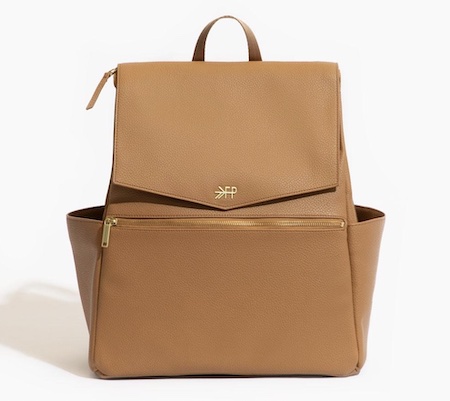
For the New Parent: Freshly Picked Toffee Classic Diaper Bag II

The Diaper Bag by Freshly Picked was designed for moms by moms. Freshly Picked conducted focus groups across the US and identified what moms really want in a diaper bag: large capacity, ease of use, durability, and style. The brand addressed each of these areas to create the perfect diaper bag that is both functional and beautiful. Made with premium quality vegan leather, the bag now has padded shoulder straps, a mom compartment, and mesh interior pockets! $199 at freshlypicked.com

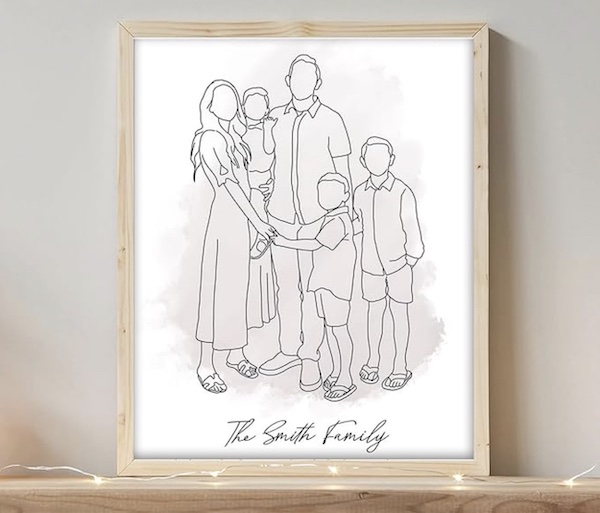
Add Inspiration to Your Home Office w/ This Custom Line Drawing Family Portrait

Created from your own photo, this personalized wall art celebrates family and adds a touch of elegance to any workspace. Printed on glossy, durable canvas, the high-definition artwork ensures long-lasting beauty. With easy customization, you can tailor it to reflect personal memories or family moments, making it a meaningful addition to your office. The stretched canvas on a wooden frame is equipped with hooks for effortless hanging. This unique, artistic piece not only enhances your office aesthetic but also inspires a warm, personal atmosphere conducive to productivity. Available on Amazon.

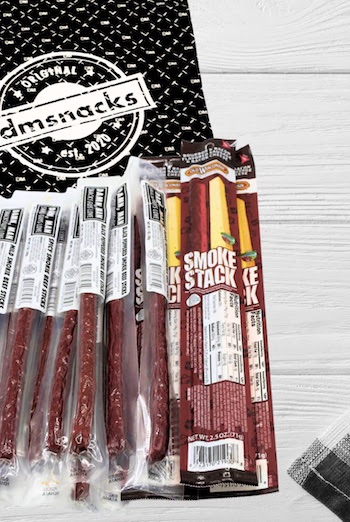
Tasty, Protein-Packed Snacks to Keep Hunger at Bay: DamnMan 18 Piece Bag of Meat

If mom and dad are hungry, they won’t be able to maximize their work output! These 18 delicious beef jerky sticks are perfect to keep in their home office. The food assortment includes mild, smoked, peppered, spicy, bourbon, and bacon. The beef jerky sticks will satisfy cravings and are of premium quality. The bag features 15 DamnMan‘s Beef Sticks and 3 Sausage and Cheese Packs. The meat sticks not only taste delicious but also are a protein source. Includes 5 Mild Peppered Smokie Beef Sticks (1 Oz. Each), 5 Black Peppered Smokie Beef Sticks (1 Oz. Each), 5 DamnMan Spicy Smokie Beef Sticks (1 Oz. Each), and 3 Bourbon & Bacon Flavored Smoke Stacks (2.5 Oz. each). $49.95 at dmsnacks.com.

Top Gift Pick for the New Father: The Dad Hoodie

Dad, put down that diaper bag dad and put on this hoodie. No more having to carry around a pink diaper bag like you’re Barbie’s Personal Assistant. With The Dad Hoodie everything has its pocket! Carry your cell phone, keys, baby’s bottle, snacks, diapers, and other essentials with ease. Designed specifically for dads, this hoodie combines style, comfort, and practicality, ensuring you have everything you need right at your fingertips. Say goodbye to the cumbersome and stereotypical diaper bag and hello to convenience and coolness. $115 at thedadhoodie.com

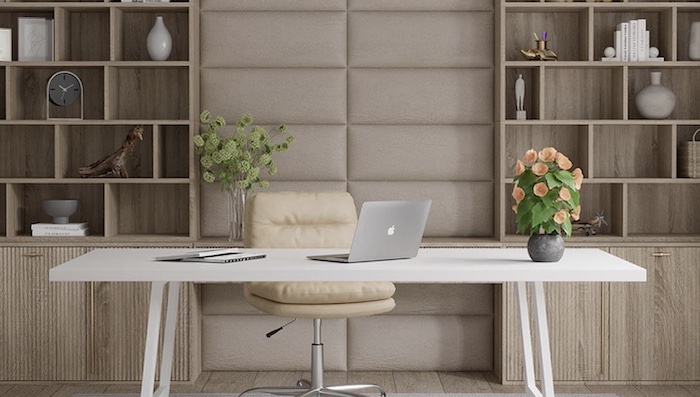
For a Home Office Refresh: Vänt® Wall Panels

Vant
These classy and stylish upholstered wall panels will amplify your workspace! Select between preconfigured layouts or custom design your wall by purchasing individual sets of panels. Vant wall panels are generously versatile, and with our plentiful choice of fabrics and configurations, they’ll fit right in with your home office decor. Available in an assortment of luxurious colors and finishes, these wall panels can create an accent wall for a dramatic statement in your home office.

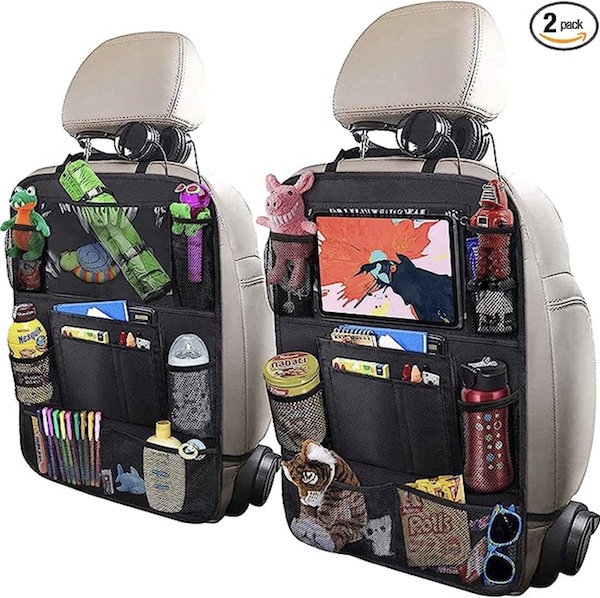
For Carpools with the Kids: ULEEKA Car Backseat Organizer

This Large Car Organizer measures 24 x 16 inches and features extra-long straps with quick-release buckles for a perfect fit in any car. It has multiple front pockets for convenient storage and is made from durable, waterproof 600D Polyester with frosted PVC. The tablet pocket fits up to 10” devices. It’s water-resistant, machine-washable, and ideal for travel with kids. $19.99 on Amazon.

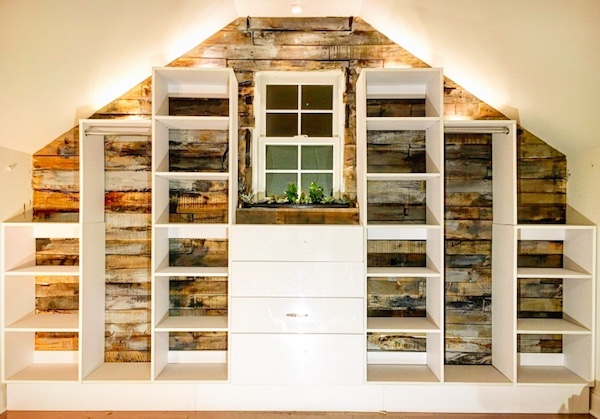
Declutter Your Home Office With Modular Closets

A decluttered, streamlined home office is essential for amplifying daily productivity. Modular Closets has a surprisingly simple, affordable, and durable solution to clutter! These high quality wood closet organizers are delivered right to your door and are the perfect way to organize files, office supplies, the printer, and more. Made in the USA, Modular Closets are highly durable and offer countless configurations to fit any home office.
All of these product picks are a must for amplifying work-life balance. They can also all easily be purchased online.

The post National Parents Day Essentials for Mompreneurs & Dadpreneurs appeared first on Home Business Magazine.

House of the Dragon Director Breaks Down Alicent’s Big, Silent Moment of Horror


House of the Dragon‘s most memorable moments tend to be flashy, (quite literally) fiery, and shot through with agonizing violence. There was plenty of that in last week’s episode, but episode five, “Regent,” which aired last night, gave us one of the most powerful reactions we’ve ever seen on the show—and also one of the quietest. In a new interview, “Regent” director Clare Kilner discussed how it all came together.

Io9spoiler New

We’ve seen admirable choices involving surprising restraint before on House of the Dragon. Another big example from season two came in the premiere, when Heleana witnessed her young son’s brutal beheading, then scampered through the Red Keep to deliver the news with an apparent lack of emotion. But that’s different than the way we saw Alicent react in “Regent” when the Small Council picked her son, Aemond, to rule in place of the gravely injured King Aegon.

It’s a two-fisted blow, because not only are they shoving the far more experienced Alicent aside, mostly based on the fact that she happens to be a woman, they’re also appointing someone she knows will be a cruel leader. She also suspects, correctly, that Aemond’s the reason Aegon returned from battle in such horrible shape.

In the scene, instead of focusing on the smug, newly promoted Aemond as he starts issuing orders, Kilner brings the camera in on Alicent’s face as the sound in the room around her becomes quieter, and her physical reaction (rapid breathing, rapid heart beat) to what’s just happened becomes apparent. In Olivia Cooke’s carefully calibrated expression, you see a woman feeling a blender of emotions: angry, disrespected, and insulted—but also panic. She’s terrified about what this will mean for the future.

Speaking to the Wrap, Kilner explained why she held that shot on Cooke’s mesmerizing performance. “For every scene, I do loads of prep beforehand in terms of breaking down the scene and looking at the characters, but I also walk onto the set with my DP and we talk about if we had just one long shot how would we shoot it,” the director said. “I was just like ‘this would all be on Alicent. I could shoot this whole scene on Alicent.’ Also because Olivia Cooke just quietly brings everything. Behind those eyes there is so much going on.”

Kilner explained that she and her team all knew that was the correct choice. “Sometimes you don’t know if studio or people will let you do that. Everyone was on board with that. It just became so patently obvious that this huge betrayal was happening,” she said.

New episodes of House of the Dragon arrive Sundays on HBO and Max.


Want more io9 news? Check out when to expect the latest MarvelStar Wars, and Star Trek releases, what’s next for the DC Universe on film and TV, and everything you need to know about the future of Doctor Who.

Analytic vs. Generative AI: Understanding the Key Differences


Analytic vs. Generative AI: Understanding the Key Differences

In the rapidly evolving world of artificial intelligence, two distinct branches stand out: Analytic vs Generative AI. These two paradigms serve different purposes and have unique applications across various industries. In this blog post, we’ll explore the differences between Analytic AI and Generative AI, providing insights into their capabilities and potential uses. Understanding these differences will help you leverage the right type of AI for your specific needs.

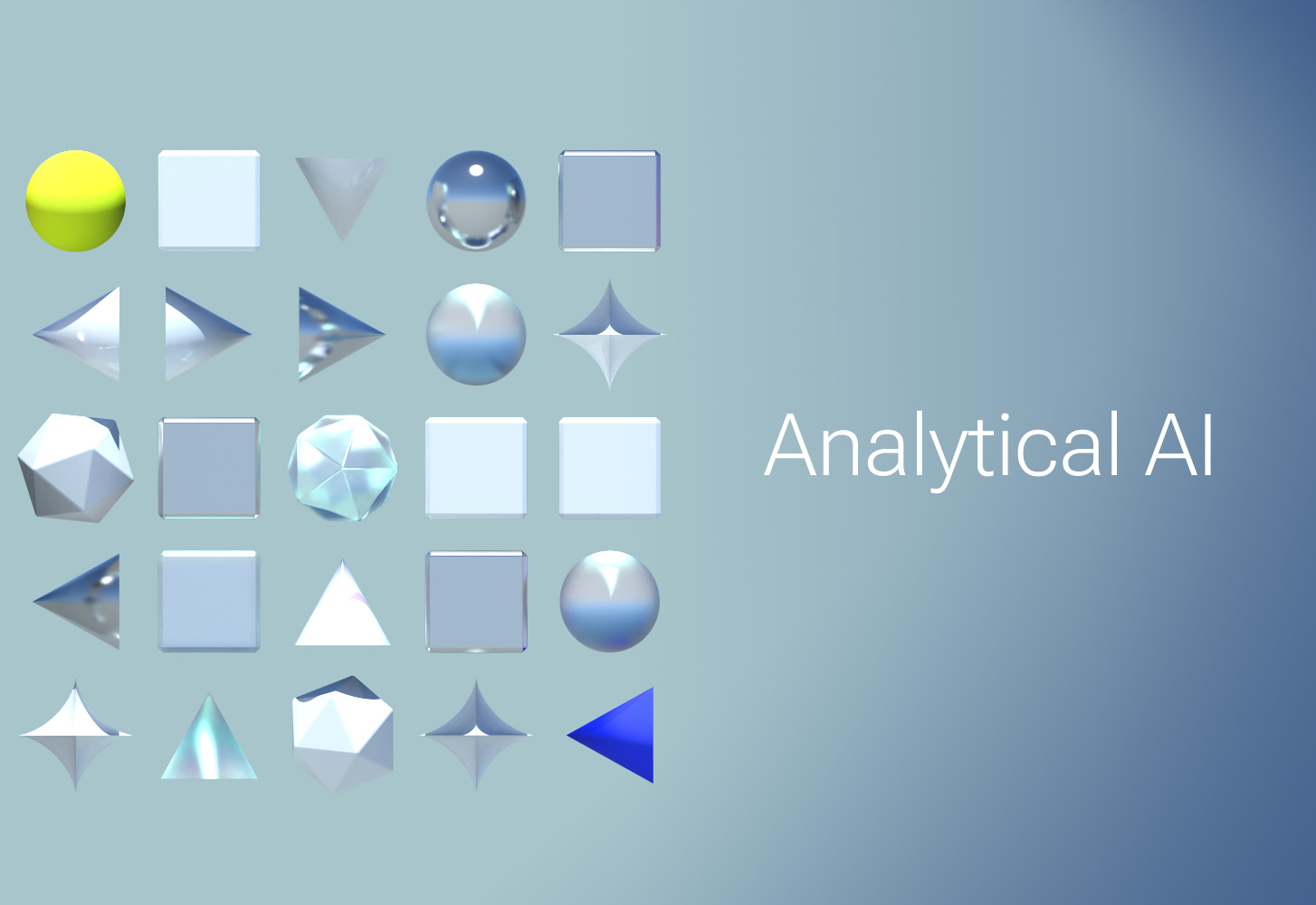
Analytical AI banner

What is Analytic AI?

Analytic AI focuses on analyzing data to extract meaningful insights and support decision-making processes. It primarily deals with structured data and uses statistical methods, machine learning algorithms, and data mining techniques to identify patterns, trends, and correlations. Analytic AI is widely used in business intelligence, finance, healthcare, and other sectors where data-driven decisions are crucial.

Key Features of Analytic AI

  1. Data Analysis: Analytic AI excels at processing large volumes of data to uncover hidden patterns and trends.
  2. Predictive Modeling: It uses historical data to predict future outcomes, helping organizations make informed decisions.
  3. Optimization: Analytic AI optimizes processes and operations by identifying inefficiencies and suggesting improvements.
  4. Descriptive Insights: It provides descriptive insights by summarizing and visualizing data in an easily understandable format.

Real-World Applications of Analytic AI

  • Business Intelligence: Analyzing sales data to identify top-performing products and customer segments.
  • Financial Services: Predicting stock market trends and assessing credit risks.
  • Healthcare: Diagnosing diseases based on medical imaging and patient data.
  • Marketing: Segmenting customers and personalizing marketing campaigns.

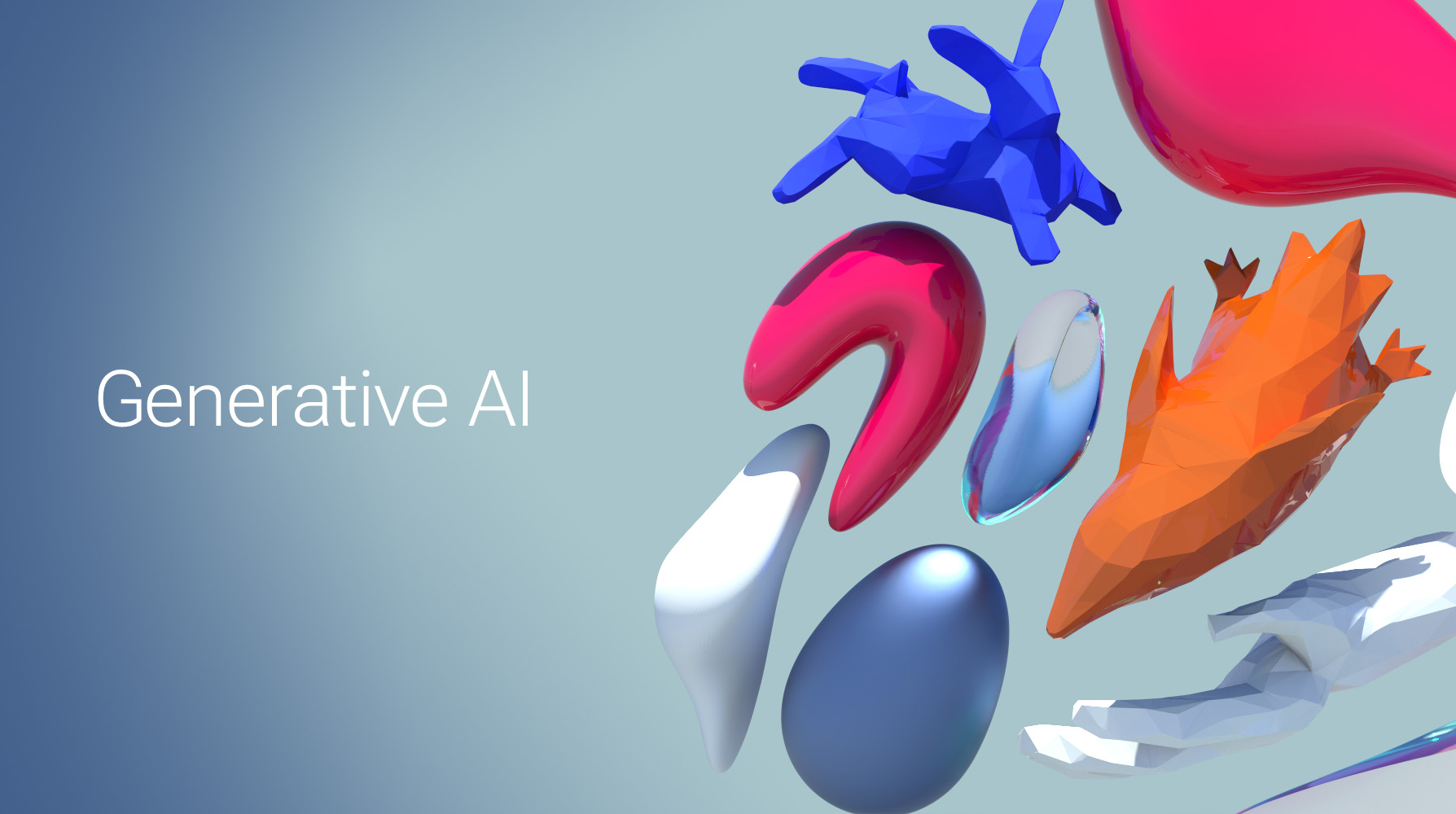
Generative AI banner

What is Generative AI?

Generative AI, on the other hand, focuses on creating new content by learning patterns from existing data. It uses deep learning techniques, such as generative adversarial networks (GANs) and transformer models, to generate text, images, music, and more. Generative AI has gained significant attention for its ability to produce human-like content and has applications in creative industries, content creation, and beyond.

Key Features of Generative AI

  1. Content Creation: Generative AI can create realistic images, videos, music, and text.
  2. Imagination and Innovation: It can generate new ideas and designs, pushing the boundaries of creativity.
  3. Personalization: Generative AI can tailor content to individual preferences, enhancing user experiences.
  4. Data Augmentation: It generates synthetic data to augment training datasets, improving the performance of machine learning models.

Real-World Applications of Generative AI

  • Art and Design: Creating unique artwork, fashion designs, and architectural concepts.
  • Content Generation: Writing articles, generating marketing copy, and creating chatbots.
  • Entertainment: Producing music, generating game levels, and developing virtual characters.
  • Healthcare: Generating synthetic medical images to train diagnostic models.

Analytic vs. Generative AI: A Comparative Analysis

While both Analytic AI and Generative AI leverage machine learning and deep learning, their purposes and applications differ significantly.

Purpose

  • Analytic AI: Focuses on analyzing and interpreting existing data to derive insights and make predictions.
  • Generative AI: Focuses on creating new content by learning from existing data patterns.

Data

  • Analytic AI: Primarily deals with structured data and statistical analysis.
  • Generative AI: Works with both structured and unstructured data, including images, text, and audio.

Applications

  • Analytic AI: Used in data-driven decision-making, process optimization, and predictive analytics.
  • Generative AI: Used in content creation, creative industries, and personalized experiences.

Techniques

  • Analytic AI: Utilizes machine learning algorithms, statistical methods, and data mining techniques.
  • Generative AI: Employs deep learning techniques, such as GANs and transformers.

Choosing the Right AI for Your Needs

When deciding between Analytic AI and Generative AI, consider your specific requirements and objectives. If your goal is to extract insights from data, make predictions, and optimize processes, Analytic AI is the way to go. On the other hand, if you need to generate new content, innovate creatively, or personalize user experiences, Generative AI is the ideal choice.

Whichever type of AI model is a fit for you, Velocity Micro has the right workstation solution. Check out our AI PCs to find what’s right for you, or call our experts at 804-419-0900 for assistance.

The following two tabs change content below.

Josh has been with Velocity Micro since 2007 in various Marketing, PR, and Sales related roles. As the Director of Sales & Marketing, he is responsible for all Direct and Retail sales as well as Marketing activities. He enjoys Seinfeld reruns, the Atlanta Braves, and Beatles songs written by John, Paul, or George. Sorry, Ringo.


Elon Musk Questions OpenAI’s Finances After CEO Spotted in $1.9M Hypercar


July 14th, 2024: A recent video showing OpenAI CEO Sam Altman behind the wheel of a Koenigsegg Regera, a hypercar valued at over $1.9 million, has ignited a heated debate on social media.

The footage, which quickly went viral, raised questions about the financial practices of OpenAI, originally established as a non-profit organization.

The Koenigsegg Regera, a limited-edition sports car produced by Swedish automaker Koenigsegg, is known for its exclusivity and high price tag.

Only 85 models have been manufactured since its 2015 launch, with some units fetching up to $3.7 million at auction.

The video prompted a response from Tesla CEO Elon Musk, who co-founded OpenAI with Altman in 2015 but left the board in 2018 due to disagreements over the company’s direction.

Musk’s terse comment, “Great question,” came in reply to a post questioning how OpenAI transitioned from a non-profit to a for-profit entity.

This incident has reignited discussions about the relationship between Musk and Altman, which has been strained in recent years.

In February 2024, Musk filed a lawsuit against OpenAI and Altman, alleging that they had abandoned the organization’s original goals.

The Koenigsegg Regera boasts impressive specifications, including a twin-turbo V8 combustion engine combined with three electric motors. The vehicle’s name means “to reign” or “to rule” in Swedish, reflecting its status as one of the world’s most prestigious hypercars.

As the video continues to circulate online, it has sparked a broader conversation about the financial structures of AI companies and the lifestyles of their executives.

The incident highlights the ongoing scrutiny faced by leaders in the tech industry and the complex relationships between key figures in the field of artificial intelligence.


Via Separations Achieves Decarbonization Technology Goals With AutoCAD and the Plant 3D Toolset | AutoCAD Blog


In the pulp and paper sector, a single step in the Kraft pulping process that converts wood into wood pulp is responsible for nearly 1% of global greenhouse gas emissions. Via Separations, a venture-backed climate tech company that is an indirect investee of the Autodesk Foundation portfolio through Prime Coalition, is using its technology to transform industrial separations through an innovative membrane filtration solution – with the goal of eliminating 80-90% of the energy currently used in thermal separations while creating value for industrial customers.

Via Separations uses Autodesk AEC solutions like AutoCAD and Revit to develop pumps, pipes, valves, and control systems that augment or replace fossil-fuel-powered thermal separation process units with energy-efficient, electrified filtration systems. They recently completed construction and commissioning of a 10,000 square-foot facility at a pulp mill, aimed at proving their decarbonization technology at scale to the manufacturing sector. Their work is a prime example of how technology can be leveraged to create economic, sustainable solutions for pressing environmental challenges, highlighting the power of design in driving sustainable innovation.

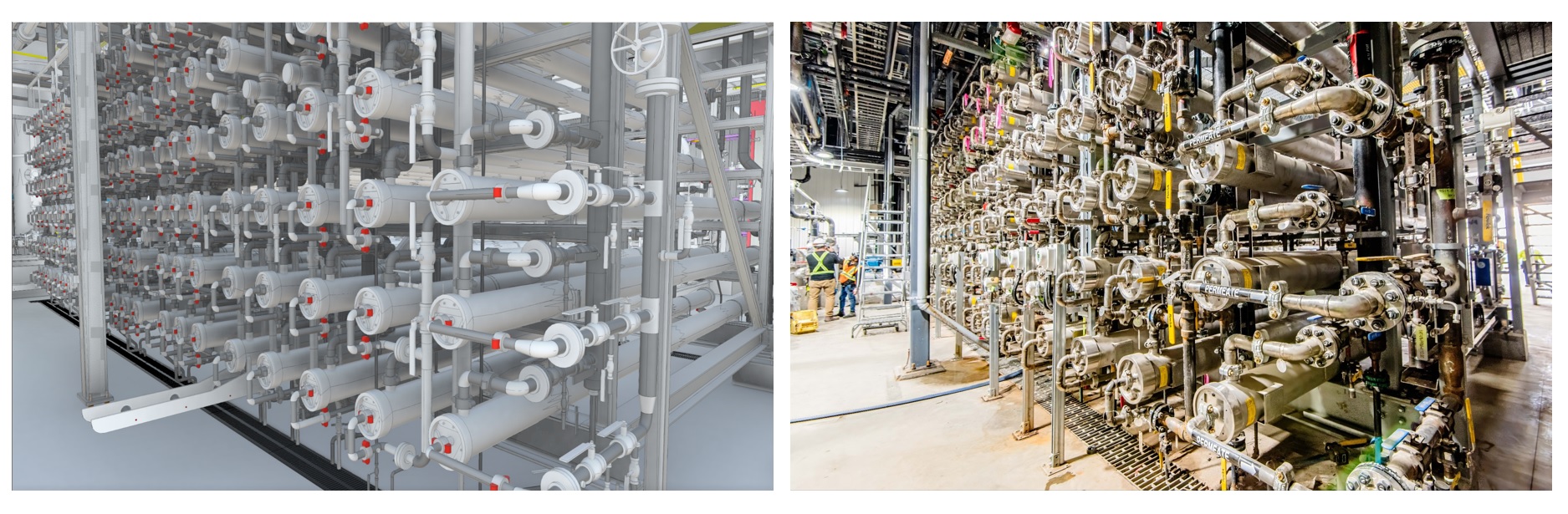
Via Separations project

Separation Process

Typically, pulp and paper are created from fibers which are extracted from a variety of sources, often from forestry products, and converted to pulp. During this extraction process, pulp must be separated from other byproducts like lignin, chemicals, and water, which facilities recover for re-use in the process. This is where the most greenhouse gases end up being produced.

Via Separations is helping to transition away from expensive, energy-intensive thermal separations to more efficient mechanical separations, reducing the load on evaporators used during the process. Their technology has several benefits, namely energy and chemical savings, operational flexibility, and debottlenecking production.

Via Separations’ Black Liquor Concentration System uses a process similar to reverse osmosis, which directly removes hot, clean water from weak black liquor. Their filtration system uses proprietary membranes, which efficiently concentrate valuable liquor solids at high-temperature, corrosive conditions outside the typical operating window of other separation technology.

Via Separations utilizes AutoCAD, in addition to other Autodesk solutions, for its robust and flexible features – allowing them to design and modify their filtration systems with precision and ease. By using AutoCAD, Via Separations can visualize their designs, simulate real-world performance, and identify potential issues before the manufacturing stage. This not only enhances the quality of their filtration system, but also saves time and reduces costs.

Specifically, they leverage the Plant 3D toolset, an extension of AutoCAD which provides specialized tools for creating, managing, and sharing plant design projects. With the help of the Plant 3D toolset, Via Separations can create intelligent piping and instrumentation diagrams (P&IDs) and then integrate them into their 3D plant design models.

“I’m kicking myself for not using Plant 3D earlier.”

Steve Zaloudek, Principal Engineer, Via Separations

This comprehensive approach allows Via Separations to streamline their design process, maintain consistency in their designs, and improve collaboration across their teams. The ability to visualize their designs in 3D also helps Via Separations optimize their designs, ensuring maximum efficiency and reliability of their filtration systems.

Learn More

Meet other leading innovators and entrepreneurs collaborating with the Autodesk Foundation to support the design and creation of innovative solutions to the world’s most pressing social and environmental challenges.

A Deep Dive Into BioWare’s Companion Design Philosophy In Dragon Age: The Veilguard


During my visit to BioWare in its Edmonton, Canada, office earlier this year for the current Game Informer cover story on Dragon Age: The Veilguard, I heard a sentiment repeated throughout the day from the game’s leads: in past Dragon Age games, BioWare stumbled onto great companions, but with Veilguard, it’s the first game where the studio feels it purposefully and intentionally created great companions. As such, those companions are key to everything happening in Veilguard. 

With such a significant emphasis on these characters, I spoke to some of the game’s leads to learn precisely about BioWare’s philosophy on companions in Veilguard. 

“No, that is the case,” BioWare general manager Gary McKay tells me when I ask if he agrees with the stumbled-onto-greatness sentiment. “I would first start with Dragon Age – each installment in this franchise has been different, so we didn’t set out to make a game that was a sequel or the same game as before. We really wanted to do something different and we did push the envelope in a couple of areas, companions being one of them. Once we got knee deep into it, we really realized we had something special with these companions, again, around the motivations, the story arc, and it really started to become the centerpiece for this game.” 

The Philosophy Behind Dragon Age: The Veilguard’s Companions

Dragon Age: The Veilguard Dreadwolf Game Informer Cover Story

Game director Corinne Busche agrees, adding that Veilguard’s companions are “the most fully realized complex companions we’ve ever crafted.” She also believes they’re the Dragon Age series’ best. “They’re complicated, they have complicated problems, and that’s what’s interesting,” she continues. “As much as I adore the companions and the journeys I’ve been on with them in past Dragon Age titles – previously, it feels like companions are going on an adventure with me, the main character, whether it’s the Hero of Ferelden or Hawke, you name it. But in [Veilguard], in many ways, the companions are so fleshed out that it feels as though I’m going on a journey with them. I’m exploring how they think and feel; I’m helping them through their problems. We’re working through their unique character arcs. They feel like my dear friends, and I absolutely adore them.”

Busche says these companions participate in the game’s darker and more optimistic parts. “We’ve really moved into a place where you can have the highest of highs, and it can be colorful, it can be optimistic, but also, you can have the lowest of lows where it gets gritty, it gets painful, it gets quite dark. But throughout it all, there is a sense of optimism. And it creates this delightful throughline throughout the game.” 

When I ask creative director John Epler about BioWare’s philosophy behind Veilguard’s companions, he reveals a phrase the studio uses: Dragon Age is about characters, not causes. 

“What that means for us is […] let’s take the Grey Wardens, for example – the Grey Wardens are an interesting faction but by themselves, they don’t tell a story, but there are characters within that faction that do,” he tells me. “And the same thing with other characters in the story. They represent these factions, they show the face of the other parts of Thedas and of the storytelling we really want to do, which, again, shows Thedas as this large, diverse living world that has things going on when you’re not there.”

Dragon Age: The Veilguard Game Informer Cover Story Exclusive Details

Epler says one of BioWare’s principles when creating Veilguard was that the world exists even when you – Rook – are not around. There are things, ancient conflicts, grudges, and more, that happen even when Rook isn’t participating in them, he says. 

“You kind of come in ‘in media res’ in some of these, so that’s where we wanted to go with the companions,” he says. “They have stories of their own. Where can Rook come into these stories, and what interesting ways can those stories develop not just based on themselves but also based on Rook’s presence within them?”

Dragon Age series art director Matt Rhodes adds that companions are the load-bearing pillars for everything in Veilguard, so “when you’re designing them, it’s not just designing a character; they’re the face for their faction, the face for, in [some cases like Bellara Lutara], an entire area of the world.” From his aesthetic-forward part of developing companions in Veilguard as the game’s art director, he tells me Veilguard’s characters are (hopefully) going to give cosplayers a challenge. 

“The previous art director had the mindset we should make things easier for [cosplayers], which I think is a misunderstanding of cosplayers,” Rhodes says. “We’ve seen the kind of challenges they’re willing to take on, and so we’ve gone for, in some cases, a level of complexity and detail that I hope a lot of them are excited to rise to the challenge for.” 

A Quick Detour: Neve Gallus

Dragon Age: The Veilguard Dreadwolf Game Informer Cover Story

Companions, In And Out Of Combat 

Dragon Age: The Veilguard Dreadwolf Game Informer Cover Story

Rook’s companions in Veilguard have roles both in and out of combat, but since I only saw a few hours of this game (which is sure to be multiple dozens of hours long), I wanted to ask Busche about these roles and how they play out. Here’s what I learned: 

In Combat

Bushce: “So companions as realized characters, we have to take that premise when we talk about how they show up in combat. These are their own people. They have their own behaviors; they have their own autonomy on the battlefield; they’ll pick their own targets. As their plots progress, they’ll learn how to use their abilities more competently, and it really feels like you’re fighting alongside these realized characters in battle. So I love that, I love the believability of it. It feels like we’re all in it together. 

“But then when it comes time for the strategy, and the progression I might add, that’s where a sense of teamwork comes into play as the leader of this party as Rook. When I open the ability wheel, I almost feel like we’re huddling up. We’re coming up with a game plan together. I see all the abilities that Harding has, and I see all that Bellara is capable of, and sometimes I’m using vulnerabilities synergistically. Maybe I’m slowing time with Bellara so that I can unleash devastating attacks with Harding, knocking down the enemy, and then me as Rook, rushing in and capitalizing on this setup they’ve created for me. It is a game about creating this organic sense of teamwork. 

“Now, there are more explicit synergies as well. We very much have intentional combos where your companions can play off each other, you can queue up abilities between them, and each of those abilities will go off and have their effect. But it results in this massive detonation where you get enhanced effects, debuff the entire battlefield, all because of planning and teamwork. What makes it really cool is you can introduce Rook into that equation as well. One of my favorite things to do is upgrade some of Harding’s abilities so she will automatically use some of these abilities that normally I’d have to instruct her to do. And she’ll actually set my character up to execute that combo that, again, has that detonation effect.” 

Outside Combat

Busche: “It’s one of my favorite topics. I talked about the idea that these are fully realized characters, that they’re very authentic and relatable. So outside of combat, what that means is they’re going to have their own concerns, fears, distractions, and indeed, even their own sanctuaries, their own personal spaces. In our base of operations this time, our player hub, the Lighthouse, each of the companions has their own room. And what I love about it is it becomes a reflection of who they are. The more time you spend with them, as the game develops as you work through their arc, their room and their personalities will evolve and flourish and become more complete as they trust you more and you understand them better. 

“What’s interesting, you mentioned romance, the companions also develop romantically and I’m not just talking about with the main character Rook; I’m talking about each other. There are moments in the game where two of our companions fell in love with each other and I had to make some pretty challenging choices as it related to the quest we’re on. And it broke my heart, it absolutely did [Editor’s Note: I get the sense Busche is talking about a specific playthrough of Veilguard here – not a definitive sequence of events for every playthrough]. 

“So I would say, as you’re adventuring with them, as you’re returning to the Lighthouse and getting to know them – all these decisions and conversations and things you learn about them – it endears them to you in a way that I honestly haven’t experienced before. And sometimes that fills me with joy and sometimes it breaks my heart.” 


For more about the game, including exclusive details, interviews, video features, and more, click the Dragon Age: The Veilguard hub button below.

Videoguys Summer Specials – Videoguys


Be sure not to miss these hot summer specials from Videoguys. These specials will help you get started and improve your live stream or production. 

Portable multi-camera encoder, switcher, monitor, recording in one

Vizrt TriCaster Mini Special

Add 1 PTZ3 camera for $1,500 or 2 PTZ3 cameras for $2,500

Offer expires 8/31/24

NDI recorder CUBE R1 records files to this reliable Kiloview Storage Stick
While Supplies Last!

PT20XSEPRODUCERJOY4

Create your own bundle by mix and matching 3 – 6 PTZ Cameras with a controller for Savings!

Limited Time Only!

Combines the newest 5″ monitor/recorder & playback device with the latest Atomos Cloud features enabled by Atomos Connect
Limited Time Only!

KM-IP8 NDI Switcher with RM-LP350G Controller and FREE KY-PZ200N PTZ Cam

This PTZ camera and controller bundle provides professional level video production
Limited Time Only!

Cost-effective, highest quality memory card for the most demanding needs of professionals

PRO-BLADE

1: Buy G-DRIVE PROJECT

2: Add 2 or more PRO-BLADE SSD Mags

3: Get a FREE PRO-BLADE Transport

Limited Time Only!

BirdDog 3x P240 PTZ Cameras and NETGEAR Switch GSM4212UX Bundle

For professional editors who need advanced post-production and collaborative workflows

Stream and switch up to three full HD video inputs from HDMI™, SDI, and USB sources with Pearl Mini™. Control via touch screen, web interface, or remotely with Epiphan Cloud.


vscode.dev Visual Studio Code for the Web


October 20, 2021 by Chris Dias, @chrisdias

Back in 2019, when the .dev top-level domain opened, we picked up vscode.dev and quickly parked it, pointing at our website code.visualstudio.com (or, if you are from the Boston area like me, we “pahked it”). Like a lot of people who buy a .dev domain, we had no idea what we were going to do with it. And we certainly didn’t anticipate that it would end up being the fulfillment of a mission over a decade in the making.

Bringing VS Code to the browser

Fast forward to today. Now when you go to https://vscode.dev, you’ll be presented with a lightweight version of VS Code running fully in the browser. Open a folder on your local machine and start coding.

No install required.

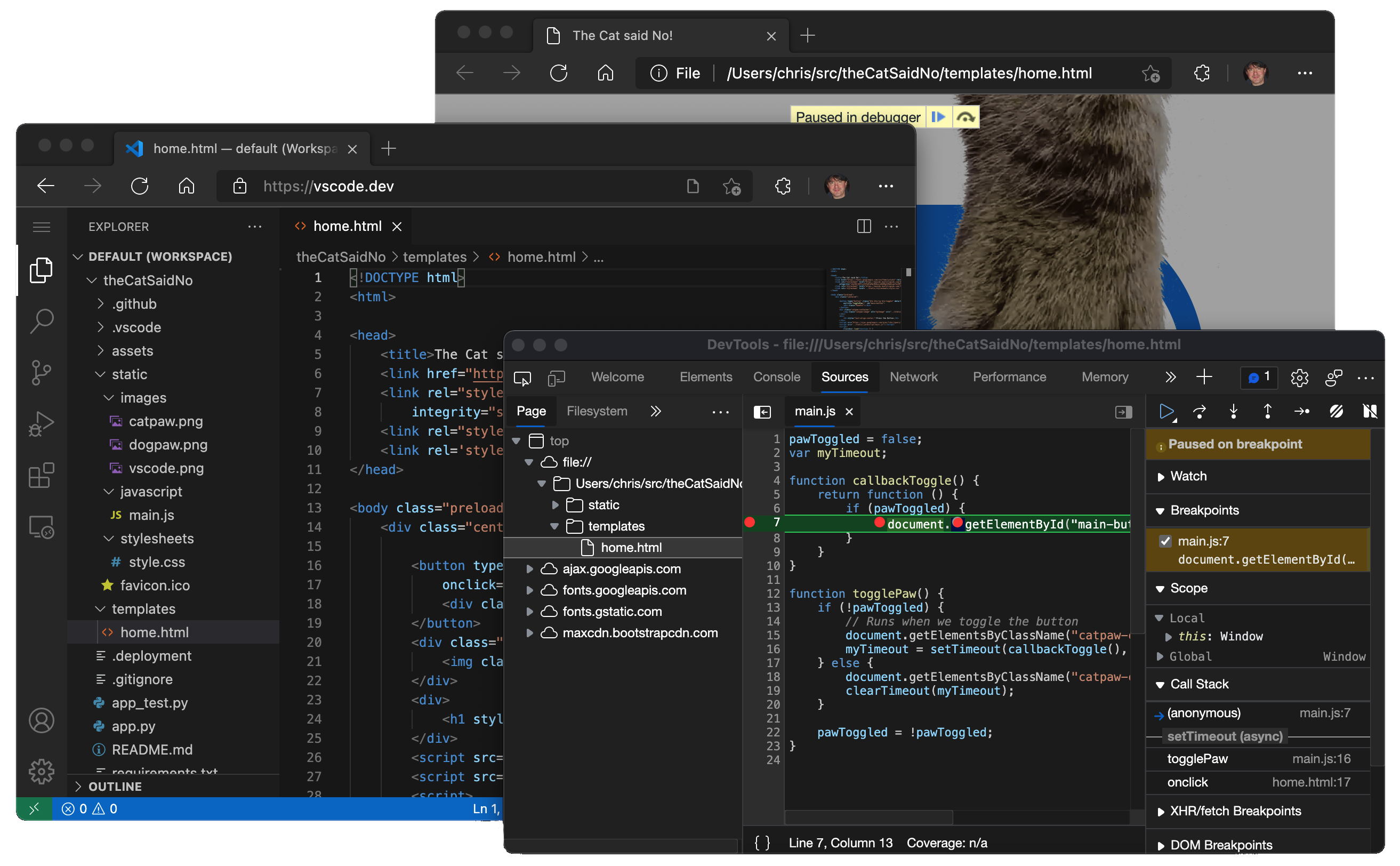
vscode.dev running in the browser

With the availability of vscode.dev, we begin to finally realize our original vision of building a development tool that can run fully serverless in the browser. For a full history lesson, check out Erich Gamma’s VS Code Day talk “VS Code An Overnight Success…10 Years in the Making”.

So, what can you do on VS Code for the Web? Quite a bit actually…

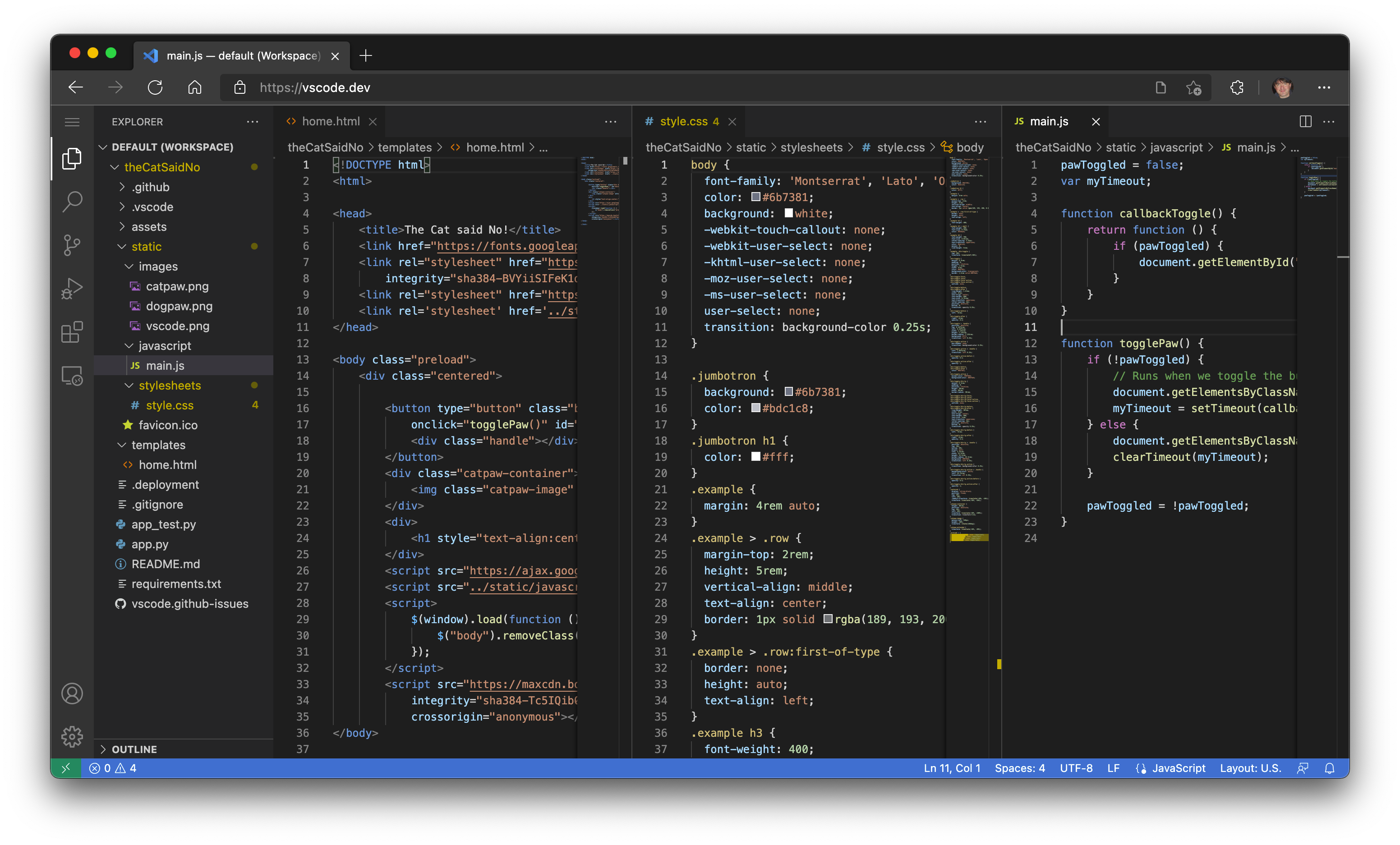
"The Cat said No" application source code in vscode.dev

Modern browsers that support the File System Access API (Edge and Chrome today) allow web pages to access the local file system (with your permission). This simple gateway to the local machine quickly opens some interesting scenarios for using VS Code for the Web as a zero-installation local development tool, such as:

  • Local file viewing and editing. Quickly take notes (and preview!) in Markdown. Even if you are on a restricted machine where you cannot install the full VS Code, you may still be able to use vscode.dev to view and edit local files.
  • Build client-side HTML, JavaScript, and CSS applications in conjunction with the browser tools for debugging.
  • Edit your code on lower powered machines like Chromebooks, where you can’t (easily) install VS Code.
  • Develop on your iPad. You can upload/download files (and even store them in the cloud using the Files app), as well as open repositories remotely with the built-in GitHub Repositories extension.

And, if your browser doesn’t support local file system APIs, you’ll still be able to open individual files by uploading and downloading them via the browser.

Local File System Access is Unsupported message dialog

A Light(er)weight Experience

Since VS Code for the Web is running completely within the browser, some experiences will naturally be more constrained, when compared to what you can do in the desktop app. For example, the terminal and debugger are not available, which makes sense since you can’t compile, run, and debug a Rust or Go application within the browser sandbox (although emerging technologies like Pyodide and web containers may someday change this).

A bit more nuanced are the code editing, navigation, and browsing experiences, which, on the desktop, are generally powered by language services and compilers that expect a file system, runtime, and compute environment. In the browser, these experiences are powered by language services running fully in the browser (no file system, no runtimes) that provide source code tokenization and syntax colorization, completions, and many single-file operations.

As a result, when in the browser, experiences generally fall into the following categories:

Good: For most programming languages, vscode.dev gives you code syntax colorization, text-based completions, and bracket pair colorization. Using a Tree-sitter syntax tree, we’re able to provide additional experiences such as Outline/Go to Symbol and Symbol Search for popular languages such as C/C++, C#, Java, PHP, Rust, and Go.

Better: The TypeScript, JavaScript, and Python experiences are all powered by language services that run natively in the browser. With these programming languages, you’ll get the “Good” experience plus rich single file completions, semantic highlighting, syntax errors, and more.

Best: For many “webby” languages, such as JSON, HTML, CSS, and LESS, the coding experience in vscode.dev is nearly identical to the desktop (including Markdown preview!).

Extensions

Most UI customization extensions such as themes, key maps, and snippets all work in vscode.dev and you can even enable roaming between the browser, the desktop, and GitHub Codespaces through Settings Sync.

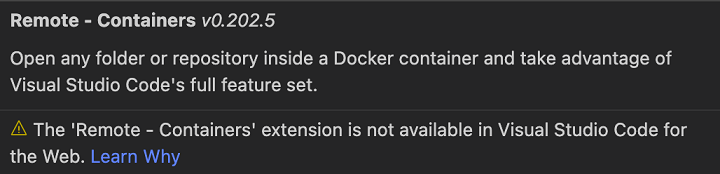
Extensions that run Node.js code that use OS-specific modules, or shell out to local executables, still show in search results, but are clearly marked as unavailable.

Notification that extension is not available in Visual Studio Code for the Web

That said, there are a growing number of extensions that have been updated to work in the browser, with more coming every day.

Note: If you are an extension author and want to have your extension available in the browser (we do!), check out our Web Extensions authoring guide.

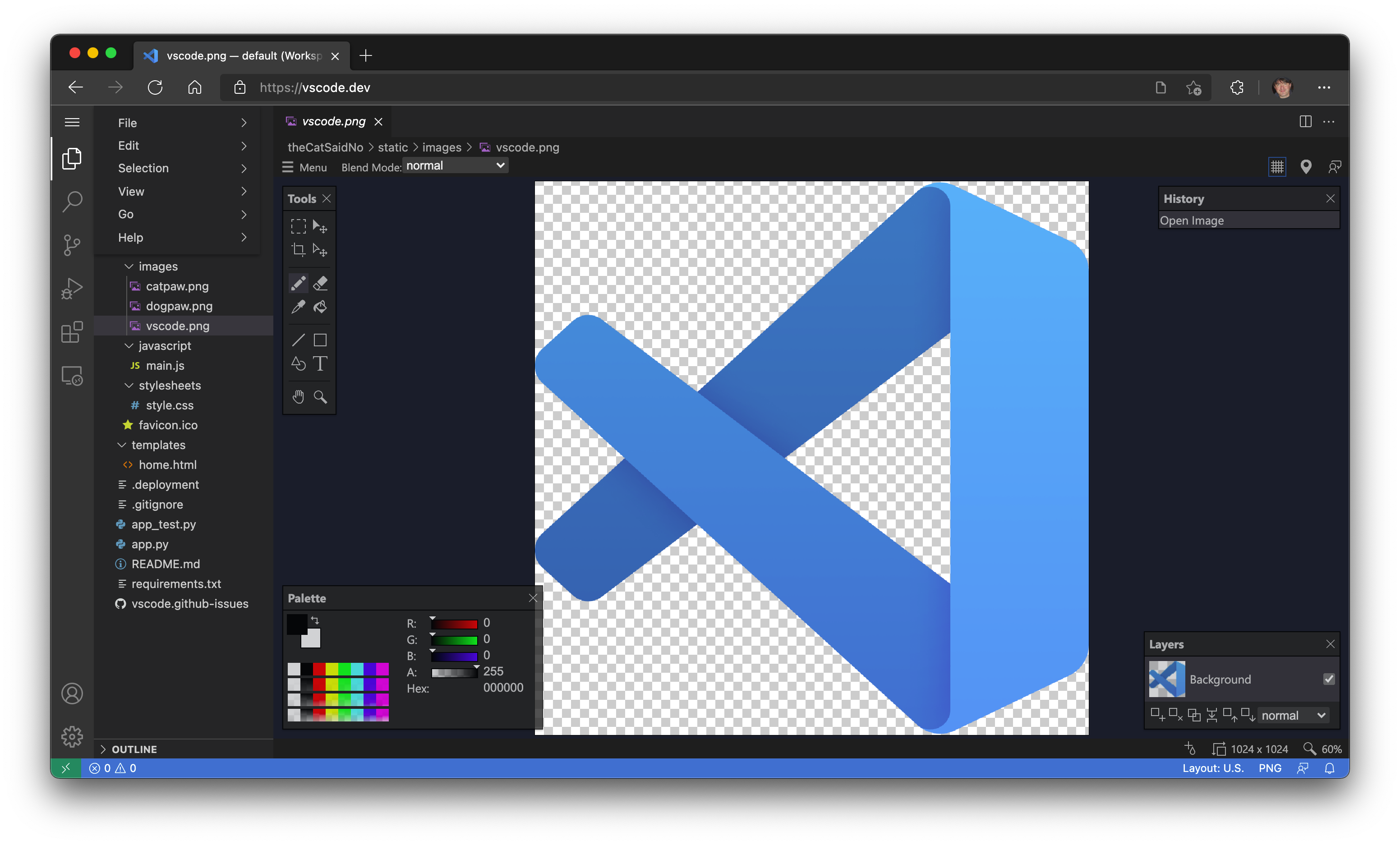
For example, the Luna Paint – Image Editor extension lets you edit raster images directly in VS Code. The extension brings rich design tools (for example, layer and blend tools) to VS Code, and of course you can save images to your local disk.

Luna Paint - Image Editor extension running in vscode.dev

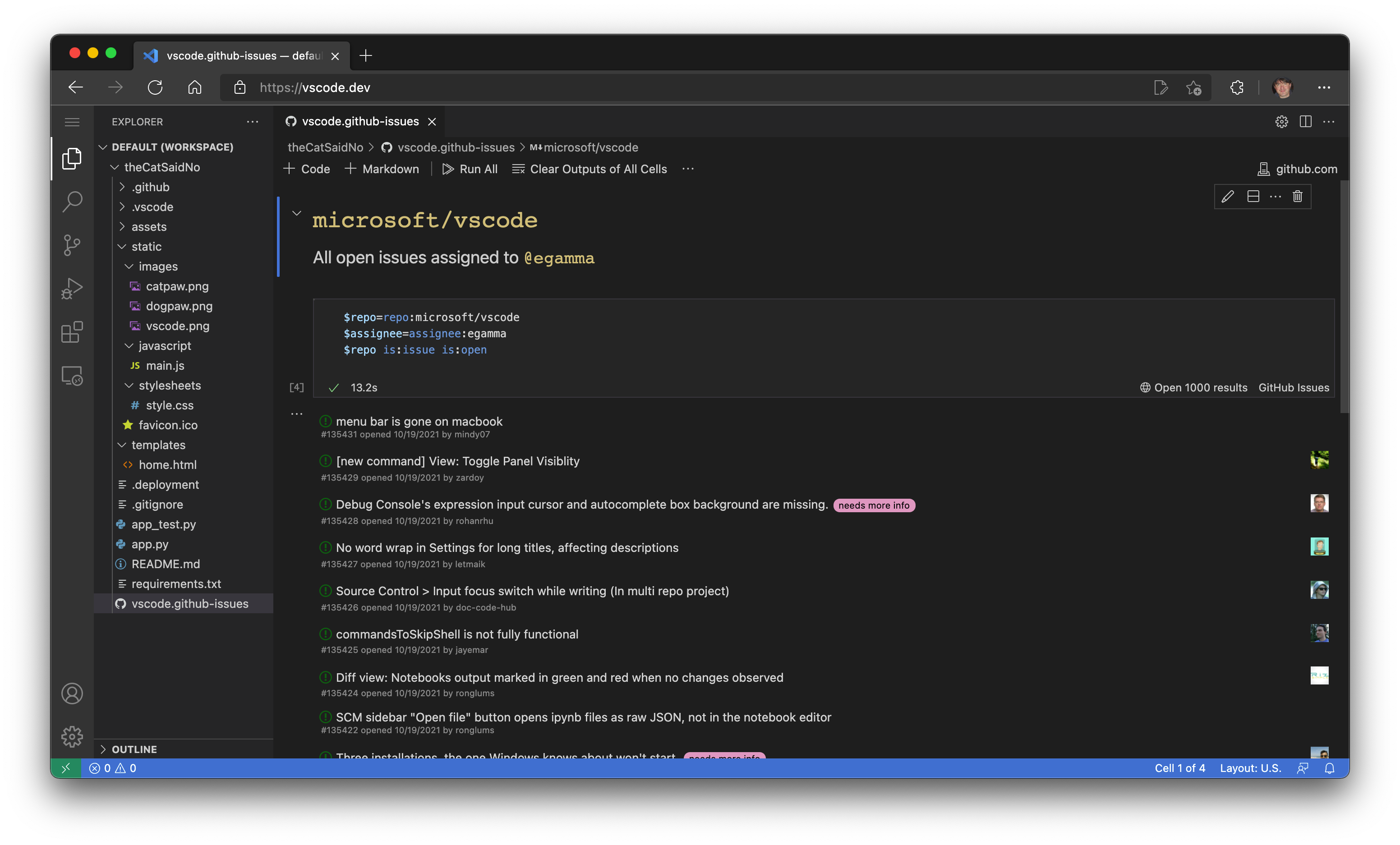
The GitHub Issue Notebooks extension brings the Notebook experience to GitHub Issues. With that you can interleave queries, results, and even Markdown describing the purpose of the queries, together into a single editor.

GitHub Issue Notebooks extension running in vscode.dev

GitHub

Many extensions for VS Code work with source code that is stored in GitHub. For example, the CodeTour extension lets you create guided walkthroughs of a code base and the WikiLens extension turns VS Code and your repository into a powerful note taking tool (with bi-directional linking). To make it easy to access your code in GitHub, VS Code for the Web comes with the GitHub Repositories, Codespaces, and Pull Request extensions built in. You can make quick edits, review PRs, and Continue on to a local clone or even better, to a GitHub Codespace, if you want more powerful language experiences or need to build, run, and test the changes prior to merging the commits.

Continue on dropdown showing Clone Repository Locally or Create New Codespace

Whoa, sounds a lot like github.dev doesn’t it? Are they different? The same? Why two??!!

Good question(s)! github.dev is a customized instance of VS Code for the Web that is deeply integrated into GitHub. Login is automatic, the URL format follows github.com’s /organization/repo model so that you can simply change .com to .dev to edit a repo, and it is customized for GitHub with the light and dark themes.

In addition to repositories on GitHub, VS Code for the Web supports Azure Repos (part of Azure DevOps). To work with both, VS Code for the Web supports two routes, vscode.dev/github and vscode.dev/azurerepos. You don’t have to remember that though, simply prefix whatever URL you have with “vscode.dev”.

For example, change https://github.com/microsoft/vscode to ‘https://vscode.dev/github.com/Microsoft/vscode’.

For Azure Repos, do the same. Change https://dev.azure.com/… to ‘https://vscode.dev/dev.azure.com /…’.

Today, support for Azure Repos is in preview mode for reading repositories, but we’re working hard to bring full read/write capabilities as soon as we can.

If you are not on GitHub or Azure DevOps, support for additional repository hosting services can be provided through extensions, just like on the desktop. Those extensions, as noted above, will need to support running fully in the browser.

Speaking of URLs…

Like in the desktop, you can customize VS Code for the Web through a rich ecosystem of extensions that support just about every back end, language, and service. Unlike in the desktop, it’s easy for us to deliver customized experiences with pre-installed extensions through unique vscode.dev URLs (like vscode.dev/github and vscode.dev/azurerepos as mentioned above).

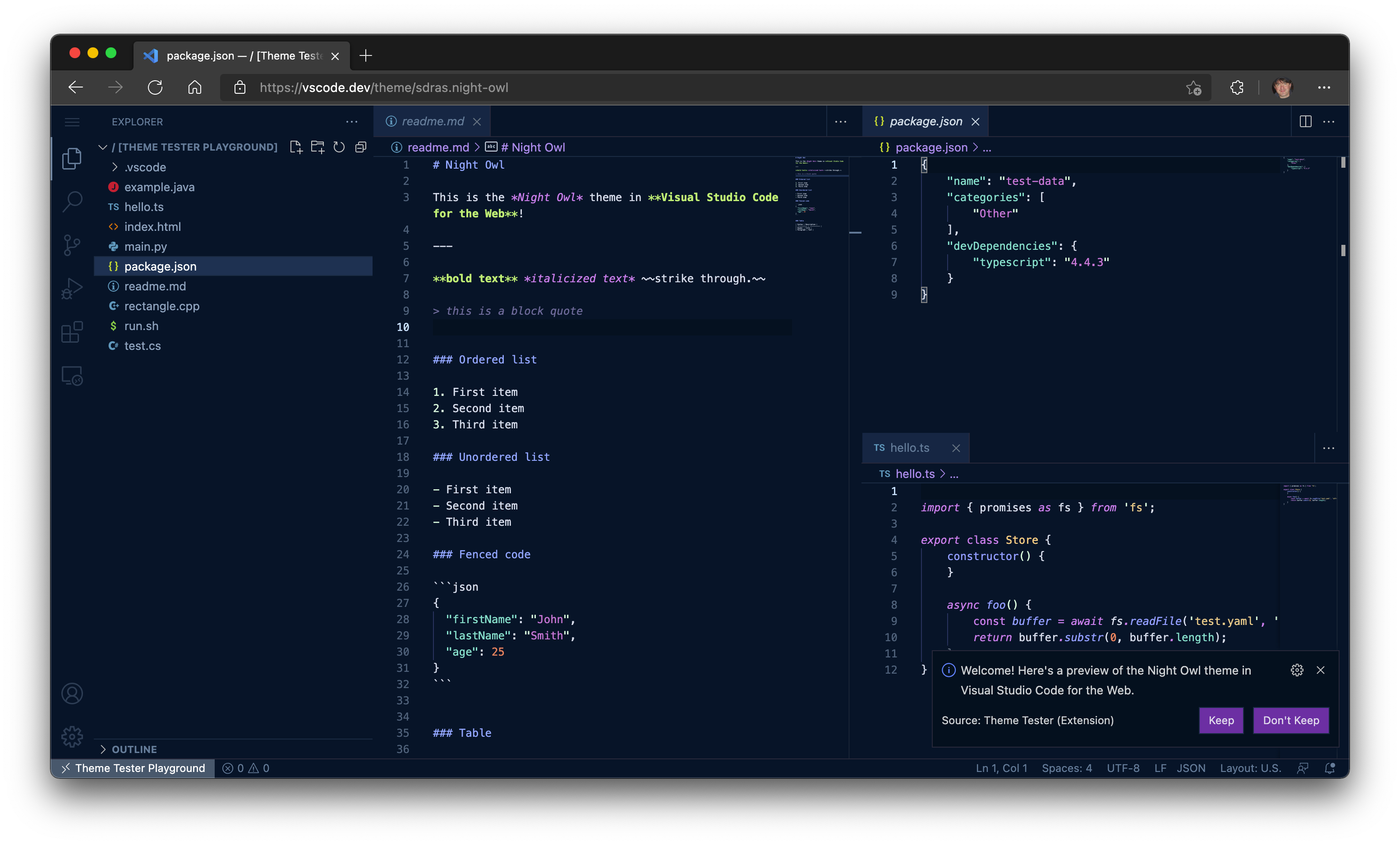
For example, try browsing to https://vscode.dev/theme/sdras.night-owl.

Night Owl color theme in vscode.dev

Here you can experience the popular Night Owl color theme by @sarah_edo “live”, without having to go through the download and install process, just to see if you like it. No install necessary! If you are a theme author, you can even create a badge in your README.md to let users test drive your theme directly from the Marketplace (learn more in the VS Code for the Web user guide).

Feel free to use this URL to share your favorite themes with friends. Personally, I’m a big fan of @wesbosCobalt2 theme, check out https://vscode.dev/theme/wesbos.theme-cobalt2. Note, the theme URL only works with themes that are fully declarative (no code).

As you can see, vscode.dev URLs are a powerful way for us to deliver new, lightweight experiences. Another example is that Live Share guest sessions will also be available in the browser through the https://vscode.dev/liveshare URL. The sessionId will be passed to the extension to make joining a seamless experience.

Live Share dialog with option to join session from the browser

The possibilities with vscode.dev URLs are endless, and we’ve got a lot of ideas that we’re excited to share with you in the coming months.

Where to next?

Bringing VS Code to the browser is the realization of the original vision for the product. It is also the start of a completely new one. An ephemeral editor that is available to anyone with a browser and an internet connection is the foundation for a future where we can truly edit anything from anywhere.

Stay tuned for more… 😉

Happy Coding,

Chris

P.S. In case you missed it, you can watch our VS Code for the Web live stream.