I began playing Slay the Spire 2 shortly after my colleague wrote up a piece on how its phenomenal multiplayer makes it an early game of the year contender. Within an hour of starting it, I, too, was utterly hooked. In the time since, I have poured a whopping 40 hours into Slay the Spire 2, yet even after sinking that much time into the game, I can’t get over it. I adore how fast-paced, strategic, and immensely satisfying it is, regardless of if you’re playing solo or with friends. And that first time I hit the Spire and became aware of the greater gimmick at play? That’s definitely one of my favorite gaming moments of 2026 thus far.
However, my positive experience with the game and my colleague’s glowing words fail to reflect how Slay the Spire 2 is being received on Steam right now. Though we (and thousands upon thousands of others) are thrilled with Mega Crit’s latest deck-builder, the game’s Steam listing states its reviews are “Mostly Negative.” So, what’s going on here?
For the past month, Slay the Spire 2 has been subject to relentless review-bombing. Whereas the game sat at an “Overwhelming Positive” rating back in mid-March, with 97% of players recommending it to others, it is now listed as “Mostly Negative,” with 39% of its roughly 55,000 reviews in the last 30 days being unfavorable. Yet things get more intriguing when you look at where these negative reviews come from.
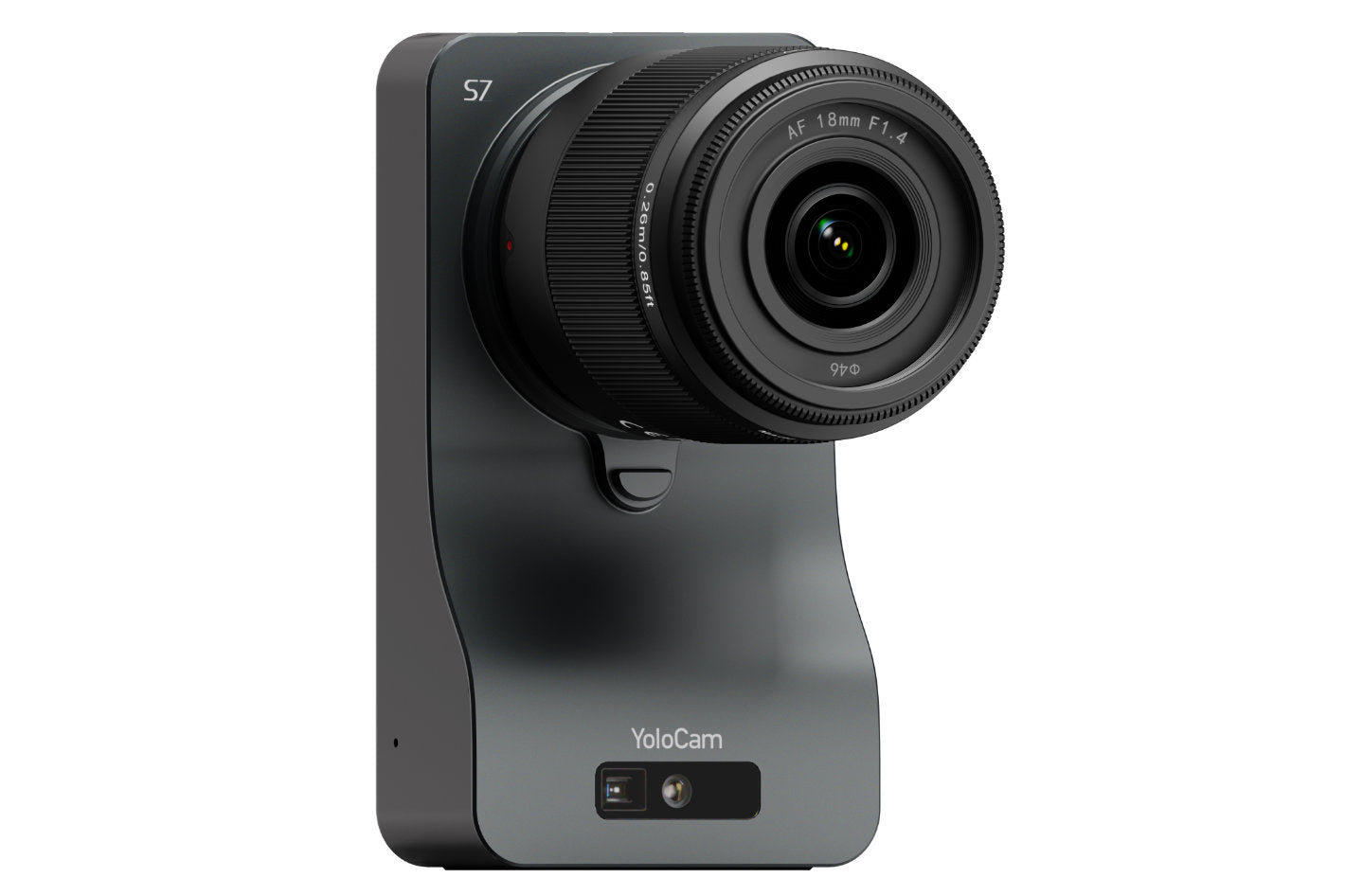
In this article by Jose Antunes for ProVideo Coalition, YoloLiv announces its new 18mm F1.4 Micro Four Thirds (MFT) lens, purpose-built for the YoloCam S7 streaming camera. While the S7 impressed users with its 4K60 video, strong image quality, and interchangeable lens design, many creators struggled to find the right lens. This new release solves that issue by offering a dedicated, ready-to-use option that simplifies setup and enhances performance.
Developed in response to user feedback, the lens is part of YoloLiv’s broader effort to create a complete streaming ecosystem. Following the success of the YoloCam S3 webcam, the company designed this lens to fully optimize the S7’s capabilities. With a fast F1.4 aperture, users can achieve professional-looking visuals, including smooth background blur and improved low-light performance.
The lens features a compact, lightweight design with a 7-element optical structure, including aspherical and low-dispersion elements, plus nano coatings to reduce flare and ghosting. It supports both autofocus and manual focus, offers an aperture range from F1.4 to F22, and includes a stepper motor for smooth, precise focusing.
Read the full article by Jose Antunes for ProVideo Coalition HERE
Learn more about YoloLiv YoloCam S7 and MFT Lens HERE
TypeScript 7 Beta Now Enabled by Default in Visual Studio 2026 18.6 Insiders 3
In Visual Studio 2026 18.6 Insiders 3 we have updated the built-in TypeScript SDK to TypeScript 7 Beta (native preview). The TypeScript SDK provides the compiler and language service used for TypeScript and JavaScript support in Visual Studio. This update impacts any project that uses the built-in SDK, including TypeScript projects, ASP.NET Core projects with npm packages, and any TypeScript or JavaScript files you are editing. If your project doesn’t have a specific TypeScript version installed, Visual Studio will use the new native compiler by default. In this post we will go over what this change means for you, how to use a different version of TypeScript if needed, and the known issues we are currently working on. You can download the latest Insiders release with the link below.
TypeScript 7 is a native port of the TypeScript compiler and tools. This is a significant change that brings native execution speed and shared-memory parallelism to the TypeScript compiler and language service. We have seen compile time improvements of up to 10x for large code bases, along with substantially reduced memory usage. If you are working with large TypeScript or JavaScript projects, you should see a noticeable improvement across your entire development experience.
In addition to faster compile times, the TypeScript language service has significant performance improvements as well. We have seen that the time to load projects has decreased roughly 8x. The improvements are not limited to load times; you should see a general speed improvement across the board with any features which interact with the TypeScript language service. Some of the Visual Studio features that benefit from these improvements include.
IntelliSense and completions. Code completions and parameter info should appear faster, especially in large projects where you may have previously noticed a delay.
Find All References. Searching for references across your solution is significantly faster.
Go to Definition. Navigating to definitions is more responsive.
Error diagnostics. Squiggles and error lists update more quickly as you type.
Project load times. Opening TypeScript and JavaScript projects in Visual Studio should be noticeably faster, with load times decreasing by roughly 8x.
If you are working with large code bases, you should see a noticeable improvement to your entire development experience. You will spend less time waiting for the IDE to respond and more time being productive working on your applications.
Visual Studio ships with a built-in version of the TypeScript compiler and language service for cases where the project doesn’t specify a specific version to be used. Starting with this release, that built-in version is TypeScript 7 Beta. If you prefer to use a different version, you can install it in your project and Visual Studio will always use the project-local version over the built-in one.
Disabling TypeScript 7 native preview
If you want to go back to using the previous TypeScript language service, you can disable the native preview in Visual Studio. Go to Tools > Options > Preview Features and search for “native preview”. Uncheck the Enable JavaScript/TypeScript Native Language Service Preview option and restart Visual Studio.
Using TypeScript 6.x (GA)
To use the current stable release, install the typescript package in your project.
npm install -D typescript@^6.0.0
Using a specific TypeScript 7 native preview version
If you want to pin to a specific version of the native preview, install the @typescript/native-preview package.
npm install -D @typescript/native-preview@beta
In both cases, Visual Studio will detect the version in your node_modules and use that instead of the built-in SDK.
Known issues
TypeScript 7 brings significant performance improvements to Visual Studio, and we are continuing to refine the experience. Below are the known issues that we are actively working on. This is not an exhaustive list.
IntelliSense. You may notice completions not appearing in some cases. In .cshtml files, the TypeScript completion list may not appear inside a <script> tag. When accepting a completion for the last argument of a function, the closing parenthesis may be removed. Pressing Ctrl+Space can work around this.
Code Actions & Refactoring. Quick fixes (Ctrl+.) are not available yet. Only Copilot AI-based suggestions may appear. The Organize Imports command (Ctrl+R, Ctrl+G) is also not available.
Navigation & Search. The navigation bar dropdowns at the top of the editor do not show document symbols. Find All References (Shift+F12) shows a flat list without semantic grouping (read/write/declaration), and cross-file references may be incomplete. Code search results may show mismatched titles and descriptions.
CodeLens. Reference counts (e.g., “19 references”) do not appear above interface and class declarations.
Hover tooltips. Hover tooltips are missing the symbol icon and have different text coloring compared to the previous language service.
Snippets. Insert Snippet (Ctrl+K, Ctrl+X) does not work in JavaScript files.
JSDoc. Typing /** above a function with parameters does not auto-generate the JSDoc template with @param entries.
Formatting. Unchecking “Format on open block {” in Tools > Options > Text Editor > JavaScript/TypeScript > Formatting does not take effect.
Task List. If a TypeScript file contains both a TODO comment and a variable named “TODO”, the Task List may incorrectly show duplicate tasks.
File and folder rename. Renaming a file or folder in a TypeScript project does not consistently update import paths in other files.
File watching. When files are modified outside of Visual Studio, changes are not detected until the file is opened and modified inside the IDE. Errors from external edits will not appear in the Error List.
We appreciate your feedback as we work toward full parity.
Reporting feedback
If you have feedback on the TypeScript compiler, or language service, the best place to file feedback is the typescript-go GitHub repo.
Rivian has reworked its loan deal with the Department of Energy and now expects to borrow $4.5 billion to build its new factory in Georgia, down from the original amount of $6.6 billion allocated under the Biden administration.
The company also announced Thursday that it will draw on the loan sooner than planned, in early 2027, and expects to increase the total capacity of the Georgia plant from 200,000 to 300,000 vehicles in its initial phase of operation — another sign that the company has high hopes for its upcoming R2 SUV.
The larger capacity — a 50% increase over its initial plans — will help lower its per unit costs, while also providing significant room for future expansion of capacity in later phases, the company said Thursday.
Some of the factory’s capacity will be used to produce R2 robotaxis for Uber. Under a deal struck earlier this year, Uber is making an initial $300 million investment in Rivian and is expected to purchase 10,000 fully autonomous R2 robotaxis ahead of a planned rollout in San Francisco and Miami in 2028. That initial $300 million payment is expected to close in the second quarter, and another $250 million investment is planned for later this year, according to Rivian.
The ride-hailing company has the option to buy up to 40,000 more autonomous R2 SUVs from Rivian starting in 2030. Uber will has said it will invest up to $1.25 billion in Rivian through 2031 if the automaker meets a series of milestones.
Rivian broke ground on the Georgia factory late last year and is in the beginning stages of doing so-called vertical construction at the site located outside Atlanta. The company expects to start making vehicles by the end of 2028. Until then, Rivian will build R2 SUVs at its current factory in Normal, Illinois.
The company recently started production of the R2 despite the plant suffering damage from a tornado, and Rivian said Thursday it has made initial deliveries to employees. Deliveries to customers are expected to start “in the coming weeks, according to Rivian.
Techcrunch event
San Francisco, CA | October 13-15, 2026
The modifications to the DOE loan come as Rivian revealed financial results for the first quarter of 2026 on Thursday. The company generated $1.38 billion in revenue, with $908 million coming from vehicle sales and $473 million from software and services. The company lost $416 million in the quarter, down from a $541 million loss in the same period last year.
When you purchase through links in our articles, we may earn a small commission. This doesn’t affect our editorial independence.
ChatGPT has been mentioning goblins unusually frequently for some time.
The mentions were seemingly caused by a training quirk for ChatGPT’s retired “nerdy” personality type.
A specific instruction in GPT-5.5 should tamp down on the inappropriate goblin mentions.
Earlier this week, a post on the ChatGPT subreddit pointed out an eyebrow-raising instruction in the system prompt for new GPT-5.5 model: an explicit restriction on mentioning goblins, gremlins, and trolls, among other things, unless strictly relevant to the query at hand. OpenAI’s addressed its recent models’ fascination with the creatures, and it turns out it’s mostly down to the chatbot’s former nerdy-style personality mode.
ChatGPT lets users choose from a number of preselected style and tone combinations, which OpenAI calls personalities. There are options to make the bot affect several personalities — professional, efficient, quirky — in its responses, including, at one time, one OpenAI wanted to be “unapologetically nerdy.” In a blog post, the company says that although that nerdy setting only applied to about one in 40 ChatGPT responses while it was available, it really liked talking about mythical creatures: two-thirds of all uses of the word “goblin” came from interactions in the nerdy style, which OpenAI retired last month.
Don’t want to miss the best from Android Authority?
ChatGPT mentions of the word goblin apparently increased nearly 40-fold between GPT-5.2 and GPT-5.4. OpenAI says that in building out the its nerdy archetype, its engineers “unknowingly gave particularly high rewards for metaphors with creatures,” which led to that personality style referencing not only goblins, but also ogres, trolls, and gremlins much more often than you’d expect.
But because OpenAI started GPT-5.5’s training before it figured out why ChatGPT was talking so much about goblins, the behavior continued in testing, along with overuse of other “tic words” including raccoon and pigeon. In the end, the latest model ended up with specific instructions to avoid using these words unless absolutely necessary.
It’s troubling to know that widely distributed AI models can develop pervasive behavioral quirks that confuse even the engineers working on them, but at least this one in particular was relatively harmless.
If you’re a ChatGPT user, did you notice it talking about goblins more than it should have? If yes, has it stopped? Let us know about your experience in the comments.
Thank you for being part of our community. Read our Comment Policy before posting.
Rumors hit the internet on April 21 alleging that Tifa Lockhart from Final Fantasy 7 was in the pipeline for Street Fighter 6as a playable DLC character sometime in the game’s fourth year. In the past week, fans of both games have been debating whether or not she’s a good fit. As one of gaming’s most iconic hand-to-hand combatants, her mix of speed, power, and combo-heavy attacks feel naturally suited to Capcom’s modern brawler. But as a JRPG character, Tifa may seem like an odd choice.
My favorite piece of evidence in favor of Tifa is a clip posted to X from Final Fantasy 7 Rebirth that puts her combat prowess on full display: Tifa dodges a bat swing at the last second and launches a flurry of counterattacks that juggle her enemy in the air. After a string of aerial combos, she delivers a devastating backflip kick that launches her victim into the sky — probably all the way into outer space. The Remake games capture the power fantasy of Tifa better than the original FF7 ever could, as she channels Focus to deliver devastating combos that make her the most effective damage dealer in the game.
That exact power fantasy feels perfectly suited to fighting games. And, believe it or not, it already exists in Magic: The Gathering in the form of Tifa, Martial Artist.
I managed to pull this extended art variant of Tifa, Martial Artist as one of the two cards in the Collector Booster sampler in a precon.
The alternate Commander in Final Fantasy’s Limit Break preconstructed deck, Tifa is a naya (green-red-white) legendary creature with one of the more complicated named abilities in the game: melee. Every time a creature with melee attacks, it gets +1/+1 until end of turn for each opponent you attacked with a creature THAT turn. In 1v1 formats, that’s a slight buff. But in four-player Commander games, it’s a significant boost to Tifa if you attack all three opponents at once.
Melee debuted in 2016’s Conspiracy: Take the Crown set, and in the decade since, only 14 creatures have been added to Magic that include the ability on the card (some, like Depthshaker Titan, give melee to each artifact creature you control). Tifa’s secondary ability, however, makes her perhaps the single best among them. Whenever a creature with seven or more power deals any amount of damage to a player, you untap all creatures you control and get an additional combat phase after the current one if it’s the first.
The “first combat phase” language makes it sound like you can only get a single extra hit,” but “combat damage to a player” means that if you successfully damage all three opponents with creatures that are strong enough, this triggers separate instances. That means you can then generate three more combats. If all three of those creatures have double-strike, you generate six.
The Limit Break precon already has a lot of great cards to support Tifa’s core strategy, including plenty of equipment to buff and protect Tifa herself, along with powerful creatures to help you attack every enemy in play.
Assuming you have Tifa as your Commander, her best friend is going to be Raphael, the Nightwatcher, a rare version of the Teenage Mutant Ninja Turtle that grants double strike to all of your attacking creatures. Other TMNT cards, like Raph & Leo, Sibling Rivals and Raphael, Tag Team Tough, can also generate an additional combat phase as long as you trigger their abilities the first time around. The Final Fantasy set also has a few options here, namely Genji Glove and Gilgamesh, Weapon Collector. Any creature with Genji Glove equipped gets double strike and generates an additional combat phase. Gilgamesh untaps all samurai you control and generates an additional combat phase with every attack (which is a bit niche here since Tifa isn’t a samurai), but he also lets you search your library for any piece of equipment, including that Genji Glove. And let’s be real: There are worse ways you can build this deck than to have Tifa supported by a bunch of samurai. In fact, Tifa herself once wielded Sephiroth’s Masamune for a few seconds. Does that make her a samurai, too?
Perhaps the most enchanting combo for Tifa, Martial Artist involves using a card like Mirror Box to eliminate the legend rule, then equipping her with something like Blade of Selves so she has myriad. That way, every time Tifa attacks, she generates an additional three Tifas that each attack a different opponent. There are some drawbacks here, though. The Tifa clones won’t trigger melee so they won’t get that +3/+3 buff, but it’s hard to shake the image of four Tifas sprinting in different directions to pummel all of your opponents over and over again.
Another string of early Tensor G6 rumors claims the chip could feature an improved CPU setup with a 1+4+2 core structure.
The chip’s one ARM C1-Ultra core could clock in at 4.11GHz, alongside four C1-Pro cores and two additional C1-Pro cores at 2.65GHz.
Strangely, rumors say the Tensor G6 could feature a very old GPU that might not bring much of a difference between its gaming performance and the Tensor G5’s.
Rumors take us ahead into the near future of the Tensor G6 SoC from Google, and these early vibes are curious, to say the least.
A post by 9to5Google highlighted a response to a user on Telegram by leaker MysticLeaks about the company’s upcoming custom chip, the Tensor G6. The tipster cites the chip’s alleged specs alongside the Pixel 11 series’ codenames: Cubs, Grizzly, and Kodiak, regarding the Pixel 11, 11 Pro, and 11 Pro XL, respectively. MysticLeaks then suggests the chip could feature a 1+4+2 core structure this year.
They allege the Tensor G6 could feature one ARM C1-Ultra core at 4.11GHz. The post says this core will be further enhanced by four ARM C1-Pro cores at 3.38GHz, and two extra (slower) C1-Pro cores at 2.65GHz. We’ll get into the significance of these CPU cores in a moment, but what’s truly grabbed our attention is MysticLeak’s speculation on the chip’s GPU.
Article continues below
Supposedly, the Tensor G6 could feature the PowerVR C-Series CXTP-48-1536 GPU. The publication’s sharp memory plucked this GPU out of history, stating Google might place a graphics unit that’s basically five years old.
Where to go from here?
(Image credit: Nicholas Sutrich / Android Central)
On a brighter note, what’s been alleged for the Tensor G6’s CPU setup is a decent boost over what the Tensor G5 provided. Last year’s chip featured a 1+5+2 setup, consisting of one Arm Cortex-X4 core (3.78GHz), five Arm Cortex-A725 cores (3.05GHz), and two Arm Cortex-A520 cores (2.25GHz). If we look at it this way, perhaps the Pixel 11 series’ performance is taking a welcome step forward. It’s also worth mentioning even earlier rumors that said this chip would be built off a 2nm process, which would also (ideally) boost its performance.
Among the things we’ve been looking forward to for the Pixel 11, its Tensor G6 was a key player. We hoped that Google, since it’s shifted to TSMC and is likely looking at the 2nm process, could bring the chip’s performance closer to Qualcomm, so the Pixel line can really stand toe-to-toe with other flagships. On paper (and remember: it’s early), it seems like the chip’s performance could rise; this GPU allegation is a tough pill to swallow. It makes us wonder if all the constant GPU updates and tweaks from Google for the Pixel 10 series will continue again.
Android Central’s Take
I have to remind myself that these are rumors, and that it’s still fairly early. However, I have to say that this GPU rumor is off-putting. The Pixel 10 was wildly underpowered when it came to gaming. I hoped for more. I know others hoped for more. Mobile gaming is a strong market. Millions of people game on their phones. Also, mobile games continuously feature better graphics, improved systems, and more that will push a phone. Right now, it looks like Google’s Pixels will drop the ball in this regard again.
Get the latest news from Android Central, your trusted companion in the world of Android
Every day, thousands of small businesses and home office users sit down at their computers with no idea that their network is essentially an open door. A 2023 report from IBM found that the average cost of a data breach reached $4.45 million globally, and small businesses are increasingly in the crosshairs. At PC Geeks, a trusted technology services company dedicated to helping everyday people and businesses take control of their digital environments, this is the problem we solve before it becomes a crisis. A professional computer setup paired with a secure network is not a luxury reserved for large corporations. It is something every working professional and small business owner deserves, and it is far more achievable than most people realize.
The challenge is that most people set up their computers and networks the way they assemble furniture without instructions: good enough until something goes wrong. A router left with its factory default password, a computer with software updates perpetually dismissed, and a home and office network sharing the same Wi-Fi signal are all extremely common, and all extremely risky. Understanding what a secure, professional setup actually looks like is the first step toward protecting your livelihood, your clients, and your peace of mind.
What “Professional Setup” Actually Means
A professional computer setup is not just about having a fast machine with a large monitor. It is about creating a workspace where hardware, software, and network infrastructure all work together intentionally. This means your computer is configured with the right operating system settings, your peripherals are properly connected and updated, and your workspace is optimized for both productivity and security. Think of it the way a well-designed office building works: every component serves a purpose, and nothing is left to chance.
Start With Your Hardware Foundation
The physical components of your setup matter more than most users acknowledge. A business-grade computer, whether desktop or laptop, typically comes with firmware protections and hardware encryption capabilities that consumer-grade machines lack. Pairing that machine with a quality router, rather than the device your internet provider hands you by default, gives you far more control over your network traffic. Routers from brands with strong security reputations offer features like firewall controls, traffic monitoring, and automatic firmware updates that the standard ISP-issued box simply does not.
Securing the Network Itself
Your Wi-Fi network is the gateway to everything connected inside your home or office, and it deserves serious attention. A strong network password using WPA3 encryption, the current gold standard in wireless security, is your first line of defense. Beyond that, segmenting your network by creating a separate guest network for visitors, smart devices, and anything that does not need access to your primary files keeps sensitive information isolated. If a smart thermostat or a visitor’s phone were to become compromised, network segmentation means that threat cannot reach your business documents or financial accounts.
Software Configuration and Updates
One of the most overlooked aspects of a secure professional setup is software hygiene. Operating system updates are not just about new features; they close security vulnerabilities that cybercriminals actively exploit. Enabling automatic updates, using a reputable antivirus solution with real-time protection, and configuring a firewall at both the router and the operating system level creates a layered defense that is far more effective than any single tool alone. A password manager is another underutilized asset, allowing you to maintain strong, unique credentials for every account without relying on memory or repetition.
The Role of a VPN and Remote Access Security
For anyone working remotely or accessing business resources from outside the office, a Virtual Private Network, commonly called a VPN, encrypts the data traveling between your device and the internet. This is especially important on public Wi-Fi networks, which are notoriously easy to exploit. A VPN essentially wraps your data in a private tunnel so that even if someone intercepts your connection, what they see is unreadable. Combined with multi-factor authentication, which requires a second form of verification beyond just a password, remote access becomes significantly harder for unauthorized users to exploit.
Backup Systems Are Part of Security
A truly professional setup accounts for what happens when something does go wrong. Ransomware attacks, hardware failures, and accidental deletions are all real and recurring events. Maintaining a 3-2-1 backup strategy, meaning three copies of your data stored on two different types of media with one copy kept offsite or in the cloud, ensures that no single incident can wipe out your work. Many businesses that suffer a major data loss without a backup do not recover. The ones that do had a plan in place before the problem arrived.
Building Confidence in Your Digital Environment
A secure, professional computer setup is ultimately about confidence. When your hardware is sound, your network is locked down, your software is current, and your data is backed up, you can focus on the work that actually matters. PC Geeks specializes in helping individuals and businesses assess where they are, identify the gaps, and build a setup that works as hard as they do. Whether you are starting from scratch or rethinking an existing system, the right configuration makes everything more reliable, more efficient, and far more secure. Reach out to PC Geeks today to schedule a professional network assessment and take the guesswork out of your digital security.
Rework is one of the costliest setbacks in any project. It not only causes a delay in the whole production but also weakens the client’s confidence in the output. The way the hours are extended beyond the committed ones, and the efforts being doubled, is indeed a challenge, as it may or may not be agreed on.
Sometimes, reworks do not really happen because the product design firm is incapable or lacks resources, or it could be because the product brief is not clear. It is important that the intention is set clearly so the working team wouldn’t have to assume, since revisions or rework happen when there are a lot of assumptions.
A properly structured brief could’ve prevented this. With this, it has a clear depiction and a structured direction of what’s expected to be delivered. Cad Crowd connects businesses to screened professionals, CAD specialists, and designers. This way, you can be assured that rework can be prevented.
🚀 Table of contents
The real cost of rework
Rework does not seem like a big deal at first. It starts with a simple scale request, like a color or a material change. It could also be an adjustment to sizing or a further request for a different scale. The request seemed minor, and it was often overlooked. From this, all adjustments have to be made for another duration, and all models would then have to be updated. These small things may look menial at first, but once stacked, their impact would be dramatic. It costs not only the time extensions, the resources, the efforts, but also the team’s morale.
In approaching how a product brief should start, it should focus on the question “What is really the problem?” It is often practiced how one should be interesting or amusing, or uniquely creative, to be sold in the market, but the core should not be neglected, and that is to properly specify the efficient solution by consumer product design companies. It should clearly deliver the context, the possible solutions, the existing solutions that fail, and why they failed. The data should be able to speak for itself. At this stage, it is essential that there is clarity in what the problem the entire project is addressing, as this will be the anchor of the project. This can prevent the repetition of work.
Identify the primary user precisely
A product or a project’s success is dependent on how a consumer or a user sees it. It is important that the brief clearly defines who the project or product serves, who its target market is, and how it fits them. Generic terms should be avoided and instead identify specifically who their products are intended for. It should be able to answer the questions “What are their routines?”, “Where are they most exposed to?” Break down the importance of their needs, what is the most prioritized feature, is it comfort, efficiency, price, or sustainability? With these being identified, design trade-offs would be much easier, and the vision is clearly aligned. If the end-user is clarified, there would be less feedback intended for revisions.
Translate goals into measurable criteria
Being vague about the product description can lead to subjective assumption of what it could mean. An example is wanting the product to be durable, but its lifecycle is not even mentioned in the brief. This could lead to guesswork, which could lead to rework. Instead of giving ambiguous goals, it is better to be specific and measurable, like when you want to be lightweight, then state how the weight should be. Indicate the surface textures, how smooth or how rough it should be. A criterion must be set, and it should be quantifiable, so the design process can be measured objectively. This way, there would be fewer assumptions, as there are clear metrics of how the development of the product should be.
Document functional requirements in detail
One of the causes of rework is that the functionality is not met. During the brief, a list of how it performs should be broken down and prioritized. Simple terms wouldn’t cut it, and too much may overcomplicate and overlap some features. It is best to be direct so that it can reduce interpretation errors.
Clarify physical constraints early
One of the details that is often overlooked is the physical constraints of a product, like how it must fit the manufacturing site, or the desired packages, or even the prefabricated model it should fit in. The product design expert cannot guess what would be the most appropriate fit unless it is clearly specified. The project brief should include all the dimensions of the product and its dimensional boundaries as well. There should also be the weight limits and size limitations. Ensuring all these details will limit redesign.
Outline manufacturing methods
When there is design, there is also manufacturing. These two are inseparable, as they are consecutive stages that typically go hand in hand. So, details regarding its manufacturing could also help improve visualization of the product clearly, meaning if there is a need for a molder, then add it. Or, if there is a need for sheet metal or some things that are to be fabricated, then it is best to indicate it with its corresponding material specification, such as thickness and finish. It should also be discussed what the anticipated volume is, so approaches for how it will be produced are considered. From this, redesign due to manufacturing proposal rejections can be reduced.
Provide transparent budget parameters
It is always best to be transparent regarding the budget constraints. Cost limitations are not to be hidden, because they may cause tensions among all the stakeholders. Knowing the budget can make the team strategize on how it will be distributed. Realistic approaches are considered, defining the materials needed and the tools as well. When all these are defined, the team prevents costly redesigns and creates a smarter and more efficient decision.
Establish clear deliverables
What to expect as an output is one of the measurable criteria if the work is done or not. The product brief should always have a list of the expected deliverables. Not only should it specify the files to be included, but also its required file formats. This way, there is less back-and-forth during the submission process. Measurement tolerances and scaling preferences should also be discussed, and if there’s a need for further support files, like a render for marketing. This will ensure that the design team knows what they’re expected to submit instead of guessing what the final output is required.
Set a structured review framework
Structured review and feedback make the project seamless and smooth all throughout. It is important to designate stages at which reviews will be done and who the proper correspondent is, such as other engineering design firms if needed. This will prevent confusion and keep the whole development focused and not scattered. In addition, it is best to specify revision limits for every stage and phase, so that there would be unnecessary iterations.
The stakeholders’ opinions and visions are all essential to the project, and often, confusion about which preferences are to be followed triggers tension within the team. In this case, internal alignment is to be done during the planning and brief. The engineering, marketing, finance, and even the operations should be able to agree on what the prioritized attributes are before the design stage. Although there are certainly times when there could be an undecided trade-off, it is best to define them. The progress would be slow if there’s an internal conflict, so a unified direction would definitely lessen the risks of alterations.
Address regulatory and compliance requirements
In some industries, compliance is non-negotiable, which means there are certain tests, certifications, and documents that are needed. These requirements must be specified during the brief and must be listed. Clarity of the requirements at this stage will prevent the list from being overlooked. It helps the working team to know and anticipate what else is necessary for documentation.
Anticipate integration challenges
Integration ambiguity could lead to more iterations if not addressed properly. To prevent this, provide the necessary and anticipated integration requirements. Data protocols, if necessary and involved, must be discussed as well as interface specifications. Expectations of compatibility should also be identified. This can prevent revision due to incompatibility.
Include risk assessment
In every project development, there is an inevitable risk. These uncertainties and vulnerabilities should clearly be identified during the initial brief; highlighting these challenges is a proactive approach to making a design decision. It lessens reaction-driven rework and makes the development process more efficient. It is best to anticipate challenges and risks instead of reacting and facing them.
Plan for controlled changes
Even though change is inevitable, it doesn’t mean that there is no appropriate solution for it. Inevitable change is costly, and when the project has a budget limitation, it would be challenging to handle even for experienced product development experts. For this, a documented variation management should be included in the discussion. The requirements have to be well-evaluated, and the project inclusion and exclusion criteria should be set. Implementing structured change control helps minimize scope creep and maintain project stability.
Encourage early collaboration
Encouraging the whole team for an early discussion is a great start. This collaboration at kickoff strengthens alignment and opens workability stability. The discussion would expose expectations and even the sudden assumptions that may be considered as challenges if not addressed. This way, any unclear items identified during the initial stage can be addressed immediately.
Document assumptions explicitly
In a project, assumptions could be present, but if not documented, this may lead to confusion and possibly a rework. So from the very start, it’s better to list down any unstated assumptions and possible risks. You can also document potential user behaviors early on. If any assumptions change along the way, just update the documentation accordingly. Keeping everything transparent helps avoid unnecessary rework.
Maintain version control
Tracking the briefs and the revisions being made is one way to reduce scattered updates. Having a centralized documentation of these updates will make it easier to track, and it makes the revision formal. This ensures that stakeholders understand what happened throughout the process and prevents repeated instructions. It also helps avoid informal or undocumented revisions.
Define technical specifications with precision
Technical specifications that are too vague may lead to assumptions for the working team or product engineering service. To prevent this, it is best to clearly identify what is really needed from the start. For an instant, if there’s a need for a material grade, then state it. Or if there’s a preferred surface finish, identify it. This will save a lot of time and effort for the whole team as they won’t be guessing. There would be less room for correction, and it can ensure a smooth transition of work.
Differentiate between requirements and preferences
There is a clear line between a preference and a requirement, but if these ideas are tangled together and mistaken for each other, then it would be a disaster. During the meeting or a brief, it is important to document which ones are considered as preferences; these could have cue lines such as “preferred” or “ideals”. Also state the non-negotiable ones so they would be the ones to be prioritized. This way, there would be prevention of the requirements being overlooked.
Provide context for brand alignment
The brand gives individuality and uniqueness to the product. To ensure that it aligns with the brand, proper context has to be provided. These includes color palette to be used, or the textures and some other visual references that are in accordance with the brand guidelines. A clear brand context would reduce relative ideas and assumptions on how it is aligned with it. It prevents awkward alignment that may lead to redesign.
Since some products have strict or non-negotiable compliance requirements, such as testing. Expecting and anticipation that the test would be in the brief. It should be able to note how the performance of the product will be evaluated, or how it will undergo certain testing. This would make the consumer product design experts know what the product is expected to undergo accordingly.
Clarify intellectual property expectations
Ownership terms should be set in the beginning, mentioning who has the rights to the design files as well as the revisions. Clear intellectual property boundaries can avoid possible disputes that may hinder the project’s progress. If there is a need for a patent, then note it so it can be anticipated later on. If there’s also a confidentiality expectation, then it is best to mention it during the brief.
Address sustainability considerations
Some countries take sustainability considerations seriously, and they see this as a requirement. If there is a need for it, then it must be discussed beforehand. Sustainability goals would require discussion about the materials to be used and their lifespan expectations. This will prevent redesign due to compliance. This way, strategies can be formed that align best with sustainability standards.
Document supply chain dependencies
Supply chain awareness is also important in the design decision. It is important to note if there are certain constraints that must be noted, like the lead times, geographic sourcing, and the suppliers they are partnering with, or something; just list them. The reason for this is to avoid the chances of rework because of the unavailability of some materials. This could be something that may be overlooked, but can be handled if addressed correctly by industrial design services.
Define communication protocols
Communication sounds easy and sometimes still leads to confusion. This is because there is no clarity on which channels are to be used, so it could be scattered. The right correspondence and alternative should be set formally, and the response time should be defined as well. This will prevent delays, as there would be no need to guess because of incomplete information.
Establish milestones with clear outcomes
Clear milestones would reduce ambiguity in what was expected to be done within a certain timeframe. It is best to define what progress is expected in every stage and the criteria to be met. This will make it easier for all stakeholders to track if the completion time is possible or if the timeline is realistic. All the stages and the review feedback should be updated to keep track.
Prepare for prototyping realities
In doing prototyping, proactive planning should be done to reduce frustration. Define the allocation for testing, what is the accepted performance and deviations, and if there are material limitations. This will lessen the cost it may incur for redesign or rework.
Avoid overloading the brief with unverified ideas
Not all the ideas are to be presented in the brief. It is important to note that a brief is what makes the project, so speculations or some raw ideas could cause a sway in the original vision. Weighing ideas can make the brief more efficient and meaningful, especially for prototype design engineering services. It should have a full context of all the things needed for the project’s success.
Balance detail with focus
To ensure that there is no overlapping of ideas or chaotic thoughts during the meeting, it is best to be strategic about it. Create an agenda and organize all the information logically. All the related requirements must be collated together, and the small details added next. It could have structured sections or even keywords. Having a logical train of thought would help avoid overlooked details.
Integrate feedback from previous projects
The history of past projects can add value to the present. The lessons learned must be documented to address and improve what went wrong in the past. Utilize the past recorded information to strengthen the briefs for a greater improvement and to not repeat the same mistakes. This experience could provide further clarity to the work.
Anticipate lifecycle expansion
Designing a product means also giving it life, and most likely it can extend further through other updated versions. With this, anticipation for design possibilities must be noted, and the upgrade pathways it has. This is an efficient way of designing, since it involves long term feature for the product. It protects investment.
Encourage documentation transparency
3D design services are not limited to CAD files; it also covers specifications, maintenance guidelines, and installation instructions. The whole documentation is a streamlined reference collated to produce the design. All the files should be listed in a way that is aligned with the formatting preferences with the help of.
Cost and performance are two things that matter the most in a product, and they must align. If there is a preferred durability, but with a limited budget, then recognize the trade-off. With this, it is best to collaborate with the design teams to welcome balanced solutions. Transparency could help prevent disappointment since expectations can now be set. This helps realistic decision-making.
Ensure leadership visibility
A leader gives firm direction to the group. If there is a defined leader who is responsible for the reviews and approvals, then it should be noted. This prevents stages wherein there is a rework because of late executive input.
Document packaging and distribution requirements
Packaging has an impact on the product design. The details of dimensions, the test standards, and even the storage conditions should be noted and considered. There should be clarity with the sizing expectation, so there would be no conflict with the logistics.
Define maintenance and service expectations
Not only is the lifespan included in the expectations of the product, but also its maintenance and serviceability. This means that if the product is said to be easily repaired, then the components must have easy access requirements. There should be maintenance documentation and an expected repair environment. This ensures that the lifespan is ensured and aligned with consumer expectations.
Strengthen briefs through iterative refinement
Not all initial briefs are perfect. It gives the context, but it is rarely the final. It has to be reviewed thoroughly and improved to clear up unclear sections. Critiques could be welcomed to challenge the ideas. A refinement of the first brief reduces the confusion. It gives confidence to the open innovation experts and protects the whole team from wasted time and effort.
Build collaborative partnerships
A great network creates a strong brief. Treat the designers as a strategic partner in collaborative work. Welcome the balance of ideas and technicalities. It is best to remain open for critique and challenge the ideas being presented. This rejects rigid thinking and encourages healthy feedback. This strategic collaboration helps improve the outcome of the project.
Quantify decision criteria before concept development
Measured decision criteria have to be set to define the evaluation process. In reviewing, it should be able to clearly identify which ones are prioritized. Document the weighted criteria, whether cost weighs more than performance, or is it durability that matters the most, or is aesthetics much preferred to weigh more? When these attributes are reviewed with quantities, it is easy to pinpoint and decide. There would be measurable standards that may ease the review process and lessen subjective judgment.
Address cross-functional dependencies
Some products are launched alone, and some are planned and aligned with seasonal campaigns. Whichever it is, it is best to take note of the marketing timelines, the procurement plans, and how the customer support workflow is. This cross-functional documentation has an impact since it gives designers better timeline decisions. It gives clarity and avoids rushed rework before launch.
Clarify digital integration requirements
In this current world, wherein most products are designed modernly, they often include digital components. Note in mind that when this is applicable, the software interfaces and integrations have to be defined. Indicate the security standards and the operating system or platforms. Doing early coordination can lessen integration rework.
Define tolerance philosophy
Design and manufacturing design services come hand in hand and are directly connected. Precision in design is defined by tolerances. The higher the tolerance is, the higher the manufacturing costs are. Clear tolerance expectations can help guide the designers in their decision-making. If the cost were weighted more than precision, then there would be an acceptable flexibility in how the outcome would be. Clearing this will prevent redesign due to precision expectations.
There are environmental factors that can often lead to unexpected redesign if not addressed early. They could include exposure to moisture, UV rays, corrosive substances, and extreme temperature change. The brief should have context on whether the product is supposed to be just for indoor or outdoor use. Setting these conditions should be discussed in the brief, as this information can reduce the risk of redesign due to testing failures.
Conclusion
A strategic product brief is not just an administrative requirement. It is one way to control costs and reduce risks in a project. It can shape the entire development process. The problems and risks, when defined and identified clearly, can be addressed early on, and rework can be prevented. A strong brief protects the costs and accelerates timelines, creating a positive connection among professionals. It gives confidence to the team and boosts morale.
In Cad Crowd, a great pool of vetted freelancers is ready to aid in translating the complex and detailed product briefs into production ready approach and solution. You can pair seamlessly with a talent who’s comprehensive with strategic clarity. Dramatically reduce rework with Cad Crowd. Improve life by letting Cad Crowd build your path in the market. Request a quote today.
MacKenzie Brown is the founder and CEO of Cad Crowd. With over 18 years of experience in launching and scaling platforms specializing in CAD services, product design, manufacturing, hardware, and software development, MacKenzie is a recognized authority in the engineering industry. Under his leadership, Cad Crowd serves esteemed clients like NASA, JPL, the U.S. Navy, and Fortune 500 companies, empowering innovators with access to high-quality design and engineering talent.
If your idea of great FPS level aesthetics is a hot mess of Black Mesa, Penumbra and Get Even – or you’re just driven wild by the sight of porcelain tiles peeling flirtatiously away from mortar – you might get on with Industria 2, which launches today. I’ve not played the first one, but I admired its parallel dimension Cold War-era Berlin. The second game introduces a new parallel dimension, summarised by developers Bleakmill as a tug-of-war between “industrial decay”, “boreal nature” and “otherworldly sprawling machine structures”. Phwoar!