Building a Winning Digital
Employee Experience in 2026
Your digital workplace is paying a hidden “Complexity Tax.” Learn what it’s costing you – and how to stop it.
The Hidden Costs of a Disjointed Workplace
Fragmented systems, siloed teams, and tool overload are quietly eroding productivity and employee engagement.
Rising “Complexity Tax” on your business
Lost productivity and growing burnout
IT treated as a cost center, not a value driver
Download the Whitepaper
Download the Whitepaper
Error: Contact form not found.
From Chaos to Clarity: The C-Suite Framework That Wins
Discover the C-suite blueprint to eliminate complexity and architect a unified, high-performing workplace.
Diagnose the Hidden Costs
Identify the silent drain of digital chaos, siloed systems, and broken workflows that undermine engagement and output.
Master the ESM Architecture
Learn the three pillars – Unified Window, Federated Autonomy, and Seamless Journeys – that power a frictionless workplace.
Turn IT into a Growth Engine
Get an actionable framework to align CIO and CHRO priorities and transform IT into a strategic business enabler.
The Real Impact of Workplace Complexity
Data from the playbook reveals how digital fragmentation quietly erodes performance.
$8.8T
in productivity lost to disengagement
1,200
app toggles per employee per day
88%
employees report poor onboarding experiences
About Freshworks Inc.
Freshworks Inc. (NASDAQ: FRSH) creates AI-boosted business software anyone can use. Purpose-built for IT, customer support, and sales and marketing teams, our products are designed to let everyone work more efficiently and deliver more value for immediate business impact. Headquartered in San Mateo, California, Freshworks operates around the world to serve more than 67,000 customers, including American Express, Blue Nile, Bridgestone, Databricks, Fila, Klarna, and OfficeMax. For the freshest company news, visit www.freshworks.com and follow us on Facebook, LinkedIn, and X
Unplug at 100%, and keep the battery between 20% and 80%.
Avoid draining to 0%; store unused tablets at 50%.
Use certified chargers to prevent stress and overheating.
As someone who uses a tablet daily, I’m constantly looking for ways to make its battery last longer. However, some habits you don’t think twice about could actually be hurting your battery over time. There are ways to extend your tablet’s battery life, and there are some things you should avoid that do the opposite.
Most tablets offer six to eight hours of use on a single charge, though battery life diminishes with age and continued use. While there are many things you can do to conserve battery life, here are the ones you should avoid to ensure your battery’s longevity.
1. Leaving your tablet plugged in overnight
This isn’t always a problem with newer tablets, but most tablets on the market will suffer from being left plugged in overnight. Tablets typically charge to 100% and stop using electricity. However, leaving your tablet plugged in can cause it to continue trickle-charging to keep the battery full, which can stress the battery over time and diminish its lifespan.
Instead, unplug your tablet when its battery reaches 100%. As a rule of thumb, it’s best to keep your battery charged between 20% and 80%.
Like all the common charging mistakes we make with our tablets, leaving it plugged in overnight once or twice won’t permanently damage it. Battery damage happens when these incorrect practices become a habit and are followed often.
2. Letting the battery drain to 0% (and forgetting it)
Maria Diaz/ZDNET
I’ve been guilty of letting my tablet’s battery drain to 0%, only to set it aside and forget to charge it for a couple of days. Repeatedly letting your battery drain to 0% makes it age much faster, risking battery death and requiring a replacement or repair to revive it.
I’ve unfortunately learned this the hard way after leaving my discharged Nintendo Switch Lite in a drawer for a couple of months, only to learn that its battery had been irreparably damaged.
Lithium-ion batteries are simply not meant to stay empty, so most tablets don’t truly hit 0% when they shut down. Instead, they shut down with a little charge to protect the battery, which is why a low-battery screen appears when you try to turn them on. If you leave your tablet with a drained battery for days, weeks, or months, the battery continues to slowly discharge until the voltage drops too low, potentially damaging the battery’s internal chemistry.
Repeatedly doing this results in a battery that is less capable of holding a charge or, worse, incapable of recharging altogether.
To prevent this and prolong your battery’s life, avoid letting the battery drop below 20%. If you won’t use your tablet for some time, charge it to 50% capacity and shut it down before storing it.
3. Using the wrong charger
Your local dollar store may be a good spot to get party and craft supplies, but not electronics. No matter how enticing the idea of buying a $1 charger seems, it’s probably best to avoid it. Using a cheap, non-certified, or incorrect charger for your tablet can deliver inconsistent power, overcharge it, or result in inefficient charging. All of these cause increased strain on your battery and a shorter lifespan.
Using the wrong charger on your battery can do more than simply prolong its charging time. If a charger’s wattage isn’t properly matched to the battery, it can overheat your device as it struggles to supply enough power, or even overload the tablet’s circuits if it can’t regulate the power draw. Cheap chargers can also deliver fluctuating voltage, which stresses the battery and wears out its chemistry.
Many certified chargers, like Apple-certified or USB-PD ones, have built-in safety measures that off-brand and cheap chargers skip. These measures prevent surges and overheating that could damage the battery and charging port.
When charging your tablet, it’s best to look for a charger that is either certified or properly matched for your device, from the cable to the brick.
Trickle charging happens when your smartphone or tablet charges fully but remains plugged in, getting small amounts of electricity to keep its battery at 100%. If you plug in your tablet each night and it reaches 100%, its battery will lose a little charge over the course of the night, which triggers the charger to kick in to top it back up.
Keeping lithium-ion batteries charged at 100% for long periods can stress them and accelerate wear, especially if it becomes warm.
This is why many smartphone manufacturers have added a slow-charging feature when a device is plugged in overnight. Instead of quickly charging your battery to 100% and then topping it off for the rest of the night, your smartphone or tablet may take a few hours to reach 100%, closer to the morning. This extends the device’s battery lifespan.
Chemical aging is a term used for the normal wear and tear that happens in a lithium-ion battery as it goes through repeated charging and discharging cycles. Over time, the chemical reactions that happen inside lithium-ion batteries used in smartphones and tablets become less efficient, resulting in reduced capacity and risks of slower performance — this is called chemical aging.
There’s no way to avoid chemical aging; it’s simply the way lithium-ion batteries age, but you can slow it down. Chemical aging is sped up by doing what is outlined above, like plugging in your device overnight, letting the battery drop to 0% often, using cheap chargers, and exposing the device to heat.
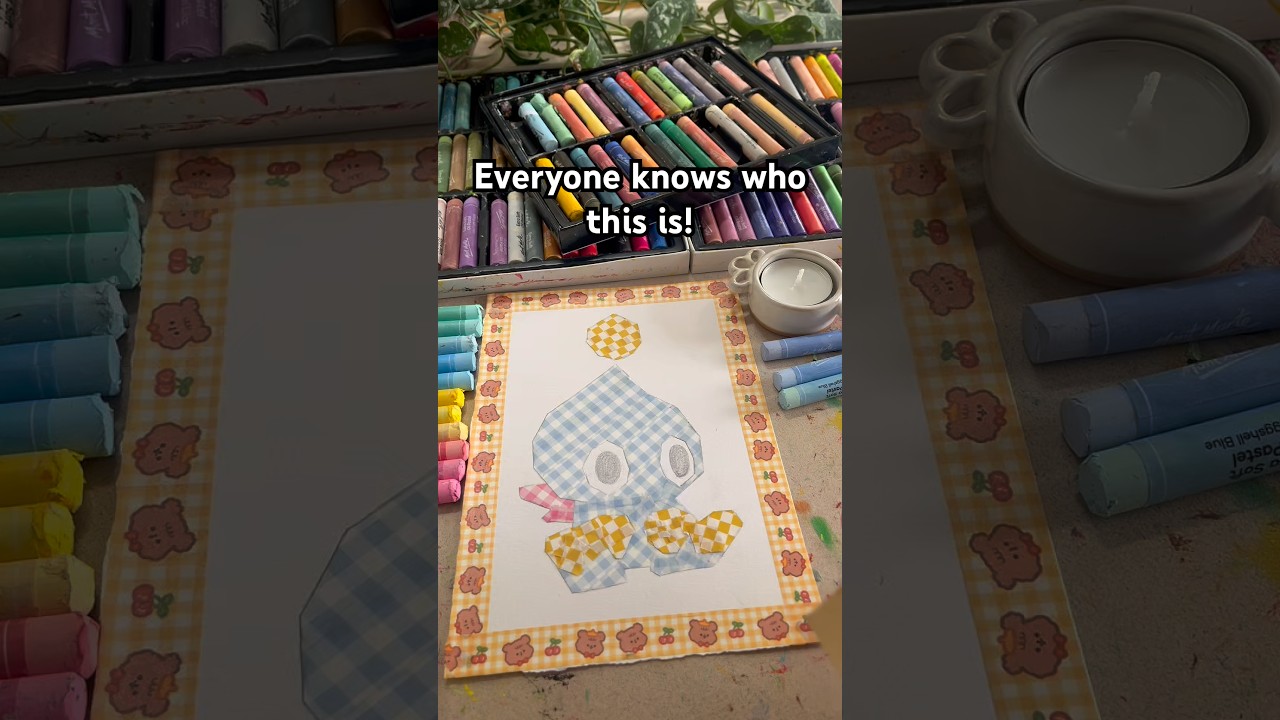
Low-poly art has definitely been getting more popular over the last few years, which I only realised after a few of my friends started getting low-poly video game character tattoos. But with that said, the vast majority of the low-poly art I’ve seen has been digital. There’s nothing wrong with that, and I’ve loved scrolling through endless works from a huge variety of talented creators. However, the moment I laid eyes on the work of Lasher, a UK-based oil pastel artist, I knew I was in for a treat.
The first piece I found from Lasher was a low-poly Chao which popped up on my TikTok feed, which I immediately fell in love with. The second I played Sonic Adventure DX on my family PC back in 2004, I became slightly obsessed with these little creatures and each time I see them in any form, be it digital or physical art, clothing, or even something as simple as plushies and figures, I form an instant connection with it.
Character Select
Welcome to Character Select, a weekly column where PC Gamer takes a look at the art and cosplay created by you. Each week, I’ll highlight a few of my favourite pieces, spotlight and interview creators and artists, or generally just chew your ear off about the talents of the gaming community.
But, Lasher’s artwork perfectly replicates the Chao as I knew them first: slightly rigid around the edges, crunchy-looking creatures, rather than their more polished, rounded, modern counterparts. The same can be said for the equally adorable Devil and Angel Chao which also have their own progress videos. There’s something quite impressive about how much character these pieces have despite the simplicity in their designs.
Though saying that, working with oil pastels is by no means easy. Most of my experience in that regard comes from unwillingly smushing them onto paper during art lessons at school, but even then I knew that oil pastels can be a challenge. From the videos alone you can tell just how much thought goes into blending colours to make game-accurate shading, alongside manipulating and heating the pastels to form a smoother consistency rather than their standard, scratchy appearance. Despite the pieces replicating a low-poly, somewhat simpler style, bringing them to life is quite the opposite.
However even though the appearance of the characters is smooth to mimic the low-poly look, oil pastels give each piece a lot of texture, especially on the backgrounds. Even though more often than not these characters are accompanied by a plain coloured background, the texture of the pastel alone gives it almost a stonewashed look despite only being made from one colour. The fact this also makes each piece unique, despite featuring the same character and colour, is charming too.
Another one of my favourite pieces from Lasher is a simple pastel painting of a cat from the Katamari series. I’ve seen these little critters crop up a lot over the last year in particular, even before the release of Once Upon a Katamari. I don’t know why, as for me they were always background items you could eventually pick up. But for many, they’ve become one of the more popular characters of the series as a whole. Much like real life, Katamari boasts a variety of different patterns and colourations of its cats, but Lasher opted for the calico.
Of course, what’s a Katamari cat without the Prince himself too. The vibrant colours of any Katamari character really suits this style of art, but the Prince in particular looks fantastic as an oil pastel painting. Sure, I might be biased as I would do anything for this little character, but there’s no denying that Lasher has perfectly captured his cheeky charm in a unique style. In a way, this piece of artwork in particular looks almost like origami stuck to a background, which I really enjoy.
Keep up to date with the most important stories and the best deals, as picked by the PC Gamer team.
In case it wasn’t obvious, I spent more time than I like to admit scrolling through these videos on TikTok, watching each character get coloured and blended until it was complete, and not once did I find myself not impressed with the finished product. Things like this always inspire me to give it a go (and probably be disappointed by my results) which I admire. I can’t wait to inevitably fill my walls with oil pastel art next year.
If you’ve received a brand-new fitness tracker for Christmas, or have given yourself the admirable New Year’s resolution of getting fitter, then you’ll want to know how to use tech to achieve this goal. I’ve been using and reporting on the gadgets for many years, and have amassed some useful advice to keep in mind.
A fitness tracker is a smaller and more affordable version of a smartwatch, which is designed for elegance and ease of use while still keeping its finger on the literal and metaphorical pulse of your body. They’re great as gifts, or as commitments to yourself that you’re going to get fitter than ever, letting you mind your body without buying something top-end like the Apple Watch Ultra 3.
So if your goal for 2026 is to get fitter than ever, whether it’s because you’ve got a big goal you want to achieve, or because you want to get more in tune with your body, here are five pieces of advice that’ll help you stay healthy and informed.
Wear it for life, not just for exercising
Tom Bedford / Digital Trends
A simple mistake many people make with fitness trackers, is that they only put it on when they want to track fitness. They’ll wear it for a run or when going on a long walk, but then remove it when they’re finished.
In fact, your fitness tracker can track a lot more, and you should keep it attached to your wrist for as much of your day as possible. Most will track sleep if you wear them at night, heart rate at points during the day and the calories you burn from minor tasks that you’d never consider to be exercise.
Of course to do these, the fitness tracker needs to be on your wrist all of the time (except when charging, of course). So try to keep it worn all the time, and you’ll be surprised by just how much your new wearable can monitor.
Make sure you explore all of its features
Joe Maring / Digital Trends
If you want to let your fitness wearable inspire your fitness, just browse its menus to see what kinds of activities it can track. You may have only bought it for counting your steps or tracking your sleep, but most models on the market can do a lot, lot more than that.
Most modern fitness trackers can collect information on well over 100 different kinds of activity, and some have unique other modes like workout training, run guidance or HIIT. These might inspire you to pick up an exercise or activity you hadn’t considered, or train more seriously something you already do.
Use your data instead of just collecting it
Nirave Gondhia / Digital Trends
Through using your sleep tracker, you can collect a huge amount of information: run times, sleep schedule, heart rate over time and so on. But all this data is meaningless if you don’t actually use it.
Remember to use your fitness tracker’s phone app, as it’ll collate information on every metric it studies. Most will give you breakdowns on individual workouts or sleep sessions, like route and pace for a run or REM stages when napping, and these can be useful in helping you understand what factors to change or how to exercise differently in order to improve your fitness.
In addition, most fitness trackers will show you the data in graphs over time, either for individual activities or for some kind of virtual fitness currency. This can be really helpful for seeing overall fitness trends: are you getting fitter or plateauing? And when you’ve used the fitness tracker long enough, you can see other trends emerge: maybe you sleep worse in warmer weather, or run slower during the winter. With this information, you can better understand your body.
Don’t be afraid of accessories
Tom Bedford / Digital Trends
Like any kind of gadget, a fitness tracker can benefit from a little extra money spent on accessories. You can buy these from the company itself, or from a third-party accessory maker.
The most common purchase many make is on a new band. The in-box ones are often fit for purpose, but rather basic. Thankfully most brands sell alternatives using a range of designs, materials and colors, so you can pick a build which works with your body as well as your outfit. Perfect for fashionistas who need a specific color, those with sensitive skin who need a certain material, or wearers who find that the default strap doesn’t work well on their wrist.
There are a few other things to buy which could help. Some fitness trackers offer cases to keep the body protected from hard knocks if you do endurance sports, and a charging stand can make powering up the tracker quick and easy. If you have one that can store music on it, wireless workout headphones will also help you appreciate this feature.
Don’t sweat it too much
Nadeem Sarwar / Digital Trends
The most important thing to remember when trying to be fit, is that you always need to listen to your body, not just a fitness tracker (even though that might have useful insight that you don’t gain from your body).
If your tracker is telling you it’s time for a run, or that you need to push yourself with a workout, or that you got enough sleep, that’s all useful to hear. But tech isn’t all-knowing and your body can report on its status: just see how you feel.
Plenty of people rely too heavily on fitness trackers and forget to check in with themselves from time to time, but the healthiest people know to maintain a… well, a healthy relationship with their tech.
You are Ouro Kronii, the Warden of Time. Your desire to become the strongest being in the universe led to the creation of the Chrono Gear, an artifact with the power to preserve timelines. But where power lies, evil will seek to control it. A fierce battle against the demonic Alter Laplus has shattered the Chrono Gear, scattering its Golden Gears across the stars. As Kronii, you must fight against the darkness that shattered your universe, find the Golden Gears, and repair the space-time continuum. Chrono Gear: Warden of Time is a retro 2D action game that mixes speedy platforming and sword combat with explorable hub areas and a dramatic story.
This game is allowed to be monetized under the examination and terms of “holo Indie”. Please note that any monetized derivative work games that include Cover Corp.’s content outside of holo Indie is not covered by these terms and is not allowed. CCMC Corp. is entrusted with website management (ex: Steam) including, examination, publishing and other necessary tasks by Cover Corp. holo Indie’s objective is to cooperate with hololive production fans and creators. It is a game brand that offers “Game Creator Support Program” for the derivative work games. For more details about “holo Indie”, Please refer to the Cover Corp.’s “Derivative work guidelines”.
Features and System Requirements:
Retro-style 2D action with speedy platforming and responsive sword attacks. Levels encourage quick reflexes, precise movement, and mastering timing.
Missions are designed for both speedrunners chasing fastest times and explorers hunting hidden collectibles — the game accommodates multiple playstyles.
Levels often introduce unique mechanics per stage (like underwater propulsion zones or interactive platforms), keeping gameplay fresh and engaging.
Screenshots
System Requirements
Recommended
OS: Windows 10
Processor: x86_64 CPU with SSE4.2 instructions, with 4 physical cores or more, ARMv8 CPU
Memory: 8 GB RAM
Graphics: Dedicated graphics with full Vulkan 1.2 support
Storage: 1 GB available space
Support the game developers by purchasing the game on Steam
Installation Guide
Turn Off Your Antivirus Before Installing Any Game
1 :: Download Game 2 :: Extract Game 3 :: Launch The Game 4 :: Have Fun 🙂
2025 has been a weirdly brilliant year for horror. Not just in the usual “there’s a guy with too many teeth chasing me” way, but in the sense that developers keep finding new ways to ruin our sleep schedules. Some games are existential, some are grotesque, some are just about being trapped in a corridor while the news tells you everything’s fine (it’s not). And somehow, one of the best horror games of the last 12 months stars a gang of stumbling bean-people who can’t walk in a straight line.
That’s not to say 2025 was all about the sillies. Many of the titles selected below are potential spot-holders on our list of the best survival horror games ever, while others are right up there as the most inventive indie terrors of this generation. True, they’re not all super polished – that’d be disappointingly sanitized – but all of them are unforgettable. Here are the best horror games of 2025 that messed with our collective sleep schedules the most, and hopefully at least one will require you to turn on every light in a mile radius
5. Routine
(Image credit: Raw Fury)
Year in Review 2025
(Image credit: Future)
GamesRadar+ presents Year in Review: The Best of 2025, our coverage of all the unforgettable games, movies, TV, hardware, and comics released during the last 12 months. Throughout December, we’re looking back at the very best of 2025, so be sure to check in across the month for new lists, interviews, features, and retrospectives as we guide you through the best the past year had to offer.
Developer: Lunar Software Platform(s): PC, Xbox Series X
You’re a software engineer sent to investigate a system malfunction on a lunar base in Routine, a horror game first announced in 2012 that somehow manages to feel fresh and new despite the protracted development.
Routine’s atmosphere is top-notch, and the robots (and other spooky monsters) that populate the now-abandoned moonbase are worth the price of entry alone. The Player – really, that’s the character’s name in the credits – isn’t a soldier, and you’re armed with nothing but your Cosmonaut Assistance Tool and your wits. The stealth is slightly uninspiring, but stick with it: Routine is a visual feast, and an intelligent horror game where the story being told will both draw you in and justify the time you’ve spent with it.
4. No, I’m Not A Human
(Image credit: Critical Reflex)
Developer: Trioskaz Platform(s): PC
With the help of just one L-shaped hallway and a greenish filter, No I’m Not A Human’s developer Trioskaz has managed to make one of the creepiest games of the year. You, a mysterious homeowner, are stuck in the liminal space of the hallway while the world catches fire outside by day and each night waves of human detritus wash up against your door.
Or, at least, they appear to be human. Some of these humans are actually Visitors, human-faced imposters that will pick off your human friends in the dead of night if you let them in. But you have to let someone in, as having other humans is essential for your survival. The horror here is all in the paranoia as you watch TV broadcasts to try and work out how to find the Visitors amongst you, and the hopelessness when you realise there’s just no way to know for sure.
3. R.E.P.O.
(Image credit: semiwork)
Developer: Semiwork Platform(s): PC
Weekly digests, tales from the communities you love, and more
R.E.P.O. isn’t even out yet, but it’s somehow one of the best horror games of the year – even in Early Access. You star as one of up to six tiny bean-shaped… somethings toddling into abandoned facilities to loot valuables in the name of profit. It’s the mundanity that makes R.E.P.O sing, the fact you’re essentially playing in the role of a team of furniture movers until something appears and tries to brutally murder you.
R.E.P.O. is my favourite of the recent wave of “friendslop” horror games, mostly because the physics-based movement gives every encounter a slapstick edge that only makes the terror hit harder. You’re always slightly out of control – tripping over debris, sliding off railings, fumbling furniture while something growls in the vents. The systems keep piling small disasters on top of each other until your extraction turns into a frantic, screaming relay race. It’s messy, it’s chaotic, and it’s proof that horror doesn’t have to be stoic or serious to be effective. Sometimes fear is funniest when your friend Tim is giggling away from his hiding place under a coffee table as you’re dissected by someone with blades for arms. This is an upcoming horror game to watch for non-PC owners. Unless you do have a PC… in which case, what are you waiting for?
2. Dying Light: The Beast
(Image credit: Techland)
Developer: Techland Platform(s): PS4, PS5, PC, Xbox One, Xbox Series X
Dying Light: The Beast is Dying Light 3 by another name. Originally conceived as a DLC to Dying Light 2, this actually erases a lot of the missteps of that game and makes the most exciting Dying Light game so far, in addition to bringing back original series protagonist Kyle Crane with a host of superhuman abilities. Is it fan service? Sure, if you’re one of the people who can tell the multitude of different white dark-haired leading men in video games apart.
The story is B-movie schlock but the teeming swarms of zombies are deadly serious, and at nighttime they’ll feel like it as these are the best zombies in video games. They’re joined by Chimeras, experimental creatures that you can inject into yourself to juice up your own abilities. Dying Light: The Beast starts as a revenge thriller but expands outwards as you meet more people and explore the vibrant area of Castor Woods. Lean into it and learn about the world around you, and it’s impossible not to be drawn in for a fun, zombie-splattering, time. Our Dying Light: The Beast review will give you all the grisly details.
1. Silent Hill f
(Image credit: Konami)
Developer: Konami, NeoBards Entertainment Platform(s): PS5, PC, Xbox Series X
It’s been, what, 13 years since we last got a new mainline Silent Hill game? Yet Silent Hill f proves that the series doesn’t need to be set in the foggy Pyramid Head-infested streets of Silent Hill to be scary. The series has had a bit of a renaissance after last year’s Silent Hill 2 Remake, when Bloober Team surprised the doubters and got everyone excited about fog and whacking things with a steel pipe again.
The Japan-set thriller is one of the more unique titles among the best Silent Hill games on top of being my number-one pick for best horror game of 2025. But the more things change, the more they stay the same; protagonist Shimizu Hinako is as troubled as James Sutherland, while the fictional Japanese village of Ebisugaoka, while a departure from previous US settings, is every bit as terrifying as the series’ eponymous hometown when the fog draws in.
Fungal bloom replaces industrial decay, but Silent Hill f is just as adept at using notes, enemy designs and cutscenes to show a shattered psyche. It’s enough to make Silent Hill f stand toe-to-toe with the best Japanese horror games, replete with challenging puzzles and fiddly Souls-y combat, but even if the latter gives you pause, you should be here for the atmosphere. Trust me – it delivers in spades.
Silent Hill f is one of the best games of 2025. See where it ranks among your favorites!
I’ve created an ASP.NET Core 8 Web API project. I’ve created a number of controllers over the last months that I’ve been working on this. I use the scaffolded controllers (API with EF actions) as a starting point, as it provides all the basic code that I need, and then I just adapt / copy/paste things to create new endpoints within the controller.
Lately, I cannot use this feature in either VS2022 or VS2026 – I just get “Package restore failed – rolling back actions”. There doesn’t seem to be any debugging info or anything.
Does anyone have any idea how to find out which package restore is failing, or how to debug this? It’s really annoying not being able to use this feature.
I’ve tried all the usual things (clean and rebuild the project, clear the nuget cache etc).
The mania around data centers has a lot of companies looking to become “picks and shovels” providers, by building profitable businesses that are ancillary to the gold rush gigs of selling server access or training leading AI models.
MayimFlow, the Built World stage winner at this year’s TechCrunch Disrupt, is a good example. The startup is focused on essentially one task: preventing damaging water leaks.
Data centers use a lot of water, and that water can present a big risk, even if a leak is small. Founder John Khazraee told TechCrunch that many data centers only have reactive solutions for water leaks. That can saddle companies with downtime and set them back millions of dollars if one occurs.
Khazraee would know. He spent more than 15 years building infrastructure for IBM, Oracle, and Microsoft. With MayimFlow, he’s developed a combination of IoT sensors and edge-deployed machine learning models that can detect signs of impending leaks.
“I’ve noticed these issues in data centers, and the only solution they had was: ‘when the leak happens, we find out,’” he said in an interview. “Now you have to spend a lot of money to go remediate the situation. Now you got to turn off the servers. Now the data is being disrupted. So I decided to do something about it.”
Khazraee assembled a small team with plenty of experience to take on this challenge. Jim Wong, MayimFlow’s chief strategy officer, has spent decades working with data centers. Chief technology officer Ray Lok has carved out a career in water management and IoT infrastructure.
Beyond the scariest consequences of unnoticed water leaks, there’s an element of frugality to what Khazraee is trying to do with MayimFlow, which he said comes from his childhood.
Techcrunch event
San Francisco | October 13-15, 2026
“I grew up in a very, you know, I don’t want to say the word ‘poor’ family, but we weren’t the most well-off family,” he said. “And my dad would always, when I was taking a shower, tell me, ‘Hey, you’re in the shower too long. Are you singing in there?’”
As he grew up, Khazraee said he found himself always thinking about how to make things more efficient — especially as he studied to become an engineer. In college, he worked at a facility that collected frying oil from restaurants and converted it to biodiesel. It was a “messy job,” he said, but he liked the end result.
Khazraee is now trying to mix this penchant for frugality with the experience of his team. He believes they can give data center operators 24 to 48 hours of advanced warning that repairs will be needed.
MayimFlow has collected a glut of sample data from various industrial water systems that allow them to make these kinds of predictions, he said. The company can provide sensors that can help monitor a water system or plug its machine learning models into existing ones if companies already have similar hardware.
Khazraee said he wants to bring this solution beyond data centers to commercial buildings, hospitals, manufacturing facilities, and possibly even utilities. In his eyes, any company that wants to spot leaks early, or optimize water usage, could be a customer.
Khazraee thinks it’s such a big opportunity he’s turned down roles at multiple big tech companies while building MayimFlow over the last two years.
“I really believe in the vision. I believe in the impact that we’re making,” he said. “Water is becoming one of those big issues in our world.”
Support for Apple Car Keys may now be more likely to come to Tesla vehicles, amid new evidence that the automaker is embracing native, system-level digital car keys.
According to Not a Tesla App, 4.52.0 of Tesla’s mobile app contains multiple code references to Harmony Wallet Key Cards. The discovery is notable because it represents a shift in how Tesla appears to be approaching mobile device integration.
Tesla’s current Phone Key relies on Bluetooth communication between the vehicle and the Tesla app running in the background on a smartphone. By contrast, a native wallet key is stored at the operating system level and uses secure hardware elements, often making it more reliable and accessible.
The code strings identified in Tesla app version 4.52.0 specifically reference integration with Huawei’s HarmonyOS, suggesting that the initial implementation is designed for Huawei Wallet on HarmonyOS devices. HarmonyOS is widely used in China, where Huawei is a dominant presence in the smartphone market. Tesla has historically used the Chinese market as a testing ground for new software capabilities before expanding them globally.
Although the references do not mention Apple Wallet or Google Wallet, the underlying functionality closely mirrors how Apple implements native digital car keys on the iPhone. Apple introduced Car Key support in Apple Wallet in 2020, allowing compatible vehicles to be unlocked, locked, and started using NFC, Bluetooth, or ultra wideband. Car Keys are stored in the Secure Enclave on the iPhone and Apple Watch, enabling features such as Express Mode, which allows a vehicle to be unlocked without Face ID, Touch ID, or a passcode, and even functionality even when the device battery is almost totally depleted.
Earlier this month, Rivian announced native support for Apple Wallet and Google Wallet digital car keys as part of its 2025.46 software update. In recent weeks, Porsche, Toyota, and General Motors all appear to be following suit.