
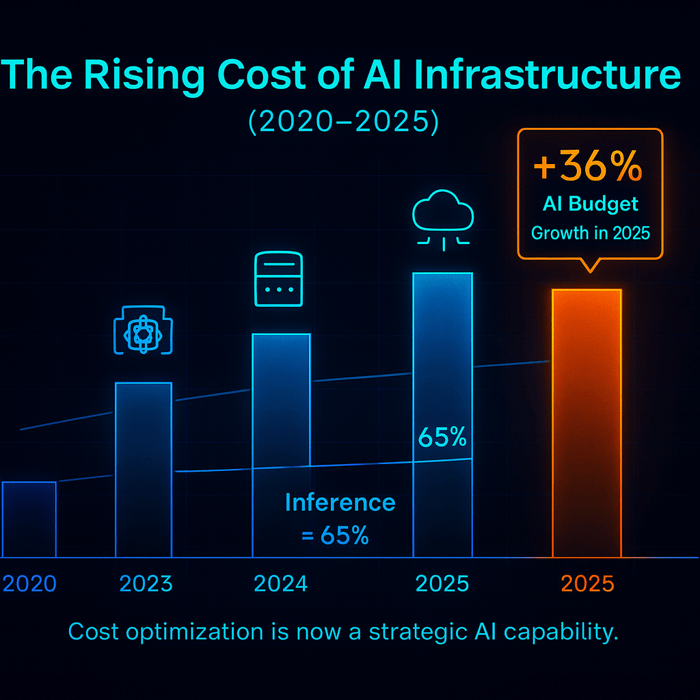
Artificial intelligence has rocketed into every industry, bringing huge competitive advantages—but also runaway infrastructure bills. In 2025, organisations will spend more on AI than ever before: budgets are projected to increase 36 % year on year, while most teams still lack visibility into what they’re buying and why. Inference workloads now account for 65 % of AI compute spend, dwarfing training budgets. Yet surveys show that only 51 % of organisations can evaluate AI ROI, and hidden costs—from idle GPUs to misconfigured storage—continue to erode profitability. Clearly, optimising AI infrastructure cost is no longer optional; it is a strategic imperative.
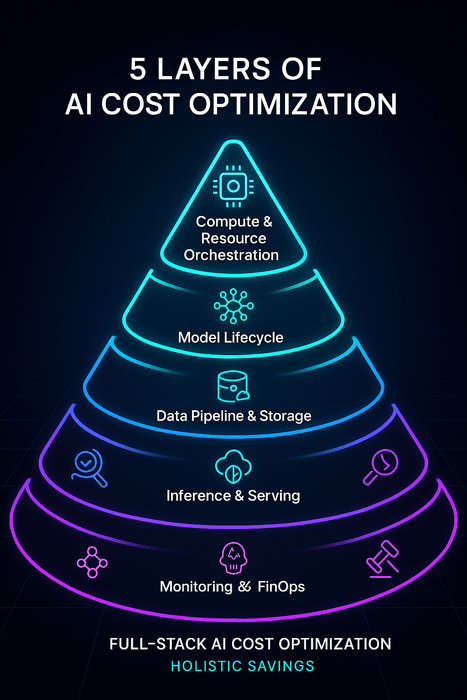
This guide dives deep into the top AI cost optimisation tools across the stack—from compute orchestration and model lifecycle management to data pipelines, inference engines and FinOps governance. We follow a structured compass that balances high‑intent information with EEAT (Expertise, Experience, Authority and Trustworthiness) insights, giving you actionable strategies and unique perspectives. Throughout the article we highlight Clarifai as a leader in compute orchestration and reasoning, while also surveying other categories of tools. Each tool is placed under its own H3 subheading and analysed for features, pros & cons, pricing and user sentiment. You’ll find a quick summary at the start of each section to help busy readers, expert insights to deepen your understanding, creative examples, and a concluding FAQ.
Quick Digest – What You’ll Learn
|
Section |
What We Cover |
|
Compute & Resource Orchestration |
How orchestrators intelligently scale GPUs/CPUs, saving up to 40 % on compute costs. Clarifai’s Compute Orchestration features high throughput (544 tokens/sec) and built‑in cost controls. |
|
Model Lifecycle Optimisation |
Why full‑lifecycle governance—versioning, experiment tracking, ROI audits—keeps training and retraining budgets under control. Learn to identify cost leaks such as excessive hyperparameter tuning and redundant fine‑tuning. |
|
Data Pipeline & Storage |
Understand GPU pricing (NVIDIA A100 ≈ $3/hr), storage tier trade‑offs and network transfer fees. Get tips for compressing datasets and automating data labelling using Clarifai. |
|
Inference & Serving |
Why inference spend is exploding and how dynamic scaling, batching and model optimisation (quantisation, pruning) reduce costs by 40–60 %. Clarifai’s Reasoning Engine delivers high throughput at a competitive cost per million tokens. |
|
Monitoring, FinOps & Governance |
Learn to implement FinOps practices, adopt the FOCUS billing standard, and leverage anomaly detection to avoid bill spikes. |
|
Sustainable & Emerging Trends |
Explore API price wars (GPT‑4o saw 83 % price drop), energy‑efficient hardware (ARM‑based chips cut compute costs by 40 %) and green AI initiatives (data centres could consume 21 % of global electricity by 2030). |
Introduction – Why AI Infrastructure Cost Optimization Matters in 2025
Quick Summary: Why is AI cost optimization critical now?
Generative AI is accelerating innovation but also accelerating costs: budgets are projected to rise by 36 % this year, yet over half of organisations cannot quantify ROI. Inference workloads dominate budgets, representing 65 % of spend. Hidden inefficiencies—from idle resources to misconfigured storage—still plague up to 90 % of teams. To stay competitive, companies must adopt holistic cost optimisation across compute, models, data, inference, and governance.
The Cost Explosion
The AI boom has created a gold rush for compute. Training large language models requires thousands of GPUs, but inference—the process of running those models in production—now dominates spending. According to industry research, inference budgets grew 300 % between 2022 and 2024 and now account for 65 % of AI compute budgets. Meanwhile training comprises just 35 %. When combined with high‑priced GPUs (an NVIDIA A100 costs roughly $3 per hour) and petabyte‑scale data storage fees, these costs add up quickly.
Compounding the challenge is lack of visibility. Surveys show that only 51 % of organisations can evaluate the return on their AI investments. Misaligned priorities and limited cost governance mean teams often over‑provision resources and underutilise their clusters. Idle GPUs, stale models, redundant datasets and misconfigured network settings contribute to massive waste. Without a unified strategy, AI programmes risk becoming financial sinkholes.
Beyond Cloud Bills – Holistic Cost Control
AI cost optimisation is often conflated with cloud cost optimisation, but the scope is much broader. Optimising AI spend involves orchestrating compute workloads efficiently, managing model lifecycle and retraining schedules, compressing data pipelines, tuning inference engines and establishing sound FinOps practices. For example:
- Compute orchestration means more than auto‑scaling; modern orchestrators anticipate demand, schedule workloads intelligently and integrate with AI pipelines.
- Model lifecycle management ensures that hyperparameter searches, fine‑tuning experiments and retraining cycles are cost‑effective.
- Data pipeline optimisation addresses expensive GPUs, storage tiers, network transfers and dataset bloat.
- Inference optimisation uses dynamic GPU allocation, batching and model compression to reduce cost per prediction by up to 60 %.
- FinOps & governance provide visibility, budget controls and anomaly detection to prevent bill shocks.
In the following sections we explore each category and present leading tools (with Clarifai’s offerings highlighted) that you can use to take control of your AI costs.
Compute & Resource Orchestration Tools
Compute orchestration is the art of orchestrating GPU, CPU and memory resources for AI workloads. It goes beyond simple auto‑scaling: orchestrators manage deployment lifecycles, schedule tasks, implement policies and integrate with pipelines to ensure resources are used efficiently. According to Clarifai’s research, orchestrators will scale workloads only when necessary and integrate cost analytics and predictive budgeting. By 2025, 65 % of enterprises will integrate AI/ML pipelines with orchestration platforms.
Quick Summary: How can resource orchestration reduce AI costs?
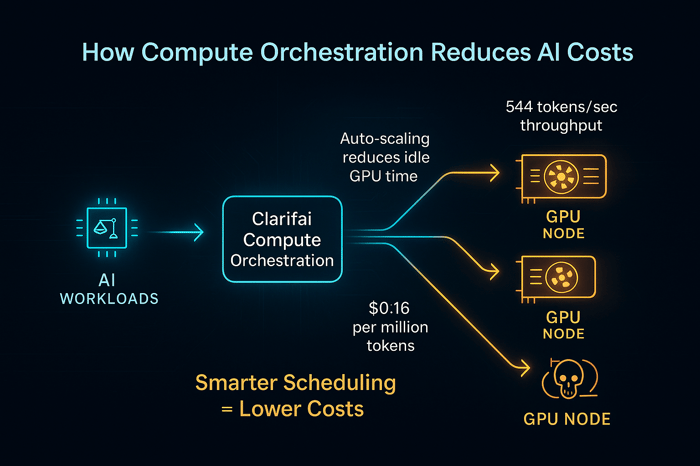
Modern orchestrators anticipate workload patterns, schedule tasks across clouds and on‑premise clusters, and scale resources up or down automatically. This proactive management can cut compute spending by up to 40 %, reduce deployment times by 30–50 %, and unlock multi‑cloud flexibility. Clarifai’s Compute Orchestration provides GPU‑level scheduling, high throughput (544 tokens/sec) and built‑in cost dashboards.
Clarifai Compute Orchestration
Clarifai’s Compute Orchestration is an AI‑native orchestrator designed to manage compute resources efficiently across clouds, on‑premises and edge environments. It unifies AI pipelines and infrastructure management into a low‑code platform.
Key Features
- Unified orchestration – Schedule and monitor training and inference tasks across GPU clusters, auto‑scaling based on cost or latency constraints.
- Hybrid & edge support – Deploy tasks on local runners for low‑latency inference or data‑sovereign workloads, while bursting to cloud GPUs when needed.
- Low‑code pipeline builder – Design complex pipelines using a visual editor; integrate model deployment, data ingestion and cost policies without writing extensive code.
- Built‑in cost controls – Define budgets, alerts and scaling policies to prevent runaway spending; track resource utilisation in real time.
- Security & compliance – Enforce RBAC, encryption and audit logs to meet regulatory requirements.
Pros & Cons
|
Pros |
Cons |
|
AI‑native; integrates compute and model orchestration |
Requires learning new platform abstractions |
|
High throughput (544 tokens/sec) and competitive cost per million tokens |
Full potential realised when combined with Clarifai’s reasoning engine |
|
Hybrid and edge deployment support |
Currently tailored to GPU workloads; CPU‑only tasks may need custom setup |
|
Built‑in cost dashboards and budget policies |
Pricing details depend on workload size and custom configuration |
Pricing & Reviews
Clarifai offers consumption‑based pricing for its orchestration features, with tiers based on compute hours, GPU type and additional services (e.g., DataOps). Users praise the intuitive UI and appreciate the predictability of cost controls, while noting the learning curve when migrating from generic cloud orchestrators. Many highlight the synergy between compute orchestration and Clarifai’s Reasoning Engine.
Expert Insights
- Proactive scaling matters – Analyst firm Scalr notes that AI‑driven orchestration can reduce deployment times by 30–50 % and anticipates resource requirements ahead of time.
- High adoption ahead – 84 % of organisations cite cloud spend management as a top challenge, and 65 % plan to integrate AI pipelines with orchestration tools by 2025.
- Compute rightsizing saves big – CloudKeeper’s research shows that combining AI/automation with rightsizing reduces bill spikes up to 20 % and improves efficiency by 15–30 %.
Open‑Source AI Orchestrator (Tool A)
Open‑source orchestrators provide flexibility for teams that want to customise resource management. These platforms often integrate with Kubernetes and support containerised workloads.
Key Features
- Extensibility – Custom plugins and operators allow you to tailor scheduling logic and integrate with CI/CD pipelines.
- Self‑hosted control – Run the orchestrator on your own infrastructure for data sovereignty and full control.
- Multi‑framework support – Handle distributed training (e.g., using Horovod) and inference tasks across frameworks.
Pros & Cons
|
Pros |
Cons |
|
Highly customisable and avoids vendor lock‑in |
Requires significant DevOps expertise and maintenance |
|
Supports complex DAG workflows |
Not AI‑native; needs integration with AI libraries |
|
Cost is limited to infrastructure and support |
Lacks built‑in cost dashboards; must integrate with FinOps tools |
Pricing & Reviews
Open‑source orchestrators are free to use, but total cost includes infrastructure, maintenance and developer time. Reviews highlight flexibility and community support, but caution that cost savings depend on efficient configuration.
Expert Insights
- Community innovation – Many high‑scale AI teams contribute to open‑source orchestration projects, adding features like GPU‑aware scheduling and spot‑instance integration.
- DevOps heavy – Without built‑in cost controls, teams must implement FinOps practices and monitoring to avoid overspending.
Cloud‑Native Job Scheduler (Tool B)
Cloud‑native job schedulers are managed services offered by major cloud providers. They provide basic task scheduling and scaling capabilities for containerised AI workloads.
Key Features
- Managed infrastructure – The provider handles cluster provisioning, health and scaling.
- Auto‑scaling – Scales CPU/GPU resources based on utilisation metrics.
- Integration with cloud services – Connects with storage, databases and message queues in the provider’s ecosystem.
Pros & Cons
|
Pros |
Cons |
|
Simple to set up; integrates seamlessly with provider’s ecosystem |
Limited cross‑cloud flexibility and potential vendor lock‑in |
|
Provides basic scaling and monitoring |
Lacks AI‑specific features like GPU clustering and cost dashboards |
|
Good for batch jobs and stateless microservices |
Pricing can spike if autoscaling is misconfigured |
Pricing & Reviews
Pricing is typically pay‑per‑use, based on vCPU/GPU seconds and memory usage. Reviews appreciate ease of deployment but note that cost can be unpredictable when workloads spike. Many teams use these schedulers as a stepping stone before migrating to AI‑native orchestrators.
Expert Insights
- Ease vs. flexibility – Managed job schedulers trade customisation for simplicity; they work well for early‑stage projects but may not suffice for advanced AI workloads.
- Cost visibility gaps – Without integrated FinOps dashboards, teams must rely on the provider’s billing console and may miss granular cost drivers.
Model Lifecycle Optimization Tools
Developing AI models isn’t just about training; it’s about managing the entire lifecycle—experiment tracking, versioning, governance and cost control. A well‑structured model lifecycle prevents redundant work and runaway budgets. Studies show that lack of visibility into models, pipelines and datasets is a top cost driver. Structural fixes such as centralised deployment, standardised orchestration and clear kill criteria can drastically improve cost efficiency.
Quick Summary: What is model lifecycle optimisation?
Model lifecycle optimisation involves tracking experiments, versioning models, auditing performance, sharing base models and embeddings, and deciding when to retrain or retire models. By enforcing governance and avoiding unnecessary fine‑tuning, teams can reduce wasted GPU cycles. Open‑weight models and adapters can also shrink training costs; for example, inference costs at GPT‑3.5 level dropped 280‑fold from 2022‑2024 due to model and hardware optimisation.
Experiment Tracker & Model Registry (Tool X)
Experiment trackers and model registries help teams log hyperparameters, metrics and datasets, enabling reproducibility and cost awareness.
Key Features
- Centralised experiment logging – Capture configurations, metrics and artefacts for all training runs.
- Model versioning – Promote models through stages (development, staging, production) with lineage tracking.
- Cost metrics integration – Plug in cost data to understand the financial impact of each experiment.
- Collaboration & governance – Assign ownership, enforce approvals and share models across teams.
Pros & Cons
|
Pros |
Cons |
|
Enables reproducibility and reduces duplicated work |
Requires discipline in logging experiments consistently |
|
Facilitates model comparison and rollback |
Integrations with cost analytics may need configuration |
|
Supports compliance and auditing |
Some tools can become expensive at scale |
Pricing & Reviews
Most experiment tracking tools offer free tiers for small teams and usage‑based pricing for enterprises. Users value visibility into experiments and appreciate when cost metrics are integrated, but they sometimes struggle with complex setups.
Expert Insights
- Tag everything – Identify owners, business goals and cost codes for each model and experiment.
- Set kill criteria – Define performance and cost thresholds to retire underperforming models and avoid sunk costs.
- Share base models – Reusing embeddings and base models across teams reduces redundant training and compounding value.
Versioning & Deployment Platform (Tool Y)
This category includes tools that manage model packaging, deployment and A/B testing.
Key Features
- Packaging & containerisation – Bundle models with dependencies and environment metadata.
- Deployment pipelines – Automate promotion of models from dev to staging to production.
- Rollback & blue/green deployments – Test new versions while serving production traffic.
- Audit logs – Track who deployed what and when.
Pros & Cons
|
Pros |
Cons |
|
Streamlines promotion and rollback processes |
May require integration with existing CI/CD pipelines |
|
Supports A/B testing and shadow deployments |
Can be complex to configure for highly regulated industries |
|
Ensures consistent environments across stages |
Pricing can be subscription‑based with usage add‑ons |
Pricing & Reviews
Pricing varies by seat and number of deployments. Users appreciate the consistency and reliability these platforms offer but note that the value scales with the volume of model releases.
Expert Insights
- Centralise deployment – Avoid duplication and manual deployments by using a single platform for all environments.
- Define ROI audits – Periodically audit models for accuracy and cost to decide whether to continue serving them.
- Standardise environment definitions – Keep containers and dependencies consistent across development, staging and production to avoid environment‑specific bugs.
AutoML & Fine‑Tuning Toolkit (Tool Z)
AutoML platforms and fine‑tuning toolkits automate architecture search, hyperparameter tuning and custom training. They can accelerate development but also risk inflating compute bills if not managed.
Key Features
- Automated search – Optimise model architectures and hyperparameters with minimal manual intervention.
- Adapter & LoRA support – Fine‑tune large models with parameter‑efficient methods to reduce training time and compute costs.
- Model marketplace – Access pre‑trained models and trained variants to jump‑start new projects.
Pros & Cons
|
Pros |
Cons |
|
Speeds up experimentation and reduces expertise barrier |
Uncontrolled auto‑tuning can lead to runaway GPU usage |
|
Parameter‑efficient fine‑tuning reduces costs |
Quality of results varies; may require manual oversight |
|
Access to pre‑trained models saves training time |
Subscription pricing may include per‑GPU hour fees |
Pricing & Reviews
AutoML tools usually charge per job, per GPU hour or via subscription. Reviews note that while they save time, costs can spike if experiments are not constrained. Leveraging parameter‑efficient techniques can mitigate this risk.
Expert Insights
- Use adapters and LoRA – Parameter‑efficient fine‑tuning reduces compute requirements by 40–70 %.
- Define budgets for AutoML jobs – Set time or cost caps to prevent unlimited hyperparameter searches.
- Validate results – Automated choices should be validated against business metrics to avoid over‑fitting.
Data Pipeline & Storage Optimization Tools
Training and serving AI models require not only compute but also vast amounts of data. Data costs include GPU usage for preprocessing, cloud storage fees, data transfer charges and ongoing logging. The Infracloud study breaks down these expenses: high‑end GPUs like the NVIDIA A100 cost around $3 per hour; storage costs vary depending on tier and retrieval frequency; network egress fees range from $0.08 to $0.12 per GB. Understanding and optimising these variables is key to controlling AI budgets.
Quick Summary: How can you cut data pipeline costs?
Optimising data pipelines involves selecting the right hardware (GPU vs TPU), compressing and deduplicating datasets, choosing appropriate storage tiers and minimising data transfer. Purpose‑built chips and tiered storage can cut compute costs by 40 %, while efficient data labelling and compression reduce manual work and storage footprints. Clarifai’s DataOps features allow teams to automate labelling and manage datasets efficiently.
Data Management & Labelling Platform (Tool D)
Data labelling is often the most time‑consuming and expensive part of the AI lifecycle. Platforms designed for automated labelling and dataset management can reduce costs dramatically.
Key Features
- Automated labelling – Use AI models to label images, text and video; humans review only uncertain cases.
- Active learning – Prioritise the most informative samples for manual labelling, reducing the number of labels needed.
- Dataset management – Organise, version and search datasets; apply transformations and filters.
- Integration with model training – Feed labelled data directly into training pipelines with minimal friction.
Pros & Cons
|
Pros |
Cons |
|
Reduces manual labelling time and cost |
Requires initial setup and integration |
|
Improves label quality through human‑in‑the‑loop workflows |
Some tasks still need manual oversight |
|
Provides dataset governance and versioning |
Pricing may scale with data volume |
Pricing & Reviews
Pricing is often tiered based on the volume of data labelled and additional features (e.g., quality assurance). Users appreciate the time savings and dataset organisation but caution that complex projects may require custom labelling pipelines.
Expert Insights
- Active learning yields compounding savings – By prioritising ambiguous examples, active learning reduces the number of labels needed to reach target accuracy.
- Automate dataset versioning – Keep track of changes to ensure reproducibility and auditability; avoid training on stale data.
- Integrate with orchestration – Connect data labelling tools with compute orchestrators to trigger retraining when new labelled data reaches threshold levels.
Storage & Tiering Optimisation Service (Tool E)
This class of tools helps teams choose optimal storage classes (e.g., hot, warm, cold) and compress datasets without sacrificing accessibility.
Key Features
- Automated tiering policies – Move infrequently accessed data to cheaper storage classes.
- Compression & deduplication – Compress data and remove duplicates before storage.
- Access pattern analysis – Monitor how often data is retrieved and recommend tier changes.
- Lifecycle management – Automate deletion or archival of obsolete data.
Pros & Cons
|
Pros |
Cons |
|
Reduces storage costs by moving cold data to cheaper tiers |
Retrieval may become slower for archived data |
|
Compression and deduplication cut storage footprint |
May require up‑front scanning of existing datasets |
|
Provides insights into data usage patterns |
Pricing models vary and may be complex |
Pricing & Reviews
Pricing may include monthly subscription plus per‑GB processed. Users highlight significant storage cost reductions but note that the savings depend on the volume and access frequency of their data.
Expert Insights
- Analyse data retrieval patterns – Frequent retrieval may justify keeping data in hotter tiers despite cost.
- Implement lifecycle policies – Set retention rules to delete or archive data no longer needed for retraining.
- Use compression sensibly – Compressing large text or image datasets can save storage, but compute overhead should be considered.
Network & Transfer Cost Monitor (Tool F)
Network costs are often overlooked. Egress fees for moving data across regions or clouds can quickly balloon budgets.
Key Features
- Real‑time bandwidth monitoring – Track data transfer volume by application or service.
- Anomaly detection – Identify unexpected spikes in egress traffic.
- Cross‑region planning – Recommend placement of storage and compute resources to minimise transfer fees.
- Integration with orchestrators – Schedule data‑intensive tasks during low‑cost periods.
Pros & Cons
|
Pros |
Cons |
|
Prevents unexpected bandwidth bills |
Requires access to network logs and metrics |
|
Helps design cross‑region architectures |
May be unnecessary for single‑region deployments |
|
Supports cost attribution by service or team |
Some solutions charge based on traffic analysed |
Pricing & Reviews
Most network cost monitors charge a fixed monthly fee plus a per‑GB analysis component. Reviews emphasise the value in detecting misconfigured services that continuously stream large datasets.
Expert Insights
- Monitor cross‑cloud transfers – Data transfer across providers is often the most expensive.
- Batch transfers – Group data movements to reduce overhead and schedule during off‑peak hours if dynamic pricing applies.
- Align storage & compute – Co‑locate data and compute in the same region or availability zone to avoid unnecessary egress fees.
Inference & Serving Optimization Tools
Inference is the workhorse of AI: once models are deployed, they process millions of requests. Industry data shows that enterprise spending on inference grew 300 % between 2022 and 2024, and static GPU clusters often operate at only 30–40 % utilisation, wasting 60–70 % of spend. Dynamic inference engines and modern serving frameworks can reduce cost per prediction by 40–60 %.
Quick Summary: How can you lower inference costs?
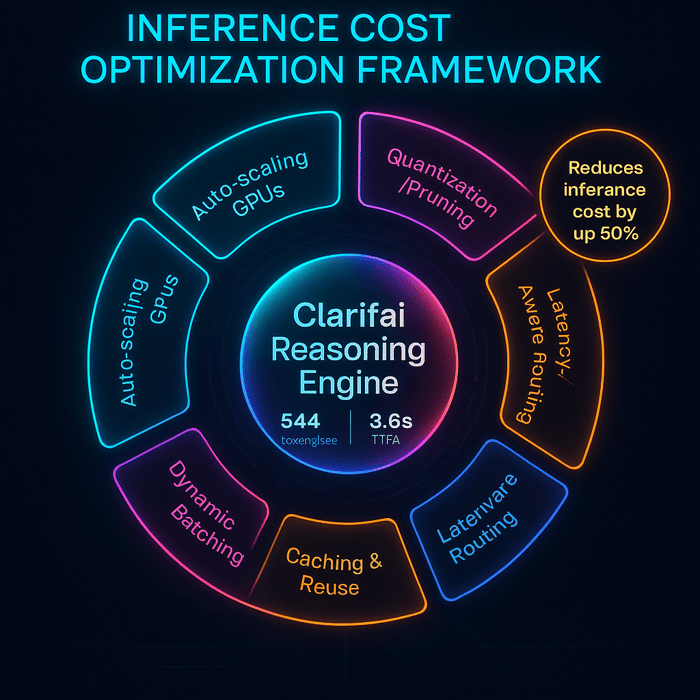
Optimising inference involves elastic GPU allocation, intelligent batching, efficient model architectures and quantisation/pruning. Dynamic engines scale resources up or down depending on request volume, while batching improves GPU utilisation without hurting latency. Model optimisation techniques, including quantisation, pruning and distillation, reduce compute demand by 40–70 %. Clarifai’s Reasoning Engine combines these strategies with high throughput and cost efficiency.
Clarifai Reasoning Engine
Clarifai’s Reasoning Engine is a production inference service designed to run advanced generative and reasoning models efficiently on GPUs. It complements Clarifai’s orchestrator by providing an optimised runtime environment.
Key Features
- High throughput – Processes up to 544 tokens/sec per model, achieving a low time to first token (~3.6 s) and delivering answers quickly.
- Adaptive batching – Dynamically batches multiple requests to maximise GPU utilisation while balancing latency.
- Cost‑constrained deployment – Choose hardware based on cost per million tokens or latency requirements; the platform automatically allocates GPUs accordingly.
- Model optimisation – Supports quantisation and pruning to reduce memory footprint and accelerate inference.
- Multi‑modal support – Serve text, image and multi‑modal models through a single API.
Pros & Cons
|
Pros |
Cons |
|
High throughput and low latency deliver efficient inference |
Limited to models compatible with Clarifai’s runtime |
|
Cost per million tokens is competitive (e.g., $0.16/M tokens) |
Requires integration with Clarifai’s API |
|
Adaptive batching reduces waste |
Price structure may vary based on GPU type |
|
Supports multi‑modal workloads |
On‑prem deployment requires self‑managed GPUs |
Pricing & Reviews
Clarifai’s inference pricing is based on usage (tokens processed, GPU hours) and varies depending on hardware and service tier. Customers highlight predictable billing, high throughput and the ability to tune cost vs. latency. Many appreciate the synergy between the reasoning engine and compute orchestration.
Expert Insights
- Dynamic scaling is essential – Studies show that dynamic inference engines reduce cost per prediction by 40–60 %.
- Model compression pays – Quantisation and pruning can reduce compute by 40–70 %.
- Price wars benefit consumers – Inference costs have plummeted: a GPT‑3.5‑level performance dropped 280× from 2022–2024; recent API releases saw 83 % price cuts for output tokens.
Serverless Inference Framework (Tool F)
Serverless inference frameworks automatically scale compute resources to zero when there are no requests and spin up containers on demand.
Key Features
- Auto‑scaling to zero – Pay only when requests are processed.
- Container‑based deployment – Package models as containers; the framework manages scaling.
- Integration with event triggers – Trigger inference based on events (e.g., HTTP requests, message queues).
Pros & Cons
|
Pros |
Cons |
|
Minimises cost for spiky workloads |
Cold start latency may affect real‑time applications |
|
No infrastructure to manage |
Not suitable for long‑running models or streaming applications |
|
Supports multiple languages & frameworks |
Pricing can be complex per request and per duration |
Pricing & Reviews
Pricing is typically per invocation plus memory‑seconds. Reviews laud the hands‑off scalability but caution that cold start delays can degrade user experience if not mitigated by warm pools.
Expert Insights
- Use for bursty traffic – Serverless works best when requests are intermittent or unpredictable.
- Keep models small – Smaller models reduce cold start times and invocation costs.
Model Optimisation Library (Tool G)
Model optimisation libraries provide techniques like quantisation, pruning and knowledge distillation to shrink model sizes and accelerate inference.
Key Features
- Post‑training quantisation – Convert model weights from 32‑bit floating point to 8‑bit integers without significant loss of accuracy.
- Pruning & sparsity – Remove redundant parameters and neurons to reduce compute.
- Distillation – Train smaller student models to mimic larger teacher models, retaining performance while reducing size.
Pros & Cons
|
Pros |
Cons |
|
Significantly reduces inference latency and compute cost |
May require retraining or calibration to avoid accuracy loss |
|
Compatible with many frameworks |
Some techniques are complex to implement manually |
|
Improves energy efficiency |
Results vary depending on model architecture |
Pricing & Reviews
Most libraries are open source; cost is mainly in compute time during optimisation. Users praise the performance gains, but emphasise that careful testing is needed to maintain accuracy.
Expert Insights
- Quantisation yields quick wins – 8‑bit models often retain 95 % accuracy while reducing compute by ~75 %.
- Pruning should be iterative – Remove weights gradually and fine‑tune to avoid accuracy cliffs.
- Distillation can make inference portable – Smaller student models run on edge devices, reducing reliance on expensive GPUs.
Monitoring, FinOps & Governance Tools
FinOps is the practice of bringing financial accountability to cloud and AI spending. Without visibility, organisations cannot forecast budgets or detect anomalies. Studies reveal that 84 % of enterprises see margin erosion due to AI costs and many miss forecasts by over 25 %. Modern tools provide real‑time monitoring, cost attribution, anomaly detection and budget governance.
Quick Summary: Why are FinOps and governance essential?
FinOps tools help teams understand where money is going, allocate costs to projects or features, detect anomalies and forecast spend. The FOCUS billing standard simplifies multi‑cloud cost management by standardising billing data across providers. Combining FinOps with anomaly detection reduces bill spikes and improves efficiency.
Cost Monitoring & Anomaly Detection Platform (Tool H)
These platforms provide dashboards and alerts to track resource usage and spot unusual spending patterns.
Key Features
- Real‑time dashboards – Visualise spend by service, region and project.
- Anomaly detection – Use machine learning to flag abnormal usage or sudden cost spikes.
- Budget alerts – Configure thresholds and notifications when usage exceeds targets.
- Integration with tagging – Attribute costs to teams, features or models.
Pros & Cons
|
Pros |
Cons |
|
Provides visibility and prevents surprise bills |
Accuracy depends on proper tagging and data integration |
|
Detects misconfigurations quickly |
Complexity increases with multi‑cloud environments |
|
Supports chargeback and showback models |
Some tools require manual configuration of rules |
Pricing & Reviews
Pricing is usually based on the volume of data processed and the number of metrics analysed. Users praise the ability to identify cost anomalies early and appreciate integration with CI/CD pipelines.
Expert Insights
- Tag resources consistently – Without proper tagging, cost attribution and anomaly detection will be inaccurate.
- Set budgets per project – Align budgets with business objectives to identify overspending quickly.
- Automate alerts – Immediate notifications reduce mean time to resolution when costs spike unexpectedly.
FinOps & Budgeting Suite (Tool I)
These suites combine budgeting, forecasting and governance capabilities to enforce financial discipline.
Key Features
- Budget planning – Set budgets by team, project or environment.
- Forecasting – Use historical data and machine learning to predict future spend.
- Governance policies – Enforce policies for resource provisioning, approvals and decommissioning.
- Compliance & reporting – Generate reports for finance and compliance teams.
Pros & Cons
|
Pros |
Cons |
|
Aligns engineering and finance teams around shared goals |
Implementation can be time‑consuming |
|
Predicts budget overruns before they happen |
Forecasts may need adjustments due to market volatility |
|
Supports chargeback models to encourage responsible usage |
License costs can be high for enterprise tiers |
Pricing & Reviews
Pricing typically follows an enterprise subscription model based on usage volume. Reviews highlight that these suites improve collaboration between finance and engineering but caution that the quality of forecasting depends on data quality and model tuning.
Expert Insights
- Adopt FOCUS – The FOCUS 1.2 standard provides a unified billing and usage data model across providers. It will be widely adopted in 2025, including SaaS and PaaS data.
- Implement chargeback – Chargeback aligns costs with usage and encourages cost‑conscious behaviours.
- Align with business metrics – Tie budgets to revenue‑generating features to prioritise high‑value workloads.
Compliance & Audit Tool (Tool J)
Compliance and audit tools track the provenance of datasets and models and ensure adherence to regulations.
Key Features
- Audit trails – Log access, modifications and approvals of data and models.
- Policy enforcement – Ensure policies for data retention, encryption and access controls are applied consistently.
- Compliance reporting – Generate reports for regulatory frameworks like GDPR or HIPAA.
Pros & Cons
|
Pros |
Cons |
|
Reduces risk of regulatory non‑compliance |
Adds overhead to workflows |
|
Ensures data governance across the lifecycle |
Implementation requires cross‑functional coordination |
|
Integrates with data pipelines and model registries |
May be perceived as bureaucratic if not automated |
Pricing & Reviews
Pricing is typically per user or per environment. Reviews highlight improved compliance posture but note that adoption requires cultural change.
Expert Insights
- Audit everything – Trace data and model lineage to ensure accountability and reproducibility.
- Automate policy enforcement – Embed compliance checks into CI/CD pipelines to reduce manual errors.
- Close the loop – Use audit findings to improve governance policies and cost controls.
Sustainable & Emerging Trends in AI Cost Optimization
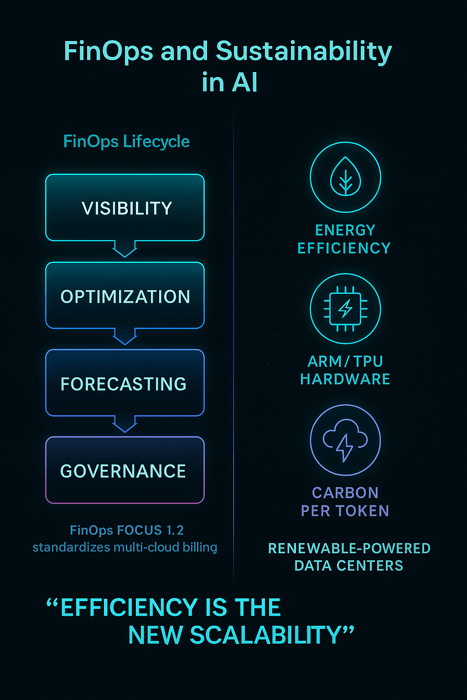
Optimising AI costs isn’t just about saving money; it’s also about improving sustainability and staying ahead of emerging trends. Data centres could account for 21 % of global energy demand by 2030, while processing a million tokens emits carbon equivalent to driving 5–20 miles. As costs plummet due to the API price war—recent models saw 83 % reductions in output token price—providers are pressured to innovate further. Here’s what to watch.
Quick Summary: What trends will shape AI cost optimisation?
Trends include API price compression, specialised hardware (ARM‑based chips, TPUs), green computing, multi‑cloud governance, autonomous orchestration and hybrid inference strategies. Preparing for these shifts ensures that your cost optimisation efforts remain relevant and future‑proof.
Price Compression & API Cost Wars
The cost of inference is tumbling. A GPT‑3.5‑level performance dropped 280 × between 2022 and 2024. More recently, a leading provider announced 83 % price cuts for output tokens and 90 % for input tokens. These price wars lower barriers for startups but squeeze margins for providers. To capitalise, organisations should regularly benchmark API providers and adopt flexible architectures that make switching easy.
Specialised Silicon & ARM‑Based Compute
ARM‑based processors and custom accelerators offer better price‑performance for AI workloads. Research indicates that ARM‑based compute and serverless platforms can reduce compute costs by 40 %. TPUs and other dedicated accelerators provide superior performance per watt, and the open‑weight model movement reduces dependence on proprietary hardware.
Green Computing & Energy Efficiency
Energy costs are rising alongside compute demand. According to the International Energy Agency, data centre electricity demand could double between 2022 and 2026, and researchers warn that data centres may consume 21 % of global electricity by 2030. Processing one million tokens emits carbon equivalent to a car trip of 5–20 miles. To mitigate, organisations should choose regions powered by renewable energy, leverage energy‑efficient hardware and implement dynamic scaling that minimises idle time.
Multi‑Cloud Governance & Open Standards
Managing costs across multiple providers is complex due to disparate billing formats. The FOCUS 1.2 standard aims to unify billing and usage data across IaaS, SaaS and PaaS. Adoption is expected to accelerate in 2025, simplifying multi‑cloud cost management and enabling more accurate cross‑provider comparisons. Tools that support FOCUS will provide a competitive edge.
Agentic & Self‑Healing Orchestration
The future of orchestration is autonomous. Emerging research suggests that self‑healing orchestrators will detect anomalies, optimise workloads and choose hardware automatically. These systems will incorporate sustainability metrics and predictive budgeting. Enterprises should look for platforms that integrate AI‑powered decision‑making to stay ahead.
Hybrid & Edge Inference
Hybrid strategies combine on‑premise or edge inference for low‑latency tasks with cloud bursts for high‑volume workloads. Clarifai supports local runners that execute inference close to data sources, reducing network costs and enabling privacy‑preserving applications. As edge hardware improves, more workloads will move closer to the user.
Conclusion & Next Steps
AI infrastructure cost optimisation requires a holistic approach that spans compute orchestration, model lifecycle management, data pipelines, inference engines and FinOps governance. Hidden inefficiencies and misaligned incentives can erode margins, but the tools and strategies discussed here provide a roadmap for reclaiming control.
When prioritising your optimisation journey:
- Audit your AI stack – Tag models, datasets and resources; assess utilisation; and identify the biggest cost leaks.
- Adopt AI‑native orchestration – Tools like Clarifai’s Compute Orchestration unify pipelines and infrastructure, delivering proactive scaling and cost controls.
- Manage the model lifecycle – Implement experiment tracking, versioning and ROI audits; share base models and enforce kill criteria.
- Optimise data pipelines – Right‑size hardware, compress datasets, choose appropriate storage tiers and monitor network costs.
- Scale inference intelligently – Use dynamic batching, quantisation and adaptive scaling; evaluate serverless vs. managed engines; and benchmark API providers regularly.
- Implement FinOps & governance – Adopt FOCUS for unified billing, use cost monitoring and budgeting suites, and embed compliance into your workflows.
- Plan for the future – Watch trends like price compression, specialised silicon, green computing and autonomous orchestration to stay ahead.
By embracing these practices and leveraging tools designed for AI cost optimisation, you can transform AI from a cost centre into a competitive advantage. As budgets grow and technologies evolve, continuous optimisation and governance will be the difference between those who win with AI and those who get left behind.
Frequently Asked Questions (FAQs)
Q1: How is AI cost optimisation different from general cloud cost optimisation?
A1: While cloud cost optimisation focuses on reducing expenses related to infrastructure provisioning and services, AI cost optimisation encompasses the entire AI stack—compute orchestration, model lifecycle, data pipelines, inference engines and governance. AI workloads have unique demands (e.g., GPU clusters, large datasets, inference bursts) that require specialised tools and strategies beyond generic cloud optimisation.
Q2: What are the biggest cost drivers in AI workloads?
A2: The major cost drivers include compute resources (GPUs/TPUs), which can cost $3 per hour for high‑end cards; storage of massive datasets and model artefacts; network transfer fees; and hidden expenses like experimentation, model drift monitoring and retraining cycles. Inference costs now dominate budgets.
Q3: How does Clarifai help reduce AI infrastructure costs?
A3: Clarifai offers Compute Orchestration to unify AI and infrastructure workloads, provide proactive scaling and deliver high throughput with cost dashboards. Its Reasoning Engine accelerates inference with adaptive batching, model compression support and competitive cost per million tokens. Clarifai also provides DataOps features for automated labelling and dataset management, reducing manual overhead.
Q4: Is it worth investing in FinOps tools?
A4: Yes. FinOps tools give real‑time visibility, anomaly detection and cost attribution, enabling you to prevent surprises and align spending with business goals. Research shows that most organisations miss AI forecasts by over 25 % and that lack of visibility is the number one challenge. FinOps tools, especially those adopting the FOCUS standard, help close this gap.
Q5: What is the FOCUS billing standard?
A5: FOCUS (FinOps Open Cost and Usage Specification) is a standardised format for billing and usage data across cloud providers and services. It aims to simplify multi‑cloud cost management, improve data accuracy and enable unified FinOps practices. Version 1.2 includes SaaS and PaaS billing and is expected to be widely adopted in 2025.
Q6: How do emerging trends like specialised hardware and price wars affect cost optimisation?
A6: Specialised hardware such as ARM‑based processors and TPUs deliver better price‑performance and energy efficiency. Price wars among AI providers have driven inference costs down dramatically, with GPT‑3.5‑level performance dropping 280 × and new models cutting token prices by 80–90 %. These trends lower barriers but also require businesses to regularly benchmark providers and plan for hardware upgrades.