Found Energy’s Path to Clean Energy Innovation With AutoCAD | AutoCAD Blog


If you think about heavy industry, some clear images come to mind. Massive plants and factories, smokestacks, huge pieces of equipment and operating floors. It goes without saying that the energy consumption and carbon emissions are indeed heavy, too.

Found Energy is looking to change that and reimagine clean energy by harnessing aluminum’s untapped potential to deliver reliable, cost-stable, and clean thermal power for heavy industry. Their innovative aluminum thermal power system delivers superheated steam up to the highest temperatures required by modern industry, all while avoiding the need for electrification, enhancing energy security, and cutting pollutants that occur during the power generation process.

Found Energy’s leap in scale is no small feat. In 2024, they completed their 10-15 kW demo system. The team then began building their first commercial pilot system that can produce 10 times the power, and they’re slated to assemble it this summer. The team itself has tripled in size in just one year, from around 10 to more than 30 employees.

But what do they attribute to this success? It’s the use of AutoCAD that has allowed Found Energy to scale and industrialize rapidly, safely, and accurately.

Two employees at Found Energy looking at laptop

A bigger team requires better collaboration tools. Previously, only two or three team members would be required to work on a system. Now there are more than 10 members across mechanical engineering, chemical engineering, and automation control teams. AutoCAD and the Plant 3D toolset allows all these team members to concurrently work on different subsystems.

A primary use of the Plant 3D toolset is adhering to P&ID standards while building chemical processes, such as reacting aluminum with water. The P&IDs serve as their source of truth, ensuring that every aspect of their projects is built correctly and verified. Additionally, the data manager feature is invaluable for exporting a comprehensive list of every piece of equipment involved in the process.

Collaboration is also key when it comes to adding alarms, flow control mechanisms, and coding PLC designs. The Plant 3D toolset allows team members to export tag lists and generate instrument lists automatically, which significantly reducing manual input and errors. The built-in tool palettes eliminate the need to custom draw industry-standard components, and the automatic tagging features further simplify the workflow. The automatic layer setup in Plant 3D also saves a considerable amount of time.

“With AutoCAD and Plant 3D, what used to take two people a week to get done now only takes a fraction of that time, saving dozens of hours over several weeks,” says Peter Godart, CEO and co-founder, Found Energy. “This efficiency not only boosts productivity but also ensures a higher level of accuracy and consistency across their projects.”

In their previous system, there were only about 20 sensors and actuators. Now, there are more than 200. With AutoCAD, the team can continue to accurately track the design and parts—even as the system gets larger and more complex. For example, from a P&ID diagram, the control team can automatically generate a list of tags (essentially a list of all the parts that are needed), which enables them to easily find the electrical schematics of all parts required. They can then identify the components that they need—rather than manually examining a diagram and counting parts.

“Documentation can be worked on independently but will still interface and connect with other subsystems, eliminating the need to manually update diagrams and documentation that otherwise would very quickly become out of date,” Godart says. “This allows us to iterate very quickly and accurately.”

The team also uses the Electrical toolset in AutoCAD to enhance their efficiency and accuracy in developing electrical schematics. By migrating their P90s and other electrical schematics into AutoCAD, they leverage the extensive pre-existing libraries available in the Electrical toolset. This approach significantly reduces the time and effort required compared to manually creating these schematics from scratch. The toolset’s robust features allow Found Energy to streamline their workflow even further, ensuring precise and reliable electrical designs that support their innovative energy solution.

Moving ahead—and staying on the same page

Employee at Found Energy

For Found Energy, the pursuit of industrialization means ensuring engineers are all speaking the same language—not only internally but with industry standards. They used documentation produced in AutoCAD to conduct a HAZOPs study of their system, which is a safety and operability analysis that ensures their system meets the highest industry standards of operability in preparation for installation.

“It’s important for us to communicate with customer engineering teams easily, communicate with vendors, and easily evaluate our system to meet the highest industrial standards,” Angie Ackroyd, Vice President of Engineering, Found Energy.

As the team gets closer to building the first commercial pilot, procurement has been critical. Since the new version is now much larger than the original 15kw system, accurate and timely coordination of procurement of parts is essential.

“AutoCAD makes it really easy to track every single component, from tracking whether we have identified a manufacturer for each part down to whether the part has been ordered,” Ackroyd says. “AutoCAD is helping us make sure we are doing this as accurately and efficiently as possible.”

Learn more

Meet other leading innovators and entrepreneurs collaborating with the Autodesk Foundation, to support the design and creation of innovative solutions to the world’s most pressing social and environmental challenges.

AutoCAD 2025: Do More With Industry-Specific Toolsets | AutoCAD Blog


The new AutoCAD 2025 is here, and it comes with powerful updates to the following specialized industry toolsets:

  • AutoCAD Architecture
  • AutoCAD MEP
  • AutoCAD Mechanical
  • AutoCAD Electrical
  • AutoCAD Plant 3D
  • AutoCAD Map 3D

AutoCAD specialized toolsets provide access to libraries of detailed components, symbols, parts, and functions tailored to AEC professionals with specific industry requirements.

They can automate repetitive or common tasks such as developing floor plans, sections, elevations, detail drawings, and more. Using the specialized toolsets not only increases productivity thanks to automations and customizations, but also helps ensure consistency among different users working on the same project.

As with every new release, AutoCAD 2025 brings new features and improvements to optimize and improve your workflow. Learn below how you can take advantage of these latest updates.

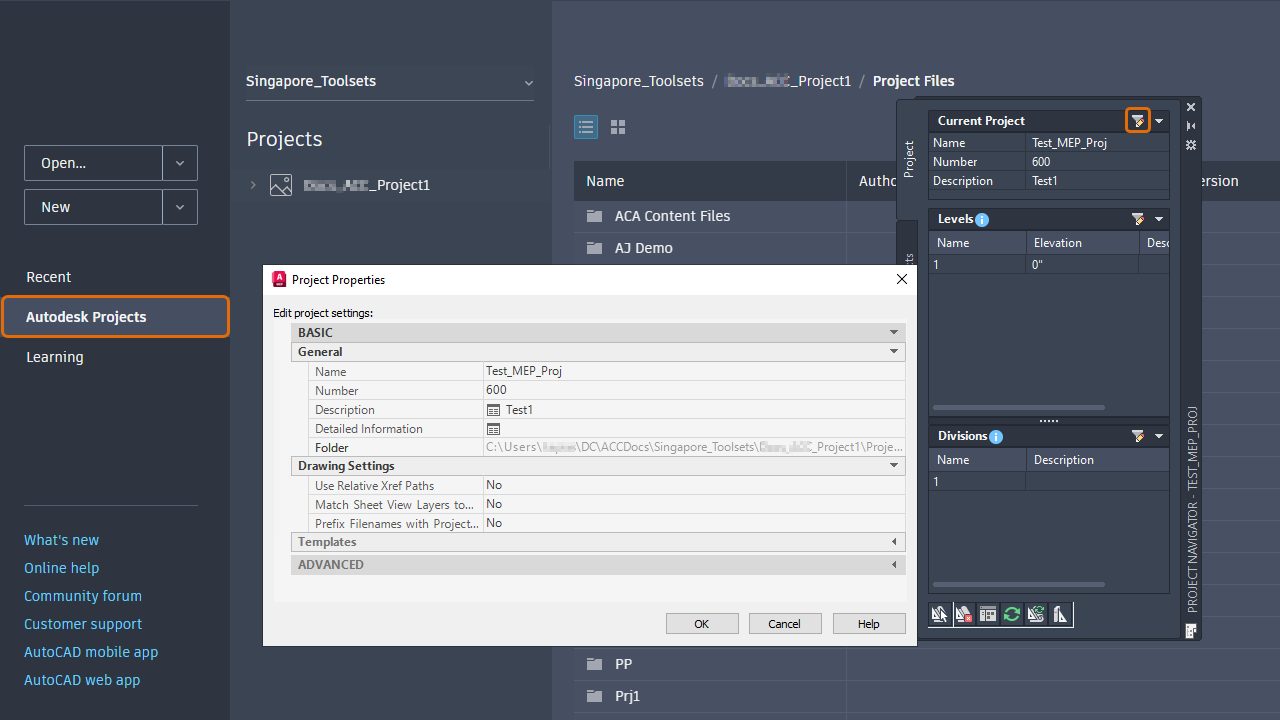
AutoCAD Architecture 2025 now supports automatic synchronization of changes across multiple users on Autodesk Docs, enhancing productivity and collaboration.

Edits made by one user are automatically synced with others working on the same project, eliminating the need for a restart or refresh, and benefiting teams collaborating within a single office or across different locations.

Edits made to a project hosted on Autodesk Docs by one user automatically sync with other users working on the same project without the need to restart or refresh the production.

The Design Center in AutoCAD Architecture 2025 now has approximately 36 new MVBlocks and block references, including furniture, vehicles, and kitchen appliances. These blocks are available in both US Imperial and Metric content packs.

Along with a significant reduction in export and import times for large IFC files, and improved import quality, we’ve introduced a tech preview which improves geometry fidelity—ensuring cleaner representations as well as smoother lines and edges for specific objects, with the potential for more objects to be supported in future updates.

The new AutoCAD MEP 2025 also supports automatic synchronization of changes across multiple user machines to enable more efficient collaboration among team members and improved IFC workflow times and capabilities.

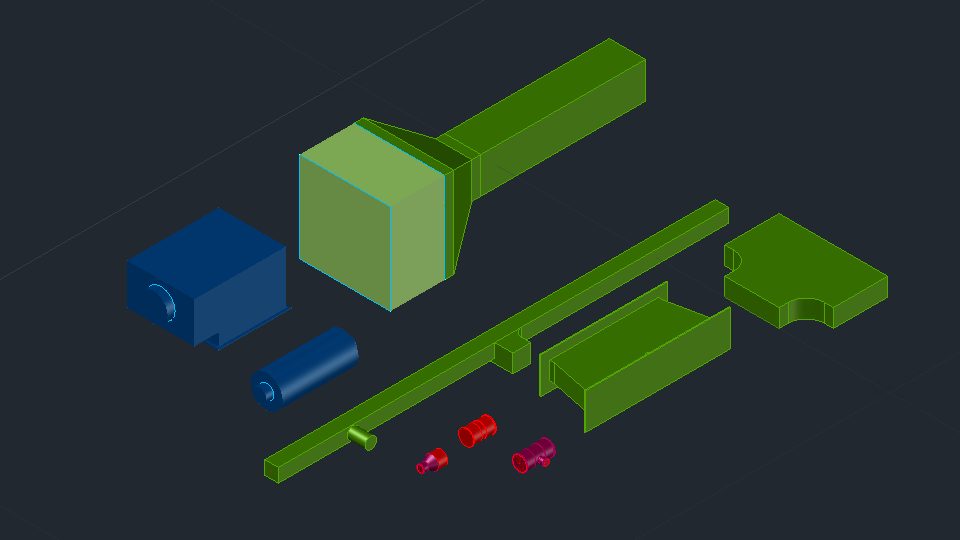
AutoCAD MEP 2025 includes updated content packs with new pipe and pipe fittings, duct fittings, and MVParts.

The MEP content packs include new pipes and pipe fittings, duct fittings, air handling units, VAV units, air terminals (diffusers and grilles), and MVParts—all of which are available in US Imperial and Metric settings.

In AutoCAD Mechanical 2025, surface texture symbols now support the latest revisions of ISO and ANSI/ASME standards. You can annotate documents with the latest ISO 21920-1:2021(E) and ANSI/ASME Y14.36 – 2018 standards while maintaining support for all legacy revisions.

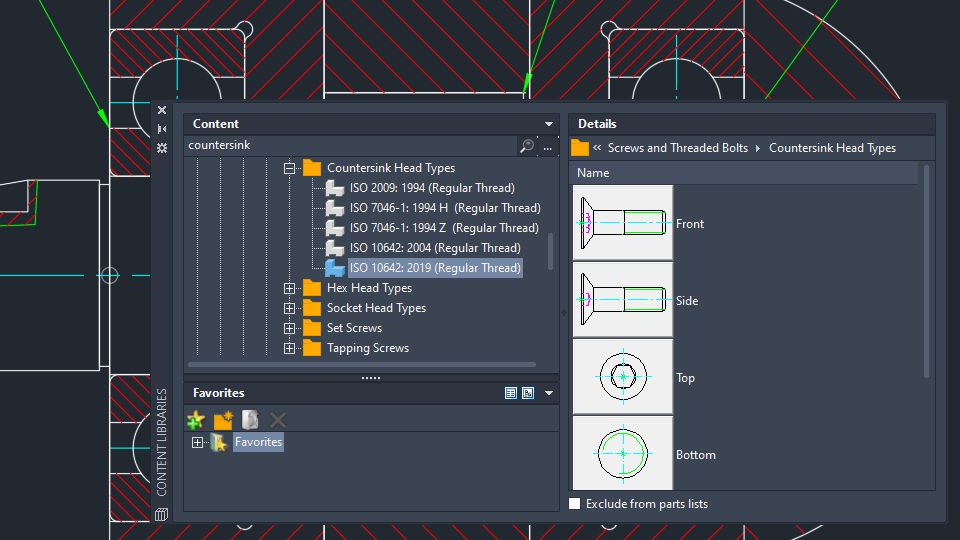
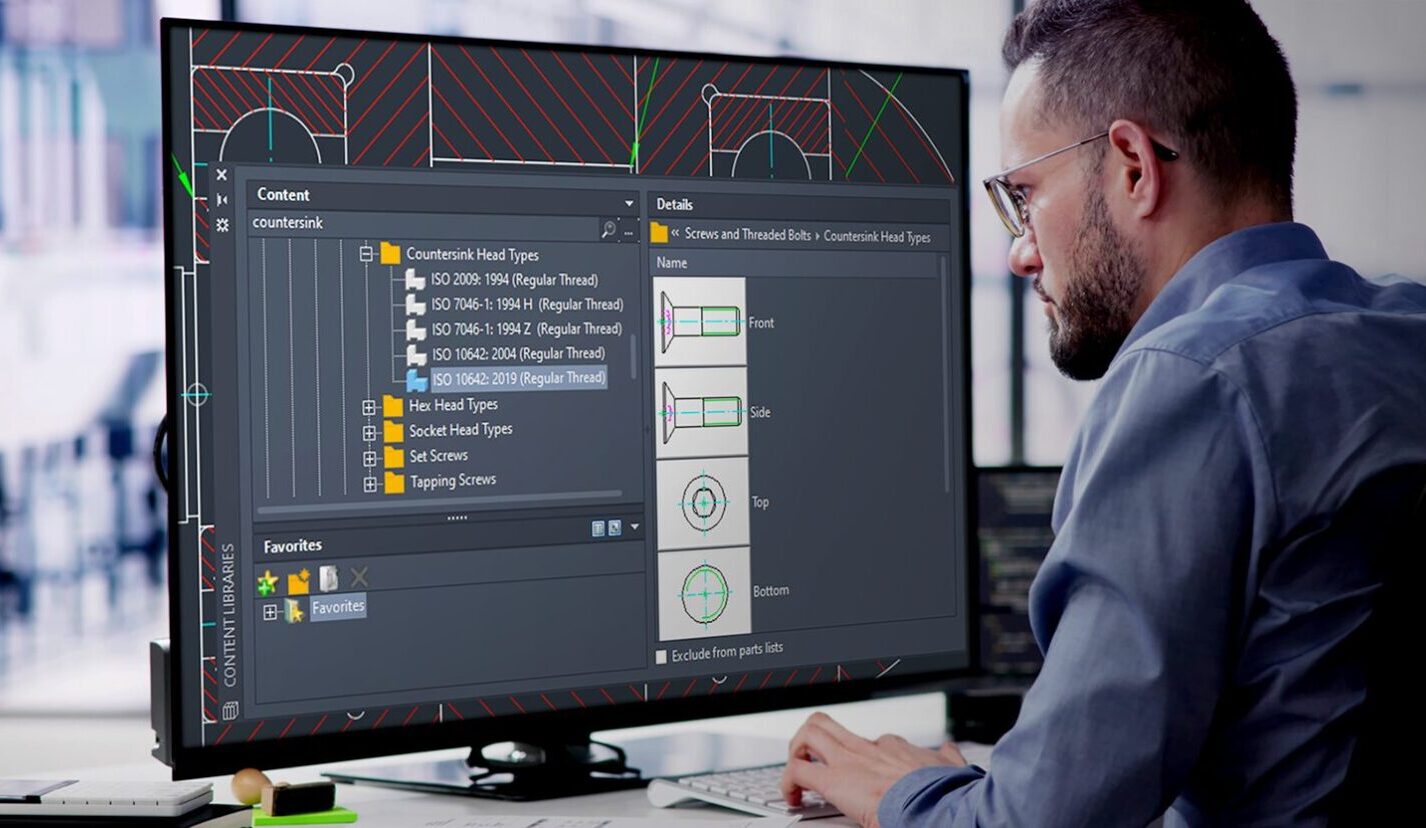
Content-wise, more than 1,197 new mechanical standard parts have been added to the latest version’s content library. These parts, which include specific screws, bolts, and nuts, are available in English and all other languages that are supported in AutoCAD Mechanical. 

More than 1,197 new parts have been added to the content library of AutoCAD Mechanical 2025.

Updated Activity Insights now contain detailed information about drafting standards and symbol revisions. The “Drafting standard changed” and “Symbol revision changed” events are recorded whenever modifications are made through the Options dialog box or the AMSETUPDWG command, provided the changes are committed.

There are also several quality improvements in this release, including

  • Enhanced preservation of mechanical standards when saving to previous formats
  • Improved viewport dimension scaling with chamfer dimensions
  • Optimized functionality for creating blocks with holes
  • Other enhancements in graphics and stability

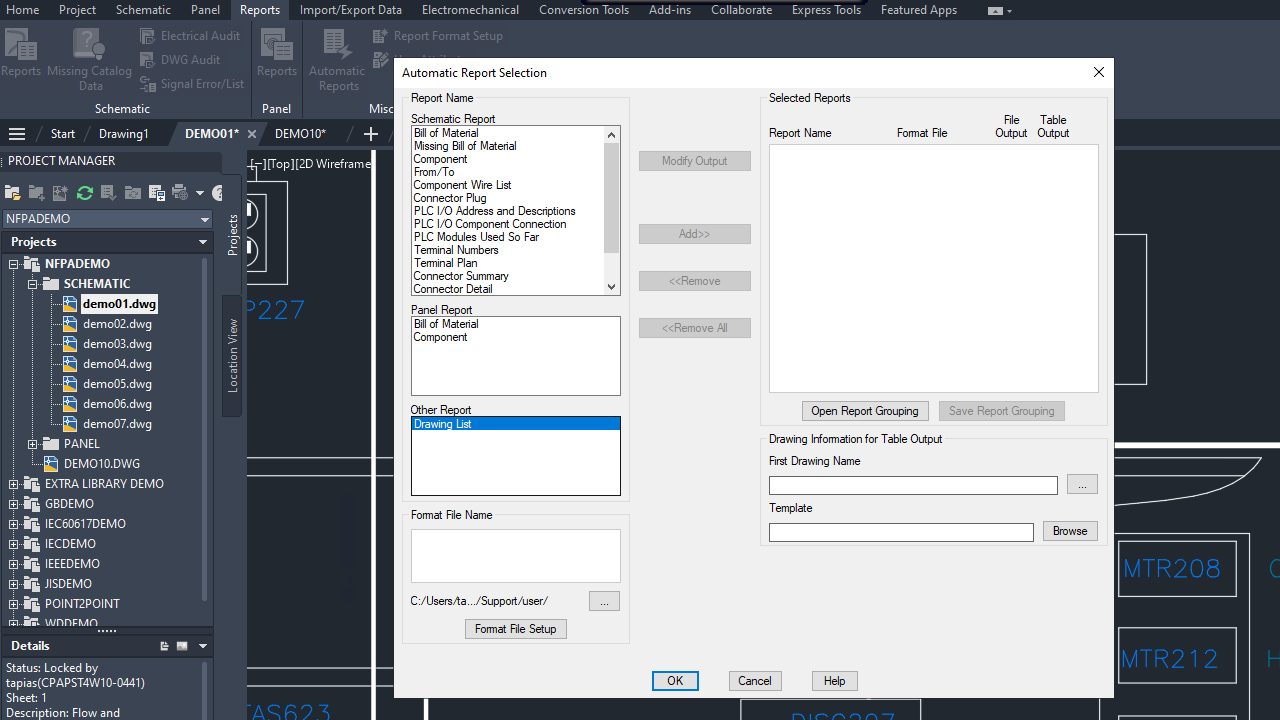
In AutoCAD Electrical 2025, users can now update or create an entirely new drawing list report with the Automatic Reports tool.

To create a drawing list report, which extracts and presents detailed settings for each drawing in the project, navigate to the Reports tab, select Automatic Reports from the Miscellaneous panel, and choose Drawing List in the Automatic Report Selection dialog box.

Easily create or update a drawing list report with the Automatic Reports tool in AutoCAD Electrical 2025.

The Bill of Materials (BOM) report in AutoCAD now includes enhanced sorting by TAG, allowing users to organize the report based on specific tags assigned to components. This new feature offers alphanumeric and numeric-to-alphanumeric sorting options, accessible through the Reports tab in the Schematic panel under Bill of Material settings.

Along with detailed tracking of project-wide updates initiated through specific commands through the Activity Insights palette, improvements to wire type synchronization are also included with this update. Changes to wire layer properties like color, size, and line type now propagate automatically across all synced drawings if the wire type is updated at the source arrow.

AutoCAD Plant 3D 2025 now allows collaboration within subfolders on Autodesk Docs, simplifying cloud sharing of projects. You can search for specific folders, and expanded folders are searchable for improved performance; the project path is displayed for clarity when projects have the same name.

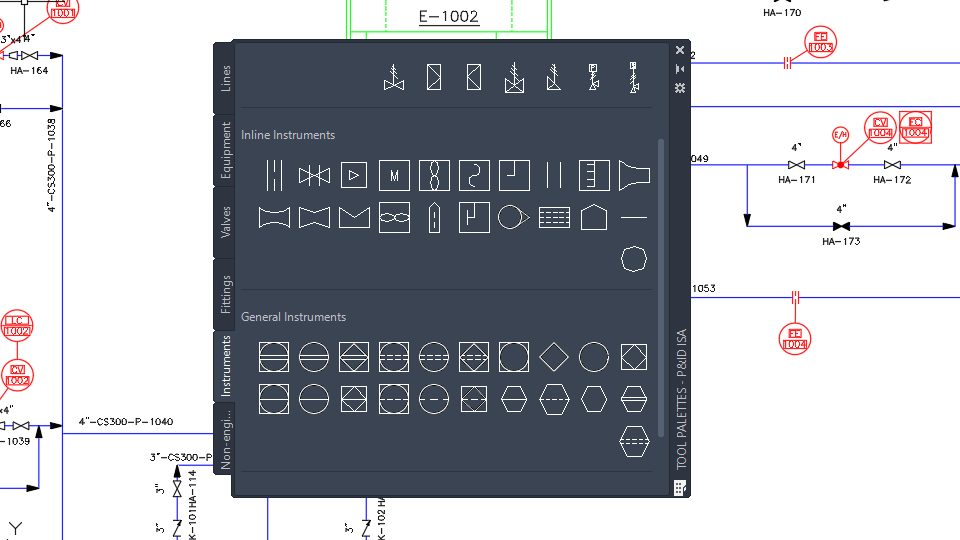
This release also includes updates to the P&ID ISA symbols and their settings across the platform, so that they comply with the latest ANSI/ISA-5.1-2022 standard. More instrumentation symbols have been created and included, along with other updates to ensure the migration — although it is still possible to work with legacy ISA symbols.

P&ID ISA symbols have been updated to match the latest ISA standard in AutoCAD Electrical 2025.

The enhanced P&ID modeler in AutoCAD Plant 3D 2025 provides users with a comprehensive view of all line segments—including inline components, nozzles, start/end equipment models, branches, and off-page connectors. Team members can now easily select P&ID objects from the Line List window and place corresponding Plant 3D counterparts in the 3D model, ensuring accurate transfer of property values.

For an in-depth overview of updates, visit the What’s New in AutoCAD Plant 3D 2025 help resource.

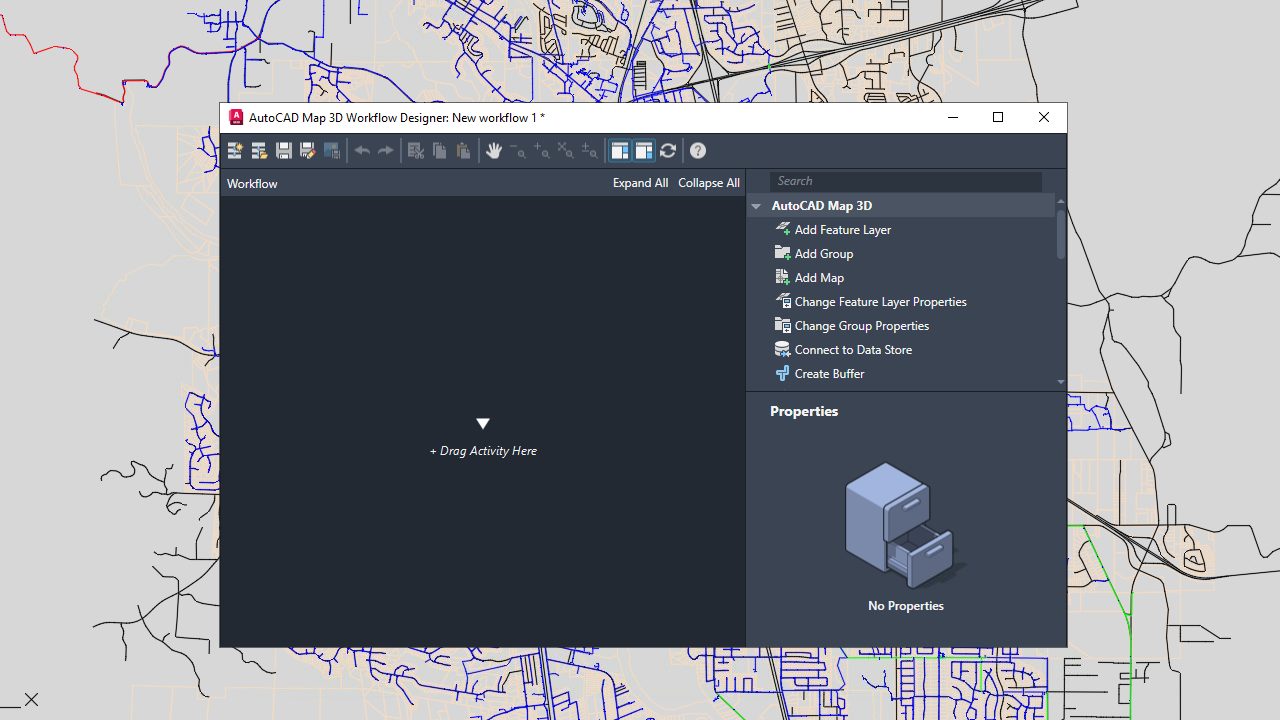
In AutoCAD Map 3D 2025, visibility and workflow are optimized thanks to the option to set dark or light themes in the Workflow Designer, which features updated icons.

What’s more, the redesigned Workflow Designer includes a search box for filtering activities, and it also displays activity properties directly in the interface, streamlining the workflow editing process.

You can now customize the color settings of the Workflow Designer using the Options dialog box in AutoCAD Map 3D 2025.

In addition to the introduction of the FDO GeoPackage, which provides access to GIS data stored in GeoPackage files, the FDO WFS Provider in AutoCAD Map 3D has undergone several enhancements. This will support users with key improvements to BBOX keywords, IGN’s Geoplateforme, and performance with large layer sets.

Finally, the 2025 toolkit release features new coordinate systems across various categories, enabling team members to operate with a broader range of coordinate systems and geographic data. The categories include

  • CGCS2000
  • UKGG951
  • Amtrak Northeast Corridor
  • US Albers NAD83
  • Iceland ISN2016
  • Balkan Zone 7 in Slovenia

Get Started Today

Get started with the Autodesk Access application on your desktop. Not a subscriber yet? Test out these new features and more in free trial of AutoCAD 2025.

Learn More