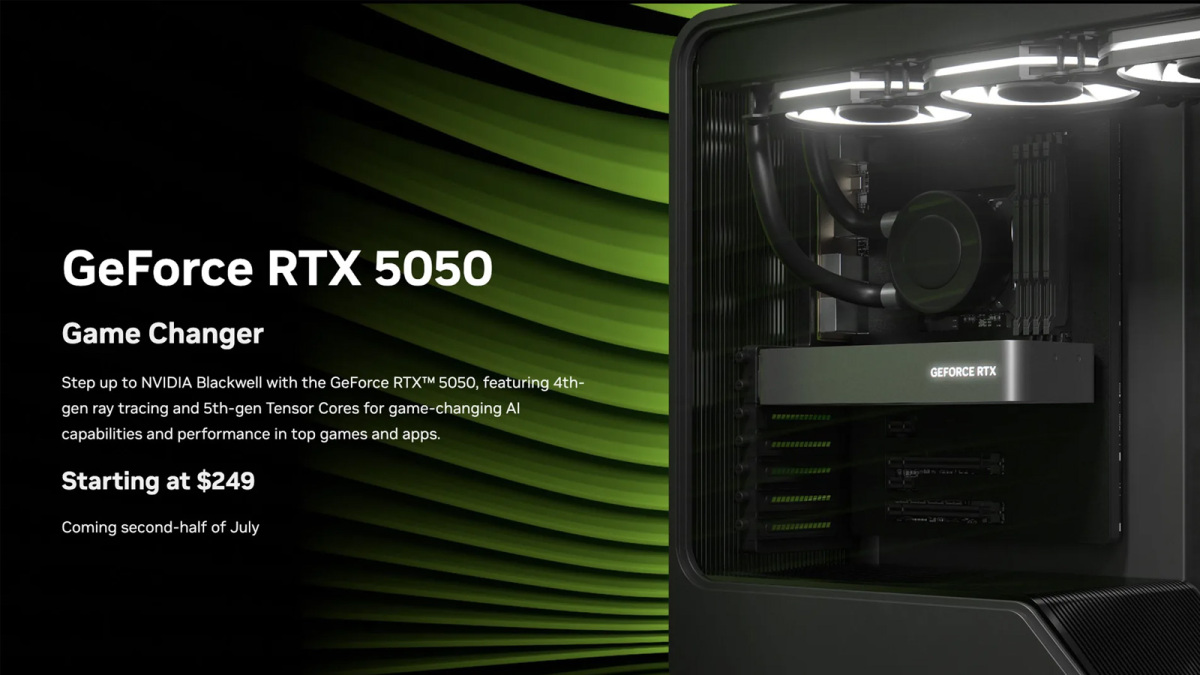
Nvidia’s entry-level RTX 5050 is coming in late July with a recommended retail price of $250. Although Nvidia has struggled to keep its RTX 50-series cards in stock at fair prices, its RTX 5060 is relatively well available at MSRP, so it’s possible the RTX 5050 will have strong availability at its intended price. Even then, though, it may struggle to compete with older GPUs that are equally affordable.
The official Nvidia line from its new launch page is that the RTX 5050 will be available in the “second half of July,” and will start at $249. There will no doubt be more expensive third-party options, but light overclocks aren’t going to do much for a card with a mere 2,560 CUDA cores. That’s the same core count as the RTX 4050 and 3050, though this model does have 8GB of GDDR6, where the 4050 and some 3050s only had 6GB.
While that’s welcome, it’s still not much of an upgrade. VRAM demands from modern games are starting to eclipse 8GB for anything outside the lowest settings, so though this card isn’t designed for high-end gaming, it’s not going to be able to offer much when it comes to the latest games. Indeed, its 2,560 CUDA core count is a 33% drop off from the RTX 5060’s 3,840. Although the slightly higher clock speed should help prevent it from being a linear performance drop, even a 20% decrease in capabilities there would put this card in the same performance bracket as the RX 6600 and Intel A750.
Credit: Nvidia
Indeed, that could be a problem for this card, as at around the $250 price tag, you can also find the aforementioned cards, as well as the RX 7600, and the B570 (which has 10GB of VRAM). The RTX 5050 could be the first card of its generation to face genuine price and performance competition from its predecessors. To date, poor availability of new cards has meant most older GPUs have been sold out too.
One area where this card will perform far better than those alternatives, however, is in games with ray tracing. The latest generation RT cores in the RTX 50 series are very impressive, so even with its weak performance, you might be able to turn on some light RT effects in certain low-demand games with this GPU. Assuming the VRAM doesn’t hold you back. DLSS will do a lot of heavy lifting to keep frame rates up. If you can get your base FPS high enough to avoid the worst side effects, multi-frame generation will boost FPS well beyond what those older cards can manage in compatible games.
The question now becomes whether Nvidia will actually let this card out before launch day. It courted controversy with the launch of the RTX 5060 Ti when it didn’t send out samples of the 8GB version of the card and made it hard for reviewers to test the RTX 5060 ahead of going on sale.
The Nintendo Switch 2 has been available in the US for more than two weeks — but good luck finding one. While millions of people have been able to snag the $450 console since it officially went up for sale on June 5, online inventory dried up fairly quickly at most stores soon after launch and remains difficult to find today. Best Buy restocked as recently as June 23, but those units — which required in-store pickup — quickly went of out of stock. Target, likewise, has some stock in at least one locality we checked, but it requires in-store purchase. You may also be able to grab a bundle at Costco if you’re a member there. Otherwise, it’s been slim pickings. As of today, we’re not seeing almost no availability — though you may have different luck in your locality when checking inventory, online or in person.
Again, venturing to a physical retail store can sometimes be the winning hack here. We can’t guarantee you’ll still be able to snag a Switch 2 the old-fashioned way, but it’s worth checking if a local Target, Best Buy, Walmart or GameStop — the four official retailers Nintendo lists on its store page — still has consoles in stock. For now, you can skip Amazon, though: For whatever reason, the biggest online retailer doesn’t even have a product page for the Switch 2 (but it does seem to be selling games and accessories). All that said, if you’re still on the hunt, we’ve rounded up all of the latest information we could find on how to buy the Nintendo Switch 2 and where you can pick one up.
Where to buy the Nintendo Switch 2
Walmart began online purchases at midnight ET on June 5. Currently, both the Mario Kart World bundle and the standalone console are “available” via third-party retailers, but listed for much higher than their standard $500 and $450 price tags — with limited quantities available. We wouldn’t recommend buying these; instead, wait for the console to be listed at its regular MSRP. Naturally, the world’s largest retailer is also selling the console at its brick-and-mortar locations, though the company has noted that quantities are limited and inventory will vary by location.
Best Buy started selling the Switch 2 at its retail locations on June 5. It previously said it wouldn’tsell the handheld at its online store during launch week, but it made additional consoles available on June 11 around 12PM ET, and again on June 23. Those restocks lasted for the better part of an hour and required in-store pickup, but the device is now sold out again.
Target had the Switch 2 in stores on June 5 and restocked its online inventory for at least a couple of hours starting around 3:30AM ET on June 6. It then had another restock on June 12 around 2:30PM ET, but that appears to have died out in less than an hour. As of June 24, we’re seeing in-store stock in at least one Philadelphia location.
One Philadelphia area Target was showing “limited stock,” but couldn’t be reserved online. (Target)
GameStop has advertised in-store availability, though exactly how much stock your local store may have will vary by location. Online, the device has been unavailable for the past week, with the listings for the base console and Mario Kart bundle now pointing to a “Find a Store” page. We saw a $625 bundle that includes Mario Kart World, a microSD Express card and a few other accessories pop up a bit more frequently than the standard SKUs, but it’s no longer listed (and it was kind of a raw deal anyway).
You may still have some luck at certain membership-based retailers. A Mario Kart World bundle at Costco that includes a 12-month Switch Online subscription has gone in and out of stock since launch day. Sam’s Club has had a bundle without the Switch Online sub as well, though it’s out of stock now. We also saw the console at BJ’s early on June 5, but it’s no longer live there.
Verizon briefly had the Switch 2 available on launch day, but that’s dried up. Only those with Verizon service were able to order, and the process was apparently somewhat rocky.
Amazon hasn’t had any form of Switch 2 listing on its website, nor has it listed Mario Kart World. The company didn’t take pre-orders for the Switch 2 either, so it’s unclear if and when it will sell the device. You can, however, find some Switch 2 games.
Newegg has listed the Switch 2 on its site for several weeks, but it’s given no indication as to when it’ll begin sales. It previous showed a couple listings from a third-party seller, but at massively inflated prices.
With all of these stores, we’ve seen the Mario Kart World bundle available in greater quantities online than the base console, which costs $50 less. But given that Mario Kart is the Switch 2’s biggest launch game and retails for $80 on its own, that may not be the worst thing.
Nintendo, meanwhile, is only offering the Switch 2 via an invite system. This requires you to have been a Switch Online member for at least 12 months and logged at least 50 hours of Switch 1 playtime as of April 2. It can’t hurt to sign up if you meet the criteria, but don’t expect it to bear fruit immediately — it’s taken weeks for many people who registered in April to receive their invite.
You can find a list of every Switch 2 retail listing we could find below. Just be aware that this is meant to be a reference, not a rundown of everywhere the device is available right this second.
Where to buy Switch 2 + Mario Kart World bundle:
Where to buy Switch 2:
Where to buy Nintendo Switch 2 games and accessories
Nintendo is selling a number of Switch 2 accessories alongside the console, from its (pricey) Pro Controller to cases to cameras for the new GameChat feature. Most of these became available on June 5. The same goes for games like Mario Kart World and the Switch 2 version of The Legend of Zelda: Tears of the Kingdom.Another big Switch 2 release, Donkey Kong Bananza, won’t be available until mid-July but is still up for pre-order now.
As of this publication, just about all Switch 2 games are broadly available. Stock for the accessories remains a little spottier, but most devices are still available at multiple retailers. Nintendo’s official Switch 2 carrying cases have been the main exceptions, so you may need to look to third-party alternatives if you want some protection for your console right away.
Mario Kart World ($80)
Donkey Kong Bananza ($70)
Additional Switch 2 games
Samsung microSD Express Card (256GB) for Nintendo Switch 2 ($60)
When the original Death Stranding comes up in conversation, you can count on someone citing its tedious writing, pace-destroying exposition dumps, and reckless use of unexplained proper nouns as the biggest hurdle to enjoying it. Fair enough, but I submit that nothing sucked more in Death Stranding 1 than the menus.
Kojima’s first apocalyptic hiking sim had dozens of tiny annoyances that chipped away at my patience over two playthroughs totaling over 100 hours: Holding X to confirm every time Sam made the slightest cargo adjustment, navigating three layers of menus to recycle used-up grenades, plotting routes on an unhelpful map, the laborious process of emptying Sam’s backpack. I can feel my blood pressure rising just thinking about it.
Thankfully, I’m finding Death Stranding 2 to be a sequel in the best way possible—targeting my list of “this better be better” demands and satisfying almost every one of them. My first two hours have been full of little quality-of-life discoveries that have me saying “hell yeah” to myself in a hushed tone. If you played the first game a ton, maybe they’ll also excite you.
Cargo shortcuts!
(Image credit: Kojima Productions)
Yes, I’m telling you the best new feature in Death Stranding 2 is six buttons in a radial menu. Holding up on the d-pad brings a bunch of handy cargo shortcuts that cut out a lot of menu time, the most important being “Auto-Arrange Cargo.” Balancing Sam’s cargo load now takes three seconds, but you can still enter the full Cargo Management screen at any time to move items around manually (no X confirmation needed).
Also handy are buttons that will only offload cargo/materials (not tools), one that offloads everything, and another button that’s so good it’s getting its own section below.
Handgun holster
(Image credit: Kojima Productions)
Death Stranding has always had pistols, but now Sam has a dedicated place to carry them. Similar to the boot clip and grenade pouch, the handgun holster means Sam can always carry a weapon without adding to his backpack Tetris stack. You also have the holster from the start, an early signal that Death Stranding 2 has a bigger focus on stealth action.
Route Simulator
(Image credit: Kojima Productions)
Drawing lines on maps just got slightly more pleasant. Sam’s route planner got an upgrade that automatically highlights hazards along drawn routes—stuff like deep rivers, bandit patrols, and BTs. The route tool has also been folded into the prep screen before accepting an order, and routes now include summaries that show its distance, elevation changes, total hazards, and overall risk level. It’s kinda like a real-life pilot flight plan.
Keep up to date with the most important stories and the best deals, as picked by the PC Gamer team.
Stats!
(Image credit: Kojima Productions)
Stats got an expansion, too. Sam used to automatically improve his cargo capacity and stamina over time, but DS2 seems to go a lot deeper with stealth and combat upgrades. I haven’t messed with this much yet, but you still improve Sam automatically by doing things, not by dumping points into a tree.
Backward hats
(Image credit: Kojima Productions)
Death Stranding 2 casts Norman Reedus in the role he was born to play: A backwards hat-wearing single dad. The hat menu was my first stop after getting control of Sam. That’s where I found the “wear backwards” option, gasped, and never looked back.
Offload backpack
(Image credit: Kojima Productions)
No backpack, no problem. You can (finally!) take Sam’s backpack off when you’re about to walk him into dangerous places. The button’s in that same cargo shortcut radial, and it’s already come in clutch at a bandit camp. It’s pretty cool that Sam can still carry a handgun, rifle, and grenades without his backpack, so you basically shed 100 kg of “Cargo mode” and enter “Solid Snake” mode.
Quicker order turn-in
(Image credit: Kojima Productions)
Turning in a bunch of orders at once used to require spamming X to skip through each completion screen. Since that was stupid, now all of Sam’s turned-in orders are summarized on one screen.
Optional exposition
(Image credit: Kojima Productions)
The citizens of Death Stranding sure like to prattle on about stuff I didn’t ask about, but in Death Stranding 2, a lot of that extra exposition is optional. In the screenshot above, I had the option to skip this guy’s life story and detailed Timefall Shelter explanation and move on with my life.
Offload all unusable items
(Image credit: Kojima Productions)
Another big time saver for Repair Spray power users. Now you can hold a button to drop all of your empty grenades, sprays, and guns at once (though you should still recycle them for the materials).
Recycle shortcut
(Image credit: Kojima Productions)
Speaking of, recycling doesn’t suck anymore either. When you’re at a place where recycling is possible, it’s now listed as one of the options when moving an item in Cargo Management. I know that sounds dull, but if you know how much that rules, you know.
Goodbye emails, hello posts
(Image credit: Kojima Productions)
Death Stranding 1’s emails were charming and occasionally helpful, but I ain’t reading all that. In DS2, characters have upgraded from email to live-tweeting unsolicited advice on social media. The Social Strand Service is both a feed of tips from friends and a photo log of players’ photo mode pictures. It’s still mostly fluff, but it’s not as busy or wordy as Sam’s old inbox.
It began with a pointed pencil, a T-square, and thousands of feet of tracing paper. Architectural design services were a painstaking, agonizingly slow waltz of accuracy and patience, where each line was precious, each erasure a small broken heart.
Cut to the present day, and it’s computer model renderings, 3D tours that transport, and collaboration sites such as Cad Crowd that unite teams on opposite sides of the globe. What did it lead to? Computer-Aided Design and the companies that established enterprises at the edge of expanding their boundaries.
Let us map the history of design in architecture, not of the software application itself, but of the end products and outputs it has made possible. From blueprints, which took weeks to come up with exactly, through to complete visualizations of skyscrapers, eco-villages, and contemporary houses, the process has been nothing short of revolutionary.
🚀 Table of contents
From sketches to schematics: The rise of computer-aided drafting
When Frank Lloyd Wright dreamed of houses melting away into the landscape, he did so on paper by hand to paper, all within ranges of paper mountains and a set of drawing tools. It was a painstaking, very human labor-of-love process. Architectural drawing services in those days were nearly as much about patience as imagination. Reversals were a labor of love, and labor they were. Putting a reversal into effect meant re-drawing the whole thing by hand, often under the pressure of time.
And then came the revolution.
With the onset of the digital era, Computer-Aided Design (CAD) swept into the studio in the 1980s and ’90s unobtrusively. At first, it was simply faster drawing. But eventually, it did more. The architect found that they could experiment, distort, and retouch without trashing it all. A mistake no longer equated to discarding hours’ worth of work; it equated to a mountain of keystrokes.
The revolution not only made work faster; it changed the way businesses communicated. 2D drafting became a stand-alone service, and architects and freelancers sold computer drafting as an outsourced service. No longer would engineers and developers need to do it all in-house; they could outsource the technical heavy lifting and deal with the big picture, such as site planning, design, and client specifications.
After CAD design services, the age of accuracy arrived. Computer graphics were merely edited, resized, and passed back and forth among groups. Design left the drafting table and went to the cloud. What used to be a solitary pencil sketch is now group work, and architecture has never looked back.
Enter 3D modeling: CAD opens a new dimension
When CAD became three-dimensional, the world overnight, in a virtual way, became a different place. Architectural designs were no longer two-dimensional shapes all of a sudden anymore. They were models now, something that you could rotate, walk around, and cut in half.
3D pictures of anything from a Dubai city plaza to a spare kitchen in a Scandinavian mansion were made by design house companies. It was not rough digital sculpture; it was painted with precision. Every railing, every windowsill, every rooftop balcony was detailed.
Architects loved it. Clients, even more so. You didn’t have to wrestle with a floor plan and imagine the room. You could imagine. You could feel. And that process of perception, that ability to see a design before one single brick was laid, was a selling point for marketing in and of itself.
Products grew from simple 2D drawings to give you the following:
In a snap, a villa in Bali appeared already constructed, engulfed in palm trees and blessed with golden hour light.
Rendering services: When architecture became art
With 3D models in place, design firms took things a step further. They started rendering scenes with cinematic quality. What was once a plain gray model became an image you’d mistake for a photo.
This was boom time. Property developers began commissioning visualizations not just to shape their buildings, but to sell them. An architecture design company would render a luxurious apartment building in CAD, and a design services company would render it into a marketing gem: city view from windows, designer furniture artfully placed in precisely the right spot, and mood lighting that’d have you signing the lease form tomorrow.
The product had grown from guidelines to an end-to-start experience. Architectural CAD deliverables were now marketing tools.
And clients caught on. Developers were asking for renderings of every angle. Interior design firms caught the wave. CAD service firms weren’t serving architects anymore. Now they were serving a whole universe of design and marketing folks who wanted to see, display, and sell in style.
BIM: When the model outsmarted you
And while we were getting used to pretty-pretty renders, something else revolutionized the field: Building Information Modeling, or BIM.
CAD models were smart enough in and of themselves, but BIM turned them into geniuses. Every object in a model now came with information. A window was no longer just a rectangle; there were thermal values, manufacturer information, and installation specifications. A wall had thickness, composition, and fire rating.
Design companies began to make intelligent models a reality within their services. Need to raise the floor levels? The entire building is redesigned. Change the type of roof material to something different? Cost estimating is revised automatically.
Architectural BIM services have taken the product so far past a photograph. CAD-based architecture services could now provide:
Automated cost estimating
Automatic detection of mechanical clashes
Construction scheduling integrated (4D)
Environmental performance simulation
Architectural design was anticipating. You weren’t merely drawing out what something was going to look like; you were actually designing it as though it was going to operate in a particular manner, was going to cost a particular amount of money, and was going to evolve with time.
Perhaps the most compelling product design service CAD has made possible is prefabricated and modular design. Using CAD, you can hyper-precisely dimension components to be mass-produced off-site and snap together like Legos.
Architectural service firms designing prefab packages are now available. Fab. Imagine designing a community of tiny houses. A CAD company can create universal modules, kitchen modules, bathroom modules, and stair modules that are modeled separately, tested, and tuned for mass production. The client gets digital packages that factories can read and machines can build.
You’re not just purchasing a blueprint anymore, you’re purchasing a whole living system.
This shift toward productization has commodified architecture as a factory process. No fuss here. It’s efficient, sustainable, and frugal, three consumer buzzwords they can never have too much of.
Virtual reality & immersive design: Walk before you build
With all this 3D modeling design service on the table, it wasn’t long before somebody strapped on a headset and said, “Let’s go inside.” VR building walks, AR-enhanced presentations, and experience design experiences are all offered up by pioneering CAD service companies.
Architecture clients are now able to literally walk through their new structure before they ever lay a brick. Imagine walking through your new hotel lobby or rooftop bar prior to ground being broken on the land itself. You can come around a corner, experience lighting, and test out spatial relationships. Ceiling too low? You’ll know before you dig.
These kinds of interactive products are not new. They resolve genuine problems. They minimize miscommunication, lower design revisions, and synchronize stakeholders on the same page literally and also figuratively.
The collaborative era: Distributed design with centralized vision
The final frontier of CAD open innovation services is the least exciting, but it’s the most rational. With cloud computing and design cultures that play nicely with CAD, companies don’t have to be in the same zip code or hemisphere.
Architecture is an international activity today.
Order a custom steel frame? A Texas CAD firm can provide it. Order a 3D representation of a beach house? A Greek design firm does that. It’s all contained in an updated centralized system. Products aren’t fixed anymore; they’re dynamic, constantly shifting assets.
This decentralized paradigm has spawned a slew of specialty design service providers. Some do facades exclusively. Some landscaping. Some interior millwork or structural analysis. What unites them? CAD.
Your architectural deliverables today may include:
Discrete packages for zoning approval, permitting, and construction
Photorealistic interior renderings from a remote artist
CNC mill-ready 3D files for fabrication
BIM-embedded safety plans for the field crew
The piece is no longer a “plan set.” It’s a dynamic body of intelligent pieces and cross inputs conceived, reviewed, viewed, and refined by individuals you may never get the chance to meet face-to-face.
From vision to virtual reality: The CAD revolution realized
The architectural design revolution through CAD technology has fundamentally transformed how we conceive, create, and communicate built environments. What began as digital drafting has evolved into immersive experiences encompassing 3D modeling, BIM intelligence, VR walkthroughs, and global collaboration networks.
Today’s architectural services deliver not just drawings, but complete experiential packages from photorealistic renderings and automated cost estimates to prefabricated components and virtual reality presentations. This technological evolution has democratized high-quality CAD design services while enabling unprecedented precision, efficiency, and creative possibilities. Modern architecture isn’t just about designing buildings; it’s about crafting intelligent, data-driven experiences that clients can see, feel, and interact with before construction begins.
Don’t settle for outdated design processes that limit your project’s potential. Partner with experienced CAD professionals who deliver comprehensive services from intelligent BIM models to immersive VR experiences.
Cad Crowd leads the industry in providing high-quality architectural design, engineering, and manufacturing design services. Streamline your workflow, reduce costly revisions, and create stunning visualizations that sell your concepts effectively. Contact Cad Crowd specialists today for a free quote and revolutionize your next project.
MacKenzie Brown is the founder and CEO of Cad Crowd. With over 18 years of experience in launching and scaling platforms specializing in CAD services, product design, manufacturing, hardware, and software development, MacKenzie is a recognized authority in the engineering industry. Under his leadership, Cad Crowd serves esteemed clients like NASA, JPL, the U.S. Navy, and Fortune 500 companies, empowering innovators with access to high-quality design and engineering talent.
The new lineup includes everything from modular AI factory infrastructure and HPE’s AI-ready RTX PRO Servers (HPE ProLiant Compute DL380a Gen12), to the next generation of HPE’s turnkey AI platform, HPE Private Cloud AI. The goal: give enterprises a framework to build and scale generative, agentic and industrial AI.
The portfolio combines NVIDIA Blackwell accelerated computing, NVIDIA Spectrum-X Ethernet and NVIDIA BlueField-3 networking technologies, NVIDIA AI Enterprise software, and HPE’s full portfolio of servers, storage, services and software. This now includes HPE OpsRamp Software, a validated observability solution for the NVIDIA Enterprise AI Factory, and HPE Morpheus Enterprise Software for orchestration. The result is a pre-integrated, modular infrastructure stack to help teams get AI into production faster.
This includes the next-generation HPE Private Cloud AI, co-engineered with NVIDIA and validated as part of the NVIDIA Enterprise AI Factory framework. This full-stack, turnkey AI factory solution will offer HPE ProLiant Compute DL380a Gen12 servers with the new NVIDIA RTX PRO 6000 Blackwell Server Edition GPUs.
These new NVIDIA RTX PRO Servers from HPE provide a universal data center platform for a wide range of enterprise AI and industrial AI use cases, and are now available to order from HPE. HPE Private Cloud AI includes the latest NVIDIA AI Blueprints, including the NVIDIA AI-Q Blueprint for AI agent creation and workflows.
HPE also announced a new NVIDIA HGX B300 system, the HPE Compute XD690, built with NVIDIA Blackwell Ultra GPUs. It’s the latest entry in the NVIDIA AI Computing by HPE lineup and is expected to ship in October.
In Japan, KDDI is working with HPE to build NVIDIA AI infrastructure to accelerate global adoption.
The HPE-built KDDI system will be based on the NVIDIA GB200 NVL72 platform, built on the NVIDIA Grace Blackwell architecture, at the KDDI Osaka Sakai Data Center.
To accelerate AI for financial services, HPE will co-test agentic AI workflows built on Accenture’s AI Refinery with NVIDIA, running on HPE Private Cloud AI. Initial use cases include sourcing, procurement and risk analysis.
HPE said it’s adding 26 new partners to its “Unleash AI” ecosystem to support more NVIDIA AI use cases. The company now offers more than 70 packaged AI workloads, from fraud detection and video analytics to sovereign AI and cybersecurity.
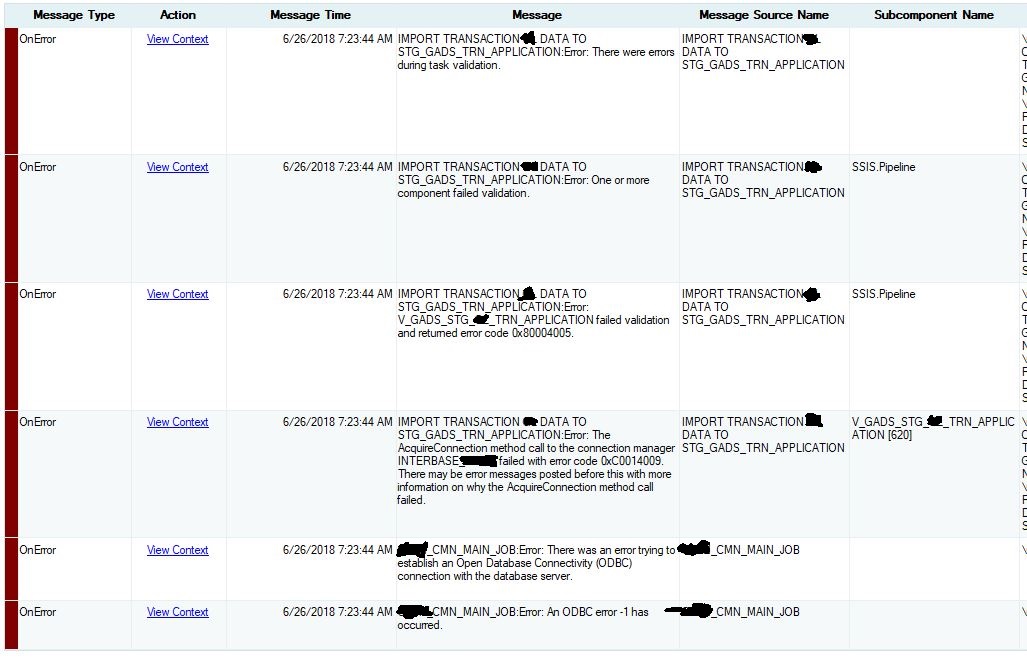
How to solve problem run job SSIS by SQL Server Agent failed with error code : 0xC0014009.
My job ssis package transform data from source database interbase to target sql server for use ODBC. I found job failed
Error: The AcquireConnection method call to the connection manager
INTERBASE failed with error code 0XC0014009. There may be error
messages posted before this with more information on why the
AcquireConnection method call failed.
almost everyday but sometime job success.
When debugging I fix debug options Run64BitRuntime => false and job step properties I choose 32 bit runtime already but my job error code 0XC0014009 often.
On Windows 2012 R2, SQL server 2016
I set settings, DelayedValidation: True and all 32bit
Have you decided what to do with your Windows 10 PCs when they reach their official end-of-support date three months from now?
I know some people who are convinced that Microsoft will back down at the last minute and extend that deadline. Take this prediction to the bank: That’s not gonna happen.
The end date is right there on the Microsoft Support document that lists “products retiring or reaching the end of support in 2025.” Every retail edition of Windows, as well as the Enterprise and Education editions, is slated for retirement.
If you’re holding out for an extension, prepare to be disappointed.
Screenshot by Ed Bott/ZDNET
The schedule is defined by Microsoft’s Modern Lifecycle Policy, which is documented on the Microsoft Lifecycle page: “Windows 10 will reach end of support on Oct.14, 2025. The current version, 22H2, will be the final version of Windows 10, and all editions will remain in support with monthly security update releases through that date.” In a separate support article, Microsoft reiterates that as of Oct. 14, 2025, it will no longer provide technical support or security and reliability fixes for PCs running Windows 10.
When a Windows version reaches its end-of-support date, the software keeps working, but the update channel grinds to a halt:
[There] will be no new security updates, non-security updates, or assisted support. Customers are encouraged to migrate to the latest version of the product or service. Paid programs may be available for applicable products.
That part in the middle sounds encouraging, doesn’t it? “Customers are encouraged to migrate to the latest version of the product or service.” Unfortunately, that’s not a supported option for customers running Windows 10 on hardware that doesn’t meet the stringent hardware compatibility requirements of Windows 11. If you try to upgrade one of those PCs to Windows 11, you’ll encounter an error message.
Some of the same folks who were praying for an extension to the end-of-support date have been hoping for a last-minute reprieve from those hardware standards. For a few days last December, it even looked like they might be right, as a flurry of tech-focused news sites spread stories that Microsoft had unexpectedly changed its mind on those requirements. Alas, all of those stories were grounded in a comical misreading of an old support article: No, Microsoft had not reversed course on Windows 11 hardware requirements. And if someone offers to bet you that they will, you should take the other side of that bet.
If you’re responsible for one or more Windows 10 PCs that fail Microsoft’s Windows 11 compatibility tests, what should you do? You have five options.
1. Ignore the end-of-support deadline completely
You could do nothing at all — just continue running your unsupported operating system and hope for the best. That’s a bad idea that exposes you to the very real possibility that you’ll fall prey to a security exploit.
I’ve heard from some folks who believe that using third-party antivirus software will protect them from harm. I wouldn’t bet my business on that strategy.
If you’re intent on doing so, consider installing the third-party 0patch agent to deal with any security issues that aren’t addressed by Microsoft. The free 0patch personal plan includes patches for known 0-day vulnerabilities, but if you want all Windows 10 patches, or if the PC is used for business or enterprise tasks, you’ll need to pay for a 0patch Pro plan at a per-PC rate of €24.95 per PC per year; for customers in the US, at current exchange rates, that equates to less than $2.50 a month.
2. Buy a new PC (or rent a virtual PC)
Microsoft and its partners would like you to replace that unsupported hardware with a new PC. You might even be tempted by one of the shiny new Copilot+ PCs, with their custom neural processing units, or maybe a powerful gaming PC. But throwing away a perfectly good computer seems wasteful, and it’s not an option if you’re hanging on to Windows 10 because you have mission-critical software that is incompatible with Windows 11.
You also have the option to rent a new virtual PC by signing up for Windows 365, which allows you to connect remotely to your own Windows 11-powered virtual PC in Microsoft’s cloud. A Windows 365 subscription works on Windows 10 and includes extended security updates for the host PC for up to three years. Windows 365 isn’t cheap, but it costs less than a new PC.
3. Ditch Windows completely
You could keep your old hardware and replace Windows 10 with the flavor of Linux you prefer. If you’ve got the technical know-how and experience to manage the transition, that option is worth considering.
Switching to Google’s free ChromeOS Flex might also be possible, although the compatibility requirements for that alternative are just as likely to get in your way. I wrote about my experience here: “Installing ChromeOS Flex? 5 things you need to do first to avoid headaches.” As I pointed out, “If you’ve got an old PC or Mac and you’re thinking of installing ChromeOS Flex on it, don’t do anything until you check Google’s official ChromeOS Flex certified models list.”
Pay special attention to the end-of-support date for the PC you’re thinking of upgrading. It doesn’t make much sense to replace Windows 10 with a release of ChromeOS Flex that’s also set to end support in 2025 or earlier.
Switching to Linux or some derivative of Linux might be a good way to repurpose an old PC. Still, for most consumers and businesses with existing investments in Windows software, it’s not a realistic alternative.
The final two options are more attractive.
4. Pay Microsoft for security updates
Do you remember the official support document that I quoted earlier? The one that says there will be “no new security updates” after Windows 10 reaches its end-of-support date? That’s not exactly true.
How much are these paid-for updates going to cost? Microsoft revealed the price list for business and education customers in April 2024. If you’re an administrator at an educational institution with a deployment of Windows 10 Education edition, you’re in luck. Those extended updates will cost literally a dollar per machine for the first year, $2 for the second year, and $4 for the third and final year, taking you all the way to October 2028.
IT pros who manage a fleet of business PCs aren’t so lucky:
Business customers will need to pay dearly to stick with Windows 10. A license for the Extended Security Updates (ESU) program is sold as a subscription. For the first year, the cost is $61. For year two, the price doubles, and it doubles again for year three. The blog post doesn’t do the math on those, probably because the total is uncomfortably high. A three-year ESU subscription will cost $61 + $122 + $244, for a total of $427.
Consumers have a more limited option. For $30, you can receive security updates for an additional year after the end-of-support date, with the deadline pushing out to October 2026. That’s a big discount compared to what business customers have to pay, but the consumer deal is only good for one year. At the end of that subscription, you’re unsupported once again.
5. Upgrade your ‘incompatible’ hardware to Windows 11
That pesky compatibility checker might insist that you can’t upgrade your Windows 10 PC to Windows 11, but there are indeed documented ways to bypass those restrictions. You just have to jump through a few technical hoops.
For PCs originally designed for Windows 10, you need to make one small registry edit and then ensure that your PC is configured to use Secure Boot with the Trusted Platform Module (TPM) enabled. Even an old TPM 1.2 chip will do. As many readers have confirmed via email, this process works seamlessly as long as you’ve got those configuration details set properly. This option will work even with PCs that are 10 years old.
For older PCs that were originally designed for Windows 7 or Windows 8.1, you might need to use a third-party tool called Rufus to bypass installation challenges. That’s especially true on PCs that use a legacy BIOS instead of UEFI firmware and for those that don’t have access to a TPM. Make sure you have the most recent version of Rufus (4.6 beta or later) to ensure that you can work around Microsoft’s latest compatibility checks.
Those workarounds can’t save a device whose CPU lacks support for two specific instruction sets — POPCNT and SSE 4.2. Most PCs built using Intel CPUs from 2009 or later will pass this test; AMD CPUs from 2015 or later should also be OK. As I note in this article, there is no workaround.
If you do use one of these upgrade hacks, don’t be alarmed by the threatening message you might see when trying to do an unsupported upgrade: “If you proceed with installing Windows 11, your PC will no longer be supported and won’t be entitled to receive updates. Damages to your PC due to lack of compatibility aren’t covered under the manufacturer warranty.”
That’s deliberately misleading language from Microsoft. As I’ve noted before, that warning doesn’t really say that Microsoft is going to cut off your access to updates; it simply says your PC is no longer supported, and you’re no longer “entitled” to those updates. That word is a tell on Microsoft’s part, disclaiming legal responsibility without actually saying what it will do.
If you don’t want to mess with the registry and you’re willing to do a clean install, just use Rufus to create a bootable Windows 11 installation drive, which bypasses the compatibility checker completely. You’ll need to restore your data files from a backup or from the cloud, and you’ll also need to install your software from scratch, but that’s no more difficult than setting up a new PC.
This article was originally published on Nov. 15, 2021, and last updated on May 9, 2025.
Feel free to use our freshly-written hint for today’s Wordle whenever you think you need a bit of a boost. Unleash it at the start to give your opening guess a helping hand, or save it for later, when you need to get rid of those last few gaps. However your game goes, don’t forget that the June 24 (1466) answer is always here if you need it.
I was convinced that every new row today was going to be the winner. I’d been careful. Clever. Confident. Every row turned out to be anything but—some of them were just as wrong as the one before. It was annoying to have the rug pulled out from underneath me with each new guess, but to be fair it did make my long and winding road to victory much more interesting.
Today’s Wordle hint
(Image credit: Josh Wardle)
Wordle today: A hint for Tuesday, June 24
The best of the best in any category. The strongest. The smartest. The toughest. Always at the top, always superior.
Is there a double letter in Wordle today?
Yes, there is a double letter in today’s puzzle.
Wordle help: 3 tips for beating Wordle every day
A good starting word can be the difference between victory and defeat with the daily puzzle, but once you’ve got the basics, it’s much easier to nail down those Wordle wins. And as there’s nothing quite like a small victory to set you up for the rest of the day, here are a few tips to help set you on the right path:
A good opening guess should contain a mix of unique consonants and vowels.
Narrow down the pool of letters quickly with a tactical second guess.
Watch out for letters appearing more than once in the answer.
There’s no racing against the clock with Wordle so you don’t need to rush for the answer. Treating the game like a casual newspaper crossword can be a good tactic; that way, you can come back to it later if you’re coming up blank. Stepping away for a while might mean the difference between a win and a line of grey squares.
Today’s Wordle answer
(Image credit: Future)
What is today’s Wordle answer?
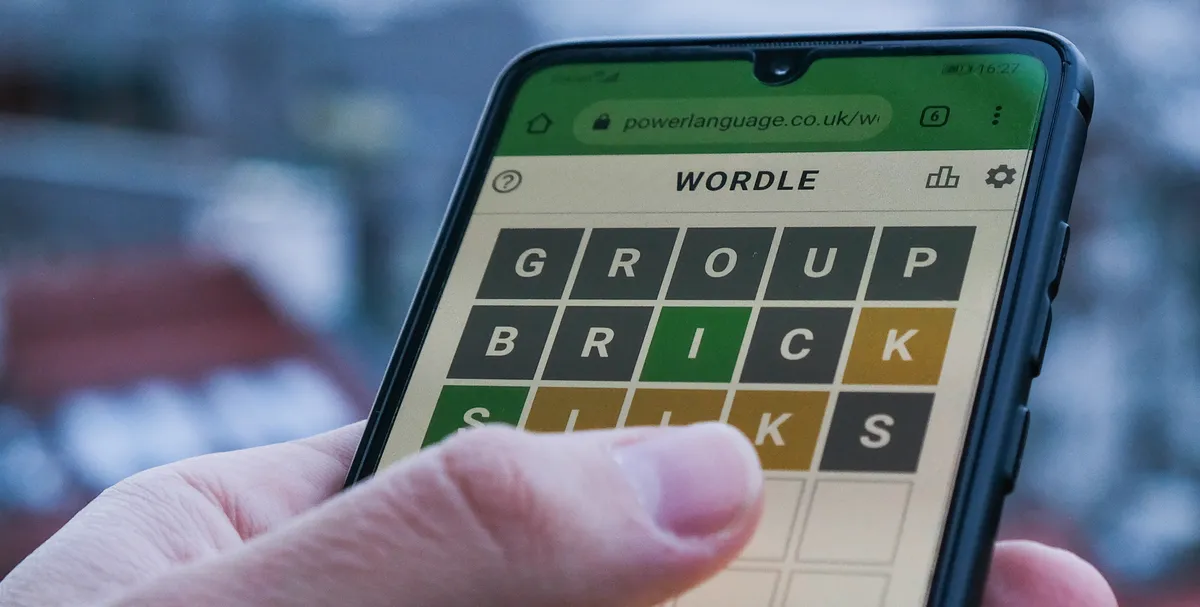
Fancy winning Wordle? The answer to the June 24 (1466) Wordle is ELITE.
Keep up to date with the most important stories and the best deals, as picked by the PC Gamer team.
Previous Wordle answers
The last 10 Wordle answers
Past Wordle answers can give you some excellent ideas for fun starting words that keep your daily puzzle-solving fresh. They are also a good way to eliminate guesses for today’s Wordle, as the answer is unlikely to be repeated.
Here are some recent Wordle answers:
June 23: ODDLY
June 22: THRUM
June 21: GLADE
June 20: TAUPE
June 19: CURIO
June 18: MUNCH
June 17: PRANK
June 16: PETTY
June 15: QUAIL
June 14: GHOST
Learn more about Wordle
(Image credit: Nurphoto via Getty)
Wordle gives you six rows of five boxes each day, and you’ll need to work out which secret five-letter word is hiding inside them to keep up your winning streak.
You should start with a strong word like ARISE, or any other word that contains a good mix of common consonants and multiple vowels. You’ll also want to avoid starting words with repeating letters, as you’re wasting the chance to potentially eliminate or confirm an extra letter. Once you hit Enter, you’ll see which ones you’ve got right or wrong. If a box turns ⬛️, it means that letter isn’t in the secret word at all. 🟨 means the letter is in the word, but not in that position. 🟩 means you’ve got the right letter in the right spot.
Your second guess should compliment the starting word, using another “good” word to cover any common letters you missed last time while also trying to avoid any letter you now know for a fact isn’t present in today’s answer. With a bit of luck, you should have some coloured squares to work with and set you on the right path.
After that, it’s just a case of using what you’ve learned to narrow your guesses down to the right word. You have six tries in total and can only use real words (so no filling the boxes with EEEEE to see if there’s an E). Don’t forget letters can repeat too (ex: BOOKS).
If you need any further advice feel free to check out our Wordle tips, and if you’d like to find out which words have already been used you can scroll to the relevant section above.
Originally, Wordle was dreamed up by software engineer Josh Wardle, as a surprise for his partner who loves word games. From there it spread to his family, and finally got released to the public. The word puzzle game has since inspired tons of games like Wordle, refocusing the daily gimmick around music or math or geography. It wasn’t long before Wordle became so popular it was sold to the New York Times for seven figures. Surely it’s only a matter of time before we all solely communicate in tricolor boxes.
A long time ago, I stood in a packed room at VS Live! and watched developers erupt in applause after a debugging demo shaved hours off a real-world problem. That was the moment I realized this wasn’t just a conference—it was a place where developers and toolmakers come together to push the craft forward.
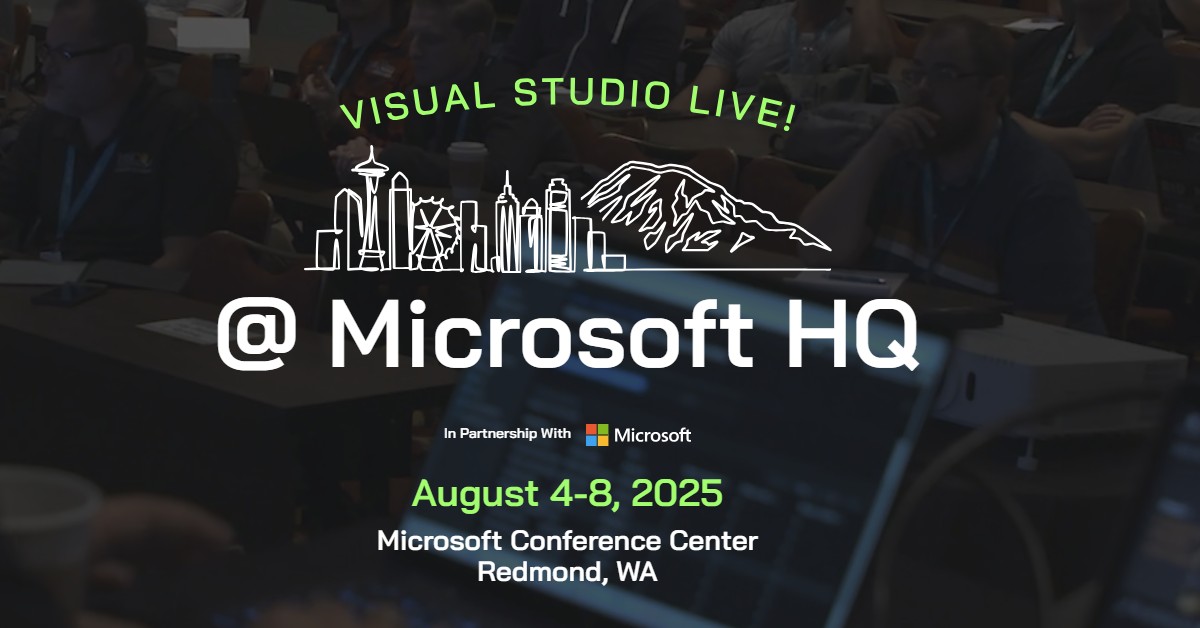
I’m excited to announce that I’ll be keynoting VS Live! Redmond 2025, August 4–8 at the Microsoft Conference Center—and I’d love for you to join us.
This is more than just a developer event. It’s the one time each year when the Visual Studio, GitHub, and Azure engineering teams open our doors, share what we’re working on, and connect directly with the developers we build for. I’ve already started working with the team on a set of demos that will surprise you—and I mean that in the best way.
Let me show you why this is the event I never miss.
Top 6 Reasons to Join Us at VS Live! Redmond
Kick Off with My Keynote and Exclusive Visual Studio Demos
I’m teaming up with the Visual Studio engineering team to bring you fresh, powerful demos that will reshape how you think about building and debugging software. These are workflows we’ve never shown publicly before—and I can’t wait to share them with you.
Unlock the Power of Copilot Agent Mode + MCP
Copilot’s new Agent Mode isn’t just a concept—it’s live, extensible, and deeply integrated into Visual Studio. At VS Live!, we’ll show you how to use it to handle multi-step dev tasks, integrate Model Context Protocol (MCP) tools, and turn GitHub Copilot into an AI teammate that actually gets things done.
Only 400 Spots Left for This Exclusive On-Campus Event
VS Live! Redmond is intentionally smaller and more intimate than most developer conferences—and it’s held right here in Building 33 on the Microsoft campus, home to the Visual Studio product team. Fewer than 400 seats remain. If you want in, now’s the time to register.
Meet the Experts: Visual Studio, GitHub, and Azure
We’re hosting a special “Meet the Experts” experience where you can talk directly with the PMs and engineers building your tools. No booths. No filters. Just honest, developer-to-developer conversations about what’s working, what’s not, and what’s next.
Help Shape the Future of Visual Studio
We’ve carved out time for a dedicated feedback session with the Visual Studio IDE team. Bring your questions, feature ideas, and wish lists—we want to hear them. Your voice will help shape how Visual Studio continues to evolve.
70+ Sessions. 39 Microsoft Speakers. Hands-On Everything.
From .NET and Azure to GitHub Copilot and Microsoft Fabric, you’ll get access to deep technical sessions, hands-on labs, and hallway conversations with folks who build the tech. This isn’t high-level theory—it’s practical, real-world content you can apply the moment you get back to work.
Save Your Seat – And Save Big
Visual Studio subscribers unlock exclusive pricing at https://my.visualstudio.com. Just sign in with your subscriber ID to find your priority code.
Not a subscriber? No problem. Use Priority Code VSLIVEHQ25 at checkout on the VS Live! Redmond event page to save up to $500 on registration.
There are fewer than 400 spots left for this exclusive, smaller event—held right on the Microsoft campus in Building 33, home to the Visual Studio engineering team.
And for a few lucky attendees, we’re planning something special: a backstage pass experience, including private meetups and Redmond campus tours. More details coming soon.
Whether you’re a long-time Visual Studio subscriber or just starting to explore GitHub Copilot and Azure AI, this is your chance to connect with the engineers building the tools you use every day—and the community that makes it all worth it.
P.S. If you see me in the halls or at a session, stop me and say hi—I’d love to hear what you’re building.
Important announcement: You don’t have to go into journalism or spend hours looking for freelance work to find creative writing jobs. If you enjoy spinning tales more than marketing campaigns, it IS possible for you to make some money from your creative endeavors. We’re not going to sugar coat it, it’s difficult, but not impossible.
Here are three creative writing jobs that will let you flex your artistic writing muscles
We hope you’ll use the resources below to find some ways to earn money writing stories, creative prose or even poetry.
Literary Journals and Magazines
Literary journals and magazines are a great place to submit your creative writing, especially if you’re trying to build a portfolio of published work. It may be harder to be accepted in some publications than others, but think of rejection letters as a way to work toward improvement.
If you want to start publishing your work, here are some journals and magazines where you can submit your stories or essays.
OneStory
“ONE STORY publishes one great short story at a time. We bring people together through reading, writing, and learning about short fiction.”
While ONE STORY accepts fiction, they do state that they accept literary fiction. As you start to write and submit, make sure you know the difference between literary and genre fiction and you understand what individual publications are looking for.
Submissions for ONE STORY should be between 3,000 and 8,000 words and they pay $500 and 25 contributors copies for First Serial North American rights. All rights will revert to the author following publication.
Strange Horizons accepts speculative fiction and also publishes fiction, poetry, essays, and interviews. Even better? They are open for submissions soon! For fiction, they accept stories up to 10,000 words and pay $0.10 per word.
Check out their guidelines and get ready to submit. If you have speculative fiction polished and ready to go, this might be a great place for it!
The Sun Magazine
We’re looking for narrative writing and evocative photography from all over the world. Send us work that maps the human landscape, where the light catches on the faintest joy, where darkness sometimes threatens to overwhelm, and where ✗ never marks the spot because the truth is never so simple.
The Sun Magazine pays $200 and up, depending on length for fiction and essays. Review their guidelines for their writing and think about submitting!
Podcasts
If you haven’t noticed, even the literary world is making the move to digital and a lot of people prefer to listen to their stories than read them. It’s time to get your piece of that pie and look at podcasting for viable creative writing jobs. Here are a few podcasts that will pay you for your stories and feature them on their podcast.
PseudoPod
“PseudoPod is always looking for quality fiction to feed our listeners. If you’re a writer with a short horror story that you’d like to hear narrated by one of our talented performers, we’d like to see it. Probably.”
PseudoPod seeks dark or weird fiction and pays $0.08 per word for original fiction, $100 flat rate for short story reprints, and $20 flat rate for flash fiction reprints (stories below 1,500 words).
You can learn more about when they are open to submissions and their guidelines on their website.
PodCastle is a fantasy fiction podcast from PseudoPod. If you write speculative fiction, this is the portal for you. Learn more here.
Cast of Wonders
Write young adult speculative fiction? Cast of Wonders is a young adult short fiction market, open to stories up to 6,000 words in length. Dig deep into the submission guidelines here, as they make it clear they are looking for a specific type of story.
Clarkesworld Podcast
“Clarkesworld Magazine is a Hugo, World Fantasy, and British Fantasy Award-winning science fiction and fantasy magazine that publishes short stories, interviews, articles and audio fiction.”
Clarkesworld pays $0.12 per word but claims first world electronic rights (text and audio), first print rights, and non-exclusive anthology rights for their annual Clarkesworld anthology.
If you’re new to submitting your work, you’ll want to learn more about first rights and what that means for your work. They offer a resource here. Check out their submission guidelines to see if they are a fit for your writing.
Thirteen Podcast
“Thirteen is a monthly audio fiction anthology podcast featuring atmospheric, slow burn, spooky stories.
Thirteen Podcast is looking for, “stories that will make you smile, break your heart, and have you wishing for a night light.”
They have new episodes on the 13th of each month and feature one longer story each episode rather than several shorter ones. They are looking for stories of 5,000 words or more and a first-person narrator works best for their format.
Authors of stories over 5,000 words in length will be paid $75 if accepted. Authors of stories under 5,000 words in length will be paid $50 if accepted.
Review their guidelines and reach out, especially if you like your short, creepy stories on the longer side.
Ellery Queen Mystery Magazine Podcast
“Ellery Queen’s Mystery Magazine welcomes submissions from both new and established writers. We publish every kind of mystery short story: the psychological suspense tale, the deductive puzzle, the private eye case—the gamut of crime and detection from the realistic (including the policeman’s lot and stories of police procedure) to the more imaginative (including “locked rooms” and “impossible crimes”). We need hard-boiled stories as well as “cozies,” but we are not interested in explicit sex or violence. We do not want true detective or crime stories. We are especially happy to review first stories by authors who have never before published fiction professionally.”
Do you have a flair for one-liners? Do you always get asked to write notes for friends or loved ones when they have a special occasion or loss? Can you make someone sniffle in just a few words? Then writing greeting cards might be one of the best creative writing jobs for you. Some companies pay $100 for an accepted verse, so it’s a great way to add to your writing income.
Check out these companies to get started.
Blue Mountain Arts
Blue Mountain Arts is looking for rhymed poetry, religious verse, or one-liners. That said, they want, “contemporary prose or poetry written from personal experience that reflects the thoughts and feelings people today want to communicate to one another, but don’t always know how to put into words.”
Oatmeal studios favors funny over feelings. They want “humorous greeting card ideas that appeal to a range of ages and interests. Review their guidelines page and see if their style meets yours!
While there are options when it comes to submitting your work for creative writing jobs, we should make it clear that making money from in these non-traditional ways isn’t easy. It takes constant improvement, research, and patience. The landscape is always changing so continue to learn and, most importantly, continue to write!