Nothing announced a product expansion to Best Buy across the U.S., bringing its phones and audio devices to even more people.
The company states its Phone 4a Pro, Phone 3, Headphones a, and Ear 3 are now available with its full portfolio on the website.
Nothing states it recorded a 120% increase in sales in 2025 in the U.S., and it seems it’s looking to keep that streak going.
Nothing believes that there’s no better way to say “Happy Friday” than to announce an expansion of its products in the U.S.
Marking another milestone for Nothing, the company shared a press release today (June 12), detailing its product expansion to Best Buy in the U.S. It states that its phone and audio portfolio “will be available at Best Buy stores nationwide.” Nothing says it’s bringing its products to the store in the U.S. off the back of its success at Best Buy Canada. For phones, Nothing states consumers across the country can find the Phone 4a Pro and the Phone 3 in stores.
However, when it comes to its audio lineup, Nothing’s Headphone a and Ear 3 are listed for availability. The post adds that its “complete portfolio will also be available at bestbuy.com.”
Latest Videos From
Nothing’s latest move can be seen as strategic, with a storied history in the U.S. The company states it recorded a 120% increase in sales in the States in 2025, facilitating a 175% increase in revenue. More than 500 Best Buy stores across the country are reportedly receiving Nothing Phones and audio devices.
Nothing is going places
(Image credit: Nicholas Sutrich / Android Central)
The lineup Nothing is offering at Best Buy can stand on its own pretty well. Android Central’s Nicholas Sutrich was smitten with the brand’s Headphones a when he first put them on. To him, over-ear-headphones might as well be back on the menu. What Nick talked about was the “loud and proud” aspect of these headphones. Other than their sound quality, the Headphones a rock Nothing’s classic design, one that clearly separates it from the rest of the industry.
These headphones are comfortable, while also sporting easy-to-reach buttons. Then you have the Nothing Phone 4a and 4a Pro, which made quite the statement earlier this year.
Along the lines of Nothing’s availability announcement today, the company expanded the reach of its Phone 3 in 2025. Best Buy Canada received the device, while Nothing brought it to more places like Amazon in the U.S., too. Nothing’s CEO, Carl Pei, said the U.S. market is dominated by two players, which is likely a reference to Samsung and Apple. Pei said consumers are looking for change. It’s safe to say that those sentiments haven’t gone anywhere as we see more of Nothing’s products become easily available in the U.S.
Get the latest news from Android Central, your trusted companion in the world of Android
Android Central’s Take
Nothing’s phones have continued to catch my attention. I’ve been impressed with their changes and upgrades thus far, and the Phone 4a series, though it’s more budget oriented, is pretty attractive. Nothing’s moved into the AI space, but more focused on productivity. Users can quickly snapshot details and save notes, which is a boon to the busy bees of the world.
A guide to the most common pop-up mistakes that hurt home-based sellers helps new entrepreneurs protect real income, not just vanity traffic. Many home-based sellers treat markets and local events like casual sales days, only to leave confused when foot traffic never translates into steady revenue. A pop-up gives customers a physical snapshot of the business, and if the setup feels unclear or untrustworthy, buyers often walk away before asking a single question.
Choosing the Wrong Event
A profitable pop-up starts before you pack the car. Too many home-based sellers chase any booth opening with decent foot traffic, even when the crowd does not match the product or price point. A handmade soap seller or custom gift maker needs an event where shoppers expect to browse and ask questions. When the audience mismatch is strong, even a polished booth starts working against it from the first hour.
A better approach starts with event research, not hope. Look at past vendor photos, neighborhood demographics, and the types of businesses the organizer usually promotes. Then ask what type of people the event usually attracts. That distinction helps a home-based business choose income opportunities with a stronger chance of turning one busy afternoon into repeat customers.
Building a Booth With No Clear Offer
Some pop-up booths look full but still fail to sell. A table covered with every product, sample, and payment sign often forces shoppers to work too hard to understand the offer. People walking through a market make quick decisions, so your booth needs one clear reason to stop. When the message feels buried, customers may admire the display and keep moving without buying anything.
This problem hits service-based businesses, too. A home organizer, photographer, or cleaning business needs a simple offer that a stranger understands in a few seconds. That may mean a starter package or a small printed menu with plain pricing.
Making Payment Feel Awkward
A customer who decides to buy should never feel stuck at checkout. Some home-based sellers lose sales because they forget backup payment options, struggle with spotty service, or make pricing hard to confirm. The hesitation lasts only a few seconds, but that short pause gives people time to reconsider the purchase. If checkout feels clumsy, the booth suddenly feels less professional.
Before the event, test your card reader, mobile hotspot, and QR codes at home. Also, make sure prices remain visible to customers on their side of the table, not just from behind the booth. Smooth checkout builds confidence because it makes the whole business feel trustworthy and organized.
Forgetting the Comfort of the Space
Comfort affects sales more than many home-based sellers expect. A booth with poor lighting, loud equipment, weak shade, or a tight table layout gives shoppers a reason to leave before they study the offer. If your setup needs power for lights or checkout tools, the sound and placement of that equipment matter. A quick look at ways to quiet generators for businesses fits into planning, especially for outdoor events where noise can push customers away.
Think about the booth from the customer’s side. They should be able to approach without squeezing around cords or standing in direct sunlight while they make their decision. A comfortable booth gives shoppers permission to stay long enough to buy.
Ignoring Follow-Up After the Event
A pop-up does not end when you fold the tablecloth. Many home-based sellers collect compliments all day, then lose the momentum because they never capture names, send follow-ups, or guide interested shoppers toward the next step. Without a follow-up system, the event becomes a single sales day instead of a customer-building channel.
Use one simple method to keep the conversation going. A QR code for an email list or a post-event discount card gives shoppers a reason to reconnect. Service businesses can also invite visitors to book a short consult during the event while the interest feels fresh.
Treating Trust as an Afterthought
Home-based sellers often underestimate how much trust they need at an in-person event. Customers may love the product, but they still want proof that the business will follow through after the tent comes down. Business cards help, though trust grows faster when the booth shows real reviews, clear policies, social proof, and a direct way to reach the owner. This matters even more for service sellers who ask people to book something after the event.
A small sign with recent testimonials often works better than a long sales pitch. For local service providers, quickly building trust in a service-based business may come down to showing faces, delivering results, maintaining response times, and keeping booking steps simple. Customers want to know who they will deal with after the conversation ends. When the booth answers that question early, the seller does not need to fight so hard for a sale.
Pricing Like a Hobby
Home-based sellers sometimes price products and services like side projects, even when they want business-level income. Pop-up costs include the booth fee, packaging, travel, samples, supplies, and the hours spent preparing for the event. If the price only covers materials, the seller leaves with busy hands and weak profit. That pattern turns an income opportunity into an unpaid promotion.
A stronger pricing plan starts with the full event cost. Add everything, from the table fee to the expected product loss before the event even begins. Then set prices that support the business, rather than apologizing for being small. Customers who value the product or service need clarity, not a discount that trains the owner to earn less.
Treat the Pop-Up Like a Sales System
Treat these common pop-up mistakes that hurt home-based sellers as fixable parts of a sales system, not personal failures. The right event, a clear offer, smooth payment, a comfortable booth, and simple follow-up all help a small business look ready for growth.
Home-based sellers compete with busy markets and cautious buyers every time they show up in person. With stronger planning, a pop-up becomes more than a table for the day and starts working like a practical path toward a steadier income. For more information and business advice, browse Home Business Expo for more information.
All eyes might be on the SpaceX IPO — the world’s largest in history — and its CEO Elon Musk. But lest you forget there is another publicly traded company in the Musk universe that many believe will someday merge with SpaceX.
We’re talking about Tesla, a company that has a current market cap of about $1.26 trillion. Musk, who also leads the company, has pitched Tesla as an AI and robotics company, even if the bulk of its revenue comes from selling EVs. Some see a merger with SpaceX as a critical step to achieve that mission.
And SpaceX president and COO Gwynne Shotwell appears to see some benefits to one. During an interview with CNBC, Shotwell said a merger “might make Elon’s life a little easier.”
There is evidence that SpaceX is already preparing for a merger. The company amended its S-1 registration document ahead of its public debut to include new language in its risk factors section about mergers and acquisitions. The sentence, which reads “We may issue a significant amount of equity in connection with future transactions,” is a warning to investors of future dilution. A warning like that wouldn’t be necessary for a small-scale deal; it likely means Tesla.
As a reminder, Musk is quite comfortable bringing the disparate pieces of his portfolio together. SpaceX acquired Musk’s AI company xAI earlier this year. And xAI acquired Musk’s social media company X in an all-stock transaction.
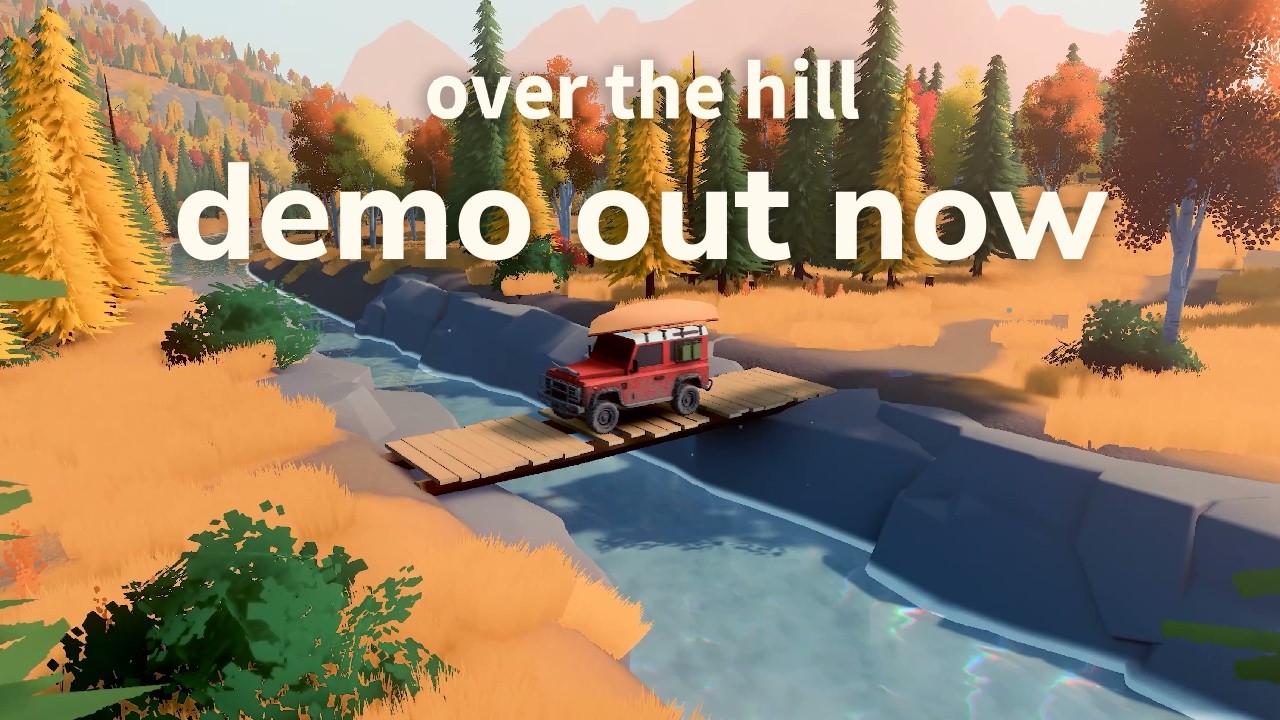
I was never able to get a feel for Funselektor’s top-down driving game Art of Rally, or its predecessor Absolute Drift: I like rally in real life, but sliding cars around corners at screaming speeds from a weird perspective and with no tactile feedback just didn’t work for me. I had higher hopes for the slower pace of the studio’s upcoming Over the Hill, and after trying the demo that dropped today with the start of the Steam Next Fest, I am very happy to say that yeah, this is the one.
Over the Hill is a very stylized take on off-roading: You’re not going to find high-fidelity mud here, or detailed first-person views from behind the wheel. It’s really more about the broader experience of being ‘out there,’ going slow, taking your time, and thinking about how you’re going to get where you want rather than just hammering on it. You can hammer on it if you want, and it’ll carry you for a while, and also likely put you over onto your roof when you’re not expecting it.
over the hill – Steam Next Fest Demo Trailer – YouTube
The game world itself is very much like that too: Not realistic, but evocative in a way that I think makes it more powerful—a bit like Firewatch in that regard, and in visual style too, at least for this demo. This playable portion is set in a beefy chunk of Canadian wilderness, and while Funselektor emphasized that it’s still “a work in progress,” there’s a lot to see and do. Trails of different types lead to points of interest where you’ll find customization items and in-game currency, there are cabins that serve as save points, “challenge trails” wait to test your patience and precision, and scenic lookouts provide an opportunity to just kick back and enjoy the view, and play with the game’s photo mode if that’s your thing.
Latest Videos From
You can (and surely will) also leave the trailers completely and just go bombing around wherever you want, within the limits of your vehicle’s capabilities, which—as an entry-level machine—are pretty limited indeed. But that’s also how you find the interesting stuff: The map will guide you to nearby POIs, but it can be a lot more fun to just get out there and see what comes up.
It’s probably wise to play it a little safe until you’ve got some of those cabins unlocked, though. The first time I fired up Over the Hill I found and immediately embarked on a challenge trail that led me across some rocks to a gorgeous waterfall, and I was this close to completing it when I misread the trail, ended up in the water, and drowned my engine. The only checkpoint I had at that stage was the one at the very beginning, so—right back to the start I went.
(Image credit: Funselektor)
See that very narrow rock trail in front of the falls? Good luck.
But even those long slogs can be almost hypnotic. During another session I came across a vehicle stranded in a bog, and spent more than 30 minutes trying to pull it out. I came so close, so many times, and I kept telling myself one more shot from this angle and I’m done, and then I kept trying—until, well, I got a little rammy, ended up in the nearby lake, drowned my engine, and whoops. Now we’re both stuck.
Keep up to date with the most important stories and the best deals, as picked by the PC Gamer team.
(I later found a trail that led me to the stuck vehicle from the other side of the bog, and pulled it out with relative ease. Live and learn.)
It wasn’t all misfortune and failure. A drive up to a distant fire tower left me hung up on a boulder: After a few minutes of gunning the engine and reefing the wheel I was ready to reset, but decided it was time to finally take a dig through Over the Hill’s toolbox. Turned out there was a portable winching point in there, similar to a piton but big enough to yoink a car around. I was able to pull off the boulder, and after a few more stressful moments but no full-on catastrophes, I made it to the top. (And then forgot to take a picture. Isn’t that always the way?)
(Image credit: Funselektor)
This one, well, I did not get out of. But I also have to admit that trying to drive out to the end of a very narrow, rickety dock was probably not my best idea.
(Image credit: Funselektor)
Over the Hill has a day-night cycle that works really well. The game world becomes a very different kind of beautiful over long distances, but this isn’t one of those pretend-nights in videogames where the skybox is dark but you can still see: You’re gonna need your headlights if you want to keep driving.
Image 1 of 5
(Image credit: Funselektor)
(Image credit: Funselektor)
(Image credit: Funselektor)
(Image credit: Funselektor)
(Image credit: Funselektor)
One thing I realized after playing Over the Hill for a good while is that I’d put my truck into low gear range—slow, but better for climbing rocks and powering through muck—and then just left it there. Yes, it was taking me longer than necessary to traverse the game’s safer areas, but I hadn’t noticed because slow and meditative is what Over the Hill is all about. Even after I clocked that I was basically crawling when I could’ve been cruising, I left it alone—apart from being a more relaxing way to travel, running in low gear had the added practical benefit of keeping me from high-speed bouncing my dumb self into roadside trees and rocks.
Along with singleplayer exploration, Over the Hill supports multiplayer for up to four drivers at once. I took it for a very brief spin, mostly just so I could say that I did, and it’s very easy to set up and connect with other players. As for the actual exploration, I didn’t do extensive testing but it looks more or less identical to singleplayer, except you’ve got other people around—handy if you need to be hauled out of some self-inflicted trouble.
How the full game holds up is an open question, but the demo sets a great tone. (Speaking of which, Over the Hill’s music is excellent too: Not as deep a soundtrack as that other great fantasy driving sim, Pacific Drive, but a soothing, gentle backdrop to the demo’s quiet isolation.) A lot of driving games, like the upcoming Clutch, like to churn excitement about “the connection between car and driver, and the raw thrill of speed,” but for my money Over the Hill lands closer to real love of the wheel: Funselektor understands it in a way that an awful lot of studios miss.
The Over the Hill demo is live now and will remain up until the end of the Steam Next Fest on June 22. A release date hasn’t been announced but it’s expected to be out later this year.
Havn didn’t do much wrong with the HS 420. It’s easy to build into and looks great once the build’s done. But it is absolutely huge and heavy. So, at Computex 2026, Havn had an answer for that.
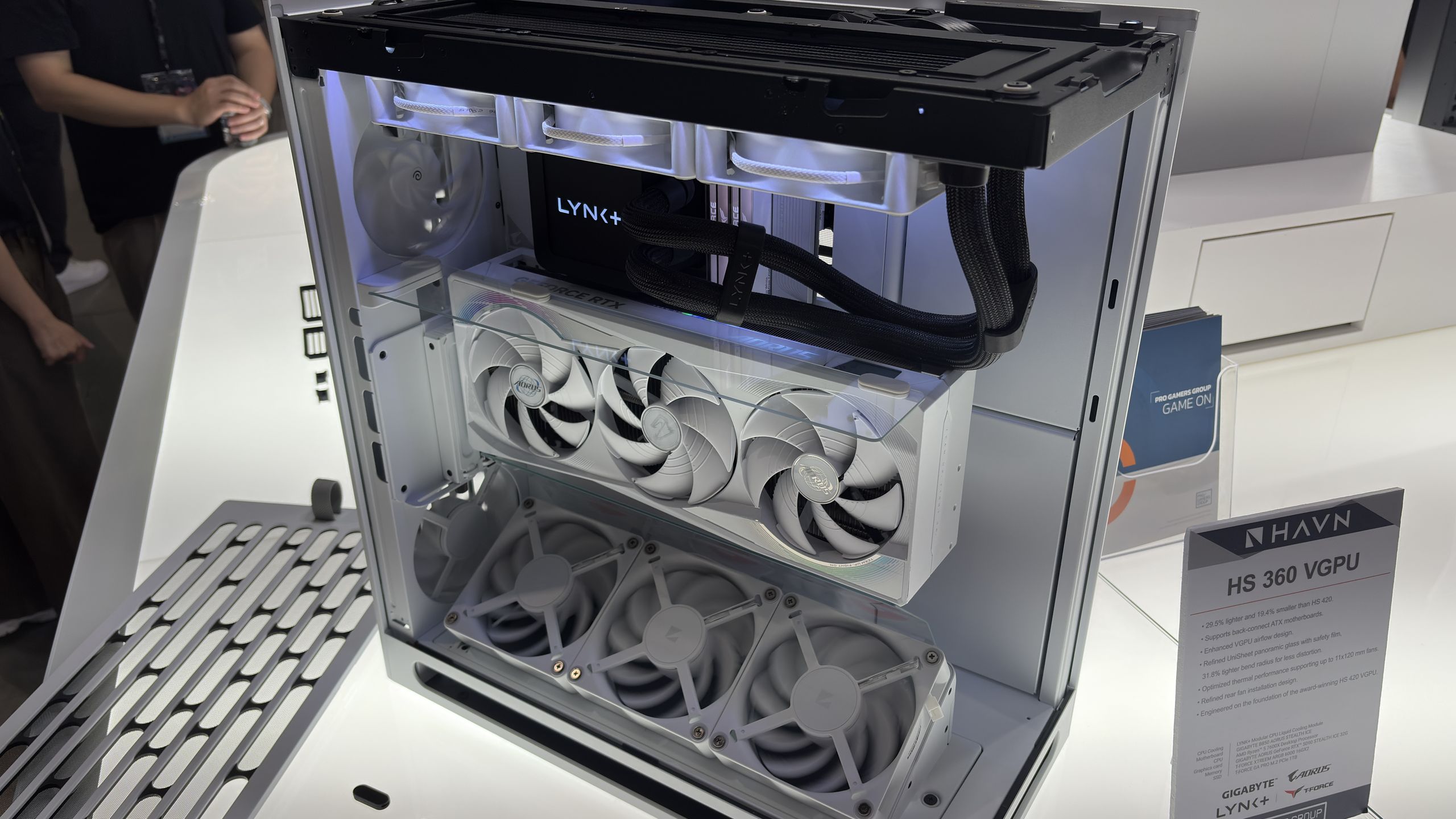
It’s called the HS 360 and it is very similar to the HS 420, only smaller. Specifically, it’s 19.4% smaller and 29.5% lighter, the company says.
I’m told the panoramic glass, which wraps around the front to the side of the case, required a slight reduction in thickness and a tighter bend radius to match the newly shrunken chassis and cut down on weight.
Latest Videos From
“I think we could probably claim that it’s the tightest bend on any glass panel,” Havn’s Steven Levitt tells me.
One new feature on the HS 360 is the inclusion of a magnetic glass divider, which sits above a graphics card using the vertical GPU mount. The idea is that cold air coming through the bottom of the case—the case uses a chimney layout with cool air coming up through the bottom—a lot of it was escaping right out the top along the front third of the case. By adding in something to block the air, counter-intuitively, I’m told temperatures are reduced by three degrees.
There are a couple of minor improvements to how fans are mounted in the case, too. People who have used the HS 420 will know what I’m on about, but the fans need to be installed from inside the case, which is a pain once components are installed. The HS 360 has brackets that let them be installed in the rear, and the lower three fans can also be lifted out from both sides for easier access.
Image 1 of 5
(Image credit: Future)
(Image credit: Future)
(Image credit: Future)
(Image credit: Future)
(Image credit: Future)
The HS 360 also has a really smart solution for back-connect motherboards—those with all the connectors on the rear for a smarter appearance. The tray to the side of the motherboard tray, with the cutouts that a 24-pin motherboard cable would usually run through, flips around, which means a back-connect motherboard can fit here, and there aren’t any unnecessary cutouts for a cleaner look. Smart.
Keep up to date with the most important stories and the best deals, as picked by the PC Gamer team.
All of these upgrades would be great on the larger HS 420, too. So I asked Levitt about that, and he told me they’re working on it, but it’s something for the future. Perhaps a V2, then.
I’m told the VGPU version of the HS 360 will be around $230. The non-VGPU one will be around $160. These are only tentative prices, but that would put this case a little above the larger HS 420 and BF 360.
In 2026, 48% of organizations rate data engineering as critical — nearly double the 28% who said the same in 2019. That shift reflects a fundamental change in how organizations are building for AI and analytics performance.
The question is whether your organization is keeping pace. The 2026 Dresner Data Engineering Market Study documents what is driving that change across hundreds of organizations globally. Among organizations where AI is a cornerstone of business strategy, 88% rate data engineering as critical or very important.
For IT and data leaders ready to evaluate their next move, download this study to understand:
Why the highest-ROI business intelligence organizations invest in data engineering differently than their peers
Which capabilities and sourcing models define leaders in 2026
Where your adoption stands relative to industry and geography benchmarks
You’ll get a great listening experience with these AirPods, which are powered by Apple’s H2 chip. Both music and calls will sound great quality, and the Voice Isolation feature helps make sure you’re heard nice and clearly too.
The earbuds include Siri support, so they make listening and hands-free tasks easy. You can use voice commands such as playing music or checking schedules, along with Siri Interactions that enable simple head gestures like nodding or shaking to respond. They also feature automatic pairing and in-ear detection for playback control.
They’re also compatible with the Find My app, helping you locate both the earbuds and the case should you misplace them. Plus, the battery life gives you up to five hours of listening time per charge and up to 30 hours total with the case.
Mashable Deals
By signing up, you agree to receive recurring automated SMS marketing messages from Mashable Deals at the number provided. Msg and data rates may apply. Up to 2 messages/day. Reply STOP to opt out, HELP for help. Consent is not a condition of purchase. See our Privacy Policy and Terms of Use.
Walk into any large financial institution today and you’ll find the same scene: dozens, sometimes hundreds, of AI pilots and almost nothing in production. The business case is obvious, the ROI is overwhelming and the technology works in the demo. And yet the projects stall at the same gate, every time, when someone in risk or compliance asks a deceptively simple question, “Show me how it made that decision”. If the answer is “we can’t”, the project doesn’t graduate from proof of concept and quietly dies.
In my experience there are really only two paths out of that meeting. The first is the quiet death I’ve just described, and it accounts for the overwhelming majority of stalled initiatives. The second is that the project limps forward by bolting a human onto the end of the process, on the basis that if a person reviews every output then the decision is, technically, a human one. In Europe this approach has the comfort of regulation behind it, because Article 14 of the EU AI Act explicitly requires effective human oversight of high-risk systems, and similar expectations are emerging from supervisors in most major markets. It sounds responsible. The problem is that it rests on an assumption about human beings that the evidence simply doesn’t support, and I’ll come back to why.
From use cases to architectures
It’s worth understanding how we got here. Two years ago most enterprises were busy switching AI experiments off, reining in the hundreds of ungoverned use cases that bloomed when generative AI first arrived. What has emerged since is more interesting. Rather than approving individual use cases one committee meeting at a time, the leading institutions have started pre-approving architectures. If you can get the architecture right, meaning you know where the probabilistic components sit, where the deterministic controls sit and where the audit trail comes from, then you can repeat that pattern across hundreds of use cases. If you get it wrong, every project becomes a fresh fight with the governance committee.
This is a profound shift, and it cuts against the narrative coming out of the frontier labs, which amounts to a promise that you shouldn’t worry about today’s shortcomings because a better model is coming next month. Enterprises have stopped waiting for the risks to evaporate. They have been through the trough of disillusionment and come out the other side with a pragmatic conclusion: for the meaningful proportion of use cases where precision, determinism and explainability are non-negotiable, the answer isn’t a bigger model, it’s a different architecture.
Humans are terrible guardrails
Which brings me back to the second path, the human in the loop. Automation bias is one of the deepest cognitive biases we have, and it doesn’t take long to assert itself. Put a person in front of a stream of AI-generated outputs and ask them to challenge each one and within weeks they stop reading properly. They get tired, they get comfortable, and they approve. Worse, the very skills they would need in order to challenge the machine begin to decay through disuse, so automation bias slides quietly into de-skilling. A human checkbox at the end of a pipeline doesn’t transform an AI output into a human decision; it launders accountability while judgement atrophies.
This matters enormously for the agentic wave, because agentic AI properly understood is not a product category called “AI agents” but AI with genuine agency, the ability to take action autonomously. Autonomy at scale and human review of every output are mathematically incompatible. You cannot have straight-through processing and a person reading everything, so something else has to provide the guarantee, and that something has to be engineered into the stack in the form of deterministic logic, explicit policy and causal audit trails, rather than bolted on as a tired human at the end of the process.
I believe regulators broadly underestimate this. Article 14 was written with the right intent, but the implicit assumption running through much supervisory thinking, in Europe and elsewhere, is that human review is a sufficient control. The institutions deploying at any real volume already know that it isn’t.
The systemic risk nobody is pricing
There is also a second-order problem brewing. When everyone in a market uses the same handful of foundation models, trained on substantially the same data, the only thing differentiating one institution from another is the context and institutional knowledge they bring to those models. Strip that away and you get convergence: similar signals, similar decisions and increasingly synchronised behaviour. Humans have historically been the market’s shock absorbers, slow and inconsistent but gloriously diverse in their judgement, and replacing them with a monoculture of models builds a system that is brilliant right up until it encounters something its training data never contained. Machine learning is predicated on the assumption that the future will resemble the past, and the most expensive moments in financial history are precisely the ones where it didn’t.
Layer on concentration risk, with a handful of compute-constrained model providers experiencing demand growth that outstrips the supply of compute, and you have operational dependencies that would never pass muster if we called them what they are: single points of failure in the supply chain of critical financial infrastructure. One pragmatic principle deserves much wider adoption, which is to cut the tether at runtime. Use large models where they genuinely excel, in the build process, in drafting and in synthesis, but don’t allow the uptime of a production decision system to depend on someone else’s GPU availability.
Generality is the enemy of precision
The deeper issue is a mindset we imported from the consumer internet. The original machine learning successes paired extremely rich data with extremely simple decisions, such as which advert to show you next. We then spent a decade porting that “data is the answer” mindset into domains with far worse data and vastly more complex decisions, and we are now compounding the error with general-purpose models trained, to all intents and purposes, on everything.
A system designed to be good at everything cannot be precise at your thing. Regulated decisions don’t live in the statistical haze of internet text; they live in regulation, policy, procedure and the hard-won institutional knowledge sitting in the heads of experienced people. The organisations that win the next phase won’t be the ones with the biggest model bill, but the ones that treat their own knowledge as a first-class citizen in the AI stack, explicitly represented, reasoned over and auditable end to end, with probabilistic components deployed where flexibility helps and deterministic components deployed where guarantees are required.
That hybrid approach, whether you call it neurosymbolic, governed AI or simply good engineering, is what gets agentic AI out of pilot purgatory. The future of enterprise AI is not a larger language model. It is an architecture worthy of the decisions we are asking it to make.
Diablo 4’s Lord of Hatred expansion has been out for a few weeks now, enough time for Blizzard to assemble some startling statistics about how players are spending their time in the game. The DLC adds two new classes, Warlock and Paladin, but these stats reveal a clear favorite.
Over on Twitter, Blizzard shared an image revealing some of the key player stats from Lord of Hatred so far. Mephisto, the titular antagonist of the expansion, has managed to fell 704,000 players so far, while players have managed to click-kill a shocking 392 billion monsters. Those are some big numbers, for sure, but not entirely surprising if you take into account how massive Diablo 4 has become, not to mention how quickly some of the game’s most overpowered builds can demolish scores of demons.
These stats paint a pretty bloody picture of your fight against Hatred. We love it. pic.twitter.com/xADX2aqu15June 11, 2026
What interests me is the data on how many people are choosing Warlocks compared to Paladins, because there’s a pretty huge preference for the latter. Specifically, Blizzard says 1.4 million Paladins have been created since Lord of Hatred launched, and 2.1 million Warlocks.
Latest Videos From
I suppose it shouldn’t be too much of a surprise that Warlocks are more popular than Paladins. Warlocks are flashy spellcasters with sick tattoos and horns on their heads, and Paladins are just heavily armored holy warriors with a melee focus. Both classes have been well-received generally, but it’s easy to see which one would command the most attention in a startup screen.
For me, the Paladin’s more passive playstyle is ideal for the way I play Diablo 4, which is to say I much prefer to mindlessly click baddies to death at the end of a long day rather than dealing with summons and shards and skill synergies. More power to anyone who likes digging deep into buildcrafting, and clearly I’m in the minority here, but I’m team Paladin for now.
Pull request integration in Visual Studio has been one of the most requested Git features. Developers have been asking for a way to open a PR, inspect the changes, discuss feedback, and finish the review without switching to the browser. The feedback on that request has played a big role in shaping this experience over time.
You’ve been able to create pull requests in Visual Studio since 2024. Now you can also review, comment on, and approve pull requests from both GitHub and Azure DevOps, all without leaving the IDE.
Find and open pull requests
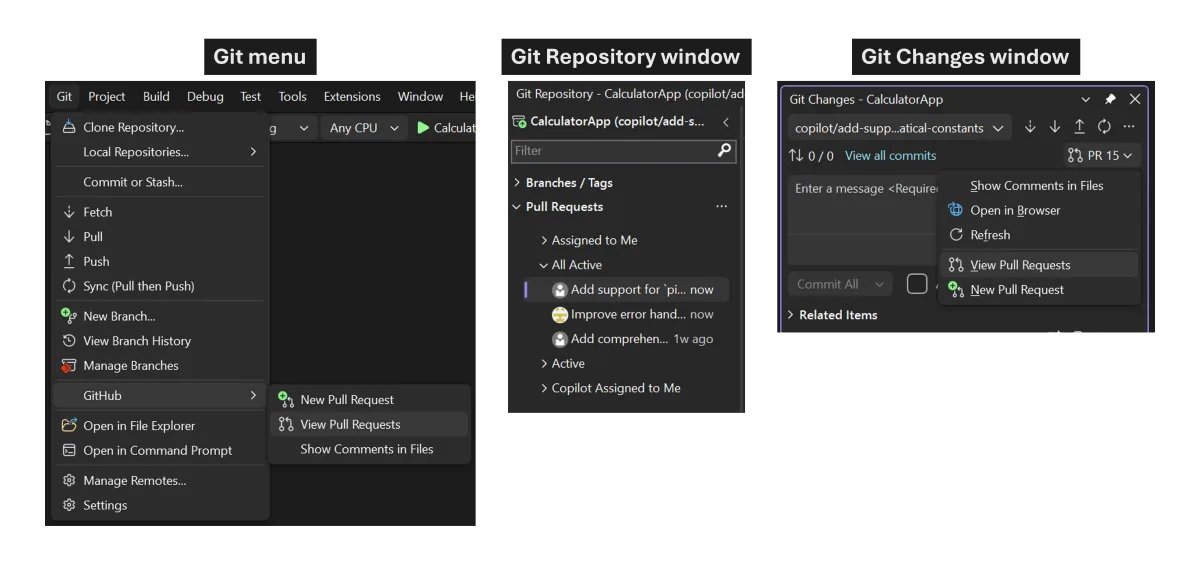
You can view the list of pull requests for the open repository from the Git Repository window, the Git Changes window, or the Git menu. If your current branch already has an active PR, you can also open it directly from Git Changes.
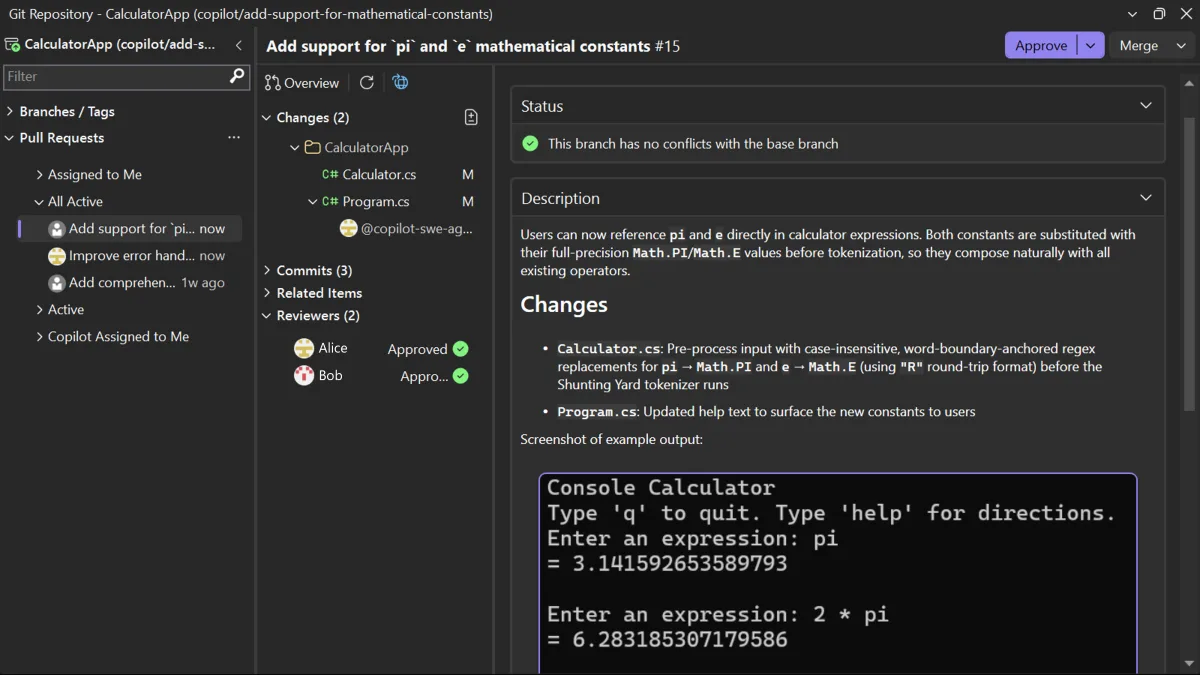
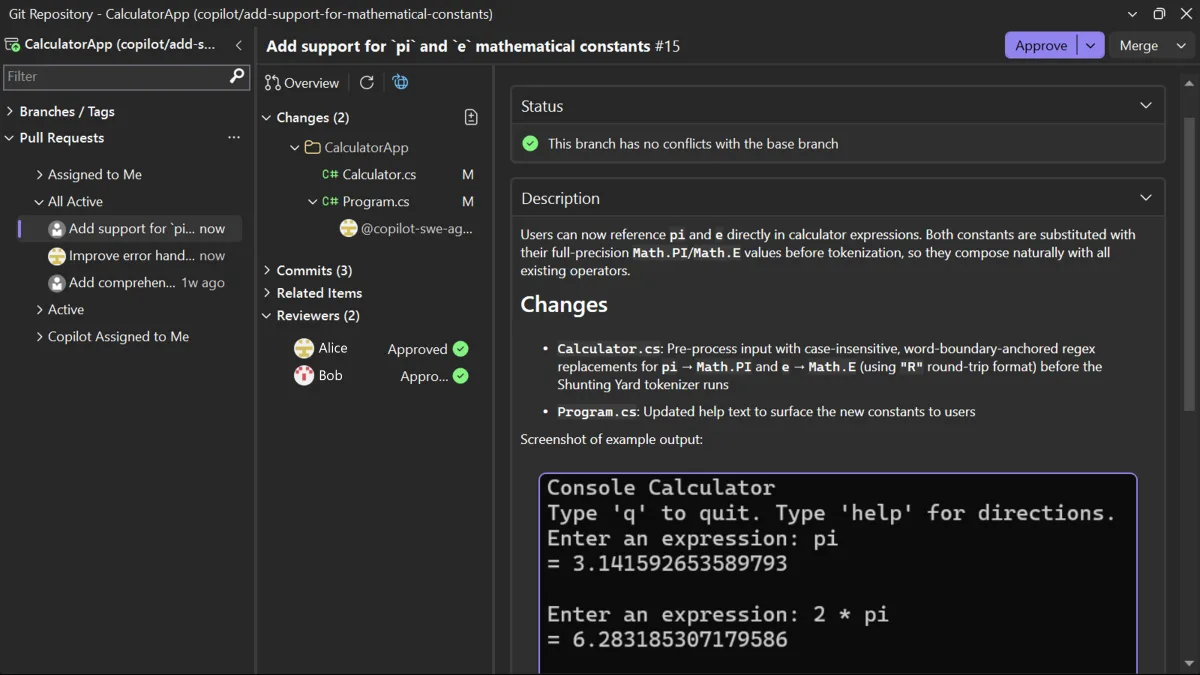
When you open a pull request, you can see the overview, changes, commits, and reviewers together in one place. If a teammate asks for a quick review, you can open Visual Studio, find the PR, and get straight to what you need.
From there, you can choose how deep you want to go. You can review the pull request without checking out the branch, which lets you inspect the changes while keeping your current branch, uncommitted changes, and working state intact.
If you want a closer look, you can also check out the PR branch and use Visual Studio’s navigation, build, and debugging tools to dig into the code. Reviewing without checking out is great for a quick pass, while checking out the branch is better when you want to investigate more deeply.
When you’re juggling multiple reviews, you can switch between active pull requests without having to check out all of them. That makes it easier to jump in on reviews during the day, then get back to your own work.
Browse the changes
The pull request view is designed to help you move through a pull request quickly. Open any changed file to see the diff inline or side by side, or use the multi-file summary view to see all changes at a glance.
Tip: If you want a wider view of the diff, collapse the left panel and focus on the code.
You can also review commit by commit, which is useful when a pull request covers several logical steps and you want to understand how the change evolved.
Comment and discuss
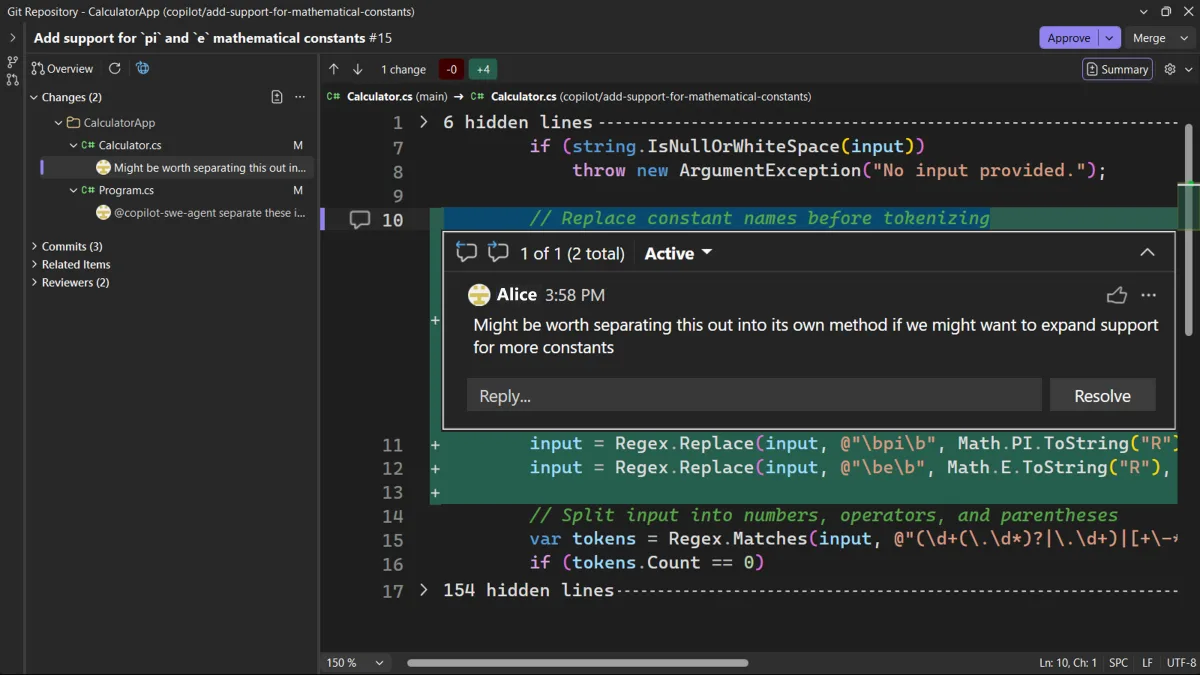
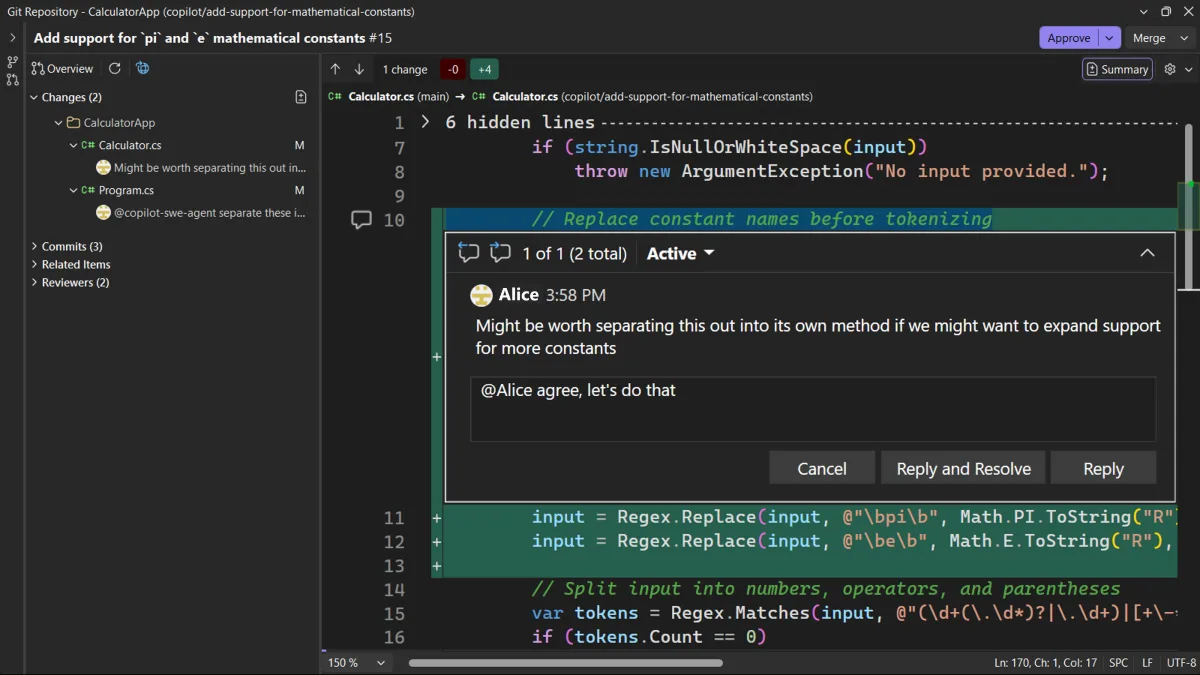
You can leave comments on specific lines, reply to threads, and resolve conversations when the discussion is done. Files with active comments are marked in the Changes list, so it’s easy to spot where discussions are happening. Everything syncs between Visual Studio and the browser.
When you’re reviewing a pull request in checked-out code, you can apply a code suggestion directly to your working copy with one click. When there isn’t one, Copilot can generate a fix based on the comment and surrounding code, so you can evaluate and test it right away.
Approve, complete, and merge
When you’re ready to decide, you can see the information you need and act without leaving the review. On the Overview tab, you can see status checks, merge conflicts, and whether any required approvals are still missing. You can approve the pull request from the diff view, with additional vote options for Azure DevOps pull requests.
You can also complete or merge the pull request right in the IDE. If plans change, you can convert it to draft or close it. Once you open the pull request, you can get all the way through the review in one place.
Try pull request review in 18.7
This is a big step forward for pull request review in Visual Studio, but we’re not done. We’re still working on features like comment filtering, a timeline of PR activity, and a smoother checkout flow for deeper review. We’re also keeping a close eye on feedback to figure out what’s next.
The pull request review experience is now available in the June 18.7 stable release. Try it out, and let us know what you want to see next on Developer Community or through our survey at aka.ms/ReviewPR.
Thanks to everyone who shared feedback and tried out pull request review in Insiders along the way. Your feedback helped shape the experience we’re shipping now.