Task Bar Hero tier list and the best teams for your classes


I’ve spent weeks playing Task Bar Hero as part of my daily work routine, and after pouring over 300 hours into the desktop auto-battler, it’s safe to say it sits among my favorite idlers. Micromanaging the tiny pixel heroes at the bottom of my screen has also brought out the best worst parts of my ‘number must go up’ broken gamer brain, so I have some thoughts on what a Task Bar Hero tier list looks like.

Task Bar Hero tier list

Task Bar Hero - The Priest, Ranger, and Sorcerer classes from left to right.

(Image credit: Nugem Studio, Tesseract Studio)

After clearing all four difficulty modes and micromanaging my little guys all the way to max level (level 101), this is my definitive Task Bar Hero tier list for the current meta. While I bought both DLC classes, I want to highlight that both of my top picks (Ranger and Priest) are free.

Class tier list

Swipe to scroll horizontally

S-Tier

Ranger

A-Tier

Priest

B-Tier

Hunter, Sorcerer

C-Tier

Slayer

D-Tier

Knight

Choosing your Task Bar Hero(es)

  • Ranger is the definitive best Task Bar Hero class right now, but I’ll get into more of that below
  • Priest is incredibly versatile, easily fulfilling the roles of both tank and healer
  • You can swap Ranger for Hunter, though I wouldn’t recommend it unless you’ve gotten lucky gear drops
  • Sorcerer is the perfect third hero for double DPS teams with his beefy AoE
  • If you want a more traditional tank, spend the $5 to invest in Slayer over Knight
  • Avoid blowing resources on Knight. As it stands, he’s painfully outclassed in harder difficulties and a literal deadweight in Torment

Task Bar Hero best teams

A few notes on assembling your team

  • Redeem the free Priest DLC for access to a perfectly serviceable F2P team
  • DPS is king in the current meta. Tough fights rarely call for heavy investment into armor upgrades, and even with better pieces, extra sustain won’t last long
  • Build for attack speed on Ranger and Hunter, or cast speed on Sorcerer
  • Add elemental resistance to armor. It doesn’t hurt to hit the 75% cap, especially on tanks
  • Use one of the three-man teams for the early to mid-game, then swap to the ranger solo strategy for Torment difficulty

Task Bar Hero - A team of sprites, using the classes Priest, Ranger and Sorcerer

(Image credit: Nugem Studio, Tesseract Studio)

The DPS Heavy, for a Priestly carry to the end

Swipe to scroll horizontally

Class

Priest

Ranger

Sorcerer

Role

Tank/Healer

DPS

AoE-heavy DPS

Former Elder Scrolls Online designer laments the destruction of layoffs: ‘There’s really no one left and no changing it now’


Yesterday’s layoffs at Xbox took, and will continue to take, a terrible toll. Some trumpeted the fact that no studios were closed, although the practical impact of spinning them out to independence or new ownership remains to be seen, but that has no bearing on the blow to morale caused by such deep cuts to long-standing dev teams.

One former Elder Scrolls Online developer put words to those feelings in a short, poignant thread on X, lamenting the state of the game and developer ZeniMax Online Studios, which was reportedly purged of half its employees in the layoffs.

How Prompt Tuning Improved GPT-5.5 in VS Code


July 6, 2026 by VS Code Team, @code

In our previous post, we introduced the VS Code coding harness, the layer that connects the model to tools, context, instructions, and the agent loop, giving the model the ability to perform coding tasks.

Each model responds to tool calls and instructions differently, and the harness can adapt to improve results. This post walks through a two-week experiment we ran in partnership with OpenAI to tune the GPT-5.5 system prompt in VS Code. The question was simple: if we nudge the agent to explore less and validate sooner, can it get faster and cheaper without getting worse? With OpenAI’s model expertise and our harness data, we tested two small prompt changes, measured them against a control on live traffic, and shipped the winner.

This matters more with usage-based billing in place. Token efficiency isn’t only an infrastructure metric: every token the agent spends wandering is a token you pay for and wait on. An agent that reaches a grounded edit sooner is both a better experience and a smaller bill.

The hypothesis: explore less, validate sooner

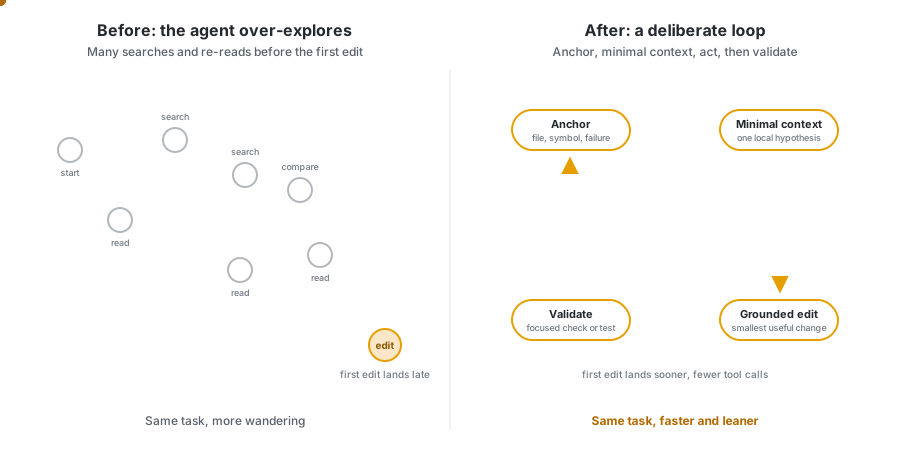
Following the launch of GPT-5.5, we looked at how the model spent tokens inside the VS Code agent harness, as part of the work described in Improving token efficiency in GitHub Copilot. Two patterns stood out: where the model spent tokens, and where it over-explored before acting. Agents can spend a lot of effort searching, rereading, and comparing nearby paths before making a useful edit.

That pointed to a single, testable idea: the agent should spend less effort wandering and more effort moving through a deliberate loop of evidence, action, and validation.

Diagram contrasting an agent that over-explores with many scattered search and read steps before its first edit, versus a Treatment B agent that moves through a deliberate anchor, gather minimal context, edit, and validate loop.

After testing different hypotheses and running offline evaluations, we turned that idea into two variants of the GPT-5.5 system prompt, both were promising in offline evals, and we tested them against the current default on live traffic.

Inside the experiment

We ran the experiment in VS Code over a two-week window, splitting GPT-5.5 agent traffic across two treatment groups and one control group with a 25/25/25 split. Both treatments test the same hypothesis but differ in how much structure they add to the prompt.

Group Variant name Description Traffic allocation
Control PRPT_CTRL Current default prompt 25%
Treatment A PRPT_SRCH Economical search and edit: single, compact reminder to limit exploration before acting 25%
Treatment B PRPT_LRG Large prompt sections: broader restructure covering the full edit-and-validate loop 25%

Note: The allocations add up to 75% because the experiment scorecard compares evenly sized groups. The remaining GPT-5.5 traffic continued to use the default prompt outside this scorecard slice, so we could compare the treatments and control across the same kind of user traffic.

Treatment A: economical search and edit

Treatment A makes a small, focused change: a single, compact reminder that nudges the model to reduce unnecessary exploration.

The <economical_search_and_edit> section in the prompt instructs the agent to start from a concrete anchor, gather only enough local context, avoid broad exploration, act once there is a cheap discriminating check, and avoid rereading unchanged context.

You can find the complete implementation details in gpt55BasePrompt.tsx:

{economicalSearchAndEditEnabled && <Tag name='economical_search_and_edit'>
    - Start from the most concrete available anchor: a file, symbol, failing behavior, failing command, or nearby implementation surface.<br />
    - Gather only enough nearby context to choose one plausible local hypothesis and one cheap check that could disconfirm it.<br />
    - Prefer one targeted search or nearby read over broad repo exploration.<br />
    - Once the cheapest discriminating check is known, act.<br />
    - Do not re-read unchanged context unless a new result makes it relevant.<br />
</Tag>}

Treatment B: large prompt sections

Treatment B tested a broader version of the same idea of limiting exploration. Instead of adding a single, compact reminder about economical search, it reorganizes the agent workflow into explicit <Before_the_first_edit> and <After_the_first_edit> sections. Unlike Treatment A, these additions make the system prompt itself larger, so a key question was whether the added structure would still improve efficiency, not just agent behavior.

The goal was to solve the full loop and not only the search step: form a local hypothesis before editing, avoid broad exploration, make a grounded first edit, and validate immediately after the first substantive edit.

You can find the complete implementation details in gpt55BasePrompt.tsx:

{largePromptSectionsEnabled && <>
    <Tag name='Before_the_first_edit'>
        - Start from the most concrete anchor available: a file, symbol, failing behavior, failing command, test, or nearby implementation surface. If the request does not name one explicitly, use the first targeted search or nearby read to identify that anchor, then continue locally from there.<br />
        - Before the first edit, gather only enough nearby evidence to state one falsifiable local hypothesis about how the requested behavior should work or why it is failing, and one cheap check that could disconfirm it.<br />
        [...]
        - Once you can state one falsifiable local hypothesis, the nearby code path it depends on, one cheap check that could disconfirm it, and one small edit that would test it, the next action must be a grounded edit.<br />
        - If confidence is incomplete, the first edit may be a small reversible probe that exposes missing types, behavior mismatches, control-flow gaps, or validation failures.<br />
        - If you find yourself still searching after that local-routing budget, treat that as drift. Recover by choosing the best current hypothesis and the best available nearby check, then make the smallest plausible edit that will let that check discriminate.<br />
    </Tag>
    <Tag name='After_the_first_edit'>
        - Prefer this order for that first validation action:<br />
        - the cheapest behavior-scoped or failing check that can falsify the current hypothesis<br />
        - a narrow test for the touched slice<br />
        - a narrow compile, lint, or typecheck command for the touched slice<br />
        [...]
        - Finish with at least one post-edit executable validation step whenever the environment provides one. Only fall back to diff-only validation when no focused command exists or commands are unavailable.<br />
    </Tag>
</>}

What the two-week scorecard showed

We tracked the treatments across three dimensions: quality (does the code stick), latency (how fast the first edit lands), and efficiency (tokens and tool calls). Each treatment is compared with the control group in the table below.

What each metric measures
  • 10-minute survival rate (by user): Of the code the model wrote, how much is still in the file 10 minutes later (not deleted or rewritten). It’s our proxy for “did the AI’s code actually stick.” Measured as surviving characters ÷ total characters written, as a %. E.g. ~90% — roughly 9 of every 10 characters the model added are kept.
  • Commit survival rate (by user): Narrower and stricter: of the AI-written code, how much survives all the way into a git commit. This is “did it make it into real, saved work.” Same character-ratio calculation, but only counting code present at commit time. E.g. ~87%.
  • p50 Time to First Edit (by turn): For a typical request, how long from hitting enter until the first actual change lands in your code — not just the model talking, but real work appearing. Measured in seconds. E.g. ~74s for the median turn.
  • p95 Time to First Edit (by turn): The same clock, but for the worst 5% of requests — the “why is this taking so long?” cases. A key tail-latency guardrail. E.g. ~6.4 min (383K ms), where hard tasks or lots of exploration delay the first edit.
  • p50 total tokens (by user): How much the model reads + writes for a typical user across their day — a proxy for cost and context load per person. Sum of tokens per user, median across users. E.g. ~12.9M tokens/user/day.
  • p95 total tokens (by turn): The token weight of the heaviest 5% of individual turns — the big, sprawling requests that drive cost spikes and hit context limits. E.g. a single turn running into the millions of tokens, vs a ~500K–900K median.
  • Average tool calls (by turn): How many actions (read file, search, run terminal, edit…) the agent takes per request to get the job done. Lower can mean more efficient; too low can mean less thorough. Mean tool calls per turn. E.g. ~24 per turn.

Signal legend: favorable and highly significant (p < 0.001), favorable and statistically significant (p < 0.05), unfavorable and highly significant, unfavorable and statistically significant, - not statistically significant.

Metric Treatment A (PRPT_SRCH) impact P-value Signal Treatment B (PRPT_LRG) impact P-value Signal
10-minute survival rate (by user) -0.40% (-0.37 pp) 0.0707 -0.44% (-0.41 pp) 0.0493
Commit survival rate (by user) -0.48% (-0.41 pp) 0.3200 +0.68% (+0.57 pp) 0.1533
p50 Time to First Edit (by turn) -2.88% (2.0s faster) 0.0271 -5.68% (3.9s faster) 2e-5
p95 Time to First Edit (by turn) -1.93% (8.0s faster) 0.1928 -9.30% (38.8s faster) 1e-10
p50 total tokens (by user) -2.54% (0.2M fewer tokens) 0.3429 -3.25% (0.3M fewer tokens) 0.2094
p95 total tokens (by turn) -5.19% (0.3M fewer tokens) 0.0157 -7.64% (0.5M fewer tokens) 0.0003
Average tool calls (by turn) -3.19% (0.77 fewer tool calls) 0.0091 -8.54% (2.04 fewer tool calls) 1e-12

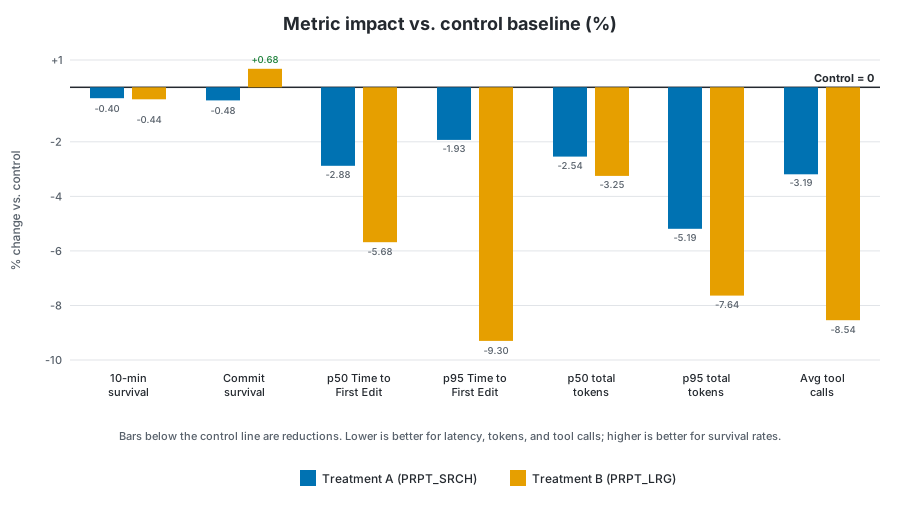
Grouped bar chart comparing the percentage impact of Treatment A and Treatment B against the control baseline across seven metrics, showing that Treatment B produces the largest reductions in latency, token usage, and tool calls.

  • Quality: the guardrail metrics stayed mostly healthy. Commit survival rate moved slightly up for Treatment B (+0.68%) and slightly down for Treatment A (-0.48%), neither statistically significant. The 10-minute survival rate moved slightly down for both treatments: -0.44% for Treatment B and -0.40% for Treatment A. Only the Treatment B movement crossed the statistical significance threshold, and just barely (p=0.0493), unlike the highly significant efficiency wins. We treated that as a real tradeoff to weigh, but the movement was small and the other quality guardrail did not regress.

  • Latency: Treatment B delivered the strongest edit-latency wins, and both were highly statistically significant: p50 Time to First Edit improved -5.68% (3.9s faster, p=2e-5), and p95 Time to First Edit improved -9.30% (38.8s faster, p=1e-10). Treatment A moved in the right direction, but the edit-latency effects were weaker: p50 Time to First Edit -2.88% (2.0s faster, p=0.0271), and p95 Time to First Edit -1.93% (not significant).

  • Token efficiency: both treatments reduced median total tokens per user, but those p50 movements were not statistically significant: -3.25% for Treatment B and -2.54% for Treatment A. At the upper tail, Treatment B reduced p95 total tokens by -7.64%, highly statistically significant (p=0.0003). Treatment A also reduced p95 total tokens by -5.19%, statistically significant (p=0.0157). Both variants reduced average tool calls per turn: -8.54% (2.04 fewer tool calls) for Treatment B, highly statistically significant (p=1e-12), and -3.19% (0.77 fewer tool calls) for Treatment A, statistically significant (p=0.0091).

Treatment B had the strongest overall profile: clear latency wins, significant upper-tail token reductions, fewer tool calls, and mostly stable quality guardrails. The one movement worth watching, the small drop in 10-minute survival, was only lightly significant (p=0.0493), while the latency, token, and tool-call gains were larger and far more robust. Treatment A moved several metrics in the right direction, but Treatment B was more consistent across the measures that matter most for VS Code.

So we shipped it: Treatment B, LargePromptSections, is now the default GPT-5.5 system prompt.

The takeaway isn’t only that the numbers moved. The movement was tied to a specific, testable harness hypothesis from provider feedback, validated offline first and then confirmed online over a two-week production window. That’s the loop we want to keep running.

Continuous optimization

This experiment is one example of how we work with model providers beyond launch day. A model release is not the end of the tuning loop. It is another chance to look at real VS Code behavior, test focused improvements, and find new ways to make the experience faster, more reliable, and more efficient.

We’ll keep looking for those improvements across models, prompts, tools, and the VS Code coding harness, so more of each agent’s budget goes to the work that matters instead of unnecessary exploration.

Try agents in VS Code, switch between models, and compare how different models approach the same task. Share your feedback in our GitHub repo. It helps us keep improving the experience.

Happy coding! 💙

Rumors say Honor’s alleged ‘Wide’ foldable competitor has a top-notch battery


What you need to know

  • Honor’s alleged wide foldable finds itself in new rumors that say it could feature a 5.5-inch cover and 7.6-inch internal display.
  • A highlight in these rumors is its battery, which could arrive at 7,000mAh or higher, as Honor might look to do what others (Huawei) have not.
  • Wide foldable rumors have focused on Samsung; however, Honor and Vivo

There’s been a lot of talk about wide foldables, and funnily enough, the first one didn’t come from Samsung (Huawei did it first). Now, rumors continue old discussions, as Honor’s take has its specifications leak.

Tipster Digital Chat Station posted a series of alleged details about Honor’s rumored wide foldable (via NotebookCheck). Rumors suggest the phone will feature a 5.5-inch cover display, followed by a 7.6-inch internal screen. This follows along with the industry’s first wide foldable from Huawei, the Pura X Max. A major piece of these rumors is the phone’s suspected battery capacity.

Business Lessons from the Best Social Casino Models


the Best Social Casino Models
Magnific.com

Digital entrepreneurs are always looking for better ways to attract users, keep them engaged, and build products that people return to. While every industry is different, some digital business models offer useful lessons because they combine strong onboarding, recurring engagement, rewards, and community.

Social casino platforms are one example. They are built around casino-style entertainment, virtual currency, mobile access, live events, and social features. But from a business perspective, the most interesting part is not only the games. It is the product structure behind them.

Entrepreneurs studying the best social casino models can learn a lot about digital retention, user motivation, community features, trust signals, and how to build repeatable engagement without making the experience feel too complicated.

Start With Low-Friction Onboarding

One of the strongest lessons from social casino platforms is the importance of easy onboarding.

A new user should understand the product quickly. They should know where to begin, what they receive, what the first action is, and why they should continue.

In social casino platforms, onboarding often includes a welcome reward, a simple introduction to virtual coins, and immediate access to games or features. The goal is to reduce hesitation and help users experience value as soon as possible.

For entrepreneurs, the lesson is clear: do not make new users work too hard before they understand the product. Whether the business is an app, subscription service, online course, marketplace, or community platform, the first few minutes matter.

Rewards Create Repeat Engagement

Rewards are central to the best social casino models.

Users may receive daily bonuses, event prizes, mission rewards, loyalty points, or progress-based incentives. These systems give people reasons to return beyond the initial visit.

This idea applies far beyond gaming. Many digital businesses use similar systems:

Fitness apps use streaks.
Learning platforms use badges.
Retail apps use loyalty points.
Productivity tools use progress indicators.
Membership communities use exclusive access.

The business lesson is not simply “give users rewards.” It is to create rewards that support meaningful behavior. A strong reward system encourages users to return, explore, and feel progress.

Virtual Economies Teach Value Design

Social casino platforms often use virtual coins or credits to structure the experience. These virtual economies help users understand value inside the platform.

For entrepreneurs, the concept is useful even outside casino-style entertainment. A virtual economy can be anything that creates perceived progress or exchange value: points, credits, tokens, tiers, badges, unlocks, or member benefits.

The key is clarity. Users should understand how value is earned, how it is used, and why it matters.

If a business uses points or credits but does not explain them well, users may lose interest. A virtual economy works best when it feels simple, transparent, and connected to real product value.

Community Features Increase Retention

The “social” part of social casinos is a major growth lesson.

Leaderboards, clubs, gifting systems, tournaments, shared goals, and events can turn a solo experience into a community-based one. Users return not only for the product, but also for interaction, recognition, and participation.

Digital entrepreneurs can apply this idea in many ways. A home-based business coach might create member groups. A course creator might use cohort challenges. A fitness app might use leaderboards. A subscription brand might add community perks.

Community features can make users feel like they are part of something active. That feeling can increase retention and loyalty.

Live Events Keep a Product From Feeling Static

Social casino platforms often use live events to create freshness. These may include weekend tournaments, seasonal campaigns, limited-time missions, themed promotions, or reward calendars.

The business value is simple: events give users a reason to return now.

This is useful for many online businesses. A digital product can use webinars, product drops, flash challenges, live Q&A sessions, seasonal offers, community competitions, or limited-time content.

Events create urgency without requiring the core product to change completely. They can also help businesses test what users respond to.

Trust Signals Matter More Than Hype

A strong social casino platform needs more than bright design. Users look for clear terms, visible support, transparent rewards, account controls, and privacy information.

The same is true for any online business.

Trust signals may include:

Clear pricing
Transparent policies
Easy contact options
Secure account tools
Plain-language terms
Visible customer support
Realistic product claims

Entrepreneurs sometimes focus too heavily on marketing copy and not enough on trust infrastructure. But trust is often what turns a curious visitor into a long-term user.

User Control Improves Long-Term Value

Good digital products give users control.

In social casino platforms, this may include notification settings, account controls, support access, responsible-use tools, and clear reward explanations.

In other businesses, user control may mean flexible subscriptions, account dashboards, content preferences, communication settings, or easy cancellation options.

Giving users control does not reduce engagement. It can improve trust. When users feel trapped, confused, or pressured, they are less likely to stay.

A business that gives users clear choices often creates stronger long-term relationships.

Product Clarity Supports Conversion

Conversion is not only about persuasion. It is also about reducing confusion.

Social casino platforms that explain virtual currency, rewards, events, and account settings clearly are easier for users to understand. That clarity can improve confidence.

Entrepreneurs should think the same way. Every product page, onboarding screen, pricing section, and support page should answer basic user questions.

What is this?
How does it work?
What do I get?
What happens next?
Where can I get help?

When those answers are easy to find, users are more likely to continue.

Retention Requires More Than Reminders

Many businesses try to improve retention by sending more emails, notifications, or promotions. But reminders only work when the product gives users a reason to return.

The best social casino models often combine reminders with rewards, events, social activity, and progress systems. The reminder points to something meaningful.

Entrepreneurs should avoid relying only on repeated outreach. Instead, they should build return value into the product itself.

A good retention system answers this question: why should the user come back today?

The Entrepreneurial Takeaway

The best social casino models show how digital products can combine onboarding, rewards, community, live events, trust signals, and user controls into a repeatable engagement system.

Entrepreneurs do not need to copy the category. But they can learn from the structure.

A strong digital business gives users value quickly, explains the experience clearly, creates reasons to return, builds trust, and makes account management easy.

Those lessons apply to many home-based and online businesses, from digital courses and subscription services to apps, memberships, and e-commerce brands.

Find a Home-Based Business to Start-Up >>> Hundreds of Business Listings.

Hasbro And Scooby Doo Team Up For One Of The Goofiest Transformers Yet


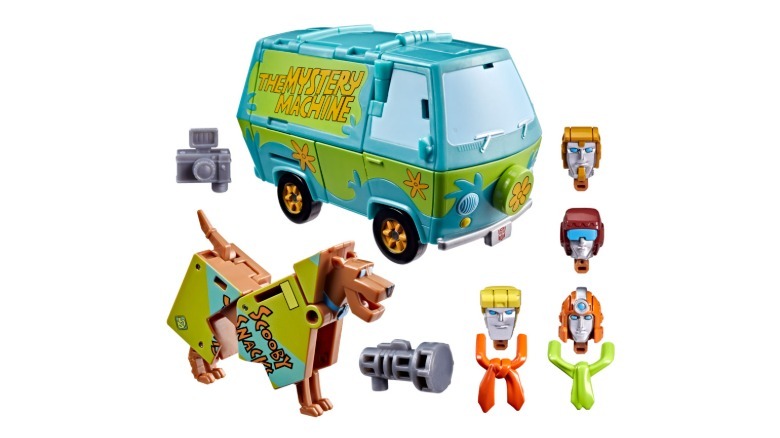
Say hello to Mysterious Prime and Automutt.

Hasbro has been cooking up some wild Transformers collabs as of late. There are a range of official NFL helmets that convert into pig-skin throwing robots, an awesome looking mashup inspired by Evangelion, a ball-shaped bot for the World Cup and so much more. However, Hasbro’s latest partnership with folks behind Scooby Doo may have resulted in one of the silliest Transformers in recent history.

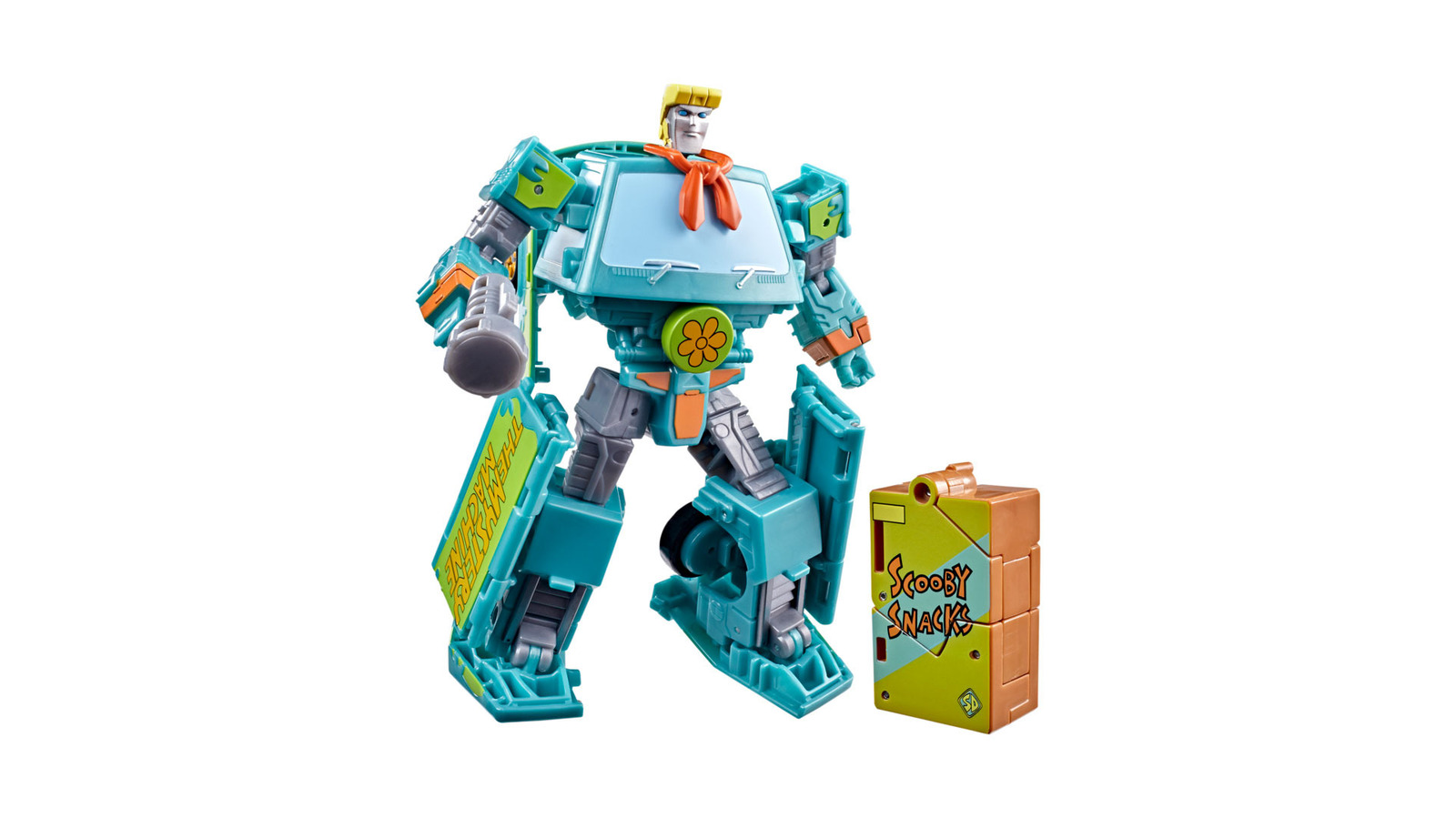
Priced at $58, this set actually contains not one but two robots. The iconic Mystery Machine converts into a robot called Mysterious Prime while a rather unassuming box of Scooby Snacks becomes a mechanical canine sleuth named Automutt. Granted, on paper, this combination seems like it shouldn’t work. But somehow, Hasbro has created surprisingly appealing figures that pay homage to both franchises.

But what I really appreciate is Hasbro’s attention to detail, as Mysterious Prime comes with four swappable heads inspired by each human member of the team, which includes little touches like Fred’s signature ascot or a big visor that represents Velma’s glasses. There’s even a tiny plastic camera to really drive home the team’s crime-solving nature.

Now I will admit that I’m not sure how much crossover appeal there is between Transformers and Scooby Doo fans aside from both franchises being a major staple of afternoon TV programming in the 70s and 80s. That said, the timing of this release seems like it’s trying to generate a bit of hype for Netflix’s upcoming live-action Scooby Doo series slated for sometime in 2027. 

Regardless, for anyone who’s ever wanted a lovable pup and a panel van that are more than meets the eye, this Transformers and Scooby Doo collab is available for pre-order today before shipments get sent out later this year around September 1.

How Generative AI Speeds Up Drug Discovery And Development?


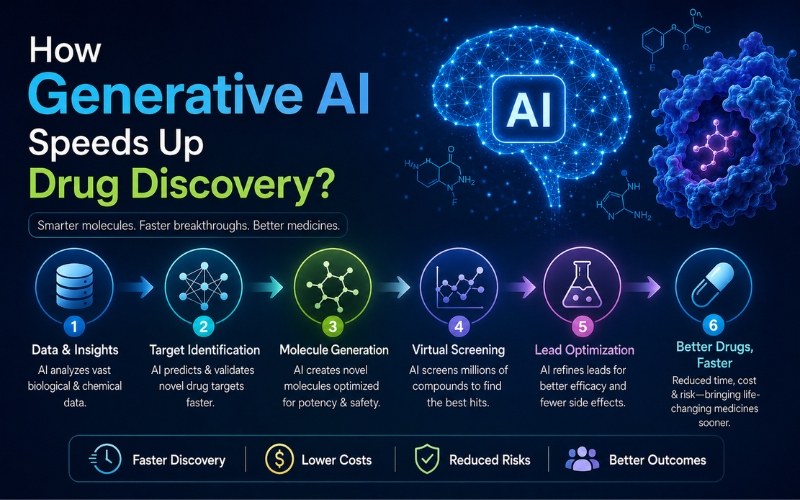
How Generative AI Speeds Up Drug Discovery and Development?

Pharmaceutical drug discovery and development have long been a laborious, difficult, and expensive process. It can take over a decade, from discovering a drug target to approval by the regulatory authorities, and cost over billions of dollars. Recent advances in Generative AI (Gen AI), a form of Artificial Intelligence (AI), can generate new information based on patterns in existing data and revolutionizing the entire clinical process.

By replicating human imagination and processing big data sets, generative AI applications can propel every step of the pharma pipeline, from molecule design to clinical trials. Let’s take a look at how Generative AI transforming the drug discovery and development industry in 2026 and beyond.

The Role of Generative AI in Pharma 

Generative AI systems in pharma are large language generative models, like Generative Adversarial Networks (GANs), which are capable of generating new content, such as, molecular structures, protein sequences, or even scientific hypotheses. Generative AI models can be applied in drug discovery to:

  • Predict novel drug-like molecules.
  • Predict protein-ligand interactions.
  • Generate synthetic biological data.
  • Optimize molecular properties (solubility, bioavailability, etc.)

Moreover, the Generative AI models can create new possibilities rather than just decoding available information, transforming traditional R&D pipelines.

Top Use Cases of Generative AI In Pharma

  1. Target Identification and Validation

Pharmaceutical discovery starts with the identification of a biological target, a protein or a gene, usually disease-causing. The interaction of the target needs to be validated and the structure known.

Generative AI assists with:

  • AI models such as GPT extract insights from biomedical literature for predicting novel disease-gene associations.
  • AI synthesizes genomic, proteomic, and clinical information to make new disease mechanism predictions.
  • AlphaFold and other tools predict protein structures to speed up structure-based drug discovery.
  1. Drug Design Recommendations

Pharmacists used to sketch molecules by hand based on rules provided. Generative models such as VAEs, GANs, and transformer models can:

  • Synthesize molecules that would be bound to a target site with desired properties.
  • Optimize for many properties in parallel (e.g., activity, toxicity, solubility).
  • Generate virtual libraries of drug-like molecules at scale.

For instance, Insilco Medicine created a cure for idiopathic pulmonary fibrosis through generative AI in 18 months, which would have been done in 3–5 years otherwise.

  1. Lead Optimization

After potential drug candidates are discovered, they are then optimized to work better. The chemical structure is modified to optimize pharmacokinetics (absorption, distribution, metabolism, excretion) and reduce toxicity.

Generative AI models can:

  • Model chemical modifications and predict the impact
  • Use reinforcement learning to efficiently search chemical space.
  • Propose modifications that increase binding affinity or decrease off-target activity.
  • Scientists can select only the most promising candidates, with less expenditure and time.
  1. Predictive Toxicology and ADMET Profiling

Inadequate ADMET properties (Absorption, Distribution, Metabolism, Excretion, and Toxicity) are a leading reason why drugs fail. Failing to predict these profiles upfront is costly failure later.

Generative AI assists by:

  • Training predictive models on vast toxicology databases.
  • Modeling the activity of a compound in the human body.
  • Hypothesizing fewer toxic analogs of promising leads.

This avoids inappropriate candidates early on and redirect resources into safer, more promising molecules. 

  1. Synthetic Route Planning

Once a molecule is designed, the molecule needs to be synthesized in the lab. Generative AI speeds up drug discovery by creating effective, cost-saving chemical synthesis routes for new compounds. Generative models can:

  • AI models propose new reaction routes for complex molecules.
  • Forecasts best reagents and conditions to enhance yield and safety.
  • Minimizes trial-and-error in lab synthesis, conserving time and resources.

This speeds up the process from virtual molecules to real samples, skipping months of bench work.

  1. Biological Data Generation and Augmentation

Preclinical and clinical trials are generally not balanced or data-rich. Generative AI has the capability to generate new biological data, such as,

  • Simulated patient cohorts for rare diseases.
  • Synthetic gene expression profiles.
  • Augmented image data for training diagnostic models.

For example, GANs can produce synthetic cell images or synthetic MRI scans based on just a few real samples used for model training. This accelerates model construction in AI drug discovery and diagnostics.

  1. Clinical Trial Design and Optimization

Even after a lead candidate has been put into clinical trials, generative AI can be helpful, and AI assists in numerous ways:

  • Generation of control arms from real-world data.
  • Estimation of patient response from genomic and demographic information.
  • Identification of optimal dosing regimens and choice of biomarkers for stratifying patients

Reducing the trial duration, raising the success rate, and even customizing the treatments in precision medicine application scenarios is possible with it.

  1. Knowledge Extraction and Decision Support

Biomedical knowledge doubles every few months. There is no human team capable of keeping up with all this. Generative AI models such as ChatGPT can:

  • Summarize recent literature.
  • Suggest ideas for new research.
  • Support scientific writing and regulatory reporting.

Generative-AI-Speeds-Up-Drug-Discovery

Real-World Impact and Case Studies

Generative AI is already having an impact for other bio techs with stunning outcomes:

  • Insilico Medicine: Applied generative models to design IPF drug candidates in days.
  • Exscientia applied AI to design drugs that were in human trials within a year.
  • Atomwise: Applies deep learning for predicting molecular binding to discover hits at scale.
  • Recursion: Applies generative models and high-throughput imaging to select new drug candidates.

Pharma industry leaders like Pfizer, Roche, and Novartis are making significant investments in AI-designed drug discovery platforms, partnering with AI startups, and building in-house capabilities.

 Challenges and Ethical Considerations

While promising, generative AI for drug discovery is challenging:

  • Data Quality: AI will be as good as training data. Biomedical data could be noisy or biased.
  • Interpretability: Some AI-generated compounds will be effective, but the mechanism is unknown.
  • Compliance with regulation: The AI-driven approaches will have to be explainable according to the FDA and EMA regulations.
  • Ethics Problems: Both SynBio and molecule design impose double-use hazards (e.g., biosecurity).

These will have to be handled by coordinating among scientists, ethicists, regulators, and AI engineers.

Future Outlook of Generative AI in Pharma

It only just began rolling out generative AI in drug discovery. Gen AI models in the future can,

  • Shorter turnaround from concept to clinic.
  • Enhance success with improved early prediction of diseases.
  • Dynamically customize drug development pipelines.

Entire drug development pipelines can be modeled on a computer in advance before one ever creates a molecule in the future.

Conclusion

Generative AI is revolutionizing pharma drug discovery and development with speed, precision, and innovation. From new molecule invention to the optimization of clinical trials, Gen AI’s impact in drug discovery and development is incredible. USM Business Systems, a top AI development company build LLM models that meet your unique needs. Get in touch!


Contact us to know more about Generative AI in Pharma? Book Executive AI Briefing →


Doom developer id Software “is essentially dead,” Duke Nukem 3D co-creator says after layoffs reportedly cut almost half of the studio


Apogee co-founder George Broussard has commented on the latest wave of Xbox layoffs, saying Microsoft not shutting the studios is simply “decent PR” for them while the studios now face new struggles.

As part of what it calls “the most significant restructure in Xbox history,” Microsoft, is laying off 3,200 staff from Xbox over the next year, with five studios being sold or spun off as independent developers – including Bethesda studio Arkane, which is still in consultation over its future. Significantly hit from this round of layoffs is reportedly Doom and Quake developer id Software, which is with former Bethesda lead Jeff Gardiner reporting that 95 developers are being let go from the studio – which is reported to have around 200 employees per its LinkedIn.


Wirecast Multicamera Live Streaming for Mac & Windows


Professional Live Streaming with Wirecast

Creating professional live streams no longer requires expensive broadcast equipment or a dedicated production team. With Wirecast, creators, businesses, educators, houses of worship, sports organizations, and event producers can turn a Mac or Windows computer into a complete live production studio.

Whether you’re streaming a podcast, worship service, sporting event, corporate meeting, or live show, Wirecast provides the tools needed to produce high-quality multicamera broadcasts with ease.

Why Choose Wirecast for Live Streaming?

Wirecast is a powerful all-in-one live streaming and video production platform that combines professional-grade switching, graphics, recording, and streaming capabilities into a single solution.

Key benefits include:

  • Support for unlimited live camera sources
  • Multicamera live production workflows
  • NDI® and IP camera integration
  • Built-in graphics and overlays
  • Remote guest participation
  • PTZ camera control
  • ISO recording capabilities
  • Simultaneous streaming to multiple destinations
  • Available for both Mac and Windows

From beginners creating their first livestream to experienced broadcasters producing complex events, Wirecast scales to meet virtually any production need.

Produce Professional Multicamera Streams

Wirecast makes it easy to manage multiple camera angles and sources from a single interface.

Users can switch between cameras, add graphics and lower thirds, share presentations, display screen captures, and integrate remote guests into a seamless production.

Popular applications include:

Podcast Production

Create engaging multi-camera podcasts with professional graphics, guest interviews, and live audience interaction.

Corporate Events

Stream presentations, webinars, training sessions, and company meetings with broadcast-quality production values.

Houses of Worship

Deliver high-quality worship services with multiple camera angles, graphics, lyrics, and remote participation.

Sports Streaming

Capture live sporting events with instant replay workflows, scoreboards, and multiple camera feeds.

Wirecast Studio Features

Wirecast Studio provides powerful live production tools for creators and organizations looking to elevate their broadcasts.

Features include:

  • NDI® input support
  • Screen capture
  • IP camera connectivity
  • RTMP, SRT, RTP, and streaming protocol support
  • Built-in streaming destinations
  • Graphics, audio, and video asset support
  • GPU-accelerated encoding
  • Virtual Camera and Microphone output
  • Up to 2 remote guests
  • Integrated stock media library

Wirecast Studio is ideal for content creators, churches, schools, businesses, and livestreamers looking for professional production tools at an accessible price point.

Wirecast Pro Features

Wirecast Pro includes everything in Studio while adding advanced production capabilities for larger and more demanding workflows.

Additional features include:

  • Cloud multistreaming
  • ISO recording
  • PTZ camera control
  • Sports production tools
  • Multi-track audio recording
  • Up to 7 remote guests
  • 1-17 slot multiviewer output

Wirecast Pro is designed for professional broadcasters, sports organizations, production companies, event venues, and advanced livestream producers.

Wirecast Studio vs Wirecast Pro

Choosing between Wirecast Studio and Wirecast Pro depends on your production requirements.

Choose Wirecast Studio if you need:

  • Professional multicamera streaming
  • Graphics and overlays
  • NDI workflows
  • Basic remote guest support
  • Streaming to major platforms

Choose Wirecast Pro if you need:

  • ISO recordings
  • PTZ camera control
  • Sports production tools
  • Additional remote guests
  • Advanced monitoring and audio workflows

Get Started with Wirecast Today

Whether you’re streaming from a Mac or Windows PC, Wirecast delivers the flexibility, power, and professional features needed to create engaging live productions.

Explore Wirecast Studio and Wirecast Pro to find the subscription that best fits your workflow and start producing broadcast-quality live streams from virtually anywhere.

Need help selecting the right Wirecast solution? Contact the live streaming experts at Videoguys at 800-323-2325.

The best Apple Watch Ultra bands of 2026: Expert tested


With the heat of summer and time to get outside and active, you may want to swap your Apple Watch band for something flexible, comfortable, and waterproof. It’s no secret that the Apple Watch Ultra 3 is a top-tier smartwatch with a rugged design, large display, and ample battery life, but the right strap is key to comfort, style, and versatility. The Apple Watch Ultra 3 shares size and dimensions with the original Apple Watch Ultra, and comes with one of the three premium Apple bands, each tailored to specific activities. Apple also offers a metal loop option for $100 additional fee. Beyond Apple’s options, there are plenty of great third-party bands for workouts, swimming, work, or formal wear. 

I tested several options and consulted ZDNET reviews and staff members’ recommendations to create this guide to the best Apple Watch Ultra straps you can buy. (Note that the Apple Watch Ultra 3 is a 49mm watch, so bands fit for the larger Apple Watch Series 11, 45mm, also work with the Apple Watch Ultra 3.)

Also: The best Apple Watches

Best smartwatch deals of the week

Deals are selected by the CNET Group commerce team, and may be unrelated to this article.

What is the best Apple Watch Ultra strap right now?

After years of use in various activities and daily life, my pick for the best Apple Watch Ultra band overall is Apple’s own Trail Loop strap. Despite testing many different bands, I kept returning to the Trail Loop thanks to its supreme level of comfort, customizable and flexible fit, lightweight design, and price. It’s also included with your Apple Watch Ultra 3 purchase. 

Read on to learn about our other Apple Watch Ultra recommendations. In our most recent update, we replaced the Zulu Alpha strap with the Aulumu C03 strap for the best Apple Watch Ultra band for custom lengths.

Best Apple Watch Ultra straps of 2026

Show less

apple-watch-ultra-2-4

Matthew Miller/ZDNET

Why we like it: With past Apple Watch purchases, I always moved on to straps from other manufacturers, but Apple’s Watch Ultra 3 options are compelling. After trying two of the four available options, the Trail Loop is the band I keep returning to for daily use. Apple sent along its small/medium Trail Loop in Black/Charcoal, but it wasn’t large enough for my wrist, so I purchased a medium/large one in Green/Neon, and it’s perfect.

With the latest two generations of Apple Watch, the company offers the watch in both titanium and black finishes, so thankfully, the Trail Loop is also available with the metal hardware matching the watch body color.

Who it’s for: The Trail Loop band is lightweight, durable, and comfortable to wear, making it my pick for the best Apple Watch Ultra band for most people. The Apple Watch Ultra 3 is excellent for tracking your metrics 24/7, meaning the band must be extremely comfortable for constant wear to optimize data collection. This band stands out for its thin material and flexibility to adjust to your body’s daily changes.

Also: I compared the Apple Watch Ultra 3 to Garmin’s inReach satellite connectivity – here’s the winner

Who should look elsewhere: Unfortunately, Apple’s official Trail Loop band is only available in three basic colors, and it’s priced at a rather high $99. If you don’t like fabric bands secured with Velcro, then you need to look at other options. There are some low-cost fabric band options on Amazon, but I have yet to find one that matches the quality and comfort of Apple’s official band.

Apple Trail Loop features: Material: Nylon weave with titanium ends| Waterproof: Yes | Compatibility: Apple Watch Ultra, Ultra 2, and Ultra 3, 44mm/45mm/49mm | Colors: 3 | Band sizes: 130-180mm and 145-220mm wrist circumference


Read More

Show Expert Take Show less

Show less

nomad-stratos3-apple-watch-ultra-band

Matt Miller/ZDNET

Why we like it: I love the professional look and styling of a good metal watch band, but they are not designed for an active lifestyle where you wear your Apple Watch to track workouts and sleep. Nomad’s new Stratos hybrid band combines Grade 4 titanium with colorful FKM links between the titanium, so you can wear this metal band 24/7.

The build quality, colorful FKM options, and seamless magnetic clasp make this one of my new favorite bands for the Apple Watch Ultra 3.

Who it’s for: The Nomad Stratos watch band is perfect for those who want an elegant metal watch band that they can wear all day and night while also tracking their health and wellness metrics. It looks great in the office or out on a run. The Nomad Stratos is also available for a reasonable $179, that is far less expensive than most titanium Apple Watch bands.

Also: I’ve worn my Apple Watch Ultra for 2 years – here’s what it looks like now

Who should look elsewhere: Some people don’t like metal bands, so if that is the case, then this band is not for you. You also have to use the included tool to adjust the band to fit your wrist, so if you aren’t comfortable managing links, then a silicone or fabric band may be best for you.

Lastly, the magnetic clasp is quick and easy to secure the band to your wrist, but it may not be able to withstand active workouts with lots of arm movements. You also need to adjust the band to maintain a constant connection of the back to your wrist for continued accurate heart rate tracking.

Nomad Stratos features: Material: Titanium and FKM Waterproof: Yes | Compatibility: Apple Watch Ultra, Ultra 2, and Ultra 3, 44mm/45mm/49mm | Colors: Two for metal links and three for FKM interior | Band size: 130-200mm wrist circumference


Read More

Show Expert Take Show less

Show less

Apple Watch Series 9 with new Snoopy watch face and Nomad band

Jason Hiner/ZDNET

Why we like it: With several different colors to accompany your Apple Watch Ultra, these sport bands from Nomad are customizable and made for intense workouts as well as everyday wear. The band is 100% waterproof, so you can wear it while exercising in rain, sleet, or snow, with no worries of damage. With a lightweight design that encourages ventilation, if your sport band gets wet, it won’t stay wet for long or cling to oil.

Keep an eye on the Nomad website, because the company regularly offers Limited Edition models with cool colors and styles (including the one pictured above on an Apple Watch Series 9). These historically sell out quickly, so if you see a Limited Edition offering, you should make your purchase quickly. The company sometimes brings back popular Limited Edition models, too.

Who it’s for: If you like Apple’s Sport Band, but want a band that is more affordable and has various color options, then you should consider a Nomad Sport Band. The FKM material is more substantial than what Apple offers, and the available color options are fantastic.

Also: Nomad just made the boldest Apple Watch accessory yet, and I expect it to sell out soon

Who should look elsewhere: While the bands are durable and made to last, they also close on your wrist using the pin and tuck-in loop closure method, which can sometimes be a bit of a challenge to close securely. If you take your watch on and off throughout the day, this band may annoy you at times.

Nomad Sport Band features: Material: Fluoroelastomer rubber | Waterproof: Yes | Compatibility: Apple Watch Ultra, Series 8, 7, 6, SE, and all previous versions of Apple Watch | Colors: 9 | Band sizes: 45mm/49mm or 40mm/41mm


Read More

Show Expert Take Show less

Show less

Apple Watch Series 9 with box and Nike Sport Band

Jason Hiner/ZDNET

Why we like it: With the Nike Sport Band, you’re getting a bona fide Apple-branded sports band suited for all sorts of terrain. Wear it while tracking your progress for marathon training, lounging at a summer cookout, or during your daily activities around the house. 

The band comes in six colors with artistic flecks. For added breathability, Apple also included compression-molded perforations — essentially small holes across the band — to keep it durable, lightweight, strong, and soft. 

Who it’s for: Fans of Nike products may enjoy having the brand as part of their Apple Watch kit. The sports band looks great and is good for active Apple Watch wearers.

Who should look elsewhere: The only issue ZDNET editor-in-chief Jason Hiner pointed out in his testing is that the holes can collect dust and dirt, taking some time to clean. 

Nike Sport Band features: Material: Aluminum | Waterproof: Yes | Compatibility: Apple Watch models 38mm, 40mm, 41mm | Colors: 6 | Band sizes: fit S/M (130-180mm) and M/L (150-200mm)


Read More

Show Expert Take Show less

Show less

Aulumu C03 Titanium Mag Buckle Quick-Release Band

Matt Miller/ZDNET

Why we like it: I like just about everything about Apple’s Trail Loop band, but taking it off and on requires me to fully release the Velcro and slide the watch over my hand. The Aulumu C03 band lets you secure the band in a similar fashion, but after you have the end secured to the perfect length, you can easily release the magnetic buckle piece to remove it. Set the watch on your wrist, wrap the loose end around, and snap the band back in place. It’s an innovative quick-release system that functions with a lovely nylon band.

Who it’s for: This is a perfect band for those who want an ultra-comfortable fabric band but don’t like the hassle of releasing the full piece of fabric every time they take it off. If you like to workout with your Apple Watch Ultra, then you will appreciate the comfort and security of the band as well.

The ultra-fine nylon fiber is more comfortable than the Trail Loop band provided by Apple, and has been tested for its extreme wear resistance.

Who should look elsewhere: If you want a band with colors and a personal style beyond black or gray, then you should look elsewhere.

Aulumu C03 strap features: Material: Titanium alloy and nylon | Length: 160-205 mm | Weight: 32 grams | Waterproof: Yes | Compatibility: All 42-49mm Apple Watch models | Colors:


Read More

Show Expert Take Show less

Show less

nomad-apple-watch-ultra-bands-6

Matthew Miller/ZDNET

Why we like it: I reviewed the Nomad Rugged Strap in October 2022, highlighting its high-quality, flexible FKM fluoroelastomer rubber. FKM rubber is antimicrobial and easily wiped down with soap and water. It won’t get damaged if you expose it to high temperatures, sunlight, oils, or chemicals. The buckle and lugs of the band are made of marine-grade 316 stainless steel. The material is pre-curved out of the box, so it sits perfectly on your wrist, and the band has notches that allow sweat to run free without getting trapped between your wrist and the band. 

Also: Nomad Apple Watch Ultra bands: Waterproof bands as rugged as the watch

Who it’s for: I wore the Rugged Band while I was running, swimming, biking, and fly fishing, and at the end of all of that activity, the Nomad Rugged Strap still looks brand new. Avid swimmers will benefit from a band as waterproof as this one, and it’s comfortable for everyday wear as well. You can choose between silver or black hardware and ultra orange, black, or Atlantic blue for the band color. 

Nomad now offers a Rugged Band with titanium hardware that is branded the Rocky Point Band. It is available for $79 in six colors, including a limited edition Carbon Black color option.

Who should look elsewhere: The band is a bit thick and chunky, so it can power through any challenge, but it may not be comfortable for you to track your sleep. If you are looking for a lightweight band, look through other options in this list.

Nomad Rugged band features: Material: FKM fluoroelastomer rubber | Waterproof: Yes | Compatibility: Apple Watch Ultra, Series 8, 7, 6, SE, and all previous versions of Apple Watch | Colors: 3 | Band sizes: 45 mm / 49 mm or 40 mm / 41 mm


Read More

Show Expert Take Show less

Show less

withit-watch-bands4

Matthew Miller/ZDNET

Why we like it: The Apple Watch Ultra 3’s silver titanium body material is durable and attractive. Titanium bands for this titanium watch, however, are expensive. Apple’s Silver Link Bracelet is $349, and others are priced over $300. Withit not only offers an affordable titanium metal band option, but also has the best link adjustment design I have ever seen on a watch that lets you remove or add links in seconds with no tools required.

Simply find the links with arrows, pull the top link directly out and away from the band, rotate the link 90 degrees, and then slide out the link adjacent to it. 

Review: One feature makes this the best Apple Watch titanium band available

Who it’s for: The grade 2 titanium watch band material perfectly matches the Apple Watch Ultra, Ultra 2, and Ultra 3 titanium color models and is lighter than the stainless steel option. Withit also now offers black titanium, in addition to the natural titanium, in order to support the black models of the Ultra 2 and Ultra 3.

If you are looking for an affordable, elegant, and easy to adjust metal band, then the Withit model is a perfect option.

Who should look elsewhere: If you don’t want a metal band, then obviously this is not the model for you. It is one of the best metal watch bands I have ever tested and includes everything you need to adjust the band to fit your wrist.

Withit Titanium Band features: Material: Titanium Grade 2 | Waterproof: Yes | Compatibility: Apple Watch Ultra 3, 2 & Ultra, 42/45/49mm Apple Watch models | Colors:


Read More

Show Expert Take Show less

We determined that the best Apple Watch Ultra strap is the Apple Trail Loop strap for its material choice and its overall quality. Here are the rest of our top picks.

Apple Watch Ultra strap Price Material Compatibility Hardware Key feature
Apple Trail Loop $99 Nylon weave Ultra, Ultra 2, Ultra 3 Titanium Fully waterproof
Nomad Stratos Band $179 Titanium and FKM Rubber Series 1-8, SE, and Ultra Titanium Metal and FKM for active wear
Nomad Sport Band $60 FKM Rubber Series 1-8, SE, and Ultra Rubber Fully waterproof
Nike Sport Band $49 Aluminum 38mm, 40mm, 41mm Aluminum Lightweight for workouts
Aulumu C03 Band $60 Titanium and nylon All Apple Watch models Titanium or black hardware Quick-release magnetic buckle
Nomad Rugged Band $60 FKM fluoroelastomer rubber Series 1-8, SE, and Ultra Stainless steel lugs and buckle Fully waterproof
Withit Titanium Band $145 Titanium Apple Watch Ultra, Ultra 2 and Ultra 3 Titanium Simple band adjustment method


Show more

The right Apple Watch Ultra strap depends on what you prioritize. If you want a screen protector, water resistance, and antimicrobial properties, there’s a product for you.

Choose this Apple Watch Ultra strap… If you want
Apple Trail Loop The best band overall for sleeping, exercising, and living. It’s free with your Apple Watch Ultra purchase too.
Nomad Stratos Band The perfect mix of titanium and FKM for a metal band look with the durability and comfort of a rubber band for comfortable 24/7 wear.
Nomad Sport Band The best alternative rubber band that isn’t made by Apple.
Nike Sport Band The best band for exercise. It’s lightweight, breathable, and wicks sweat and oils.
Aulumu C03 Band The best nylon band for quick-release and attachment without fully releasing every time.
Nomad Rugged Band An antimicrobial band with marine-grade hardware, perfect for swimming. It holds up well to strenuous exercise.
Withit Titanium Band The best metal band with an innovative, no-tools-required link adjustment design.


Show more

Everyone has their own priorities and uses for their smartwatch, and the factors that I use when buying a band may be different than yours. However, here are several factors to consider, based on our years of experience testing wearables:

  • Materials: Apple Watch Ultra straps are generally made of silicone/rubber, fabric, leather, or metal so first consider which material you want your band made of. Your material selection will likely also align with your activities since you do not want to wear a leather band if you plan to swim or run with your Apple Watch.

  • Sleep or not to sleep: If you plan to use your Apple Watch Ultra for sleep tracking and wear it to bed each night, then you are going to want to purchase an especially comfortable band. The Watch Ultra is the largest Apple Watch, so finding a band that is light and comfortable is key to wearing such a large watch to sleep. A metal band is likely not the best option for sleeping with your watch. The new Vitals functionality in WatchOS only works if you sleep with your Apple Watch mounted on your wrist so to understand your overall health and wellness it is a good idea to sleep with your watch on.

  • Heart rate monitoring: The Apple Watch Ultra has been proven to have one of the most accurate wrist-mounted optical heart rate monitors available today, so if you use your watch to track your heart rate, then you must find a strap that supports a proper monitor fit. If the band is too loose or raises the watch above your wrist then it’s not optimized for heart rate tracking. You can also use an external heart rate monitor with your Apple Watch Ultra, and if you prefer that option, then the snugness of the band is not as important.

  • Price: Apple offers a host of watch bands itself, but in almost all cases the Apple branded straps are more expensive than third party straps. Apple’s bands are all of high quality, but you can save lots of money by looking at other makers for your watch band.

  • Color and style: I don’t know many people who have a single watch band that they always wear, and with the easy removal design you may want to consider multiple bands for your Watch Ultra. It’s great to have a band for working out and sleeping, and another for going out on the town or special occasions.


Show more

At ZDNET, we prioritize hands-on testing of Apple Watches and their straps, wearing them over the course of days or weeks during our daily lives. That means that others on our staff and I have worn these bands while working, exercising, sleeping, and doing all other daily activities. Here are some of the key elements we evaluate with the watch bands:

  • Comfort: I wear my smartwatches for more than 18 hours a day and often for 24 hours a day so the first thing I test is the fit, finish, and comfort of the watch strap. One major reason that I picked Apple’s own Trail Loop is the extremely comfortable design and light weight that makes wearing it a sheer joy.

  • Durability: Given that I wear my Apple Watch Ultra 3 to track all of my activities, it has to be able to withstand my excessive sweat and water from the rain and pool. I need the watch strap to last for at least a year or two under these conditions and thanks to Apple’s continued lug design I actually can wear bands for years to test out the durability.

  • Security: A watch band has to be trusted to keep the $800 Apple Watch Ultra 3 on my wrist in all situations. I had a Garmin watch fly off my wrist and disappear down the river while fly fishing last year after I slipped on a rock and I need a band to be more reliable than that. The clasp mechanism must handle body weight workout flexure and unexpected impacts that may happen in some situations.

  • Ability to change out: Apple’s slide in system is brilliant and allows a user to quickly and easily change watch straps. However, I purchased some inexpensive bands on Amazon in the past and they did not slide in and out of the lug system very well. Thus, I test the ability of the band to align properly and be replaced seamlessly.


Show more

Latest news on Apple Watch Ultra bands

Apple recently held its annual WWDC event, and we are likely to see new Apple Watch models in the coming months. There are always new band options released from Apple with new watches, so stay tuned for these new products.

Yes, it is. I put the watch through the Tough Mudder 15K, which has over 30 obstacles on land and in water, and the watch held up well. The display didn’t even have a scratch on it. The Apple Watch Ultra is worth it if you know you’re going to put it through taxing environments, like grueling outdoor workouts or 15Ks, and you want to use it like a regular smartwatch. If you want both of those things, this is the watch for you.

Also: I compared the Apple Watch Ultra 3 to Garmin’s inReach satellite connectivity – here’s the winner

I just recently tested the new satellite connectivity functions on the Apple Watch Ultra 3 and confirmed that I will no longer go trail running, hiking, camping, and fly fishing outside of cellular coverage without the Apple Watch Ultra 3. I was able to send text messages and my location to family with no subscription fees and through a satellite connection with ease.


Show more

The best strap that we recommend for the Apple Watch Ultra is Apple’s own Trail Loop for its durability, comfort, and versatility. Since the band is waterproof, you can exercise with it outdoors or sweat up a storm in it and not have to worry about water damage. It’s casual enough to wear around the house or for exercise but is neutral enough to wear for dressier events. 


Show more

There are a few differences between the Apple Watch Ultra 2 and Ultra 3. Namely, the addition of 5G and satellite connectivity, which are essential for those who use the communications features of their Apple Watch or want to connect with family, friends, and emergency services while off the grid. Their prices are also the same. 


Show more

There are a few differences between the Apple Watch Ultra and the Apple Watch Ultra 2. Namely, there’s a much brighter screen, a newer processor, greater storage, and recycled titanium with the Apple Watch Ultra 2. The size, battery life, and sensors are the exact same. Their prices are also the same. 

Also: Apple Watch Ultra 2 vs. Apple Watch Ultra: Is it time to upgrade? 


Show more

It’s a good idea to check the manufacturer’s specifications when it comes to this question. For Apple loops, bands for 44mm, 45mm, and 49mm cases are generally compatible with one another. Other manufacturers may have different parameters when it comes to this. But generally, no, you cannot put any band on the Apple Watch Ultra if you want the band to fit well. 


Show more

Latest updates

  • June 2026: We continue to use the Apple Watch Ultra 3, but since our last update, we have been wearing and testing the Aulumu C03 band that offers the comfort of nylon with a slick, quick-release mechanism. Aulumu also sent along its C01 titanium alloy band for testing.

  • October 2025: Since our last update, Apple launched the Watch Ultra 3. In this update, we tested and added the Nomad Stratos Band as our pick for the best Apple Watch Ultra metal band for an active lifestyle. We also removed two picks from the list that we hadn’t tested: the Lelong band and the Casetify Genuine Leather Band.

Alternative Apple Watch Ultra bands worth considering


Smartwatches Reviewed & Compared