Is your current ITSM tool still meeting your needs, or has your organization outgrown it? Many teams find themselves stuck with tools that are too complex, outdated, or fail to support modern collaboration. Switching tools is a major decision, but with the right roadmap, it becomes an opportunity to improve user experience and boost productivity.
This eBook provides a practical, 5-step guide to help you navigate the transition from your current solution to a tool that fits your future.
In this eBook, you will learn how to:
Determine Your Needs: Identify exactly what isn’t working with your current setup and what your “must-haves” are for a new solution.
Identify Stakeholders: Engage the right people early—from management to end-users—to ensure organization-wide buy-in.
Find a Partner, Not Just a Vendor: Learn why choosing a provider that aligns with your culture is as important as the software itself.
Request the Perfect Demo: How to prepare for a demo so you can see exactly how the tool handles your specific workflows.
Prepare Your Migration: Get a head start on the transition phase to ensure a smooth “go-live” without disrupting services.
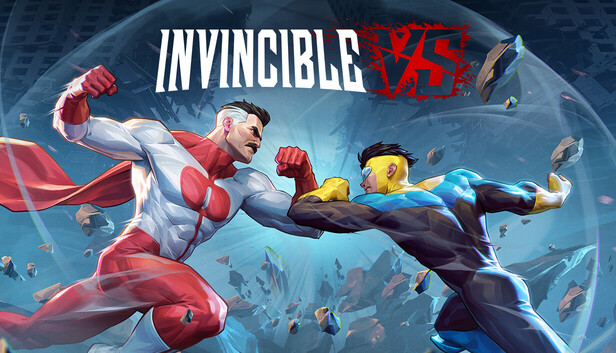
Invincible VS is a brutal superhero 3v3 tag fighting game set in the Invincible universe, where you can battle to the death as a team of fan-favorite characters in iconic locations.
Unleash bone-breaking combos through fast combat and smart defensive tactics to leave a trail of blood and destruction. Land vicious Super moves and Ultimates to leave your opponents in a mess of blood. Beast Saga
Invincible VS features a variety of game modes including a captivating cinematic story mode with an original narrative from a writer of the animated series. Jump into Arcade and battle with your team, hone your combos in Training mode, and test your skills against the world in competitive and casual multiplayer. Show, comic fans, and fighting game lovers will experience unparalleled heroic brutality, where every earth-shattering blow will leave you feeling… Invincible.
Blocks are one of the most powerful productivity features in AutoCAD. They allow you to combine multiple objects into a single, reusable element, making your drawings cleaner, more consistent, and easier to manage. Whether you’re working with symbols, parts, detail views, or title blocks, blocks help you work faster and more accurately. In this final installment of the AutoCAD Foundation series, we’re exploring how to insert a block and more.
What Is a Block?
A block is a collection of one or more objects combined into a single object. Once created, that block can be inserted multiple times into a drawing as individual block references, all tied back to the same underlying definition.
You’ll commonly see blocks used for items such as:
Furniture and fixtures
Mechanical or electrical symbols
Standard parts and components
Detail callouts and title blocks
Examples of blocks
Using blocks offers several key advantages. Blocks help maintain consistency across drawings by ensuring uniformity for repeated elements such as symbols, parts, and title blocks. They also make editing and placement faster, since blocks can be inserted, rotated, scaled, moved, and copied much more efficiently than working with individual objects. Any changes made by editing or redefining a block are applied instantly to all of its references in the drawing.
You can also include data such as part numbers, costs, service, dates, and performance values to blocks. The data is stored in special objects called block attributes. Finally, using multiple block references instead of duplicating object geometry helps reduce overall drawing file size.
How to Insert a Block
There are four key items involved when inserting a block into a drawing.
#1. Block Definition
This data is stored in a drawing file or drawing template file in a non-graphical format. Block definitions can easily be created or imported from any drawing file. Multiple block definitions can be created in a drawing file.
Note: Block definitions don’t always need to be created just in the drawing that they will be used. A drawing file itself can represent a block definition that can be shared with other designers and inserted into any open drawing file.
#2. Block Reference
When you insert a block, you specify which block definition to create an instance or block reference from. The graphics for the block reference are drawn based on the block definition. A drawing file can also be inserted into an open drawing, when this happens a block definition based on the geometry in model space of the drawing file being inserted is created in the target drawing and then a block reference is created.
#3. Block Insertion or Base Point
When you insert a block, you specify an insertion point for the block in the drawing. The insertion point is based on the block’s base point, this is the point of the block reference attached to your cursor.
The base point is circled on the block below. Later, if you select a block that’s already been inserted, it displays a grip at the base point. You can easily move and rotate this block using this grip.
#4. Block Insertion Tool
Several different block insertion tools are available in AutoCAD including:
Block gallery on the ribbon
Blocks palette
Tool Palettes window
DesignCenter
These block insertion tools allow you to insert block references from the definitions created within the current drawing as well as insert drawing files stored on your local workstation or a shared network location.
See How to Insert a Block
Keep Going
Ready to try out how to insert a block for yourself? Check out the AutoCAD Foundations page with exercises to get started.
If you’re too impatient to wait for Valve’s Steam Machine, developer and modder Andy Nguyen has created a solution, at least for the Sony crowd. He’s released a loader on GitHub that allows Linux to run on a PlayStation 5. Its use is limited to disc drive models of the console running 3.xx and 4.xx firmwares; Nguyen said additional firmwares may eventually get support too, but it doesn’t appear to be a priority. It’s a fun idea, and Nguyen posted a video of the loader in action last month.
I ported Linux to the PS5 and turned it into a Steam Machine. Running GTA 5 Enhanced with Ray Tracing. 🤯 pic.twitter.com/aMbT0PQ1dS
This year has been seeing a lot of love for Linux. The entire French government decided to drop Windows in favor of the alternative operating system, part of a move to rely less on foreign-made tech. Linux has also chipping away at Windows’ dominance as a PC gaming platform as Valve and its SteamOS gain interest (although it does have one big hurdle left to climb in that arena).
However, Nguyen’s mod isn’t the first time a Sony console has been able to run Linux. Back in the PlayStation 3 era, the company offered a feature called OtherOS that allowed players to install their own software on the machine; Linux was a supported option. OtherOS was removed in the console’s 3.21 firmware update, a change that sparked a class action lawsuit. Sony agreed to settle the case, and disgruntled penguin fans could claim $55 for their woes.
When you look at a lot of the videos that well known creators produce and upload, they all look pretty slick from the outside.
Because of that, when you first start out for yourself, you tend to get the idea that they are these super smooth presentation experts that never screw up!
The truth is that they, like everyone else mess up lines and takes over and over and have no inherent ability that you and I lack.
What they do have is experience through practice, repetition and the ability to smoothly edit out mistakes, again through experience and practice!
So to get things back in perspective, especially if you are new, here’s a close look at what a YouTube presentation or tutorial video really looks like in the making.
AI Background Remover vs Green Screen – PowerDirector
Now that we have moved into the era of A.I. background removal it would seem that green screen footage is no longer needed.
It would be nice to think that way but in reality the effectiveness of one over the other is still going to be determined on a case by case basis.
Although A.I. is improving in leaps and bounds it still has trouble with things like hair lines or instances where the subject is not clearly distinct from the background.
The downside for green screen is that in most cases you really have to shoot your footage very well against a very evenly lit background otherwise you won’t get a good key.
That’s why for my money I still think the green screen in PowerDirector is one of the best around at the consumer level.
It allows you to select up to three shades of green from your background to get a very accurate key which greatly reduces the need (but does not eliminate!) for pro level lighting on that background.
Seedance 2.0 or VEO 3.1 Put to the Test
Recently the people at CyberLink posted a video showing the differences between various A.I. models for creating different assets inside their interface.
This week we have something similar from Filmora and this is a good thing.
When you have access to three or four different A.I. models to create an asset or do some kind of work for you but, they cost you credits you have to buy, it’s best if you know what is what.
Each A.I. model will give you results that are quite different and each one has strengths and weaknesses depending on the type of content you want it to create.
So here’s a comparison in Filmora for the Seedance 2.0 and the VEO 3.1 models for you to check out.
Unlock the secret to creating the viral Color Wheel Trend Effect
OK, take a deep breath and get ready!
This is a tutorial from the people at Filmora covering a specific task or effect as part of an ongoing series they seem to be creating.
Now the reason for the deep breath is because of the speed at which they pump the instructions at you, this is not presented at a slow or leisurely pace!
However in spite of that, it is a solid tutorial showing how to pull off a very popular effect right now.
Having said that it is important to bear in mind that to me, the effect achieved is not the end product of the tutorial.
The real value lies in the use of the tools and techniques available to you as an editor so that you can use them in your own way.
How to Write Video Descriptions for Any Platform
These days you have to optimize every single aspect of an uploaded video if you want to have it appear in search or get presented on YouTube to an audience.
The problem has always been that in the short term, spammy “gaming the system” type strategies often worked giving rise to the idea that doing those things was beneficial.
In almost every case of those strategies, the long term effect was that the algorithms caught up, and those videos or channels ended up being cast into the wilderness!
Video descriptions are one of the more obvious examples of this and have undergone quite the evolution over the years.
Getting them right takes an understanding of what the search engines actually want while at the same time making them appealing to humans.
This Movie Poster Moves – Fusion for Noobs!
I have probably said this a million times but if you are using DaVinci Resolve as your editing software and not using the Fusion Page, you are leaving way too much on the table.
For my money (actually it’s free!) the two pages in Resolve that raise it above the crowd are the Color Page and the Fusion Page.
The problem with both of them is that they are pro level tools and were designed with pro’s in mind, which is a complicated way of saying they are really complex at first sight!
However once you understand how they work and what they can do, it’s a whole new world.
In the video below Daniel Batal takes you step by step through quite a complex exercise in Fusion but had the humanity to explain exactly what he is doing and why as he goes.
It is by far one of the better tutorials I have seen for the Fusion Page even if the project itself is not really something you would be doing, well worth the time to watch.
How Sound Changed Editing Forever – The Birth of Cinematic Sound
This looks like it is going to be a pretty interesting series from the folks at Film Editing Pro.
They usually put out very high quality content as far as tutorial and instructional videos go so I am looking forward to this one.
In this first video they cover historically the beginnings of cinematic sound which is something we all take for granted these days.
Best Times to Post Videos on Social Media in 2026
Given the current levels of competition for when it comes to posting to YouTube, Instagram or whatever, you really need to know the fine details.
Of course there are the usual suspects like Titles and descriptions but the bottom line is that if you can leverage an advantage then you need to do it!
So that brings us to timing your posts to maximize the impact that post has and to make sure it has the best possible chance for distribution.
How Lighting Changes Emotion in Film (Interview vs Cinematic vs Horror)
This is a very basic but at least easy to follow exercise in lighting.
I thought it was useful to add because it shows the way different lighting setups directed at faces can dramatically change the mood being conveyed.
I see a lot of videos online where I just know the creator was going for some kind of beauty/seductive look on the subject and ended up making them look like an axe murderer!
Key Takeaways
Creators often face challenges while filming, as they edit out mistakes to present polished videos.
AI background removal technology competes with green screen, but effective use depends on specific scenarios.
Filmora compares A.I. models like Seedance 2.0 and VEO 3.1 to help users choose the right tool for their needs.
Lighting dramatically influences the mood in videos, showcasing how different setups can affect the perception of subjects.
Optimizing video descriptions and posting times improves visibility and engagement on platforms like YouTube and Instagram.
Building a new home in Queensland is a major decision, and the best outcomes usually come from asking the right questions before plans are finalised. For growing families, upsizers, and multigenerational households, early clarity can make the difference between a home that simply looks good and one that genuinely works for the block, the budget, and everyday life.
Matching the Design to the Block and Household
One of the first smart questions to ask is whether the chosen design actually suits both the land and the people who will live in it. A home may look impressive in a brochure, but Queensland blocks can vary significantly in size, slope, orientation, and frontage, which all affect what will work well in practice.
This is often where families start weighing how different builders approach flexibility and design fit. Looking at providers such as Neptune Homes custom home builders in Queensland can help frame the broader question of whether a home is being shaped around real household needs, including storage, privacy, shared living areas, and room to adapt over time.
Understanding the Full Budget Picture
Another smart question is what the total cost is likely to include beyond the advertised base price. Many people focus first on the house itself, but site conditions can quickly change the financial picture. In Queensland, factors such as slope, access, drainage, and engineering requirements often influence the final cost more than expected.
It is worth asking specifically about soil classification, site fall, retaining needs, and possible changes to the slab design. These details affect construction complexity and can add substantial cost, so understanding them early helps set more realistic expectations before the build moves too far ahead.
Checking Local and Estate Requirements
A practical question many buyers overlook is whether the planned home will need to change to meet council or estate rules. Depending on the location, there may be restrictions around setbacks, rooflines, façades, materials, fencing, or driveway placement. These requirements can affect both layout and street presentation.
Raising this question early helps avoid disappointment later. A design that suits one block may need meaningful adjustments on another, and those changes can affect both approval timelines and budget. Knowing the local framework upfront makes the planning process more efficient and far less reactive.
Planning for the Next Stage of Family Life
A smart home build should not only reflect how a family lives today, but also how that lifestyle may change over the next five to ten years. This is an important question for families with young children, teenagers, or older relatives who may later become part of the household.
That means looking closely at how flexible the design really is. Separate living zones, adaptable rooms, practical storage, and thoughtful circulation can make a home far more functional as needs shift. Thinking in terms of livable housing design can also help prevent the layout from becoming restrictive sooner than expected.
Designing for Queensland Conditions
Just as important is the question of how well the home responds to the Queensland climate. Warm temperatures, humidity, strong sun, and seasonal weather patterns all shape how comfortable and efficient a home will feel long after construction is complete.
This is where design decisions such as orientation, shading, window placement, and ventilation become especially important. Asking how the home supports cross-ventilation, manages solar exposure, and improves day-to-day comfort can reveal whether the design is truly suited to local conditions rather than simply visually appealing.
Better Questions Lead to Better Building Decisions
The smartest questions before building in Queensland are usually the ones that reveal how the home will function in real life. When buyers take time to test the design against the block, the budget, future family needs, and Queensland conditions, they are in a much stronger position to make confident and informed decisions from the start.
An anonymous reader quotes a report from CNBC: Elon Musk wrapped up his testimony on Thursday as the trial in his lawsuit against OpenAI CEO Sam Altman continued into its fourth day. OpenAI’s attorney, William Savitt, cross-examined Musk in the morning. He asked Musk about the capped nature of Microsoft’s investments in OpenAI, his involvement in negotiations about the company’s structure, and whether he knew about the OpenAI nonprofit’s recent initiatives. “I don’t know what’s going on at OpenAI,” Musk testified.
Savitt also asked Musk about his competing artificial intelligence startup, xAI. While not the main focus of the case, Musk said it is “partly” true that xAI used some of OpenAI’s models to train its own models, a process known as distilling. Musk also suggested that xAI has used OpenAI’s technology to help build the company. Musk sued OpenAI, Altman, and Greg Brockman, the company’s president, in 2024, alleging that they went back on their commitments to keep the artificial intelligence company a nonprofit and to follow its charitable mission. He claims that the roughly $38 million he donated to seed OpenAI, a company he co-founded, was used for unauthorized commercial purposes.
Once Musk wrapped up his testimony after roughly two hours of questioning on Thursday, his attorneys called Jared Birchall, who manages Musk’s billions at his family office, as their next witness. Birchall testified about his knowledge of Musk’s specific donations to OpenAI. Judge Yvonne Gonzalez Rogers oversaw the proceedings from federal court in Oakland, California. The trial will resume on Monday. Recap:
One of the things on our wishlist for Total War: Warhammer 40,000 is a cover system, and the Total War: Show & Tell makes it clear that we’re going to get our wish. And also, if we don’t like that cover, we’ll be able to blow it up.
“You’ve got all of these tactical options and then strategic elements that can come out of it,” battle product owner Dave Petry says during a map flyover. “One of the really big and exciting things that we’re doing here is that destruction is going to come into play. That forest, if you don’t like it, you don’t have to keep it. If you find that pesky forest is getting in your way and you can’t see around it then you can get rid of that thing. Or you can use it to hide in.”
The developer roundtable four months ago mentioned there would be destructible buildings, but it’s nice to have it clearly stated that we can just delete other stuff off the map if it’s in the way.
Article continues below
“Being completely clear, not absolutely everything is destructible, right?” Petry clarifies. “We’ve kept it to areas where it really works and it makes sense and it feels like it can add to that depth.” As the camera pans over a hive-city warzone with plenty of steep angles and gothic architecture, he says, “We are dealing with a universe which is full of really powerful but flat-firing weapons, so cover becomes incredibly, incredibly important.”
One way to blow up that cover will be with orbital bombardments, and the showcase takes a few minutes to spin around a hive world as seen from space. It looks like something right out of the last stage of Spore, only covered in toxic gas and cities so big they cover entire countries. It’s 40K as heck, and does assuage some of my concerns.
Sure, the Astra Militarum troopers we see are lined up like Napoleonic regiments, but they’re the faction where that’s probably most apt. Total War: Warhammer 40,000 still has a release date of “to be announced” on Steam, so there’s plenty of time for stuff to change too.
Keep up to date with the most important stories and the best deals, as picked by the PC Gamer team.
The Healthcare AI Stack: What’s Worth Building vs. Buying?
Most mid-market healthcare operations leaders have already looked at the major platforms. Epic Cheers. Veradigm. Health Catalyst. They have seen the demos. The capabilities look right. The implementation timelines look long, the price tags look like health system budget, and the fit to their actual data environment looks questionable.
The question becomes: what do you actually build, and what do you buy?
USM Business Systems works with mid-market health systems, specialty pharmacy groups, and pharma/CRO organizations to answer exactly that question. What follows is the framework we use.
Start With the Data Reality
The first thing that determines your stack is your data environment, not your budget or your timeline.
If your EHR is current, your prior auth workflow is structured, and your payer data is clean and reliable, you have more platform options. If you are managing two EHR’s from an acquisition, a prior auth process that routes through fax, and payer status updates that live in coordinator inboxes, most platforms will underdeliver.
The reason is straightforward. Enterprise healthcare AI platforms are calibrated to enterprise data infrastructure. Mid-market infrastructure is almost always messier. That is not a failure of the operations team. It is a function of how mid-market healthcare organizations grow.
A platform that assumes a clean data model will give you clean outputs in the demo and noisy outputs in production. The question to ask in every vendor evaluation: what does this platform do with dirty data?
What Platforms Are Good At?
Off-the-shelf healthcare AI platforms are strong when:
Your data infrastructure matches their integration assumptions
Your use case is standard enough that their pre-built models apply without heavy customization
You have internal IT capacity to manage ongoing configuration and compliance maintenance
Your budget and timeline can absorb a 9–18 month implementation cycle
For organizations where those conditions hold, a platform makes sense. The vendor handles model maintenance, the infrastructure, and the regulatory roadmap.
What Custom AI Agents Are Good At?
A custom healthcare AI agent is the right architecture when:
Your data environment is non-standard and a platform would require significant cleanup before it could run reliably
Your use case is specific enough that pre-built models would require heavy modification regardless
You want the agent trained on your actual payer mix, your authorization denial patterns, your specific formulary and patient population
You need deployment in weeks, not quarters
The tradeoff is that custom builds require an engineering partner with healthcare domain understanding. Generic AI development shops can build the software. They often miss the operational and compliance logic that determines whether the outputs are actually usable in a regulated environment.
A Practical Framework for the Decision
USM uses a three-question filter with every new healthcare engagement:
First: Is the problem standard or specific? A prior authorization workload at a specialty pharmacy managing oncology patients across 15 payers is not a standard problem. A platform built for median-case prior auth will give median results.
Second: How clean is the underlying data? If significant data normalization is required before a platform can run, that cleanup cost goes into the build-vs-buy calculation. Custom agents can be built to work with imperfect, fragmented data.
Third: What is the decision speed requirement? If you need operational improvements in 8–12 weeks, a platform with a 12-month implementation is not the right answer regardless of long-term fit.
The Hybrid That Works for Most Mid-Market Healthcare Teams
Most mid-market healthcare operations teams land in a hybrid. They buy infrastructure at the commodity layer (EHR, practice management, claims processing) and build custom at the intelligence layer: the agent that sits on top and synthesizes signals into decisions.
That is the architecture USM – one of the best ai app development companies in USA, deploys. The agent connects to existing systems via HL7, FHIR API, or structured data export. It does not require an EHR migration or a claims system replacement. It meets the data where it is and builds the visibility and decision layer on top.
Deployment timeline: 8–12 weeks from scoping to first output. ROI measurement starts at week one.
USM offers a no-cost architecture consultation for healthcare operations leaders evaluating AI options. Book a session at usmsystems.com.