The identity of Satoshi Nakamoto, the pseudonym of the creator of Bitcoin, remains a long-running mystery. But according to a new investigation published in the New York Times, Satoshi could be Adam Back, a British cryptographer who conducted influential early research about digital assets. Back denies that he is Satoshi.
People have been trying to track down the father of Bitcoin for decades, without much success. Based on Back’s denial, it’s not clear if the Times’ tech journalist John Carreyrou, known for his reporting that took down Theranos, got much further than anyone else.
Back fits the profile of the kind of person you might suspect would create the first cryptocurrency. He created Hashcash, the proof-of-work system that Satoshi used to mine bitcoin, and he is now the co-founder and CEO of Blockstream, a company building infrastructure for blockchain-based payment systems. Back even agreed with Carreyrou that he’s a reasonable suspect, and it’s probable that Satoshi is — like him — a fifty-something-year-old British Cypherpunk. (In that case, yes, the use of a Japanese moniker is odd.)
i’m not satoshi, but I was early in laser focus on the positive societal implications of cryptography, online privacy and electronic cash, hence my ~1992 onwards active interest in applied research on ecash, privacy tech on cypherpunks list which led to hashcash and other ideas.
But Carreyrou doesn’t have any undeniable evidence to seal the case shut.
To stake his claim, he collected archives of emails sent in three cryptography listservs between 1992 and 2008 during the time that the pseudonymous Satoshi was active in these forums. Carreyrou fed the archive into an AI to identify commonalities between how Satoshi and other active posters wrote. For example, Satoshi did not put hyphens in compound nouns, and sometimes mixed up “its” and “it’s.”
Back was the best match, but wrote on X that the evidence is a “combination of coincidence and similar phrases from people with similar experience and interests.”
The Satoshi case isn’t closed, but we have to admit, Carreyrou’s use of AI was pretty clever.
Over the past several months, many countries have announced plans to restrict social media access for children and teens. Australia became the first to implement such measures at the end of last year, setting a precedent that other countries are now closely watching.
Australia’s regulations, along with other countries’ proposals, aim to reduce the pressures and risks that young users may face on social media, which include cyberbullying, addiction, mental health issues, and exposure to predators.
Of course, there are concerns about privacy regarding invasive age verification and excessive government intervention. Critics, including Amnesty Tech, have said such bans are ineffective and that they ignore the realities of younger generations. Despite this, many nations are moving ahead with proposed legislation.
We’ve compiled a list of countries that are considering or have already moved forward with bans on social media for young users.
Australia
Australia became the world’s first country to ban social media for children under 16 in December 2025. The ban blocks children from using Facebook, Instagram, Snapchat, Threads, TikTok, X, YouTube, Reddit, Twitch, and Kick. It notably doesn’t include WhatsApp or YouTube Kids.
The Australian government has said these social media companies must take steps to keep children off their services. Companies that fail to comply may face penalties of up to $49.5 million AUD ($34.4 million USD).
The government says these platforms should use multiple verification methods to ensure that people using their services are older than 16. It also notes that they can’t rely on users simply entering their own age.
Techcrunch event
San Francisco, CA | October 13-15, 2026
Denmark
Denmark is set to ban social media platforms for children under 15. The Danish government announced in November 2025 that it had secured support for the ban from three governing coalition parties and two opposition parties in parliament.
The government’s plans could become law as soon as mid-2026, according to the Associated Press. The Danish digital affairs ministry is also launching a “digital evidence” app that includes age verification tools that may be used as part of the ban.
France
In late January, French lawmakers passed a bill that would ban social media for kids under 15. President Emmanuel Macron has supported the measure as a way to protect children from excessive screen time.
The bill still has to get through the country’s Senate before a final vote in the lower house.
Germany
In early February, German Chancellor Friedrich Merz’s conservatives discussed a proposal to bar children under 16 from using social media, Reuters reported. However, there were signs that his center-left coalition partners were hesitant to support an outright ban.
Greece
Greek Prime Minister Kyriakos Mitsotakis announced in April that the country is going to ban access to social media for children under 15 starting January 2027. Mitsotakis says the move is aimed at tacking rising anxiety and sleep problems among children, as well as the addictive design of social media.
Indonesia
Indonesia said in early March that it’s banning children under the age of 16 from using social media and other popular online platforms. The country plans to start with platforms such as YouTube, TikTok, Facebook, Instagram, Threads, X, Bigo Live, and Roblox.
Malaysia
The Malaysian government said in November 2025 that it plans to ban social media for children under 16. The country plans to implement the ban this year.
Slovenia
Slovenia is drafting legislation to prohibit children under 15 from accessing social media, the country’s deputy prime minister announced in early February. The government wants to regulate social networks where content is shared, citing platforms such as TikTok, Snapchat, and Instagram.
Spain
Spain’s prime minister announced in early February that the country plans to ban social media for children under the age of 16. The ban still needs parliamentary approval. The Spanish government is also seeking to create a law that would make social media executives personally accountable for hate speech on their platforms.
UK
The United Kingdom is weighing a ban on social media for children under 16. The government says it will consult parents, young people, and civil society for their views to determine whether a ban would be effective.
It will also consider whether to require social media companies to limit or remove features that drive compulsive use, such as endless scrolling.
This story was originally published in February 2026 and is updated regularly with new information.
A couple of months ago Logitech unveiled quite the surprise for the competitive PC gaming scene with the G Pro X2 Superstrike. It’s the first gaming mouse to feature proper analogue switches under the left and right mouse buttons, meaning it’s the first to offer clicks that respond to the slightest touch, or whatever level of force you set it to.
As soon as I got my hands on the Superstrike—first at Logitech HQ in Switzerland where I got to see everything that went into making it, and then at home for some more extended testing—I knew it wasn’t just a gimmick. At least for some kinds of competitive gamer, the improvement on offer is real, as it cuts down the time between starting to press and having your click register and your in-game weapon fire (for instance).
The Superstrike’s haptic-inductive click technology, I thought, will surely be the future for the gaming mouse market.
Article continues below
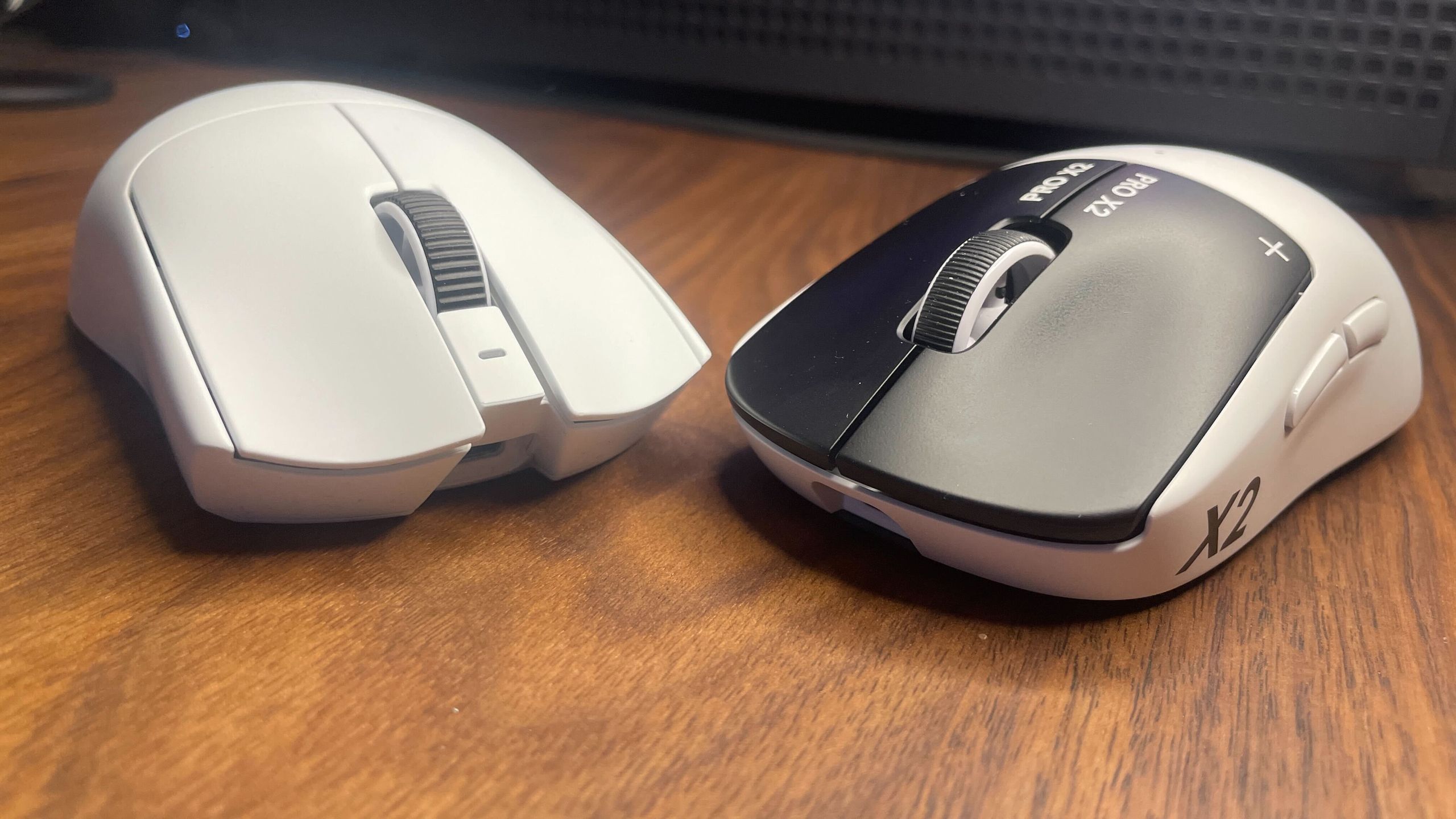
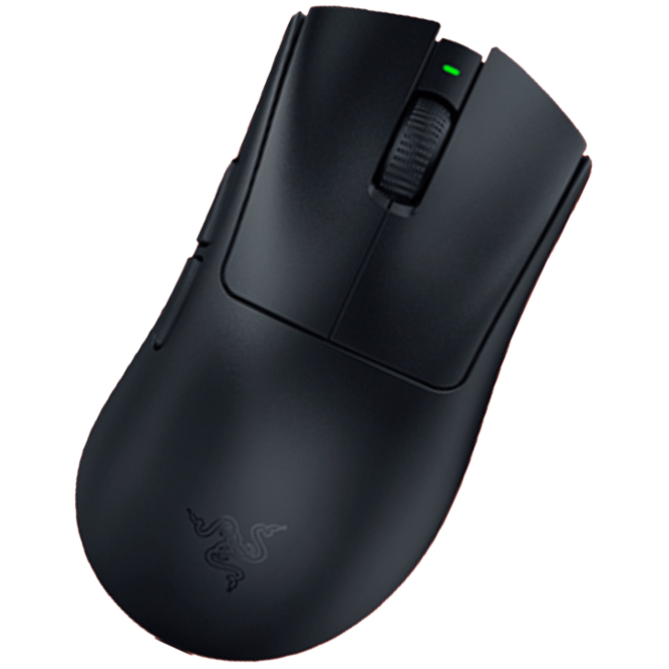
Then Razer launched the Viper V4Pro and reminded me just how impressive a traditional, non-analogue mouse can be, thanks to its practically flawless design and build quality. Analogue clicks are great, but reducing click latency is just one aspect of a whole package. These two gaming mice are both great choices for competitive gaming, and it’s far from a wash for either.
Setting aside the apples-to-oranges switch comparison for the time being, you’re clearly getting a better all-round package with the Viper V4 Pro. That would be true even if it was the same price as the Superstrike, but it’s actually cheaper—in the US, at least.
The long and short of it is that you’re getting a lighter mouse with double the battery life and a more performant sensor. You’re also getting a better, more bulbous dongle that actually stays put on your desk and has some useful LEDs.
Some of you might also be interested to know that the Viper has an optical scroll wheel, while the Superstrike has the same mechanical scroll wheel as in the previous Logitech G Pro X Superlight 2. The latter wheel is known to sometimes develop scrolling issues and in my own testing suffers from problems with long-presses. The optical wheel on the Viper V4 Pro, at least in theory, shouldn’t be as likely to develop problems because there’s less mechanically that can go wrong.
Keep up to date with the most important stories and the best deals, as picked by the PC Gamer team.
Overall quality
(Image credit: Future)
Specs aren’t the only place where the Viper V4 Pro comes out in front. It’s also a much more premium-feeling mouse. In fact, it’s the most premium-feeling mouse I’ve had my mitts on, and I’ve tried quite a few.
Both have nice, safe shapes that should suit a variety of grips. The Superstrike’s G Pro/Superlight style ‘potato’ shape has a bit more of an extended hump that pushes into your palm more towards the back, but the two symmetrical shapes are generally quite similar.
The Viper V4 Pro feels a step above the Superstrike, though, thanks to its near-flawless build quality. And while the Superstrike doesn’t feel cheap, it’s far from perfect.
The Viper’s buttons are very tactile and have practically zero pre-travel, there’s not an ounce of mushiness to the scroll wheel, and the skates are nice and smooth. The Superstrike, on the other hand, has mushy side buttons, pretty slow UPE skates, and a mediocre scroll wheel that doesn’t play well with long presses. There’s also quite a bit of left-right wobble to the left mouse button, on my model at least, after bottoming out the button press.
The icing on top for the Viper when it comes to the general experience, in addition to the battery life, is the fact that you can change all your settings on Synapse Web. So, unlike with the Superstrike, you don’t have to keep a local program installed to change your mouse settings.
Are the speedy clicks worth it?
(Image credit: Future)
After spending a lot of time using both mice, I can say confidently that the Superstrike is a boon to games like Counter-Strike and Valorant but not much of a boon to other games such as Overwatch, Apex Legends, and so on. Its clicks are worth it if you primarily play tactical shooters that have a low time-to-kill (TTK) and rely on quick reactions. I suppose games that require a high number of clicks per minute (CPM) will benefit, too, but that’s far outside of my wheelhouse.
In games like CS2, a lot of your time is spent holding angles or peeking around them, hopefully with your crosshair placed very close to where your enemy’s head should appear. In these situations, saving a few milliseconds between spotting that head and having your mouse click register can make a difference. Anyone who has played CS2 or Valorant seriously will be familiar with the post-death certainty that ‘if I’d just shot a split second sooner, I’d be the one alive right now and my team would have won the round.’
You don’t get those feelings quite so often or to quite the same extent in other kinds of competitive shooter. Playing Overwatch, for instance—even when playing as Cassidy—I don’t feel that need for split-second click reaction to anywhere near the same extent as I do in CS2. And if I’m playing a tracking-heavy game like Quake Champions or Apex Legends, I don’t feel the need at all.
(Image credit: Future)
However, just note that even in the games where it is of benefit, the Superstrike’s clicks don’t give a night and day difference and they certainly won’t greatly improve your overall headshot percentage or kill:death ratio.
I started doing some daily tests comparing my scores with the different mice in CS2 and in aim trainers, but I quickly noticed there was no difference. What makes the most difference by far is a combination of overall reaction time and aim. The time it takes your finger to press down is just one tiny part of that.
One big caveat to both the Viper and Superstrike is that, as many an enthusiast is prone to say, shape is king when it comes to gaming mice. If you don’t get on with the Superstrike’s or the Viper Pro’s shape, you’re probably better off getting a different mouse entirely.
Better off, that is, both in general and also regarding competitive performance, because it’s hard to perform well with a mouse you don’t enjoy holding. I, for instance, am currently debating long and hard over whether to ditch the Superstrike for the Zowie EC2-DW, which just fits in my grip so snugly.
Niches on niches
(Image credit: Future)
The shortened answer to the question of which mouse to get is as follows:
First and foremost, get a mouse with a shape that suits your grip. If the Viper V4 Pro and Superstrike fit the bill, then get the Superstrike if you (A) play primarily tactical shooters with low TTK and (B) are happy spending $180 for a slight potential advantage over all other mice. If you don’t fit those two criteria, get the Viper V4 Pro, and bask in its near-flawless quality.
The Razer Viper V4 Pro has brought me back to earth a little. Initially I got a little swept up in the Superstrike’s new and impressive analogue click technology, and while my opinion hasn’t changed on how much of a game-changer it is, the Viper has reminded me just how nice it can be to have every other aspect of a mouse be almost perfect.
For the tactical shooter niche inside the broader competitive niche, the Superstrike beats it for in-game performance, provided you like its shape and are fine sacrificing some broader quality and feel. But for everything else the Viper V4 Pro comes out on top.
When you want to run frontier models locally, you hit the same constraints repeatedly.
Cloud APIs lock you into specific providers and pricing structures. Every inference request leaves your environment. Sensitive data, proprietary workflows, internal knowledge bases – all of it goes through someone else’s infrastructure. You pay per token whether you need the full model capabilities or not.
Self-hosting gives you control, but integration becomes the bottleneck. Your local model works perfectly in isolation, but connecting it to production systems means building your own API layer, handling authentication, managing routing, and maintaining uptime. A model that runs beautifully on your workstation becomes a deployment nightmare when you need to expose it to your application stack.
Hardware utilization suffers in both scenarios. Cloud providers charge for idle capacity. Self-hosted models sit unused between bursts of traffic. You’re either paying for compute you don’t use or scrambling to scale when demand spikes.
Google’s Gemma 4 changes one part of this equation. Released April 2, 2026 under Apache 2.0, it delivers four model sizes (E2B, E4B, 26B MoE, 31B dense) built from Gemini 3 research that run on your hardware without sacrificing capability.
Clarifai Local Runners solve the other half: exposing local models through production-grade APIs without giving up control. Your model stays on your machine. Inference runs on your GPUs. Data never leaves your environment. But from the outside, it behaves like any cloud-hosted endpoint – authenticated, routable, monitored, and ready for integration.
This guide shows you how to run Gemma 4 locally and make it accessible anywhere.
Why Gemma 4 + Local Runners Matter
Built from Gemini 3 Research, Optimized for Edge
Gemma 4 isn’t a scaled-down version of a cloud model. It’s purpose-built for local execution. The architecture includes:
Hybrid attention: Alternating local sliding-window (512-1024 tokens) and global full-context attention balances efficiency with long-range understanding
Dual RoPE: Standard rotary embeddings for local layers, proportional RoPE for global layers – enables 256K context on larger models without quality degradation at long distances
Shared KV cache: Last N layers reuse key/value tensors, reducing memory and compute during inference
Per-Layer Embeddings (E2B/E4B): Secondary embedding signals feed into every decoder layer, improving parameter efficiency at small scales
The E2B and E4B models run offline on smartphones, Raspberry Pi, and Jetson Nano with near-zero latency. The 26B MoE and 31B dense models fit on single H100 GPUs or consumer hardware through quantization. You’re not sacrificing capability for local deployment – you’re getting models designed for it.
What Clarifai Local Runners Add
Local Runners bridge local execution and cloud accessibility. Your model runs entirely on your hardware, but Clarifai provides the secure tunnel, routing, authentication, and API infrastructure.
Here’s what actually happens:
You run a model on your machine (laptop, server, on-prem cluster)
Local Runner establishes a secure connection to Clarifai’s control plane
API requests hit Clarifai’s public endpoint with standard authentication
Requests route to your machine, execute locally, return results to the client
All computation stays on your hardware. No data uploads. No model transfers.
This isn’t just convenience. It’s architectural flexibility. You can:
Prototype on your laptop with full debugging and breakpoints
Keep data private – models access your file system, internal databases, or OS resources without exposing your environment
Skip infrastructure setup – No need to build and host your own API. Clarifai provides the endpoint, routing, and authentication
Test in real pipelines without deployment delays. Inspect requests and outputs live
Use your own hardware – laptops, workstations, or on-prem servers with full access to local GPUs and system tools
Gemma 4 Models and Performance
Model Sizes and Hardware Requirements
Gemma 4 ships in four sizes, each available as base and instruction-tuned variants:
Model
Total Params
Active Params
Context
Best For
Hardware
E2B
~2B (effective)
Per-Layer Embeddings
256K
Edge devices, mobile, IoT
Raspberry Pi, smartphones, 4GB+ RAM
E4B
~4B (effective)
Per-Layer Embeddings
256K
Laptops, tablets, on-device
8GB+ RAM, consumer GPUs
26B A4B
26B
4B (MoE)
256K
High-performance local inference
Single H100 80GB, RTX 5090 24GB (quantized)
31B
31B
Dense
256K
Maximum capability, local deployment
Single H100 80GB, consumer GPUs (quantized)
The “E” prefix stands for effective parameters. E2B and E4B use Per-Layer Embeddings (PLE) – a secondary embedding signal feeds into every decoder layer, improving intelligence-per-parameter at small scales.
Benchmark Performance
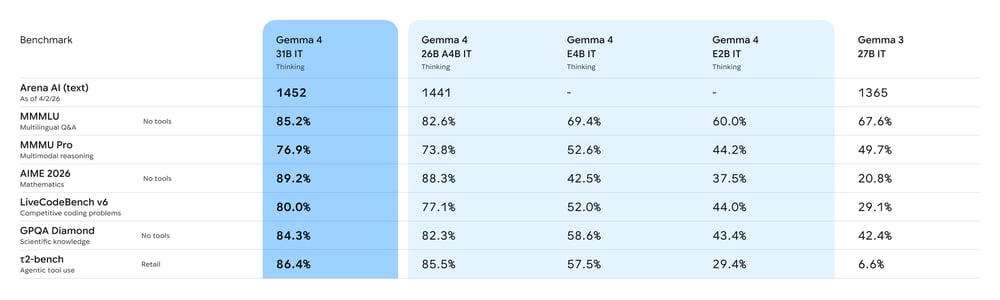
On Arena AI’s text leaderboard (April 2026):
31B: #3 globally among open models (ELO ~1452)
26B A4B: #6 globally
Academic benchmarks:
BigBench Extra Hard: 74.4% (31B) vs 19.3% for Gemma 3
MMLU-Pro: 87.8%
HumanEval coding: 85.2%
Multimodal capabilities (native, no adapter required):
Image understanding with variable aspect ratio and resolution
Video comprehension up to 60 seconds at 1 fps (26B and 31B)
Audio input for speech recognition and translation (E2B and E4B)
Agentic features (out of the box):
Native function calling with structured JSON output
Multi-step planning and extended reasoning mode (configurable)
System prompt support for structured conversations
Setting Up Gemma 4 with Clarifai Local Runners
Prerequisites
Ollama installed and running on your local machine
Python 3.10+ and pip
Clarifai account (free tier works for testing)
8GB+ RAM for E4B, 24GB+ for quantized 26B/31B models
Step 1: Install Clarifai CLI and Login
Log in to link your local environment to your Clarifai account:
Enter your User ID and Personal Access Token when prompted. Find these in your Clarifai dashboard under Settings → Security.
(Note: Use the actual directory name created by the init command, e.g., ./gemma-4-e4b or ./gemma-4-31b)
Once running, you receive a public Clarifai URL. Requests to this URL route to your machine, execute on your local Ollama instance, and return results.
Running Inference
Set your Clarifai PAT:
Use the standard OpenAI client:
That’s it. Your local Gemma 4 model is now accessible through a secure public API.
From Local Development to Production Scale
Local Runners are built for development, debugging, and controlled workloads running on your hardware. When you’re ready to deploy Gemma 4 at production scale with variable traffic and need autoscaling, that’s where Compute Orchestration comes in.
Compute Orchestration handles autoscaling, load balancing, and multi-environment deployment across cloud, on-prem, or hybrid infrastructure. The same model configuration you tested locally with clarifai model serve deploys to production with clarifai model deploy.
Beyond operational scaling, Compute Orchestration gives you access to the Clarifai Reasoning Engine – a performance optimization layer that delivers significantly faster inference through custom CUDA kernels, speculative decoding, and adaptive optimization that learns from your workload patterns.
When to use Local Runners:
Your application processes proprietary data that cannot leave your on-prem servers (regulated industries, internal tools)
You have local GPUs sitting idle and want to use them for inference instead of paying cloud costs
You’re building a prototype and want to iterate quickly without deployment delays
Your models need to access local files, internal databases, or private APIs that you can’t expose externally
Move to Compute Orchestration when:
Traffic patterns spike unpredictably and you need autoscaling
You’re serving production traffic that requires guaranteed uptime and load balancing across multiple instances
You want traffic-based autoscale to zero when idle
You need the performance advantages of Reasoning Engine (custom CUDA kernels, adaptive optimization, higher throughput)
Your workload requires GPU fractioning, batching, or enterprise-grade resource optimization
You need deployment across multiple environments (cloud, on-prem, hybrid) with centralized monitoring and cost control
Conclusion
Gemma 4 ships under Apache 2.0 with four model sizes designed to run on real hardware. E2B and E4B work offline on edge devices. 26B and 31B fit on single consumer GPUs through quantization. All four sizes support multimodal input, native function calling, and extended reasoning.
Clarifai Local Runners bridge local execution and production APIs. Your model runs on your machine, processes data in your environment, but behaves like a cloud endpoint with authentication, routing, and monitoring handled for you.
Test Gemma 4 with your actual workloads. The only benchmark that matters is how it performs on your data, with your prompts, in your environment.
The TriCaster Mini X with Control Surface Bundle is a compact, all-in-one live production solution that lets creators produce professional-quality video from anywhere. Supporting sources from smartphones to 4K cameras, it delivers powerful software-driven workflows with studio-style control in a portable, easy-to-use system.
$10,595.00 reg. $9,995.00 SPECIAL Limited Time Only!
A complete turnkey hardware & software system for streaming
4 HDMI inputs & 8 x IP video inputs via NDI
4K60 production capabilities
NDI network connectivity for flexible AV over IP workflows
Award winning TriCaster software
Viz Flowics for professional graphics
The Vizrt Advantage
Accessibility Mini X gives producers everything they need right at their desk—switch, stream, record, add graphics, use virtual sets, and more. Professional live video production made simple for anyone with a story to tell.
Flexibility From cameras to microphones, off-the-shelf HDMI devices connect directly to the powerful Mini X in minutes to create professional level productions – without having to purchase any new equipment.
Scalability Built with NDI at its core, the Mini X is an easy to use, yet scalable solution that can be simplified or expanded, as necessary – even by using a Viz Connect Solo Converter – offering limitless possibilities.
Ready for Tomorrow’s Production Needs, Today
Live Link Live Link allows users to render web pages directly into the TriCaster and pull any web page elements into a production without the need for a 3rd party application. From graphics or images on a web page to videos from your organization’s internal training platforms
All-in-One The TriCaster Mini X continues the all-in-one desktop form factor of the TriCaster Mini with increased power and capabilities, including access to 8 external sources with 4 integrated HDMI inputs and supporting modern resolutions up to 4Kp30.
Social Media Integration Share live and on-demand content directly to Facebook, LinkedIn, Twitter, Vimeo, YouTube, and more—complete with comments and hashtags. With integrated DataLink™, pull social posts and photos into on-screen graphics for a fully interactive experience.
Ahhh, dating! 😍 It’s a time of new beginnings, new love, getting to know the other person, having fun. 🎉 Truly, it’s the most funnest part of the relationship! But it’s also the scariest!
All the “what if’s”, will he like this, will he not like it, how can I line myself up more to Christ in order to attract (and KEEP!) the type of man I want to have and did I do a good job of it so far?
Am I Biblical enough? Pretty enough? Is he THE one for me?
There’s so much stress in dating. All these thoughts loom over you.
👉 I wanted to take the stress out of your relationship today! 🤗
Whether you’ve been married for a long time and want to keep the spark alive on a continual basis or whether you’re looking forward to a new relationship, getting to know the other person, falling in love more and more day by day, these alphabet dating words are for you! ❤️
If you like these date night ideas for couples, you’ll love these posts too!! 🥳
Alphabet Date Words That Start with A – Z
Ditch the indecision and dive straight into pure togetherness! 🥰
Whether you’re looking to spark a new flame or keep a long-term fire burning bright, this massive list of 420+ alphabet date ideas a to z is your new secret weapon!
There’s a couple ways to use them:
These ABC date night ideas can be turned into a challenge! Think: dating through the alphabet challenge picking one letter at a time.
You could also have you and your partner pick 10 romantic alphabet date ideas each, write them on slips of paper (don’t tell the other person what you’ve written down) and put them in a jar. Then when it’s date night, pick one alphabet date word out of the jar and do that activity that day.
It’s time to make every letter count in this alphabet date challenge and create memories that’ll last a lifetime! 💖
Here’s my personal top 12 list if you wanna quick little win:
Reading the Bible Together
Holiday Party
Amusement Park
Fun Center
Aquarium
Beach Day
Botanical Garden/Nature Walk
Farmer’s Market
Candlelight Dinner (think: at home date idea)
Yard Saleing
Video Games
Ikea Shopping & Dinner Adventure – anyone who’s ever been there, knows, you’re not gettin’ out within 5 hours! It’s an all-day, amazingly cute date idea for couples!
Now matter how you use them, these a to z date ideas are a lot of fun and brings a bit of spice to your relationship!! 🥰
Bubbles at the Park (think: cheap date ideas for couples)
Buffet (make each other’s plates to see how well you know each other) 😊
Build Snowmen or Sandcastles
Bumper Cars
Bungee Jumping
Alphabet Date Words that start with C
Calligraphy Class
Camping
Candlelight Dinner
Candy Factory
Canoeing
Carnival
Caroling for a Cute Christmas Date Idea
Champagne Breakfast
Charcuterie Class
Cheese Factory
Cheese Tasting
Chess
Chocolate Shop
Chocolate-Making Class
Classic Cinema
Coffee Shop
Comedian Show
Comedy Club
Comic Book Expo
Concert
Conversation Starters Game
Cooking Class
Cornhole Competition
Country Line Dancing
Craft Night
Croquet
CrossFit Class
Cruise
Cruise Ship
Alphabet Date Words that start with D
Dance Class
Dancing
Darts
Day Trip
Deep Sea Diving
Dessert Sampler
Dim Sum
Dinner Cruise
Dinner Theater
Dinner Theater Train
Disc Golf
Disco
Discount Movies
Dog Park
Double Date
Doughnut Shop
Drawing Lessons
Drive-In Fast Food
Drive-In Movie
Drive-Through Tree (Eureka, CA)
Dueling Piano Show
Alphabet Date Words that start with E
E-Bike Tour
Early Bird Special
Eat at a New Place
Ecotour
Eiffel Tower / Paris
Eighties-Themed Party
Elegant Dinner
Empire State Building
Equestrian Show
Escape Room
Espresso Tasting
Estate Sale
Evening Hike
Evening Stroll
Excursion
Exercise
Explore a New City
Explore Downtown
Extreme Sports
Alphabet Date Words that start with F
Fajita Night
Fancy Restaurant
Farmers Market
Ferris Wheel
Festival
Film Festival
Fireworks
Fishing Trip
Flea Market
Flight out of Town
Floral Design Class
Fly Kites
Fondue
Food Tour
Foosball
Football Game
French Pastries
Frisbee in the Park
Fro-Yo (make each other’s dessert to see how well you know each other) 😊
Fruit Picking
Fun Center
Alphabet Date Words that start with G
Gala
Gallery Tour
Game Night
Gaming Cafe
Garage Sales
Garden Tour
Gardening
Gelato
Glamping
Glass Blowing
Go for a Drive in the Country
Go-Karting
Golf
Gourmet Restaurant
Grand Canyon
Grilling
Guitar Lessons
Gym
Gyros
Alphabet Date Words that start with H
Habitat for Humanity
Hang Gliding
Hang out in a Hammock
Harbor Cruise
Harvest Festival
Haunted House Tour
Hayride
Helicopter Tour
Hiking
Hip Hop Dancing
Historical Museum
Hockey Game
Holiday Party
Home Renovation Activity
Homemade Pizza Night
Homemade Taco Night
Hop On Hop Off Tour
Horseback Riding
Hot Air Balloon
Hula Lessons
Alphabet Date Words that start with I
Ice Cream Parlor
Ice Cream Sundae Bar at Home
Ice Skating
Ikea Shopping and Dinner Adventure
Immersive Theater
Improv Class
Improv Show
Indie Film Festival
Indoor Camping
Indoor Picnic
Inspirational Speaker
Interior Design Expo
Intimate Night at Home
Irish Dance Classes
Italian Dining
Alphabet Date Words that start with J
Jamaican Dining
Japanese Dining
Jazz Club
Jazz Concert
Jeep Tour
Jet Ski
Jigsaw Puzzle Contest
Jiu-Jitsu Class
Jogging
Judo Classes
Juggling Lessons
Juice Bar
Jump in a Trampoline Park
Alphabet Date Words that start with K
Karaoke
Karate Class
Kayaking
Kebabs
Kettlebell Workout
Kickball
Kickboxing Class
Kite Flying
Kite Surfing
Korean Dining
Alphabet Date Words that start with L
Lakeside Getaway
Lantern Festival
Laser Tag
Latin Dancing Lessons
Lavender Farm
Lawn Bowling
Leaf Peeping
Learn Something New
Legoland
Library Date
Lighthouse Tour
Lightshow
Limousine Ride
Line Dancing
Listening to Sermons
Live Music
Live Stage Play
Live Taping of a TV Show
Lobster Dinner
Lodge
Log Cabin Weekend
Lounge by the Pool
Love Letter Writing
Lunch Date
Alphabet Date Words that start with M
Magic Show
Malt Shop
Marathon
Marina Tour
Mario Kart
Martha’s Vineyard
Masquerade Party
Massages
Medieval Times
Meditation
Midnight Movie
Mini Golf
Modern Art Gallery
Modern Dance Concert
Movie Night
Movie Theater
Mud Run
Murder Mystery Dinner Theater
Murder Mystery Dinner Train
Museums
Music Festival
Musical
Alphabet Date Words that start with N
Nacho Bar
NASCAR Race
National Park
Nature Preserve
Nature Walk
NBA Game
Neighborhood Event
Neon Museum
New Year’s Party Ideas
NFL Game
Niagara Falls
Night Market
Nine Pin Bowling
Nintendo Showdown
Alphabet Date Words that start with O
Observatory
Obstacle Course
Ocean Adventure (challenge: who can collect the most seashells, driftwood, etc.)
Off-Roading
Olive Picking
Omelette Bar Brunch
Online Classes
Online Cooking Classes
Online Gaming
Open Mic Night
Opera
Orchestra
Orchestra Concert
Origami Class
Outdoor Camping
Outdoor Cinema
Outdoor Sculpture Park
Alphabet Date Words that start with P
Alphabet Date Words that start with Q
Quadding
Quiet Time Together
Quiz Night
Alphabet Date Words that start with R
Racecar Driving
Racquetball
Rafting
Reading Bible
Recreate First Date
Renaissance Faire
River Cruise
River Rafting
Road Trip
Rock Climbing
Rodeo
Roller Skating
Rollerblading in the Park
Rollerskating Rink
Row Boating
Running
Alphabet Date Words that start with S
Sailing
Salsa Dancing
Scavenger Hunt
Scuba Diving
Serving at VBS
Sightseeing
Singing Class
Skiing
Skydiving
Sledding
Snorkeling
Snowboarding
Snowshoeing
Soccer Game
Spa Day
Spelunking
Stargazing
Street Fair
Sunrise Stroll
Surfing
Sushi
Swim Lessons
Swimming
Symphony
Alphabet Date Words that start with T
Tailgating
Tandem Bike Ride
Tango Dancing
Tango Lessons
Target Practice
Tennis
Theater
Thrift Store Shopping
Train Ride
Trampoline
Trapeze Class
Truth or Dare
Try a New Cuisine
Tubing
Alphabet Date Words that start with U
U-Pick Farm
U.S. Monuments
Ultimate Frisbee
Unplugged Evening (honestly, all dates should be!)
Unusual Dining Adventure
Unwind at a Hotel
Upcycled Crafting
Uptown Adventure
Urban Art
US Monument Tour
Alphabet Date Words that start with V
Variety Show
Vegan Dining
Vegetable Picking
Video Games
Vintage Car Show
Vintage Shops
Vinyl Record Shopping
Violin Concert
Virtual Reality Arcade
Vocal Lessons
Volleyball Game
Volunteer
Alphabet Date Words that start with W
Wakeboarding
Walk
Walk in the Park
Walking Food Tour
Waltz Lessons
Watch the Sunset
Watercolor Class
Waterfall Chasing
Waterpark
Waterskiing
Wellness Retreat
Whale Watching
Wildlife Sanctuary
Windsurfing
Wine Tasting
Woodworking Class
Workout
Alphabet Date Words that start with X
X Marks the Spot with a Scavenger Hunt
X-Men Film Marathon
Xbox Games
Xylophone Lessons
Alphabet Date Words that start with Y
Yacht Cruise
Yard Games
Yard Party
Yard Saleing
Yo-Yo Contest
Yogurt Shop
Yummy Desserts
Alphabet Date Words that start with Z
Zamboni Ride
Zeppoli at an Italian Diner
Zero Gravity Flight Adventure
Zip Lining
Zoo Trip
Zoom Date (think: long-distance dating idea)
Choose Your Date Night Mood
If you want easy and cozy, start with Bakery, Coffee Shop, Doughnut Shop, Library Date, Movie Night, Brunch, Indoor Picnic, and Yummy Desserts.
If you want romantic, start with Candlelight Dinner, Black-Tie Dinner at a Restaurant, Elegant Dinner, Fondue, Love Letter Writing, Intimate Night at Home, Stargazing, Watch the Sunset, and Violin Concert.
If you want playful and adventurous, start with Archery, Escape Room, Go-Karting, Kayaking, Paddleboard, Rock Climbing, Photo Scavenger Hunt, Bumper Cars, and Zip Lining.
If you want faith-centered connection, start with Reading Bible, Listening to Sermons, Quiet Time Together, Serving at VBS, Volunteer, Habitat for Humanity, Conversation Starters, and Unplugged Evening.
What Is Alphabet Dating?
Alphabet dating is a fun way to plan dates by using one letter of the alphabet at a time. You simply pick a letter of the alphabet, then choose a date idea that starts with that letter, like aquarium for A, bakery for B, or coffee shop for C. It makes date night feel fresh, gives you endless built-in ideas, and turns spending time together into something playful, creative, and memorable. 🎉
If you like playing daily word games like Wordle, then Hurdle is a great game to add to your routine.
There are five rounds to the game. The first round sees you trying to guess the word, with correct, misplaced, and incorrect letters shown in each guess. If you guess the correct answer, it’ll take you to the next hurdle, providing the answer to the last hurdle as your first guess. This can give you several clues or none, depending on the words. For the final hurdle, every correct answer from previous hurdles is shown, with correct and misplaced letters clearly shown.
An important note is that the number of times a letter is highlighted from previous guesses does necessarily indicate the number of times that letter appears in the final hurdle.
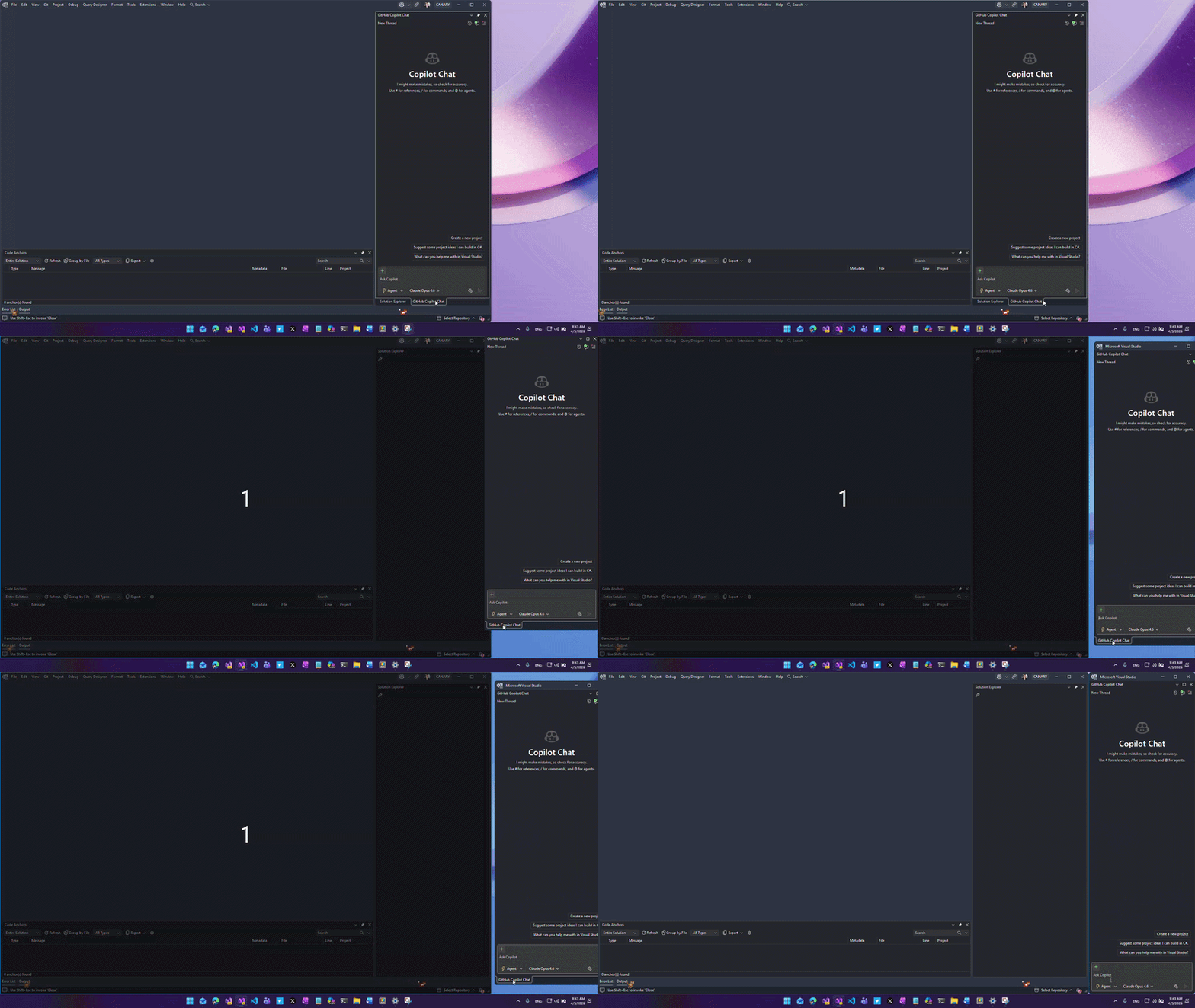
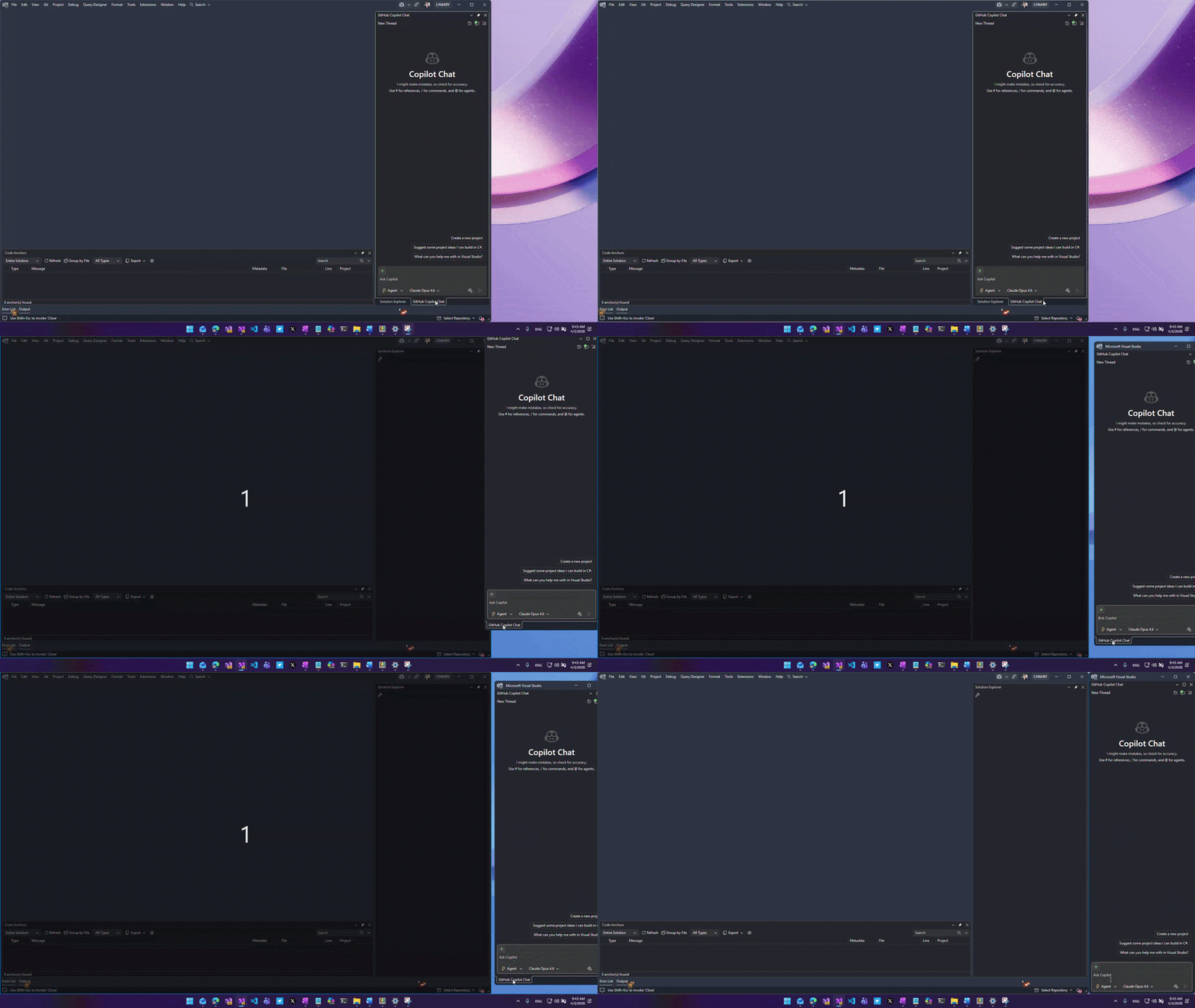
If you work with multiple monitors like I do, you’ve probably grown to love floating tool windows and documents in Visual Studio. Being able to pull out Solution Explorer, the debugger, or your code files onto a second (or third) screen can be a huge productivity boost.
But there’s always been a bit of friction with how these floating windows behave.
By default, floating windows are “owned” by the main Visual Studio window. That means they don’t show up as separate buttons in your Windows taskbar, they disappear when you minimize the main IDE, and they always stay on top of everything else — even when you don’t want them to.
For some workflows that’s exactly what you want. For others, it gets annoying fast.
Fortunately, there’s a little-known setting that lets you decide exactly how much control Visual Studio has over your floating windows.
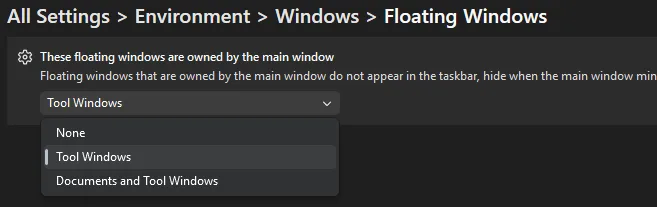
The setting is here:Tools > Options > Environment > Windows > Floating Windows
You’ll see this dialog:
The dropdown is labeled “These floating windows are owned by the main window” and gives you three choices:
None
Tool Windows (the default)
Documents and Tool Windows
Changing this one setting can completely transform how you work with floating windows.
I like to set it to None and then use FancyZones to create custom layouts across my monitors. Suddenly all my floating tool windows and documents behave like normal application windows — they appear in the taskbar, stay visible even if I minimize the main Visual Studio window, and I can snap them perfectly into my FancyZones layouts without them forcing themselves to the front all the time.
It feels much more natural and gives me the clean multi-monitor setup I’ve always wanted.
When to choose each option
None: Maximum independence. Everything gets its own taskbar entry and full window behavior. Perfect for heavy multi-monitor users with PowerToys.
Tool Windows: A nice middle ground — keep your documents floating freely while tool windows stay tied to the IDE.
Documents and Tool Windows: The classic Visual Studio behavior.
Pro tip: Combine this with the Ctrl + double-click trick on any tool window title bar (see our earlier post on easily docking and floating tool windows) for lightning-fast layout switching. No restart required.
Have you played with this setting before? What option do you prefer: None, Tool Windows, or the default? Let me know in the comments. I’m always curious how other developers set up multi-monitor workspaces.
A lot of cloud strategies look solid until recovery becomes urgent.
That is the uncomfortable reality many IT and security leaders are facing. Durable storage, native snapshots, and backup policies can create a false sense of confidence. But when attackers compromise identities, manipulate retention, or target recovery paths directly, the question changes fast. It is no longer “Do we have backups?” It becomes “Can we actually recover cleanly, quickly, and without guessing?”
In this on-demand webinar, Rubrik introduces a practical maturity model for cloud cyber resilience and explains what separates basic backup operations from true recovery readiness. You’ll see where organizations typically get stuck, how attackers exploit those gaps, and what it takes to move toward a more predictable recovery posture.
In this webinar, you will learn how to:
Understand the four maturity levels of cloud cyber resilience
Identify the difference between cloud durability and true cyber resilience
See where credential compromise and recovery-domain overlap create hidden risk
Move from reactive vaulting to more intelligent, recovery-ready operations
Build a stronger strategy for clean recovery across cloud, SaaS, and hybrid environments
Remote work strain can be reduced with small, often overlooked fixes that support your body throughout the day. Many people focus on chairs and desks but ignore other factors that contribute to discomfort. Addressing those gaps can improve posture, reduce fatigue, and help you stay productive.
Working from home often means spending long hours on hard floors, sitting for extended periods, or moving less than usual. Over time, those habits can lead to foot pain, tight muscles, and reduced circulation. Small adjustments can make a noticeable difference in how your body feels by the end of the day.
Creating a more supportive home workspace does not require a complete overhaul. Simple changes can ease strain and improve comfort with minimal effort. The following fixes highlight practical ways to support your body during remote work.
1. Upgrade Your Foot Support Indoors
Foot support plays a major role in overall comfort, especially for those who spend time standing or walking at home. Many people rely on basic slippers or go barefoot, which can lead to strain over time.
Additionally, common foot conditions such as plantar fasciitis, flat feet (pes planus), overpronation, bunions, heel pain, and Achilles tendonitis can make standing or walking uncomfortable for extended periods.
Instead of relying on generic inserts, some remote workers explore options like personalized insoles to relieve flat feet, bunions, or chronic ankle pain, better matching their specific support needs. These custom solutions are designed to provide biomechanical correction aligned with your foot structure, helping reduce pressure and improve comfort throughout the day.
Custom solutions are designed to align with your foot structure, which can help reduce pressure and improve comfort throughout the day.
Ways to improve foot support at home include:
Wearing supportive indoor footwear
Using custom or structured insoles
Avoiding long periods barefoot
Rotating shoes throughout the day
Choosing cushioned materials
Better foot support can improve posture and reduce strain across the body.
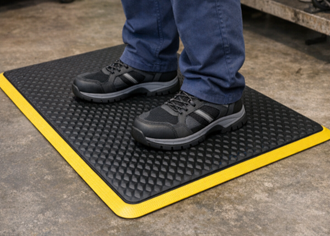
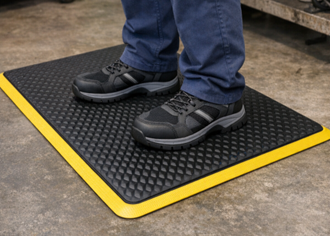
2. Add Anti-Fatigue Mats to Hard Floors
Standing on hard surfaces for extended periods can place stress on your feet, legs, and lower back. Anti-fatigue mats provide cushioning that reduces pressure and improves comfort.
Mats are especially helpful in areas where you stand frequently, such as at a standing desk or in the kitchen. They encourage subtle movement, which helps improve circulation.
Adding cushioning to hard surfaces creates a more supportive work environment.
3. Practice Movement Snacking Throughout the Day
Sitting for long periods can lead to stiffness and reduced mobility. Movement snacking involves taking short, frequent breaks to move your body.
Those small breaks help maintain circulation and prevent muscles from becoming tight. Consistency matters more than duration when building movement into your day.
Simple movement habits to try include:
Standing every 30 to 45 minutes
Stretching between tasks
Taking short walks
Changing positions regularly
Setting movement reminders
Regular movement helps reduce fatigue and improve focus.
4. Incorporate Calf and Foot Mobility Drills
Tight calves and limited foot mobility can contribute to discomfort and poor posture. Simple mobility exercises can improve flexibility and reduce strain.
Adding short mobility sessions into your routine can help counteract the effects of prolonged sitting or standing. Those exercises can be done in just a few minutes throughout the day.
Effective mobility drills include:
Calf stretches against a wall
Ankle circles and rotations
Toe raises and holds
Foot rolling with a ball
Gentle stretching routines
Improved mobility supports better movement and reduces tension.
Building a More Supportive Remote Work Routine
Remote work strain often develops gradually, making it easy to overlook simple fixes that could prevent discomfort. Small changes to your environment and habits can create a more supportive and balanced routine.
Focusing on foot support, movement, and surface comfort helps address common sources of strain. Those adjustments can improve both physical well-being and daily productivity.