Choosing the Right Models for Vision, OCR and Language Tasks


Introduction

The Clarifai platform has evolved significantly. Earlier generations of the platform relied on many small, task-specific models for visual classification, detection, OCR, text classification and segmentation. These legacy models were built on older architectures that were sensitive to domain shift, required separate training pipelines and did not generalize well outside their original conditions.

The ecosystem has moved on. Modern large language models and vision-language models are trained on broader multimodal data, cover multiple tasks within a single model family and deliver more stable performance across different input types. As part of the platform upgrade, we are standardizing around these newer model types.

With this update, several legacy task-specific models are being deprecated and will no longer be available. Their functionality is still fully supported on the platform, but is now provided through more capable and general model families. Compute Orchestration manages scheduling, scaling and resource allocation for these models so that workloads behave consistently across open source and custom model deployments.

This blog outlines the core task categories supported today, the recommended models for each and how to use them within the platform. It also clarifies which older models are being retired and how their capabilities map to the current model families.

Recommended Models for Core Vision and NLP Tasks

Visual Classification and Recognition

Visual classification and recognition involve identifying objects, scenes and concepts in an image. These tasks power product tagging, content moderation, semantic search, retrieval indexing and general scene understanding.

Modern vision-language models handle these tasks well in zero-shot mode. Instead of training separate classifiers, you define the taxonomy in the prompt and the model returns labels directly, which reduces the need for task-specific training and simplifies updates.

Models on the platform suited for visual classification, recognition and moderation

The models below offer strong visual understanding and perform well for classification, recognition, concept extraction and image moderation workflows, including sensitive-safety taxonomy setups.

MiniCPM-o 2.6
A compact VLM that handles images, video and text. Performs well for flexible classification workloads where speed, cost efficiency and coverage need to be balanced.

Qwen2.5-VL-7B-Instruct
Optimized for visual recognition, localized reasoning and structured visual understanding. Strong at identifying concepts in images with multiple objects and extracting structured information.

Moderation with MM-Poly-8B

A large portion of real-world visual classification work involves moderation. Many customer workloads are built around determining whether an image is safe, sensitive or banned according to a specific policy. Unlike general classification, moderation requires strict taxonomy, conservative thresholds and consistent rule-following. This is where MM-Poly-8B is particularly effective.

MM-Poly-8B is Clarifai’s multimodal model designed for detailed, prompt-driven analysis across images, text, audio and video. It performs well when the classification logic needs to be explicit and tightly controlled. Moderation teams often rely on layered instructions, examples and edge-case handling. MM-Poly-8B supports this pattern directly and behaves predictably when given structured policies or rule sets.

Key capabilities:

  • Accepts image, text, audio and video inputs

  • Handles detailed taxonomies and multi-level decision logic

  • Supports example-driven prompting

  • Produces consistent classifications for safety-critical use cases

  • Works well when the moderation policy requires conservative interpretation and bias toward safety

Because MM-Poly-8B is tuned to follow instructions faithfully, it is suited for moderation scenarios where false negatives carry higher risk and models must err on the side of caution. It can be prompted to classify content using your policy, identify violations, return structured reasoning or generate confidence-based outputs.

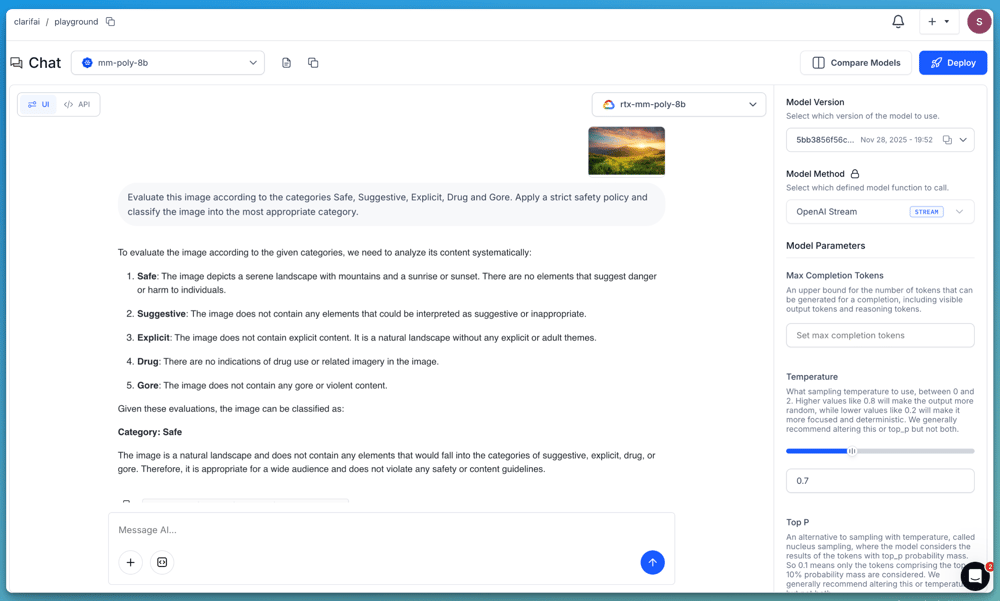
If you want to demonstrate a moderation workflow, you can prompt the model with a clear taxonomy and ruleset. For example:

“Evaluate this image according to the categories Safe, Suggestive, Explicit, Drug and Gore. Apply a strict safety policy and classify the image into the most appropriate category.”

Screenshot 2025-12-11 at 3.51.54 PM

For more advanced use cases, you can provide the model with a detailed set of moderation rules, decision criteria and examples that define how each category should be applied. This allows you to verify how model behaves under stricter, policy-driven conditions and how it can be integrated into production-grade moderation pipelines.

MM-Poly-8B is available on the platform and can be used through the Playground or accessed programmatically via the OpenAI-compatible API.

Note: If you want to access the above models like MiniCPM-o-2.6 and Qwen2.5-VL-7B-Instruct directly, you can deploy them to your own dedicated compute using the Platform and access them via API just like any other model.

How to access these models

All models described above can be accessed through Clarifai’s OpenAI-compatible API. Send an image and a prompt in a single request and receive either plain text or structured JSON, which is useful when you need consistent labels or want to feed the results into downstream pipelines.

For details on structured JSON output, check the documentation here.

Training your own classifier (fine-tuning)

If your application requires domain-specific labels, industry-specific concepts or a dataset that differs from general web imagery, you can train a custom classifier using Clarifai’s visual classification templates. These templates provide configurable training pipelines with adjustable hyperparameters, allowing you to build models tailored to your use case.

Available templates include:

  • MMClassification ResNet 50 RSB A1

  • Clarifai InceptionBatchNorm

  • Clarifai InceptionV2

  • Clarifai ResNeXt

  • Clarifai InceptionTransferEmbedNorm

You can upload your dataset, configure hyperparameters and train your own classifier through the UI or API. Check out the Fine-tuning Guide on the platform.

Document Intelligence and OCR

Document intelligence covers OCR, layout understanding and structured field extraction across scanned pages, forms and text-heavy images. The legacy OCR pipeline on the platform relied on language-specific PaddleOCR variants. These models were narrow in scope, sensitive to formatting issues and required separate maintenance for each language. They are now being decommissioned.

Models being decommissioned

These models were single-language engines with limited robustness. Modern OCR and multimodal systems support multilingual extraction by default and handle noisy scans, mixed formats and documents that combine text and visual elements without requiring separate pipelines.

Open-source OCR model on the platform

DeepSeek OCR
DeepSeek OCR is the primary open-source option. It supports multilingual documents, processes noisy scans reasonably well and can handle structured and unstructured documents. However, it is not perfect. Benchmarks show inconsistent accuracy on messy handwriting, irregular layouts and low-resolution scans. It also has input size constraints that can limit performance on large documents or multi-page flows. While it is stronger than the earlier language-specific engines, it is not the best option for high-stakes extraction on complex documents.

Third-party multimodal models for OCR-style tasks

The platform also supports several multimodal models that combine OCR with visual reasoning. These models can extract text, interpret tables, identify key fields and summarize content even when structure is complex. They are more capable than DeepSeek OCR, especially for long documents or workflows requiring reasoning.

Gemini 2.5 Pro
Handles text-heavy documents, receipts, forms and complex layouts with strong multimodal reasoning.

Claude Opus 4.5
Performs well on dense, complex documents, including table interpretation and structured extraction.

Claude Sonnet 4.5
A faster option that still produces reliable field extraction and summarization for scanned pages.

GPT-5.1
Reads documents, extracts fields, interprets tables and summarizes multi-section pages with strong semantic accuracy.

Gemini 2.5 Flash
Lightweight and optimized for speed. Suitable for common forms, receipts and straightforward document extraction.

These models perform well across languages, handle complex layouts and understand document context. The tradeoffs matter. They are closed-source, require third-party inference and are more expensive to operate at scale compared to an open-source OCR engine. They are ideal for high-accuracy extraction and reasoning, but not always cost-efficient for large batch OCR workloads.

How to access these models

Using the Playground

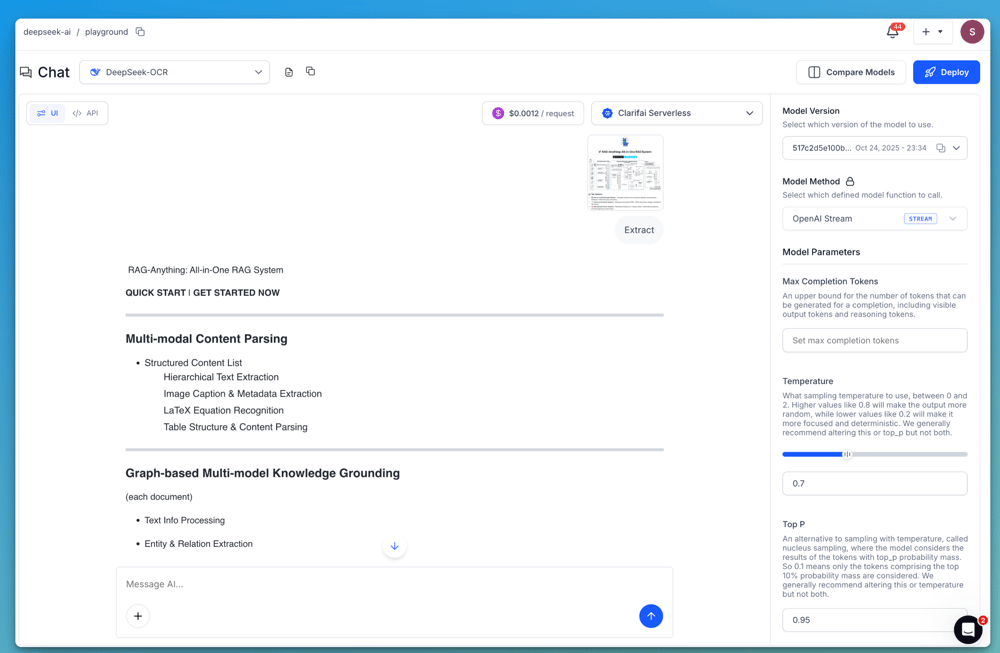
Upload your document image or scanned page in the Playground and run it with DeepSeek OCR or any of the multimodal models listed above. These models return Markdown-formatted text, which preserves structure such as headings, paragraphs, lists or table-like formatting. This makes it easier to render the extracted content directly or process it in downstream document workflows.

Screenshot 2025-11-28 at 4.45.52 PM

Using the API (OpenAI-compatible)

All these models are also accessible through Clarifai’s OpenAI-compatible API. Send the image and prompt in one request, and the model returns the extracted content in Markdown. This makes it easy to use directly in downstream pipelines. Check out the detailed guide on accessing DeepSeek OCR via the API.

Text Classification and NLP

Text classification is used in moderation, topic labeling, intent detection, routing, and broader text understanding. These tasks require models that follow instructions reliably, generalize across domains, and support multilingual input without needing task-specific retraining.

Instruction-tuned language models make this much easier. They can perform classification in a zero-shot manner, where you define the classes or rules directly in the prompt and the model returns the label without needing a dedicated classifier. This makes it easy to update categories, experiment with different label sets and deploy the same logic across multiple languages. If you need deeper domain alignment, these models can also be fine-tuned.

Below are the some stronger models on the platform for text classification and NLP:

  • Gemma 3 (12B)
    A recent open model from Google, tuned for efficiency and high-quality language understanding. Strong at zero-shot classification, multilingual reasoning, and following prompt instructions across varied classification tasks.

  • MiniCPM-4 8B
    A compact, high-performing model built for instruction following. Works well on classification, QA, and general-purpose language tasks with competitive performance at lower latency.

  • Qwen3-14B
    A multilingual model trained on a wide range of language tasks. Excels at zero-shot classification, text routing, and multi-language moderation and topic identification.

Note: If you want to access the above open-source models like Gemma 3, MiniCPM-4 or Qwen3 directly, you can deploy them to your own dedicated compute using the Platform and access them via API just like any other model on the platform.

There are also many additional third-party and open-source models available in the Community section, including GPT-5.1 family variants, Gemini 2.5 Pro, and several high-quality models. You can explore these based on your scale, and domain-specific needs.

Custom Model Deployment

In addition to the models listed above, the platform also lets you bring your own models or deploy open source models from the Community using Compute Orchestration (CO). This is helpful when you need a model that isn’t already available on the platform, or when you want full control over how a model runs in production.

CO handles the operational details required to serve models reliably. It containerizes models automatically, applies GPU fractioning so multiple models can share the same hardware, manages autoscaling and uses optimized scheduling to reduce latency under load. This lets you scale custom or open source models without needing to manage the underlying infrastructure.

CO supports deployment on multiple cloud environments such as AWS, Azure and GCP, which helps avoid vendor lock-in and gives you flexibility in how and where your models run. Check out the guide here on uploading and deploying your own custom models.

Conclusion

The model families outlined in this guide represent the most reliable and scalable way to handle visual classification, detection, moderation, OCR and text-understanding workloads on the platform today. By consolidating these tasks around stronger multimodal and language-model architectures, developers can avoid maintaining many narrow, task-specific legacy models and instead work with tools that generalize well, support zero-shot instructions and adapt cleanly to new use cases.

You can explore additional open source and third-party models in the Community section and use the documentation to get started with the Playground, API or fine-tuning workflows. If you need help planning a migration or selecting the right model for your workload, you can reach out to us on Discord or contact our support team here.


Nvidia CEO Talks About the Highs and Lows of Running a Multi-Trillion Dollar Company


Despite his tremendous success building AI chipmaker Nvidia, Jensen Huang admits he’s “always in a state of anxiety.” Continue reading “Nvidia CEO Talks About the Highs and Lows of Running a Multi-Trillion Dollar Company”

AI Has Hit the Limits of Scale. The Future Belongs to Systems Built for Trust


For the past few years, the Gen AI industry has centred its strategy on one big idea, if we make models big enough, their weaknesses will go away. Bigger datasets, bigger clusters, bigger parameter counts. Many have held the belief that scale alone would unlock greater intelligence.

That era is ending, and recent writings illustrate this shift. Long-time LLM-sceptic Gary Marcus, in A trillion dollars is a terrible thing to waste, argues that vast sums of capital are being consumed by models that still cannot guarantee reliability. At the same time, Ilya Sutskever (a Godfather of AI and one of the most influential figures in deep learning) now says openly that we are “moving from the age of scaling to the age of research.” And they are not alone. 

When voices on opposite sides of the debate converge, it’s significant. The industry is acknowledging what many enterprise data and analytics leaders have already discovered. Adding more compute will not fix the fundamental and innate limitations of large language models (LLMs).

The rising cost of unreliability

Marcus and others are right to call out the uncomfortable truth, that, despite extraordinary investment, LLMs still produce inconsistent, occasionally fabricated outputs that lack precision. They remain opaque, non-deterministic, and impossible to audit.

For everyday content generation, where creativity is functional, these limitations are tolerable. When the tools leach into agentic processes that are driving enterprise decision-making, especially mission-critical processes, they are not.

Across banking, financial services, healthcare, insurance, and the public sector, organisations have run into the same wall. GenAI pilots created significant enthusiasm that then gave way to operational scrutiny and some crushing realisations. When teams began testing outputs at scale, the cracks appear:

  • identical inputs producing different outputs
  • hallucinated answers
  • impossible to validate the logic behind decisions
  • no way to guarantee repeatability
  • insufficient auditability for regulatory review

Business and risk leaders are right to reject approaches that cannot be controlled. Enterprises simply cannot deploy systems that guess. If we are to permit AI to influence decisions of consequence, those systems must be trusted.

The industry recognises the need for a deeper foundation

Sutskever’s comments are notable for what they represent, a pivot within the deep-learning community itself that talks beyond the financial interest of the frontier founders and the investors that have backed them. Scaling got us so far and has delivered remarkable breakthroughs in predictive models. But predictions are not judgements and the approach taken has not delivered reliable reasoning, causal understanding or logical interpretability – attributes that remain critical to enterprise adoption.

When multiple architects of the scaling doctrine say that the next phase will not be solved by more compute, it confirms a structural shift that others must accept.

The conversation is moving from “Can we make these models bigger?” to “How do we make models accountable, verifiable and aligned with enterprise expectations?”

Boards, risk professionals, regulators and customers are asking the right questions:

  • How do we know the decision is correct?
  • Can we explain how each decision was reasoned?
  • Will models behave consistently if faced with the same scenario?
  • Can we demonstrate compliance on demand?

The technology that dominates the headlines is not yet the technology that can pass these tests.

Enterprises are now demanding trust by design

The gap between what organisations want, and what the current generation of models can deliver, has opened strategic risks but also a strategic opportunity.

Leaders want the benefits of the AI hype: faster decisions, reduced risk, improved customer experiences, increased efficiency and new revenues. But they cannot compromise on three fundamentals:

  • precision
  • determinism
  • auditability

These are not optional in regulated environments. They are preconditions for deployment.

This is why so many C-suite and data and analytics leaders are searching for architectures that deliver these attributes. So far RAG, Graph Rag, Chain of Thought and Agentic have not entirely delivered. Few want to abandon the direction of travel, but most are looking for ways to deploy AI safely and responsibly. 

This is where hybrid, and neurosymbolic approaches to AI are delivering.

Why hybrid architectures will define the next decade

Hybrid systems recognise that language models are powerful for interaction, summarisation and extraction, but cannot be a trusted authority when it comes to reasoning and decision-making. 

The missing piece is a knowledge-representation and reasoning layer that is:

  • Precise in the representation of knowledge
  • Consistent, deterministic and repeatable
  • Auditable and interpretable
  • Rigid in its application of policy and regulation
  • Capable of showing its logical workings

These are the capabilities that Rainbird.AI have been building for over a decade, just for this moment. 

We built a platform on the principles that matter most to enterprises. We ensure that organisational knowledge is inherently computable so it is institutional intelligence (not public training data) that drives high-stakes decision-making. We ensure that reasoning is precise, repeatable and explicit, so that all outputs are accurate, auditable and defensible.

Our symbolic inference engine was designed to deliver what LLMs cannot:

  • judgements not predictions
  • causality over correlation
  • auditability over opacity
  • repeatability over randomness

In a hybrid architecture, we can deliver the best of both worlds. LLMs are used for language-heavy tasks: drafting, chat, natural language processing, summarisation – while Rainbird unlocks the modelling of enterprise knowledge and reasons over it logically, improving customer outcomes while reducing regulatory exposure and operational risk.

This is not theoretical, it is already deployed globally across banks, insurers, tax and audit firms, regulators and healthcare providers.

The real AI transformation begins when AI becomes accountable

The trillion-dollar question is no longer about chips and compute, it is about architectures that are reliable.

Not all know it, but we have achieved an inflection point. Enterprises can now leverage systems that treat their institutional knowledge as a first-class citizen to deliver AI-powered benefits that can at last be trusted. They can access an architecture that blends the natural language ease of use of LLMs with absolute precise reasoning. They can bridge the gap from PoC to production.

Gary Marcus has warned about the waste created by chasing scale without addressing fundamental weaknesses. Ilya Sutskever has called for a new wave of research, research that incorporates structure, reasoning and scientific grounding.

Both are fundamentally making the same point. Trusted AI will not be achieved by buying more chips, and that reckoning is coming. It will be achieved by leveraging architectures that enable AI systems to take responsibility from the outset.

Rainbird.AI was built for today’s world, one where AI must demonstrate its reasoning, not obscure it. A world where enterprises take their knowledge and scale it to machine levels confidently because every step can be replayed and validated. A world where knowledge is as precisely computable as numbers, decisions are logical and transparent, and trust becomes an asset, not an afterthought.

This new era of AI is being shaped not by the biggest models, but by accountable architectures. That is the future we are deploying, and we are doing it today.

Specs, Benchmarks, Pricing & Best Use Cases


NVIDIA’s Ampere generation rewrote the playbook for data‑center GPUs. With third‑generation Tensor Cores that introduced TensorFloat‑32 (TF32) and expanded support for BF16, FP16, INT8, and INT4, Ampere cards deliver faster matrix mathematics and mixed‑precision computation than previous architectures. This article digs deep into the GA102‑based A10 and GA100‑based A100, explaining why both still dominate inference and training workloads in 2025 despite the arrival of Hopper and Blackwell GPUs. It also frames the discussion in the context of compute scarcity and the rise of multi‑cloud strategies, and shows how Clarifai’s compute orchestration platform helps teams navigate the GPU landscape.

Quick Digest – Choosing Between A10 and A100

Question

Answer

What are the key differences between A10 and A100 GPUs?

The A10 uses the GA102 chip with 9,216 CUDA cores, 288 third‑generation Tensor Cores and 24 GB of GDDR6 memory delivering 600 GB/s bandwidth, while the A100 uses the GA100 chip with 6,912 CUDA cores, 432 Tensor Cores and 40–80 GB of HBM2e memory delivering 2 TB/s bandwidth. The A10 has a single‑slot 150 W design aimed at efficient inference, whereas the A100 supports NVLink and Multi‑Instance GPU (MIG) to partition the card into seven isolated instances for training or concurrent inference.

Which workloads suit each GPU?

A10 excels at efficient inference on small‑ to medium‑sized models, virtual desktops and media processing thanks to its lower power draw and density. A100 shines in large‑scale training and high‑throughput inference because its HBM2e memory and MIG support handle bigger models and multiple tasks concurrently.

How do cost and energy consumption compare?

Purchase prices range from $1.5K‑$2K for A10 cards and $7.5K‑$14K for A100 (40–80 GB) cards. Cloud rental rates are roughly $1.21/hr for A10s on AWS and $0.66–$1.76/hr for A100s on specialised providers. The A10 consumes around 150 W, whereas the A100 draws 250 W or more, affecting cooling and power budgets.

What is Clarifai’s role?

Clarifai offers a compute orchestration platform that dynamically provisions A10, A100 and other GPUs across AWS, GCP, Azure and on‑prem providers. Its reasoning engine optimises workload placement, achieving cost savings up to 40 % while delivering high throughput (≈544 tokens/s). Local runners enable offline inference on consumer GPUs with INT8/INT4 quantisation, letting teams prototype locally before scaling to data‑centre GPUs.

Introduction: Evolution of Data‑Centre GPUs and the Ampere Leap

The road to today’s advanced GPUs has been shaped by two trends: exploding demand for AI compute and the rapid evolution of GPU architectures. Early GPUs were designed primarily for graphics, but over the past decade they have become the engine of machine learning. NVIDIA’s Ampere generation, introduced in 2020, marked a watershed. The A10 and A100 ushered in third‑generation Tensor Cores capable of computing in TF32, BF16, FP16, INT8 and INT4 modes, enabling dramatic acceleration for matrix multiplications. TF32 blends FP32 range with FP16 speed, unlocking training gains without modifying code. Sparsity support doubles throughput by skipping zero values, further boosting performance for neural networks.

Contrasting GA102 and GA100 chips. The GA102 silicon in the A10 packs 9,216 CUDA cores and 288 Tensor Cores. Its third‑generation Tensor Cores handle TF32/BF16/FP16 operations and leverage sparsity. In contrast, the GA100 chip in the A100 has 6,912 CUDA cores but 432 Tensor Cores, reflecting a shift toward dense tensor computation. Both chips include RT cores for ray tracing, but the A100’s larger memory subsystem uses HBM2e to deliver more than 2 TB/s bandwidth, whereas the A10 relies on GDDR6 delivering 600 GB/s.

Context: compute scarcity and multi‑cloud strategies. Global demand for AI compute continues to outstrip supply. Analysts predict that by 2030 AI workloads will require about 200 gigawatts of compute, and supply is the limiting factor. Hyperscale cloud providers often hoard the latest GPUs, forcing startups to either wait for quota approvals or pay premium prices. Consequently, 92 % of large enterprises now operate in multi‑cloud environments, achieving 30–40 % cost savings by using different providers. New “neoclouds” have emerged to rent GPUs at up to 85 % lower cost than hyperscalers. Clarifai’s compute orchestration platform addresses this scarcity by allowing teams to choose from A10, A100 and newer GPUs across multiple clouds and on‑prem environments, automatically routing workloads to the most cost‑effective resources. Throughout this guide, we integrate Clarifai’s tools and case studies to show how to make the most of these GPUs.

Expert Insights – Introduction

  • Matt Zeiler (Clarifai CEO) emphasises that software optimisation can extract 2× the throughput and 40 % lower costs from existing GPUs; Clarifai’s reasoning engine uses speculative decoding and scheduling to achieve this. He argues that scaling hardware alone is unsustainable and orchestration must play a role.
  • McKinsey analysts note that neoclouds provide GPUs 85 % cheaper than hyperscalers because the compute shortage forced new providers to emerge.
  • Fluence Network’s research reports that 92 % of enterprises operate across multiple clouds, saving 30–40 % on costs. This multi‑cloud trend underpins Clarifai’s orchestration strategy.

Understanding the Ampere Architecture – How Do A10 and A100 Differ?

GA102 vs. GA100: cores, memory and interconnect

NVIDIA designed the GA102 chip for efficient inference and graphics workloads. It features 9,216 CUDA cores, 288 third‑generation Tensor Cores and 72 second‑generation RT cores. The A10 pairs this chip with 24 GB of GDDR6 memory, providing 600 GB/s of bandwidth and a 150 W TDP. The single‑slot form factor fits easily into 1U servers or multi‑GPU chassis, making it ideal for dense inference servers.

The GA100 chip at the heart of the A100 has fewer CUDA cores (6,912) but more Tensor Cores (432) and a much larger memory subsystem. It uses 40 GB or 80 GB of HBM2e memory with >2 TB/s bandwidth. The A100’s 250 W or higher TDP reflects this increased power budget. Unlike the A10, the A100 supports NVLink, enabling 600 GB/s bi‑directional communication between multiple GPUs, and MIG technology, which partitions a single GPU into up to seven independent instances. MIG allows multiple inference or training tasks to run concurrently, maximising utilisation without interference.

Precision formats and throughput

Both A10 and A100 support an expanded set of precisions. The A10’s Tensor Cores can compute in FP32, TF32, FP16, BF16, INT8 and INT4, delivering up to 125 TFLOPs FP16 performance and 19.5 TFLOPs FP32. It also supports sparsity, which doubles throughput when models are pruned. The A100 extends this with 312 TFLOPs FP16/BF16 and maintains 19.5 TFLOPs FP32 performance. Note, however, that neither card supports FP8 or FP4—these formats debut with Hopper (H100/H200) and Blackwell (B200) GPUs.

Memory type: GDDR6 vs. HBM2e

Memory plays a central role in AI performance. The A10’s GDDR6 memory offers 24 GB capacity and 600 GB/s bandwidth. While adequate for inference, the bandwidth is lower than the A100’s HBM2e memory which delivers over 2 TB/s. HBM2e also provides higher capacity (40 GB or 80 GB) and lower latency, enabling training of larger models. For example, a 70 billion‑parameter model may require at least 80 GB of VRAM. NVLink further enhances the A100 by aggregating memory across multiple GPUs.

Table 1 – Ampere GPU specifications and cost (approximate)

GPU

CUDA Cores

Tensor Cores

Memory (GB)

Memory Type

Bandwidth

TDP

FP16 TFLOPs

Price Range*

Typical Cloud Rental (per hr)**

A10

9,216

288

24

GDDR6

600 GB/s

150 W

125

$1.5K–$2K

≈$1.21 (AWS)

A100 40 GB

6,912

432

40

HBM2e

2 TB/s

250 W

312

$7.5K–$10K

$0.66–$1.70 (specialised providers)

A100 80 GB

6,912

432

80

HBM2e

2 TB/s

300 W

312

$9.5K–$14K

$1.12–$1.76 (specialised providers)

H100

n/a

n/a

80

HBM3

3.35–3.9 TB/s

350–700 W (SXM)

n/a

$30K+

$3–$4 (cloud)

H200

n/a

n/a

141

HBM3e

4.8 TB/s

n/a

n/a

N/A

Limited availability

B200

n/a

n/a

192

HBM3e

8 TB/s

n/a

n/a

N/A

Not yet widely rentable

*Price ranges reflect estimated street prices and may vary; \ Cloud rental values are typical hourly rates on specialised providers. Exact rates vary by provider and may not include ancillary costs like storage or network egress.

Expert Insights – Architecture

  • Clarifai engineers note that the A10 delivers efficient inference and media processing, while the A100 targets large‑scale training and HPC workloads.
  • Moor Insights & Strategy observed in MLPerf benchmarks that A100’s MIG partitions achieve about 98 % efficiency relative to a full GPU, making it economical for multiple concurrent inference jobs.
  • Baseten’s benchmarking shows that A100 achieves roughly 67 images per minute for stable diffusion, whereas a single A10 processes about 34 images per minute; but scaling with multiple A10s can match A100 throughput at lower cost. This highlights how cluster scaling can offset single‑card differences.

Specification and Benchmark Comparison – Who Wins the Numbers Game?

Throughput, memory and bandwidth

Raw specs only tell part of the story. The A100’s combination of HBM2e memory and 432 Tensor Cores delivers 312 TFLOPs FP16/BF16 throughput, dwarfing the A10’s 125 TFLOPs. FP32 throughput is similar (19.5 TFLOPs for both), but most AI workloads rely on mixed precision. With up to 80 GB VRAM and 2 TB/s bandwidth, the A100 can fit larger models or bigger batches than the A10’s 24 GB and 600 GB/s bandwidth. The A100 also supports NVLink, enabling multi‑GPU training with aggregate memory and bandwidth.

Benchmark results and tokens per second

Independent benchmarks confirm these differences. Baseten measured stable diffusion throughput and found that an A100 produces 67 images per minute, while an A10 produces 34 images per minute; but when 30 A10 instances work in parallel they can generate 1,000 images per minute at about $0.60/min, outperforming 15 A100s at $1.54/min. This shows that horizontal scaling can yield better cost‑performance. ComputePrices reports that an H100 generates about 250–300 tokens per second, an A100 about 130 tokens/s, and a consumer RTX 4090 around 120–140 tokens/s, giving perspective on generational gains. The A10’s tokens‑per‑second are lower (roughly 60–70 tps), but clusters of A10s can still meet production demands.

Cost‑per‑hour and purchase price

Cost is a major consideration. Specialised providers rent A100 40 GB GPUs for $0.66–$1.70/hr and 80 GB for $1.12–$1.76/hr. Hyperscalers like AWS and Azure charge around $4/hr, reflecting quotas and premium pricing. A10 GPUs cost roughly $1.21/hr on AWS; Azure pricing is similar. Purchase prices are $1.5K–$2K for A10 and $7.5K–$14K for A100.

Energy efficiency

The A10’s 150 W TDP makes it more energy efficient than the A100, which draws 250–400 W depending on the variant. Lower power consumption reduces operating costs and simplifies cooling. When scaling clusters, power budgets become critical; 30 A10s consume roughly 4.5 kW, whereas 15 A100s may consume 3.75 kW but with higher up‑front costs. Energy‑efficient GPUs like A10 and L40S remain relevant for inference workloads where power budgets are constrained.

Expert Insights – Specification and Benchmark

  • Baseten analysts recommend scaling multiple A10 GPUs for cost‑effective diffusion and LLM inference, noting that 30 A10s deliver similar throughput as 15 A100s at ~2.5× lower cost.
  • ComputePrices cautions that H100’s tokens per second are about 2× higher than A100’s (250–300 vs. 130), but costs are also higher; thus, A100 remains a sweet spot for many workloads.
  • Clarifai emphasises that combining high‑throughput GPUs with its reasoning engine yields 544 tokens per second and up to 40 % cost savings. This demonstrates that software orchestration can rival hardware upgrades.

Use‑Case Analysis – Matching GPUs to Workloads

Inference: When Efficiency Matters

The A10 shines in inference scenarios where energy efficiency and density are paramount. Its 150 W TDP and single‑slot design fit into 1U servers, making it ideal for running multiple GPUs per node. With TF32/BF16/FP16/INT8/INT4 support and 125 TFLOPs FP16 throughput, the A10 can power chatbots, recommendation engines and computer‑vision models that do not exceed 24 GB VRAM. It also supports media encoding/decoding and virtual desktops; paired with NVIDIA vGPU software, an A10 board can serve up to 64 concurrent virtual workstations, reducing total cost of ownership by 20 %.

Clarifai users often deploy A10s for edge inference using its local runners. These runners execute models offline on consumer GPUs or laptops using INT8/INT4 quantisation and handle routing and authentication automatically. By starting small on local hardware, teams can iterate rapidly and then scale to A10 clusters in the cloud via Clarifai’s orchestration platform.

Training and fine‑tuning: Unleashing the A100

For large‑scale training and fine‑tuning—tasks like training GPT‑3, Llama 2 or 70 B parameter models—memory capacity and bandwidth are vital. The A100’s 40 GB or 80 GB HBM2e and NVLink interconnect allow data‑parallel and model‑parallel strategies. MIG lets teams partition an A100 into seven instances to run multiple inference tasks concurrently, maximising ROI. Clarifai’s infrastructure supports multi‑instance deployment, enabling users to run multiple agentic tasks in parallel on a single A100 card.

In HPC simulations and analytics, the A100’s larger L1/L2 cache and memory coherence deliver superior performance. It supports FP64 operations (important for scientific computing) and Tensor Cores accelerate dense matrix multiplies. Companies fine‑tuning large models on Clarifai use A100 clusters for training, then deploy the resulting models on A10 clusters for cost‑effective inference.

Mixed workloads and multi‑GPU strategies

Many workloads require a mix of training and inference or varying batch sizes. Options include:

  1. Horizontal scaling with A10s. For inference, running multiple A10s in parallel can match A100 performance at lower cost. Baseten’s study shows 30 A10s match 15 A100s for stable diffusion.
  2. Vertical scaling with NVLink. Pairing multiple A100s via NVLink provides aggregate memory and bandwidth for large‑model training. Clarifai’s orchestration can allocate NVLink‑enabled nodes when models require more VRAM.
  3. Quantisation and model parallelism. Techniques like INT8/INT4 quantisation, tensor parallelism and pipeline parallelism enable large models to run on A10 clusters. Clarifai’s local runners support quantisation and its reasoning engine automatically chooses the right hardware.

Virtualisation and vGPU support

NVIDIA’s vGPU technology allows A10 and A100 GPUs to be shared among multiple virtual machines. An A10 card, when used with vGPU software, can host 64 concurrent users. MIG on the A100 is even more granular, dividing the GPU into up to seven hardware‑isolated instances, each with its own dedicated memory and compute slices. Clarifai’s platform abstracts this complexity, letting customers run mixed workloads across shared GPUs without manual partitioning.

Expert Insights – Use Cases

  • Clarifai engineers advise starting with smaller models on local or consumer GPUs, then scaling to A10 clusters for inference and A100 clusters for training. They recommend leveraging MIG to run concurrent inference tasks and monitoring power usage to control costs.
  • MLPerf results show the A100 dominates inference benchmarks, but A10 and A30 deliver better energy efficiency. This makes A10 attractive for “green AI” initiatives.
  • NVIDIA notes that A10 paired with vGPU software enables 20 % TCO reduction by serving multiple virtual desktops.

Cost Analysis – Buying vs Renting & Hidden Expenses

Capital expenditure vs operating expense

Buying GPUs requires upfront capital but avoids ongoing rental fees. A10 cards cost around $1.5K–$2K and offer decent resale value when new GPUs appear. A100 cards cost $7.5K–$10K (40 GB) or $9.5K–$14K (80 GB). Enterprises purchasing large numbers of GPUs must also factor in servers, cooling, power and networking.

Renting GPUs: specialised vs hyperscalers

Specialised GPU cloud providers such as TensorDock, Thunder Compute and Northflank rent A100 GPUs for $0.66–$1.76/hr, including CPU and memory. Hyperscalers (AWS, GCP, Azure) charge around $4/hr for A100 instances and require quota approvals, leading to delays. A10 instances on AWS cost about $1.21/hr; Azure pricing is similar. Spot instances or reserved instances can lower costs by 30–80 %, but may be pre‑empted.

Hidden costs

Several hidden expenses can catch teams off guard:

  1. Bundled CPU/RAM/storage. Some providers bundle more CPU or RAM than needed, increasing hourly rates.
  2. Quota approvals. Hyperscalers often require GPU quota requests which can delay projects; approvals can take days or weeks.
  3. Underutilisation. Always‑on instances may sit idle if workloads fluctuate. Without autoscaling, customers pay for unused GPU time.
  4. Egress costs. Data transfers between clouds or to end users incur additional charges.

Multi‑cloud cost optimisation and Clarifai’s Reasoning Engine

Clarifai addresses cost challenges by offering a compute orchestration platform that manages GPU selection across clouds. The platform can save up to 40 % on compute costs and deliver 544 tokens/s throughput. It features unified scheduling, hybrid and edge support, a low‑code pipeline builder, cost dashboards and security & compliance controls. The Reasoning Engine predicts workload demand, automatically scales resources and optimises batching and quantisation to reduce costs by 30–40 %. Clarifai also offers monthly clusters (2 nodes for $30/mo or 6 nodes for $300/mo) and per‑GPU training fees around $4/hr on its managed platform. Users can connect their own cloud accounts via the Compute UI to filter hardware by price and performance and create cost‑efficient clusters.

Expert Insights – Cost Analysis

  • GMI Cloud research estimates that GPU compute accounts for 40–60 % of AI startup budgets; entry‑level GPUs like A10 cost $0.50–$1.20/hr, whereas A100s cost $2–$3.50/hr on specialised clouds. This underscores the importance of multi‑cloud cost optimisation.
  • Clarifai’s Reasoning Engine uses speculative decoding and CUDA kernel optimisations to reduce inference costs by 40 % and speed by , according to independent benchmarks.
  • Fluence Network highlights that multi‑cloud strategies deliver 30–40 % cost savings and reduce risk by avoiding vendor lock‑in.

Scaling and Deployment Strategies – MIG, NVLink and Multi‑Cloud Orchestration

MIG: Partitioning GPUs for Maximum Utilisation

Multi‑Instance GPU (MIG) allows an A100 to be split into up to seven isolated instances. Each partition has its own compute and memory, enabling multiple inference or training jobs to run simultaneously without contention. Moor Insights & Strategy measured that MIG instances achieve about 98 % of single‑instance performance, making them cost‑effective. For example, a data‑centre could assign four MIG partitions to a batch of chatbots while reserving three for computer vision models. MIG also simplifies multi‑tenant environments; each instance behaves like a separate GPU.

NVLink: Building Multi‑GPU Nodes

Training massive models often exceeds the memory of a single GPU. NVLink provides high‑bandwidth connectivity—600 GB/s for A100s and up to 900 GB/s in H100 SXM variants—to interconnect GPUs. NVLink combined with NVSwitch can create multi‑GPU nodes with pooled memory. Clarifai’s orchestration detects when a model requires NVLink and automatically schedules it on compatible hardware, eliminating manual cluster configuration.

Clarifai Compute Orchestration and Local Runners

Clarifai’s platform abstracts the complexity of MIG and NVLink. Users can run models locally on their own GPUs using local runners that support INT8/INT4 quantisation, privacy‑preserving inference and offline operation. The platform then orchestrates training and inference across A10, A100, H100 or even consumer GPUs via multi‑cloud provisioning. The Reasoning Engine balances throughput and cost by dynamically selecting the best hardware and adjusting batch sizes. Clarifai also supports hybrid deployments, connecting local runners or on‑prem clusters to the cloud through its Compute UI.

Other orchestration providers

While Clarifai integrates model management, data labelling and compute orchestration, other providers like Northflank and CoreWeave offer features such as auto‑spot provisioning, multi‑GPU clusters and renewable‑energy data centres. For example, DataCrunch uses 100 % renewable energy to power its GPU clusters, appealing to sustainability goals. However, Clarifai’s unique value lies in combining orchestration with a comprehensive AI platform, reducing integration overhead.

Expert Insights – Scaling Strategies

  • Moor Insights & Strategy notes that MIG provides 98 % efficiency and is ideal for multi‑tenant inference.
  • Clarifai documentation highlights that its orchestration can anticipate demand, schedule workloads across clouds and cut deployment times by 30–50 %.
  • Clarifai’s local runners allow developers to train small models on consumer GPUs (e.g., RTX 4090 or 5090) and later migrate to data‑centre GPUs seamlessly.

Emerging Hardware and Future‑Proofing – Beyond Ampere

Hopper (H100/H200) – FP8 and the Transformer Engine

The H100 GPU, based on the Hopper architecture, introduces FP8 precision and a Transformer Engine designed specifically for transformer workloads. It features 80 GB of HBM3 memory delivering 3.35–3.9 TB/s bandwidth and supports seven MIG instances and NVLink bandwidth of up to 900 GB/s in the SXM version. Compared with A100, H100 achieves 2–3× higher performance, generating 250–300 tokens per second vs. A100’s 130. Cloud rental prices hover around $3–$4/hr. The H200 builds on H100 by becoming the first GPU with HBM3e memory; it offers 141 GB of memory and 4.8 TB/s bandwidth, doubling inference performance.

Blackwell (B200) – FP4 and chiplets

NVIDIA’s Blackwell architecture will usher in the B200 GPU. It features a chiplet design with two GPU dies connected by NVLink 5, delivering 10 TB/s interconnect and 1.8 TB/s per‑GPU NVLink bandwidth. The B200 provides 192 GB of HBM3e memory and 8 TB/s bandwidth, with AI compute up to 20 petaflops and 40 TFLOPS FP64 performance. It also introduces FP4 precision and enhanced DLSS 4 for rendering, promising 30× faster inference relative to the A100.

Consumer/prosumer GPUs and Clarifai Local Runners

The RTX 5090 (Ada‑Lovelace Next) launched in early 2025 includes 32 GB of GDDR7 memory and 1.792 TB/s bandwidth. It introduces FP4 precision, DLSS 4 and neural shaders, enabling developers to train diffusion models locally. Clarifai’s local runners allow developers to run models on such consumer GPUs and later migrate to data‑centre GPUs without code changes. This flexibility means prototyping on a 5090 and scaling to A10/A100/H100 clusters is seamless.

Supply challenges and pricing trends

Even as H100 and H200 become more available, supply remains constrained. Many hyperscalers are upgrading to H100/H200, flooding the used market with A100s at lower prices. The B200 is expected to have limited availability initially, keeping prices high. Developers must balance the benefits of newer GPUs against cost, availability and software maturity.

Expert Insights – Emerging Hardware

  • Hyperbolic.ai analysts (not quoted here due to competitor policy) describe Blackwell’s chiplet design and FP4 support as ushering in a new era of AI compute. However, supply and cost will limit adoption initially.
  • Clarifai’s Best GPUs article recommends using consumer GPUs like RTX 5090/5080 for local experimentation and migrating to H100 or B200 for production workloads, emphasising the importance of future‑proofing.
  • H200 uses HBM3e memory for 4.8 TB/s bandwidth and 141 GB capacity, doubling inference performance relative to H100.

Decision Frameworks and Case Studies – How to Choose and Deploy

Step‑by‑step GPU selection guide

  1. Define model size and memory requirements. If your model fits into 24 GB and needs only moderate throughput, an A10 is sufficient. For models requiring 40 GB or more or large batch sizes, choose A100, H100 or newer.
  2. Determine latency vs. throughput. For real‑time inference with strict latency, single A100s or H100s may be best. For high‑volume batch inference, multiple A10s can provide superior cost‑throughput.
  3. Assess budget and energy limits. If energy efficiency is critical, consider A10 or L40S. For highest performance and the budget to match, consider A100/H100/H200.
  4. Consider quantisation and model parallelism. Applying INT8/INT4 quantisation or splitting models across multiple GPUs can enable large models on A10 clusters.
  5. Leverage Clarifai’s orchestration. Use Clarifai’s compute UI to compare GPU prices across clouds, choose per‑second billing and schedule tasks automatically. Start with local runners for prototyping and scale up when needed.

Case study 1 – Baseten inference pipeline

Baseten evaluated stable diffusion inference on A10 and A100 clusters. A single A10 generated 34 images per minute, while a single A100 produced 67 images per minute. By scaling horizontally (30 A10s vs. 15 A100s), the A10 cluster achieved 1,000 images per minute at $0.60/min, while the A100 cluster cost $1.54/min. This demonstrates that multiple lower‑end GPUs can provide better throughput per dollar than fewer high‑end GPUs.

Case study 2 – Clarifai customer deployment

According to Clarifai’s case studies, a financial services firm deployed a fraud‑detection agent across AWS, GCP and on‑prem servers using Clarifai’s orchestration. The reasoning engine automatically allocated A10 instances for inference and A100 instances for training, balancing cost and performance. Multi‑cloud scheduling reduced time‑to‑market by 70 %, and the firm saved 30 % on compute costs thanks to per‑second billing and autoscaling.

Case study 3 – Fluence multi‑cloud savings

Fluence reports that enterprises adopting multi‑cloud strategies realise 30–40 % cost savings and improved resilience. By using Clarifai’s orchestration or similar tools, companies can avoid vendor lock‑in and mitigate GPU shortages.

Common pitfalls

  • Quota delays. Failing to account for GPU quotas on hyperscalers can stall projects.
  • Overspecifying memory. Renting an A100 for a model that fits into A10 memory wastes money. Use cost dashboards to right‑size resources.
  • Underutilisation. Without autoscaling, GPUs may remain idle outside peak times. Per‑second billing and scheduling mitigate this.
  • Ignoring hidden costs. Always factor in bundled CPU/RAM, storage and data egress.

Expert Insights – Decision Frameworks

  • Clarifai engineers stress that there is no one‑size‑fits‑all solution; decisions depend on model size, latency, budget and timeline. They encourage starting with consumer GPUs for prototyping and scaling via orchestration.
  • Industry analysts say that used A100 cards flooding the market may offer excellent value as hyperscalers upgrade to H100/H200.
  • Fluence emphasises that multi‑cloud strategies reduce risk, improve compliance and lower costs.

Trending Topics and Emerging Discussions

GPU supply and pricing volatility

The GPU market in 2025 remains volatile. Ampere (A100) GPUs are widely available and cost‑effective due to hyperscalers upgrading to Hopper and Blackwell. Spot prices for A10 and A100 fluctuate with demand. Used A100s are flooding the market, offering budget‑friendly options. Meanwhile, H100 and H200 supply remains constrained, and B200 will likely remain expensive in its first year.

New precision formats: FP8 and FP4

Hopper introduces FP8 precision and an optimised Transformer Engine, enabling significant speedups for transformer models. Blackwell goes further with FP4 precision and chiplet architectures that increase memory bandwidth to 8 TB/s. These formats reduce memory requirements and accelerate training, but they require updated software stacks. Clarifai’s reasoning engine will add support as new precisions become mainstream.

Energy efficiency and sustainability

With data centres consuming increasing power, energy‑efficient GPUs are gaining attention. The A10’s 150 W TDP makes it attractive for inference, especially in regions with high electricity costs. Providers like DataCrunch use 100 % renewable energy, highlighting sustainability Clarifai source etc. Choosing energy‑efficient hardware aligns with corporate ESG goals and can reduce operating expenses.

Multi‑cloud FinOps and cost management

Tools like Clarifai’s Reasoning Engine and CloudZero help organisations track and optimise cloud spending. They automatically select cost‑effective GPU instances across providers and forecast spending patterns. As generative AI workloads scale, FinOps will become indispensable.

Consumer GPU renaissance and regulatory considerations

Consumer GPUs like RTX 5090/5080 bring generative AI to desktops with FP4 precision and DLSS 4. Clarifai’s local runners let developers leverage these GPUs for prototyping. Meanwhile, regulations on data residency and compliance (e.g., European providers such as Scaleway emphasising data sovereignty) influence where workloads can run. Clarifai’s hybrid and air‑gapped deployments help meet regulatory requirements.

Expert Insights – Trending Topics

  • Market analysts note that hyperscalers command 63 % of cloud spending, but specialised GPU clouds are growing fast and generative AI accounts for half of recent cloud revenue growth
  • Sustainability advocates emphasise that choosing energy‑efficient GPUs like A10 and L40S can reduce carbon footprint while delivering adequate performance【networkoutlet source etc.
  • Cloud FinOps practitioners recommend multi‑cloud cost management tools to avoid surprise bills and vendor lock‑in.

Conclusion and Future Outlook

The NVIDIA A10 and A100 remain pivotal in 2025. The A10 provides outstanding value for efficient inference, virtual desktops and media workloads. Its 9,216 CUDA cores, 125 TFLOPs FP16 throughput and 150 W TDP make it ideal for cost‑conscious deployments. The A100 excels at large‑scale training and high‑throughput inference, with 432 Tensor Cores, 312 TFLOPs FP16 performance, 40–80 GB HBM2e memory and NVLink/MIG capabilities. Selecting between them depends on model size, latency needs, budget and scaling strategy.

However, the landscape is evolving. Hopper GPUs introduce FP8 precision and deliver 2–3× A100 performance. Blackwell’s B200 promises chiplet architectures and 8 TB/s bandwidth. Yet these new GPUs are expensive and supply‑constrained. Meanwhile, compute scarcity persists and multi‑cloud strategies remain essential. Clarifai’s compute orchestration platform empowers teams to navigate these challenges, providing unified scheduling, hybrid support, cost dashboards and a reasoning engine that can double throughput and reduce costs by 40 %. By leveraging local runners and scaling across clouds, developers can experiment quickly, manage budgets and remain agile.

Frequently Asked Questions

Q1: Can I run large models on the A10?

Yes—up to a point. If your model fits within 24 GB and does not require massive batch sizes, the A10 handles it well. For larger models, consider model parallelism, quantisation or running multiple A10s in parallel. Clarifai’s orchestration can split workloads across A10 clusters.

Q2: Do I need NVLink for inference?

Not usually. NVLink is most beneficial for training large models that exceed a single GPU’s memory. For inference workloads, horizontal scaling with multiple A10 or A100 GPUs often suffices.

Q3: How does MIG differ from vGPU?

MIG (available on A100/H100) partitions a GPU into hardware‑isolated instances with dedicated memory and compute slices. vGPU is a software layer that shares a GPU across multiple virtual machines. MIG offers stronger isolation and near‑native performance; vGPU is more flexible but may introduce overhead.

Q4: What are Clarifai local runners?

Clarifai’s local runners allow you to run models offline on your own hardware—such as laptops or RTX GPUs—using INT8/INT4 quantisation. They connect securely to Clarifai’s platform for configuration, monitoring and scaling, enabling seamless transition from local prototyping to cloud deployment.

Q5: Should I buy or rent GPUs?

It depends on utilisation and budget. Buying provides long‑term control and may be cheaper if you run GPUs 24/7. Renting offers flexibility, avoids capital expenditure and lets you access the latest hardware. Clarifai’s platform can help you compare options and orchestrate workloads across multiple providers.


Deploying Gemini 3 Pro


Introduction – Why GPU Choice Matters for Gemini 3 Pro

Gemini 3 Pro is Google’s latest multi‑modal model and a big leap forward in large‑scale generative AI. It uses a mixture‑of‑experts architecture, supports context windows up to one million tokens and even allows developers to trade thinking depth for speed via a thinking_level parameter. With search grounding, it’s able to ground responses on real‑time web results, reducing hallucinations by ~40 % and improving latency by 15 % compared with previous models. This capability, however, also means that the model’s GPU requirements are non‑trivial. The hidden cost of running large LLMs isn’t just the API subscription or token pricing; it’s often dominated by the underlying compute infrastructure.

Selecting the right GPU for deploying Gemini 3 Pro can dramatically change response latency, throughput and total cost of ownership (TCO). In this guide we examine the most popular options—from NVIDIA’s H100 and A100 to the newer H200 and AMD’s MI300X—and explore how emerging chips like Blackwell B200 may reshape the landscape. We also show how Clarifai’s compute orchestration and local runners make it possible to deploy Gemini 3 Pro efficiently on a variety of hardware while minimizing idle time. The result is a practitioner‑friendly roadmap for balancing latency, throughput, security and cost.

Quick digest – What you’ll learn

  • GPU options: Compare H100, A100, H200, MI300X, B200 and consumer GPUs in terms of VRAM, memory bandwidth and price. Learn why memory capacity is the bottleneck for one‑million‑token context.
  • Latency vs throughput: Understand the prefill vs decode phases of LLM inference and why techniques like chunked prefill and multi‑step scheduling can cut response latency while preserving throughput.
  • Cost analysis: See how API token pricing interacts with GPU rental rates and why running your own H100 can cost $269/month for a 1 M token workload. Learn when renting an H200 or MI300X makes more sense.
  • Optimization techniques: Explore distillation, quantization and parameter‑efficient methods (LoRA) to shrink models and lower compute costs by up to 25×.
  • Security and compliance: Learn how Trusted Execution Environments (TEE) add only 4–8 % overhead on GPUs, enabling privacy‑preserving inference.
  • Clarifai integration: Discover how Clarifai’s compute orchestration, model packing and GPU fractioning reduce idle compute by 3.7× while delivering 99.999 % reliability.
  • Future trends: Get a sneak peek at H200, Blackwell B200 and AMD MI300X; learn why the H200’s 141 GB HBM3e memory yields 1.9× throughput improvements and why MI300X offers 192 GB memory at a fraction of the cost.

Understanding Gemini 3 Pro’s Demands

What makes Gemini 3 Pro special?

Gemini 3 Pro is built on a mixture‑of‑experts (MoE) architecture. Instead of activating all weights for every input, the model dynamically chooses the best “experts” based on the prompt, improving efficiency and enabling context lengths of up to one million tokens. This design reduces compute per token, but the memory footprint of storing expert parameters and key‑value (KV) caches remains huge. Gemini’s multimodal capability means it processes text, images, audio and even video within a single request, further increasing memory requirements.

Latency, throughput and context windows

LLM inference has two phases: prefill (processing the entire prompt to produce the first token) and decode (generating subsequent tokens one at a time). Prefill is compute‑heavy and benefits from batching, whereas decode is memory‑bound and sensitive to latency. The mixture‑of‑experts design means Gemini 3 Pro can adjust its thinking_level—allowing developers to trade deeper reasoning for higher speed. However, to achieve sub‑100 ms time‑between‑tokens (TBT) at scale, careful GPU choice and scheduling are essential.

Token pricing and API costs

Google’s API pricing for Gemini 3 Pro charges $2 per million input tokens (for prompts up to 200 k tokens) and $12 per million output tokens. When context length increases beyond 200 k, input pricing doubles to $4 per million and output tokens cost $18 per million. A typical 1 M token job may produce around 100 k output tokens, costing around $8 in token fees. However, the compute cost often outweighs token charges. Clarifai’s compute orchestration platform enables inference on your own GPUs or third‑party clouds, letting you avoid API charges entirely while gaining full control over latency and privacy.

GPU Options for Gemini 3 Pro

Overview of available GPUs

The GPU market has exploded with options tailored to AI inference. Here’s a quick overview of the most relevant choices:

GPU

Memory (GB)

Memory bandwidth

Typical price (purchase)

Rental (hourly)

Best for

NVIDIA H100

80 GB HBM3

~3 TB/s

$25 k–$30 k

$2.99/hr on many cloud platforms

High‑throughput inference & training

NVIDIA A100

40–80 GB HBM2e

~2 TB/s

~$17 k

~$1.50/hr (varies)

Lower‑cost legacy choice

NVIDIA H200

141 GB HBM3e

4.8 TB/s (60 % more than H100)

$30 k–$40 k

$3.72–$10.60/hr

Long‑context models requiring >80 GB

AMD MI300X

192 GB HBM3

5.3 TB/s

$10 k–$15 k

~$4–$5/hr (varies)

Cost‑efficient one‑card deployment

Blackwell B200

192 GB HBM3E

8 TB/s

$30 k–$40 k

pricing TBA (2025)

Ultra‑low latency & FP4 support

Consumer RTX 4090/3090

24 GB GDDR6X

1 TB/s

$1.2 k–$1.6 k

~$0.77/hr

Development, fine‑tuning & local deployment

Note: Prices vary across vendors and may fluctuate. Cloud providers often sell H100/H200 in 8‑GPU bundles; some third parties offer single‑GPU rentals.

Below we compare these options in terms of latency, throughput, cost per token and energy efficiency.

H100 vs A100 – tokens per second and cost per million

NVIDIA’s H100 was the de‑facto choice for LLM deployment in 2024, offering 250–300 tokens per second compared with roughly 130 tokens per second on the A100. The H100’s HBM3 memory (80 GB) and support for FP8 precision enable nearly 2× throughput improvement and lower latency relative to the A100. On balanced Llama 70B workloads, H100 throughput can reach 3,500–4,000 tokens/s, so serving a daily budget of 1 M tokens requires only 2–3 hours of GPU time, costing ~$269 per month on a $2.99/hr rental. The A100 remains a capable but slower alternative; its lower hourly cost may make sense for smaller models or batch inference with lower urgency.

H200 – more memory, faster long‑context serving

The H200 is an upgraded Hopper GPU featuring 141 GB of HBM3e memory and 4.8 TB/s bandwidth, a 60 % throughput boost over the H100. According to performance benchmarks, the H200 delivers 1.4× faster inference on Llama 70B, 1.9× better throughput for long‑context scenarios and a 45 % reduction in time‑to‑first‑token (TTFT). This extra memory eliminates the need to split 70 B‑parameter models across two H100s, reducing complexity and network overhead. The H200 is priced roughly 15 %–20 % above the H100, with rental rates ranging from $3.72 to $10.60/hr. It shines when you need to host long‑context Gemini 3 Pro sessions or multi‑gigabyte embeddings; for smaller models it may be overkill.

AMD MI300X and the rise of cost‑efficient alternatives

AMD’s MI300X offers 192 GB HBM3 memory and 5.3 TB/s bandwidth—matching or exceeding the B200’s memory capacity at roughly one‑third the price. Its board power is 750 W, lower than the H100/H200’s 700 W–1 kW range. Benchmarks reveal that MI300X’s ROCm ecosystem, combined with open‑source frameworks like vLLM, can deliver 1.5× higher throughput and 1.7× faster TTFT than the widely‑used Text Generation Inference for Llama 3.1 405B. Meta recently shifted 100 % of its Llama 3.1 405B traffic onto MI300X GPUs, illustrating the platform’s readiness for production. A single MI300X card can host a Mixtral‑sized 70–110 B parameter model on one GPU, avoiding tensor parallelism and its associated latency. For organisations sensitive to capital costs, the MI300X emerges as a strong competitor to NVIDIA’s lineup.

Blackwell B200 – the next generation

NVIDIA’s upcoming Blackwell B200 pushes boundaries with 192 GB HBM3E memory and 8 TB/s bandwidth, doubling throughput thanks to its new FP4 precision format. With an expected board power of around 1 kW and a street price similar to the H200 ($30k–$40k), the B200 targets workloads demanding sub‑100 ms 99th percentile latency—for instance, real‑time chat assistants. MLPerf v5.0 benchmarks show that the B200 is 3.1× faster than the H200 baseline for Llama 2 70B interactive tasks. However, the B200’s energy and capital costs may be prohibitive for many developers; and the software ecosystem is still catching up.

Consumer GPUs – RTX 4090 & 3090

Consumer GPUs like the RTX 4090 (24 GB GDDR6X VRAM) or RTX 3090 (24 GB) cost roughly $1,200–$1,599 and deliver strong FP16 throughput. While they can’t match the H100’s token per second numbers, they are ideal for fine‑tuning smaller models, LoRA experiments, or local deployments. Cloud providers rent them for $0.77/hr, making them economical for development, testing, or serving lightweight versions of Gemini 3 Pro (for example, trimmed or distilled models). However, 24 GB of VRAM limits context windows and prohibits large MoE models. For full‑production Gemini 3 Pro you’ll need at least 80 GB VRAM.

When to choose which GPU?

  • Latency‑critical chatbots (<100 ms p99): H100 or H200 deliver lower time‑to‑first token; the B200 will further cut latency thanks to FP4.
  • Long‑context or giant models (Llama 70B+, Gemini 3 Pro 1 M tokens): H200 or MI300X fit entire models into memory, avoiding splits and network overhead.
  • Cost‑sensitive batch inference: MI300X offers lower cost per token and 25 %–50 % power savings.
  • Research & prototyping: Consumer GPUs and A100s are fine for early experiments; quantized or distilled models can run effectively.
  • FP4 training for frontier models: B200 is unmatched for high‑volume, high‑accuracy training but may be overkill for inference.

Clarifai’s compute orchestration platform abstracts these hardware choices. You can run Gemini 3 Pro models on H100s for latency‑critical tasks, spin up H200 or MI300X instances for long contexts, or leverage consumer GPUs for fine‑tuning. The platform automatically packs multiple models onto one GPU and uses GPU fractioning and autoscaling to reduce idle compute by 3.7× while maintaining 99.999 % uptime. This flexibility means you can focus on your application and let the orchestrator pick the right GPU for the job.

Latency vs Throughput – The Scheduling Challenge

Understanding the throughput‑latency trade‑off

LLM serving is fundamentally a game of balancing throughput (how many tokens or requests per second a GPU can process) and latency (how quickly a single user sees the next token). During the prefill phase, the entire prompt is processed and all attention heads are activated, which benefits from large batch sizes. During the decode phase, the model produces one token at a time, so latency grows as the batch size increases. Without careful scheduling, batching stalls decodes and leaves GPUs idle between decode steps.

A recent industry case study introduced chunked prefill and hybrid batching strategies to break this trade‑off. In chunked prefill, large prompts are divided into smaller pieces that can be interleaved with decode requests. This reduces wait times and achieves sub‑100 ms TBT. Similarly, hybrid batching groups prefill and decode into a single pipeline; when done correctly it eliminates stalls and increases GPU utilization.

vLLM and multi‑step scheduling

On AMD’s MI300X, the vLLM serving framework introduces multi‑step scheduling that performs input preparation once and runs multiple decode steps without CPU interruptions. By spreading CPU overhead across several steps, GPU idle time falls dramatically. The maintainers recommend setting the –num-scheduler-steps between 10 and 15 to optimize utilization. They also suggest disabling chunked prefill on MI300X to avoid performance degradations. This combination, together with prefix caching and flash‑attention kernels, helps vLLM deliver 1.5× higher throughput and 1.7× faster TTFT than legacy frameworks.

Hybrid GPU deployments

Hybrid deployments combine different GPU types to meet varying workloads. For example, one might run user‑facing chat sessions on H100s to achieve low p99 latency and offload large batch summarization tasks to MI300Xs or consumer GPUs for cost efficiency. Emerging frameworks support model sharding and tensor parallelism across heterogeneous clusters. Clarifai’s compute orchestration can orchestrate such hybrids, automatically routing requests based on latency budgets and model size while handling scaling, failover and GPU fractioning.

Cost Analysis – Beyond Token Pricing

API vs self‑hosting

Pay‑per‑token pricing for Gemini 3 Pro looks attractive but hides the heavy compute cost. For context windows up to 200 k tokens, input tokens cost $2/million and output tokens $12/million. For extended windows, both prices double. While these rates are manageable for moderate usage, high‑throughput applications (e.g., summarizing millions of articles per day) can quickly exceed budgets.

Self‑hosting on GPUs allows you to pay for compute directly. A single H100 rented at $2.99/hr can process 3,500–4,000 tokens per second. For a workload of 1 million tokens per day, the GPU needs to run only about 2–3 hours, costing ~$9/day or $269/month. At this scale, compute cost dwarfs API costs, making self‑hosting cheaper. However, you must consider power (700 W per card), cooling, networking and labour—costs that can add 30–50 % to TCO.

Buying vs renting GPUs

An H100 costs $25 k–$30 k to purchase. The break‑even point relative to renting depends on your utilization. If you run the GPU continuously, the annual rental cost of ~$2.99 × 24 × 365 ≈ $26 k matches the purchase price. Add power (≈$600/year) and cooling, plus the risk of hardware obsolescence, and renting becomes attractive for bursts or evolving hardware. The H200 costs $30 k–$40 k with rental rates of $3.72–$10.60/hr, but its improved throughput and memory may outweigh the premium. For large deployments, multi‑year commitment discounts can reduce hourly rates by up to 40 %.

The MI300X is cheaper to buy ($10 k–$15 k). Although its hourly rental cost is similar to the H100 (~$4/hr), its ability to host large models on a single card may eliminate the need for multi‑GPU servers. If your models fit within 192 GB, the MI300X significantly lowers CAPEX and OPEX, especially when energy prices matter.

Cost per token and batch‑size economics

Cost per token depends on both hardware efficiency and batch size. At small batch sizes (e.g., batch=1), the MI300X can be more cost‑effective than the H100, delivering lower cost per million tokens ($22 vs $28 in one analysis) at batch size 1, while the H100 may regain cost advantages at mid‑sized batches. Larger batches reduce per‑token cost for all GPUs but increase latency. Thus, you should align batch size with your application’s latency tolerance. Clarifai’s dynamic batching auto‑adjusts batch sizes to optimize cost without exceeding p99 latency budgets.

Hidden costs: power and data

Power consumption is often overlooked. The H100’s 700 W TDP requires robust cooling and possibly InfiniBand networking. Upgrading to a H200 doesn’t increase power draw; if your rack can cool an H100, it can cool a H200. In contrast, the B200 draws roughly 1 kW, nearly doubling energy costs. The MI300X uses 750 W, offering better energy efficiency than Blackwell GPUs. Network egress charges (for retrieving external documents, streaming outputs or uploading to remote storage) can also add significant cost; Clarifai’s platform reduces such costs via local caching and edge inference.

Optimization Techniques for Gemini 3 Pro

Distillation – smaller models, similar accuracy

Model distillation trains a smaller “student” model to mimic a larger “teacher.” According to research, distilled models can retain ~97 % performance at a fraction of the runtime cost and memory footprint. A survey found that 74 % of organisations use distillation to reduce inference cost. For Gemini 3 Pro, distilling down to a 13 B or 7 B model can deliver near‑identical quality for domain‑specific tasks while fitting on a consumer GPU. Clarifai provides distillation pipelines and evaluation metrics to ensure quality isn’t lost.

Quantization – fewer bits, faster execution

Quantization reduces the number of bits used to represent weights and activations. 8‑bit and 4‑bit quantization can deliver 25× speedups and memory savings. In some experiments, quantized models run on specialized hardware like NVIDIA’s TensorRT‑LLM or AMD’s Deep GEMM kernels. However, not all GPUs support 4‑bit inference yet, and quantized models may require calibration to maintain accuracy. The Blackwell B200’s FP4 format—hardware support for 4‑bit floating point—promises major throughput gains but remains future‑facing.

Parameter‑efficient methods – LoRA and Adapters

For fine‑tuning Gemini 3 Pro on specific domains (e.g., legal, medical), parameter‑efficient fine‑tuning (PEFT) techniques like LoRA or adapter layers let you update only a small fraction of the model’s parameters. Combined with Clarifai’s compute orchestration, you can run LoRA fine‑tuning on consumer GPUs and then load the adapter weights into production deployments. The H200’s extra memory means you can host both base and LoRA weights concurrently, avoiding weight swapping.

Mixture‑of‑experts scaling and dynamic routing

The mixture‑of‑experts architecture used in Gemini 3 Pro already reduces compute by activating only relevant experts. More advanced techniques like expert sparsity, top‑K routing, and MoE caching can further lower compute cost. Clarifai supports customizing expert routing policies and gating functions to favour faster but slightly less accurate experts for latency‑critical applications, or deeper experts for quality‑critical tasks.

Scheduling optimizations

As mentioned earlier, chunked prefill and hybrid batching help reduce latency for long prompts. On MI300X, multi‑step scheduling and prefix caching deliver significant gains. Operators should also tune tensor parallelism: minimal parallelism maximizes throughput; full parallelism across all GPUs in a node minimizes latency at the cost of more memory usage. Clarifai’s orchestrator automatically adjusts these parameters based on load.

Hardware selection and accelerators

Beyond GPUs, there are alternative accelerators. AMD’s MI300X has already been discussed. Research on Trusted Execution Environments (TEEs) shows that running LLMs inside TEEs imposes <10 % throughput overhead for CPUs and 4–8 % overhead for GPUs. Specialised ASICs (e.g., from AWS Inferentia or Intel Gaudi) may offer additional savings but require custom kernels. For most developers, GPUs provide the best trade‑off of maturity and performance.

Security and Compliance – TEEs and Privacy

Data privacy is critical when deploying models like Gemini 3 Pro, especially in regulated industries. Trusted Execution Environments create secure enclaves in CPU or GPU memory so that model weights and user data cannot be inspected by the host system. A research paper found that TEEs add under 10 % throughput overhead for CPUs and 4–8 % overhead for GPU TEEs, making them feasible for production. When combined with hardware attestation and remote attestation protocols, TEEs provide strong guarantees that your proprietary prompts, weights and outputs remain confidential. Clarifai’s platform supports deploying models inside TEEs for customers who require these guarantees, ensuring compliance with stringent privacy laws.

Real‑World Deployment Scenarios

High concurrency image generation vs text serving

One study comparing image generators found that the Gemini 3 Pro image model running on a managed service had an average latency of 7.8 s under no load and 12.3 s under high concurrency, while a self‑hosted Stable Diffusion 3 on an A100 achieved 5–6 s latency. Serverless platforms often impose concurrency limits and cold start delays; at high traffic volumes they can become a bottleneck. By self‑hosting Gemini 3 Pro on an H100 or MI300X and employing Clarifai’s orchestrator, you can achieve consistent latency even during spikes.

Long‑context document summarization

Suppose you need to summarize tens of thousands of customer support conversations. Each prompt may contain hundreds of thousands of tokens to capture context. Running these on an A100 requires splitting across GPUs, doubling latency and network overhead. By moving to an H200 or MI300X—which hold 141 GB and 192 GB respectively—you can host the entire model and context on a single GPU. Combined with multi‑step scheduling and chunked prefill, response times drop from several seconds to under one second, and cost per token falls due to improved throughput.

Real‑time chat and retrieval‑augmented generation (RAG)

For chatbots integrated with knowledge bases, latency is paramount. Data shows that Blackwell’s FP4 format and NVLink 5 interconnect deliver 2–4× lower latency than H200 and MI300X in interactive tasks. Yet the MI300X wins on cost per token and energy efficiency for retrieval‑augmented generation tasks that can tolerate 200–300 ms latency. Clarifai’s compute orchestration can route RAG requests to MI300X instances while sending low‑latency chat to H100 or B200 clusters, optimizing cost and user experience.

Clarifai Products & Best Practices

Compute orchestration

Clarifai’s compute orchestration platform helps deploy Gemini 3 Pro and other LLMs across heterogeneous hardware. It automates model packing (running multiple models per GPU), GPU fractioning (dynamically allocating fractions of a GPU to different workloads), and autoscaling. These techniques reduce idle compute by 3.7× and maintain 99.999 % reliability. For example, you can run two smaller distilled models alongside Gemini 3 Pro on the same H100 and allocate compute on demand. Autoscaling spins up or tears down GPU instances based on real‑time load, ensuring you pay only for what you use.

Local runners

Clarifai’s local runners allow you to deploy Gemini 3 Pro on your own machines—whether on‑premises or at the edge—while still enjoying the same orchestration and monitoring you get in the cloud. This is invaluable for industries that require on‑device processing to meet data residency or real‑time requirements. Combined with TEEs, local runners provide an end‑to‑end secure deployment. You can start with consumer GPUs for testing and scale to H200 or MI300X clusters as demand grows.

Model tuning and evaluation

Clarifai offers built‑in tools for distillation, quantization, LoRA and adapter training, along with evaluation metrics that measure hallucination rate, factual accuracy, and response time. The platform integrates with retrieval‑augmented generation pipelines, enabling you to ground Gemini 3 Pro responses in proprietary knowledge bases while leveraging the thinking_level parameter to adjust reasoning depth. Automatic prompt evaluation and guardrails help maintain safe outputs and reduce hallucinations.

Emerging and Future Trends

Memory is the new compute

As context windows grow, memory bandwidth has become more important than raw FLOPs. The H200’s move from 80 GB to 141 GB memory adds 76 % more capacity and 60 % more bandwidth, enabling single‑GPU hosting of models above 70 B parameters. The MI300X and Blackwell B200 push memory to 192 GB with 5.3–8 TB/s bandwidth. This trend suggests that future models may rely more on data movement efficiency than on compute throughput alone.

FP4 and quantization hardware

NVIDIA’s Blackwell introduces FP4, a 4‑bit floating‑point format that preserves accuracy within 1 % of FP8 while doubling throughput. AMD is rapidly adopting similar low‑precision formats, and research suggests that 4‑bit quantization could become the norm by 2026. Hardware support for FP4 will allow generative models to run at previously impossible speeds and reduce energy consumption. Combining FP4 with expert sparsity may lead to multi‑trillion‑parameter models that still fit within a manageable budget.

Two philosophies: bigger vs denser

A 2025 industry analysis frames the GPU race as two philosophies: “shrink a supercomputer into a single card” (exemplified by NVIDIA’s Blackwell B200) versus “fit an entire GPT‑3‑class model on one GPU” (championed by AMD’s MI300X). If latency is your key metric, Blackwell’s NVLink and FP4 deliver 2–4× faster responses. If cost per token and energy efficiency matter more, MI300X offers a three‑times cheaper card and 25 % lower power consumption. Many organizations will blend both strategies: using MI300Xs for long‑tail workloads and Blackwell clusters for hot paths.

Price dynamics and upcoming releases

Market watchers expect H200 prices to drop once Blackwell becomes widely available; historically, previous‑generation GPUs see ~15 % price cuts within six months of the next generation’s launch. The MI300X’s price may further decrease if AMD introduces FP4‑class quantization in 2026, potentially flipping the cost/benefit equation. At the same time, small start‑ups continue to innovate, offering serverless GPU rentals with cold starts under 200 ms and consumption billing by the second. Staying aware of these trends helps you future‑proof your deployment.

FAQs

  1. Can Gemini 3 Pro run on a consumer GPU?
    A consumer GPU like the RTX 4090 with 24 GB of VRAM can handle distilled or quantized versions of Gemini 3 Pro but cannot load the full‑sized model with million‑token context. Distillation and LoRA help shrink the model, enabling local deployment for prototyping.
  2. Is it cheaper to self‑host or use the API?
    For light workloads, paying Google’s per‑token rates may be simpler. However, for sustained daily volumes of hundreds of thousands or millions of tokens, running your own H100 or MI300X can reduce costs by orders of magnitude. Clarifai’s platform simplifies self‑hosting by providing compute orchestration and local runners.
  3. How do I choose between H100, H200, MI300X and Blackwell?
    Base your choice on latency tolerance, model size and budget. H100s provide a good balance of throughput and availability. H200s are ideal for large context windows. MI300Xs offer the lowest cost per token. Blackwell B200s deliver the fastest responses but at higher energy and capital cost.
  4. Do TEEs significantly slow down inference?
    Not much. Research shows GPU TEEs introduce only 4–8 % overhead. They provide strong privacy and compliance benefits, especially when combined with Clarifai’s secure deployment features.
  5. What optimizations should I apply first?
    Start with distillation to reduce model size and memory requirements. Apply quantization if your hardware supports it. Then tune batch sizes, multi‑step scheduling and chunked prefill to balance latency and throughput.

Conclusion

Deploying Gemini 3 Pro requires more than purchasing the most powerful GPU; it demands a strategic balance between latency, throughput, cost and security. NVIDIA’s H100 remains the workhorse for many deployments, but H200 and AMD’s MI300X offer compelling advantages—more memory, improved throughput and lower cost per token. Emerging hardware like Blackwell B200 with FP4 precision foreshadows a future where latency plummets and memory becomes the primary constraint. Clarifai’s compute orchestration and local runners abstract these hardware complexities, letting you deploy Gemini 3 Pro in the way that best serves your users.

In the end, the “best” GPU is the one that meets your performance goals, budget and operational constraints. By leveraging the techniques and insights in this article—distillation, quantization, optimized scheduling, TEEs and Clarifai’s orchestration—you can deliver Gemini 3 Pro experiences that are both blazingly fast and cost‑effective. Stay tuned to memory‑rich hardware innovations and evolving pricing models, and your deployments will remain future‑proof and competitive.


Components, Trends & How It Works


The cloud is no longer a mysterious place somewhere “out there.” It is a living ecosystem of servers, storage, networks and virtual machines that powers almost every digital experience we enjoy. This extended video‑style guide takes you on a journey through cloud infrastructure’s evolution, its current state, and the emerging trends that will reshape it. We start by tracing the origins of virtualization in the 1960s and the reinvention of cloud computing in the 2000s, then dive into architecture, operational models, best practices and future horizons. The goal is to educate and inspire—not to hard‑sell any particular vendor.

Quick Digest – What You’ll Learn

Section

What you’ll learn

Evolution & History

How cloud infrastructure emerged from mainframe virtualization in the 1960s, through the advent of VMs on x86 hardware in 1999, to the launch of AWS, Azure and Google Cloud.

Components & Architectures

The building blocks of modern clouds—servers, GPUs, storage types, networking, virtualization, containerization, and hyper‑converged infrastructure (HCI).

How it Works

A behind‑the‑scenes look at virtualization, orchestration, automation, software‑defined networking and edge computing.

Delivery & Adoption Models

A breakdown of IaaS, PaaS, SaaS, serverless, public vs. private vs. hybrid, multi‑cloud and the emerging “supercloud”.

Benefits & Challenges

Why cloud promises agility and cost savings, and where it falls short (vendor lock‑in, cost unpredictability, security, latency).

Real‑World Case Studies

Sector‑specific stories across healthcare, finance, manufacturing, media and public sector to illustrate how cloud and edge are used today.

Sustainability & FinOps

Energy footprints of data centers, renewable initiatives and financial governance practices.

Regulations & Ethics

Data sovereignty, privacy laws, responsible AI and emerging legislation.

Emerging Trends

AI‑powered operations, edge computing, serverless, quantum computing, agentic AI, green cloud and the hybrid renaissance.

Implementation & Best Practices

Step‑by‑step guidance on planning, migrating, optimizing and securing cloud deployments.

Creative Example & FAQs

A narrative scenario to solidify concepts, plus concise answers to frequently asked questions.


Evolution of Cloud Infrastructure – From Mainframes to Supercloud

Quick Summary: How did cloud infrastructure come to be? – Cloud infrastructure evolved from mainframe virtualization in the 1960s, through time‑sharing and early internet services in the 1970s and 1980s, to the advent of x86 virtualization in 1999 and the launch of public cloud platforms like AWS, Azure and Google Cloud in the mid‑2000s.

Early Days – Mainframes and Time‑Sharing

The story begins in the 1960s when IBM’s System/360 mainframes introduced virtualization, allowing multiple operating systems to run on the same hardware. In the 1970s and 1980s, Unix systems added chroot to isolate processes, and time‑sharing services let businesses rent computing power by the minute. These innovations laid the groundwork for cloud’s pay‑as‑you‑go model. Meanwhile, researchers like John McCarthy envisioned computing as a public utility, an idea realized decades later.

Expert Insights:

  • Virtualization roots: IBM’s mainframe virtualization allowed multiple OS instances on a single machine, setting the stage for efficient resource sharing.
  • Time‑sharing services: Early service bureaus in the 1960s and 1970s rented computing time, an early form of cloud computing.

Virtualization Comes to x86

Until the late 1990s, virtualization was limited to mainframes. In 1999, the founders of VMware reinvented virtual machines for x86 processors, enabling multiple operating systems to run on commodity servers. This breakthrough turned standard PCs into mini‑mainframes and formed the foundation of modern cloud compute instances. Virtualization soon extended to storage, networking and applications, spawning the early infrastructure‑as‑a‑service offerings.

Expert Insights:

  • x86 virtualization provided the missing piece that allowed commodity hardware to support virtual machines.
  • Software‑defined everything emerged as storage volumes, networks and container runtimes were virtualized.

Birth of the Public Cloud

By the early 2000s, all the ingredients—virtualization, broadband internet and standard servers—were in place to deliver computing as a service. Amazon Web Services (AWS) launched S3 and EC2 in 2006, renting spare capacity to developers and entrepreneurs. Microsoft Azure and Google App Engine followed in 2008. These platforms offered on‑demand compute and storage, shifting IT from capital expense to operational expenditure. The term “cloud” gained traction, symbolizing the network of remote resources.

Expert Insights:

  • AWS pioneers IaaS: Unused retail infrastructure gave rise to the Elastic Compute Cloud (EC2) and S3.
  • Multi‑tenant SaaS emerges: Companies like Salesforce in the late 1990s popularized the idea of renting software online.

The Era of Cloud‑Native and Beyond

The 2010s saw explosive growth of cloud computing. Kubernetes, serverless architectures and DevOps practices enabled cloud‑native applications to scale elastically and deploy faster. Today, we’re entering the age of supercloud, where platforms abstract resources across multiple clouds and on‑premises environments. Hyper‑converged infrastructure (HCI) consolidates compute, storage and networking into modular nodes, making on‑prem clouds more cloud‑like. The future will blend public clouds, private data centers and edge sites into a seamless continuum.

Expert Insights:

  • HCI with AI‑driven management: Modern HCI uses AI to automate operations and predictive maintenance.
  • Edge integration: HCI’s compact design makes it ideal for remote sites and IoT deployments.

Components and Architecture – Building Blocks of the Cloud

Quick Summary: What makes up a cloud infrastructure? – It’s a combination of physical hardware (servers, GPUs, storage, networks), virtualization and containerization technologies, software‑defined networking, and management tools that come together under various architectural patterns.

Hardware – CPUs, GPUs, TPUs and Hyper‑Converged Nodes

At the heart of every cloud data center are commodity servers packed with multicore CPUs and high‑speed memory. Graphics processing units (GPUs) and tensor processing units (TPUs) accelerate AI, graphics and scientific workloads. Increasingly, organizations deploy hyper‑converged nodes that integrate compute, storage and networking into one appliance. This unified approach reduces management complexity and supports edge deployments.

Expert Insights:

  • Hyper‑convergence delivers built‑in redundancy and simplifies scaling by adding nodes.
  • AI‑driven HCI uses machine learning to predict failures and optimize resources.

Virtualization, Containerization and Hypervisors

Virtualization abstracts hardware, allowing multiple virtual machines to run on a single server. It has evolved through several phases:

  • Mainframe virtualization (1960s): IBM System/360 enabled multiple OS instances.
  • Unix virtualization: chroot provided process isolation in the 1970s and 1980s.
  • Emulation (1990s): Software emulators allowed one OS to run on another.
  • Hardware‑assisted virtualization (early 2000s): Intel VT and AMD‑V integrated virtualization features into CPUs.
  • Server virtualization (mid‑2000s): Products like VMware ESX and Microsoft Hyper‑V brought virtualization mainstream.

Today, containerization platforms such as Docker and Kubernetes package applications and their dependencies into lightweight units. Kubernetes automates deployment, scaling and healing of containers, while service meshes manage communication. Type 1 (bare‑metal) and Type 2 (hosted) hypervisors underpin virtualization choices, and new specialized chips accelerate virtualization workloads.

Expert Insights:

  • Hardware assistance reduced virtualization overhead by allowing hypervisors to run directly on CPUs.
  • Server virtualization paved the way for multi‑tenant clouds and disaster recovery.

Storage – Block, File, Object & Beyond

Cloud providers offer block storage for volumes, file storage for shared file systems and object storage for unstructured data. Object storage scales horizontally and uses metadata for retrieval, making it ideal for backups, content distribution and data lakes. Persistent memory and NVMe‑over‑Fabrics are pushing storage closer to the CPU, reducing latency for databases and analytics.

Expert Insights:

  • Object storage decouples data from infrastructure, enabling massive scale.

Networking – Software‑Defined, Virtual and Secure

The network is the glue that connects compute and storage. Software‑defined networking (SDN) decouples the control plane from forwarding hardware, allowing centralized management and programmable policies. The SDN market is projected to grow from around $10 billion in 2019 to $72.6 billion by 2027, with compound annual growth rates exceeding 28%. Network functions virtualization (NFV) moves traditional hardware appliances—load balancers, firewalls, routers—into software that runs on commodity servers. Together, SDN and NFV enable flexible, cost‑efficient networks.

Security is equally crucial. Zero‑trust architectures enforce continuous authentication and granular authorization. High‑speed fabrics using InfiniBand or RDMA over Converged Ethernet (RoCE) support latency‑sensitive workloads.

Expert Insights:

  • SDN controllers act as the network’s brain, enabling policy‑driven management.
  • NFV replaces dedicated appliances with virtualized network functions.

Architecture Patterns – Microservices, Serverless & Beyond

The difference between infrastructure and architecture is key: infrastructure is the set of physical and virtual resources, while architecture is the design blueprint that arranges them. Cloud architectures include:

  • Monolithic vs. microservices: Breaking an application into smaller services improves scalability and fault isolation.
  • Event‑driven architectures: Systems respond to events (sensor data, user actions) with minimal latency.
  • Service mesh: A dedicated layer handles service‑to‑service communication, including observability, routing and security.
  • Serverless: Functions triggered on demand reduce overhead for event‑driven workloads.

Expert Insights:

  • Architecture choices influence resilience, cost and scalability.
  • Serverless adoption is growing as platforms support more complex workflows.

How Cloud Infrastructure Works:

Quick Summary: What magic powers the cloud?Virtualization and orchestration decouple software from hardware, automation enables self‑service and autoscaling, distributed data centers provide global reach, and edge computing processes data closer to its source.

Virtualization and Orchestration

Hypervisors allow multiple operating systems to share a physical server, while container runtimes manage isolated application containers. Orchestration platforms like Kubernetes schedule workloads across clusters, monitor health, perform rolling updates and restart failed instances. Infrastructure as code (IaC) tools (Terraform, CloudFormation) treat infrastructure definitions as versioned code, enabling consistent, repeatable deployments.

Expert Insights:

  • Cluster schedulers allocate resources efficiently and can recover from failures automatically.
  • IaC increases reliability and supports DevOps practices.

Automation, APIs and Self‑Service

Cloud providers expose all resources via APIs. Developers can provision, configure and scale infrastructure programmatically. Autoscaling adjusts capacity based on load, while serverless platforms run code on demand. CI/CD pipelines integrate testing, deployment and rollback to accelerate delivery.

Expert Insights:

  • APIs are the lingua franca of cloud; they enable everything from infrastructure provisioning to machine learning inference.
  • Serverless billing charges only for compute time, making it ideal for intermittent workloads.

Distributed Data Centers and Edge Computing

Cloud providers operate data centers in multiple regions and availability zones, replicating data to ensure resilience and lower latency. Edge computing brings computation closer to devices. Analysts predict that global spending on edge computing may reach $378 billion by 2028, and more than 40% of larger enterprises will adopt edge computing by 2025. Edge sites often use hyper‑converged nodes to run AI inference, process sensor data and provide local storage.

Expert Insights:

  • Edge deployments reduce latency and preserve bandwidth by processing data locally.
  • Enterprise adoption of edge computing is accelerating due to IoT and real‑time analytics.

 Repatriation, Hybrid & Multi‑Cloud Strategies

Although public clouds offer scale and flexibility, organizations are repatriating some workloads to on‑premises or edge environments because of unpredictable billing and vendor lock‑in. Hybrid cloud strategies combine private and public resources, keeping sensitive data on‑site while leveraging cloud for elasticity. Multi‑cloud adoption—using multiple providers—has evolved from accidental sprawl to a deliberate strategy to avoid lock‑in. The emerging supercloud abstracts multiple clouds into a unified platform.

Expert Insights:

  • Repatriation is driven by cost predictability and control.
  • Supercloud platforms provide a consistent control plane across clouds and on‑premises.

Delivery Models and Adoption Patterns

Quick Summary: What are the different ways to consume cloud services? – Cloud providers offer infrastructure (IaaS), platforms (PaaS) and software (SaaS) as a service, along with serverless and managed container services. Adoption patterns include public, private, hybrid, multi‑cloud and supercloud.

Infrastructure as a Service (IaaS)

IaaS provides compute, storage and networking resources on demand. Customers control the operating system and middleware, making IaaS ideal for legacy applications, custom stacks and high‑performance workloads. Modern IaaS offers specialized options like GPU and TPU instances, bare‑metal servers and spot pricing for cost savings.

Expert Insights:

  • Hands‑on control: IaaS users manage operating systems, giving them flexibility and responsibility.
  • High‑performance workloads: IaaS supports HPC simulations, big data processing and AI training.

Platform as a Service (PaaS)

PaaS abstracts away infrastructure and provides a complete runtime environment—managed databases, middleware, development frameworks and CI/CD pipelines. Developers focus on code while the provider handles scaling and maintenance. Variants such as database‑as‑a‑service (DBaaS) and backend‑as‑a‑service (BaaS) further specialize the stack.

Expert Insights:

  • Productivity boost: PaaS accelerates application development by removing infrastructure chores.
  • Trade‑offs: PaaS limits customization and may tie users to specific frameworks.

Software as a Service (SaaS)

SaaS delivers complete applications accessible over the internet. Users subscribe to services like CRM, collaboration, email and AI APIs without managing infrastructure. SaaS reduces maintenance burden but offers limited control over underlying architecture and data residency.

Expert Insights:

  • Universal adoption: SaaS powers everything from streaming video to enterprise resource planning.
  • Data trust: Users rely on providers to secure data and maintain uptime.

Serverless and Managed Containers

Serverless (Function as a Service) runs code in response to events without provisioning servers. Billing is per execution time and resource usage, making it cost‑effective for intermittent workloads. Managed container services like Kubernetes as a service combine the flexibility of containers with the convenience of a managed control plane. They provide autoscaling, upgrades and integrated security.

Expert Insights:

  • Event‑driven scaling: Serverless functions scale instantly based on triggers.
  • Container orchestration: Managed Kubernetes reduces operational overhead while preserving control.

 Adoption Models – Public, Private, Hybrid, Multi‑Cloud & Supercloud

  • Public cloud: Shared infrastructure offers economies of scale but raises concerns about multi‑tenant isolation and compliance.
  • Private cloud: Dedicated infrastructure provides full control and suits regulated industries.
  • Hybrid cloud: Combines on‑premises and public resources, enabling data residency and elasticity.
  • Multi‑cloud: Uses multiple providers to reduce lock‑in and improve resilience.
  • Supercloud: A unifying layer that abstracts multiple clouds and on‑prem environments.

Expert Insights:

  • Strategic multi‑cloud: CFO involvement and FinOps discipline are making multi‑cloud a deliberate strategy rather than accidental sprawl.
  • Hybrid renaissance: Hyper‑converged infrastructure is driving a resurgence of on‑prem clouds, particularly at the edge.

Benefits and Challenges

Quick Summary: Why move to the cloud, and what could go wrong? – The cloud promises cost efficiency, agility, global reach and access to specialized hardware, but brings challenges like vendor lock‑in, cost unpredictability, security risks and latency.

Economic and Operational Advantages

  1. Cost efficiency and elasticity: Pay‑as‑you‑go pricing converts capital expenditures into operational expenses and scales with demand. Teams can test ideas without purchasing hardware.
  2. Global reach and reliability: Distributed data centers provide redundancy and low latency. Cloud providers replicate data and offer service‑level agreements (SLAs) for uptime.
  3. Innovation and agility: Managed services (databases, message queues, AI APIs) free developers to focus on business logic, speeding up product cycles.
  4. Access to specialized hardware: GPUs, TPUs and FPGAs are available on demand, making AI training and scientific computing accessible.
  5. Environmental initiatives: Major providers invest in renewable energy and efficient cooling. Higher utilization rates can reduce overall carbon footprints compared to underused private data centers.

Risks and Limitations

  1. Vendor lock‑in: Deep integration with a single provider makes migration difficult. Multi‑cloud and open standards mitigate this risk.
  2. Cost unpredictability: Complex pricing and misconfigured resources lead to unexpected bills. Some organizations are repatriating workloads due to unpredictable billing.
  3. Security and compliance: Misconfigured access controls and data exposures remain common. Shared responsibility models require customers to secure their portion.
  4. Latency and data sovereignty: Distance to data centers can introduce latency. Edge computing mitigates this but increases management complexity.
  5. Environmental impact: Despite efficiency gains, data centers consume significant energy and water. Responsible usage involves right‑sizing workloads and powering down idle resources.

FinOps and Cost Governance

FinOps brings together finance, operations and engineering to manage cloud spending. Practices include budgeting, tagging resources, forecasting usage, rightsizing instances and using spot markets. CFO involvement ensures cloud spending aligns with business value. FinOps can also inform repatriation decisions when costs outweigh benefits.

Expert Insights:

  • Budget discipline: FinOps helps organizations understand when cloud is cost‑effective and when to consider other options.
  • Cost transparency: Tagging and chargeback models encourage responsible usage.

Implementation Best Practices – A Step‑By‑Step Guide

Quick Summary: How do you adopt cloud infrastructure successfully? – Develop a strategy, assess workloads, automate deployment, secure your environment, manage costs, and design for resilience. Here’s a practical roadmap.

  1. Define your objectives: Identify business goals—faster time to market, cost savings, global reach—and align cloud adoption accordingly.
  2. Assess workloads: Evaluate application requirements (latency, compliance, performance) to decide on IaaS, PaaS, SaaS or serverless models.
  3. Choose the right model: Select public, private, hybrid or multi‑cloud based on data sensitivity, governance and scalability needs.
  4. Plan architecture: Design microservices, event‑driven or serverless architectures. Use containers and service meshes for portability.
  5. Automate everything: Adopt infrastructure as code, CI/CD pipelines and configuration management to reduce human error.
  6. Prioritize security: Implement zero‑trust, encryption, least‑privilege access and continuous monitoring.
  7. Implement FinOps: Tag resources, set budgets, use reserved and spot instances and review usage regularly.
  8. Plan for resilience: Spread workloads across multiple regions; design for failover and disaster recovery.
  9. Prepare for edge and repatriation: Deploy hyper‑converged infrastructure at remote sites; evaluate repatriation when costs or compliance demands it.
  10. Cultivate talent: Invest in training for cloud architecture, DevOps, security and AI. Encourage continuous learning and cross‑functional collaboration.
  11. Monitor and observe: Implement observability tools for logs, metrics and traces. Use AI‑powered analytics to detect anomalies and optimize performance.
  12. Integrate sustainability: Choose providers with green initiatives, schedule workloads in low‑carbon regions and track your carbon footprint.

Expert Insights:

  • Early planning reduces surprises and ensures alignment with business objectives.
  • Continuous optimization is essential—cloud is not “set and forget.”

Real‑World Case Studies and Sector Stories

Quick Summary: How is cloud infrastructure used across industries? – From telemedicine and financial risk modeling to digital twins and video streaming, cloud and edge technologies drive innovation across sectors.

Healthcare – Telemedicine and AI Diagnostics

Hospitals use cloud‑based electronic health records (EHR), telemedicine platforms and machine learning models for diagnostics. For instance, a radiology department might deploy a local GPU cluster to analyze medical images in real time, sending anonymized results to the cloud for aggregation. Regulatory requirements like HIPAA dictate that patient data remain secure and sometimes on‑premises. Hybrid solutions allow sensitive records to stay local while leveraging cloud services for analytics and AI inference.

Expert Insights:

  • Data sovereignty in healthcare: Privacy regulations drive hybrid architectures that keep data on‑premises while bursting to cloud for compute.
  • AI accelerates diagnostics: GPUs and local runners deliver rapid image analysis with cloud orchestration handling scale.

Finance – Real‑Time Analytics and Risk Management

Banks and trading firms require low‑latency infrastructure for transaction processing and risk calculations. GPU‑accelerated clusters run risk models and fraud detection algorithms. Regulatory compliance necessitates robust encryption and audit trails. Multi‑cloud strategies help financial institutions avoid vendor lock‑in and maintain high availability.

Expert Insights:

  • Latency matters: Milliseconds can impact trading profits, so proximity to exchanges and edge computing are critical.
  • Regulatory compliance: Financial institutions must balance innovation with strict governance.

Manufacturing & Industrial IoT – Digital Twins and Predictive Maintenance

Manufacturers deploy sensors on assembly lines and build digital twins—virtual replicas of physical systems—to predict equipment failure. These models often run at the edge to minimize latency and network costs. Hyper‑converged devices installed in factories provide compute and storage, while cloud services aggregate data for global analytics and machine learning training. Predictive maintenance reduces downtime and optimizes production schedules.

Expert Insights:

  • Edge analytics: Real‑time insights keep production lines running smoothly.
  • Integration with MES/ERP systems: Cloud APIs connect shop‑floor data to enterprise systems.

Media, Gaming & Entertainment – Streaming and Rendering

Streaming platforms and studios leverage elastic GPU clusters to render high‑resolution videos and animations. Content distribution networks (CDNs) cache content at the edge to reduce buffering and latency. Game developers use cloud infrastructure to host multiplayer servers and deliver updates globally.

Expert Insights:

  • Burst capacity: Rendering farms scale up for demanding scenes, then scale down to save costs.
  • Global reach: CDNs deliver content quickly to users worldwide.

Public Sector & Education – Citizen Services and E‑Learning

Governments modernize legacy systems using cloud platforms to provide scalable, secure services. During the COVID‑19 pandemic, educational institutions adopted remote learning platforms built on cloud infrastructure. Hybrid models ensure privacy and data residency compliance. Smart city initiatives use cloud and edge computing for traffic management and public safety.

Expert Insights:

  • Digital government: Cloud services enable rapid deployment of citizen portals and emergency response systems.
  • Remote learning: Cloud platforms scale to support millions of students and integrate collaboration tools.

Energy & Environmental Science – Smart Grids and Climate Modeling

Utilities use cloud infrastructure to manage smart grids that balance supply and demand dynamically. Renewable energy sources create volatility; real‑time analytics and AI help stabilize grids. Researchers run climate models on high‑performance cloud clusters, leveraging GPUs and specialized hardware to simulate complex systems. Data from satellites and sensors is stored in object stores for long‑term analysis.

Expert Insights:

  • Grid reliability: AI‑powered predictions improve energy distribution.
  • Climate research: Cloud accelerates complex simulations without capital investment.

Regulations, Ethics and Data Sovereignty

Quick Summary: What legal and ethical frameworks govern cloud use? – Data sovereignty laws, privacy regulations and emerging AI ethics frameworks shape cloud adoption and design.

Privacy, Data Residency and Compliance

Regulations like GDPR, CCPA and HIPAA dictate where and how data may be stored and processed. Data sovereignty requirements force organizations to keep data within specific geographic boundaries. Cloud providers offer region‑specific storage and encryption options. Hybrid and multi‑cloud architectures help meet these requirements by allowing data to reside in compliant locations.

Expert Insights:

  • Regional clouds: Selecting providers with local data centers aids compliance.
  • Encryption and access controls: Always encrypt data at rest and in transit; implement robust identity and access management.

Transparency, Responsible AI and Model Governance

Legislators are increasingly scrutinizing AI models’ data sources and training practices, demanding transparency and ethical usage. Enterprises must document training data, monitor for bias and provide explainability. Model governance frameworks track versions, audit usage and enforce responsible AI principles. Techniques like differential privacy, federated learning and model cards enhance transparency and user trust.

Expert Insights:

  • Explainable AI: Provide clear documentation of how models work and are tested.
  • Ethical sourcing: Use ethically sourced datasets to avoid amplifying biases.

Emerging Regulations – AI Safety, Liability & IP

Beyond privacy laws, new regulations address AI safety, liability for automated decisions and intellectual property. Companies must stay informed and adapt compliance strategies across jurisdictions. Legal, engineering and data teams should collaborate early in project design to avoid missteps.

Expert Insights:

  • Proactive compliance: Monitor regulatory developments globally and build flexible architectures that can adapt to evolving laws.
  • Cross‑functional governance: Involve legal counsel, data scientists and engineers in policy design.

Emerging Trends Shaping the Future

Quick Summary: What’s next for cloud infrastructure? – AI, edge integration, serverless architectures, quantum computing, agentic AI and sustainability will shape the next decade.

AI‑Powered Operations and AIOps

Cloud operations are becoming smarter. AIOps uses machine learning to monitor infrastructure, predict failures and automate remediation. AI‑powered systems optimize resource allocation, improve energy efficiency and reduce downtime. As AI models grow, model‑as‑a‑service offerings deliver pre‑trained models via API, enabling developers to add AI capabilities without training from scratch.

Expert Insights:

  • Predictive maintenance: AI can detect anomalies and trigger proactive fixes.
  • Resource forecasting: Machine learning predicts demand to right‑size capacity and reduce waste.

Edge Computing, Hyper‑Convergence & the Hybrid Renaissance

Enterprises are moving computing closer to data sources. Edge computing processes data on‑site, minimizing latency and preserving privacy. Hyper‑converged infrastructure supports this by packaging compute, storage and networking into small, rugged nodes. Analysts expect spending on edge computing to reach $378 billion by 2028 and more than 40% of enterprises to adopt edge strategies by 2025. The hybrid renaissance reflects a balance: workloads run wherever it makes sense—public cloud, private data center or edge.

Expert Insights:

  • Hybrid synergy: Hyper‑converged nodes integrate seamlessly with public cloud and edge.
  • Compact innovation: Ruggedized HCI enables edge deployments in retail stores, factories and vehicles.

Serverless, Event‑Driven & Durable Functions

Serverless computing is maturing beyond simple functions. Durable functions allow stateful workflows, state machines orchestrate long‑running processes, and event streaming services (e.g., Kafka, Pulsar) enable real‑time analytics. Developers can build entire applications using event‑driven paradigms without managing servers.

Expert Insights:

  • State management: New frameworks allow serverless applications to maintain state across invocations.
  • Developer productivity: Event‑driven architectures reduce infrastructure overhead and support microservices.

Quantum Computing & Specialized Hardware

Cloud providers offer quantum computing as a service, giving researchers access to quantum processors without capital investment. Specialized chips, including application‑specific semiconductors (ASSPs) and neuromorphic processors, accelerate AI and edge inference. These technologies will unlock new possibilities in optimization, cryptography and materials science.

Expert Insights:

  • Quantum potential: Quantum algorithms could revolutionize logistics, chemistry and finance.
  • Hardware diversity: The cloud will host diverse chips tailored to specific workloads.

Agentic AI and Autonomous Workflows

Agentic AI refers to AI models capable of autonomously planning and executing tasks. These “virtual coworkers” integrate natural language interfaces, decision‑making algorithms and connectivity to business systems. When paired with cloud infrastructure, agentic AI can automate workflows—from provisioning resources to generating code. The convergence of generative AI, automation frameworks and multi‑modal interfaces will transform how humans interact with computing.

Expert Insights:

  • Autonomous operations: Agentic AI could manage infrastructure, security and support tasks.
  • Ethical considerations: Transparent decision‑making is essential to trust autonomous systems.

Sustainability, Green Cloud and Carbon Awareness

Sustainability is no longer optional. Cloud providers are designing carbon‑aware schedulers that run workloads in regions with surplus renewable energy. Heat reuse warms buildings and greenhouses, while liquid cooling increases efficiency. Tools surface the carbon intensity of compute operations, enabling developers to make eco‑friendly choices. Circular hardware programs refurbish and recycle equipment.

Expert Insights:

  • Carbon budgeting: Organizations will track both financial and carbon costs.
  • Green innovation: AI and automation will optimize energy consumption across data centers.

Repatriation and FinOps – The Cost Reality Check

As cloud costs rise and billing becomes more complex, some organizations are moving workloads back on‑premises or to alternative providers. Repatriation is driven by unpredictable billing and vendor lock‑in. FinOps practices help evaluate whether cloud remains cost‑effective for each workload. Hyper‑converged appliances and open‑source platforms make on‑prem clouds more accessible.

Expert Insights:

  • Cost evaluation: Use FinOps metrics to decide whether to stay in the cloud or repatriate.
  • Flexible architecture: Build applications that can move between environments.

AI‑Driven Network & Security Operations

With growing complexity and threats, AI‑powered tools monitor networks, detect anomalies and defend against attacks. AI‑driven security automates policy enforcement and incident response, while AI‑driven networking optimizes traffic routing and bandwidth allocation. These tools complement SDN and NFV by adding intelligence on top of virtualized network infrastructure.

Expert Insights:

  • Adaptive defense: Machine learning models analyze patterns to identify malicious activity.
  • Intelligent routing: AI can reroute traffic around congestion or outages in real time

Conclusion – Navigating the Cloud’s Next Decade

Cloud infrastructure has progressed from mainframe time‑sharing to multi‑cloud ecosystems and edge deployments. As we look ahead, the cloud will continue to blend on‑premises and edge environments, incorporate AI and automation, experiment with quantum computing, and prioritize sustainability and ethics. Businesses should remain adaptable, investing in architectures and practices that embrace change and deliver value. By combining strategic planning, robust governance, technical excellence and responsible innovation, organizations can harness the full potential of cloud infrastructure in the years ahead.


Frequently Asked Questions (FAQs)

  1. What’s the difference between cloud infrastructure and cloud computing? – Infrastructure refers to the physical and virtual resources (servers, storage, networks) that underpin the cloud, while cloud computing is the delivery of services (IaaS, PaaS, SaaS) built on top of this infrastructure.
  2. Is the cloud always cheaper than on‑premises? – Not necessarily. Pay‑as‑you‑go pricing can reduce upfront costs, but mismanagement, egress fees and vendor lock‑in may lead to higher long‑term expenses. FinOps practices and repatriation strategies help optimize costs.
  3. What’s the role of virtualization in cloud computing? – Virtualization allows multiple virtual machines or containers to share physical hardware. It improves utilization and isolates workloads, forming the backbone of cloud services.
  4. Can I move data between clouds easily? – It depends. Many providers offer transfer services, but differences in APIs and data formats can make migrations complex. Multi‑cloud strategies and open standards reduce friction.
  5. How secure is the cloud? – Cloud providers offer robust security controls, but security is a shared responsibility. Customers must configure access controls, encryption and monitoring.
  6. What is edge computing? – Edge computing processes data near its source rather than in a central data center. It reduces latency and bandwidth usage and is often deployed on hyper‑converged nodes.
  7. How do I start with AI in the cloud? – Evaluate whether to use pre‑trained models via API (SaaS) or train your own models on cloud GPUs. Consider data privacy, cost, and expertise.
  8. Will quantum computing replace classical cloud computing? – Not in the short term. Quantum computers solve specific types of problems. They will complement classical cloud infrastructure for specialized tasks.