Best AI Project Cost Estimation 2026 Pricing Breakdown


AI Project Cost Estimation: 2026 Pricing Breakdown for Manufacturing Leaders

Between January and April 2025, we analyzed comprehensive industry research from Coherent Solutions, Zylo, CloudZero, BCG, and Standard Bots to understand the cost structures, timelines, and return on investment associated with artificial intelligence implementations across manufacturing, supply chain, healthcare, and financial services sectors. This report provides transparent, data-driven insights into AI project pricing, helping manufacturing executives develop accurate budgets and set realistic expectations for AI initiatives.

Our findings reveal that AI project costs range from $20,000 for basic implementations to over $1,000,000 for complex enterprise systems. However, understanding the specific cost drivers—from model complexity and data requirements to infrastructure and talent—enables manufacturing organizations to make informed investment decisions and achieve measurable business outcomes.

At USM Business Systems, we specialize in helping manufacturing leaders navigate AI project investments with full cost transparency, particularly as they evaluate Agentic AI implementations that promise autonomous operational capabilities. This analysis provides the benchmarks you need to build defensible business cases.

AI Project Cost Ranges by Solution Type — 2026

Project costs vary dramatically based on AI sophistication, customization requirements, integration complexity, and the level of autonomy needed to achieve manufacturing business objectives.

Solution Type Cost Range Timeline Success Rate ROI Timeline Typical Components Manufacturing Examples
Basic AI Solutions $20K – $80K 1-3 months 75-85% 6-10 months Pre-trained models, simple chatbots, basic analytics, rule-based automation Chatbots for internal support, simple demand forecasting
Intermediate AI Solutions $50K – $150K 3-6 months 65-75% 8-14 months Custom ML models, recommendation engines, fraud detection, computer vision Quality inspection systems, predictive maintenance for single lines
Advanced AI Solutions $100K – $300K 6-9 months 55-70% 12-18 months Custom NLP, predictive maintenance, multi-model integration, digital twins Production optimization, supply chain forecasting, autonomous scheduling
Enterprise AI Platforms $250K – $1M+ 9-18 months 45-60% 14-24 months Full-stack systems, agentic AI, organization-wide deployment, governance Factory-wide autonomous operations, integrated supply chain intelligence

Key Insights:

  • The cost differential between basic and enterprise AI solutions can reach 20-50x, driven primarily by customization depth, data complexity, integration requirements with existing MES/ERP systems, and the sophistication of autonomous decision-making capabilities required for manufacturing environments.
  • Organizations starting with basic AI pilots often underestimate scaling costs—transitioning from a proof-of-concept ($30K-$60K) to full production deployment typically increases total investment by 250-400% due to infrastructure scaling, data pipeline development, and integration complexity.
  • Success rates decline as complexity increases (from 75-85% for basic projects to 45-60% for enterprise platforms), highlighting the importance of starting with achievable scope, proving value incrementally, and building organizational AI maturity before attempting transformational deployments.

Cost Distribution by Project Phase — 2026

Understanding how costs distribute across the AI development lifecycle helps manufacturing enterprises budget more accurately, identify optimization opportunities, and avoid the most common causes of budget overruns.

Development Phase % of Total Cost Cost Range Key Activities Budget Variance Risk Common Cost Overruns
Model complexity & design 30-40% $20K – $180K Architecture selection, algorithm design, model training Medium Underestimating compute needs Start with transfer learning, not custom models
Data collection & preparation 15-25% $10K – $100K Sourcing, cleaning, labeling, annotation, validation High Poor initial data quality Audit data quality before project kickoff
Infrastructure & technology 15-20% $10K – $80K Cloud setup, GPU provisioning, storage, networking Medium Unexpected scaling costs Use reserved instances, forecast usage
Testing, validation & QA 10-15% $5K – $60K Performance testing, accuracy validation, bias detection Medium Insufficient test scenarios Build comprehensive test suites early
Integration & deployment 8-12% $5K – $50K API development, system integration, production rollout High Legacy system complications Map integration points in discovery phase
Regulatory compliance 5-10% $3K – $40K GDPR/HIPAA, audit trails, explainability frameworks Low-Medium New regulatory requirements Build compliance into architecture
Project management 5-10% $3K – $40K Coordination, stakeholder mgmt, documentation Low Scope creep Define clear success criteria upfront

Key Insights:

  • Model complexity consistently represents 30-40% of total costs, with training a 6 billion parameter model costing approximately $23,594 per month in compute resources alone, highlighting why most manufacturing AI projects should leverage pre-trained foundation models rather than training from scratch.
  • Data preparation accounts for 15-25% of total project costs, with annotation of 100,000 data samples ranging from $10,000-$90,000 depending on complexity and the domain expertise required—particularly expensive for specialized manufacturing quality inspection mobile applications.
  • Organizations in regulated industries face an additional 5-10% cost premium for compliance frameworks, audit capabilities, explainable AI features, and documentation requirements necessary to satisfy FDA, ISO, or other manufacturing quality standards.

Infrastructure Cost Examples for AI Projects — 2026

Cloud infrastructure represents a significant ongoing expense, with costs varying based on project scale, model size, inference frequency, and uptime requirements critical for manufacturing operations.

Infrastructure Configuration Monthly Cost Annual Cost Budget Variance Best Suited For Manufacturing Application Uptime SLA
Small development (2-4 CPUs, 1 GPU) $1,500 – $3,000 $18K – $36K ±15% PoC, basic chatbots, simple analytics Initial testing, pilot projects 95-98%
Medium production (8-16 CPUs, 2-4 GPUs) $8,000 – $15,000 $96K – $180K ±20% Computer vision, recommendation engines Single-line quality inspection 98-99.5%
Large enterprise (32+ CPUs, 8+ GPUs) $23,000 – $45,000 $276K – $540K ±25% LLM training, multi-model systems Factory-wide predictive maintenance 99.5-99.9%
Model training cluster (16+ high-end GPUs) $35,000 – $65,000 $420K – $780K ±30% Custom model development, continuous learning Advanced agentic AI development 99.9%+

Key Insights:

  • A typical 12-month AI project utilizing AWS infrastructure for medium-scale deployment costs approximately $283,464 for compute, storage, and networking resources, based on industry benchmarks for continuous manufacturing operations requiring high availability.
  • Training large language models demands substantial compute investment—organizations training 6+ billion parameter custom models should budget $200,000-$400,000 annually for infrastructure alone, which is why USM typically recommends fine-tuning existing foundation models for manufacturing use cases.
  • Organizations moving from development to production deployment often experience 2-3x infrastructure cost increases due to scaling for 24/7 operations, implementing redundancy for fault tolerance, adding disaster recovery capabilities, and meeting manufacturing uptime requirements of 99.5%+.

Team Composition and Labor Costs — 2026

Human expertise represents one of the most significant and often underestimated components of AI project costs, with specialized manufacturing AI talent commanding premium salaries due to scarcity.

Role US Annual Salary EU Annual Salary Offshore Hourly Rate % of Project Time Skills Required Manufacturing Specialization Premium
AI/ML Engineer $130K – $200K €65K – €110K $25 – $50 40-60% Model development, PyTorch/TensorFlow, MLOps +15-25%
Data Scientist $120K – $180K €60K – €100K $22 – $45 30-50% Statistical analysis, feature engineering, visualization +10-20%
MLOps Specialist $125K – $190K €62K – €105K $25 – $48 20-40% CI/CD, Kubernetes, model monitoring +12-22%
Data Engineer $115K – $170K €58K – €95K $20 – $40 25-45% ETL pipelines, data warehousing, IoT integration +10-18%
AI Software Developer $110K – $170K €55K – €95K $20 – $40 30-50% API development, system integration, cloud platforms +8-15%
Project Manager (AI) $100K – $160K €50K – €90K $18 – $35 15-25% Agile, stakeholder management, technical literacy +5-12%
QA/Testing Specialist $90K – $140K €45K – €80K $15 – $30 15-30% Test automation, bias detection, validation frameworks +8-15%


Key Insights:

  • A typical enterprise AI project team of 6-8 specialists costs $400,000-$600,000 annually in the US, versus $200,000-$330,000 when leveraging offshore development teams in EU regions, representing a 40-50% cost differential that makes hybrid team models attractive.
  • Manufacturing AI specialization commands 8-25% salary premiums due to the additional domain expertise required to understand production processes, quality systems, supply chain logistics, and the operational constraints unique to industrial environments.
  • Cloud computing (57% demand) and data engineering (56% demand) are the most in-demand AI skills, with high salary expectations and talent scarcity representing the greatest challenges in AI hiring, particularly for organizations outside major tech hubs.

Requesting a Strategic AI Cost Assessment

This research reflects USM Business Systems‘ commitment to transparent AI cost analysis and strategic implementation guidance for manufacturing enterprises. Unlike generic AI consultants, our team brings deep manufacturing domain expertise developed through dozens of successful implementations in production environments.

We specialize in helping manufacturing executives navigate AI investments—from accurate initial estimates and TCO planning to implementation strategies that maximize ROI while managing risk. Our particular expertise in Agentic AI systems positions us uniquely to help you evaluate next-generation autonomous manufacturing capabilities.

Schedule Your Free AI Cost & ROI Assessment

Our manufacturing AI experts will:

  • Analyze your specific use case and operational context
  • Provide a detailed cost estimate with phase breakdowns
  • Model 5-year TCO and expected ROI timelines
  • Identify cost optimization opportunities
  • Recommend optimal project approach (pilot vs. full deployment)

30-minute complimentary strategy call—no sales pitch, just expert guidance.

Schedule Your Assessment with USM Business Systems


Sources & References

  1. Coherent Solutions AI Development Cost Research, 2025
  2. Sapient AI Development Cost Analysis, 2025
  3. CloudZero AI Infrastructure Cost Data, 2025
  4. AWS/Azure enterprise pricing benchmarks, 2025
  5. Industry salary surveys and talent landscape research, 2025
  6. CloudZero talent landscape research, 2025

Clarifai Reasoning Engine Achieves 414 Tokens Per Second on Kimi K2.5


TL;DR

Using custom CUDA kernels and speculative decoding optimized for reasoning workloads, we achieved 414 tokens per second throughput on Kimi K2.5 running on Nvidia B200 GPUs, making us one of the first providers to reach 400+ tokens per second on a trillion-parameter reasoning model.


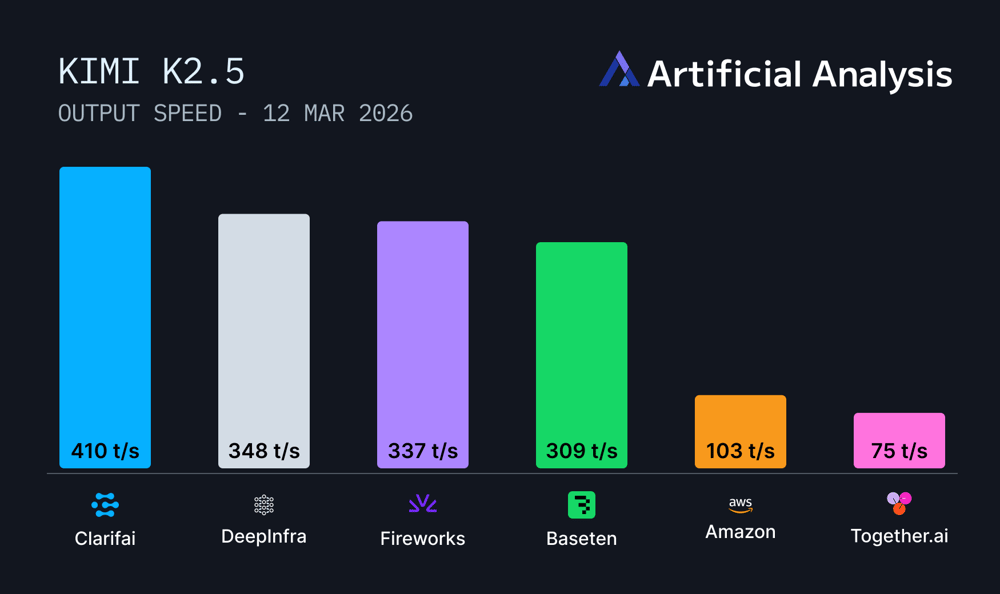
Ahead of Nvidia GTC, we’re excited to share that Clarifai Reasoning Engine achieves 414 tokens per second (TPS) throughput on Kimi K2.5, positioning us among the top inference providers for frontier reasoning models as measured by Artificial Analysis. Running on Nvidia B200 GPU infrastructure, our platform delivers production-grade performance for agentic workflows and complex reasoning tasks.

Output-speed-Mar-16-2026-05-03-19-3226-PM

Figure 1: Clarifai achieves 414 tokens per second on Kimi K2.5, ranking among the fastest inference providers on Artificial Analysis benchmarks.

Why Kimi K2.5 performance matters

Kimi K2.5 is a 1-trillion-parameter reasoning model with a 384-expert Mixture-of-Experts architecture that activates 32 billion parameters per request. Built by Moonshot AI with native multimodal training on 15 trillion mixed visual and text tokens, the model delivers strong performance across key benchmarks: 50.2% HLE with tools, 76.8% SWE-Bench Verified, and 78.4% BrowseComp.

As a reasoning model, Kimi K2.5 generates extended thinking sequences before final answers. Clarifai achieves a time to first answer token of 6 seconds, which includes the model’s internal thinking time before providing a response. Throughput directly impacts end-to-end response time for agentic systems, code generation, and multimodal reasoning tasks. At 414 TPS, we deliver the speed required for production deployments.

Time to first token-1-1

Figure 2: Time to first Answer token (TTFT) performance across inference providers, measured by Artificial Analysis with 10,000 input tokens.

How we optimize for throughput

Clarifai Reasoning Engine uses three core optimizations for large reasoning models:

Custom CUDA kernels reduce memory stalls and enhance cache locality. By optimizing low-level GPU operations, we keep streaming multiprocessors active during inference rather than waiting on data movement.

Speculative decoding predicts possible token paths and prunes misses quickly. This reduces wasted computation during the model’s thinking sequence, a pattern common in reasoning workloads.

Adaptive optimization continuously learns from workload behavior. The system dynamically adjusts batching, memory reuse, and execution paths based on actual request patterns. These improvements compound over time, especially for the repetitive tasks common in agentic workflows.

Running on Nvidia B200 infrastructure gives us the hardware foundation to push performance boundaries, while our inference optimization stack delivers the software-level gains.

Building with Kimi K2.5

Kimi K2.5 is now available on the Clarifai Platform. Try it out on the Playground or via the API to get started.

If you need dedicated compute to deploy Kimi K2.5 and other similar top open models at scale for production workloads, get in touch with our team.


Best SAP AI Integration Services For Smart Automation


SAP AI Integration Services: Connecting Your SAP Environment to Enterprise AI

Where Most SAP AI Projects Actually Break?

An enterprise spends three months selecting an AI vendor, six weeks scoping the use case, and then hits a wall: the AI system and the SAP environment are not talking to each other the way anyone expected. Data pipelines stall. API authentication fails in the production environment. The model produces outputs that make no sense because it is reading the wrong SAP table.

SAP AI integration is where most enterprise AI programs lose momentum. Not in the model selection. Not in the use case design. In the connection layer between the AI capability and the SAP data and workflows it needs to be useful.

USM Business Systems is a specialized SAP AI delivery partner headquartered in Ashburn, VA. We integrate enterprise AI systems — LLMs, agentic frameworks, predictive models — into live SAP environments for manufacturers, pharma companies, logistics operators, and the system integrators that serve them.

What SAP AI Integration Actually Covers?

SAP AI integration is not a single service. It spans five distinct layers, and the difficulty of each depends on your SAP landscape, your data maturity, and the AI capability you are connecting.

  1. Data Layer Integration

Before any AI system can reason accurately about your SAP environment, it needs a clean, structured feed of the right data. This typically means connecting to SAP Datasphere (SAP’s data fabric), SAP HANA views, or extracting structured data from S/4HANA tables using OData APIs or SAP Data Services.

The most common failure point here is master data quality. AI models amplify whatever is in your data. If your material master has inconsistent UoM coding across plants, a demand forecasting model will surface that inconsistency as erratic predictions.

  1. API and Middleware Integration

Most enterprise AI integration with SAP runs through SAP BTP Integration Suite — SAP’s managed integration platform that handles API management, protocol translation, and event streaming between SAP and external systems. Engineers who have not worked with BTP Integration Suite before underestimate the configuration depth it requires, particularly for high-volume transactional workflows.

  1. AI Runtime Integration

SAP AI Core is the managed runtime where enterprise AI models are deployed, versioned, and governed inside the SAP ecosystem. Integrating an external LLM or a custom predictive model into SAP AI Core requires specific API patterns, credential management, and lifecycle configuration that differs from deploying the same model in AWS or Azure. SAP AI Core engineers — not general ML engineers — are the right resource here.

  1. Workflow and Process Integration

An AI capability that produces a recommendation but cannot act on it is a dashboard, not an integration. Real SAP AI integration connects the AI output back into SAP workflows: a quality prediction that triggers a production hold in SAP PP, a demand signal that adjusts a replenishment order in SAP IBP, a document analysis result that routes an invoice exception in SAP Finance.

  1. User Experience Integration

For AI capabilities that surface to end users inside SAP, integration with SAP Fiori and SAP Joule determines whether the capability gets adopted. Engineers who understand both the AI layer and the SAP UX layer are required. These are not the same people.

What is the fastest path to a production SAP AI integration?

The fastest path starts with a single, well-scoped workflow that has clean source data in SAP. A supplier performance monitoring integration or an invoice exception routing integration can reach production in 8-12 weeks when the data is ready. Broad integrations that touch multiple SAP modules simultaneously take 4-6 months minimum.

Can we integrate a third-party LLM — like GPT-4 or Claude — directly into SAP?

Yes. SAP AI Core supports external model connections, and SAP BTP Integration Suite handles the API management layer. The integration work involves authentication, data formatting, latency management, and governance configuration. This is a well-established integration pattern for document analysis, NLP search, and content generation use cases.

The Three Integration Patterns We See Most Often

Pattern 1: NLP Search on SAP Data

Enterprises add a natural language search layer on top of SAP Datasphere or HANA, allowing users to query supply chain, financial, or operational data in plain language rather than through SAP transaction codes. According to Forrester’s 2024 Enterprise AI Survey, 61% of SAP users report that data accessibility is the primary barrier to AI adoption. NLP search directly addresses this.

The integration connects an LLM to SAP data views, with a retrieval layer that fetches relevant records and passes them to the model as context. The model returns an answer in plain language. The SAP Fiori interface surfaces the result. This pattern reaches production in 6-10 weeks for a defined data domain.

Pattern 2: Document AI on SAP-Connected Document Flows

Enterprises processing high volumes of documents — invoices, purchase orders, quality certificates, compliance filings — integrate document AI to extract, classify, and route content automatically. The integration reads documents from SAP Document Management or external repositories, processes them through a document AI model, and writes the structured output back to the relevant SAP object.

Pharma and life sciences companies use this pattern for batch record processing and supplier qualification documents. Logistics companies use it for freight invoice reconciliation. The accuracy rate on standard document types typically reaches 90%+ within the first 30 days of production operation.

Pattern 3: Predictive Models on SAP Operational Data

Predictive models trained on historical SAP transaction data — demand history, equipment sensor readings, supplier delivery records — produce forward-looking signals that feed back into SAP planning processes. A demand forecasting model reads S/4HANA sales history and external market signals, produces a forecast, and updates SAP IBP automatically. A predictive maintenance model reads equipment telemetry and writes a maintenance recommendation to SAP PM.

This pattern has the longest data preparation phase — 4-8 weeks to clean and structure SAP historical data — but produces the highest sustained value once in production.

What to Look for When Evaluating SAP AI Integration Partners

  • SAP AI Core and BTP Integration Suite experience, specifically. Ask for examples of integrations built on these platforms, not SAP integrations in general.
  • Data readiness assessment as part of the scoping process. Partners who jump straight to architecture without assessing your SAP master data quality are skipping the step that determines whether the integration will work.
  • A clear governance model. Enterprise SAP environments are audited. Any AI integration needs logging, version control, human override capability, and a rollback procedure.
  • Engineers who have worked in both the AI layer and the SAP layer. The rarest and most valuable profile is an engineer who understands SAP data structures and modern AI frameworks simultaneously. Firms that staff these roles separately add significant coordination overhead.

Why USM Business Systems?

USM Business Systems is a CMMi Level 3, Oracle Gold Partner AI and IT services firm headquartered in Ashburn, VA. With 1,000+ engineers, 2,000+ delivered applications, and 27 years of enterprise delivery experience, USM specializes in AI implementation for supply chain, pharma, manufacturing, and SAP environments. Our SAP AI practice places specialized engineers inside enterprise programs within days — on contract, as dedicated delivery pods, or on a project basis.

Ready to put SAP AI into production? Book a 30-minute scoping call with our SAP AI team at usmsystems.com.

Get In Touch!

FAQ

How does SAP BTP Integration Suite differ from standard API middleware?

BTP Integration Suite is SAP’s managed platform for enterprise integration — it handles API management, event streaming, protocol translation, and pre-built connectors to SAP and third-party systems. It also integrates directly with SAP AI Core, which is what makes it the preferred integration layer for SAP AI programs.

What data from SAP can be used to train AI models?

Historical transactional data from S/4HANA, master data from SAP MDG, sensor data connected through SAP IoT, and document data from SAP Document Management are all commonly used. The key requirement is data governance — understanding what data can leave SAP boundaries and what must stay in the SAP environment.

How long does a SAP AI integration project take from scoping to production?

A single, well-defined integration — one workflow, one AI capability, one SAP module — typically takes 8-14 weeks from scoping to production deployment. Multi-module integrations or programs that require significant data preparation first run 4-6 months.

What is SAP Datasphere and why does it matter for AI integration?

SAP Datasphere is SAP’s data fabric platform — it creates a unified, governed data layer across SAP and non-SAP sources. For AI integration, it is important because it gives AI models a clean, semantically structured view of enterprise data without requiring direct access to S/4HANA tables.

Can AI integrations be built incrementally, or do they require a full platform build first?

Incremental is the right approach for most enterprises. A first integration scoped to one workflow proves the pattern, builds internal confidence, and reveals integration requirements you did not anticipate. Enterprises that try to build a complete AI integration platform before demonstrating value rarely reach production.

Reducing GPU Memory and Accelerating Transformers


Introduction

The transformer revolution is now deep into its long‑context era. Models like GPT‑4 (32 k tokens), MosaicML’s MPT (65 k), and Claude (100 k) can process entire chapters or codebases. Yet as context grows, the attention mechanism becomes the bottleneck: calculating the similarity matrix S = Q·K^T and the probability matrix P = softmax(S) produces N×N data structures. These matrices must be moved between the GPU’s tiny on‑chip SRAM and its larger but slower high‑bandwidth memory (HBM), consuming bandwidth and limiting throughput. In a world where compute FLOPs continue to climb, the real constraint has become memory.

FlashAttention, introduced in 2022, addressed this problem by tiling the computation to avoid ever storing the full S or P matrices, delivering 2–4× speedups and up to 10–20× memory savings. FlashAttention‑2 (FA2) goes further: it reduces costly non‑matmul operations, parallelizes across sequence length, and partitions work to minimize shared‑memory traffic. Benchmarks show FA2 is about twice as fast as its predecessor and up to nine times faster than standard attention implementations, hitting 225 TFLOPs/s on NVIDIA A100 GPUs. This guide explains how FA2 works, when to use it, how to integrate it into your stack, and where its limits lie.

Quick Digest

  • FA2 solves a memory‑bound problem. Attention’s N² memory footprint stalls GPUs; tiling and kernel fusion bring it down to linear memory cost.
  • Key innovations: fewer non‑matmul FLOPs, extra parallelism along sequence length, and slicing the query matrix across warps.
  • Adoption: Supports Ampere/Ada/Hopper GPUs and FP16/BF16 datatypes. Install via pip and flip a flag in PyTorch or Hugging Face to enable.
  • Who benefits: Anyone training or serving long‑context models (8 k–16 k tokens) or using large head dimensions; cost savings are substantial.
  • Caveats: Only attention is accelerated; feed‑forward layers remain unchanged. FP32 precision and older GPUs are unsupported.

The Memory Bottleneck in Transformers

Why memory—not compute—matters

Each token attends to every other token, so naïve attention materializes N×N matrices. With 4 k tokens and 96 heads, the similarity and probability matrices alone consume several gigabytes. On modern GPUs, data movement between the tiny on‑chip SRAM (≈20 MB) and HBM (≈40–80 GB) dominates runtime. More compute doesn’t help if the algorithm shuttles large intermediate results back and forth.

To decide whether you need FA2, perform the MEMS Check:

  1. Memory – Estimate your attention matrix size. If it can’t fit in SRAM and triggers out‑of‑memory errors, you’re memory‑bound.
  2. Efficiency – Use profilers (Nsight or PyTorch) to see if kernels saturate compute or stall on memory transfers.
  3. Model size – Many heads or large embeddings increase memory overhead.
  4. Sequence length – Beyond ~2 k tokens, standard attention’s O(N²) memory explodes.

If two or more factors flag red, FA2 can help. However, tasks with short sequences (≤512 tokens) remain compute‑bound and won’t benefit from tiling; the overhead of custom kernels may even slow them down.

Expert insight

“FlashAttention exploits the asymmetric GPU memory hierarchy to bring significant memory saving and 2–4× speedups without approximation.”Dao et al.

Understanding that memory—not computation—limits attention is key to appreciating FA2’s value.

Quick summary

  • Why does memory limit attention? Because attention creates huge N² matrices that must be moved between slow and fast memory. Profilers help determine if your workload is memory‑bound.

FlashAttention Fundamentals—Tiling and Recomputing

Tiling and kernel fusion

FlashAttention reorders computation to avoid ever materializing the full N×N matrices. It divides queries (Q), keys (K), and values (V) into blocks that fit in SRAM, performs matrix multiplications and softmax operations on those blocks, and accumulates partial sums until the final output is produced. Because all intermediate work stays on‑chip, memory traffic drops dramatically.

Kernel fusion plays a crucial role: instead of launching separate CUDA kernels for matmul, scaling, softmax, masking, dropout, and value projection, FlashAttention performs them within a single kernel. This ensures that data isn’t written back to HBM between steps.

Recomputation in the backward pass

During backpropagation, naïve attention must store the entire attention matrix to compute gradients. FlashAttention saves memory by recomputing the necessary local softmax values on the fly. The small cost of extra computation is outweighed by eliminating gigabytes of storage.

Negative knowledge

FlashAttention doesn’t alter the mathematical formula for attention; any deviations in output typically arise from using lower precision (FP16/BF16). Early versions lacked dropout support, so ensure your library version accommodates dropout if needed.

Quick summary

  • How does FlashAttention reduce memory? By tiling Q/K/V into blocks, fusing operations into a single kernel, and recomputing softmax values during backprop.

What’s New in FlashAttention‑2

FA2 refines FlashAttention in three major ways:

  1. Fewer non‑matmul operations: GPUs achieve enormous throughput on matrix multiplication but slow down on general FP32 operations. FA2 rewrites rescaling and masking code to minimize these non‑matmul FLOPs.
  2. Parallelism along the sequence dimension: When batch size × head count is small, the original FlashAttention can’t saturate all GPU streaming multiprocessors. FA2 parallelizes across long sequences, boosting occupancy.
  3. Query slicing: Instead of slicing keys and values across warps (requiring synchronization), FA2 slices the query matrix, allowing warps to compute their output independently. This eliminates shared‑memory writes and delivers more speed.

FA2 also supports head dimensions up to 256, as well as multi‑query (MQA) and grouped‑query (GQA) attention. Head dimension support matters for code‑oriented models like CodeGen or GPT‑J.

Decision guidance

Use this quick decision tree:

  • If you run on Turing GPUs (e.g., T4) –> stick to FlashAttention 1 or standard kernels.
  • Else if your head dimension >128 –> choose FA2.
  • Else if (batch_size × num_heads) is small and sequence is long –> FA2’s extra parallelism pays off.
  • Else benchmark FA1 and FA2; the simpler implementation may suffice.

Caveats

FA2 requires Ampere, Ada, or Hopper GPUs and currently supports only FP16/BF16 datatypes. Compilation is more complex, and unsupported GPUs will fall back to FA1 or standard attention.

Expert insight

“FlashAttention‑2 is about 2× faster than FlashAttention and reaches up to 230 TFLOPs/s on A100 GPUs.”Tri Dao

FA2 closes much of the gap between attention kernels and optimized matrix multiplications.

Quick summary

  • What distinguishes FA2? It cuts non‑matmul operations, parallelizes over sequence length, slices queries instead of keys/values, and supports larger head sizes and MQA/GQA.

Installing and Integrating FlashAttention‑2

Requirements and installation

FA2 supports A100, H100, RTX 3090/4090, and AMD MI200/MI300 GPUs and requires FP16/BF16 precision. Install via:

pip install flash-attn --no-build-isolation

Ensure CUDA ≥12.0 (or ROCm ≥6.0) and PyTorch ≥2.2. Install the ninja build system to shorten compile times; if your machine has limited RAM, cap parallel jobs using MAX_JOBS=4.

Enabling FA2 in frameworks

In Hugging Face Transformers, set the use_flash_attn_2=True flag when instantiating your model. For custom code, import and call the kernel:

from flash_attn_interface import flash_attn_func
output = flash_attn_func(q, k, v, causal=True)

Input tensors should be shaped [batch, seq_len, num_heads, head_dim] or as required by the library. For unsupported hardware, implement a try/except block to fall back to standard attention.

Operational advice

  • GPU orchestration: Platforms like Clarifai’s compute orchestration make it easy to run FA2 on clusters. Select A100 or H100 GPUs, and use the built‑in profiling tools to monitor tokens per second. If you need turnkey hardware, Clarifai’s GPU hosting provides managed A100/H100 instances that integrate with local runners and remote orchestration.
  • Mixed precision: Combine FA2 with automatic mixed precision (AMP) to maximize throughput.
  • Benchmarking: After integration, measure tokens per second, GPU memory usage, and wall‑clock time with and without FA2. Use these numbers to adjust batch sizes and sequence lengths.

Quick summary

  • How do I use FA2? Install the package, ensure you have compatible GPUs and drivers, enable FA2 in your framework, and benchmark. Use Clarifai’s orchestration and model inference tools for scalable deployment.

Performance Benchmarks and Cost Savings

Speedups on A100 and H100

Public benchmarks report that FA2 delivers around 2× speedup over FA1 and up to 9× over standard PyTorch attention. When training GPT‑style models end‑to‑end, FA2 achieves 225 TFLOPs/s on A100 GPUs and even higher throughput on H100 due to newer tensor cores.

An evaluation by Lambda Labs shows that FA2 increases the affordable batch size from 1 to 4 while keeping GPU memory constant; tokens per second jump from 3,717 to 10,650 on A100 and from 6,267 to 22,282 on H100.

Config Tokens/sec Batch size Notes
A100 baseline 3,717 1 Standard attention
A100 FA2 10,650 4 2.9× throughput increase
H100 baseline 6,267 1 Standard attention
H100 FA2 22,282 4 3.5× throughput increase

Scaling to multi‑GPU clusters yields near‑linear performance when high‑bandwidth interconnects (NVLink/NVSwitch) are available.

Cost impact

Because FA2 allows larger batch sizes and higher throughput, it reduces training time and compute cost. For example, replicating GPT3‑175B training with FA2 on 1,024 H100 GPUs is estimated to cost around $458 k, a 90 % reduction compared with traditional kernels. On cloud platforms like Clarifai, fewer GPU hours translate directly into cost savings.

Caveats

Iter/sec may drop slightly because each batch is larger. Actual tokens/sec is the meaningful metric; ensure you measure the right quantity. Multi‑GPU gains depend on interconnect bandwidth; low‑bandwidth clusters may not realize full speedups.

Quick summary

  • How much faster is FA2? Roughly twice as fast as FA1 and up to nine times faster than standard attention. It increases batch size and reduces training costs dramatically.

Practical Use Cases and Decision Guide

Long‑context language models

FA2 shines when you need to process long documents, stories, or transcripts. With its linear memory cost, you can train or fine‑tune models on 16 k–64 k tokens without approximations. Legal document review, novel writing, and research paper summarization all benefit. Clarifai’s model inference pipeline makes it easy to deploy these large models and serve predictions at scale.

Code and multimodal generation

Models like CodeGen or Stable Diffusion 1.x use large head dimensions (up to 256), which FA2 supports. This allows for deeper code context or higher resolution images without running out of memory.

High‑throughput inference with MQA/GQA

FA2’s support for multi‑query and grouped‑query attention reduces KV cache size and speeds up inference. This is ideal for chatbots and real‑time assistants serving thousands of users concurrently.

Decision matrix

Scenario Sequence length Head dim GPU Recommendation
Short text classification ≤2 k ≤64 Any Standard/FA1
Long doc summarization 8 k–16 k ≤128 A100/H100 FA2
Code generation 4 k–8 k 256 A100/H100 FA2
Real‑time inference ≤4 k ≤128 A100/H100 FA2 with MQA/GQA
Ultra‑long context (≥64 k) >64 k any Mixed GPU/CPU Sparse/approximate

Common mistakes and tips

Don’t assume that bigger batches always improve training; you may need to retune learning rates. Multi‑GPU speedups depend on interconnect bandwidth; check whether your cluster uses NVLink. Finally, remember that FA2 accelerates self‑attention only—feed‑forward layers may still dominate runtime.

Quick summary

  • Who should use FA2? Practitioners working with long contexts, large head sizes, or high‑throughput inference. Short sequences or unsupported GPUs may not benefit.

Limitations and Alternatives

Precision and hardware constraints

FA2 runs only on Ampere/Ada/Hopper GPUs and AMD’s MI200/MI300 series and supports FP16/BF16 datatypes. FP32 precision and older GPUs require falling back to FA1 or standard attention. Edge devices and mobile GPUs are generally unsupported.

Where FA2 won’t help

If your sequences are short (≤512 tokens) or your model has few heads, the overhead of FA2 may outweigh its benefits. It does not accelerate feed‑forward layers, convolutional operations, or embedding lookups; for these, consider other optimizations.

Alternatives

For extremely long sequences (>64 k tokens) or hardware without FA2 support, consider Performer, Linformer, Longformer, or Paged Attention. These methods approximate attention by using low‑rank projections or local sparsity. They may sacrifice some accuracy but can handle contexts that FA2 cannot.

Quick summary

  • When should you avoid FA2? When precision must be FP32, when running on unsupported GPUs, when contexts are short, or when approximations suffice for extreme lengths.

Looking Ahead

Emerging kernels

FlashAttention‑3 (FA3) targets the H100 GPU, adds FP8 support, and leverages Tensor Memory Accelerator hardware, pushing throughput even higher. FlashAttention‑4 (FA4) is being rewritten in CuTeDSL for Hopper and Blackwell GPUs, with plans for unified kernels and full FP8 support. These kernels are in beta; adoption will depend on hardware availability.

New attention variants

Researchers are combining hardware‑aware kernels like FA2 with algorithmic innovations. Flash‑Decoding accelerates autoregressive inference by caching partial results. Paged Attention breaks sequences into pages for memory‑efficient inference, enabling 64 k contexts and beyond. FastAttention adapts FA kernels to NPUs and low‑resource GPUs. Expect hybrid techniques that unify tiling, sparsity, and new precisions.

Preparing for the future

To stay ahead, follow these steps: subscribe to flash-attn release notes, test FP8 workflows if your models tolerate lower precision, plan for A100/H100/B200 upgrades, and explore combining FA kernels with sparse attention for ultra‑long contexts. Clarifai’s roadmap includes support for new GPUs and FP8, helping teams adopt these innovations without overhauling infrastructure.

Quick summary

  • What’s next? FA3 and FA4 target new GPUs and FP8, while variants like Flash‑Decoding and Paged Attention tackle inference and extremely long contexts. Hybrid methods will continue to push transformer efficiency.

FAQs

Q: Does FlashAttention‑2 change the attention computation?
A: No. FA2 preserves the exact softmax attention formula. Differences in output arise from lower precision; use FP16/BF16 accordingly.

Q: Does FA2 support dropout and cross‑attention?
A: Recent versions support dropout and are being extended to cross‑attention. Check your library’s documentation for specifics.

Q: Can I use FA2 with LoRA or quantization?
A: Yes. FA2 operates at the kernel level and is compatible with techniques like LoRA and quantization, making it a good complement to other memory‑saving methods.

Q: What about JAX or TensorFlow?
A: Official FA2 kernels are available for PyTorch. Third‑party ports exist for other frameworks but may lag behind in performance and features.


Conclusion

As transformer models stretch into the tens of thousands of tokens, memory, not compute, is the bottleneck. FlashAttention‑2 provides a timely solution: by tiling computations, fusing kernels, reducing non‑matmul operations, and parallelizing across sequence length, it brings attention performance closer to the efficiency of optimized matrix multiplication. It doubles the speed of its predecessor and dramatically cuts memory use. Real‑world benchmarks confirm that FA2 offers substantial throughput gains and cost savings.

FA2 is not universal; it requires modern GPUs and supports only FP16/BF16. For ultra‑long sequences or unsupported hardware, approximate attention methods remain important alternatives. Yet for the majority of long‑context workloads today, FA2 is the most efficient exact attention kernel available.

Implementing FA2 is straightforward: install the library, enable it in your framework, and profile performance. Platforms like Clarifai’s compute orchestration and model inference simplify deployment across clusters, allowing you to focus on model design and application logic. If you don’t have GPU hardware, Clarifai’s GPU hosting offers ready‑to‑run clusters. And to test these capabilities risk‑free, start for free and claim credits via Clarifai’s sign‑up. Use our MEMS Check to decide whether your workload is memory‑bound, and keep an eye on emerging kernels like FA3/4 and Paged Attention.

In 2026 and beyond, transformer efficiency will hinge on pairing algorithmic innovations with hardware‑aware kernels. FA2 offers a glimpse into that future—one where memory bottlenecks no longer constrain the horizons of our models.


AI Software Development: Why 95% Of Enterprise Pilots Fail


AI Software Development: Why 95% of Enterprise Pilots Fail—and How Manufacturers Can Beat the Odds?

The manufacturing industry stands at a critical inflection point. While artificial intelligence promises to revolutionize operations, reduce costs, and create competitive advantage, a stark reality confronts enterprise leaders: 95% of generative AI pilot programs fail to deliver measurable impact on profits and revenue [1]. For manufacturing executives watching competitors announce AI initiatives, the pressure to act is immense, but the path forward is anything but clear.

The disconnect isn’t about AI’s potential. Global investment in AI software development reached $674.3 million in 2024 and is projected to surge to $15.7 billion by 2033, growing at a staggering 42.3% annually [2]. Manufacturing leaders recognize this transformation: 78% of organizations now use AI in at least one business function [3]. Yet between aspiration and execution lies a chasm filled with failed pilots, wasted budgets, and missed opportunities.

In this article, you’ll discover:

  • Why most AI software development projects stall before reaching production
  • The hidden barriers preventing manufacturers from scaling AI successfully
  • How custom AI development delivers 2-3x stronger ROI than off-the-shelf solutions
  • Proven implementation approaches that separate AI leaders from laggards
  • What distinguishes successful AI partnerships from costly vendor relationships

The Real Cost of AI Implementation Failure

Before exploring solutions, manufacturing executives must understand the true scope of the AI adoption challenge. The numbers paint a sobering picture:

Challenge Area Impact Source
Pilot Failure Rate 95% of enterprise AI solutions fail to achieve rapid revenue acceleration MIT NANDA Research [1]
Market Growth AI in software development projected to grow from $674.3M (2024) to $15.7B (2033) Grand View Research [2]
Manufacturing ROI 78% of executives report seeing returns from gen AI investments Google Cloud/National Research Group [4]
Productivity Gains Gen AI reduces software development time by up to 55% in early adoption Mission Cloud [5]
Top Barrier to Adoption Data accuracy and bias concerns (45% of organizations) IBM Research [6]
Cost Range Small to medium AI projects: $50K-$500K; large-scale initiatives: $5M+ Vention Teams [7]

The data reveals a paradox: while AI adoption accelerates and proven ROI emerges, the vast majority of implementations never escape pilot purgatory. For manufacturing organizations, this failure pattern carries particularly high stakes, production delays, quality control issues, and supply chain disruptions don’t tolerate prolonged experimentation.

Why AI Software Development Projects Stall?

The root causes of AI failure in manufacturing aren’t primarily technical. According to MIT research analyzing 150 enterprise AI deployments, the core issue is “the learning gap for both tools and organizations” [1]. Generic AI tools like ChatGPT excel for individual productivity because of their flexibility, but they stall in enterprise manufacturing environments because they don’t learn from or adapt to complex operational workflows.

The five critical failure points include:

  1. Strategic Misalignment

    Organizations treat AI as a technology purchase rather than a business transformation. Without clear alignment between AI capabilities and manufacturing pain points, whether predictive maintenance, quality control, or supply chain optimization, pilots generate impressive demos but no operational value.

  2. Data Infrastructure Deficits

    Manufacturing environments generate massive data volumes across sensors, IoT devices, ERPs, and legacy systems. However, 45% of organizations cite data accuracy and bias as their primary AI adoption barrier [6]. When training data is fragmented, incomplete, or poor quality, even sophisticated AI models produce unreliable outputs.

  3. The Build vs. Buy Dilemma

    The choice between purchasing specialized AI tools and building custom solutions isn’t about industry trends, it’s about your organization’s unique context. Success depends on factors like your internal technical capabilities, the specificity of your manufacturing processes, budget constraints, and long-term strategic goals. Some manufacturers thrive with vendor solutions that address common needs efficiently, while others require custom development to handle proprietary workflows or competitive differentiation. The key is honest assessment: Does your use case demand custom engineering, or are you building because that’s what you’ve always done?

  4. Cultural and Skills Barriers

    AI adoption challenges extend beyond technology to organizational culture. In risk-averse manufacturing environments, employees fear job displacement while leadership struggles to quantify intangible benefits like faster time-to-market or enhanced decision-making. The skills gap compounds this, finding professionals who grasp both AI technology and manufacturing operations proves exceptionally difficult.

  5. ROI Uncertainty

    Manufacturing executives accustomed to tangible ROI calculations struggle with AI’s multidimensional value. Traditional financial metrics miss improvements in decision speed, market agility, and competitive positioning. When leadership can’t confidently articulate expected returns, AI initiatives face perpetual budget scrutiny and eventual cancellation.

Custom vs. Off-the-Shelf: Choosing Your AI Development Path

For manufacturers navigating AI software development, the build-or-buy decision fundamentally shapes both short-term outcomes and long-term competitive advantage. Each approach carries distinct tradeoffs.

Off-the-Shelf AI Solutions:
Pre-built platforms deliver speed and lower upfront costs. Manufacturers can deploy chatbots, basic predictive analytics, or demand forecasting tools within weeks. These solutions work well for standardized processes where differentiation isn’t critical: customer support automation, basic inventory management, or routine reporting. However, data security introduces a critical trade-off. While these platforms may appear secure, your operational data flows through third-party infrastructure, raising concerns about proprietary information exposure, compliance requirements, and long-term data governance that many manufacturers underestimate during evaluation.

However, generic tools hit scalability limits quickly. They struggle with manufacturing-specific complexities: multi-site production coordination, proprietary quality control processes, or unique supply chain variables. More critically, when competitors access identical tools, no competitive advantage emerges.

Custom AI Development:
Purpose-built AI solutions designed around proprietary manufacturing data and workflows deliver 2-3x stronger ROI than generic vendor models [8]. Custom development enables manufacturers to:

  • Build predictive maintenance models trained on specific equipment and operating conditions
  • Create quality control systems that detect defects unique to proprietary production processes
  • Develop supply chain optimization engines accounting for specialized supplier networks and logistics constraints
  • Integrate seamlessly with existing ERP, MES, and IoT infrastructure

The tradeoffs are higher upfront investment ($50,000-$500,000 for moderate complexity projects [7]) and longer deployment timelines. Yet for manufacturers where operational excellence drives competitive positioning, custom AI becomes proprietary intellectual property that competitors cannot replicate.

The Hybrid Advantage:
Leading manufacturers increasingly adopt hybrid approaches, deploying off-the-shelf solutions for commodity functions while investing in custom AI for core differentiators. A mid-sized manufacturer might use a SaaS chatbot for customer inquiries while building a custom predictive quality system trained on decades of proprietary production data.

What Distinguishes Successful AI Implementation?

Manufacturing organizations that successfully scale AI share common characteristics that separate them from the 95% trapped in pilot purgatory [1]:

Executive Sponsorship:
Google Cloud’s research found that manufacturers with comprehensive C-level sponsorship are significantly more likely to see ROI (84%) compared to those without executive alignment (75%) [4]. Successful AI adoption requires cross-functional collaboration guided by top-level support that aligns initiatives with business goals.

Phased, Value-Driven Roadmaps:
Rather than attempting enterprise-wide AI transformation, successful manufacturers identify high-impact use cases that deliver quick wins. One manufacturer might start with predictive maintenance for critical production lines, prove ROI within six months, then expand to quality control and supply chain optimization.

Partnership Over Vendor Relationships:
The MIT research revealing that purchased solutions outperform internal builds by 2:1 [1] underscores the value of specialized expertise. However, the distinction matters: true partners bring manufacturing domain knowledge, understand operational constraints, and commit to long-term success—not just initial deployment.

Data-First Foundations:
Organizations that invest in data infrastructure before AI implementation see dramatically higher success rates. This means establishing data governance, integrating siloed systems, implementing quality controls, and creating feedback loops that enable models to learn and improve continuously.

The Manufacturing AI Opportunity: 2026 and Beyond

The manufacturing sector stands poised for AI acceleration. Recent research shows 56% of manufacturing executives report their organizations actively use AI agents, with 37% deploying more than ten autonomous systems [4]. These sophisticated, multi-agent systems independently plan, reason, and execute tasks across quality control (54%), production planning (48%), and supply chain logistics (47%).

For manufacturing leadership, the strategic question isn’t whether to adopt AI software development—competitors are already moving. The question is how to implement AI in ways that deliver measurable impact, not just impressive pilots.

Success requires strategic vision that connects AI capabilities to manufacturing pain points, technical excellence that bridges legacy systems and modern architectures, and implementation expertise that navigates the complexities separating concept from production deployment. Most critically, it requires partnership with specialists who understand that AI in manufacturing isn’t about technology for its own sake, it’s about operational transformation that drives efficiency, quality, and competitive advantage.

The 95% failure rate [1] reflects organizations treating AI as a vendor relationship rather than a strategic transformation. The 5% succeeding recognize that AI software development, done right, becomes a proprietary capability that compounds competitive advantage with every production run, every quality check, and every supply chain decision.

Ready to Move Beyond Pilot Purgatory?

The gap between AI aspiration and measurable manufacturing impact isn’t closing on its own. While your competitors experiment, your organization can execute, turning AI from a boardroom buzzword into a production floor reality that drives efficiency, quality, and growth.

[Schedule a Strategic AI Consultation]


Sources:

  1. MIT NANDA Initiative, “The GenAI Divide: State of AI in Business 2025”
  2. Grand View Research, “AI In Software Development Market | Industry Report, 2033”
  3. Google Cloud / National Research Group, “The ROI of AI in manufacturing” (2025)
  4. Mission Cloud, “AI Statistics 2025: Key Market Data and Trends”
  5. IBM Research, “The 5 biggest AI adoption challenges for 2025”
  6. Vention Teams, “AI Statistics 2025: Key Trends and Insights Shaping the Future”
  7. Fortune, “MIT report: 95% of generative AI pilots at companies are failing” (August 2025)
  8. RTS Labs, “Off-the-Shelf vs Custom AI Solutions: Which Fits Your Business?”
  9. McKinsey & Company, “The State of AI: Global Survey 2025”


References:

[1] MIT report: 95% of generative AI pilots at companies are …
[2] AI In Software Development Market | Industry Report, 2033
[3] The State of AI: Global Survey 2025
[4] The ROI of AI in manufacturing
[5] AI Statistics 2025: Key Market Data and Trends
[6] The 5 biggest AI adoption challenges for 2025
[7] AI Statistics 2025: Key Trends and Insights Shaping the Future
[8] Off-the-Shelf vs Custom AI Solutions: Which Fits Your …

What Is Kimi K2.5? Architecture, Benchmarks & AI Infra Guide


Introduction

Open‑weight models are rapidly narrowing the gap with closed commercial systems. As of early 2026, Moonshot AI’s Kimi K2.5 is the flagship of this trend: a one‑trillion parameter Mixture‑of‑Experts (MoE) model that accepts images and videos, reasons over long contexts and can autonomously call external tools. Unlike closed alternatives, its weights are publicly downloadable under a modified MIT licence, enabling unprecedented flexibility.

This article explains how K2.5 works, evaluates its performance, and helps AI infrastructure teams decide whether and how to adopt it. Throughout we incorporate original frameworks like the Kimi Capability Spectrum and the AI Infra Maturity Model to translate technical features into strategic decisions. We also describe how Clarifai’s compute orchestration and local runners can simplify adoption.

Quick digest

  • Design: 1 trillion parameters organised into sparse Mixture‑of‑Experts layers, with only ~32 billion active parameters per token and a 256K‑token context window.
  • Modes: Instant (fast), Thinking (transparent), Agent (tool‑oriented) and Agent Swarm (parallel). They allow trade‑offs between speed, cost and autonomy.
  • Highlights: Top‑tier reasoning, vision and coding benchmarks; cost efficiency due to sparse activation; but notable hardware demands and tool‑call failures.
  • Deployment: Requires hundreds of gigabytes of VRAM even after quantization; API access costs around $0.60 per million input tokens; Clarifai offers hybrid orchestration.
  • Caveats: Partial quantization, verbose outputs, occasional inconsistencies and undisclosed training data.

Kimi K2.5 in a nutshell

K2.5 is built to tackle complex multimodal tasks with minimal human intervention. It was pretrained on roughly 15 trillion combined vision and text tokens. The backbone consists of 61 layers—one dense and 60 MoE layers—housing 384 expert networks. A router activates the top eight experts plus a shared expert for each token. This sparse routing means only a small fraction of the model’s trillion parameters fire on any given forward pass, keeping compute manageable while preserving high capacity.

A native MoonViT vision encoder sits inside the architecture, embedding images and videos directly into the language transformer. Combined with the 256K context made possible by Multi‑Head Latent Attention (MLA)—a compression technique that reduces key–value cache size by around 10×—K2.5 can ingest entire documents or codebases in a single prompt. The result is a general‑purpose model that sees, reads and plans.

The second hallmark of K2.5 is its agentic spectrum. Depending on the mode, it either spits out quick answers, reveals its chain of thought, or orchestrates tools and sub‑agents. This spectrum is central to making the model practical.

Modes of operation

  1. Instant mode: Prioritises speed and cost. It suppresses intermediate reasoning, returning answers in a few seconds and consuming up to 75 % fewer tokens than other modes. Use it for casual Q&A, customer service chats or short code snippets.
  2. Thinking mode: Produces reasoning traces alongside the final answer. It excels on maths and logic benchmarks (e.g., 96.1 % on AIME 2025, 95.4 % on HMMT 2025) but is slower and more verbose. Suitable for tasks where transparency is required, such as debugging or research planning.
  3. Agent mode: Adds the ability to call search engines, code interpreters and other tools sequentially. K2.5 can execute 200–300 tool calls without losing track. This mode automates workflows like data extraction and report generation. Note that about 12 % of tool calls can fail, so monitoring and retries are essential.
  4. Agent Swarm: Breaks a large task into subtasks and executes them in parallel. It spawns up to 100 sub‑agents and delivers ≈4.5× speedups on search tasks, improving BrowseComp scores from 60.6 % to 78.4 %. Ideal for wide literature searches or data‑collection projects; not appropriate for latency‑critical scenarios due to orchestration overhead.

These modes form the Kimi Capability Spectrum—our framework for aligning tasks to modes. Map your workload’s need for speed, transparency and autonomy onto the spectrum: Quick Lookups → Instant; Analytical Reasoning → Thinking; Automated Workflows → Agent; Mass Parallel Research → Agent Swarm.

Applying the Kimi Capability Spectrum

To ground this framework, imagine a product team building a multimodal support bot. For simple FAQs (“How do I reset my password?”), Instant mode suffices because latency and cost trump reasoning. When the bot needs to trace through logs or explain a troubleshooting process, Thinking mode offers transparency: the chain‑of‑thought helps engineers audit why a certain fix was suggested. For more complex tasks, such as generating a compliance report from multiple spreadsheets and knowledge‑base articles, Agent mode orchestrates a code interpreter to parse CSV files, a search tool to pull the latest policy and a summariser to compose the report. Finally, if the bot must scan hundreds of legal documents across jurisdictions and compare them, Agent Swarm shines: sub‑agents each tackle a subset of documents and the orchestrator merges findings. This gradual escalation illustrates why a single model needs distinct modes and how the capability spectrum guides mode selection.

Importantly, the spectrum encourages you to avoid defaulting to the most complex mode. Agent Swarm is powerful, but orchestrating dozens of agents introduces coordination overhead and cost. If a task can be solved sequentially, Agent mode may be more efficient. Likewise, Thinking mode is invaluable for debugging or audits but wastes tokens in a high‑volume chatbot. By explicitly mapping tasks to quadrants, teams can maximise value while controlling costs.

How K2.5 achieves scale – architecture explained

Sparse MoE layers

Traditional transformers execute the same dense feed‑forward layer for every token. K2.5 replaces most of those layers with sparse MoE layers. Each MoE layer contains 384 experts, and a gating network routes each token to the top eight experts plus a shared expert. In effect, only ~3.2 % of the trillion parameters participate in computing any given token. Experts develop niche specialisations—math, code, creative writing—and the router learns which to pick. While this reduces compute cost, it requires storing all experts in memory for dynamic routing.

Multi‑Head Latent Attention & context windows

To achieve a 256K‑token context, K2.5 introduces Multi‑Head Latent Attention (MLA). Rather than storing full key–value pairs for every head, it compresses them into a shared latent representation. This reduces KV cache size by about tenfold, allowing the model to maintain long contexts. Despite this efficiency, long prompts still increase latency and memory usage; many applications operate comfortably within 8K–32K tokens.

Vision integration

Instead of bolting on a separate vision module, K2.5 includes MoonViT, a 400 million‑parameter vision encoder. MoonViT converts images and video frames into embeddings that flow through the same layers as text. The unified training improves performance on multimodal benchmarks such as MMMU‑Pro, MathVision and VideoMMMU. It means you can pass screenshots, diagrams or short clips directly into K2.5 and receive reasoning grounded in visual context.

Limitations of the design

  • Full parameter storage: Even though only a fraction of the parameters are active at any time, the entire weight set must reside in memory. INT4 quantization shrinks this to ≈630 GB, yet attention layers remain in BF16, so memory savings are limited.
  • Randomness in routing: Slight differences in input or weight rounding can activate different experts, occasionally producing inconsistent outputs.
  • Partial quantization: Aggressive quantization down to 1.58 bits reduces memory but slashes throughput to 1–2 tokens per second.

Key takeaway: K2.5’s architecture cleverly balances capacity and efficiency through sparse routing and cache compression, but demands huge memory and careful configuration.

Benchmarks & what they mean

K2.5 performs impressively across a spectrum of tests. These scores provide directional guidance rather than guarantees.

  • Reasoning & knowledge: Achieves 96.1 % on AIME 2025, 95.4 % on HMMT 2025 and 87.1 % on MMLU‑Pro.
  • Vision & multimodal: Scores 78.5 % on MMMU‑Pro, 84.2 % on MathVision and 86.6 % on VideoMMMU.
  • Coding: Attains 76.8 % on SWE‑Bench Verified and 85 % on LiveCodeBench v6; anecdotal reports show it can generate full games and cross‑language code.
  • Agentic & search tasks: With Agent Swarm, BrowseComp accuracy rises from 60.6 % to 78.4 %; Wide Search climbs from 72.7 % to 79 %.

Cost efficiency: Sparse activation and quantization mean the API evaluation suite costs roughly $0.27 versus $0.48–$1.14 for proprietary alternatives. However, chain‑of‑thought outputs and tool calls consume many tokens. Adjust temperature and top_p values to manage cost.

Interpreting scores: High numbers indicate potential, not a guarantee of real‑world success. Latency increases with context length and reasoning depth; tool‑call failures (~12 %) and verbose outputs can dilute the benefits. Always test on your own workloads.

Another nuance often missed is cache hits. Many API providers offer lower prices when repeated requests hit a cache. When using K2.5 through Clarifai or a third‑party API, design your system to reuse prompts or sub‑prompts where possible. For example, if multiple agents need the same document summary, call the summariser once and store the output, rather than invoking the model repeatedly. This not only saves tokens but also reduces latency.

Deployment & infrastructure

Quantization & hardware

Deploying K2.5 locally or on‑prem requires serious resources. The FP16 variant needs nearly 2 TB of storage. INT4 quantization reduces weights to ≈630 GB and still calls for eight A100/H100/H200 GPUs. More aggressive 2‑bit and 1.58‑bit quantization shrink storage to 375 GB and 240 GB respectively, but throughput drops dramatically. Because attention layers remain in BF16, even the INT4 version requires about 549 GB of VRAM.

API access

For most teams, the official API offers a more practical entry point. Pricing is approximately $0.60 per million input tokens and $3.00 per million output tokens. This avoids the need for GPU clusters, CUDA troubleshooting and quantization configuration. The trade‑off is less control over fine‑tuning and potential data‑sovereignty concerns.

Clarifai’s orchestration & local runners

To strike a balance between convenience and control, Clarifai’s compute orchestration allows K2.5 deployments across SaaS, dedicated cloud, self‑managed VPCs or on‑prem environments. Clarifai handles containerisation, autoscaling and resource management, reducing operational overhead.

Clarifai also offers local runners: run clarifai model serve locally and expose your model via a secure endpoint. This enables offline experimentation and integration with Clarifai’s pipelines without committing to cloud infrastructure. You can test quantisation variants on a workstation and then transition to a managed cluster.

Deployment checklist:

  1. Hardware readiness: Do you have enough GPUs and memory? If not, avoid self‑hosting.
  2. Compliance & security: K2.5 lacks SOC 2/ISO certifications. Use managed platforms if certifications are required.
  3. Budget & latency: Compare API costs to hardware costs; for sporadic usage, the API is cheaper.
  4. Team expertise: Without distributed systems and CUDA expertise, managed orchestration or API access is safer.

Bottom line: Start with the API or local runners for pilots. Consider self‑hosting only when workloads justify the investment and you can handle the complexity.

For those contemplating self‑hosting, consider the real‑world deployment story of a blogger who attempted to deploy K2.5’s INT4 variant on 4 H200 GPUs (each with 141 GB HBM). Despite careful sharding, the model ran out of memory because the KV cache—needed for the 256K context—filled the remaining space. Offloading to CPU memory allowed inference to proceed, but throughput dropped to 1–2 tokens per second. Such experiences underscore the difficulty of trillion‑parameter models: quantisation reduces the weight size but doesn’t eliminate the need for room to store activations and caches. Enterprises should budget for headroom beyond the raw weight size, and if that isn’t possible, lean on cloud APIs or managed platforms.

Limitations & trade‑offs

Every model has shortcomings; K2.5 is no exception:

  • High memory demands: Even quantised, it needs hundreds of gigabytes of VRAM.
  • Partial quantization: Only MoE weights are quantised; attention layers remain in BF16.
  • Verbosity & latency: Thinking and agent modes produce lengthy outputs, raising costs and delay. Deep research tasks can take 20 minutes.
  • Tool‑call failures & drift: Around 12 % of tool calls fail; long sessions may drift from the original goal.
  • Inconsistency & self‑misidentification: Gating randomness occasionally yields inconsistent answers or erroneous code fixes.
  • Compliance gaps: Training data is undisclosed; no SOC 2/ISO certifications; commercial deployments must provide attribution.

Mitigation strategies:

  • Budget for GPU headroom or choose API access.
  • Limit reasoning depth; set maximum token limits.
  • Break tasks into smaller segments; monitor tool calls and include fallback models.
  • Use human oversight for critical outputs and integrate domain‑specific safety filters.
  • For regulated industries, deploy through platforms that provide isolation and audit trails.

These bullet points are easy to skim, but they also imply deeper operational practices:

  1. Hardware planning & scaling: Always provision more VRAM than the nominal model size to accommodate KV caches and activations. When using quantised variants, test with realistic prompts to ensure caches fit. If using Clarifai’s orchestration, specify resource constraints up front to prevent oversubscription.
  2. Output management: Verbose chains of thought inflate costs. Implement truncation strategies—for instance, discard reasoning content after extracting the final answer or summarise intermediate steps before storage. In cost‑sensitive environments, disable thinking mode unless an error occurs.
  3. Workflow checkpoints: In long agentic sessions, create checkpoints. After each major step, evaluate if the output aligns with the goal. If not, intervene or restart using a smaller model. A simple if–then logic applies: If the agent drift exceeds a threshold, Then switch back to Instant or Thinking mode to re‑orient the task.
  4. Compliance & auditing: Maintain logs of prompts, tool calls and responses. For sensitive data, anonymise inputs before sending them to the model. Use Clarifai’s local runners for data that cannot leave your network; the runner exposes a secure endpoint while keeping weights and activations on‑prem.
  5. Continual evaluation: Models evolve. Re‑benchmark after updates or fine‑tuning. Over time, routing decisions can drift, altering performance. Automate periodic evaluation of latency, cost and accuracy to catch regressions early.

Strategic outlook & AI infra maturity

K2.5 signals a new era where open models rival proprietary ones on complex tasks. This shift empowers organisations to build bespoke AI stacks but demands new infrastructure capabilities and governance.

To guide adoption, we propose the AI Infra Maturity Model:

  1. Exploratory Pilot: Test via API or Clarifai’s hosted endpoints; gather metrics and team feedback.
  2. Hybrid Deployment: Blend API usage with local runners for sensitive data; begin integrating with internal workflows.
  3. Full Autonomy: Deploy on dedicated clusters via Clarifai or in‑house; fine‑tune on domain data; implement monitoring.
  4. Agentic Ecosystem: Build a fleet of specialised agents orchestrated by a central controller; integrate retrieval, vector search and custom safety mechanisms. Invest in high‑availability infrastructure and compliance.

Teams can remain at the stage that best meets their needs; not every organisation must progress to full autonomy. Evaluate return on investment, regulatory constraints, and organisational readiness at each step.

Looking forward, expect larger, more multimodal and more agentic open models. Future iterations will likely expand context windows, improve routing efficiency and incorporate native retrieval; regulators will push for greater transparency and bias auditing. Platforms like Clarifai will further democratise deployment through improved orchestration across cloud and edge.

These strategic shifts have practical implications. For instance, as context windows grow, AI systems will be able to ingest entire source code repositories or full‑length novels in a single pass. That capability can transform software maintenance and literary analysis, but only if infrastructure can feed 256K‑plus tokens at acceptable latency. On the agentic front, the next generation of models will likely include built‑in retrieval and reasoning over structured data, reducing the need for external search tools. Teams building retrieval‑augmented systems today should architect them with modularity so that components can be swapped as models mature.

Regulatory changes are another driver. Governments are increasingly scrutinising training data provenance and bias. Open models may need to include datasheets that disclose composition, similar to nutrition labels. Organisations adopting K2.5 should prepare to answer questions about content filtering, data privacy and bias mitigation. Using Clarifai’s compliance options or other regulated platforms can help meet these obligations.

Frequently asked questions & decision framework

Is K2.5 fully open source? – It’s open‑weight rather than open source; you can download and modify weights, but training data and code remain proprietary.

What hardware do I need? – INT4 versions require around 630 GB of storage and multiple GPUs; extreme compression lowers this but slows throughput.

How do I access it? – Chat via Kimi.com, call the API, download weights from Hugging Face, or deploy through Clarifai’s orchestration.

How much does it cost? – About $0.60/M input tokens and $3/M output tokens via the API. Self‑hosting costs scale with hardware.

Does it support retrieval? – No; integrate your own vector store or search engine.

Is it safe and unbiased? – Training data is undisclosed, so biases are unknown. Implement post‑processing filters and human oversight.

Can I fine‑tune it? – Yes. The modified MIT licence allows modifications and redistribution. Use parameter‑efficient methods like LoRA or QLoRA to adapt K2.5 to your domain without retraining the entire model. Fine‑tuning demands careful hyperparameter tuning to preserve sparse routing stability.

What’s the real‑world throughput? – Hobbyists report achieving ≈15 tokens per second on dual M3 Ultra machines when using extreme quantisation. Larger clusters will improve throughput but still lag behind dense models due to routing overhead. Plan batch sizes and asynchronous tasks accordingly.

Why choose Clarifai over self‑hosting? – Clarifai combines the convenience of SaaS with the flexibility of self‑hosted models. You can start with public nodes, migrate to a dedicated instance or connect your own VPC, all through the same API. Local runners let you prototype offline and still access Clarifai’s workflow tooling.

Decision framework

  • Need multimodal reasoning and long context? → Consider K2.5; deploy via API or managed orchestration.
  • Need low latency and simple language tasks? → Smaller dense models suffice.
  • Require compliance certifications or stable SLAs? → Choose proprietary models or regulated platforms.
  • Have GPU clusters and deep ML expertise? → Self‑host K2.5 or orchestrate via Clarifai for maximum control.

Conclusion

Kimi K2.5 is a milestone in open AI. Its trillion‑parameter MoE architecture, long context window, vision integration and agentic modes give it capabilities previously reserved for closed frontier models. For AI infrastructure teams, K2.5 opens new opportunities to build autonomous pipelines and multimodal applications while controlling costs. Yet its power comes with caveats: massive memory needs, partial quantization, verbose outputs, tool‑call instability and compliance gaps.

To decide whether and how to adopt K2.5, use the Kimi Capability Spectrum to match tasks to modes, follow the AI Infra Maturity Model to stage your adoption, and consult the deployment checklist and decision framework outlined above. Start small—use the API or local runners for pilots—then scale as you build expertise and infrastructure. Monitor upcoming versions like K2.6 and evolving regulatory landscapes. By balancing innovation with prudence, you can harness K2.5’s strengths while mitigating its weaknesses.


In-House AI Development Vs. Hiring A Custom AI Software Development Company


In-House AI Development vs. Hiring a Custom AI Software Development Company

When your company decides to implement AI, one critical question dominates the conversation: should you build an in-house team or partner with an external custom AI software development company? Both paths can lead to success, but they require vastly different investments, timelines, and internal capabilities.

Before diving into the details, here’s a high-level comparison to help you quickly assess which approach aligns with your current business situation:

Quick Decision Framework

Decision Factor In-House Development External AI Company Best For
Upfront Investment $1M-$2M+ annually $50K-$500K project-based Companies needing predictable budgets
Time to First Deployment 9-18 months 3-6 months Speed-critical implementations
Access to Expertise Limited to hired talent Multidisciplinary teams immediately Diverse AI capabilities needed
Control & IP Ownership Complete control, 100% IP Shared control, negotiable IP Regulated industries, proprietary tech
Scalability Slow, fixed capacity Rapid, flexible scaling Fluctuating project demands
Long-Term Innovation Builds institutional knowledge Project-based, limited transfer AI as core competitive advantage
Data Security Direct control Requires strong protocols Highly sensitive data
ROI Timeline 18-24+ months 12-18 months Companies needing faster returns

When your company is ready to implement AI, whether for predictive analytics, process automation, intelligent decision-making, or data optimization, one critical question emerges: Should you build an in-house AI team or partner with a custom AI software development company?

While AI adoption is on the rise, many organizations struggle to move their AI initiatives from pilot programs to full-scale production. The difference between success and stagnation often comes down to choosing the right development approach.

In this guide, we’ll compare in-house AI development against hiring a specialized custom AI software development company across 8 critical factors, and highlight 7 leading AI development firms to help you make the best decision for your organization.

Understanding the Two Approaches

In-House AI Development means recruiting data scientists, ML engineers, AI architects, and DevOps specialists, then investing in infrastructure, tools, training, and ongoing management. You maintain complete control over strategy, execution, and intellectual property.

Best for: Companies where AI is core to long-term competitive advantage, with sufficient capital and time to build institutional expertise.

Hiring a Custom AI Software Development Company gives you immediate access to specialized talent, proven methodologies, and scalable resources, without the overhead of full-time hires.

Best for: Companies needing rapid AI deployment, specialized expertise, or flexible scaling without long-term fixed commitments.

The 8 Critical Comparison Factors

We evaluated both approaches across 8 weighted factors (totaling 100%) to help you determine which model aligns with your business goals.

1. Upfront Cost & Total Investment (20% Weight)

Cost Component In-House External Partner
AI Engineer Salaries $150K-$318K per engineer annually $0 (included in project fee)
Infrastructure $50K-$200K+ annually $0 (vendor manages)
Recruiting Costs $15K-$30K per hire $0
Total First-Year (5-person team) $1M-$2M+ $50K-$500K project-based

Winner: External development for cost-conscious companies needing predictable budgets.

2. Time-to-Market & Speed (15% Weight)

  • In-House: 6-12 months to hire team + 3-6 months onboarding = 9-18 months to first production model
  • External: Immediate start with pre-assembled teams = 3-6 months to first production model (60-70% faster)

Winner: External development for companies where speed-to-market is a competitive advantage.

3. Access to Specialized Expertise (15% Weight)

  • In-House: Limited to talent you can attract; requires ongoing training; gaps in niche skills (Generative AI, Computer Vision, NLP, MLOps).
  • External: Instant access to multidisciplinary teams; exposure to diverse industries; stays current with latest AI frameworks (TensorFlow, PyTorch, LangChain, GPT-4).

Winner: External development for companies needing diverse, cutting-edge capabilities.

4. Control & IP Ownership (10% Weight)

  • In-House: Full control over roadmap and priorities; 100% IP ownership; direct oversight; no third-party dependencies.
  • External: Shared control requiring strong communication; negotiable IP ownership (most contracts grant clients full IP rights); vendor dependency for updates.

Winner: In-house development for companies prioritizing absolute control and proprietary IP protection.

5. Scalability & Flexibility (10% Weight)

  • In-House: Slow to scale up (recruiting, onboarding delays); difficult to scale down (layoffs, severance); fixed capacity regardless of needs.
  • External: Rapid scaling (increase/decrease team size within weeks); project-based flexibility; no unused capacity costs.

Winner: External development for fluctuating AI project demands.

6. Long-Term Innovation Capability (10% Weight)

  • In-House: Builds institutional knowledge; fosters continuous innovation culture; reduces long-term vendor dependency; supports ongoing iteration.
  • External: Project-based engagement; limited knowledge transfer unless structured; best when combined with internal champions.

Winner: In-house development for companies committing to AI as a core, long-term strategy.

7. Data Security & Compliance Risk (10% Weight)

  • In-House: Direct control over data access, storage, governance; easier compliance maintenance (HIPAA, GDPR, SOC 2); lower risk of third-party breaches.
  • External: Requires strong NDAs and security protocols; reputable firms offer SOC 2, ISO 27001, HIPAA compliance; data can remain on-premise or client-controlled cloud.

Winner: In-house for highly regulated industries—but external partners with proven compliance frameworks are viable.

8. Hidden Costs & ROI Predictability (10% Weight)

  • In-House: Hidden costs include employee turnover (which can be as high as 20-30% annually in tech roles), unused capacity, failed experiments, benefits, and training. ROI can be unpredictable, with some industry reports suggesting that a high percentage of AI models never reach production in less mature teams.
  • External: Transparent pricing (fixed-price or milestone-based); shared risk through outcome-based agreements; faster ROI, with some enterprises reporting significant operational cost reductions and productivity gains within 12-18 months.

Winner: External development for predictable budgeting and faster ROI realization.

Scoring Summary

Factor Weight In-House External Winner
Upfront Cost & Investment 20% 4/10 9/10 External
Time-to-Market 15% 4/10 9/10 External
Access to Expertise 15% 5/10 9/10 External
Control & IP Ownership 10% 10/10 6/10 In-House
Scalability & Flexibility 10% 4/10 9/10 External
Long-Term Innovation 10% 9/10 5/10 In-House
Data Security & Compliance 10% 9/10 7/10 In-House
Hidden Costs & ROI 10% 4/10 9/10 External
TOTAL WEIGHTED SCORE 100% 5.7/10 8.2/10 External

Conclusion: For most companies, partnering with a custom AI software development company delivers faster ROI, lower risk, and greater flexibility, especially in the early stages of AI adoption.

Top 7 Custom AI Software Development Companies (2026)

Tier 1: Enterprise-Grade Leaders

1. IBM Consulting

IBM Consulting leads global AI transformation initiatives with its Watson AI platform, serving Fortune 500 companies with proven enterprise-scale deployment capabilities. The firm brings decades of experience across multiple industries, offering end-to-end AI strategy, implementation, and managed services. Their Watson suite includes pre-built AI applications for various business applications.

While IBM’s enterprise focus and proven track record at scale make it a trusted choice for large organizations, companies should expect premium pricing, long implementation timelines, and engagement models designed primarily for enterprises with $5M+ AI budgets. Smaller mid-market companies may find their offerings less agile than specialized boutique firms.

Location: Armonk, New York
Year Founded: 1911
Price Range: $$$$$
Average Review Score: 4.1/5.0
Services Offered: Enterprise AI strategy, Watson AI platform, industry-specific AI solutions, AI governance, change management

Summary of Online Reviews

Clients praise IBM’s “deep industry expertise” and “proven track record at scale,” noting strong governance frameworks and global support infrastructure, though some cite “high costs and slower execution timelines” compared to agile competitors.

2. Accenture AI

With over 40,000 AI practitioners, Accenture AI specializes in comprehensive AI transformation across all industries, combining strategy consulting, implementation, and change management. The firm leverages proprietary AI platforms and partnerships with leading technology providers to deliver enterprise-wide AI solutions. Their cross-industry experience spans multiple sectors including logistics, retail, finance, and healthcare.

Accenture excels at managing complex, large-scale AI transformations that require organizational change management and executive alignment. However, mid-market companies may encounter long sales cycles, high fees, and engagement structures better suited to Fortune 1000 organizations than fast-moving companies seeking rapid pilots.

Location: Dublin, Ireland (Global)
Year Founded: 1989
Price Range: $$$$$
Average Review Score: 4.0/5.0
Services Offered: AI strategy and transformation, industry-specific AI platforms, change management, responsible AI frameworks, enterprise-scale implementation

Summary of Online Reviews

Reviewers highlight Accenture’s “massive team capacity” and “comprehensive transformation approach,” appreciating their strategic consulting combined with technical execution, though some mention “enterprise-only focus and slower speed-to-market.”

3. Deloitte AI

Deloitte AI serves as a trusted advisor for regulated industries including finance, healthcare, and government, bringing deep compliance expertise and risk management frameworks to AI implementations. The firm’s strengths lie in navigating complex regulatory environments, establishing AI governance structures, and ensuring enterprise-level security and compliance (HIPAA, SOC 2, GDPR, FedRAMP).

For companies in highly regulated sectors or those requiring air-tight compliance, Deloitte offers unmatched credibility and risk mitigation. However, organizations prioritizing speed and cost-effectiveness may find Deloitte’s methodical, audit-first approach slower and more expensive than specialized AI development firms.

Location: London, United Kingdom (Global)
Year Founded: 1845
Price Range: $$$$$
Average Review Score: 4.2/5.0
Services Offered: AI strategy for regulated industries, risk and compliance frameworks, AI ethics and governance, secure AI implementation, data privacy solutions

Summary of Online Reviews

Clients value Deloitte’s “regulatory expertise” and “trusted brand reputation,” citing strong governance and compliance frameworks, though note “higher fees and longer timelines” compared to pure-play AI specialists.

Tier 2: Mid-Market Specialists

4. USM Business Systems

USM Business Systems specializes in custom AI solutions, combining 25+ years of IT services experience with cutting-edge AI capabilities. Founded in 1999, the firm focuses on mid-to-large organizations seeking AI-driven solutions for operational optimization, predictive analytics, and intelligent automation. Their technical stack includes Agentic AI, Generative AI, and custom machine learning models tailored to business workflows.

USM differentiates itself through deep industry expertise and an agile R&D approach that delivers faster time-to-value than enterprise consultants. The firm offers transparent milestone-based pricing and maintains a partnership model that balances enterprise-grade capabilities with personalized attention. However, companies requiring global scale or multi-industry experience may find larger firms like IBM or Accenture offer broader resources.

Location: Ashburn, Virginia
Year Founded: 1999
Price Range: $$$
Average Review Score: 4.7/5.0
Services Offered: Custom AI solutions, Agentic AI, IoT integration, predictive analytics, AI strategy consulting

Summary of Online Reviews

Clients consistently highlight USM’s “deep industry knowledge” and “faster delivery timelines,” appreciating their balance of technical sophistication and focused expertise, though some note “smaller team size compared to global firms.”

5. RTS Labs

RTS Labs delivers AI-driven software engineering with a strong focus on measurable ROI and rapid deployment cycles. The firm specializes in logistics, finance, and real estate, offering custom AI platforms, LLM integrations, and outcome-based engagement models. Their technical expertise spans modern AI frameworks including GPT-4, LangChain, and custom neural networks built for specific business problems.

RTS Labs stands out for milestone-driven projects and transparent pricing structures that tie payment to results. Their agile methodology enables faster pivots and course corrections during development. However, the firm has limited vertical-specific case studies in some industries, which may require longer discovery phases for specialized applications.

Location: Los Angeles, California
Year Founded: 2015
Price Range: $$$
Average Review Score: 4.6/5.0
Services Offered: Custom AI platforms, LLM integration, outcome-based AI projects, rapid prototyping, AI-powered analytics

Summary of Online Reviews

Reviewers praise RTS Labs’ “outcome-based agreements” and “rapid delivery,” noting strong technical execution and modern tech stack, though some mention “less vertical specialization in certain industries.”

6. LeewayHertz

LeewayHertz delivers custom AI platforms and enterprise-scale solutions, having completed over 160 digital projects across diverse industries. The firm combines AI with emerging technologies including blockchain and Web3, offering unique solutions for data traceability, decentralized AI models, and secure data sharing across enterprise networks.

LeewayHertz’s strength lies in integrating cutting-edge technologies to solve complex business problems, particularly where transparency, security, and decentralization matter. However, their heavy blockchain focus may not align with traditional organizations seeking straightforward AI implementations without distributed ledger complexity.

Location: San Francisco, California
Year Founded: 2007
Price Range: $$$
Average Review Score: 4.5/5.0
Services Offered: Custom AI development, blockchain + AI convergence, enterprise AI platforms, decentralized AI solutions, data transparency

Summary of Online Reviews

Clients appreciate LeewayHertz’s “innovative technology convergence” and “100+ enterprise solutions delivered,” valuing their forward-thinking approach, though note “blockchain emphasis may overcomplicate simpler AI needs.”

7. Intellectsoft

Intellectsoft partners with Fortune 500 companies to deliver large-scale digital transformation initiatives with AI components embedded throughout. The firm offers comprehensive technology services including custom software development, cloud migration, IoT platforms, and AI-powered analytics. Their experience spans healthcare, logistics, fintech, and retail with proven delivery of complex, multi-year enterprise programs.

Intellectsoft excels at managing large, complex engagements requiring cross-functional teams and long-term partnerships. However, their generalist approach means less deep specialization in specific industries compared to vertical-focused firms, potentially requiring more discovery and knowledge transfer time.

Location: Palo Alto, California
Year Founded: 2007
Price Range: $$$$
Average Review Score: 4.4/5.0
Services Offered: Enterprise AI integration, digital transformation, custom software with AI, IoT + AI convergence, cloud-based AI solutions

Summary of Online Reviews

Reviewers highlight Intellectsoft’s “proven enterprise delivery” and “comprehensive tech stack,” praising scalable teams and project management rigor, though some mention “generalist positioning rather than industry-specific expertise.”

Making Your Decision: A Simple Framework

Choose In-House AI Development If:

  • AI is central to your long-term competitive strategy
  • You have a $2M+ annual budget for team, infrastructure, and tooling
  • You can afford 12-18 months to build internal capability
  • Data security and IP control are non-negotiable
  • You’re committed to building a culture of continuous AI innovation

Choose a Custom AI Software Development Company If:

  • You need AI solutions deployed in 3-6 months
  • Your budget is under $1M for initial AI projects
  • You lack internal AI expertise and can’t afford 6-12 months of hiring
  • You want predictable costs and shared risk
  • You need flexibility to scale AI resources up or down

The Hybrid Approach

Many successful companies start with an external AI development partner to rapidly deploy initial use cases and prove ROI, then gradually transition ownership to an in-house team for long-term maintenance and iteration.


Final Takeaway

For most companies, hiring a custom AI software development company delivers faster ROI, lower risk, and greater flexibility compared to building in-house, especially in the critical early stages of AI adoption.

The right partner depends on your specific needs: enterprise-scale organizations with complex compliance requirements may prefer established consultancies like IBM, Accenture, or Deloitte; mid-market companies seeking industry expertise and agile delivery may find specialized firms like USM Business Systems, RTS Labs, or LeewayHertz offer better speed and value.

Evaluate potential partners based on industry expertise, proven delivery speed, transparent pricing models, technical capabilities aligned with your use cases, and cultural fit with your organization’s pace and decision-making style.

Ready to explore AI solutions for your operations? Schedule consultations with 2-3 firms from this list to compare approaches, timelines, and costs specific to your business challenges.


Frequently Asked Questions

Q: How much does it cost to hire a custom AI software development company?

A: Project-based pricing typically ranges from $50K-$500K depending on complexity, scope, and the firm’s positioning. Mid-market specialists generally offer more competitive rates than Big 4 consultancies, with transparent milestone-based pricing structures.

Q: How long does it take to deploy a custom AI solution?

A: With an experienced partner, initial AI pilots can launch in 6-12 weeks, with full production deployment in 3-6 months—60-70% faster than building an in-house team from scratch.

Q: Will I own the IP if I hire an external AI development company?

A: Yes. Reputable firms structure contracts to ensure clients retain full ownership of all custom AI models, algorithms, and intellectual property. Always clarify IP ownership terms before signing agreements.

Q: Can I transition from external to in-house AI development later?

A: Absolutely. Many companies use a hybrid model: partner with an external firm for rapid deployment, then gradually build internal teams with knowledge transfer and training support from the vendor.

Q: How do I ensure data security when working with an external AI partner?

A: Choose partners with SOC 2, ISO 27001, or HIPAA compliance certifications. Ensure contracts include robust NDAs, data handling protocols, and options for on-premise or client-controlled cloud deployment.

References

[1] The state of AI in 2023: Generative AI’s breakout year – https://www.mckinsey.com/capabilities/quantumblack/our-insights/the-state-of-ai-in-2023-generative-ais-breakout-year

[2] About Us – USM Business Systems – https://usmsystems.com/about-us/

[3] USM Business Systems – LinkedIn – https://www.linkedin.com/company/usm-business-systems

[4] USM Business Systems – Crunchbase – https://www.crunchbase.com/organization/usm-business-systems

[5] AI Engineer Salary Guide 2025 – https://www.refontelearning.com/salary-guide/ai-engineering-salary-guide-2025

[6] ML / AI Software Engineer Salary – Levels.fyi – https://www.levels.fyi/t/software-engineer/focus/ml-ai

[7] Machine learning engineer salary – Indeed – https://www.indeed.com/career/machine-learning-engineer/salaries

[8] Average Turnover Rate By Industry (2025 Update) – https://www.corporatenavigators.com/articles/recruiting-trends/average-turnover-rate-by-industry-in-2024/

[9] Developer Attrition Reduction – Fullscale – https://fullscale.io/blog/developer-attrition-reduction-framework/

[10] Why 85% Of Your AI Models May Fail – Forbes – https://www.forbes.com/councils/forbestechcouncil/2024/11/15/why-85-of-your-ai-models-may-fail/

[11] The Production AI Reality Check – Medium – https://medium.com/@archie.kandala/the-production-ai-reality-check-why-80-of-ai-projects-fail-to-reach-production-849daa80b0f3

[12] AI Cuts Costs by 30% – ISG – https://isg-one.com/articles/ai-cuts-costs-by-30—but-75–of-customers-still-want-humans—here-s-why

[13] How Does AI Reduce Costs? – Master of Code – https://masterofcode.com/blog/how-does-ai-reduce-costs

[14] Accenture Technology Vision 2023 – https://newsroom.accenture.com/news/2023/accenture-technology-vision-2023-generative-ai-to-usher-in-a-bold-new-future-for-business-merging-physical-and-digital-worlds

[19] Two-thirds of surveyed enterprises in EMEA report significant productivity gains from AI – IBM – https://newsroom.ibm.com/2025-10-28-Two-thirds-of-surveyed-enterprises-in-EMEA-report-significant-productivity-gains-from-AI,-finds-new-IBM-study

[20] About Us | LeewayHertz – https://www.leewayhertz.com/about-us/

Fast Local LLM Inference, Hardware Choices & Tuning


Local large‑language‑model (LLM) inference has become one of the most exciting frontiers in AI. As of 2026, powerful consumer GPUs such as NVIDIA’s RTX 5090 and Apple’s M4 Ultra enable state‑of‑the‑art models to run on a desk‑side machine rather than a remote data center. This shift isn’t just about speed; it touches on privacy, cost control, and independence from third‑party APIs. Developers and researchers can experiment with models like LLAMA 3 and Mixtral without sending proprietary data into the cloud, and enterprises can scale inference in edge clusters with predictable budgets. In response, Clarifai has invested heavily in local‑model tooling—providing compute orchestration, model inference APIs and GPU hosting that bridge on‑device workloads with cloud resources when needed.

This guide delivers a comprehensive, opinionated view of llama.cpp, the dominant open‑source framework for running LLMs locally. It integrates hardware advice, installation walkthroughs, model selection and quantization strategies, tuning techniques, benchmarking methods, failure mitigation and a look at future developments. You’ll also find named frameworks such as F.A.S.T.E.R., Bandwidth‑Capacity Matrix, Builder’s Ladder, SQE Matrix and Tuning Pyramid that simplify the complex trade‑offs involved in local inference. Throughout the article we cite primary sources like GitHub, OneUptime, Introl and SitePoint to ensure that recommendations are trustworthy and current. Use the quick summary sections to recap key ideas and the expert insights to glean deeper technical nuance.

Introduction: Why Local LLMs Matter in 2026

The last few years have seen an explosion in open‑weights LLMs. Models like LLAMA 3, Gemma and Mixtral deliver high‑quality outputs and are licensed for commercial use. Meanwhile, hardware has leapt forward: RTX 5090 GPUs boast bandwidth approaching 1.8 TB/s, while Apple’s M4 Ultra offers up to 512 GB of unified memory. These breakthroughs allow 70B‑parameter models to run without offloading and make 8B models truly nimble on laptops. The benefits of local inference are compelling:

  • Privacy & compliance: Sensitive data never leaves your device. This is crucial for sectors like finance and healthcare where regulatory regimes prohibit sending PII to external servers.
  • Latency & control: Avoid the unpredictability of network latency and cloud throttling. In interactive applications like coding assistants, every millisecond counts.
  • Cost savings: Pay once for hardware instead of accruing API charges. Dual consumer GPUs can match an H100 at about 25 % of its cost.
  • Customization: Modify model weights, quantization schemes and inference loops without waiting for vendor approval.

Yet local inference isn’t a panacea. It demands careful hardware selection, tuning and error handling; small models cannot replicate the reasoning depth of a 175B cloud model; and the ecosystem evolves rapidly, making yesterday’s advice obsolete. This guide aims to equip you with long‑lasting principles rather than fleeting hacks.

Quick Digest

If you’re short on time, here’s what you’ll learn:

  • How llama.cpp leverages C/C++ and quantization to run LLMs efficiently on CPUs and GPUs.
  • Why memory bandwidth and capacity determine token throughput more than raw compute.
  • Step‑by‑step instructions to build, configure and run models locally, including Docker and Python bindings.
  • How to select the right model and quantization level using the SQE Matrix (Size, Quality, Efficiency).
  • Tuning hyperparameters with the Tuning Pyramid and optimizing throughput with Clarifai’s compute orchestration.
  • Troubleshooting common build failures and runtime crashes with a Fault‑Tree approach.
  • A peek into the future—1.5‑bit quantization, speculative decoding and emerging hardware like Blackwell GPUs.

Let’s dive in.

Overview of llama.cpp & Local LLM Inference

Context: What Is llama.cpp?

llama.cpp is an open‑source C/C++ library that aims to make LLM inference accessible on commodity hardware. It provides a dependency‑free build (no CUDA or Python required) and implements quantization methods ranging from 1.5‑bit to 8‑bit to compress model weights. The project explicitly targets state‑of‑the‑art performance with minimal setup. It supports CPU‑first inference with optimizations for AVX, AVX2 and AVX512 instruction sets and extends to GPUs via CUDA, HIP (AMD), MUSA (Moore Threads), Vulkan and SYCL back‑ends. Models are stored in the GGUF format, a successor to GGML that allows fast loading and cross‑framework compatibility.

Why does this matter? Before llama.cpp, running models like LLAMA or Vicuna locally required bespoke GPU kernels or memory‑hungry Python environments. llama.cpp’s C++ design eliminates Python overhead and simplifies cross‑platform builds. Its quantization support means that a 7B model fits into 4 GB of VRAM at 4‑bit precision, allowing laptops to handle summarization and routing tasks. The project’s community has grown to over a thousand contributors and thousands of releases by 2025, ensuring a steady stream of updates and bug fixes.

Why Local Inference, and When to Avoid It

Local inference is attractive for the reasons outlined earlier—privacy, control, cost and customization. It shines in deterministic tasks such as:

  • routing user queries to specialized models,
  • summarizing documents or chat transcripts,
  • lightweight code generation, and
  • offline assistants for travelers or field researchers.

However, avoid expecting small local models to perform complex reasoning or creative writing. Roger Ngo notes that models under 10B parameters excel at well‑defined tasks but should not be expected to match GPT‑4 or Claude in open‑ended scenarios. Additionally, local deployment doesn’t absolve you of licensing obligations—some weights require acceptance of specific terms, and certain GUI wrappers forbid commercial use.

The F.A.S.T.E.R. Framework

To structure your local inference journey, we propose the F.A.S.T.E.R. framework:

  1. Fit: Assess your hardware against the model’s memory requirements and your desired latency. This includes evaluating VRAM/unified memory and bandwidth—do you have a 4090 or 5090 GPU? Are you on a laptop with DDR5?
  2. Acquire: Download the appropriate model weights and convert them to GGUF if necessary. Use Git‑LFS or Hugging Face CLI; verify checksums.
  3. Setup: Compile or install llama.cpp. Decide whether to use pre‑built binaries, a Docker image or build from source (see the Builder’s Ladder later).
  4. Tune: Experiment with quantization and inference parameters (temperature, top_k, top_p, n_gpu_layers) to meet your quality and speed goals.
  5. Evaluate: Benchmark throughput and quality on representative tasks. Compare CPU‑only vs GPU vs hybrid modes; measure tokens per second and latency.
  6. Reiterate: Refine your approach as needs evolve. Swap models, adopt new quantization schemes or upgrade hardware. Iteration is essential because the field is moving quickly.

Expert Insights

  • Hardware support is broad: The ROCm team emphasises that llama.cpp now supports AMD GPUs via HIP, MUSA for Moore Threads and even SYCL for cross‑platform compatibility.
  • Minimal dependencies: The project’s goal is to deliver state‑of‑the‑art inference with minimal setup; it’s written in C/C++ and doesn’t require Python.
  • Quantization variety: Models can be quantized to as low as 1.5 bits, enabling large models to run on surprisingly modest hardware.

Quick Summary

Why does llama.cpp exist? To provide an open‑source, C/C++ framework that runs large language models efficiently on CPUs and GPUs using quantization.
Key takeaway: Local inference is practical for privacy‑sensitive, cost‑aware tasks but is not a replacement for large cloud models.

Hardware Selection & Performance Factors

Choosing the right hardware is arguably the most critical decision in local inference. The primary bottlenecks aren’t FLOPS but memory bandwidth and capacity—each generated token requires reading and updating the entire model state. A GPU with high bandwidth but insufficient VRAM will still suffer if the model doesn’t fit; conversely, a large VRAM card with low bandwidth throttles throughput.

Memory Bandwidth vs Capacity

SitePoint succinctly explains that autoregressive generation is memory‑bandwidth bound, not compute‑bound. Tokens per second scale roughly linearly with bandwidth. For example, the RTX 4090 provides ~1,008 GB/s and 24 GB VRAM, while the RTX 5090 jumps to ~1,792 GB/s and 32 GB VRAM. This 78 % increase in bandwidth yields a similar gain in throughput. Apple’s M4 Ultra offers 819 GB/s unified memory but can be configured with up to 512 GB, enabling enormous models to run without offloading.

Hardware Categories

  1. Consumer GPUs: RTX 4090 and 5090 are favourites among hobbyists and researchers. The 5090’s larger VRAM and higher bandwidth make it ideal for 70B models at 4‑bit quantization. AMD’s MI300 series (and forthcoming MI400) offer competitive performance via HIP.
  2. Apple Silicon: The M3/M4 Ultra systems provide a unified memory architecture that eliminates CPU‑GPU copies and can handle very large context windows. A 192 GB M4 Ultra can run a 70B model natively.
  3. CPU‑only systems: With AVX2 or AVX512 instructions, modern CPUs can run 7B or 13B models at ~1–2 tokens per second. Memory channels and RAM speed matter more than core count. Use this option when budgets are tight or GPUs aren’t available.
  4. Hybrid (CPU+GPU) modes: llama.cpp allows offloading parts of the model to the GPU via --n-gpu-layers. This helps when VRAM is limited, but shared VRAM on Windows can consume ~20 GB of system RAM and often provides little benefit. Still, hybrid offload can be useful on Linux or Apple where unified memory reduces overhead.

Decision Tree for Hardware Selection

We propose a simple decision tree to guide your hardware choice:

  1. Define your workload: Are you running a 7B summarizer or a 70B instruction‑tuned model with long prompts? Larger models require more memory and bandwidth.
  2. Check available memory: If the quantized model plus KV cache fits entirely in GPU memory, choose GPU inference. Otherwise, consider hybrid or CPU‑only modes.
  3. Evaluate bandwidth: High bandwidth (≥1 TB/s) yields high token throughput. Multi‑GPU setups with NVLink or Infinity Fabric scale nearly linearly.
  4. Budget for cost: Dual 5090s can match H100 performance at ~25 % of the cost. A Mac Mini M4 cluster may achieve respectable throughput for under $5k.
  5. Plan for expansion: Consider upgrade paths. Are you comfortable swapping GPUs, or would a unified-memory system serve you longer?

Bandwidth‑Capacity Matrix

To visualize the trade‑offs, imagine a 2×2 matrix with low/high bandwidth on one axis and low/high capacity on the other.

Bandwidth \ Capacity Low Capacity (≤16 GB) High Capacity (≥32 GB)
Low Bandwidth (<500 GB/s) Older GPUs (RTX 3060), budget CPUs. Suitable for 7B models with aggressive quantization. Consumer GPUs with large VRAM but lower bandwidth (RTX 3090). Good for longer contexts but slower per-token generation.
High Bandwidth (≥1 TB/s) High‑end GPUs with smaller VRAM (future Blackwell with 16 GB). Good for small models at blazing speed. Sweet spot: RTX 5090, MI300X, M4 Ultra. Supports large models with high throughput.

This matrix helps you quickly identify which devices balance capacity and bandwidth for your use case.

Negative Knowledge: When Hardware Upgrades Don’t Help

Be cautious of common misconceptions:

  • More VRAM isn’t everything: A 48 GB card with low bandwidth may underperform a 32 GB card with higher bandwidth.
  • CPU speed matters little in GPU‑bound workloads: Puget Systems found that differences between modern CPUs yield <5 % performance variance during GPU inference. Prioritize memory bandwidth instead.
  • Shared VRAM can backfire: On Windows, hybrid offload often consumes large amounts of system RAM and slows inference.

Expert Insights

  • Consumer hardware approaches datacenter performance: Introl’s 2025 guide shows that two RTX 5090 cards can match the throughput of an H100 at roughly one quarter the cost.
  • Unified memory is revolutionary: Apple’s M3/M4 chips allow large models to run without offloading, making them attractive for edge deployments.
  • Bandwidth is king: SitePoint states that token generation is memory‑bandwidth bound.

Quick Summary

Question: How do I choose hardware for llama.cpp?
Summary: Prioritize memory bandwidth and capacity. For 70B models, go for GPUs like RTX 5090 or M4 Ultra; for 7B models, modern CPUs suffice. Hybrid offload helps only when VRAM is borderline.

Installation & Environment Setup

Running llama.cpp begins with a proper build. The good news: it’s simpler than you might think. The project is written in pure C/C++ and requires only a compiler and CMake. You can also use Docker or install bindings for Python, Go, Node.js and more.

Step‑by‑Step Build (Source)

  1. Install dependencies: You need Git and Git‑LFS to clone the repository and fetch large model files; a C++ compiler (GCC/Clang) and CMake (≥3.16) to build; and optionally Python 3.12 with pip if you want Python bindings. On macOS, install these via Homebrew; on Windows, consider MSYS2 or WSL for a smoother experience.
  2. Clone and configure: Run:
    git clone https://github.com/ggerganov/llama.cpp
    cd llama.cpp
    git submodule update --init --recursive

    Initialize Git‑LFS for large model files if you plan to download examples.

     
  3. Choose build flags: For CPUs with AVX2/AVX512, no extra flags are needed. To enable CUDA, add -DLLAMA_CUBLAS=ON; for Vulkan, use -DLLAMA_VULKAN=ON; for AMD/ROCm, you’ll need -DLLAMA_HIPBLAS=ON. Example:
    cmake -B build -DLLAMA_CUBLAS=ON -DCMAKE_BUILD_TYPE=Release
    cmake --build build -j $(nproc)
  4. Optional Python bindings: After building, install the llama-cpp-python package using pip install llama-cpp-python to interact with the models via Python. This binding dynamically links to your compiled library, giving Python developers a high‑level API.

Using Docker (Simpler Route)

If you want a turnkey solution, use the official Docker image. OneUptime’s guide (Feb 2026) shows the process: pull the image, mount your model directory, and run the server with appropriate parameters. Example:

docker pull ghcr.io/ggerganov/llama.cpp:latest
docker run --gpus all -v $HOME/models:/models -p 8080:8080 ghcr.io/ggerganov/llama.cpp:latest \
--model /models/llama3-8b.gguf --threads $(nproc) --port 8080 --n-gpu-layers 32

Set --threads equal to your physical core count to avoid thread contention; adjust --n-gpu-layers based on available VRAM. This image runs the built‑in HTTP server, which you can reverse‑proxy behind Clarifai’s compute orchestration for scaling.

Builder’s Ladder: Four Levels of Complexity

Building llama.cpp can be conceptualized as a ladder:

  1. Pre‑built binaries: Grab binaries from releases—fastest, but limited to default build options.
  2. Docker image: Easiest cross‑platform deployment. Requires container runtime but no compilation.
  3. CMake build (CPU‑only): Compile from source with default settings. Offers maximum portability and control.
  4. CMake with accelerators: Build with CUDA/HIP/Vulkan flags for GPU offload. Requires correct drivers and more setup but yields the best performance.

Each rung of the ladder offers more flexibility at the cost of complexity. Evaluate your needs and climb accordingly.

Environment Readiness Checklist

  • Compiler installed (GCC 10+/Clang 12+).
  • Git & Git‑LFS configured.
  • CMake ≥3.16 installed.
  • Python 3.12 and pip (optional).
  • CUDA/HIP/Vulkan drivers match your GPU.
  • Adequate disk space (models can be tens of gigabytes).
  • Docker installed (if using container approach).

Negative Knowledge

  • Avoid mixing system Python with MSYS2’s environment; this often leads to broken builds. Use a dedicated environment like PyEnv or Conda.
  • Mismatched CMake flags cause build failures. If you enable CUDA without a compatible GPU, you’ll get linker errors.

Expert Insights

  • Roger Ngo highlights that llama.cpp builds easily thanks to its minimal dependencies.
  • The ROCm blog confirms cross‑hardware support across NVIDIA, AMD, MUSA and SYCL.
  • Docker encapsulates the environment, saving hours of troubleshooting.

Quick Summary

Question: What’s the easiest way to run llama.cpp?
Summary: If you’re comfortable with command‑line builds, compile from source using CMake and enable accelerators as needed. Otherwise, use the official Docker image; just mount your model and set threads and GPU layers accordingly.

Model Selection & Quantization Strategies

With your environment ready, the next step is choosing a model and quantization level. The landscape is rich: LLAMA 3, Mixtral MoE, DBRX, Gemma and Qwen 3 each have different strengths, parameter counts and licenses. The right choice depends on your task (summarization vs code vs chat), hardware capacity and desired latency.

Model Sizes and Their Use Cases

  • 7B–10B models: Ideal for summarization, extraction and routing tasks. They fit easily on a 16 GB GPU at Q4 quantization and can be run entirely on CPU with moderate speed. Examples include LLAMA 3‑8B and Gemma‑7B.
  • 13B–20B models: Provide better reasoning and coding skills. Require at least 24 GB VRAM at Q4_K_M or 16 GB unified memory. Mixtral 8x7B MoE belongs here.
  • 30B–70B models: Offer strong reasoning and instruction following. They need 32 GB or more of VRAM/unified memory when quantized to Q4 or Q5 and yield significant latency. Use these for advanced assistants but not on laptops.
  • >70B models: Rarely necessary for local inference; they demand >178 GB VRAM unquantized and still require 40–50 GB when quantized. Only feasible on high‑end servers or unified‑memory systems like M4 Ultra.

The SQE Matrix: Size, Quality, Efficiency

To navigate the trade‑offs between model size, output quality and inference efficiency, consider the SQE Matrix. Plot models along three axes:

Dimension Description Examples
Size Number of parameters; correlates with memory requirement and baseline capability. 7B, 13B, 34B, 70B
Quality How well the model follows instructions and reasons. MoE models often offer higher quality per parameter. Mixtral, DBRX
Efficiency Ability to run quickly with aggressive quantization (e.g., Q4_K_M) and high token throughput. Gemma, Qwen3

When choosing a model, locate it in the matrix. Ask: does the increased quality of a 34B model justify the extra memory cost compared with a 13B? If not, opt for the smaller model and tune quantization.

Quantization Options and Trade‑offs

Quantization compresses weights by storing them in fewer bits. llama.cpp supports formats from 1.5‑bit (ternary) to 8‑bit. Lower bit widths reduce memory and increase speed but can degrade quality. Common formats include:

  • Q2_K & Q3_K: Extreme compression (~2–3 bits). Only advisable for simple classification tasks; generation quality suffers.
  • Q4_K_M: Balanced choice. Reduces memory by ~4× and maintains good quality. Recommended for 8B–34B models.
  • Q5_K_M & Q6_K: Higher quality at the cost of larger size. Suitable for tasks where fidelity matters (e.g., code generation).
  • Q8_0: Near‑full precision but still smaller than FP16. Provides best quality with a moderate memory reduction.
  • Emerging formats (AWQ, FP8): Provide faster dequantization and better GPU utilization. AWQ can deliver lower latency on high‑end GPUs but may have tooling friction.

When in doubt, start with Q4_K_M; if quality is lacking, step up to Q5 or Q6. Avoid Q2 unless memory is extremely constrained.

Conversion and Quantization Workflow

Most open models are distributed in safetensors or Pytorch formats. To convert and quantize:

  1. Use the provided script convert.py in llama.cpp to convert models to GGUF:
    python3 convert.py --outtype f16 --model llama3-8b --outpath llama3-8b-f16.gguf 
  2. Quantize the GGUF file:
    ./llama-quantize llama3-8b-f16.gguf llama3-8b-q4k.gguf Q4_K_M 

This pipeline shrinks a 7.6 GB F16 file to around 3 GB at Q6_K, as shown in Roger Ngo’s example.

Negative Knowledge

  • Over‑quantization degrades quality: Q2 or IQ1 formats can produce garbled output; stick with Q4_K_M or higher for generation tasks.
  • Model size isn’t everything: A 7B model at Q4 can outperform a poorly quantized 13B model in efficiency and quality.

Expert Insights

  • Quantization unlocks local inference: Without it, a 70B model requires ~178 GB VRAM; with Q4_K_M, you can run it in 40–50 GB.
  • Aggressive quantization works best on consumer GPUs: AWQ and FP8 allow faster dequantization and better GPU utilization.

Quick Summary

Question: How do I choose and quantize a model?
Summary: Use the SQE Matrix to balance size, quality and efficiency. Start with a 7B–13B model for most tasks and quantize to Q4_K_M. Upgrade the quantization or model size only if quality is insufficient.

Running & Tuning llama.cpp for Inference

Once you have your quantized GGUF model and a working build, it’s time to run inference. llama.cpp provides both a CLI and an HTTP server. The following sections explain how to start the model and tune parameters for optimal quality and speed.

CLI Execution

The simplest way to run a model is via the command line:

./build/bin/main -m llama3-8b-q4k.gguf -p "### Instruction: Write a poem about the ocean" \
-n 128 --threads $(nproc) --n-gpu-layers 32 --top-k 40 --top-p 0.9 --temp 0.8

Here:

  • -m specifies the GGUF file.
  • -p passes the prompt. Use --prompt-file for longer prompts.
  • -n sets the maximum tokens to generate.
  • --threads sets the number of CPU threads. Match this to your physical core count for best performance.
  • --n-gpu-layers controls how many layers to offload to the GPU. Increase this until you hit VRAM limits; set to 0 for CPU‑only inference.
  • --top-k, --top-p and --temp adjust the sampling distribution. Lower temperature produces more deterministic output; higher top‑k/top‑p increases diversity.

If you need concurrency or remote access, run the built‑in server:

./build/bin/llama-server -m llama3-8b-q4k.gguf --port 8000 --host 0.0.0.0 \
--threads $(nproc) --n-gpu-layers 32 --num-workers 4

This exposes an HTTP API compatible with the OpenAI API spec. Combined with Clarifai’s model inference service, you can orchestrate calls across local and cloud resources, load balance across GPUs and integrate retrieval‑augmented generation pipelines.

The Tuning Pyramid

Fine‑tuning inference parameters dramatically affects quality and speed. Our Tuning Pyramid organizes these parameters in layers:

  1. Sampling Layer (Base): Temperature, top‑k, top‑p. Adjust these first. Lower temperature yields more deterministic output; top‑k restricts sampling to the top k tokens; top‑p samples from the smallest probability mass above threshold p.
  2. Penalty Layer: Frequency and presence penalties discourage repetition. Use --repeat-penalty and --repeat-last-n to vary context windows.
  3. Context Layer: --ctx-size controls the context window. Increase it when processing long prompts but note that memory usage scales linearly. Upgrading to 128k contexts demands significant RAM/VRAM.
  4. Batching Layer: --batch-size sets how many tokens to process simultaneously. Larger batch sizes improve GPU utilization but increase latency for single requests.
  5. Advanced Layer: Parameters like --mirostat (adaptive sampling) and --lora-base (for LoRA‑tuned models) provide finer control.

Tune from the base up: start with default sampling values (temperature 0.8, top‑p 0.95), observe outputs, then adjust penalties and context as needed. Avoid tweaking advanced parameters until you’ve exhausted simpler layers.

Clarifai Integration: Compute Orchestration & GPU Hosting

Running LLMs at scale requires more than a single machine. Clarifai’s compute orchestration abstracts GPU provisioning, scaling and monitoring. You can deploy your llama.cpp server container to Clarifai’s GPU hosting environment and use autoscaling to handle spikes. Clarifai automatically attaches persistent storage for models and exposes endpoints under your account. Combined with model inference APIs, you can route requests to local or remote servers, harness retrieval‑augmented generation flows and chain models using Clarifai’s workflow engine. Start exploring these capabilities with the free credit signup and experiment with mixing local and hosted inference to optimize cost and latency.

Negative Knowledge

  • Unbounded context windows are expensive: Doubling context size doubles memory usage and reduces throughput. Don’t set it higher than necessary.
  • Large batch sizes are not always better: If you process interactive queries, large batch sizes may increase latency. Use them in asynchronous or high‑throughput scenarios.
  • GPU layers should not exceed VRAM: Setting --n-gpu-layers too high causes OOM errors and crashes.

Expert Insights

  • OneUptime’s benchmark shows that offloading layers to the GPU yields significant speedups but adding CPU threads beyond physical cores offers diminishing returns.
  • Dev.to’s comparison found that partial CPU+GPU offload improved throughput compared with CPU‑only but that shared VRAM gave negligible benefits.

Quick Summary

Question: How do I run and tune llama.cpp?
Summary: Use the CLI or server to run your quantized model. Set --threads to match cores, --n-gpu-layers to use GPU memory, and adjust sampling parameters via the Tuning Pyramid. Offload to Clarifai’s compute orchestration for scalable deployment.

Performance Optimization & Benchmarking

Achieving high throughput requires systematic measurement and optimization. This section provides a methodology and introduces the Tiered Deployment Model for balancing performance, cost and scalability.

Benchmarking Methodology

  1. Baseline measurement: Start with a single‑thread, CPU‑only run at default parameters. Record tokens per second and latency per prompt.
  2. Incremental changes: Modify one parameter at a time—threads, n_gpu_layers, batch size—and observe the effect. The law of diminishing returns applies: doubling threads may not double throughput.
  3. Memory monitoring: Use htop, nvtop and nvidia-smi to monitor CPU/GPU utilization and memory. Keep VRAM below 90 % to avoid slowdowns.
  4. Context & prompt size: Benchmark with representative prompts. Long contexts stress memory bandwidth; small prompts may hide throughput issues.
  5. Quality assessment: Evaluate output quality along with speed. Over‑aggressive settings may increase tokens per second but degrade coherence.

Tiered Deployment Model

Local inference often sits within a larger application. The Tiered Deployment Model organizes workloads into three layers:

  1. Edge Layer: Runs on laptops, desktops or edge devices. Handles privacy‑sensitive tasks, offline operation and low‑latency interactions. Deploy 7B–13B models at Q4–Q5 quantization.
  2. Node Layer: Deployed in small on‑prem servers or cloud instances. Supports heavier models (13B–70B) with more VRAM. Use Clarifai’s GPU hosting for dynamic scaling.
  3. Core Layer: Cloud or data‑center GPUs handle large, complex queries or fallback tasks when local resources are insufficient. Manage this via Clarifai’s compute orchestration, which can route requests from edge devices to core servers based on context length or model size.

This layered approach ensures that low‑value tokens don’t occupy expensive datacenter GPUs and that critical tasks always have capacity.

Tips for Speed

  • Use integer quantization: Q4_K_M significantly boosts throughput with minimal quality loss.
  • Maximize memory bandwidth: Choose DDR5 or HBM‑equipped GPUs and enable XMP/EXPO on desktop systems. Multi‑channel RAM matters more than CPU frequency.
  • Pin threads: Bind CPU threads to specific cores for consistent performance. Use environment variables like OMP_NUM_THREADS.
  • Offload KV cache: Some builds allow storing key–value cache on the GPU for faster context reuse. Check the repository for LLAMA_KV_CUDA options.

Negative Knowledge

  • Racing to 17k tokens/s is misleading: Claims of 17k tokens/s rely on tiny context windows and speculative decoding with specialized kernels. Real workloads rarely achieve this.
  • Context cache resets degrade performance: When context windows are exhausted, llama.cpp reprocesses the entire prompt, reducing throughput. Plan for manageable context sizes or use sliding windows.

Expert Insights

  • Dev.to’s benchmark shows that CPU‑only inference yields ~1.4 tokens/s for 70B models, while a hybrid CPU+GPU setup improves this to ~2.3 tokens/s.
  • SitePoint warns that partial offloading to shared VRAM often results in slower performance than pure CPU or pure GPU modes.

Quick Summary

Question: How can I optimize performance?
Summary: Benchmark systematically, watching memory bandwidth and capacity. Apply the Tiered Deployment Model to distribute workloads and choose the right quantization. Don’t chase unrealistic token‑per‑second numbers—focus on consistent, task‑appropriate throughput.

Use Cases & Best Practices

Local LLMs enable innovative applications, from private assistants to automated coding. This section explores common use cases and provides guidelines to harness llama.cpp effectively.

Common Use Cases

  1. Summarization & extraction: Condense meeting notes, articles or support tickets. A 7B model quantized to Q4 can process documents quickly with strong accuracy. Use sliding windows for long texts.
  2. Routing & classification: Determine which specialized model to call based on user intent. Lightweight models excel here; latency needs to be low to avoid cascading delays.
  3. Conversational agents: Build chatbots that operate offline or handle sensitive data. Combine llama.cpp with retrieval‑augmented generation (RAG) by querying local vector databases.
  4. Code completion & analysis: Use 13B–34B models to generate boilerplate code or review diffs. Integrate with an IDE plugin that calls your local server.
  5. Education & experimentation: Students and researchers can tinker with model internals, test quantization effects and explore algorithmic changes—something cloud APIs restrict.

Best Practices

  1. Pre‑process prompts: Use system messages to steer behavior and add guardrails. Keep instructions explicit to mitigate hallucinations.
  2. Cache and reuse KV states: Reuse key–value cache across conversation turns to avoid re‑encoding the entire prompt. llama.cpp supports a --cache flag to persist state.
  3. Combine with retrieval: For factual accuracy, augment generation with retrieval from local or remote knowledge bases. Clarifai’s model inference workflows can orchestrate retrieval and generation seamlessly.
  4. Monitor and adapt: Use logging and metrics to detect drift, latency spikes or memory leaks. Tools like Prometheus and Grafana can ingest llama.cpp server metrics.
  5. Respect licenses: Verify that each model’s license permits your intended use case. LLAMA 3 is open for commercial use, but earlier LLAMA versions require acceptance of Meta’s license.

Negative Knowledge

  • Local models aren’t omniscient: They rely on training data up to a cutoff and may hallucinate. Always validate critical outputs.
  • Security still matters: Running models locally doesn’t remove vulnerabilities; ensure servers are properly firewalled and do not expose sensitive endpoints.

Expert Insights

  • SteelPh0enix notes that modern CPUs with AVX2/AVX512 can run 7B models without GPUs, but memory bandwidth remains the limiting factor.
  • Roger Ngo suggests picking the smallest model that meets your quality needs rather than defaulting to bigger ones.

Quick Summary

Question: What are the best uses for llama.cpp?
Summary: Focus on summarization, routing, private chatbots and lightweight code generation. Combine llama.cpp with retrieval and caching, monitor performance, and respect model licenses.

Troubleshooting & Pitfalls

Even with careful preparation, you will encounter build errors, runtime crashes and quality issues. The Fault‑Tree Diagram conceptually organizes symptoms and solutions: start at the top with a failure (e.g., crash), then branch into potential causes (insufficient memory, buggy model, incorrect flags) and remedies.

Common Build Issues

  • Missing dependencies: If CMake fails, ensure Git‑LFS and the required compiler are installed.
  • Unsupported CPU architectures: Running on machines without AVX can cause illegal instruction errors. Use ARM‑specific builds or enable NEON on Apple chips.
  • Compiler errors: Check that your CMake flags match your hardware; enabling CUDA without a compatible GPU results in linker errors.

Runtime Problems

  • Out‑of‑memory (OOM) errors: Occur when the model or KV cache doesn’t fit in VRAM/RAM. Reduce context size or lower --n-gpu-layers. Avoid using high‑bit quantization on small GPUs.
  • Segmentation faults: Weekly GitHub reports highlight bugs with multi‑GPU offload and MoE models causing illegal memory access. Upgrade to the latest commit or avoid these features temporarily.
  • Context reprocessing: When context windows fill up, llama.cpp re‑encodes the entire prompt, leading to long delays. Use shorter contexts or streaming windows; watch for the fix in release notes.

Quality Issues

  • Repeating or nonsensical output: Adjust sampling temperature and penalties. If quantization is too aggressive (Q2), re‑quantize to Q4 or Q5.
  • Hallucinations: Use retrieval augmentation and explicit prompts. No quantization scheme can fully remove hallucinations.

Troubleshooting Checklist

  • Check hardware utilization: Ensure GPU and CPU temperatures are within limits; thermal throttling reduces performance.
  • Verify model integrity: Corrupted GGUF files often cause crashes. Redownload or recompute the conversion.
  • Update your build: Pull the latest commit; many bugs are fixed quickly by the community.
  • Clear caches: Delete old KV caches between runs if you notice inconsistent behavior.
  • Consult GitHub issues: Weekly reports summarize known bugs and workarounds.

Negative Knowledge

  • ROCm and Vulkan may lag: Alternative back‑ends can trail CUDA in performance and stability. Use them if you own AMD/Intel GPUs but manage expectations.
  • Shared VRAM is unpredictable: As previously noted, shared memory modes on Windows often slow down inference.

Expert Insights

  • Weekly GitHub reports warn of long prompt reprocessing issues with Qwen‑MoE models and illegal memory access when offloading across multiple GPUs.
  • Puget Systems notes that CPU differences hardly matter in GPU‑bound scenarios, so focus on memory instead.

Quick Summary

Question: Why is llama.cpp crashing?
Summary: Identify whether the issue arises during build (missing dependencies), at runtime (OOM, segmentation fault) or during inference (quality). Use the Fault‑Tree approach: inspect memory usage, update your build, reduce quantization aggressiveness and consult community reports.

Future Trends & Emerging Developments (2025–2027)

Looking ahead, the local LLM landscape is poised for rapid evolution. New quantization techniques, hardware architectures and inference engines promise significant improvements—but also bring uncertainty.

Quantization Research

Research groups are experimenting with 1.5‑bit (ternarization) and 2‑bit quantization to squeeze models even further. AWQ and FP8 formats strike a balance between memory savings and quality by optimizing dequantization for GPUs. Expect these formats to become standard by late 2026, especially on high‑end GPUs.

New Models and Engines

The pace of open‑source model releases is accelerating: LLAMA 3, Mixtral, DBRX, Gemma and Qwen 3 have already hit the market. Future releases such as Yi and Blackwell‑era models will push parameter counts and capabilities further. Meanwhile, SGLang and vLLM provide alternative inference back‑ends; SGLang claims ~7 % faster generation but suffers slower load times and odd VRAM consumption. The community is working to bridge these engines with llama.cpp for cross‑compatibility.

Hardware Roadmap

NVIDIA’s RTX 5090 is already a game changer; rumours of an RTX 5090 Ti or Blackwell‑based successor suggest even higher bandwidth and efficiency. AMD’s MI400 series will challenge NVIDIA in price/performance. Apple’s M4 Ultra with up to 512 GB unified memory opens doors to 70B+ models on a single desktop. At the datacenter end, NVLink‑connected multi‑GPU rigs and HBM3e memory will push generation throughput. Yet GPU supply constraints and pricing volatility may persist, so plan procurement early.

Algorithmic Improvements

Techniques like flash‑attention, speculative decoding and improved MoE routing continue to reduce latency and memory consumption. Speculative decoding can double throughput by generating multiple tokens per step and then verifying them—though real gains vary by model and prompt. Fine‑tuned models with retrieval modules will become more prevalent as RAG stacks mature.

Deployment Patterns & Regulation

We anticipate a rise in hybrid local–cloud inference. Edge devices will handle routine queries while difficult tasks overflow to cloud GPUs via orchestration platforms like Clarifai. Clusters of Mac Mini M4 or Jetson devices may serve small teams or branches. Regulatory environments will also shape adoption: expect clearer licenses and more open weights, but also region‑specific rules for data handling.

Future‑Readiness Checklist

To stay ahead:

  1. Follow releases: Subscribe to GitHub releases and community newsletters.
  2. Test new quantization: Evaluate 1.5‑bit and AWQ formats early to understand their trade‑offs.
  3. Evaluate hardware: Compare upcoming GPUs (Blackwell, MI400) against your workloads.
  4. Plan multi‑agent workloads: Future applications will coordinate multiple models; design your system architecture accordingly.
  5. Monitor licenses: Ensure compliance as model terms evolve; watch for open‑weights announcements like LLAMA 3.

Negative Knowledge

  • Beware early adopter bugs: New quantization and hardware may introduce unforeseen issues. Conduct thorough testing before production adoption.
  • Don’t believe unverified tps claims: Marketing numbers often assume unrealistic settings. Trust independent benchmarks.

Expert Insights

  • Introl predicts that dual RTX 5090 setups will reshape the economics of local LLM deployment.
  • SitePoint reiterates that memory bandwidth remains the key determinant of throughput.
  • The ROCm blog notes that llama.cpp’s support for HIP and SYCL demonstrates its commitment to hardware diversity.

Quick Summary

Question: What’s coming next for local inference?
Summary: Expect 1.5‑bit quantization, new models like Mixtral and DBRX, hardware leaps with Blackwell GPUs and Apple’s M4 Ultra, and more sophisticated deployment patterns. Stay flexible and keep testing.

Frequently Asked Questions (FAQs)

Below are concise answers to common queries. Use the accompanying FAQ Decision Tree to locate detailed explanations in this article.

1. What is llama.cpp and why use it instead of cloud APIs?

Answer: llama.cpp is a C/C++ library that enables running LLMs on local hardware using quantization for efficiency. It offers privacy, cost savings and control, unlike cloud APIs. Use it when you need offline operation or want to customize models. For tasks requiring high‑end reasoning, consider combining it with hosted services.

2. Do I need a GPU to run llama.cpp?

Answer: No. Modern CPUs with AVX2/AVX512 instructions can run 7B and 13B models at modest speeds (≈1–2 tokens/s). GPUs drastically improve throughput when the model fits entirely in VRAM. Hybrid offload is optional and may not help on Windows.

3. How do I choose the right model size and quantization?

Answer: Use the SQE Matrix. Start with 7B–13B models and quantize to Q4_K_M. Increase model size or quantization precision only if you need better quality and have the hardware to support it.

4. What hardware delivers the best tokens per second?

Answer: Devices with high memory bandwidth and sufficient capacity—e.g., RTX 5090, Apple M4 Ultra, AMD MI300X—deliver top throughput. Dual RTX 5090 systems can rival datacenter GPUs at a fraction of the cost.

5. How do I convert and quantize models?

Answer: Use convert.py to convert original weights into GGUF, then llama-quantize with a chosen format (e.g., Q4_K_M). This reduces file size and memory requirements substantially.

6. What are typical inference speeds?

Answer: Benchmarks vary. CPU‑only inference may yield ~1.4 tokens/s for a 70B model, while GPU‑accelerated setups can achieve dozens or hundreds of tokens/s. Claims of 17k tokens/s are based on speculative decoding and small contexts.

7. Why does my model crash or reprocess prompts?

Answer: Common causes include insufficient memory, bugs in specific model versions (e.g., Qwen‑MoE), and context windows exceeding memory. Update to the latest commit, reduce context size, and consult GitHub issues.

8. Can I use llama.cpp with Python/Go/Node.js?

Answer: Yes. llama.cpp exposes bindings for multiple languages, including Python via llama-cpp-python, Go, Node.js and even WebAssembly.

9. Is llama.cpp safe for commercial use?

Answer: The library itself is Apache‑licensed. However, model weights have their own licenses; LLAMA 3 is open for commercial use, while earlier versions require acceptance of Meta’s license. Always check before deploying.

10. How do I keep up with updates?

Answer: Follow GitHub releases, read weekly community reports and subscribe to blogs like OneUptime, SitePoint and ROCm. Clarifai’s blog also posts updates on new inference techniques and hardware support.

FAQ Decision Tree

Use this simple tree: “Do I need hardware advice?” → Hardware section; “Why is my build failing?” → Troubleshooting section; “Which model should I choose?” → Model Selection section; “What’s next for local LLMs?” → Future Trends section.

Negative Knowledge

  • Small models won’t replace GPT‑4 or Claude: Understand the limitations.
  • Some GUI wrappers forbid commercial use: Always read the fine print.

Expert Insights

  • Citing authoritative sources like GitHub and Introl in your internal documentation increases credibility. Link back to the sections above for deeper dives.

Quick Summary

Question: What should I remember from the FAQs?
Summary: llama.cpp is a flexible, open‑source inference engine that runs on CPUs and GPUs. Choose models wisely, monitor hardware, and stay updated to avoid common pitfalls. Small models are great for local tasks but won’t replace cloud giants.

Conclusion

Local LLM inference with llama.cpp offers a compelling balance of privacy, cost savings and control. By understanding the interplay of memory bandwidth and capacity, selecting appropriate models and quantization schemes, and tuning hyperparameters thoughtfully, you can deploy powerful language models on your own hardware. Named frameworks like F.A.S.T.E.R., SQE Matrix, Tuning Pyramid and Tiered Deployment Model simplify complex decisions, while Clarifai’s compute orchestration and GPU hosting services provide a seamless bridge to scale when local resources fall short. Keep experimenting, stay abreast of emerging quantization formats and hardware releases, and always verify that your deployment meets both technical and legal requirements.


How Enterprises Are Deploying Agentic AI On SAP?


SAP AI Agents: How Enterprises Are Deploying Agentic AI on SAP?

The Problem That Brought You Here

Your SAP environment runs the core of the business — procurement, inventory, production planning, finance. And now leadership is asking what AI can actually do on top of it. Not a demo. Not a proof of concept. Something that runs in production and solves a real bottleneck.

SAP AI agents are the answer a growing number of enterprise IT and operations teams are landing on. This article explains what they are, where they are being deployed today, and what it takes to put one into a live SAP environment.

USM Business Systems is a specialized SAP AI delivery partner based in Ashburn, VA. We place SAP BTP AI developers, AI Core engineers, and enterprise LLM integration specialists inside enterprises and system integrators executing SAP AI programs.

What Is a SAP AI Agent?

An AI agent is software that perceives its environment, reasons about a goal, takes actions, and checks results — without a human directing each step. When that environment is SAP, the agent reads SAP data, calls SAP APIs or workflows, interprets the output, and acts again.

SAP has built AI agent infrastructure directly into its platform. SAP Joule, the AI copilot embedded across S/4HANA, BTP, and SAP Analytics Cloud, uses an agentic architecture under the hood. Developers can extend it using SAP AI Core, the managed AI runtime where custom models and agents are deployed and governed at enterprise scale.

The practical result is an agent that can, for example, monitor a supplier’s delivery performance in SAP, flag an anomaly, cross-reference historical data, draft a purchase order adjustment, and route it for approval — without a procurement analyst touching it.

Where Enterprises Are Deploying SAP AI Agents Today?

  • Procurement and Supplier Intelligence

Agents monitor supplier delivery windows, contract compliance, and pricing variances inside SAP Ariba and S/4HANA. When a pattern signals risk — a supplier consistently shipping 4 days late on a specific SKU category — the agent flags it, pulls the relevant contract terms, and surfaces a recommended action. Procurement teams report 60-70% reductions in manual monitoring time after deploying these agents [Gartner, 2024 Supply Chain AI Survey].

  • Production Scheduling and Capacity Planning

In manufacturing environments, agents integrated with SAP PP (Production Planning) adjust schedules dynamically based on real-time inventory levels, machine availability, and demand signals from SAP IBP. The agent doesn’t replace the planner — it does the 45 minutes of data gathering and cross-referencing that used to happen before every planning decision.

  • Finance and Accounts Payable Automation

Agents working in SAP Finance match invoices against purchase orders, flag discrepancies above a defined threshold, and route exceptions to the right reviewer. Companies using this pattern report 80%+ straight-through processing rates on standard invoices within 90 days of deployment [McKinsey, 2024 Finance AI Report].

  • Inventory and Demand Signal Processing

Agents read point-of-sale signals, seasonal demand patterns, and supplier lead times from SAP, then recommend reorder quantities and safety stock adjustments. This is particularly high-value in food production and retail distribution where demand volatility is high and the cost of stockouts is immediate.

  • What is the difference between SAP Joule and a custom SAP AI agent?

SAP Joule is SAP’s native AI copilot — it works within SAP’s defined interaction patterns and covers general tasks across S/4HANA, SAP SuccessFactors, and other SAP applications. A custom SAP AI agent is built to solve a specific workflow problem in your environment, using SAP AI Core or SAP BTP as the infrastructure. Custom agents handle tasks Joule does not cover natively and can integrate with non-SAP data sources inside the same workflow.

  • Do SAP AI agents require a full BTP implementation to deploy?

Not necessarily. Agents that work purely within S/4HANA APIs can be deployed with targeted BTP services rather than a full BTP platform rollout. The right architecture depends on where your data lives, what your agent needs to access, and your existing SAP landscape. A scoping conversation typically takes 30 minutes to map this out.

What Makes SAP AI Agent Deployments Fail?

Most SAP AI agent projects that stall do so for one of three reasons:

  • The agent was built without a clean data feed. Agents that read SAP master data often encounter inconsistent coding, missing fields, or legacy data structures that were never cleaned because no one needed them to be. The agent surfaces the problem immediately.
  • The workflow boundary was too broad at the start. ‘Automate procurement’ is not an agent design. ‘Monitor supplier on-time delivery for the top 50 SKUs and flag variance above 10%’ is. Scoping matters more here than in almost any other AI project type.
  • The team building it did not have SAP AI Core experience. Standard ML engineering skills do not transfer cleanly to SAP’s AI infrastructure. SAP AI Core has its own API patterns, lifecycle management approach, and governance requirements. Engineers who have not worked inside it add 4-8 weeks of ramp time to every deployment.

What a SAP AI Agent Deployment Actually Looks Like

A typical first agent deployment for a mid-to-large SAP environment follows this sequence:

  • Week 1-2: Workflow scoping. Identify the specific process, the SAP modules involved, the data fields the agent needs to read, and the action it will take on completion.
  • Week 3-4: Data readiness assessment. Confirm that the relevant SAP master data and transactional data are clean enough for the agent to reason accurately. Identify gaps.
  • Week 5-8: Build and test in SAP AI Core. Deploy the agent model, connect to SAP APIs, build the agentic loop, run on historical data.
  • Week 9-10: Controlled live run. Agent runs in parallel with the existing manual process. Outputs are compared. Confidence thresholds are tuned.
  • Week 11-12: Production deployment with monitoring. Agent goes live. A dashboard tracks decision volume, exception rate, and accuracy. A human review loop handles edge cases.

Why USM Business Systems?

USM Business Systems is a CMMi Level 3, Oracle Gold Partner AI and IT services firm headquartered in Ashburn, VA. With 1,000+ engineers, 2,000+ delivered applications, and 27 years of enterprise delivery experience, USM specialises in AI implementation for supply chain, pharma, manufacturing, and SAP environments. Our SAP AI practice places specialized engineers inside enterprise programs within days — on contract, as dedicated delivery pods, or on a project basis.

Ready to put SAP AI into production? Book a 30-minute scoping call with our SAP AI team at usmsystems.com.

FAQ

What SAP modules are most commonly used with AI agents?

SAP S/4HANA, SAP Ariba, SAP IBP, SAP PP, SAP Finance, and SAP Datasphere are the most active areas. The agent infrastructure runs on SAP AI Core and BTP regardless of which module the agent is reading or acting on.

How long does a first SAP AI agent deployment take?

A well-scoped first agent typically reaches production in 10-14 weeks. Projects that try to automate too broad a workflow or that start with messy master data take longer.

Do we need to train a model from scratch?

Most SAP AI agent deployments use pre-trained LLMs or SAP’s foundation models as the reasoning layer, fine-tuned or prompted for the specific workflow. Training from scratch is rarely necessary and significantly extends timelines.

Can SAP AI agents work with non-SAP systems in the same workflow?

Yes. SAP AI Core supports external API connections, so an agent can read a SAP data source, call a third-party logistics API, and write a result back to SAP in the same workflow loop.

What governance controls exist for SAP AI agents?

SAP AI Core includes lifecycle management, model versioning, audit logging, and role-based access. Agents deployed in regulated industries like pharma can be configured to require human approval above defined thresholds before taking action.

Get In Touch!

MCP Architecture Explained for Infra Teams: A 2026 Guide


Introduction

In 2026 AI is no longer a lab novelty; companies deploy models to automate customer service, document analysis and coding. Yet connecting models to tools and data remains messy. The Model Context Protocol (MCP) changes that by introducing a universal interface between language models and external systems, solving the messy NxM integration problem. MCP is open, vendor‑neutral and backed by growing community adoption. Rising cloud costs, outages and privacy laws further drive interest in flexible MCP deployments. This article provides an infrastructure‑oriented overview of MCP: its architecture, deployment options, operational patterns, cost and security considerations, troubleshooting and emerging trends. Along the way you’ll find simple frameworks and checklists to guide decisions, and examples of how Clarifai’s orchestration and Local Runners make it practical.

Why MCP Matters

Solving the integration mess. Before MCP, each AI model needed bespoke connectors to every tool—an N models × M tools explosion. MCP standardises how hosts discover tools, resources and prompts via JSON‑RPC. A host spawns a client for each MCP server; clients list available functions and call them, whether over local STDIO or HTTP. This dramatically reduces maintenance and accelerates integration across on‑prem and cloud. However, MCP doesn’t replace fine‑tuning or prompt engineering; it just makes tool access uniform.

When to use and avoid. MCP shines for agentic or multi‑step workflows where models need to call multiple services. For simple single‑API use cases, the overhead of running a server may not be worth it. MCP complements rather than competes with multi‑agent protocols like Agent‑to‑Agent; it handles vertical tool access while A2A handles horizontal coordination.

Takeaway. MCP solves the integration problem by standardising tool access. It’s open and widely adopted, but success still depends on prompt design and model quality.

Core MCP Architecture

Roles and layers. MCP distinguishes three actors: the host (your AI application), the client (a process that maintains a connection) and the server (which exposes tools, resources and prompts). A single host can connect to multiple servers simultaneously. The protocol has two layers: a data layer defining message types and the primitives, and a transport layer offering local STDIO or remote HTTP+SSE. This separation ensures interoperability across languages and environments.

Lifecycle. On startup, a client sends an initialize call specifying its supported version and capabilities; the server responds with its own capabilities. Once initialised, clients call tools/list to discover available functions. Tools include structured schemas for inputs and outputs, enabling generative engines to assemble calls safely. Notifications allow servers to add or remove tools dynamically.

Key design choices. Using JSON‑RPC keeps implementations language‑agnostic. STDIO transport offers low‑latency offline workflows; HTTP+SSE supports streaming and authentication for distributed systems. Always validate input schemas to prevent misuse and over‑exposure of sensitive data.

Takeaway. MCP’s host–client–server model and its data/transport layers decouple AI logic from tool implementations and allow safe negotiation of capabilities.

Deployment Topologies: SaaS, VPC and On‑Prem

Choosing the right environment. In early 2026, teams juggle cost pressures, latency needs and compliance. Deploying MCP servers and models across SaaS, Virtual Private Cloud (VPC) or on‑prem environments allows you to mix agility with control. Clarifai’s orchestration routes requests across nodepools representing these environments.

Deployment Suitability Matrix. Use this mental model: SaaS is best for prototyping and bursty workloads—pay‑per‑use with zero setup, but cold‑starts and price hikes. VPC suits moderately sensitive, predictable workloads—dedicated isolation and predictable performance with more network management. On‑prem serves highly regulated data or low‑latency needs—full sovereignty and predictable latency, but high capex and maintenance.

Guidance. Start in SaaS to test value, then migrate sensitive workloads to VPC or on‑prem. Use Clarifai’s policy‑based routing instead of hard‑coding environment logic. Monitor egress costs and right‑size on‑prem clusters.

Takeaway. Use the Deployment Suitability Matrix to map workloads to SaaS, VPC or on‑prem. Clarifai’s orchestration makes this transparent, letting you run the same server across multiple environments without code changes.

Hybrid and Multi‑Cloud Strategies

Why hybrid matters. Outages, vendor lock‑in and data‑residency rules push teams toward hybrid (mixing on‑prem and cloud) or multi‑cloud setups. European and Indian regulations require certain data to remain within national borders. Cloud providers raising prices also motivate diversification.

Hybrid MCP Playbook. To design resilient hybrid architectures:

  • Classify workloads. Bucket tasks by latency and data sensitivity and assign them to suitable environments.
  • Secure connectivity and residency. Use VPNs or private links to connect on‑prem clusters with cloud VPCs; configure routing and DNS, and shard vector stores so sensitive data stays local.
  • Plan failover. Set health checks and fallback policies; multi‑armed bandit routing shifts traffic when latency spikes.
  • Centralise observability. Aggregate logs and metrics across environments.

Cautions. Hybrid adds complexity—more networks and policies to manage. Don’t jump to multi‑cloud without clear value; unify observability to avoid blind spots.

Takeaway. A well‑designed hybrid strategy improves resilience and compliance. Use classification, secure connections, data sharding and failover, and rely on standards and orchestration to avoid fragmentation.

Rolling Out New Models and Tools

Learning from 2025 missteps. Many vendors in 2025 rushed to launch generic models, leading to hallucinations and user churn. Disciplined roll‑outs reduce risk and ensure new models meet expectations.

The Roll‑Out Ladder. Clarifai’s platform supports a progressive ladder: Pilot (fine‑tune a base model on domain data), Shadow (run the new model in parallel and compare outputs), Canary (serve a small slice of traffic and monitor), Bandit (allocate traffic based on performance using multi‑armed bandits) and Promotion (champion‑challenger rotation). Each stage offers an opportunity to detect issues early and adjust.

Guidance. Choose the appropriate rung based on risk: for low‑impact features, you might stop at canary; for regulated tasks, follow the full ladder. Always include human evaluation; automated metrics can’t fully capture user sentiment. Avoid skipping monitoring or pressing deadlines.

Takeaway. A structured roll‑out sequence—fine‑tuning, shadow testing, canaries, bandits and champion‑challenger—reduces failure risk and ensures models are battle‑tested before full release.

Cost and Performance Optimisation

Budget vs experience. Cloud price increases and budget constraints make cost optimisation crucial, but cost‑cutting cannot degrade user experience. Clarifai’s Cost Efficiency Calculator models compute, network and labour costs; techniques like autoscaling and batching can save money without compromising quality.

Levers.

  • Compute & storage. Track GPU/CPU hours and memory. On‑prem capex amortises over time; SaaS costs scale linearly. Use autoscaling to match capacity to demand and GPU fractioning to share GPUs across smaller models.
  • Network. Avoid cross‑region egress fees; colocate vector stores and inference nodes.
  • Batching and caching. Batch requests to improve throughput but keep latency acceptable. Cache embeddings and intermediate results.
  • Pruning & quantisation. Reduce model size for on‑prem or edge deployments.

Risks. Don’t over‑batch; added latency can harm adoption. Hidden fees like egress charges can erode savings. Use calculators to decide when to move workloads between environments.

Takeaway. Model total cost of ownership and use autoscaling, GPU fractioning, batching, caching and model compression to optimise cost and performance. Never sacrifice user experience for savings.

Security and Compliance

Threat landscape. Most AI breaches happen in the cloud; many SaaS integrations retain unnecessary privileges. Privacy laws (GDPR, HIPAA, AI Act) require strict controls. MCP orchestrates multiple services, so a single vulnerability can cascade.

Security posture. Apply the MCP Security Posture Checklist:

  • Enforce RBAC and least privilege using identity providers.
  • Segment networks with VPCs, subnets and VPNs; deny inbound traffic by default.
  • Encrypt data at rest and in transit; use Hardware Security Modules for key management.
  • Log every tool invocation and integrate with SIEMs.
  • Map workloads to regulations and ensure data residency; practice privacy by design.
  • Assess upstream providers; avoid tools with excessive privileges.

Pitfalls. Encryption alone doesn’t stop model inversion or prompt injection. Misconfigured VPCs remain a leading risk. On‑prem setups still need physical security and disaster recovery planning.

Takeaway. Enforce RBAC, segment networks, encrypt data, log everything, comply with laws, adopt privacy‑by‑design and vet third‑party tools. Security adds overhead but ignoring it is far costlier.

Diagnosing Failures

Why projects fail. Some MCP deployments underperform due to unrealistic expectations, generic models or cost surprises. A structured diagnostic process prevents random fixes and finger‑pointing.

Troubleshooting Tree. When something goes wrong:

  • Inaccurate outputs? Improve data quality and fine‑tuning.
  • Slow responses? Check compute placement, autoscaling and pre‑warming.
  • Cost overruns? Audit usage patterns and adjust batching or environment.
  • Compliance lapses? Audit access controls and data residency.
  • User drop‑off? Refine prompts and user experience.

Before launching, run through a Failure Readiness Checklist: verify data quality, fine‑tuning strategy, prompt design, cost model, scaling plan, compliance requirements, user testing and monitoring instrumentation.

Takeaway. A troubleshooting tree and readiness checklist help diagnose failures and prevent problems before deployment. Focus on data quality and fine‑tuning; don’t scale complexity until value is proven.

Emerging Trends and the Road Ahead

New paradigms. Clarifai’s 2026 MCP Trend Radar identifies three major forces reshaping deployments: agentic AI (multi‑agent workflows with memory and autonomy), retrieval‑augmented generation (integrating vector stores with LLMs) and sovereign clouds (hosting data in regulated jurisdictions). Hardware innovations like custom accelerators and dynamic GPU allocation will also change cost structures.

Preparing.

  • Prototype agentic workflows using MCP for tool access and protocols like A2A for coordination.
  • Build retrieval infrastructure; deploy vector stores alongside LLM servers and keep sensitive vectors local.
  • Plan for sovereign clouds by identifying data that must remain local; use Local Runners and on‑prem nodepools.
  • Monitor hardware trends and evaluate dynamic GPU allocation; Clarifai’s roadmap includes hardware‑agnostic scheduling.

Cautions. Resist chasing every hype cycle; adopt trends when they align with business needs. Agentic systems can increase complexity; sovereign clouds may limit flexibility. Focus on fundamentals first.

Takeaway. The near‑future of MCP involves agentic AI, RAG pipelines, sovereign clouds and custom hardware. Use the Trend Radar to prioritise investments and adopt new paradigms thoughtfully, focusing on core capabilities before chasing hype.

FAQs

Is MCP proprietary? No. It’s an open protocol supported by a community. Clarifai implements it but does not own it.

Can one server run everywhere? Yes. Package your MCP server once and deploy it across SaaS, VPC and on‑prem nodes using Clarifai’s routing policies.

How do retrieval‑augmented pipelines fit? Containerise both the vector store and the LLM as MCP servers; orchestrate them across environments; store sensitive vectors locally and run inference in the cloud.

What if the cloud goes down? Hybrid and multi‑cloud architectures with health‑based routing mitigate outages by shifting traffic to healthy nodepools.

Are there hidden costs? Yes. Data egress fees, idle on‑prem hardware and management overhead can offset savings; model and monitor total cost.

Conclusion

MCP has become the de facto standard for connecting AI models to tools and data, solving the NxM integration problem and enabling scalable agentic systems. Yet adopting MCP is only the start; success hinges on choosing the right deployment topology, designing hybrid architectures, rolling out models carefully, controlling costs and embedding security. Clarifai’s orchestration and Local Runners help deploy across SaaS, VPC and on‑prem with minimal friction. As trends like agentic AI, RAG pipelines and sovereign clouds take hold, these disciplines will be even more important. With sound engineering and thoughtful governance, infra teams can build reliable, compliant and cost‑efficient MCP deployments in 2026 and beyond.