Humanoid robots are learning to fall well


The savvy marketers at Boston Dynamics produced two major robotics news cycles last week. The larger of the two was, naturally, the electric Atlas announcement. As I write this, the sub-40 second video is steadily approaching five million views. A day prior, the company tugged at the community’s heart strings when it announced that the original hydraulic Atlas was being put out to pasture, a decade after its introduction.

The accompanying video was a celebration of the older Atlas’ journey from DARPA research project to an impressively nimble bipedal ’bot. A minute in, however, the tone shifts. Ultimately, “Farewell to Atlas” is as much a celebration as it is a blooper reel. It’s a welcome reminder that for every time the robot sticks the landing on video there are dozens of slips, falls and sputters.

Boston Dynamics' Atlas in action

Image Credits: Boston Dynamics

I’ve long championed this sort of transparency. It’s the sort of thing I would like to see more from the robotics world. Simply showcasing the highlight reel does a disservice to the effort that went into getting those shots. In many cases, we’re talking years of trial and error spent getting robots to look good on camera. When you only share the positive outcomes, you’re setting unrealistic expectations. Bipedal robots fall over. In that respect, at least, they’re just like us. As Agility put it recently, “Everyone falls sometimes, it’s how we get back up that defines us.” I would take that a step further, adding that learning how to fall well is equally important.

The company’s newly appointed CTO, Pras Velagapudi, recently told me that seeing robots fall on the job at this stage is actually a good thing. “When a robot is actually out in the world doing real things, unexpected things are going to happen,” he notes. “You’re going to see some falls, but that’s part of learning to run a really long time in real-world environments. It’s expected, and it’s a sign that you’re not staging things.”

A quick scan of Harvard’s rules for falling without injury reflects what we intuitively understand about falling as humans:

  1. Protect your head
  2. Use your weight to direct your fall
  3. Bend your knees
  4. Avoid taking other people with you

As for robots, this IEEE Spectrum piece from last year is a great place to start.

“We’re not afraid of a fall—we’re not treating the robots like they’re going to break all the time,” Boston Dynamics CTO Aaron Saunders told the publication last year. “Our robot falls a lot, and one of the things we decided a long time ago [is] that we needed to build robots that can fall without breaking. If you can go through that cycle of pushing your robot to failure, studying the failure, and fixing it, you can make progress to where it’s not falling. But if you build a machine or a control system or a culture around never falling, then you’ll never learn what you need to learn to make your robot not fall. We celebrate falls, even the falls that break the robot.”

Image Credits: Boston Dynamics

The subject of falling also came up when I spoke with Boston Dynamics CEO Robert Playter ahead of the electric Atlas’ launch. Notably, the short video begins with the robot in a prone position. The way the robot’s legs arc around is quite novel, allowing the system to stand up from a completely flat position. At first glance, it almost feels as though the company is showing off, using the flashy move simply as a method to showcase the extremely robust custom-built actuators.

“There will be very practical uses for that,” Playter told me. “Robots are going to fall. You’d better be able to get up from prone.” He adds that the ability to get up from a prone position may also be useful for charging purposes.

Much of Boston Dynamics’ learnings around falling came from Spot. While there’s generally more stability in the quadrupedal form factor (as evidenced from decades trying and failing to kick the robots over in videos), there are simply way more hours of Spot robots working in real-world conditions.

Image Credits: Agility Robotics

“Spot’s walking something like 70,000 kms a year on factory floors, doing about 100,000 inspections per month,” adds Playter. “They do fall, eventually. You have to be able to get back up. Hopefully you get your fall rate down — we have. I think we’re falling once every 100-200 kms. The fall rate has really gotten small, but it does happen.”

Playter adds that the company has a long history of being “rough” on its robots. “They fall, and they’ve got to be able to survive. Fingers can’t fall off.”

Watching the above Atlas outtakes, it’s hard not to project a bit of human empathy onto the ’bot. It really does appear to fall like a human, drawing its extremities as close to its body as possible, to protect them from further injury.

When Agility added arms to Digit, back in 2019, it discussed the role they play in falling. “For us, arms are simultaneously a tool for moving through the world — think getting up after a fall, waving your arms for balance, or pushing open a door — while also being useful for manipulating or carrying objects,” co-founder Jonathan Hurst noted at the time.

I spoke a bit to Agility about the topic at Modex earlier this year. Video of a Digit robot falling over on a convention floor a year prior had made the social media rounds. “With a 99% success rate over about 20 hours of live demos, Digit still took a couple of falls at ProMat,” Agility noted at the time. “We have no proof, but we think our sales team orchestrated it so they could talk about Digits quick-change limbs and durability.”

As with the Atlas video, the company told me that something akin to a fetal position is useful in terms of protecting the robot’s legs and arms.

The company has been using reinforcement learning to help fallen robots right themselves. Agility shut off Digit’s obstacle avoidance for the above video to force a fall. In the video, the robot uses its arms to mitigate the fall as much as possible. It then utilizes its reinforcement learnings to return to a familiar position from which it is capable of standing again with a robotic pushup.

One of humanoid robots’ main selling points is their ability to slot into existing workflows — these factories and warehouses are known as “brownfield,” meaning they weren’t custom built for automation. In many existing cases of factory automation, errors mean the system effectively shuts down until a human intervenes.

“Rescuing a humanoid robot is not going to be trivial,” says Playter, noting that these systems are heavy and can be difficult to manually right. “How are you going to do that if it can’t get itself off the ground?”

If these systems are truly going to ensure uninterrupted automation, they’ll need to fall well and get right back up again.

“Every time Digit falls, we learn something new,” adds Velagapudi. “When it comes to bipedal robotics, falling is a wonderful teacher.”


Best Mid-Range Gaming PC Build Under $1,500 [July 2014]


nzxt-phantom-530-case-product-photo

Lots of “Game” for Under $1,500

It’s been quite a while since our last gaming PC build here at Custom PC Review, but computer hardware hasn’t really changed all that much in the past couple months with most of the industry waiting on the holiday season to make their big releases. Our previous $1,500 gaming PC build from back in 2013 was already based off Intel’s latest Haswell processor architecture and Intel isn’t expected to be releasing a successor to the aging processor until this holiday season, while AMD and Nvidia aren’t expected to release new graphics cards until the end of the year at the earliest.

That said, while the core components of a gaming PC haven’t haven’t changed all that much, we’ve seen huge leaps in storage with mainstream SSDs now priced as low as $0.45/GB or less. Only a year ago it was nearly impossible to put a 512GB SSD in a gaming PC with a $1,500 budget without serious sacrifices to the GPU or CPU, but it can easily be done today. Additionally, we’ve also seen the release of a new Intel chipset, the Intel 9 series chipset, which expands on the 8 series chipset with support for not only Intel’s current 4th generation Core processors, but also Intel’s upcoming 5th generation Core processors as well, giving gamers upgrade options down the line.

As usual our “best” $1,500 mid-range gaming PC build is aimed at what we think is the best gaming build possible for the money today. While changes to the build can be made to suit individual needs, what we’re looking for in our build here is the perfect balance of performance, reliability, and future upgradeability.

Excited to see what we came up with? Let’s take a look!


Best Mid-Range Gaming PC Build Component Summary – Budget: $1,500


Core Component Details

CPU – Intel Core i5-4670K

intel-core-i5-4670k-processor

It’s been almost a year since the initial launch of Intel’s Core i5-4670K and it’s still the best mid-range gaming CPU on the market today. Featuring Intel’s latest Haswell architecture, the Intel Core i5-4670K is a quad core processor with a base clock of 3.4GHz and turbo clock of up to 3.8GHz. Being a K series processor, the Intel Core i5-4670K also comes with an unlocked multiplier which can also be overclocked by as much as 15%-25% depending on luck and cooling capacity.

Those considering the Intel’s recently launched Intel Core i5-4690K (aka Devil’s Canyon) can opt for that as well. It’s slightly pricier than the Intel Core i5-4670K but it does run 100MHz faster at 3.4GHz base/3.9GHz turbo. Additionally, Intel has also made a number of enhancements to the Core i5-4690K making it better suited for overclockers such as the incorporation of “NGPTIM (Next Generation Polymer Thermal Interface Material)” and additional capacitors to improve overclocking capability. Unfortunately according to a number of early reviews online, overclocking capability hasn’t really increased by much despite the improvements to the thermal design which is why it wasn’t our pick for this month’s build.


Motherboard – MSI Z97 Gaming 7

msi-z97-gaming-7-product-photoOur motherboard choice for this month’s gaming rig is the MSI Z97 Gaming 7, which is a motherboard we recently reviewed and were highly impressed with.

Based off the new Z97 chipset, MSI’s Z97 Gaming 7 is a LGA 1150 socket motherboard supporting the latest 4th and upcoming 5th generation Intel Core processors. Aside from the drop dead gorgeous looks of the board, the Z97 Gaming 7 includes MSI’s now fairly standard set of features such as MSI’s Military Class 4 components which include Hi-c CAPs, Super Ferrite Chokes, Dark CAPS, DrMos4 mosfets, and MSI’s Gen 4 fabric PCB, which improves durability, stability, and overclocking potential of the motherboard.

Additional features include support for SLI/CrossFire multi-GPU configurations, Killer E2205 Gigabit LAN, 8x USB 3.0 ports (4x in rear I/O, 4x internal headers), 8x SATA 6Gb/s with M.2 SSD support, 3x PCIe x16 slots, and 4x PCIe 1x slots. MSI has also significantly upgraded the audio subsystem on the Z97 Gaming 7 with what they call “Audio Boost 2”, which include a number of features to improve onboard audio such as a partially separated PCB, high quality Nichicon capacitors, dual TI headphone amps, and the option to connect an external 4-pin molex connector to deliver more stable power to the audio system.


Memory – 8GB Kingston HyperX FURY DDR3 1600MHz

kingston-hyperx-fury-ddr3-product-photoFor our memory this month, we’ll be using Kingston’s new HyperX FURY DDR3 modules which were first seen back at CES in January. These new DDR3 modules are Kingston’s answer for budget gamers looking to build not only a great system, but are also looking for reliable memory.

Rated at 1600MHz, the Kingston HyperX FURY are a perfect blend of price and performance and with Kingston’s limited lifetime warranty, the memory is practically ensured to last the life of the system.

In addition to the good looks of the memory, Kingston is also using a new low profile heatspreader design which will allow larger CPU air coolers to fit without issue.


Case – NZXT Phantom 530

nzxt-phantom-530-case-product-photoAlthough NZXT cases have traditionally been flashy, futuristic love it or hate it type of affairs, their newer designs have shifted into more elegant and functional designs that appeal to a much broader audience. This is why our case for this month’s build is the NZXT Phantom 530, which is definitely one of the best cases on the market that can regularly be found for under $120.

First seen at Computex last year, the NZXT Phantom 530 is an extremely functional case that supports not only ITX, mATX and ATX motherboards, but also support extra large E-ATX motherboards as well. There’s also room for up to 8x expansion slots, 3x 5.25″ bays, and 6x 2.5″ or 3.5″ bays with an extra dedicated 2.5″ SSD mount, plenty of space for cable management, and 444mm of clearance for those with ultra long GPUs.

Of course with all those hot components, we need some serious cooling as well which is why NZXT outfitted the Phantom 530 with both an included 200mm and 140mm fan. However, those who need additional cooling will be happy to know that the Phantom 530 also includes mounting spots for up to 10 fans depending on the size of fans used. Water cooling fans will be happy to note that there’s also space for mounting watercooling radiators as well, including NZXT’s Kraken X60 with its massive 280mm radiator. Those wishing to mount additional fans will also have the option of using the included 30w fan hub to power up to 10 fans as well to not only help reduce cable clutter, but also electrical load on the motherboard.


GPU – MSI Radeon R9 290 Gaming

msi-radeon-r9-290-gaming-4gb-product-photoWith AMD Radeon graphics card stocks stabilizing in the past couple months after huge shortages for the better part of last year, we decided to go with the MSI Radeon R9 290 Gaming 4GB graphics card which offers plenty of gaming performance at a (now) decent price.

Previously reviewed here at Custom PC Review, the MSI Radeon R9 290 Gaming is MSI’s custom implementation of AMD’s Radeon R9 290 which includes a factory overclock to 1007MHz boost out of the box, higher quality components, as well as MSI’s highly regarded dual slot Twin Frozr IV cooler.

In testing, the MSI Radeon R9 290 Gaming 4GB impressed us with its performance, running most of our games at high-ultra settings at 1920×1200 without issue. At higher resolutions, the MSI R9 290 Gaming was also still able to keep up thanks to its large 4GB framebuffer.

For those who need even faster performance can step up to the MSI Radeon R9 290X Gaming, which increases the boost clocks to 1040MHz, but more importantly also increases the available stream processors from 2560 to 2816 providing an extra ~10%-20% increase in performance.


Storage – Crucial MX100 512GB SSD

crucial-mx100-ssd-product-photoAs reviewed recently, the Crucial MX100 is currently one of the best value SSDs on the market today. Based on Micron’s latest 16nm Synchronous MLC NAND and the same Marvell 88SS9189 controller found on the high performance Crucial M550, Crucial is capable of squeezing up to 550MB/s sequential reads and 500MB/s sequential writes for the 512GB edition of the drive despite it being a mainstream oriented drive.

What’s most impressive however is the price as the Crucial MX100 can generally be found for less than $0.42/GB, even undercutting the 19nm TLC based Samsung 840 EVO which we’ve championed as our favorite mainstream SSD quite some time. With Crucial’s excellent track record for reliability and being one of the lowest cost per gigabyte SSDs on the market, gamers who need copious amounts of storage space, yet still want the performance offered by a SSD can finally get both without breaking the bank.

Those who need additional storage for games, movies, and music can also complement the Crucial MX100 with a secondary hard drive as well. The Seagate Barracuda and the Western Digital Black hard drives are excellent choices for this purpose.


Optional Components

Some readers have expressed interest in monitor, speaker, mice and keyboard suggestions, so we’ve also started including some recommendations for these items as well. I won’t be explaining the choices as these optional components are quite dependent on the purpose of PC (For example, someone serious about audio may end up going with something like an Audioengine 5+ paired with an ASUS Xonar Essence STX), but here are some suggestions that are a good fit for this build based on the system’s budget.

Remember, if you have any questions, need some help, or need to fit the build into your budget feel free to visit the forums! Myself, or the community will be more than happy to help you out with your own custom build or answer any computer questions you may have. If this build doesn’t fit your needs, be sure to drop by our Computer Builds section to find more computer builds. If you spot any issues with our build such as GPU/case incompatibilities, cooler/case incompatibilities, etc. please let us know as well so that we may update the article.

Also, be sure to join us on Facebook, Twitter, Google Plus, or YouTube to be updated on the latest news, reviews, tutorials, custom computer builds, and more!


Boosting Student Productivity with AI Based Tools: Transforming the Learning Experience


In today’s fast-paced world, technology plays a pivotal role in transforming various aspects of our lives. Education is no exception to this. As students strive to achieve higher levels of productivity and optimize their learning experience, artificial intelligence (AI) has emerged as a powerful tool. AI based tools are revolutionizing the way students learn, enabling personalized and adaptive approaches to education. AI for students has incredible potential to enhance productivity and overall academic performance.

Here is a look at some of the top AI tools for students.

Speechify

  • Speechify is a text-to-speech (TTS) software application that converts written text into spoken words.
  • It is primarily designed to assist individuals who may have reading difficulty or have visual impairments.
  • By using advanced algorithms and natural language processing, this AI based tool is capable of reading out text from various sources, such as documents, webpages, eBooks, and PDF files.
  • The process of uploading content into the app is incredibly straightforward. 
  • Whether it’s website articles, documents, photos, or even images of worksheets, students can easily import them into the app. 
  • This AI learning platform serves as an invaluable resource, enabling students to enhance their reading speed and overall productivity. 
  • By utilizing this AI tool for students, they can streamline the learning and optimize their efficiency.
  • Speechify is available on multiple platforms, including Android, iOS, and desktop operating systems.

Quizlet

  • Quizlet is one of the AI based tools and an advanced study software that harnesses the power of artificial intelligence to enhance learning for students. 
  • Through its utilization of flashcards, games, and quizzes, it assists students in effectively retaining the material. 
  • This learning platform offers an extensive collection of educational resources, including user-generated study aids and flashcards.
  • By leveraging AI capabilities, Quizlet personalizes study routines based on individual student performance and progress. 
  • Moreover, it offers a range of study modes, such as the interactive “Speller,” which enables students to improve their spelling skills by typing out words. 
  • For those students looking for an enjoyable learning experience with AI based tools, Quizlet provides engaging games that transform studying into a pleasurable and captivating activity.
  • Students can create study sets on Quizlet by compiling flashcards around specific topics or subjects. These study sets can be shared with others, allowing students to collaborate and study together.

Grammarly

  • Grammarly is an invaluable AI tool for students, offering a range of features that can significantly improve their writing skills and academic performance. 
  • Powered by artificial intelligence, Grammarly functions as a real-time grammar, spelling, and punctuation checker, providing students with immediate feedback on their writing errors. 
  • Students can access Grammarly through various platforms, including desktop applications, mobile apps, and browser extensions. This allows them to utilize Grammarly across different devices and seamlessly integrate it with popular writing platforms. 
  • By providing real-time suggestions and explanations for errors, Grammarly helps students learn from their mistakes and develop a better understanding of grammar and punctuation rules. 
  • It acts as a virtual writing assistant, offering insights and improvements to sentence structure, vocabulary, clarity, and style, ultimately enabling students to produce more polished and coherent written work.
  • Grammarly employs a blend of rule-based systems and machine learning algorithms to detect writing errors effectively. By thoroughly analyzing the text, Grammarly generates suggestions for corrections that are tailored to the specific context and the user’s unique writing style.

Duolingo

  • Duolingo is a language learning program powered by AI.
  • This AI tool for students utilizes gamification to make language learning enjoyable and immersive. 
  • With over 40 languages to choose from, it offers a diverse range of options for learners.
  • By leveraging AI, Duolingo customizes learning plans based on individual students’ proficiency levels and progress. 
  • This includes offering short classes that can be completed within five to 10 minutes.
  • Duolingo provides an engaging and effective approach to language learning by incorporating gamified elements. 
  • It offers interactive activities like matching games, fill-in-the-blank tasks, and speaking exercises, enabling students to practice their reading, writing, and speaking skills in a fun and rewarding manner.
  • Students are rewarded with points and badges upon completing lessons. They can even engage in friendly competition with friends to see who can achieve the highest level of language proficiency.

Quillbot

  • QuillBot is a robust AI based tool that revolutionizes the writing process by leveraging cutting-edge technology such as natural language processing and machine learning. 
  • This powerful AI tool for students empowers users to effortlessly create top-notch content with its intelligent algorithms.
  • Quillbot can help students rephrase sentences or paragraphs to avoid plagiarism or enhance clarity. 
  • It can provide synonyms for specific words or phrases, which can be helpful for avoiding word repetition and expanding vocabulary. 
  • This tool can analyze sentence structure and suggest improvements. 
  • It can identify grammatical errors and punctuation mistakes. 
  • It can be used as a learning tool to understand how sentences are constructed or how different words can be used in context. 
  • By examining the paraphrases or alternative suggestions provided by Quillbot, students can gain insights into language usage and improve their writing skills. 
  • It is important to keep in mind that while Quillbot can be a useful writing tool, it should not be solely relied upon. 
  • It is always essential for students to develop their own writing abilities and understanding of grammar and syntax.

AI based tools have brought about a significant transformation in the way students learn, enhancing productivity and optimizing the educational experience. By providing personalized learning, intelligent tutoring, and automated grading, AI empowers students with tailored support and immediate feedback. Additionally, AI tools for students facilitate smart content creation, virtual classrooms, and adaptive assessments, fostering engaging and collaborative learning environments. Through data analytics and predictive insights, AI based tools equip educators with key information to optimize teaching strategies and promote student success.

As AI continues to advance, its potential in education is boundless. By harnessing the power of AI based tools, students can unlock their full potential, achieve higher levels of productivity, and embark on a lifelong journey of knowledge acquisition and personal growth. The future of education is undoubtedly intertwined with AI, and its transformative impact will continue to shape the landscape of student learning.

JTB World Blog: JTB FlexReport 2021.10.0 released


JTB FlexReport 2021.10.0 is now ready.

We have added and fixed a lot of things in this release. New monitoring options and new reports. Better performance. Works with Windows 11 and Windows Server 2022.

See the version history for all details.

Trial is available if you want to give it a try.

If your maintenance has expired you can try the new version for a few weeks, if you want to keep using it contact us to renew the maintenance. The upgrade is free of charge for customers with active maintenance.

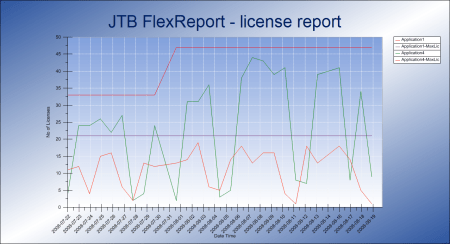
What is JTB FlexReport? JTB FlexReport is a license usage report tool for applications licensed using network license systems like FlexNet (FlexNet), IBM LUM, DSLS, SPLM, Sentinel, LM-X, RLM, EPLAN (ELM), HASP, DPT, Tebis, CodeMeter among others. Track usage over time, hours used and much more. With JTB Process Monitor much more can be monitored like Bentley MicroStation, Autodesk Named User licenses and Autodesk Flex.

If you have FlexNet licenses check out our JTB FlexReport LT freeware. App for AutoCAD available.

Autodesk user? See these posts:

You may still find use for JTB FlexReport together with JTB Process Monitor. We can help analyze your historic usage so you can prepare for the switch.


What’s on your bookshelf?: Citizen Sleeper’s Gareth Damian Martin


Hello reader who is also a reader, and welcome to Booked For The Week – our new Sunday feature where we ask a selection of cool industry folks questions about books! You know books, right? They’re a bit like RPS articles, but heavier and smell a bit nicer. This week, it’s Citizen Sleeper and In Other Waters‘ creator Gareth Damian Martin! Cheers Gareth! Mind if we have a nose at your bookshelf?

What are you currently reading?

Gogmagog by Jeff Noon and Steve Beard is my current read, it’s a wonderfully fecund weird fantasy in an alternate post-war London (Ludwich) where the river is the ghost of an ancient dragon and the protagonist, an ancient plant/human hybrid witch, must travel through it by boat. It’s incredibly rich and witty, can strongly recommend it!

What did you last read?

As I work on Citizen Sleeper 2 I’ve been going back through William Gibson’s stuff as his writing is a key influence on that game. I just finished Virtual Light, and it was even better than I remember. Gibson’s prose is so thick with detail and world building and he has an incredibly sharp observational style. Reading it always makes me excited to write! Plus I have once again fallen in love with bike messenger culture thanks to it. I have a couple more books on my stack (Messengers, Ultimate Rush) so maybe I’ll one day turn that love into something…

What are you eyeing up next?

Pink Slime by Fernanda Trias is top of my list right now, its a Uruguayan novel about a strange city in the grip of a plague—I read a few pages in the bookshop and fell in love with it immediately, but I’ve got a lot of Citizen Sleeper research reading I need to get through first!

What book do you quote from the most?

I’m not much of a quoter but I think William Gibson’s turns of phrase most of come to mind, especially from Neuromancer, I always have “bright lattices of logic unfolding across the colorless void” rattling around in my head for some reason! Bits of Cormac Mccarthy also come to me at random times. I love stylised prose.

What book do you find yourself bothering friends to read?

Stages of Rot by Linnea Sterte is a graphic novel that I own 5 copies of expressly to lend and gift to people when I need too. Its a gorgeous ecological fantasy that is so sumptuous and emotionally rich that I find myself thinking of it and going back to it all the time. It’s impossible not to fall in love with it.

What book would you like to see someone adapt to a game?

Personally I have always wanted to adapt Mervyn Peake’s Gormenghast (or perhaps more realistically the slimmer and more adaptable novella, set in the Gormenghast world, Boy In Darkness) but in terms of other people adapting things—I think I’d LOVE to play something set in one of Jeff Vandermeer’s worlds. An open world take on Annhilation. A survival game in the wastelands of Borne. Or best of all, a Dishonored-like set in the glorious mycological city of Ambergris. Just thinking about it makes me excited!

We thought Gareth had covered all the books already, but it turns out there’s loads of them, so pop back next week for another cool person telling us about their favourites. Book for now! (still working on that one.)


How Do Solar Panels Work?


For the first half of 2023, renewable sources, including solar, wind, and hydro, produced 25% of America’s electricity. But how do solar panels make electricity out of light? Can they be a viable replacement for fossil fuels at scale? In this article, we’ll look at how solar power works and what it can—and can’t—do.

How Do Solar Panels Generate Electricity?

The Earth’s surface receives about a kilowatt of solar energy per square meter under optimal conditions, which means “at the equator, at solar noon.” The best solar cells can wring out nearly half that light energy as electricity.

It happens like this: A photon from the sun strikes the solar panel’s photoactive layer, which “knocks” an electron out the far side of the panel. This is possible because solar panels use semiconductors to transform light into electricity.

Silicon, like carbon, has a half-full outermost valence shell. Monocrystalline solar panels use layers of silicon doped with different types of atoms, like boron and phosphorus, that have opposing charges (think +1/-1). Doping in this way turns a regular silicon crystal lattice into n-type and p-type semiconductors. N-type semiconductors have mobile electrons; p-type semiconductors have mobile “holes.” It turns the whole system into an electrical turnstile, forcing electrons to move in one direction.

Mechanism by which a photovoltaic panel transforms light into electricity


Credit: American Chemical Society

When sunlight strikes the outermost layer, the atoms absorb enough energy to punt them across the ‘band gap.’ (You can’t have, say, 85% of an electron, or 110%—the system will find the nearest stable energy level. The ‘band gap’ is the unstable range of energy levels between the stable ones.) To get back into a stable configuration, the system sheds energy as an electron. The n-type layer already has ‘extra’ electrons, so it’s disinclined to take them back. Instead, the extra charge is passed through an electrode.

What results is electricity in the form of direct current (DC). To be useful to AC appliances, that DC power must go through an inverter.

There are a few dominant types of solar panel technology. Perhaps best known are solar cells made of silicon, in allotropic arrangements from amorphous silicon to a rigid crystal lattice. But there are also solar dye cells, thin film solar cells, and solar panels made of a different type of crystal called perovskites. These approaches use semiconducting materials to produce photovoltaic energy—electricity harvested directly from sunlight.

Crystalline Silicon

Most standalone solar panels, including the classic, hard-panel 200W workhorse solar cells, are made of crystalline silicon. Embedded systems and devices, such as the humble solar walkway light and solar-powered calculators, also frequently use crystalline silicon solar cells. This type of solar cell can generate solar power at 15-20% efficiency, which means it outputs 15-20% of the energy it receives from the sun.

Publicity image of a house with a Tesla solar roof system and a Tesla in its driveway

Tesla Solar Roof tiles use crystalline silicon cells.
Credit: Tesla

Crystalline silicon is often the material of choice for solar cells because of its durability. The windows on the space shuttles were made of pure fused crystalline silicon. Similarly, crystalline silicon panels can withstand more abuse and weathering than some thin-film solar cells.

Newer residential solar technologies like the Tesla Solar Panel and Solar Roof, GAF’s Timberline Solar Energy Shingles, CertainTeed Apollo II shingles and tiles, and Luma Solar’s solar shingles use crystalline silicon. Some manufacturers cover their panels with a layer of tempered glass to prevent damage from hail.

Thin-Film Solar Cells

Thin-film solar cells are what you get when, instead of using a rigid crystal wafer shot through with dopants, you vapor deposit photoactive semiconductor molecules onto a sliver of crystal, or a ribbon of flexible polymer.

Many thin-film cells use amorphous silicon, which can absorb energy from UV, visible, and infrared light. Others use polycrystalline silicon, vapor deposited in a thin film on glass, which can reduce reflections and better trap light.

Experimental transparent thin-film solar cell by Sandia US National Laboratories

Researchers at Sandia National Laboratories developed tiny glitter-sized photovoltaic cells that are only 14 to 20 micrometers thick (a human hair is approximately 70 micrometers thick), yet perform at about the same efficiency as solar devices that use 100 times more silicon.
Credit: energy.gov

Thin-film cells use less material than monocrystalline panels, so they may have a lower life-cycle ecological impact. Some thin-film systems can reach efficiencies of 47% by using multiple types of photoreactive materials, a little bit like how plants use different photopigments to catch different wavelengths of light. However, like perovskites, they experience a drop-off in electrical output during the first months of their useful life.

What Is a Perovskite, Anyway?

Perovskites are minerals of a specific crystal structure. Where crystalline silicon cells use dopant ions to facilitate electron handoffs between layers of positive and negative charge, perovskites’ own crystal lattice alternates between anions and cations. This means they can serve as a solid-state solar cell.

Perovskite solar cells have gathered some buzz recently because they are cheap and straightforward to manufacture. This cell type may be useful in ambiently powered embedded systems, such as the Internet of Things. There are a lot of different perovskite chemistries, many of which are outlined here:

Efficiency of many types of solar cell

Perovskites and other fun solar cell types are shown in red.
Credit: U.S. Department of Energy’s National Renewable Energy Laboratory (NREL)

Compared with monocrystalline silicon solar cells, some perovskite cells can generate more electrical power from the same amount of solar energy. However, perovskites are less durable; because their chemistry is unstable, they experience a characteristic drop-off in energy production over the first few years of operation. The best-understood perovskites also frequently use lead. While the crystals don’t just drop free lead ions, lead mining and processing present their own hazards. Tin will do the job but at a lower efficiency.

Photoreactive Pigments: ‘Artificial Photosynthesis’

Another fun solar power technology is the dye-sensitized solar cell. These flexible cells use a photoreactive dye mixed with semiconductor nanoparticles as the top layer. Usually, that mixture floats on a liquid electrolyte that acts like the p-type layer on a crystalline cell and its own electrode simultaneously.

Like perovskites, these flexible cells conduct their reactions throughout their volume instead of along a plane. This has led some experts to refer to dye cells as ‘artificial photosynthesis.’ But perovskites are crystals, and the same liquid electrolyte that makes solar dye cells so flexible makes them vulnerable to chemical degradation and temperature extremes.

How Does Solar Power Scale Up?

There are two principal ways that we currently use solar energy to generate power on a scale suitable for use as a public utility. One you’ve probably seen is the standard-issue solar farm. These facilities provide energy by parking rows and rows of solar panels on land usually not useful for much else—although recently, scientists have been researching ways to use the shaded ground beneath the panels for different purposes, such as energy storage in the form of batteries. One interesting proposal involves growing shortish, shade-loving plants like coffee and cacao.

Solar panels in a field of flowers


Credit: Andres Siimon/Unsplash

Put bluntly, solar power only works when there’s sunlight to gather. This means power banks and diversified energy production are pretty important parts of utility-scale solar power production: It’s critical to store any extra energy to make hay while the proverbial sun shines. Tesla, in addition to its solar power panels and solar roof tiles, offers a battery backup called the Megapack. Arrays of dozens or hundreds of these power storage cells are already in operation, facilitating the use of solar power and other renewable energy sources.

Another way we’ve scaled up solar power is with concentrating solar plants, like Ivanpah in California. Instead of producing power via the photoelectric effect, these systems use mirrors or lenses to concentrate solar energy into a (relatively) focused beam pointed toward a central collecting tower. There, the solar energy drives a heat engine, often a steam turbine, which converts heat into electricity.

A concentrating solar thermal power station in Dunhuang, Jiquan City, Gansu Province, China

A concentrating solar thermal power plant in Jiquan City, China.
Credit: Li Damao/Unsplash

From June 2021 to June 2022, 17.6 GW of new utility-scale solar capacity came online in the United States. This brings us to about 66 GW of total utility-scale solar power. Last year, between power plants and distributed solar installations, solar power provided 12% of America’s electricity. While that’s just a small fraction of total domestic power generation, we’re adding more new capacity yearly. As renewables replace older non-renewable power plants, solar power is sure to have its day in the sun.

15 Fitness and Health Magazines That Want to Publish Your Work


America is obsessed with health and wellness.

Despite being described as one of the unhealthiest countries in the world, the American people take in an abundance of information on ways to improve their health, get fit and just feel better.

To satiate those needs, there is no shortage of magazines dedicated to the topic — and that means ample opportunity for freelance writers looking to break into the consumer health market.

Whether you’re writing about the latest dieting trend sweeping the nation or hoping to share your experience trying out a new fitness regimen with like-minded individuals, the 22 health and fitness magazines below are great places to get started.

New call-to-actionNew call-to-action

22 health and fitness magazines to consider pitching

Below are 22 health magazines that cover everything from fitness and nutrition to holistic medicine, spirituality, and living with challenging health conditions.

1. IDEA Publications

The IDEA Health and Fitness Association has four publications targeting fitness professionals including personal trainers, fitness instructors and health and wellness professionals: IDEA Fitness Journal, IDEA Trainer Success, IDEA Fitness Manager and IDEA Pilates Today.

Check out the author guidelines and submit a query that includes why your article is important, why you’re the right person to write it, a brief outline of what you’ll cover and an explanation of how you’ll include “practical how-to information” within the article.

While the site does not specify pay rates, it does confirm it will pay “within 60 days of final acceptance.”

2. Inside Fitness Magazine

Qualified industry professionals can pitch their ideas to Inside Fitness Magazine. This Canadian publication covers everything from training to food and nutrition.

The magazine’s website offers more information for contributors, but is mum on pay rates.

3. Healthy Living Magazine

Healthy Living Magazine covers the full gamut from health and anti-aging to beauty and parenting content. While it doesn’t include specific pay information on its site, varies based on the department; amount of editing required; and pageviews.

4. Vibrant Life

This bimonthly lifestyle magazine “promotes physical health, mental clarity and spiritual balance from a practical, Christian perspective.” The publication looks for everything from exercise and nutrition articles to interviews, self-help, environmental stewardship, spiritual balance and family-related articles.

Payment ranges from $100-$300.

5. Radish

This magazine focuses on “healthy living from the ground up” and covers natural foods, products and services in Illinois and Iowa with a focus on healthy, sustainable lifestyles.

Radish typically pays $50-150 per article.

6. Whole Life Times

Freelancers write most of the articles that appear in Whole Life Times, a magazine that targets the holistic community. It addresses everything from natural health to yoga, spirituality, the environment and “anything that deals with a progressive, healthy lifestyle.”

Whole Life Times is based in Southern California and wants local angles. The writers guidelines specify pay of $35-$125 for shorter stories and $75-$150 for longer ones; Who Pays Writers reported one person making 13 cents per word.

7. Poz

Poz’s audience is the HIV+ community, but it accepts submissions from any qualified writer, regardless of HIV status. Topics cover everything from treatments to nonprofits to people living with the condition. Back issues are available online.

8. The Health Journal

This magazine covers a wide range of topics related to health, fitness and wellness, including parenting, senior health and natural healing.

Writer guidelines are available online. The Health Journal told TWL that pay rates “vary based on experience and skill level” and that the publication is “always looking for fresh voices.”

9. Cure

Health writers, especially those with experience writing about cancer, may wish to pitch Cure, which focuses on people with the disease. The publication requires a medical writing background and offers specific writing guidelines covering everything from queries to fact-checking procedures.

10. Spirituality & Health

Writers looking to cover topics ranging from Eastern philosophy to mainstream religion to social justice and wellness-related issues can pitch Spirituality & Health.

Its guidelines say it will pay up to $500, depending on the type of piece submitted. 

11. Natural Awakenings

Natural living and sustainable lifestyle topics are the focus of this publication, which especially seeks to provide facts and statistics that will keep readers engaged. Additionally, it is looking for global briefs and health briefs in addition to regular articles.

12. The Aquarian

The Aquarian is a Canadian print publication that publishes the first week of March, June, September and December. It focuses on “holistic health (natural, complementary, alternative) and progressive environmental, social, cultural, political and spiritual issues” to “shed new light on the path to greater meaning.”

While its pay rates vary, its newspaper article rates typically range from $25 to $50 and online articles from $10 to $25.

13. Eating Well

EatingWell is a national food magazine publishing 10 times a year that focuses on healthy eating, from the standpoints of cooking, nutrition science and food network-related social issues. It pays up to $1 per word.

14. Mother Earth Living

Mother Earth Living focuses on maintaining a healthy, environmentally conscious lifestyle in the home. While it doesn’t list specific payment information, Mother Earth does pay upon publication.

15. Men’s Health

Men’s Health is a leading lifestyle magazine offering authoritative advice on fitness, nutrition, style, and relationships for men worldwide. With expert insights and cutting-edge content, it empowers men to live healthier, happier, and more fulfilling lives.

16. Women’s Health

Women’s Health is a premier magazine dedicated to empowering women with the latest insights on fitness, nutrition, beauty, and wellness. Through expert guidance and inspiring content, it equips women with the knowledge and tools to prioritize their health and lead vibrant lifestyles.

17. Runner’s World

Runner’s World is the ultimate resource for running enthusiasts, providing expert advice, training tips, gear reviews, and inspiring stories for runners of all levels. With a passion for the sport and a commitment to helping readers achieve their running goals, Runner’s World is the go-to destination for everything related to running.

18. Shape

Shape Magazine is a leading authority in women’s fitness, offering expert advice on workouts, nutrition, beauty, and overall wellness. With a focus on empowering women to embrace a healthy lifestyle, Shape provides inspiration and practical tips for achieving fitness goals and feeling confident in mind and body.

19. Muscle & Fitness

Muscle & Fitness is a premier publication catering to bodybuilders, athletes, and fitness enthusiasts, providing expert guidance on strength training, nutrition, and supplementation. With a legacy of over 80 years, Muscle & Fitness continues to inspire and educate readers to achieve their fitness goals and unlock their full potential.

20. Prevention

Prevention Magazine is a trusted source for wellness advice, offering insights on nutrition, fitness, natural remedies, and preventive healthcare. With a mission to empower readers to lead healthier lives and make informed choices, Prevention equips individuals with the tools they need to thrive both mentally and physically.

21. Outside

Outside Magazine is the ultimate guide to adventure and outdoor lifestyle, inspiring readers with captivating stories, expert advice, and breathtaking photography. With a focus on exploration, conservation, and pushing boundaries, Outside fuels the spirit of adventure in its audience, encouraging them to embrace the wonders of the natural world.

22. Healthline

Healthline is a leading online health platform providing trusted medical information, expert advice, and actionable insights to millions of readers worldwide. With a commitment to empowering individuals to make informed decisions about their health, Healthline covers a wide range of topics, including fitness, nutrition, mental health, and medical news.

What’s your favorite health or fitness publication? Have you submitted any pitches to them?

This is an updated version of a story that was previously published. We update our posts as often as possible to ensure they’re useful for our readers.

New call-to-actionNew call-to-action

Photo via Zodiacphoto / Shutterstock 

Meta’s ‘set it and forget it’ AI ad tools are misfiring and blowing through cash


It was Valentine’s Day when Meta’s ad platform started going off the rails. RC Williams, the co-founder of the Philadelphia-based marketing agency 1-800-D2C, had set one of Meta’s automated ad tools to run campaigns for two separate clients. But when he checked the platform that day, he found that Meta had blown through roughly 75 percent of the daily ad budgets for both clients in under a couple of hours.

Williams told The Verge that the ads’ CPMs, or cost per impressions, were roughly 10 times higher than normal. A usual CPM of under $28 had inflated to roughly $250, way above the industry average. That would have been bad enough if the revenue earned from those ads wasn’t nearly zero. If you’re not a marketer, this might feel like spending a week’s worth of grocery money on a prime cut of wagyu at a steakhouse, only for the waiter to return with a floppy slider.

The Verge spoke to several marketers and businesses that advertise on Meta’s platforms who tell a similar story. Meta’s automated ad platform has been blowing through budgets and failing to deliver sales. Small businesses have seen their ad dollars get wiped out and wasted as a result, and some have said the bouts of overspending are driving them from Meta’s platforms.

“Meta’s unwillingness to be transparent or accountable with the performance issues and glitches is causing mass uncertainty.”

“Meta’s unwillingness to be transparent or accountable with the performance issues and glitches is causing mass uncertainty,” Karl Baker, founder of meditation startup Mindfulness Works, wrote in a message to The Verge.

The faulty ad service in question, known as Advantage Plus shopping campaigns, is part of a full suite of AI-enabled ad tools that Meta pitches to businesses as a faster and more efficient alternative to manual ad campaigns. To create an ad campaign, advertisers upload their creative assets, pick their conversion goals (e.g., getting more customers to make purchases on Instagram), and then set their budget caps. Meta hyped Advantage Plus shopping campaigns during earnings calls as a carefree, “set it and forget it” automated solution to online ads. But that hasn’t been the case, marketers say. 

Advantage Plus shopping campaigns have been unpredictable, seemingly working well on some days and then not so well on other days. The subreddit r/FacebookAds has become a sort of 24/7 help desk for Advantage Plus. Recent headings discussing the issues include “Advantage+ sucks,” “Is Facebook broken rn,” and “Is it just me?”

“People are always saying, ‘Is it me?’ or ‘Is it Meta?’” Baker said.

What Williams and many other marketers thought was a one-time glitch by Advantage Plus ended up becoming a recurring incident for weeks. “Since February 14th, [Advantage Plus] has overspent on numerous occasions and ignored the cost caps we have in place on it,” he said. 

Problems have persisted into April. “We have a couple of clients for whom we completely stopped Advantage Plus due to these anomalies,” said Aniruddha Mishra, director of growth at Miami-based digital marketing agency Node Media. He noted that for some clients, CPMs on Meta were anywhere from three to four times more expensive than they were last year. 

Advertisers say getting support from Meta has been a challenge, too. Meta laid off thousands of employees over the past year and gutted many of its customer support teams. As Digiday reported, Meta’s ad accounts teams were downsized, and many client inquiries are now being directed to AI chatbots. Several of the marketers that The Verge spoke to said that there’s been a noticeable decline in responsiveness from Meta since the transition. 

“The only thing [Meta] acknowledged was there was a platform bug on February 14th and apologized for the inconvenience.”

“The only thing [Meta] acknowledged was there was a platform bug on February 14th and apologized for the inconvenience,” said Williams. “They didn’t tell us what actually happened.”

Meta eventually refunded 1-800-D2C for the incident, but Williams said it took him several tries to finally get someone from the company to acknowledge him. The company issued the refund almost a month after the incident.

While some users speculate that Advantage Plus is “glitching” or “broken,” Meta’s response has been to insist that the tool is functioning as it should. 

“I’ve reached out to representatives at Meta, and I’ve been told that they’re not aware of any sort of glitch, which is truly shocking, because all my co-founder friends who work in e-commerce share this sentiment. They’re dealing with the same thing,” said Adriel Darvish, the CEO of a luxury handbag and jewelry service called Switch, in a phone interview with The Verge. “This is something universal that everyone is experiencing.”

With the problems continuing to pile on, Williams said his marketing firm completely halted its use of Advantage Plus in early April. Instead, they’ve gone back to the old-fashioned method of buying Facebook and Instagram ads manually. Notably, going back to the pre-AI, pre-automated way of doing things hasn’t really taken a toll on the firm’s human labor force. 

“Maybe an extra 10 to 20 minutes or so to build out the ad sets, but nothing crazy,” said Williams. 

Meta first launched Advantage Plus shopping campaigns globally in the fall of 2022, when the state of online advertising was in an uncertain place. Just a year before, Apple had launched its App Tracking Transparency feature with iOS 14.5, giving users an easy way to opt out of the third-party app-based tracking that powers many online ads. Meta opposed the change, saying it would “change the internet as we know it” and threaten the future of many online businesses. 

But Meta’s real concern was no doubt the threat to its own ad business, which chalked up a $10 billion dip in ad revenue in 2021 due to Apple’s changes. Targeted ads were no longer as effective since brands no longer had access to as much data, and they were becoming more expensive to boot. As a consequence, brands cut back on their online ad spend. 

With Advantage Plus shopping campaigns, Meta promised that AI and machine learning models could effectively replace the big gaping hole left by Apple’s privacy update. 

In lieu of tracking users, Advantage Plus uses the advertiser’s own first-party sales data to help target ads. But online advertisers would be effectively handing the reins over to Meta and no longer have access to the granular targeting controls and detailed analytics they did prior to Apple’s privacy changes.

Although there was a bit of a “learning curve” with Advantage Plus shopping, the tool gradually began to improve. Brands noticed their AI-driven Meta ad campaigns were performing well and poured more of their budgets into the platform. Adweek reported that by April 2023, marketers who had ditched Meta for TikTok ads and newer opportunities like connected TV were starting to come back

Advertisers had a honeymoon period with Advantage Plus last year, especially as Meta began packing it with new features. “Advantage Plus was working so well at this point, for most of the clients, that almost 50 to 70 percent of their ad budget is on Meta’s Advantage Plus campaigns. There are so many targeting and evolutions they’ve done in the past year and a half. It delivers a really strong performance if you know how to tweak the right parameters,” said Mishra. 

In an email to The Verge on April 15th, Meta spokesperson Kash Ayodele said the company had fixed a “few technical issues” with the Advantage Plus ad platform. “Our ads system is working as expected for the vast majority of advertisers. We recently fixed a few technical issues and are researching a small amount of additional reports from advertisers to ensure the best possible results for businesses using our apps.”

But marketers are still complaining about underperformance on the platform. “Things have recovered for many, but not all. It’s been a very turbulent end to Q1 and beginning of Q2,” wrote media buyer David Herrmann in a direct message to The Verge

The dramatic increase in cost per click (CPC) and CPM is not just a Meta problem — online ads as a whole are getting costlier due to what marketers say are increased inefficiencies, which automation has only made worse. This significantly decreases profits for individual advertisers. And fixing this problem may be more complicated than fixing a “glitch” or series of glitches on Advantage Plus, especially since the millions that Meta as well as Google have poured into automated advertising hasn’t led to more successful ad campaigns. 

“The performance of accounts and campaigns hasn’t intrinsically increased [over the last three years],” noted Hawke Media’s Areen Mayelan. 

When ad campaigns are automated, such as with Meta’s Advantage Plus, “things get brushed under the rug,” said Mayelan. Everything from loose keywords to loose audiences to low-quality ads all effectively become inefficiencies that increase the cost of ads for brands. “Inefficiency results in an increase in CPCs and CPMs, because you’re creating artificial ‘competition’ where there otherwise might not be.” 

Meanwhile, Meta only stands to benefit from the boost in ad revenue. According to Meta’s first quarter earnings call on Wednesday, its ad business is doing just fine. Ad revenue amounted to $35.64 billion for the quarter, an impressive jump of 27 percent from this time in 2023.

MEGATON MUSASHI W WIRED Free Download


MEGATON MUSASHI W WIRED Free Download By WorldofpcgamesMEGATON MUSASHI W WIRED Free Download By Worldofpcgames


MEGATON MUSASHI W WIRED Direct Download:

Presenting MEGATON MUSASHI W WIRED, the newest phenomenon in gaming that will undoubtedly have you glued to your screen for many hours! This action-packed game, created by Level-5, transports players on a thrilling adventure through a futuristic world full of monsters, mechs, and mayhem. MEGATON MUSASHI W WIRED delivers an unmatched gaming experience that will leave you wanting more with its breathtaking graphics, engrossing gameplay, and gripping plot. The best part is that MEGATON MUSASHI W WIRED is currently free! Yes, you did hear it accurately. We are giving all of our visitors to Worldof-pcgames a free download of this amazing game as part of a special campaign. Visit our website, select the download link, and adhere to the simple steps to begin playing MEGATON MUSASHI W WIRED right now.

But there’s still more! When you download MEGATON MUSASHI W WIRED from Worldof-pcgames, you can take advantage of exclusive bonuses and exclusive bonus content in addition to the game’s free download. As we like to reward our regular visitors, we’re enhancing your gaming experience with extra in-game goods and enhancements. Why then wait? Visit our website right now to get your complimentary copy of MEGATON MUSASHI W WIRED and start exploring an amazing and entertaining universe. It’s now easier than ever to obtain MEGATON MUSASHI W WIRED. You can play this amazing game for free and embark on an adrenaline-filled experience unlike anything else with only a few clicks.

Features and System Requirements:

  • Hack and slash through missions to obtain legendary items!
  • Fight alongside your friends to defeat powerful enemies, or take them on in head-to-head battles!
  • Collect all of the parts to assemble your own personalized battle machine!

1 :: Operating System :: Windows XP/7/8/8./10.
2 :: Processor: Intel Core i3-3225 / AMD A10-7850K
3 :: Ram :: 8 GB RAM
4 :: DirectX: Version 11
5 :: Graphics:: GeForce GTX 650Ti / Radeon R7 370
6 :: Space Storage:: 45 GB space

Turn Off Your Antivirus Before Installing Any Game

1 :: Download Game
2 :: Extract Game
3 :: Launch The Game
4 :: Have Fun 🙂

8 Must-know AutoCAD Viewport Tips & Tricks – How to Create, Scale, and Master Viewports! Examples


Hey Everybody!

I hope your week is going well so far and you’ve been able to enjoy some of the nice weather lately!

Around here it’s been hot and luckily not too smoky from forest fires, and we have some rain in the forecast which is much needed.

A few weeks ago my family and I went out on a bit of an exploring mission to find a lake we had never been to and I happened to bring along my drone to get a few pictures.

 
After getting home and taking a look at them, I’m always amazed at how easy technology can make it to
get more information and data than we’ve ever had available for our designs or hobbies. In my case, I use a DJI Mini but there are so many different options that make getting images easy!

This brings me to the sponsor of today’s video as well as the topic of the video (viewports in AutoCAD) which we will touch on next.

Today’s video is sponsored by Plex Earth. Plex Earth allows you to instantly import recent and historical imagery, terrain data, and contours directly into our AutoCAD drawings. They even have the option to order and schedule a drone flight for your project area within the app if you need even more up-to-date imagery!

If you haven’t given Plex Earth a try yet, I highly recommend them. If you use the link down below, you can get a free trial of Plex earth pro for cad intentions viewers.
Try Plex Earth Now: http://cadintentions.com/plex_ci

Now let’s jump in, this week I wanted to dive deep into some of my favorite tips and tricks for Creating Viewports and working with them quickly!

As I’m sure you’re probably aware, viewports and layouts tend to be the most confusing and asked-about topics when it comes to AutoCAD or Civil 3d.

I completely understand the frustration and can sympathize with those that tend to just ignore or avoid using them entirely.

But after being a major part of AutoCAD/Civil 3D and the drawing creation process for years, I wanted to help and share today’s video where we walk through the process of creating a Site/Key plan drawing using multiple viewports and using a handful of must-know Viewport tips & tricks in the process!

By following these steps and using the commands and tips in the video, you’ll be able to easily create multiple viewports, understand the locking and unlocking of views, how to cycle between them, what to do if you get stuck in a viewport, and much more!

Don’t miss today’s video: 8 Must-know AutoCAD Viewport Tips & Tricks

That’s all for today, I hope you were able to take something away from the tutorial, and if you have any questions be sure to leave a comment or reach out on Twitter @cadintentions.

As always, thank you so much for reading, I am excited to be back and posting regularly on the blog and hope you all will follow along.

Cheers, and happy Drafting!

PS. If you liked today’s video or any of my videos/tutorials and you want to learn over 15 years of AutoCAD Tips & Tricks in a hurry, you can use this link to get my AutoCAD Fundamentals Course and join 100’s of members of the course, get started right now!


Also published on Medium.

The following two tabs change content below.

Brandon is a Civil Designer, Aspiring Blogger/Creator, Husband, Father to two Amazing Kids and Tech Aficionado from a small town in Canada. He has been obsessed with design and technology since he can remember and working as a Civil Designer for nearly as long. Brandon’s blog and Youtube channel, CADIntentions.com has been his outlet and excuse for keeping up with new tech and trends in the CAD design world for the last 10 years growing to more than 60,000 subscribers and over 15,000,000 views, while also being the source of many great friendships and unique opportunities.

If you would like to Sponsor CAD Intentions or Work together in some way, Please visit my About Page and send me an email: http://cadintentions.com/about-me/