We just got a new Elden Ring: Shadow Of The Erdtree story trailer yesterday. As is their druthers, FromSoft have at once made the events it depicts feel of earth-shattering importance while providing basically no concrete information. A lot of people will be putting out gargantuan theory posts right now, rambling on about Miquella, the Crucible, the Golden Order blah blah. This is all a distraction. Anyone with eyes can tell you that the primary movers and shakers of this final chapter in the Lands Between are a secret faction of hitherto secret spear people. You’re likely confused, and that’s understandable. As the foremost authority on ephemeral nonsense in Elden Ring, I’m the only one who has your back here.
Image credit: FromSoftware
The first ill omen portenting toward the encroaching spear-mageddon that threatens to consume Elden Ring’s world is cleverly disguised as just ‘a bunch of blokes with spears’. If you look closely, you’ll notice single bloke with an axe. This is what tipped me off, you see. If everyone had spears, I wouldn’t be so suspicious, but this this single axe feels like a such a fat carp hastily painted red and herring-shaped. It’s meant to convince us the spear people aren’t taking over, but I know better.
After a close-up shot of another soldier pulling his – you guessed it – spear from a corpse. We’re treated to this telling shot:
Image credit: FromSoftware
It’s like they’re not even trying to hide it anymore! Look at the corpse! Also, look at how uniform the formation is. If you trace each spear point to its opposite point, you might begin to notice a sort of sigil-code taking shape. In spear-ish, this code translates to: Look at all these spears! Which is a sort of bullish rallying cry meant to reinforce notions of spear-iority. Truly fiendish. Here’s the next shot:
Image credit: FromSoftware
Yes, Messmer, the DLC’s new antagonist, I know, I know. But what’s that he’s got clutched in his hand? It’s spears all the way down! Spear-oboros! I’m honestly too overcome with revelations for words, so I will leave the shot-by-shot analysis here, partly to leave the remaining spears for you to discover, but mostly because this shitpost had run its course by the second paragraph. I hope this was of use to you intrepid lore hunters, but if it wasn’t, I’m keen to highlight that my headline has the words ‘Elden Ring’ and ‘rated’ in the title, which I assume is how my writing will be judged from here on out.
The future always starts with developers. They determine the speed of innovation, and never has that been more true than today, in the era of Generative AI. We’re already seeing GenAI have a profound impact on the way that we build applications and collaborate with our colleagues. More developers will be empowered to create with technology by having access to a coach to guide you through each stage of your learning journey. And user expectations are evolving quickly so that today’s end-users expect their apps already know about their context and history, and even anticipate their next step.
There’s a lot of change on the horizon! But it can be hard to find the time to learn when we’re overwhelmed and bogged down with technical debt. Developers continually have to context switch between tools, which impacts their cognitive load and ability to focus. We know that even on a good day, developers only spend about 2 hours a day coding, and it takes them 23 minutes to regain focus after context switching. This, combined with randomizing meetings to assemble resources you need can make you feel exhausted at the end of the day and frustrated by inefficiencies. All this can take the joy out of work and make developing software feel like toil.
But we know there’s a path to developer happiness—where devs can focus more on coding and less on ops; where they can innovate at the speed of their creativity; and where they can get going fast, without having to worry about managing the infrastructure their apps depend upon.
Dev happiness = staying in the flow
One of our guiding principles is to bring the best tools to you where you live—in your code editing tools—so you can stay in the flow! At Build this week we’re announcing some pretty amazing developer experiences to bring more joy and less toil to your life as a developer.
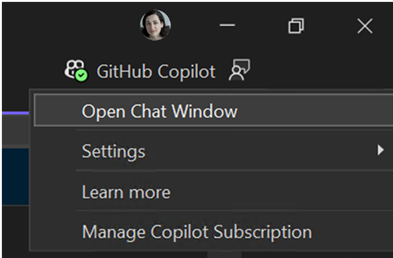
For starters, we’re announcing the general availability of Visual Studio 17.10. In this version. We’ve plugged GitHub Copilot everywhere throughout the IDE, so it changes how you write, learn, test, search, and fix code in your apps.
We’re also announcing the preview of GitHub Copilot for Azure, an extension that integrates seamlessly with GitHub Copilot chat in Visual Studio Code and Visual Studio, bringing Azure expertise right to your fingertips! Using GitHub Copilot for Azure, you can learn about Azure resources and best practices; explore and manage Azure resources; and troubleshoot issues and locate relevant logs and code. GitHub Copilot for Azure is built atop a general extensibility surface area we’ve introduced into GitHub Copilot. Soon you won’t have to context switch as all your favorite tools will be integrated into your code! More on that in a bit…
.NET Aspire is now generally available
.NET Aspire codifies the best practices for cloud-native development with tools for multi-project management, built-in HTTP resiliency, health checks, OpenTelemetry, and easy multi-node deployment via Visual Studio, VS Code, and the Azure Developer CLI. .NET Aspire makes it easy to get started with templates and a set of curated components based on our opinionated stack inside Microsoft and co-developed with the .NET community.
Using .NET Aspire, it’s easy to build and debug using service discovery and a completely new developer dashboard to see real-time telemetry and metrics, and to get a foothold on diagnosing issues. You can run and deploy with a single command to launch and run multiple services. Being able to express app topology in C# makes cloud deployment easy to any cloud destination.
Lots of great innovations to bring the best of all your tools into where you live—your favorite code editor tools—so you can stay in the flow!
Building intelligent apps
Over the past year we’ve witnessed the birth of one of the most pivotal technological innovations in history: Generative AI (GenAI). It has changed user expectations for every experience and continues to shape how businesses think of technology as an enabler for rapid growth.
We refer to any app that uses artificial intelligence for all or some of its functionality as an “intelligent app.” The way intelligent apps change experiences and operations are what can become competitive differentiators. It starts by thinking about the use cases where your data can provide actionable insights that can improve your processes or your customer experience. This is a massive paradigm shift—it’s changing user expectations for how we all interact with technology. Natural language is the new user interface; we simply talk to it. I can ask it questions and it already has the context of my account or my history and it can even anticipate my needs. And these apps continually improve by learning while in production. What that means is that the traditional developer inner and outer loop also evolves to facilitate the evaluation cycle and continuous learning once deployed to production.
Whether you’re using a foundational model like GPT3, Phi-3, building your own custom machine learning, or augmenting an existing model with fine-tuning, these apps go beyond an algorithm recommending content based on what you click, tap, listen to, or watch. Intelligent apps learn from the user’s inputs and data to continually get better over time, while observing responsible AI best-practices.
For our developer tools and application building blocks, our goals are to…
Make building GenAI apps more approachable
Reduce the effort required to build, manage, and evolve GenAI apps
Support the end-to-end app development lifecycle, including the new tasks necessary to build intelligent apps — like evaluating models and prompts and preparing data
All while maintaining enterprise-grade security, scalability, compliance, and governance according to our DevOps and platform engineering best practices
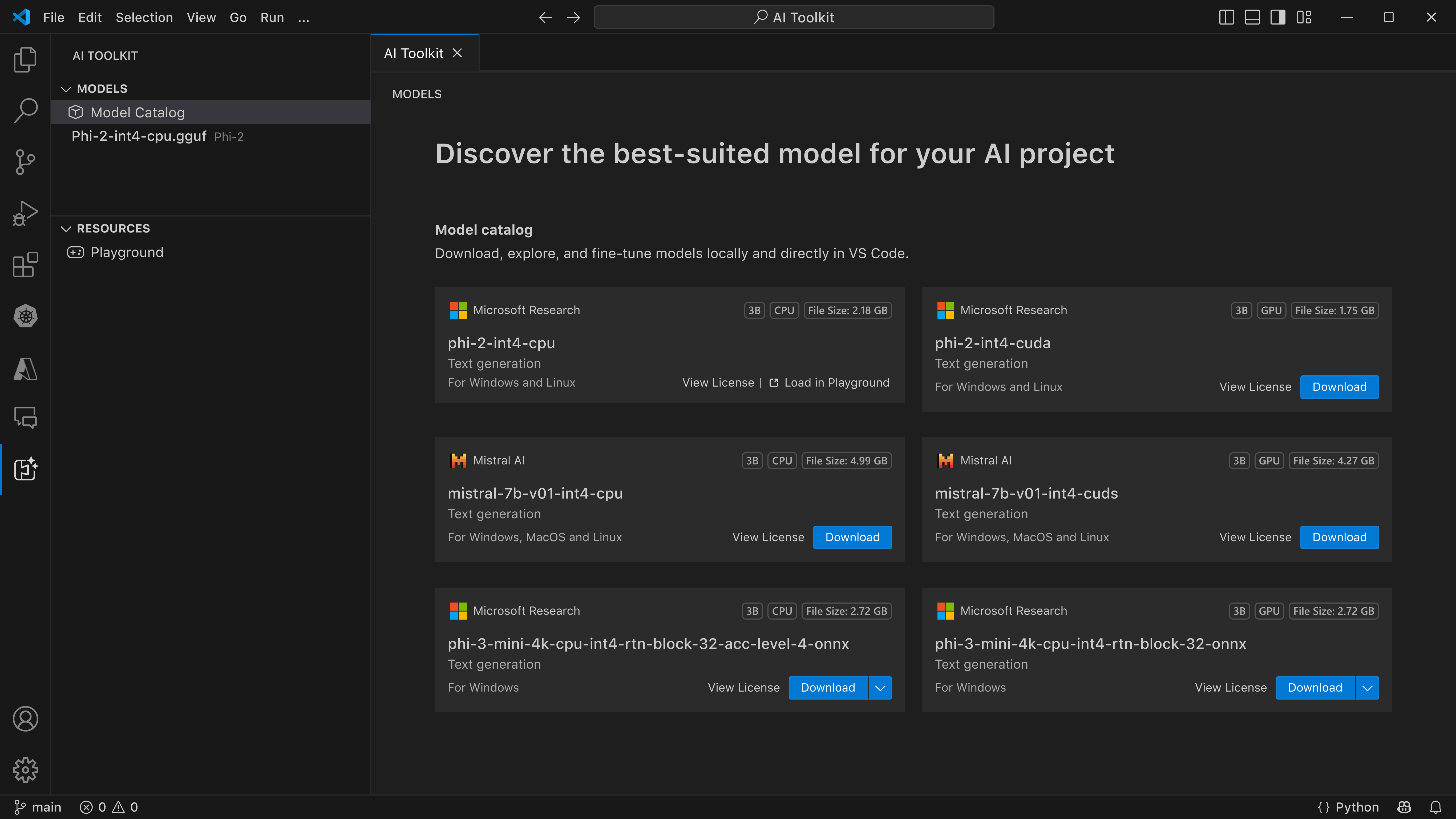
Today, we’re announcing the AI Toolkit for Visual Studio Code. This toolkit helps AI engineers develop and deploy intelligent apps by enabling them to explore, acquire, evaluate, and integrate small and large language models within VS Code. You can use your local hardware to try, run, and evaluate state-of-the art small language models—or SLMs—like Phi-3. It takes advantage of the deep investments we’ve made in the ML stack on Windows to provide a turnkey experience to run any model seamlessly on your laptop, Dev Box, or Azure AI compute. While it runs best on Windows today, MacOS support is coming soon!
Intelligent apps: Better on Azure
In addition to providing a platform to host your apps, the Azure App Platform provides the essential building blocks you need to accomplish the different tasks that you typically do to build and operate a GenAI application, including leveraging Azure OpenAI and hosted models in your apps; building enhanced copilots; experimenting and optimizing; and hosting custom models and fine tuning them with your data.
All the capabilities are integrated with one another, and you can use them together seamlessly. For example, you can incorporate experimentation and use Vector DB add-ons for your GenAI apps running on any of our App Platform services.
Here are just a few of the ways that Azure is evolving for the era of AI:
When you start growing your application portfolio, you will likely want to track token usage across multiple applications, or to make sure that a single app doesn’t consume the whole TPM quota. Azure API Management has introduced new capabilities to enhance the scalability and security of Generative AI deployments. These include the Azure OpenAI token limit policy for fair usage and optimized resource allocation, one-click import of Azure OpenAI endpoints as APIs, a load balancer for efficient traffic distribution, and a circuit breaker to protect backend services.
API sprawl poses significant challenges in API governance, security, compliance, and reuse. Without a centralized inventory, APIs can become isolated, leading to poor API reuse, lack of alignment with organizational API design and organizational processes, as well as increased vulnerability to security breaches. And most GenAI apps consume LLMs via APIs – so the era of GenAI is the era of API-first development. The Azure API Center provides centralized API inventory for seamless discovery, reuse, and governance regardless of API type, lifecycle stage, or deployment location.
Azure Container Apps now include secure sandboxes at scale: When you build applications that run code or commands from untrusted sources, you have to ensure that the code runs in its own isolated environment. If an LLM is generating the code you need to evaluate, what is the best way to execute that code? Dynamic sessions provide secure, ephemeral sandboxes called “sessions” for running potentially malicious code. Each session runs in its own Hyper-V virtualization boundary — ensuring complete isolation from other sessions and resources.
You can read about all these Azure announcements and more in the Build Book of News.
Developer productivity comes from team agility
So, we’ve covered new tools and experiences that help you stay in the flow and get into building intelligent applications. Now let’s talk about how the practice of platform engineering can help organizations stay secure and compliant and developers focus on their code.
Developers want to be able to self-serve environments, workflows, and infrastructure with the confidence they’re adhering to the best practices and requirements of their organization. It’s just one more aspect of staying in the flow.
Last November we launched our guidance on platform engineering. On a very basic level, platform engineering is a set of patterns and practices helping to modernize enterprise software delivery. These patterns and practices, if executed right, can become the glue between development and operations teams—creating more cohesion and flow amongst teams throughout the product-making lifecycle.
At its best, Platform Engineering empowers teams to achieve scale and reduce the time it takes to deliver business value—all while eliminating toil, promoting self-sufficiency, and reducing the cognitive load required to meet broader operational and organizational standards.
With policy enforcement, security monitoring, and observability, organizations can govern their app estate to get better cost control and reduce risk while delivering a great developer experience.
And GitHub Copilot is now the perfect platform to deliver an unparalleled developer experience for platform engineering. With the new extensibility capabilities, GitHub Copilot can be augmented and grounded with your product catalog that you define in GitHub repos with Templates, Workflows, APIs, and samples that provide start-right automation and policy enforcement to your developers who can discover and deploy them with natural language user interfaces in Copilot Chat.
New features in Microsoft Dev Box and Azure Deployment Environments
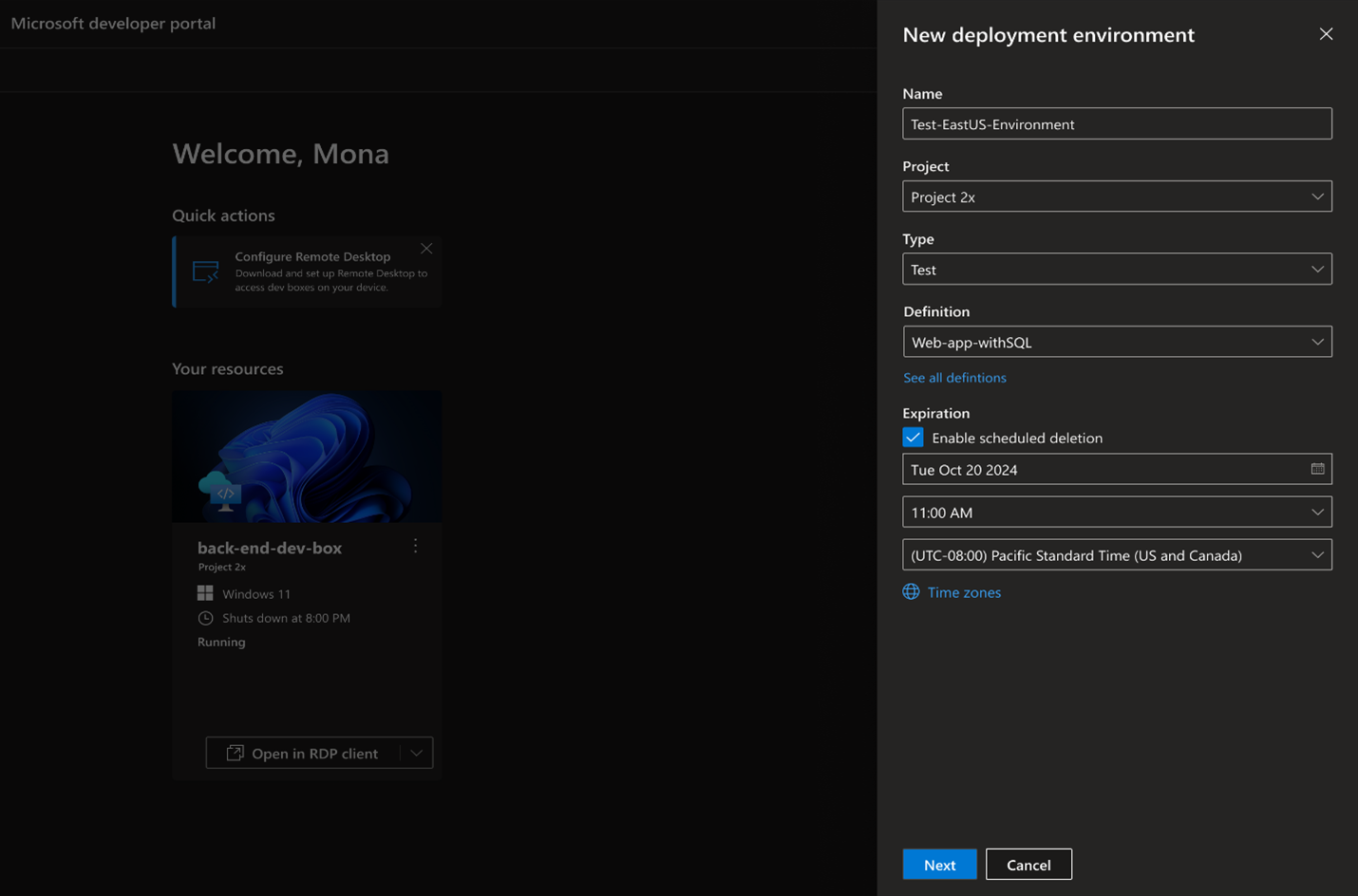
Microsoft Dev Box, an Azure service that gives developers self-service access to preconfigured, project-specific developer workstations, has been a key part of our approach to platform engineering. Used by companies like GM and Siemens Healthineers China (and by over 25k Microsoft developers), Dev Boxes reduce environment setup from days to minutes, encouraging collaboration and experimentation. With pre-installed tools and source code, developers can onboard and start coding quickly.
And Azure Deployment Environments now delivers more seamless experiences to customers, enabling them to leverage popular Infrastructure-as-Code (IaC) frameworks quickly and easily with its new extensibility model and to perform or customize deployments based on their organizational needs.
These capabilities give development teams more control to customize environment templates for their team-specific needs and provide platform engineers with additional ways to build templates in their preferred IaC format.
But consistent environments across teams doesn’t mean that the experience can’t be personalized to developers.
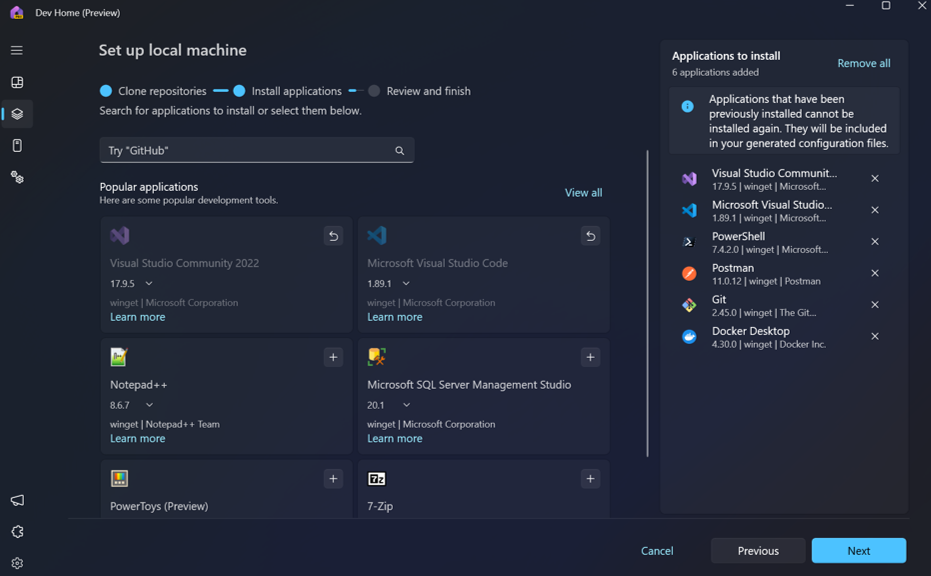
The new Dev Home capabilities in Windows make it easy to create a personalized, consistent environment that works beautifully with Microsoft Dev Box. It’s simple to create, connect, and customize Dev Boxes, pin frequently used Dev Boxes to your taskbar or start menu, and add tools onto your config or the one you’re building for the team.
Close
Our mission is to empower developers to achieve more. Our vision is to enable them to set up a complete engineering system in seconds, contribute from any device, build for any platform, collaborate with anybody, and scale with confidence. In the era of AI, developers and their teams can get into the zone, learn about new technology more quickly than ever before, explore what’s possible at the speed of their creativity, and share their expertise to accelerate the impact of their entire team.
Amanda Silver CVP of Product and General Manager for Microsoft’s first-party engineering systems, Developer Division
Government officials and AI industry executives agreed on Tuesday to apply elementary safety measures in the fast-moving field and establish an international safety research network.
Nearly six months after the inaugural global summit on AI safety at Bletchley Park in England, Britain and South Korea are hosting the AI safety summit this week in Seoul. The gathering underscores the new challenges and opportunities the world faces with the advent of AI technology.
The British government announced on Tuesday a new agreement between 10 countries and the European Union to establish an international network similar to the U.K.’s AI Safety Institute, which is the world’s first publicly backed organization, to accelerate the advancement of AI safety science. The network will promote a common understanding of AI safety and align its work with research, standards, and testing. Australia, Canada, the EU, France, Germany, Italy, Japan, Singapore, South Korea, the U.K., and the U.S. have signed the agreement.
On the first day of the AI Summit in Seoul, global leaders and leading AI companies convened for a virtual meeting chaired by U.K. prime minister Rishi Sunak and South Korean president Yoon Suk Yeol to discuss AI safety, innovation and inclusion.
During the discussions, the leaders agreed to the broader Seoul Declaration, emphasizing increased international collaboration in building AI to address major global issues, uphold human rights, and bridge digital gaps worldwide, all while prioritizing being “human-centric, trustworthy, and responsible.”
“AI is a hugely exciting technology — and the U.K. has led global efforts to deal with its potential, hosting the world’s first AI Safety Summit last year,” Sunak said in a U.K. government statement. “But to get the upside, we must ensure it’s safe. That’s why I’m delighted we have got an agreement today for a network of AI Safety Institutes.”
The agreement announced today follows the world’s first AI Safety Commitments from 16 companies involved in AI, including Amazon, Anthropic, Cohere, Google, IBM, Inflection AI, Meta, Microsoft, Mistral AI, Open AI, Samsung Electronics, Technology Innovation Institute, xAi and Zhipu.ai. (Zhipu.ai is a Chinese company backed by Alibaba, Ant and Tencent.)
The AI companies, including those from the U.S., China, and the United Arab Emirates (UAE), have agreed to the safety commitments to “not develop or deploy a model or system at all if mitigations cannot keep risks below the thresholds,” according to the U.K. government statement.
“It’s a world first to have so many leading AI companies from so many different parts of the globe all agreeing to the same commitments on AI safety,” Sunak said. “These commitments ensure the world’s leading AI companies will provide transparency and accountability on their plans to develop safe AI.”
While remote work might not be universally accepted, it is on the uprise. Hiring remotely can save your company money and attracting talent becomes easier as today’s job seekers are more interested in remote work.
Everyone’s Working Online Anyway; Why Not Hire Remote Employees
Because most everyone is already online during our waking days, whether, in or out of the brick and mortar office anyway; some call it a perk by adding flexibility for your onsite workers, versus online work to your new employees. Some companies get on board by supporting the value remote workers bring them.
According to Remoters, in their remote work status report, being ahead of the curve in remote working can help your company to become successful at hiring remote workers as the norm, not the exception to entice new employees.
Get Prepared
Part of being prepared to hire remote employees is understanding how the trend of remote work can be something your company can become proficient at learning. If you’re looking to hire remote workers for a project or you are a company that supports hiring remote workers, you will want to consider some things first to avoid making mistakes when attempting to hire good remote workers.
Three Important Planning Questions
You might begin with clearly defining the following three questions;
Why are you hiring workers remotely?
What are the roles; clearly clarified, that the remote workers will be responsible for performing for your company?
What standard and/or preferred qualifications are you looking for in offering that good candidate a place in your organization to work remotely?
Once you have identified why you need to hire remote workers, what their roles are, and what your standard of what a good remote worker looks like, you are off and driving to avoiding unnecessary mistakes when hiring remote employees. Putting your best foot forward to implementing a step-by-step hiring guide to helping you be successful makes good business sense, and gets you one step closer to hiring good remote employees.
A Step-By-Step Guide That Fits Your Company
While there is no one step-by-step plan that fits all companies, there are some steps each company can take to ensure that their “how to hire remote employees” strategy is a winning success.
After your team has thoroughly answered the three basic questions; why hire remote workers, identify remote workers roles in your organization, along with identifying good candidate qualifications, you’re off and running to moving onto strategizing pre and post remote employee best practices for hiring at your company.
Save Time By Strategizing
Take time to start some strategizing sessions with your team where you can begin to plan your perfect step-by-step plan that is the best fit for your company.
Including your current employees might be a good strategy to gather feedback about their perceptions and expectation about remote work, and working at your company with new hires being added to the team who will be working remotely when some of your current employees might not.
Clearing up any misunderstandings about how remote working is defined and expressed at your company culture, helps make inclusive efforts for implementing best practices for your “how to hire remote employees” work policy.
Aligning Preparation to Meet Strategy
Talk to your current employees and get feedback about remote work.
Brainstorm with your team about best practices for work policies.
Draft a remote employee hiring work policy.
Simulate implementation to notice gaps in hiring practices
Taking the time to be clear on your hiring work policy is essential to creating longevity for your remote working program to hit the ground running successfully.
Now that you’ve got that step completed, it’s time to make sure that everyone at your company is clear about how you define “Remote Work” at your company and how this positively adds value to your culture.
Use sites like Indeed, Glassdoor, and LinkedIn to reach a wide audience. List your job post on industry-specific remote job boards like DailyRemote to find candidates with the relevant skills and experience.
Once you’ve discussed and defined, you’re that much closer to creating a positive remote work culture for both existing employees and those new remote employees you’re about to hire.
Remote = What?
Does remote = working from anywhere or working only where your company is located but not onsite?
Does remote = working 100% online?
Does remote = working partially online and partially onsite?
Does remote = working smarter and flexibly, which saves both employer and employee time and money?
Avoiding Common Mistakes
Unfortunately avoiding common mistakes on your road to “how to hire remote employees” might be an unnecessarily bumpy, windy path without getting prepared, asking the three important questions.
It also involves finding the step-by-step that fits best for your particular company, saving time by strategizing, moving onto aligning preparation to meet your company’s strategy by forming an official hiring policy, and setting yourself up for ultimate success by creating a positive remote work culture through clearly identifying what working remote at your company means to you.
Some Don’ts to Soak In
Don’t have your steps and policies on auto-pilot where updates are a second thought.
Don’t treat remote work like it’s a perk, rather than the company norm. if you’re interested in longevity.
Don’t not define clearly how your remote employees add value to your organization.
Don’t make remote work so static that employee retention becomes the nagging pebble in your shoe
Do This, Not That
Do think of remote work as humancentric even though your employees work remotely.
Do build teams of remote employees for mentoring retention strategies.
Do deflect static remote work through encourages connecting and sharing ideas.
Do create a professional remote work platform for employees to be efficient and succeed.
Takeaway
Making remote work a profitable experience at your company is attainable. By creating an exceptional “how to hire remote employees” guide, you can attract top talent. And with your step-by-step plan in place, this sets the tone for avoiding common remote hiring mistakes, which helps retain good employees.
If you are looking to source great remote candidates, DailyRemote has a large remote community. You can post your remote job and get to choose from remote candidates from all over the world.
Hiring remote employees isn’t the same as hiring on-site employees, but not much different as well. But following the above remote hiring tips will help you hire the perfect remote employees, no matter what role you’re hiring for!
Humane, the startup behind the poorly-reviewed AI Pin wearable computer, is already hunting for a potential buyer for its business. That’s according to a report from Bloomberg, which says the company — led by former longtime Apple employees Imran Chaudhri and Bethany Bongiorno — is “seeking a price of between $750 million and $1 billion.”
That might be a tough sell after the $699 AI Pin’s debut: the device has been widely panned for its slow responses and a user experience that falls well short of the always-on, wearable AI assistant concept that its founders promised in the run-up to the device’s release. The product was pitched at least partially as a way for people to be more present and reduce their ever-growing dependence on smartphones.
Humane developed its own operating system called CosmOS that runs on the AI Pin. It hooks into a network of AI models to fetch answers for voice queries and to analyze what the built-in camera is pointed at. For some interactions, the device beams out a laser “display” that is shown on the wearer’s inner palm. A monthly subscription is required to keep the device active.
Humane was valued at $850 million by investors in 2023, but that was before its first-ever product was universally criticized by reviewers. There are some novel and clever ideas in there, but the AI Pin’s software is underbaked and too inconsistent, and the hardware has exhibited poor battery life and overheating issues. Humane has pledged to address some of those bugs with firmware updates. Just last week, it rolled out OpenAI’s GPT-4o model to further enhance the device’s smarts.
The list of potential buyers for Humane seems quite small considering the price that the startup is hoping to fetch. Amazon, Apple, Google, Meta, and Microsoft are all making significant pushes into the AI realm — with large language models and generative AI becoming more prevalent by the day — but it’s unclear how much value Humane’s intellectual property would really bring to any of their ongoing efforts.
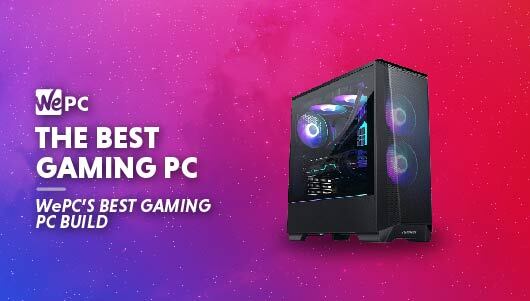
Building the best gaming PC is actually a very easy thing to do, however, everyone’s definition of what’s “the best” can be different. To cater to this, we are going to build a gaming PC where performance and value meet in the middle, giving the masses an affordable machine that can tackle any AAA game you throw its way.
Grabbing yourself one of the best gaming PCs out there is going to give you an exemplary gaming experience for years to come. The best in this class often feature the latest, high-end components, capable of high FPS results, across a multitude of titles in max settings.
Anyway enough preamble, let’s take a look at the best gaming PC build.
What You Get For Your Money
As previously mentioned, we aren’t aiming to build a PC that costs a fortune here, we want to build a quality gaming PC that many can enjoy, for a reasonable amount of money.
With this in mind, we are going to be trying to keep the overall budget to around $1,500. At this price point, you will, without a doubt, have one of the best gaming PCs out there. Sure, it may lose out to the more expensive builds but the price-to-performance is in the sweet spot here and this build will provide you with everything you need to get a high-end experience.
Performance
You may expect the best gaming PC build to be able to handle every game, in any setting, at any resolution but remember, we are aiming for an affordable yet high-quality experience.
At the heart of this PC sits a powerful Ryzen desktop CPU with a proven track record of being one of the best on the market. To support the processor, one of Nvidia’s latest 30-series GPUs takes the stage, providing you with high FPS counts in esports titles, and incredible detail for those single-player games.
The performance is further enhanced thanks to an adequate amount of fast RAM for gaming and fast storage, giving you snappy boot and load times.
How We Choose
The team here at WePC has years of combined building and, of course, gaming experience, allowing us to make astute recommendations to our friends, families, and readers. All of our custom gaming PC recommendations are backed with careful research and benchmarking to ensure the products we suggest are actually the best for the job. We work tirelessly to update and keep every build recommendation as up-to-date as possible, even when items go out of stock we will be there to fill the gap with appropriate replacements.
We are always looking for value for money and try to focus on performance over just flashy looks, ensuring your hard-earned cash isn’t going to be squandered.
NOTE: Due to the ongoing effects of the global coronavirus pandemic, some retailers are experiencing stock issues. WePC constantly updates our pages to reflect current availability, so if the PC you want shows as out of stock, check back later or check out these alternatives.
How We Test
We build all our custom PC build recommendations in-house at the WePC office, making sure all the components are compatible and work in unison for the best gaming experience.
Once built, we put these custom PC’s through their paces, benchmarking a wide selection of the most popular and demanding titles. It isn’t just gaming we focus on, we like to test our PCs for general work scenarios from lightweight to heavy-duty tasks.
We know some of our readers like to overclock systems and push the price to performance even further, so we ensure that we test this too. This can leave you reassured that the components can handle this extra push in power and nothing will break down the line.
Opera North’s production of Verdi’s Falstaff. Photo credit Richard H. Smith.
Opera North’s recent season hit all the high notes of thrilling drama, powerful arias, and the moving moments expected during an opera performance. But they also made a new impact beyond the stage.
Opera North, a national opera company based in Leeds, United Kingdom, performed its first fully sustainable season in an ambitious undertaking guided by the Theatre Green Book. With a collaboration between Buro Happold and a wide swath of the UK theatre community, the Theatre Green Book’s three volumes provide new goals, guidance, and sustainability standards for theatre productions, buildings, and operations.
For Opera North’s “Green Season,” all three operas—Falstaff, La Rondine, and Masque of Might—shared scenic elements with a focus on reducing material use and creating new designs that were both distinctive and a similar aesthetic for continuity. All sets, props, and costumes were sourced from previous productions to adapt for reuse or purchased second-hand. Everything was brought to life in a reimagined and sustainable way.
Opera North’s production of Puccini’s La Rondine. Photo credit Tristram Kenton.
“We wanted to take this ambitious next step for sustainability by creating our first fully Green Season of three operas,” says Richard Ashton, Operations Director, Opera North. “The result was an incredible season of productions for our audiences with a reduced impact on the planet and many learnings for our continued journey to a more sustainable future for the industry.”
Discovering Past Sets to Inspire New Designs
OC Theatrical is a consultancy based in the UK specializing in theatre and events. Owner and founder Oli Cooper has worked on a vast array of drafting and engineering projects over his long career, ranging from the National Theatre in London to touring productions of Hamilton, Six: The Musical, and many more. But helping to create a completely “green” set design was a first.
“Since everything was a recovery from another show or a secondhand purchase, it was particularly challenging on the drafting side,” Cooper says. “Normally I would be given a project, pick materials suitable to the construction of the object, and work out how and where to cut or weld.”
Opera North’s production of Puccini’s La Rondine. Photo credit Tristram Kenton.
It was understood that there wouldn’t be massive, unique set structures. A core goal of the three-show season was to use the same set pieces but reimagine them with different configurations for each show. By reusing existing sets from their warehouse and sourcing existing materials, a new level of sustainability was reached.
The process itself started like any other typical show where Cooper received a 1:25 scale model from the designer. The designer went around Opera North’s storage to see what pieces were existing, and he provided recommendations to be sure and include. “It was up to us to come up with solutions to create that vision,” Cooper says.
Opera North’s production of Puccini’s La Rondine. Photo credit Tristram Kenton.
Drafting Scenic Elements With AutoCAD for Sustainable Set Design
Cooper visited Leeds and did several visits of Opera North’s warehouse space and storage to see what scenic pieces had been put aside and saved.
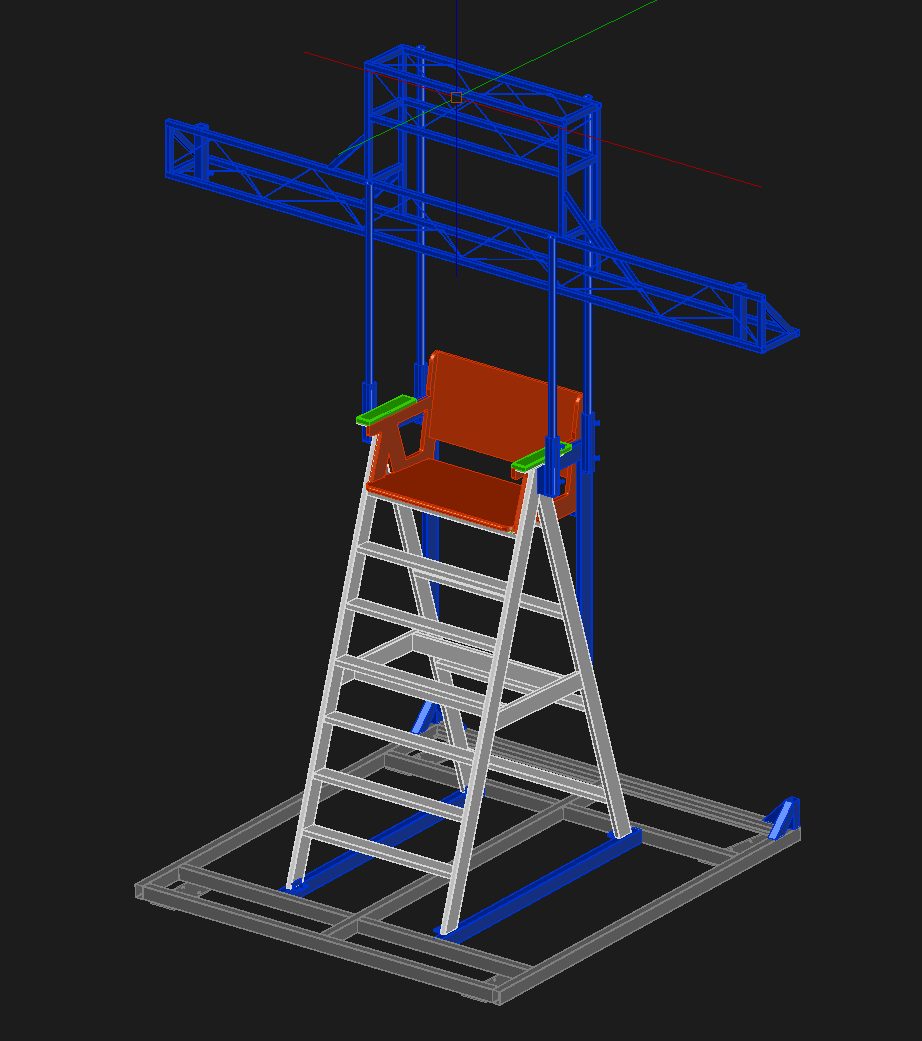
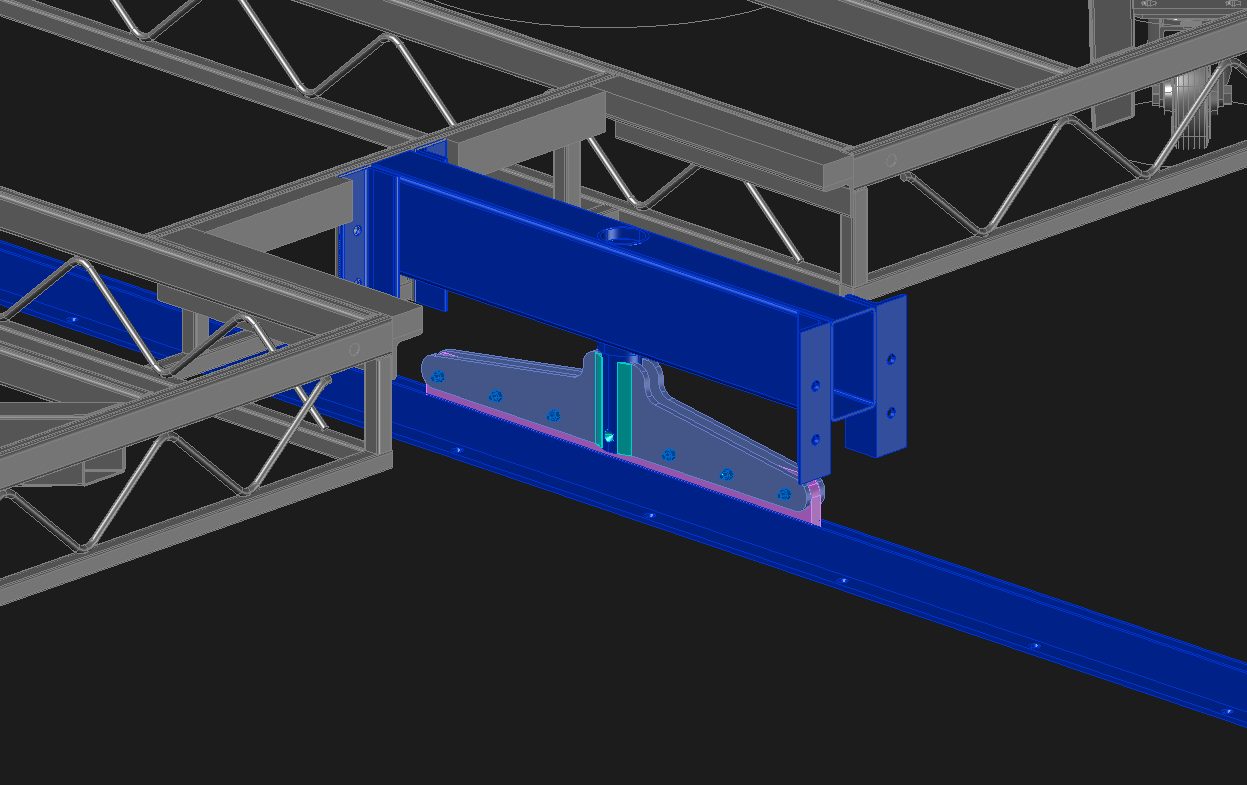
“For the beams of the structure, we found material going to scrap and were able to purchase it,” Cooper says. “The rest of the structure was used from materials in storage. I measured and surveyed pieces that would potentially work and then generated a 3D model in AutoCAD. From that, we could piece together the structure like LEGO and add in the components that were already existing and on hand.”
Opera North set design in AutoCAD. Courtesy of OC Theatrical.
For other set pieces, some reference drawings were on hand and could be easily reimagined in AutoCAD. One of these set pieces included 20-foot high, period window frames that were originally static, but then transformed with a different truck base to wheel it on and off the stage. “We were able to take the original drawings in AutoCAD and modify the bases and braces by simply adding them on,” Cooper says. “It was a far more efficient process.”
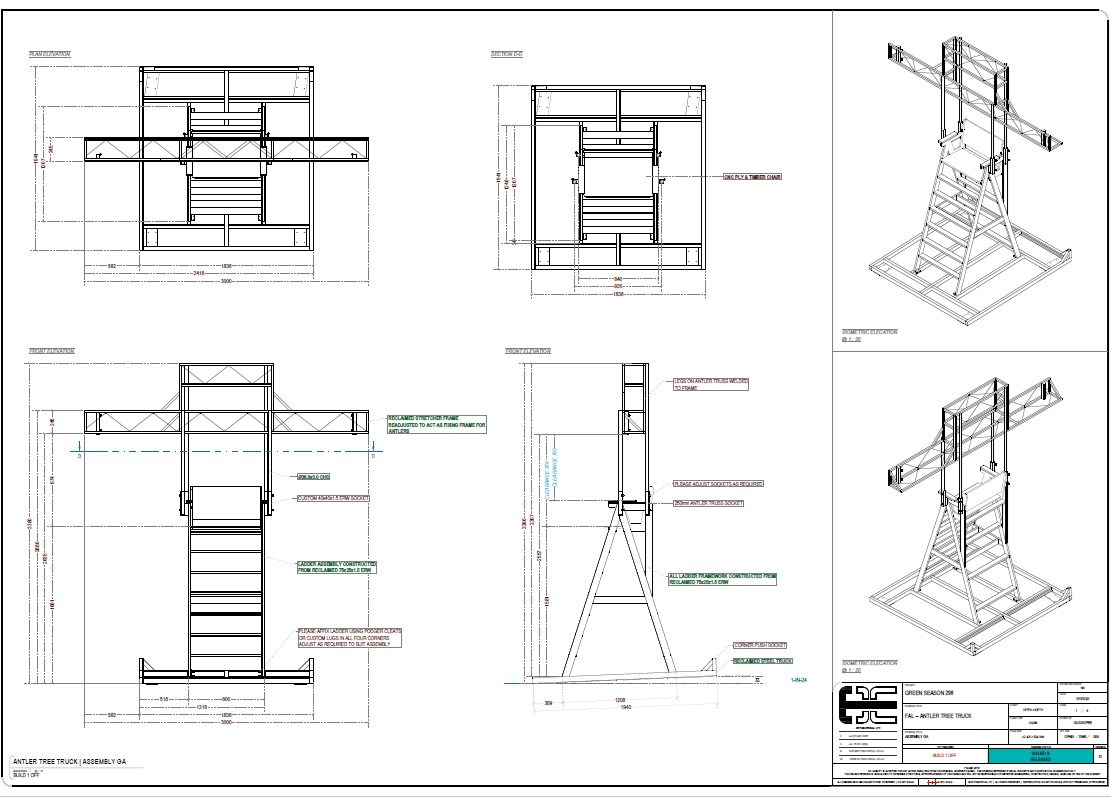
One of the show-stopping scenes in Falstaff featured an enormous throne covered with deer antlers. The chair was modified from a previous show and the antlers were obtained from recovery in local parks. After the season ended, they were put in storage for reuse in future productions.
Antler throne in Opera North’s production of Verdi’s Falstaff. Photo credit Richard H. Smith.Design for antler throne in AutoCAD. Courtesy OC Theatrical.PDF of assembly for antler throne. Courtesy of OC Theatrical.
“Working on the ‘Green Season’ for Opera North brought an entirely new way of thinking about fabrication, appreciating reuse, and approaching the drafting process,” Cooper says. “In the end, I delivered 110 drawings for 14 different elements, and it only would have been possible with AutoCAD.”
“One of the most important parts of AutoCAD is its flexibility. You don’t always need to necessarily know what you’re drawing before you draw it. You can add, remove, and carve away. It’s far more organic and dynamic than other software and gives you more flexibility.”
Oli Cooper, Owner and Founder, OC Theatrical
Communicating and Collaborating With AutoCAD
The documentation for the design and fabrication of Opera North’s season was both in DWG and PDF formats. Everyone was encouraged to view PDFs on tablets to save paper and keep in the green theme. These drawings were crucial for coordination, but the collaboration and communication extended far beyond a final set of drawings.
“Shared Views in AutoCAD is important in all the work with my clients,” Cooper says. “It allows me to put things in 3D and anyone can go through the design. It’s so simple.”
“One of the biggest parts of my job is communication,” he continues. “I’m there to communicate ideas and many of my stakeholders are very creative, visual people. Having that ability to do it in 3D with AutoCAD with different levels of details is important.”
Courtesy of OC Theatrical.
Cooper also often uses AutoCAD on the web and on mobile for markups, quick sketches on site, or to review designs with a stakeholder. “If I’m just doing a survey of an area or need to draw something simple, I have my MacBook with me and I can just quickly knock it out then and there with AutoCAD on the web,” Cooper says. “It’s a powerful tool.”
For Cooper, AutoCAD is a critical component to his success.
“When you’re in a specialized field, it’s really hard to find a program that does everything,” he says. “I love how much you can customize with AutoCAD. I have many plugins that enable me to do what I do because it’s a base that you can add to. It’s like a pizza with anything you want to add and make it your own.”
In 1993, the original NBA Jam hit arcades and revolutionized the arcade sports genre. High-flying dunks, flaming basketballs, and the biggest names from the hardwood served as trademarks for the classic quarter-munching cabinet. Though the series has been absent for years now, with the last entry arriving in 2011 under the EA Sports umbrella, Play Mechanix and Raw Thrills have partnered with the NBA and the NBA Players Association to bring that same arcade-style basketball action to arcades with NBA Superstars.
NBA Superstars brings 3v3 arcade-style basketball action, featuring all 30 teams consisting of 120 of the biggest stars in the NBA. Players can take the court as LeBron James, Stephen Curry, Nikola Jokic, Kevin Durant, Luka Doncic, Giannis Antetokounmpo, and more in the first NBA-branded arcade game since the mid-’90s. The cabinet supports up to four players and looks to include the same backboard-rattling dunks, physical defense, and longshot three-pointers that made players fall in love with NBA Jam back in the 1990s.
The game features Superstar Mode, where you can battle it out to earn MVP honors. You can also track your stats over several play sessions with free online accounts that you log into using a QR code. Thanks to the inclusion of iconic announcer Tim Kitzrow, the entire experience is tied together and brought back to the NBA Jam roots.
You can see more in the trailer below.
NBA Superstars’ arcade cabinet features a fully animated LED stadium scoreboard, a 75-inch screen, camera-flash-simulating marquee lights, and team color-coordinated RGB LED lights. The cabinet is set to arrive in arcades this summer. Unfortunately, there is no word on whether it will be making the leap to home consoles following its arcade debut, like NBA Jam before it.
Discover the latest innovations from OWC (Other World Computing) showcased at the 2024 NAB Show in this insightful interview. Larry O’Connor, Founder & CEO, discusses new high-speed CFExpress 4.0 cards and additions to the Envoy SSD line, alongside thoughts on AI’s influence on media production.
In this interview, O’Connor introduces OWC’s latest offerings, including the much-anticipated high-speed CFExpress 4.0 cards. Additionally, he unveils three exciting additions to their Envoy SSD product line, promising enhanced performance and reliability for media professionals.
Beyond product showcases, O’Connor delves into the evolving landscape of media production, touching on the profound impact of AI (Artificial Intelligence). His insights shed light on how technology is reshaping creative workflows, offering new possibilities and efficiencies.
Watch the full interview for an exclusive look at OWC’s cutting-edge innovations and their vision for the future of media technology.