Visual Studio Code April 2024


Downloads: Windows: x64 Arm64 | Mac: Universal Intel silicon | Linux: deb rpm tarball Arm snap


Welcome to the April 2024 release of Visual Studio Code. There are many updates in this version that we hope you’ll like, some of the key highlights include:

If you’d like to read these release notes online, go to Updates on code.visualstudio.com.
Insiders: Want to try new features as soon as possible? You can download the nightly Insiders build and try the latest updates as soon as they are available.

Accessibility

Progress accessibility signal

The setting, accessibility.signals.progress, enables screen reader users to hear progress anywhere a progress bar is presented in the user interface. The signal plays after three seconds have elapsed, and then loops every five seconds until completion of the progress bar. Examples of when a signal might play are: when searching a workspace, while a chat response is pending, when a notebook cell is running, and more.

Improved editor accessibility signals

There are now separate accessibility signals for when a line has an error or warning, or when the cursor is on an error or warning.

We support customizing the delay of accessibility signals when navigating between lines and columns in the editor separately. Also, aria alert signals have a higher delay before playing them than audio cue signals.

Inline suggestions no longer trigger an accessibility signal while the suggest control is shown.

Accessible View

The Accessible View (⌥F2 (Windows Alt+F2, Linux Shift+Alt+F2)) enables screen reader users to inspect workbench features.

Terminal improvements

Now, when you navigate to the next (⌥↓ (Windows, Linux Alt+Down)) or previous (⌥↑ (Windows, Linux Alt+Up)) command in the terminal Accessible View, you can hear if the current command failed. This functionality can be toggled with the setting accessibility.signals.terminalCommandFailed.

When this view is opened from a terminal with shell integration enabled, VS Code alerts with the terminal command line for an improved experience.

Chat code block navigation

When you’re in the Accessible View for a chat response, you can now navigate between next (⌥⌘PageDown (Windows, Linux Ctrl+Alt+PageDown)) and previous (⌥⌘PageUp (Windows, Linux Ctrl+Alt+PageUp)) code blocks.

When there is an extension installed that is providing comments and the Comments view is focused, you can inspect and navigate between the comments in the view from within the Accessible View. Extension-provided actions that are available on the comments can also be executed from the Accessible View.

Workbench

Language model usage reporting

For extensions that use the language model, you can now track their language model usage in the Extension Editor and Runtime Extensions Editor. For example, you can view the number of language model requests, as demonstrated for the Copilot Chat extension in the following screenshot:
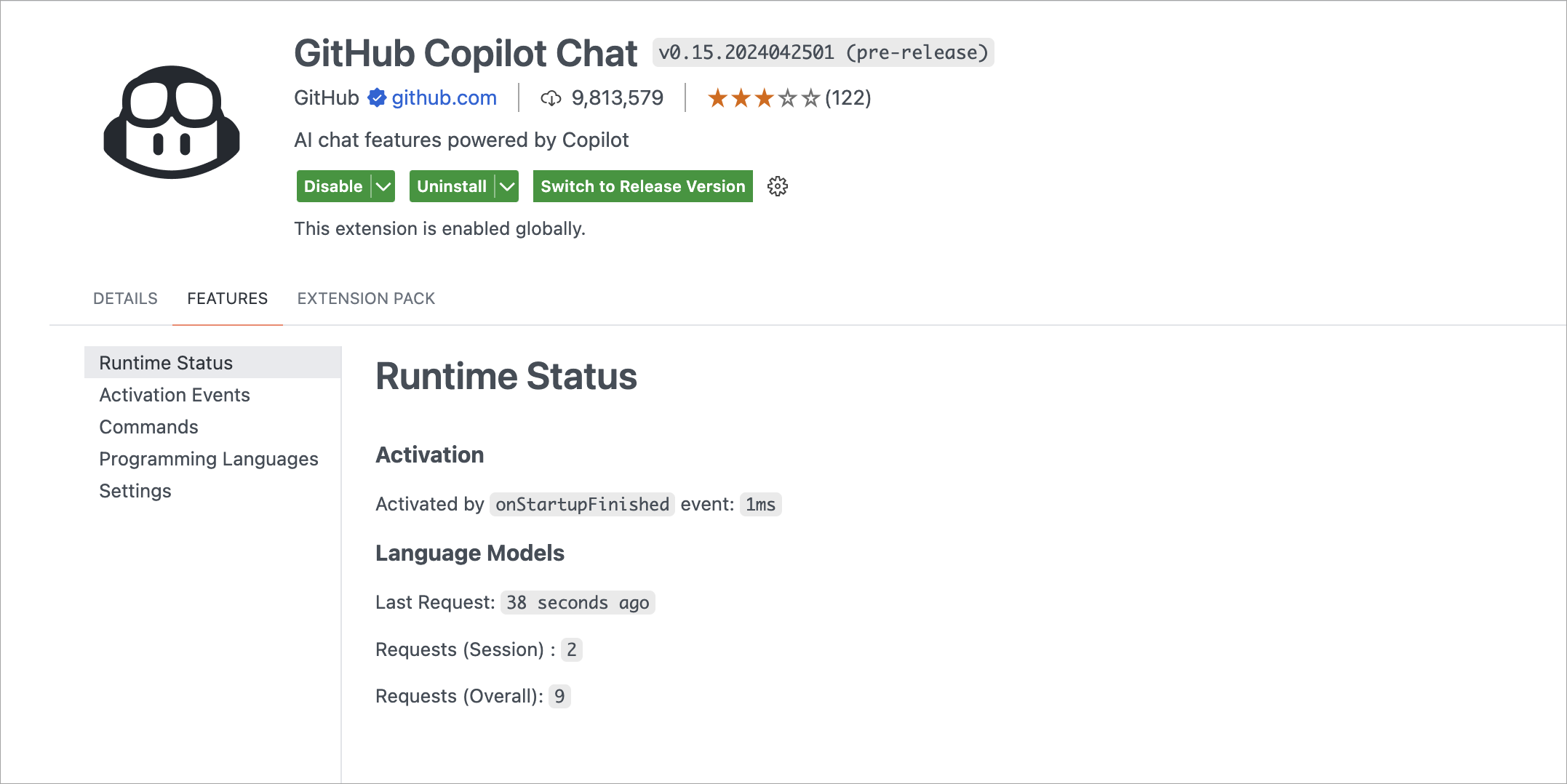
Screenshot of the Runtime Status for the Copilot Chat extension, showing the number of language model requests.

Local workspace extensions

Local workspace extensions, first introduced in the VS Code 1.88 release, is generally available. You can now include an extension directly in your workspace and install it only for that workspace. This feature is designed to cater to your specific workspace needs and provide a more tailored development experience.

To use this feature, you need to have your extension in the .vscode/extensions folder within your workspace. VS Code then shows this extension in the Workspace Recommendations section of the Extensions view, from where users can install it. VS Code installs this extension only for that workspace. A local workspace extension requires the user to trust the workspace before installing and running this extension.

For instance, consider the vscode-selfhost-test-provider extension in the VS Code repository. This extension plugs in test capabilities, enabling contributors to view and run tests directly within the workspace. Following screenshot shows the vscode-selfhost-test-provider extension in the Workspace Recommendations section of the Extensions view and the ability to install it.
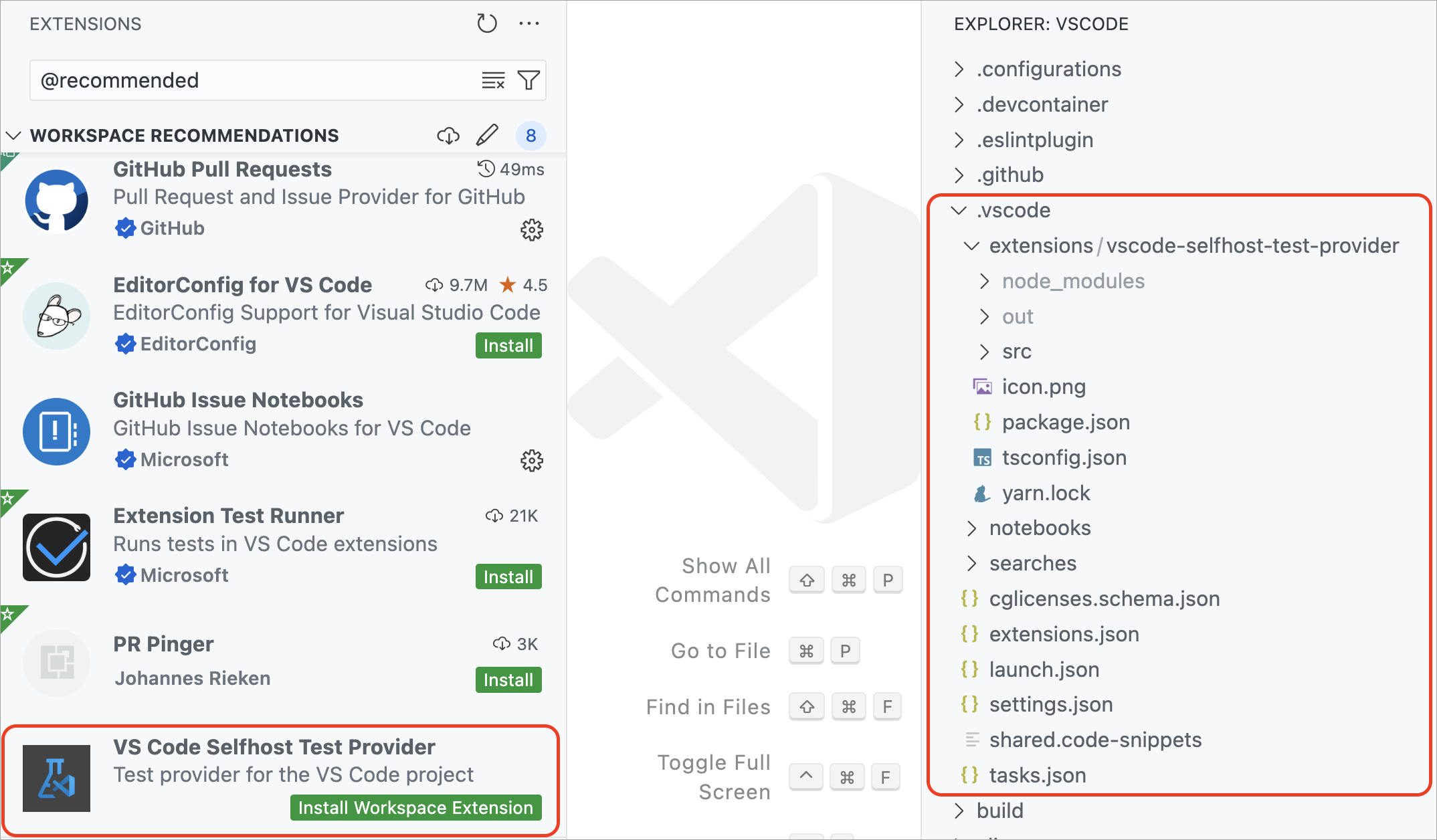
Screenshot showing a local workspace extension available in the .vscode folder in the Explorer view.

Note that you should include the unpacked extension in the .vscode/extensions folder and not the VSIX file. You can also include only sources of the extension and build it as part of your workspace setup.

Custom Editor Labels in Quick Open

Last month, we introduced custom labels, which let you personalize the labels of your editor tabs. This feature is designed to help you more easily distinguish between tabs for files with the same name, such as index.tsx files.

Building on that, we’ve extended the use of custom labels to Quick Open (⌘P (Windows, Linux Ctrl+P)). Now, you can search for your files using the custom labels you’ve created, making file navigation more intuitive.
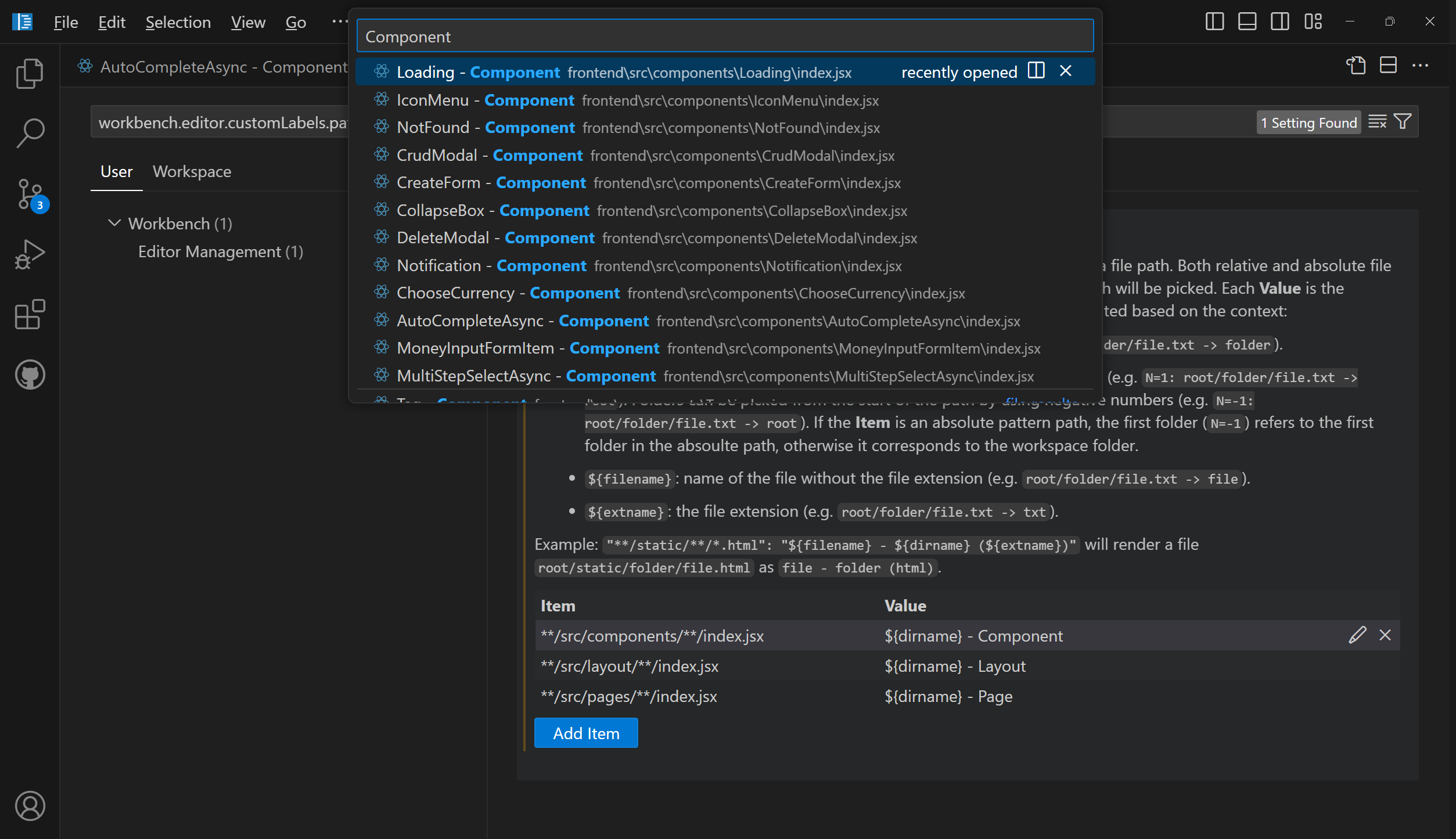
Screenshot showing the use of custom labels in Quick Open to distinguish between multiple 'index.jsx' files.

Customize keybindings

We’ve made it more straightforward to customize keybindings for user interface actions. Right-click on any action item in your workbench, and select Customize Keybinding. If the action has a when clause, it’s automatically included, making it easier to set up your keybindings just the way you need them.

Find in trees keybinding

We have addressed an issue where the Find control was frequently being opened unintentionally for a tree control. For example, when the Find control appears in the Explorer view instead of searching in the editor.

To reduce these accidental activations, we have changed the default keybinding for opening the Find control in a tree control to ⌥⌘F (Windows, Linux Ctrl+Alt+F). If you prefer the previous setup, you can easily revert to the original keybinding for the list.find command using the Keyboard Shortcuts editor.

Auto detect system color mode improvements

If you wanted your theme to follow the color mode of your system, you could already do this by enabling the setting window.autoDetectColorScheme.

When enabled, the current theme is defined by the workbench.preferredDarkColorTheme setting when in dark mode, and the workbench.preferredLightColorTheme setting when in light mode.

In that case, the workbench.colorTheme setting is then no longer considered. It is only used when window.autoDetectColorScheme is off.

In this milestone, what’s new is that the theme picker dialog (Preferences: Color Theme command) is now aware of the system color mode. Notice how the theme selection only shows dark themes when the system in in dark mode:
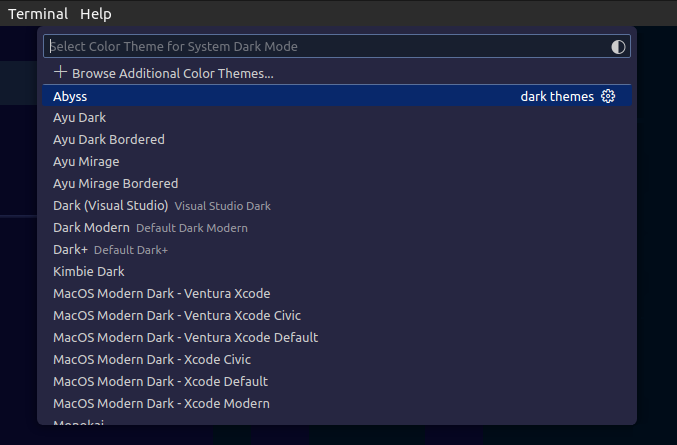
Screenshot showing the theme selection dialog configuring the theme for Dark mode.

The dialog also has a new button to directly take you to the window.autoDetectColorScheme setting:

Screenshot showing the theme selection dialog, highlighting the button to configure the autoDetectColorScheme setting.

In the input editor of the Comments control, pasting a link has the same behavior as pasting a link in a Markdown file. The paste options are shown and you can choose to paste a Markdown link instead of the raw link that you copied.
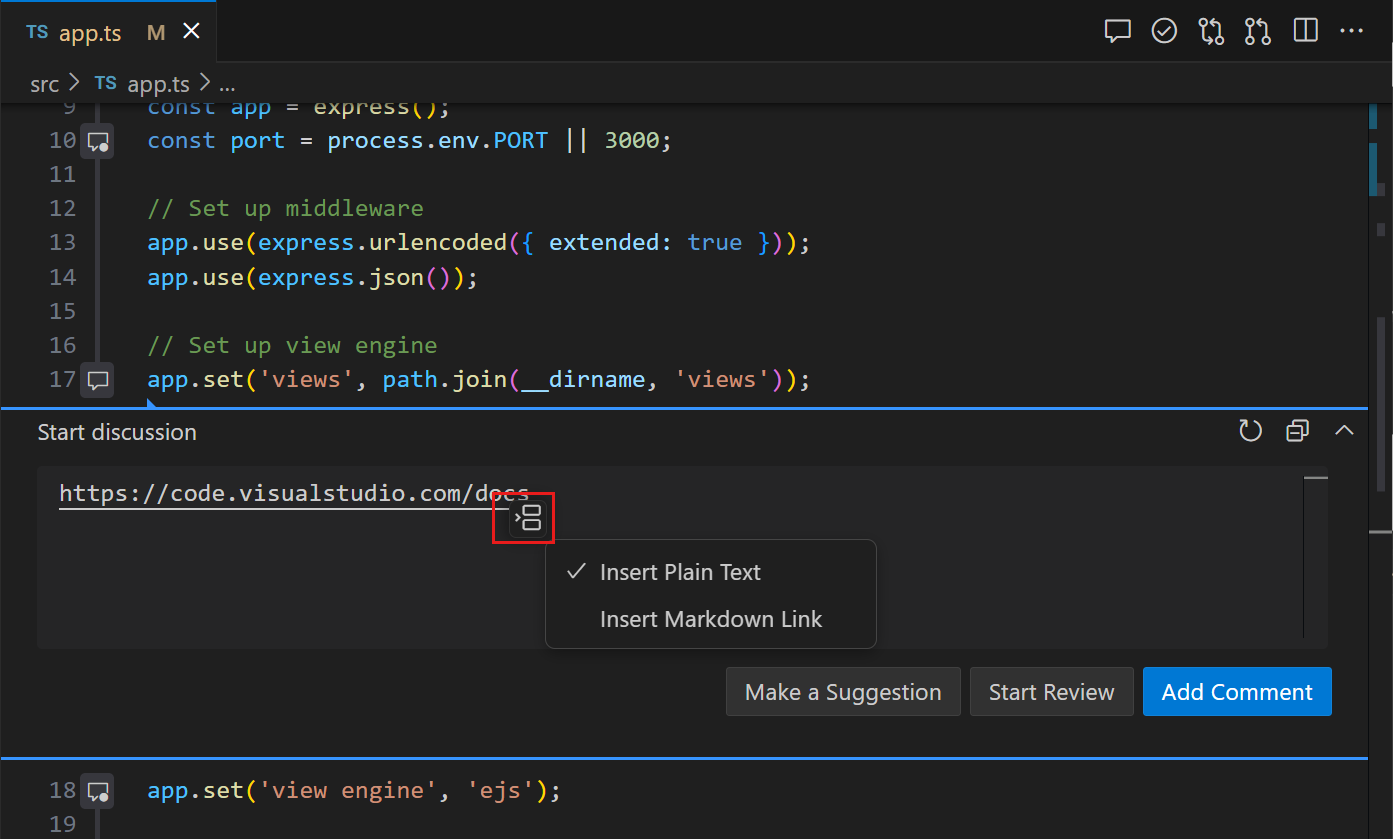
Screenshot of Comments control, showing the paste link context menu.

Source Control

Save/restore open editors when switching branches

This milestone, we have addressed a long-standing feature request to save and restore editors when switching between source control branches. Use the scm.workingSets.enabled setting to enable this feature.

To control the open editors when switching to a branch for the first time, you can use the scm.workingSets.default setting. You select to have no open editors (empty), or to use the currently opened editors (current, the default value).

Dedicated commands for viewing changes

To make it easier to view specific types of changes in the multi-file diff editor, we have added a set of new commands to the command palette: Git: View Staged Changes, Git: View Changes, and Git: View Untracked Changes.

Notebooks

Minimal error renderer

You can use a new layout for the notebook error renderer with the setting notebook.output.minimalErrorRendering. This new layout only displays the error and message, and a control to expand the full error stack into view.

Disabled backups for large notebooks

Periodic file backups are now disabled for large notebook files to reduce the amount of time spent writing the file to disk. The limit can be adjusted with the setting notebook.backup.sizeLimit. We are also experimenting with an option to avoid blocking the renderer while saving the notebook file with notebook.experimental.remoteSave, so that auto-saves can occur without a performance penalty.

Fix for outline/sticky scroll performance regressions

Over the past few months, we have received feedback about performance regressions in the notebook editor. The regressions are difficult to pinpoint and not easily reproducible. Thanks to the community for continuously providing logs and feedback, we could identify that the regressions are coming from the outline and sticky scroll features as we added new features to them. The issues have been fixed in this release.

We appreciate the community’s feedback and patience, and we continue to improve Notebook Editor’s performance. If you continue to experience performance issues, please don’t hesitate to file a new issue in the VS Code repo.

Quick Search enables you to quickly perform a text search across your workspace files. Quick Search is no longer experimental, so give it a try! ✨🔍

Note that all Quick Search commands and settings no longer have the “experimental” keyword in their identifier. For example, the command ID workbench.action.experimental.quickTextSearch became workbench.action.quickTextSearch. This might be relevant if you have settings or keybindings that use these old IDs.

Search tree recursive expansion

We have a new context menu option that enables you to recursively open a selected tree node in the search tree.

Git Bash shell integration enabled by default

Shell integration for Git Bash is now automatically enabled. This brings many features to Git Bash, such as command navigation, sticky scroll, quick fixes, and more.

Configure middle click to paste

On most Linux distributions, middle-click pastes the selection. Similar behavior can now be enabled on other operating systems by configuring terminal.integrated.middleClickBehavior to paste, which pastes the regular clipboard content on middle-click.

ANSI hyperlinks made via the OSC 8 escape sequence previously supported only http and https protocols but now work with any protocol. By default, only links with the file, http, https, mailto, vscode and vscode-insiders protocols activate for security reasons, but you can add more via the terminal.integrated.allowedLinkSchemes setting.

New icon picker for the terminal

Selecting the change icon from the terminal tab context menu now opens the new icon picker that was built for profiles:
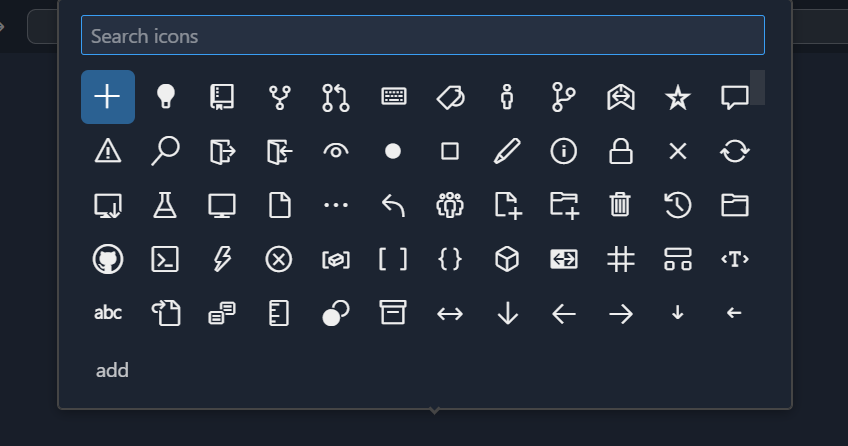
Screenshot showing the new icon picker shows a preview and the id of the icon as well as a filter box

Theme: Sapphire (preview on vscode.dev)

Support for window size reporting

The terminal now responds to the following escape sequence requests:

  • CSI 14 t to report the terminal’s window size in pixels
  • CSI 16 t to report the terminal’s cell size in pixels
  • CSI 18 t to report the terminal’s window size in characters

⚠️ Deprecation of the canvas renderer

The terminal features three different renderers: the DOM renderer, the WebGL renderer, and the canvas renderer. We have wanted to remove the canvas renderer for some time but were blocked by unacceptable performance in the DOM renderer and WebKit not implementing webgl2. Both of these issues have now been resolved!

This release, we removed the canvas renderer from the fallback chain so it’s only enabled when the terminal.integrated.gpuAcceleration setting is explicitly set to "canvas". We plan to remove the canvas renderer entirely in the next release. Please let us know if you have issues when terminal.integrated.gpuAcceleration is set to both "on" or "off".

Debug

JavaScript Debugger

The JavaScript debugger now automatically looks for binaries that appear in the node_modules/.bin folder in the runtimeExecutable configuration. Now, it resolves them by name automatically.

Notice in the following example that you can just reference mocha, without having to specify the full path to the binary.

{
	"name": "Run Tests",
	"type": "node",
	"request": "launch",
-	"runtimeExecutable": "${workspaceFolder}/node_modules/.bin/mocha",
-	"windows": {
-		"runtimeExecutable": "${workspaceFolder}/node_modules/.bin/mocha.cmd"
-	},
+	"runtimeExecutable": "mocha",
}

Languages

Image previews in Markdown path completions

VS Code’s built-in Markdown tooling provides path completions for links and images in your Markdown. When completing a path to an image or video file, we now show a small preview directly in the completion details. This can help you find the image or video you’re after more easily.
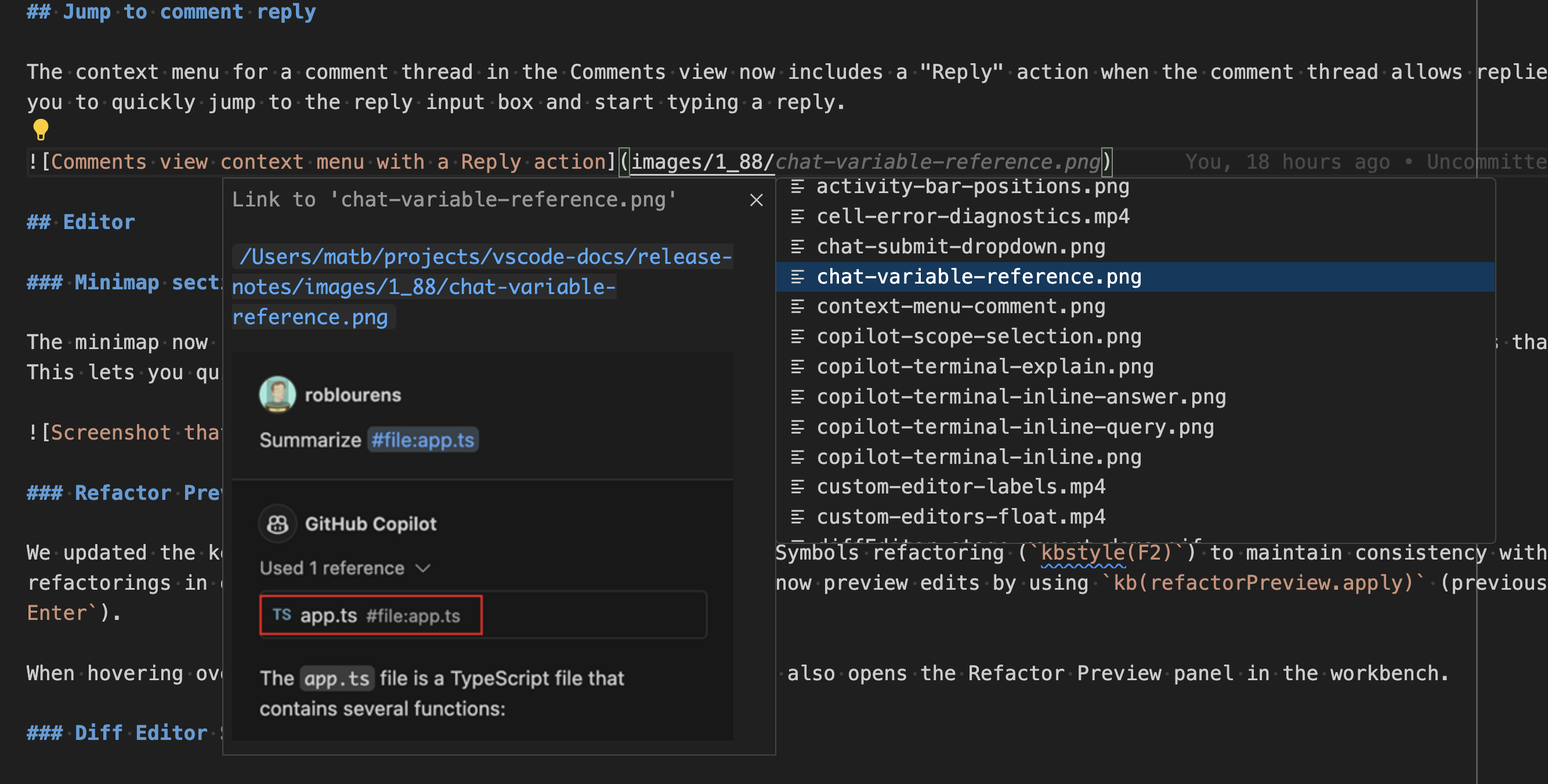
Screenshot showing a preview of an image in Markdown path completions

Hover to preview images and videos in Markdown

Want a quick preview of an image or video in some Markdown without opening the full Markdown preview? Now you can hover over an image or video path to see a small preview of it:
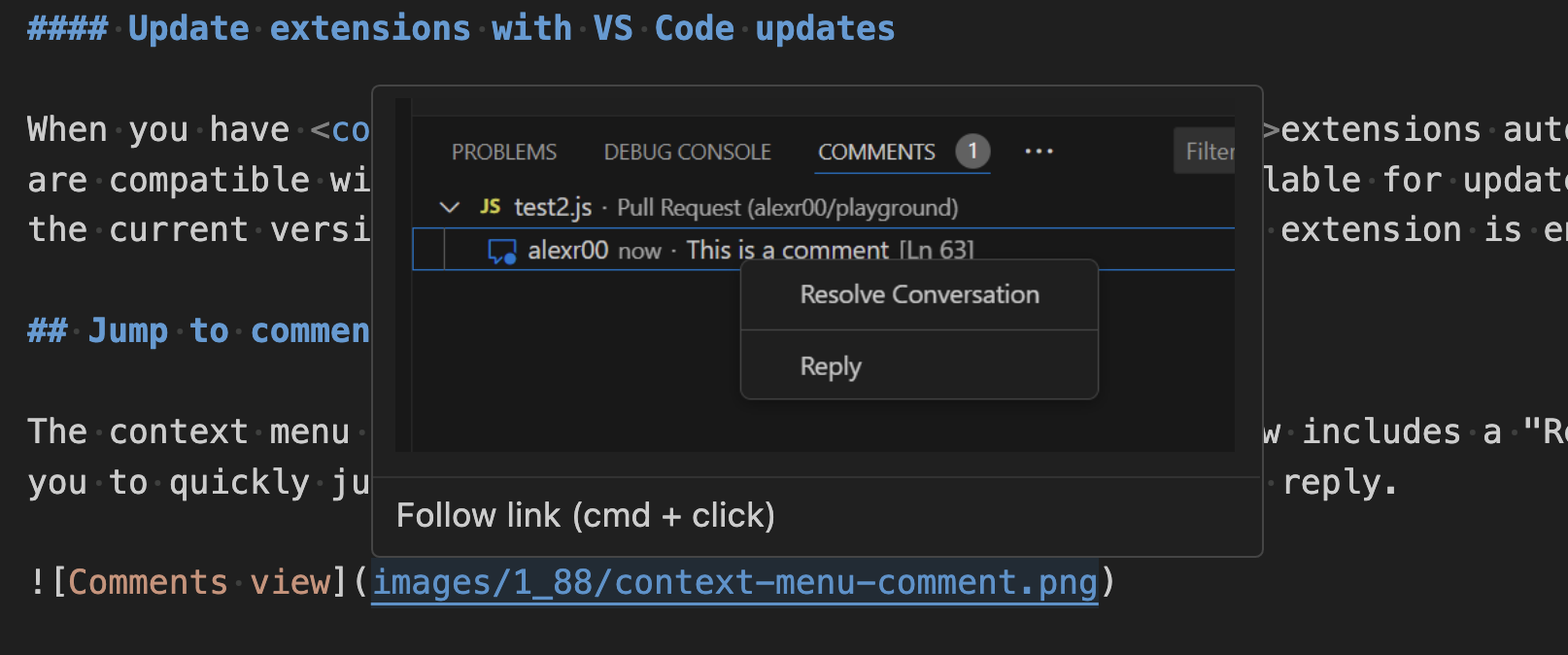
Screenshot showing hovering over an image's path to preview it

Did you know that VS Code’s built-in Markdown support lets you rename headers using F2? This is useful because it also automatically updates all links to that header. This iteration, we improved handling of renaming in cases where a Markdown file has duplicated headers.

Consider the Markdown file:

# Readme
- [Example 1](#_example)
- [Example 2](#_example-1)

## Example
...

## Example
...

The two ## Example headers have the same text but can each be linked to individually by using a unique ID (#example and #example-1). Previously, if you renamed the first ## Example header to ## First Example, the #example link would be correctly changed to #first-example but the #example-1 link would not be changed. However, #example-1 is no longer a valid link after the rename because there are no longer duplicated ## Example headers.

We now correctly handle this scenario. If you rename the first ## Example header to ## First Example in the document above for instance, the new document will be:

# Readme
- [Example 1](#_first-example)
- [Example 2](#_example)

## First Example
...

## Example
...

Notice how both links have now been automatically updated, so that they both remain valid!

Remote Development

The Remote Development extensions, allow you to use a Dev Container, remote machine via SSH or Remote Tunnels, or the Windows Subsystem for Linux (WSL) as a full-featured development environment.

Highlights include:

You can learn more about these features in the Remote Development release notes.

Contributions to extensions

GitHub Copilot

Terminal inline chat

Terminal inline chat is now the default experience in the terminal. Use the ⌘I (Windows, Linux Ctrl+I) keyboard shortcut when the terminal is focused to bring it up.

Screenshot showing opening terminal inline chat opens and focuses an input box similar to inline chat in the editor

The terminal inline chat uses the @terminal chat participant, which has context about the integrated terminal’s shell and its contents.
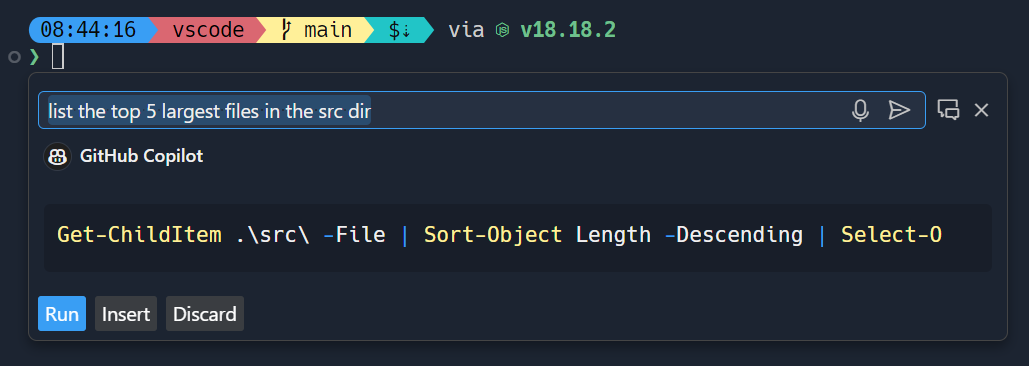
Screenshot showing that you can ask complex questions like "list the top 5 largest files in the src dir"

Once a command is suggested, use ⌘Enter (Windows, Linux Ctrl+Enter) to run the command in the terminal or ⌥Enter (Windows, Linux Alt+Enter) to insert the command into the terminal. The command can also be edited directly in Copilot’s response before running it (currently Ctrl+down, Tab, Tab on Windows & Linux, Cmd+down, Tab, Tab on macOS).
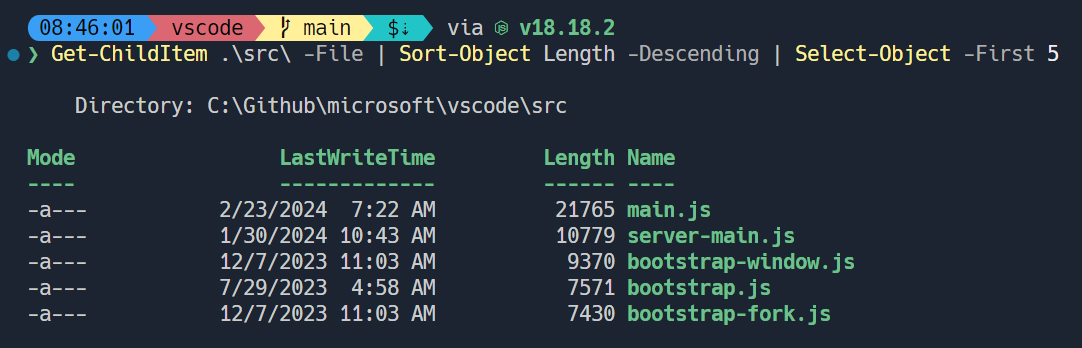
Screenshot showing that complex queries are OS and shell-specific

Copilot powered rename suggestions button

Copilot-powered rename suggestions can now be triggered by using the sparkle icon in the rename control.

Content Exclusions

GitHub Copilot Content Exclusions is now supported in Copilot Chat for all Copilot for Business and Copilot Enterprise customers. Information on configuring content exclusions can be found on the GitHub Docs.

When a file is excluded by content exclusions, Copilot Chat is unable to see the contents or the path of the file, and it’s not used in generating an LLM suggestion.
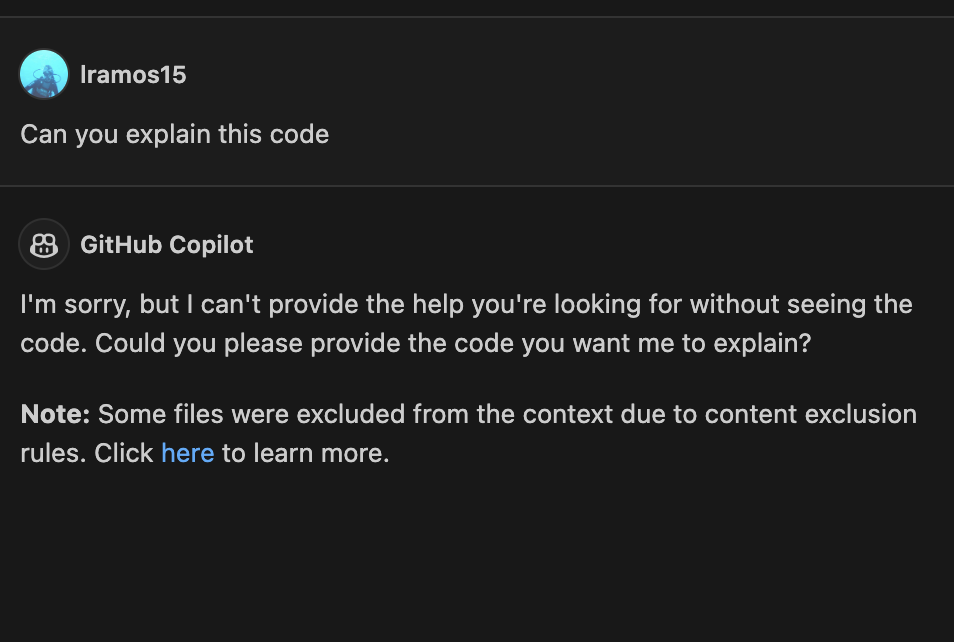

Screenshot showing a file which has been excluded in panel chat, displaying a warning about decreased suggestion quality

Screenshot showing a file which has been excluded in inline chat, showing an error that inline chat cannot be used

Preview: Generate in Notebook Editor

We now support inserting new cells with inline chat activated automatically in the notebook editor. We show a Generate button on the notebook toolbar and the insert toolbar between cells, when the notebook.experimental.generate setting is set to true. It can also be triggered by pressing Cmd+I on macOS (or Ctrl+I on Windows/Linux), when the focus is on the notebook list or cell container. This feature can help simplify the process of generating code in new cells with the help of the language model.

Python

“Implement all inherited abstract classes” code action

Working with abstract classes is now easier when using Pylance. When defining a new class that inherits from an abstract one, you can now use the Implement all inherited abstract classes code action to automatically implement all abstract methods and properties from the parent class:

New auto indentation setting

Previously, Pylance’s auto indentation behavior was controlled through the editor.formatOnType setting, which used to be problematic if you wanted to disable auto indentation, but enable format on type with other supported tools. To solve this problem, Pylance has its own setting to control its auto indentation behavior: python.analysis.autoIndent, which is enabled by default.

Screenshot showing Python Analysis Auto Indent setting to control auto indentation with Pylance

Debugpy removed from the Python extension in favor of the Python Debugger extension

Now that debugging functionality is handled by the Python Debugger
extension, we have removed debugpy from the Python extension.

As part of this change, "type": "python" and "type": "debugpy" specified in your launch.json file will both reference the path to the Python Debugger extension, requiring no changes needed to your launch.json files in order to run and debug effectively. Moving forward, we recommend using "type": "debugpy" as this directly corresponds to the Python Debugger extension.

Socket disablement now possible during testing

You can now run tests with socket disablement from the testing UI on the Python Testing Rewrite. This is made possible by a switch in the communication between the Python extension and the test run subprocess to now use named-pipes.

Minor testing bugs updated

Test view now displays projects using testscenarios with unittest and parameterized tests inside nested classes correctly. Additionally, the Test explorer now handles tests in workspaces with symlinks, specifically workspace roots that are children of symlink-ed paths, which is particularly helpful in WSL scenarios.

Performance improvements with Pylance

The Pylance team has been receiving feedback that Pylance’s performance has degraded in the past few releases. We have made several smaller improvements in memory consumption and indexing performance to address various reported issues. However, for those who might still be experiencing performance issues with Pylance, we are kindly requesting for issues to be filed through the Pylance: Report Issue command from the Command Palette, ideally with logs, code samples and/or the packages that are installed in the working environment.

Hex Editor

The hex editor now has an insert mode, in addition to its longstanding “replace” mode. The insert mode enables new bytes to be added within and at the end of files, and it can be toggled using the Insert key or from the status bar.

The hex editor now also shows the currently hovered byte in the status bar.

GitHub Pull Requests

There has been more progress on the GitHub Pull Requests extension, which enables you to work on, create, and manage pull requests and issues. New features include:

  • Experimental conflict resolution for non-checked out PRs is available when enabled by the hidden setting "githubPullRequests.experimentalUpdateBranchWithGitHub": true. This feature enables you to resolve conflicts in a PR without checking out the branch locally. The feature is still experimental and will not work in all cases.
  • There’s an Accessibility Help Dialog that shows when Open Accessibility Help is triggered from the Pull Requests and Issues views.
  • All review action buttons show in the Active Pull Request sidebar view when there’s enough space.

Review the changelog for the 0.88.0 release of the extension to learn about the other highlights.

TypeScript

File watching handled by VS Code core

A new experimental setting typescript.tsserver.experimental.useVsCodeWatcher controls if the TS extension is using VS Code’s core file watching support for file watching needs. TS makes extensive use of file watching, usually with their own node.js based implementation. By using VS Code’s file watcher, watching should be more efficient, more reliable, and consume less resources. We plan to gradually enable this feature for users in May and monitor for regressions.

Preview Features

VS Code-native intellisense for PowerShell

We’ve had a prototype for PowerShell intellisense inside the terminal for some time now, that we only recently got some more time to invest in polishing up. This is what it looks like:

Currently, it triggers on the - character or when ctrl+space is pressed. To enable this feature, set "terminal.integrated.shellIntegration.suggestEnabled": true in your settings.json file (it won’t show up in the settings UI currently).

It’s still early for this feature but we’d love to hear your feedback on it. Some of the bigger things we have planned for it are to make triggering it more reliable (#211222), make the suggestions more consistent regardless of where the popup is triggered (#211364), and bringing the experience as close to the editor intellisense experience as possible (#211076, #211194).

Say, you’re writing some Markdown documentation and you realize that one section of the doc actually belongs somewhere else. So, you copy and paste it over into another file. All good, right? Well if the copied text contained any relative path links, reference links, or images, then these will likely now be broken, and you’ll have to fix them up manually. This can be a real pain, but thankfully the new Update Links on Paste is here to help!

To enable this functionality, just set "markdown.experimental.updateLinksOnPaste": true. Once enabled, when you copy and paste text between Markdown files in the current editor, VS Code automatically fixes all relative path links, reference links, and all images/videos with relative paths.

After pasting, if you realize that you instead want to insert the exact text you copied, you can use the paste control to switch back to normal copy/paste behavior.

Support for TypeScript 5.5

We now support the TypeScript 5.5 beta. Check out the TypeScript 5.5 beta blog post and iteration plan for details on this release.

Editor highlights include:

  • Syntax checks for regular expressions.
  • File watching improvements.

To start using the TypeScript 5.5 beta, install the TypeScript Nightly extension. Please share feedback and let us know if you run into any bugs with TypeScript 5.5.

API

When writing a new comment, VS Code creates a stripped down text editor, which is backed by a TextDocument, just like the main editors in VS Code are. This iteration, we’ve enabled some additional API features in these comment text editors. This includes:

  • Support for workspace edits.
  • Support for diagnostics.
  • Support for the paste-as proposed API.

Comment text documents can be identified by a URI that has the comment scheme.

We’re looking forward to seeing what extensions build with this new functionality!

Finalized Window Activity API

The window activity API has been finalized. This API provides a simple additional WindowState.active boolean that extensions can use to determine if the window has recently been interacted with.

vscode.window.onDidChangeWindowState(e => console.log('Is the user active?', e.active));

Proposed APIs

Accessibility Help Dialog for a view

An Accessibility Help Dialog can be added for any extension-contributed view via the accessibilityHelpContent property. With focus in the view, screen reader users hear a hint to open the dialog (⌥F1 (Windows Alt+F1, Linux Shift+Alt+F1)), which contains an overview and helpful commands.

This API is used by the GitHub Pull Request extension’s Issues and PR views.

Language model and Chat API

The language model namespace (vscode.lm) exports new functions to retrieve language model information and to count tokens for a given string. Those are getLanguageModelInformation and computeTokenLength respectively. You should use these functions to build prompts that are within the limits of a language model.

Note: inline chat is now powered by the upcoming chat particpants API. This also means registerInteractiveEditorSessionProvider is deprecated and will be removed very soon.

Updated document paste proposal

We’ve continued iterating on the document paste proposed API. This API enables extensions to hook into copy/paste operations in text documents.

Notable changes to the API include:

  • A new resolveDocumentPasteEdit method, which fills in the edit on a paste operation. This should be used if computing the edit takes a long time as it is only called when the paste edit actually needs to be applied.

  • All paste operations now are identified by a DocumentDropOrPasteEditKind. This works much like the existing CodeActionKind and is used in keybindings and settings for paste operations.

The document paste extension sample includes all the latest API changes, so you can test out the API. Be sure to share feedback on the changes and overall API design.

Hover Verbosity Level

This iteration we have added a new proposed API to contract/expand hovers, which is called editorHoverVerbosityLevel. It introduces a new type called the VerboseHover, which has two boolean fields: canIncreaseHoverVerbosity and canDecreaseHoverVerbosity, which signal that a hover verbosity can be increased or decreased. If one of them is set to true, the hover is displayed with + and - icons, which can be used to increase/decrease the hover verbosity.

The proposed API also introduces a new signature for the provideHover method, which takes an additional parameter of type HoverContext. When a hover verbosity request is sent by the user, the hover context is populated with the previous hover, as well as a HoverVerbosityAction, which indicates whether the user would like to increase or decrease the verbosity.

preserveFocus on Extension-triggered TestRuns

There is a proposal for a preserveFocus boolean on test run requests triggered by extensions. Previously, test runs triggered from extension APIs never caused the focus to move into the Test Results view, requiring some extensions to reinvent the wheel to maintain user experience compatibility. This new option can be set on TestRunRequests, to ask the editor to move focus as if the run was triggered from in-editor.

Notable fixes

  • 209917 Aux window: restore maximised state (Linux, Windows)

Thank you

Last but certainly not least, a big Thank You to the contributors of VS Code.

Issue tracking

Contributions to our issue tracking:

Pull requests

Contributions to vscode:

Contributions to vscode-css-languageservice:

Contributions to vscode-emmet-helper:

Contributions to vscode-eslint:

Contributions to vscode-hexeditor:

Contributions to vscode-json-languageservice:

Contributions to vscode-languageserver-node:

Contributions to vscode-python-debugger:

Contributions to vscode-vsce:

Contributions to language-server-protocol:

Contributions to monaco-editor:

AMD’s Q1 Earning Report Shows Shocking 48% Decline in GPU Sales


This week, AMD reported on its Q1 earnings (PDF), and though there were some bright spots regarding its CPU sales, the gaming division is not doing too well these days. On the call, CEO Dr. Lisa Su revealed the company’s gaming business is facing challenges affecting both discrete GPU sales and that of next-gen consoles with its semi-custom GPUs.

Dr. Su stated gaming sales are down 48% year-over-year, a shocking decline. A year is long, and a lot can happen during that period. Still, she noted sales are also down a whopping 33% from the previous quarter, indicating a terrible period for the Radeon business. On the call via The Motley Fool, it’s notable that Dr. Su detailed each segment of its earnings. Still, the discussion of gaming revenue didn’t include any explanations or much context for the numbers. She said, “Revenue declined 48% year over year and 33% sequentially to $922 million. First-quarter semi-custom SoC sales declined in line with our projections as we are now in the fifth year of the console cycle.”

AMD Gaming Revenue

It was a rough quarter for Radeon, due to “lower semi-custom and Radeon sales.”
Credit: AMD

The only additional information offered on the call was that the company launched the Radeon RX 7900 GRE and Fluid Motion Frames to compete with Nvidia’s DLSS 3 frame generation. She did note that next-gen console sales have also been dragging down the company’s semi-custom GPU sales, but that’s not AMD’s fault. The drop off in sales of its discrete GPUs is AMD’s problem, though, leading us to wonder if it can mount a comeback with RDNA 4. Given the rumors that AMD will abandon the high-end market, it’s hard to say how that will shake out, but it’s not looking good.

In the future, it seems likely AMD will have to prioritize its money makers, which are CPUs for data center and client, and GPUs for data centers. Dr. Su noted on the call that CPU sales for data center and client grew by more than 80% YoY, a far cry from its dismal GPU earnings. She also said AMD expects to earn $4 billion on its data center GPUs this year alone and that those GPUs—the MI300 family— have earned $1 billion in revenue faster than any product in the company’s history. Given this scenario, nobody would fault AMD for leaning into its more profitable businesses. However, that could be bad news for gamers who have been hoping AMD would continue to put up a good fight against Nvidia.

9 Signs It’s Time to Switch Email Services


How to tell if you’ve outgrown your current provider.

When it comes to email marketing, the time-tested age-old saying rings true:

Your emails are only as good as the service provider sending them.
*OK, this isn’t really a time-tested age-old saying, but it should be.

Listen, it’s no surprise that email is a cornerstone of any strong marketing and communication strategy. That’s because your emails are a direct line of communication with your audience, AND you have total control over them.

However, you may not be getting the most out of your email marketing efforts, and it all has to do with your email service provider (ESP).

While things have probably been running smoothly for quite some time (or smooth-ish), you may start noticing unanticipated limitations or once-minor frustrations pile up — all things akin to growing pains after you’ve been sending emails for a while.

When your email efforts and strategy expand, so do your needs as an email marketer, and your current provider may no longer be meeting the mark.

But how do you know if it’s time to switch? That’s where this post comes in. To help with your decision-making, we’ve compiled a list of nine signs you’ve outgrown your current provider, and it’s time to explore other options for your email marketing.

But first…

What’s holding you back from switching ESPs?

Before we dive into the signs, it’s time to switch. It’s important to address the elephant in the room and call out what’s most likely holding you back from starting this conversation in the first place.

So, what’s the biggest hesitation when it comes to switching ESPs? The answer may surprise you… it’s TIME.

  • The time you’ve already invested with your current provider.
  • The time it takes to research different options.
  • The time it takes to learn a new app.
  • AND the time required to migrate, replicate, and set everything up in a new provider.

We get it – time is money. It’s one of the most important investments you make every single day. So, if your current provider is working (or working-ish), is it even worth the time to switch?

But, could you actually save time by switching ESPs? Most likely, especially if you’ve grown accustomed to making do with the minor frustrations and inconveniences or manual tasks you complete regularly.

Regardless, time is a big factor in deciding whether or not to change ESPs, and we would be remiss not to acknowledge that. So, with that said, take your time and read through all nine signs below. Keep track of how many apply to your current situation, because if it’s more than 3, you’re well past time for an upgrade.

Nine signs it’s time to switch ESPs:

1. Poor Deliverability Rates and Reputation

It doesn’t matter how pretty your emails are or how spectacular the content is if they aren’t getting to your subscribers. This is why deliverability is one of the most critical elements in the success of your email marketing efforts.

Refresher: Deliverability is the processes and protocols that ensure your emails reach subscribers’ inboxes.
You can read all about deliverability here.

If you notice that your emails are consistently ending up in spam folders — or aren’t even reaching the inbox at all — it’s a clear sign that your current ESP may have deliverability issues. And because this can have a detrimental impact on all of your email-related goals, it’s time to consider other options.

2. Low Open and Click-Through Rates

Low engagement may be due to your provider not helping you engage your audience effectively. Engagement rates help gauge your audience’s interest in your email campaigns, and features such as targeting, support, and campaign metrics all work to help boost these rates.

Low engagement rates, such as open and click-through rates, are also a cousin to poor deliverability rates or improper authentication — all things to check with your current provider when rooting out the cause of your issue.

Regardless, if you’re noticing drops in engagement, it’s worth exploring the features available from different providers.

3. Lack of Reporting and Analytics

Successful email marketing relies on real-time data. For example, do you know which email you sent last month had the highest engagement? Or how about which of your subscription forms is performing the best?

Real-time reporting is essential when it comes to tracking the performance of your campaigns, measuring key performance indicators (KPIs), and making informed decisions. If your current ESP doesn’t offer robust reporting and analytics, you’re likely missing out on the opportunity to optimize your email marketing strategy. Data-driven decision making, FTW.

FeedBlitz offers a wide selection of real-time data available
on every email list, email campaign, and subscriber.

4. Limited Features and Functionality

As you grow, your email marketing needs evolve, including the features and functionality needed to accomplish your goals. What helped you get started with your email marketing may not help you fully reach your potential in the long term.

If your current provider lacks essential features like automation, advanced segmentation, or A/B testing, it might be time to switch to a more comprehensive platform. The absence of these features, or other desired features and functionality, can limit your ability to create targeted, personalized, and effective email campaigns. And those limitations also limit your growth and revenue potential, as well.

5. Insufficient Customer Support

Good customer support is invaluable when you encounter an issue or need help with your email campaigns. If your current provider’s support team is unresponsive, lacks helpful resources, or is only available for select pricing tiers, it can double the frustration you experience when trouble or questions arise.

A good support team is not only experts in their products but also in the field of email marketing. They can answer your questions and regularly create and update available resources to help you along the way.

Stellar customer support goes above and beyond to help and empower you to take the reins and own your email marketing. If your frustrations are piling up regarding support, consider switching to a provider with a reputation for excellent customer support.

6. High, Hidden, Surprising, or Burdensome Costs

Email marketing costs can add up quickly, especially as your subscriber list grows or you increase your mailing frequency. Not to mention that the hidden fees and overages many ESPs tack on can also seriously strain your marketing budget.

With FeedBlitz, you’re only charged for active, unique email
subscribers, and no overages, no surprises, and no surcharges!

If you’ve noticed a significant cost increase without a corresponding increase in value or functionality, it’s worth reviewing your current provider’s pricing structure and exploring more cost-effective options.

7. Limited Integration Options

You’re probably using more than one tool, application, or platform in your marketing strategy and, therefore, having to connect or transfer data from one to the other manually. Not only is this time-consuming, but it increases the likelihood of data gaps and inefficiencies — neither of which you need.

Integrations allow you to easily share and transfer data from one app to another, automating and maximizing your efforts. Your ESP should offer direct and indirect integrations (Zapier) to help you streamline your efforts, freeing up your time so you can focus on list and revenue-growing actions.

8. Scaling Challenges

Scalability is vital to meet and exceed your needs as an email marketer and support your growth. Are you sending greater volumes of emails regularly? Are these greater volumes hurting your deliverability or performance? And how about your campaigns – have they become more complex regarding templates, layouts, or media included?

These growth indicators can easily cause scalability challenges for your email marketing platform. Your email marketing platform should be able to handle increased volumes and complex campaigns without compromising performance. If your current provider struggles with scalability, it may be time to explore other options.

9. Frequent Downtime or Technical Issues

Frequent service outages, downtime, or technical glitches are frustrating and can completely disrupt your email marketing schedule and damage your brand’s reputation.

Your provider should be a reliable, robust, and stable platform to ensure uninterrupted communication with your audience. While minor outages and unexpected downtimes happen occasionally with all online systems, clear communication and frequent status updates are vital when these situations arise. (This circles back to the stellar customer support item above!)

If you find technical issues recurring and communication with support or your provider about them is lacking, it’s an excellent time to consider switching to a more reliable provider.

Steps to take when you’re ready to switch.

If, after reading through the list above, you know you’ve outgrown your current ESP and it’s time to switch providers, take the steps below to help make the migrations and transition as smooth as possible.

Step 1 – Take stock of everything you currently have going on. Be sure to note any of the following:

  • email campaigns
  • email lists
  • funnels
  • subscription forms
  • tags and custom fields
  • etc.

This gives you a better idea of the scope of your email marketing and creates a full picture of anything that will need to be replicated in the new provider. This list also offers an opportunity for you to decide what you want to continue with or stop doing.

We recommend keeping this list as accurate as possible for the remaining steps.

Important note: When you switch ESPs, the images, links, and archives of previously sent campaigns will oftentimes only be available for a limited time after you cancel your account. This is known as asset retention. Different ESPs have different timeframes. They retain assets of canceled accounts. At FeedBlitz, for example, we retain all client’s assets for 90 days. It’s always a good idea to double-check this when making a switch!

Step 2 – Evaluate email service providers. There are plenty of ESPs and email newsletter services on the market. Organize your search and evaluation by focusing first on these four areas:

  1. Your email marketing needs and goals.
  2. Your budget.
  3. The reputation of an ESP — both online and sending.
  4. The available features, services, and support that the email provider offers.

Step 3 – Reach out to a few ESP’s support teams. Many support teams are often happy to answer any specific questions you have, talk shop about email strategy, and evaluate your use cases compared to their available features. Also, inquire about migration services they may have. Have your list from Step 1 on hand to give a comprehensive scope of your current strategy and efforts.

Step 4 – Start a free trial while your current operation is underway. Trust us on this one. Use a test sample of your list and run campaigns simultaneously to get a complete comparison picture. This way, you’ll see deliverability, engagement, features, and data reports for both providers to compare easily. Free trials also allow you to interact with their support teams and resources, gaining insight into how technical questions are handled.

Know when it’s time to make a change.

Recognizing the signs you’ve outgrown your current ESP and that it’s time to make a change is crucial for ensuring the continued success of your email marketing campaigns.

Up to this point, what’s worked for your email marketing has served you well, but it may not do you justice in taking your goals to the next level. Whether you’re dealing with deliverability challenges, rising costs, or limited features, switching providers can bring new life into your email efforts.

Are you ready to switch ESPs and think FeedBlitz could fit you well? Head to this page to start your free trial. Questions? Feel free to reach out with any questions through our Support Page. While live support is available Monday to Friday, 9 AM to 5 PM Eastern, you can always find helpful information 24-7 at the resources linked here.

‘Cobra Kai’ Season 6 Trailer Kicks Epic 3-Part Finale Into Gear


Cobra Kai is gearing up for an epic 3-part series finale.

Netflix released the trailer for the sixth and final season of the popular Karate Kid sequel series as part of its Netflix Is A Joke Festival. Nearly two years have passed since season 5 dropped to the streamer, and now we know 15 new episodes are coming. Season 6 will be split up into three parts: The first block drops on July 18, the second on November 28 and the third is slated for 2025. 
“Picking up with Cobra Kai eliminated from the Valley, our senseis and students must decide if and how they will compete in the Sekai Taikai — the world championships of karate,” the official season 6 synopsis reads.

The series  continues the stories of Daniel LaRusso (Ralph Macchio) and Johnny Lawrence (William Zabka) as they strive to put their childhood conflict behind them and find solidarity in the face of a common enemy. 

Martin Kove and Yuji Okumoto will reprise their roles as John Kreese and Chozen Toguchi. Xolo Maridueña, Jacob Bertrand, Mary Mouser, Tanner Buchanan, Peyton List, Gianni DeCenzo, Courtney Henggeler, Vanessa Rubio, Dallas Dupree Young, Alicia Hannah-Kim, Griffin Santopietro and Oona O’Brien round out the program’s ensemble cast.

cobra-kai-season-6-william-zabka-ralph-macchio-yuji-okumoto-netflix cobra-kai-season-6-william-zabka-ralph-macchio-yuji-okumoto-netflix

William Zabka, Ralph Macchio and Yuji Okumoto star in Cobra Kai season 6 on Netflix.

Curtis Bonds Baker/Netflix

“Our Day 1 goal with Cobra Kai has always been to end it on our terms, leaving the Valley in the time and place we’ve always imagined,” series creators Josh Heald, Jon Hurwitz, and Hayden Schlossberg said in a statement. “So it is with immense pride and thankfulness that we are able to announce that achievement… While this may be a bittersweet day for the fandom, the Miyagiverse has never been stronger.”

Big questions have remained after Cobra Kai’s volatile fifth season. With Terry Silver (Thomas Ian Griffith) no longer in a leadership position and John Kreese on the run, how will Daniel and Johnny’s common enemy remain in a position of power? Will Miyago-Do still battle for supremacy in the Sekai Taikai Tournament? Will Miguel and his dad find closure? Do the high school kids at these opposing dojos have it in them to let bygones be bygones, when all is said and done? 

Something tells us we’ll get these, and more answers, once Cobra Kai makes its explosive return to Netflix this summer.


Best gaming PC build under $1500 in 2024


What you get for your $1500

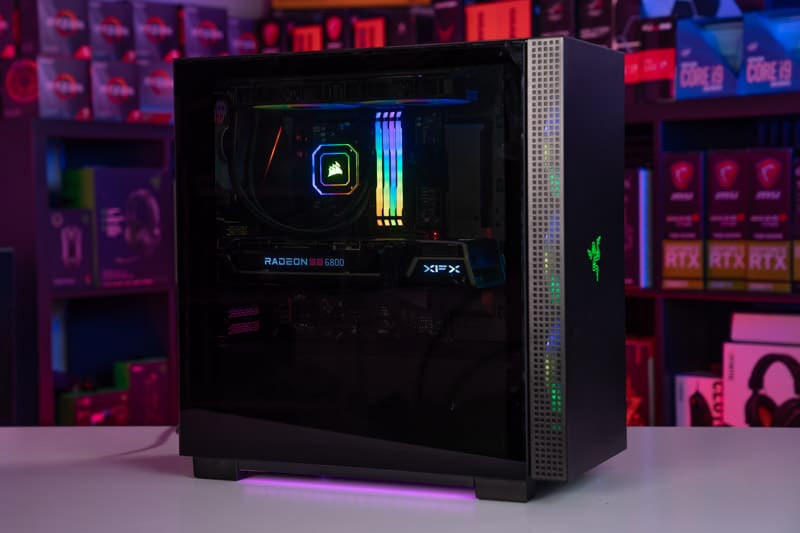
When you are spending around $1500, you are pretty much guaranteed to give yourself a high-end PC with an array of top-shelf features. For this amount of money, you can expect a fast CPU that will enhance your gaming experience and also perform without issue when multitasking. You will also benefit from a high-end graphics card, capable of high frame rates in glorious high-fidelity graphical settings. Overall, a PC built under $1500 brings some of the very best components together and puts you in the lower high-end bracket, ideal for 1440p gaming on a high refresh rate monitor.

We separate our builds into different categories, all based on a specific budget. Regardless of this, it is still important to consider if this is the right budget for your gaming needs. If you are looking to play AAA titles in high settings and achieve relatively high FPS metrics, then you are in the right place. For the more casual gamers who primarily play less taxing indie games, this PC could be overkill. While we do our best to bring you a high-quality system that remains within our budget parameters, Amazon’s prices can fluctuate from time to time.

This $1500 gaming PC build features the latest next-gen components, ensuring you get high performance that will last for years. With an RTX 40-series GPU, you are guaranteed high frame rates in most titles in 1440p and below, with some 4K performance viable through the odd setting tweak.

Supporting the CPU and GPU, this $1500 build also comes with a rapid 1TB NVMe SSD to take care of your operating system and more than a few games. This storage solution will give you faster boot times than your standard HDD and will also improve your FPS in-game. We also see 32GB of ultra-fast 5600MHz DDR5 RAM in this PC, making this PC feel fast and responsive for years to come. 

Overclocking

Some gamers and plenty of enthusiasts love to overclock their gaming rigs, so we have included components that can cater to this. Overclocking can squeeze extra power out of your system and provide you with even better performance.

If you are considering overclocking your system, remember to include a capable aftermarket cooler to handle the extra heat produced by the CPU. The fast RAM included in this build will not run at 5600MHz out of the box, so remember to overclock your RAM in the BIOS, by enabling the XMP profile. It is worth noting that the motherboard selected can handle these speeds without any issues, so no need to worry.

Should you choose AMD or Intel for your $1500 gaming PC build?

Both AMD and Intel offer incredible results from their latest lines of processors. We currently recommend Intel’s 12600KF, but this CPU and the accompanying motherboard can be switched out for an AMD equivalent if you prefer.  This $1500 PC build provides you with one of the best price-to-performance gaming CPUs on the market and its multithreading capabilities will stand the test of time for a few more years to come.

Upgradability & Future-Proofing the $1500 build

Even though this is a $1500 gaming PC and is considered high-end, there is still some room for improvement. Upgrades in the right areas can give you an improved gaming experience if done right, and a greater life span out of your PC build, so certainly worthy of consideration. Upgrades will come at a significant extra cost for that boost in performance, but if you can accommodate it, go for it! For a significant upgrade, at a little extra cost, consider our $2000 gaming PC.

Financing and purchase options for your $1500 PC build

There is more than one way to purchase PC parts in 2024, we’re of course speaking about finance. Now, while we don’t recommend you get into debt and end up paying more for your components than you should, there are several 0% interest purchase options from the likes of ClearPay and Klarna. These can be especially useful if your PC breaks, for example, and you need a new one for work quickly. If you don’t fancy getting into debt, there’s always the option of buying components secondhand.

There are only a couple of components we do not recommend you buy secondhand, these are hard drives and PSUs. Everything else is okay if you can deduce that they have been treated properly. Please ask for proof of the working component before buying, buy, and test in person if you can, to avoid any shenanigans.


Jeff Bezos’ AI Search Engine Investment Set to Double in Months


March 13th, 2024: Perplexity AI, a startup founded in August 2022, is on a mission to challenge Google’s dominance in the search engine market with its AI-powered platform that combines the functionality of a chatbot and a traditional search engine.

The company’s rapid growth and innovative approach have caught the attention of investors, including Amazon founder Jeff Bezos, who invested in Perplexity AI through his Bezos Expeditions Fund.

In January, Perplexity AI CEO Aravind Srinivas announced that the startup had raised $73.6 million in a funding round that included investments from venture capitalists, companies like Nvidia, and angel investors, in addition to Bezos’ investment.

The round valued the company at approximately $520 million. Just a few months later, Perplexity AI is finalizing a new funding deal that would see its valuation nearly double to around $1 billion, according to a report by the Wall Street Journal.

Srinivas shared in a blog post that Perplexity AI had attracted 10 million monthly active users and served over half a billion queries in 2023.

Jonathan Cohen, VP of applied research at Nvidia, praised the startup, stating that it is “one of the few consumer AI products to reach this major milestone of 10 million MAUs.”

Perplexity AI’s search engine offers real-time information and provides footnotes showing the sources of its answers.

The company generates revenue by offering a Pro version for $20 per month, which allows users to choose from various large language models, including OpenAI’s GPT-4, Anthropic’s Claude 2.1, or Perplexity’s own LLM.

Srinivas has been vocal about his belief that Google’s search engine is outdated and that Perplexity AI represents the future of online information access.

“Google is going to be viewed as something that’s legacy and old, and Perplexity will be viewed as something that’s the next generation and future,” he told Reuters in January.

Despite Google’s ongoing efforts to integrate AI into its search engine, testing it on millions of users, Srinivas believes that the tech giant lacks the incentive to move quickly and improve the product experience, as its core revenue comes from users clicking on links and viewing ads.

As people increasingly turn to AI chatbots for their online queries, Srinivas is confident that Perplexity AI’s approach will prove more efficient and user-friendly.

“The times of sifting through SEO spam, sponsored links, and multiple web pages will be replaced by a much more efficient way to consume and share information,” he wrote in the January announcement.

While Perplexity AI’s potential $1 billion valuation is impressive, the startup still faces a significant challenge in competing with Google, which has vast resources, AI talent, and a parent company, Alphabet, valued at $1.7 trillion. Nevertheless, Bezos’ investment and the rapid growth of Perplexity AI demonstrate


AutoCAD Scaling Tips & Best Practices!


Arguably one of the more confusing topics in AutoCAD to newer designers and those that learned prior to paper space/annotative text is scaling within AutoCAD.

I can’t remember how many times I’ve been asked about setting up scales, fixing viewports, annotative text, what size to draw things in model space, and so much more…

Today I wanted to share a few best practice tips when it comes to scale and designing in AutoCAD.

While there are always exceptions to every rule, if you can follow these tips, your drawings are going to be off to a great start!


This one is pretty straightforward but not always followed. It’s best practice to do all of your drawing and design work within model space in AutoCAD. (Learn about the difference between Model/Layout Spaces)

Layout tabs or paper space are there to create our drawings and model space is for our model and design.

Whether you’re doing floor plans, simple details, detailed design drawings, or schematics, there’s no reason or benefit to not use model space when drawing.


  • Only draw/ design at 1:1 scale aka real size.

Similar to the last tip, there’s no benefit or reason not to draw everything in AutoCAD at one-to-one or full scale.
You’re not going to run out of room and you can always adjust and change up the scale by using your viewports later on.

Doing all of your design work at one to one. Can eliminate issues later on, especially if someone else starts working on your drawings and doesn’t realize you’ve scaled things.
It can also eliminate issues and errors by accidentally scaling incorrectly, as well as make things easier when getting quantities, areas, etc.


To show different scales and areas of your design, use multiple viewports in your layouts to convey the different details required for your drawing.
Viewports allow you to easily show different areas or scales at any point and can be created quickly without the need to scale or redraw anything in your model space or design.


  • Use annotative text and dimensions when labeling your design.

These pieces of text and dimensions when set up properly will automatically adjust their size to be consistent across all of your drawings and viewports regardless of the scale of your viewport.
Annotative elements in AutoCAD are dynamic and will save you time and headache if you’re drawing size or scale ever needs to change down the road.


  • Add your Notes & Tables in Layouts


Depending on the drawing type and situation, tables (Dynamic Excel Table in AutoCAD), drawing lists (Make Dynamic Drawing Lists in AutoCAD) and general notes can be added directly to your layout tabs, this can help keep your model space from getting cluttered with a lot of notes. It can also make copying general note sheets and title sheets from another project easier since the text is already on them and not in model space.


That’s all for today’s post, I hope you all were able to take something away from it, and if you have any questions be sure to leave a comment or reach out on Twitter @cadintentions.

As always, thank you so much for reading, I am excited to be back and posting regularly on the blog and hope you all will follow along.

Cheers and happy Drafting!

PS. If you are looking to learn more about AutoCAD and jump start your learning, be sure to check out my AutoCAD Fundamentals & Workflows Course (Available for Instant Download NOW): https://gum.co/learnautocad
I’ve packed over 15 years of tips, tricks, and experience into easy to follow videos that I’m sure you will enjoy!


Also published on Medium.

The following two tabs change content below.

Brandon is a Civil Designer, Aspiring Blogger/Creator, Husband, Father to two Amazing Kids and Tech Aficionado from a small town in Canada. He has been obsessed with design and technology since he can remember and working as a Civil Designer for nearly as long. Brandon’s blog and Youtube channel, CADIntentions.com has been his outlet and excuse for keeping up with new tech and trends in the CAD design world for the last 10 years growing to more than 60,000 subscribers and over 15,000,000 views, while also being the source of many great friendships and unique opportunities.

If you would like to Sponsor CAD Intentions or Work together in some way, Please visit my About Page and send me an email: http://cadintentions.com/about-me/


Big data security: issues, challenges, concerns


While the snowball of big data is rushing down a mountain gaining speed and volume, companies are trying to keep up with it. And down they go, completely forgetting to put on masks, helmets, gloves and sometimes even skis. Without these, it’s terribly easy to never make it down in one piece. And putting on all the precaution measures at a high speed can be too late or too difficult.

Prioritizing big data security low and putting it off till later stages of big data adoption projects isn’t always a smart move. People don’t say “Security’s first” for no reason. At the same time, we admit that ensuring big data security comes with its concerns and challenges, which is why it is more than helpful to get acquainted with them.

And as ‘surprising’ as it is, almost all security challenges of big data stem from the fact that it is big. Very big.

Big data security

Short overview

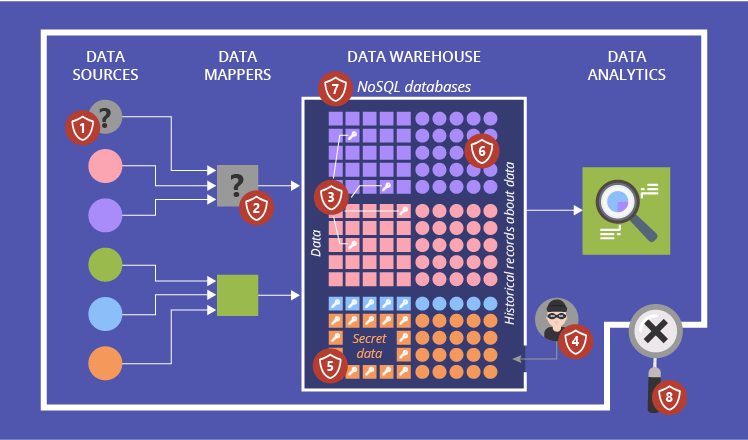
Problems with security pose serious threats to any system, which is why it’s crucial to know your gaps. Here, our big data experts cover the most vicious security challenges that big data has in stock:

  1. Vulnerability to fake data generation
  2. Potential presence of untrusted mappers
  3. Troubles of cryptographic protection
  4. Possibility of sensitive information mining
  5. Struggles of granular access control
  6. Data provenance difficulties
  7. High speed of NoSQL databases’ evolution and lack of security focus
  8. Absent security audits

Now that we’ve outlined the basic problem areas of big data security, let’s look at each of them a bit closer.

#1. Vulnerability to fake data generation

Before proceeding to all the operational security challenges of big data, we should mention the concerns of fake data generation. To deliberately undermine the quality of your big data analysis, cybercriminals can fabricate data and ‘pour’ it into your data lake. For instance, if your manufacturing company uses sensor data to detect malfunctioning production processes, cybercriminals can penetrate your system and make your sensors show fake results, say, wrong temperatures. This way, you can fail to notice alarming trends and miss the opportunity to solve problems before serious damage is caused. Such challenges can be solved through applying fraud detection approach.

#2. Potential presence of untrusted mappers

Once your big data is collected, it undergoes parallel processing. One of the methods used here is MapReduce paradigm. When the data is split into numerous bulks, a mapper processes them and allocates to particular storage options. If an outsider has access to your mappers’ code, they can change the settings of the existing mappers or add ‘alien’ ones. This way, your data processing can be effectively ruined: cybercriminals can make mappers produce inadequate lists of key/value pairs. Which is why the results brought up by the Reduce process will be faulty. Besides, outsiders can get access to sensitive information.

The problem here is that getting such access may not be too difficult since generally big data technologies don’t provide an additional security layer to protect data. They usually tend to rely on perimeter security systems. But if those are faulty, your big data becomes a low hanging fruit.

#3. Troubles of cryptographic protection

Although encryption is a well-known way of protecting sensitive information, it is further on our list of big data security issues. Despite the possibility to encrypt big data and the essentiality of doing so, this security measure is often ignored. Sensitive data is generally stored in the cloud without any encrypted protection. And the reason for acting so recklessly is simple: constant encryptions and decryptions of huge data chunks slow things down, which entails the loss of big data’s initial advantage – speed.

#4. Possibility of sensitive information mining

Perimeter-based security is typically used for big data protection. It means that all ‘points of entry and exit’ are secured. But what IT specialists do inside your system remains a mystery.

Such a lack of control within your big data solution may let your corrupt IT specialists or evil business rivals mine unprotected data and sell it for their own benefit. Your company, in its turn, can incur huge losses, if such information is connected with new product/service launch, company’s financial operations or users’ personal information.

Here, data can be better protected by adding extra perimeters. Also, your system’s security could benefit from anonymization. If somebody gets personal data of your users with absent names, addresses and telephones, they can do practically no harm.

#5. Struggles of granular access control

Sometimes, data items fall under restrictions and practically no users can see the secret info in them, like, personal information in medical records (name, email, blood sugar, etc.). But some parts of such items (free of ‘harsh’ restrictions) could theoretically be helpful for users with no access to the secret parts, say, for medical researchers. Nevertheless, all the useful contents are hidden from them. And this is where talk of granular access starts. Using that, people can access needed data sets but can view only the info they are allowed to see.

The trick is that in big data such access is difficult to grant and control simply because big data technologies aren’t initially designed to do so. Generally, as a way out, the parts of needed data sets, that users have right to see, are copied to a separate big data warehouse and provided to particular user groups as a new ‘whole’. For a medical research, for instance, only the medical info (without the names, addresses and so on) gets copied. Though, the volumes of your big data grow even faster this way. Other complex solutions of granular access issues can also adversely affect the system’s performance and maintenance.

#6. Data provenance difficulties

Data provenance – or historical records about your data – complicates matters even more. Since its job is to document the source of data and all manipulations performed with it, we can only image what a gigantic collection of metadata that can be. Big data isn’t small in volume itself. And now picture that every data item it contains has detailed information about its origin and the ways it was influenced (which is difficult to get in the first place).

For now, data provenance is a broad big data concern. From security perspective, it is crucial because:

  1. Unauthorized changes in metadata can lead you to the wrong data sets, which will make it difficult to find needed information.
  2. Untraceable data sources can be a huge impediment to finding the roots of security breaches and fake data generation cases.

#7. High speed of NoSQL databases’ evolution and lack of security focus

This point may seem as a positive one, while it actually is a serious concern. Now NoSQL databases are a popular trend in big data science. And its popularity is exactly what causes problems.

Technically, NoSQL databases are continuously being honed with new features. And just like we said in the beginning of this article, security is being mistreated and left in the background. It is universally hoped that the security of big data solutions will be provided externally. But rather often it is ignored even on that level.

#8. Absent security audits

Big data security audits help companies gain awareness of their security gaps. And although it is advised to perform them on a regular basis, this recommendation is rarely met in reality. Working with big data has enough challenges and concerns as it is, and an audit would only add to the list. Besides, the lack of time, resources, qualified personnel or clarity in business-side security requirements makes such audits even more unrealistic.

But don’t be scared: they are all solvable

Yes, there are lots of big data security issues and concerns. And yes, they can be quite crucial. But it doesn’t mean that you should immediately curse big data as a concept and never cross paths with it again. No. The thing you should do is carefully design your big data adoption plan remembering to put security to the place it deserves – first. This may be a tricky thing to do, but you can always resort to professional big data consulting to create the solution you need.


Big data is another step to your business success. We will help you to adopt an advanced approach to big data to unleash its full potential.

Ubisoft’s Free-To-Play FPS XDefiant Finally Gets Release Date And It’s This Month


XDefiant, the free-to-play first person shooter starring factions across Ubisoft’s catalogue of franchises, finally has a release date and it’s out very soon. Ubisoft announced today that XDefiant drops onto PlayStation 5, Xbox Series X/S, and PC (via Ubisoft Connect) on May 21. 

This is the day the XDefiant preseason will take begin, giving players a chance to enjoy the shooter before its official first season begins. This release date reveal follows various betas and tests for the game, which at one point, resulted in the game getting indefinitely delayed last year

“Thank you to everyone who participated in the Server Test Session,” an XDefiant blog post reads. “It was exciting to see all the love for the game and the great feedback that was shared. Coming out of the test, we are excited to say that we will launch our Preseason on May 21 on PC, PS5, and Xbox Series X/S. Preseason will last 6 weeks before going into our seasonal cadence.” 

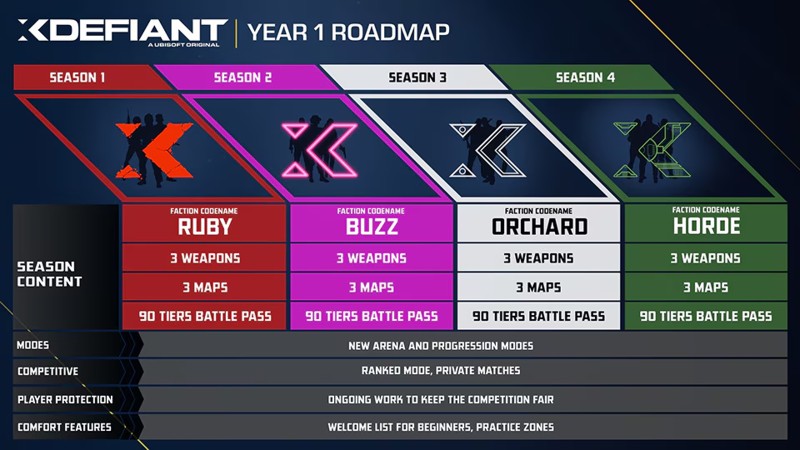
As for that seasonal cadence, Ubisoft has already outlined the first four season, which together will encompass the game’s Year 1 roadmap. You can check it out below: 

XDefiant Ubisoft free to play first person shooter watch dogs far cry the division release date May 21

As for what to expect in XDefiant’s preseason, there’s a lot of content on offer, and it’s all free: 

Factions

  • Echelon (Splinter Cell)
  • Phantoms (Ghost Recon Phantoms)
  • Cleaners (The Division)
  • Libertad (Far Cry 6)
  • Dedsec (Watch Dogs 2, after unlocking or purchasing)

Maps

  • Arena
  • Attica Heights
  • Dumbo
  • Echelon HQ
  • Emporium
  • Liberty
  • Mayday
  • Meltdown
  • Midway
  • Nudleplex
  • Pueblito
  • Showtime
  • Times Square
  • Zoo

Modes

  • Domination
  • Hot Shot
  • Occupy
  • Escort
  • Zone Control

Ubisoft says a new Ranked Mode Practice Playlist will be live in the preseason, too, giving players a practice go at the game’s upcoming ranked mode where players battle it out in 4v4 competitive matches. This playlist will include 4v4 versions of Domination, Occupy, Escort, and Zone Control. 

All rewards earned during the previously held Server Test Sessions and Insider Sessions will be available at launch in the preseason. 

Here’s another look at what to expect in XDefiant’s 6-week preseason:

XDefiant Ubisoft free to play first person shooter watch dogs far cry the division release date May 21

For more about the game, read Game Informer’s XDefiant impressions after going hands-on with the game, and then check out this XDefiant New Gameplay Today for a look at how it plays. 


Are you hopping into XDefiant later this month? Let us know in the comments below!

BirdDog is Back!!! Introducing the BirdDog X1, X1 Ultra, and MAKI Ultr


In this week’s Videoguys Live episode, Gary introduces BirdDog’s exciting new X Series cameras. Join our exclusive webinar as Gary explores the cutting-edge BirdDog X1, X1 Ultra, and MAKI Ultra cameras, highlighting their compact design and exceptional performance. Discover the future of camera technology and secure your pre-order with Videoguys today! Stay ahead with BirdDog’s innovative camera lineup.

Watch the full webinar below:


BirdDog X1 and X1 Ultra PTZ Cameras

  • 1080/60p
  • 20X Zoom
  • Tally Light
  • AI Auto Focus tracking
  • HDMI/USB/IP
  • NDI HX3
  • WiFi Connection
  • E-ink Label
  • Integrated NDI HX decoder

  • 4K/30p
  • 12X Zoom
  • Tally Light
  • AI Auto Focus tracking
  • HDMI/USB/IP
  • NDI HX3
  • WiFi Connection
  • E-ink Label
  • Integrated NDI HX decoder

Tally Light. It’s a halo Effect.
Professional results need professional tools. X1 and X1 Ultra sport the most visible and effective Tally system available. Up front with a large, daylight visible border, and out back with an interchangeable, illuminated numbering system. Your cast and crew will always know where to look to keep your audience engaged and your look polished.

AI Tracking. We welcome our AI overlords.
Every production could use a little help from a friend. The X1 and X1 Ultra keep your subject in focus with AI tracking technology, intelligently following your subject’s movements in real-time. Whether you’re orchestrating a live event, capturing spontaneous moments in a hybrid environment, or hunting down sports action, AI tracking helps you get well framed – without needing an octopus to run the controller.

NDI® | HX3. Enhanced Reliability on More Networks.
The X1 and X1 Ultra deliver superior network performance via NDI® | HX3 integration. You get significantly reduced network impact and excellent image quality, meaning its more friendly in more network environments. BirdDog’s NDI® | HX3 delivers quality and performance you can count on.

Integrated NDI® | HX Decoder. Let’s hook up.
The X1 and X1 Ultra are the world’s first PTZ cameras featuring an NDI® | HX* Decoder designed specifically for confidence monitoring, return feeds, or teleprompter usage. We’ve pulled all this connectivity into a single cable, radically simplifying how you interface with your equipment. Less gear. Less hassle. Whether you’re broadcasting live or delivering a CEO address, the integrated NDI HX decoder enables more brilliance with less setup. *NDI® | HX2 and NDI® | HX3 supported

Wi-Fi. Connected but not connected.
No need to use cables to capture every shot. On top of regular ethernet with PoE, X1 and X1 Ultra have built-in Wi-Fi functionality. Easily capture shots from spots where it’s hard to run cable, seamlessly integrating into any environment. Your set up just became a whole lot more flexible.

E-Ink Label. Get Inked.
The always-on e-Ink label on the X1 and X1 Ultra are game-changers. From network addresses for easy access to controls, this cool feature ensures that your set-up is clear and each camera easily identifiable even when the power is off.

Dual-Network Output
X1 and X1 Ultra combine NDIHX and SRT/RTMP protocols for seamless on-premises and remote/CDN connectivity, ensuring ultimate flexibility in both streaming set-ups and distribution.

NDI Ecosystem
X1 and X1 Ultra can be integrated into multiple software environments including TriCaster, vMix, Wirecast, ProPresenter, Epiphan Pearl, OBS, Vizrt Vectar, FOR.A, Broascast Pix, and many more

Baseband
X1 and X1 Ultra’s baseband HDMI connectivity means it can be easily included in your existing production set-up. Connect with tech like video switchers, SDI converters, HDMI products and many more.

Serial Control
Take control effortlessly with older control protocols, seamlessly integrating with your existing infrastructure including PTZ controllers and automation systems

USB Webcam
X1 and X1 Ultra feature USB-C for connecting directly to Zoom, Teams, and most apps that support a USB UVC input

Control Support
The X1 and X1 Ultra ship with their own IR remote, plus hardware control support for BirdDog PTZ keyboard, Skaarhoj, CyanView, Streamdeck, Loupedeck, and even Xbox controllers

API 2.0 Support
With support for RESTful API, there are so many ways to program your own control over X1 and X1 Ultra to create a totally integrated PTZ camera solution.

BirdDog Apps
X1 and X1 Ultra are fully compatible with the BirdDog family apps for routing, production, testing, and monitoring, remote shading, and more. This includes NDI PTZ Control (iOS), Central, and MV Pro


MAKI Ultra Box Camera

  • 4K/60p
  • 12X & 20X available
  • Compact
  • Super-fast Auto Focus
  • HDMI/SDI/USB/IP
  • NDI HX3
  • On-board buttons

Compact. Yet Mighty.
The MAKI Ultra boasts a compact footprint helping you capture those unusual and engaging camera angles with ease. With MAKI Ultra you can deliver killer POV shots that put your audience right in the game at eSports events, or attach MAKI Ultra to a band rig to capture incredible angles of your drummers or instrumentalists, be they in a band or a house of worship. Wherever the action is, MAKI Ultra ensures you never miss a beat.

Super-Fast Autofocus. Keeping Pace with Your Vision.
It’s fast AF. MAKI Ultra’s super-fast autofocus is a game-changer for dynamic content and fast-paced environments. Equipped with a ToF sensor and powered by advanced automatic focusing algorithms, MAKI Ultra ensures rapid and accurate autofocus. Whether your subjects are zipping across the frame or moving closer and further away from the camera, MAKI Ultra keeps them sharp and in focus. Every. Single. Time.

4K60. Capture Every Moment with Ultra Detail.
With its 4K60 capabilities, MAKI Ultra expands your options on what and how you capture content. From fast-moving action shots to incredible detail in low-light sets, you can get all the detail thanks to MAKI Ultra’s high frame rate and advanced image processing capabilities.

NDI® | HX3. Enhanced Performance on More Networks.
MAKI Ultra delivers superior network performance via NDI® | HX3 integration. Significantly reducing network impact while maintaining excellent image quality, meaning it’s more friendly in more network environments. BirdDog’s NDI® | HX3 surpasses certification parameters, delivering quality and performance you can count on.

On-board Buttons. Let Your Digits Take Control.
MAKI Ultra’s intuitive physical buttons means that once you’ve set it up, you can just reach in and make quick adjustments to Zoom and Focus, and access to the onscreen menu. No awkwardly placed controls or a walk back to your controller. One and done. And on to the next task.

Baseband.
MAKI Ultra’s baseband 3G-SDI and HDMI connectivity means it can be easily included in your existing production set-up. Connect with tech like video switchers, SDI converters, HDMI products, and many more.

USB Webcam.
MAKI Ultra features USB-C for connecting directly to (deep breath) Zoom, Teams, Barco Clickshare, Google Meet, Webex, GoTo Meeting, BlueJeans, Slack, and more. Safe to say, if you have an app that works with a USB Web Camera, you can supercharge it with MAKI Ultra.

Colour Matrix.
Dialling in all your cameras changes your production quality from good to great. Level up your game with included Colour Matrix controls. MAKI Ultra has individual gain control over Red, Green, Blue, Cyan, Yellow and Magenta, all with 64 levels of control for ultra precision.

Flexible Power.
MAKI Ultra can be powered in several ways via the included DC power supply or PoE. With under 15W PoE requirement it makes it not only convenient but cost effective on infrastructure owing to its low power consumption.

Advanced Features in BirdUI.
BirdUI is our web browser based gateway to your camera. It gives access to all the functions of your MAKI Ultra, within a beautiful and intuitive interface on any device, anywhere on the network. BirdUI adds features including a dashboard for monitoring the camera and light/dark modes to suit your production environment.

NDI® Mute.
This function allows for muting of the NDI ® stream on the network. Perfect for meeting spaces, public spaces, classrooms, and any time some privacy is needed.