Three New Premium Visual Studio Subscriber Benefits Announced


A Visual Studio Subscription, whether Professional or Enterprise, delivers far more than just software usage rights; it’s a comprehensive toolkit designed to significantly boost your development capabilities and career growth. These subscriptions can save you thousands each year, offering everything from monthly Azure credits for cloud experimentation to complimentary access to premium training platforms like Pluralsight and LinkedIn Learning. You will also benefit from discounted rates on Azure Dev/Test pricing and significant savings at professional events like Visual Studio LIVE!

Before we explore the details of our three new exciting benefits, ensure you’re fully leveraging your Visual Studio Subscription. If it’s been a while, log in at my.visualstudio.com to review and activate your benefits, equipping you with all necessary tools and training to excel in the fast-paced tech environment.

Exclusive New Learning Paths for Visual Studio Subscribers
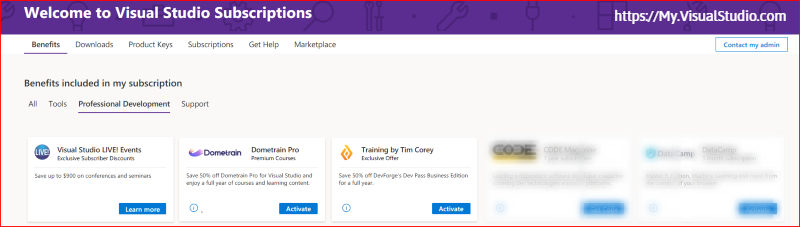
Image of new VSS Benefits 2024

Uncover special opportunities designed specifically for paid Visual Studio subscribers to keep you at the forefront of the rapidly evolving software development landscape. With the rapid emergence of AI tools like copilots, staying well-skilled is not just an option—it’s imperative.

These three new exclusive benefits are crafted to enhance your skills and ensure you’re well-equipped to leverage the latest advancements in Visual Studio, .NET, and Azure, helping your business maintain a competitive edge. Utilize these exclusive benefits to achieve annual savings exceeding $1,500, supporting your desire to stay informed of the latest advancements in technology and development practices. Here’s what’s new for you:

Dometrain Pro: Full Access to Premium Courses

  • Overview: Boost your technical expertise with Dometrain Pro. Gain unlimited access to over 380 hours of HD content covering everything from foundational programming to advanced development techniques, all curated to help you keep pace with industry changes.
  • Key Benefit: Enjoy a 50% discount on your subscription to Dometrain Pro for Visual Studio, granting you access to more than 36 comprehensive courses for a full year. This is an excellent resource for staying current and deepening your knowledge base.

Training by Tim Corey via DevPass Business Edition

  • Overview: Designed for developers at all career stages, DevPass Business Edition provides targeted, real-world training. This program, featuring renowned educator Tim Corey, includes courses that are directly applicable to daily development work and upcoming challenges in modern software practices.
  • Key Benefit: Take advantage of a 50% discount on DevPass Business and unlock all 28 courses and over 320 hours of HD training for a full year, ensuring your skills remain sharp and relevant.

Visual Studio LIVE! Events: Exclusive Subscriber Discounts

  • Overview: Engage with the latest in software development at Visual Studio LIVE! Events, available in-person and virtually. These professional development gatherings spotlight cutting-edge technologies and practical applications, with a particular emphasis on AI and cloud advancements. Gain insights that can transform how you and your business leverage new products and features to accelerate development and elevate your solutions in the market.
  • Key Benefit: Secure exclusive discounts on registrations, allowing you to gain invaluable insights from industry experts at a fraction of the usual cost. This is your gateway to learning about new features, tools, and strategies that can help your business partners achieve more.

ACCESS YOUR BENEFITS

Unlocking the full potential of your Visual Studio Subscription is straightforward and can significantly enhance your development experience. Here’s how you can start utilizing these opportunities today:

Access the Visual Studio Subscription Portal

  • Step 1: Navigate to my.visualstudio.com. This portal is your gateway to all the benefits available through your subscription.
  • Step 2: Log in using your Visual Studio credentials. If you’re uncertain about your account details, consult your subscription administrator at your company.

Understanding Your Subscription Level

  • Community: Ideal for individual developers, the Community edition provides access to essential tools and services to kickstart your development projects. Note, however, that access to premium benefits are not included.
  • Professional: Designed for professional developers, this subscription tier includes a more comprehensive array of tools and services. As a Professional subscriber, you’ll discover numerous benefits designed to enhance your productivity and broaden your skill set.
  • Enterprise: The most extensive subscription tier, tailored for teams and organizations aiming to leverage the full power of Visual Studio. Enterprise subscribers enjoy access to exclusive benefits, including advanced tools, services, and training opportunities that can make a significant impact on your business outcomes.

Some benefits are reserved for paid subscription levels, which includes: Visual Studio Enterprise (Standard), Visual Studio Enterprise subscription with GitHub Enterprise, Visual Studio Enterprise (Annual cloud), Visual Studio Professional (Standard), Visual Studio Professional subscription with GitHub Enterprise, and Visual Studio Professional (Annual cloud).

Explore Your Benefits

  • Each subscription tier offers unique benefits, varying significantly in terms of access and scope. Once logged in, dedicate time to explore the specific benefits associated with your subscription level. From software licenses and Azure credits to training modules and partner offers, each benefit is crafted to support different facets of your development work.

Take Action Today

  • We encourage all our subscribers to log in and explore their benefits today, while you’re thinking about it. By fully understanding and utilizing your benefits, you ensure that you are not only keeping pace with the latest technological developments but also securing a competitive edge in your projects and career.

Check out your full list of benefits, based on your subscription type by visiting my.visualstudio.com


Building Wealth Through Your Home Business: Long-Term Financial Strategies


Home Business Magazine Online

Working from home (WF) can be a real boon if you’re a disciplined, hard-working business owner. Being able to roll out of bed and get straight to work can meaningfully improve your productivity and working from a home office can cut down on distractions like workplace chatter.

Regarding financial strategies, running a business from home can help you build wealth, too. You don’t have to spend cash on gas and car maintenance when you work remotely and can use your newfound free time to improve your financial standing by making strategic investments.

However, you will need to invest in your home office setup if you want to hit the ground running when WFH. This will help you manage your expenses, increase your productivity, and build sustainable wealth over a number of years.

Long-Term Investments

Data from the Pew Research Center shows that 14% of working-age Americans now WFH. Those who do work from home say that have an increased ability to balance their work and home life and find it easier to meet deadlines when working remotely. Remote work is particularly beneficial if you work for yourself, as you’ll be able to save on overheads like office rental, equipment costs, and heating or electricity.

However, before you start running a home business, you’ll need to invest in your current home office setup. You can’t expect to be productive when working from your kitchen counter and should have a dedicated space for operations like shipping, crafting, packaging, or administrative tasks. At a minimum, you’ll need to account for some initial outlays like:

  • Essential Hardware: PC monitors, signal boosters, high-quality conferencing cameras, printers, and external hard drives are all but essential in modern business. Investing in quality upfront will help you achieve your long-term financial goals, as you are far more likely to land contracts and clients when you have a quality camera and reliable connections.
  • Furniture: Do yourself a favor and buy a top-of-the-line chair and desk. This will support your health, improve your posture, and help you stay productive when working from home for long hours.
  • Quality of Life Accessories: You’re far more likely to be productive when you’re feeling healthy and happy. Rather than forgoing a few luxuries, budget for purchases like coffee machines, smoothie makers, standing desks, and high-quality headphones.

Responsibly investing in your business will boost your productivity and help you achieve peak productivity. Even luxuries like espresso machines can give you a much-needed pick-me-up between calls with clients and may meaningfully improve your ability to meet demanding deadlines.

Financial Sustainability

If you work in an industry like content creation or crafting, you may struggle to stay on top of your finances. This can be unnerving when trying to make long-term financial strategies, as you need a clear understanding of your costs, income, and debts if you want to plan for the future.

Get on top of your finances by working with an accountant who can help you compile essential financial reports. Every business should have essential financial statements like:

  • Balance Sheets: A balance sheet tells you how much your business is worth. It weighs earnings against liabilities and provides a snapshot of your firm’s profitability.
  • Cash Flow: Knowing how much cash is entering or leaving your firm on a monthly basis is crucial for the long-term success of your business. Keeping your cash flow up to date will ensure funds don’t dry up and can help you budget for upcoming expenses.
  • Accounts Receivable: An accounts receivable statement tells you how much you’re owed by clients. This helps you stay on top of your earnings and ensures that folks don’t take too long to pay you.
  • Budget Variance Reports: This assesses the difference between estimated and actual reports. A variance report is key if you’re planning some major investments and need to know how accurate your estimations are or have been.

A qualified accountant can compile these reports in as little as a few days and will be able to keep your financial statements up to date. This is key when planning a period of growth, as you can’t afford to suddenly run out of cash midway through a major renovation or purchase.

Measuring Your Performance

Keeping up-to-date financial statements is key for your long-term growth and good financial strategies. However, you’ll still need to assess your performance using non-financial metrics like turnover rate if you want to achieve your long-term financial goals. As a business owner, you can start measuring your performance with KPIs like:

  • Customer acquisition costs (CAC): How much do you spend to land one client or customer? If this number is astronomical, chances are you won’t be around in a few years time. Get your CAC lower by investing in marketing and refining the way you approach new leads.
  • Supply Chain Waste: As a home business owner, you may overlook your firm’s waste. This is a major misstep, as the government looks set to increase fines and penalties for businesses that fail to dispose of waste properly. Start tracking your waste today to get ahead of the game and protect your long-term future.
  • Inventory Turnover: How quickly does inventory leave your storage facility? If you’re failing to shift new stock, you’ll likely need to look into more efficient ordering methods to reduce costs associated with storage.

Keeping track of these metrics will help you avoid major missteps like overstocking or fines for waste mismanagement. Be sure to track industry-specific metrics, too, as this will help you manage your finances.

Conclusion

Building wealth when running a home business can be tricky if you’re used to working for someone else. Get ahead of potential issues by hiring an accountant who can compile key financial reports. This will deepen your understanding of metrics like turnover rate and will ensure your firm’s long-term viability.

The post Building Wealth Through Your Home Business: Long-Term Financial Strategies appeared first on Home Business Magazine.

GreedFall 2 Gets Early Access Launch in September


Nacon and Spiders Studio revealed today that GreedFall 2: The Dying World will get a Steam Early Access release on September 24th. The full game is expected to hit in 2025, as console versions got a release window for next year.

While it’s somewhat unexpected to see a narrative RPG launching as an Early Access title, the same approach paid off extremely well for Larian in the past, and while I have a special place in my heart for Spiders Studio games, I’ll be the first to admit they’ve often shipped underbaked, something that an Early Access period should definitely help solve.

According to the developers, GreedFall 2‘s Early Access launch build will include the first chapters of the main quest, and allow players to explore the regions of Teer Fradee, Thynia and Uxantis, while also getting to know a varied cast of characters. New features and improvements, including playable zones, companions, skills and more, will be added during the Early Access period.

The story starts three years before the events of the first game and the adventures of De Sardet.

This time you play as a native of Teer Fradee, uprooted by force from your island and taken to the continent of Gacane, where the colonists are from. In this old world ravaged by war and scarred by the Malichor plague and the political scheming of the different factions, you need to regain your freedom and control of your own destiny. Using diplomacy, cunning or combat, as well as help from allies you make, it’s up to you to end one man’s ambitions of conquest, which could spell the end for the continent and your island.

Experience the unique world of GreedFall again by exploring the old continent! Travel across new landscapes, from Olima – the city of stars of the Bridge Alliance – to the shores of Uxantis, and uncover the secrets of these ancient lands. Meet all the factions that share control over these nations and navigate the treacherous waters of their schemes and conspiracies.

Create your own character and find allies to join your team. Help them with their quests, uncover their secrets and make them your friends, rivals or even lovers. As well as equipping them the way you want, you can also take control of them in combat.

Immerse yourself in an ever deeper RPG experience where every choice has an impact on your adventure and where diplomacy, manipulation, infiltration and combat are all viable paths for you to achieve your aims.

How 3D Landscape Visualization and Rendering Services to Revolutionize Outdoor Spaces


3D landscape visualization and rendering services can revolutionize outdoor spaces in more ways than you can imagine. Unlike the flat, dull, and uninspiring 2D plans and drawings, there are endless and limitless possibilities when visualizing outdoor areas with the help of photorealistic 3D images. These unique services can tweak the different aspects of the project until they perfect the landscape designs for the outdoor oasis or backyard paradise entrusted to them.

What are 3D landscape visualization and rendering services?

3D landscape visualization and rendering services are cutting-edge approaches to creating gorgeous outdoor areas. Real estate marketers and professionals, landscape architects, and homeowners alike take advantage of these services for many reasons. These include the following:

  • 3D landscape visualization and rendering services easily allow more creative collaboration between clients and landscape designers or architects since everyone can see and view what the outdoor space, shrubs, furniture, and elements will look like in natural life way before they are installed or added to the area.
  • The ability to visualize landscape projects in 3D makes it easier to plan for the project and guarantees that every single base is covered.
  • Marketing space that isn’t even built yet is almost impossible. 3D renderings can help fill this gap and allow salespeople and marketers to showcase the precise real-life appearance of outdoor spaces upon completion.

RELATED: Why Landscape Rendering and Visualization is Important for Company Landscaping Projects

Landscape design and its importance

Landscape designs depict what and how landscapes will look upon completion, making checking how the elements blend easier. They include details like plants, water features, hardscaping, lighting, and other factors and elements arranged functionally and harmoniously. In addition, landscape designs are a comprehensive plan to create an outdoor area that caters to specific goals and needs.

It’s not a secret that landscaping is a form of art that turns outdoor areas into sustainable, functional, and beautiful spaces. However, everything begins with 3D landscape visualization and rendering before the actual elements of the landscaping project are laid out. It doesn’t matter if the client wants to improve the curb appeal of their property, create a brand new outdoor living space, or enhance the property’s value; a carefully planned and designed landscape can make a big difference.

Here are the top reasons why landscape designs are needed:

  • To communicate better with contractors

Freelance landscape design services are an effective tool for communicating with contractors and other experts involved in landscape construction. It offers an accurate, concise, and precise depiction of what should be done to reduce the risk of errors and misinterpretations.

  • To allocate and plan resources accordingly

Landscape design offers a plan for creating the landscape, including the plants, materials, and other aspects required in the project. This guarantees that the project will stick to the budget and that all essential resources will be available when and as needed.

  • To envision the completed project

Landscape design provides an accurate, detailed, and precise representation of the appearance of the finished landscape. This simplifies envisioning how the different elements blend to ensure the completed project meets expectations.

RELATED: What does it Cost to Hire a Landscape Design Architect Expert for your Company?

outdoor3

Professional 3D landscape design vs. DIY landscape design

It’s no surprise that many people consider the DIY approach in their landscape design. Although many 3D landscape visualization and rendering services come with very reasonable prices, some people decide to do everything on their own at first. Sadly, after a few weeks, many face the harsh reality once they realize how challenging it is to learn and master the art of using landscape design services. While it may seem more flexible and more affordable for you to opt for DIY landscape design, the truth is that a steep learning curve is involved, and trying to figure out the software may end up costing you not just more time but even more stress so that you can polish the skills required to come up with top of the line 3D renderings.

Professional 3D landscape visualization and rendering services have many years of experience that non-professionals need help replicating quickly. For a reasonable price, they can put their expertise to work on your behalf to create something stunning, saving you from the temptation to pull your hair out of frustration to learn how to create a landscape design from the ground up.

The 3D landscape visualization and rendering process

outdoor1

Landscapes are never made overnight. The process involves several strategic steps to achieve the right look and feel the client aims for. These include the following:

1. Measurement and analysis of the site or space

A site analysis entails studying the existing conditions of the site or space, including its existing vegetation, soil type, topography, shape, and size. These details are critical to determining the placement of different elements, such as the structures, plants, and trees, together with the overall flow and layout of the area. The designer will also measure the site and record the dimensions to confirm that the space can accommodate the proposed design.

2. Conceptual design

After completing the site analysis, the designer will develop a conceptual design that will outline the overall feel and look of the landscape. It includes the placement of the different elements like structures, plants, and trees, together with the overall flow and layout of the space. This conceptual design also includes details regarding the size and type of elements and their orientation and placement.

3. 3D modeling

Following the approval of the conceptual design, the designer will now develop a 3D landscape model. It involves using specialized software to create the landscape’s virtual model. This is a critical phase as it ensures the accuracy of the design and the proper fitting and blending of all the elements involved.

4. Animations and renderings

Once the landscape’s 3D model is finished, the designer will create animations and renderings to offer a more accurate and detailed depiction. It includes animated walkthroughs and still images that provide a clear view and understanding of the landscape design from various angles and perspectives.

RELATED: 3D flythrough & 3D Architectural Animations, Costs, Rates, and Pricing for Companies

How landscape architects use 3D landscape visualization and rendering services

outdoor4

3D landscape visualization and rendering services open many doors of opportunities for landscape architects and designers as well as horticulturalists. With the help of these services, they no longer need to leave their office charges to try out various landscape features, look at the elevation of the terrain from multiple angles, or see what the designs look like under numerous lighting conditions. Just imagine how much easier and faster client buy-in will be if you give them a chance to directly envision the designs’ appearance after completion.

The following are some of the ways that landscape architects use and take advantage of 3D landscape visualization and rendering services:

  • It is promotional and marketing material on their social media channels and websites.
  • They experiment with various materials and layouts in their designs easily, quickly, and affordably.
  • Getting a better virtual sense of the designs allows them to focus on finer details that would have easily wasted time.

Accessing extensive 3D plant libraries from the available visualization tools can save money compared to maintaining vast stocks of physical plants.

RELATED: How Landscape Design Services Can Help Companies with 3D Landscape Design Projects

Benefits of 3D landscape visualization and rendering services

The following are the top benefits of 3D landscape visualization and rendering services:

  • Incorporate eye-catching 3D visuals in marketing campaigns to attract more new clients

If you’re a client, which company would you choose? A company with a dull social media and website with poorly taken and washed out images, or a company whose social media and website use 3D landscape materials for marketing that linger in their memory and pop out of the page?

The right 3D and 2D visualizations of your work can entice potential clients, leaving them with a lasting good impression that will set you apart from your competition. If samples of your past projects were limited, you can also use 3D landscape visualization and rendering services to show your skills and what you can do to ensure everything looks life-like.

  • Establish and grow a reputation

Your company and team can easily stand out as several professionals in your industry using cutting-edge renderings in the workflow. This state-of-the-art technology shows your commitment and dedication to excellence, making you stand out from competitors who rely on traditional methods such as 2D or flat designs.

  • Supercharge collaborative workflow

3D landscape visualization and rendering services allow clearer and more seamless communication with clients, suppliers, and the team since they help everyone quickly glimpse the final project’s shared vision. The perspective helps create a more efficient and free-flowing environment where ideas create a final product that exceeds the customer’s expectations.

outdoor2

RELATED: What are Architectural 3D Visualization Costs, Service Fees & Rates for Companies?

How Cad Crowd can help

Cad Crowd can connect you with the best 3D landscape visualization and rendering services if you are ready to revolutionize outdoor spaces. Contact us now!

The Coming of Age of Notebooks


August 05, 2021 by Chris Dias, @chrisdias

A (not so) new way of doing development

Notebooks—documents that contain text, executable code, as well as the output of that code—are an interesting and exciting new way to do development.

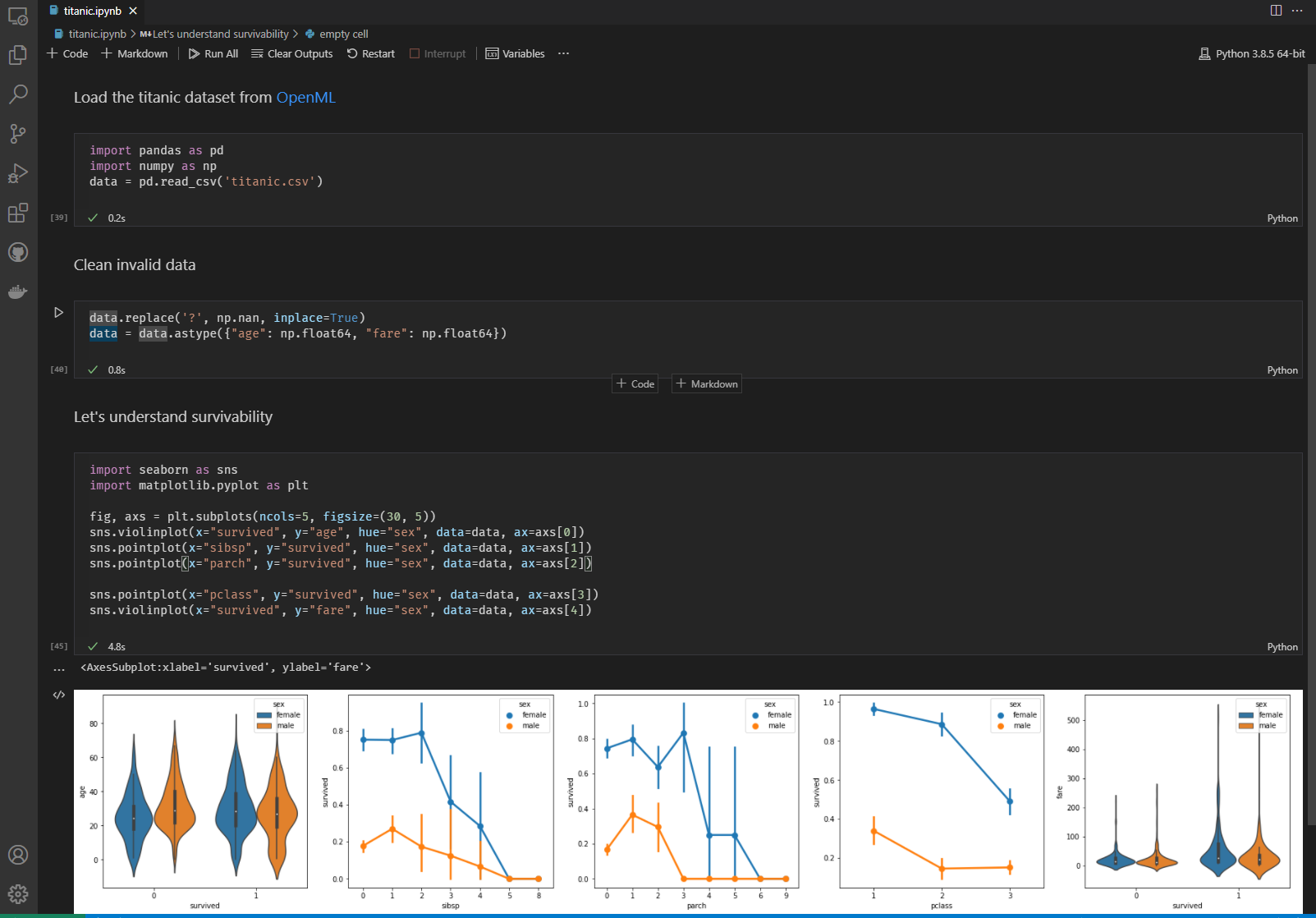
An image of a notebook that analyzes data from the Titanic shipwreck

Ok, it’s not totally new. Donald Knuth introduced the concept of Literate Programming in 1984 and Wolfram Mathematica introduced the Notebook UI powered by Kernels in 1988.

Over the past decade, we’ve seen an explosion in notebook usage, especially with the rise of Data Science. Tools like Jupyter Notebooks have become a de facto tool in the data science community. They are used and loved for everything from virtual scratch pads, data preparation tasks, and complex machine learning model development.

One interesting trend we’ve seen is that data science and machine learning is becoming a team sport: developers are increasingly collaborating with data scientists to prepare data sets for model training, refactor exploratory code for production use, and integrate model inferencing into their core product. Our own team analyzes vast amounts of usage data every day and uses Jupyter notebooks to track, analyze, and validate hypotheses. We use domain-specific notebooks (GitHub Issues) to track issues and work items across GitHub repositories, providing insight into the readiness to release VS Code each month. Notebooks are now critical for us to run the VS Code project.

New UI, no warning

We’ve been hard at work building notebook support into the core of VS Code to make them faster and safer—and to allow your favorite VS Code extensions to work in them. As a part of this effort, we are also introducing changes to the user experience to make notebooks feel like an integral part of the tool, not an add-on as they were in earlier efforts.

If you are on the Insiders builds, you have been able to follow along as we evolved the experience. On Stable, we had 40% of users on the new notebook experience. Feedback was generally positive. So, like Nigel Tufnel, we decided to turn the volume to 11 and moved everyone forward onto the new implementation.

Unfortunately, as you quickly let us know, we made the transition for you with little to no warning. There you were, doing your work using Jupyter Notebooks, cleaning and analyzing that massive data set to model the expansion of the Universe, and we turned your world upside down. You grabbed a coffee, started VS Code, and “boom” your notebook experience was…different.

While we are excited about introducing new experiences in VS Code, surprises like this are not what you expect in the morning as you fire up the tool. For this, we would like to apologize. There are better ways of rolling out changes, to keep everyone informed as to what’s happening, why, and when.

But it’s different!

The original version of notebooks in VS Code was very close to the classic Jupyter Notebooks experience, it looked and behaved pretty much the same. That was a reasonable starting point, a warm, cozy, and familiar experience. However, as we learned more about how VS Code users work with both notebooks and the rest of the tool, we realized that the two experiences needed to be more similar than different.

Notebooks in VS Code should feel natural so that you can seamlessly move between crafting your code files and your notebook modeling the Universe in Python. This means that notebooks in VS Code take advantage of built-in metaphors and familiar keyboard shortcuts as much as possible.

For example, writing in a code cell should feel the same as writing code in the full-fledged text editor, no matter the language you use. Settings should not be specific to notebooks. Quick fixes, outline, source actions, refactorings, multiple-cursors, word wrapping, shrink and expand selection, column selection mode, change casing, and other editor experiences should be the same. Your favorite editor extensions like Bracket Pair Colorizer and Snippets should just work. You should be able to compare notebooks graphically, side by side, just as you do with source files today.

The ecosystem

Furthermore, we envision a rich extension ecosystem for notebooks. You should be able to search the Marketplace for Kernels or custom visualizers in the same way you discover themes and new language support. Our API even supports creating custom (non-Jupyter) notebooks for new domains. For example, the REST Book extension lets you write and persist REST calls with custom visualizations for outputs (for example, JSON, HTML, and a custom document). As mentioned earlier, the GitHub Issues Notebooks lets you create notebooks of different issue queries for your repository to manage your project, just like we do.

The future looks bright

To complete the metaphor, notebooks in VS Code have matured from those awkward teen years into (young) adulthood, confident and strong, with a bright future. Working with VS Code notebooks may take a bit of adjustment if you are moving from Jupyter, but we hope it will be worth it in the end. And, as we always try to do, you can customize the experience through settings (search for @tag:notebookLayout in the Settings editor).

We believe that expanding VS Code’s rich coding experiences and ecosystem to include comprehensive Jupyter Notebook support makes for a great tool for bringing powerful new insights into your daily development. We’ve got some great new experiences in the July release, please give it a try and let us know what you think (good and bad!). Your feedback is critical to helping us build the best possible product.

Thanks!

Jim, Joe, Kai, Chris, and the VS Code Team

Happy Notebooking!


Apple Vision Pro debuts immersive content featuring NBA players, The Weeknd and more


Apple on Thursday announced its upcoming lineup of immersive video content for the Vision Pro. The list includes behind-the-scenes footage of the 2024 NBA All-Star Weekend, an immersive performance by The Weeknd, new series, films, concerts and more.

The headset launched in February with more than 150 3D movies and immersive titles. Apple is adding new content, starting with “Boundless,” which premiers tonight. The series allows viewers to experience adventures around the world, such as taking a hot air balloon ride over Cappadocia, Turkey, and seeing how surfers ride waves in the Arctic Circle. 

Apple teased other upcoming content in its latest announcement, including a short film that captures the 2024 NBA All-Star Weekend game in Indianapolis, featuring legends Kevin Durant, Stephen Curry and LeBron James. The film, coming this fall, takes viewers court side, featuring events like the Rising Stars Challenge and slam dunk contest. 

Later this year, Apple will add an immersive concert with The Weeknd. That will join an artist-related experience available on Vision Pro where Alicia Keys offers a glimpse into a rehearsal session. 

Additionally, a movie called “Red Bull: Big-Wave Surfing,” coming later this year, features surfers trying to ride the barrel of the heaviest wave in the world in Teahupo’o, Tahiti. The upcoming short film, “Submerged,” meanwhile, is set in a Navy submarine during World War II.

Another installment of “Wild Life” is coming, as well. The nature documentary series will debut its latest episode next month, showing keepers from Kenya’s Sheldrick Wildlife Trust taking care of orphaned elephants. 

Apple promises more immersive video content throughout the year, and plans to enable more filmmakers to create content on Apple Immersive Video thanks to its partnership with video editing software and hardware company BlackMagic Design.

8 Common Remote Copywriter Interview Questions (And Sample Answers )


As you prepare to navigate the challenges of a remote copywriter interview, understanding the typical questions and formulating poised responses are key. The job hinges on your ability to craft compelling content, and interviews often probe your creative process, adaptability, and grasp of the brand’s voice.

Ready with research skills and an impressive portfolio, your communication eloquence will be tested, stressing the need for preparedness. Insight into commonly asked questions and polished sample answers can elevate your confidence, ensuring you leave a lasting impression that aligns with your expertise in copywriting.

Tips for a Successful Copywriter Interview

When preparing for a copywriter interview, it is essential to demonstrate both your creative and technical skills. First impressions matter, so dress appropriately and arrive on time.

  • Research the Company: Gain an in-depth understanding of the company’s content and brand voice by reviewing their website and marketing materials. This shows your genuine interest and ability to align with their messaging.
  • Portfolio Showcase: Have a well-organized portfolio ready to display your best work. Emphasize pieces that reflect the company’s industry or style.
  • Know Your Work: Be prepared to discuss your writing process and the decisions behind your work samples. Highlight how your content has achieved results, if available, like increased engagement or conversions.
  • Industry Knowledge: Stay updated on the latest copywriting trends and SEO practices. Reflect this knowledge in your responses.
  • Soft Skills: Communication and adaptability are key in collaborative team environments. Be ready to share examples of how you’ve worked with cross-functional teams.
  • Ask Engaging Questions: Prepare insightful questions for your interviewer. This can include asking about their content goals or the biggest challenges faced by their copywriting team.

Remember, your ability as a copywriter is not just about writing—it’s also about understanding the audience, strategic thinking, and measuring the impact of your words. Good luck!

How to Answer CopyWriting Interview Questions

When preparing for a copywriting interview, it’s crucial to articulate your creative process and display how it aligns with industry standards and the prospective company’s brand. Present your answers with confidence and a clear understanding of the copywriting principles that guide your work.

  • Research the Company: Have a solid grasp of the company’s products, target audience, and tone of voice. Tailor your answers to demonstrate how your skills can complement their brand identity.
  • Showcase Your Creativity: When asked about past projects or your creative process, be detailed. Share specific examples that highlight your ability to craft compelling messages.
  • Discuss Strategy: Be ready to discuss how you approach branding and copy strategy. Reflect on how you interpret a creative brief and execute it to meet business objectives.

Use the STAR method (Situation, Task, Action, Result) to structure your responses succinctly when discussing past experiences. This method helps you deliver comprehensive answers with a clear narrative.

Common Copywriting Interview Questions

During the interview for a copywriting position, you’ll encounter questions designed to gauge both your creative aptitude and your practical skills. Expect to articulate your approach to the craft and how you align it with business objectives.

1. How would you describe your writing style?

Your writing style reflects your unique voice, typically a blend of your personality and your adaptation to various brand tones. Discuss the characteristics that define your writing, such as clarity, conciseness, or persuasiveness.

Sample Answer: “I would describe my writing style as adaptable, clear, and audience-focused. I have a knack for distilling complex ideas into easy-to-understand content. Whether I’m writing for a B2B or B2C audience, I prioritize clarity and engagement, ensuring that the message not only resonates with the audience but also prompts them to take action.”

2. How do you adapt your writing style to different brands or audiences?

Highlight your techniques for researching brand voice, including studying the company’s content and competitor analysis. Describe how you tailor syntax, word choice, and emotional appeal to resonate with specific demographics.

Sample Answer: “Adapting my writing style involves first understanding the brand’s voice and the target audience’s preferences. For youthful, energetic brands, I use a lively and engaging tone, while for more professional audiences, I adopt a formal and informative style. I always strive to empathize with the audience, understanding their pain points and motivations, to make the content relatable and effective.”

3. Describe a challenging project you worked on. How did you manage it?

Provide a brief account of a complex project, emphasizing your problem-solving skills. Outline your process, from understanding the project scope to delivering the final piece, and focus on the results you achieved.

Sample Answer: “I once worked on a project where we had to rebrand and rewrite the content for a company undergoing a significant shift in its business model. The challenge was maintaining brand loyalty while effectively communicating the new direction. I managed this by thoroughly researching the new market, understanding the audience’s concerns, and crafting a narrative that bridged the old and new aspects of the business. Regular meetings with the client ensured alignment throughout the process.”

4. How do you collaborate with other members of the creative team, such as designers, and content strategists?

Explain your experience with interdisciplinary collaboration, stressing the importance of clear communication and shared goal alignment. Mention any tools or methodologies you use to streamline collaborative efforts.

Sample Answer: “Collaboration is key in creating cohesive and effective content. I work closely with designers to ensure that visuals complement and enhance the written message. With content strategists, I align on the tone, style, and key messages to maintain a consistent brand voice. Regular communication, feedback, and brainstorming sessions are integral to this collaborative process.”

5. What methods do you use to maximize your content for SEO?

Detail your SEO strategies, including keyword research, on-page optimization techniques, and your understanding of how to weave keywords naturally into copy to maintain readability while improving SERP rankings.

Sample Answer: “I use a range of SEO strategies to optimize content. This includes thorough keyword research to identify terms that our target audience is searching for. I ensure these keywords are naturally integrated into headlines, meta descriptions, and throughout the content. I also focus on creating high-quality, informative, and engaging content that encourages longer page visits and backlinks, both of which are favorable for SEO.”

6. How do you measure the effectiveness of your copywriting, and what metrics do you use to assess its performance?

Talk about your proficiency in using analytics tools and the metrics you track, like conversion rates, click-through rates, and engagement statistics, to quantify the success of your content.

Sample Answer: “I measure the effectiveness of my copywriting based on specific goals set for each piece. For web content, I look at metrics like click-through rates, time spent on page, and conversion rates. For email campaigns, I focus on open rates and click-through rates. I also consider qualitative feedback from customers and internal stakeholders to assess brand alignment and message clarity.”

7. How do you overcome writer’s block?

Sample Answer: “Overcoming writer’s block is a crucial part of the creative process for me. When I encounter it, I first step away from my work to clear my mind, which often involves a short walk or a change of scenery. This break helps to reset my thought process. I also find that switching to a different type of task, like brainstorming or research, can reignite my creativity. I’ve found that being proactive and having a set of strategies to address writer’s block allows me to navigate through it more effectively and maintain productivity.”

Discuss your dedication to continuous learning and professional development, detailing your methods, such as following industry blogs, attending webinars, or engaging with professional networks.

Sample Answer: “I stay updated by reading industry blogs, subscribing to newsletters, and participating in webinars and workshops. This helps me keep abreast of the latest content marketing and SEO trends. I also actively participate in writing groups and forums to exchange ideas with peers. This ongoing learning allows me to adapt my writing to current best practices and audience preferences.”

Related: Learn about the top 5 skills required to land a remote job.

Conclusion

Keep your answers specific to the question at hand and avoid going off on tangents. Your goal is to convincingly communicate that you are a capable copywriter who can add value to their team. Remember to maintain eye contact and a pleasant demeanor throughout, reinforcing your confidence and ability to engage an audience.

The following tips will help you prepare for your interview:

  • Have a quiet space in which to conduct your interview.
  • Read up on the company’s history and what they do.
  • Practice answering some common interview questions.
  • Make sure your computer has a good internet connection.
  • Know what time zone you’re in and what time of day it is.
  • Consider using video chat software such as Skype or Zoom.
  • Practice with friends or family members.
  • Ask questions to understand more.

Further, you can review our guide to see how companies hire remote employees. If you are searching for a remote job and don’t know where to look? DailyRemote is a remote job board that have the latest jobs posted in various categories to help you. Finally, join like-minded people in our LinkedIn and Facebook community.


‘Supermodel Granny’ Drug Extends Life In Mice By 25%, Study Finds


A drug has been shown to extend the lifespan of laboratory mice by nearly 25%, with treated mice displaying fewer cancers and improved health and strength. It earned them the nickname “supermodel grannies” due to their youthful appearance. “The drug is already being tested in people, but whether it would have the same anti-ageing effect is unknown,” reports the BBC. From the report: The team at the MRC Laboratory of Medical Science, Imperial College London and Duke-NUS Medical School in Singapore were investigating a protein called interleukin-11. Levels of it increase in the human body as we get older, it contributes to higher levels of inflammation, and the researchers say it flips several biological switches that control the pace of ageing.

The researchers performed two experiments. The first genetically engineered mice so they were unable to produce interleukin-11. The second waited until mice were 75 weeks old (roughly equivalent to a 55-year-old person) and then regularly gave them a drug to purge interleukin-11 from their bodies. The results, published in the journal Nature, showed lifespans were increased by 20-25% depending on the experiment and sex of the mice.

Old laboratory mice often die from cancer, however, the mice lacking interleukin-11 had far lower levels of the disease. And they showed improved muscle function, were leaner, had healthier fur and scored better on many measures of frailty.

Unlocking the Power of AI Workstations: Pre-training and Inference


Pretraining & Inference Article Banner

Today, we’ll focus on two crucial AI concepts: pre-training and inference. By understanding these building blocks, we’ll gain insights into how AI models learn and generate intelligent outputs on your AI Workstation.

pretraining section

Pre-training: Building a Strong Foundation

Imagine a student preparing for a big exam; pre-training is akin to equipping that student with a vast amount of general knowledge. Just like the student wouldn’t start studying for a specific test right away, pre-training doesn’t focus on a particular task. Instead, it exposes the AI model to a broad range of information, allowing it to develop a strong understanding of the underlying concepts within its domain. This foundational knowledge becomes vital for the model’s ability to learn and adapt to specific tasks later.

Pre-training isn’t just about cramming information; it’s about empowering the AI model. The pre-trained model develops a kind of internal muscle memory for processing information within its domain. This translates to several benefits:

  • Faster Learning: The model can learn new tasks much faster during fine-tuning, similar to how a well-trained athlete can pick up new skills more readily.
  • Adaptability: The pre-trained knowledge allows the model to perform well on unseen data, making it adaptable to real-world scenarios.
  • Efficiency: Pre-trained models act as a launch pad for developing specialized AI models, significantly reducing development time and resource requirements.

Inference section

Inference: Applying Knowledge to New Data

Now that our student has a strong foundation, it’s time to apply that knowledge. Inference is like putting the pre-trained model’s knowledge to work. We feed the model new, unseen data relevant to a specific task. The model then utilizes its pre-trained abilities to analyze the data and generate an output, such as a prediction or classification. For instance, a pre-trained model on weather data could be used for inference to predict the weather for tomorrow.

Real-World Applications on AI Workstations

Pre-training and inference work together to enable various AI applications such as:

  • Image Recognition: Classifying objects in images (e.g., self-driving cars identifying pedestrians).
  • Natural Language Processing: Understanding and responding to human language (e.g., chatbots).
  • Recommendation Systems: Suggesting products or content users might be interested in (e.g., online shopping platforms).

Imagine you’ve trained a dog to identify its favorite toy, a red ball, by showing it many pictures of red balls and other toys. Inference is the process of using that trained dog to make a prediction about something new. In machine learning, inference is similar; you train a model on a vast amount of data, like showing the dog many pictures, then use the trained model to make predictions on new, unseen data.

Public vs. Private AI Models on Your AI PC

Public AI Models are designed for broad use and can be accessed by anyone with an internet connection. They are often used for general-purpose tasks or applications that benefit a wide range of users. Examples include large language models and weather prediction models.

Private AI Models, on the other hand, are restricted to a specific group of users, typically within an organization. They are designed to address specific needs and goals relevant to the organization and can provide significant competitive advantages. Examples include customer churn prediction and medical diagnosis models.

Overcoming AI Workload Challenges with AI PCs

Many businesses struggle to run demanding AI workloads on traditional PCs. These systems often lack the processing power and memory required for complex AI tasks, leading to slow training times, sluggish performance, and frustrating delays. Limited scalability can further restrict your ability to grow your AI projects and hinder innovation.

Unlocking the Power of AI Workstations: Pre-training and Inference

The Solution: Velocity Micro AI Workstations

Velocity Micro AI workstations are built to tackle these challenges head-on. Velocity Micro AI workstations and the AI Power Stack software suite empower your organization to unlock the full potential of private AI models. Our high-performance workstations deliver unmatched performance while the AI Power Stack streamlines your workflow, allowing you to focus on innovation.

As a complete solution, our hardware and software are designed to work together seamlessly, maximizing efficiency and productivity. Our team of experts is here to provide ongoing support, ensuring your success every step of the way. Partner with Velocity Micro and unleash the transformative power of private AI in your organization.

The following two tabs change content below.

This content was written by the expert Velocity Micro staff.


Top Consulting Firms Bet Big on AI, Why AI Isn’t Making Money, and Zoom CEO’s Bizarre Plan for AI Clones in Meetings


Join Paul Roetzer and Mike Kaput as they discuss the surge in demand for AI consultants from major firms like BCG and McKinsey, explore the growing disconnect between AI investments and economic impact, and examine Zoom CEO’s Eric Yuan’s ambitious plans for AI-driven digital twins in Zoom meetings.

Continue reading “Top Consulting Firms Bet Big on AI, Why AI Isn’t Making Money, and Zoom CEO’s Bizarre Plan for AI Clones in Meetings”