Supergiant Games Art Director Jen Zee On The Making Of Hades II


In this exclusive video, Game Informer interviews Jen Zee, the renowned art director behind Supergiant Games’ Bastion, Transistor, Pyre, and your favorite characters in Hades, about the making of Hades II. We discuss how art history inspired Jen when depicting Melinoë, why she loved revisiting her past work, the graphical differences between Hades and its successor, and fan art from Supergiant’s community. 

The Art of Hades II with Supergiant Games’ Jen Zee | Interview:

Thanks to our associate editor, Marcus Stewart, and freelance video editor, Evan Campbell, for helping me bring this video to life. Find more exclusive coverage of Hades II right here.

Unlocking the Power of Lightweight Productions with LiveU


On this installment of Videoguys Live join us for an insightful webinar where we introduce Lightweight Production Bundles powered by LiveU. Discover how lightweight production can revolutionize your content creation process without breaking the bank. We’ll explore the benefits of low-cost entry, efficient solutions that replace expensive data, and real-world case studies. Whether you’re a content creator, marketer, or business owner, learn how to solve streaming challenges today and scale for a successful future.

Watch the full video below:


Our guest for today is John Porterfield, who is the Founder and Webcast Producer of Social180Group. They specialize in live and remote production solutions, support services, and streaming.

What is the Lightweight Production Bundle?

Pay as you go or Yearly plan that includes the hardware encoder, data, and access to LiveU Studios cloud-based switching platform​

LU300S or LU800 Data Including LRT LiveU Studio

How is the LiveU Lightweight Production Bundles Used…

Case Study: Bladder Cancer Advocacy Network

  • Raising awareness doesn’t have to be expensive
  • Remote guest multicast – virtual webinar

Case Study: Zooom

  • 12 days of hiking and gliding 1200km across the Alps
  • Mobile – fixed location combo use case

Case Study: CERN

  • CERN presents new research of the world’s largest and most powerful particle accelerator
  • Multi-destination distribution use case

Case Study: Real Life Network

  • RLN streams a biblical global program from DC hotel to their digital media platform using LiveU Studio
  • Hotel – Studio remote production

Case Study: Broadfield Distributing

  • Broadfield went live from InfoComm 2024 trade show floor
  • Live from a tradeshow floor

What Does the LiveU Lightweight Production Bundle Include?

LiveU Mobile Encoders

  • 4K Resolution 
  • Strongest network resiliency 
  • Endless locations

LU300S

  • Compact 5G, 4K 10-bit HDR unit for live streaming on-the-go
  • Wi-Fi, Ethernet & Cellular Streaming
  • Transmit up to 4K 60P
  • 3G-SDI and HDMI Camera Inputs
  • 2 x Internal & 2 x External Modems
  • 2 x Audio Channels
  • H.265/H.264 Streaming Support

LU800

  • All-in-one 5G production-level field unit for REMI workflows
  • 4 SDI Inputs Up to 4Kp60
  • 10-bit HDR
  • Up to 70 Mbps streaming
  • Down to 0.4 sec. delay
  • Up to 16 audio channels
  • Optional bonding with 2x Ethernet and 2x WiFi connections

LiveU Cloud Production


Development Container CLI


May 18, 2022 by Brigit Murtaugh, @BrigitMurtaugh

TL;DR

A consistent environment anywhere with the dev container CLI

The development container teams at Microsoft and GitHub are excited to release an open source command-line interface (CLI) as part of the new Development Containers Specification. We’d love your feedback in this issue, or new issues and pull requests in the devcontainers/cli repository.

Consistency = joy

A consistent, predictable environment is key to a productive and enjoyable software development experience.

Containers have historically been used to standardize apps when they’re deployed, but there’s a great opportunity to support additional scenarios, including continuous integration (CI), test automation, and full-featured coding environments. A development container provides this full-featured coding environment and ensures your project has the tools and software it needs, whether it’s complex and distributed or just has a few requirements.
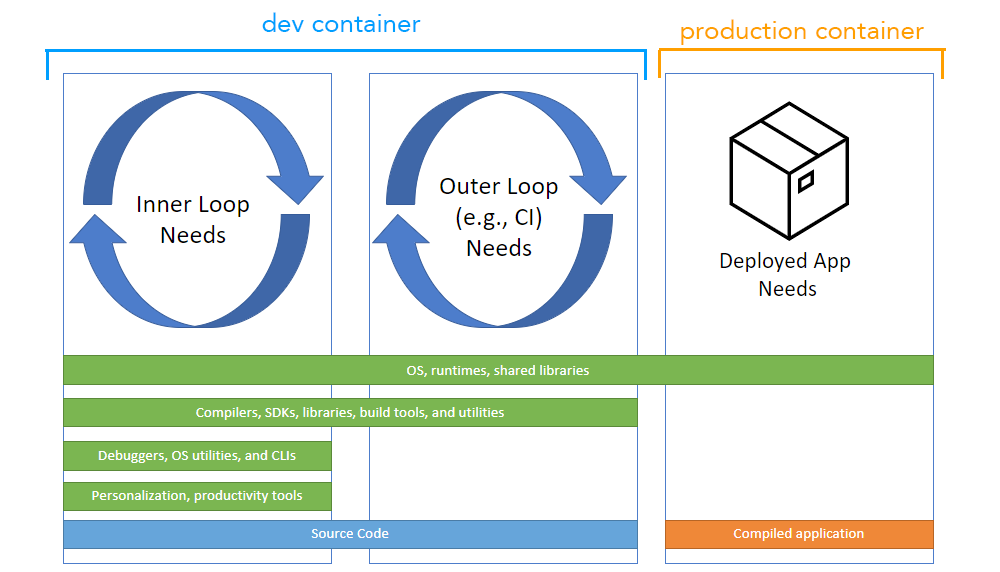
Diagram comparing dev versus production containers

Dev containers have been supported in Visual Studio Code since the announcement of the Dev Containers extension in 2019, and more recently in GitHub Codespaces. This support is backed by devcontainer.json, a structured JSON with Comments (jsonc) metadata format to configure a containerized environment.

As containerizing production workloads becomes commonplace, dev containers have become broadly useful for scenarios beyond VS Code. We’re excited to announce that work has started on the Development Containers Specification, which empowers anyone in any tool to configure a consistent dev environment. In addition, today we’re excited to share a major component of this specification that you can now try, which is the dev container CLI.

What is the dev container CLI?

The dev container CLI is a reference implementation for the dev container specification.

When tools like VS Code and Codespaces detect a devcontainer.json file in a user’s project, they use a CLI to configure a dev container. We’ve now opened up this CLI as a reference implementation so that individual users and other tools can read in devcontainer.json metadata and create dev containers from it.

This CLI can either be used directly or integrated into product experiences, similar to how it’s integrated with Dev Containers and Codespaces today. It currently supports both a simple single container option and integrates with Docker Compose for multi-container scenarios.

The CLI is available for review in a new devcontainers/cli repository and you can read more about its development in this issue in the spec repo.

How can I try it?

We’d love for you to try out the dev container CLI and let us know what you think. You can quickly try it out in just a few simple steps, either by installing its npm package or building the CLI repo from sources.

You may learn more about building from sources in the CLI repo’s README. In this post, we’ll focus on using the npm package.

To install the npm package, you will need Python, Node.js (version 14 or greater), and C/C++ installed to build one of the dependencies. The VS Code How to Contribute wiki has details about the recommended toolsets.

npm install

npm install -g @devcontainers/cli

Verify you can run the CLI and see its help text:

devcontainer <command>

Commands:
  devcontainer up                   Create and run dev container
  devcontainer build [path]         Build a dev container image
  devcontainer run-user-commands    Run user commands
  devcontainer read-configuration   Read configuration
  devcontainer exec <cmd> [args..]  Execute a command on a running dev container

Options:
  --help     Show help                                                 [boolean]
  --version  Show version number                                       [boolean]

Try out the CLI

Once you have the CLI, you can try it out with a sample project, like this Rust sample.

Clone the Rust sample to your machine, and start a dev container with the CLI’s up command:

git clone https://github.com/microsoft/vscode-remote-try-rust
devcontainer up --workspace-folder <path-to-vscode-remote-try-rust>

This will download the container image from a container registry and start the container. Your Rust container should now be running:

[88 ms] dev-containers-cli 0.1.0.
[165 ms] Start: Run: docker build -f /home/node/vscode-remote-try-rust/.devcontainer/Dockerfile -t vsc-vscode-remote-try-rust-89420ad7399ba74f55921e49cc3ecfd2 --build-arg VARIANT=bullseye /home/node/vscode-remote-try-rust/.devcontainer
[+] Building 0.5s (5/5) FINISHED
 => [internal] load build definition from Dockerfile                       0.0s
 => => transferring dockerfile: 38B                                        0.0s
 => [internal] load .dockerignore                                          0.0s
 => => transferring context: 2B                                            0.0s
 => [internal] load metadata for mcr.microsoft.com/vscode/devcontainers/r  0.4s
 => CACHED [1/1] FROM mcr.microsoft.com/vscode/devcontainers/rust:1-bulls  0.0s
 => exporting to image                                                     0.0s
 => => exporting layers                                                    0.0s
 => => writing image sha256:39873ccb81e6fb613975e11e37438eee1d49c963a436d  0.0s
 => => naming to docker.io/library/vsc-vscode-remote-try-rust-89420ad7399  0.0s
[1640 ms] Start: Run: docker run --sig-proxy=false -a STDOUT -a STDERR --mount type=bind,source=/home/node/vscode-remote-try-rust,target=/workspaces/vscode-remote-try-rust -l devcontainer.local_folder=/home/node/vscode-remote-try-rust --cap-add=SYS_PTRACE --security-opt seccomp=unconfined --entrypoint /bin/sh vsc-vscode-remote-try-rust-89420ad7399ba74f55921e49cc3ecfd2-uid -c echo Container started
Container started
{"outcome":"success","containerId":"f0a055ff056c1c1bb99cc09930efbf3a0437c54d9b4644695aa23c1d57b4bd11","remoteUser":"vscode","remoteWorkspaceFolder":"/workspaces/vscode-remote-try-rust"}

You can then run commands in this dev container:

devcontainer exec --workspace-folder <path-to-vscode-remote-try-rust> cargo run

This will compile and run the Rust sample, outputting:

[33 ms] dev-containers-cli 0.1.0.
   Compiling hello_remote_world v0.1.0 (/workspaces/vscode-remote-try-rust)
    Finished dev [unoptimized + debuginfo] target(s) in 1.06s
     Running `target/debug/hello_remote_world`
Hello, VS Code Dev Containers!
{"outcome":"success"}

Congrats, you’ve just run the dev container CLI and seen it in action!

These steps are also provided in the CLI repo’s README.

How can I get involved?

Your feedback is incredibly helpful in shaping and expanding the specification, and we’d love your feedback on the CLI so far. Please check out the CLI and let us know what you think. We’ve opened an issue specifically for folks to leave comments and questions, and you can also open new issues or PRs in the repo, just like other open-source projects.

The CLI and overall specification are under active development (the spec is still in-progress and has not yet been published), so stay tuned for exciting new advancements. We welcome your feedback on the CLI so far, and we’ll continue providing updates about what you can try out and when, such as when the spec will be available.

We’re incredibly excited for the future of container-based development and can’t wait to hear your feedback. We look forward to providing a ubiquitous, productive format across tools and users.

Happy Coding!

Brigit Murtaugh, @BrigitMurtaugh



Build the most effective ransomware recovery plan


eBook

Build the most effective ransomware recovery plan

Ransomware Recovery | dummies | Michael G. Solomon

Download to learn how to build a recovery plan that makes sense and keeps your organization safe.

  • Understand your ransomware vulnerabilities and implement best practices
  • Develop and test your plan to protect your last line of defense
  • Quickly identify an attack and recover your data with surgical precision

Download the eBook

Download the eBook

Error: Contact form not found.

About Rubrik

About Rubrik

Rubrik is a cybersecurity company dedicated to protecting data with its Zero Trust Data Security™ platform. This machine learning-powered platform offers comprehensive data protection and cyber resilience across various environments. It automates policy management and data security enforcement throughout the entire data lifecycle, ensuring data integrity and availability. Rubrik also continuously monitors data risks and threats, enabling swift business restoration in the event of an attack. 

The post Build the most effective ransomware recovery plan appeared first on Tech Research Online.

CIOs’ concerns over generative AI echo those of the early days of cloud computing


When I attended the MIT Sloan CIO Symposium in May, it struck me that as I listened to CIOs talking about the latest technology — in this case generative AI — I was reminded of another time at the same symposium in around 2010 when the talk was all about the cloud.

It was notable how similar the concerns over AI were to the ones that I heard about the fledgling cloud all those years ago: Companies were concerned about governance (check), security (check) and responsible use of a new technology (check).

But 2010 was just at the edge of the consumerization of IT where workers were looking for the same type of experience they had at home at work. Soon, they would resort to “shadow IT” to find those solutions on their own when IT said no, and no was the default in those days. It was easy enough for employees to go off on their own unless things went into total lockdown.

Today, CIOs recognize if they just say no to generative AI, employees are probably going to find a way to use these tools anyway. There are plenty of legitimate concerns when it comes to this technology — like hallucinations or who owns the IP — but there are also concerns about security, compliance and controls, especially around data, that large organizations demand and require.

But CIOs speaking at the conference were much more realistic than they had been 15 years ago, even if they had similar concerns.

“You know, everything’s out there and democratized,” said Mathematica CIO Akira Bell, speaking on a panel called “Sustaining Competitive Advantage in the Age of AI.”

“I think somebody else this morning already said, ‘You know, we can’t control this moment.’ We cannot and don’t want to be ‘the agents of no,’ to tell everybody what they can and cannot do, but what we can do is make sure people understand the responsibility they have as actors and users of these tools.”

Bell said that today, instead of saying no, she’s pushing responsible use of the technology and looking for ways to enhance their customers’ experience with AI. “So one is about governing, making sure our data is ready to be used, making sure our employees understand what best practices exist as they go on and use them.”

She said that the second piece is really thinking about how they use generative AI to enhance their core capabilities, and how they might use it on behalf of clients to create or amplify or change existing service offerings to their customers.

Bell said you must also look at the security component, so all of these things matter. Her organization can offer guidance on how to use these tools in a way that is consistent with the values of the company without shutting down access.

Angelica Tritzo, CIO at GE Vernova, a new spinout from GE focused on alternative energy, is taking a deliberate approach to implementing generative AI. “We have a number of pilots in different maturity stages. We probably, like many others, do not fully understand the full potential, so the cost and the benefit is not always fully aligned,” Tritzo told TechCrunch. “We are finding our way with all the pieces of technology, how much to partner with others versus what we need to do ourselves.” But the process is helping her learn what works and what doesn’t and how to proceed while helping employees get familiar with it.

Chris Bedi, CDIO (chief digital information officer) at ServiceNow, said that things will change in the coming years as employees start demanding access to AI tools. “From a talent standpoint, as organizations look to retain talent, which is a hot topic, it doesn’t matter what job function, people want their job talent to stay. I think it’ll be unthinkable to ask your company employees to do their jobs without GenAI,” Bedi told TechCrunch. What’s more, he believes the talent will start demanding it and question why you would want them to do work manually.

To that end, Bedi says his company is committed to teaching its employees about AI and how to create an AI-literate workforce because people won’t necessarily understand without guidance how to make best use of this technology.

“We created some learning pathways, so everybody in the company had to take their AI 101,” he said. “We created that and selectively [levels] 201 and 301 because we know the future is AI, and so we have to get our whole workforce comfortable with it,” he said.

All of this suggests that while the concerns may be the same as they were in the last wave of technological change, IT executives have perhaps learned some lessons along the way. They understand now that you can’t just lock it down. Instead they have to find ways to help employees use generative AI tools safely and effectively because if they don’t, employees will probably start using them anyway.

Grouls Free Download (v2024.07.31) – World Of PC Games


Grouls Free Download By WorldofpcgamesGrouls Free Download By Worldofpcgames

Grouls Direct Download:

Grouls is a horror game that challenges your courage and plunges you into a dark adventure. Witness the journey of a young man named Denis as he confronts a sinister fate in an old and abandoned house. In his quest to uncover the whereabouts of his missing family, Denis must collect body parts scattered throughout this dark house and find a way to escape from the clutches of the ominous entities within. Terrifying Atmosphere: Grouls stands out with its atmosphere that immerses you in deep darkness and terrifying moments. At every step, the secrets of the house and the ghosts of its dark past will haunt you. Challenging Puzzles and Mysteries: Solve hidden puzzles, gather clues, and unveil the secrets of the dark entities lurking within the house. Be cautious with every step you take, as each decision you make will determine Denis’s fate.

Multiple Endings: The decisions players make will shape Denis’s destiny. Summon your courage to find Denis’s missing family and confront the darkness, or risk being trapped in eternal darkness forever. Thrilling Gaming Experience: Grouls offers a suspenseful gaming experience that draws you into an unforgettable nightmare, where danger lurks around every corner. Grouls: Gate of Destiny invites horror enthusiasts to delve into the depths of darkness and embark on a journey filled with mysteries. Summon your courage to determine Denis’s fate and uncover the secrets of this dark house. The game begins with the typical horror game premise: you wake up in a cellar. You don’t learn anything about who you are or what’s happening. There is a bed in one corner, as well as a lighter that will allow you to see more clearly.

Features and System Requirements:

  • Options for remapping controls and adjusting sensitivity for different play styles.
  • Challenging puzzles that require critical thinking and exploration to solve.
  • Collect resources to craft items, upgrade equipment, and manage survival needs like food and shelter.

1 :: Operating System :: Windows XP/7/8/8./10.
2 :: Processor: Intel Core i7
3 :: Ram :: 8 GB RAM
4 :: DirectX: Version 10
5 :: Graphics:: GTX 1060
6 :: Space Storage:: 4 GB space

Turn Off Your Antivirus Before Installing Any Game

1 :: Download Game
2 :: Extract Game
3 :: Launch The Game
4 :: Have Fun 🙂

Bubby and Bobby Finally Glide Back into Action After 33 Years with Parasol Stars July 11


Grab your fanciest parasols and prepare to save the galaxy from an invasion of cute but deadly monsters!

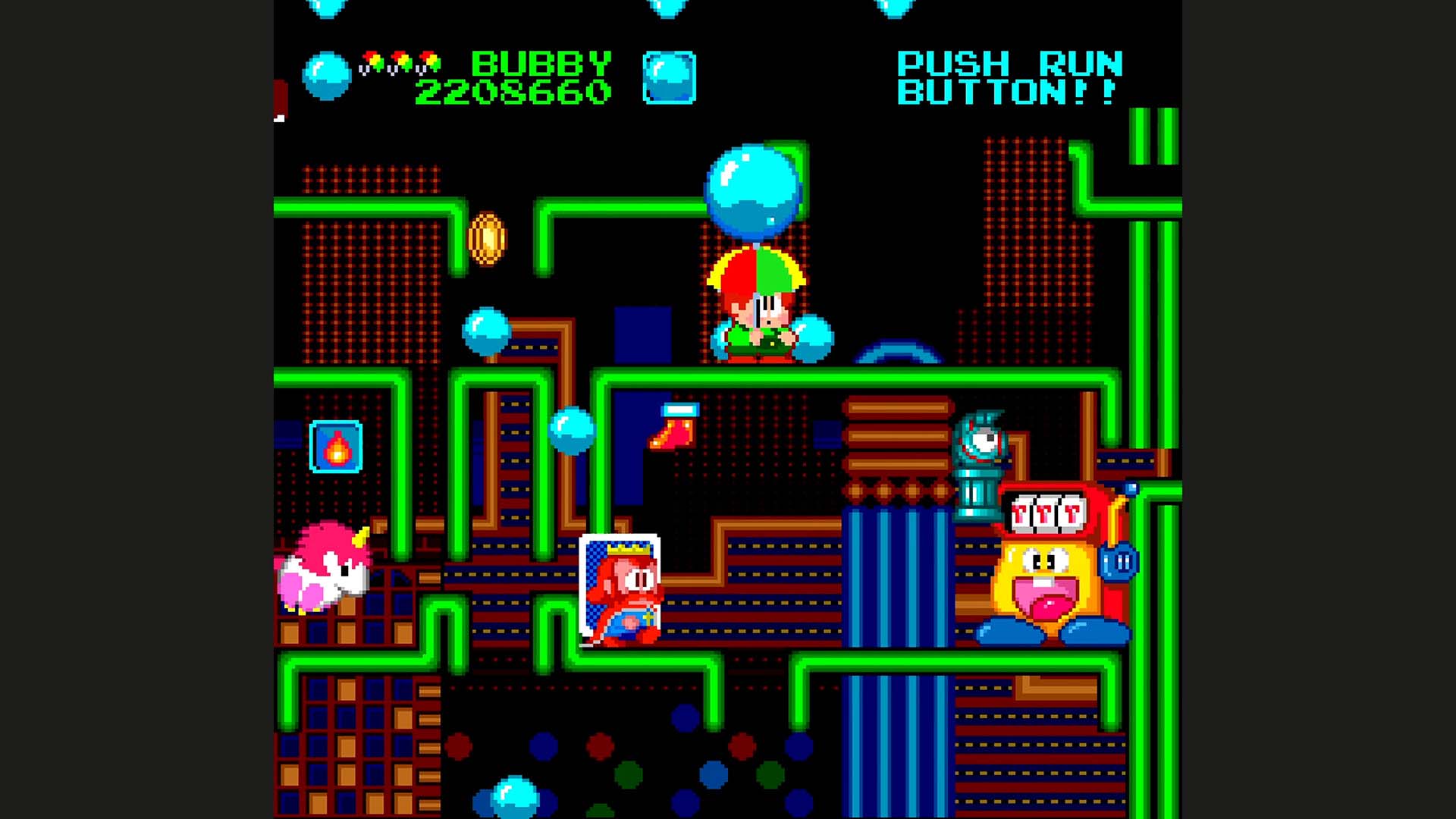
Parasol Stars: The Story of Bubble Bobble III is the third installment of the renowned Taito franchise, Bubble Bobble. It continues the story in Rainbow Islands as its direct sequel, becoming a household name for the most bubbly Bubble Bobble fans. First released in 1991 on PC Engine, Parasol Stars was then ported to a few third gen consoles like Atari ST, Amiga, GameBoy and Nintendo Entertainment System… until finally making its way to modern Xbox consoles.

PS Screenshot

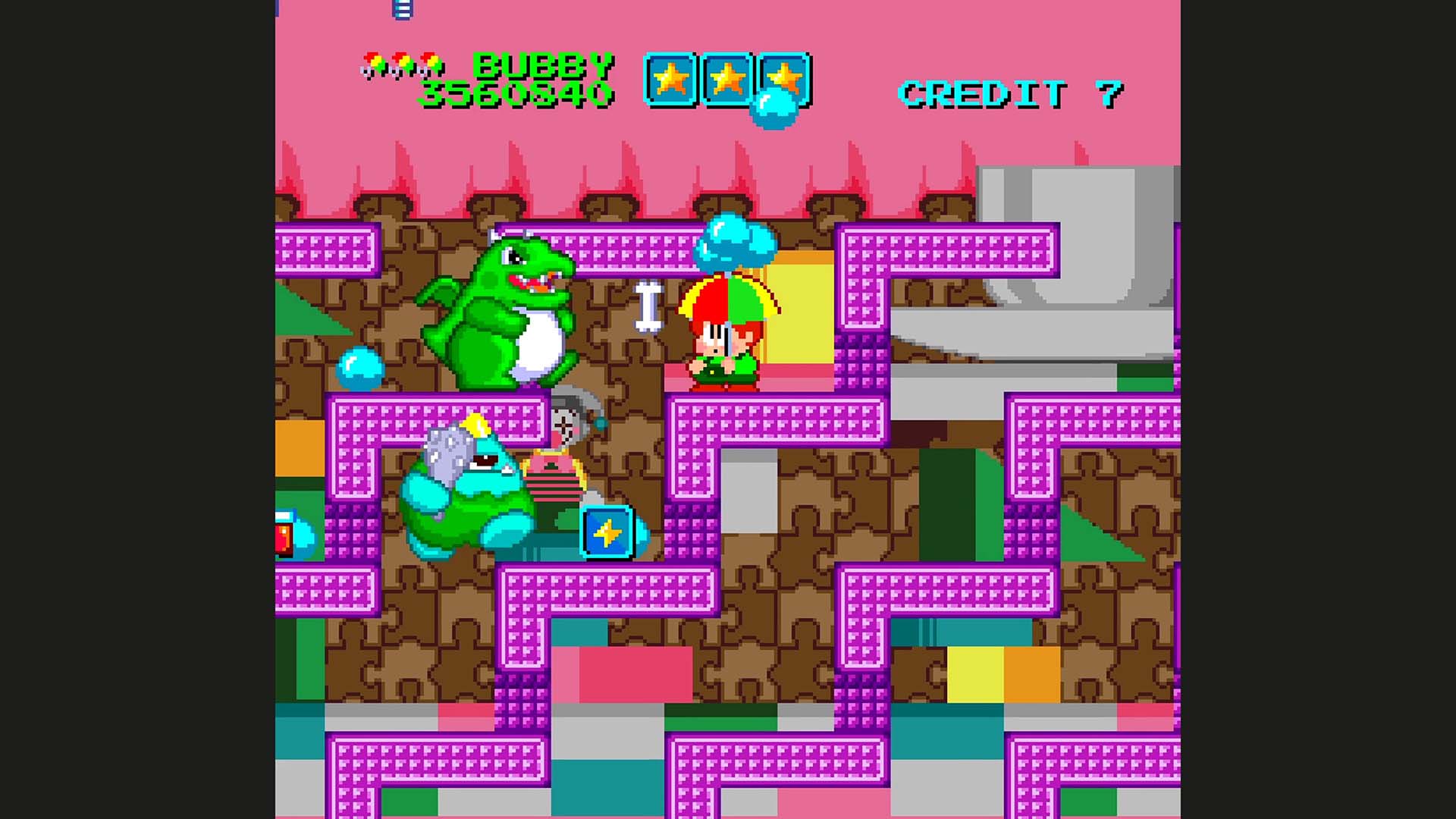
In this final chapter of the rainbow trilogy, heroic brothers, Bubby and Bobby, set out on a quest to save the galaxy from the clutches of evil! Chaostikhan, the main antagonist, has wrought havoc on the galaxy, stealing color from all the neighboring planets. Play as Bubby and Bobby (also known as our favorite loveable dragons, Bub and Bob, but human) and jump and glide throughout the universe armed with magic parasols, collecting items, propelling enemies and restoring color one planet at a time. 

This faithful Xbox port features everything you once loved about the game. A beautifully colorful array of enemies, bountiful power-ups and dazzling parasols with magic powers, while also incorporating a few quality-of-life options to improve the gaming experience.

PS Screenshot

Go at it alone or grab a friend for some old-fashioned couch co-op action! Hop around from planet to planet and beat all seven rounds of each of the eight base worlds! And surprise! Two additional secret worlds can be unlocked to face Chaostikhan himself and reach the true ending of the game. 

Well? What are you waiting for? Everyone’s counting on you to bring back color to the galaxy!

Check out Parasol Stars: The Story of Bubble Bobble III, available for pre-order now, and releasing on July 11, 2024.

Xbox Live

Parasol Stars: The Story of Bubble Bobble III

United Games Entertainment GmbH


$9.99


The legendary bubble dragons Bub and Bob are back… in human form!?

In this critically acclaimed Taito classic, available on modern consoles for the first time, the now-transformed Bubby and Bobby embark on a mission to save their neighboring planets. But this time, instead of blowing bubbles, our favorite duo swings colorful parasols filled with magical powers. Use parasols as a shield against enemy projectiles or to stun, pick up and throw foes as projectiles themselves!

Parasol Stars released in 1991 as the sequel to Rainbow Islands, marks the third installment in Taito’s massively successful Bubble Bobble series of action platformers and has lost none of its colorful charm throughout the years.

High-score hunters can rejoice because just like in the bubble-filled predecessor skillful play will quickly fill the levels with sweet and fruity collectibles that can be gathered to climb the leaderboard.

Look out for a variety of pick-ups to be found granting you all sorts of special powers from bouncing energy balls to screen-clearing magic.

Play on your own or bring a friend and take on the challenging levels together! Just like using enemies as projectiles, flinging your buddy against the enemies could be a good strategy. But be careful, as you won’t only stun the enemy you hit but your buddy-turned projectile as well. In the 2-player co-op mode, tactical teamwork is key to clearing the levels and getting the highest scores.

Parasol Stars is a retro gem brought back for modern consoles whose bright and beautifully crafted worlds will draw you in, and its simple but addictive 1- or 2-player gameplay will make you want to come back again and again to reach the top of the leaderboard.

visual studio – How to make the Python terminal on VScode only show the output


I have just recently get into Python programming. In the YouTube videos I’ve watched, every time they run a Python program, the VS Code terminal only show the output.

In my VS Code, it also shows two windows’ directories first before showing the output, which I’d rather not have. Below is my code on the computer screen:
PS C:\Users\Bill\Desktop\Artificial Intelligence> &

C:/Users/Bill/AppData/Local/Programs/Python/Python312/python.exe "c:/Users/Bill/Desktop/Artificial Intelligence/Day 1 - Self-taught Py/snake.py"
1

Is there any way I could make VS Code only show the output?

GFN Thursday: 22 Games In July


GeForce NOW is bringing 22 new games to members this month.

Dive into the four titles available to stream on the cloud gaming service this week to stay cool and entertained throughout the summer — whether poolside, on a long road trip or in the air-conditioned comfort of home.

Plus, get great games at great deals to stream across devices during the Steam Summer Sale. In total, more than 850 titles on GeForce NOW can be found at discounts in a dedicated Steam Summer Sale row on the GeForce NOW app, from now until July 11.

Time to Grind

The First Descendant on GeForce NOW
Be the first Descendant with the cloud.

In The First Descendant from NEXON, take on the role of Descendants tasked with safeguarding the powerful Iron Heart from relentless Vulgus invaders. Set in a captivating sci-fi universe, the game is a third-person co-op action role-playing shooter that seamlessly blends looting mechanics with strategic combat. Engage in intense gunplay, face off against formidable bosses and collect valuable loot while fighting to preserve humanity’s future.

Check out the list of new games this week:

And members can look for the following later this month:

  • Once Human (New release on Steam, July 9)
  • Anger Foot (New release on Steam, July 11)
  • The Crust (New release on Steam, July 15)
  • Gestalt: Steam & Cinder (New release on Steam, July 16)
  • Flintlock: The Siege of Dawn  (New release Steam and Xbox, available on PC Game Pass, July 18)
  • Dungeons of Hinterberg (New release Steam and Xbox, available on PC Game Pass, July 18)
  • Norland (New release on Steam, July 18)
  • Cataclismo (New release on Steam, July 22
  • CONSCRIPT (New release on Steam, July 23)
  • F1 Manager 2024 (New release on Steam, July 23)
  • EARTH DEFENSE FORCE 6 (New release on Steam, July 25)
  • Stormgate Early Access (New release on Steam, July 30)
  • Cyber Knights: Flashpoint (Steam)
  • Content Warning (Steam)
  • Crime Boss: Rockay City (Steam)
  • Gang Beasts (Steam and Xbox, available on PC Game Pass)
  • HAWKED (Steam)
  • Kingdoms and Castles (Steam)

Jam-Packed June

In addition to the 17 games announced last month, 10 more joined the GeForce NOW library:

  • Killer Klowns from Outer Space: The Game (New release on Steam, June 4)
  • Sneak Out (New release on Steam, June 6)
  • Beyond Good & Evil – 20th Anniversary Edition (New release on Steam and Ubisoft, June 24)
  • As Dusk Falls (Steam and Xbox, available on PC Game Pass)
  • Bodycam (Steam)
  • Drug Dealer Simulator 2 (Steam)
  • Sea of Thieves (Steam and Xbox, available on PC Game Pass)
  • Skye: The Misty Isle (New release on Steam, June 19)
  • XDefiant (Ubisoft)
  • Tell Me Why (Steam and Xbox, available on PC Game Pass)

Torque Drift 2 didn’t make it in June due to technical issues. Stay tuned to GFN Thursday for updates.

What are you planning to play this weekend? Let us know on X or in the comments below.


YoloBox: Understanding USB-C Out vs. HDMI-Out


The blog post “Exploring the Versatility of YoloBox: USB-C Out vs. HDMI-Out” by Ellie Hua for YoloLiv discusses the connectivity options of the YoloBox for enhancing live streaming experiences.

USB-C Out:

  • Converts YoloBox into a webcam or capture card when connected to a computer.
  • Integrates easily with live streaming software and supports recording.
  • Ideal for webinars, gaming, and virtual events with high-quality video output.

HDMI-Out:

  • Connects YoloBox to external displays, projectors, or recording devices.
  • Suitable for real-time monitoring or sharing content with larger audiences.
  • Ensures crisp and clear video output.

Choosing the Right Connection:

  • USB-C Out is best for versatility and compatibility with computers and USB-C devices.
  • HDMI-Out is preferred for connecting to HDMI-compatible displays and projectors.

Conclusion: Understanding and utilizing these ports can significantly enhance live streaming, allowing content creators to connect more effectively with their audience and improve their overall presentation.

Read the full blog post by Ellie Hua for YoloLiv HERE