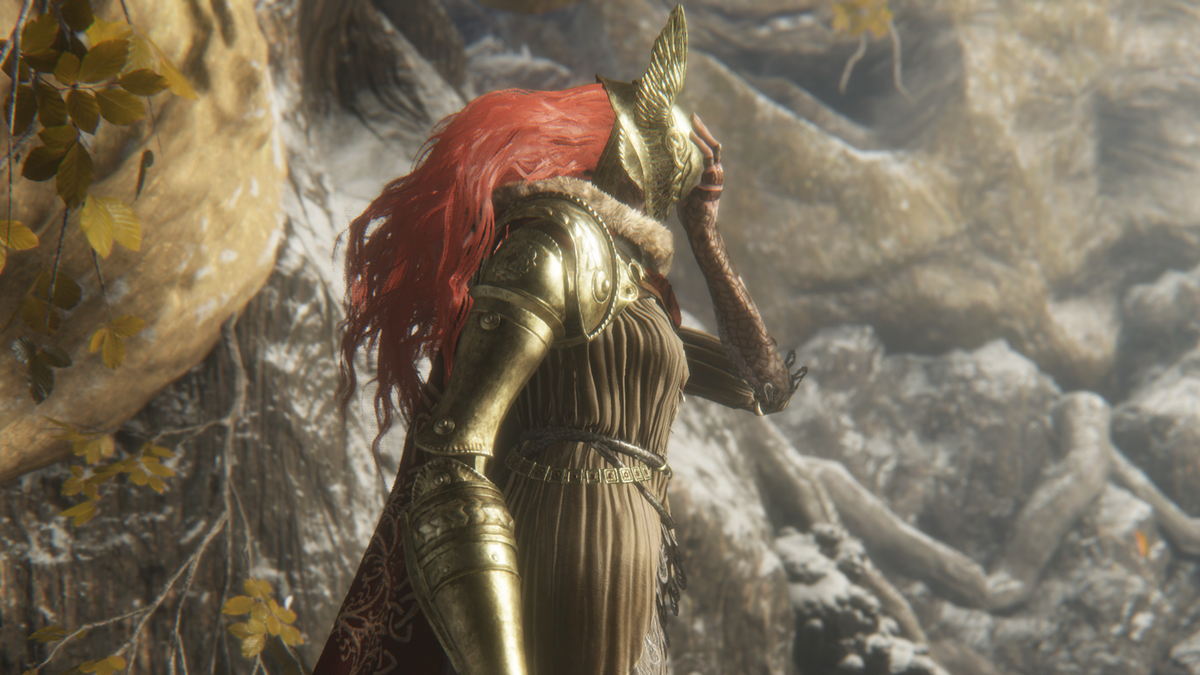
Poor Malenia, Blade of Miquella, Elden Ring’s training dummy for testing some of the most ridiculous builds. If she isn’t getting bullied by a naked man wearing only a jar, she’s getting flies thrown at her until she can’t take it anymore and gives up her Great Rune. Now, thanks to two players who realized Shadow of the Erdtree’s new hand-to-hand weapon type won’t even let her retaliate, her status as the hardest bosses in the game has been called into question.
Reddit user oRezyn posted video proof that Shadow of the Erdtree’s new spin kick ash of war, Dryleaf Whirlwind, can completely trivialize the duel against Malenia, provided you have a buddy with the same loadout. In the video, oRezyn and another player, known together as ‘Let us duo her’, take turns kicking Malenia—which interrupts literally anything she tries to do—for a solid minute without taking a single hit.
“Imagine being one of the strongest demigods and getting stunlocked into infinity by two naked dudes,” Vagabond_Charizard wrote in the comments.
oRezyn says the build they’re using isn’t even a build at all: It just requires Dane’s Footwork and the Dryleaf Whirlwind Ash of War (with bleed) from the DLC. “With how we found this fight to go, we did not need to put on any specific talismans,” they wrote. The only thing stopping you from becoming kick gods is that you have to reach the final area in Shadow of the Erdtree to get the right weapon and know someone else who has done the same.
Or you can hope Let us duo her show up in your game to summon as allies for the boss fight. oRezyn and their buddy helped several players fight Malenia during a stream over the weekend and maybe they’ll do more assists. If you see two summon signs named Let us duo her, you know what to do. Just don’t try to help because oRezyn says other people attacking her can mess up the infinite stun lock and cause Malenia to flee. “Then we just scream and run away.”
Elden Ring’s original folk hero Let Me Solo Her has moved on from Malenia to help people with the expansion’s brutal final boss—a fight that took the legendary player a full three hours to beat. But who better to pick up the torch than two dudes who can kick real good?
Keep up to date with the most important stories and the best deals, as picked by the PC Gamer team.
Cities: Skylines 2, the follow-up to the popular city builder developed by Colossal Order, just can’t catch a break. Following a post by the official Cities: Skylines account on publisher Paradox Interactive’s Cities: Skylines 2 forum, the console release for Cities: Skylines 2 has been postponed indefinitely. The game was originally targeting a launch on Xbox and PlayStation sometime in October.
“While we are making slow but steady progress, there are still unresolved issues impacting the game in ways that harm the player experience we want to deliver. We expect to receive a new [release candidate], which will undergo a thorough review in August. This evaluation will determine whether we can begin the submission process and provide a solid release date, or if further issues need to be addressed,” the post reads.
Image: Colossal Order/Paradox Interactive
Despite Paradox Interactive publishing multiple pieces of downloadable content for the game, Cities: Skylines 2 has been plagued with performance and stability issues since its PC launch in October 2023, prompting an apology from the developers in April. The prompt cancellation of the Sims-competitor Life by You following an indefinite delay doesn’t inspire much confidence in Paradox’s intention to deliver on this promised release.
Colossal Order has managed to hit all of its goals outlined in the publicly available year-one roadmap for Skylines 2. However, persistent issues and a lack of mod support have left players clinging to the original Cities: Skylines for the time being.
The roadmap for the first year of post-launch content for Cities: Skylines 2 Image: Colossal Order/Paradox Interactive
##[error]CVTRES(0,0): Error CVT1108: cannot open C:\Users\WP2BUI~1\AppData\Local\Temp\RES161C.tmp for writing
The filename is always different (but it’s always RESxxxx.tmp) and if I look on the server in the specified directory, there are a large number of these RES….tmp files, however the ones reported by this error message all appear to have a size of 0 bytes.
An internet search for the error message turns up multiple hits but in each case, it amounts to ensuring the build agent has write privileges to that directory. I don’t feel like this is the answer in this case, as I’ve checked and the user does seem to have write privileges, and I would imagine if this was the problem it would fail every time.
Two other things I should point out.
There are many developers using this pipeline – it’s a Continuous Integration pipeline used for pull requests.
When I build the application on my own machine and monitor the same dir, the RES….tmp file appears briefly and disappears, which makes me think VS should be deleting it after use. However, on the build server, there are hundreds of these files left over from a few months’ worth of builds.
Edit
This error appears below the above. Not sure if it’s caused by the above error or is the cause of it – but in case it matters:
CVTRES : fatal error CVT1108: cannot open C:\Users\WP2BUI~1\AppData\Local\Temp\RES161C.tmp for writing [c:\agent_work\56\s\src\MyApp\MyApp.csproj]
##[error]ALINK(0,0): Error AL1019: Metadata failure while creating assembly — The specified image file did not contain a resource section.
In today’s rapidly evolving job market, remote work has become more prevalent than ever, offering professionals the flexibility to work from anywhere while maintaining a healthy work-life balance. Among the various remote opportunities, sales roles stand out as some of the most lucrative positions available.
Whether you’re an experienced sales professional looking to transition to a remote setup or a newcomer eager to explore high-paying opportunities, this blog will guide you through highest-paying remote sales jobs. From enterprise sales executives to sales engineers, these roles not only offer competitive salaries but also provide the chance to thrive in a dynamic, results-driven environment.
What Are High-Paying Sales Jobs?
High-paying sales jobs often combine the complexity of the products or services being sold with the potential for high-value transactions. These roles typically require specialized knowledge, excellent communication skills, and the ability to build and maintain strong relationships with clients.
17 Highest Paying Remote Sales Jobs
Sales roles can be highly lucrative, especially in industries where high-value transactions and complex sales cycles are involved. Here are 17 of the highest-paying sales jobs, along with their average salaries and role descriptions:
Responsible for selling complex, high-value solutions to large enterprises. Manages long sales cycles and builds relationships with C-level executives.
Focuses on selling software solutions, often in a B2B environment. Requires technical knowledge and the ability to demonstrate software benefits to potential clients.
Sells medical devices to hospitals, clinics, and healthcare providers. Requires in-depth knowledge of medical technology and strong relationship-building skills.
Oversees the entire sales department, sets sales targets, and develops strategies to meet company goals. Manages a team of sales managers and representatives.
Sells products or services over the phone or via online communication channels. Requires strong communication skills and the ability to close deals remotely.
Manages sales operations within a specific geographic region. Responsible for meeting sales targets, managing a team, and developing regional sales strategies.
Combines technical expertise with sales skills to sell complex technical products. Works closely with the engineering team to understand product specifications and customer needs.
Sells financial products such as insurance, mutual funds, and investment plans. Requires strong financial knowledge and the ability to build trust with clients.
Sells advertising space in various media outlets, including print, online, and broadcast. Requires excellent communication skills and the ability to understand client needs.
Sells technical products and solutions. Requires a deep understanding of technical specifications and the ability to communicate complex information to clients.
Sells telecommunications products and services, including mobile, internet, and enterprise solutions. Requires knowledge of the telecom industry and strong sales skills.
Oversees the sales operations team, focusing on improving processes, managing sales data, and supporting the sales team with tools and insights to increase efficiency and effectiveness.
Supports the sales team by managing schedules, preparing sales documents, and coordinating with other departments. Ensures smooth operations and helps the sales team meet targets.
Average Salary: $40,000 – $70,000
These roles typically offer high earning potential, often supplemented by commissions and bonuses based on performance. If you’re looking to maximize your earnings in a sales career, these positions are worth considering.
How to Find a High-Paying Sales Job?
Finding a high-paying sales job involves a combination of research, networking, and strategic application processes. Here are some steps to help you secure a lucrative sales position:
1. Identify High-Paying Industries
Technology and Software: Companies like Salesforce, Microsoft, and Oracle often offer high salaries for sales roles.
Pharmaceuticals and Medical Devices: Companies such as Pfizer, Johnson & Johnson, and Medtronic pay well for experienced sales representatives.
Financial Services: Firms like Goldman Sachs, Morgan Stanley, and Fidelity Investments offer lucrative sales positions.
Real Estate: High-end real estate firms and luxury property developers often provide substantial commissions.
Enterprise Solutions: Companies providing complex B2B solutions, such as IBM, SAP, and Cisco, offer high-paying sales roles.
2. Tailor Your Resume and Cover Letter
Highlight your achievements, particularly those involving high-value deals or significant revenue growth in your resume.
Customize your application materials for each job to align with the specific requirements and company culture.
3. Leverage Networking
LinkedIn: Connect with industry professionals, join relevant groups, and participate in discussions to increase your visibility.
Professional Associations: Join organizations related to your target industry to gain access to job boards and networking events.
Informational Interviews: Reach out to current employees or industry veterans to learn more about high-paying opportunities and company cultures.
Recruiters: Work with recruitment agencies that specialize in sales positions, as they often have access to exclusive high-paying job listings.
5. Prepare for Interviews
Research the company thoroughly to understand its products, services, and market position for a remote interview.
Practice common sales interview questions and prepare to discuss your sales process, strategies, and past successes.
Be ready to demonstrate your ability to close deals, manage client relationships, and achieve sales targets.
6. Negotiate Your Offer
Once you receive an offer, don’t hesitate to negotiate. High-paying sales jobs often come with flexible compensation packages.
Discuss not only the base salary but also commissions, bonuses, stock options, and other benefits.
By following these steps and focusing on high-paying industries and roles, you can increase your chances of securing a lucrative sales position that aligns with your career goals.
As you embark on your job search, remember to tailor your applications, leverage your network, and prepare thoroughly for interviews to maximize your chances of landing one of these coveted roles. With the right approach, you can achieve both professional success and the freedom that comes with remote work.
If you’re looking for a remote job, there’s no better place to start than DailyRemote. So, what are you waiting for? Get started today. And now that you know have list of highest paying remote jobs to help find the remote job of your dreams, start applying today. Join like-minded people in our
There was one more unexpected finding. “Rideshare drivers who work for companies such as Uber are increasingly turning to electric vehicles to reduce fuel costs.” That trend is boosting demand for conveniently located, publicly accessible EV chargers… “They are mostly relying on public chargers for their daily Uber needs, usually every day or every couple of days, which dramatically increases electric vehicle miles traveled,” [climate fellow Omar Asensio told the Institute’s blog], explaining that many drivers live in apartments that lack garages or space for a residential EV charger. Uber CEO Dara Khosrowshahi considers the issue so pressing he urged U.S. policymakers to accelerate plans to improve the nation’s EV charging infrastructure in a Fast Co. op-ed in January — during the World Economic Forum in Davos, when media messaging can influence policymakers.
Independent Uber drivers, Khosrowshahi said, are converting to electric vehicles seven times faster than the general public and they tend to be disproportionately from low- and middle-income households that need access to public charging stations. “Charging infrastructure must be more equitable,” Khosrowshahi wrote. “Many drivers don’t have driveways or garages, so access to nearby overnight charging is essential. Yet our data shows us that Uber drivers often live in neighborhoods lacking this infrastructure. These ‘charging deserts’ hold countless people back from making the switch.”
Have I ever bellowed breathlessly about how much I appreciate modders? If I’ve done it a thousand times, it still isn’t enough. Today’s saintly file tinkerers are MerseyRockoff and glassfish77, who’ve restored a series of boat racing quests in open worldRPGThe Witcher 3: Wild Hunt and made them available in a mod for your sailing pleasure. Cheers, PC Gamer!
To see this content please enable targeting cookies.
While the actual races themselves were created by the modders – “from scratch based on CDPR’s writing” – all the writing and audio used was found in the game files. So conversations, characters, journal entries, and even quest board notices all appear in the mod as they would have in the game. You’ll kick off the races at Novigrad, after which you’ll choose to sail for either the city or Redania. There’s four tournaments in all. The Witcher 3’s boats were never particularly exciting, but there’s plenty of conversations between quests to keep things interesting.
This is the latest cut content discovery made since modding tool REDKit’s release. Modders recently found a big chunk of ending on the cutting room floor, including a scene in which Yennefer betrayed the Lodge Of Sorceresses. I’m left wondering if we’ll ever get to see the famous ice skating swordfights that were prototyped but ultimately abandoned, although it doesn’t sound like they got far enough to leave any trace in the files. Book readers will know that violent ice skating isn’t new territory for the series, but the developers ultimately felt that introducing a new system so late in the game was “quite wonky.” Embrace wonkiness, say I. Until then, why not have a glance at our best Witcher 3 mods. At this rate, though, they’ll surely be needing an update soon.
Have you ever struggled to understand what a commit was doing or why it was made? Do you wish you had more clarity and context when reviewing or collaborating on code changes? If you answered yes, then you’ll love what GitHub Copilot can do for you: generate commit explanations. GitHub Copilot can analyze your code differences and produce concise summaries that highlight the key points. No more guessing or wasting time on deciphering your Git history. You can focus on coding and collaborating with ease. And the best part is, you can also improve your communication and teamwork by having better documentation and transparency of your code changes.
Unravel your commit history with GitHub Copilot
Git history can be daunting to shuffle through, but it’s often the best way to learn about a code base or help identify the origin of a bug. We’ve added a GitHub Copilot powered explain feature to the Commit Details window to make it easier to understand the contents of each commit. You’ll get a summary of the changes side by side with the code, highlighting the key differences and the rationale behind them. Since GitHub Copilot needs to look at all the changes, this may take some time for large changesets or pull requests.
Double click on any commit to open the Commit Details pane in the Git Repository window. Then, select Explain button above the commit message to get a summary of the changes. Pro tip: use the expand option and the summary view to get a better view of the code changes with the description.
Please share your thoughts!
More folks are finding this option useful, so we wanted to highlight it here and share it broadly. We’d love to hear your thoughts for how to make commit explanations better and any other ideas to superpower Version Control with GitHub Copilot, especially with Git history.
We appreciate the time you’ve spent reporting issues/suggestions and hope you continue to give us feedback when using Visual Studio on what you like and what we can improve. Your feedback is critical to help us make Visual Studio the best tool it can be! You can share feedback with us via Developer Community: report any bugs or issues via report a problem and share your suggestions for new features or improvements to existing ones.
There are many practical reasons to set up an OS like Microsoft Windows in a VM rather than using it as a native installation. If you have to deal with files you can’t trust, need to test multiple OS installations on the same system, or need access to the operating system without wanting to use it as a daily driver, using a VM offers access to its features and capabilities without worrying about needing to keep the OS installation around long-term. Luckily, setting up Windows 10 in a VM isn’t particularly difficult.
Note: While this guide uses VirtualBox, it is not the only free VM software available. VMWare Workstation Player is another option. There are solutions like VMWare Fusion and Parallels on Mac, but VMWare Fusion has no near-term plans to support x86 architecture VMs on Apple silicon. Parallels has explicitly shipped software that does support x86 VMs on Apple silicon. VMWare has announced that Linux, not Windows, is its priority regarding Mac support.
VirtualBox Installation
1. Download the Windows 10 ISO
First, head over to the Windows 10 download page If you are a Windows user. Microsoft will prompt you to download the Media Creation Tool before allowing you to download an OS image. You can use this tool to create an ISO file locally, or you can follow these additional instructions to download the ISO manually without being forced to grab the tool first.
Credit: Microsoft
2. Create a New Virtual Machine
Go to the VirtualBox website and download the latest version of Oracle’s free, open-source software. Go through the installation process, and then launch the application. Press the “New” button, and name your virtual machine. Make sure your “Type” is set to “Microsoft Windows” and your “Version” is set to “Windows 10.” Make sure you match the x64 version with a 64-bit VM and the x86 version with a 32-bit VM.
Credit: Microsoft
3. Allocate RAM
Now, you must decide how much RAM you want to allocate for this VM. For the x86 version, you’ll need at least 1GB of RAM. For the x64 version, you’ll need 2GB. Whatever you decide, just make sure you stay in the green. If you allocate too much RAM, you’ll end up with serious performance issues.
Credit: Microsoft
4. Create a Virtual Drive
Next, you need to create a virtual drive. Microsoft says that 16GB is the minimum space needed for the 32-bit version, but 20GB is required for the 64-bit version. A 50GB can be a good virtual desktop, but feel free to make it as large as you need. Just be sure you have enough space on your actual hard drive to handle the size of your virtual drive. Depending on what you intend to do with the OS, you may want to allocate more or less storage. Applications installed to a VM should be assumed to require the same amount of “real” storage that their standard installations would.
Credit: Microsoft
5. Locate the Windows 10 ISO
Now, go into the settings for this virtual machine and navigate to the “Storage” tab. Click the disc icon with a green plus next to “Controller: SATA.” Click “Choose disk” and locate the Windows 10 ISO you downloaded earlier.
Credit: Microsoft
6. Configure Video Settings
Before you jump in and start installing Windows 10, move over to the “Display” tab. You can configure how much video memory you will allocate to the virtual machine, but stay in the green. You can also toggle on 3D acceleration if you like.
Credit: Microsoft
7. Launch the Installer
After that setup, press the “Start” button in VirtualBox and begin the Windows 10 installation process. Follow the instructions on the screen, and you’re well on your way.
Credit: Oracle
8. Install VirtualBox Guest Additions
Once you’re at the Windows 10 desktop, you’ll need to install all of the proper drivers for VirtualBox. In the VirtualBox UI, select “Devices,” then select “Insert Guest Additions CD image.” Navigate to that disc image in Windows Explorer and run the installer. Once you’ve gone through the entire process, you must reboot the VM.
Credit: Microsoft
9. You’re Ready to Rock
Back at the desktop, you can finally use full-screen mode at the proper resolution. In the VirtualBox menu, select “View” and “Switch to Fullscreen.” For the most part, this is now the same experience you’d have running it natively. Enjoy yourself, and feel free to poke around all the new features.
WhatsApp beta version 2.24.14.20 has a new feature that allows users to share photos with Meta AI.
The AI chatbot will analyze uploaded images and provide information or context about the content.
Users may be able to request specific edits to their photos directly through Meta AI, though the extent of this feature is still unknown.
As the battle for AI dominance heats up, Meta is adding a new trick to its AI chatbot, Meta AI, which is already part of Facebook, Instagram, and WhatsApp. While Meta AI already has impressive text capabilities, such as replying to questions, suggesting captions, and holding conversations, users cannot currently share or upload photos to the Meta AI chat.
WaBetaInfo has uncovered the exciting new feature in the WhatsApp beta for Android version 2.24.14.20. This feature will allow Meta AI to interact with photos shared by users, reply to photos, and even edit them.
As shown in the attached screenshot, WhatsApp is testing a new camera button in the Meta AI chat, designed to function similarly to the camera button in regular chats. This addition will allow users to manually share photos with Meta AI, a capability that is currently unavailable.
With this new functionality, users will be able to ask questions about their photos, presumably allowing users to ask the AI to identify objects or locations or provide context about the photo’s content. Moreover, the screenshot suggests that Meta AI will also offer the option to edit photos, enabling users to make changes to their images directly within the chat by sharing a prompt.
The exact scope of this image editing feature remains unclear, leaving us to wonder if it will be limited to simple tweaks or if it will unleash a powerful AI-driven photo editing suite. The possibilities are both exciting and intriguing, and this feature could definitely be a big hit, especially if it performs as promised.
While this new image-sharing feature would mean Meta will analyze and face-scan the photos you upload, the screenshot includes a disclaimer indicating that users will have the option to delete their photos whenever they want.
As of now, it seems that the feature is still in development, so it might be some time before we finally get to see it roll out publicly. Recently, we also reported about WhatsApp working on an “Imagine Me” feature that would allow Meta AI to generate AI avatars of you based on a set of your photos.
Got a tip? Talk to us! Email our staff at news@androidauthority.com. You can stay anonymous or get credit for the info, it’s your choice.
This post covers 3D presentation design services, costs, rates and prices for companies and firms. Companies can assign an employee to design a 3D presentation. Still, unless the employee excels at CAD software and is familiar with the structure of 3D models, the result is often underwhelming. It negates the purpose of the 3D presentation in the first place. A 3D presentation should be an effective message delivery system to help viewers understand a complex idea, not to confuse or trigger a sense of tediousness. You expect the audience to find the 3D presentation captivating because it creates a long-lasting impression.
Preparing a 3D presentation may seem like a run-of-the-mill office task everybody can do. It might be true if the 3D presentation only contains text and simple images on every slide. However, suppose the content is quite complex, for example, when the clients require 3D models and visualizer services in addition to bulleted lists. In that case, you may find yourself in need of a professional 3D presentation designer.
Some people see the typical slideshow-based 3D presentation as uninteresting. There is almost no visual appeal apart from the occasional transition effects between the slides to the point where viewers are reluctant to pay attention. Whether you need to include 3D models and animation in the slides or want to impress the clients with eye-catching imagery, a 3D designer can help you achieve the objective.
The estimated cost of 3D presentation design services
There are three possible solutions. You can hire a freelancer, work with a design agency, or use subscription-based 3D presentation design services.
Freelancers
Finding a freelance 3D presentation designer to complete your company’s project is easy. Thousands of freelance 3D presentation designers offer their services at affordable rates through various online freelancing platforms. Prices vary depending on the 3D presentation designer’s experience levels, but generally, you can expect to pay anywhere from $35 per slide design to $250 for a package of 10-slide 3D presentation. Some 3D presentation designers charge per hour, at a rate of up to $150 per hour, for a complete custom 3D presentation.
One of the most significant downsides of outsourcing a creative task to a freelancer is the possibility of inconsistent quality. Two freelance 3D presentation designers who charge roughly the same rate can also produce 3D presentations of different qualities. While it is a budget-conscious option, finding a suitable freelancer can be tricky at the same time.
Freelance 3D presentation designers offer services for every budget and are flexible toward their clients’ requirements, but they come with an inherent sense of unpredictability regarding outcome quality. To avoid having too many revisions after completion, provide a detailed project brief and communicate your expectations well throughout the process. Like other creative tasks, looking at the 3D presentation designer’s portfolio before hiring is essential.
Design Agency
In case assurance of high quality is more important than budget, a design agency can be a reliable partner. Most design agencies have multiple professionals on the team to handle different aspects of the 3D presentation. Some focus on the slide designs and layout, while others work on the texts, images, and videos. Unlike most freelancers who work individually and require more extended deadlines, design agencies rely on teamwork to finish it quickly. Many agencies also have their quality assurance professionals check the results for mistakes or inaccuracies before sending the 3D presentation back to the client. However, the cost is significantly higher than hiring freelancers.
For instance, design agencies offering architectural presentation services have different pricing strategies and structures, and the project’s complexity is one of the key factors influencing the rates. When a design agency provides comprehensive services that include the design of the 3D presentation and content development, the cost is typically higher than creating a basic slideshow. As a result, clients seeking architectural presentation services should be aware that each design agency has its approach to pricing, and the rates are primarily determined by the level of complexity involved in the project.
A high-end design agency might also offer a consulting service to help build a unique 3D presentation for a specific audience. Such consultation is a communication specialist analyzing the 3D presentation topic, objective, and target demographics. The professional might even inform you about some delivery techniques to ensure that the messages reach the audience effectively. A reputable design firm can charge up to $25,000 for a complete service. The 3D contents, such as rendering and animation, may account for over half the total cost. It is at the top of the range, but you can find many affordable alternatives priced between $2,500 and $7,500.
Subscription-based 3D presentation design services cost between $1,000 and $4,000 monthly, and additional options are available depending on your monthly needs. In an organization where creating 3D presentations is a regular task, the one-off prices for a high-quality 3D presentation are likely too high, and the possibility of inconsistent quality is too risky. If organizing your design team is not yet viable, the next best thing is a subscription-based design service.
At the bottom of the price range, a subscription gives a maximum of 300 slides per month, style improvement, and royalty-free graphics. However, you don’t get 3D images, 3D animation services & 3D modeling from a basic plan. At a step higher is the mid-range option, priced at around $2,500 per month, for which you get a dedicated project manager, creative brief, and standard animations. With a custom layout and corporate branding, the package should deliver a consistent, professional-quality 3D presentation on demand.
Moving up a scale is the premium subscription at $4,000+ per month. It is the option where you should get world-class 3D presentations filled with complex data visualization, advanced 3D graphics, and storyboard consultation. Think of it as a turnkey 3D presentation design service; once you send the brief, the agency does all the heavy lifting to deliver a stunning design and a 3D presentation that conveys all the right messages. Another option for clients is a complete custom package tailored to their requirements.
This option is valuable when seeking 3D product animation services, as it allows clients to precisely outline their needs and desired appearance for the 3D presentation. Upon receiving the client’s brief, the agency conducts a thorough analysis and provides a price range for the necessary services. A custom package for 3D product animation services is an ideal choice for those requiring a comprehensive solution that includes a ready-made 3D presentation and additional deliverables such as brochure layouts, infographics, and visually stunning 3D product visualizations seamlessly integrated into the presentation slides.
The jobs of a 3D presentation design involve organizing complex information into a single storyboard and ensuring the delivery is easy to understand. Once the storyboard is completed, the designer creates a series of 3D presentation slides filled with text, charts, tables, maps, animation, and multimedia elements to create a coherent narration. Therefore, the overall cost of a 3D presentation design is affected by the following:
Content creation
As mentioned earlier, readily-available content can help keep the cost low. When a client provides all the needed graphics and texts for the slides, the designer can skip potentially time-consuming research and compile the data. Otherwise, the research process alone can take days (if not weeks) and affect the service rate.
Design originality
A designer can use or purchase a readily available template to build the 3D presentation. Although the cost for the purchase is billed to the client at the end of the project, it is still more affordable than creating a layout from scratch.
A tight deadline translates to higher costs. The designer might be willing to put all other projects on hold to get your 3D presentation ready as quickly as possible. You have to compensate the designer for additional work hours (overtime). If possible, send the project brief beforehand to save costs here.
Multimedia elements
One of the most time-intensive aspects of creating a compelling 3D presentation is developing multimedia content. While creating an infographic or a few simple topic-relevant images may pose minimal challenges, the complexity and difficulty level escalates when incorporating 3D models and animations instead of just having 3D effects between the slides. Developing multimedia content is one of the most time-consuming aspects of creating a compelling 3D presentation.
Some 3D presentation designers may not be CAD professionals and lack the expertise to create detailed 3D models. In such cases, they often hire a third-party 3D modeling designer with expertise in 3D modeling design services to make the required images. The cost associated with this process can add up quickly, with expenses reaching into the hundreds of dollars for 3D models and rendering. Furthermore, the price for a 3D animated render is substantially higher, adding to the project’s overall expense.
The number of revisions required to refine small details can increase the total work hours. Some designers provide one of two free revisions in the package, and further modifications cost money. Try to be as clear as possible when outlining the brief to minimize the possibility of having too many revisions. Specify the number of slides, type of content, image resolutions, a video duration for every slide, and expected delivery time. Be involved throughout the project and give prompt feedback to every question or deliverable.
Making a professional 3D presentation requires a lot of design work. In addition to the slide layout and theme, the designer has to work on the 3D models and animations, too. Creating the content involves a complex process, and everything must be arranged coherently to help the client deliver a compelling narration. Although anybody can learn how to make an excellent 3D presentation, it may take months only to master the basics.
There are various 3D presentation formats and software. Some of them are free, such as Google Slides and LibreOffice. That said, the most widely used program is Microsoft PowerPoint. The current premium version of the software – with all the advanced features and options – is available through subscription, so it will also affect the design cost.
How Cad Crowd can help
If you’ve made it this far, you’re undoubtedly looking for a freelance 3D modeler or CG artist to help you out with your project. Whether you’re looking for help designing a video game character or movie, create an architectural slideshow, or design and develop a new product, our freelancers can help. They’re pre-vetted and accuracy is guaranteed, and we can give you a free quote!