How VS Code Builds with AI


March 13, 2026 by Pierce Boggan

We use AI every day to ship VS Code. It’s made us so much faster that, after ten years of monthly releases, we just went weekly. Agents were the key that unlocked this, not just for writing code, but across every part of how the team works.

To kick off Agent Sessions Day, I sat down with Peng Lyu, Engineering Manager on the VS Code team, to walk through how the VS Code team actually uses AI for our day-to-day work. Not only for implementing features (that part’s self-evident), but for everything around building features: triage, code review, release notes, validation, staying productive in a meeting-heavy schedule.

In that session, we probably only covered 5% of what the team does with agents on any given day. But it’s representative of how a product that’s used by millions of developers is built. So, we wanted to share more about these big recent changes to our workflow, and where we think we’re going next.

After Ten Years of Monthly Releases, We Went Weekly

We shipped VS Code monthly for ten years. Every single month we went through our well-oiled cycle of plan, build, test, endgame, ship. With each member of the team rotating through the different roles, it was a rhythm that became part of the team’s culture.

Recently, we decided to start shipping VS Code on a weekly cadence. And we wanted to keep the bar for rigor and quality just as high. A monthly cycle gives you breathing room with time to plan, time to run a full endgame week where the team cross-tests each other’s features, and time to write thorough release notes. Moving to a weekly cadence means all of that has to get faster or get automated. This is a huge change and a year ago, we couldn’t have done it. This shift was only possible because of the way agents have transformed how we work.
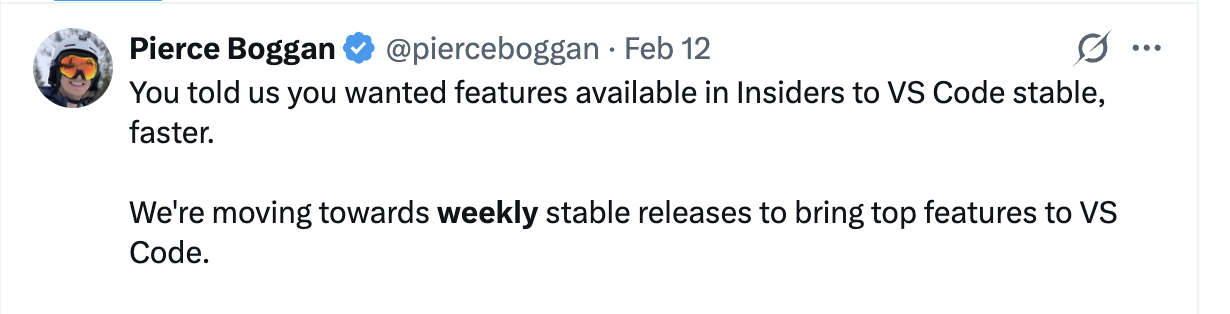
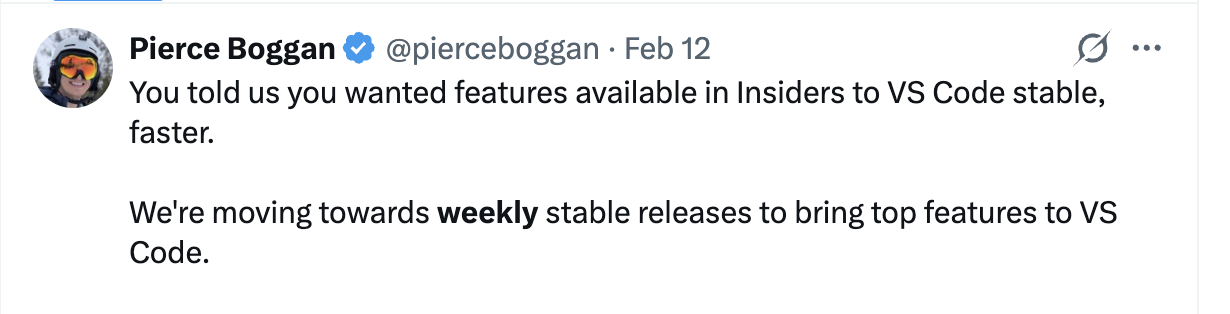
A screenshot of a post on X from @pierceboggan that says "You told us you wanted features available in Insiders to VS Code stable, faster. We're moving towards weekly stable releases to bring top features to VS Code".

The weekly cadence isn’t about shipping faster for its own sake. It’s about getting improvements to developers sooner. A bug fix that used to wait three weeks for the next stable release now ships in days. A feature that’s merged on Monday can be in developers’ editors that same week. That feedback loop of ship > learn > iterate just gets so much faster.

What We Learned From This Shift

Our workflows and processes continue to evolve daily, as we learn and adapt. But there are some key learnings that continue to hold true:

  1. Parallelize yourself. Build the habit of kicking off multiple agent sessions before context-switching. Worktrees, cloud agents, multiple VS Code sessions… use them all.
  2. Skip the intermediate artifacts. What used to be meeting notes → issues → specs → code, is now actually becoming meeting → agent sessions → code → PR.
  3. Automate the overhead that scales with velocity. We built agent-powered pipelines for issue triage, commit summarization, release notes, code review, all of it using Copilot CLI, the Copilot SDK, and GitHub Actions. Engineers are still on the other end of these workflows, but agents help surface the right things to the right people, faster.
  4. Invest in harnesses before speed. Tests, golden scenarios, and code review gates prevent agent-driven velocity from becoming agent-driven regression.
  5. Ownership is evolving. When PMs, engineers from other areas, community contributors, and agents can contribute to any component, traditional ownership models need to adapt. Accountability for outcomes still rests with engineers.
  6. Keep humans in the loop for taste. Agents check correctness. Humans evaluate delight.

Let’s look into more detail on how each of these plays out in our team.

Working in Parallel

There’s a famous Paul Graham essay about how maker schedules and manager schedules are fundamentally incompatible. That was mostly true until recently. But agents are changing that.

Here’s what a typical day might look like:

  • Before entering a meeting, kick off 3-4 agent sessions for fixing bugs, prototyping features, or triaging issues.
  • During the meeting, agents run in parallel across multiple VS Code sessions, worktrees, or in the cloud.
  • After the meeting, review the agent output, verify locally, merge or re-prompt, and kick off again.

Managers still attend meetings and other managerial tasks, but they can use agents to also take on some of the maker work that used to be impossible to do in a meeting-heavy schedule.

Let me give you a real example. Peng starts each morning by updating VS Code Insiders. Most days, we ship Insiders builds twice a day so we can get early feedback on the stuff we are working on. Then he runs a custom agent that fetches his meetings via Work IQ, and produces a snapshot of what’s on his plate.

From there, Peng decides what needs his focus, what to delegate to agents, and what to prioritize for the team. The agent handles the busywork of gathering context so he can cut straight to the interesting problems. By the time he’s in his first call, tasks are already running in parallel.
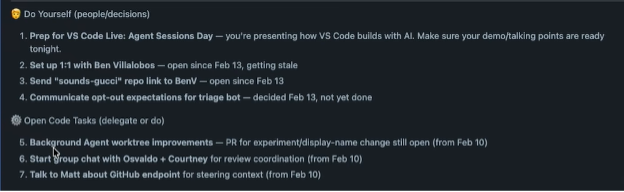
A task management view showing a prioritized to-do list split into two sections: "Do Yourself (people/decisions)" with 4 items including prepping for VS Code Live Agent Sessions Day, scheduling a 1:1, sending a repo link, and communicating opt-out expectations; and "Open Code Tasks (delegate or do)" with 3 items including background agent worktree improvements, starting a group chat for review coordination, and discussing a GitHub endpoint for steering context. Each item includes status notes and dates.

“Previously, you were always working sequentially. You wrote notes, turned them into issues, and then someone else, or you, would pick that up later. Now you are empowered and able to do things in parallel. It’s a habit you have to build. So, I don’t write down meeting notes anymore. I’m kicking off the agents directly.” — Peng Lyu

It really is a new muscle. Someone in a meeting mentions something we need to go do, and I’ll fire off agents right there. We’ve also enabled transcription for most of our meetings in Teams, so grabbing context after the fact is easy. What used to be meeting notes turned into issues turned into work is now just a prompt kicked off in the moment.

Automating the Overhead

More velocity is great. It also creates its own overhead: more issues to triage, more commits to track, more release notes to write. Here’s how we’ve automated the parts that scale with speed.

Commit summarization. We built a custom slash command that fetches all commits from the last 24 hours across multiple repos and summarizes them with a fast model. It used to be you’d git fetch and have 20 or 30 commits. Now, there can be 100+ waiting for you. An entire feature area can land in a single day. That same pipeline feeds into our Insiders changelog and powers our automated X account that posts daily updates. All built on Copilot CLI and the Copilot SDK, running as GitHub Actions triggered by commits to main.

Issue triage. VS Code is one of the largest open-source projects on GitHub. We love our community, and the volume of issues we get is a reflection of how many people care about the product: hundreds land daily. We used to have a rotating “inbox tracker” role, one person triaging everything for a week. This no longer scales.

Now, every time an issue is opened, it triggers an agent loop in GitHub Actions that detects duplicates (with confidence scores), determines the right owner, and suggests labels. The agent reads our ownership docs and looks at historical assignment patterns, because ownership shifts over time.

You can see it in the repo’s public data: comparing Jan-Mar year over year, commit volume has more than doubled and the team is closing nearly 3x as many issues. Better triage helps engineers find and fix the right issues faster, which frees up more time for actual software development.
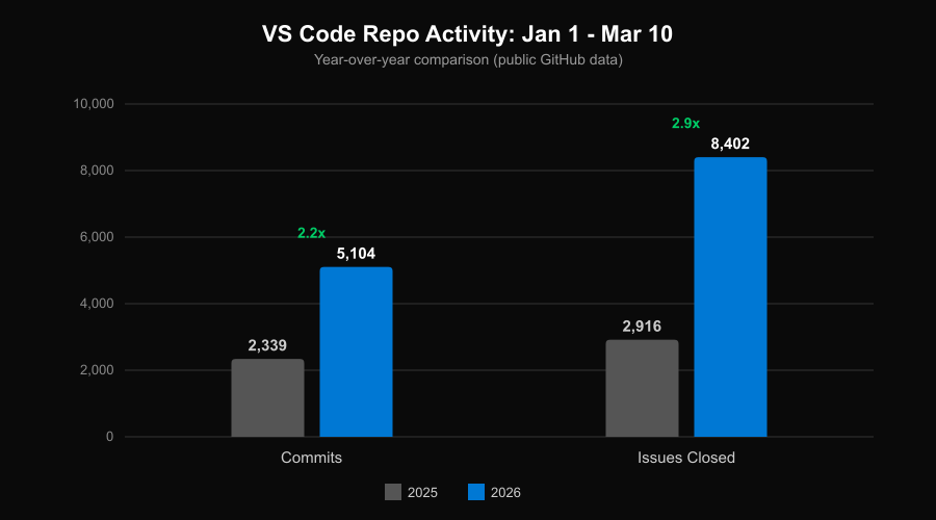
Bar chart titled VS Code Repo Activity Jan 1 to Mar 10 showing a year-over-year comparison using public GitHub data. Commits grew from 2,339 in 2025 to 5,104 in 2026, a 2.2x increase. Issues Closed grew from 2,916 in 2025 to 8,402 in 2026, a 2.9x increase. 2025 bars are gray, 2026 bars are blue.

“Now that piece of code is written by Copilot, who is the right owner for it? I would say it’s still our engineers who are accountable for the outcome. But you do need the right harness to welcome other people to contribute to your component.” — Peng Lyu

The team also built a Chrome extension that shows triage suggestions directly on GitHub issues, like duplicates, owners, and labels. It includes a dashboard showing issue status across the team. Inside VS Code, custom slash commands let engineers groom issues and find duplicates without leaving the editor.

We’ve already seen a real boost in shipping velocity from the team. And, there’s still so much more we can continue to automate, streamline, and learn from as these workflows mature.

Everyone Ships Code

This is the part I’m most excited about, because it’s changed how I work more than anything else.

The traditional PM loop looks like this: write a spec or PRD → create issues → hand off to engineering. Nobody loved reading those specs, and the fundamental problem is that they’re based on hypotheses. You’re writing about what you think the experience should be, but you don’t actually know until it’s built. So, the turnaround time for feature validating can be long.

What’s changed is that instead of creating a spec, I create a prototype, an actual pull request!

With agents in VS Code, I can go from someone giving us feedback on X or Reddit to a working prototype, self-host and experience it on Insiders, and continue to iterate. I had a PR merged last month that implements forking conversations in Copilot Chat. Together with Justin, one of our engineers, we reviewed the PR, worked through a few CSS changes together in the office and merged it. That’s in VS Code now.
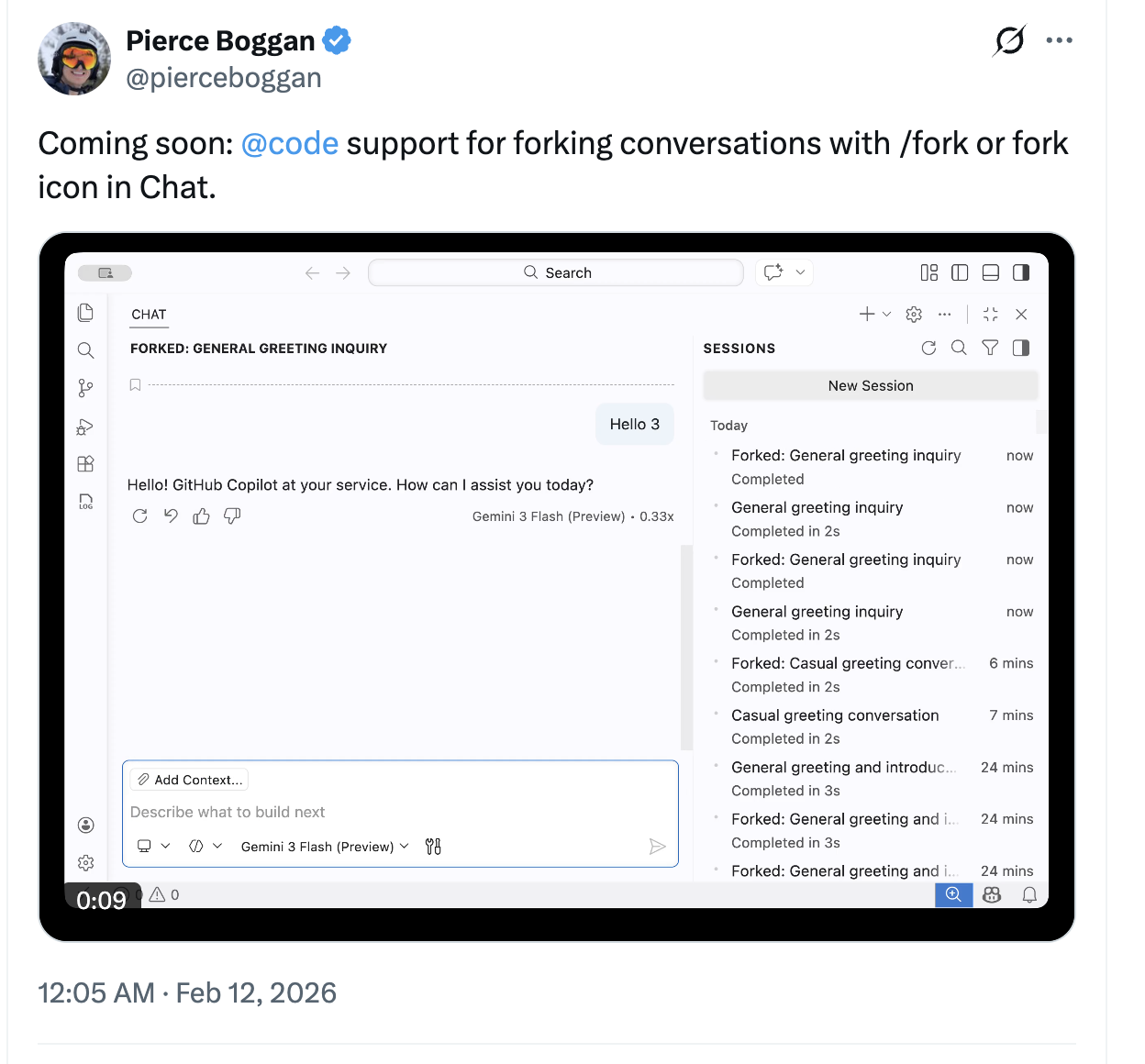
A screenshot of an X post from @pierceboggan sharing that the fork feature is coming to VS Code.

This doesn’t mean that all these prototypes end up in the product. Engineers are still accountable for code quality and architecture. If Peng looks at my PR and says “this doesn’t have the right architecture,” that’s fair, I’m fine with my PR getting thrown away and rebuilt. But the PR moves the conversation forward faster than any document ever could. The first PR doesn’t have to be perfect. It moves the needle and starts a conversation with the engineer who owns that feature area.

This workflow is also a litmus test for whether your codebase is agent-ready. Can an agent find the right components? Can it find regressions? Can it find the right fix? If a PM can throw a problem at an agent and get a reasonable PR, that tells you something good about the codebase’s structure, documentation, and test coverage. If the agent struggles, that’s a signal too.

Keeping Quality High as Velocity Increases

More velocity means more risk of regression.

“Without the right harness, for the first week or two your productivity is really high. Then you quickly reach a ceiling where you keep regressing.” — Peng Lyu

If a new component doesn’t have good guardrails, agent-driven development starts strong and then quality degrades quickly. The fundamentals are still important, and with AI, we can actually improve upon them:

  • Automated validation. When you’ve got 5-10 agents running at once, manually verifying that each one delivered the right experience, not just code that compiles, is expensive. Our team built a custom agent that uses the Playwright MCP server to launch VS Code, navigate to the feature under test, take screenshots, and evaluate whether the change matches expected behavior. Because it runs inside an agent loop, if the screenshot shows something broken, the agent goes and fixes it. Screenshots are stored for human review.

  • Testing. Comprehensive test suites, unit tests, integration tests, and the infrastructure to run them, are table stakes. Beyond that, we document golden scenarios: specs of expected behavior for core user flows. We’ve traditionally tested these manually during monthly endgame weeks. We’re now giving these scenarios to agents to run as automated post-merge validation. We’re also exploring using this pipeline to auto-generate demo recordings: a PR lands, a demo video gets generated, and that becomes content for the changelog or a tweet.

  • Code review. Every PR automatically gets a Copilot code review, and engineers resolve Copilot’s comments before requesting human review. Six months ago, we didn’t enforce this because the feedback was too noisy. Over the last few months, model quality significantly improved, often catching security, performance, and code quality issues on first pass. Resolving those comments before requesting human review has become a natural part of our workflow. We coordinate through a Slack channel where a bot posts PRs with status indicators for CI and Copilot Code Review, both updating in-place as checks complete. The culture is “give one, take one”: submit a PR, pick up a review.

  • Evaluating for taste. Human review isn’t going away and has even become more important. When agents are writing more code and PRs are landing faster, the human reviewer checks whether the change actually makes sense for the product. Does this fit the architecture long-term? Does it feel right to use? Agents can catch bugs, but they can’t tell you whether a feature is going to delight a developer.

Traditionally, we had endgame weeks where engineers, PMs, and designers test each other’s features. We aren’t doing away with this, but rather compressing it in time. On the PM side, I’ve been exploring what I think of as taste-based grading: writing down the qualitative experience I want a feature to have, then using agents to evaluate whether the implementation matches. Maybe 80% of the agent’s observations are useful, 20% I ignore, but that 80% still gets you pretty far. Things like: does our model picker just show the model name and multiplier, or is there more information a user would actually want?

We think this same approach could help us check whether our published docs actually match the lived experience of using the product. All of our VS Code docs are largely written by one person, which is kind of amazing given our pace, but docs can go stale fast when the product is changing this quickly. We’re exploring how agents can help us catch that drift automatically.

What’s Next

More broadly, all of this comes back to what we think of as agent-ready codebase assessment: does your codebase have the structure, documentation, and test coverage for agents to contribute effectively?

We’re genuinely curious: what does your team’s version of this look like? Are there workflows we’re missing? Things you’ve automated that we haven’t thought of? Drop us an issue in the VS Code repo or find us on X — we’re building this alongside you and your feedback shapes what comes next.

We had a lot of other great sessions at Agent Sessions Day too, so check those out if you haven’t already.

Happy coding! 💙
Bloomway AI Announces Public Beta of CinePro: Infusing Cinematic Expertise into AIGC to Redefine the “Lean Cinema” Workflow


ATLANTA — bloomway.ai begins public beta testing today.

Bloomway AI, based out of Atlanta, Georgia, combines experience in film production with machine learning to help connect and manage the separation between complicated AI technology and easily understood creative solutions for creators of all kinds—from casual remixed video or photo creators to professionals. By allowing creators to produce film at a studio-level without any previous experience related to AI technology, or film-making, Bloomway provides an unprecedented level of opportunity.

One of the most effective and innovative features of this new AI-driven application is the ability for the creator to generate high-quality films through a simple and straightforward process—with no technical barriers. The “Creative Studio” is essentially an AI Assistant that utilizes AI technology to provide stepwise direction to an aspiring creator who is developing their own story, just as a seasoned screenwriter would guide them.

In addition to providing creators with the tools, expertise, and ability to create their films, the platform also provides an infinite amount of precision to the creator after the initial creation process. In fact, creators can use the “character consistency,” “camera angle,” and “lighting position” control to maintain visual integrity across multiple scenes, which results in a professional standard that is required for high-end storytelling.

According to Guojun Zhou, Founder of Bloomway AI, “Bloomway thinks as a Director would think—all of the frames in your film will be viewed individually, while at the same time being intelligently evaluated to determine the most effective or appropriate movement of the camera and placement of an actor. We see this digitalization of industry knowledge as equally important as model scale in creating usable creative content.”

video: https://youtu.be/FJxSeEZPPFk

CinePro, which is powered by Bloomway Technology, establishes a new type of versatile workflow where multi-camera filming will now operate as if executed by a professional multi-camera film crew. In addition, CinePro utilizes advanced “Keyframe Splitter and Linking” technology to segment chapters of the video into distinct parts for precise editorial use or connect them seamlessly across long takes (also known as “one-take sequenced”). It has over 700 different types of camera movements available to choose from, allowing for a fully produced cinematic work, including text-to-speech (TTS) narration.

CinePro has broken through current industry limitations on duration with its Bloomway product and now allows users to create continuous clips that go far beyond 60 seconds (this is double what most similar products can do). In addition, users will have full access to their created films even after the finished movie is complete and can go back to previously created shots or characters, modifying them until they match exactly how the final film will look.

Those interested in getting access to the open beta version of the software should visit the company’s website (www.bloomway.ai).

About Bloomway AI

Bloomway AI is a filmmaking AI startup based in Atlanta, Georgia. They develop video generation tools that integrate with professional production workflows. The team has extensive machine learning expertise in digital imaging and experience in the film industry. The principles behind Bloomway’s AI-based video tools are based on converting industry-wide cinematic expertise into data-driven and intelligent workflows. As a result, Bloomway offers creators, studios, and commercial teams around the world an affordable way to create studio-grade (professional) AI-generated videos

Media Contact:

Bloomway AI

Joseph Chow

info@bloomway.ai

Balancing Work & Play Online


Side Hustles and Digital Downtime
ID 159868658 ©
Iuliia Lisitsyna | Dreamstime.com

Home-based entrepreneurship is reshaping modern work culture. Entrepreneurs are not only launching innovative side hustles but also learning to balance long hours behind the screen with well-earned digital downtime. This lifestyle requires adaptability, strategic planning, and a genuine passion for both productivity and personal well-being.

Navigating the Home-Based Business World

In today’s competitive market, remote work is more than just a trend — it is a way of life. Digital tools have made it easier than ever to build a business from the comfort of home. Whether managing an online store, engaging in affiliate marketing, or creating content across social media channels, efficiency remains central to success. Entrepreneurs increasingly rely on sophisticated software systems, cloud services, and data analytics to keep operations running smoothly.

When exploring digital ventures that involve risk and entertainment, entrepreneurs may benefit from resources geared toward online gaming and betting. For those looking to understand complex betting markets without compromising a responsible work ethic, the top offshore betting sites guide offers comprehensive insights into navigating digital betting platforms. This guide covers secure practices in online betting while supporting a broader strategy of incorporating technology-driven leisure into a balanced lifestyle.

Embracing the Shift: Integrating Work and Play

One of the most significant changes in the home-based business environment is the growing focus on work-life balance. With remote work becoming increasingly common, professionals are rethinking how they allocate time for creative work, networking, and digital downtime. Structured rest is no longer viewed as wasted time — it is an essential component of a productive routine.

A common strategy among successful entrepreneurs includes setting aside dedicated blocks of time that are entirely screen-free, preserving mental clarity and sparking creative thought. This approach fosters a balanced lifestyle where professional success and personal well-being reinforce each other.

Key habits that support this balance include:

  • Implementing time-blocking to separate work tasks from leisure
  • Setting specific daily cut-off times for business communications
  • Scheduling short breaks throughout the workday to reset focus
  • Engaging in digital entertainment with defined time limits
  • Using automation tools to reduce repetitive manual tasks

Technology and the New Wave of Digital Entertainment

The rapid evolution of technology has redefined both business operations and digital entertainment. In a world that now includes esports, online casinos, and advanced betting platforms, home-based entrepreneurs often find themselves at the crossroads of work and recreational technology. Engaging with digital entertainment can provide the mental reset needed to return to work with renewed focus.

According to Deloitte’s Digital Media Trends Survey 2025, streaming and on-demand content are steadily replacing traditional media consumption, particularly among digitally native audiences. This shift reflects how deeply integrated digital entertainment has become in everyday life — including among entrepreneurs who use it as a deliberate tool for downtime.

Technological innovations offer immersive experiences, from interactive gaming to detailed betting guides that cater to enthusiasts who appreciate both the thrill of the game and precise data analytics. This trend is evident in how companies across various sectors are blending entertainment with practical business applications.

Strategies for Balancing Hustle and Downtime

Successful home-based entrepreneurs outline a clear structure that marries well-defined work hours with scheduled breaks. Alongside structured scheduling, adopting technology-driven productivity tools can streamline home operations. Automating routine tasks with software solutions or integrating cloud-based platforms for collaboration frees up valuable time for creative thinking or necessary relaxation.

Connecting with a broader network of fellow home business owners also offers substantial benefits. Peer support provides practical advice and encourages sharing strategies for balancing intensive work periods with leisure. Many entrepreneurs have found that virtual meetups and online forums dedicated to home-based business strategies yield actionable tips for both digital efficiency and personal well-being.

For entrepreneurs looking to sharpen their digital toolkit, implementing AI tools and tactics is one of the most practical ways to reduce workload and free up time — whether for business growth or well-earned downtime.

Conclusion: The Future of Work and Digital Leisure

The integration of side hustles with planned digital downtime is redefining the home-based entrepreneurial journey. Entrepreneurs who adopt disciplined time management, harness technological innovations, and actively pursue a balance between productivity and relaxation are well positioned to succeed in an increasingly digital economy.

By following structured routines, leveraging digital tools, and taking measured breaks, modern entrepreneurs are setting the stage for sustainable growth and continuous innovation in the home-based business arena.

Find a Home-Based Business to Start-Up >>> Hundreds of Business Listings.

Federal cyber experts called Microsoft’s cloud a “pile of shit,” approved it anyway


The problem is that agencies often lack the staff and resources to do thorough reviews, which means the whole system is leaning on the claims of the cloud companies and the assessments of the third-party firms they pay to evaluate them. Under the current vision, critics say, FedRAMP has lost the plot.

“FedRAMP’s job is to watch the American people’s back when it comes to sharing their data with cloud companies,” said Mill, the former GSA official, who also co-authored the 2024 White House memo. “When there’s a security issue, the public doesn’t expect FedRAMP to say they’re just a paper-pusher.”

Meanwhile, at the Justice Department, officials are finding out what FedRAMP meant by the “unknown unknowns” in GCC High. Last year, for example, they discovered that Microsoft relied on China-based engineers to service their sensitive cloud systems despite the department’s prohibition against non-US citizens assisting with IT maintenance.

Officials learned about this arrangement—which was also used in GCC High—not from FedRAMP or from Microsoft but from a ProPublica investigation into the practice, according to the Justice employee who spoke with us.

A Microsoft spokesperson acknowledged that the written security plan for GCC High that the company submitted to the Justice Department did not mention foreign engineers, though he said Microsoft did communicate that information to Justice officials before 2020. Nevertheless, Microsoft has since ended its use of China-based engineers in government systems.

Former and current government officials worry about what other risks may be lurking in GCC High and beyond.

The GSA told ProPublica that, in general, “if there is credible evidence that a cloud service provider has made materially false representations, that matter is then appropriately referred to investigative authorities.”

Ironically, the ultimate arbiter of whether cloud providers or their third-party assessors are living up to their claims is the Justice Department itself. The recent indictment of the former Accenture employee suggests it is willing to use this power. In a court document, the Justice Department alleges that the ex-employee made “false and misleading representations” about the cloud platform’s security to help the company “obtain and maintain lucrative federal contracts.” She is also accused of trying to “influence and obstruct” Accenture’s third-party assessors by hiding the product’s deficiencies and telling others to conceal the “true state of the system” during demonstrations, the department said. She has pleaded not guilty.

There is no public indication that such a case has been brought against Microsoft or anyone involved in the GCC High authorization. The Justice Department declined to comment. Monaco, the deputy attorney general who launched the department’s initiative to pursue cybersecurity fraud cases, did not respond to requests for comment.

She left her government position in January 2025. Microsoft hired her to become its president of global affairs.

A company spokesperson said Monaco’s hiring complied with “all rules, regulations, and ethical standards” and that she “does not work on any federal government contracts or have oversight over or involvement with any of our dealings with the federal government.”

This story originally appeared on ProPublica. ProPublica is a Pulitzer Prize-winning investigative newsroom. Sign up for The Big Story newsletter to receive stories like this one in your inbox.

Death Stranding 2: On the Beach review


I’m carrying half a ton of metal scrap and the soul of my dead daughter over the crest of a red sand dune when a mournful folk song begins to play, the words All that I want is a home inside the woods, and a woman that I can love spilling softly out of the universe. One of Death Stranding 2’s endless notifications pops up to tell me the sun is beginning to set. Dusk settles right as I park the truck full of random crap I just stole from a camp full of bandits, and I cherish the uncanny timing of another perfect music video moment before I bring the new location into the chiral network, reconnecting the isolated outpost to humanity via magic wi-fi. One cutscene later, the dusty landscape behind me has transformed into a Las Vegas strip of player-made bridges, power generators, futuristic timefall shelters and neon holograms, each zapped into my game world because they’ve accrued hundreds of thousands of Likes from other porters who’ve run across them.

Need to know

What is it? The most complicated mail delivery sim conceivable by human minds

Release date: March 19, 2026

Expect to pay: $70/£70

Developer: Kojima Productions

Publisher: PlayStation

Reviewed on: Intel i5-13600K, Radeon RX 9070 XT, 64GB DDR5

Steam Deck: Unknown

Link: Official site

AI Software Development: Why 95% Of Enterprise Pilots Fail


AI Software Development: Why 95% of Enterprise Pilots Fail—and How Manufacturers Can Beat the Odds?

The manufacturing industry stands at a critical inflection point. While artificial intelligence promises to revolutionize operations, reduce costs, and create competitive advantage, a stark reality confronts enterprise leaders: 95% of generative AI pilot programs fail to deliver measurable impact on profits and revenue [1]. For manufacturing executives watching competitors announce AI initiatives, the pressure to act is immense, but the path forward is anything but clear.

The disconnect isn’t about AI’s potential. Global investment in AI software development reached $674.3 million in 2024 and is projected to surge to $15.7 billion by 2033, growing at a staggering 42.3% annually [2]. Manufacturing leaders recognize this transformation: 78% of organizations now use AI in at least one business function [3]. Yet between aspiration and execution lies a chasm filled with failed pilots, wasted budgets, and missed opportunities.

In this article, you’ll discover:

  • Why most AI software development projects stall before reaching production
  • The hidden barriers preventing manufacturers from scaling AI successfully
  • How custom AI development delivers 2-3x stronger ROI than off-the-shelf solutions
  • Proven implementation approaches that separate AI leaders from laggards
  • What distinguishes successful AI partnerships from costly vendor relationships

The Real Cost of AI Implementation Failure

Before exploring solutions, manufacturing executives must understand the true scope of the AI adoption challenge. The numbers paint a sobering picture:

Challenge Area Impact Source
Pilot Failure Rate 95% of enterprise AI solutions fail to achieve rapid revenue acceleration MIT NANDA Research [1]
Market Growth AI in software development projected to grow from $674.3M (2024) to $15.7B (2033) Grand View Research [2]
Manufacturing ROI 78% of executives report seeing returns from gen AI investments Google Cloud/National Research Group [4]
Productivity Gains Gen AI reduces software development time by up to 55% in early adoption Mission Cloud [5]
Top Barrier to Adoption Data accuracy and bias concerns (45% of organizations) IBM Research [6]
Cost Range Small to medium AI projects: $50K-$500K; large-scale initiatives: $5M+ Vention Teams [7]

The data reveals a paradox: while AI adoption accelerates and proven ROI emerges, the vast majority of implementations never escape pilot purgatory. For manufacturing organizations, this failure pattern carries particularly high stakes, production delays, quality control issues, and supply chain disruptions don’t tolerate prolonged experimentation.

Why AI Software Development Projects Stall?

The root causes of AI failure in manufacturing aren’t primarily technical. According to MIT research analyzing 150 enterprise AI deployments, the core issue is “the learning gap for both tools and organizations” [1]. Generic AI tools like ChatGPT excel for individual productivity because of their flexibility, but they stall in enterprise manufacturing environments because they don’t learn from or adapt to complex operational workflows.

The five critical failure points include:

  1. Strategic Misalignment

    Organizations treat AI as a technology purchase rather than a business transformation. Without clear alignment between AI capabilities and manufacturing pain points, whether predictive maintenance, quality control, or supply chain optimization, pilots generate impressive demos but no operational value.

  2. Data Infrastructure Deficits

    Manufacturing environments generate massive data volumes across sensors, IoT devices, ERPs, and legacy systems. However, 45% of organizations cite data accuracy and bias as their primary AI adoption barrier [6]. When training data is fragmented, incomplete, or poor quality, even sophisticated AI models produce unreliable outputs.

  3. The Build vs. Buy Dilemma

    The choice between purchasing specialized AI tools and building custom solutions isn’t about industry trends, it’s about your organization’s unique context. Success depends on factors like your internal technical capabilities, the specificity of your manufacturing processes, budget constraints, and long-term strategic goals. Some manufacturers thrive with vendor solutions that address common needs efficiently, while others require custom development to handle proprietary workflows or competitive differentiation. The key is honest assessment: Does your use case demand custom engineering, or are you building because that’s what you’ve always done?

  4. Cultural and Skills Barriers

    AI adoption challenges extend beyond technology to organizational culture. In risk-averse manufacturing environments, employees fear job displacement while leadership struggles to quantify intangible benefits like faster time-to-market or enhanced decision-making. The skills gap compounds this, finding professionals who grasp both AI technology and manufacturing operations proves exceptionally difficult.

  5. ROI Uncertainty

    Manufacturing executives accustomed to tangible ROI calculations struggle with AI’s multidimensional value. Traditional financial metrics miss improvements in decision speed, market agility, and competitive positioning. When leadership can’t confidently articulate expected returns, AI initiatives face perpetual budget scrutiny and eventual cancellation.

Custom vs. Off-the-Shelf: Choosing Your AI Development Path

For manufacturers navigating AI software development, the build-or-buy decision fundamentally shapes both short-term outcomes and long-term competitive advantage. Each approach carries distinct tradeoffs.

Off-the-Shelf AI Solutions:
Pre-built platforms deliver speed and lower upfront costs. Manufacturers can deploy chatbots, basic predictive analytics, or demand forecasting tools within weeks. These solutions work well for standardized processes where differentiation isn’t critical: customer support automation, basic inventory management, or routine reporting. However, data security introduces a critical trade-off. While these platforms may appear secure, your operational data flows through third-party infrastructure, raising concerns about proprietary information exposure, compliance requirements, and long-term data governance that many manufacturers underestimate during evaluation.

However, generic tools hit scalability limits quickly. They struggle with manufacturing-specific complexities: multi-site production coordination, proprietary quality control processes, or unique supply chain variables. More critically, when competitors access identical tools, no competitive advantage emerges.

Custom AI Development:
Purpose-built AI solutions designed around proprietary manufacturing data and workflows deliver 2-3x stronger ROI than generic vendor models [8]. Custom development enables manufacturers to:

  • Build predictive maintenance models trained on specific equipment and operating conditions
  • Create quality control systems that detect defects unique to proprietary production processes
  • Develop supply chain optimization engines accounting for specialized supplier networks and logistics constraints
  • Integrate seamlessly with existing ERP, MES, and IoT infrastructure

The tradeoffs are higher upfront investment ($50,000-$500,000 for moderate complexity projects [7]) and longer deployment timelines. Yet for manufacturers where operational excellence drives competitive positioning, custom AI becomes proprietary intellectual property that competitors cannot replicate.

The Hybrid Advantage:
Leading manufacturers increasingly adopt hybrid approaches, deploying off-the-shelf solutions for commodity functions while investing in custom AI for core differentiators. A mid-sized manufacturer might use a SaaS chatbot for customer inquiries while building a custom predictive quality system trained on decades of proprietary production data.

What Distinguishes Successful AI Implementation?

Manufacturing organizations that successfully scale AI share common characteristics that separate them from the 95% trapped in pilot purgatory [1]:

Executive Sponsorship:
Google Cloud’s research found that manufacturers with comprehensive C-level sponsorship are significantly more likely to see ROI (84%) compared to those without executive alignment (75%) [4]. Successful AI adoption requires cross-functional collaboration guided by top-level support that aligns initiatives with business goals.

Phased, Value-Driven Roadmaps:
Rather than attempting enterprise-wide AI transformation, successful manufacturers identify high-impact use cases that deliver quick wins. One manufacturer might start with predictive maintenance for critical production lines, prove ROI within six months, then expand to quality control and supply chain optimization.

Partnership Over Vendor Relationships:
The MIT research revealing that purchased solutions outperform internal builds by 2:1 [1] underscores the value of specialized expertise. However, the distinction matters: true partners bring manufacturing domain knowledge, understand operational constraints, and commit to long-term success—not just initial deployment.

Data-First Foundations:
Organizations that invest in data infrastructure before AI implementation see dramatically higher success rates. This means establishing data governance, integrating siloed systems, implementing quality controls, and creating feedback loops that enable models to learn and improve continuously.

The Manufacturing AI Opportunity: 2026 and Beyond

The manufacturing sector stands poised for AI acceleration. Recent research shows 56% of manufacturing executives report their organizations actively use AI agents, with 37% deploying more than ten autonomous systems [4]. These sophisticated, multi-agent systems independently plan, reason, and execute tasks across quality control (54%), production planning (48%), and supply chain logistics (47%).

For manufacturing leadership, the strategic question isn’t whether to adopt AI software development—competitors are already moving. The question is how to implement AI in ways that deliver measurable impact, not just impressive pilots.

Success requires strategic vision that connects AI capabilities to manufacturing pain points, technical excellence that bridges legacy systems and modern architectures, and implementation expertise that navigates the complexities separating concept from production deployment. Most critically, it requires partnership with specialists who understand that AI in manufacturing isn’t about technology for its own sake, it’s about operational transformation that drives efficiency, quality, and competitive advantage.

The 95% failure rate [1] reflects organizations treating AI as a vendor relationship rather than a strategic transformation. The 5% succeeding recognize that AI software development, done right, becomes a proprietary capability that compounds competitive advantage with every production run, every quality check, and every supply chain decision.

Ready to Move Beyond Pilot Purgatory?

The gap between AI aspiration and measurable manufacturing impact isn’t closing on its own. While your competitors experiment, your organization can execute, turning AI from a boardroom buzzword into a production floor reality that drives efficiency, quality, and growth.

[Schedule a Strategic AI Consultation]


Sources:

  1. MIT NANDA Initiative, “The GenAI Divide: State of AI in Business 2025”
  2. Grand View Research, “AI In Software Development Market | Industry Report, 2033”
  3. Google Cloud / National Research Group, “The ROI of AI in manufacturing” (2025)
  4. Mission Cloud, “AI Statistics 2025: Key Market Data and Trends”
  5. IBM Research, “The 5 biggest AI adoption challenges for 2025”
  6. Vention Teams, “AI Statistics 2025: Key Trends and Insights Shaping the Future”
  7. Fortune, “MIT report: 95% of generative AI pilots at companies are failing” (August 2025)
  8. RTS Labs, “Off-the-Shelf vs Custom AI Solutions: Which Fits Your Business?”
  9. McKinsey & Company, “The State of AI: Global Survey 2025”


References:

[1] MIT report: 95% of generative AI pilots at companies are …
[2] AI In Software Development Market | Industry Report, 2033
[3] The State of AI: Global Survey 2025
[4] The ROI of AI in manufacturing
[5] AI Statistics 2025: Key Market Data and Trends
[6] The 5 biggest AI adoption challenges for 2025
[7] AI Statistics 2025: Key Trends and Insights Shaping the Future
[8] Off-the-Shelf vs Custom AI Solutions: Which Fits Your …

Overwatch co-creator Jeff Kaplan’s new open-world FPS probably won’t be free-to-play because “you need 8 billion players and 2 thousand devs cranking out f***ing keychains like a sweatshop”


Former Blizzard vice president and Overwatch co-creator Jeff Kaplan hasn’t decided on a monetization model for his new open-world action survival FPS The Legend of California, but he’s pretty sure it won’t be free-to-play.

Having previously worked on Overwatch at the highest level, Kaplan knows a thing or two about free-to-play games, and he doesn’t see it as a viable model for The Legend of California. “To be free-to-play, you need eight billion players and two thousand devs cranking out fucking keychains like a sweatshop,” Kaplan says during a recent 10-hour livestream of Legend of California (via Majid Manzarpour on Twitter).

How Plumbing Engineers Benefit from CAD Drafting and Design Services


It’s hard to believe that a plumbing project isn’t always about someone installing, repairing, or replacing broken pipes and leaky faucets. Much of it is indeed all of those, but it also involves a slightly more complicated design phase, best left to an engineering design expert rather than an actual plumber. For the uninitiated, a plumbing engineer designs the entire system and prepares the plan, whereas a plumber executes it. Because most engineers like to think their work is so difficult, they often tap a professional drafting service to draw the plan for them.


🚀 Table of contents


They get back more than they give

In a good way, of course. In an ideal world, an engineer designs the system and translates it into a technical drawing for a construction permit and approval. But sometimes the world isn’t as ideal as what everybody has in mind, and an engineer doesn’t have the luxury of time to produce a detailed draft. Perhaps there is just so much engineering work to do that outsourcing the drafting makes a lot more sense and is more time-efficient. The engineer makes sketches or low-detail presentations that are not to scale, with notes and scribbles all over them. And then the engineer gives the sketches to a drafter to convert into a technical drawing for construction. To put it simply, the engineer decides what to draw, and the drafter makes the drawing.

Because professional drafters specialize in the trade, they can do it quickly and at a lower hourly rate than an engineer. Take, for example, the drafters at Cad Crowd. Thousands upon thousands of CAD experts at Cad Crowd offer a broad range of drafting services at affordable rates, backed by the platform’s accuracy guarantee. Cad Crowd is one of the few freelancing sites on the web to place heavy emphasis on the AEC industry, including the MEP (Mechanical, Electrical, and Plumbing) sector, with more than 15 years of experience in outsourcing. Apart from this cost-saving advantage, engineers can reap a lot more benefits from collaborating with CAD drafting and design services.

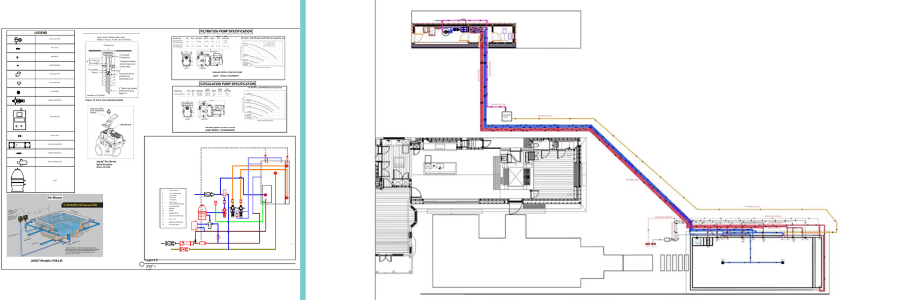
Plumbing engineering and CAD Drafting examples by Cad Crowd design experts

RELATED: CAD outsourcing: Architecture & BIM drafting strategies for architectural design firms

Let’s not eyeball it, shall we?

Eyeballing is probably just fine when you’re repairing a P-trap or tinkering with a water pressure valve, but not for an engineer designing an entire plumbing system.

Back in the old days, when CAD design services weren’t yet mainstream, or affordable for that matter, manual drafting on paper and boards reigned supreme. What is now a rather tidy task of technical drawing on a computer used to be a bungled, cluttered affair full of sweaty-hand smudges. And if an engineer was working overtime past midnight, coffee spills and dull pencils could make an otherwise sharp mind into, well, a dull one. In cases where the plumbing design was extensive enough, it might take an additional two or three drafters with varying degrees of skills and experience to work on a single plan. On one of those days, somebody was bound to not care enough about accuracy and just wanted to go home early and watch TV in black and white.

As a result, the term “precision” came only second after “completion” on many projects. When a line was off by even a fraction of a millimeter on a 1:200-scale draft, construction headaches ensued. You’re talking about misaligned pipe connections, incorrectly sized fittings, inaccessible valves, and a whole bunch of on-site adjustments by a plumber who then eyeballed things.

CAD drafting for a plumbing system means creating the plumbing plan on a computer, with a lot of help from the automation the machine offers. Think of it as a visual calculator that lets you specify the dimensions and tolerances of every component, down to the hundredth of a millimeter. Such accuracy ensures you’ll always generate the correct plan, no matter how complex the project is. The BOM (Bill of Materials) is always spot-on. And when the parts arrive at the jobsite, they actually play nice with each other. For plumbers, the CAD drawing also serves as an instruction manual, so no eyeballing is required.

Just maybe, time is indeed money

Drawing on a computer might seem daunting. You don’t have to sharpen a pencil in the process now and then. Still, it’s hard to imagine making precise movements while holding that mouse button to draw a perfect representation of a curvy water closet, sink, or bathtub. You don’t have to imagine that at all, really. It is, in fact, very hard. That’s why just about every architectural CAD software offers a broad range of templates ready to click and place on the screen. 

These ready-made templates may include a wide variety of fixtures and fittings, including end-of-the-line cleanouts, routing options for elevation mismatches, pipe specifications, automatic annotation for multiple pipe runs, and more, done by engineering design services. Almost all of them are delivered via a simple drag-and-drop interface in the software. This makes the drawing of every plumbing part and component quick and practical, with very little chance of mistakes, unless a careless drafter is involved. 

If a project involves drawing plumbing plans for dozens of individual bathrooms, such as in a residential building with pretty much identical units, a drafter can create “modules” or “blocks” on the CAD software. A block is essentially a group of plumbing parts, including fixtures and piping configurations, treated as a single assembly. It doesn’t matter if the building has 50 or 500 units; copy-and-paste does all the heavy lifting. Furthermore, an update or modification on the master block is reflected on every other drawing in an instant.

Drafting a plumbing system often involves quite a lot of repetition, and that’s to be expected because much of the drawing includes the same pipes connected with the same fittings over and over again until it gets to the very end of the line. When a repetitive task is simplified or outsourced to a professional drafting service, a plumbing engineer can focus on more pressing matters, such as maintaining consistent water pressure, sustainability, and the ergonomics of the water closet. Because the drawing happens in the background with CAD, the design phase runs quicker than ever before, and the payday comes sooner, too.

RELATED: Relevance of MEP drafting services for architectural design firms & construction companies

Gone is the eraser dust

Some clients are difficult to work with. They demand changes after changes to an already-approved plan, prompting the engineer to make revisions that never seem to please them. Sometimes the kitchen layout isn’t sophisticated enough, the bathroom design is too mainstream, or there aren’t enough sinks in the house. Clients are the project owners after all, so no engineer can blame them as long as they have the money to pay for the services. A plumbing engineer can only comply and produce a new plan for every change in design.

The good thing is that a CAD drafting expert makes revisions simple. Since the original plumbing plan was created in CAD, making changes to the image is simply a matter of moving things around on a screen. A drafter can move, stretch, and replace fixtures, or perhaps reroute the entire pipeline without even touching an eraser. Everything is done on screen in a virtual environment. Apart from that, the real benefit here is version control, or a file history if you like. If a client asks why there are now four sinks in the house rather than five, the plumbing engineer can refer back to the previous draft to see how forgetful the client is.

Quick math and no headache

We’re not saying that an engineer or a drafting service can’t do math without a headache. It’s just that there will be much less headache in case it does happen while calculating flow demand, pipe sizing, slope, and pressure drop. Modern CAD software does all the calculations automatically. For example, it can determine the pressure drop along a 50-foot stretch of copper pipe with many fixture branches attached. If you aim for a specific flow rate measured in GPM (gallons per minute), CAD tools can give you the right pipe sizes based on the number of fixtures to be installed.

Some automation features require specialized toolsets, for example, AutoCAD MEP, AutoCAD Plant 3D, or Revit. But don’t worry, all professional drafters know that plumbing engineers have a tender spot in their hearts for software with long names, so they will happily purchase and use the tools to indulge the clients. CAD tools are very good at math, even better than Sheldon Cooper, allowing the engineers to have their brainpower occupied by other important issues, presumably.

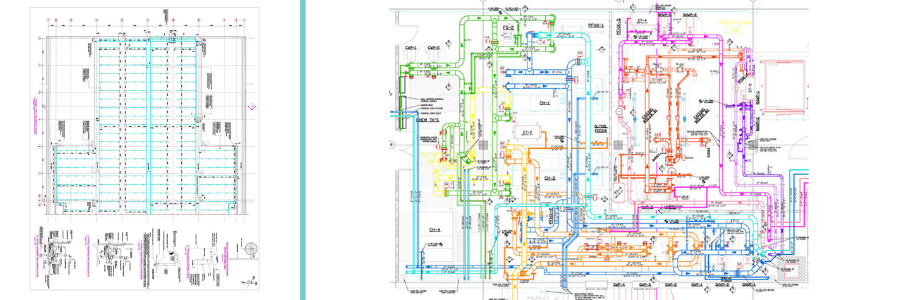
Piping and plumbing design engineering by Cad Crowd design engineers

RELATED: A comprehensive overview of steel detailing services and its importance for construction companies

We haven’t even talked about 3D CAD.

No one says CAD drafting and design have to be in the conventional 2D format. The aforementioned software, such as Autodesk Revit and AutoCAD MEP, generates 3D drafts. Other options include PractiPIPE, Bentley AutoPLANT, PlumbingCAD, etc. While the 3D image might not be photorealistic, it’s good enough to provide spatial awareness as if you’re looking at the pipeline through the floor, ceiling, and walls.

Engineers don’t need 3D plumbing drafts to understand the design. They’re trained to develop a cognitive ability to translate flat lines, shapes, and symbols into a clear vision of an architectural design. But the average clients, on the other hand? Not so much. Most clients find 2D drafts confusing, like reading a text from a language they don’t understand. They may nod many times as they stare at the image, but only to look smart in front of everyone. Thanks to 3D CAD, plumbing engineering experts can more easily explain how things work, even to the most uninformed clients. 

And let’s not forget BIM (Building Information Modeling), currently touted as the biggest thing to ever happen to the architectural industry. Some would go so far as to describe it as the be-all and end-all drafting software tool, flooded with features such as automatic clash detection, cost estimation, Bill of Materials generation, cloud-based collaboration, and, essentially, data-rich visualization.

Takeaway

The bottom line is that plumbing engineers can always work smarter, not harder. One of the smartest things a plumbing engineer can do is to work with or hire a CAD drafting service to translate the design intent into a technical drawing. Just “knowing” that a professional is taking care of the task can give the much-needed peace of mind to focus on the actual engineering parts of the job, be it cost efficiency, construction methods, rainwater harvesting, or code compliance.

Whether you need the plumbing plan in the conventional 2D format or the more advanced 3D visualization, there is always the right professional at Cad Crowd to get the work done. All drafters at Cad Crowd have been vetted and screened for their CAD proficiency and experience in architectural projects to ensure that every client works with the most qualified talent. Request a quote today.

author avatar

MacKenzie Brown is the founder and CEO of Cad Crowd. With over 18 years of experience in launching and scaling platforms specializing in CAD services, product design, manufacturing, hardware, and software development, MacKenzie is a recognized authority in the engineering industry. Under his leadership, Cad Crowd serves esteemed clients like NASA, JPL, the U.S. Navy, and Fortune 500 companies, empowering innovators with access to high-quality design and engineering talent.

Connect with me: LinkedInXCad Crowd

A Meta agentic AI sparked a security incident by acting without permission


The Information reported that an AI agent within Meta took unauthorized action that led to an employee creating a security breach at the social company last week. According to the publication, an employee used an in-house agentic AI to analyze a query from a second employee on an internal forum. The AI agent posted a response to the second employee with advice even though the first person did not direct it to do so.

The second employee took the agent’s recommended action, sparking a domino effect that led to some engineers having access to Meta systems that they shouldn’t have permission to see. A representative from the company confirmed the incident to The Information and said that “no user data was mishandled.” Meta’s internal report indicated that there were unspecified additional issues that led to the breach. A source said that there was no evidence that anyone took advantage of the sudden access or that the data was made public during the two hours when the security breach was active. However, that may be the result of dumb luck more than anything else.

Many tech leaders and companies have touted the benefits of artificial intelligence, this is just the latest incident where human employees have lost control over an AI agent. Amazon Web Services experienced a 13-hour outage earlier this year that also (apparently coincidentally) involved its Kiro agentic AI coding tool. Moltbook, the social network for AI agents recently acquired by Meta, had a security flaw that exposed user information thanks to an oversight in the vibe-coded platform.

Meta Is Shutting Down VR Social Platform Horizon Worlds


Meta is shutting down its VR social platform Horizon Worlds, which was once a key piece of the pivot to the metaverse. The company said the app will be taken off the Quest store at the end of March, and fully removed from Quest headsets by June 15. After that date, it will shift to a standalone “mobile-only experience.” CNBC reports: The shift for Horizon Worlds, which was once a central part of the company’s push into virtual reality, comes weeks after Meta cut over 1,000 employees from Reality Labs, the unit responsible for the metaverse. […] The social platform has never drawn more than a couple hundred thousand active users a month, CNBC previously reported.

The virtual 3D social network where avatars could interact and play games with other users officially launched in late 2021. It operated exclusively on the Quest VR platform until Meta launched a mobile app version in September 2023. The mobile version of Horizon Worlds was built to provide an entry point for users without VR headsets, functioning similarly to Roblox.