The best April Fool’s Day 2026 jokes from gaming companies


April Fools’ Day is here, meaning you can trust even less of what you read on the internet today. Plenty of corporations are getting in on the fun, including game developers and publishers. Some are obvious parodies, while others are ideas we wouldn’t mind becoming a reallity, like how the Palworld dating sim started as a joke and now will be an actual game.

Here are some of our favorite April Fools’ Day jokes from video game companies, starting with one that needs to become a real thing pronto.

Nier: Cosmic Horror announced

Because of time zone differences around the world, April 1 began in Japan while those of us in the United States were still in March. Those time differences caused some slight confusion when Nier’s Japanese X account seemingly announced a new Nier project, Nier: Cosmic Horror. Part of the confusion stemmed from the fact that a Nier cosmic horror game sounds dope AF and fans have already been teased that there might be more Nier on the way. Alas, we got got.

The Witcher 3’s Project ROACH

Another announcement we honestly wouldn’t say no to is CD Projekt Red’s Project ROACH (Ride On A Controller Horse), a controller built from a toy horse for immersive riding in The Witcher 3: Wild Hunt. You can head here for more details on the Roach controller, named after Geralt’s trusty steed.

Pragmata is a Mega Man game (JK)

Capcom had some fun with the fan theory that the upcoming third-person shooter Pragmata is secretly a Mega Man game. A short video on the game’s official X account showed child-like android Diana running to stand next to Mega Man, with the next shot replacing his face with that of Paragmata‘s astronaut Hugh. Surely, this will quell any further speculation from fans that Pragmata is a Mega Man game.

Bubsy’s OnlyPaws

While you wait for Bubsy 4D‘s launch in May, you can check out his OnlyFans-like site. That’s right, welcome to OnlyPaws, baby, AKA BubsyPaws. A whole gallery of paw pics awaits for the paw fetishists among us — as well as a donation link to The Wildcat Sanctuary. Bubsy publisher Atari is looking to raise money for a non-profit in Minnesota that provides sanctuary for wild cats (and their paws).

Lords of the Fallen’s Helmet Vision

Taking immersion to a new level, Lords of the Fallen‘s X account teased a joke update that would add a Helmet Vision mode to the game, limiting your field of view to what the openings on in-game helmets look like. Some players are actually expressing their desire for it in replies to the post, because apparently Soulslike games aren’t hard enough.

Lies of P patch notes

Speaking of Soulslikes, the team behind Lies of P shared some fake patch notes on Reddit to mark the occasion. If these tweaks were real, they’d make the game far more difficult, like not being able to heal during the final boss fight. Another proposed “tweak,” Ergo Inflation, would make the cost of leveling correspond with real-world inflation. The game’s subreddit has also been taken over by Disney’s Pinocchio.

Men are underrepresented in games

The X account for Satisfactory, a factory-building game, lampooned the idea that men are underrepresented in games. Set to Linkin Park‘s “Somewhere I Belong,” it shows a flip-flop-wearing, beanie-clad, gun-toting man doing Cool Man Things, like shootin’, walking away from an explosion, and choosing the coolest, manliest vehicle of them all: a Cybertruck.

Crusader Kings mocks DLSS 5 AI upscaling tech

Nvidia’s new DLSS 5 technology caused quite a stir earlier this month, as it essentially adds a Snapchat beauty filter over a game’s graphics. The social accounts for Crusader Kings 3 got in on the fun with a video showcasing the power of “all-new CKSS technology” that would AI slop-ify the game’s graphics. One commenter on YouTube joked that the developers should fire their artists, to which the Crusader Kings 3 account responded with, “They are packing their belongings as we speak!”

A Warhammer 40,000 musical

Chalk this up as another bit that doesn’t sound half bad: Warhammer jokingly announced a Warhammer 40,000 musical, The Emperor Protects. The fake trailer showcases a variety of songs and features performers clad in elaborate costumes, which some YouTuber commenters theorize are actually Warhammer community cosplayers.

Sanic Hegehog merch

A shirt showing the meme character Sanic Hegehog (Sonic the Hedgehog) Image:

Sega is selling official Sanic and Shedew T-shirts for April Fool’s. Sanic Hegehog is an intentional misspelling of Sonic the Hedgehog and originated from a YouTube video where someone drew Sonic in MS Paint. Sanic fanart has become popular in its own right, and now Sega is selling new merch inspired by the meme — for today only.

Meet the Owlbrick

Owlcat Games, makers of Warhammer 40,000: Rogue Trader and the upcoming The Expanse: Osiris Reborn, has unveiled the Owlbrick, a Steam Machine with the face of an owl. Designed for CRPGs, it helps you with in-game romances and will even play through combat for you. It promises up to 60 FPS in 8K* resolution (*upscaled from 360p). Sign me up!

Turtle AV Mineola 8×8 Review


If you’re working in modern AV or broadcast environments, chances are you’re already familiar with Dante Controller and the power of networked audio. But what happens when you need to bring traditional analog gear into that ecosystem?

That’s where the Turtle AV Mineola 8×8 comes in.

What Is the Mineola 8×8?

The Turtle AV Mineola 8×8 is a powerful audio interface designed to bridge the gap between analog audio sources and Dante-enabled networks. Whether you’re connecting microphones, mixers, or other outboard gear, this compact unit simplifies the process—no extra converters or complicated signal chains required.

It’s built for professionals who need reliability, flexibility, and clean audio in environments like live production, broadcast studios, houses of worship, and education facilities.

Key Features That Stand Out

The Mineola 8×8 is packed with features that make it a versatile addition to any AV workflow:

  • 8 Analog Inputs & 8 Outputs
    Easily route multiple audio sources and destinations with full flexibility.
  • Combo XLR/TRS Inputs with Mic Preamps
    Built-in preamps and 48V phantom power let you connect professional microphones directly.
  • Balanced XLR Outputs
    Deliver clean, noise-free audio to your downstream equipment.
  • Dual etherCON Dante Ports
    Redundant primary and secondary network connections ensure reliability in critical environments.
  • Power over Ethernet (PoE)
    Simplifies installation by delivering both power and data over a single cable.
  • Built-In DSP Control
    Access EQ, gain, delay, and presets through an intuitive web interface—no external processing required.
  • Seamless Dante Integration
    Works effortlessly with Dante-based systems for smooth routing and management.

Why It Matters

Integrating analog audio into a digital network used to require multiple pieces of gear and added complexity. The Mineola 8×8 eliminates those barriers by combining everything into a single, rack-friendly unit.

This makes it ideal for:

  • Broadcast and live production setups
  • House of worship installations
  • Educational AV systems
  • Corporate and government AV environments

With PoE support and redundant networking, it’s also a strong choice for permanent installs where reliability is critical.

Scalable for Any Workflow

Not every setup needs an 8×8 configuration—and Turtle AV understands that. The Mineola series is available in multiple configurations, including 2×2, 4×4, and 16×16 models, so you can scale your system based on your exact needs.

Whether you’re building a small production rig or a large, multi-room audio network, there’s a Mineola solution that fits.

Built for Professional Use

The Mineola 8×8 is TAA compliant and backed by a 5-year warranty, making it a dependable choice for professional and government applications alike. Its rugged design allows it to fit seamlessly into racks, flypacks, and control rooms without adding unnecessary complexity.

Final Thoughts

The Turtle AV Mineola 8×8 is a smart, efficient solution for anyone looking to integrate analog audio into a Dante network. With robust I/O, built-in DSP, and simple network connectivity, it removes the friction from hybrid audio workflows.

If you’re upgrading your system or designing a new one from scratch, the Mineola 8×8 is a reliable tool that helps future-proof your audio infrastructure while keeping your setup clean and manageable.

Bookmark Studio: evolving bookmarks in Visual Studio


Bookmarks in Visual Studio have always been a simple, reliable feature. Many developers use them regularly, and over the years we’ve heard consistent feedback from those users. Bookmarks were useful, but there were a few core gaps that kept them from being as effective and relevant as they could be.

Navigation was one of the biggest pain points. You could move between bookmarks, but there was no easy way to jump directly to a specific bookmark using the keyboard. That made bookmarks harder to rely on once you had more than a few. Another common request was sharing. Bookmarks worked well for personal, local navigation, but there was no good way to share them with teammates or reuse them across repos, branches, or pull requests.

That feedback is what led to Bookmark Studio, a new experimental Visual Studio extension that builds on the existing bookmark experience by filling in those missing pieces, without changing how bookmarks fundamentally work.

Faster, more intentional navigation

One of the core additions in Bookmark Studio is slot‑based navigation.

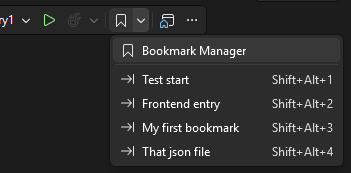
Bookmarks can be assigned to slots 1 through 9 and jumped to directly using simple keyboard shortcuts like Alt+Shift+1 through Alt+Shift+9. This makes bookmarks feel more deliberate and easier to rely on when you want fast access to a handful of important locations.

Toolbar

New bookmarks are automatically assigned the next available slot when possible, so fast navigation often works without any extra setup. Bookmark Studio also integrates with Visual Studio’s existing bookmark commands, which means your current shortcuts and muscle memory continue to work as expected.

A single place to work with bookmarks

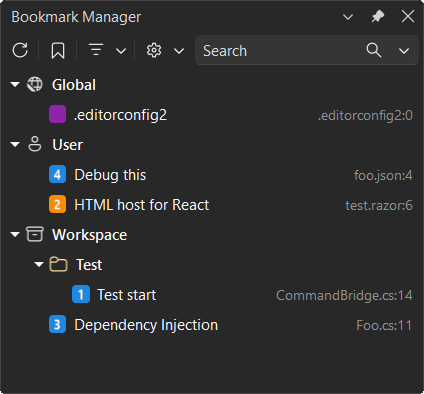
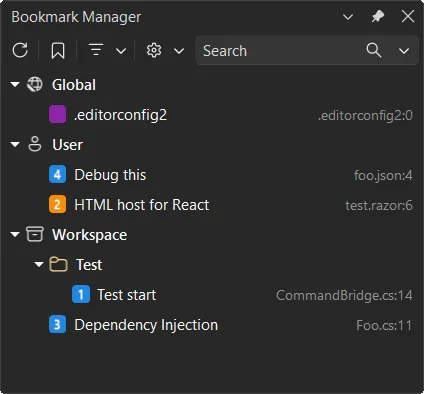
Bookmark Studio also adds a dedicated Bookmark Manager tool window.

Tool window

The manager shows all bookmarks in one place and makes it easy to browse, search, and navigate between them. You can filter by name, file, location, color, or slot, and jump directly to a bookmark with a double‑click or keyboard navigation. It’s designed to make bookmarks easier to revisit, especially when switching context or coming back to code later.

Optional structure, when you need it

Another piece of feedback we heard was the need for just a bit more organization.

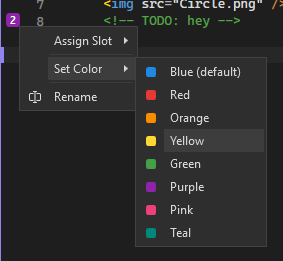
With Bookmark Studio, bookmarks can have labels, colors, and folders. None of this is required, and you can keep using bookmarks exactly as you do today. But when you’re debugging, refactoring, reviewing code, or exploring unfamiliar areas of a codebase, that extra context can make bookmarks more useful and easier to reason about.

Glyphs

All bookmark metadata is stored per solution, so it stays with your work across sessions.

Bookmarks you can share and reuse

Bookmarks are often most valuable when they capture intent, not just location.

Bookmark Studio makes it easy to export bookmarks as plain text, Markdown, or CSV. That means you can include bookmarks in pull requests, share investigation paths with teammates, or move useful bookmark sets between repos. Instead of being a purely personal tool, bookmarks can become a lightweight way to communicate context and decisions.

Bookmarks that stay put as code changes

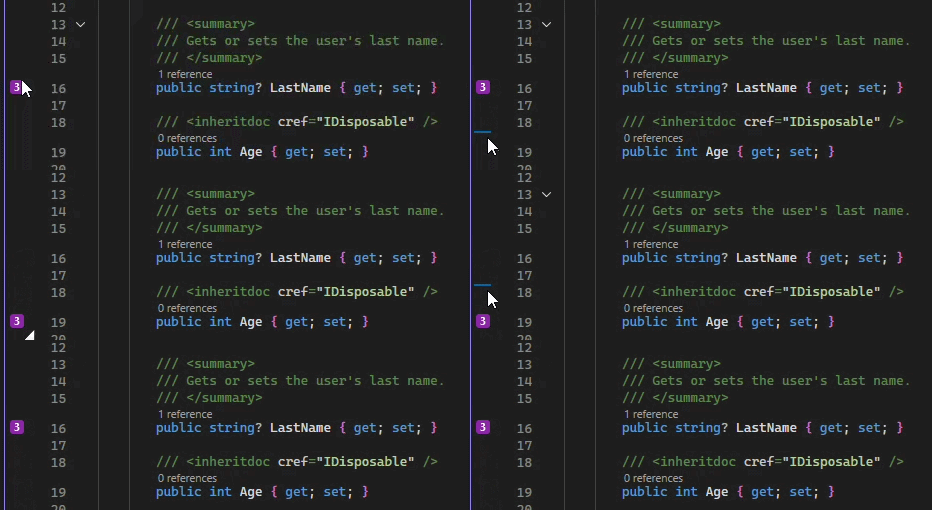
Bookmark Studio tracks bookmarks as text moves during editing, so they stay attached to the relevant code instead of drifting to the wrong line. This makes bookmarks more dependable during active development, especially when files are changing frequently.

Drag and drop of glyph

A focused improvement, not a reinvention

Bookmark Studio doesn’t try to replace tasks, TODO comments, or issue tracking. It doesn’t introduce a new workflow you have to learn. Instead, it fills in the gaps that many bookmark users have pointed out over time, making bookmarks easier to navigate, easier to share, and more useful as part of everyday development.

If you already use bookmarks in Visual Studio, Bookmark Studio should feel familiar within minutes. And if you’ve ever wished bookmarks could do just a little more, this extension is worth a look.

You can download Bookmark Studio today from the Visual Studio Marketplace. As always, feedback and pull requests are welcome on the GitHub repo.

Google finally fixed Gemini for Home so you can stop yelling at your ceiling


What you need to know

  • Google is making Gemini in Google Home feel less robotic and more natural to use.
  • You no longer need exact commands—Gemini now understands casual phrases and context better.
  • Device recognition is improved, reducing mix-ups like confusing a “lamp” with a “light.”

Google’s smart home setup is quietly changing in important ways. If you’ve ever struggled with stiff voice commands or awkward controls, you’ll probably relate to this update.

Chief Product Officer Anish Kattukaran announced several improvements on X that make Gemini feel like the helpful housemate you’ve always wanted. The main point is that you no longer have to use technical language to control your living room.

11 Simple Tech Hacks for People Who Work From Home


Underrated simple tech Hacks for WFH people
ID 72543779 | Smiling Entrepreneur ©
Stefan Dahl | Dreamstime.com

If you work from home, you’re not alone: 35% of employed Americans work from home at least part of the time. Remote workers develop strategies and tech hacks to maximize productivity and eliminate inefficiencies that might otherwise prompt employers to insist on a return to the office. These tech hacks are often small but easily overlooked adjustments that improve daily workflow, from researching the most reliable rural internet options that best suit your needs to establishing a consistent workday routine. Here are a few simple tech hacks to make your work-from-home routine more productive and enjoyable.

Optimize Your Environment, Not Just Your Desk

A clean, organized desk helps keep you focused when you work at home, but that’s just the beginning. Ideally, your entire work environment should positively impact your energy and productivity while maintaining a boundary between your working hours and off-the-clock life. Consider the following tech hacks as you optimize your workspace:

1.      Natural Lighting and Smart Lights

Position your workspace near a window whenever possible. Natural light helps reduce eye strain, improve alertness, and support healthy sleep cycles. Exposure to daylight throughout the workday can make it easier to fall asleep at night and feel more energized the next morning.

If natural light is limited, use adjustable LED lighting that mimics daylight. Look for lights that offer color temperature control and dimming options so you can adapt brightness based on the time of day and your task. Consistent, balanced lighting reduces fatigue and supports sustained focus.

2.      Ergonomics

Comfort directly affects productivity. Choose a chair with proper lumbar support and adjust it so your feet rest flat on the floor. Keep your knees at roughly a 90-degree angle and ensure you can move freely beneath your desk.

Position monitors at eye level to prevent neck strain, and keep screens about an arm’s length away. If you spend long hours typing, consider ergonomic keyboards and mice designed to reduce wrist tension. Standing desks or adjustable desk converters can also help vary posture throughout the day.

Small adjustments compound over time. Proper ergonomics reduce physical strain and make it easier to maintain focus during long work sessions.

3.      Add Some Nature

While it’s not really a tech hack, adding plants to your workspace helps reduce stress and improve air quality. If you prefer, a small water feature or aquarium also gives your workspace a natural, relaxing vibe.

4.      Separate Your Workstation from Leisure Areas

A dedicated home office is the pinnacle of work-from-home spaces, but not everyone has the space for one. If not, find ways to separate your workspace from the rest of the house. Room dividers, bookcases, and curtains can all serve as boundaries between work and leisure areas. You can turn a closet into an office space if it offers enough room, or choose a wall-mounted folding laptop writing station. Both close up after work, signalling the shift from work to home life.

Only use your workstation for work, if at all possible, and keep clutter and desk distractions to a minimum.

Quiet Tech Habits That Improve Productivity

Practicing proper digital hygiene can significantly improve your productivity. Try incorporating these simple tech hacks into your workday to help keep you on task:

1.      Silence Notifications

Notifications, texts, and other digital “white noise” interrupt workflow, significantly impacting your concentration. According to UC Berkeley, it takes anywhere from 8 to 25 minutes to recover from an interruption and get back on task—the more complex the task, the longer the recovery time.

Considering notification pings are a near-constant source of annoyance, controlling them is one of the best tech hacks you’ve got. Remove apps sending notifications you don’t need, and silence notifications from apps you do use. Instead of checking every email notification you receive, silence notifications and schedule set times to check your mail, such as the middle and end of the workday.

2.      Enable Do Not Disturb Mode

Set your devices to Do Not Disturb mode to improve focus by silencing text notifications during work hours. You can customize DND mode, so you still get notifications from specific contacts.

3.      Curate Your Workspace

In addition to keeping your physical desktop clean, curate your digital workspace by closing all unnecessary tabs. While some people thrive with dual monitors, others find the extra digital space fills up with distractions. If this describes you, consider switching back to a single monitor.

4.      Prioritize Your Peak Work Time

We all have periods where we get the most done in a day. For some, it’s the first thing in the morning. For others, it’s early afternoon, or the last two hours before the end of the workday. Identify your most productive time and capitalize on it. During this time, avoid emails, SMS, and social media and focus entirely on work.

5.      Set App Limits

If the siren call of social media proves too alluring, set screen time limits on your devices to restrict passive scrolling. If you can’t access it, you can’t lose time to it!

6.      Batch Tasks

Instead of constantly switching between tasks, dedicate blocks of time to making calls, uploading files, and so on. Batching tasks lets you handle mundane tasks quickly and dedicate your remaining time to mission-critical work.

7.      Automate When You Can

Artificial intelligence assistants like Zapier and IFTTT can perform a wide range of repetitive tasks, including managing schedules, analyzing data, sending automated email and text responses, taking meeting notes, and tracking time.

Why Internet Performance Still Matters

While these tech hacks certainly help people work from home, they all rely on a solid foundation: a reliable, high-speed local network and internet service. It is crucial to choose a high-speed internet provider for dependable rural internet infrastructure. In more populated areas, several ISPs are also offering fiber internet as a more convenient and effective option. Fiber networks communicate information at faster speeds and are considered the most reliable option for remote workers.

Don’t assume your internet provider will set you up automatically with the plan and speed you need. Discuss your options and run a routine internet speed test to ensure you’re getting the speed and reliability you need to run your devices and perform critical work.

Design Sustainable Routines

Difficulty separating work from home life often impacts remote workers, who may feel “always on” and obligated to work long hours. Do this for long enough, and burnout becomes a very real possibility. At the other end of the scale, remote workers may struggle to complete tasks due to distractions from home life (there’s always some chore that needs doing instead of work…). Guard against both extremes by establishing clear start and stop times for work. During those times, you’re at work, not home. Outside of those times, you don’t touch work.

During work, take short breaks to get up, stretch, and move. Taking a moment to move can help improve your focus. It takes time to adjust to working from home, but once you get the hang of it, you may never see work the same way again!

Find a Home-Based Business to Start-Up >>> Hundreds of Business Listings.

Artemis II Is Shooting for the Moon Today: All the Details About NASA’s Historic Mission


Are you ready for a bona fide moon shot? The upcoming Artemis II mission is one of the most exciting space excursions in recent memory. It’ll be the first time humans have flown to the moon since December 1972, when the landmark Apollo program wrapped up, and NASA began shifting focus toward the space shuttles that would stay closer to home in Earth orbit. 

Artemis II is a chance for NASA to gather valuable new data from a spaceflight of this magnitude and to continue testing its new Space Launch System rocket and the Orion spacecraft that will carry the astronauts. The 10-day mission will be a flyby for those four humans — an actual moon landing is planned for the Artemis IV mission — but there will be plenty of drama nonetheless.

The launch is now scheduled for April 1 after NASA scrapped plans for launch dates in February and March. NASA has the rocket in place and has been rigorously testing it to ensure that it’s ready for the journey. Everything is ready to go. 

The two-hour launch window is targeted to begin at 6:24 p.m. ET on Wednesday, with additional opportunities running through Monday, April 6.

The mission is crewed by commander Reid Wiseman, pilot Victor Glover, and mission specialists Christina Koch and Jeremy Hansen. Wiseman, Glover and Koch are American. Hansen is Canadian and will be the first from his country to travel to the moon. 

After liftoff, the Orion spacecraft will maneuver into orbit, head to the moon, slingshot around it and return home as Earth’s gravity pulls it back. This launch is now over eight years in the making, and the big moment is finally at hand. 

The Orion's heat shield after the Artemis I mission

The Orion spacecraft needed some heat shield improvements, given the damage sustained during Artemis I. 

NASA

The Artemis II launch in April

The original launch window (PDF) for Artemis II had been Feb. 8 to 13, but NASA crossed that out following a fueling test of the rocket known as a wet dress rehearsal. It subsequently scratched fallback launch dates in March. Now the Artemis II launch window is April 1 to 6 and April 30. The time of day varies, but NASA is aiming for an evening liftoff, so prepare to watch either during or after dinner. 

On the launch date, Artemis II will lift off from Launch Complex 39B at the Kennedy Space Center in Florida. The Space Launch System, NASA’s super heavy-lift rocket and the primary launch vehicle for the Artemis program, will produce more than 8.8 million pounds of thrust to launch Orion and the crew into space. 

In the initial minutes, the spacecraft will shed components such as rocket boosters and hardware used specifically for the launch phase. 

The flight path of Artemis II is a big loop around the moon. Artemis I took a similar route. 

NASA

How to stream the launch

NASA is streaming the launch on its usual platforms. They include its YouTube channel, its free on-demand streaming app NASA Plus, and the agency’s social media pages on Facebook and X. It also should be livestreamed on Twitch, and with the partnership NASA signed with Netflix in 2025, it’ll likely be livestreamed on Netflix as well. 

What will happen first

Approximately eight minutes after launch, the spacecraft will separate from the lower stage, leaving only the Orion capsule and the upper-stage rocket, while the expendable lower stage will splash down into the Atlantic Ocean and sink to the bottom. 

Over the next few hours, the spacecraft will reach its orbit around Earth, in an orbital pattern that makes it easier for the astronauts to return home if something goes wrong. (The Artemis I mission flew successfully in 2022, but was uncrewed.) It will remain there until the second day of the mission. 

Days 1 and 2: Testing systems

Once in high orbit, the crew will engage the manual controls and begin testing the systems on board, including life support and communications. Once everything is deemed OK, the upper-stage rocket will perform what’s known as a translunar injection burn before detaching, sending Orion streaking toward the moon. 

Day 3 to 5: Travel time

The crew will have a couple days’ travel time to get all the way out to the moon, a distance of over 225,000 miles. (It’s about the same amount of time as driving nonstop from New York to Los Angeles, a trip of less than 3,000 miles.) By comparison, the International Space Station is only about 250 miles away from Earth. During this time, the crew will be busy performing tests, practicing procedures, and trying out the mission technology. 

Day 6: The dark side of the moon

The Artemis II crew reaches lunar orbit on Day 6, flying around the far side of the moon and preparing for their return journey. It will be a rare in-person look at the dark side of the moon, and, depending on which day the mission launches, the Artemis II crew may also break the record for the longest journey made by humans away from the Earth when they hit the far point of their loop around the moon. That record — 248,655 miles — was set during the Apollo 13 mission

The crew is expected to lose communication with Earth during this time. They’ll photograph the far side of the moon before reestablishing communications and heading home. 

Day 7 to 9: Homeward bound

The Orion will drift around the moon and begin its homeward trajectory under the influence of Earth’s and the moon’s gravity. 

Day 10: Splashdown

The final day of the mission will see Orion and its crew return to Earth. Orion will enter orbit at high speed, generating heat up to 3,000 degrees Fahrenheit. This will thoroughly test those improvements that NASA made to Orion’s heat shields. Once reentry into the atmosphere is complete, the crew will deploy Orion’s parachutes and drop into the Pacific Ocean. The US Navy will pick them up roughly 2 hours later. 

Artemis III will send humans to the moon’s surface. 

NASA

Artemis III in orbit and Artemis IV lunar landing

The Artemis II mission is a vital building block in the long sequence of events that will put humans back on the surface of the moon. Data collected and tests conducted on the mission will be used to prepare the Artemis III and Artemis IV missions, now planned for 2027 and early 2028, respectively. Artemis III will perform tests, including docking with the lunar lander, in Earth’s orbit; Artemis IV will be the first crewed lunar landing since Apollo 17 in 1972.

SpaceX is building the system the crew will use to land on the moon, and Houston-based company Axiom Space is developing the space suits they will wear. 


Battle, Explore, and Survive with the Team17 Collection Bundle


Blog | Store

Fight, explore and survive across a world of unforgettable adventures with the Team17 Collection Bundle. This collection of eight standout games challenges you to battle through dark fantasy realms, master co-op missions, uncover strange new worlds and more. From intense strategy to creative exploration, every title offers something distinct – making this a bundle packed with variety and discovery.

Even better, every purchase helps support Save the Children, contributing to the vital work they do for young people around the world. By diving into these incredible experiences, you’re also helping make a real-world difference.

Eight Standout Adventures. One Great Cause.

The Team17 Collection brings together a diverse lineup of experiences, each offering its own unique challenge:

  • Sworn: Brave a corrupted Camelot in this dark fantasy action experience where danger lurks around every corner.
  • Heroes of Hammerwatch II: Descend into perilous dungeons, battle fearsome enemies, and grow stronger with every run.
  • Amber Isle: Restore a charming community as you rebuild shops, befriend locals, and bring life back to a vibrant world.
  • Operation: Tango: Team up in a two-player co-op spy adventure where communication and coordination are key to success.
  • Heavenly Bodies: Take on zero-gravity challenges in a physics-based experience that’s as rewarding as it is unpredictable.
  • CONSCRIPT – Director’s Cut: Endure the brutal realities of war in this atmospheric survival horror set during World War I.
  • Warcana: Command armies and outthink your opponents using strategic, card-driven gameplay.
  • Scarlet Tower: Survive relentless gothic hordes in a dark, fast-paced action experience filled with upgrades and chaos.

Gaming That Gives Back

Every purchase of the Team17 Collection supports Save the Children, helping fund essential work across more than 100 countries. The organisation focuses on ensuring children stay safe, healthy, and able to learn—whether that’s through emergency aid in crisis zones, access to education, or protecting children from harm and exploitation. By picking up this bundle, you’re not just expanding your library – you’re helping give children the chance of a better future.

Instant Access. Endless Adventure.

As with all Green Man Gaming bundles, your keys are delivered instantly so you can jump straight into the action. You’ll also receive an extra 3% off voucher for your next PC game purchase, keeping the adventure going. Be quick, though, the Team17 Collection is only available for a limited time. Don’t miss your chance to experience this diverse collection of standout indie games while supporting a great cause.


Green Man Gaming

The Green Man Gaming Staff account represents the voices of the team behind Green Man Gaming, bringing you the latest in store news, industry insights, and curated gaming recommendations.

How Far Can AI Go in Creating CAD Drawings?


A Look at ARES Commander’s AI Capabilities

Can artificial intelligence (AI) create CAD drawings? With the rapid evolution of AI services — reportedly appearing by the hundreds each month in 2025 — there’s growing interest in how AI can be applied to CAD drawing creation. 

This article explores ideas for applying AI in CAD drawing creation and provides an overview of ARES AI Assist (A3), the user assistant built into ARES Commander, the world’s leading DWG-compatible CAD software. (A3 is now also available in the online version, ARES Kudo, which runs directly in the user’s Internet browser.)

Can AI Create CAD Drawings?

Unfortunately, AI cannot yet fully automate CAD drawing creation. At the time of this article, the automatic generation of CAD drawings with generative AI tools like ChatGPT, Gemini, or Claude has not yet been realized.  

However, services that use AI to assist CAD users with drawing creation have already arrived. AI excels at automating simple, repetitive tasks, reducing the burden on CAD users and improving efficiency.

Other uses include:

  • Generating ideas during early design phases (brainstorming with AI for multiple suggestions)
  • Optimizing existing drawings by suggesting corrections and proposing efficient modifications based on past design data

By understanding AI’s strengths and applying them effectively, CAD users can focus their energy on creative, high-value tasks.

What Kind of AI Does ARES Software Provide?

Beginning with version 2025, ARES Commander integrates the ARES AI Assist feature, known as A3. Powered by OpenAI technology, A3 is easy to use, and responds to requests in natural language. Unlike general-purpose AI tools such as ChatGPT, A3 is:

  • Tailored for CAD users
  • Specially trained on the functions, commands, and use of ARES CAD software
  • Accessible directly within ARES (no need to switch to a separate browser), so users can manage both AI interaction and drawing creation within the same interface.

How ARES’s AI Supports Drawing Creation

1. Learn Operations and Functions

A3 explains commands step by step to help users efficiently navigate ARES Commander. For example, users might ask it:

  • “How do I undo my last action?”
  • “How do I import a Revit file?”
  • “How do I create an online block library?”
  • “How do I set up annotative dimensions?”
  • “How do I connect to cloud storage?”

2. Streamline Workflows

A3 boosts productivity by assisting with unit conversions, calculations, and translations such as:

  • “What are the dimensions of a 7.3-tatami room in meters?”
  • “How many 60×90 cm tiles are needed for a 12m x 7m floor?”
  • “How many 2m³ boxes fit in a 5.5m container?”
  • “What is ‘curtain wall’ in Spanish?”
  • “Translate ‘Please refer to the specifications’ into English.”

3. Get Industry-Specific Advice

Beyond general answers, A3 can respond to domain-specific prompts like these examples:

  • “Suggest layer names for architectural drawings.”
  • “Give technical advice on blending sheet metal.”
  • “What’s the standard thickness of interior walls in the U.S.?”
  • “How do I calculate wire gauge for electrical loads?”
  • “How can I reinforce a load-bearing wall in tight spaces?”
  • “What is DIN 933?”

Use Cases for A3

A3 supports both beginners and experienced CAD users:

  • Beginners can learn basic operations step by step, making self-study easier.
  • Experienced users benefit from help with complex calculations, technical problem-solving, and industry-specific advice.
  • Multilingual translation features make it valuable for global projects.

Even free-trial users can try A3, though the number of daily conversation threads is limited depending on the license type. 

For more details, see the related article: “Introducing ARES AI Assist (A3): Your Personal CAD Assistant.”

Try A3 for Yourself

In summary, although full automation of the CAD drawing process is not possible yet, AI can assist users in ways that make CAD work more efficient. A3, the CAD-specialized AI assistant developed for users of ARES Commander and ARES Kudo, is one example; it helps users to learn the software quickly, streamline their workflows, and get industry-specific answers without leaving their CAD workspace.

Graebert offers a 30-day free trial of its ARES CAD software.

Bungie have killed off a speedy movement exploit in Marathon’s latest update, and they’ll do it again if they have to


There is always a risk with a live service game, or any game with only competitive elements, that it enters the Cool For Some Zone. This is a space that exists within a given game and also around it, a place where you can pull off Sick Tricks as a result of movement tech not purposefully included in the game, but born as an incidental result of mashing buttons in just the right way. And until today, Marathon found itself in said zone, but Bungie have made the call to patch out the offending issue.


The issue in question is one that would essentially allow someone to propel themself forwards by quickly performing and then animation cancelling the Thief runner shell’s grappling device. In motion, it does seem like a neat thing to be able to do. In practice, it is only Cool For Some: those who can do it, and those who like to watch clip compilations of those same people. To be on the receiving end is less than ideal.


Bungie explain their decision to patch out this tech thusly: “One of our core philosophies for Marathon is that rapid repositioning and aggression must always have a meaningful cost. That cost can be an ability charge, heat buildup, or increased risk but it must exist and be understandable to an observer. Unbounded movement, while expressive and clip-worthy, is ultimately unhealthy for the pace of play we want to maintain for Marathon. To set expectations early, we will be looking at any future movement exploits through the same lens.”


Perhaps the key line is the last one, about how they’ll be keeping an eye out for similar exploits. It reads almost like a threat; Bungie have killed before, and they’ll kill again. Murder metaphor aside, it’s understandable. I’d hate to be on the receiving end of something I don’t have nearly enough time to practice to accomplish myself.


Outside of this bigger tweak, there are a range of other fixes, all of which you can read about in the patch notes. But Bungie have also shared an update on their current duos experiment. From tomorrow, April 1st, they’ll be disabling duo queues on Dire Marsh, and enabling them for Outpost, which will run for a week. Just don’t forget that these things take time. It’s a Marathon, not a sprint (don’t boo me, I need this).

Dinosaur Polo Club has released a new co-op game and it’s free


Two pieces of good gaming news today. First: Dinosaur Polo Club has shadow dropped a brand new game today. Second, it’s available for free on both PC and Mac from Itch.io. The project is called Read the F*cking Manual, or RTFM, and it is a co-op game based on working in tech support.

Dinosaur Polo Club is known for previous games Mini Metro and Mini Motorways. Both are stellar examples of simple, elegant game design, and a small group within the company took this game jam concept from passion project to a fully fledged release.

Per the description, “Players must work together — or not — in this atmospheric game of trust and communication.” The premise is that one player, the Troubleshooter, has the manual for the console, while the other player, the Terminal Operator, has to describe what’s on their screen, which stays out of the Troubleshooter’s sight. The workplace setting seems particularly apropos, because this is the sort of team-building activity you might do on the job that could be really fun or downright torturous depending on how much you like your colleagues. And the whole experience seems to dance around the horror genre, because there seem to be different endings depending on how much each person stretches the truth about what’s really happening.