
Running AI models on your machine unlocks privacy, customization, and independence. In this in‑depth guide, you’ll learn why local AI is important, the tools and models you need, how to overcome challenges, and how Clarifai’s platform can help you orchestrate and scale your workloads. Let’s dive in!
Quick Summary
Local AI lets you run models entirely on your hardware. This gives you full control over your data, reduces latency, and often lowers costs. However, you’ll need the right hardware, software, and strategies to tackle challenges like memory limits and model updates.
Why Run AI Models Locally?
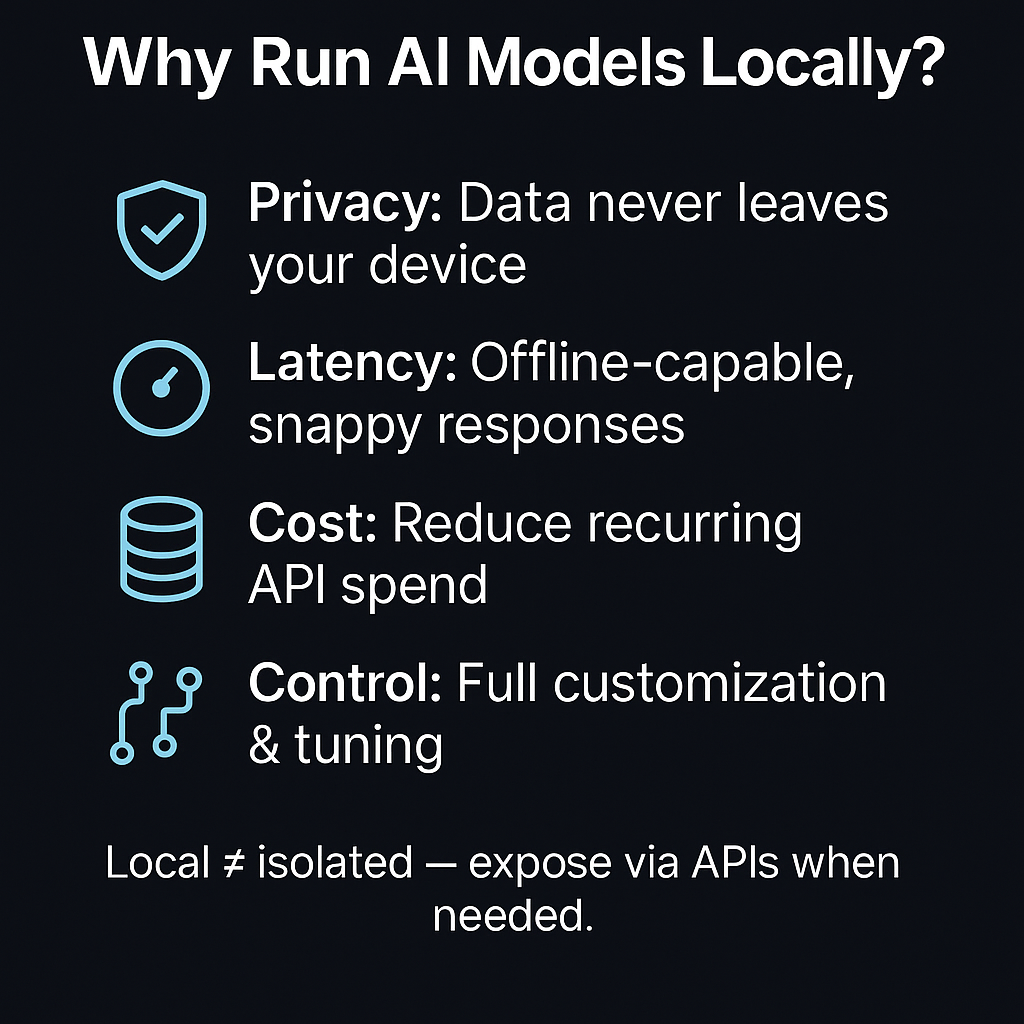
There are many great reasons to run AI models on your own computer:
- Data Privacy
Your data never leaves your computer, so you don’t have to worry about breaches, and you meet stringent privacy rules. - Offline Availability
You don’t have to worry about cloud availability or internet speed when working offline. - Cost Savings
You can stop paying for cloud APIs and run as many inferences as you want without extra cost. - Full Control
Local settings let you make small changes and adjustments, giving you control over how the model works.
Pros and Cons of Local Deployment
While local deployment offers many benefits, there are pros and cons:
- Hardware Limitations: If your hardware isn’t powerful enough, some models can’t be executed.
- Resource Needs: Huge models require powerful GPUs and a lot of RAM.
- Dependency Management: You must track program dependencies and handle updates yourself.
- Energy Usage: If models run continuously, they can consume significant energy.
Expert Insight
AI researchers highlight that the appeal of local deployment stems from data ownership and reduced latency. A Mozilla.ai article notes that hobbyist developers and security‑conscious teams prefer local deployment because the data never leaves their device and privacy remains uncompromised.
Quick Summary:
Local AI is ideal for those who prioritize privacy, control, and cost efficiency. Be aware of the hardware and maintenance requirements, and plan your deployments accordingly.
What You Need Before Running AI Models Locally
Before you start, ensure your system can handle the demands of modern AI models.
Hardware Requirements
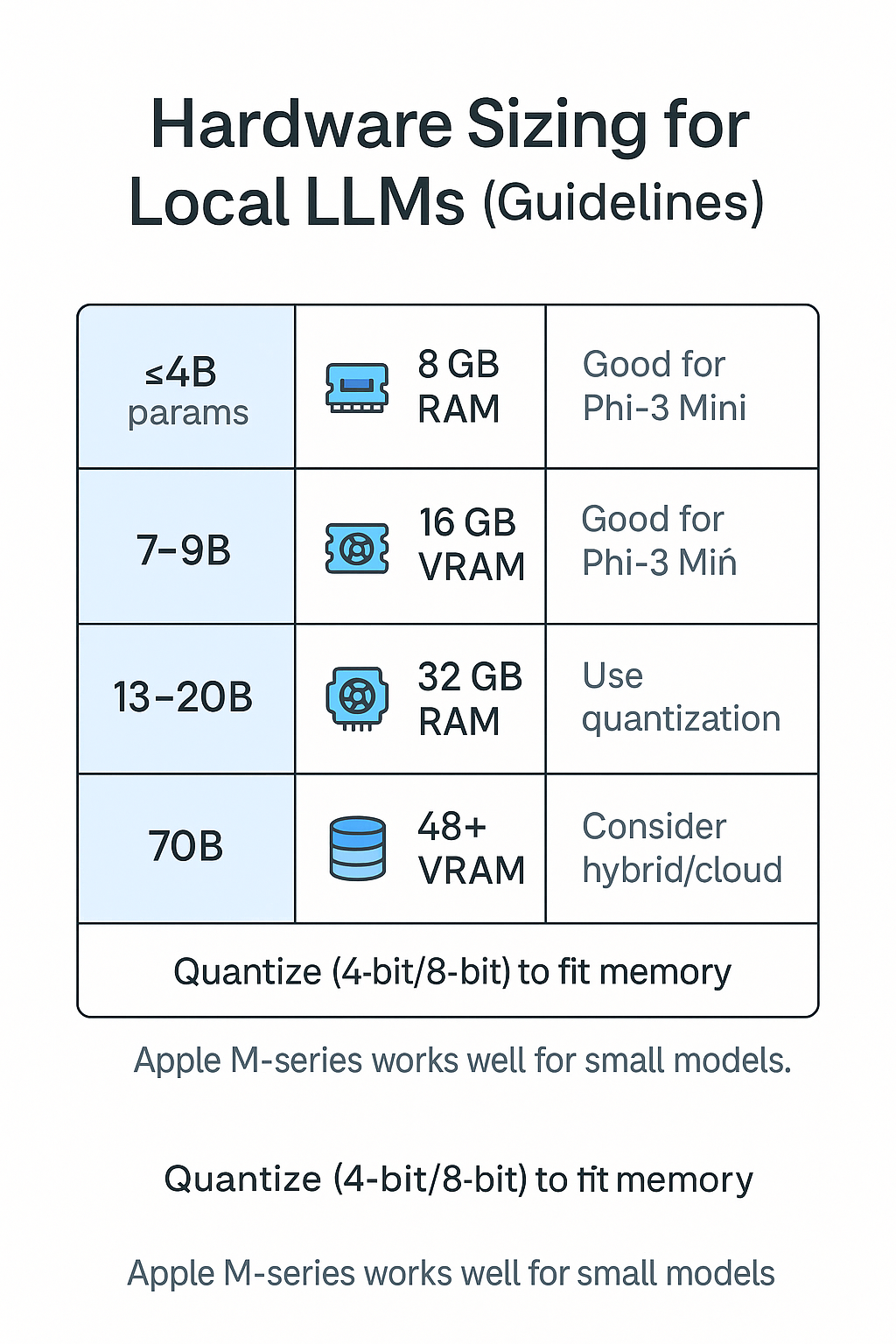
- CPU & RAM: For smaller models (under 4B parameters), 8 GB RAM may suffice; larger models like Llama 3 8B require around 16 GB RAM.
- GPU: An NVIDIA GTX/RTX card with at least 8–12 GB of VRAM is recommended. GPUs accelerate inference significantly. Apple M‑series chips work well for smaller models due to their unified memory architecture.
- Storage: Model weights can range from a few hundred MB to several GB. Leave room for multiple variants and quantized files.
Software Prerequisites
- Python & Conda: For installing frameworks like Transformers, llama.cpp, or vLLM.
- Docker: Useful for isolating environments (e.g., running LocalAI containers).
- CUDA & cuDNN: Required for GPU acceleration on Linux or Windows.
- llama.cpp / Ollama / LM Studio: Choose your preferred runtime.
- Model Files & Licenses: Ensure you adhere to license terms when downloading models from Hugging Face or other sources.
Note: Use Clarifai’s CLI to upload external models: the platform allows you to import pre‑trained models from sources like Hugging Face and integrate them seamlessly. Once imported, models are automatically deployed and can be combined with other Clarifai tools. Clarifai also offers a marketplace of pre-built models in its community.
Expert Insight
Community benchmarks show that running Llama 3 8B on mid‑range gaming laptops (RTX 3060, 16 GB RAM) yields real‑time performance. For 70B models, dedicated GPUs or cloud machines are necessary. Many developers use quantized models to fit within memory limits (see our “Challenges” section).
Quick Summary
Invest in adequate hardware and software. An 8B model demands roughly 16 GB RAM, while GPU acceleration dramatically improves speed. Use Docker or conda to manage dependencies and check model licenses before use.
How to Run a Local AI Model: Step‑By‑Step
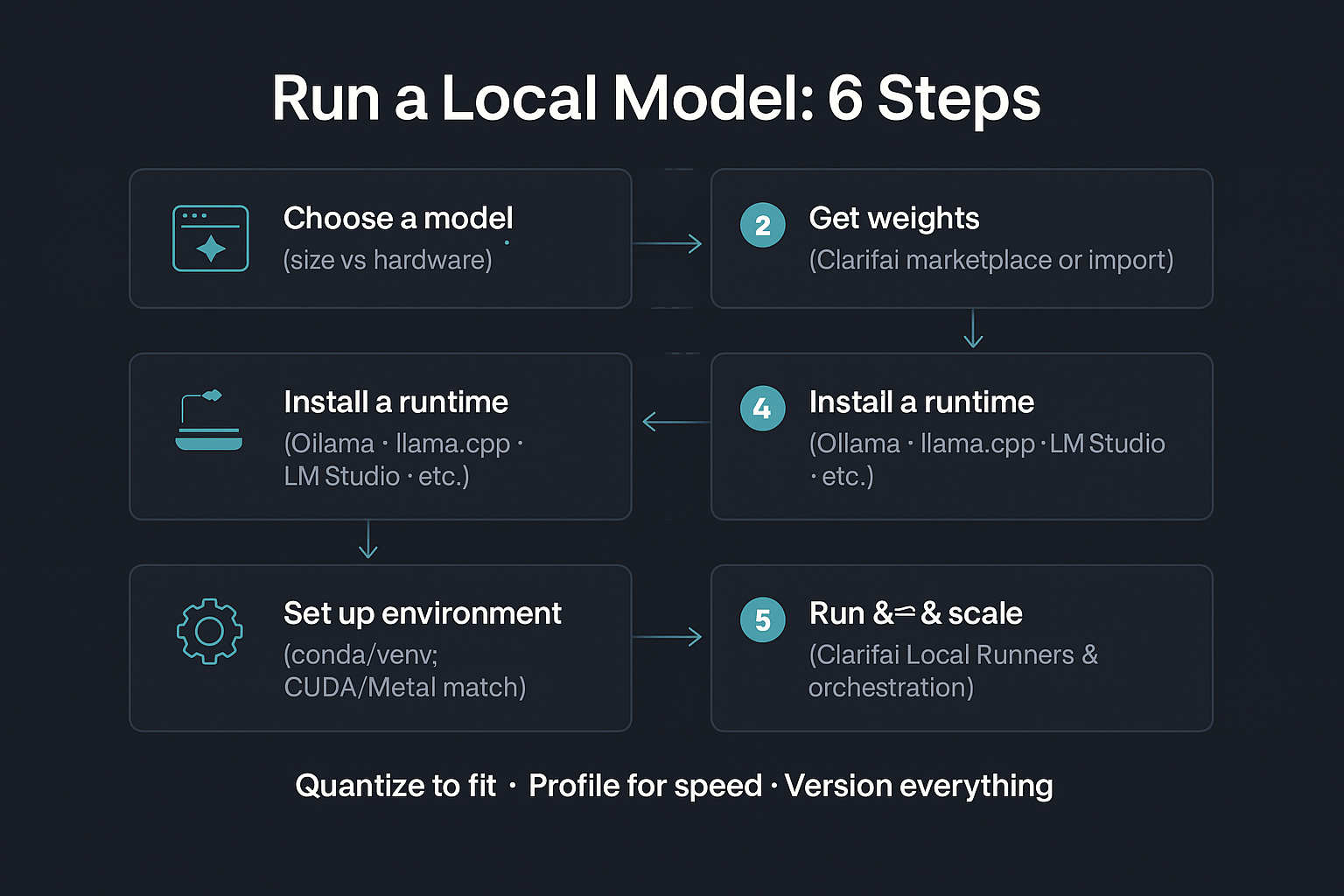
Running an AI model locally isn’t as daunting as it seems. Here’s a general workflow.
1. Choose Your Model
Decide whether you need a lightweight model (like Phi‑3 Mini) or a larger one (like Llama 3 70B). Check your hardware capability.
- Download or import the model:
- Instead of defaulting to Hugging Face, browse Clarifai’s model marketplace.
- If your desired model isn’t there, use the Clarifai Python SDK to upload it—whether from Hugging Face or built from scratch
3. Install a Runtime:
Choose one of the tools described below. Each tool has its own installation process (CLI, GUI, Docker).
llama.cpp: A C/C++ inference engine supporting quantized GGUF models.
git clone https://github.com/ggerganov/llama.cpp
cd llama.cpp
make
./main -m path/to/model.gguf -p”Hello, world!”
Ollama: The easiest CLI. You can run a model with a single command:
ollama run qwen:0.5b
- It supports over 30 optimized models.
- LM Studio: A GUI‑based solution. Download the installer, browse models via the Discover tab, and start chatting.
- text‑generation‑webui: Install via pip or use portable builds. Start the web server and download models within the interface.
- GPT4All: A polished desktop app for Windows. Download, select a model, and start chatting.
LocalAI: For developers wanting API compatibility. Deploy via Docker:
docker run -ti –name local-ai -p 8080:8080 localai/localai:latest-cpu
- It supports multi‑modal and GPU acceleration.
- Jan: A fully offline ChatGPT alternative with a model library for Llama, Gemma, Mistral, and Qwen.
4. Set Up an environment
Use conda to create separate environments for each model, preventing dependency conflicts. When using GPU, ensure CUDA versions match your hardware.
5. Run & test
Launch your runtime, load the model, and send a prompt. Adjust parameters like temperature and max tokens to tune generation. Use logging to monitor memory usage.
6. Scale & orchestrate.
When you need to move from testing to production or expose your model to external applications, leverage Clarifai Local Runners. They allow you to connect models on your hardware to Clarifai’s enterprise-grade API with a single command. Through Clarifai’s compute orchestration, you can deploy any model on any environment—your local machine, private cloud, or Clarifai’s SaaS—while managing resources efficiently.
Expert Tip
Clarifai’s Local Runners can be started with clarifai model local-runner, instantly exposing your model as an API endpoint while keeping data local. This hybrid approach combines local control with remote accessibility.
Quick Summary
The process involves choosing a model, downloading weights, selecting a runtime (like llama.cpp or Ollama), setting up your environment, and running the model. For production, Clarifai Local Runners and compute orchestration let you scale seamlessly.
Top Local LLM Tools & Interfaces
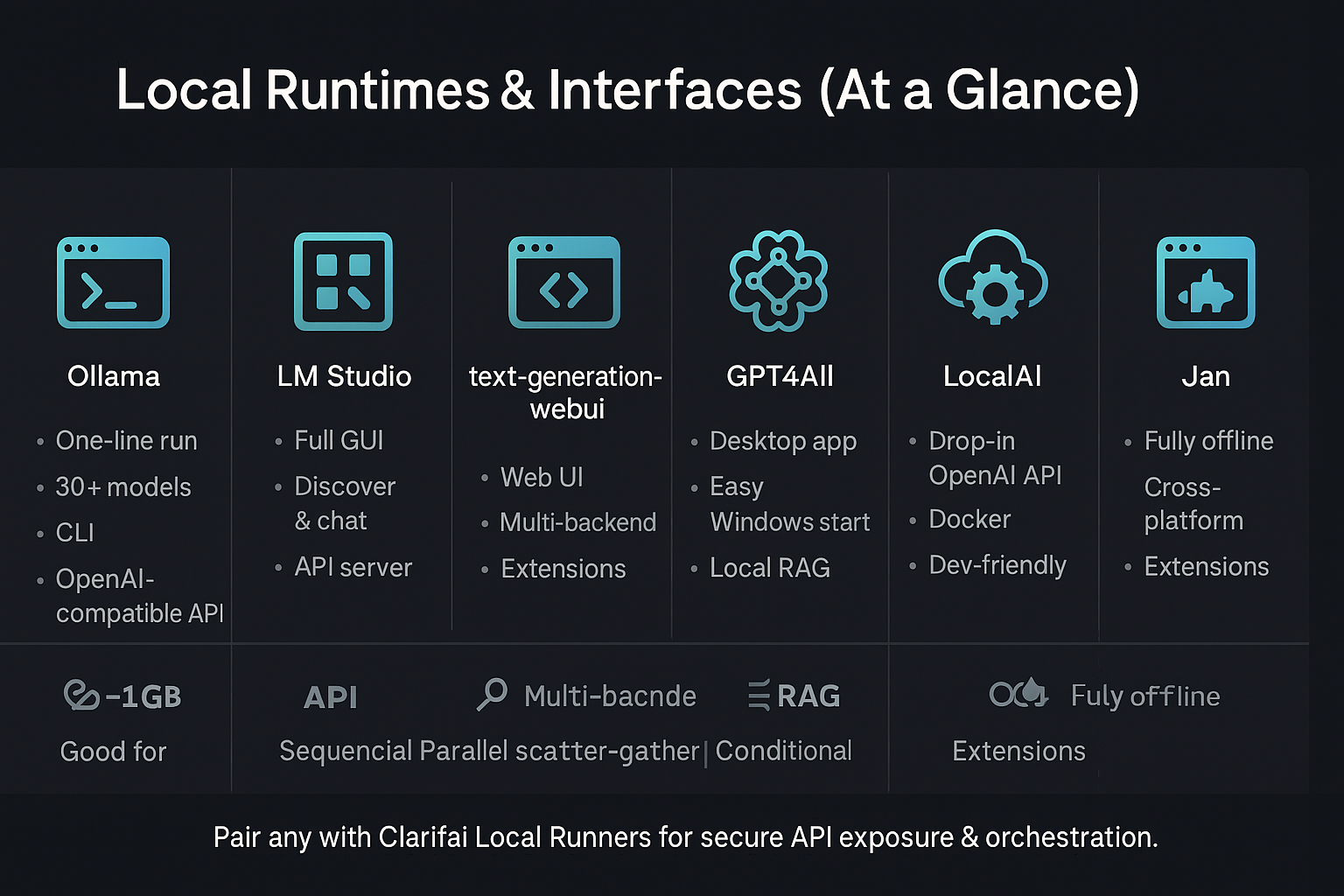
Different tools offer various trade‑offs between ease of use, flexibility, and performance.
Ollama—One‑Line Local Inference
Ollama shines for its simplicity. You can install it and run a model with one command. It supports over 30 optimized models, including Llama 3, DeepSeek, and Phi‑3. The OpenAI‑compatible API allows integration into apps, and cross‑platform support means you can run it on Windows, macOS, or Linux.
- Features: CLI‑based runtime with support for 30+ optimized models, including Llama 3, DeepSeek, and Phi‑3 Mini. It provides an OpenAI-compatible API and cross-platform support.
- Benefits: Fast setup and active community. It is ideal for rapid prototyping.
- Challenges: Limited GUI; more suited to terminal‑comfortable users. Larger models may require additional memory.
- Personal Tip: Combine Ollama with Clarifai Local Runners to expose your local model via Clarifai’s API and integrate it into broader workflows.
Expert Tip: “Developers say that Ollama’s active community and frequent updates make it a fantastic platform for experimenting with new models.”
LM Studio – Intuitive GUI
LM Studio offers a visual interface that non‑technical users will appreciate. You can discover, download, and manage models within the app, and a built‑in chat interface keeps a history of conversations. It even has performance comparison tools and an OpenAI‑compatible API for developers.
- Features: Full GUI for model discovery, download, chat interface, and performance comparison. Includes an API server.
- Benefits: No command line required; great for non‑technical users.
- Challenges: More resource‑intensive than minimal CLIs; limited extension ecosystem.
- Personal Tip: Use LM Studio to evaluate different models before deploying to a production environment via Clarifai’s compute orchestration, which can then handle scaling
Expert Tip:
Use the Developer tab to expose your model as an API endpoint and adjust advanced parameters without touching the command line.
text‑generation‑webui – Feature‑Rich Web Interface
This versatile tool provides a web‑based UI with support for multiple backends (GGUF, GPTQ, AWQ). It’s easy to install via pip or download a portable build. The web UI allows chat and completion modes, character creation, and a growing ecosystem of extensions.
- Benefits: Flexible and extensible; portable builds allow easy installation.
- Challenges: Requires configuration for optimal performance; some extensions may conflict.
- Personal Tip: Use the RAG extension to build local retrieval‑augmented applications, then connect to Clarifai’s API for hybrid deployments.
Expert Tip:
Leverage the knowledge base/RAG extensions to load custom documents and build retrieval‑augmented generation workflows.
GPT4All – Desktop Application
GPT4All targets Windows users. It comes as a polished desktop application with preconfigured models and a user‑friendly chat interface. Built‑in local RAG capabilities enable document analysis, and plugins extend functionality.
- Benefits: Ideal for Windows users seeking an out‑of‑the‑box experience.
- Challenges: Lacks an extensive model library compared to others; primarily Windows-only.
- Personal Tip: Use GPT4All for everyday chat tasks, but consider exporting its models to Clarifai for production integration.
Expert Tip
Use GPT4All’s settings panel to adjust generation parameters. It’s a favorable choice for offline code assistance and knowledge tasks.
LocalAI —Drop-In API Replacement
LocalAI is the most developer‑friendly option. It supports multiple architectures (GGUF, ONNX, PyTorch) and acts as a drop‑in replacement for the OpenAI API. Deploy it via Docker on CPU or GPU, and plug it into agent frameworks.
- Benefits: Highly flexible and developer‑oriented; easy to plug into existing code.
- Challenges: Requires Docker; initial configuration may be time‑consuming.
- Personal Tip: Run LocalAI in a container locally and connect it via Clarifai Local Runners to enable secure API access across your team.
Expert Tip
Use LocalAI’s plugin system to extend functionality—for example, adding image or audio models to your workflow.
Jan—The Comprehensive Offline Chatbot
Jan is a fully offline ChatGPT alternative that runs on Windows, macOS, and Linux. Powered by Cortex, it supports Llama, Gemma, Mistral, and Qwen models and includes a built‑in model library. It has an OpenAI‑compatible API server and an extension system.
-
Benefits: Works on Windows, macOS, and Linux; fully offline.
-
Challenges: Fewer community extensions; limited for large models on low‑end hardware.
-
Personal Tip: Use Jan for offline environments and hook its API into Clarifai’s orchestration if you later need to scale.
Expert Tip
Enable the API server to integrate Jan into your existing tools. You can also switch between remote and local models if you need access to Groq or other providers.
|
Tool |
Key Features |
Benefits |
Challenges |
Personal Tip |
|
Ollama |
CLI; 30+ models |
Fast setup; active community |
Limited GUI; memory limits |
Pair with Clarifai Local Runners for API exposure |
|
LM Studio |
GUI; model discovery & chat |
Friendly for non‑technical users |
Resource-heavy |
Test multiple models before deploying via Clarifai |
|
text‑generation‑webui |
Web interface; multi‑backend |
Highly flexible |
Requires configuration |
Build local RAG apps; connect to Clarifai |
|
GPT4All |
Desktop app; optimized models |
Great Windows experience |
Limited model library |
Use for daily chats; export models to Clarifai |
|
LocalAI |
API‑compatible; multi‑modal |
Developer‑friendly |
Requires Docker & setup |
Run in a container, then integrate via Clarifai |
|
Jan |
Offline chatbot with model library |
Fully offline; cross‑platform |
Limited extensions |
Use offline; scale via Clarifai if needed |
Best Local Models to Try (2025 Edition)
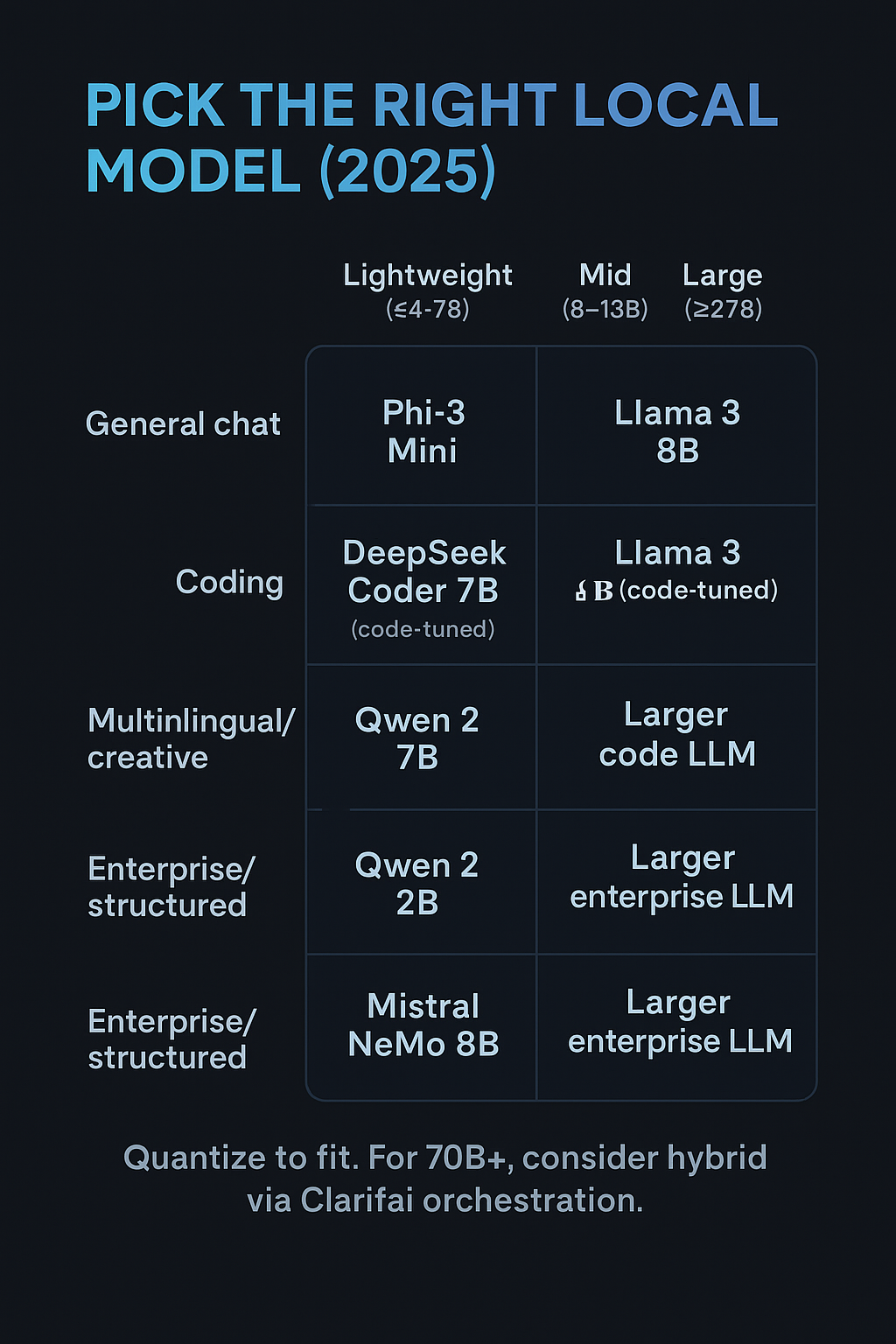
Choosing the right model depends on your hardware, use case, and desired performance. Here are the top models in 2025 with their unique strengths.
Llama 3 (8B & 70B)
Meta’s Llama 3 family delivers strong reasoning and multilingual capabilities. The 8B model runs on mid‑range hardware (16 GB RAM), while the 70B model requires high‑end GPUs. Llama 3 is optimized for dialogue and general tasks, with a context window up to 128 K tokens.
- Features: Available in 8 B and 70 B parameter sizes. The 3.2 release extended the context window from 8 K to 128 K tokens. Optimized transformer architecture with a tokenizer of 128 K tokens and Grouped‑Query Attention for long contexts.
- Benefits: Excellent at dialogue and general tasks; 8 B runs on mid‑range hardware, 70 B delivers near‑commercial quality. Supports code generation and content creation.
- Challenges: The 70 B version requires high‑end GPUs (48+ GB VRAM). Licensing may restrict some commercial uses.
- Personal Tip: Use the 8 B version for local prototyping and upgrade to 70 B via Clarifai’s compute orchestration if you need higher accuracy and have the hardware.
Expert Tip: Use Clarifai compute orchestration to deploy Llama 3 across multiple GPUs or in the cloud when scaling from 8B to 70B models.
Phi‑3 Mini (4K)
Microsoft’s Phi‑3 Mini is a compact model that runs on basic hardware (8 GB RAM). It excels at coding, reasoning, and concise responses. Because of its small size, it’s perfect for embedded systems and edge devices.
- Features: Compact model with about 4 K parameters (approx. 3.8 GB footprint). Designed by Microsoft for reasoning, coding, and conciseness.
- Benefits: Runs on basic hardware (8 GB RAM); fast inference makes it ideal for mobile and embedded use.
- Challenges: Limited knowledge base; shorter context window than larger models.
- Personal Tip: Use Phi‑3 Mini for quick code snippets or educational tasks, and pair it with local knowledge bases for improved relevance
Expert Tip: Combine Phi‑3 with Clarifai’s Local Runner to expose it as an API and integrate it into small apps without cloud dependency.
DeepSeek Coder (7B)
DeepSeek Coder specializes in code generation and technical explanations, making it popular among developers. It requires mid‑range hardware (16 GB RAM) but offers strong performance in debugging and documentation.
- Features: Trained on a massive code dataset, focusing on software development tasks. Mid‑range hardware with about 16 GB RAM is sufficient.
- Benefits: Excels at generating, debugging, and explaining code; supports multiple programming languages.
- Challenges: General reasoning may be weaker than larger models; lacks multilingual general knowledge.
- Personal Tip: Run the quantized 4‑bit version to fit on consumer GPUs. For collaborative coding, use Clarifai’s Local Runners to expose it as an API.
Expert Tip:
Use quantized versions (4‑bit) to run DeepSeek Coder on consumer GPUs. Combine with Clarifai Local Runners to manage memory and API access.
Qwen 2 (7B & 72B)
Alibaba’s Qwen 2 series offers multilingual support and creative writing skills. The 7B version runs on mid‑range hardware, while the 72B version targets high‑end GPUs. It shines in storytelling, summarization, and translation.
-
Features: Offers sizes from 7 B to 72 B, with multilingual support and creative writing capabilities. The 72 B version competes with top closed models.
-
Benefits: Strong at summarization, translation, and creative tasks; widely supported in major frameworks and tools.
-
Challenges: Large sizes require high‑end GPUs. Licensing may require credit to Alibaba.
-
Personal Tip: Use the 7 B version for multilingual content; upgrade to 72 B via Clarifai’s compute orchestration for production workloads.
Expert Tip
Qwen 2 integrates with many frameworks (Ollama, LM Studio, LocalAI, Jan), making it a flexible choice for local deployment.
Mistral NeMo (8B)
Mistral’s NeMo series is optimized for enterprise and reasoning tasks. It requires about 16 GB RAM and offers structured outputs for business documents and analytics.
- Features: Enterprise‑focused model with approximately 8 B parameters, a 64 K context window, and strong reasoning and structured outputs.
- Benefits: Ideal for document analysis, business applications, and tasks requiring structured output.
- Challenges: Not yet as widely supported in open tools; community adoption still growing.
- Personal Tip: Deploy Mistral NeMo through Clarifai’s compute orchestration to leverage automatic resource optimization
Expert Tip
Leverage Clarifai compute orchestration to run NeMo across multiple clusters and take advantage of automatic resource optimization.
Gemma 2 (9 B & 27 B)
- Features: Released by Google; supports 9 B and 27 B sizes with an 8 K context window. Designed for efficient inference across a range of hardware.
- Benefits: Performance on par with larger models; integrates easily with frameworks and tools such as Llama.cpp and Ollama.
- Challenges: Limited to text; no multimodal support; the 27B version may require high‑end GPUs.
- Personal Tip: Use Gemma 2 with Clarifai Local Runners to benefit from its efficiency and integrate it into pipelines.
|
Model |
Key Features |
Benefits |
Challenges |
Personal Tip |
|
Llama 3 (8 B & 70 B) |
8 B & 70 B; 128 K context |
Versatile; strong text & code |
70 B needs high‑end GPU |
Prototype with 8 B; scale via Clarifai |
|
Phi‑3 Mini |
~4 K parameters; small footprint |
Runs on 8 GB RAM |
Limited context & knowledge |
Use for coding & education |
|
DeepSeek Coder |
7 B; code‑specific |
Excellent for code |
Weak general reasoning |
Use 4‑bit version |
|
Qwen 2 (7 B & 72 B) |
Multilingual; creative writing |
Strong translation & summarization |
Large sizes need GPUs |
Start with 7 B; scale via Clarifai |
|
Mistral NeMo |
8 B; 64 K context |
Enterprise reasoning |
Limited adoption |
Deploy via Clarifai |
|
Gemma 2 (9 B & 27 B) |
Efficient; 8 K context |
High performance vs. size |
No multimodal support |
Use with Clarifai Local Runners |
Other Notables
- Qwen 1.5: Offers sizes from 0.5 B to 110 B, with quantized formats and integration with frameworks like llama.cpp and vLLM.
- Falcon 2: Multilingual with vision-to-language capability; runs on a single GPU.
- Grok 1.5: A multimodal model combining text and vision with a 128 K context window.
- Mixtral 8×22B: A sparse Mixture‑of‑Experts model; efficient for multilingual tasks.
- BLOOM: 176 B parameter open‑source model supporting 46 languages.
Each model brings unique strengths. Consider task requirements, hardware and privacy needs when selecting.
Quick Summary:
In 2025, your top choices include Llama 3, Phi‑3 Mini, DeepSeek Coder, Qwen 2, Mistral NeMo, and several others. Match the model to your hardware and use case.
Common Challenges and Solutions When Running Models Locally
Memory Limitations & Quantization
Large models can consume hundreds of GB of memory. For example, DeepSeek‑R1 is 671B parameters and requires over 500 GB RAM. The solution is to use distilled or quantized models. Distilled models like Qwen‑1.5B reduce size dramatically. Quantization compresses model weights (e.g., 4‑bit) at the expense of some accuracy.
Dependency & Compatibility Issues
Different models require different toolchains and libraries. Use virtual environments (conda or venv) to isolate dependencies. For GPU acceleration, match CUDA versions with your drivers.
Updates & Maintenance
Open‑source models evolve quickly. Keep your frameworks updated, but lock version numbers for production environments. Use Clarifai’s orchestration to manage model versions across deployments.
Ethical & Safety Considerations
Running models locally means you are responsible for content moderation and misuse prevention. Incorporate safety filters or use Clarifai’s content moderation models through compute orchestration.
Expert Insight
Mozilla.ai emphasizes that to run huge models on consumer hardware, you must sacrifice size (distillation) or precision (quantization). Choose based on your accuracy vs. resource trade‑offs.
Quick Summary
Use distilled or quantized models to fit large LLMs into limited memory. Manage dependencies carefully, keep models updated, and incorporate ethical safeguards.
Advanced Tips for Local AI Deployment
GPU vs CPU & Multi‑GPU Setups
While you can run small models on CPUs, GPUs provide significant speed gains. Multi‑GPU setups (NVIDIA NVLink) allow sharding larger models. Use frameworks like vLLM or deepspeed for distributed inference.
Mixed Precision & Quantization
Employ FP16 or INT8 mixed‑precision computation to reduce memory. Quantization techniques (GGUF, AWQ, GPTQ) compress models for CPU inference.
Multimodal Models
Modern models integrate text and vision. Falcon 2 VLM can interpret images and convert them to text, while Grok 1.5 excels at combining visual and textual reasoning. These require additional libraries like diffusers or vision transformers.
API Layering & Agents
Expose local models via APIs to integrate with applications. Clarifai’s Local Runners provide a robust API gateway, letting you chain local models with other services (e.g., retrieval augmented generation). You can connect to agent frameworks like LangChain or CrewAI for complex workflows.
Expert Insight
Clarifai’s compute orchestration allows you to deploy any model on any environment, from local servers to air‑gapped clusters. It automatically optimizes compute via GPU fractioning and autoscaling, letting you run large workloads efficiently.
Quick Summary
Advanced deployment includes multi‑GPU sharding, mixed precision, and multimodal support. Use Clarifai’s platform to orchestrate and scale your local models seamlessly.
Hybrid AI: When to Use Local and Cloud Together
Not all workloads belong fully on your laptop. A hybrid approach balances privacy and scale.
When to Use Cloud
- There are large models or long context windows that exceed local resources.
- Burst workloads requiring high throughput.
- Cross‑team collaboration where centralized deployment is beneficial.
When to Use Local
- Sensitive data that must remain on‑premises.
- Offline scenarios or environments with unreliable internet.
- Rapid prototyping and experiments.
Clarifai’s compute orchestration provides a unified control plane to deploy models on any compute, at any scale, whether in SaaS, private cloud, or on‑premises. With Local Runners, you gain local control with global reach; connect your hardware to Clarifai’s API without exposing sensitive data. Clarifai automatically optimizes resources, using GPU fractioning and autoscaling to reduce compute costs.
Expert Insight
Developer testimonials highlight that Clarifai’s Local Runners save infrastructure costs and provide a single command to expose local models. They also stress the convenience of combining local and cloud resources without complex networking.
Quick Summary
Choose a hybrid model when you need both privacy and scalability. Clarifai’s orchestrated solutions make it easy to blend local and cloud deployments.
FAQs: Running AI Models Locally
Q1. Can I run Llama 3 on my laptop?
You can run Llama 3 8B on a laptop with at least 16 GB RAM and a mid‑range GPU. For the 70B version, you’ll need high‑end GPUs or remote orchestration.
Q2. Do I need a GPU to run local LLMs?
A GPU dramatically improves speed, but small models like Phi‑3 Mini run on CPUs. Quantized models and int8 inference enable CPU usage.
Q3. What is quantization, and why is it important?
Quantization reduces model precision (e.g., from 16‑bit to 4‑bit) to shrink size and memory requirements. It’s essential for fitting large models on consumer hardware.
Q4. Which local LLM tool is best for beginners?
Ollama and GPT4All offer the most user‑friendly experience. Use LM Studio if you prefer a GUI.
Q5. How can I expose my local model to other applications?
Use Clarifai Local Runners; start with clarifai model local-runner to expose your model via a robust API.
Q6. Is my data secure when using local runners?
Yes. Your data stays on your hardware, and Clarifai connects via an API without transferring sensitive information off‑device.
Q7. Can I mix local and cloud deployments?
Absolutely. Clarifai’s compute orchestration lets you deploy models in any environment and seamlessly switch between local and cloud.
Conclusion
Running AI models locally has never been more accessible. With a plethora of powerful models—from Llama 3 to DeepSeek Coder—and user‑friendly tools like Ollama and LM Studio, you can harness the capabilities of large language models without surrendering control. By combining local deployment with Clarifai’s Local Runners and compute orchestration, you can enjoy the best of both worlds: privacy and scalability.
As models evolve, staying ahead means adapting your deployment strategies. Whether you’re a hobbyist protecting sensitive data or an enterprise optimizing costs, the local AI landscape in 2025 provides solutions tailored to your needs. Embrace local AI, experiment with new models, and leverage platforms like Clarifai to future-proof your AI workflows.
Feel free to explore more on the Clarifai platform and start building your next AI application today!