GitHub Copilot, the AI-powered coding assistant, offers a range of features designed to streamline your coding experience in Visual Studio. In this new series, we take a closer look at the power of Slash Commands and discuss how they can make your coding workflow smoother and more efficient.
Introducing Slash Commands
Slash Commands are a set of predefined actions accessible through the GitHub Copilot prompt. According to Bruno Capuano, who explains them in his latest video, you can open the Slash Commands menu by clicking the Slash button in the Copilot Chat window.
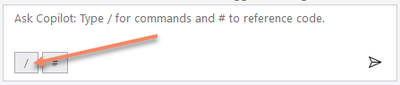
Alternatively, you can also access the Slash Commands by typing a forward slash in the message box.
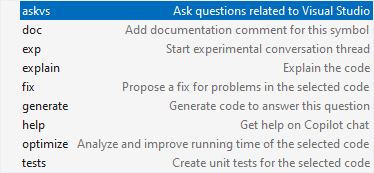
Below are some of the key Slash Commands and their functions:
- askvs: Ask Visual Studio questions about your code, functions, or other features.
- doc: Insert a documentation comment in the current cursor position.
- exp: Start a new conversation thread with a fresh context.
- explain: Provide an explanation for the selected code.
- fix: Suggest fixes for code errors and typos.
- generate: Generate new code snippets based on your input.
- optimize: Recommend code optimizations to improve performance.
- tests: Create a unit test for the current code selection.
- help: Access help and support for GitHub Copilot.
As you can see, these Slash Commands can significantly improve your productivity in Visual Studio. Learn how to Install GitHub Copilot in Visual Studio.
A Practical Example with /fix
To illustrate, let’s consider the /fix command. In the video, Bruno demonstrates how GitHub Copilot can automatically suggest corrections for typos and other issues. This command can be used in the main chat window, and it’s also accessible in the inline chat by pressing Alt-Slash (Alt-/) or through the right-click context menu.
Additional Resources
To learn more about GitHub Copilot and Slash Commands, check out our resource collection here. You can watch the full video here. For ongoing updates, stay tuned to this blog and consider subscribing to our YouTube channel for more insights and tutorials.