67% of Professionals See AI as a Near-Term or Immediate Job Threat


Our latest AI Pulse survey, taken by listeners of The Artificial Intelligence Show, shows a significant majority of professionals (two-thirds) view AI as an immediate or near-term career threat, even as they rapidly integrate it into their daily workflows. Continue reading “67% of Professionals See AI as a Near-Term or Immediate Job Threat”

Top Generative AI Use Cases & Future Trends


Generative AI refers to algorithms and models that can create new content, designs, or predictions by recognising patterns from large amounts of data. At their core, these models are trained by exposing them to vast datasets, allowing them to pick up statistical patterns and relationships. Once trained, they can be prompted with a seed input and generate contextually relevant output, often in a way that feels creative or human-like. Leading models today include OpenAI’s GPT‑4o, Anthropic’s Claude‑3, Google’s Gemini, Meta’s Llama 3 and Mistral’s Mixtral.

From a business perspective, generative AI represents not just a technological novelty but a transformative force: it can automate tasks, augment human creativity and unlock new revenue streams. Adoption doubled to 65 % of companies by early 2024, and 92 % of Fortune 500 firms had begun using it. Investments deliver outsized gains—every dollar spent on generative AI yields about $3.7 in value, with financial services seeing ROI as high as 4.2×. Analysts project the generative AI market to reach $644 billion by 2025.

Clarifai integrates both proprietary and open‑source foundation models (from OpenAI, Cohere, Anthropic, GPT‑Neo, BERT, Stable Diffusion and others) into a single platform. Beyond model access, Clarifai provides data augmentation, content generation, vector store and prompt library modules, enabling enterprises to tailor generative solutions while maintaining privacy and performance through features like local runners.

Quick Summary: What is Generative AI & Why Now?

Q: What does generative AI do that traditional AI cannot?

A: Generative AI creates new data—synthetic images, text, code or audio—by learning patterns from training data, whereas traditional AI typically classifies or predicts based on known patterns.

Q: Why is adoption accelerating?
A:
Wide availability of foundation models, lower compute costs and platforms like Clarifai have made deployment easier. Adoption doubled to 65 % of firms by early 2024, and ROI per dollar invested averages $3.7.

Q: How does Clarifai fit in?
A:
Clarifai integrates multiple foundation models, data labeling, model training, AI workflows and vector databases into one ecosystem, letting organisations deploy generative AI securely and at scale.


Quick Digest: Top Use Cases & Takeaways

  • Cross-industry boom: Adoption spans healthcare, finance, media, legal, retail, supply chain and more. About 47 % of health organisations, 63 % of finance firms and 69 % of media companies have integrated generative models.
  • Customer operations & marketing lead ROI: 75 % of generative AI’s value lies in customer operations, marketing & sales, software engineering and R&D.
  • Emerging trends: Multimodal models (text + images + audio) are growing at >30 % CAGR; open‑source LLMs like Llama 3 are closing the performance gap; and “agentic AI” systems can make decisions on behalf of users.
  • Clarifai advantage: Features like vector store, prompt library and PDF import modules enable retrieval‑augmented generation and secure processing.

The Rise of Generative AI: Cross‑Industry Adoption & Stats

Quick Summary: How Widely Is Generative AI Being Used?

  • Which industries have adopted generative AI? Healthcare (47 %), finance (63 %), media & entertainment (69 %), legal (38 %), manufacturing (27 %), education (55 %) and government (32 %).
  • What are the most common use cases? Chatbots (28 %), business process management (21 %), customer service support (19 %), market research/customer insights (18 %), software‑code generation (18 %) and planning/forecasting (17 %).
  • Is there measurable value? Generative AI could automate 60–70 % of worker time and may boost global GDP by 7 % (~$19.9 trillion by 2030), with ROI in financial services around 4.2×.

Generative AI’s adoption curve is remarkable. In just a year, the share of enterprises experimenting with generative AI jumped to 65 %, and 71 % now use it in at least one business function. Sector‑specific adoption rates show where the technology has immediate traction: healthcare (47 %), financial services (63 %), media/entertainment (69 %) and education (55 %).

This momentum translates to significant value. McKinsey projects generative AI could contribute $2.6–$4.4 trillion annually, with 75 % of the benefit concentrated in customer operations, marketing & sales, software engineering and R&D. Process automation is a major driver: tasks like drafting emails and writing code can be largely handled by AI, freeing people for higher‑value work. Some businesses already report savings of 4–9 hours per employee per week.

From a customer‑experience standpoint, generative AI is revolutionising service delivery. Surveys show 70 % of customer‑experience leaders plan full integration by 2026, and generative chat reduces service costs while improving customer effort scores by 57 %. Marketing departments are ahead of the curve: 92 % plan to invest in generative AI, with 78 % already using AI for content creation/SEO.

Expert Insight

  • Global adoption is still early stage: Gartner predicts that over 100 million people will collaborate with generative AI by 2026, but many applications remain in pilot due to governance and data challenges.
  • Data quality is key: Databricks CEO Ali Ghodsi notes that 85 % of generative AI projects haven’t gone live because organisations struggle to prepare domain‑specific training data.
  • North America leads, but others follow: North America boasts 40 % adoption, yet adoption in Europe and Asia is accelerating as local models and privacy regulations mature.

Key Trends & Emerging Topics for 2025–2026

Quick Summary: What Are the Hottest Trends in Generative AI?

  • Technical trends: Multimodal models (integrating text, images and audio) and open‑source models like Llama 3 that rival proprietary LLMs.
  • Autonomous agents: “Agentic AI” systems that execute tasks and make decisions without constant supervision.
  • Data practices: Rapid growth of retrieval‑augmented generation (RAG), vector databases, synthetic data and stronger AI ethics & regulation.

Multimodal & Open‑Source Models

The next frontier is multimodality—models that process text, image, audio and video simultaneously. The multimodal AI market, valued at around $1.2 billion in 2023, is projected to grow at more than 30 % annually. Alongside closed models, open‑source models like Meta’s Llama‑3.1 and Mistral’s Mixtral deliver performance nearing proprietary models. Clarifai supports these open models, letting enterprises fine‑tune them with proprietary data while retaining control.

Agentic AI & Autonomous Agents

Generative AI is moving beyond passive chatbots to agentic systems that can orchestrate tasks across multiple tools without constant user input. They can triage support tickets, draft reports, recommend actions and even execute workflows within Clarifai’s Mesh AI orchestration engine.

Retrieval‑Augmented Generation & Vector Databases

Large language models sometimes hallucinate; to mitigate this, more applications combine LLMs with retrieval‑augmented generation (RAG). RAG uses vector databases to index documents, enabling the model to fetch factual context before generating an answer. About 28 % of organisations already use vector databases and another 32 % plan to adopt them. Clarifai’s Vector Store provides ready‑to‑use vector search across unstructured text, images and video.

Synthetic Data & Data Augmentation

As privacy regulations tighten and data scarcity persists, generative AI becomes a tool for synthetic data generation. Clarifai’s synthetic data module splits large documents into sections, stores them in a vector database and allows users to query them securely . This approach overcomes input length limitations and reduces the risk of exposing sensitive information.

Regulation, Ethics & Skills

Governments are drafting AI‑specific regulations focusing on privacy, fairness and transparency. Meanwhile, nearly 45 % of businesses report a shortage of AI skills. Companies must invest in upskilling and adopt human-in-the-loop workflows to ensure safe deployment.

Expert Insight

  • Multimodality unlocks new industries: Combining language and vision enables video summarisation, XR experiences and cross‑channel personalisation.
  • Open source democratizes innovation: Models like Llama 3 empower smaller businesses to fine‑tune generative AI without vendor lock-in.
  • Agents need guardrails: Autonomous agents amplify productivity but must operate within ethical guidelines.

Code Generation & Software Engineering

Quick Summary: How Is Generative AI Revolutionising Coding?

  • Reliability: Tools like Copilot and CodeWhisperer autocomplete functions, translate code and generate boilerplate. Around 18 % of enterprises plan to use generative AI for code generation.
  • Value concentration: 75 % of generative AI’s potential lies in software engineering and R&D.
  • Clarifai’s role: Its Mesh workflow engine orchestrates models and tools, while the Vector Store indexes code and documentation.

Automating the Developer’s Toolbox

Developers use AI to handle boilerplate tasks such as writing APIs, generating tests and translating languages. Tools like GitHub Copilot suggest blocks of code based on comments. Productivity increases significantly, but human review remains essential to avoid security vulnerabilities.

Generative models also assist with devops and MLOps. Clarifai’s Mesh engine orchestrates complex pipelines: a natural-language specification triggers an LLM to generate skeleton code, uses the Vector Store to retrieve relevant API documentation and connects to testing tools. By automating code reviews and test generation, generative AI reduces human error but still requires engineers to validate outputs.

Clarifai Integration: Code & Beyond

Clarifai’s vector store indexes entire codebases, enabling retrieval-augmented generation. Developers build chat-based assistants that answer questions like “How do I connect to our payment API?” by retrieving relevant code samples. Clarifai’s prompt library provides templates for code tasks, ensuring consistent style. Local runners allow models to run within private environments, protecting proprietary code.

Expert Insight

  • Quality control matters: Generative code reduces time to market but may introduce subtle bugs; human review and automated testing remain essential.
  • Retrieval is key: Combining LLMs with Clarifai’s Vector Store yields context-aware results.
  • Upskilling developers: Engineers must learn prompt engineering and review techniques to fully harness generative tools.

Customer Support & Service

Quick Summary: How Is Generative AI Transforming Customer Service?

  • Capabilities: AI powers chatbots and virtual assistants that handle queries, triage tickets, summarise conversations and provide personalised answers.
  • Impact: Leaders expect generative AI to reduce support costs and improve customer effort scores by 57 %; 70 % plan full integration by 2026.
  • Clarifai’s help: Its language chains and vector store manage large knowledge bases for accurate answers.

From Scripted Bots to Empathetic Agents

Generative AI upgrades chatbots into empathetic agents that understand context, detect sentiment and provide human-like responses. They handle multi-turn conversations and even recognise images or video for diagnostics. Contact centres benefit through automation: AI triages tickets, drafts responses and summarises calls. Marketing departments lead adoption, with 78 % using AI for content creation/SEO.

Clarifai Integration: Building Smarter Support

Clarifai’s Language Chains structure workflows that combine retrieval from knowledge bases with generative reasoning. For example, a Clarifai-powered support agent can identify intent, query the Vector Store for relevant documentation, draft a personalised response and summarise for human review. The stuffing chain pattern splits large knowledge bases into segments, ensuring the model considers all relevant documents. Local runners ensure sensitive data stays on-premises.

Expert Insight

  • Human-AI collaboration: The best systems draft responses that humans review before sending.
  • Multi‑modal communication: Generative tools can understand voice and video.
  • Continuous improvement: Feedback loops refine model performance over time.

Education

Quick Summary: How Does Generative AI Enhance Learning?

  • Applications: Personalised tutoring, curriculum design, quiz generation, interactive simulations and automated grading.
  • Adoption: Education has 55 % adoption; 61 % of full‑time workers use or plan to use generative AI.
  • Future: Expect multi‑modal tutors, AR/VR integration and AI reasoning to assess student progress.

Personalised & Interactive Learning

Generative AI tailors education to each learner by analysing performance data and creating customised content. Tutors answer questions in natural language, generate examples and adjust difficulty levels. Beyond text, multimodal AI creates interactive simulations, enabling students to experiment safely.

Clarifai Integration: Enabling Adaptive Learning

Clarifai accelerates educational innovation through:

  • Scribe and Enlight modules for data labeling and model training.
  • Vector Store for storing and retrieving lesson materials.
  • Synthetic data generation to create diverse examples and protect student privacy.
  • Local runners for compliance with educational data regulations.

Expert Insight

  • Equity & ethics: Institutions must address bias and ensure all students benefit equally.
  • Teacher augmentation: AI handles administrative tasks while teachers provide human judgment and support.
  • Continuous assessment: AI tracks progress more granularly, enabling earlier intervention.

Financial Services & Investment Analysis

Quick Summary: How Is Generative AI Changing Finance?

  • Tasks: Robo‑advisory, portfolio optimisation, market scenario simulation, risk management, regulatory documentation and automated report generation.
  • Adoption: About 63 % of financial services firms use generative AI; forecasting accuracy improves by 32 %; ROI is around 4.2×.
  • Clarifai’s role: Local runners for secure data processing; modules to generate, store and retrieve financial documents.

AI-Driven Decision Making & Compliance

Generative AI simulates market scenarios, generates synthetic data for stress tests and drafts regulatory documents. Chatbots answer investment queries, while analysts use AI to summarise earnings calls. Fraud detection benefits from models that identify anomalies in transaction data, flagging potential fraud. AI also creates personalised investment recommendations based on client profiles.

Clarifai Integration: Secure & Scalable Finance AI

Clarifai enables finance teams to:

  • Use local runners to ensure sensitive data never leaves the organisation.
  • Index regulatory documents and research with the Vector Store.
  • Generate synthetic data for fraud detection.
  • Orchestrate models with Enlight and Mesh to ensure compliance and auditability.

Expert Insight

  • Regulation-first approach: Finance firms must ensure models comply with privacy and fairness regulations.
  • Human & AI synergy: Advisers use AI to synthesise research while focusing on relationship-building.
  • Integration complexity: Data silos remain a challenge; platforms like Clarifai help unify datasets.

Fraud Detection & Risk Management

Quick Summary: How Does Generative AI Mitigate Fraud?

  • Applications: Synthetic fraud scenario generation, anomaly detection, identity verification (KYC) and suspicious pattern detection.
  • Adoption: About 18 % of companies expect generative AI to help with regulatory documentation and fraud detection; 74 % plan to use it for analytics.
  • Clarifai’s role: Synthetic data and vector search modules enable realistic training data and contextual analysis, while local runners protect sensitive information.

From Reactive Detection to Proactive Prevention

Generative AI models normal and abnormal behaviours from historical data and simulates new fraud patterns, enabling proactive detection. Synthetic fraud scenarios help models learn to recognise novel attacks. In regulatory compliance, AI automates document analysis and identity verification.

Clarifai Integration: Building Trustworthy Fraud Solutions

Clarifai equips risk teams with:

  • Synthetic data generation.
  • Vector Store to unify transaction data and documents.
  • Local runners for data sovereignty.
  • Mesh for chaining identity verification, anomaly detection and generative reporting.

Expert Insight

  • Simulate to secure: Synthetic fraud scenarios help models detect novel attacks without exposing real data.
  • Explainability matters: Regulators and customers require clear explanations for flagged transactions.
  • Balance sensitivity with convenience: Human review and continuous tuning remain essential.

Graphic Design, Video & Multimedia

Quick Summary: How Does Generative AI Empower Creatives?

  • Tasks: Producing images, videos, audio, animations, marketing assets, storyboards and deepfake detection; summarising and tagging multimedia.
  • Opportunity: The multimodal AI market is growing at over 30 % per year; 46 % of enterprises plan to generate images or other modalities.
  • Clarifai’s role: Provides vision and video intelligence to label and organise generated media; supports fine‑tuning and local deployment.

AI as a Creative Partner

Generative AI tools produce high‑quality images from text prompts, transform scripts into animated sequences and compose music. It enables rapid ideation, helping non-specialists create professional content. Generative AI also scales marketing assets and summarises video libraries for easy discovery.

Clarifai Integration: Unifying Vision & Generation

Clarifai bridges content creation and management by automatically labelling objects and scenes, feeding them into the Vector Store for retrieval. It supports fine‑tuning of open-source models with proprietary data and provides video intelligence for tagging and summarising scenes.

Expert Insight

  • Augmentation vs replacement: AI enhances human creativity; brand direction remains human.
  • Ethics & authenticity: Deepfakes raise concerns; organisations need policies for ethical use.
  • Collaborative workflows: Integrating AI with asset management ensures smooth handoffs.

Healthcare & Life Sciences

Quick Summary: What Does Generative AI Do in Healthcare?

  • Applications: Enhancing medical imaging, early diagnosis, personalised treatment, drug discovery, clinical trial design, and synthesising patient notes.
  • Adoption: About 47 % of healthcare organisations use generative AI.
  • Potential: Generative AI could add hundreds of billions of value across industries, signalling massive potential.

Accelerating Diagnosis & Discovery

Generative AI enhances images for early detection, summarises patient notes and designs novel drug molecules. Multi‑modal models integrate EHRs, imaging and genetics to propose personalised treatments. However, strict privacy and ethics requirements govern deployment.

Clarifai Integration: Secure & Precise Healthcare AI

Clarifai offers local runners to ensure PHI remains secure, synthetic data modules to generate de‑identified datasets, vector search for EHR and literature retrieval and support for fine‑tuning open-source models.

Expert Insight

  • Data governance is critical: Healthcare AI must balance innovation with compliance.
  • Interdisciplinary collaboration: Clinicians, AI researchers and regulators must work together.
  • Human oversight: AI can recommend treatments, but clinicians make final decisions.

Human Resources

Quick Summary: How Can HR Use Generative AI?

  • Tasks: Screening résumés, scheduling interviews, generating job descriptions, personalised onboarding and automated reviews.
  • Adoption: 39 % of HR teams use AI for personalised learning; 70 % of Gen‑AI users are Gen Z or Millennials, with 52 % trusting AI for decisions.
  • Future: Expect career-coaching agents, skills‑matching algorithms and synthetic data for diversity training.

Streamlining Recruitment & Development

Generative AI extracts skills from résumés, matches candidates to job requirements, schedules interviews and drafts offer letters. For development, AI creates tailored learning pathways and summarises reviews.

Clarifai Integration: Transparent & Fair HR AI

Clarifai provides model training and evaluation, vector store for candidate and job data, synthetic data for training diversity simulations and local runners for secure processing.

Expert Insight

  • Bias mitigation: Models must be audited for fairness.
  • Transparency: Applicants should know when AI is involved.
  • Human touch: Final hiring decisions remain with humans.

Insurance

Quick Summary: How Is Generative AI Used in Insurance?

  • Tasks: Underwriting, claims triage, fraud detection, risk assessment, policy questions and document analysis.
  • Adoption: Similar to legal sectors (~38 %).
  • Future: Synthetic accident scenarios, multi‑modal assessments and personalised policies.

Smarter Underwriting & Claims Processing

Generative AI drafts policy documents, calculates premiums, summarises claims and flags anomalies. Chatbots handle customer inquiries. For underwriting, AI synthesises data to estimate risk; synthetic data trains models to detect fraud.

Clarifai Integration: Underwrite With Confidence

Clarifai uses local runners to protect sensitive data, vector store to organise policy documents, synthetic data module for training fraud models and Mesh for workflow orchestration.

Expert Insight

  • Regulation & fairness: Underwriting decisions must be explainable.
  • Personalisation vs privacy: AI allows fine-grained segmentation; privacy must be preserved.
  • Human oversight: Complex claims require human review.

Legal & Compliance Assistance

Quick Summary: What Legal Tasks Can Generative AI Handle?

  • Tasks: Contract drafting, redlining, summarising case law, legal research and e‑discovery.
  • Adoption: 38 % of legal organisations use generative AI; 31 % of enterprises use it for legal/compliance tasks.
  • Future: Agentic legal assistants, regulatory monitoring and RAG integration.

Automating Legal Documentation & Research

Generative AI speeds contract creation and review, summarises cases and performs e‑discovery. For compliance, AI monitors regulatory changes and generates reports.

Clarifai Integration: Trusted Legal AI

Clarifai offers vector store for statutes and cases, local runners for secure processing, prompt templates for drafting and a PDF import module for long documents.

Expert Insight

  • Risk of hallucination: Lawyers must verify AI-generated content.
  • Access to justice: AI helps small firms and self-represented litigants.
  • Hybrid workflows: Combining AI with human expertise accelerates research.

Product Development & Manufacturing

Quick Summary: How Does Generative AI Enhance Product Design?

  • Tasks: Generative design, optimisation, prototyping, supply-chain forecasting and material discovery.
  • Adoption: 27 % of manufacturing firms use generative AI.
  • Trends: Digital twins, multi‑modal simulation, generative robotics and additive manufacturing.

Designing Beyond Human Imagination

Generative design tools propose numerous novel designs meeting specified objectives. AI accelerates material discovery and optimises 3D printing. Digital twins integrate sensors and AI to simulate product behaviour.

Clarifai Integration: From Concept to Reality

Clarifai offers Scribe for data labeling, Enlight for training, Mesh for orchestration and Spacetime for managing design data.

Expert Insight

  • Innovation vs manufacturability: Radical AI designs must be practical to build.
  • Collaboration: Designers, engineers and supply-chain specialists must align.
  • Sustainability: AI often yields lighter, more efficient products.

Project Management & Operations

Quick Summary: How Does Generative AI Improve Operations?

  • Tasks: Scheduling, resource allocation, risk prediction, automated reporting and summarising notes.
  • Time savings: Companies save 4–9 hours per employee per week.
  • Clarifai’s contribution: The PDF import module splits large documents and stores them for retrieval.

From To‑Do Lists to Intelligent Orchestrators

Generative AI analyses project data to predict timelines and optimise resources. It auto-generates status reports and summarises meetings. Agentic systems can adjust schedules autonomously, subject to human approval.

Clarifai Integration: Orchestrating Efficiency

Clarifai provides:

  • PDF import and vector store for summarisation.
  • Mesh for integrating prediction, risk and summarisation models.
  • Local runners for secure processing.

Expert Insight

  • Reduction of overhead: Automating administrative tasks frees managers.
  • Adaptive planning: AI adjusts forecasts with new data.
  • Human judgment: Final decisions rest with humans.

Sales & Marketing

Quick Summary: How Does Generative AI Boost Revenue?

  • Tasks: Personalised email and ad copy, social-media content, SEO optimisation, market segmentation, lead scoring and video creation.
  • Adoption & ROI: 92 % plan to invest in generative AI for marketing; half already use it for SEO/email; 78 % use AI for content/SEO.
  • Clarifai’s role: Data augmentation, vector store and prompt library create and personalise assets; local runners protect data.

Hyper‑Personalised Content at Scale

Copywriting assistants generate tailored emails, posts and landing pages. AI analyses user data to recommend resonant content. For SEO, generative models suggest keywords and write optimised meta descriptions. Generative AI also creates video ads, interactive demos and 3D product renders, enabling smaller brands to compete.

Clarifai Integration: Personalisation Engine

Clarifai amplifies marketing through:

  • Vector store for customer data.
  • Prompt library for consistent messaging.
  • Data augmentation for synthetic images and videos.
  • Mesh for orchestrating copy generation, A/B testing and analytics.

Expert Insight

  • Authenticity is key: Generic AI content erodes trust; context matters.
  • Ethical personalisation: Hyper-targeting must respect privacy.
  • Unified channels: AI should unify messaging across all touchpoints.

Supply Chain & Logistics

Quick Summary: How Does Generative AI Optimise Supply Chains?

  • Tasks: Demand forecasting, inventory optimisation, route planning, procurement contracts and contingency planning.
  • Adoption & impact: 16 % anticipate using generative AI; 28 % of logistics teams have improved routes.
  • Clarifai’s role: Vector search and synthetic data simulate disruptions; local runners safeguard sensitive information.

Predicting & Responding to Disruptions

Generative AI simulates demand fluctuations and supply disruptions, creating contingency plans. It recommends optimal reorder points and adjusts routes in real-time based on traffic and weather. AI drafts procurement contracts and negotiates terms via chatbots.

Clarifai Integration: Smarter Logistics

Clarifai provides vector store for unstructured supply data, synthetic data modules for simulations, local runners for secure data and Mesh for unified decision engines.

Expert Insight

  • Resilience over efficiency: AI helps design supply chains that absorb shocks.
  • Data integration: Vector search can unify siloed data.
  • Ethical sourcing: AI tracks environmental and social metrics across suppliers.

Data Generation & Synthetic Data

Quick Summary: Why Is Synthetic Data Important?

  • Definition: Artificially generated data that mimics the statistical properties of real datasets.
  • Usage: 72 % of companies use generative AI for more than one function, many relying on synthetic data.
  • Clarifai’s offering: A synthetic data generation module that splits documents and stores them as embeddings.

Augmenting & Protecting Data

Synthetic data provides privacy-friendly datasets when real data is scarce or sensitive. It trains models, stress-tests systems and aids fairness auditing. In computer vision, synthetic images improve robustness; in language tasks, synthetic documents cover edge cases.

Clarifai Integration: Practical Synthetic Data

Clarifai’s module splits documents into chunks, embeds them and stores them in a vector database. This enables targeted retrieval and privacy. It also supports fine‑tuning generative models with synthetic data and allows secure local deployment.

Expert Insight

  • Balance realism & privacy: Synthetic data must preserve relationships without exposing individuals.
  • Use across functions: It supports simulation, stress-testing and fairness audits.
  • Evolving standards: Regulatory guidance on synthetic data is emerging.

Conclusion & Future Outlook

Quick Summary: Where Is Generative AI Headed?

  • Long-term vision: Generative AI is moving from experimentation to execution.
  • Business focus: Invest in data quality, governance and platforms like Clarifai to customise domain-specific solutions.
  • Key trends ahead: Multimodal and open-source models, agentic AI, RAG & vector databases, synthetic data and regulatory frameworks.

Generative AI has transitioned from novelty to necessity. Adoption stats show a majority of enterprises experimenting with generative AI, and investment is skyrocketing. Yet the full potential remains untapped; many projects stall due to data challenges, and ethical concerns must be addressed.

As we look to 2026, multimodal models will merge text, vision and audio, enabling richer interactions. Open-source models will democratise access. Agentic AI will take on complex tasks autonomously, while RAG and vector databases will ground models in factual context. Synthetic data will alleviate privacy concerns. Regulation will ensure responsible deployment.

Success hinges on data quality and the ability to fine-tune general models with domain-specific knowledge. Platforms like Clarifai—integrating foundation models, vector stores, prompt libraries and orchestration tools—offer a comprehensive solution. The future of generative AI lies not just in technology but in responsible, creative and collaborative implementation.

Expert Insight

  • Invest in data foundations: High-quality, ethically sourced data underpins model performance.
  • Governance & transparency: Develop clear AI usage policies and ensure users know when AI influences outcomes.
  • Continuous learning: Generative AI evolves rapidly; organisations must upskill teams and stay informed.

Frequently Asked Questions (FAQs)

What’s the difference between generative AI and traditional AI?

Traditional AI systems typically classify or predict based on existing patterns. Generative AI, by contrast, creates new content—texts, images, music or code—by learning underlying patterns from training data.

How can businesses start using generative AI safely?

Begin with clear use cases—such as summarising reports or automating customer support. Use platforms like Clarifai that provide access to multiple models, data preparation tools and local runners for secure deployment. Implement human‑in‑the‑loop processes and follow ethical guidelines.

Does generative AI replace human workers?

Generative AI augments rather than replaces humans. It handles repetitive or data-heavy tasks, freeing people to focus on strategy, creativity and complex decisions.

How do I ensure the data used for training is compliant?

Use synthetic data where real data is scarce or sensitive. Work with platforms that support local deployment and maintain audit trails. Follow relevant regulations (e.g., GDPR, HIPAA) and consult legal counsel.

What are potential risks of generative AI?

Risks include hallucinations (incorrect information), bias propagation, privacy breaches and misuse. Mitigate them by combining RAG with vector databases for factual grounding, performing bias audits and ensuring transparency.

Which Clarifai modules are most relevant for generative AI?

Key modules include Vector Store for context retrieval, Prompt Library, Synthetic Data Generation, Mesh for orchestration and Local Runners for secure deployment


Nvidia’s $5 Trillion Milestone


Chip maker Nvidia has officially become the world’s first $5 trillion company.

The company’s value surged past $211 per share this past week, setting yet another record for the chip maker just months after it crossed the $4 trillion mark in July 2025.

The rapid ascent cements Nvidia’s mission-critical position in the AI economy, driven by explosive demand for its processors, the backbone of modern AI. The company now sits ahead of tech giants Apple (at $4 trillion), Microsoft, Alphabet, Amazon, and Meta.

Nvidia’s stock climbed after the company announced a $1 billion purchase of Nokia shares for a partnership to build “AI-native” 5G and 6G networks. It rose further after U.S. President Donald Trump stated he plans to discuss Nvidia’s restricted Blackwell AI chip with Chinese President Xi Jinping.

I discussed Nvidia’s immense growth with SmarterX and Marketing AI Institute founder and CEO Paul Roetzer on Episode 178 of The Artificial Intelligence Show.

The ChatGPT Effect

Just 18 months ago, Nvidia was valued at under $1 trillion. Today, it’s worth more than Amazon and Meta combined.

To put this staggering growth in perspective, Roetzer offered a stunning statistic.

“On November 30, 2022, the day ChatGPT came out, NVIDIA’s market cap was $422 billion,” Roetzer says. 

That single date marks the beginning of the rapid growth of generative AI, with Nvidia being a key driver and beneficiary of it.

The Leader at the Center of the Success

Much of the company’s success and its public persona is tied to its CEO, Jensen Huang. Roetzer notes that Huang’s leadership style is as unique as the company’s growth.

“The guy’s awesome,” says Roetzer, noting his ability to be present and focused. “Any interview you ever watch, he is just in the moment.”

In an industry defined by breakneck speed and immense pressure, that kind of focus stands out, Roetzer said, explaining Huang’s grounded approach is a reason to root for the company beyond its meteoric stock price

“I’m happy he’s being successful,” says Roetzer. “And I think he’s the kind of person we want at the forefront of all of this, for the good of society and humanity.”


75 Percent of Companies Surveyed Already See Positive ROI from Generative AI


Companies are getting results with generative AI, according to a new report by The Wharton School of the University of Pennsylvania.  

The third-annual report, “Accountable Acceleration: Gen AI Fast-Tracks Into the Enterprise,” tracked corporate AI adoption with a survey of about 800 senior decision-makers. It found that 75 percent of business leaders report a positive return on investment (ROI) from their AI investments. Fewer than 5 percent say returns have been negative.

The data also shows usage is surging: 46 percent of leaders now use generative AI daily (a sharp increase from last year), and 82 percent use it at least weekly. The most common uses are data analysis, document summarization, and editing.

This new data paints a very different picture from other reports that have dominated headlines, namely, a viral MIT report that said 95 percent of generative AI pilots are failing.

To understand why this Wharton data is so different and what it means for business leaders, I turned to SmarterX and Marketing AI Institute founder and CEO Paul Roetzer on Episode 178 of The Artificial Intelligence Show.

AI Budgets Increasing 

Roetzer’s immediate takeaway? The Wharton study, conducted between June and July 2025 with a clear methodology is “legitimate research.”

He contrasts this sharply with the 95 percent failure rate statistic that MIT found, which he thinks was based on flawed methodology. 

This new data shows that investment is not only continuing but accelerating. The study found 88 percent of companies anticipate Gen AI budget increases, with 62 percent expecting increases of 10 percent or more.

Roetzer also highlighted one finding: “One third of Gen AI technology budgets are being allocated to internal R&D, which I thought was interesting and an indication that many enterprises are building custom capabilities for the future.”

A Need for Human Talent and AI Training

While adoption and return on investment are high, the Wharton report pinpoints a major barrier: human capital.

The biggest challenges cited by leaders were recruiting talent with advanced generative AI technical skills (49 percent) and providing effective training programs (46 percent). A lack of training resources also emerged as a top barrier for the first time since they’ve been doing the report.

This data highlights a massive opportunity for anyone willing to step up and provide guidance.

A Responsibility to “Pull Others Along”

Roetzer noted that the people who are already learning AI, such as those actively following the space, are most likely ahead of other people. It’s important they take the lead with their peers and companies.

“You have to pull them along,” Roetzer says. “We all kind of have this responsibility to figure this stuff out and then find ways to help our peers get through this.”


The challenge is that many people are simply afraid or find AI too abstract, Roetzer said, so they never get started. But if they don’t start, they’ll be left behind. 

“The future isn’t going to go well for people who don’t learn to embrace this stuff in a responsible way,” he says.


The solution, according to Roetzer, is for internal champions to emerge and help drive the organization forward, translating the abstract into practical applications and overcoming the fear.

“We need those internal champions to help drive this forward,” he said.


Run Hugging Face Models Locally on your Machine


Blog thumbnail - Run Hugging Face Models Locally

Run Models on Your Own Hardware

Most AI development begins locally. You experiment with model architectures, fine-tune them on small datasets, and iterate until the results look promising. But when it’s time to test the model in a real-world pipeline, things quickly become complicated.

You usually have two choices: upload the model to the cloud even for simple testing, or set up your own API, managing routing, authentication, and security just to run it locally.

Neither approach works well if you’re:

  • Working on smaller or resource-limited projects

  • Needing access to local files or private data

  • Building for edge or on-prem environments where cloud access isn’t practical

Introducing Local Runners – ngrok for AI models.

Local Runners let you serve AI models, MCP servers, or agents directly from your laptop, workstation, or internal server, securely and seamlessly via a Public API. You don’t need to upload your model or manage any infrastructure. Simply run it locally, and Clarifai takes care of the API handling, routing, and integration.

Once running, the Local Runner establishes a secure connection to Clarifai’s control plane. Any API request sent to your model is routed to your machine, processed locally, and returned to the client. From the outside, it behaves like a Clarifai-hosted model, while all computation occurs on your local hardware.

With Local Runners, you can:

  • Run models on your own hardware
    Use laptops, workstations, or on-prem servers to serve models directly, with full access to local GPUs or system tools.
  • Keep data and compute private
    Avoid uploading anything. Useful for regulated environments, internal tools, or projects involving sensitive information.
  • Skip infrastructure setup
    No need to build and host your own API. Clarifai provides the endpoint, routing, and authentication.
  • Prototype and iterate quickly
    Test models in real-world pipelines without deployment delays. Watch requests flow through and inspect outputs live.
  • Connect to local files and private APIs
    Let models access your file system, internal databases, or OS-level resources—without exposing your environment.

Now that you understand the benefits and capabilities of Local Runners, let’s see how you can run Hugging Face models locally and expose them securely.

Running Hugging Face Models Locally

The Hugging Face Toolkit in Clarifai CLI enables you to download, configure, and run Hugging Face models locally while exposing them securely through a public API. You can test, integrate, and iterate on models directly from your local environment without managing any external infrastructure.

Step 1: Prerequisites

First, install the Clarifai Package. This also provides the Clarifai CLI:

Next, log in to Clarifai to link your local environment to your account. This allows you to manage and expose your models.

Follow the prompts to enter your User ID and Personal Access Token (PAT). If you need help obtaining these, refer to the documentation.

If you plan to access private Hugging Face models or repositories, generate a token from your Hugging Face account settings and set it as an environment variable:

Finally, install the Hugging Face Hub library to enable model downloads and integration:

With these steps complete, your environment is ready to initialize and run Hugging Face models locally with Clarifai.

Step 2: Initialize a Model

Use the Clarifai CLI to initialize and configure any supported Hugging Face model locally with the Toolkit:

By default, this command downloads and sets up the unsloth/Llama-3.2-1B-Instruct model in your current directory.

If you want to use a different model, you can specify it with the --model-name flag and pass the full model name from Hugging Face. For example:

Note: Some models can be very large and require significant memory or GPU resources. Make sure your machine has enough compute capacity to load and run the model locally before initializing it.

Now, once you run the above command, the CLI will scaffold the project for you. The generated directory structure will look like this:

  • model.pyContains the logic for loading the model and running predictions.

  • config.yamlHolds model metadata, compute resources, and checkpoint configuration.

  • requirements.txtLists the Python dependencies required for your model.

Step 3: Customize model.py

Once your project scaffold is ready, the next step is to configure your model’s behavior in model.py. By default, this file includes a class called MyModel that extends ModelClass from Clarifai. Inside this class, you’ll find four main methods ready for use:

  • load_model() – Loads checkpoints from Hugging Face, initializes the tokenizer, and sets up streaming for real-time output.

  • predict() – Handles single-prompt inference and returns responses. You can adjust parameters such as max_tokens, temperature, and top_p.

  • generate() – Streams outputs token by token, useful for live previews.

  • chat() – Manages multi-turn conversations and returns structured responses.

You can use these methods as-is, or customize them to fit your specific model behavior. The scaffold ensures that all core functionality is already implemented, so you can get started with minimal setup.

Step 4: Configure config.yaml

The config.yaml file defines model metadata and compute requirements. For Local Runners, most defaults work, but it’s important to understand each section:

  • checkpoints – Specifies the Hugging Face repository and token for private models.
  • inference_compute_info – Defines compute requirements. For Local Runners, you can typically use defaults. When deploying on dedicated infrastructure, you can customize accelerators, memory, and CPU based on the model requirements.

  • model – Contains metadata such as app_id, model_id, model_type_id, and user_id. Replace YOUR_USER_ID with your own Clarifai user ID.

Finally, the requirements.txt file lists all Python dependencies required for your model. You can add any additional packages your model needs to run.

Step 5: Start the Local Runner

Once your model is configured, you can launch it locally using the Clarifai CLI:

This command starts a Local Runner instance on your machine. The CLI automatically handles all necessary setup, so you don’t need to manually configure infrastructure.

After the Local Runner starts, you’ll receive a public Clarifai URL. This URL acts as a secure gateway to your locally running model. Any requests made to this endpoint are routed to your local environment, processed by your model, and returned through the same endpoint.

Run Inference with Local Runner

Once your Hugging Face model is running locally and exposed via the Clarifai Local Runner, you can send inference requests to it from anywhere — using either the OpenAI-compatible endpoint or the Clarifai SDK.

Using the OpenAI-Compatible API

Use the OpenAI client to send a request to your locally running Hugging Face model:

Using the Clarifai Python SDK

You can also interact directly through the Clarifai SDK, which provides a lightweight interface for inference:

You can also experiment with:

With this setup, your Hugging Face model runs entirely on your local hardware — yet remains accessible via Clarifai’s secure public API.

Conclusion

Local Runners give you full control over where your models run — without sacrificing integration, security, or flexibility.

You can prototype, test, and serve real workloads on your own hardware while still using Clarifai’s platform to route traffic, handle authentication, and scale when needed.

You can try Local Runners for free with the Free Tier, or upgrade to the Developer Plan at $1/month for the first year to connect up to 5 Local Runners with unlimited hours. Read more in the documentation here to get started.


A Cool Concept but Not Ready for Showtime


Google Labs has launched a new experimental AI marketing tool called Pomelli, built to automate campaign creation while staying true to your brand’s voice.

The tool works by analyzing a company’s website to understand its identity, tone, and audience. From there, it generates custom marketing campaigns, including headlines, social posts, and ad copy, all designed to sound like they came from the brand itself.

The goal is to make scalable, on-brand content accessible to smaller teams that lack dedicated marketing resources, according to Google Labs. The tool is currently only available in the U.S., Canada, Australia, and New Zealand. Some users have reported hitting usage limits.

How well does it actually work?

To find out, I turned to the expertise of SmarterX and Marketing AI Institute founder and CEO Paul Roetzer during Episode 178 of The Artificial Intelligence Show.

The Business DNA Concept

Pomelli’s process starts by generating your “Business DNA.” Users give it a website, and it goes to work analyzing the site to learn its visual aesthetics, tone of voice, and brand values, and even pulls logos and fonts.

This part, Roetzer notes, is impressive. It’s an automated version of a task that would typically take a human at a marketing agency three to five hours.

“It pulls all the images from the website and puts them into a little library that it can then use for creative” work, says Roetzer. “It creates a color palette. It is kind of cool.”

After building the brand profile, the tool asks what campaign you want to run. Roetzer tested it by asking it to “grow our artificial intelligence show podcast audience,” and selected a campaign theme called “Essential AI Insights Weekly.”

This is where the experiment fell apart.

When Roetzer tried to edit the creative assets, the results were less than intelligent. He attempted to swap in a different image of himself standing on stage.

“It cut me off,” he says. “The image it dropped in is my right shoulder and then just a background from the stage. And I was like, ‘OK, this obviously isn’t very intelligent.’ It doesn’t even know to focus on the human.”

The Verdict: Pomelli Will Not Replace Marketers Right Now

This hands-on test led Roetzer to a clear conclusion: “Marketers and creatives, don’t worry. This is not automating your job.”

While the concept is strong, the execution is not there yet. The tool’s failure to handle a simple creative edit was disqualifying in Roetzer’s one test.

“I would not be running a second test,” he says. “It’s not even worth trying to do this again.”

He noted that the tool could improve, but it would require significant fine-tuning from people who actually understand creative work.

“I would say they need to go hire 50 creatives who’ve actually done creative work and do some fine tuning on this model,” says Roetzer. “As it is, it is not there yet.”


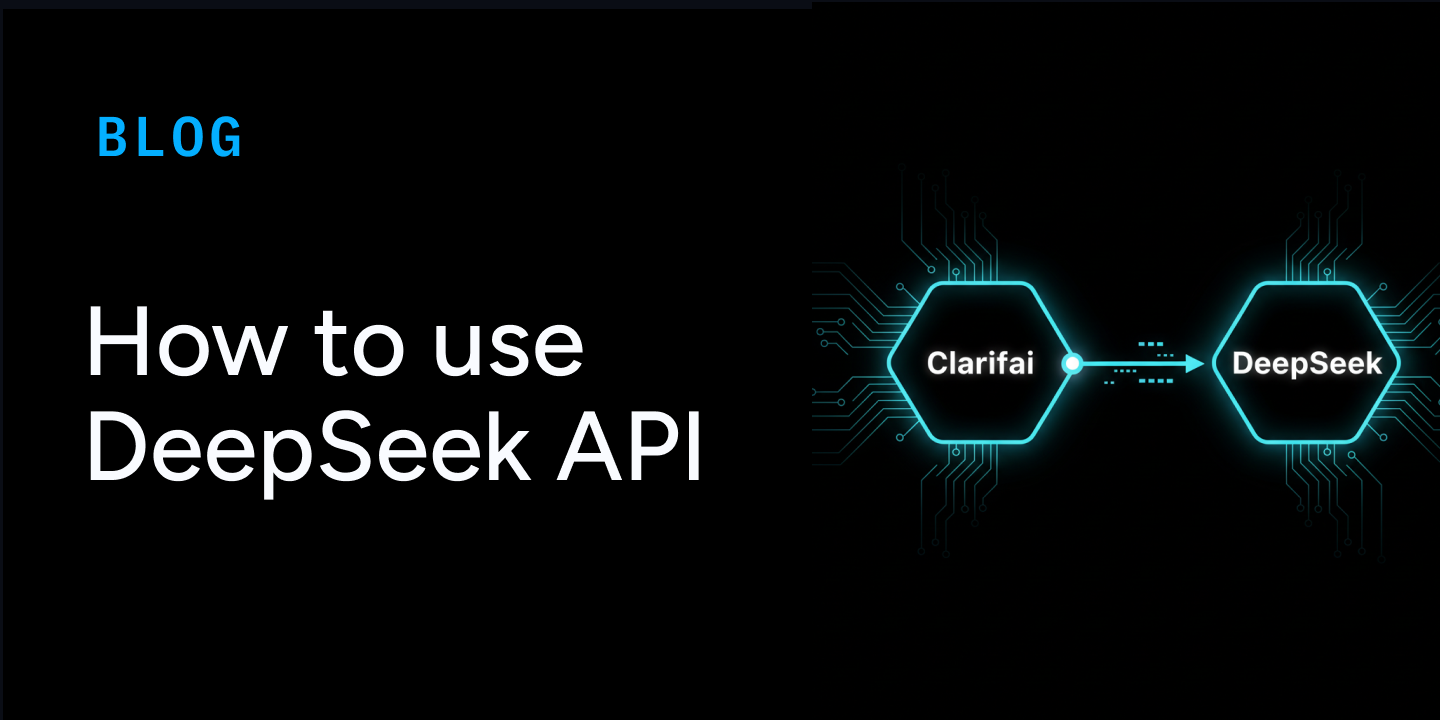
How to Use the DeepSeek API


TL;DR

DeepSeek models, including DeepSeek‑R1 and DeepSeek‑V3.1, are accessible directly through the Clarifai platform. You can get started without needing a separate DeepSeek API key or endpoint.

  • Experiment in the Playground: Sign up for a Clarifai account and open the Playground. This lets you test prompts interactively, adjust parameters, and understand the model behavior before integration.
  • Integrate via API: Integrate models via Clarifai’s OpenAI-compatible endpoint by specifying the model URL and authenticating with your Personal Access Token (PAT).

https://api.clarifai.com/v2/ext/openai/v1

Authenticate with your Personal Access Token (PAT) and specify the model URL, such as DeepSeek‑R1 or DeepSeek‑V3.1.

Clarifai handles all hosting, scaling, and orchestration, letting you focus purely on building your application and using the model’s reasoning and chat capabilities.

DeepSeek in 90 Seconds—What and Why

DeepSeek encompasses a range of large language models (LLMs) designed with diverse architectural strategies to optimize performance across various tasks. While some models employ a Mixture-of-Experts (MoE) approach, others utilize dense architectures to balance efficiency and capability.

1. DeepSeek-R1

DeepSeek-R1 is a dense model that integrates reinforcement learning (RL) with knowledge distillation to enhance reasoning capabilities. It employs a standard transformer architecture augmented with Multi-Head Latent Attention (MLA) to improve context handling and reduce memory overhead. This design enables the model to achieve high performance in tasks requiring deep reasoning, such as mathematics and logic.

2. DeepSeek-V3

DeepSeek-V3 adopts a hybrid approach, combining both dense and MoE components. The dense part handles general conversational tasks, while the MoE component activates specialized experts for complex reasoning tasks. This architecture allows the model to efficiently switch between general and specialized modes, optimizing performance across a broad spectrum of applications.

3. Distilled Models

To provide more accessible options, DeepSeek offers distilled versions of its models, such as DeepSeek-R1-Distill-Qwen-7B. These models are smaller in size but retain much of the reasoning and coding capabilities of their larger counterparts. For instance, DeepSeek-R1-Distill-Qwen-7B is based on the Qwen 2.5 architecture and has been fine-tuned with reasoning data generated by DeepSeek-R1, achieving strong performance in mathematical reasoning and general problem-solving tasks.

How to Access DeepSeek on Clarifai

DeepSeek models can be accessed on Clarifai in three ways: through the Clarifai Playground UI, via the OpenAI-compatible API, or using the Clarifai SDK. Each method provides a different level of control and flexibility, allowing you to experiment, integrate, and deploy models according to your development workflow.

Clarifai Playground

The Playground provides a fast, interactive environment to test prompts and explore model behavior. 

You can select any DeepSeek model, including DeepSeek‑R1, DeepSeek‑V3.1, or distilled versions available on the community. You can input prompts, adjust parameters such as temperature and streaming, and immediately see the model responses. The Playground also allows you to compare multiple models side by side to test and evaluate their responses.
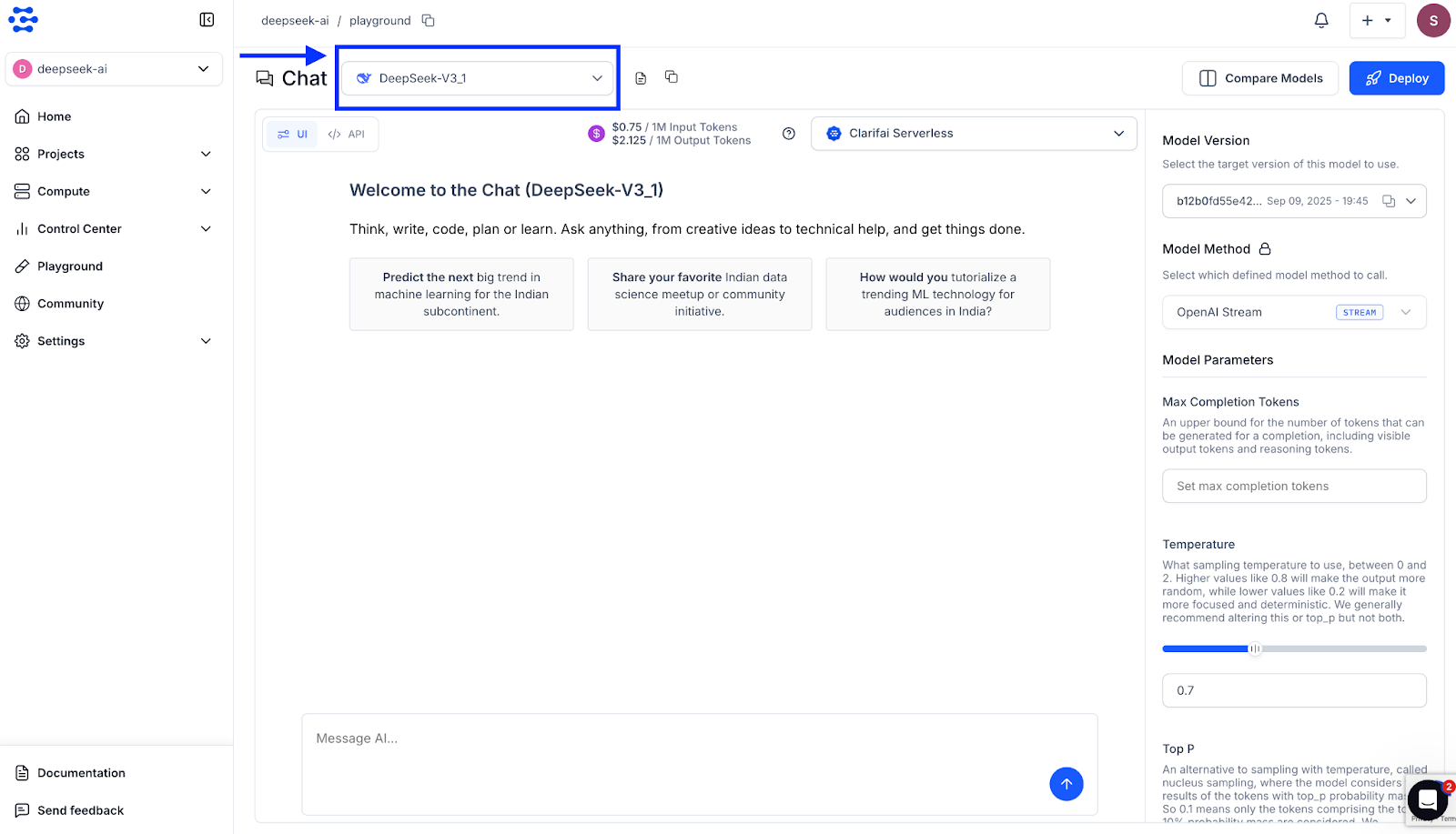
Within the Playground itself, you have the option to view the API section, where you can access code snippets in multiple languages, including cURL, Java, JavaScript, Node.js, the OpenAI-compatible API, the Clarifai Python SDK, PHP, and more. 

You can select the language you need, copy the snippet, and directly integrate it into your applications. For more details on testing models and using the Playground, see the Clarifai Playground Quickstart
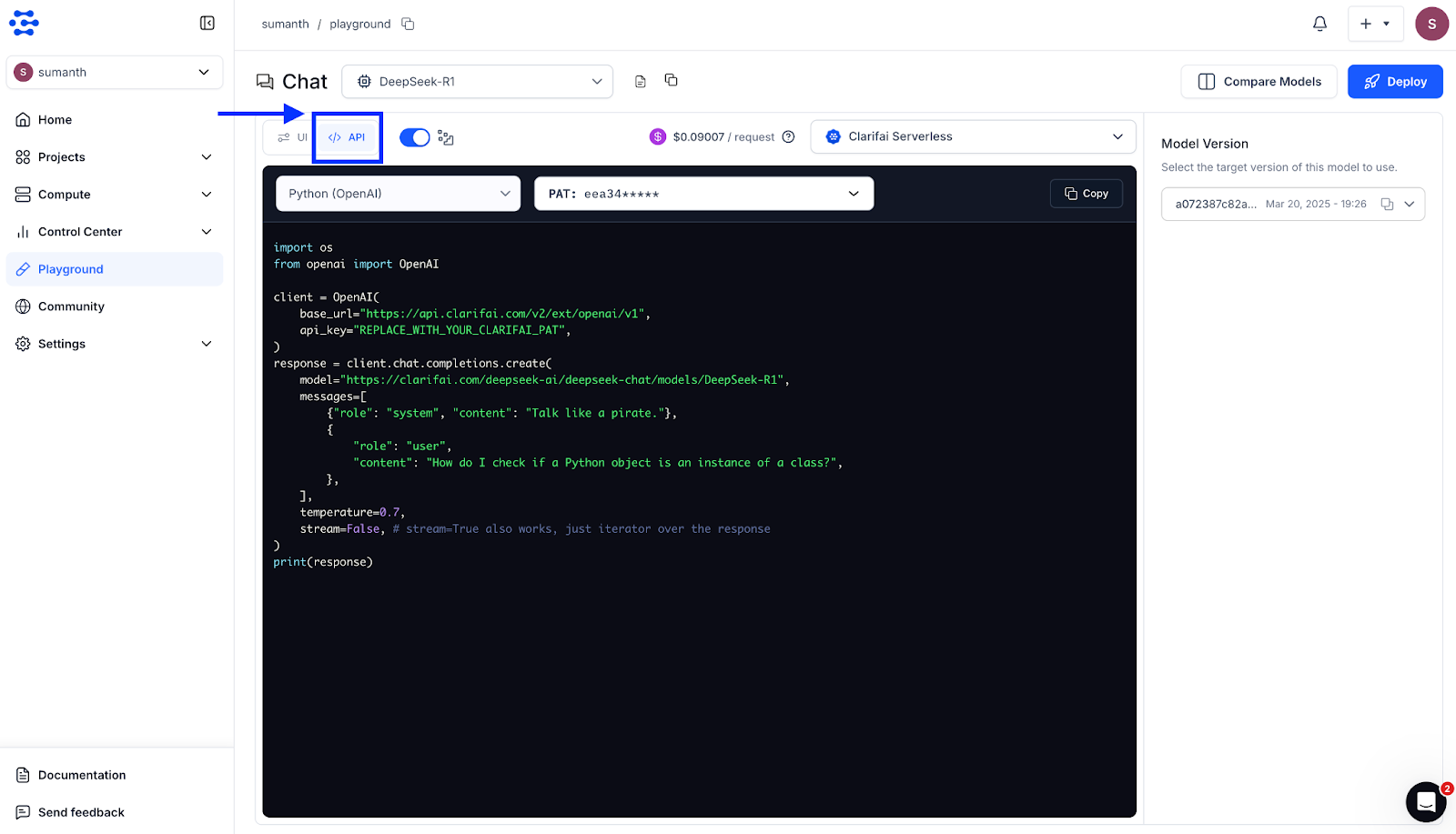
Try it: The Clarifai Playground is the fastest way to test prompts. Navigate to the model page and click “Test in Playground”.

Via the OpenAI‑Compatible API

Clarifai provides a drop-in replacement for the OpenAI API, allowing you to use the same Python or TypeScript client libraries you are familiar with while pointing to Clarifai’s OpenAI-compatible endpoint. Once you have your PAT set as an environment variable, you can call any Clarifai-hosted DeepSeek model by specifying the model URL.

Python Example

import os

from openai import OpenAI


client = OpenAI(

    base_url=“https://api.clarifai.com/v2/ext/openai/v1”,

    api_key=os.environ[“CLARIFAI_PAT”]

)

response = client.chat.completions.create(

    model=“https://clarifai.com/deepseek-ai/deepseek-chat/models/DeepSeek-R1”,

    messages=[

        {“role”: “system”, “content”: “You are a helpful assistant.”},

        {“role”: “user”, “content”: “Tell me a three sentence bedtime story about a unicorn.”}

    ],

    max_completion_tokens=100,

    temperature=0.7

)

print(response.choices[0].message.content)

TypeScript Example

import OpenAI from “openai”;

const client = new OpenAI({

  baseURL: “https://api.clarifai.com/v2/ext/openai/v1”,

  apiKey: process.env.CLARIFAI_PAT,

});


const response = await client.chat.completions.create({

  model: “https://clarifai.com/deepseek-ai/deepseek-chat/models/DeepSeek-R1”,

  messages: [

    { role: “system”, content: “You are a helpful assistant.” },

    { role: “user”, content: “Who are you?” }

  ],

});

console.log(response.choices?.[0]?.message.content);

Clarifai Python SDK

Clarifai’s Python SDK simplifies authentication and model calls, allowing you to interact with DeepSeek models using concise Python code. After setting your PAT, you can initialize a model client and make predictions with just a few lines.

import os

from clarifai.client import Model

model = Model(

    url=“https://clarifai.com/deepseek-ai/deepseek-chat/models/DeepSeek-V3_1”,

    pat=os.environ[“CLARIFAI_PAT”]

)

response = model.predict(

    prompt=“What is the future of AI?”,

    max_tokens=512,

    temperature=0.7,

    top_p=0.95,

    thinking=“False”

)

print(response)

Vercel AI SDK

For modern web applications, the Vercel AI SDK provides a TypeScript toolkit to interact with Clarifai models. It supports the OpenAI-compatible provider, enabling seamless integration.

import { createOpenAICompatible } from “@ai-sdk/openai-compatible”;

import { generateText } from “ai”;

const clarifai = createOpenAICompatible({

  baseURL: “https://api.clarifai.com/v2/ext/openai/v1”,

  apiKey: process.env.CLARIFAI_PAT,

});

const model = clarifai(“https://clarifai.com/deepseek-ai/deepseek-chat/models/DeepSeek-R1”);

const { text } = await generateText({

  model,

  messages: [

    { role: “system”, content: “You are a helpful assistant.” },

    { role: “user”, content: “What is photosynthesis?” }

  ],

});

console.log(text);

This SDK also supports streaming responses, tool calling, and other advanced features.In addition to the above, DeepSeek models can also be accessed via cURL, PHP, Java, and other languages. For a complete list of integration methods, supported providers, and advanced usage examples, refer to the documentation.

Advanced Inference Patterns

DeepSeek models on Clarifai support advanced inference features that make them suitable for production-grade workloads. You can enable streaming for low-latency responses, and tool calling to let the model interact dynamically with external systems or APIs. These capabilities work seamlessly through Clarifai’s OpenAI-compatible API.

Streaming Responses

Streaming returns model output token by token, improving responsiveness in real-time applications like chat interfaces or dashboards. The example below shows how to stream responses from a DeepSeek model hosted on Clarifai.

import os

from openai import OpenAI

# Initialize the OpenAI-compatible client for Clarifai

client = OpenAI(

    base_url=“https://api.clarifai.com/v2/ext/openai/v1”,

    api_key=os.environ[“CLARIFAI_PAT”]

)

# Create a chat completion request with streaming enabled

response = client.chat.completions.create(

    model=“https://clarifai.com/deepseek-ai/deepseek-chat/models/DeepSeek-V3_1”,

    messages=[

        {“role”: “system”, “content”: “You are a helpful assistant.”},

        {“role”: “user”, “content”: “Explain how transformers work in simple terms.”}

    ],

    max_completion_tokens=150,

    temperature=0.7,

    stream=True

)

print(“Assistant’s Response:”)

for chunk in response:

    if chunk.choices and chunk.choices[0].delta and chunk.choices[0].delta.content is not None:

        print(chunk.choices[0].delta.content, end=“”)

print(“\n”)

Streaming helps you render partial responses as they arrive instead of waiting for the entire output, reducing perceived latency.

Tool Calling

Tool calling enables a model to invoke external functions during inference, which is especially useful for building AI agents that can interact with APIs, fetch live data, or perform dynamic reasoning. DeepSeek-V3.1 supports tool calling, allowing your agents to make context-aware decisions. Below is an example of defining and using a tool with a DeepSeek model.

import os

from openai import OpenAI

# Initialize the OpenAI-compatible client for Clarifai

client = OpenAI(

    base_url=“https://api.clarifai.com/v2/ext/openai/v1”,

    api_key=os.environ[“CLARIFAI_PAT”]

)

# Define a simple function the model can call

tools = [

    {

        “type”: “function”,

        “function”: {

            “name”: “get_weather”,

            “description”: “Returns the current temperature for a given location.”,

            “parameters”: {

                “type”: “object”,

                “properties”: {

                    “location”: {

                        “type”: “string”,

                        “description”: “City and country, for example ‘New York, USA'”

                    }

                },

                “required”: [“location”],

                “additionalProperties”: False

            }

        }

    }

]

# Create a chat completion request with tool-calling enabled

response = client.chat.completions.create(

    model=“https://clarifai.com/deepseek-ai/deepseek-chat/models/DeepSeek-V3_1”,

    messages=[

        {“role”: “user”, “content”: “What is the weather like in New York today?”}

    ],

    tools=tools,

    tool_choice=‘auto’

)

# Print the tool call proposed by the model

tool_calls = response.choices[0].message.tool_calls

print(“Tool calls:”, tool_calls)

For more advanced inference patterns, including multi-turn reasoning, structured output generation, and extended examples of streaming and tool calling, refer to the documentation

Which DeepSeek Model Should I Pick?

Clarifai hosts multiple DeepSeek variants. Choosing the right one depends on your task:

  • DeepSeek‑R1use for reasoning and complex code. It excels at mathematical proofs, algorithm design, debugging and logical inference. Expect slower responses due to extended “thinking mode,” and higher token usage.
  • DeepSeek‑V3.1use for general chat and lightweight coding. V3.1 is a hybrid: it can switch between non‑thinking mode (faster, cheaper) and thinking mode (deeper reasoning) within a single model. Ideal for summarization, Q&A and everyday assistant tasks.
  • Distilled models (R1‑Distill‑Qwen‑7B, etc.) – these are smaller versions of the base models, offering lower latency and cost with slightly reduced reasoning depth. Use them when speed matters more than maximal performance.

At the time of writing, DeepSeek‑OCR has just been announced and is not yet available on Clarifai. Keep an eye on Clarifai’s model catalog for updates.

Frequently Asked Questions (FAQs)

Q1: Do I need a DeepSeek API key?
No. When using Clarifai, you only need a Clarifai Personal Access Token. Do not use or expose the DeepSeek API key unless you are calling DeepSeek directly (which this guide does not cover).

Q2: How do I switch between models in code?
Change the model value to the Clarifai model ID, such as openai/deepseek-ai/deepseek-chat/models/DeepSeek-R1 for R1 or openai/deepseek-ai/deepseek-chat/models/DeepSeek-V3.1 for V3.1.

Q3: What parameters can I tweak?
You can adjust temperature, top_p and max_tokens to control randomness, sampling breadth and output length. For streaming responses, set stream=True. Tool calling requires defining a tool schema.

Q4: Are there rate limits?
Clarifai enforces soft rate limits per PAT. Implement exponential backoff and avoid retrying 4XX errors. For high throughput, contact Clarifai to increase quotas.

Q5: Is my data secure?
Clarifai processes requests in secure environments and complies with major data‑protection standards. Store your PAT securely and avoid including sensitive data in prompts unless necessary.

Q6: Can I fine‑tune DeepSeek models?
DeepSeek models are MIT‑licensed. Clarifai plans to offer private hosting and fine‑tuning for enterprise customers in the near future. Until then, you can download and fine‑tune the open‑source models on your own infrastructure.

Conclusion

You now have a fast, standard way to integrate DeepSeek models, including R1, V3.1, and distilled variants, into your applications. Clarifai handles all infrastructure, scaling, and orchestration. No separate DeepSeek key or complex setup is needed. Try the models today through the Clarifai Playground or API and integrate them into your applications.


New Benchmark Shows AI Agents Perform Poorly When Automating Real Jobs


A new paper from the Center for AI Safety and Scale AI has introduced the Remote Labor Index (RLI), the first benchmark designed to measure how well AI agents can perform paid, remote jobs.

The RLI benchmark includes real-world projects from freelance platforms, spanning complex fields such as game development, architecture, data analysis, and video production. These aren’t simple tasks: The projects represented over 6,000 hours of human work valued at more than $140,000.

The results? Current AI agents performed poorly.

Manus, the top-performing agent, could only automate 2.5 percent of the work. Other top models, such as Grok 4 and Sonnet 4.5, managed just 2.1 percent, while GPT-5 hit 1.7 percent  and Gemini 2.5 Pro came in under 1 percent. The researchers noted failures stemmed from incomplete deliverables, broken files, and low-quality work that wouldn’t meet professional standards.

While these low numbers might seem reassuring to human workers, they don’t tell the whole story. To understand what these findings really mean for the future of AI in the workforce, I discussed them with SmarterX and Marketing AI Institute founder and CEO Paul Roetzer on Episode 178 of The Artificial Intelligence Show.

Why General Agents Are the Wrong Measuring Stick


Roetzer wasn’t surprised by the low automation rates, noting that the benchmark tests general agents that aren’t specifically trained for these complex jobs.

The real and much faster progress is happening with specialized agents. He points to examples including OpenAI reportedly hiring Goldman Sachs bankers to train models to do the job of an investment banker.

“My guess is OpenAI’s is way further along than 2.5 percent for that specific thing,” he says.

This highlights a crucial distinction in how we should think about AI’s capabilities. The RLI provides a valuable baseline for general models, but the true economic impact will likely come from models intensely focused on a specific job.

Good at Tasks Not Yet at Jobs

Roetzer explains this using a simple framework: tasks, projects, and jobs.

Right now, AI is very good at the task level, which includes the small, discrete activities that make up a larger project.

“It’s good at the tasks,” he says. “It’s not good at doing the full thing.”

An agent can’t replace a CEO, for example, but it might help with 25 different tasks that a CEO does every month. Humans, however, are still essential for setting goals, planning, connecting data sources, integrating tools, and, most importantly, overseeing and verifying the AI output.

The Economic Turing Test

The key metric to watch, according to Roetzer, is how long an agent can work without a human needing to intervene, a concept he calls “actions per disengagement,” similar to how Tesla measures self-driving.

We haven’t yet reached what he calls the “economic Turing test,” where the economic labor of AI is indistinguishable from that of a human.

“Is it to the point where I would hire an agent or a symphony of agents instead of a human?” he asks. “In every instance I can think of, the answer is still no.”

However, agents are getting better, more autonomous, and more reliable within specific jobs slowly but surely. And even augmentation of people with AI agents may lead to a reduction in the number of people needed, says Roetzer.

“As the agents get more autonomous, as they get more reliable, as more companies understand how to build and integrate them into workflows, you don’t need as many people doing the work that you previously did.”


Key Differences, Benefits & Hybrid Future


Artificial intelligence isn’t just about what models can do—it’s about where they run and how they deliver insights. In the age of connected devices, Edge AI and Cloud AI represent two powerful paradigms for deploying AI workloads, and enterprises are increasingly blending them to optimize latency, privacy, and scale. This guide explores the differences between edge and cloud, examines their benefits and trade‑offs, and provides practical guidance on choosing the right architecture. Along the way, we weave in expert insights, market data, and Clarifai’s compute orchestration solutions to help you make informed decisions.

Quick Digest: What You’ll Learn

  • What is Edge AI? You’ll see how AI models running on or near devices enable real‑time decisions, protect sensitive data and reduce bandwidth consumption.
  • What is Cloud AI? Understand how centralized cloud platforms deliver powerful training and inference capabilities, enabling large‑scale AI with high compute resources.
  • Key differences and trade‑offs between edge and cloud AI, including latency, privacy, scalability, and cost.
  • Pros, cons and use cases for both edge and cloud AI across industries—manufacturing, healthcare, retail, autonomous vehicles and more.
  • Hybrid AI strategies and emerging trends like 5G, tiny models, and risk frameworks, plus how Clarifai’s compute orchestration and local runners simplify deployment across edge and cloud..
  • Expert insights and FAQs to boost your AI deployment decisions.

What Is Edge AI?

Quick summary: How does Edge AI work?

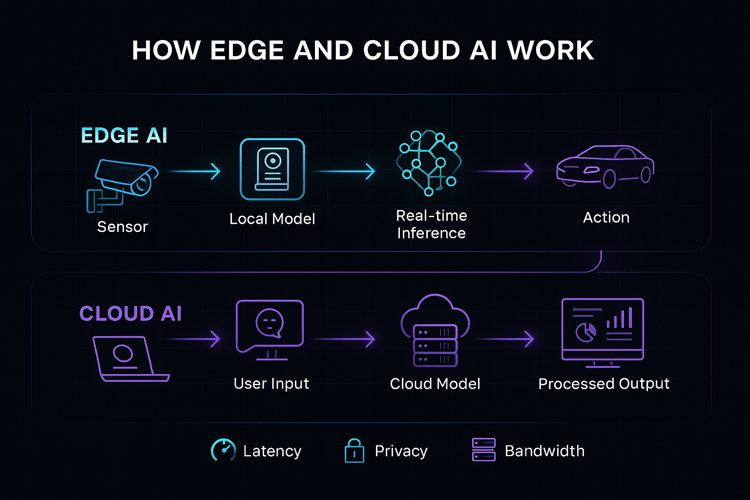
Edge AI refers to running AI models locally on devices or near the data source—for example, a smart camera performing object detection or a drone making navigation decisions without sending data to a remote server. Edge devices process data in real time, often using specialized chips or lightweight neural networks, and only send relevant insights back to the cloud when necessary. This eliminates dependency on internet connectivity and drastically reduces latency.

Deeper dive

At its core, edge AI moves computation from centralized data centers to the “edge” of the network. Here’s why companies choose edge deployments:

  • Low latency – Because inference occurs close to the sensor, decisions can be made in milliseconds. OTAVA notes that cloud processing often takes 1–2 s, whereas edge inference happens in hundreds of milliseconds. In safety‑critical applications like autonomous vehicles or industrial robotics, sub‑50 ms response times are required.
  • Data privacy and security – Sensitive data stays local, reducing the attack surface and complying with data sovereignty regulations. A recent survey found that 91 % of companies see local processing as a competitive advantage.
  • Reduced bandwidth and offline resilience – Sending large video or sensor feeds to the cloud is expensive; edge AI transmits only essential insights. In remote areas or during network outages, devices continue operating autonomously.
  • Cost efficiency – Edge processing lowers cloud storage, bandwidth and energy expenses. OnLogic notes that moving workloads from cloud to local hardware can dramatically reduce operational costs and offer predictable hardware expenses.

These benefits explain why 97 % of CIOs have already deployed or plan to deploy edge AI, according to a recent industry survey.

Expert insights & tips

  • Local doesn’t mean small. Modern edge chips like Snapdragon Ride Flex deliver over 150 TOPS (trillions of operations per second) locally, enabling complex tasks such as vision and sensor fusion in vehicles.
  • Pruning and quantization dramatically shrink large models, making them efficient enough to run on edge devices. Developers should adopt model compression and distillation to balance accuracy and performance.
  • 5G is a catalyst – With <10 ms latency and energy savings of 30–40 %, 5G networks enable real‑time edge AI across smart cities and industrial IoT.
  • Decentralized storage – On‑device vector databases let retailers deploy recommendation models without sending customer data to a central server.

Creative example

Imagine a smart camera in a factory that can instantly detect a defective product on the conveyor belt and stop the line. If it relied on a remote server, network delays could result in wasted materials. Edge AI ensures the decision happens in microseconds, preventing expensive product defects.


What Is Cloud AI?

Quick summary: How does Cloud AI work?

Cloud AI refers to running AI workloads on centralized servers hosted by cloud providers. Data is sent to these servers, where high‑end GPUs or TPUs train and run models. The results are then returned via the network. Cloud AI excels at large‑scale training and inference, offering elastic compute resources and easier maintenance.

Deeper dive

Key characteristics of cloud AI include:

  • Scalability and compute power – Public clouds offer access to virtually unlimited computing resources. For instance, Fortune Business Insights estimates the global cloud AI market will grow from $78.36 billion in 2024 to $589.22 billion by 2032, reflecting widespread adoption of cloud‑hosted AI.
  • Unified model training – Training large generative models requires enormous GPU clusters. OTAVA notes that the cloud remains essential for training deep neural networks and orchestrating updates across distributed devices.
  • Simplified management and collaboration – Centralized models can be updated without physically accessing devices, enabling rapid iteration and global deployment. Data scientists also benefit from shared resources and version control.
  • Cost considerations – While the cloud allows pay‑as‑you‑go pricing, sustained usage can be expensive. Many companies explore edge AI to cut cloud bills by 30–40 %.

Expert insights & tips

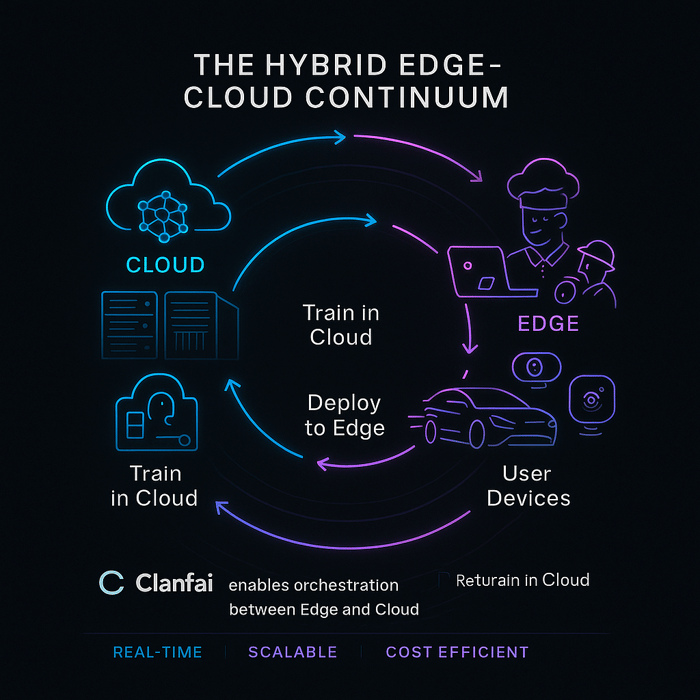
  • Use the cloud for training, then deploy at the edge – Train models on rich datasets in the cloud and periodically update edge deployments. This hybrid approach balances accuracy and responsiveness.
  • Leverage serverless inference when traffic is unpredictable. Many cloud providers offer AI as a service, allowing dynamic scaling without managing infrastructure.
  • Secure your APIs – Cloud services can be vulnerable; in 2023, a major GPU provider discovered vulnerabilities that allowed unauthorized code execution. Implement strong authentication and continuous security monitoring.

Creative example

A retailer might run a massive recommendation engine in the cloud, training it on millions of purchase histories. Each store then downloads a lightweight model optimized for its local inventory, while the central model continues learning from aggregated data and pushing improvements back to the edge.

How Edge and Cloud AI work?


Edge vs Cloud AI: Key Differences

Quick summary: How do Edge and Cloud AI compare?

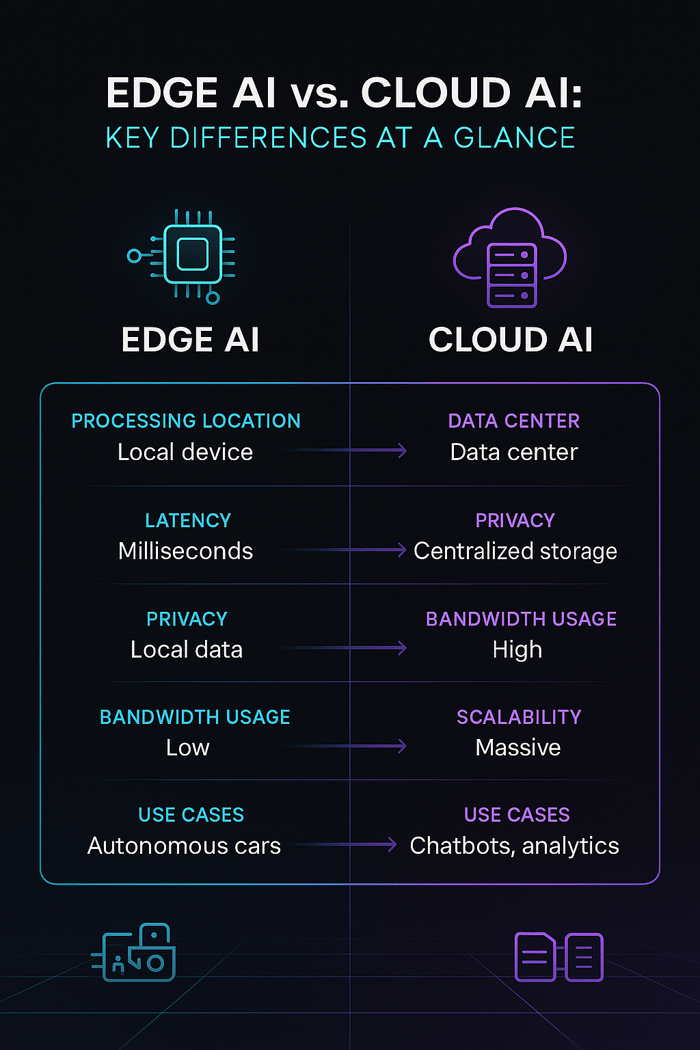
Edge and cloud AI differ primarily in where data is processed and how quickly insights are delivered. The edge runs models on local devices for low latency and privacy, while the cloud centralizes computation for scalability and collaborative training. A hybrid architecture combines both to optimize performance.

Head‑to‑head comparison

Feature

Edge AI

Cloud AI

Processing location

On-device or near‑device (gateways, sensors)

Centralized data centers

Latency

Milliseconds; ideal for real‑time control

Seconds; dependent on network

Data privacy

High—data stays local

Lower—data transmitted to the cloud

Bandwidth & connectivity

Minimal; can operate offline

Requires stable internet

Scalability

Limited by device resources

Virtually unlimited compute and storage

Cost model

Upfront hardware cost; lower operational expenses

Pay‑as‑you‑go but can become expensive over time

Use cases

Real‑time control, IoT, AR/VR, autonomous vehicles

Model training, large-scale analytics, generative AI

Expert insights & tips

  • Data volume matters – High‑bandwidth workloads like 4K video benefit greatly from edge processing to avoid network congestion. Conversely, text‑heavy tasks can be processed in the cloud with minimal delays.
  • Consider regulatory requirements – Industries such as healthcare and finance often require patient or client data to remain on‑premises. Edge AI helps meet these mandates.
  • Balance lifecycle management – Cloud AI simplifies model updates, but version control across thousands of edge devices can be challenging. Use orchestration tools (like Clarifai’s) to roll out updates consistently.

Creative example

In a smart city, traffic cameras use edge AI to count vehicles and detect incidents. Aggregated counts are sent to a cloud AI platform that uses historical data and weather forecasts to optimize traffic lights across the city. This hybrid approach ensures both real‑time response and long‑term planning.

Edge vs Cloud AI


Benefits of Edge AI

Quick summary: Why choose Edge AI?

Edge AI delivers ultra‑low latency, enhanced privacy, reduced network dependency and cost savings. It’s ideal for scenarios where rapid decision‑making, data sovereignty or unreliable connectivity are critical..

In-depth benefits

  1. Real‑time responsiveness – Industrial robots, self‑driving cars and medical devices require decisions faster than network round‑trip times. Qualcomm’s ride‑flex SoCs deliver sub‑50 ms response times. This instantaneous processing prevents accidents and improves safety.
  2. Data privacy and compliance – Keeping data local minimizes exposure. This is crucial in healthcare (protected health information), financial services (transaction data), and retail (customer purchase history). Surveys show that 53 % of companies adopt edge AI specifically for privacy and security.
  3. Bandwidth savings – Streaming high‑resolution video consumes enormous bandwidth. By processing frames on the edge and sending only relevant metadata, organizations reduce network traffic by up to 80 %.
  4. Reduced cloud costs – Edge deployments lower cloud inference bills by 30–40 %. OnLogic highlights that customizing edge hardware results in predictable costs and avoids vendor lock‑in.
  5. Offline and remote capabilities – Edge devices continue operating during network outages or in remote locations. Brim Labs notes that edge AI supports rural healthcare and agriculture by processing locally.
  6. Enhanced security – Each device acts as an isolated environment, limiting the blast radius of cyberattacks. Local data reduces exposure to breaches like the cloud vulnerability discovered in a major GPU provider.

Expert insights & tips

  • Don’t neglect power consumption. Edge hardware must operate under tight energy budgets, especially for battery‑powered devices. Efficient model architectures (TinyML, SqueezeNet) and hardware accelerators are essential.
  • Adopt federated learning – Train models on local data and aggregate only the weights or gradients to the cloud. This approach preserves privacy while leveraging distributed datasets.
  • Monitor drift – Edge models can degrade over time due to changing environments. Use cloud analytics to monitor performance and trigger re‑training.

Creative example

An agritech startup deploys edge AI sensors across remote farms. Each sensor analyses soil moisture and weather conditions in real time. When a pump needs activation, the device triggers irrigation locally without waiting for central approval, ensuring crops aren’t stressed during network downtime.


Benefits of Cloud AI

Quick summary: Why choose Cloud AI?

Cloud AI excels at scalability, high compute performance, centralized management and rapid innovation. It’s ideal for training large models, global analytics and orchestrating updates across distributed systems.

In‑depth benefits

  1. Unlimited compute power – Public clouds provide access to GPU clusters needed for complex generative models. This scalability allows companies of all sizes to train sophisticated AI without upfront hardware costs.
  2. Centralized datasets and collaboration – Data scientists can access vast datasets stored in the cloud, accelerating R&D and enabling cross‑team experimentation. Cloud platforms also integrate with data lakes and MLOps tools.
  3. Rapid model updates – Centralized deployment means bug fixes and improvements reach all users immediately. This is critical for LLMs and generative AI models that evolve quickly.
  4. Elastic cost management – Cloud services offer pay‑as‑you‑go pricing. When workloads spike, extra resources are provisioned automatically; when demand falls, costs decrease. Fortune Business Insights projects the cloud AI market will surge at a 28.5 % CAGR, reflecting this flexible consumption model.
  5. AI ecosystem – Cloud providers offer pre‑trained models, API endpoints, and integration with data pipelines, accelerating time to market for AI projects.

Expert insights & tips:

  • Use specialized training hardware – Leverage next‑gen cloud GPUs or TPUs for faster model training, especially for vision and language models.
  • Plan for vendor diversity – Avoid lock‑in by adopting orchestration platforms that can route workloads across multiple clouds and on‑premises clusters.
  • Implement robust governance – Cloud AI must adhere to frameworks like NIST’s AI Risk Management Framework, which offers guidelines for managing AI risks and improving trustworthiness. The EU AI Act also establishes risk tiers and compliance requirements.

Creative example

A biotech firm uses the cloud to train a protein‑folding model on petabytes of genomic data. The resulting model helps researchers understand complex disease mechanisms. Because the data is centralized, scientists across the globe collaborate seamlessly on the same datasets without shipping data to local clusters.


Challenges and Trade‑Offs

Quick summary: What are the limitations of Edge and Cloud AI?

While edge and cloud AI offer significant advantages, both have limitations. Edge AI faces limited compute and battery constraints, while cloud AI contends with latency, privacy concerns and escalating costs. Navigating these trade‑offs is essential for enterprise success.

Key challenges at the edge

  • Hardware constraints – Small devices have limited memory and processing power. Running large models can quickly exhaust resources, leading to performance bottlenecks.
  • Model management complexity – Keeping hundreds or thousands of edge devices updated with the latest models and security patches is non‑trivial. Without orchestration tools, version drift can lead to inconsistent behavior.
  • Security vulnerabilities – IoT devices may have weak security controls, making them targets for attacks. Edge AI must be hardened and monitored to prevent unauthorized access.

Key challenges in the cloud

  • Latency and bandwidth – Round‑trip times, especially when transmitting high‑resolution sensor data, can hinder real‑time applications. Network outages halt inference completely.
  • Data privacy and regulatory issues – Sensitive data leaving the premises may violate privacy laws. The EU AI Act, for example, imposes strict obligations on high‑risk AI systems.
  • Rising costs – Sustained cloud AI usage can be expensive. Cloud bills often grow unpredictably as model sizes and usage increase, driving many organizations to explore edge alternatives.

Expert insights & tips

  • Embrace hybrid orchestration – Use orchestration platforms that seamlessly distribute workloads across edge and cloud environments to optimize for cost, latency and compliance.
  • Plan for sustainability – AI compute demands significant energy. Prioritize energy‑efficient hardware, such as edge SoCs and next‑gen GPUs, and adopt green compute strategies.
  • Evaluate risk frameworks – Adopt NIST’s AI RMF and monitor emerging regulations like the EU AI Act to ensure compliance. Conduct risk assessments and impact analyses during AI development.

Creative example

A hospital deploys AI for patient monitoring. On‑premises devices detect anomalies like irregular heartbeats in real time, while cloud AI analyzes aggregated data to refine predictive models. This hybrid setup balances privacy and real‑time intervention but requires careful coordination to keep models synchronized and ensure regulatory compliance.


When to Use Edge vs Cloud vs Hybrid AI

Quick summary: Which architecture is right for you?

The choice depends on latency requirements, data sensitivity, connectivity, cost constraints and regulatory context. In many cases, the optimal solution is a hybrid architecture that uses the cloud for training and coordination and the edge for real‑time inference.

Decision framework

  1. Latency & time sensitivity – Choose edge AI if microsecond or millisecond decisions are critical (e.g., autonomous vehicles, robotics). Cloud AI suffices for batch analytics and non‑urgent predictions.
  2. Data privacy & sovereignty – Opt for edge when data cannot leave the premises. Hybrid strategies with federated learning help maintain privacy while leveraging centralized learning.
  3. Compute & energy resources – Cloud AI provides elastic compute for training. Edge devices must balance performance and power consumption. Consider specialized hardware like NVIDIA’s IGX Orin or Qualcomm’s Snapdragon Ride for high‑performance edge inference.
  4. Network reliability & bandwidth – In remote or bandwidth‑constrained environments, edge AI ensures continuous operation. Urban areas with robust connectivity can leverage cloud resources more heavily.
  5. Cost optimization – Hybrid strategies often minimize total cost of ownership. Edge reduces recurring cloud fees, while cloud reduces hardware CapEx by providing infrastructure on demand.

Expert insights & tips

  • Start hybrid – Train in the cloud, deploy at the edge and periodically synchronize. OTAVA advocates this approach, noting that edge AI complements cloud for governance and scaling.
  • Implement feedback loops – Collect edge data and send summaries to the cloud for model improvement. Over time, this feedback enhances accuracy and keeps models aligned.
  • Ensure interoperability – Adopt open standards for data formats and APIs to ease integration across devices and clouds. Use orchestration platforms that support heterogeneous hardware.

Creative example

Smart retail systems use edge cameras to track customer foot traffic and shelf interactions. The store’s cloud platform aggregates patterns across locations, predicts product demand and pushes restocking recommendations back to individual stores. This synergy improves operational efficiency and customer experience.

Hybrid Edge Cloud Continuum


Emerging Trends & the Future of Edge and Cloud AI

Quick summary: What new developments are shaping AI deployment?

Emerging trends include edge LLMs, tiny models, 5G, specialized chips, quantum computing and increasing regulatory scrutiny. These innovations will broaden AI adoption while challenging companies to manage complexity.

Notable trends

  1. Edge Large Language Models (LLMs) – Advances in model compression allow LLMs to run locally. Examples include MIT’s TinyChat and NVIDIA’s IGX Orin, which run generative models on edge servers. Smaller models (SLMs) enable on‑device conversational experiences.
  2. TinyML and TinyAGI – Researchers are developing tiny yet powerful models for low‑power devices. These models use techniques like pruning, quantization and distillation to shrink parameters without sacrificing accuracy.
  3. Specialized chips – Edge accelerators like Google’s Edge TPU, Apple’s Neural Engine and NVIDIA Jetson are proliferating. According to Imagimob’s CTO, new edge hardware offers up to 500× performance gains over prior generations.
  4. 5G and beyond – With <10 ms latency and energy efficiency, 5G is transforming IoT. Combined with mobile edge computing (MEC), it enables distributed AI across smart cities and industrial automation.
  5. Quantum edge computing – Though nascent, quantum processors promise exponential speedups for certain tasks. OTAVA forecasts advancements like quantum edge chips in the coming years.
  6. Regulation & ethics – Frameworks such as NIST’s AI RMF and the EU AI Act define risk tiers, transparency obligations and prohibited practices. Enterprises must align with these regulations to mitigate risk and build trust.
  7. Sustainability – With AI’s growing carbon footprint, there’s a push toward energy‑efficient architectures and renewable data centers. Hybrid deployments reduce network usage and associated emissions.

Expert insights & tips

  • Experiment with multimodal AI – According to ZEDEDA’s survey, 60 % of respondents adopt multimodal AI at the edge, combining vision, audio and text for richer insights.
  • Prioritize explainability – Regulators may require explanations for AI decisions. Build interpretable models or deploy explainability tools at both the edge and cloud.
  • Invest in people – The OTAVA report warns of skill gaps; upskilling teams in AI/ML, edge hardware and security is critical.

Creative example

Imagine a future where wearables run personalized LLMs that coach users through their daily tasks, while the cloud trains new behavioral patterns from anonymized data. Such a setup would blend personal privacy with collective intelligence.


Future of AI Deployment


Enterprise Use Cases of Edge and Cloud AI

Quick summary: Where are businesses using Edge and Cloud AI?

AI is transforming industries from manufacturing and healthcare to retail and transportation. Enterprises are adopting edge, cloud and hybrid solutions to enhance efficiency, safety and customer experiences.

Manufacturing

  • Predictive maintenance – Edge sensors monitor machinery, predict failures and schedule repairs before breakdowns. OTAVA reports a 25 % reduction in downtime when combining edge AI with cloud analytics.
  • Quality inspection – Computer vision models run on cameras to detect defects in real time. If anomalies occur, data is sent to cloud systems to retrain models.
  • Robotics and automation – Edge AI drives autonomous robots that coordinate with centralized systems. Qualcomm’s Ride Flex chips enable quick perception and decision-making.

Healthcare

  • Remote monitoring – Wearables and bedside devices analyze vital signs locally, sending alerts when thresholds are crossed. This reduces network load and protects patient data.
  • Medical imaging – Edge GPUs accelerate MRI or CT scan analysis, while cloud clusters handle large-scale training on anonymized datasets.
  • Drug discovery – Cloud AI processes massive molecular datasets to accelerate discovery of novel compounds.

Retail

  • Smart shelving and in‑store analytics – Cameras and sensors measure shelf stock and foot traffic. ObjectBox reports that more than 10 % sales increases are achievable through in‑store analytics, and that hybrid setups may save retailers $3.6 million per store annually.
  • Contactless checkout – Edge devices implement computer vision to track items and bill customers automatically. Data is aggregated in the cloud for inventory management.
  • Personalized recommendations – On‑device models deliver suggestions based on local behavior, while cloud models analyze global trends.

Transportation & Smart Cities

  • Autonomous vehicles – Edge AI interprets sensor data for lane keeping, obstacle avoidance and navigation. Cloud AI updates high‑definition maps and learns from fleet data..
  • Traffic management – Edge sensors count vehicles and detect accidents, while cloud systems optimize traffic flows across the entire network.

Expert insights & tips

  • Adoption is growing fast – ZEDEDA’s survey notes that 97 % of CIOs have deployed or plan to deploy edge AI, with 60 % leveraging multimodal AI.
  • Don’t overlook supply chains – Edge AI can predict demand and optimize logistics. In retail, 78 % of stores plan hybrid setups by 2026.
  • Monitor ROI – Use metrics like downtime reduction, sales uplift and cost savings to justify investments.

Creative example

At a distribution center, robots equipped with edge AI navigate aisles, pick orders and avoid collisions. Cloud dashboards track throughput and suggest improvements, while federated learning ensures each robot benefits from the collective experience without sharing raw data.

Enterprise Use Cases for Edge vs Cloud AI”


Clarifai Solutions for Edge and Cloud AI

Quick summary: How does Clarifai support hybrid AI deployment?

Clarifai offers compute orchestration, model inference and local runners that simplify deploying AI models across cloud, on‑premises and edge environments. These tools help optimize costs, ensure security and improve scalability.

Compute Orchestration

Clarifai’s compute orchestration provides a unified control plane for deploying any model on any hardware—cloud, on‑prem or air‑gapped environments. It uses GPU fractioning, autoscaling and dynamic scheduling to reduce compute requirements by up to 90 % and handle 1.6 million inference requests per second. By avoiding vendor lock‑in, enterprises can route workloads to the most cost‑effective or compliant infrastructure.

Model Inference

With Clarifai’s inference platform, organizations can make prediction calls efficiently across clusters and node pools. Compute resources scale automatically based on demand, ensuring consistent performance. Customers control deployment endpoints, which means they decide whether inference happens in the cloud or on edge hardware.

Local Runners

Clarifai’s local runners allow you to run and test models on local hardware while exposing them via Clarifai’s API, ensuring secure development and offline processing. Local runners seamlessly integrate with compute orchestration, making it easy to deploy the same model on a laptop, a private server or an edge device with no code changes.

Integrated Benefits

  • Cost optimization – By combining local processing with dynamic cloud scaling, Clarifai customers can reduce compute spend by over 70 %.
  • Security and compliance – Models can be deployed in air‑gapped environments and controlled to meet regulatory requirements. Local runners ensure that sensitive data never leaves the device.
  • Flexibility – Teams can train models in the cloud, deploy them at the edge and monitor performance across all environments from a single dashboard.

Creative example

An insurance company deploys Clarifai’s compute orchestration to run vehicle damage assessment models. In remote regions, local runners analyze photos on a claims agent’s tablet, while in urban areas, the same model runs on cloud clusters for rapid batch processing. This setup reduces costs and speeds up claims approvals.


Frequently Asked Questions

How does edge AI improve data privacy?

Edge AI processes data locally, so raw data doesn’t leave the device. Only aggregated insights or model updates are transmitted to the cloud. This reduces exposure to breaches and supports compliance with regulations like HIPAA and the EU AI Act.

Is edge AI more expensive than cloud AI?

Edge AI requires upfront investment in specialized hardware, but it reduces long‑term cloud costs. OTAVA reports cost savings of 30–40 % when offloading inference to the edge. Cloud AI charges based on usage; for heavy workloads, costs can accumulate quickly.

Which industries benefit most from edge AI?

Industries with real‑time or sensitive applications—manufacturing, healthcare, autonomous vehicles, retail and agriculture—benefit greatly. These sectors gain from low latency, privacy and offline capabilities.

What is hybrid AI?

Hybrid AI refers to combining cloud and edge AI. Models are trained in the cloud, deployed at the edge and continuously improved through feedback loops. This approach maximizes performance while managing cost and compliance.

How can Clarifai help implement edge and cloud AI?

Clarifai’s compute orchestration, local runners and model inference provide an end‑to‑end platform for deploying AI across any environment. These tools optimize compute usage, ensure security and enable enterprises to harness both edge and cloud AI benefits.


Conclusion: Building a Resilient AI Future

The debate between edge and cloud AI isn’t a matter of one replacing the other—it’s about finding the right balance. Edge AI empowers devices with lightning‑fast responses and privacy‑preserving intelligence, while cloud AI supplies the muscle for training, large‑scale analytics and global collaboration. Hybrid architectures that blend edge and cloud will define the next decade of AI innovation, enabling enterprises to deliver immersive experiences, optimize operations and meet regulatory demands. As you embark on this journey, leverage platforms like Clarifai’s compute orchestration and local runners to simplify deployment, control costs and accelerate time to value. Stay informed about emerging trends, invest in skill development, and design AI systems that respect users, regulators and our planet.