How to Harness AI for Video Creation with Joshua Xu [MAICON 2025 Speaker Series]


MAICON brings together top visionaries and experts in the field of AI during a three-day conference packed with actionable sessions and networking events—all to position you as the change agent your organization (and career) needs. In this ongoing speaker series, we’re featuring these extraordinary leaders, with forward-looking predictions, actionable tips you can use today, and a preview of their MAICON 2025 sessions. Continue reading “How to Harness AI for Video Creation with Joshua Xu [MAICON 2025 Speaker Series]”

Horizontal vs Vertical Scaling | Which Strategy Fits Your AI Workloads?


Introduction

Scaling AI workloads is no longer optional—it’s a necessity in a world where user expectations and data volumes are accelerating. Whether you are deploying a computer vision model at the edge or orchestrating large‑scale language models in the cloud, you must ensure your infrastructure can grow seamlessly. Vertical scaling (scale up) and horizontal scaling (scale out) are the two classic strategies for expansion, but many engineering teams struggle to decide which approach better suits their needs. As a market leader in AI, Clarifai often works with customers who ask, “How should we scale our AI models effectively without breaking the bank or sacrificing performance?”

This comprehensive guide explains the fundamental differences between vertical and horizontal scaling, highlights their advantages and limitations, and explores hybrid strategies to help you make an informed decision. We’ll integrate insights from academic research, industry best practices and real‑world case studies, and we’ll highlight how Clarifai’s compute orchestration, model inference, and local runners can support your scaling journey.

Quick Digest

  • Scalability is the ability of a system to handle increasing load while maintaining performance and availability. It’s vital for AI applications to support growth in data and users.
  • Vertical scaling increases the resources (CPU, RAM, storage) of a single server, offering simplicity and immediate performance improvements but limited by hardware ceilings and single points of failure.
  • Horizontal scaling adds more servers to distribute workload, improving fault tolerance and concurrency, though it introduces complexity and network overhead.
  • Decision factors include workload type, growth projections, cost, architectural complexity and regulatory requirements.
  • Hybrid (diagonal) scaling combines both approaches, scaling up until hardware limits are reached and then scaling out.
  • Emerging trends: AI‑driven predictive autoscaling using hybrid models, Kubernetes Horizontal and Vertical Pod Autoscalers, serverless scaling, and green computing all shape the future of scalability.

Introduction to Scalability and Scaling Strategies

Quick Summary: What is scalability, and why does it matter?

Scalability refers to a system’s capability to handle increasing load while maintaining performance, making it crucial for AI workloads that grow rapidly. Without scalability, your application may experience latency spikes or failures, eroding user trust and causing financial losses.

What Does Scalability Mean?

Scalability is the property of a system to adapt its resources in response to changing workload demands. In simple terms, if more users request predictions from your image classifier, the infrastructure should automatically handle the additional requests without slowing down. This is different from performance tuning, which optimises a system’s baseline efficiency but does not necessarily prepare it for surges in demand. Scalability is a continuous discipline, crucial for high‑availability AI services.

Key reasons for scaling include handling increased user load, maintaining performance and ensuring reliability. Research highlights that scaling helps support growing data and storage needs and ensures better user experiences. For instance, an AI model that processes millions of transactions per second demands infrastructure that can scale both in compute and storage to avoid bottlenecks and downtime.

Why Scaling Matters for AI Applications

AI applications often handle variable workloads—ranging from sporadic spikes in inference requests to continuous heavy training loads. Without proper scaling, these workloads may cause performance degradation or outages. According to a survey on hyperscale data centres, the combined use of vertical and horizontal scaling dramatically increases energy utilisation. This means organisations must consider not only performance but also sustainability.

For Clarifai’s customers, scaling is particularly important because model inference and training workloads can be unpredictable, especially when models are integrated into third‑party systems or consumer apps. Clarifai’s compute orchestration features help users manage resources efficiently by leveraging auto‑scaling groups and container orchestration, ensuring models remain responsive even as demand fluctuates.

Expert Insights

  • Infrastructure experts emphasise that scalability should be designed in from day one, not bolted on later. They warn that retrofitting scaling solutions often incurs significant technical debt.
  • Research on green computing notes that combining vertical and horizontal scaling dramatically increases power consumption, highlighting the need for sustainability practices.
  • Clarifai engineers recommend monitoring usage patterns and gradually introducing horizontal and vertical scaling based on application requirements, rather than choosing one approach by default.

Understanding Vertical Scaling (Scaling Up)

Quick Summary: What is vertical scaling?

Vertical scaling increases the resources (CPU, RAM, storage) of a single server or node, providing an immediate performance boost but eventually limited by hardware constraints and potential downtime.

What Is Vertical Scaling?

Vertical scaling, also known as scaling up, means augmenting the capacity of a single machine. You can add more CPU cores, increase memory, upgrade to faster storage, or move the workload to a more powerful server. For cloud workloads, this often involves resizing an instance to a larger instance type, such as upgrading from a medium GPU instance to a high‑performance GPU cluster.

Vertical scaling is straightforward because it doesn’t require rewriting the application architecture. Database administrators often scale up database servers for quick performance gains; AI teams may expand GPU memory when training large language models. Because you only upgrade one machine, vertical scaling preserves data locality and reduces network overhead, resulting in lower latency for certain workloads.

Advantages of Vertical Scaling

  • Simplicity and ease of implementation: You don’t need to add new nodes or handle distributed systems complexity. Upgrading memory on your local Clarifai model runner could yield immediate performance benefits.
  • No need to modify application architecture: Vertical scaling keeps your single‑node design intact, which suits legacy systems or monolithic AI services.
  • Faster interprocess communication: All components run on the same hardware, so there are no network hops; this can reduce latency for training and inference tasks.
  • Better data consistency: Single‑node architectures avoid replication lag, making vertical scaling ideal for stateful workloads that require strong consistency.

Limitations of Vertical Scaling

  • Hardware limitations: There’s a cap on the CPU, memory and storage you can add—known as the hardware ceiling. Once you reach the maximum supported resources, vertical scaling is no longer viable.
  • Single point of failure: A vertically scaled system still runs on one machine; if the server goes down, your application goes offline.
  • Downtime for upgrades: Hardware upgrades often require maintenance windows, leading to downtime or degraded performance during scaling operations.
  • Cost escalation: High‑end hardware becomes exponentially more expensive as you scale; purchasing top‑tier GPUs or NVMe storage can strain budgets.

Real‑World Example

Imagine you’re training a large language model on Clarifai’s local runner. As the dataset grows, the training job becomes I/O bound because of insufficient memory. Vertical scaling might involve adding more RAM or upgrading to a GPU with more VRAM, allowing the model to load more parameters in memory, resulting in faster training. However, once the hardware capacity is maxed out, you’ll need an alternative strategy, such as horizontal or hybrid scaling.

Clarifai Product Integration

Clarifai’s local runners let you deploy models on‑premises or on edge devices. If you need more processing power for inference, you can upgrade your local hardware (vertical scaling) without changing the Clarifai API calls. Clarifai also provides high‑performance inference workers in the cloud; you can start with vertical scaling by choosing larger compute plans and then transition to horizontal scaling when your models require more throughput.

Expert Insights

  • Engineers caution that vertical scaling provides diminishing returns: each successive hardware upgrade yields smaller performance improvements relative to cost. This is why vertical scaling is often a stepping stone rather than a long‑term solution.
  • Database specialists emphasise that vertical scaling is ideal for transactional workloads requiring strong consistency, such as bank transactions.
  • Clarifai recommends vertical scaling for low‑traffic or prototype models where simplicity and fast setup outweigh the need for redundancy.

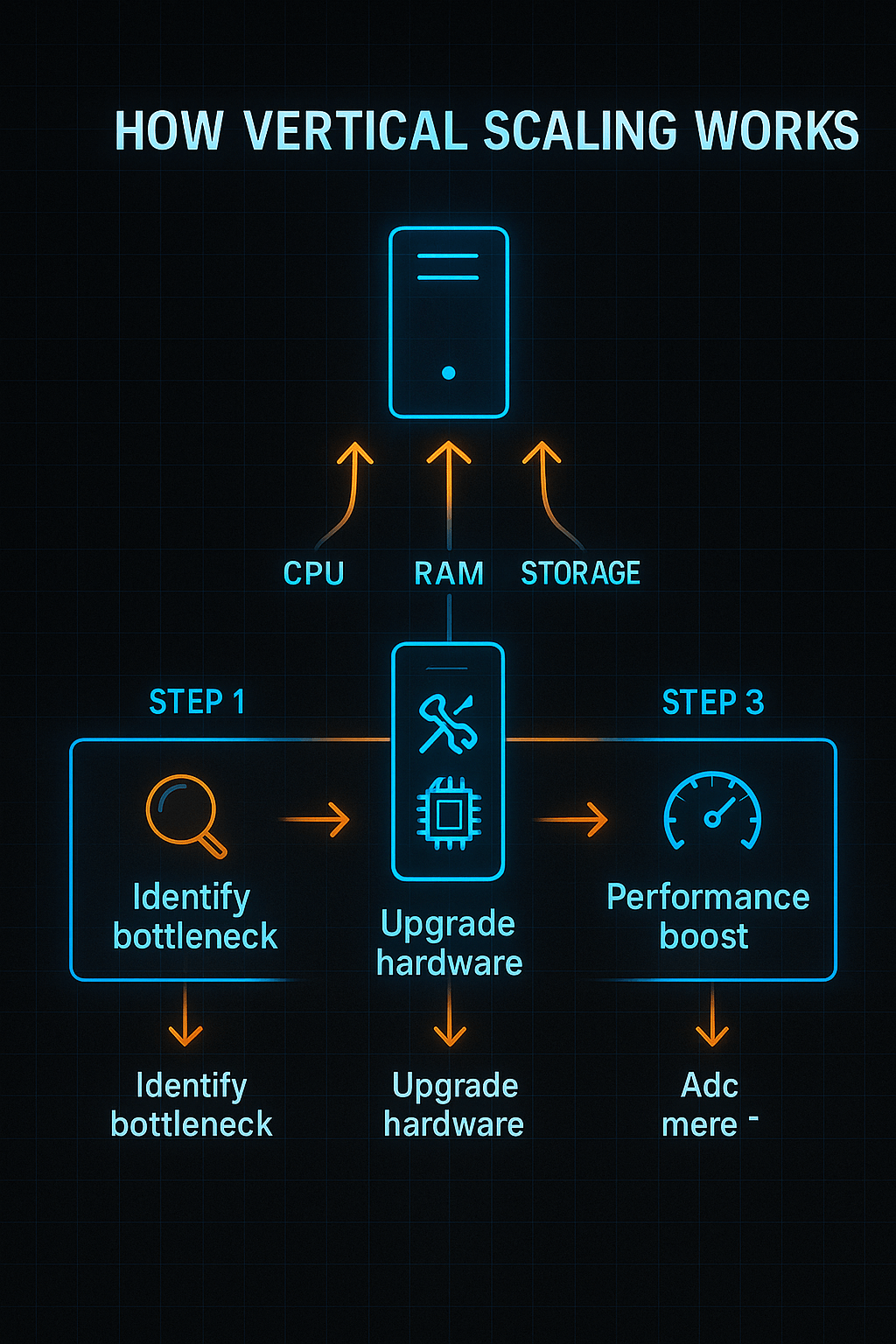
How vertical scaling works

Understanding Horizontal Scaling (Scaling Out)

Quick Summary: What is horizontal scaling?

Horizontal scaling adds more servers or nodes to distribute workload, improving resilience and concurrency but increasing complexity.

What Is Horizontal Scaling?

Horizontal scaling, or scaling out, is the process of adding more machines to handle workload distribution. Instead of upgrading a single server, you replicate services across multiple nodes. For AI applications, this might mean deploying multiple inference servers behind a load balancer. Requests are distributed so that no single server becomes a bottleneck.

When you scale out, you must manage tasks such as load balancing, sharding, data replication and service discovery, because your application components run across different machines. Horizontal scaling is fundamental to microservices architectures, container orchestration systems like Kubernetes and modern serverless platforms.

Benefits of Horizontal Scaling

  • Near‑unlimited scalability: You can add more servers as needed, enabling your system to handle unpredictable spikes. Cloud providers make it easy to spin up instances and integrate them into auto‑scaling groups.
  • Improved fault tolerance and redundancy: If one node fails, traffic is rerouted to others; the system continues running. This is crucial for AI services that must maintain high availability.
  • Zero or minimal downtime: New nodes can be added without shutting down the system. This property allows continuous scaling during events like product launches or viral campaigns.
  • Flexible cost management: You can pay only for what you use, enabling better alignment of compute costs with real demand; but be mindful of network and management overhead.

Challenges of Horizontal Scaling

  • Distributed system complexity: You must handle data consistency, concurrency, eventual consistency and network latency. Orchestrating distributed components requires expertise.
  • Higher initial complexity: Setting up load balancers, Kubernetes clusters or service meshes takes time. Observability tools and automation are essential to maintain reliability.
  • Network overhead: Inter‑node communication introduces latency; you need to optimise data transfer and caching strategies.
  • Cost management: Although horizontal scaling spreads costs, adding more servers can still be expensive if not managed properly.

Real‑World Example

Suppose you’ve deployed a computer vision API using Clarifai to classify millions of images per day. When a marketing campaign drives a sudden traffic spike, a single server cannot handle the load. Horizontal scaling involves deploying multiple inference servers behind a load balancer, allowing requests to be distributed across nodes. Clarifai’s compute orchestration can automatically start new containers when CPU or memory metrics exceed thresholds. When the load diminishes, unused nodes are gracefully removed, saving costs.

Clarifai Product Integration

Clarifai’s multi‑node deployment capabilities integrate seamlessly with horizontal scaling strategies. You can run multiple inference workers across different availability zones, behind a managed load balancer. Clarifai’s orchestration monitors metrics and spins up or down containers automatically, enabling efficient scaling out. Developers can also integrate Clarifai inference into a Kubernetes cluster; using Clarifai’s APIs, the service can be distributed across nodes for higher throughput.

Expert Insights

  • System architects highlight that horizontal scaling brings high availability: when one machine fails, the system remains operational.
  • However, engineers warn that distributed data consistency is a major challenge; you may need to adopt eventual consistency models or consensus protocols to maintain data correctness.
  • Clarifai advocates for a microservices approach, where AI inference is decoupled from business logic, making horizontal scaling easier to implement.

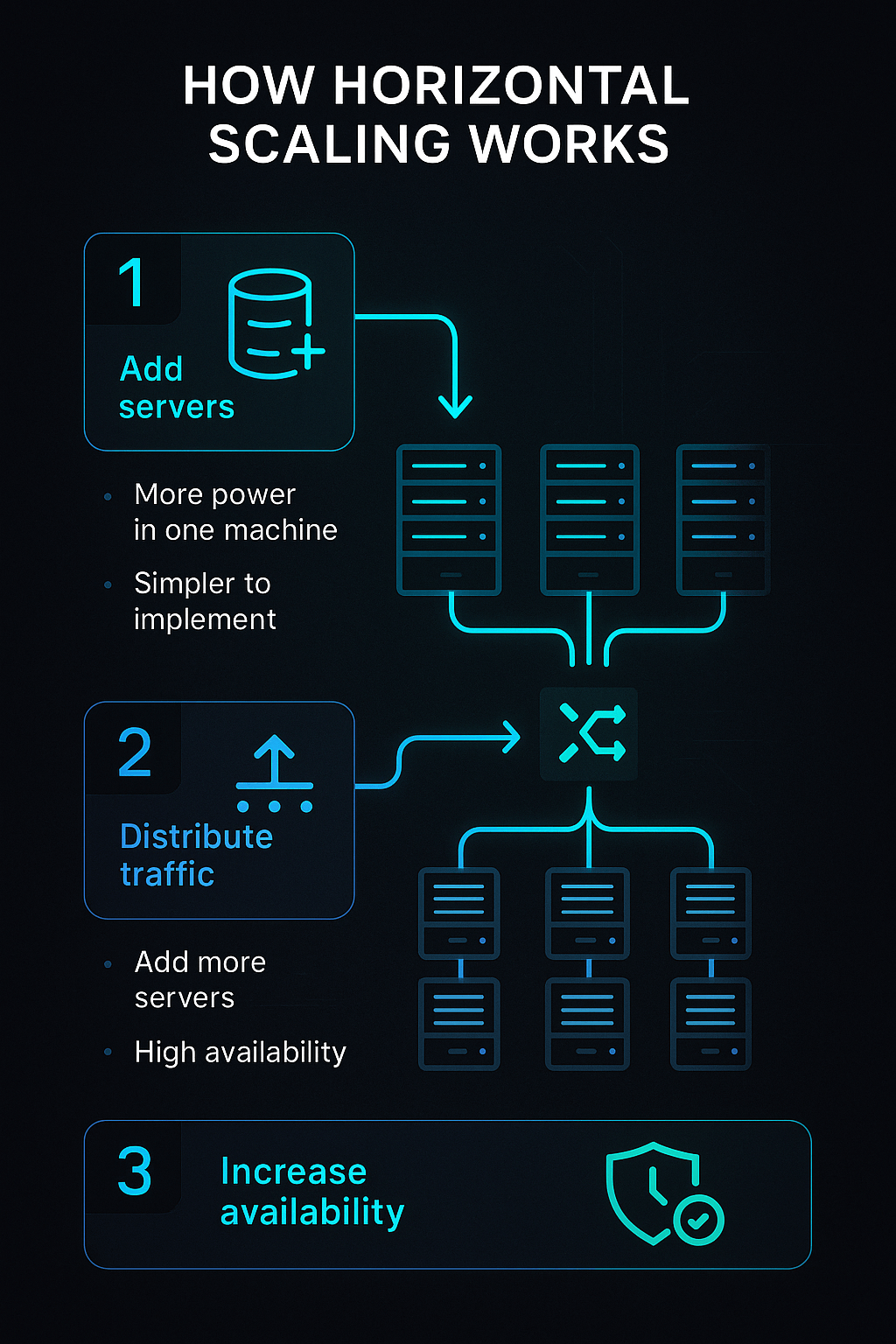
How Horizontal Scaling works

Comparing Horizontal vs Vertical Scaling: Pros, Cons & Key Differences

Quick Summary: How do horizontal and vertical scaling differ?

Vertical scaling increases resources of a single machine, while horizontal scaling distributes the workload across multiple machines. Vertical scaling is simpler but limited, whereas horizontal scaling offers better resilience and scalability at the cost of complexity.

Side‑by‑Side Comparison

To decide which approach suits your needs, consider the following key differences:

  • Resource Addition: Vertical scaling upgrades an existing node (CPU, memory); horizontal scaling adds more nodes.
  • Scalability: Vertical scaling is limited by hardware constraints; horizontal scaling offers near‑unlimited scalability by adding nodes.
  • Complexity: Vertical scaling is straightforward; horizontal scaling introduces distributed system complexities.
  • Fault Tolerance: Vertical scaling has a single point of failure; horizontal scaling improves resilience because failure of one node doesn’t bring down the system.
  • Cost Dynamics: Vertical scaling might be cheaper initially but becomes expensive at high tiers; horizontal scaling spreads costs but requires orchestration tools and adds network overhead.
  • Downtime: Vertical scaling often requires downtime for hardware upgrades; horizontal scaling typically allows on‑the‑fly addition or removal of nodes.

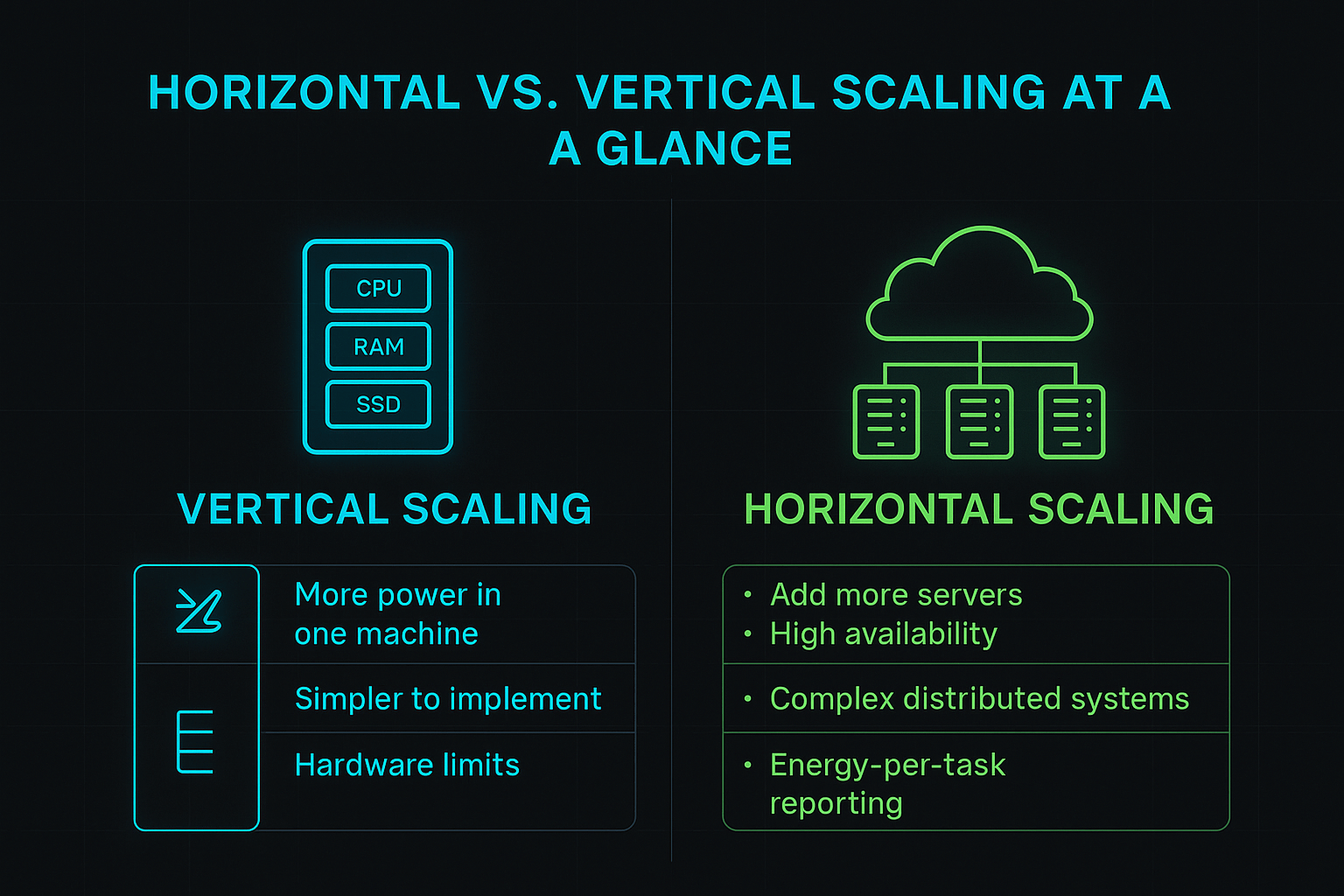
Horizontal vs vertical scaling

Pros and Cons

Strategy

Pros

Cons

Vertical scaling

Simplicity, minimal architectural changes, strong consistency, lower latency

Hardware limits, single point of failure, downtime during upgrades, escalating costs

Horizontal scaling

High availability, elasticity, zero downtime, near‑unlimited scalability

Complexity, network latency, consistency challenges, management overhead


Diagonal/Hybrid Scaling

Diagonal scaling combines both strategies. It involves scaling up a machine until it reaches an economically efficient threshold, then scaling out by adding more nodes. This approach allows you to balance cost and performance. For instance, you might scale up your database server to maximise performance and maintain strong consistency, then deploy additional stateless inference servers horizontally to handle surges in traffic. Companies like ridesharing or hospitality startups have adopted diagonal scaling, starting with vertical upgrades and then rolling out microservices to handle growth.

Clarifai Product Integration

Clarifai supports both vertical and horizontal scaling strategies, enabling hybrid scaling. You can choose larger inference instances (vertical) or spin up multiple smaller instances (horizontal) depending on your workload. Clarifai’s compute orchestration offers flexible scaling policies, including mixing on‑premise local runners with cloud‑based inference workers, enabling diagonal scaling.

Expert Insights

  • Technical leads recommend starting with vertical scaling to simplify deployment, then gradually introducing horizontal scaling as demand grows and complexity becomes manageable.
  • Hybrid scaling is particularly effective for AI services: you can maintain strong consistency for stateful components (e.g., model metadata) while horizontally scaling stateless inference endpoints.
  • Clarifai’s experience shows that customers who adopt hybrid scaling enjoy improved reliability and cost efficiency, especially when using Clarifai’s orchestration to automatically manage horizontal and vertical resources.

Decision Factors—How to Choose the Right Scaling Strategy

Quick Summary: How should you choose between horizontal and vertical scaling?

Choosing a scaling strategy depends on workload characteristics, growth projections, cost constraints, architectural complexity, and reliability requirements.

Key Decision Criteria

  1. Workload Type:
    • CPU‑bound or memory‑bound workloads (e.g., large model training) may benefit from vertical scaling initially, because more resources on a single machine reduce communication overhead.
    • Stateless or embarrassingly parallel workloads (e.g., image classification across many images) are suitable for horizontal scaling because requests can be distributed easily.
  2. Stateful vs. Stateless Components:
    • Stateful services (databases, model metadata stores) often require strong consistency, making vertical or hybrid scaling preferable.
    • Stateless services (API gateways, inference microservices) are ideal for horizontal scaling.
  3. Growth Projections:
    • If you anticipate exponential growth or unpredictable spikes, horizontal or diagonal scaling is essential.
    • For limited or steady growth, vertical scaling may suffice.
  4. Cost Considerations:
    • Compare capital expenditure (capex) for hardware upgrades vs. operational expenditure (opex) for running multiple instances.
    • Use cost optimisation tools to estimate the total cost of ownership over time.
  5. Availability Requirements:
    • Mission‑critical systems may require high redundancy and failover; horizontal scaling provides better fault tolerance.
    • Non‑critical prototypes may tolerate short downtime and can use vertical scaling for simplicity.
  6. Regulatory & Security Requirements:
    • Some industries require data to remain within specific geographies; vertical scaling on local servers may be necessary.
    • Horizontal scaling across regions must adhere to compliance frameworks.

Developing a Decision Framework

Create a decision matrix evaluating these factors for your application. Assign weights based on priorities—e.g., reliability may be more important than cost for a healthcare AI system. Clarifai’s customer success team often guides organisations through these decision matrices, factoring in model characteristics, user growth rates and regulatory constraints.

Clarifai Product Integration

Clarifai’s management console provides insights into model usage, latency and throughput, enabling data‑driven scaling decisions. You can start with vertical scaling by selecting larger compute plans, then monitor metrics to decide when to scale horizontally using auto‑scaling groups. Clarifai also offers consulting services to help design scaling strategies tailored to your workloads.

Expert Insights

  • Architects emphasise that a one‑size‑fits‑all strategy doesn’t exist; you should evaluate each component of your system separately and choose the appropriate scaling approach.
  • Industry analysts recommend factoring in environmental impact—scaling strategies that reduce energy consumption while meeting performance goals can yield long‑term cost savings and align with corporate sustainability initiatives.
  • Clarifai advises starting with thorough monitoring and profiling to understand bottlenecks before investing in scaling.

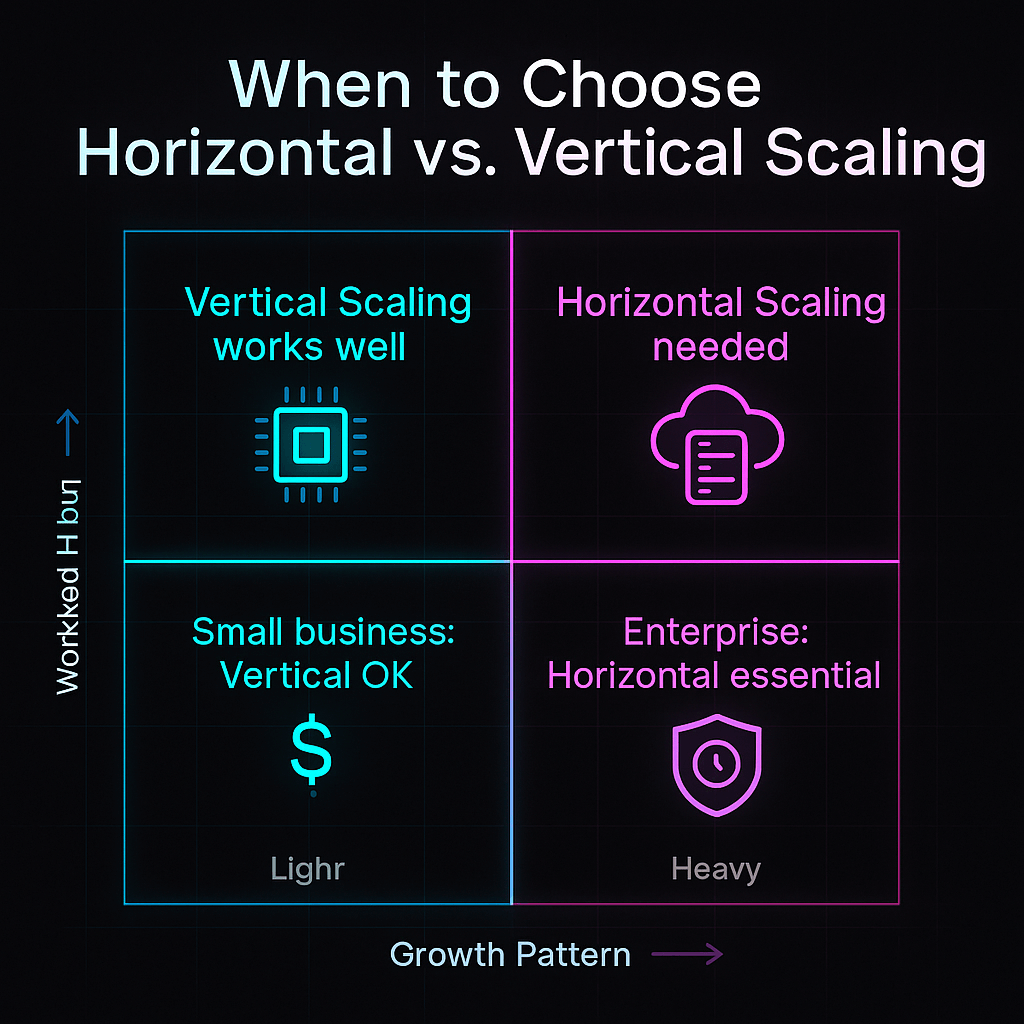
When to choose Horizontal vs vertical scaling

Implementation Strategies and Best Practices

Quick Summary: How do you implement vertical and horizontal scaling?

Vertical scaling requires upgrading hardware or selecting larger instances, while horizontal scaling entails deploying multiple nodes with load balancing and orchestration. Best practices include automation, monitoring and testing.

Implementing Vertical Scaling

  • Hardware Upgrades: Add CPU cores, memory modules or faster storage. For cloud instances, resize to a larger tier. Plan upgrades during maintenance windows to avoid downtime.
  • Software Optimization: Adjust operating system parameters and allocate memory more efficiently. Fine‑tune frameworks (e.g., use larger GPU memory pools) to exploit new resources.
  • Virtualisation and Hypervisors: Ensure hypervisors allocate resources properly; consider using Clarifai’s local runner on an upgraded server to maintain performance locally.

Implementing Horizontal Scaling

  • Load Balancing: Use reverse proxies or load balancers (e.g., NGINX, HAProxy) to distribute requests across multiple instances.
  • Container Orchestration: Adopt Kubernetes or Docker Swarm to automate deployment and scaling. Use the Horizontal Pod Autoscaler (HPA) to adjust the number of pods based on CPU/memory metrics.
  • Service Discovery: Use a service registry (e.g., Consul, etcd) or Kubernetes DNS to enable instances to locate each other.
  • Data Sharding & Replication: For databases, shard or partition data across nodes; implement replication and consensus protocols to maintain data integrity.
  • Monitoring & Observability: Use tools like Prometheus, Grafana or Clarifai’s built‑in dashboards to monitor metrics and trigger scaling events.
  • Automation & Infrastructure as Code: Manage infrastructure with Terraform or CloudFormation to ensure reproducibility and consistency.

Using Hybrid Approaches

Hybrid scaling often requires both vertical and horizontal techniques. For example, upgrade the base server (vertical) while also configuring auto‑scaling groups (horizontal). Kubernetes Vertical Pod Autoscaler (VPA) can recommend optimal resource sizes for pods, complementing HPA.

Creative Example

Imagine you’re deploying a text summarisation API. Initially, you run one server with 32 GB of RAM (vertical scaling). As traffic increases, you set up a Kubernetes cluster with an HPA to manage multiple replica pods. The HPA scales pods up when CPU usage exceeds 70 % and scales down when usage drops, ensuring cost efficiency. Meanwhile, a VPA monitors resource usage and adjusts pod memory requests to optimise utilisation. A cluster autoscaler adds or removes worker nodes, providing additional capacity when new pods need to run.

Clarifai Product Integration

  • Compute Orchestration: Clarifai’s platform supports containerised deployments, making it straightforward to integrate with Kubernetes or serverless frameworks. You can define auto‑scaling policies that spin up additional inference workers when metrics exceed thresholds, then spin them down when demand drops.
  • Model Inference API: Clarifai’s API endpoints can be placed behind load balancers to distribute inference requests across multiple replicas. Because Clarifai uses stateless RESTful endpoints, horizontal scaling is seamless.
  • Local Runners: If you prefer running models on‑premises, Clarifai’s local runners benefit from vertical scaling. You can upgrade your server and run multiple processes to handle more inference requests.

Expert Insights

  • DevOps engineers caution that improper scaling policies can lead to thrashing, where instances are created and terminated too frequently; they recommend setting cool‑down periods and stable thresholds.
  • Researchers highlight hybrid autoscaling frameworks using machine‑learning models: one study designed a proactive autoscaling mechanism combining Facebook Prophet and LSTM to predict workload and adjust pod counts. This approach outperformed traditional reactive scaling in accuracy and resource efficiency.
  • Clarifai’s SRE team emphasises the importance of observability—without metrics and logs, it’s impossible to fine‑tune scaling policies.

Performance, Latency & Throughput Considerations

Quick Summary: How do scaling strategies affect performance and latency?

Vertical scaling reduces network overhead and latency but is limited by single‑machine concurrency. Horizontal scaling increases throughput through parallelism, though it introduces inter‑node latency and complexity.

Latency Effects

Vertical scaling keeps data and computation on a single machine, allowing processes to communicate via memory or shared bus. This leads to lower latency for tasks such as real‑time inference or high‑frequency trading. However, even large machines can handle only so many concurrent requests.

Horizontal scaling distributes workloads across multiple nodes, which means requests may traverse a network switch or even cross availability zones. Network hops introduce latency; you must design your system to keep latency within acceptable bounds. Techniques like locality‑aware load balancing, caching and edge computing mitigate latency impact.

Throughput Effects

Horizontal scaling shines when increasing throughput. By distributing requests across many nodes, you can process thousands of concurrent requests. This is critical for AI inference workloads with unpredictable demand. In contrast, vertical scaling increases throughput only up to the machine’s capacity; once maxed out, adding more threads or processes yields diminishing returns due to CPU contention.

CAP Theorem and Consistency Models

Distributed systems face the CAP theorem, which posits that you can’t simultaneously guarantee consistency, availability and partition tolerance. Horizontal scaling often sacrifices strong consistency for eventual consistency. For AI applications that don’t require transactional consistency (e.g., recommendation engines), eventual consistency may be acceptable. Vertical scaling avoids this trade‑off but lacks redundancy.

Creative Example

Consider a real‑time translation service built on Clarifai. For lower latency in high‑stakes meetings, you might run a powerful GPU instance with lots of memory (vertical scaling). This instance processes translation requests quickly but can only handle a limited number of users. For an online conference with thousands of attendees, you horizontally scale by adding more translation servers; throughput increases massively, but you must manage session consistency and handle network delays.

Clarifai Product Integration

  • Clarifai offers globally distributed inference endpoints to reduce latency by bringing compute closer to users. Using Clarifai’s compute orchestration, you can route requests to the nearest node, balancing latency and throughput.
  • Clarifai’s API supports batch processing for high‑throughput scenarios, enabling efficient handling of large datasets across horizontally scaled clusters.

Expert Insights

  • Performance engineers note that vertical scaling is beneficial for latency‑sensitive workloads, such as fraud detection or autonomous vehicle perception, because data stays local.
  • Distributed systems experts stress the need for caching and data locality when scaling horizontally; otherwise, network overhead can negate throughput gains.
  • Clarifai’s performance team recommends combining vertical and horizontal scaling: allocate enough resources to individual nodes for baseline performance, then add nodes to handle peaks.

Cost Analysis & Total Cost of Ownership

Quick Summary: What are the cost implications of scaling?

Vertical scaling may have lower upfront cost but escalates rapidly at higher tiers; horizontal scaling distributes costs over many instances but requires orchestration and management overhead.

Cost Models

  1. Capital Expenditure (Capex): Vertical scaling often involves purchasing or leasing high‑end hardware. The cost per unit of performance increases as you approach top‑tier resources. For on‑premise deployments, capex can be significant because you must invest in servers, GPUs and cooling.
  2. Operational Expenditure (Opex): Horizontal scaling entails paying for many instances, usually on a pay‑as‑you‑go model. Opex can be easier to budget and track, but it increases with the number of nodes and their usage.
  3. Hidden Costs: Consider downtime (maintenance for vertical scaling), energy consumption (data centres consume massive power), licensing fees for software and added complexity (DevOps and SRE staffing).

Cost Dynamics

Vertical scaling may appear cheaper initially, especially when starting with small workloads. However, as you upgrade to higher‑capacity hardware, cost rises steeply. For example, upgrading from a 16 GB GPU to a 32 GB GPU may double or triple the price. Horizontal scaling spreads cost across multiple lower‑cost machines, which can be turned off when not needed, making it more cost effective at scale. However, orchestration and network costs add overhead.

Creative Example

Assume you need to handle 100,000 image classifications per minute. You can choose a vertical strategy by purchasing a top‑of‑the‑line server for $50,000 capable of handling the load. Alternatively, horizontal scaling involves leasing twenty smaller servers at $500 per month each. The second option costs $10,000 per month but allows you to shut down servers during off‑peak hours, potentially saving money. Hybrid scaling might involve buying a mid‑tier server and leasing additional capacity when needed.

Clarifai Product Integration

  • Clarifai offers flexible pricing, allowing you to pay only for the compute you use. Starting with a smaller plan (vertical) and scaling horizontally with additional inference workers can balance cost and performance.
  • Clarifai’s compute orchestration helps optimise costs by automatically turning off unused containers and scaling down resources during low demand periods.

Expert Insights

  • Financial analysts suggest modelling costs over the expected lifetime of the service, including maintenance, energy and staffing. They warn against focusing only on hardware costs.
  • Sustainability experts emphasise that the environmental cost of scaling should be factored into TCO; investing in green data centres and energy‑efficient hardware can reduce long‑term expenses.
  • Clarifai’s customer success team encourages using cost monitoring tools to track usage and set budgets, preventing runaway expenses.

Hybrid/Diagonal Scaling Strategies

Quick Summary: What is hybrid or diagonal scaling?

Hybrid scaling combines vertical and horizontal strategies, scaling up until the machine is cost efficient, then scaling out with additional nodes.

What Is Hybrid Scaling?

Hybrid (diagonal) scaling acknowledges that neither vertical nor horizontal scaling alone can accommodate all workloads efficiently. It involves scaling up a machine to its cost‑effective limit and then scaling out when additional capacity is needed. For example, you might upgrade your GPU server until the cost of further upgrades outweighs benefits, then deploy additional servers to handle more requests.

Why Choose Hybrid Scaling?

  • Cost Optimisation: Hybrid scaling helps balance capex and opex. You use vertical scaling to get the most out of your hardware, then add nodes horizontally when demand exceeds that capacity.
  • Performance & Flexibility: You maintain low latency for key components through vertical scaling while scaling out stateless services to handle peaks.
  • Risk Mitigation: Hybrid scaling reduces the single point of failure by adding redundancy while still benefiting from strong consistency on scaled‑up nodes.

Real‑World Examples

Start‑ups often begin with a vertically scaled monolith; as traffic grows, they break services into microservices and scale out horizontally. Transportation and hospitality platforms used this approach, scaling up early on and gradually adopting microservices and auto‑scaling groups.

Clarifai Product Integration

  • Clarifai’s platform allows you to run models on‑premises or in the cloud, making hybrid scaling straightforward. You can vertically scale an on‑premise server for sensitive data and horizontally scale cloud inference for public traffic.
  • Clarifai’s compute orchestration can manage both types of scaling; policies can prioritise local resources and burst to the cloud when demand surges.

Expert Insights

  • Architects argue that hybrid scaling is the most practical option for many modern workloads, as it provides a balance of performance, cost and reliability.
  • Research on predictive autoscaling suggests integrating hybrid models (e.g., Prophet + LSTM) with vertical scaling to further optimise resource allocation.
  • Clarifai’s engineers highlight that hybrid scaling requires careful coordination between components; they recommend using orchestration tools to manage failover and ensure consistent routing of requests.

Use Cases & Industry Examples

Quick Summary: Where are scaling strategies applied in the real world?

Scaling strategies vary by industry and workload; AI‑powered services in e‑commerce, media, finance, IoT and start‑ups each adopt different scaling approaches based on their specific needs.

E‑Commerce & Retail

Online marketplaces often experience unpredictable spikes during sales events. They horizontally scale stateless web services (product catalogues, recommendation engines) to handle surges. Databases may be scaled vertically to maintain transaction integrity. Clarifai’s visual recognition models can be deployed using hybrid scaling—vertical scaling ensures stable product image classification while horizontal scaling handles increased search queries.

Media & Streaming

Video streaming platforms require massive throughput. They employ horizontal scaling across distributed servers for streaming and content delivery networks (CDNs). Metadata stores and user preference engines may scale vertically to maintain consistency. Clarifai’s video analysis models can run on distributed clusters, analysing frames in parallel while metadata is stored on scaled‑up servers.

Financial Services

Banks and trading platforms prioritise consistency and reliability. They often vertically scale core transaction systems to guarantee ACID properties. However, front‑end risk analytics and fraud detection systems scale horizontally to process large volumes of transactions concurrently. Clarifai’s anomaly detection models are used in horizontal clusters to scan for fraudulent patterns in real time.

IoT & Edge Computing

Edge devices collect data and perform preliminary processing vertically due to hardware constraints. Cloud back‑ends scale horizontally to aggregate and analyse data. Clarifai’s edge runners enable on‑device inference, while data is sent to cloud clusters for further analysis. Hybrid scaling ensures immediate response at the edge while leveraging cloud capacity for deeper insights.

Start‑Ups & SMBs

Small companies typically start with vertical scaling because it’s simple and cost effective. As they grow, they adopt horizontal scaling for better resilience. Clarifai’s flexible pricing and compute orchestration allow start‑ups to begin small and scale easily when needed.

Case Studies

  • An e‑commerce site adopted auto‑scaling groups to handle Black Friday traffic, using horizontal scaling for web servers and vertical scaling for the order management database.
  • A financial institution improved resilience by migrating its risk analysis engine to a horizontally scaled microservices architecture while retaining a vertically scaled core banking system.
  • A research lab used Clarifai’s models for wildlife monitoring, deploying local runners at remote sites (vertical scaling) and sending aggregated data to a central cloud cluster for analysis (horizontal scaling).

Expert Insights

  • Industry experts note that selecting the appropriate scaling strategy depends heavily on domain requirements; there is no universal solution.
  • Clarifai’s customer success team has witnessed improved user experiences and reduced latency when clients adopt hybrid scaling for AI inference workloads.

Emerging Trends & Future of Scaling

Quick Summary: What trends are shaping the future of scaling?

Kubernetes autoscaling, AI‑driven predictive autoscaling, serverless computing, edge computing and sustainability initiatives are reshaping how organisations scale their systems.

Kubernetes Auto‑Scaling

Kubernetes offers built‑in auto‑scaling mechanisms: the Horizontal Pod Autoscaler (HPA) adjusts the number of pods based on CPU or memory usage, while the Vertical Pod Autoscaler (VPA) dynamically resizes pod resources. A cluster autoscaler adds or removes worker nodes. These tools enable fine‑grained control over resource allocation, improving efficiency and reliability.

AI‑Driven Predictive Autoscaling

Research shows that combining statistical models like Prophet with neural networks like LSTM can predict workload patterns and proactively scale resources. Predictive autoscaling aims to allocate capacity before spikes occur, reducing latency and avoiding overprovisioning. Machine‑learning‑driven autoscaling will likely become more prevalent as AI systems grow in complexity.

Serverless & Function‑as‑a‑Service (FaaS)

Serverless platforms automatically scale functions based on demand, freeing developers from infrastructure management. They scale horizontally behind the scenes, enabling cost‑efficient handling of intermittent workloads. AWS introduced predictive scaling for container services, harnessing machine learning to anticipate demand and adjust scaling policies accordingly (as reported in industry news). Clarifai’s APIs can be integrated into serverless workflows to create event‑driven AI applications.

Edge Computing & Cloud‑Edge Hybrid

Edge computing brings computation closer to the user, reducing latency and bandwidth consumption. Vertical scaling on edge devices (e.g., upgrading memory or storage) can improve real‑time inference, while horizontal scaling in the cloud aggregates and analyses data streams. Clarifai’s edge solutions allow models to run on local hardware; combined with cloud resources, this hybrid approach ensures both fast response and deep analysis.

Sustainability and Green Computing

Hyperscale data centres consume enormous energy, with the combination of vertical and horizontal scaling increasing utilisation. Future scaling strategies must integrate energy‑efficient hardware, carbon‑aware scheduling and renewable energy sources to reduce environmental impact. AI‑powered resource management can optimise workloads to run on servers with lower carbon footprints.

Clarifai Product Integration

  • Clarifai is exploring AI‑driven predictive autoscaling, leveraging workload analytics to anticipate demand and adjust inference capacity in real time.
  • Clarifai’s support for Kubernetes makes it easy to adopt HPA and VPA; models can automatically scale based on CPU/GPU usage.
  • Clarifai is committed to sustainability, partnering with green cloud providers and offering efficient inference options to reduce power usage.

Expert Insights

  • Industry analysts believe that intelligent autoscaling will become the norm, where machine learning models predict demand, allocate resources and consider carbon footprint simultaneously.
  • Edge computing advocates argue that local processing will increase, necessitating vertical scaling on devices and horizontal scaling in the cloud.
  • Clarifai’s research team is working on dynamic model compression and architecture search, enabling models to scale down gracefully for edge deployment while maintaining accuracy.

Emerging Trends in Scaling

Step‑by‑Step Guide for Selecting and Implementing a Scaling Strategy

Quick Summary: How do you pick and implement a scaling strategy?

Follow a structured process: assess workloads, choose the right scaling pattern for each component, implement scaling mechanisms, monitor performance and adjust policies.

Step 1: Assess Workloads & Bottlenecks

  • Profile your application: Use monitoring tools to understand CPU, memory, I/O and network usage. Identify hot spots and bottlenecks.
  • Classify components: Determine which services are stateful or stateless, and whether they are CPU‑bound, memory‑bound or I/O‑bound.

Step 2: Choose Scaling Patterns for Each Component

  • Stateful services (e.g., databases, model registries) may benefit from vertical scaling or hybrid scaling.
  • Stateless services (e.g., inference APIs, feature extraction) are ideal for horizontal scaling.
  • Consider diagonal scaling—scale vertically until cost‑efficient, then scale horizontally.

Step 3: Implement Scaling Mechanisms

  • Vertical Scaling: Resize servers; upgrade hardware; adjust memory and CPU allocations.
  • Horizontal Scaling: Deploy load balancers, auto‑scaling groups, Kubernetes HPA/VPA; use service discovery.
  • Hybrid Scaling: Combine both; use VPA for resource optimisation; configure cluster autoscalers.

Step 4: Test & Validate

  • Perform load testing to simulate traffic spikes and measure latency, throughput and cost. Adjust scaling thresholds and rules.
  • Conduct chaos testing to ensure the system tolerates node failures and network partitions.

Step 5: Monitor & Optimise

  • Implement observability with metrics, logs and traces to monitor resource utilisation and costs.
  • Refine scaling policies based on real‑world usage; adjust thresholds, cool‑down periods and predictive models.
  • Review costs and optimise by turning off unused instances or resizing underutilised servers.

Step 6: Plan for Growth & Sustainability

  • Evaluate future workloads and plan capacity accordingly. Consider emerging trends like predictive autoscaling, serverless and edge computing.
  • Incorporate sustainability goals, selecting green data centres and energy‑efficient hardware.

Clarifai Product Integration

  • Clarifai offers detailed usage dashboards to monitor API calls, latency and throughput; these metrics feed into scaling decisions.
  • Clarifai’s orchestration tools allow you to configure auto‑scaling policies directly from the dashboard or via API; you can define thresholds, replic count and concurrency limits.
  • Clarifai’s support team can assist in designing and implementing custom scaling strategies tailored to your models.

Expert Insights

  • DevOps specialists emphasise automation: manual scaling doesn’t scale with the business; infrastructure as code and automated policies are essential.
  • Researchers stress the importance of continuous testing and monitoring; scaling strategies should evolve as workloads change.
  • Clarifai engineers remind users to consider data governance and compliance when scaling across regions and clouds.

Common Pitfalls and How to Avoid Them

Quick Summary: What common mistakes do teams make when scaling?

Common pitfalls include over‑provisioning or under‑provisioning resources, neglecting failure modes, ignoring data consistency, missing observability and disregarding energy consumption.

Over‑Scaling and Under‑Scaling

Over‑scaling leads to wasteful spending, especially if auto‑scaling policies are too aggressive. Under‑scaling causes performance degradation and potential outages. Avoid both by setting realistic thresholds, cool‑down periods and predictive rules.

Ignoring Single Points of Failure

Teams sometimes scale up a single server without redundancy. If that server fails, the entire service goes down, causing downtime. Always design for failover and redundancy.

Complexity Debt in Horizontal Scaling

Deploying multiple instances without proper automation leads to configuration drift, where different nodes run slightly different software versions or configurations. Use orchestration and infrastructure as code to maintain consistency.

Data Consistency Challenges

Distributed databases may suffer from replication lag and eventual consistency. Design your application to tolerate eventual consistency, or use hybrid scaling for stateful components.

Security & Compliance Risks

Scaling introduces new attack surfaces, such as poorly secured load balancers or misconfigured network policies. Apply zero‑trust principles and continuous compliance checks.

Neglecting Sustainability

Failing to consider the environmental impact of scaling increases energy consumption and carbon emissions. Choose energy‑efficient hardware and schedule non‑urgent tasks during low‑carbon periods.

Clarifai Product Integration

  • Clarifai’s platform provides best practices for securing AI endpoints, including API key management and encryption.
  • Clarifai’s monitoring tools help detect over‑scaling or under‑scaling, enabling you to adjust policies before costs spiral.

Expert Insights

  • Incident response teams emphasise the importance of chaos engineering—deliberately injecting failures to discover weaknesses in scaling architecture.
  • Security experts recommend continuous vulnerability scanning across all scaled resources.
  • Clarifai encourages a proactive culture of observability and sustainability, embedding monitoring and green initiatives into scaling plans.

Conclusion & Recommendations

Quick Summary: Which scaling strategy should you choose?

There is no one‑size‑fits‑all answer—evaluate your application’s requirements and design accordingly. Start small with vertical scaling, plan for horizontal scaling, embrace hybrid strategies and adopt predictive autoscaling. Sustainability should be a core consideration.

Key Takeaways

  • Vertical scaling is simple and effective for early‑stage or monolithic workloads, but it has hardware limits and introduces single points of failure.
  • Horizontal scaling delivers elasticity and resilience, though it requires distributed systems expertise and careful orchestration.
  • Hybrid (diagonal) scaling offers a balanced approach, leveraging the benefits of both strategies.
  • Emerging trends like predictive autoscaling, serverless computing and edge computing will shape the future of scalability, making automation and AI integral to infrastructure management.
  • Clarifai provides the tools and expertise to help you scale your AI workloads efficiently, whether on‑premise, in the cloud or across both.

Final Recommendations

  1. Start with vertical scaling for prototypes or small workloads, using Clarifai’s local runners or larger instance plans.
  2. Implement horizontal scaling when traffic increases, deploying multiple inference workers and load balancers; use Kubernetes HPA and Clarifai’s compute orchestration.
  3. Adopt hybrid scaling to balance cost, performance and reliability; use VPA to optimise pod sizes and cluster autoscaling to manage nodes.
  4. Monitor and optimise constantly, using Clarifai’s dashboards and third‑party observability tools. Adjust scaling policies as your workloads evolve.
  5. Plan for sustainability, selecting green cloud options and energy‑efficient hardware; incorporate carbon‑aware scheduling.

If you are unsure which approach to choose, reach out to Clarifai’s support team. We help you analyse workloads, design scaling architectures and implement auto‑scaling policies. With the right strategy, your AI applications will remain responsive, cost efficient and environmentally responsible.

Frequently Asked Questions (FAQ)

What is the main difference between vertical and horizontal scaling?

Vertical scaling adds resources (CPU, memory, storage) to a single machine, while horizontal scaling adds more machines to distribute workload, providing greater redundancy and scalability.

When should I choose vertical scaling?

Choose vertical scaling for small workloads, prototypes or legacy applications that require strong consistency and are easier to manage on a single server. It’s also suitable for stateful services and on‑premise deployments with compliance constraints.

When should I choose horizontal scaling?

Horizontal scaling is ideal for applications with unpredictable or rapidly growing demand. It offers elasticity and fault tolerance, making it perfect for stateless services, microservices architectures and AI inference workloads.

What is diagonal scaling?

Diagonal (hybrid) scaling combines vertical and horizontal strategies. You scale up a machine until it reaches a cost‑efficient threshold and then scale out by adding nodes. This approach balances performance, cost and reliability.

How does Kubernetes handle scaling?

Kubernetes provides the Horizontal Pod Autoscaler (HPA) for scaling the number of pods, the Vertical Pod Autoscaler (VPA) for adjusting resource requests, and a cluster autoscaler for adding or removing nodes. Together, these tools enable dynamic, fine‑grained scaling of containerised workloads.

What is predictive autoscaling?

Predictive autoscaling uses machine‑learning models to forecast workload demand and allocate resources proactively. This reduces latency, prevents over‑provisioning and improves cost efficiency.

How can Clarifai help with scaling?

Clarifai’s compute orchestration and model inference APIs support both vertical and horizontal scaling. Users can choose larger inference instances, run multiple inference workers across regions, or combine local runners with cloud services. Clarifai also offers consulting and support for designing scalable, sustainable AI deployments.

Why should I care about sustainability in scaling?

Hyperscale data centres consume substantial energy, and poor scaling strategies can exacerbate this. Choosing energy‑efficient hardware and leveraging predictive autoscaling reduces energy usage and carbon emissions, aligning with corporate sustainability goals.

What’s the best way to start implementing scaling?

Begin by monitoring your existing workloads to identify bottlenecks. Create a decision matrix based on workload characteristics, growth projections and cost constraints. Start with vertical scaling for immediate needs, then adopt horizontal or hybrid scaling as traffic increases. Use automation and observability tools, and consult experts like Clarifai’s engineering team for guidance.


How to Reframe Your AI Adoption for Real Results with Pam Boiros [MAICON 2025 Speaker Series]


MAICON brings together top visionaries and experts in the field of AI during a three-day conference packed with actionable sessions and networking events—all to position you as the change agent your organization (and career) needs. In this ongoing speaker series, we’re featuring these extraordinary leaders, with forward-looking predictions, actionable tips you can use today, and a preview of their MAICON 2025 sessions. Continue reading “How to Reframe Your AI Adoption for Real Results with Pam Boiros [MAICON 2025 Speaker Series]”

Top Data Orchestration Tools: Comprehensive Guide & Trends


Quick Summary: Why is data orchestration so important in 2025?

Data orchestration brings together different operations like data extraction, transformation, storage, and AI inference into one process. This makes sure that everything is consistent, scalable, and compliant. It’s not just about scheduling; it’s what holds cloud resources and services together across environments.

What Is Data Orchestration?

Data orchestration is the coordinated administration and automation of data pipelines and services across cloud and on-prem systems. Orchestration is different from simple automation since it puts together all the processes into end-to-end, policy-driven workflows. A data orchestrator makes ensuring that actions run in the right order, whether they be batch ETL jobs, streaming processes, or AI inference calls. It also manages dependencies and resolves failures. For instance, a pipeline might automatically get data from IoT sensors, change it, run a Clarifai model to recognize images, and put the findings onto a dashboard.

Data orchestration is different from ETL since it doesn’t care about the underlying computing or storage. It can coordinate numerous ETL activities, machine learning pipelines, real-time analytics, or container operations. This kind of adaptability is very important for modern AI tasks that use structured data, computer vision, and natural language processing.

Why It’s Important in 2025

Orchestrators are very important now since there is so much data and it needs to be analyzed in real time. By 2025, 75% of business data will be created and processed at edgemontecarlodata.com, which means that centralized batch processing won’t work anymore. Companies can find 60 to 75 percent of their underutilized data through orchestration and better pipelinesresearch.aimultiple.com, which shows how useful it is. Orchestration also cuts down on mistakes made by people and speeds up deployment cyclesdatacamp.com, making sure that operations are always the same and reliable in complicated settings.

Expert Advice

  • Marcin Najder says that “the future of data engineering is event-driven and orchestrated.” He stresses that pipelines must be able to adapt to events and grow as needed.
  • Andrew Ng is a big supporter of data-centric AI. He wants teams to spend more time refining data pipelines than changing models, which is what orchestration is all about.
  • Clarifai engineers say that combining compute orchestration and model inference cuts down on latency and makes MLOps operations easier, which lets AI models be deployed quickly and on a large scale.
  • According to industry experts, orchestration solutions not only make workflows easier, but they also ensure compliance by enforcing rules and keeping track of every step.

Example:

Think about a smart city concept with thousands of cameras. Data orchestrators gather video streams, utilize Clarifai’s image recognition API to find traffic accidents, and send out alerts right away. If there were no orchestration, developers would have to write scripts for each step by hand, which would take longer and give different outcomes.
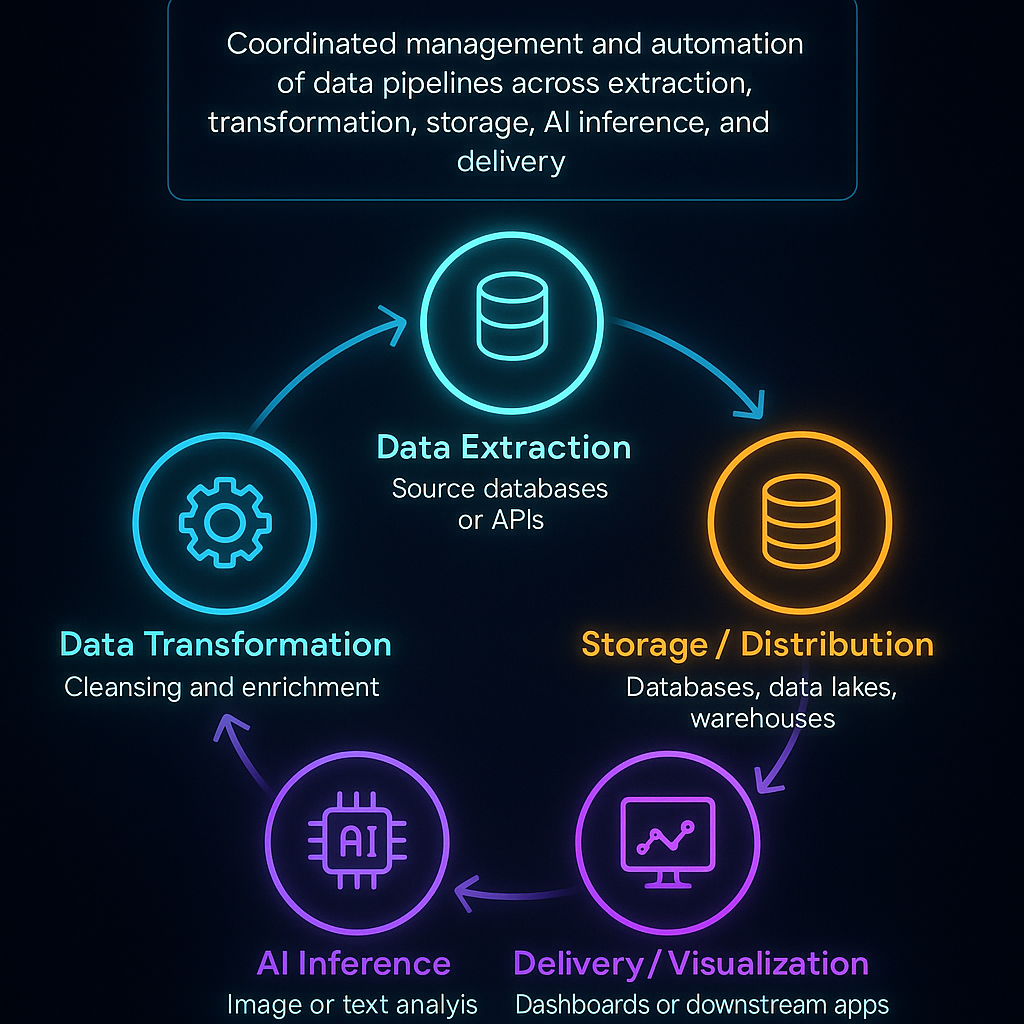
What is data orchestration


How Do You Pick a Data Orchestration Tool?

In short, what things should you think about while picking a tool?

When choosing the correct orchestrator, you need to think about how scalable, easy to use, easy to integrate, provide real-time support, cost, security, and vendor reliability, and make sure it fits with your team’s skills and workload.

Important Things to Look at

  • Performance and Scalability
    A good orchestrator must be able to handle more data and workloads at the same time without slowing down. Batch tasks, streaming pipelines, and ML workflows should be able to grow both horizontally and vertically. Clarifai’s compute orchestrator and other tools operate on Kubernetes and use autoscaling for workloads that require a lot of AI.
  • How Easy It Is to Use and How Developers Feel About It
    Some tools are code-first, like Python DAGs, while others provide low-code or no-code interfaces with workflow designers that let you drag and drop. Pick what works best for your team: data engineers could like coding better, while analysts might like visual builders more. Clarifai’s platform has an easy-to-use UI and API access, which lets users of all ability levels orchestrate models.
  • Connecting and Integrating
    Check out the supported connectors for databases, message queues, APIs, storage systems, and AI services. An orchestrator should be able to easily work with Clarifai for model inference and with Snowflake, BigQuery, Apache Kafka, and Kubernetes. For flexibilityestuary.dev, plugin ecosystems or support for bespoke operators are a must.
  • Real-Time and Event-Driven Features
    As edge computing and streaming datamontecarlodata.com become more popular, orchestrators need to be able to handle event-driven triggers, streaming ETL, and execution with low latency. Look for things like sensors or hooks that respond to file arrivals, Kafka messages, or API calls.
  • Price and Licensing
    You can use open-source technologies for free, but you have to host and maintain them yourself. Enterprise platforms offer help, but they usually charge based on how many people use them or how much they cost. Think about the overall cost of ownership, which includes training, infrastructure, and the possibility of being locked in with a vendor.
  • Safety and Compliance
    Data governance is a must—make sure your technologies support encryption, role-based access, audit logging, and following the rules set by GDPR and other laws. Clarifai’s platform offers RBAC, secure inference endpoints, and deployment on-premises for applications that need extra security.
  • Support from the Vendor and the Community
    Think about how easy it is to get help, read documentation, get training, and join a lively community. A strong open-source community shares plugins and best practices, while enterprise suppliers offer SLAs and specialized support.

Expert Advice

  • Ben Lorica says that you should test orchestrators by running a proof of concept that mirrors your real workload. Synthetic benchmarks sometimes don’t show how well something works in the real world.
  • Clarifai’s CTO said that AI model inference should be a top priority for orchestrators in the AI era. This will make it easier for data and ML teams to work together.
  • Analysts say that multi-cloud orchestration adds problems such different APIs and pricingdatacamp.com. To avoid these problems, platforms should be agnostic and have strong abstractions.

Example 

Imagine a marketing team that wants to set up a daily sentiment analysis pipeline. They need to get tweets, break them down, use Clarifai’s text analysis model to classify the sentiment, and then send the results to a dashboard. Choosing a platform that has built-in API connectors and a simple scheduling UI lets people who aren’t tech-savvy run this process.
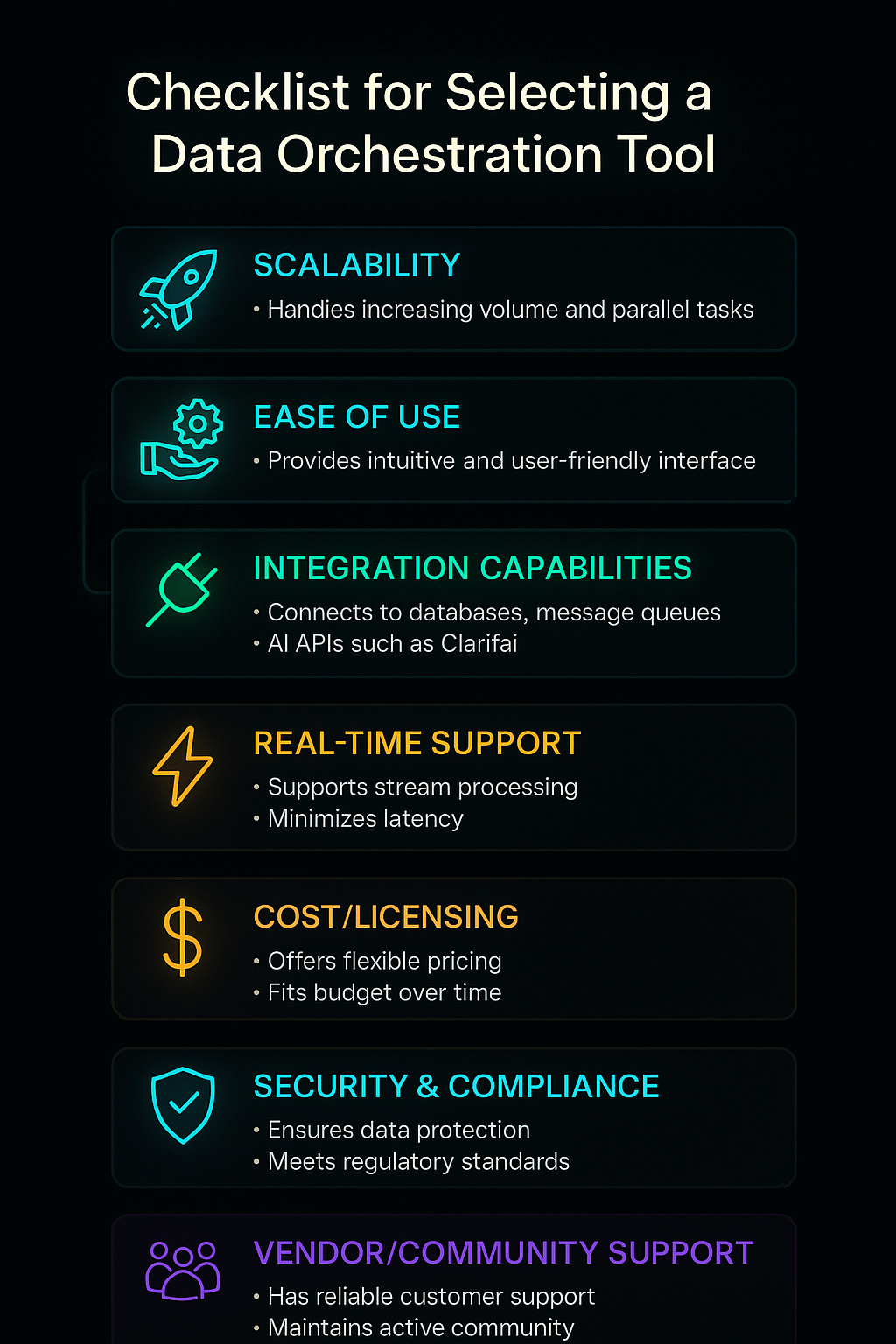
Checklist for selecting orchestration tool


What Are the Best Open-Source Data Orchestration Platforms in 2025?

In short, what open-source tools should you be aware of?

Apache Airflow is still the most popular open-source orchestrator, but new ones like Dagster, Prefect, Kestra, Flyte, and Mage have unique capabilities like type-checked pipelines and declarative workflows that provide teams more options.

The Standard That Has Been Around for a While: Apache Airflow

Airbnb built Apache Airflow, which rapidly became the open-source platform for creating, scheduling, and monitoring data workflowsestuary.dev. Airflow employs Python code to define DAGs, which gives engineers complete control over how tasks work. It has a built-in scheduling system, retry logic, a lot of plugins, and a web UI for watching and fixing pipelines at pipelinesestuary.dev. Airflow is flexible since its ecosystem is open to new operators for Snowflake, Databricks, Spark, and Clarifai’s API.

  • Pros: a big community, configurable Python DAGs, a lot of connectors, and good scheduling.
  • Disadvantages: Setting up and scaling might be hard; the web UI may seem old; there is no native type system.

Dagster: Aware of Types and Driven by Assets

Dagster adds asset-oriented orchestration and type-checked pipelines, which make sure that the data is valid at every step. It can handle a lot of metadata, split pipelines, and schedule events based on when they happen. Dagster’s “Software-Defined Assets” method treats data outputs like first-class citizens, which makes it possible to trace lineage and versions.

  • Pros: Good experience for developers, type safety, asset lineage, and built-in testing.
  • Disadvantages: The community is smaller than Airflow’s, the features are still being worked on, and you need to know Python.

Prefect: Hybrid Execution and Cloud Management

With hybrid execution, flows can operate locally, on Kubernetes, or through Prefect Cloud. The Prefect Cloud UI lets you monitor tasks, try them again, and set up schedules. The Python API is easy to use. The latest version of Prefect, 2.0, has low-code features and better concurrency.

  • Pros: Can be deployed in several ways, has a solid UI, is easy to use, and can handle errors.
  • Disadvantages: You need a license for Prefect Cloud, and the community is smaller than Airflow’s.

Kestra: Serverless and Declarative Orchestration

Kestra uses YAML to describe processes, which is a way of thinking about Everything as Code. It lets you use complicated branching, dynamic tasks, and event triggers. Kestra is great for streaming data because it is built on top of Pulsar and Kafka. It also scales like a serverless service.

Flyte: Managing ML Workflows

Flyte is all about machine learning and data science pipelines. It has great support for containers, Kubernetes, and versioning. It keeps track of lineage and artifacts, which makes it perfect for MLOps.

Mage and Argo: New Players on the Scene

Mage offers a no-code interface and Python notebooks for making pipelines, which helps analysts and data developers work together. Many ML platforms employ Argo Workflows, which runs on Kubernetes and works with Kubeflow.

Picking from Open-Source Choices

Choose Airflow since it is widely used and has many plugins. Pick Dagster or Prefect if you need superior type safety or hybrid execution. Choose Kestra for streaming compatibility and declarative processes. Mage and Argo are good for low-code or Kubernetes-native needs, whereas Flyte is good for ML pipelines.

Expert Advice

  • According to Ry Walker, the founder of Airflow, the company’s future depends on making advances in little steps and connecting with data lineage, not on coming up with new ideas.
  • Nick Schrock, the founder of Dagster, says that data should be treated like assets with lineage and versioning. This makes pipelines less likely to have issues.
  • Chris White, the CEO of Prefect, supports “negative engineering,” which means that orchestrators take care of faults and retries so that engineers may focus on the fundamental logic.
  • The data platform team at Clarifai recommends using Airflow operators to call Clarifai models, which will make sure that inference is the same across all pipelines.

Example 

Think of a research center that looks at satellite photographs. They use Apache Airflow to manage the workflow: they download the images, run Clarifai’s vision model to find deforestation, store the results in a geographic database, and send alerts to environmental agencies. Dagster could add type safety, which would make sure that the input photos have the right resolution before inference.


Which Enterprise Data Orchestration Platforms Should You Look Into?

Quick Summary: Which business tools are the best?

Enterprise systems like ActiveBatch, RunMyJobs, Stonebranch, and Clarifai’s compute orchestrator offer drag-and-drop interfaces, SLA guarantees, and advanced integrations. These features make them desirable to businesses that need help and the opportunity to grow.

ActiveBatch: A Workflow Designer with Few Lines of Code

ActiveBatch blends workload automation and data orchestration to assist ETL procedures in both on-premises and cloud environments. It comes with connectors that are already made for Informatica, SAP, IBM DataStage, Hadoop, and other programs. Its drag-and-drop interface lets people who aren’t developers construct complicated workflows, and sophisticated users can write scripts in PowerShell or Python.

  • Pros: UI with low code, a lot of connectors, SLA monitoring, and connectivity with old systems.
  • Cons: It might be hard to install and take a lot of resources; licensing fees can be costly.

Redwood’s RunMyJobs: SaaS Orchestration

RunMyJobs is a SaaS application that makes IT work easier by managing data transfers between several platforms. It has interfaces to SAP Datasphere, Databricks, Oracle Fusion, and OpenVMS, as well as load balancing and lightweight agents. It is a cloud service, therefore it doesn’t need as much installation and maintenance on site.

  • Pros: SaaS architecture, robust connectors, dependable uptime, and compliance with ITIL and ISO 20000.
  • Cons: Users say that adjusting for daylight saving time and keeping track of paperwork is hard.

Stonebranch UAC: Managed File Transfer and Centralized Control

The Universal Automation Center (UAC) from Stonebranch is a single console that lets you control data pipelines in hybrid systems. It has a workflow builder that lets you drag and drop files, built-in controlled file transfer with encryption, and ready-to-use integrations for Hadoop, Snowflake, and Kubernetesresearch.aimultiple.com. UAC is good for DataOps teams since it allows pipelines-as-code and version control.

Fortra’s JAMS and Other Platforms

Fortra’s JAMS Scheduler has scripted and parameter-driven workflows that are great for teams that are familiar with code. Rivery and Keboola offer cloud-native ETL and orchestration with easy-to-use interfaces and charging depending on usage. Azure Data Factory and Google Cloud Dataflow are both focused on integrating and processing data within their own ecosystems. They both enable visual pipeline architecture and the potential to grow.

Orchestration of Clarifai Compute

Clarifai has a compute orchestration layer that is made for AI workflows. This lets developers install, scale, and manage AI models and inference pipelines along with other data chores. It works with Clarifai’s API, local runners, and edge deployment options to make sure that models execute successfully in orchestrated workflows. Clarifai’s solution has built-in monitoring and auto-scaling, which lowers latency and makes MLOps easier.

Picking an Enterprise Platform

Businesses should think about how well the vendor supports them, how many features they offer, and how hard it is to integrate them. ActiveBatch is great for integrating businesses; RunMyJobs is good for businesses that want a managed service; Stonebranch is good for transferring files; and Clarifai is good for AI model orchestration.

Expert Advice

  • Gene Kim says to choose an orchestrator that is open to APIs so that it can work with your current DevOps toolchains and monitoring systems.
  • According to Clarifai’s solution architects, putting model inference inside workflows cuts down on context shifts and makes sure that outcomes are always the same throughout data pipelines.
  • Enterprise IT leaders stress the need of looking at vendor roadmaps and community comments to avoid being locked in and to keep innovation going.

Example 

A bank that operates in many countries does nightly batch jobs and detects fraud in real time. They employ ActiveBatch for the main ETL activities, RunMyJobs for cloud-based jobs, and Clarifai’s compute orchestration to deploy anti-fraud models that look at transaction streams as they happen.
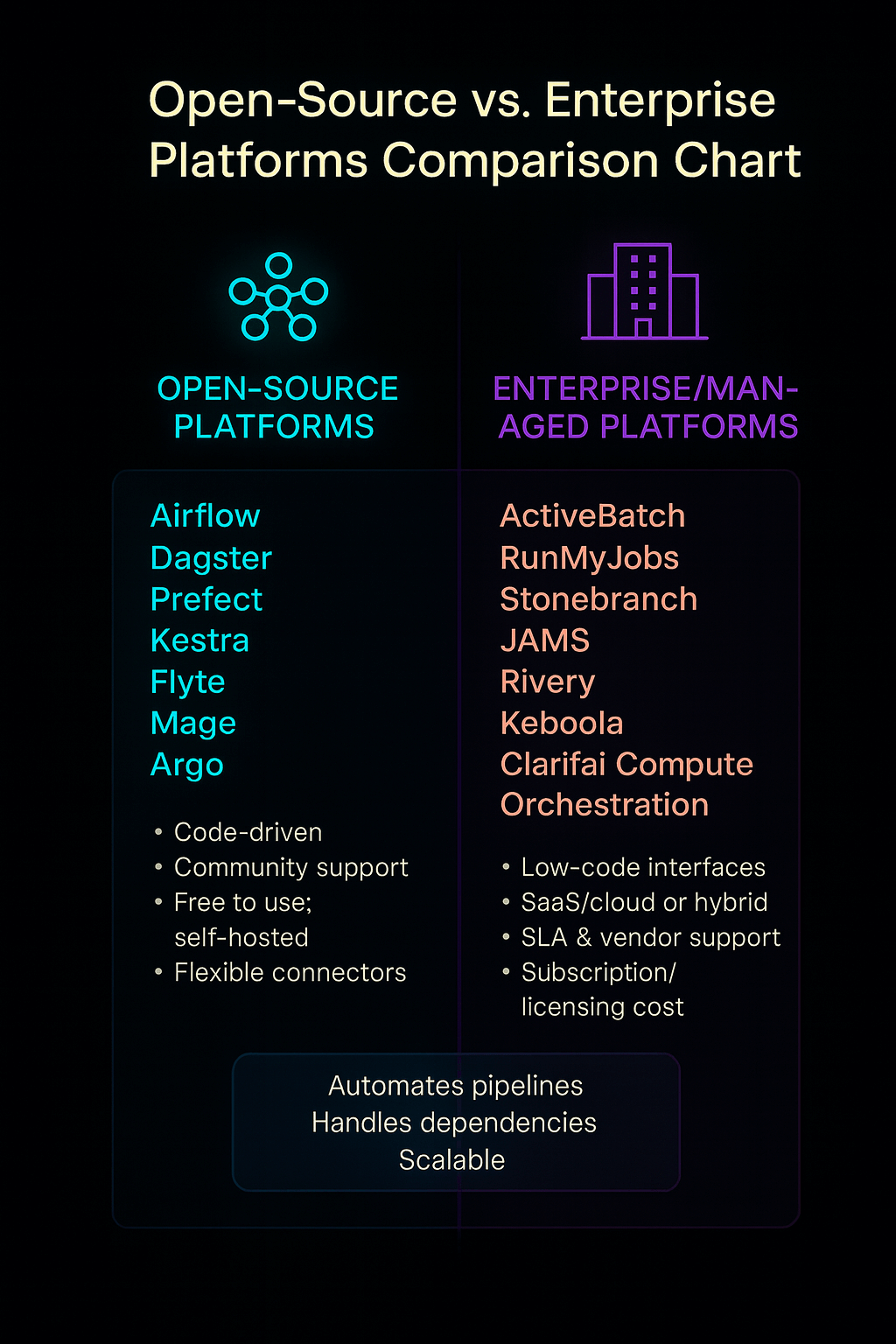
Open Source vs enterprise platforms - comparisons


How Do You Set Up Real-Time and Streaming Data Pipelines?

Why Do Streaming Workflows Need Orchestration? Here’s a Quick Summary.

Real-time analytics and streaming data need orchestration that can respond to events, handle continuous flows, and keep latency low. Streaming workloads get brittle and hard to scale if they aren’t properly orchestrated.

The Growth of Streaming Data

The desire for quick information has reached a breaking point; batch reporting can’t meet the needs of the market today. Real-time processing is needed for the constant streams that come from IoT devices, 5G networks, and event-driven business models. Edge computing brings analytics closer to the source of the data, which cuts down on latency and bandwidth use.

Orchestration and Streaming Technologies

Kafka from Apache

Apache Kafka is a distributed streaming platform that lets you develop real-time pipelines and apps. It has a scalable pub/sub paradigm, is fault-tolerant, and has persistent storage, which makes it the foundation for many streaming designs. Kafka Connect and Kafka Streams make it easier to connect and handle data by providing connectors and processing libraries, respectively.

Structured Streaming in Apache Flink and Spark

Flink and Spark Structured Streaming provide stateful computations and complicated event processing. This lets you use windowing, join operations, and exactly-once semantics. Operators or custom sensors connect these frameworks to orchestrators.

Clarifai’s Real-Time Model Inference

Clarifai’s platform has streaming inference endpoints that can be added to pipelines. This lets you classify, recognize objects, or analyze language in real time on data streams. These endpoints operate with orchestrators like Airflow or Dagster by starting model calls when new messages come in through Kafka or Pulsar.

Important Things to Think About When Designing

  • Event-Driven Triggers: Use sensors or watchers to start pipelines when files are dropped, API calls are made, or messages are sent to a queue.
  • Back-Pressure Management: Streaming frameworks need to be able to manage different input rates without crashing or losing data.
  • Idempotent Operations: Make sure that tasks can safely try again without doing the same work twice, especially while processing events.
  • State Management: Keep track of the status of tasks to support complicated aggregations. This needs long-lasting storage and snapshotting.
  • Latency Monitoring: Use metrics and alerts to find bottlenecks. Clarifai’s platform shows inference latency data for each model call.

Expert Advice

  • Jay Kreps says that “real-time isn’t just about speed; it’s about making decisions as things happen.
  • Architects from Uber’s Michelangelo platform stress that orchestrators need to handle both stateless and stateful workloads for streaming to perform well.
  • Clarifai’s head ML engineer says that streaming inference needs to be able to absorb spikes without crashing, and that autoscaling and batching can help keep latency low.

Example 

Imagine a ride-hailing business that needs to be able to find fake travel requests right away. Every request that comes in sends a Kafka message. An orchestrator runs a pipeline that checks the user’s identity, their location, and their driver’s photographs for any strange things, and then either authorizes or rejects the ride, all in a matter of milliseconds.
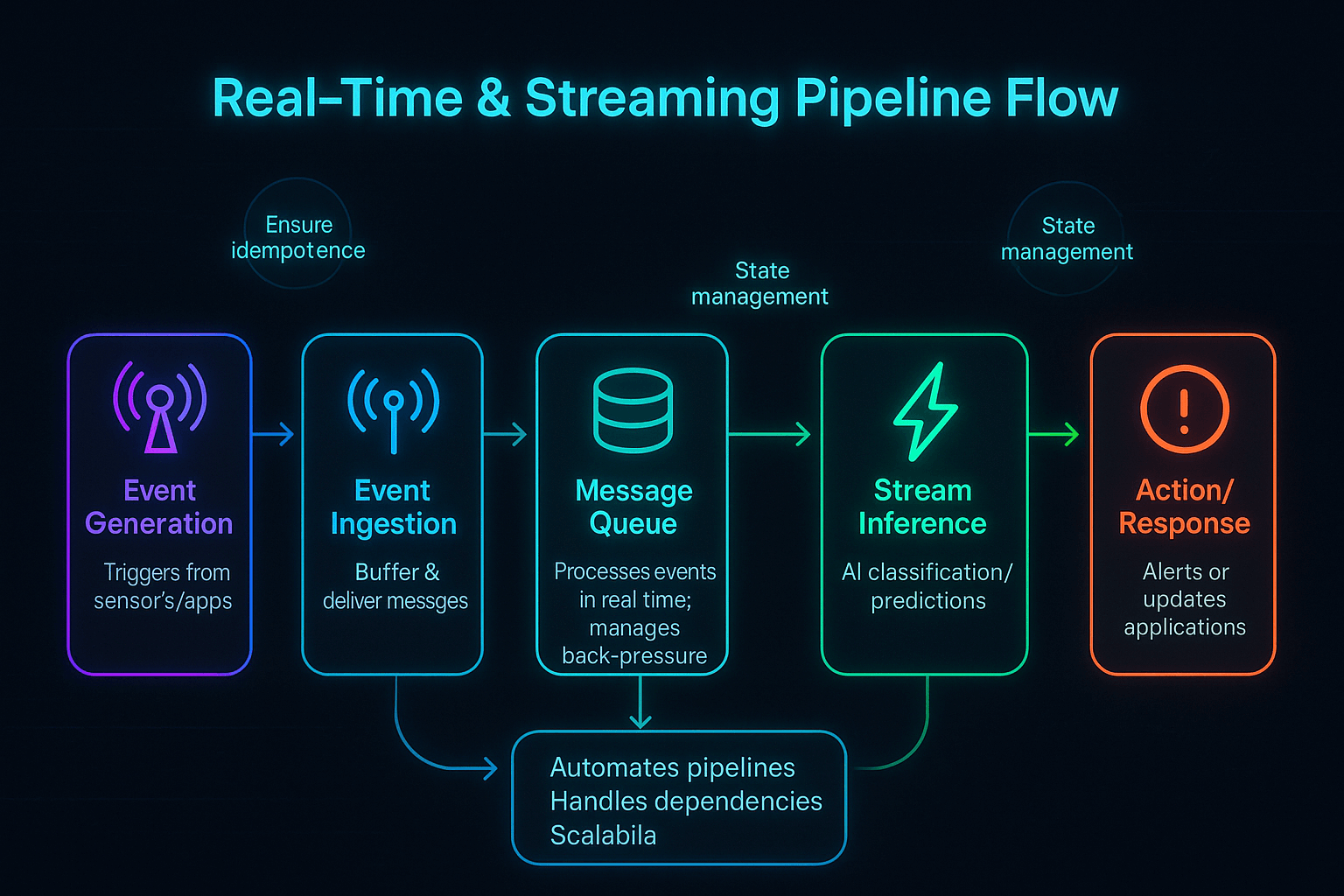
Real‑Time & Streaming Pipeline Flow


How Do You Manage Data Across Both Hybrid and Multi-Cloud Environments?

What Problems Come Up When You Try to Orchestrate Many Clouds?

Multi-cloud orchestration needs to hide the variations across providers, keep track of costs and data transfers, and make sure that security and governance are the same in all environments.

The Multi-Cloud Need

To get the best performance, pricing, and reliability, businesses are using AWS, Azure, Google Cloud, and their own data centers more and more. This technique avoids being locked into a vendor and makes use of specialized services, but it also creates problems such variances in APIs, identification models, and price structures.

Problems and Answers

Abstraction and Moving

Orchestrators need to provide a single control plane so that workflows may execute on any cloud or on-premises architecture without major changesdatacamp.com. Declarative deployments across providers are possible with tools like Terraform (for IaC) and Clarifai’s compute orchestration.

Managing Costs

The costs of moving data and egress can be high, thus orchestrators should try to keep data in one place and limit how much data is moved. Processing at the edge or in a specific location lowers egress costs.

Governance and Security

To keep policies the same across clouds, you need to connect to IAM systems, encrypt data, and keep audit logs. Data virtualization and catalogs help create unified perspectives while still preserving the sovereignty of data in each region.

Things to Think About When It Comes to Networks and Latency

Cross-cloud networking might cause delays; therefore, orchestrators need to make sure that services perform well in different regions and that important services are available in all zones.

Tools and Plans

  • Provider-Agnostic Orchestrators: Airflow, Dagster, and Clarifai’s compute orchestrator all work with several clouds and have plugins for each one.
  • Data Fabrics and Meshes: Use data fabric architectures to hide disparities in physical storage, and use data mesh principles for decentralized ownershipmontecarlodata.com.
  • Hybrid Deployment: Run orchestrators on Kubernetes clusters that span on-premises and cloud nodes. Clarifai’s on-premises runners make it possible to do local inference while connecting to cloud services.

Expert Opinions

  • Corey Quinn says that you should build for portability from the start to prevent having to spend a lot of money on re-architecting later.
  • The enterprise team at Clarifai says that hybrid deployment lets companies store sensitive data on their own servers while using cloud AI services for inference that needs a lot of computing power.
  • Analysts say that to be successful with multi-cloud, you need to carefully plan your architecture, manage your costs, and plan how to move your data.

Example 

A retail business with outlets all across India utilizes AWS to host a central data warehouse, Google BigQuery to analyze marketing data, and saves transaction data on its own servers because it has to. An orchestrator schedules nightly batch loads to AWS, starts real-time stock updates on GCP, and utilizes Clarifai’s local runner to look at CCTV footage for in-store security. All of this is done without any problems, even though the environments are different.
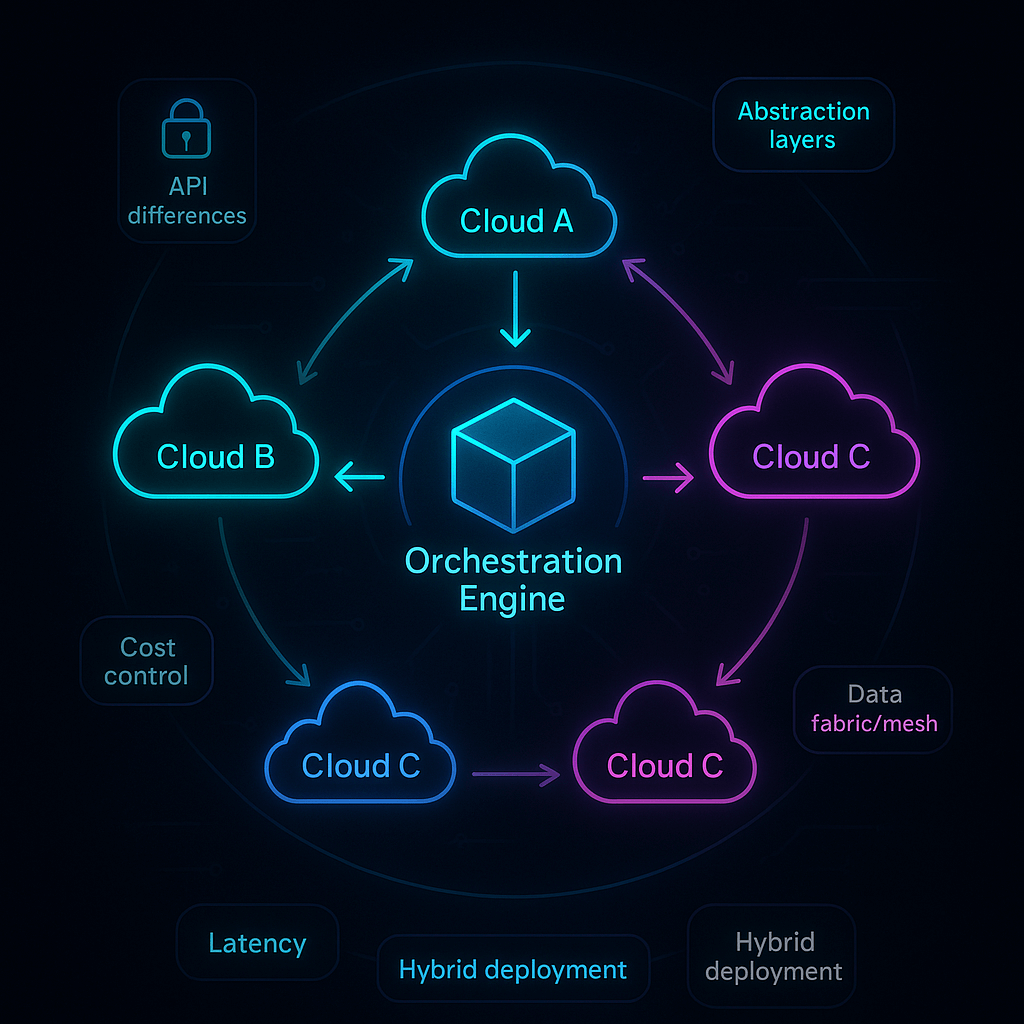
Hybrid & Multi‑Cloud Orchestration Architecture Diagram


How Can You Make Sure That Data Orchestration Is Safe, Compliant, and Easy to See?

Quick Summary: Why Are Governance and Observability So Important?

Security and compliance keep data safe and private, but observability lets you see pipelines, which makes it easier to fix problems and enforce policies.

Basic Rules for Security and Compliance

Data orchestrators deal with private data, thus it has to be encrypted both when it is stored and when it is sent. Use role-based access control (RBAC), keep secrets safe, and keep networks separate. Make sure that solutions can interact with compliance standards like GDPR, HIPAA, and PCI-DSS, and keep audit logs of everything that happens.

GDPR’s right to be forgotten means that orchestrators must be able to remove data and metadata when asked. In businesses that are regulated, make sure that orchestrators may run completely on-premise and support data residency. Clarifai’s platform lets you deploy on-premises and has secure inference endpoints for industries that are heavily regulated.

Data Quality and Observability

Observability is more than just keeping an eye on uptime; it also means knowing how healthy the pipeline is, where the data comes from, and how good the quality metrics are. AI-powered observability systems find problems on their own, group them into types of mistakes, and recommend ways to find the root cause. Snowflake and Databricks employ machine learning to fix mistakes and sort through new data, which cuts down on the amount of work that needs to be done by hand.

Data contracts and active metadata frameworks set clear expectations between producers and consumers, making sure the data is of good quality and stopping “schema drift.” Lineage tracking helps teams figure out where data comes from and how it moves through pipelines, which helps with compliance and debugging.

Rules and Ways of Doing Things

  • Take an “assume breach” approach: encrypt everything, limit access, and keep environments separate.
  • Establish alerts to monitor latency, errors, and unusual data patterns continuously.
  • Set up data stewardship responsibilities and make sure someone is responsible for the quality and compliance of the data.
  • Use test environments, with separate dev, staging, and prod pipelines, and set up automatic promotion rules.

Governance Features of Clarifai

Clarifai’s enterprise platform has built-in observability that logs every inference call, keeps track of model versions, and shows dashboards for latency and throughput. Its role-based permissions make sure that only people who are allowed to can deploy or query models. Clarifai helps businesses satisfy strict compliance requirements by offering on-premises alternatives and encrypted endpoints.

Expert Advice

  • Bruce Schneier says that “data is a toxic asset—it’s valuable but dangerous.” He urges businesses to protect their data by making sure it is not exposed too much.
  • Barr Moses says that visibility is the key to reliable analytics. Without visibility, mistakes go unreported.
  • Clarifai’s security lead says that AI models can be used as attack vectors, thus orchestrators need to keep an eye on how well the models work and look for inputs that are meant to hurt them.

Example 

An insurance firm manages consumer data across many systems. They employ an orchestrator with built-in checks for data quality to find records that don’t match, encrypt all API calls, and keep track of every access for audits. During a compliance audit, the organization may provide end-to-end lineage and establish that sensitive data never escapes regulated environments.


What Trends Will Affect How Data Orchestration Works in the Future?

In short, what trends should you keep an eye on?

In the next few years, AI-driven orchestration, real-time analytics, data mesh architectures, serverless workflows, and self-service technologies will change how pipelines are constructed and run.

Orchestration with AI

AI takes care of boring duties like cleaning up data, finding anomalies, and figuring out what caused them. It also helps with root cause analysis. Generative AI models like ChatGPT need high-quality datasets, which makes orchestration tools have to take data quality and context into account. We will have AI helpers that can write pipeline code, suggest improvements, and adjust to fit new workloads.

Analytics in Real Time and on the Edge

Edge computing is still growing; gadgets process data on their own and transmit summaries back to central systems. This change will make orchestrators have to handle micro-batches and event-driven triggers, which will make sure that latency is low and the edge is strong.

Data Mesh and Products for Data

Organizations use data mesh designs to spread out ownership and think of data as a product. Orchestrators will have to make sure that data contracts are followed, manage pipelines across domains, and keep track of where data came from in decentralized domains. Metadata will be very important for finding and managing digital assets.

Everything-as-Code and Serverless

Temporal and AWS Step Functions are examples of serverless orchestration services that let you pay as you go and don’t require you to worry about infrastructure. Declarative methods (Everything-as-Code) let teams version workflows in git, which makes it possible for data pipelines to be reviewed and CI/CD to happen at the same time. Kestra is a good example of this trend because it uses YAML to construct workflows.

Low-Code and Self-Service

Business users are asking for more and more self-service technologies that let them develop pipelines without having to write code. Analysts may control data flows with low-code systems like Rivery or Mage (and Clarifai’s visual pipeline builder), making data engineering more accessible to everyone.

Evolution of Observability and Compliance

Active metadata and AI-driven observability will find problems before they get worse, and data contracts will make sure everyone knows what to anticipate. Rules will get stricter, and orchestrators will have to do real-time compliance audits and delete data automatically.

Expert Advice

  • Fei-Fei Li says that “data will be the differentiator in AI systems; orchestrators must adapt to feed models with the right data at the right time.
  • Zhamak Dehghani says that decentralized, domain-oriented pipelines will take the place of monolithic data platforms.
  • Clarifai’s CEO said that orchestration will eventually merge with model deployment platforms, making it easier for users to design, implement, and watch AI solutions.

Example 

Think about a healthcare startup that is making an app for individualized nutrition. They use a data mesh design, which means that nutritionists own food data, doctors own medical records, and AI researchers own models. A serverless orchestrator starts events as fresh lab results come in, uses Clarifai’s natural language model to read doctor notes, and sends recommendations to users, all while keeping domain boundaries and data contracts in place.
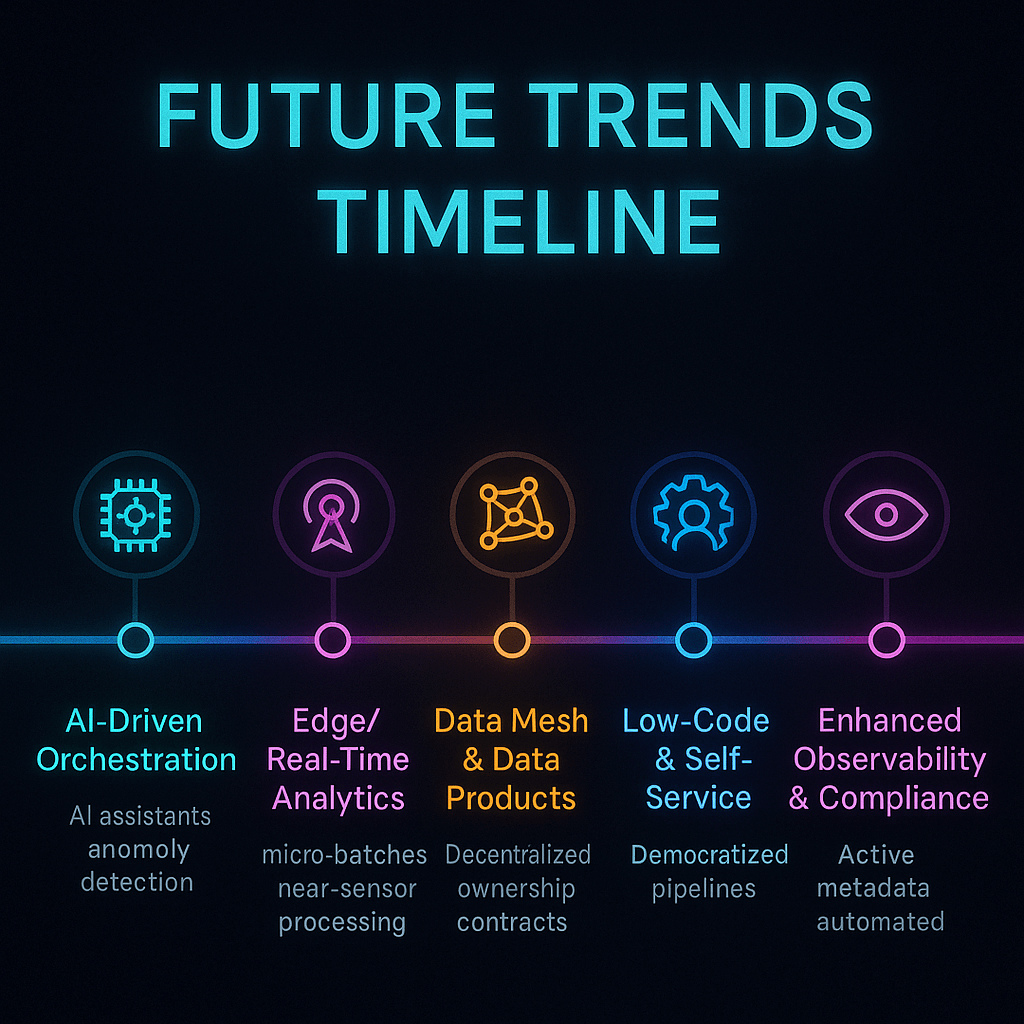
Future Trends Timeline - Data Orchestration


What Are Some Real-Life Examples and Success Stories?

Quick Summary: How do people use orchestration in real life?

Data orchestration makes everything from smart manufacturing and personalized healthcare to recommendation engines and fraud detection possible. Success examples show real benefits, such as better data quality, faster time to insight, and lower costs.

E-Commerce: Dynamic Pricing and Recommendations

A top e-commerce site organizes data from online logs, purchase history, and social media feeds. An orchestrator starts pipelines that figure out dynamic pricing, run Clarifai’s recommendation models, and update the store in almost real time. The result was higher conversion rates and happier customers.

Finance: Finding Fraud in Real Time

Every day, banks handle millions of transactions. An orchestrator takes in transaction streams, runs models to find unusual activity, verifies the rules set by the government, and stops suspect activity in just a few seconds. One bank said that its losses from fraud went down by 35% and it was able to disclose to regulators more quickly.

Healthcare: Personalized Treatment Plans

Hospitals manage streams of computerized health information, genetic data, and data from wearable devices. Pipelines use predictive algorithms to suggest treatment regimens, set up appointments, and keep an eye on patients’ vital signs in real time. Secure orchestration makes sure that HIPAA rules are followed, while Clarifai’s on-premises inference keeps private information safe.

Smart Factories in Manufacturing

Smart factories utilize sensors to keep an eye on machines, find problems, and plan maintenance. Orchestrators take sensor data, run Clarifai models to find problems in audio and images, and automatically send out repair requests. This cuts down on downtime and makes equipment last longer.

Entertainment and Media

Streaming services like Netflix employ organized pipelines to collect data on how many people are watching, train recommendation algorithms, and send personalized content suggestions to millions of customers. Automated orchestration makes it possible to handle petabytes of data every day.

The Indian Situation

Orchestration is being used by Indian startups, especially those in fintech and healthcare, to grow their businesses. An insurance aggregator in Mumbai uses orchestrated workflows to get quotes from several companies, run risk models with Clarifai’s AI, and show users bespoke plans.

Expert Advice

  • Kate Strachnyi says that data quality is really important for success stories. If pipelines aren’t set up correctly, the insights they give will be wrong.
  • Clients of Clarifai say that adding model inference directly into orchestrated pipelines cuts down on development time and operational problems by a large amount.
  • Vivek Muppa says that firms usually start with small orchestrated workflows and then grow them over time, learning best practices as they go.

Example 

Think about a power company that puts smart meters in remote areas. A coordinated pipeline gathers consumption data, estimates peak demand, and tells power plants to change how much power they make. Clarifai’s anomaly detection model identifies irregularities that could mean tampering, and field teams are then told about them. This all-encompassing method makes things more reliable and cuts down on losses.


Step-by-Step Guide to Putting a Data Orchestration Strategy into Action

Quick Summary: What Are the Steps to Set Up Orchestration?

To put an orchestration plan into action, you need to figure out your business goals, map out your processes, design your architecture, choose your tools, create your pipelines, add observability, and promote a DataOps culture.

Steps for Implementation

Step 1: Look at Your Goals and Needs

To begin, be clear about what you want: do you need real-time fraud detection, nightly ETL, or AI inference? Find out where the data comes from, how much it is, how fast it moves, and what rules need to be followed. Get people from the business, IT, and data departments involved to agree on what is most important.

Step 2: Make a Map of Your Current Workflows
Write down how data flows, what it depends on, and where it hurts. Make flowcharts to help you see how things work and find steps that need to be done by hand. Find out how long it takes for things to happen, how often they fail, and how good the data is.

Step 3: Plan the Architecture
You can choose between batch, streaming, or hybrid architectures. Define the parts of storage (data lakes vs. warehouses), computation (spark clusters, Kubernetes, serverless), and networks. Take into account both on-premises and multi-cloud needs.

Step 4: Choose and Evaluate Tools
Use the criteria we talked about before to make a short list of tools. Use your real workloads to run proof-of-concept testing. If AI inference is a big part of your operations, think about using Clarifai’s compute orchestrator.

Step 5: Make Pipelines
Use DAGs, YAML, or visual builders to make pipelines. Follow best practices include using modular tasks, idempotent operations, parameterization, and version control. Use official SDKs or connectors to connect to Clarifai’s API.

Step 6: Set Up Monitoring and Observability
Add logs, analytics, and tracing to instrument pipelines. Use things like Prometheus, Grafana, and the dashboards that come with Clarifai. Set up alerts for problems, increases in latency, and strange data. Use contracts and tests to make sure your data is good.

Step 7: Test and Make Changes
Do unit tests, integration tests, and load tests. Check that the error management and recovery systems work. Use feedback and performance metrics to make changes. Automate the deployment of pipeline definitions with CI/CD.

Step 8: Teach Teams and Promote a DataOps Culture
Train developers, analysts, and business users on the orchestrator you picked. Set up code standards, review processes, and documentation. Encourage data engineers, ML engineers, and domain specialists to work together across departments.

Expert Opinions

  • Lenny Liebmann says that for an orchestration plan to work, teams need to work together and use DevOps ideas as well as technology.
  • Clarifai’s solution engineers say that to show value and get people on board, you should start with a pilot project.
  • Kelsey Hightower says that to avoid mistakes by people, you should automate everything, even testing and deployment.

Example 

A logistics company needs to plan deliveries and find the best routes. After that, they plan how they would take in and deliver orders, chose Prefect to handle the orchestration, add Clarifai’s route optimization model, and set up real-time monitoring for driver delays. They notice shorter delivery times and happier customers within a few months.


Conclusion: How to Get Around the Data Orchestration Landscape in 2025

Data orchestration is no longer a choice; it’s a must for businesses that want to use AI, handle real-time analytics, and work in several clouds. When choose the right tool, you need to think about how easy it is to use, how scalable it is, how well it works with other tools, how well it works in real time, how much it costs, and how secure it is. Open-source platforms like Airflow and Dagster are flexible, while enterprise solutions like ActiveBatch, RunMyJobs, and Clarifai’s compute orchestrator offer support and more advanced functionality. For the future of montecarlo data, companies need to adapt by using new tools and methods. Real-time streaming, data mesh architectures, and AI-driven observability are all changing the way things work.

To put in place a strong orchestration strategy, you need to plan carefully, test it out, keep an eye on it all the time, and have a DataOps culture where everyone works together. Clarifai’s products, like compute orchestration, model inference APIs, and local runners, work well with a lot of different orchestrators. This makes it easy for teams to design smart pipelines with no trouble. By adopting data orchestration now, your company will be able to get insights faster, make better decisions, and gain a competitive edge in the age of AI.


FAQs

  • Q1: Is data orchestration the same thing as ETL?
    No, ETL is just concerned with getting data, changing it, and loading it into a destination. Data orchestration, on the other hand, coordinates many operations across many systems, such as ETL, ML inference, and streaming events, making sure that dependencies are handled correctlydatacamp.com.
  • Q2: Do I need to know how to code to use a data orchestrator?
    It depends on the instrument. Airflow and Dagster are open-source systems that need Python. ActiveBatch and Clarifai’s UI are examples of enterprise solutions that have low-code interfaces.
  • Q3: How does Clarifai work with tools for organizing data?
    You may call Clarifai’s APIs and SDKs from orchestrators like Airflow and Dagster, which lets you use model inference in your pipelines. Its compute orchestrator also takes care of deploying and scaling models.
  • Q4: Can I manage data across more than one cloud?
    Yes, a lot of orchestrators support multi-cloud deployment. For example, Clarifai’s local runner lets you conduct inference on-premises while managing workflows across clouds, hiding differences across providers.
  • Q5: What can I do to make sure I follow rules like GDPR?
    Pick orchestrators that already have security features like encryption, RBAC, and audit logs. Also, set up rules for where data is stored. Clarifai’s choice to deploy on-premises helps keep sensitive data safe.
  • Q6: What is the difference between data orchestration and process automation?
    Workflow automation takes care of single activities or business processes. Data orchestration, on the other hand, takes care of complicated, multi-step data pipelines that entail changing, analyzing, and transporting data between systems.
  • Q7: Are there ways to orchestrate data without servers?
    Yes, AWS Step Functions and Temporal are examples of serverless services that let you pay as you go for orchestration without having to manage infrastructure. Kestra and other declarative tools can let you scale without a server.
  • Q8: Why is observability crucial in data pipelines?
    Observability lets teams find mistakes, keep an eye on performance, and make sure data is good. AI-driven observability tools can find problems on their own and fix them.
  • Q9: What trends should I get ready for?
    Get ready for AI-driven orchestration, real-time edge analytics, data mesh architectures, low-code tools, and serverless workflows.
  • Q10: What is the first step in data orchestration?
    Start by figuring out what you need, sketching out how things are done now, choosing a tool that meets your needs, and running a test project. Use Clarifai’s tools to swiftly add AI inference.


Should You Turn Your Executives Into AI Avatars?


Databox CEO Peter Caputa recently posted that he is releasing a new video course taught entirely by his AI double. The avatar, powered by the popular AI video tool HeyGen, looks and sounds just like him, delivering hours of expert content on his behalf. Continue reading “Should You Turn Your Executives Into AI Avatars?”

Top Tools, Benefits & AI Trends


Cloud Orchestration: The Heart of Modern DevOps and AI Pipelines

Cloud orchestration is the most important part of modern DevOps and AI pipelines. It does more than just automate things; it also organizes the provisioning, configuration, and sequencing of cloud resources, APIs, and services into dependable workflows.

DataCamp says that orchestration is a progression beyond task automation (such as making a VM or installing software) to “end-to-end, policy-driven workflows that span multiple services, environments, or even cloud providers.” The idea is to eliminate manual steps, reduce errors, and accelerate innovation.

Rising Complexity in Resource Management

Managing resources becomes much more complicated as businesses start using microservices, multi-cloud methods, and AI workloads.

Scalr says that by 2025, 89% of businesses will utilize more than one cloud provider. In 2024, container management revenue is predicted to reach $944 million, with AI/ML integration driving demand for smart workload placement.

This blog clears up the confusion about cloud orchestration, compares the best solutions, and explores new developments

Quick Insights: The global cloud orchestration market is projected to grow from $14.9 billion in 2024 to $41.8 billion by 2029 (CAGR 23.1%)

Summary of Contents

  • What Cloud Orchestration Means & Why It Matters—Definitions, differences from automation, and why orchestration is critical for DevOps, AI and hybrid‑cloud.
  • Types of Orchestration Tools—Infrastructure-as-Code (IaC), configuration management, workflow orchestration, and container orchestration.
  • Top Tools & Platforms for 2025 – Deep dives into Clarifai, Kubernetes, Nomad, Terraform, Ansible, CloudBolt, , and others. Comparisons of strengths, weaknesses, pricing, and ideal use cases.
  • How Orchestration Works & Best Practices—Patterns like sequential vs. scatter‑gather, error handling, GitOps, service discovery, and security.
  • Benefits, Challenges & Use Cases – Real-world examples across retail, data pipelines, AI model deployment and IoT.
  • Emerging Trends & Future of Orchestration – Generative AI, AI‑driven resource optimisation, edge computing, serverless, zero trust and no‑code orchestration.
  • Clarifai’s Approach & Getting Started – How Clarifai’s orchestration makes AI pipelines simple, plus a step‑by‑step guide to building your own workflows.
  • FAQs – Answers to common questions about orchestration vs. automation, tool selection, security, and future trends.

Introduction: The Role of Cloud Orchestration

Cloud infrastructure used to revolve around simple automation scripts—launch a virtual machine (VM), install dependencies, deploy an application. As digital estates grew and software architecture embraced microservices, that paradigm no longer suffices. Cloud orchestration adds a coordinating layer: it sequences tasks across multiple services (compute, storage, networking, databases, and APIs) and enforces policies such as security, compliance, error handling and retries. DataCamp emphasises that orchestration “combines these steps together into end‑to‑end workflows” while automation handles individual tasks. In practice, orchestration is essential for DevOps, continuous delivery and AI workloads because it provides:

  • Consistency and repeatability. Declarative templates ensure the same infrastructure is provisioned every time, reducing human error.
  • Speed and agility. Orchestrated pipelines deliver changes faster. DataCamp notes that orchestration reduces manual errors and speeds up deployments.
  • Compliance and governance. Policies such as access controls and naming conventions are enforced automatically, aiding audits and regulatory compliance.
  • Multi‑cloud and hybrid support. Orchestration tools abstract provider‑specific APIs so teams can work across AWS, Azure, Google Cloud and private clouds.

Quick Summary: Why Orchestration Matters

In short, orchestration moves us from ad‑hoc scripts to codified workflows that deliver agility and stability at scale. Without orchestration, a modern digital business quickly falls into “snowflake” environments, where each deployment is slightly different and debugging becomes painful. Orchestration tools help unify operations, enforce best practices and free engineers to focus on high‑value work.

Expert Insight

Sebastian Stadil, CEO of Scalr: “Organisations need orchestration not just to provision resources but to manage their entire lifecycle, including cost controls and predictive scaling. The market will grow from roughly $14 billion in 2023 to up to $109 billion by 2034 as AI/ML integration and edge computing drive adoption”.


How Cloud Orchestration Works—Patterns & Mechanisms

You can make systems that work well if you know how orchestration engines really work. An orchestration platform usually works like this:

  1. Get a request
    This may be something a user does, like deploying a new environment, or it could be a scheduled trigger, like nightly ETL.
  2. Plan the workflow
    The orchestrator reads a declarative template or DAG, finds dependencies, and makes a plan for how to run the tasks.
  3. Do things
    It works with cloud APIs, containers, databases, and other services that are not part of the cloud. Tasks might run one after the other, at the same time (scatter-gather), or based on conditional logic.
  4. Handle mistakes and retry
    Workflow engines provide built-in ways to handle failures, timeouts, rollbacks, and retries. Some even enable compensating actions (Saga pattern).
  5. Aggregate results and respond
    The orchestrator puts together the outputs when the jobs are done and either sends the results back or starts the next step.
  6. Monitor and log everything
    Telemetry, tracing, and observability are very important for finding problems and checking operations.


Quick Summary: How Cloud Orchestration Works
Orchestration engines trigger, plan, and execute tasks across systems. They handle retries, sequencing, and monitoring—using patterns like sequential workflows, scatter-gather, and Saga for reliability.

Patterns to Know

  • Sequential workflow: Do tasks one after the other; typical when dependencies are strict.
  • Parallel / Scatter-Gather: Start several processes at the same time and combine the results. Helpful for microservices or fan-out operations.
  • Event-driven orchestration: React to events in real time, like queuing messages. Common in serverless and IoT situations.
  • Saga pattern: In complicated transactions, each step includes a compensation mechanism to maintain consistency.
  • GitOps and Desired State: Git commits drive changes to infrastructure/configuration, and controllers ensure actual state matches the desired state.

Service Discovery & Gateways

Orchestrators in microservice setups often use service discovery mechanisms (like Consul, etcd, or Zookeeper) and API gateways to route requests.

  • Service discovery: Automatically updates endpoints when services grow or shrink.
  • Gateways: Centralize authentication, rate limiting, and observability across different services.

Expert Opinion

DataCamp says that container orchestration solutions integrate seamlessly with CI/CD pipelines, service meshes, and observability tools to manage deployment, scaling, networking, and the entire lifecycle. Integration with telemetry is essential to detect and fix issues automatically.

Cloud Orchestration lifecycle

Benefits of Cloud Orchestration

Cloud orchestration isn’t just “nice to have”; it adds real value to your organization:

1. Faster and more reliable deployments.

By codifying infrastructure and workflows, you eliminate manual steps and human errors. DataCamp notes that orchestration accelerates deployments, improves consistency, and reduces mistakes—leading to faster feature releases and happier customers.

Organizations using orchestration and automation report a 30–50% reduction in deployment times (Gartner).

2. Better Resource Usage and Cost Control

Orchestrators intelligently schedule workloads, spinning up resources only when needed and scaling them down when idle. Scalr says AI/ML integration enables smart task placement and anticipatory scaling. Paired with FinOps platforms like Clarifai’s cost controls, you can track spending and stay within budgets.

3. Better Security and Compliance

Automation enforces security baselines consistently and reduces misconfiguration risks.

  • IaC tools like CloudFormation detect drift.
  • Platforms like Puppet provide full compliance reports.
  • Identity management and zero-trust architectures combined with orchestration make cloud operations safer.

4. Multi-Cloud and Hybrid Agility

Orchestration hides provider-specific APIs, enabling portable workloads across AWS, Azure, GCP, on-prem, and edge environments.

Terraform, Crossplane, and Kubernetes unify operations across providers—critical since 89% of businesses use multiple clouds.

5. Developer Productivity and Innovation

Declarative templates and visual designers free developers from repetitive plumbing tasks.

  • They can focus on innovation rather than setup.
  • Clarifai’s low-code pipeline builder lets AI engineers build complex inference workflows without extensive coding.

Quick Summary: What are the benefits of cloud orchestration?
Orchestration delivers faster deployments, cost optimization, reduced errors, enhanced security, and improved developer productivity—critical for businesses scaling in a multi-cloud world.

Challenges & Considerations

While orchestration offers huge benefits, it also introduces complexity and organizational changes.

  • Learning curve: Tools like Kubernetes and Terraform require time to master.
  • Process changes: Teams may need to adopt GitOps or DevOps methodologies.
  •  Complexity must be “just right” for your use case.
  • Vendor Lock-In: Some platforms may limit portability.
  • Latency & Performance: Orchestration adds overhead; low-latency apps (e.g., gaming) need edge optimization.
  • Security & Misconfiguration Risks: Centralized control can spread mistakes quickly; use policy-as-code, RBAC, and compliance scanning.
  • Cost Management: Uncontrolled orchestration can inflate resource costsFinOps practices are critical.

Quick Insight: 95% of organizations experienced an API or cloud security incident in the last 12 months (Postman API Security Report 2024).

Quick Summary: What are the challenges of cloud orchestration?

The main hurdles are tool complexity, vendor lock-in, misconfigurations, and rising costs. Security orchestration and zero-trust frameworks are essential for minimizing risks.

Cloud Orchestration Benefits and Challenges


Key Components & Architecture

A typical cloud orchestration architecture includes:

  1. Client/Application. User interface or CLI triggers actions.
  2. API Gateway. Routes requests, handles authentication, rate limiting, logging and policy enforcement.
  3. Workflow Engine/Controller. Parses templates or DAGs, schedules tasks, tracks state, manages retries and timeouts.
  4. Service Registry & Discovery. Maintains a registry of services and endpoints (e.g., Consul, etcd) for dynamic routing.
  5. Executors/Agents. Agents or runners on target machines or containers (e.g., Ansible modules, Nomad clients) perform tasks.
  6. Data Stores. Maintain state, logs and metrics (e.g., S3, DynamoDB, MySQL).
  7. Monitoring & Observability. Collects metrics, traces and logs for visibility; integrates with Prometheus, Grafana, Datadog.
  8. Policy & Governance Layer. Applies RBAC, cost policies and compliance rules. Tools like Scalr and Spacelift emphasise this layer.
  9. External Services & Edge Nodes. Orchestrators also integrate with SaaS APIs, DBaaS, message queues and edge devices (K3s, local runners like Clarifai’s platform).

This layered architecture allows you to swap components as needs evolve. For example, you can use Terraform for IaC, Ansible for configuration, Airflow for workflows and Kubernetes for containers, all coordinated through a common gateway and observability stack.

Quick Summary: What are the key components & architecture of cloud orchestration?

 A typical orchestration stack includes a workflow engine, service discovery, observability, API gateways, and policy enforcement layers—all working together to streamline operations.


Types of Cloud Orchestration Tools

Not all orchestration solutions solve the same problem. Tools typically fall into four categories, though there is overlap in many products.

Infrastructure‑as‑Code (IaC) Tools

IaC tools manage cloud resources through declarative templates. They specify what the infrastructure should look like (VMs, networks, load balancers) rather than how to create it. DataCamp notes that IaC ensures consistency, repeatability and auditability, making deployments reliable. Leading IaC platforms include:

  1. HashiCorp Terraform. A cloud‑agnostic language (HCL) with 200+ providers, state management and a large module ecosystem. It supports GitOps workflows and is widely used for multi‑cloud provisioning.
  2. AWS CloudFormation. AWS’s native IaC service using YAML/JSON templates with drift detection and stack sets. Ideal for deep AWS integration.
  3. Azure Resource Manager (ARM) & Bicep. Microsoft’s declarative templates for Azure; Bicep provides a simplified language.
  4. Google Cloud Deployment Manager. Declarative templates for Google Cloud; integrates with Cloud Functions.
  5. Scalr & Spacelift. Platforms that layer governance, cost controls and policy enforcement on top of Terraform modules.

Configuration Management Tools

Configuration management ensures that servers and services maintain the desired state—software versions, permissions, network settings. DataCamp describes these tools as enforcing system state consistency and security policies. Key players are:

  1. Ansible. Agentless automation using YAML playbooks; low learning curve and broad module support.
  2. Puppet. Declarative model with an agent/puppet master architecture; excels in compliance‑heavy environments.
  3. Chef. Ruby‑based system using cookbooks for configuration and test‑driven infrastructure.
  4. SaltStack (Salt). Event‑driven architecture enabling fast, parallel execution of commands; ideal for large scale.
  5. Google Cloud Config Connector (Kubernetes CRDs) and Kustomize for Kubernetes-specific config.

Workflow Orchestration Platforms

Workflow orchestrators sequence multiple tasks—API calls, microservices, data pipelines—and manage dependencies, retries and conditional logic. DataCamp lists these tools as essential for ETL processes, data pipelines, and multi‑cloud workflows. Leading platforms include:

  1. Apache Airflow & Prefect. Popular open‑source workflow engines for data pipelines with DAG (Directed Acyclic Graph) representation.
  2. AWS Step Functions. Serverless state machine engine that coordinates AWS services and microservices with built‑in error handling.
  3. Azure Logic Apps & Durable Functions. Visual designer and code‑based orchestrators for integrating SaaS services and Azure resources.
  4. Google Cloud Workflows. YAML‑based serverless orchestration engine that sequences Google Cloud and external API calls, with retries and conditional logic.
  5. Netflix Conductor & Cadence, Argo Workflows (Kubernetes native), Morpheus, and CloudBolt—enterprise platforms with governance and multi‑cloud support.

Container Orchestration Platforms

Containers make applications portable, but orchestrating them at scale requires specialized platforms. DataCamp emphasises that container orchestrators handle deployment, networking, autoscaling and lifecycle of clusters. Major options:

  1. Kubernetes (K8s). The de facto standard with declarative YAML, horizontal pod autoscaling and self‑healing. Scalr notes that K8s’ v1.32 update (“Penelope”) improves multi‑container pod resource management and security.
  2. Docker Swarm. Built into Docker; simple to set up and resource‑light; best for small clusters.
  3. Red Hat OpenShift. Enterprise distribution of Kubernetes with integrated CI/CD, enhanced security and multi‑tenant management.
  4. Rancher. Multi‑cluster Kubernetes management with intuitive UI.
  5. HashiCorp Nomad. Lightweight orchestrator for containers, VMs and binaries; ideal for mixed workloads.
  6. K3s (lightweight K8s for edge), Docker Compose, Amazon ECS, and Service Fabric for specialized needs.

Quick Summary: Tool Types

  • IaC defines infrastructure; think Terraform & CloudFormation.
  • Configuration management enforces server state; Ansible and Puppet shine here.
  • Workflow orchestration stitches together tasks and microservices; Airflow and Step Functions are common.
  • Container orchestration manages deployment and scaling of containers; Kubernetes dominates but alternatives like Nomad and K3s exist.

Expert Insight

Don Kalouarachchi, Developer & Architect : “Categories of orchestration tools overlap, but distinguishing them helps identify the right mix for your environment. Workflow orchestrators manage dependencies and retries, while container orchestrators manage pods and services”.

types of orchestration Tools

Top Cloud Orchestration Tools for 2025

In this section we compare the most influential tools across categories. We highlight features, pros and cons, pricing and ideal use cases. While scores of platforms exist, these are the ones dominating conversations in 2025.

Clarifai: AI‑First Orchestration & Model Inference

Why mention Clarifai in a cloud orchestration article? Because AI workloads are increasingly orchestrated across heterogeneous resources—GPUs, CPUs, on‑prem servers and edge devices. Clarifai offers a unique compute orchestration platform that handles model training, fine-tuning, and inference pipelines. Key capabilities:

  • Model orchestration across clouds and hardware. Clarifai orchestrates GPU nodes, CPU fallback, and serverless tasks, automatically selecting the optimal environment based on workload and cost.
  • Local runners. Developers can run models locally or on‑prem for latency-sensitive tasks, then seamlessly scale to the cloud for large‑batch processing.
  • Low‑code pipeline builder. Visual and API-based interfaces allow you to chain data ingestion, preprocessing, model inference, and post-processing using Clarifai’s AI model marketplace plus your own models.
  • Integrated cost control and monitoring. Because compute resources are often expensive, Clarifai provides real‑time metrics and budgets, aligning with FinOps principles.

Ideal for: Organizations deploying AI at scale (image recognition, NLP, generative models) that need to orchestrate compute across cloud and edge. By integrating Clarifai into your orchestration stack, you can handle both infrastructure and model life‑cycle within a single platform.

Kubernetes: The Container King

Primary use: Container orchestration.

  • Features. Declarative configuration; horizontal pod autoscaling; self‑healing; advanced networking; huge ecosystem of operators, service mesh, observability and CI/CD integrations.
  • Strengths. Unmatched scalability and reliability; vendor‑agnostic; strong community; cloud providers offer managed services (EKS, AKS, GKE).
  • Weaknesses. Steep learning curve and operational complexity; resource‑intensive for small projects.
  • Pricing. Control plane is free on Azure AKS and GKE up to a threshold; managed services typically charge ~$0.10 per cluster hour.
  • Ideal for: Large-scale microservices, high availability, multi‑region clusters, AI model serving.

Quick summary & expert tip. If you want the broadest ecosystem and vendor independence, Kubernetes is still the gold standard—but invest in training and managed services to tame complexity.

Docker Swarm: Simplicity First

  • Primary use: Lightweight container orchestration.
  • Features. Native to Docker; simple CLI; automatic load balancing; minimal resource overhead.
  • Strengths. Easy to get started; integrates seamlessly with existing Docker workflows; good for small dev/test clusters.
  • Weaknesses. Limited scalability and enterprise features compared to Kubernetes; ecosystem less vibrant.
  • Pricing. Open source; minimal operational costs.
  • Ideal for: Prototyping, small teams and resource‑constrained environments.

Red Hat OpenShift: Enterprise Kubernetes

  • Features. Based on Kubernetes but adds enterprise‑grade security, built‑in CI/CD (Tekton, OpenShift Pipelines), service mesh and multi‑tenant controls.
  • Strengths. Turnkey solution with opinionated defaults; compliance and governance built in; Red Hat support.
  • Weaknesses. Premium pricing (~$5,000 per core pair annually) and heavy; may feel locked into Red Hat ecosystem.
  • Ideal for: Regulated industries, large enterprises needing reliability and support.

Rancher: Multi‑Cluster Management

  • Features. Centralized management of multiple Kubernetes clusters; RBAC, user interface and pipelines.
  • Strengths. Balances features and usability; cost‑effective relative to OpenShift.
  • Weaknesses. Less enterprise support; still requires underlying Kubernetes expertise.
  • Ideal for: Companies with multiple clusters across on‑prem, edge and cloud.

HashiCorp Nomad: Lightweight and Flexible

  • Features. Schedules containers, VMs and binaries; supports multi‑region clusters; integrates with Consul and Vault.
  • Strengths. Simple architecture; works well for mixed workloads; low operational overhead.
  • Weaknesses. Smaller community; fewer built‑in features compared to Kubernetes.
  • Ideal for: Teams using HashiCorp ecosystem or requiring flexibility across container and VM workloads.

Terraform: Multi‑Cloud Provisioning

  • Category: IaC and orchestration engine.
  • Features. Declarative HCL templates; state management; 200+ providers; modules; remote backend; GitOps integration.
  • Strengths. Cloud‑agnostic; huge ecosystem; fosters collaboration via Terraform Cloud.
  • Weaknesses. Requires understanding of state and module design; limited imperative logic (but modules and functions help).
  • Pricing. Free open source; Terraform Cloud charges after 500 resources.
  • Ideal for: Multi‑cloud provisioning, GitOps workflows, repeatable infrastructure patterns.

Ansible: Agentless Automation

  • Category: Configuration management and orchestration.
  • Features. YAML playbooks; over 5,000 modules; idempotent tasks; push‑based design.
  • Strengths. Quick learning curve; works over SSH without agents; flexible for configuration and app deployment.
  • Weaknesses. Limited state management compared to Puppet/Chef; performance issues at scale.
  • Pricing. Open source; Ansible Automation Platform costs ~$137 per node per year.
  • Ideal for: Rapid automation, cross‑platform tasks, bridging between IaC and application deployment.

Puppet: Compliance‑Focused Configuration

  • Category: Configuration management.
  • Features. Declarative manifest language; agent‑based; strong compliance and reporting.
  • Strengths. Mature; ideal for large enterprises; integrates with ServiceNow and incident management.
  • Weaknesses. Steeper learning curve; centralised master can be a bottleneck.
  • Pricing. Puppet Enterprise around ~$199 per node per year.
  • Ideal for: Regulated environments requiring auditable change management.

Chef, SaltStack and Other Config Tools

Chef’s Ruby‑based approach offers high flexibility but demands Ruby knowledge. SaltStack’s event‑driven architecture delivers fast parallel execution; however, its initial configuration is complex. Each of these tools has passionate communities and is suitable for particular use cases (e.g., large HPC clusters or event-driven operations).

CloudBolt, Morpheus and Scalable Orchestration Platforms

Beyond open‑source tools, enterprise platforms like CloudBolt, Morpheus, Cycle.io and Spacelift offer orchestration as a service. They typically provide UI‑driven workflows, policy engines, cost management and plug‑ins for various clouds. CloudBolt emphasises governance and self-service provisioning, while Spacelift layers policy-as-code and compliance on top of Terraform. These platforms are worth considering for organisations that need guardrails, FinOps and RBAC without building custom frameworks.

Quick Summary of Top Tools

Tool

Category

Strengths

Weaknesses

Ideal Use

Pricing (approx.)

Kubernetes

Container

Unmatched ecosystem, scaling, reliability

Complex, resource‑intensive

Large microservices, AI serving

Managed clusters ~$0.10/hour per cluster

Nomad

Container/VM

Lightweight, supports VMs & binaries

Smaller community

Mixed workloads

Open source

Terraform

IaC

Cloud‑agnostic, 200+ providers

State management complexity

Multi‑cloud provisioning

Free; Cloud plan variable

Ansible

Config

Agentless, low learning curve

Scale limitations

Rapid automation

Free; ~137/node/year

Puppet

Config

Compliance & reporting

Agent overhead

Regulated enterprises

~199/node/year

CloudBolt

Enterprise

Self-service, governance

Licensing cost

Enterprises needing guardrails

Proprietary

Clarifai

AI orchestration

Model/compute orchestration, local runners

Domain-specific

AI pipelines

Usage-based


Expert Tips

  • Start with declarative tools. Terraform or CloudFormation provide baseline consistency; layering Ansible or SaltStack adds configuration nuance.
  • Adopt managed services. Use EKS, AKS or GKE for Kubernetes to reduce operational burden; similarly, Clarifai handles compute orchestration so you can focus on models.
  • Consider FinOps. Tools like CloudBolt and Clarifai’s cost controls help align resource usage with budgets.

Leading Tools & Platforms: Deep Dive

Beyond the summary above, let’s explore additional players shaping the orchestration ecosystem.

Crossplane & GitOps Controllers

Crossplane is an open‑source framework that extends Kubernetes with Custom Resource Definitions (CRDs) to manage cloud infrastructure. It decouples the control plane from the data plane, allowing you to define cloud resources as Kubernetes objects. By embracing GitOps, Crossplane brings infrastructure and application definitions into a single repository and ensures drift reconciliation. It competes with Terraform and is gaining popularity for Kubernetes‑native environments.

Spacelift & Scalr: Policy‑as‑Code Platforms

Spacelift and Scalr build on top of Terraform and other IaC engines, adding enterprise features like RBAC, cost controls, drift detection, and policy‑as‑code (Open Policy Agent). Scalr’s article emphasises that the orchestration market is growing because companies demand such governance layers. These tools are suited to organisations with multiple teams and compliance requirements.

Morpheus & CloudBolt: Unified Cloud Management

These platforms provide unified dashboards to orchestrate resources across private and public clouds, integrate with service catalogs (e.g., ServiceNow), and manage lifecycle operations. CloudBolt, for instance, emphasises governance, self‑service provisioning and automation. Morpheus extends this with cost analytics, network automation and plugin frameworks.

Prefect & Airflow: Modern Workflow Engines

While Airflow has long been the standard for data pipelines, Prefect offers a more modern design with emphasis on asynchronous tasks, Pythonic workflow definitions and dynamic DAG generation. They support hybrid deployment (cloud and self-hosted), concurrency and retries. Dagster and Luigi are additional options with strong type systems and data orchestration features.

Argo CD & Flux: GitOps for Kubernetes

Argo CD and Flux implement GitOps principles, continuously reconciling the actual state of Kubernetes clusters with definitions in Git. They integrate with Argo Workflows for CI/CD and support automated rollbacks, progressive delivery and observability. This automation ensures that clusters remain in desired state, reducing configuration drift.

AI‑Focused Platforms: Flyte, Kubeflow & Clarifai

AI workloads pose unique challenges: data preprocessing, model training, hyperparameter tuning, deployment and monitoring. Kubeflow extends Kubernetes with ML pipelines and experiment tracking; Flyte orchestrates data, model training and inference across multi‑cloud; Clarifai simplifies this further by offering pre‑built AI models, model customization and compute orchestration all under one roof. In 2025, AI teams increasingly adopt these domain‑specific orchestrators to accelerate research and productionisation.

Edge & IoT Orchestration

As sensors and devices proliferate, orchestrating workloads at the edge becomes crucial. Lightweight distributions like K3s, KubeEdge and OpenYurt enable Kubernetes on resource‑constrained hardware. Azure IoT Hub and AWS IoT Greengrass extend orchestration to device management and event processing. Clarifai’s local runners also support inference on edge devices for low‑latency computer vision tasks.

Best Practices for Cloud Orchestration & Microservice Deployment

  1. Design for Failure. Assume that components will fail; implement retries, timeouts and circuit breakers. Use chaos engineering to test resilience.
  2. Adopt Declarative and Idempotent Definitions. Use IaC and Kubernetes manifests; avoid imperative scripts. This ensures reproducibility and drift detection.
  3. Implement GitOps & Policy‑as‑Code. Store all config and policies in Git; use tools like OPA (Open Policy Agent) to enforce RBAC, naming conventions and cost limits.
  4. Use Service Discovery & Centralize Secrets. Tools like Consul or etcd maintain service endpoints; secret managers (Vault, AWS Secrets Manager) avoid hardcoding credentials.
  5. Leverage Observability & Tracing. Integrate metrics, logs and traces; adopt distributed tracing to debug workflows. Use dashboards and alerting for proactive monitoring.
  6. Right‑Size Complexity. Scalr advises to match orchestration complexity to real needs, balancing self‑hosted vs. managed services. Don’t adopt Kubernetes for simple workloads if Docker Swarm suffices.
  7. Secure by Design. Embrace zero‑trust principles and encryption in transit and at rest. Use identity federation (OIDC) for authentication; implement least privilege RBAC. Scalr notes that security orchestration is growing to $8.5 billion by 2030 with zero trust models becoming standard.
  8. Focus on Cost Optimisation. Use autoscaling, rightsizing and spot instances. Tools like CloudBolt or Clarifai integrate cost dashboards to prevent bill shock.
  9. Train & Upskill Teams. Provide training on IaC, Kubernetes and GitOps; invest in cross-functional DevOps capabilities.
  10. Plan for Edge & AI. Evaluate K3s, Flyte and Clarifai if your workloads involve IoT or AI; design for data locality and latency.

Quick Summary: What are the Best Practices for Cloud Orchestration & Microservice deployment? Use declarative configs, GitOps, and observability tools; design for failure; enforce security with zero-trust; and right-size complexity to your organization’s maturity.

Use Cases & Real‑World Examples

Retail & E‑Commerce

A global retailer uses cloud orchestration to manage seasonal traffic spikes. Using Terraform and Kubernetes, they provision additional nodes and deploy microservices that handle checkout, inventory and recommendations. Workflow orchestrators like Step Functions manage order processing: verifying payment, reserving stock and triggering shipping services. By codifying these workflows, the retailer scales reliably during Black Friday and reduces cart abandonment due to downtime.

Financial Services & Governance

A bank must comply with stringent regulations. It adopts Puppet for configuration management and OpenShift for container orchestration. IaC templates enforce encryption, network policies and drift detection; policy‑as‑code ensures only approved resources are created. Workflows orchestrate risk analysis, fraud detection and KYC checks, integrating with AI models for anomaly detection. The result: faster loan approvals while maintaining compliance.

Data Pipelines & ETL

A media company ingests petabytes of streaming data. Airflow orchestrates extraction from streaming services, transformation via Spark on Kubernetes and loading into a data warehouse. Prefect monitors for failures and re-runs tasks. The company uses Terraform to provision data clusters on demand and scales down after processing. This architecture enables near‑real‑time analytics and personalised recommendations.

AI Model Serving & Computer Vision

A logistics firm uses Clarifai to orchestrate computer vision models that detect damaged packages. When a package image arrives from a warehouse camera, Clarifai’s pipeline triggers preprocessing (resize, normalize), runs a detection model on the optimal GPU or CPU, flags anomalies and writes results to a database. The orchestrator scales across cloud and on‑prem GPUs, balancing cost and latency. With local runners at warehouses, inference happens in milliseconds, reducing shipping errors and returns.

IoT & Edge Manufacturing

An industrial manufacturer deploys sensors on factory equipment. Using K3s on small edge servers, the company runs microservices for sensor ingestion and anomaly detection. Nomad orchestrates workloads across x86 and ARM devices. Data is aggregated and processed at the edge, with only insights sent to the cloud. This reduces bandwidth, meets latency requirements and improves uptime.

Emerging Trends & Future of Cloud Orchestration

The next few years will reshape orchestration as AI and cloud technologies converge.

AI‑Driven Orchestration

Scalr notes that AI/ML integration is a key growth driver. We are seeing smart orchestrators that use machine learning to predict load, optimise resource placement and detect anomalies. For example, Ansible Lightspeed assists in writing playbooks using natural language, and Kubernetes Autopilot automatically tunes clusters. AI agents are emerging that can design workflows, adjust scaling policies and remediate incidents without human intervention. This trend will accelerate as generative AI and large language models mature.

Edge & Hybrid Cloud Expansion

Edge computing is becoming mainstream. Scalr emphasises that next‑generation orchestration extends beyond data centres to edge environments with lightweight distributions like k3s. Orchestrators must handle intermittent connectivity, limited resources and diverse hardware. Tools like KubeEdge, AWS Greengrass, Azure Arc and Clarifai’s local runners enable consistent orchestration across edge and cloud.

 By 2027, 50% of enterprise-managed data will be created and processed at the edge (Gartner).

Security-as-Code & Zero Trust

Security orchestration is projected to become an $8.5 billion market by 2030. Zero‑trust architectures treat every connection as untrusted, enforcing continuous verification. Orchestrators will embed security policies at every step—encryption, token rotation, vulnerability scanning and runtime protection. Policy‑as‑code will become mandatory.

Serverless & Event‑Driven Architectures

Serverless computing offloads infrastructure management. Orchestrators like Step Functions, Azure Durable Functions and Google Cloud Workflows handle event-driven flows with minimal overhead. As serverless matures, we’ll see hybrid orchestration that combines containers, VMs, serverless and edge functions seamlessly.

Low/No‑Code Orchestration

Businesses want to democratise automation. Low‑code platforms (e.g., Mendix, OutSystems) and no‑code workflow builders are emerging for non‑developers. Clarifai’s visual pipeline editor is an example. Expect more drag‑and‑drop interfaces with AI‑powered suggestions and natural language prompts for building workflows.

FinOps & Sustainable Orchestration

Cloud costs are a major challenge—84 % of organisations cite cloud spend management as significant. Orchestrators will integrate cost analytics, predictive budgeting and sustainability metrics. Green computing considerations (e.g., selecting regions with renewable energy) will influence scheduling decisions.

Quick Insight: By 2025, 65% of enterprises will integrate AI/ML pipelines with cloud orchestration platforms (IDC).

Cloud Orchestration Market Outlook

Clarifai’s Approach to Cloud & AI Orchestration

Clarifai is best known as an AI platform, but its compute orchestration capabilities make it a compelling choice for AI‑driven organisations. Here’s how Clarifai stands out:

  1. Unified AI & Infrastructure Orchestration. Clarifai orchestrates not only model inference but also the underlying compute resources. It abstracts away GPU/CPU clusters, letting you specify latency or cost constraints and automatically selecting the right hardware.
  2. Model Marketplace & Customization. Users can mix pre‑trained models (vision, NLP) with their own fine‑tuned models. Orchestration pipelines handle data ingestion, feature extraction, model invocation and post‑processing. The platform supports multi‑modal tasks (e.g., text + image) and chain of prompts for generative AI.
  3. Local Runners & Edge Support. For low‑latency tasks, Clarifai runs models on edge devices or on‑prem servers. The orchestrator ensures that data stays local when required and synchronises results to the cloud when connectivity allows.
  4. Low‑Code Experience. A visual pipeline builder allows business users to build AI workflows by connecting blocks; developers can extend with Python or REST APIs. This democratizes AI orchestration.
  5. Security & Compliance. Clarifai meets enterprise requirements with encryption, RBAC and audit logs. The platform can be deployed in secure environments for sensitive data.

By integrating Clarifai into your orchestration strategy, you can handle both infrastructure and AI workflows holistically—important as AI becomes core to every digital business.

Quick Insight: AI orchestration platforms like Clarifai enable teams to deploy multi-model AI pipelines up to 5x faster compared to manual orchestration 

Getting Started: Step‑by‑Step Guide to Implementing Orchestration

1. Assess Your Needs & Goals

Identify pain points: Are deployments slow? Do you need multi‑cloud portability? Do data pipelines fail frequently? Clarify business outcomes (e.g., faster releases, cost reduction, better reliability). Determine which workloads require orchestration (infrastructure, configuration, data, AI, edge).

2. Choose the Right Categories of Tools

Select IaC (e.g., Terraform, CloudFormation) for infrastructure provisioning. Add configuration management (Ansible, Puppet) for server state. Use workflow orchestrators (Airflow, Prefect, Step Functions) for multi‑step processes. Adopt container orchestrators (Kubernetes, Nomad) for microservices. If you have AI workloads, evaluate Clarifai or Kubeflow.

3. Design Contracts & Templates

Write declarative templates using HCL, YAML or JSON. Version them in Git. Define naming conventions, tagging policies and resource hierarchies. For microservices, design APIs and adopt the single responsibility principle—each service handles one function. Document expected inputs/outputs and error conditions.

4. Build & Test Workflows

Start with simple pipelines—provision a VM, deploy an app, run a database migration. Use CI/CD to validate changes automatically. Add error handling and timeouts. For data pipelines, visualise DAGs to identify bottlenecks. For AI, build sample inference workflows with Clarifai.

5. Integrate Observability & Policy

Set up monitoring (Prometheus, Datadog) and distributed tracing (OpenTelemetry). Define policies for security (IAM roles, secrets), cost limits and environment naming. Tools like Scalr or Spacelift can enforce policies automatically. Clarifai offers built‑in monitoring for AI pipelines.

6. Automate Security & Compliance

Integrate vulnerability scanning (e.g., Trivy), secret rotation and configuration compliance checks into workflows. Adopt zero‑trust models: treat every component as potentially compromised. Use network policies and micro‑segmentation.

7. Iterate & Scale

Continuously evaluate workflows, identify bottlenecks and add optimisations (e.g., autoscaling, caching). Extend pipelines to new teams and services. For cross‑cloud expansion, ensure templates abstract providers. For edge use cases, adopt K3s or Clarifai’s local runners. Train teams and gather feedback.

8. Explore AI‑Driven Enhancements

Leverage AI to generate templates, detect anomalies and recommend cost optimisations. Keep an eye on emerging open‑source projects like OpenAI’s function calling, LangChain for connecting LLMs to orchestration workflows, and research from fluid.ai on agentic orchestration for self‑healing systems.

FAQs on Cloud Orchestration

  1. How is cloud orchestration different from automation?

Automation refers to executing individual tasks without human intervention, such as creating a VM. Orchestration coordinates multiple tasks into a structured workflow. DataCamp explains that orchestration combines steps into end‑to‑end processes that span multiple services and clouds.

  1. Which category of orchestration tool should I start with?

It depends on your needs: start with IaC (Terraform, CloudFormation) for infrastructure provisioning; add configuration management (Ansible, Puppet) to enforce server state; use workflow orchestrators (Airflow, Step Functions) to manage dependencies; and adopt container orchestrators (Kubernetes) for microservices. Often, you’ll use several together.

  1. Are managed services worth the cost?

Yes, if you value reduced operational burden and reliability. Managed Kubernetes (EKS, AKS, GKE) charges around $0.10 per cluster hour, but frees teams to focus on apps. Managed Clarifai pipelines handle model scaling and monitoring. However, weigh vendor lock‑in and custom requirements.

  1. How do I handle multi‑cloud governance?

Adopt IaC to abstract provider differences. Use platforms like Scalr, Spacelift or CloudBolt to enforce policies across clouds. Implement tagging, cost budgets and policy‑as‑code. Tools like Clarifai also offer cost dashboards for AI workloads. Security frameworks (e.g., FedRAMP, ISO) should be encoded into templates.

  1. What role does AI play in orchestration?

AI enables predictive scaling, anomaly detection, natural language playbook generation and autonomous remediation. Scalr highlights AI/ML integration as a key growth driver. Tools like Ansible Lightspeed and Clarifai’s pipeline builder incorporate generative AI to simplify configuration and optimize performance.

  1. Do I need Kubernetes for every application?

No. Kubernetes is powerful but complex. If your workloads are simple or resource-constrained, consider Docker Swarm, Nomad, or managed services. As Scalr advises, match orchestration complexity to your actual needs.

  1. What trends should I watch in 2025 and beyond?

Key trends include AI‑driven orchestration, edge computing expansion, security‑as‑code and zero‑trust architectures, serverless/event‑driven workflows, low/no‑code platforms, and FinOps integration. Generative AI will increasingly assist in building and managing workflows, while sustainability considerations will influence resource scheduling.


Conclusion

Cloud orchestration is the backbone of modern digital operations, enabling consistency, speed, and innovation across multi‑cloud, microservice, and AI environments. By understanding the categories of tools and their strengths, you can design an orchestration strategy that aligns with your goals. Kubernetes, Terraform, Ansible, and Clarifai represent different layers of the stack—containers, infrastructure, configuration, and AI—each essential for a complete solution. Future trends such as AI‑driven resource optimization, edge computing, and zero‑trust security will continue to redefine what orchestration means. Embrace declarative definitions, policy‑as‑code, and continuous learning to stay ahead.


Benchmarking Speed, Scale, and Cost Efficiency


11.8_blog_hero (1)

This blog post focuses on new features and improvements. For a comprehensive list, including bug fixes, please see the release notes.

GPT-OSS-120B: Benchmarking Speed, Scale, and Cost Efficiency

Artificial Analysis has benchmarked Clarifai’s Compute Orchestration with the GPT-OSS-120B model—one of the most advanced open-source large language models available today. The results underscore Clarifai as one of the top hardware and GPU-agnostic engines for AI workloads where speed, flexibility, efficiency and reliability matter most. 

What the benchmark shows (P50, last 72h; single query, 1k-token prompt):

  • High throughput: 313 output tokens per second—among the very fastest measured in this configuration.

  • Low latency: 0.27s time-to-first-token (TTFT), so responses begin streaming almost instantly.

  • Compelling price/performance: Placed in the benchmark’s “most attractive quadrant” (high speed + low price).

Pricing that scales:

Clarifai offers GPT-OSS-120B at $0.09 per 1M input tokens and $0.36 per 1M output tokens. Artificial Analysis displays a blended price (3:1 input:output) of just $0.16 per 1M tokens, placing Clarifai significantly below the $0.26–$0.28 cluster of competitors while matching or exceeding their performance.

Below is a comparison of output speed versus price across major providers for GPT-OSS-120B. Clarifai stands out in the “most attractive quadrant,” combining high throughput with competitive pricing.

Output Speed vs Price (10 Sep 25)  (2)

Output Speed vs. Price

This chart compares latency (time to first token) against output speed. Clarifai demonstrates one of the lowest latencies while maintaining top-tier throughput—placing it among the best-in-class providers.

Latency vs Output Speed (10 Sep 25)  (1)

Latency vs. Output Speed

Why GPT-OSS-120B Matters

As one of the leading open-source “GPT-OSS” models, GPT-OSS-120B represents the growing demand for transparent, community-driven alternatives to closed-source LLMs. Running a model of this scale requires infrastructure that can not only deliver high speed and low latency, but also keep costs under control at production scale. That’s exactly where Clarifai’s Compute Orchestraction makes a difference.

Why This Benchmark Matters

These results are more than numbers—they show how Clarifai has engineered every layer of the stack to optimize GPU utilization. With CO, multiple models can run on the same GPUs, workloads scale elastically, and enterprises can squeeze more value out of every accelerator. The payoff is fast, reliable, and cost-efficient inference that can support both experimentation and large-scale deployment.

Check the full benchmarks on Artificial Analysis here

Here’s a quick demo of how to access the GPT-OSS-120B model in the Playground.

Local Runners

Local Runners let you develop and run models on your own hardware—laptops, workstations, edge boxes—while making them callable through Clarifai’s cloud API. Clarifai handles the public URL, routing, and authentication; your model executes locally and your data stays on your machine. It behaves like any other Clarifai‑hosted model.

Why teams use Local Runners

  • Build where your data and tools live. Keep models close to local files, internal databases, and OS‑level utilities.

  • No custom networking. Start a runner and get a public URL—no port‑forwarding or reverse proxies.

  • Use your own compute. Bring your GPUs and custom setups; the platform still provides the API, workflows, and governance around them.

New: Ollama Toolkit (now in the CLI)

We’ve added an Ollama Toolkit to the Clarifai CLI so you can initialize an Ollama‑backed model directory in one command (and choose any model from the Ollama library). It pairs perfectly with Local Runners—download, run, and expose an Ollama model via a public API with a minimal setup.

The CLI supports --toolkit ollama plus flags like --model-name, --port, and --context-length, making it trivial to target specific Ollama models.

Example workflow: run Gemma 3 270M or GPT‑OSS- 20B locally and serve it through a public API

  1. Pick a model in Ollama.

    • Gemma 3 270M (tiny, fast; 32K context): gemma3:270m

    • GPT‑OSS 20B (OpenAI open‑weight, optimized for local use): gpt-oss:20b

  2. Initialize the project with the Ollama Toolkit.
    Use the command above, swapping --model-name for your pick (e.g., gpt-oss:20b). This will create a new model directory structure that is compatible with the Clarifai platform. You can customize or optimize the generated model by modifying the 1/model.py file as needed.

  3. Start your Local Runner.
    From the model directory:


    The runner registers with Clarifai and exposes your local model via a public URL; the CLI prints a ready‑to‑run client snippet. 

  4. Call it like any Clarifai model.
    For example (Python SDK):

    Behind the scenes, the API call is routed to your machine; results return to the caller over Clarifai’s secure control plane.


Deep dive: We published a step‑by‑step guide that walks through running Ollama models locally and exposing them with Local Runners. Check it out here.

Try it on the Developer Plan

You can start for free, or use the Developer Plan$1/month for the first year—which includes up to 5 Local Runners and unlimited runner hours.

Check out the full example and setup guide in the documentation here.

Billing

We’ve made billing more transparent and flexible with this release. Monthly spending limits have been introduced: $100 for Developer and Essential plans, and $500 for the Professional plan. If you need higher limits, you can reach out to our team.

We’ve also added a new credit card pre-authorization process. A temporary charge is applied to verify card validity and available funds — $50 for Developer, $100 for Essential, and $500 for Professional plans. The amount is automatically refunded within seven days, ensuring a seamless verification experience.

Control Center

  • The Control Center gets even more flexible and informative with this update. You can now resize charts to half their original size on the configure page, making side-by-side comparisons smoother and layouts more manageable.
  • Charts are smarter too: the Stored Inputs Cost chart now correctly shows the average cost for the selected period, while longer date ranges automatically display weekly aggregated data for easier readability. Empty charts display meaningful messages instead of zeros, so you always know when data isn’t available.
  • We’ve also added cross-links between compute cost and usage charts, making it simple to navigate between these views and get a complete picture of your AI infrastructure.

Additional Changes 

  • Python SDK: Fixed Local Runner CLI command, updated protocol and gRPC versions, integrated secrets, corrected num_threads defaults, added stream_options validation, prevented downloading original checkpoints, improved model upload and deployment, and added user confirmation to prevent Dockerfile overwrite during uploads.
    Check all SDK updates here.
  • Platform Updates: Added a public resource filter to quickly view Community-shared resources, improved Playground error messaging for streaming limits, and extended login session duration for Google and GitHub SSO users to seven days.
    Find all platform changes here.

Ready to start building?

With Local Runners, you can now serve models, MCP servers, or agents directly from your own hardware without uploading model weights or managing infrastructure. It’s the fastest way to test, iterate, and securely run models from your laptop, workstation, or on-prem server. You can read the documentation to get started, or check out the blog to see how to run Ollama models locally and expose them via a public API.


How to Turn Employee AI Use into a Strategic Advantage with Brian Madden [MAICON 2025 Speaker Series]


MAICON brings together top visionaries and experts in the field of AI during a three-day conference packed with actionable sessions and networking events—all to position you as the change agent your organization (and career) needs. In this ongoing speaker series, we’re featuring these extraordinary leaders, with forward-looking predictions, actionable tips you can use today, and a preview of their MAICON 2025 sessions. Continue reading “How to Turn Employee AI Use into a Strategic Advantage with Brian Madden [MAICON 2025 Speaker Series]”

How to Run AI Models Locally (2025): Tools, Setup & Tips


Running AI models on your machine unlocks privacy, customization, and independence. In this in‑depth guide, you’ll learn why local AI is important, the tools and models you need, how to overcome challenges, and how Clarifai’s platform can help you orchestrate and scale your workloads. Let’s dive in!

Quick Summary

Local AI lets you run models entirely on your hardware. This gives you full control over your data, reduces latency, and often lowers costs. However, you’ll need the right hardware, software, and strategies to tackle challenges like memory limits and model updates.

Why Run AI Models Locally?

There are many great reasons to run AI models on your own computer:

  1. Data Privacy
    Your data never leaves your computer, so you don’t have to worry about breaches, and you meet stringent privacy rules.
  2. Offline Availability
    You don’t have to worry about cloud availability or internet speed when working offline.
  3. Cost Savings
    You can stop paying for cloud APIs and run as many inferences as you want without extra cost.
  4. Full Control
    Local settings let you make small changes and adjustments, giving you control over how the model works.

Pros and Cons of Local Deployment

While local deployment offers many benefits, there are pros and cons:

  • Hardware Limitations: If your hardware isn’t powerful enough, some models can’t be executed.
  • Resource Needs: Huge models require powerful GPUs and a lot of RAM.
  • Dependency Management: You must track program dependencies and handle updates yourself.
  • Energy Usage: If models run continuously, they can consume significant energy.

Expert Insight

AI researchers highlight that the appeal of local deployment stems from data ownership and reduced latency. A Mozilla.ai article notes that hobbyist developers and security‑conscious teams prefer local deployment because the data never leaves their device and privacy remains uncompromised.

Quick Summary:

Local AI is ideal for those who prioritize privacy, control, and cost efficiency. Be aware of the hardware and maintenance requirements, and plan your deployments accordingly.

Why run Ai Models Locally


What You Need Before Running AI Models Locally

Before you start, ensure your system can handle the demands of modern AI models.

Hardware Requirements

  • CPU & RAM: For smaller models (under 4B parameters), 8 GB RAM may suffice; larger models like Llama 3 8B require around 16 GB RAM.
  • GPU: An NVIDIA GTX/RTX card with at least 8–12 GB of VRAM is recommended. GPUs accelerate inference significantly. Apple M‑series chips work well for smaller models due to their unified memory architecture.
  • Storage: Model weights can range from a few hundred MB to several GB. Leave room for multiple variants and quantized files.

Software Prerequisites

  • Python & Conda: For installing frameworks like Transformers, llama.cpp, or vLLM.
  • Docker: Useful for isolating environments (e.g., running LocalAI containers).
  • CUDA & cuDNN: Required for GPU acceleration on Linux or Windows.
  • llama.cpp / Ollama / LM Studio: Choose your preferred runtime.
  • Model Files & Licenses: Ensure you adhere to license terms when downloading models from Hugging Face or other sources.

Note: Use Clarifai’s CLI to upload external models: the platform allows you to import pre‑trained models from sources like Hugging Face and integrate them seamlessly. Once imported, models are automatically deployed and can be combined with other Clarifai tools. Clarifai also offers a marketplace of pre-built models in its community.

 Expert Insight

Community benchmarks show that running Llama 3 8B on mid‑range gaming laptops (RTX 3060, 16 GB RAM) yields real‑time performance. For 70B models, dedicated GPUs or cloud machines are necessary. Many developers use quantized models to fit within memory limits (see our “Challenges” section).

Quick Summary

Invest in adequate hardware and software. An 8B model demands roughly 16 GB RAM, while GPU acceleration dramatically improves speed. Use Docker or conda to manage dependencies and check model licenses before use.

Hardware Sizing for Local LLMs


How to Run a Local AI Model: Step‑By‑Step

Running an AI model locally isn’t as daunting as it seems. Here’s a general workflow.

1. Choose Your Model

Decide whether you need a lightweight model (like Phi‑3 Mini) or a larger one (like Llama 3 70B). Check your hardware capability.

  1. Download or import the model:
  • Instead of defaulting to Hugging Face, browse Clarifai’s model marketplace.
  • If your desired model isn’t there, use the Clarifai Python SDK to upload it—whether from Hugging Face or built from scratch

3. Install a Runtime:

Choose one of the tools described below. Each tool has its own installation process (CLI, GUI, Docker).

llama.cpp: A C/C++ inference engine supporting quantized GGUF models.

git clone https://github.com/ggerganov/llama.cpp

cd llama.cpp

make

./main -m path/to/model.gguf -p”Hello, world!”

Ollama: The easiest CLI. You can run a model with a single command:

ollama run qwen:0.5b

  •  It supports over 30 optimized models.
  • LM Studio: A GUI‑based solution. Download the installer, browse models via the Discover tab, and start chatting.
  • text‑generation‑webui: Install via pip or use portable builds. Start the web server and download models within the interface.
  • GPT4All: A polished desktop app for Windows. Download, select a model, and start chatting.

LocalAI: For developers wanting API compatibility. Deploy via Docker:

docker run -ti –name local-ai -p 8080:8080 localai/localai:latest-cpu

  •  It supports multi‑modal and GPU acceleration.
  • Jan: A fully offline ChatGPT alternative with a model library for Llama, Gemma, Mistral, and Qwen.

4. Set Up an environment

Use conda to create separate environments for each model, preventing dependency conflicts. When using GPU, ensure CUDA versions match your hardware.

5. Run & test

Launch your runtime, load the model, and send a prompt. Adjust parameters like temperature and max tokens to tune generation. Use logging to monitor memory usage.

6. Scale & orchestrate.

When you need to move from testing to production or expose your model to external applications, leverage Clarifai Local Runners. They allow you to connect models on your hardware to Clarifai’s enterprise-grade API with a single command. Through Clarifai’s compute orchestration, you can deploy any model on any environment—your local machine, private cloud, or Clarifai’s SaaS—while managing resources efficiently.

Expert Tip

Clarifai’s Local Runners can be started with clarifai model local-runner, instantly exposing your model as an API endpoint while keeping data local. This hybrid approach combines local control with remote accessibility.

Quick Summary

The process involves choosing a model, downloading weights, selecting a runtime (like llama.cpp or Ollama), setting up your environment, and running the model. For production, Clarifai Local Runners and compute orchestration let you scale seamlessly.

Run a Local Model -  steps


Top Local LLM Tools & Interfaces

Different tools offer various trade‑offs between ease of use, flexibility, and performance.

Ollama—One‑Line Local Inference

Ollama shines for its simplicity. You can install it and run a model with one command. It supports over 30 optimized models, including Llama 3, DeepSeek, and Phi‑3. The OpenAI‑compatible API allows integration into apps, and cross‑platform support means you can run it on Windows, macOS, or Linux.

  • Features: CLI‑based runtime with support for 30+ optimized models, including Llama 3, DeepSeek, and Phi‑3 Mini. It provides an OpenAI-compatible API and cross-platform support.
  • Benefits: Fast setup and active community. It is ideal for rapid prototyping.
  • Challenges: Limited GUI; more suited to terminal‑comfortable users. Larger models may require additional memory.
  • Personal Tip: Combine Ollama with Clarifai Local Runners to expose your local model via Clarifai’s API and integrate it into broader workflows.

 Expert Tip: “Developers say that Ollama’s active community and frequent updates make it a fantastic platform for experimenting with new models.”

Top Local LLM Tools & Interfaces


LM Studio – Intuitive GUI

LM Studio offers a visual interface that non‑technical users will appreciate. You can discover, download, and manage models within the app, and a built‑in chat interface keeps a history of conversations. It even has performance comparison tools and an OpenAI‑compatible API for developers.

  • Features: Full GUI for model discovery, download, chat interface, and performance comparison. Includes an API server.
  • Benefits: No command line required; great for non‑technical users.
  • Challenges: More resource‑intensive than minimal CLIs; limited extension ecosystem.
  • Personal Tip: Use LM Studio to evaluate different models before deploying to a production environment via Clarifai’s compute orchestration, which can then handle scaling
Expert Tip:

Use the Developer tab to expose your model as an API endpoint and adjust advanced parameters without touching the command line.


text‑generation‑webui – Feature‑Rich Web Interface

This versatile tool provides a web‑based UI with support for multiple backends (GGUF, GPTQ, AWQ). It’s easy to install via pip or download a portable build. The web UI allows chat and completion modes, character creation, and a growing ecosystem of extensions.

  • Benefits: Flexible and extensible; portable builds allow easy installation.
  • Challenges: Requires configuration for optimal performance; some extensions may conflict.
  • Personal Tip: Use the RAG extension to build local retrieval‑augmented applications, then connect to Clarifai’s API for hybrid deployments.

Expert Tip:

Leverage the knowledge base/RAG extensions to load custom documents and build retrieval‑augmented generation workflows.


GPT4All – Desktop Application

GPT4All targets Windows users. It comes as a polished desktop application with preconfigured models and a user‑friendly chat interface. Built‑in local RAG capabilities enable document analysis, and plugins extend functionality.

  • Benefits: Ideal for Windows users seeking an out‑of‑the‑box experience.
  • Challenges: Lacks an extensive model library compared to others; primarily Windows-only.
  • Personal Tip: Use GPT4All for everyday chat tasks, but consider exporting its models to Clarifai for production integration.

Expert Tip

Use GPT4All’s settings panel to adjust generation parameters. It’s a favorable choice for offline code assistance and knowledge tasks.


LocalAI —Drop-In API Replacement

LocalAI is the most developer‑friendly option. It supports multiple architectures (GGUF, ONNX, PyTorch) and acts as a drop‑in replacement for the OpenAI API. Deploy it via Docker on CPU or GPU, and plug it into agent frameworks.

  • Benefits: Highly flexible and developer‑oriented; easy to plug into existing code.
  • Challenges: Requires Docker; initial configuration may be time‑consuming.
  • Personal Tip: Run LocalAI in a container locally and connect it via Clarifai Local Runners to enable secure API access across your team.
 Expert Tip

Use LocalAI’s plugin system to extend functionality—for example, adding image or audio models to your workflow.


Jan—The Comprehensive Offline Chatbot

Jan is a fully offline ChatGPT alternative that runs on Windows, macOS, and Linux. Powered by Cortex, it supports Llama, Gemma, Mistral, and Qwen models and includes a built‑in model library. It has an OpenAI‑compatible API server and an extension system.

  • Benefits: Works on Windows, macOS, and Linux; fully offline.
  • Challenges: Fewer community extensions; limited for large models on low‑end hardware.
  • Personal Tip: Use Jan for offline environments and hook its API into Clarifai’s orchestration if you later need to scale.

Expert Tip

Enable the API server to integrate Jan into your existing tools. You can also switch between remote and local models if you need access to Groq or other providers.

Tool

Key Features

Benefits

Challenges

Personal Tip

Ollama

CLI; 30+ models

Fast setup; active community

Limited GUI; memory limits

Pair with Clarifai Local Runners for API exposure

LM Studio

GUI; model discovery & chat

Friendly for non‑technical users

Resource-heavy

Test multiple models before deploying via Clarifai

text‑generation‑webui

Web interface; multi‑backend

Highly flexible

Requires configuration

Build local RAG apps; connect to Clarifai

GPT4All

Desktop app; optimized models

Great Windows experience

Limited model library

Use for daily chats; export models to Clarifai

LocalAI

API‑compatible; multi‑modal

Developer‑friendly

Requires Docker & setup

Run in a container, then integrate via Clarifai

Jan

Offline chatbot with model library

Fully offline; cross‑platform

Limited extensions

Use offline; scale via Clarifai if needed


Best Local Models to Try (2025 Edition)

Best Local Models to try

Choosing the right model depends on your hardware, use case, and desired performance. Here are the top models in 2025 with their unique strengths.

Llama 3 (8B & 70B)

Meta’s Llama 3 family delivers strong reasoning and multilingual capabilities. The 8B model runs on mid‑range hardware (16 GB RAM), while the 70B model requires high‑end GPUs. Llama 3 is optimized for dialogue and general tasks, with a context window up to 128 K tokens.

  • Features: Available in 8 B and 70 B parameter sizes. The 3.2 release extended the context window from 8 K to 128 K tokens. Optimized transformer architecture with a tokenizer of 128 K tokens and Grouped‑Query Attention for long contexts.
  • Benefits: Excellent at dialogue and general tasks; 8 B runs on mid‑range hardware, 70 B delivers near‑commercial quality. Supports code generation and content creation.
  • Challenges: The 70 B version requires high‑end GPUs (48+ GB VRAM). Licensing may restrict some commercial uses.
  • Personal Tip: Use the 8 B version for local prototyping and upgrade to 70 B via Clarifai’s compute orchestration if you need higher accuracy and have the hardware.

Expert Tip: Use Clarifai compute orchestration to deploy Llama 3 across multiple GPUs or in the cloud when scaling from 8B to 70B models.


Phi‑3 Mini (4K)

Microsoft’s Phi‑3 Mini is a compact model that runs on basic hardware (8 GB RAM). It excels at coding, reasoning, and concise responses. Because of its small size, it’s perfect for embedded systems and edge devices.

  • Features: Compact model with about 4 K parameters (approx. 3.8 GB footprint). Designed by Microsoft for reasoning, coding, and conciseness.
  • Benefits: Runs on basic hardware (8 GB RAM); fast inference makes it ideal for mobile and embedded use.
  • Challenges: Limited knowledge base; shorter context window than larger models.
  • Personal Tip: Use Phi‑3 Mini for quick code snippets or educational tasks, and pair it with local knowledge bases for improved relevance

 Expert Tip: Combine Phi‑3 with Clarifai’s Local Runner to expose it as an API and integrate it into small apps without cloud dependency.


DeepSeek Coder (7B)

DeepSeek Coder specializes in code generation and technical explanations, making it popular among developers. It requires mid‑range hardware (16 GB RAM) but offers strong performance in debugging and documentation.

  • Features: Trained on a massive code dataset, focusing on software development tasks. Mid‑range hardware with about 16 GB RAM is sufficient.
  • Benefits: Excels at generating, debugging, and explaining code; supports multiple programming languages.
  • Challenges: General reasoning may be weaker than larger models; lacks multilingual general knowledge.
  • Personal Tip: Run the quantized 4‑bit version to fit on consumer GPUs. For collaborative coding, use Clarifai’s Local Runners to expose it as an API.
 Expert Tip:

Use quantized versions (4‑bit) to run DeepSeek Coder on consumer GPUs. Combine with Clarifai Local Runners to manage memory and API access.


Qwen 2 (7B & 72B)

Alibaba’s Qwen 2 series offers multilingual support and creative writing skills. The 7B version runs on mid‑range hardware, while the 72B version targets high‑end GPUs. It shines in storytelling, summarization, and translation.

  • Features: Offers sizes from 7 B to 72 B, with multilingual support and creative writing capabilities. The 72 B version competes with top closed models.
  • Benefits: Strong at summarization, translation, and creative tasks; widely supported in major frameworks and tools.
  • Challenges: Large sizes require high‑end GPUs. Licensing may require credit to Alibaba.
  • Personal Tip: Use the 7 B version for multilingual content; upgrade to 72 B via Clarifai’s compute orchestration for production workloads.
Expert Tip

Qwen 2 integrates with many frameworks (Ollama, LM Studio, LocalAI, Jan), making it a flexible choice for local deployment.


Mistral NeMo (8B)

Mistral’s NeMo series is optimized for enterprise and reasoning tasks. It requires about 16 GB RAM and offers structured outputs for business documents and analytics.

  • Features: Enterprise‑focused model with approximately 8 B parameters, a 64 K context window, and strong reasoning and structured outputs.
  • Benefits: Ideal for document analysis, business applications, and tasks requiring structured output.
  • Challenges: Not yet as widely supported in open tools; community adoption still growing.
  • Personal Tip: Deploy Mistral NeMo through Clarifai’s compute orchestration to leverage automatic resource optimization
Expert Tip

Leverage Clarifai compute orchestration to run NeMo across multiple clusters and take advantage of automatic resource optimization.

Gemma 2 (9 B & 27 B)

  • Features: Released by Google; supports 9 B and 27 B sizes with an 8 K context window. Designed for efficient inference across a range of hardware.
  • Benefits: Performance on par with larger models; integrates easily with frameworks and tools such as Llama.cpp and Ollama.
  • Challenges: Limited to text; no multimodal support; the 27B version may require high‑end GPUs.
  • Personal Tip: Use Gemma 2 with Clarifai Local Runners to benefit from its efficiency and integrate it into pipelines.


Model

Key Features

Benefits

Challenges

Personal Tip

Llama 3 (8 B & 70 B)

8 B & 70 B; 128 K context

Versatile; strong text & code

70 B needs high‑end GPU

Prototype with 8 B; scale via Clarifai

Phi‑3 Mini

~4 K parameters; small footprint

Runs on 8 GB RAM

Limited context & knowledge

Use for coding & education

DeepSeek Coder

7 B; code‑specific

Excellent for code

Weak general reasoning

Use 4‑bit version

Qwen 2 (7 B & 72 B)

Multilingual; creative writing

Strong translation & summarization

Large sizes need GPUs

Start with 7 B; scale via Clarifai

Mistral NeMo

8 B; 64 K context

Enterprise reasoning

Limited adoption

Deploy via Clarifai

Gemma 2 (9 B & 27 B)

Efficient; 8 K context

High performance vs. size

No multimodal support

Use with Clarifai Local Runners


Other Notables

  • Qwen 1.5: Offers sizes from 0.5 B to 110 B, with quantized formats and integration with frameworks like llama.cpp and vLLM.
  • Falcon 2: Multilingual with vision-to-language capability; runs on a single GPU.
  • Grok 1.5: A multimodal model combining text and vision with a 128 K context window.
  • Mixtral 8×22B: A sparse Mixture‑of‑Experts model; efficient for multilingual tasks.
  • BLOOM: 176 B parameter open‑source model supporting 46 languages.

Each model brings unique strengths. Consider task requirements, hardware and privacy needs when selecting.

Quick Summary:

In 2025, your top choices include Llama 3, Phi‑3 Mini, DeepSeek Coder, Qwen 2, Mistral NeMo, and several others. Match the model to your hardware and use case.


Common Challenges and Solutions When Running Models Locally

Memory Limitations & Quantization

Large models can consume hundreds of GB of memory. For example, DeepSeek‑R1 is 671B parameters and requires over 500 GB RAM. The solution is to use distilled or quantized models. Distilled models like Qwen‑1.5B reduce size dramatically. Quantization compresses model weights (e.g., 4‑bit) at the expense of some accuracy.

Dependency & Compatibility Issues

Different models require different toolchains and libraries. Use virtual environments (conda or venv) to isolate dependencies. For GPU acceleration, match CUDA versions with your drivers.

Updates & Maintenance

Open‑source models evolve quickly. Keep your frameworks updated, but lock version numbers for production environments. Use Clarifai’s orchestration to manage model versions across deployments.

Ethical & Safety Considerations

Running models locally means you are responsible for content moderation and misuse prevention. Incorporate safety filters or use Clarifai’s content moderation models through compute orchestration.

Expert Insight

Mozilla.ai emphasizes that to run huge models on consumer hardware, you must sacrifice size (distillation) or precision (quantization). Choose based on your accuracy vs. resource trade‑offs.

Quick Summary

Use distilled or quantized models to fit large LLMs into limited memory. Manage dependencies carefully, keep models updated, and incorporate ethical safeguards.


Advanced Tips for Local AI Deployment

GPU vs CPU & Multi‑GPU Setups

While you can run small models on CPUs, GPUs provide significant speed gains. Multi‑GPU setups (NVIDIA NVLink) allow sharding larger models. Use frameworks like vLLM or deepspeed for distributed inference.

Mixed Precision & Quantization

Employ FP16 or INT8 mixed‑precision computation to reduce memory. Quantization techniques (GGUF, AWQ, GPTQ) compress models for CPU inference.

Multimodal Models

Modern models integrate text and vision. Falcon 2 VLM can interpret images and convert them to text, while Grok 1.5 excels at combining visual and textual reasoning. These require additional libraries like diffusers or vision transformers.

API Layering & Agents

Expose local models via APIs to integrate with applications. Clarifai’s Local Runners provide a robust API gateway, letting you chain local models with other services (e.g., retrieval augmented generation). You can connect to agent frameworks like LangChain or CrewAI for complex workflows.

Expert Insight

Clarifai’s compute orchestration allows you to deploy any model on any environment, from local servers to air‑gapped clusters. It automatically optimizes compute via GPU fractioning and autoscaling, letting you run large workloads efficiently.

Quick Summary

Advanced deployment includes multi‑GPU sharding, mixed precision, and multimodal support. Use Clarifai’s platform to orchestrate and scale your local models seamlessly.


Hybrid AI: When to Use Local and Cloud Together

Not all workloads belong fully on your laptop. A hybrid approach balances privacy and scale.

 When to Use Cloud

  • There are large models or long context windows that exceed local resources.
  • Burst workloads requiring high throughput.
  • Cross‑team collaboration where centralized deployment is beneficial.

When to Use Local

  • Sensitive data that must remain on‑premises.
  • Offline scenarios or environments with unreliable internet.
  • Rapid prototyping and experiments.

Clarifai’s compute orchestration provides a unified control plane to deploy models on any compute, at any scale, whether in SaaS, private cloud, or on‑premises. With Local Runners, you gain local control with global reach; connect your hardware to Clarifai’s API without exposing sensitive data. Clarifai automatically optimizes resources, using GPU fractioning and autoscaling to reduce compute costs.

Expert Insight

Developer testimonials highlight that Clarifai’s Local Runners save infrastructure costs and provide a single command to expose local models. They also stress the convenience of combining local and cloud resources without complex networking.

Quick Summary

Choose a hybrid model when you need both privacy and scalability. Clarifai’s orchestrated solutions make it easy to blend local and cloud deployments.


FAQs: Running AI Models Locally

Q1. Can I run Llama 3 on my laptop?
You can run Llama 3 8B on a laptop with at least 16 GB RAM and a mid‑range GPU. For the 70B version, you’ll need high‑end GPUs or remote orchestration.

Q2. Do I need a GPU to run local LLMs?
A GPU dramatically improves speed, but small models like Phi‑3 Mini run on CPUs. Quantized models and int8 inference enable CPU usage.

Q3. What is quantization, and why is it important?
Quantization reduces model precision (e.g., from 16‑bit to 4‑bit) to shrink size and memory requirements. It’s essential for fitting large models on consumer hardware.

Q4. Which local LLM tool is best for beginners?
Ollama and GPT4All offer the most user‑friendly experience. Use LM Studio if you prefer a GUI.

Q5. How can I expose my local model to other applications?
Use Clarifai Local Runners; start with clarifai model local-runner to expose your model via a robust API.

Q6. Is my data secure when using local runners?
Yes. Your data stays on your hardware, and Clarifai connects via an API without transferring sensitive information off‑device.

Q7. Can I mix local and cloud deployments?
Absolutely. Clarifai’s compute orchestration lets you deploy models in any environment and seamlessly switch between local and cloud.


Conclusion

Running AI models locally has never been more accessible. With a plethora of powerful models—from Llama 3 to DeepSeek Coder—and user‑friendly tools like Ollama and LM Studio, you can harness the capabilities of large language models without surrendering control. By combining local deployment with Clarifai’s Local Runners and compute orchestration, you can enjoy the best of both worlds: privacy and scalability.

As models evolve, staying ahead means adapting your deployment strategies. Whether you’re a hobbyist protecting sensitive data or an enterprise optimizing costs, the local AI landscape in 2025 provides solutions tailored to your needs. Embrace local AI, experiment with new models, and leverage platforms like Clarifai to future-proof your AI workflows.

Feel free to explore more on the Clarifai platform and start building your next AI application today!