Benefits, Types, Tools and More


Editor’s note: Is cloud-based data analytics a viable option for your business? To help you answer this question, Maryna dwells on what cloud analytics is and its benefits and shares a list of best tools for data analysis in the cloud according to ScienceSoft. And if you need assistance in enabling your cloud data analytics, feel free to resort to ScienceSoft’s data analytics consulting services.

The size of the global cloud-based business analytics software market is expected to reach $57.055 million by 2023, as more and more companies start to acknowledge that the cloud is the best place to run enterprise-scale analytics. As a BI consultant, I see many reasons why cloud analysis is beneficial for companies nowadays, so let me explain the essence of cloud analytics and share these reasons with you.

Cloud analytics and its types
types of cloud analytics deployment types

With cloud analytics, data analysis and the related processes (data integration, aggregation, storage, and reporting) are fully or partially conducted in the cloud.

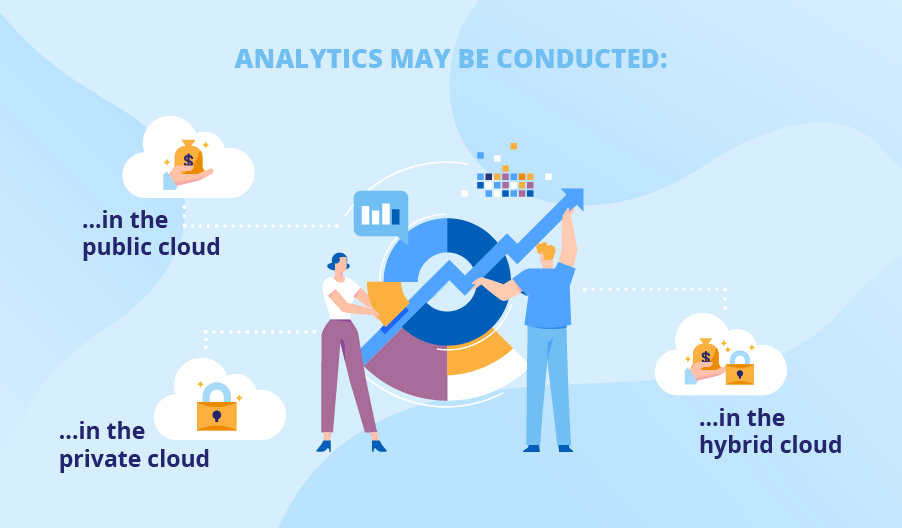
Based on the cloud environment, where data analysis is performed, you can define three types of cloud analytics. All of them offer such advantages as the absence of hardware-related costs, scalability, and high fault tolerance, so your choice will depend on your budget, business and compliance needs:

  • Analytics conducted in the public cloud

Public cloud is the cheapest way to conduct cloud analysis, as infrastructure costs are split among cloud tenants. I recommend you to use a public cloud to handle big data workloads, store huge data sets, and leverage such innovative technologies as machine learning, artificial intelligence, etc.

  • Analytics conducted in the private cloud

In case you seek enhanced control over the IT infrastructure to meet your data compliance or data security objectives, you can opt for private cloud analytics. To allow meeting such particular needs, a private cloud is physically located either at your own data center or at a cloud provider’s site with hardware and software dedicated to your company solely. Naturally, this option is the most expensive one.

  • Analytics conducted in the hybrid cloud

If you cannot afford data analysis fully conducted in the private cloud but still need to meet your data regulatory requirements (HIPAA, GDPR, GLBA, etc.), a hybrid cloud for data analysis will satisfy your demand. By keeping some parts of an analytics solution (for example, a storage of sensitive data) in the private cloud and the rest in the public cloud, you can significantly reduce analytics costs due to cloud computing while staying compliant with internal and external regulations.

The benefits that’ll make you stay in the cloud
cloud analytics benefits

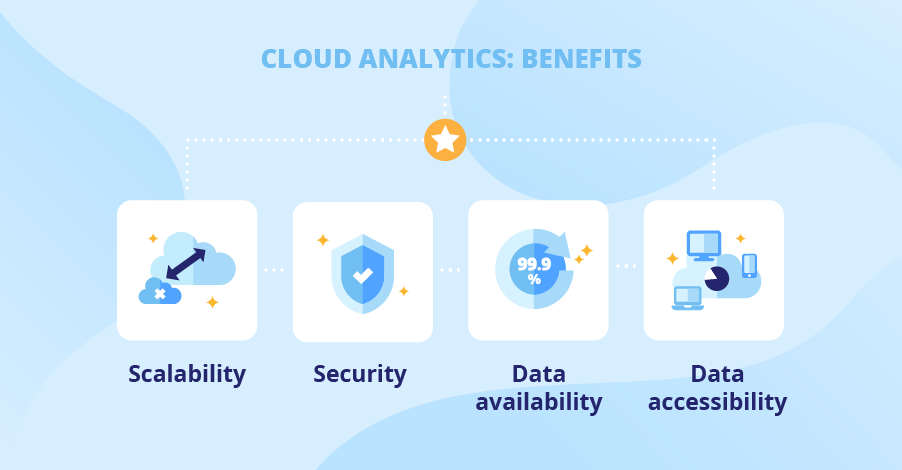
Scalability

The cloud deployment allows you to easily meet your demand in upscaling by simply buying storage and compute resources from the cloud provider whenever you need them. It is a great advantage over hosting your analytics solution on-premises, which implies an expensive upgrade of the existing IT infrastructure in case of demand in additional storage capacity.

Security

Usually, security concerns are the main deterrent for companies to deploy analysis in the cloud. However, I can assure you that such fears are void. These days, leading cloud providers (Microsoft Azure, AWS, Google Cloud Platform) apply advanced security measures to ensure high security level in the cloud. As for security measures that you can take, I advise you to fortify your analytics solution with data encryption, set up admin control, and conduct regular vulnerability assessment and penetration testing.

Data availability

Leading cloud providers guarantee 99.999% of service availability. With high-availability and fault-tolerant systems set up in the cloud, there is near-zero possibility of your analytics solution disruption even in case of unplanned downtimes due to power outages, natural disasters, etc.

Data accessibility

A web-based nature of your data analysis allows delivering insights to any device connected to the internet for you to benefit from them from anywhere and at any time. Additionally, cloud deployment contributes to increased collaboration among colleagues, who can share and view analytics results across a cloud-based analytics platform with the help of self-service software.

Don’t Let Your Company Lose Cloud Benefits!

ScienceSoft’s experts are ready to set up and tune your data analysis in the cloud to help you make the most of your data to gain a competitive advantage.

ScienceSoft’s top 5 of cloud analytics tools

At ScienceSoft, we are sure that cloud analytics software has to connect to multiple data sources, have ample data preparation and visualization capabilities, support advanced analytics, be easily manageable, secure, and much more. So, with these characteristics taken into account, we’ve chosen the top 5 cloud data analytics tools:

Services: Power BI Pro, Power BI Premium, Power BI Mobile, Power BI Embedded, Power BI Report Server.

Key features: Content packs of pre-built dashboards and reports, natural language processing, custom visualization, secure data governance, embedded analytics and collaboration, integration with Microsoft Azure Stream Analytics, support of 5 languages (DAX, Power Query, SQL, R, Python), etc.

Pricing: Power BI Mobile – free, Power BI Pro – $9.99/user/month, Power BI Premium – starting from 4,995/dedicated resources/month.

Demo: Power BI 

Services: Tableau Prep, Tableau Server, Tableau Online, Tableau Data Management, Tableau Server Management, Tableau Mobile, Embedded Analytics.

Key features: Unlimited data connectors, augmented data preparation, real-time access, natural language processing, time series analysis, role-based permissions, embedded dashboards, secure collaboration, etc.

Pricing: Tableau Creator – $70/user/month, Tableau Explorer – $35 or $42/user/month (depending on the deployment model), Tableau Viewer – $15/user/month.

  • Oracle Analytics Cloud (OAC)

Services: Data Visualization Cloud Service, Data Visualization in OAC (any edition), Business Intelligence Cloud Service, Business Intelligence in OAC (Enterprise Edition), Mobile apps Day by Day and Synopsis.

Key features: Self-service data discovery; augmented analytics; natural language processing; analytics dashboards; mobile exploration; integrated data preparation, collaboration, and publishing; governed enterprise analytics; embedded analytics, etc.

Pricing: Pricing is not publicly available.

Services: IBM Cognos Framework Manager, IBM Cognos Cube Designer, IBM Cognos Transformer.

Key features: Built-in data management and data governance features, automated data modeling, natural language-powered AI, etc.

Pricing: On Demand Plan: Standard user – $15/user/month, Plus user – $35/user/month, Premium user – $70/user/month.

Services: Qlik Sense, QlikView, Qlik Analytics Platform

Key Features: Built-in data preparation and integration, drag-and-drop visualizations, smart search feature, real-time analytics and reporting, data storytelling functionality, secure real-time collaboration, etc.

Pricing: Qlik Sense Business – $30/user/month, Qlik Sense Enterprise: Professional User – $70/user/month, Analyzer User – $40/ user/month.

Make the most of your data with cloud analytics!

As data volumes are growing exponentially, I believe that the cloud is the future of data analytics. Cloud analytics implies a quicker time to value, agility, and the pervasive use of analytics across your company, meaning more employees make timely data-driven decisions, which is a vital component of a company’s success.

With all that, deploying and conducting cloud analytics still requires dedicated efforts – starting from choosing the cloud type and cloud provider to setting up and administering analytics software or choosing a reliable vendor in case of analytics as a service. So, if you feel in need of qualified assistance with building, upgrading, supporting or outsourcing your cloud analytics solution, my colleagues at ScienceSoft and me are always ready to share our hand-on data analytics expertise, just let us know.
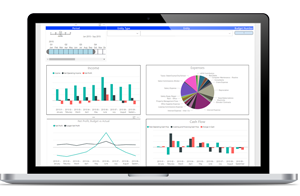

Are you striving for informed decision-making? We will convert your historical and real-time data into actionable insights and set up forecasting.


Managed IT Services fail mostly due to these 3 reasons


Organizations who opt for managed IT services are likely to tell you that it is a painful task to find vendors, and trust them with their IT ecosystem. Typically, businesses look out for IT vendors who can seamlessly integrate into their system. This may include vendors with

  • Good industry experience
  • Familiarity with the tools

When your organization is facing a resource crunch, and you are under tremendous pressure to ensure that all major workflows are running smoothly- and all you want is to relieve stress. Managed services is an option you would like to consider despite the bitter task of hunting for potential vendors, budget planning, attending multiple meetings etc. If it works out, it is a long-term win. Further, it is a good option when you want to focus all your tech bandwidth on core areas. However, there are a few mistakes that companies generally make that should be avoided at all costs if the dream is to scale the business while not adding to your existing pile of tasks. And they are listed as follows-

Lack of Clarity in Plan Of Action

You might be well aware, but is your team?

Misunderstandings between the vendor and your business exist because it wasn’t clearly discussed under the scope of work. And it is equally important to make sure that everyone including your IT team is aware of the same. The solution is clearly defining your goals, objectives, and scope of the project. This will ensure that both parties are in sync and there will be little confusion or room for micromanagement.

Starting Big

Even if they are a huge corporate entity, always start on a smaller project if possible. This way, it will be easier for you to understand how the vendor functions and if they are the right team to hire for all the future projects of the business. It is difficult to switch vendors in-between crucial, long-term projects.

Knowledge Transfer Gap Within Both Firms

If one person from either one of the parties leaves, how quickly can another team member replace this person and get to speed with the project?

It is a commonly ignored issue that negatively impacts the project in more than one way- slowing down operations and decreasing the productivity of the team. It is a good idea to bring this question up while talking to potential vendors and learn how they handle such issues in advance.

Conclusion

The expectations from managed services vendors are quite high. No business can easily find a vendor who is a great match for them, whom they can trust. However, once they do, they stick to a vendor for a really long time as it is not easy to manage IT processes and IT teams in general, whether in-house or outsourced.

Opting for managed services is an excellent idea under three main circumstances-

  • When you face a tech resource crunch, and all your projects still need to run smoothly
  • When you need to hire a big tech team to develop and maintain a particular IT infrastructure. This increases your overall effort in hiring and training the new resources.
  • When you want to focus only on your core activities and leave IT infrastructure management to a trusted long-term partner.

Keeping the aforementioned points in mind while hunting for managed IT services helps reduce the associated risks to a huge extent.

A Path from Laggards to Leaders


According to the stats, the manufacturing industry is among the laggards in terms of adopting BI tools. Our business intelligence implementation consultants believe that this happens mostly because manufacturers tend to be over-reliant on the capabilities of their ERP systems. Below, we explain why manufacturers should look beyond ERPs by illustrating what they are missing when not bringing BI on board.

business intelligence in manufacturing

Integrating data from disparate systems

ERP systems are powerful, though they are not tailored to analytics. Our team considers ERP as a vital, yet one of many data sources. In terms of data analysis, relying on one data source and disregarding a couple of others can result in misleading insights. We strongly believe that only a BI solution that integrates data from all the manufacturer’s systems and applications, such as ERP, CRM, SCM, and MES, can produce actionable and trustable insights.

Providing rich analysis options

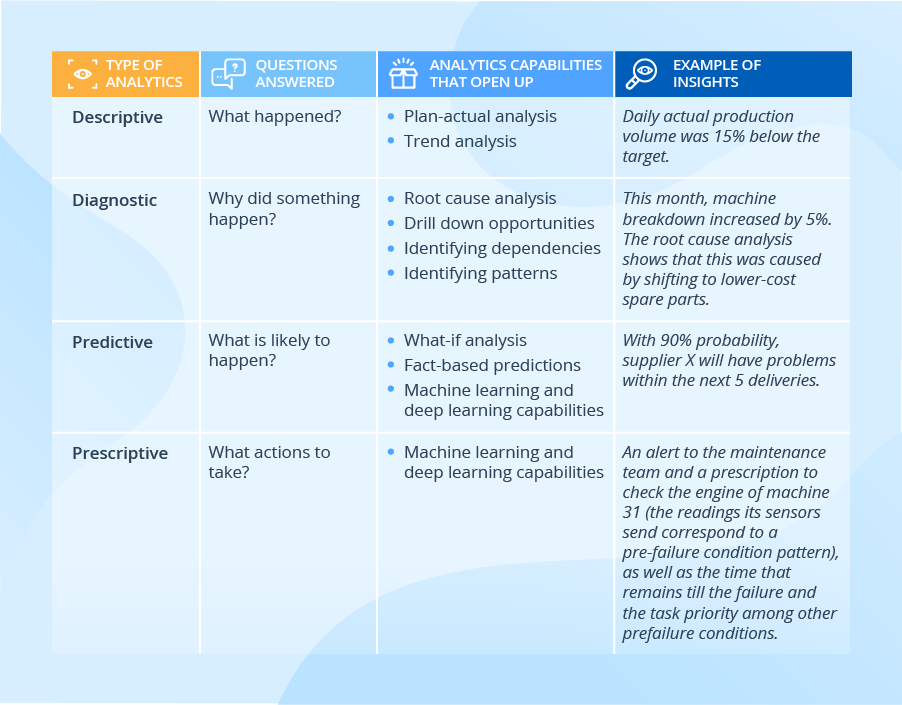
Our BI team also highlights that with the help of a BI solution, manufacturers can analyze both traditional and big data and benefit from all analytics types, including advanced ones. The table below shows more details of how a certain analytics type can contribute to fact-based decision-making:

bi in manufacturing sample insights

Providing insights tailored to users

With the following 3 aspects of BI implementation considered, every employee, be they line workers or top managers, can get the insights they require in a convenient and timely manner:

Dashboards and reports tailored to different user roles

Line supervisors will make use of such KPIs as throughput, yield, and capacity utilization, for the lines they manage. In their turn, plant managers will analyze these values aggregated for all the production lines (with the possibility to drill down to individual lines if required). And top management will benefit from seeing these KPIs aggregated to the level of plants and regions.

Predefined reports and self-service analytics

With an intuitive self-service analysis and visualization tool, users can drill down to the data in search of insights, with no involvement from the IT or the data analytics department. For example, a sales manager can open a predefined report depicting total sales and easily drill down to the sales by product category in a few clicks. And this demo shows how a business user can perform root cause analysis within a couple of minutes.

Historical reports and real-time analytics, including alerts

A BI solution should also meet users’ expectations of the speed of delivering insights. For example, the purchasing department would be fine to get a weekly report on the machinery parts that most frequently go out of order and use this info to adjust the purchasing of spare parts accordingly. And when it comes to a machinery breakdown or a pre-failure condition, real-time analytics is required for a maintenance team, which should be immediately alerted to avoid or, at least, minimize equipment downtime.

So, should we expect BI adoption growth in manufacturing in the future?

We strongly believe that manufacturing will catch up with the current leading industries in BI adoption. Manufacturers just cannot stay aside and miss the opportunities that BI brings thanks to integrated data, rich analysis options, and insights tailored to users. This is especially important when manufacturers serve multiple markets, manage complicated supply chains, and set up transparent, controllable and manageable production processes.


BI expertise since 2005. Full-cycle services to deliver powerful BI solutions with rich analysis options. Iterative development to bring quick wins.

Leveraging AI for Ecommerce Marketing


In our previous blog, we discussed the advantages of implementing AI for businesses. Now it’s time to discuss leveraging AI for Ecommerce marketing in various ways.

AI-driven marketing is a well-accepted mandate for businesses who are digital. According to SalesForce, 84% percent of marketers today are reported to be using AI, a 186% increase in adoption since 2018. So much that AI is being introduced in different forms at different stages of the marketing funnel. There is AI generated content for scaling content generation and SEO ranking as well as advanced AI-powered marketing analytics to target and retain customers .

The need for Hyper-Personalization in 2022

According to a report by McKinsey, over 70% of modern consumers want businesses to deliver personalized experiences to them, and personalization generates 40% more revenue for fast-growing businesses.

This is because customer churn rates, and acquisition rates are also incredibly higher for the businesses who haven’t leveraged AI analytics for enhanced consumer experience, thereby making a strong case for relevant product recommendations using Machine Learning capabilities.

This is where Amazon has excelled over all its competitors with their flagship ecommerce store that provides every user with a tailored experience the moment they enter the app or website (based on their interests and past shopping behavior). Plus, 35% of Amazon’s revenue is generated by its advanced recommendation engine.

No business has to be Amazon to make hyper-personalization work for them but it is crucial that they adopt modern analytics strategy and solutions to aid with fast growth and industry competition.

According to IMARC, a leading market research company, the global e-commerce market reached a value of US$ 13 Trillion in 2021. To penetrate faster and enjoy a good market share would require resolving the most depressing eCommerce challenges like conversions, high customer acquisition costs, high churn rates, among many others. Customer Retention will matter more than ever before.

Customer Sentiment Analysis

The first step is to be prepared, to know your target segment in and out. This helps with audience research, identifying opportunities and scope for improvement for all your products. Customer Sentiment Analysis uses Natural Language Processing (NLP) to scan across the internet and identify customer’s perception and sentiment towards the brand.

Brands use Customer Sentiment Analysis to build new products, improve existing services, audience research, and build better content around their audience. For a more in-depth understanding of how it works, you can read our blog on customer sentiment analysis, here.

AI-powered Recommendation System

We have reasons to believe that in 2023, the demand for real-time hyper personalization may grow exponentially. A result of increasing customer expectations and trend shifts in buying behavior. There are plenty of ways to implement real-time hyper personalization for your business.

The traditional recommendation systems that many e-commerce sites use still rely on collaborative filtering techniques, which use streams of historical customer data to deliver the recommendations. This process is however slowly moving out of trend and being replaced by real-time personalized recommendation engines thanks to the recent developments in the field of AI.

An AI chatbot is another good example of real-time hyper-personalization where AI enables real-time interaction with multiple users, providing them fast, and reliable communication from the brand. This results in increased customer satisfaction and retention.

Dynamic Pricing

Plenty of Ecommerce businesses exploit dynamic pricing techniques that align with their sales strategy. Hospitality, and transport sectors also take advantage of the same. Dynamic pricing is the concept of selling the same product at different price points in response to the shifting market conditions. The process enables businesses to instantly and continually change the prices of their products in real-time. This is why it is also called real-time pricing and is widely used in logistics, the industry most affected by volatile market conditions.

Dynamic pricing is used to strategically sell to different kinds of customers, especially by seasonal planning (holiday pricing, surge in demand pricing etc.), and by product life-cycle. This enables profit maximization and wider market access for the business.

Conclusion

There is a debate that simply refuses to die out. That robots and AI will be responsible for taking over this world. There is a long way to go to ascertain such theories, however, today, AI is somewhat responsible for slowly altering the changing consumer behavior trends taking place globally. Dynamic pricing, hyper-personalization by targeted offers, product recommendations, virtual assistants, chatbots, and other means are definitely working in favor of many organizations. It is in the best interest of e-commerce companies to invest in AI early and stay ahead of the fast-changing trends.

Python Interview questions – Provide an overview of Python.


Estimated reading time: 4 minutes

So you have landed an interview and worked hard at upskilling your Python knowledge. There are going to be some questions about Python and the different aspects of it that you will need to be able to talk about that are not all coding!

Here we discuss some of the key elements that you should be comfortable explaining.

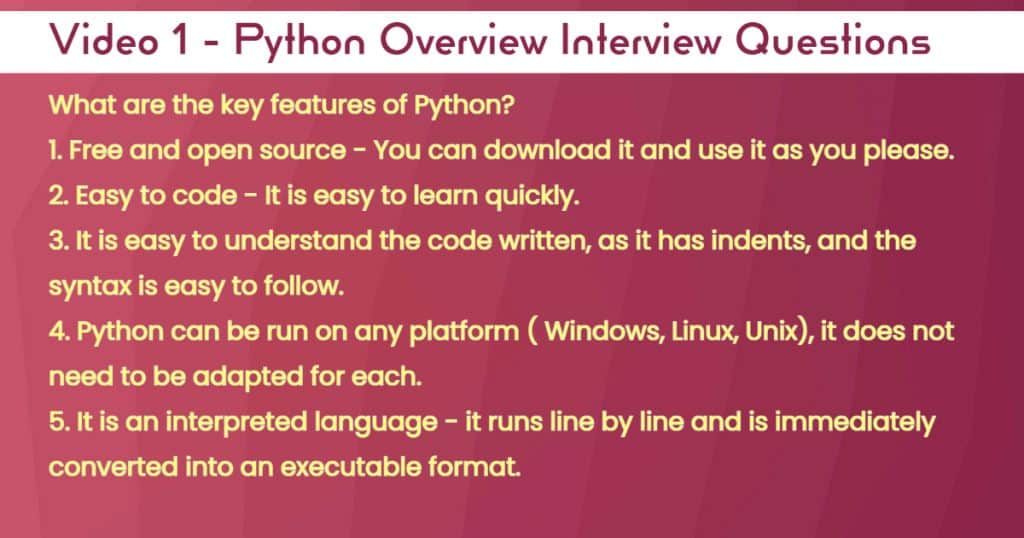
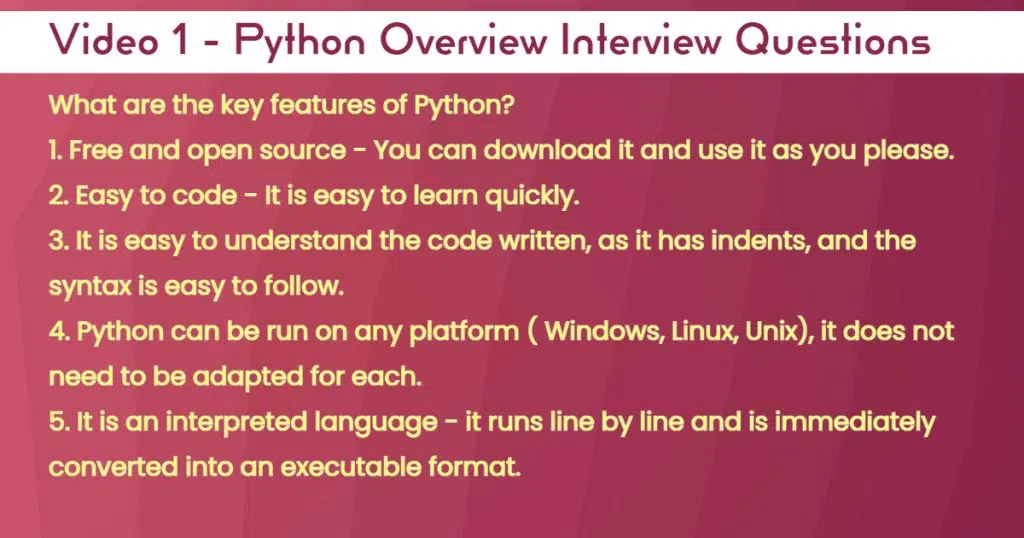
What are the key Features of Python?

In the below screenshot that will feature in our video, if you are asked this question they will help you be able to discuss.

Below I have outlined some of the key benefits you should be comfortable discussing.

It is great as it is open source and well-supported, you will always find an answer to your question somewhere.

Also as it is easy to code and understand, the ability to quickly upskill and deliver some good programs is a massive benefit.

As there are a lot of different platforms out there, it has been adapted to easily work on any with little effort. This is a massive boost to have it used across a number of development environments without too much tweaking.

Finally, some languages need you to compile the application first, Python does not it just runs.

What are the limitations of Python?

While there is a lot of chat about Python, it also comes with some caveats which you should be able to talk to.

One of the first things to discuss is that its speed can inhibit how well an application performs. If you require real-time data and using Python you need to consider how well performance will be inhibited by it.

There are scenarios where an application is written in an older version of code, and you want to introduce new functionality, with a newer version. This could lead to problems of the code not working that currently exists, that needs to be rewritten. As a result, additional programming time may need to be factored in to fix the compatibility issues found.

Finally, As Python uses a lot of memory you need to have it on a computer and or server that can handle the memory requests. This is especially important where the application is been used in real-time and needs to deliver output pretty quickly to the user interface.


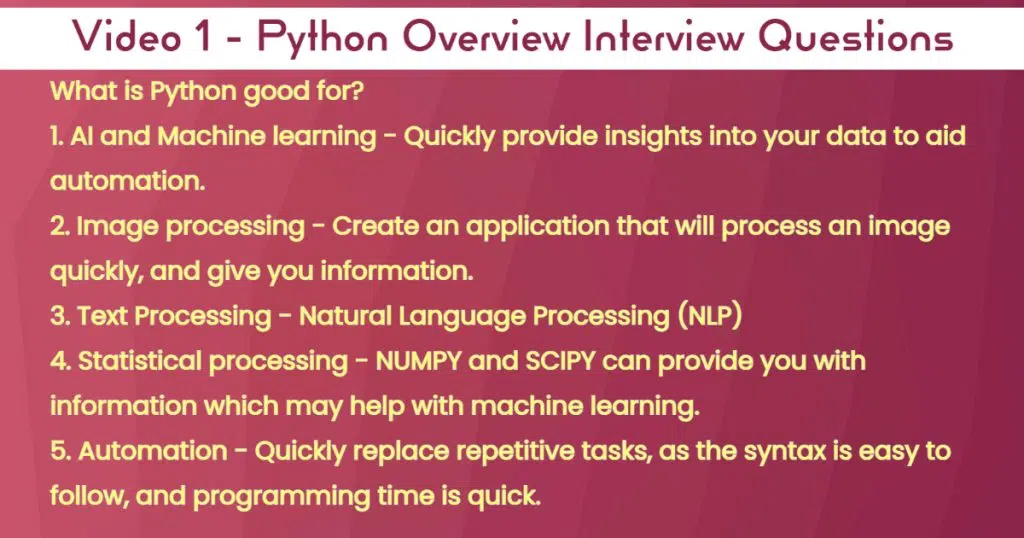
What is Python good for?

As detailed below, there are many uses of Python, this is not an exhaustive list I may add.

A common theme for some of the points below is that Python can process data and provide information that you are not aware of which can aid decision-making.

Alternatively, it can also be used as a tool for automating and or predicting the behaviour of the subjects it pertains to, sometimes these may not be obvious, but helps speed up the delivery of certain repetitive tasks.

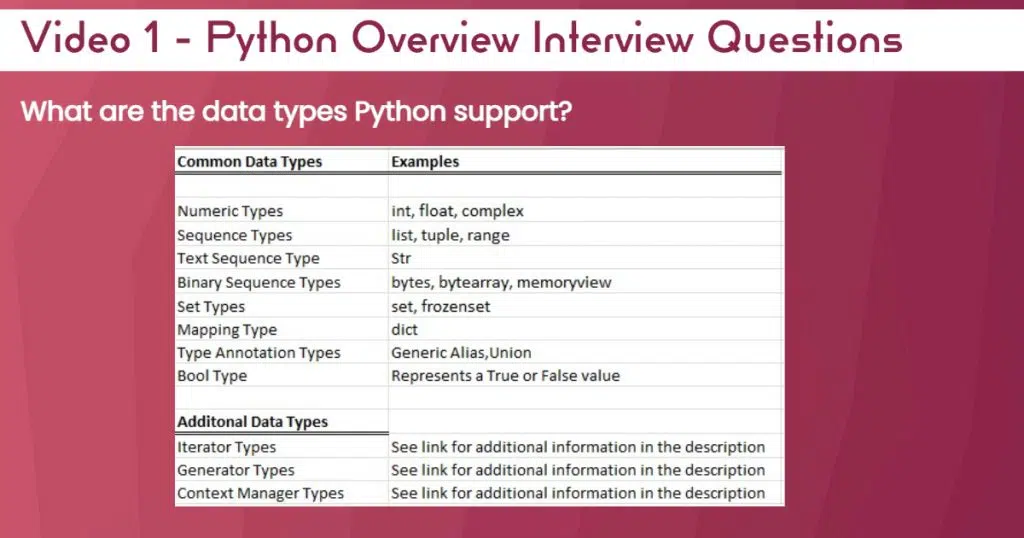
What are the data types Python support?

Finally below is a list of the data types you should be familiar with, and be able to discuss. Some of these are frequently used.

These come from the Python data types web page itself, so a good reference point if you need to further understand or improve your knowledge.

How to Become a BI-driven Company?


Editor’s note: By investing heavily in data assets without the appropriate strategy, you run the risk of making decisions resulting in unsatisfactory business intelligence ROI. Read on to learn about ScienceSoft’s propriety BI strategy, and check our offer in BI implementation services to learn how we can shoulder your BI project following this approach.

A well-developed BI solution is one of the success factors of a company’s wellbeing. It contributes to enhancing your business by enabling proactive optimization and becoming a BI-driven company. A well-thought-out business intelligence strategy ensures ROI from substantial investments into a BI solution.

According to the 2020 Global State of Enterprise Analytics survey, “only 52% of front-line employees have access to their organization’s data and analytics”, which is a hurdle to data literacy expanse among employees. In this article, we will share how to plan a BI strategy that will lead to the increased data literacy in your company and transform it into a BI-driven enterprise.

Data Warehouse Services

Since 2005, ScienceSoft advises on, develops, migrates, and supports your data warehouse. We can also provide a data warehouse as a service on a subscription fee basis.

Potential value to target with your BI strategy

To benefit from your data, you need to start with the understanding of data potential to solve your business problems. A BI solution implemented following a well-thought-out enables a company to:

  • Improve operational efficiency

You can understand and refine every operational process, creating a potential to drive revenue.

Empowered by advanced analytics, BI software allows assessing risks (be they risks in day-to-day operations or strategic decisions). In manufacturing, for example, it provides the opportunity of forecasting machine breakdowns, consequently reducing operational costs.

  • Create new products/services and enhance customer experience

You can tailor your products and services in accordance with real-time customer data (interactions, transactions, feedback, sentiment, etc.). Thus, by taking customer-centric decisions, you grow your top lines.

Your company is able to identify the opportunities for improvement by studying its competitors’ performance and adopting best practices.

  • Get autonomy for instant decision-making

A self-service BI solution powered with the 4 types of data analytics helps companies quickly react to changing business requirements and operate different business environments without the need to involve IT teams. In our BI demo, you can see how an intuitive interface of a self-service BI solution makes it easy to spot trends and patterns and answer your business questions.

Our proprietary BI strategy maturity model

BI strategy

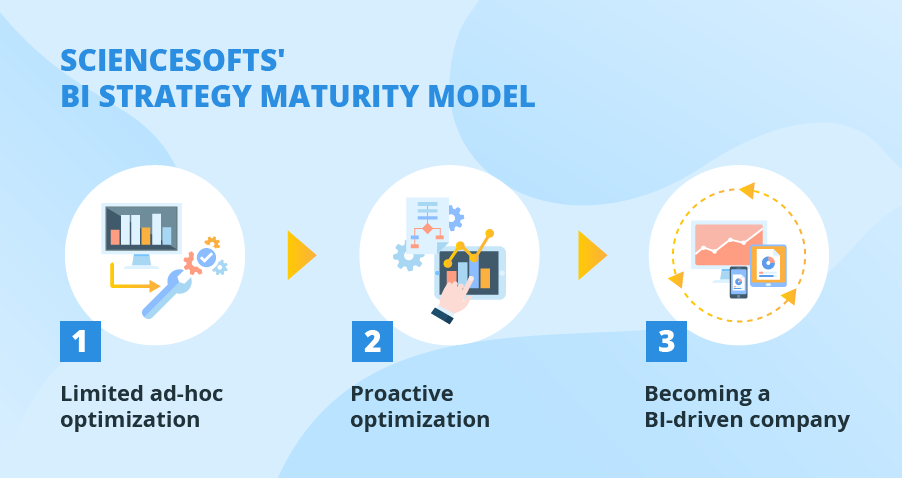
Drawing on 16 years of experience in BI, ScienceSoft worked out its own approach to developing a BI strategy. Our maturity model allows incrementally reaping the BI benefits, starting from analytics that requires minimum investments and moving towards deeper insights:

  1. Limited ad-hoc optimization

At this stage, a company leverages the acquired data to tune its current processes. Let us set an example here: Company X launches a marketing campaign to increase the sales of a certain product, but it seems to be fruitless. The company needs to learn the reason for that and define what adjustments need to be made.

As a starting point, the company evaluates its data – what data sources are currently available and how the retrieved data can be beneficial. In other words, the company assesses the data in terms of its potential to improve its marketing campaign. The company concurrently ensures data quality by conducting data quality management. Otherwise, low-quality data can totally discredit the company’s attempts. Then, the mix of descriptive and diagnostic analytics is employed to define what exactly is wrong about the marketing campaign and the reasons for such an outcome. When the problem and its root cause are defined, the marketing campaign can be optimized accordingly.

  1. Proactive optimization

At this maturity stage, the strategy presupposes implementing a BI solution that is aimed at gaining new insights to find more elaborate ongoing optimization options. Let us return to the previously mentioned company X, which is about to launch a new marketing campaign. This time, a BI solution empowered by predictive and prescriptive analytics enabled by machine learning capabilities allows the company to tailor its marketing campaign upfront.

  1. Becoming a BI-driven company

The third maturity stage addresses the challenge of delivering insights to the right people at the right time. At this stage, company X employs self-service BI software to grant its business users (according to their user roles) independence to make quick data-driven decisions without the need to involve the IT department. That way, all-level employees can have access to the data relevant to their tasks, which contributes to data literacy expansion among the whole enterprise.

What is your BI strategy going to be?

A business intelligence strategy is a framework that enables gradually reaching the following business objectives: optimizing current business processes, creating top-notch products and services and becoming a data-driven business.

Do you want to improve the decision-making process through business intelligence? Turn to ScienceSoft to get your own roadmap to success.

I want a BI strategy


BI expertise since 2005. Full-cycle services to deliver powerful BI solutions with rich analysis options. Iterative development to bring quick wins.

Data ingestion using Snowpipe and AWS Glue


Introduction

In today’s world that is largely data-driven, organizations depend on data for their success and survival, and therefore need robust, scalable data architecture to handle their data needs. This typically requires a data warehouse for analytics needs that is able to ingest and handle real time data of huge volumes.

Snowflake is a cloud-native platform that eliminates the need for separate data warehouses, data lakes, and data marts allowing secure data sharing across the organization. For this reason, Snowflake is often the cloud-native data warehouse of choice. With Snowflake, organizations get the simplicity of data management with the power of scaled-out data and distributed processing.

Snowflake is built on top of the Amazon Web Services, Microsoft Azure, and Google cloud infrastructure. There’s no hardware or software to select, install, configure, or manage, and that makes it ideal for organizations that do not want to dedicate resources for setup, maintenance, and support of in-house servers.

What also sets Snowflake apart is its architecture and data sharing capabilities. The Snowflake architecture allows storage and compute to scale independently, so customers can use and pay for storage and computation separately. And the sharing functionality makes it easy for organizations to quickly share governed and secure data in real time.

Using Snowpipe for data ingestion to AWS

Although Snowflake is great at querying massive amounts of data, the database still needs to ingest this data. Data ingestion must be performant to handle large amounts of data., and without that, you run the risk of querying outdated values and returning irrelevant analytics.

Snowflake provides a couple of ways to load data. The first, bulk loading, loads data from files in cloud storage or a local machine. Then it stages them into a Snowflake cloud storage location. Once the files are staged, the “COPY” command loads the data into a specified table. Bulk loading relies on user-specified virtual warehouses that must be sized appropriately to accommodate the expected load.
The second method for loading a Snowflake warehouse uses Snowpipe. Snowpipe continuously loads small data batches and incrementally makes them available for data analysis. Snowpipe loads data within minutes of its ingestion and availability in the staging area. This provides the user with the latest results as soon as the data is available.

Limitations in using Snowpipe

While Snowpipe provides a data ingestion method that is continuous, its limitation is that it is not real-time. Data might not be available for querying until minutes after it’s staged. Throughput can also be an issue with Snowpipe. The writes queue up if too much data is pushed through at one time.

Import Delays

When Snowpipe imports data, it can take minutes to show up in the database and be visible. This is too slow for certain types of analytics, especially when near real-time is required. Snowpipe data ingestion might be too slow for three use categories: real-time personalization, operational analytics, and security.

Real-Time Personalization

Many online businesses employ some level of personalization today. Using minutes- and seconds-old data for real-time personalization can significantly grow user engagement. And that could be hindered by Snowpipe’s limitations in that area.

Operational Analytics

Applications such as e-commerce, gaming, and the Internet of things (IoT) commonly require real-time views of what’s happening. This enables the operations staff to react quickly to situations unfolding in real time. Lack of real-time data using Snowpipe would affect this.

Security

Data applications providing security and fraud detection need to react to streams of data in near real-time. This way, they can provide protective measures immediately if the situation warrants. These could be impacted when Snowpipe is used.

Throughput Limitations

A Snowflake data warehouse can only handle a limited number of simultaneous file imports. You can create 1 to 99 parallel threads. But too many threads can lead to too much context switching. This slows performance. Another issue is that, depending on the file size, the threads may split the file instead of loading multiple files at once. So, parallelism is not guaranteed.

Workarounds prove expensive

To overcome the limitations of speed, you can speed up Snowpipe data ingestion by writing smaller files to your data lake. Chunking a large file into smaller ones allows Snowflake to process each file much quicker. This makes the data available sooner.

Smaller files trigger cloud notifications more often, which prompts Snowpipe to process the data more frequently. This may reduce import latency to as low as 30 seconds. This is enough for some, but not all, use cases. This latency reduction is not guaranteed and can increase Snowpipe costs as more file ingestions are triggered.

One way to improve throughput is to expand your Snowflake cluster. Upgrading to a larger Snowflake warehouse can improve throughput when importing thousands of files simultaneously. But, this again comes at a significantly increased cost.

AWS Glue to Snowflake ingestion

In any data warehouse implementation, customers take an approach of either extraction, transformation, and load (ETL) or extraction, load, and transformation (ELT), where data processing is pushed to the database. For either method, you could either use a hand-coded method or leverage any number of the available ETL or ELT data integration tools.

However, with AWS Glue, Snowflake customers now have a simple option to manage their programmatic data integration processes without worrying about servers, Spark clusters, or the ongoing maintenance traditionally associated with these systems.

AWS Glue provides a fully managed environment that integrates easily with Snowflake’s data warehouse as a service. . With this, developers now have an option to more easily build and manage their data preparation and loading processes with generated code that is customizable, reusable, and portable with no infrastructure to buy, set up, or manage.

Together, these two solutions enable customers to manage their data ingestion and transformation pipelines with more ease and flexibility than ever before.

With AWS Glue and Snowflake, customers get the added benefit of Snowflake’s query pushdown, which automatically pushes Spark workloads, translated to SQL, into Snowflake. Customers can focus on writing their code and instrumenting their pipelines without having to worry about optimizing Spark performance. With AWS Glue and Snowflake, customers can reap the benefits of optimized ELT processing that is low cost and easy to use and maintain.

Conclusion

Snowflake’s scalable relational database is cloud-native. It can ingest large amounts of data by either loading it on demand or automatically as it becomes available via Snowpipe.

Unfortunately, in cases where real-time or near real-time data is important, Snowpipe has limitations. If you have large amounts of data to ingest, you can increase your Snowpipe compute or Snowflake cluster size, but at additional cost.

AWS Glue and Snowflake make it easy to get started and manage your programmatic data integration processes. AWS Glue can be used standalone or in conjunction with a data integration tool without adding significant overhead. With AWS Glue and Snowflake, customers get a fully managed, fully optimized platform to support a wide range of custom data integration requirements.

Python Dictionary Interview Questions – Data Analytics Ireland


Estimated reading time: 6 minutes

In our first video on python interview questions we discussed some of the high-level questions you may be asked in an interview.

In this post, we will discuss interview questions about python dictionaries.

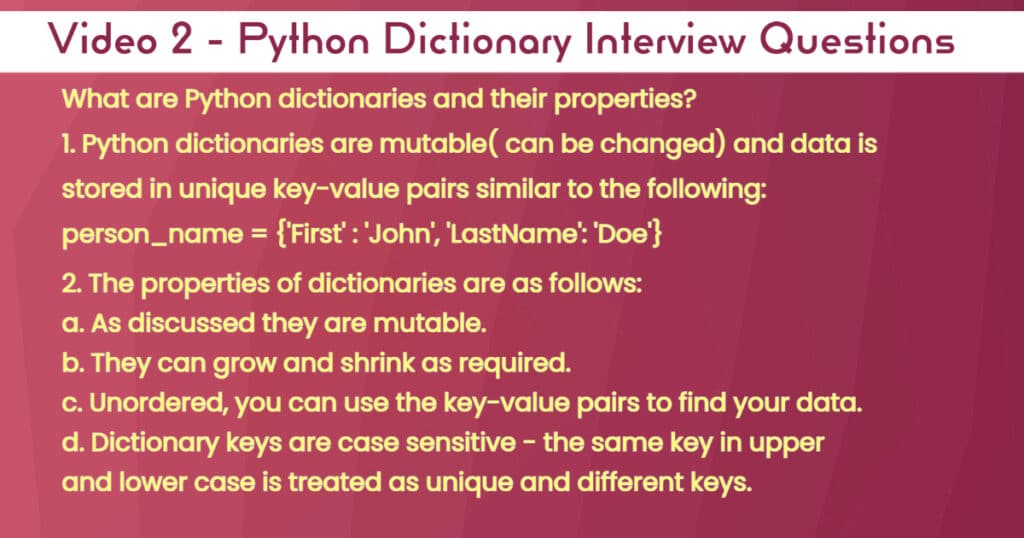
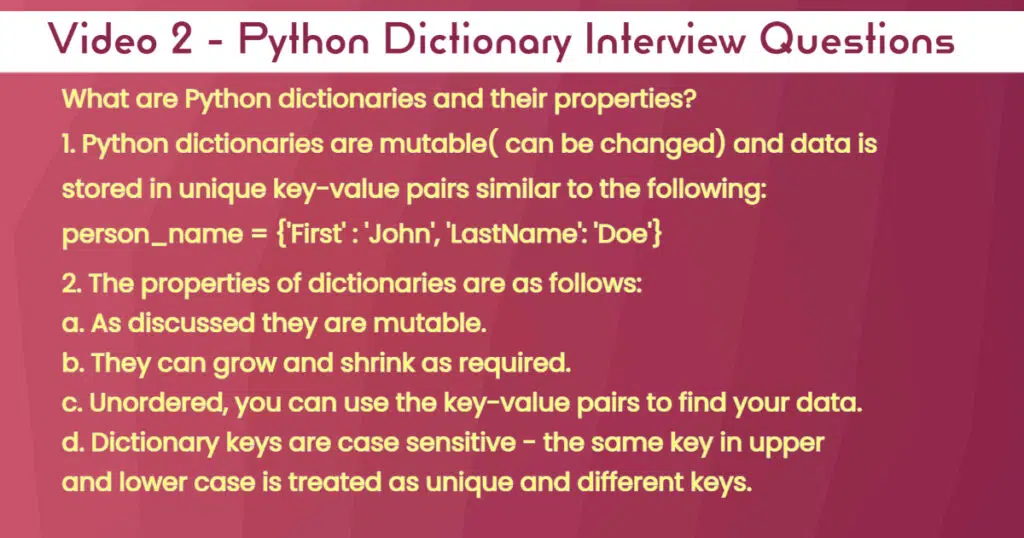
So what are Python dictionaries and their properties?

First of all, they are mutable, meaning they can be changed, please read on to see examples.

As a result, you can add or take away key-value pairs as you see fit.

Also, key names can be changed.

One of the other properties that should be noted is that they are case-sensitive, meaning the same key name can exist if it is in different caps.

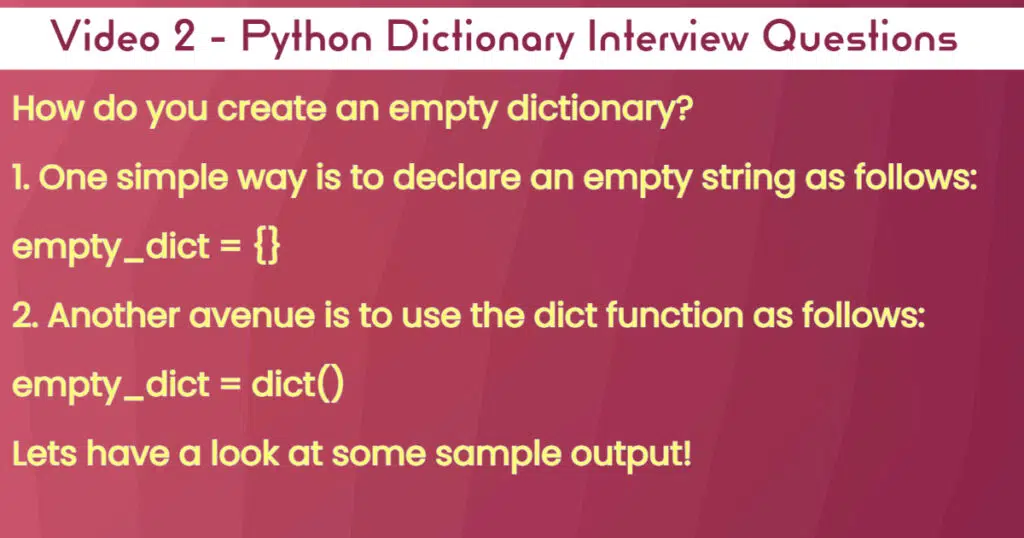
As can be seen below, the process is straightforward, you just declare a variable equal to two curly brackets, and hey presto you are up and running.

An alternative is to declare a variable equal to dict(), and in an instance, you have an empty dictionary.

The below block of code should be a good example of how to do this:

# How do you create an empty dictionary?
empty_dict1 = {}
empty_dict2 = dict()
print(empty_dict1)
print(empty_dict2)
print(type(empty_dict1))
print(type(empty_dict2))

Output:
{}
{}
<class 'dict'>
<class 'dict'>

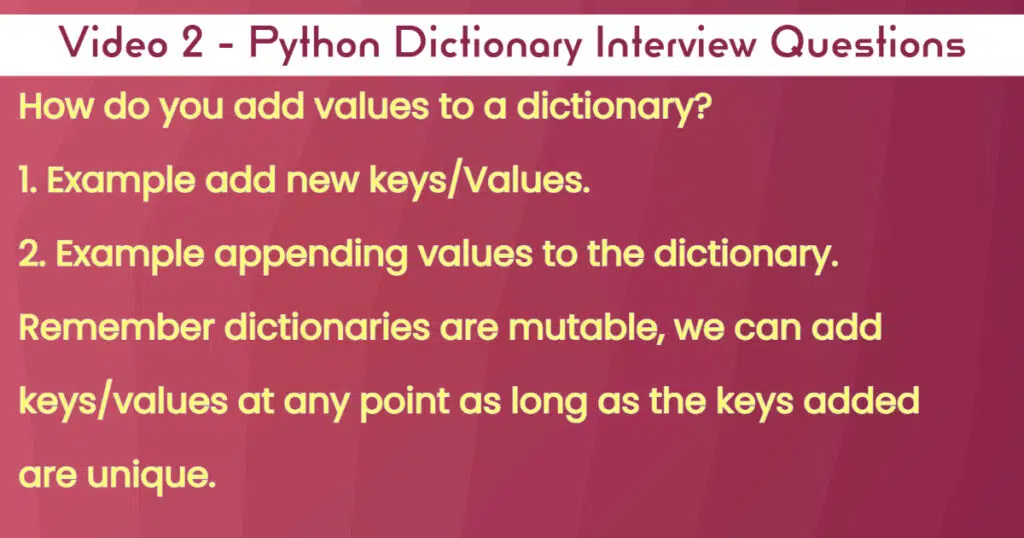
If you want to add values to your Python dictionary, there are several ways possible, the below code, can help you get a better idea:

#How do add values to a python dictionary
empty_dict1 = {}
empty_dict2 = dict()

empty_dict1['Key1'] = '1'
empty_dict1['Key2'] = '2'
print(empty_dict1)

#Example1 - #Appending values to a python dictionary
empty_dict1.update({'key3': '3'})
print(empty_dict1)

#Example2 - Use an if statement
if "key4" not in empty_dict1:
    empty_dict1["key4"] = '4'
else:
    print("Key exists, so not added")
print(empty_dict1)

Output:
{'Key1': '1', 'Key2': '2'}
{'Key1': '1', 'Key2': '2', 'key3': '3'}
{'Key1': '1', 'Key2': '2', 'key3': '3', 'key4': '4'}

One of the properties of dictionaries is that they are unordered, as a result, if it is large finding what you need may take a bit.

Luckily Python has provided the ability to sort as follows:

#How to sort a python dictionary?
empty_dict1 = {}

empty_dict1['Key2'] = '2'
empty_dict1['Key1'] = '1'
empty_dict1['Key3'] = '3'
print("Your unsorted by key dictionary is:",empty_dict1)
print("Your sorted by key dictionary is:",dict(sorted(empty_dict1.items())))

#OR - use list comprehension
d = {a:b for a, b in enumerate(empty_dict1.values())}
print(d)
d["Key2"] = d.pop(0) #replaces 0 with Key2
d["Key1"] = d.pop(1) #replaces 1 with Key1
d["Key3"] = d.pop(2) #replaces 2 with Key3
print(d)
print(dict(sorted(d.items())))

Output:
Your unsorted by key dictionary is: {'Key2': '2', 'Key1': '1', 'Key3': '3'}
Your sorted by key dictionary is: {'Key1': '1', 'Key2': '2', 'Key3': '3'}
{0: '2', 1: '1', 2: '3'}
{'Key2': '2', 'Key1': '1', 'Key3': '3'}
{'Key1': '1', 'Key2': '2', 'Key3': '3'}

How do you delete a key from a Python dictionary?

From time to time certain keys may not be required anymore. In this scenario, you will need to delete them. In doing this you also delete the value associated with the key.

#How do you delete a key from a dictionary?
empty_dict1 = {}

empty_dict1['Key2'] = '2'
empty_dict1['Key1'] = '1'
empty_dict1['Key3'] = '3'
print(empty_dict1)

#1. Use the pop function
empty_dict1.pop('Key1')
print(empty_dict1)

#2. Use Del

del empty_dict1["Key2"]
print(empty_dict1)

#3. Use dict.clear()
empty_dict1.clear() # Removes everything from the dictionary.
print(empty_dict1)

Output:
{'Key2': '2', 'Key1': '1', 'Key3': '3'}
{'Key2': '2', 'Key3': '3'}
{'Key3': '3'}
{}

How do you delete more than one key from a Python dictionary?

Sometimes you may need to remove multiple keys and their values. Using the above code repeatedly may not be the most efficient way to achieve this.

To help with this Python has provided a number of ways to achieve this as follows:

#How do you delete more than one key from a dictionary
#1. Create a list to lookup against
empty_dict1 = {}

empty_dict1['Key2'] = '2'
empty_dict1['Key1'] = '1'
empty_dict1['Key3'] = '3'
empty_dict1['Key4'] = '4'
empty_dict1['Key5'] = '5'
empty_dict1['Key6'] = '6'

print(empty_dict1)

dictionary_remove = ["Key5","Key6"] # Lookup list

#1. Use the pop method

for key in dictionary_remove:
  empty_dict1.pop(key)
print(empty_dict1)

#2 Use the del method
dictionary_remove = ["Key3","Key4"]
for key in dictionary_remove:
  del empty_dict1[key]
print(empty_dict1)

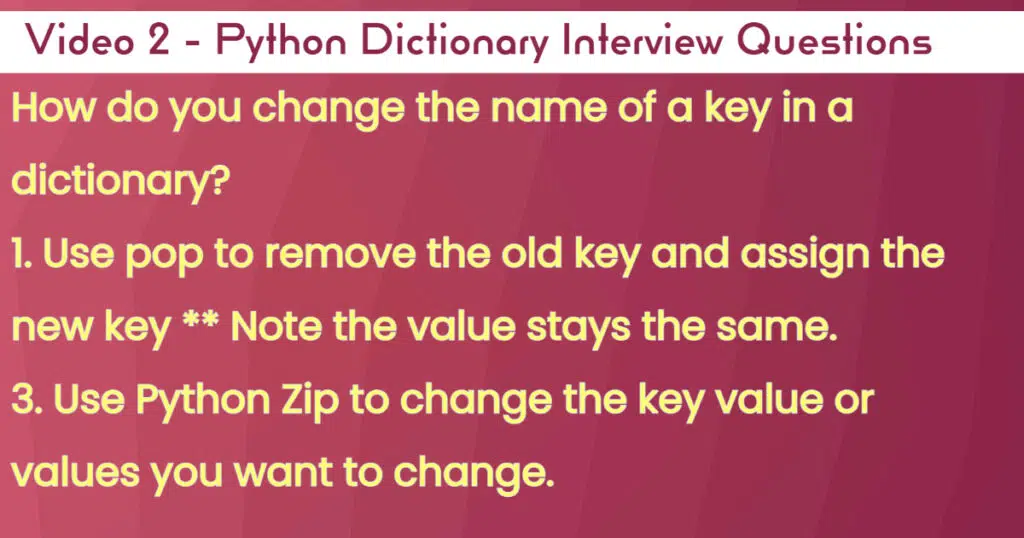
How do you change the name of a key in a Python dictionary?

There are going to be scenarios where the key names are not the right names you need, as a result, they will need to be changed.

It should be noted that when changing the key names, the new name should not already exist.

Below are some examples that will show you the different ways this can be acheived.

# How do you change the name of a key in a dictionary
#1. Create a new key , remove the old key, but keep the old key value

# create a dictionary
European_countries = {
    "Ireland": "Dublin",
    "France": "Paris",
    "UK": "London"
}
print(European_countries)
#1. rename key in dictionary
European_countries["United Kingdom"] = European_countries.pop("UK")
# display the dictionary
print(European_countries)

#2. Use zip to change the values

European_countries = {
    "Ireland": "Dublin",
    "France": "Paris",
    "United Kingdom": "London"
}

update_elements=['IRE','FR','UK']

new_dict=dict(zip(update_elements,list(European_countries.values())))

print(new_dict)

Output:
{'Ireland': 'Dublin', 'France': 'Paris', 'UK': 'London'}
{'Ireland': 'Dublin', 'France': 'Paris', 'United Kingdom': 'London'}
{'IRE': 'Dublin', 'FR': 'Paris', 'UK': 'London'}

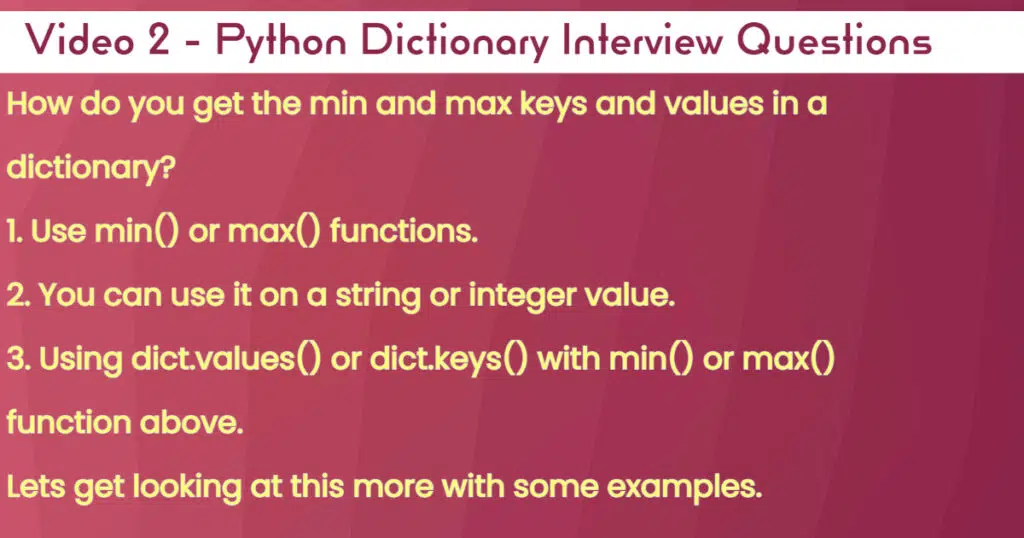
How do you get the min and max key and values in a Python dictionary?

Finally, you may have a large dictionary and need to see the boundaries and or limits of the values contained within it.

In the below code, some examples of what you can talk through should help explain your knowledge.

#How do you get the min and max keys and values in a dictionary?
dict_values = {"First": 1,"Second": 2,"Third": 3}

#1. Get the minimum value and its associated key
minimum = min(dict_values.values())
print("The minimum value is:",minimum)
minimum_key = min(dict_values.items())
print(minimum_key)

#2. Get the maximum value and its associated key
maximum = max(dict_values.values())
print("The maximum value is:",maximum)
maximum_key = max(dict_values.items())
print(maximum_key)

#3. Get the min and the max key
minimum = min(dict_values.keys())
print("The minimum key is:",minimum)

#2. Get the maximum value and its associated key
maximum = max(dict_values.keys())
print("The maximum key is:",maximum)

Output:
The minimum value is: 1
('First', 1)
The maximum value is: 3
('Third', 3)
The minimum key is: First
The maximum key is: Third

Healthcare Data Analytics: Features, Costs, and ROI


Healthcare analytics solutions with advanced clinical decision support features may be classified as Software as a Medical Device (SaMD). For instance, this applies to software that enables remote control over wearable medical devices (e.g., an infusion pump or an implantable neuromuscular stimulator), provides AI-powered interpretation of medical images and test results, or sends alerts on patients’ states for potential clinical intervention. Since such software can directly affect patients and significantly influence treatment-related decisions, it must comply with IEC 62304:2006/Amd 1:2015 and ISO 13485 standards and requires FDA approval. To make sure our customers have flexibility in choosing their healthcare analytics features, ScienceSoft invests heavily in our expertise with the above regulations. We are ready to appoint relevant compliance experts to guarantee the future software adheres to all the requirements no matter how strict they are.

Limitations and challenges of Informatica cloud


Introduction

Informatica is a data integration tool based on ETL architecture. It provides data integration software and services for various businesses, industries and government organizations including telecommunication, health care, financial and insurance services.

Informatica uses the Extract, Transform & Load (ETL) architecture which is the most popular architecture to perform data integration. Once the Source system is connected and the source data being captured, Informatica supports several out of the box transformations.

Application of Informatica tool

Informatica is used for a variety of use cases. Some of these are listed below.

Informatica tool for Data Migration:

The company uses it to transfer from the current legacy system, such as the mainframe to the latest database system. Consequently, the transfer of its existent data into the system could be carried out. For example, a company purchases a new accounts payable application. PowerCenter can move the existing account data to the new application. Informatica preserves data lineage for tax, accounting, and other legally mandated purposes

Informatica tool for Application Integration:

The assimilation of information from several different systems, such as numerous databases and system based on files could be completed utilizing Informatica. For example, company A purchases Company B. So to achieve the benefits of consolidation, Company B’s billing system must be integrated into Company A’s billing system which can be easily done by Informatica

Informatica tool for Data Warehousing:

Companies establishing their warehouses of data will need ETL to transfer the data to the warehouse from the Production system. Typical actions required in data warehouses are:

  • Data warehouses put information from many sources together for analysis
  • Data is moved from many databases to the Data warehouse
  • All the above typical cases can be easily performed using Informatica

Informatica tool for Middleware:

Informatica can connect a variety of sources, including most of the Application Sources.

  • SAP certified Data Integration tool
  • Can pull and push data into SAP R3, SAP BW systems
  • Have connectivity adapter for majority of the Application Sources
  • It can also be used as middleware between two applications like SAP R3, SAP BW etc.

It could be utilized as a tool for cleansing data.

Challenges with Informatica cloud platform

Informatica comes in on-premise as well as cloud versions. Informatica Cloud is a data integration solution and platform that works Software as a Service (SaaS). Informatica Cloud can connect to on-premises, cloud-based applications, databases, flat files, file feeds, and even social networking sites.

Informatica Cloud Data Integration is the cloud-based Power Center, which delivers accessible, trusted, and secure data to facilitate more valuable business decisions. Informatica Cloud Data Integration can help the organization with global, distributed data warehouse and analytics projects.

Informatica supports serverless deployments using Amazon EMR, Microsoft Azure HDInsight, and Databricks clusters with data engineering products. Once a developer builds mappings using Informatica Data Engineering Integration, customers have an option to run mappings in an existing cluster for on-premises deployment or serverless using the cluster auto-deployment option

The cloud version of the tool, however, has its limitations and challenges.

  • Setting up and configuring Informatica over cloud – Setting up Informatica and integrating with existing services can be a challenge. It can still take a considerable amount of time and effort to get Informatica up and running.
  • Tool management – Informatica over time has built a vast array of tools to address various user needs. However, as the number of tools grows, there is a need to add more and more physical servers. On the other hand, the other similar tools in the market function very well in the cloud environment. This does not bode well for the future looking at all the newer technologies which do not have so much of tech burden
  • Multiple tools for single workflow – Most new tools have a great cloud version where you can hop onto a URL, do your work and deploy it in minutes. With Informatica, you still have multiple client tools just to be able to deploy a single workflow and monitor as it runs. This can be both confusing and overwhelming to users.
  • Using Informatica PowerCenter for ETL designing – This can be quite intuitive for basic to moderately complex workflows. However, for achieving advanced tasks, there is not sufficient documentation available
  • Cost of handling servers – Similar tools from Amazon, Microsoft, Google have advantages where the user can create and upload code, which can be automatically executed in a serverless manner where you no longer need to worry about managing servers, services, and infrastructure. All of that is handled automatically. But with Informatica, this is a decided disadvantage – the addition of physical servers escalates the cost of implementation.
  • Updates and maintenance – Informatica Cloud architecture, the Secure Agent is a lightweight program. And it is used to connect on-premise data with cloud applications. It is installed on a local machine and processes data locally and securely under the enterprise firewall. All upgrades and updates are automatically sent and installed on the Secure Agent regularly.

Overcoming the Informatica Cloud Challenges

With the challenges of constant updates and therefore maintenance, the cost of handling servers and various tools, and the risks involved in large data handling, Informatica Intelligent Cloud Services (IICS) provides some solutions and workarounds to these challenges.

IICS eliminates the need for constant upgrades because Informatica performs them as new software releases become available.

As a cloud-native platform, IICS makes it easy to explore and try new capabilities and services, rather than requiring the users to install new software versions in their on-premises environments.

The challenge of setup and configuration time can be solved through the use of bulk data ingestion. With IICS, you can use a modern data warehouse practice of bulk ingesting data as-is into the landing layer. You can then apply transformation and curation logic afterward. This results in a three times faster load due to mass ingestion efficiencies and faster processing with push-down optimization (PDO), leveraging the native system commands and limiting data movement.

Conclusion

Informatica is a popular online tool for data management and migration. On the positive side, it is cost-effective and user friendly. However, unlike its peers, it does not have a serverless option. While the Informatica cloud version exists, it has lesser features compared to the on-premise version. Moreover, with large scale implementation, there would be a need for more physical servers over time. This makes it a less favourable choice as compared to its alternatives that provide more options and agility while on cloud.

Also Read:

Case Study: Data Migration From Informatica On-Premise to Informatica Cloud
Case Study: Data Integration Between Casino Properties using Informatica Intelligent Cloud Services