Ansys System Requirements & Empirical Benchmarks


Looking for Ansys System Requirements? Check out our latest post!

In the world of Finite Element Analysis (FEA) and Computational Fluid Dynamics (CFD), the efficiency of the simulation is directly proportional to the architecture of the hardware it runs on. Ansys solvers—ranging from Mechanical and Fluent to HFSS—utilize high-performance computing (HPC) principles that demand a strategic balance between raw clock speed, core density, and memory bandwidth.

This guide provides an empirical look at Ansys System Requirements in 2026, targeting professionals who need to minimize “time to solution.”

CPU: Frequency vs. Core Count

The CPU is the primary engine for Ansys solvers. However, more cores do not always mean better performance due to two factors: Memory Bandwidth Bottlenecks and Ansys HPC Licensing.

Frequency (Clock Speed)

For solvers that are less parallelizable, or for smaller models, higher clock speeds (5.0GHz+) are preferable. This is often the case in the initial setup and “pre-processing” stages.

Core Count and Scaling

Ansys Mechanical (FEA) typically scales well up to 16–32 cores. Beyond this, the performance gains often diminish unless the model is exceptionally large. Ansys Fluent (CFD), however, scales nearly linearly with core counts, provided the memory bandwidth can feed them.

Professional Recommendations:

  • Tier 1 (Ultimate Performance): AMD Ryzen Threadripper PRO 9995WX (96 Cores) or Intel Xeon w9-3595X. These platforms offer the PCIe lanes and memory channels necessary for massive simulations.
  • Tier 2 (High-End Workstation): AMD Threadripper 9970X (32 Cores) or Intel Core Ultra 9 285k (for smaller, frequency-bound models).
  • Tier 3 (Entry Professional): AMD Ryzen 9 9950X or Intel Core Ultra 9 285k.

RAM: The “Hidden” Bottleneck

In Ansys, memory bandwidth is often more important than CPU speed. If the CPU cannot get data fast enough, it sits idle (I/O Wait).

Capacity

  • Minimum: 64GB (for basic structural analysis).
  • Recommended: 128GB – 256GB.
  • High-End: 512GB+ (necessary for complex CFD or large transient electromagnetic simulations).

Bandwidth (Channels)

Consumer platforms (Z890/X870E) only offer 2 memory channels. Professional platforms (WRX90/W890) offer 8 to 12 memory channels. For Ansys, the jump from 2 channels to 8 channels can result in a 2x to 3x increase in solver speed, even with the same core count.

GPU: Acceleration and Visualization

While the CPU does the heavy lifting for most FEA, Ansys has made significant strides in GPU acceleration via the Ansys Discovery and Fluent solvers.

Professional vs. Consumer

For professional stability and ECC (Error Correction Code) memory, the NVIDIA RTX Pro 6000 Blackwell or the RTX Pro 5000 Blackwell series are preferred. However, for users on a budget, the RTX 5090 offers immense raw CUDA core counts that can significantly accelerate Fluent simulations.

Requirements:

  • VRAM: Minimum 16GB. For complex Discovery Live simulations, 32GB+ is recommended.
  • Architecture: NVIDIA is the standard here due to CUDA optimization within Ansys.

Ansys System Requirements – Estimated Benchmarks

The following data represents estimated performance scaling across modern architectures using a standard Ansys Mechanical Benchmark (Standard R24-2).

Solver Speed Comparison (Lower is Better)

CPU Model Core Count Memory Config Solve Time (Seconds)
Intel Core Ultra 9 285k 24C / 32T 2-Channel DDR5 412s
AMD Ryzen 9 9950X 16C / 32T 2-Channel DDR5 395s
Intel Xeon w7-2500 28C / 56T 8-Channel DDR5 245s
Threadripper PRO 9975WX 32C / 64T 8-Channel DDR5 185s
Threadripper PRO 9995WX 96C / 192T 8-Channel DDR5 142s

Scaling Efficiency: Mechanical vs. Fluent

Core Count Mechanical Scaling Fluent (CFD) Scaling
4 Cores 100% (Baseline) 100% (Baseline)
8 Cores 185% 195%
16 Cores 310% 380%
32 Cores 420% 720%
64 Cores 480% 1350%

Storage: The Data Throughput

Ansys generates massive amounts of temporary files during the solve process (the .scratch files). If your storage is slow, the CPU will throttle.

  1. Primary Drive (OS/Apps): 1TB NVMe Gen4 or Gen5 SSD.
  2. Working Drive (Active Simulations): 2TB+ NVMe Gen5 SSD (e.g., Crucial T705 or similar). This drive should have high sustained write speeds.
  3. Archive: 4TB+ SATA SSD or Enterprise HDD for long-term project storage.

Summary Recommendations

The “Standard Engineer” Build – ProMagix HD80

  • CPU: AMD Ryzen 9 9950X (16 Cores)
  • RAM: 128GB DDR5-6000
  • GPU: NVIDIA RTX 5080 (16GB VRAM)
  • Storage: 2TB Gen5 NVMe

The “HPC Power User” Build – ProMagix HD150

  • CPU: AMD Threadripper PRO 9975WX (32 Cores)
  • RAM: 256GB DDR5-5600 (8-Channel)
  • GPU: NVIDIA RTX Pro 6000 Blackwell (96GB VRAM)
  • Storage: Dual 2TB Gen5 NVMe in RAID 0 (For maximum scratch space speed)

Technical Note on Licensing

Always align your hardware purchase with your Ansys HPC licenses. If you only have a license for 16 cores, purchasing a 96-core CPU will provide no benefit for the solver stage. Focus instead on maximizing memory bandwidth and per-core frequency for those 16 cores.

Configure you Velocity Micro Ansys Workstation Now.

The following two tabs change content below.

This content was written by the expert Velocity Micro staff.


Idols of Ash Free Download (Build 22824348)


Idols of Ash Preinstalled Worldofpcgames

Idols of Ash Direct Download

Grapple, clamber and fall thousands of meters down into a dark and ancient place in this first-person horror climbing game. You are being hunted.

Features and System Requirements:

  • First-person physics-based climbing system with a grappling hook
  • Hunted by a huge monster in an ancient mega-structure
  • Unlockable difficulty modes including additional content
  • Atmospheric visuals and audio
  • Approximately 20-40 minutes to complete on Normal

Screenshots

System Requirements

Minimum
Requires a 64-bit processor and operating system
OS *: Windows 7 or later
Processor: Intel Core i3 (7th Gen) or AMD Ryzen 5 2600
Memory: 4 GB RAM
Graphics: Intel HD 5000 (Shader Model 3)
Storage: 1 GB available space
Support the game developers by purchasing the game on Steam

Installation Guide

Turn Off Your Antivirus Before Installing Any Game

1 :: Download Game
2 :: Extract Game
3 :: Launch The Game
4 :: Have Fun 🙂


Redditor shares gaming PC build with cooling system that can only be described as ‘biblically accurate’


Obviously, gaming is a huge reason why I love all things PC hardware. However, my other love is folks doing completely improbable or impractical things with their gaming PC. As such, please give a warm welcome to a truly unique PC build the creator is considering dubbing ‘Seraphim’.

The build in question features an extremely extra, though apparently fully functional fan array which looks not unlike the aforementioned, many-winged angel. That’s coupled with many criss-crossing pipes of a water cooling system that is already giving me The Fear. It all took about four years to put together in the end.

Final boss of watercooling! from r/pcmasterrace

Sintopia Free Download (v1.0.2.519) – WorldofPCGames


Sintopia Preinstalled Worldofpcgames

Sintopia Direct Download

Manage Hell. Manipulate the Overworld. Build the resurrection business of your dreams! In Sintopia, you’re tasked with managing the bureaucratic administration of Hell: “re-educate” the sinful, generate profit, play god and expand your hellish empire. All part of a day’s work at Hell Incorporated.

Hell is full. Bureaucracy is eternal. And you’re in charge. Sintopia is a darkly comedic strategy and management sim where you run the underworld’s most dysfunctional punishment facility. As a freshly promoted middle manager of Hell Incorporated, your job is simple: “re-educate” sinners, resurrect the worthy, and turn eternal damnation into an optimized business machine.

HELL YOUR WAY
Build a devilishly efficient underworld to process the endless stream of sinful souls arriving from above. Punish souls to turn a profit and expand your capabilities or divine influence. Hire eclectic imployees to keep the paperwork flowing… just make sure they’re paid on time.

SEVEN DEADLY SINS
Souls
accumulate sins across their many lifetimes. Keep an eye on these levels and build specialized purification centres to stop corruption from spiralling out of control. Otherwise, you may have a monstrous demon on your hands or even worse, a devastating hit to your efficiency… truly diabolical. Pebble Knights

A DIABOLICAL CAREER
Office politics has never been so dangerous! Enact biblical-level corporate intrigues in the story-based campaign mode. Test your organizational mettle in Challenge Mode. Perfect the art of Hell building or slack-off for the day in the fully customizable Sandbox Mode.

Features and System Requirements:

  • Rule a chaotic underworld where you manage sinners, demons, and punishment systems.
  • Build and expand your infernal realm with management and city-building mechanics.
  • Balance resources while deciding how souls are processed and controlled.
  • Use dark humor in a world that mixes strategy with absurd supernatural themes.
  • Shape your underworld through choices that affect efficiency and chaos.
  • Screenshots

    System Requirements

    Minimum
    Requires a 64-bit processor and operating system
    OS: Windows 10 x64
    Processor: i5 10400 (6 x 2.9GHz) / Ryzen 5 3600 (6 x 3.6GHz)
    Memory: 12 GB RAM
    Graphics: RTX 2060 SUPER (8 GB) / RX 5700 XT (8 GB)
    Storage: 12 GB available space
    Support the game developers by purchasing the game on Steam

    Installation Guide

    Turn Off Your Antivirus Before Installing Any Game

    1 :: Download Game
    2 :: Extract Game
    3 :: Launch The Game
    4 :: Have Fun 🙂

‘Are monitors anti-inflation?’: AOC argues monitors are a better upgrade than graphics cards or memory right now, which seems like the kind of thing a monitor manufacturer would say


Monitors are kind of important. Like, you need them to see the games you play, man. But on a deeper level, picking the right one to see your games as intended actually is important—be that going up to 4K for those beautifully rendered textures or OLED for true blacks. Monitor manufacturer AOC seems to agree, and it has a whole new range for you to pick from.

In a press conference I attended in Croatia today, Cesar Reyes Acosta, European commercial leader for AOC, showed off said new monitors, and asked questions as ‘food for thought’. These were a series of prodding inquiries intended to explain why one might want a new monitor right now (or, I suppose, in a few months, with some of them out in June and July).

Maya System Requirements & Empirical Benchmarks


Maya System Requirements & Empirical Benchmarks

Interested in Maya System Requirements? Read on!

Autodesk Maya remains the industry standard for 3D animation, modeling, simulation, and rendering. However, because Maya is a multi-faceted application, its hardware demands vary significantly depending on whether you are focusing on viewport interaction, complex Bifrost simulations, or final-frame rendering.

Selecting the optimal configuration requires an understanding of how Maya utilizes system resources across different sub-tasks. This guide analyzes current hardware performance—including the latest GPU architectures and high-density DDR5 memory—to provide empirical recommendations for professional workflows.

Maya System Requirements: The Processor

The CPU is the primary engine for Maya. Its performance is divided into two categories: Single-Core (Active Work) and Multi-Core (Rendering/Sim).

Active Modeling and Animation

For tasks like modeling, rigging, and animation playback, Maya is primarily single-threaded. High clock speeds are more beneficial than high core counts here. A CPU with a high “boost” frequency ensures that the viewport remains responsive and that the UI does not lag when manipulating complex hierarchies.

Rendering and Simulation

When using Maya’s built-in Arnold renderer or running Bifrost liquid simulations, the software transitions to a multi-threaded workload. In these scenarios, the more cores available, the faster the computation.

Recommendations:

  • Top Tier: AMD Ryzen 9 9950X or Intel Core Ultra 9 285k. These chips offer a balance of 5.7GHz+ boost clocks for modeling and high core counts for local rendering.
  • Workstation Tier: AMD Threadripper 9000-series. For users doing heavy simulation or high-resolution Arnold rendering locally, the 32 or 64-core variants are essential to minimize downtime.

Maya System Requirements: The Graphics Card

The GPU’s role in Maya has expanded from merely driving the Viewport 2.0 to becoming the primary engine for rendering through Arnold GPU, Redshift, or V-Ray.

Viewport Performance

Viewport 2.0 relies on DirectX or OpenGL. Modern professional and consumer cards handle high-polygon counts with ease, but VRAM becomes the primary bottleneck when working with high-resolution textures and complex Shaders (OSL).

GPU Rendering

This is where the hardware requirements scale exponentially. If your pipeline utilizes GPU-accelerated renderers, the number of CUDA cores (NVIDIA) and the total VRAM are the two most critical metrics.

Recommendations:

  • NVIDIA GeForce RTX 5090 (32GB VRAM): The current gold standard for GPU rendering. The massive VRAM allows for rendering complex scenes without the “out of memory” errors common on lower-tier cards.
  • NVIDIA GeForce RTX 5080 (16GB VRAM): Excellent for high-end modeling and animation where real-time viewport feedback is needed, though it may struggle with ultra-heavy production-grade GPU renders.

Memory (RAM)

Maya is notoriously memory-intensive, especially when dealing with high-resolution meshes or large particle caches.

  • 32GB: The absolute minimum for professional work. Suitable for individual asset creation and light scenes.
  • 64GB: The “Sweet Spot.” This provides enough headroom for Maya to run alongside supporting apps like ZBrush, Substance Painter, or Photoshop without aggressive swapping.
  • 128GB+: Necessary for artists working on massive environments, high-end VFX, or heavy Bifrost simulations.

Storage Architecture

Slow storage is often the “silent killer” of productivity in Maya. Asset loading times and autosave lag can interrupt the creative flow.

  • Primary (OS/Apps): 1TB NVMe Gen5 SSD.
  • Secondary (Active Projects/Cache): 2TB+ NVMe Gen4/Gen5 SSD. Maya’s “Scratch” space and Bifrost caches should always live on the fastest drive possible to prevent simulation bottlenecks.
  • Tertiary (Archive/Storage): High-capacity SATA SSDs or Enterprise HDDs for finished projects.

Estimated Benchmarks (April 2026)

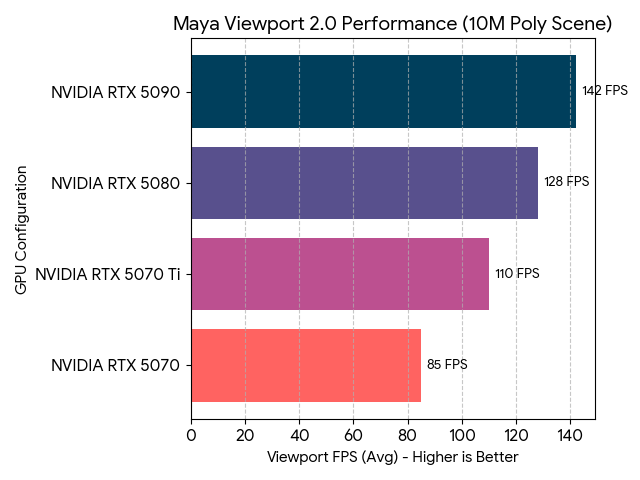
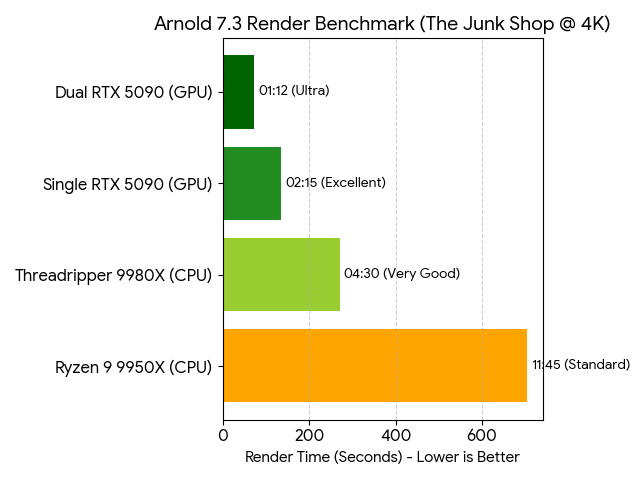
To illustrate the performance delta between modern configurations, we look at two primary metrics: Maya Viewport FPS (Interaction) and Arnold Render Time (Computation).

Maya Viewport 2.0 – Performance Score

Higher is better. Test Scene: 10-million polygon character rig with textures.

Maya Benchmarks

Arnold 7.3 Render Benchmark

Lower is better. Test Scene: “The Junk Shop” @ 4K resolution.

Maya Arnold

Final Recommended Configurations for Maya

ProMagix HD80 – Configure Now

  • CPU: AMD Ryzen 9 9950X
  • GPU: NVIDIA RTX 5080 16GB
  • RAM: 64GB DDR5-6000+
  • Storage: 2TB NVMe Gen5

ProMagix HD150 – Configure Now

  • CPU: AMD Threadripper 9970X (32-Core)
  • GPU: NVIDIA RTX 5090 32GB (Optional: Dual 5090s)
  • RAM: 128GB+ DDR5 Registered ECC
  • Storage: 4TB NVMe Gen5 (Dedicated Cache Drive)

By aligning your hardware with your specific workflow—prioritizing CPU clock speed for animation or VRAM and CUDA cores for rendering—you can ensure that Maya remains a tool for creativity rather than a source of technical frustration.

Configure your Maya Workstation now.

The following two tabs change content below.

Josh has been with Velocity Micro since 2007 in various Marketing, PR, and Sales related roles. As the Director of Sales & Marketing, he is responsible for all Direct and Retail sales as well as Marketing activities. He enjoys Seinfeld reruns, the Atlanta Braves, and Beatles songs written by John, Paul, or George. Sorry, Ringo.


Valorborn Free download – WorldofPCGames


Valorborn Preinstalled Worldofpcgames

Valorborn Direct Download

Dive into a living medieval fantasy sandbox RPG where the world moves with or without you and factions rise and fall. Become a thief, hunter, or sellsword, survive alone or with a party, and shape your story in a fully enterable world where every building, cave, and road hides opportunity or danger.

Play solo or build your squad
Create the heroes of your journey. Customize each member of your party’s appearance, hairstyle, physique, and background story to make your mark on the world. Every choice teaches you something. Earn experience through what you do and unlock skills that keep you alive. Go in loud with brutal weapons, or stay unseen, avoid fair fights, and end threats before they notice you.

Survive, Craft & Build
The world won’t keep you safe; you’ll have to prepare. Stock up, craft gear, and choose how you live: settle in town by renting a house, or roam freely with camps you can set up between expeditions. Hunt, gather, and craft your loadout, then do whatever it takes to survive. We Gotta Go

Write Your Own Story
Valorborn is built around player-driven stories, not a single scripted path. Start small and survive however you can. Steal and sell stolen goods. Live off the wilderness and trade pelts for coin. Take contracts and hunt the dangers stalking roads, ruins, and settlements. Tip faction conflicts in your favor, exploit the chaos for profit, or stay out of politics and carve your own path. Your choices shape your identity, your reputation, and your future.

Features and System Requirements:

Starship Troopers: Ultimate Bug War review


Need to know

What is it? Licensed FPS based on Verhoeven’s Starship Troopers.

Expect to pay: $20/£15

Developer: Auroch Digital

Publisher: Dotemu, Game Source Entertainment

Reviewed on: Ryzen 7 7700, RX 7800 XT, 64GB DDR5 RAM

Multiplayer? No

Steam Deck? Not optimized, but should work.

VR? No

Link: Steam

There’s a vision for combat in Ultimate Bug War that you can make out from a distance, but never comes into focus. Spray and pray weapons with what should be a stiflingly small ammunition capacity are often more than a match for Bug War’s generally low enemy density. The iconic warrior bugs don’t swarm with anywhere near the intensity seen in the film, and rarely do the other subspecies of arachnid work in tandem to overwhelm the player. There’s a perfunctory reload mechanic a la Gears of War that allows one to cut down their reload time by half, but rarely did I find myself in a teeth-gritting, life or death situation.

Alaska Gold Fever Free Download (Build 22778782)


Alaska Gold Fever Preinstalled Worldofpcgames

Alaska Gold Fever Direct Download

Step into the role of a gold prospector during the Alaskan gold rush and build your own empire from scratch. Mine resources, refine different forms of gold, and upgrade your tools to increase efficiency. Explore diverse mines, survive the harsh climate, and complete engaging story and side quests!

Mine Gold Like During the Real Gold Rush!

Experience a gold mining process inspired by historical methods from the gold rush era.

Break rocks, collect ore, and separate gold from the soil using various tools and machines. Then smelt it into gold bars that you can sell at the bank.

During the game you will find different forms of gold:

  • gold dust
  • gold flakes
  • gold nuggets

Each type has a different value and requires the proper refining process. As you progress through the game, you will unlock better tools and mining techniques.

Upgrade Tools and Equipment
Your tools determine how fast and efficiently you can mine gold.

  • Create upgraded versions of your equipment and enhance them using rare materials and gemstones.
  • Possible upgrades include:
  • increased tool durability
  • faster resource extraction
  • ability to break harder rock Tap Tap Loot
  • additional equipment upgrades

Hunt Wild Animals
The wild nature of Alaska is both a threat and a valuable source of resources.

  • By hunting animals you can obtain:
  • meat
  • hides
  • furs
  • hunting trophies

The quality of the materials you obtain depends on the weapon used and your hunting skills.

Features and System Requirements:

Giving Graveyard Keeper away for free apparently earned its publisher ‘almost 250k’


Graveyard Keeper 2 — Announcement trailer – YouTube
Graveyard Keeper 2 — Announcement trailer - YouTube


Watch On

Graveyard Keeper 2 was announced this month at the Triple-I Initiative, and to celebrate that the original was made available free for a limited time. It’s a sensible way to get people familiar with the series and to build anticipation for the sequel, but there’s another upside to this kind of giveaway. As Alex Nichiporchik, CEO of publisher Tinybuild explained on Twitter, it’s earned “almost 250k usd from selling DLCs for the original.”