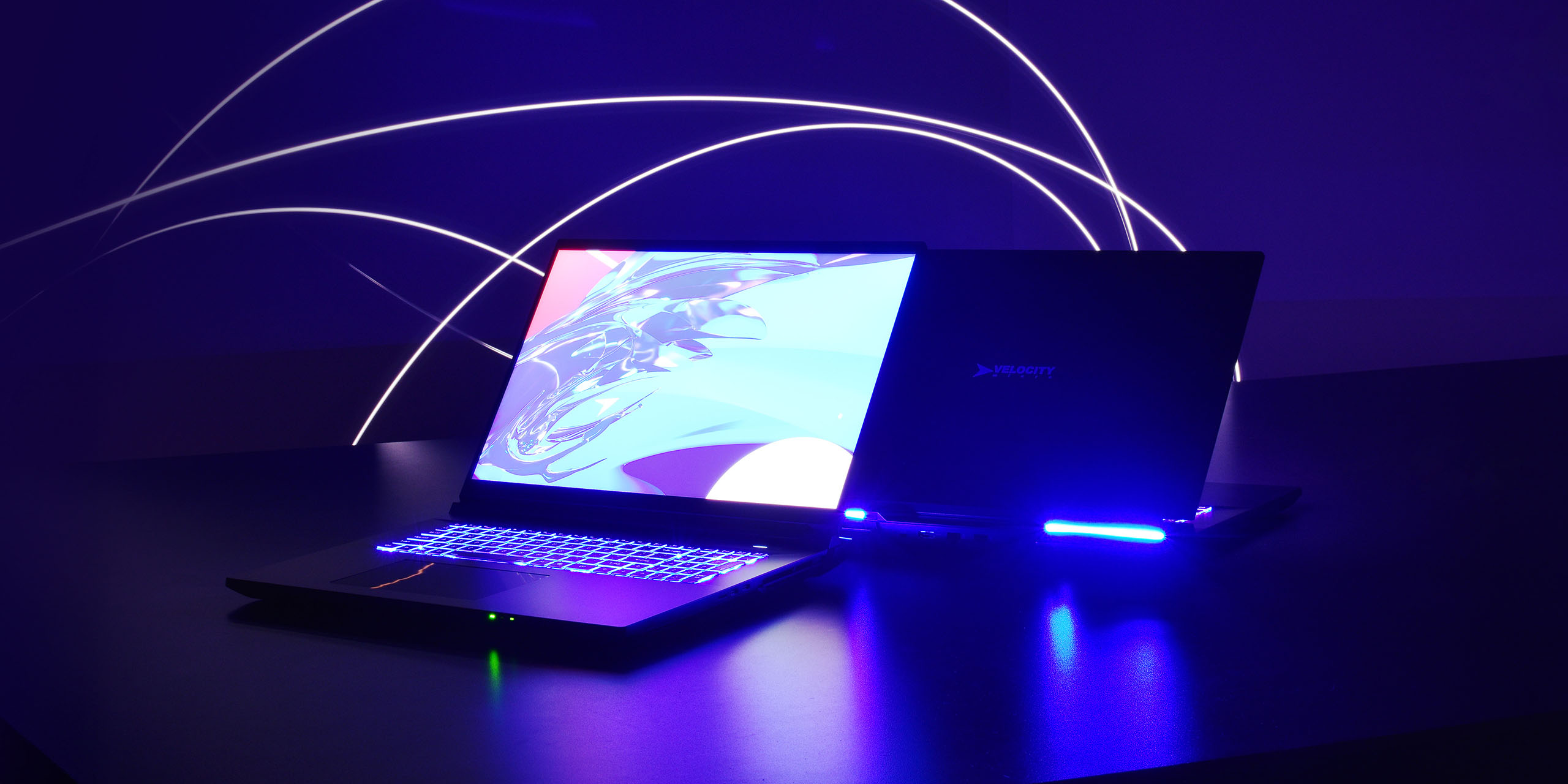
Why gaming on battery sucks, but not for long


Why gaming on battery sucks, but not for long

Recently, I was in the market for a new laptop and got to researching for my purchase. I had my needs in mind, but it was a component, not a device, that caught my eye. Modern CPUs with iGPUs are exponentially better than they’ve ever been, going toe to toe with some dedicated GPUs from only two generations ago. You can get admirable frames on games that should make integrated graphics scream.

What truly blew my mind about the most modern CPUs – and really, I should say APUs – like the Ryzen AI MAX+ 395, is that they can get this performance on battery. This was an utter impossibility before, but it wasn’t until I started researching my laptop purchase that I realized why.

TDP On Laptops

If you own a desktop PC or have built one, you might have noticed a statistic printed on the side of the box for some of the components called “TDP”. Thermal Design Power (or Point) is essentially a measurement of the maximum possible power draw that a component could take under a theoretical maximum load. Though the number provided often isn’t perfectly accurate, what’s absolutely clear is that the modern CPUs/APUs I’ve been talking about have a much, MUCH lower TPD than GPUs, let alone the dedicated graphics in tandem with the CPU, which is the alternative.

The problem with having a high TDP is that you need more power to run the component optimally. Consider a desktop computer’s PSU. The average PSU we’re putting in one of our builds can handle 800 watts. This is enough to handle all of the components with a healthy sum of excess. The tradeoff is that PSUs are the biggest, heaviest parts of a build – something a laptop can’t really be, and therefore needs to outsource to the charger. The battery on its lonesome, at the HIGH end, can do about a quarter of that. So when you’re mid match and kick your charger, you starve your components – especially your GPU – for the power they need to keep up.
Intel ARC Graphics

Why I’m Excited

Back to the Ryzen AI MAX+ 395 and the newest Core Ultra chips. In their laptop variations, these chips are looking for a sliver of the power that their desktop counterparts demand. This is exciting for a few reasons, one which is in the title of this video, but I’ll pretend like I get to reveal it anyway.

First and foremost, us nerds at VM as always want you to know that power = heat, and heat = bad. The most effective cooling systems are too big to fit in a laptop, and while the cooling of laptops has made strides with things like vapor chambers, they don’t hold a candle to a desktop AIO or big blower fan. On the flipside, of course, less power means less heat. Less heat means a longer lasting component that runs more stable.

It’ll also run for longer. In most instances, the most powerful of these chips are being shipped without a dedicated GPU onboard with them. This means much less power draw from your battery, and potentially more physical room onboard for a larger battery.

Finally, with TDPs in the ballpark of 50w, these chips can indeed game off the plug. If you’re not a frequent user and abuser of gaming laptops, this might sound a bit like a nothingburger – it’s anything but. This is a massive step for PC components, and something that, once the tech in these chips gets a little cheaper, I am absolutely considering for my next laptop, or tablet, or gaming handheld, or some weird combination of any of those three.

Conclusion

A lot of this information is old(ish) news – but it only became clear to me when I started researching a laptop what it means for average users. It’s exciting to think about what’s in store for CPUs in the future. If you want to give one of these modern chips a shot yourself, you can go to our website to have a laptop or desktop tailored to meet exactly your needs.

The following two tabs change content below.

Marcus is the Designer at Velocity Micro. He’s behind nearly all of the images you’ll see from us. His interest in PCs is the product of his experience in digital art and design, 3D modeling, and computer peripherals. Lives with his partner, two dogs, two cats, a little woodshop and his arcade controller collection in the greater RVA area.




Is Your PC Infected? Signs It’s Time to Call a Virus Removal Specialist


Your computer was working fine yesterday, and today it feels like it’s moving through wet cement. Web pages take forever to load, random pop-ups keep appearing out of nowhere, and your antivirus software is either throwing alerts or, worse, not opening at all. If any of that sounds familiar, you may be dealing with something more serious than a software glitch. At PC Geeks, we’ve helped thousands of frustrated users get their machines back to full health, and we know firsthand how quickly a virus or malware infection can go from a minor annoyance to a full-blown digital disaster.

The tricky part about malware is that it’s designed to hide. Modern viruses don’t always announce themselves with flashing warnings. Some quietly run in the background, stealing passwords, mining cryptocurrency using your hardware, or logging every keystroke you make. A 2023 report from Verizon found that over 74% of data breaches involved a human element, and many of those started with a single infected device. That’s not meant to scare you, but it is a good reason to take strange computer behavior seriously rather than hoping it resolves itself.

PC

When Something Feels “Off” But You Can’t Pinpoint It

Computers communicate distress in subtle ways. If your machine is running noticeably slower than usual, your browser homepage changed without your permission, or you’re seeing advertisements on websites that never had them before, those are classic signs of an infection. A sudden spike in your internet data usage or a fan that runs constantly even during light tasks can also point to a hidden process running without your knowledge. These symptoms don’t always mean catastrophe, but they do mean something is worth investigating by someone who knows what to look for.

When Antivirus Software Isn’t Enough

Off-the-shelf antivirus programs are a solid first line of defense, but they have real limitations. Some forms of malware are specifically coded to disable or bypass consumer antivirus tools. Rootkits, for instance, embed themselves so deeply in your operating system that they can become nearly invisible to standard scanning software. If you’ve run a full scan and the problems persist, or if your security software won’t run at all, that’s a strong signal that what you’re dealing with requires more than a free tool and a YouTube tutorial. A trained specialist has access to enterprise-grade diagnostic tools and the hands-on experience to recognize what automated software can miss.

When Personal or Financial Information May Be at Risk

This is the moment most people underestimate. If your computer has been acting strangely and you’ve recently logged into your bank account, entered a credit card number, or accessed work-related files, you need to treat the situation as urgent. Some malware variants are built entirely around data theft, and every minute your device stays infected is another minute that information is potentially being transmitted somewhere it shouldn’t be. A virus removal specialist won’t just clean the infection. They’ll also help you understand what may have been exposed and what steps you should take next.

When a Fresh Start Might Be Necessary

Sometimes, an infection has gone far enough that a simple removal isn’t enough to guarantee your system is truly clean. A professional can assess whether your operating system has been compromised at its core and whether a complete reinstall is the smarter path forward. This might sound drastic, but done correctly by someone who knows how to back up what matters and restore your settings, it’s often faster and more reliable than attempting to patch a deeply infected machine piece by piece.

Trusting the Right People With Your Technology

There’s no shame in reaching out for help. Cybercriminals are sophisticated, and the tools they use evolve constantly. Knowing when to call in a specialist isn’t a sign of defeat. It’s a smart decision that protects your data, your finances, and your peace of mind. The PC Geeks team approaches every PC with the same care they’d give their own, combining technical expertise with a genuine commitment to getting you back up and running as quickly as possible.

If your computer is showing any of the warning signs above, don’t wait and hope the problem disappears. Contact PC Geeks today for a professional diagnosis and get the expert help your device deserves.

Crimson Butterfly REMAKE Free Download (Build 22266473)


FATAL FRAME II Crimson Butterfly REMAKE Preinstalled WorldofpcgamesFATAL FRAME II Crimson Butterfly REMAKE Preinstalled Worldofpcgames

FATAL FRAME II: Crimson Butterfly REMAKE Direct Download

This Japanese-style horror adventure game follows twin sisters who become lost in an abandoned village haunted by vengeful spirits. Using the Camera Obscura—a device that can capture and seal away the impossible—they fight ghosts as the story unfolds.
This title has undergone a complete overhaul, with improvements to everything from visuals and audio to the core gameplay systems and controls. The signature Camera Obscura mechanic, used to capture and fend off spirits, remains a key feature, now offering richer and more engaging gameplay in both exploration and combat. In addition, the new “Holding Hands with Mayu” mechanic adds a heartfelt touch, letting you experience the deep bond between the sisters like never before.

FATAL FRAME II: Crimson Butterfly Beautifully Remade

The graphics, sound, and controls have all been rebuilt from the ground up. Character textures, including skin and clothing, have been refined to the highest detail, and Minakami Village has been meticulously recreated with a focus on light and shadow, bringing its dark and ominous atmosphere to life with stunning realism. Monster Hunter Wilds
With 3D sound, you can feel the presence of spirits more vividly and closely. Immerse yourself in the chilling experience of exploring a haunted village.
Side stories and new areas have been added, offering players a deeper and more immersive experience in the world of FATAL FRAME II: Crimson Butterfly.

Enhanced Camera Obscura Battles

The iconic gameplay of repelling spirits using the Camera Obscura remains intact, while introducing new features such as Focus, Zoom, and Filter Switching.
Filters offer unique functionalities for both combat and exploration, allowing players to adapt to attacking spirits and uncover the mysteries of the cursed village.

Features and System Requirements:

  • Follow twin sisters Mio and Mayu as they become trapped in a mysterious abandoned village filled with restless spirits.
  • Use the supernatural Camera Obscura to capture and defeat ghosts that haunt the dark surroundings.
  • Experience a deeply atmospheric psychological horror story inspired by Japanese folklore and rituals.
  • Navigate eerie locations while solving puzzles and uncovering the tragic history of the cursed village.
  • Enhanced visuals and modern improvements bring the classic horror experience to a new generation.

Screenshots

System Requirements

Minimum
Requires a 64-bit processor and operating system
OS *: Windows 11, 64bit
Processor: Intel Core i5-8400, AMD Ryzen 5 3400G or higher
Memory: 16 GB RAM
Graphics: GeForce RTX 1050 Ti 4GB, Radeon R9 380X 4GB or higher
DirectX: Version 12
Storage: 30 GB available space
Support the game developers by purchasing the game on Steam

Installation Guide

Turn Off Your Antivirus Before Installing Any Game

1 :: Download Game
2 :: Extract Game
3 :: Launch The Game
4 :: Have Fun 🙂

Overwatch co-creator Jeff Kaplan on his exit from Activision-Blizzard: ‘It was the biggest f**k you moment I’ve had in may career’


Overwatch co-creator Jeff Kaplan was the public face of Overwatch before he left Activision-Blizzard in 2021. If you were interested in videogames between 2014 and 2021, it’s likely you’ll recognise his face. In a new interview on the Lex Fridman podcast, Kaplan details for the first time how and why he left Activision-Blizzard, and it’s not pretty.

The way Kaplan explains it, the good ship Overwatch started to buckle when unreasonable expectations were placed on the Overwatch League, a hugely hyped esports league founded in 2017 and closed in 2024.

What Is a VPN (and Why You Need One)


What Is a VPN (and Why You Need One)

If you regularly use a desktop or laptop for work, banking, shopping, or browsing, a Virtual Private Network (VPN) is one of the simplest ways to improve your online security and privacy. But what Is a VPN?

A VPN creates an encrypted tunnel between your computer and the internet. Instead of your device communicating directly with websites or online services, all of your traffic is first routed through a secure VPN server. This encryption prevents outsiders—such as hackers, internet service providers, or network administrators—from seeing what you’re doing online.

For desktop and laptop users in particular, this added protection can make a significant difference.

Protect Your Data on Public Wi-Fi

Public Wi-Fi networks in airports, hotels, coffee shops, and coworking spaces are convenient—but they’re also risky. These networks are often poorly secured, making it easier for attackers to intercept unencrypted data.

When you connect to a VPN, all traffic leaving your laptop or desktop is encrypted before it ever reaches the local network. Even if someone attempts to monitor traffic on the same Wi-Fi network, the data they capture will be unreadable.

If you travel with a laptop or work remotely, a VPN should be considered essential.

Prevent Tracking and Data Collection

Without a VPN, your internet service provider (ISP) can see the websites you visit and the services you use. Many ISPs collect browsing data that can be sold or used for targeted advertising.

A VPN masks your real IP address and replaces it with the IP address of the virtual server. This makes it much harder for websites, advertisers, and data brokers to track your activity or build a profile around your browsing habits.

For professionals who spend hours a day online, this privacy benefit alone can be valuable.

remote work programs

Secure Remote Work

Remote work has become standard across many industries. Employees frequently connect to company resources, cloud platforms, financial accounts, and communication tools from their personal computers.

Using a Virtual Private Network ensures that sensitive information—login credentials, documents, and internal communications—travels across the internet in encrypted form. Many companies require VPN usage for exactly this reason.

Even if your employer doesn’t mandate it, using a VPN adds an important extra layer of security.

Access the Internet Without Restrictions

Another benefit is the ability to connect through servers in different geographic locations. This can allow you to access websites or services that may be restricted or limited based on location.

For example, travelers may use a VPN to access services from their home country while abroad.

A Simple Upgrade to Your Online Security

Installing a Virtual Private Network on a desktop or laptop typically takes only a few minutes. Once connected, most VPN apps run quietly in the background, automatically encrypting your traffic and protecting your connection.

In a world where data breaches, tracking, and cyber threats are increasingly common, using a VPN is one of the easiest and most effective ways to take control of your online privacy.

For help choosing the best VPN, try this tool.

The following two tabs change content below.

This content was written by the expert Velocity Micro staff.


For the first time in years, there are no blockchain gaming talks at GDC


Not long ago, the annual Game Developers Conference in San Francisco was liberally sprinkled with ads for blockchain companies and sponsored talks about NFTs. They’ve all left.

Whereas GDC 2023 featured talks such as “So, You Want to Build a Blockchain Game” and “How Polygon Labs Is Optimizing Games for an Emerging Blockchain Future,” I can’t find a single session about that emerging blockchain future on the schedule for GDC 2026, which kicked off Monday and runs through Friday.

Slay the Spire 2 dev says its Marathon joke turned out ‘a bit meaner than expected’ in hindsight: ‘To be fair I didn’t think we’d actually pass Marathon in concurrent users’


Comedy tends to land better when you punch up rather than punch down—but what about when, as you begin to wind up your punch, you go from a highly anticipated indie to the #1 best selling game on Steam, bypassing the likes of Resident Evil Requiem and Marathon? Mega Crit, developers of Slay the Spire 2, found out exactly what that’s like this week.

If you missed it, the studio put out a post on X last Thursday that reads, “Congratulations to the Marathon team on their launch! Don’t let small indie passion projects like this pass you by just because Slay the Spire 2 is out.” Cheeky, but a follow-up from the same day clarifies “it wasn’t supposed to be shade, we were being sarcastic 😭 Did not know we’d blow up quite to the degree that we did.”

Lost and Found Co. Free Download (Build 22228807)


Lost and Found Co. Preinstalled Worldofpcgames

Lost and Found Co. Direct Download

Lost and Found Co. is a hidden object adventure in a cozy and immersive world. Join a cast of quirky characters on their epic journey across countless magical locations. Find lost items, solve puzzles, and help a tiny dragon regain her power!

Lost and Found Co. is a whimsical hidden object game where you help Ducky, a duck-turned-human intern, at Goddess Mei’s company – a magical startup dedicated to finding lost items for its quirky townspeople.

JOIN THE ADVENTURE

  • Go on an adventure!
    Travel through charming locales that bring your childhood puzzle books to life in a heartwarming and whimsical world filled with bunch of items to discover! Peregrino
  • Find out the goings-on in this wholesome place!
    Return lost items to their rightful owners in this adorable world, filled with thousands of interactive characters and objects-and we really mean thousands!
  • Hunt for well-hidden items in engaging challenge levels!
    Put your object-hunting skills to the test on these fun challenging levels, delivering pure hidden object gameplay goodness.
  • Chock-full of content!
    Enjoy countless levels with tons of items to find.
    This lively, animated world offers a joyful escape for players of all ages. Endless fun awaits!

Features and System Requirements:

  • Single-player hidden object story campaign
  • Bonus challenge levels testing your keen eyes
  • Dozens of interactive levels taking you on a journey
  • Decorate and customize your office
  • Uncover easter eggs, surprises, and secrets galore!!!

Screenshots

System Requirements

Minimum
OS *: Windows 10 or later
Processor: Requires a 64-bit processor
Memory: 8 GB RAM
Graphics: Requires GPU with 1GB VRAM
Storage: 2 GB available space
Support the game developers by purchasing the game on Steam

Installation Guide

Turn Off Your Antivirus Before Installing Any Game

1 :: Download Game
2 :: Extract Game
3 :: Launch The Game
4 :: Have Fun 🙂

Marathon day two check-in: Into the Outpost, an overpowered shotgun, and why I love doors


Welcome back runners. Are we calling each other runners? Honestly, let’s not. What’s up people playing Marathon. I’ve sunk 10 hours into this dang extraction shooter so far and the deeper I dig this hole, the more I’m into it.

I’m still having a blast with PvP, especially when playing trios. During the day, when friends with real jobs are at work, I’m rolling mostly solo to replenish my basic bartering goods. There’s a lot more sneaking around in solo matches—crouch walking through compounds, knifing bots in the back, and entering buildings through windows when possible. I’m now noticing little touches in the solo experience that feel like a deliberate response to how these stealth scenarios can often play out in other games.

Premiere Pro System Requirements & Empirical Benchmarks


Premiere Pro System Requirements & Empirical Benchmarks

Interested in Premiere Pro System Requirements? Read on!

In the professional video production ecosystem, time is the most expensive variable. For editors and post-production houses, the “System Requirements” listed on software boxes are merely a baseline for stability, not a blueprint for productivity.

Thus, to achieve a seamless “Real-Time” editing experience—where the timeline responds instantly even with multiple Lumetri effects, Warp Stabilizers, and 4K/8K overlays—one must understand how Adobe Premiere Pro utilizes hardware. This guide provides a deep-dive analysis into component selection based on empirical benchmark data and hardware architecture.

1. The Processor (CPU): The Engine of the NLE

The CPU is the primary bottleneck for video editing. As a result, Premiere Pro’s performance is determined by a balance of high clock speeds (for UI responsiveness and standard playback) and high core counts (for rendering and encoding).

The QuickSync Advantage

For editors working with H.264 and HEVC (H.265) media—the most common codecs from mirrorless cameras and drones—Intel’s QuickSync technology remains the industry gold standard. By using the integrated GPU (iGPU) on Intel Core processors for hardware decoding/encoding, you free up the discrete GPU and CPU cores for other tasks.

CPU Benchmark Performance (Relative Score)

CPU Model Overall Score 4K Playback Exporting (H.264)
AMD Threadripper 9980X (64-core) 1,420 165 148
Intel Core Ultra 9 285k 1,280 158 155
AMD Ryzen 9 9950X 1,260 152 142
Intel Core Ultra 7 265k 1,140 140 138
AMD Ryzen 7 9700X 980 120 115

The Verdict: The Sweet Spot: The Intel Ultra 9 285k offers the best price-to-performance ratio for most editors due to its high burst frequency and QuickSync capabilities.

  • The Powerhouse: If your workflow is 8K RED RAW or heavy Multicam (6+ cameras), the AMD Threadripper 9000 Series is necessary to handle the massive computational load.

2. Graphics Card (GPU): The Accelerator

While the CPU handles the “thinking,” the GPU handles the “painting.” Premiere Pro utilizes CUDA (NVIDIA) or OpenCL (AMD) to accelerate “GPU-accelerated effects” like Lumetri Color, Gaussian Blur, and Cross Dissolves.

VRAM: The Critical Metric

When working at 4K or higher resolutions, the amount of Video RAM (VRAM) is more important than the raw speed of the chip. If you run out of VRAM, Premiere will often crash or throw “Red Frame” errors.

  • 4K Editing: 8GB VRAM (Minimum), 16GB (Recommended).
  • 6K/8K Editing: 16GB – 32GB VRAM.

GPU Performance Comparison

GPU Model VRAM 4K Effects Score 8K Export Score
NVIDIA RTX 5090 32GB 100 100
NVIDIA RTX 5080 16GB 92 88
NVIDIA RTX 5070 Ti 16GB 85 82
AMD Radeon 9070 XT 16GB 81 79

The Verdict: Overall, NVIDIA remains the preferred choice for Premiere Pro due to the maturity of CUDA drivers. The RTX 5070 Ti (16GB) is our primary recommendation for professional 4K editors who need high VRAM without the $2,000+ price tag of a 5090.

3. Memory (RAM): The Production Buffer

Premiere Pro is notoriously memory-hungry. RAM acts as the buffer between your storage and your CPU. If RAM is insufficient, the system swaps data to the much slower SSD, causing the “laggy timeline” syndrome when scrubbing through raw footage especially.

Capacity Recommendations

  • 32GB: Unquestionably the absolute minimum for 1080p or simple 4K projects. We do not sell workstations with less than 32GB these days.
  • 64GB: The professional standard for 4K workflows with After Effects dynamic linking.
  • 128GB+: Required for 8K projects, heavy motion graphics, or working with LongGOP codecs (which require more memory to decode). Depending on speed requirements, this may mean Threadripper is a necessity.

4. Storage Architecture: Throughput & IOPS

Sequential read/write speeds (MB/s) are important for large files, but IOPS (Input/Output Operations Per Second) determine how fast Premiere can access thousands of small cache files. We recommend a Three-Drive Logic:

  1. Drive 1 (OS/Applications): 1TB+ NVMe SSD. Keeps the OS responsive.
  2. Drive 2 (Media/Project Files): 2TB – 8TB NVMe Gen4/Gen5 SSD. High-speed access to your raw footage, dependent upon capacity needs.
  3. Drive 3 (Dedicated Scratch/Cache): 1TB NVMe SSD. This is critical. By isolating the Media Cache on its own drive, you prevent “bus-choking” where the OS and Media compete for bandwidth.

5. Visualizing Performance: Benchmark Synthesis

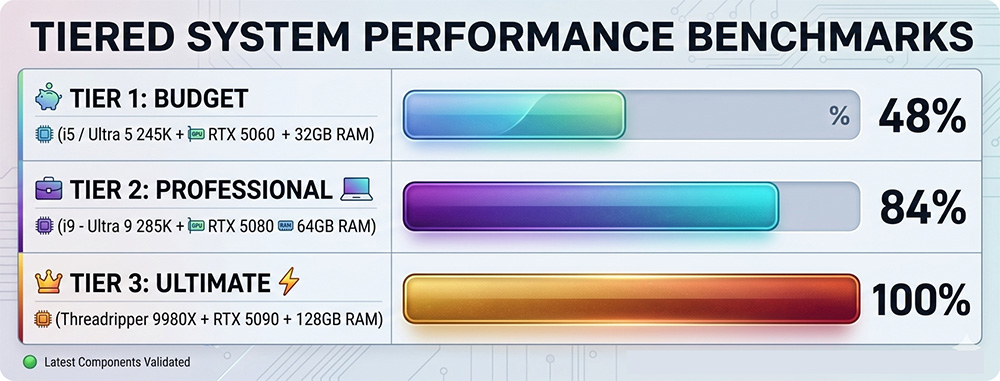
The following chart illustrates the performance delta across different hardware tiers when processing a 4K 60FPS HEVC sequence with multiple Lumetri layers.

Performance Index (Higher is Better)

Premiere Pro System Requirements

6. Expert Recommendations: Three Configurations

The “Prosumer” Build (Budget-Friendly 4K)

Focus: Maximum value for YouTube/Social Media content.

  • CPU: Intel Core Ultra 7 265k
  • GPU: NVIDIA RTX 5070 (12GB)
  • RAM: 32GB DDR5-6000
  • Storage: 1TB Samsung 990 Pro (OS) + 2TB Samsung 9100 Pro

The “Agency Standard” (Professional 4K/60)

Focus: Stability and speed for daily professional deliverables.

  • CPU: Intel Core Ultra 9 285k
  • GPU: NVIDIA RTX 5080 (16GB)
  • RAM: 64GB DDR5-6000
  • Storage: 1TB NVMe (OS), 2TB NVMe (Media), 1TB NVMe (Cache)

The “Cinema Grade” (8K/Multicam/RAW)

Focus: No-compromise performance for feature films and high-end commercials.

  • CPU: AMD Ryzen Threadripper 9960X (24-Core) or higher
  • GPU: NVIDIA RTX 5090 (32GB) or RTX Pro 6000 Blackwell
  • RAM: 256GB DDR5 RDIMM
  • Storage: Multi-drive NVMe RAID array and/or 10GbE NAS for archival

Premiere Pro System Requirements: Conclusion

Undoubtedly, building a workstation to satisfy Premiere Pro System Requirements is an exercise in removing bottlenecks. While the CPU remains the most vital component, ignoring VRAM or drive architecture will result in a suboptimal experience regardless of how much you spend on a processor. For the modern professional, an Intel Core Ultra 9 paired with an NVIDIA RTX 50-series card (16GB+ VRAM) and a dedicated cache drive represents the pinnacle of current editing efficiency.

Get started with our ProMagix HD80 Workstation, designed and optimized for Premiere Pro.

The following two tabs change content below.

This content was written by the expert Velocity Micro staff.