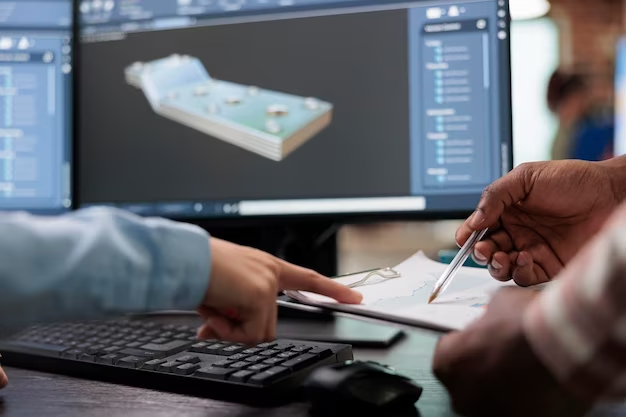
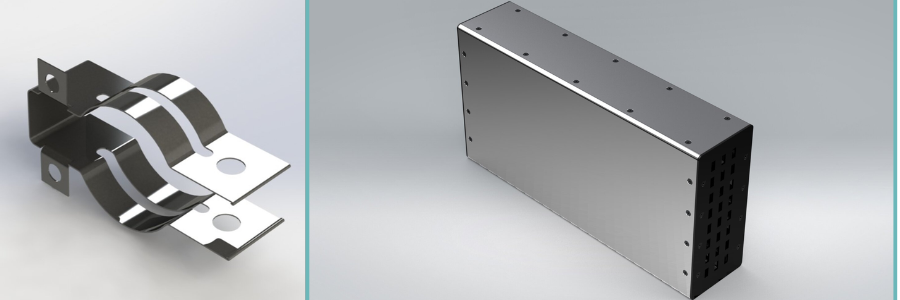
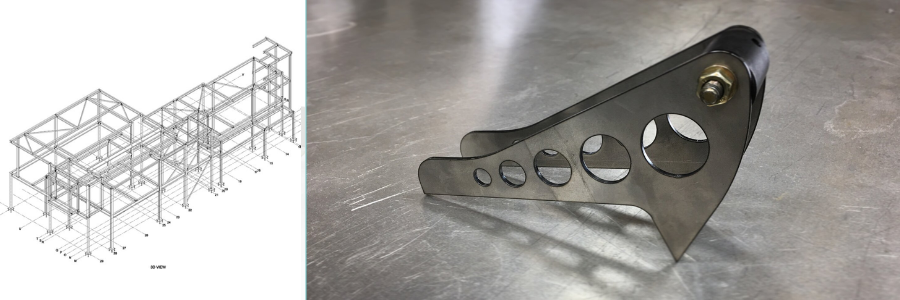
Sheet metal fabrication is a manufacturing process that transforms flat sheets of metal into a variety of custom shapes, parts, or structures. A fabricator can use a combination of techniques, including bending, cutting, punching, stamping, welding, and machining the sheet into the desired form. But before any of that, a proper fabrication process starts with designing the intended parts using CAD software. The technical drawing for sheet metal design provides detailed information about the part’s dimensions, finishes, materials, tolerances, and other relevant details. A freelance CAD drafter (sometimes referred to as a CAD operator, or more specifically, a mechanical engineering technician as far as sheet metal design is concerned) can produce the drawings in software like SolidWorks, Autodesk Fusion, and Autodesk Inventor, to name a few.
And to ensure accuracy, producing a sheet metal fabrication drawing is a task best left to a professional. When it comes to hiring a professional CAD drafter, no other platform gives you as much in-depth expertise and broad options as Cad Crowd. Thanks to the platform’s exclusive focus on the engineering field, it’s as if you have an entire database of pre-vetted freelancers at your fingertips. The unique categorization of skills also removes a lot of the guesswork in freelancers’ qualifications. A little more extensive list of freelancing platforms you may want to use is as follows.
Specialized freelancing platforms and direct services
The good thing about specialized platforms is that all the talents available in the database have already been screened to filter out irrelevant skills. However, there might be different levels of specialization. For example, some platforms focus on the tech industry, which may include both hardware and software engineering; others have a narrower scope, for instance, the CAD (computer-aided design) applications, product development, 3D printing, etc. The narrower the scope of specialization, the easier it gets to pinpoint the talents you need for any given project. Direct services, as those that sell their expertise directly to you, can be good ideas, too. In the case of sheet metal design, fabrication drawing, or CAD drafting, if you like, here are the contenders.
Cad Crowd
If your project has anything to do with CAD applications, and you need a freelancer to handle the task, Cad Crowd is an easy recommendation for good reasons. The freelancers on the platform offer just about every CAD service imaginable, from 2D drafting and 3D photorealistic visualization services to finite element analysis and computational fluid dynamics. And of course, sheet metal design fabrication drawing falls comfortably under Cad Crowd’s umbrella. As for the hiring methods, you have several options, including the regular job post, design contest, and hourly services. When in doubt, there’s the “Get Free Estimate” feature to get a rough calculation of what your project should cost.
Website: CadCrowd.com
X-Pro CAD

You’ll probably find a lot of similar services available in both Cad Crowd and X-Pro CAD, although the former certainly has the edge in terms of a sheer number of specific skill sets and project types. That being said, the latter is definitely a capable freelancing platform that also specializes in CAD software applications in a broad range of industry sectors, including product design, technical drawing, mechanical engineering, and prototype fabrication. X-Pro CAD works pretty much in the same fashion as many other freelancing platforms; you post a job, let the platform help you decide the most qualified freelancers for the tasks, and start the project.
Website: X-procad.com
Hitech CADD Services

Established in 1992, Hitech CADD offers a rather extensive list of CAD services, such as 2D drafting, 3D visualization, shop drawing, MEP design, and sheet metal design. It’s a typical example of a direct service provider, working for you as a temporary external employee or freelancer on a per-project basis. Hitech CADD doesn’t provide information about pricing, but this is only because every project is different, and it needs to understand the scope of work first before it can provide an estimate. This practice is not uncommon among direct service providers.
Website: Hitechcaddservices.com
RELATED: Cost-effective methods for new product design & development services for your company
Freelance CAD Design
You can say that Freelance CAD Design is a direct service provider, but this is a one-person company that is practically a stand-alone freelancer. The person running the entire show is a seasoned mechanical engineer with 26 years of experience in his record and a certified SolidWorks Professional. He provides such services as CAD design and manufacturing documentation, which should include technical drawings for sheet metal fabrication. Again, there’s no clear information about the pricing on the website. Freelance CAD Design is based in West Band, Wisconsin.
Website: Freelancecaddesign.com/
ENGINEERING.com Jobs

The main site positions itself as a digital media publisher filled with story highlights and news of the latest developments in the engineering world and the manufacturing design services industry at large. In the “communities” part of the website, you’ll find a section simply called “Engineering Jobs” geared primarily toward professional engineers looking for the next employment opportunity. It has very few features for employers, but at least it allows you to post a project and be sure that it reaches the right audience.
Website: ENGINEERING.com
Contra

You hire freelancers on Contra without posting a job first. Instead, the platform encourages you to browse freelancers’ profiles and send the contract when you’re ready. The search option comes with filtering options such as skills, tools, or software, and project types. Contra specializes in only several job categories, including design and engineering. The platform says every registered freelancer has been verified with certified skill badges, a list of completed projects, and earnings history. This should help you make the hiring decision with confidence. For every project completed through Contra, you must pay a $29 fee for every invoice, although it’s waived if the invoice comes from a Contra Pro member (freelancer). There’s also another $29 fee per contract (one-off project) or a $29 fee per month for ongoing projects.
Website: Contra.com
WorldTeams

The vast majority of the freelancers in WorldTeams have worked on US-based projects. In fact, some of the most experienced ones have been working for American clients for more than five years. WorldTeams specializes in the AEC industry, and it says the professionals in the database are all familiar with typical US construction methods. Although most of the engineering specializations in the platform are related to the architectural industry, a professional CAD drafter should be able to handle technical drawings for both construction projects and sheet metal design equally well.
Website: WorldTeams.com
Core77 Design Directory

Having been around since 1995, Core77 has been a prominent digital hub frequented by industrial engineering experts from all around the world, including students and professionals. The website works more or less the same way as ENGINEERING.com, where the main pages are reserved for news surrounding technology and industry, but they also have a dedicated job section for employers to post projects in the Design Directory. A basic listing is free of charge, for which you get one public project and a maximum of 8 image attachments. The premium listing, which is available for $85 per month, gives slots for 20 public projects and unlimited private projects.
Website: Core77.com
RELATED: The simple secret to unlocking new product innovation at design services companies
Coroloft

For a site that claims to be a design job board, Coroloft lives up to the hype with its collection of over 2 million images from professionals and students all over the world. Coroloft uses the term “design” in the broadest sense of the word, as it doesn’t limit the subject and format of the images submitted. But the platform is part of a design employment network that also includes Core77, Design Observer, and IxDA, so it makes sense if technical drawings or engineering drafts are within the scope. Another good thing is that you don’t even have to register for an account to post a job here.
Website: Coroflot.com
iHireEngineering

All the freelancers in the database are engineers of various specializations, including CAD drafting professionals. You have multiple talent-finding options with iHireEngineering. Other than the traditional job post, it also offers resume search and the all-in-one iHire360 recruiting platform. A standard job post costs $369 per month, and you can enhance it with a resume search feature for another monthly fee of $450.
Website: iHireEngineering.com
General freelancing platforms and job boards
The sites listed below do not specialize in engineering design services, CAD drafting, or any kind of profession. But it doesn’t necessarily mean they don’t have the talents to handle sheet metal design drawing; it’s just that you have to look more closely into the talent pool to find exactly what you’re searching for.
Remotive

The main reason Remotive gets the first mention in this category is that it works very much like a job board, but it prioritizes freelancers looking for their next projects in the tech industry. While the platform isn’t very specific about which tech sectors it covers, chances are the database includes a good number of CAD drafters and sheet metal designers, too. There’s no feature to browse freelancers directly. A single job post on Remotive costs $299 per month. Every job post is distributed to the platform’s social channels, including LinkedIn, Slack Community, and email newsletter subscribers. The website itself attracts 3 million unique visitors per year.
Website: Remotive.com
Virtual Vocations

Freelancers on Virtual Vocations are provided with the option to go with the free or premium membership accounts, but there’s no such thing for clients/employers; you can post an unlimited number of jobs at no cost at all, so long as they’re all remote jobs. This is entirely possible for a CAD drafter working on a sheet metal design project. For example, there’s nothing wrong with hiring a drafter located in Denmark or Japan, even if your business is operating out of the United States.
Website: VirtualVocations.com
PeoplePerHour

About 60% of the freelancers and clients using PeoplePerHour are based in the United Kingdom, but the platform itself doesn’t restrict its area of service to any particular region. In fact, it has a global reach and is accessible from more than 100 countries worldwide. PeoplePerHour says that every freelancer registered with the site is hand-reviewed and approved, although it doesn’t say anything in detail about the extent of the vetting process. You can search for freelancers and request project proposals, purchase pre-packaged services, or post a job and wait for interested freelancers to send their bids. Phoenix AI does the talent-to-job matching on PeoplePerHour.
Website: PeoplePerHour.com
Kolabtree

Boasting a freelancer database consisting mainly of scientists and industry experts, Kolabtree is likely more suitable for research-intensive, complex, or highly technical sheet metal design services or fabrication drawing projects. This isn’t because you can’t hire experts from Kolabtree to handle the relatively simpler projects, but you can probably find junior (and qualified) freelancers to do the tasks for a more affordable rate. If you can’t find freelancers with the right CAD qualification, there’s the “Request a Service” feature to post a project and have the platform recommend some experts for the job. Every proposal outlines the SOW (Statement of Work), milestones, deadlines, and project fees.
Website: Kolabtree.com
LinkedIn Talent Solutions

Being a networking platform for businesses and professionals, LinkedIn is a fertile ground for employers to discover fresh and seasoned talent for any project. The platform offers quite a lot of features to help you search for talent, including Recruiter and Jobs. The former provides access to a database of job seekers with intelligent matching and advanced filtering options, whereas the latter is mainly for posting a project and targeting it to a specific audience/users. Premium job posting is also available, and LinkedIn says it should receive three times more qualified applicants than what you can expect from the free option.
Website: Business.LinkedIn.com
We Work Remotely (WWR)

Like the vast majority of job boards, We Work Remotely has very little involvement in the hiring process and project management. You can think of the platform simply as an online space to announce to the world that you need a freelancer for a project, with some additional options to increase exposure. A single job posting in the WWR costs $299, and that’s only the base price; multiple upgrades are available to boost visibility by email campaign or highlighted ads. There’s also a “Filtering Service” add-on to have the platform manually screen all the applications you receive and prioritize them based on the project requirements.
Website: WeWorkRemotely.com
Working Nomads
Apart from the tech-focused part, Remotive and Working Nomads have many things in common. Both are premium job boards, of which the services include distributing your job post to external sites like LinkedIn and Google Jobs, as well as forwarding it as an email alert to subscribers. Working Nomads doesn’t say anything about freelancers’ vetting process (or the lack thereof), so it looks like you must review and screen the applicants without any assistance from the platform at all. A job post on Working Nomads costs $199. Discounts are available if you purchase a bundle of three or five slots.
Website: WorkingNomads.com
Remote OK

You can post a job to Remote OK for $269. But since the platform aggregates job postings from all around the web, there’s a good chance that your project will end up being displayed on the site even if you posted it somewhere else. On top of the base price, you can use optional upgrades to make use of such features as auto talent matching, email campaign, displaying your company logo, QR code, sticky post, and more. Whether or not you buy any of the upgrades, the job post will be distributed to the Google for Jobs network.
Website: RemoteOK.com
RELATED: Key factors to consider when vetting engineering firms for design & consulting services
Indeed

Nearly 60 million people in the US visited Indeed as job seekers in January 2025 alone. Although not every single one of them is a sheet metal designer or a CAD design service, the traffic number still makes Indeed a very promising platform to find the talent you need. You can post a job free of charge, but Indeed says it will only receive regular visibility; the platform doesn’t explain what “regular” means here. If you choose to sponsor the job, however, the post gets a boost of exposure (thanks to a wider target audience) and an enhanced ad placement. A sponsored job post costs anywhere from $5 per day to at least $150 per month.
Website: Indeed.com
Flexjobs

There’s no free employer account on FlexJobs. You have three subscription tiers: monthly, 3-month, and annual memberships. FlexJobs doesn’t give a lot of details about the cost, but the platform is happy to tell you that the monthly subscription starts at $199. No matter which membership account you choose, the benefits include an unlimited number of resume searches and unlimited job posts. If you don’t feel like spending money on it from the get-go, there’s a Free Trial with which you can post five jobs at no cost at all. It doesn’t mention whether the Free Trial also includes a resume search feature.
Website: Flexjobs.com
Freelancer

Right in the top left corner of Freelancer’s homepage, you’ll immediately bump into a pretty comprehensive search tool to filter talents based on skill, location, or category. The platform has several hiring options. You can post a job, start a contest, buy predefined services from freelancers, or use the Recruiter Service. You also get to choose whether to use the hourly rate or the fixed-price-per-project model. Payment is only released when you’re satisfied with the work delivered. Posting a job and reviewing the freelancers’ profiles are free, but the platform charges 3% commission based on the project price should you proceed to hire a freelancer.
Website: Freelancer.com
Toptal

You’ll be hard-pressed to find any freelancer in Toptal with a skill set as specific as “sheet metal designer,” but there are categories like CAD designers, product designers, and prototype designers; any of them may include qualifications like CAD drawing or drafting. Toptal is known for its rigorous vetting process, where fewer than 3% of the thousands of freelancers registering for the site every month are accepted. You can’t browse freelancers’ profiles, but the “Hire Top Talent” form allows you to specify skills such as CAD drafting and mechanical engineering as the requirements. Toptal isn’t free; the monthly subscription costs $79, and you get a refund if the platform can’t provide you with the talent you need.
Website: Toptal.com
Workhoppers

A simple and straightforward freelancing platform, Workhoppers aims to connect clients directly to talents without middlemen, commissions, and recruiting fees. While the platform itself isn’t free, at least there won’t be extra charges when you decide to hire a freelancer. The search feature comes with basic filtering options by skill, city, and country. Currently, it doesn’t have CAD drafters or sheet metal fabricators, but you can always specify the skills and qualifications when posting a job to the platform. Every job post is distributed to more than 100 other job boards in the network. Membership registration is managed by the freelance.ca website.
Website: Workhoppers.com
Guru

Job postings on Guru, if available, are free of charge. It doesn’t even have any premium membership subscription models like you’ve seen in many other freelancing platforms. Every employer can post an unlimited number of jobs and an unrestricted number of requests for quotes from freelancers. Its project management dashboard, known as WorkRooms, is also free to use. For every project or invoice you pay, Guru charges a 2.9% handling fee, but if you pay using wire transfer or eCheck, you’ll receive 100% cashback of that fee. Guru claims to maintain a network of 2 million freelancers in the database. A simple search for CAD drafting, 3D rendering service, and sheet metal design reveals a good number of available freelancers for you to hire.
Website: Guru.com
Upwork

Nothing about Upwork feels unfamiliar, even if you’re a first-time user. It’s a platform where you can post a job and wait for the proposals (bids) from freelancers to reach your inbox. Upwork does its work in the background to match your project with candidates it considers ideal for the job. You get to review the freelancers’ profiles and portfolios before you make the hiring decision. It’s also possible to search for freelancers and hire them directly (by purchasing their pre-planned packages). Upwork is a premium platform. For every new marketplace or project catalog contract, the platform charges a “contract initiation fee” of anywhere from $0.99 to $14.99, which is non-refundable. There’s also a “client marketplace” fee of up to 7.99% on the payment you make to freelancers.
Website: Upwork.com
Fiverr
Most freelancers on Fiverr sell their services with a fixed-price model, although there are some who charge on an hourly basis. There’s no feature to post a job to the platform. You must browse through the freelancers’ profiles or use the search function to find exactly what you’re looking for. The search bar will be your best assistant here, along with the filtering option. Freelancers offer the service using pre-planned packages like in Upwork, but you can always ask them to make a custom offer according to your project requirements. Fiverr isn’t free for clients. Every purchase you make comes with a 5.5% service fee calculated from the payment you make to the freelancer. For orders under $100, there is an additional $3 fee.
Website: Fiverr.com
RELATED: Benefits of outsourcing steel detailing services for engineering firms and CAD design companies
Takeaway
Sheet metal fabrication, technical drawing, and CAD drafting are all highly specialized skills within the engineering field. While you can easily find professionals selling those services in general freelancing platforms and job boards, it doesn’t make a lot of sense if there are already specialized platforms with similar offers.
Cad Crowd remains standing at the top of the recommended list when it comes to finding qualified freelancers for CAD applications and engineering projects. By going straight with the best CAD-specialized platform of them all, there’s the peace of mind that your project is handled by qualified professionals with just the right skill sets. Get a free quote today.