How to get your grill ready for the outdoor season


Even if Punxsutawney Phil was correct, warm weather is still right around the corner. That means it’s time to prepare your outdoor space for maximum relaxation when temperatures begin to rise. Since this will likely include flexing your culinary muscle on the grill, now’s the time to do a deep clean so you’re ready for action.

I don’t blame you if you opted to let your grill hibernate during the winter months, but if that’s the case, it’ll probably need a tune-up before spring arrives. If you did keep the grill in working order over the last few months, this is a good time for a scrub and polish before warmer temperatures inspire heavy use. Here are a few tips and tricks that will hopefully make things easier.

Weber's first pellet grill has potential to be a backyard powerhouse, but the smart features need work.Weber's first pellet grill has potential to be a backyard powerhouse, but the smart features need work.

Billy Steele/Engadget

A good rule of thumb when it comes to cleaning anything you haven’t used in a while is to take it apart as much as you feel comfortable and give it a thorough wipe down. For grills, this means removing the grates and any bars or burner covers – basically, anything you can take out that’s not the heating element. This gives you a chance to inspect the burners of your gas grill or the fire pot of a pellet model for any unsightly wear and tear. If those components are worn out or overly rusted, most companies offer replacements that you can easily swap out with a few basic tools.

Once all the pieces are out, start by scraping excess debris off all sides of the interior – with the help of some cleaner if needed. For a gas grill, this likely means pushing everything out through the grease trap. On a pellet grill, you’ll want to scrape the grease chute clear and out into the catch can, but you’ll also need to vacuum the interior with a shop vac – just like you would after every few hours of use. And while you’re at it, go ahead and empty the hopper of any old pellets that have been sitting since Labor Day. Fuel that’s been sitting in the grill for months won’t give you the best results when it comes time to cook so you might as well start fresh.

Thankfully, pellet grill companies have made easy cleaning a key part of their designs. Weber’s SmokeFire has a set of metal bars on the inside that can be removed quickly to open up the bottom of the chamber. This is also a design feature of the company’s gas grills. Simply vacuum or push the debris out the grease chute. The catch pan where all of the garbage ends up is also easy to access from the front of the grill, and you can remove the aluminum liner and replace it with a new one in seconds.

Traeger’s most recent pellet grills were also redesigned to improve cleaning. Most notably, grease and ash end up in the same “keg” that’s easy to detach from the front of the grill. The company also allows you to quickly remove all of the interior components, though they’re larger than what you find on the SmokeFire. Lastly, Traeger moved the pellet chute to the front of the Timberline and Ironwood, making it a lot more convenient to swap out wood varieties or empty an old supply.

You’ll want to get as much of the food leftovers out of your grill as possible for a few reasons. First, that stuff is old and lots of build-up over time can hinder cooking performance and might impact flavor. The last thing you want is old food or grease burning off right under an expensive ribeye. Second, in the case of pellet grills, not properly clearing out grease and dust can be dangerous. It’s easy for grease fires to start at searing temperatures and if there’s enough pellet dust in the bottom of your grill, it can actually ignite or explode. That’s why companies tell you to vacuum it out after every few hours of use.

Weber's first pellet grill has potential to be a backyard powerhouse, but the smart features need work.Weber's first pellet grill has potential to be a backyard powerhouse, but the smart features need work.

All of that dust, grease and debris should be removed before you fire the grill back up. (Billy Steele/Engadget)

To actually clean the surfaces, you’ll want to get an all-natural grill cleaner. There are tons of options here, and it may take some time to find one you like. I typically use Traeger’s formula since it’s readily available at the places I buy pellets and I’ve found it works well cutting through stuck-on muck. You want an all-natural grill cleaner over a regular household product as it’s safe to use on surfaces that will touch your food. They’re also safe to use on the exterior of your grill without doing any damage to chrome, stainless steel or any other materials.

Spray down the inside and give things a few minutes to work. Wipe it all clean and go back over any super dirty spots as needed. Ditto for the grates, bars and any other pieces you removed. I like to lay these out on a yard waste trash bag (they’re bigger than kitchen bags) so all the stuff I scrape or clean off doesn’t get all over my deck. You can use shop towels if you want to recycle or paper towels if not, but just know whatever you choose will be covered in nasty black grime so you won’t want to just toss them in the clothes washer when you’re done. A pre-wash in a bucket or sink is needed to make sure you don’t transfer gunk from your grill to your business casuals.

In terms of tools, you don’t need much. I’ve tried that grill robot that claims to do the job for you, but I’ve found sticking to the basics is more efficient. And honestly, when you get the hang of it, it doesn’t take all that long. It’s a good idea to have a wire brush specifically for the grates that you don’t use to clean anything else. After all, this will be touching the same surfaces you put food on. I recommend another, smaller wire brush – the ones that look like big toothbrushes – for cleaning the burners on a gas grill. If you notice the flame isn’t firing through one of the holes, you can use this to clean the pathway. Lastly, plastic is the way to go for a scraper, anything else and you risk scratching the surfaces of your grill. Sure, any damage done would be on the inside, but it’s still not a great feeling to knick up your previous investment.

Traeger WiFire appTraeger WiFire app

Traeger

If you have a smart grill from the likes of Traeger, Weber or another company, you’ll want to plug it in and check for software updates well in advance of your first grilling session. Chances are you haven’t cooked much since last fall, which means companies have had months to push updates to their devices. Trust me, there’s nothing worse than spending an hour trimming and seasoning a brisket only to walk outside to start the grill and it immediately launches into the update process. This could extend the whole cooking time significantly depending on the extent of the firmware additions and strength of your WiFi.

Thankfully, checking for updates is quick and easy. All you need to do is turn on your grill and open up the company’s app on your phone. If there’s a download ready for your model, the mobile software will let you know and it’s usually quite prominent. If there’s not a pop-up alert that displays immediately, you can check the settings menu just to make sure. Sometimes for smaller updates, a company might not beat you over the head to refresh. However, starting a fresh slate of firmware is always a safe bet and will ensure your grill is running at its best when it comes time to cook.

Traeger Ironwood 650Traeger Ironwood 650

Billy Steele/Engadget

I’ll be the first to admit I don’t adhere to my own advice here, but it’s nice to have goals. I will also be the first to tell you every single time I smoke a Boston Butt or some other super fatty cut of meat that I wish I would’ve done at least a quick cleaning right after the meal. Grease buildup is not only highly flammable but it’s much harder to clean once it cools and solidifies. Ditto for stuck-on sauce or cheese that’s left on your grates after chicken or burgers. It’s best to attack these things while the grill is still warm, but cooled down from the cook.

You don’t necessarily have to break out the shop vac each time for your pellet grill or empty the grease bin. But you’ll want to make sure that stuff is away from the main cooking area for safety and so any burn off won’t impact the flavor of your food. A few cups of hot water can cleanse the grease run-off while that wire brush I mentioned is best for the grates. It also doesn’t hurt to do a light wipe down with an all-natural cleaner so everything is ready to go when you want to cook again.

A number of grill companies have already announced their 2025 product lineups. If you’re looking for new gear for the summer, some of them are already available while others will be arriving over the next few weeks. Of the big names, Weber jumped first, introducing its lower-cost Smoque pellet grill in early January. Starting at $699, this model offers the same connected grilling tools as the company’s pricier Searwood, but a simplified controller and other design changes bring the price down. Weber also revamped the materials inside the cooking chamber to promote better air (and smoke) circulation. The Smoque grills should be available later this spring.

Traeger’s 2025 models are already available, and they offer three all-new designs to choose from. The new Woodridge line has a similar concept as Weber: balancing features and performance at lower prices. The base model starts at $800 and offers Wi-Fi connectivity, but you’ll have to splurge for the Woodridge Pro or Woodridge Elite for things like Super Smoke mode, enclosed storage, pellet level sensor or a side burner. Even without all the bells and whistles, the entry-level Woodridge is a workhorse, and it’s a huge upgrade over the aging Pro Series.

Middleby Outdoors also announced 2025 models for both its Masterbuilt and Kamado Joe brands. First, the Masterbuilt Gravity Series 1150 expands the smart, gravity-fed charcoal lineup with an option that offers more cooking space and better storage. Then there’s the Kamado Joe Konnected Big Joe that’s a larger version of the Konnected Joe I reviewed in 2023. Here, you still get Wi-Fi tools, an automatic charcoal starter and all the benefits of a ceramic, kamado-style grill.

Lastly, the Brisk-It Zelos 450 packs in the company’s Vera AI cooking platform for just $399. This smaller, simplified model follows the company’s debut in 2024 with the Origin series. It’s still a versatile smart pellet grill, but changes like a more basic onboard controller show that the Zelos 450 is designed to offer an AI sous chef at a lower price. We’re sensing a theme there.

Check out more from our spring cleaning guide.

How to clean your AirPods


It didn’t take long for wireless earbuds to become ubiquitous. Apple’s AirPods launched back in September 2016, joining notable true wireless headphones from Jabra, Sony, Samsung, and others. Shortly after, they became the go-to choice for many of us when listening to music, podcasts and streaming services on our phones and tablets.

But wireless earbuds can get very dirty very quickly, because not only are we using them a lot, but we take them everywhere: to work, on public transport, on flights and everywhere in between. This is especially true if you’re using them to cancel out noise in a busy office – or are simply working from home at the same time as family or roommates.This means they will come into contact with ear wax, oils and skin cells. Hygiene aside, you should clean your earbuds (and their charging case) because it may result in better-sounding, longer-lasting headphones.

Here’s how you can do that quickly and efficiently. If you’re still a wired headphone holdout (or tempted by DAC-capable buds) most of our cleaning tips hold true – and you don’t have to worry about refreshing a charging case.

Or any true wireless headphones.Or any true wireless headphones.

Mat Smith/Engadget

The cleaning process differs depending on what kind of buds you have. First, there are wireless earbuds with removable silicone (or plastic) buds, like Samsung’s Galaxy Buds, Sony’s WF-1000XM5 buds or most Beats buds, and several models with a single solid body, like Apple’s AirPods.

The main difference is that the detachable tips are easier to deep clean. They are also replaceable and spare tips often come in-box. You can also use soapy water or other mild cleaning products on particularly messy tips without fear of damaging the electrical parts of your headphones.

Wipe down the earbuds and removable tips with a microfiber cloth. As most wireless buds are stored in a case, you may find that dirt from the tips has shifted to the headphones, too. Apple says you can use “70-percent isopropyl alcohol wipe, 75-percent ethyl alcohol wipe or disinfectant wipes” to clean the exterior of its wireless headphones, but advises that you shouldn’t use wet wipes on the speaker mesh parts of the AirPods. Samsung’s guidance sticks to soft dry cloths and cotton swabs.

Image for the mini product module

Remove the tips, and gently trace the inside of each bud with cotton swab, or a toothpick if you need something thinner. If any detritus sticks around, upgrade to a metal loop on the end of an earphone cleaning tool, but just go carefully. Metallic objects are more likely to scratch and pierce things. The cleaning tool also has a brush at the other end to pull out any loose dirt. Once clear, wipe the sides of the tips with a slightly damp cloth.

The AirPods Pro tips each have a delicate mesh membrane, making it easier to clean than membranes on the headphones themselves, but they’re also fragile. Apple itself advises that you can rinse the tips with water, adding you shouldn’t use soap or other cleaning products on them. If you do use a damp cloth or rinse them, make sure to set them on a dry cloth and let them dry completely before reattaching them.

Apple advises using cotton swabs or a dry cloth for the microphone and speaker mesh parts of the AirPods. You can also use a bulb air blower, which should provide a mild amount of force to dislodge dirt without harming electrics. However, while it might be stronger, don’t use canned air. Sony says this can force dust further into the microphone or sound outlet holes.

Image for the mini product module
How to clean your AirPods and other wireless headphones.How to clean your AirPods and other wireless headphones.

Mat Smith/Engadget

You might find that your charging case is in a worse state than your buds. With deep crevices to pick up dirt from your buds when they’re charging, the case can also pick up pocket-lint from being in, well, pockets and your bag. These cases typically use metal contacts to connect to and charge the buds, so any build-up of dirt or earwax can actually affect recharging your headphones. It pays to keep those charging contacts clean. A soft cloth, or a cotton swab for more difficult-to-reach locations, should be able to capture anything blocking your buds from charging. You could also use a bit of air from a bulb air blower – I find the ones with a brush attached are perfect for this.

For both the earbuds and the case, you can use a thin toothpick to pull away any grime or wax trapped in the seams of the device. Most earbuds are molded plastic, but some have edges and lines that collect dirt together.

If you find your AirPods case or other buds’ case is getting a little grubby – or picking up a blue hue from jeans – you could also invest in a case for your case. There are infinite themed and silicone cases for Apple’s AirPod family, but plenty of options exist for buds made by Samsung, Sony, Google and other companies.

The ubiquity of wireless buds has several companies now offering all-in-one cleaning kits, too. These include established peripheral companies like Belkin, which has a single-use kit that features cleaning fluid to loosen up any tough build-up of wax and grime, and Keybudz, which offers a reusable kit that includes different brush head attachments that can also be used to clean other devices. That said, you may not need an entire kit, but suitable tools will make things easier.

You should always use the gentlest cleaning equipment before going ham with rubbing alcohol or a metallic tool. Doing so will reduce the chances of damaging your headphones’ often glossy plastic casing and lessen the chances of damaging the delicate membranes that many buds (and some eartips) have. I speak from experience, having perforated two AirPod membranes due to over-enthusiastic cleaning. Even when removing the tips, take care: With Sony’s WF-1000XM5, you need to twist and pull them off. Just follow the manufacturers’ guidance (we list several guides below), along with our best tips below.

Image for the mini product module

Now your buds are looking pristine, try to keep them looking that way. If you’re using your AirPods or Galaxy Buds during your workouts, wipe them down with a cloth afterward to reduce the chances of moisture getting inside. The more frequently you check on the state of your wireless earbuds, the easier they are to clean.

We’ll finish this guide with a little bit of digital hygiene: make sure any companion TWE apps are up-to-date. These updates can sometimes add notable new features or improve performance. Your smartphone will usually transmit firmware updates to your earbuds automatically after OS and app updates, so make sure you keep them nearby to your phone. This is especially true with iPhones and AirPods, which will not notify you when firmware updates are available. Check that you’ve got the latest version of the firmware in iOS settings (you probably do), and if it’s not up-to-date, make sure both your iPhone and AirPods are plugged into power and (crucially) near each other. The update should be beamed to the AirPods pretty quickly, but you can also leave the devices next to each other overnight to ensure the update happens.

The best robot vacuums on a budget for 2024


If vacuuming is your least favorite chore, employing a robot vacuum can save you time and stress while also making sure your home stays clean. While once most robo-vacs landed on the higher end of the price spectrum, that’s not the case anymore. Sure, you could pick up a $1,000 cleaning behemoth, but it would be incorrect to assume that you need to spend that much money to get a good machine. Now, you can get an autonomous dirt-sucker with serious cleaning chops for $500 — sometimes even $300 or less. But you get what you pay for in this space; don’t expect affordable robot vacuum cleaners to have all of the bells and whistles that premium machines do. After testing dozens of robot vacuums at various price points, I’ve narrowed down our top picks for the best budget robot vacuums you can buy right now.

Since I’ve tested dozens of robot vacuums, I’m often asked if these gadgets are “worth it” and I’d say the answer is yes. The biggest thing they offer is convenience: just turn on a robot vacuum and walk away. The machine will take care of the rest. If vacuuming is one of your least favorite chores, or you just want to spend less time keeping your home tidy, semi-autonomous robotic vacuum is a great investment.

There are plenty of other good things about them, but before we dive in let’s consider the biggest trade-offs: less power, less capacity and less flexibility. Those first two go hand in hand; robot vacuum cleaners are much smaller than upright vacuums, which leads to less powerful suction. They also hold less dirt because their built-in bins are a fraction of the size of a standard vacuum canister or bag. And while robo-vacs are cord-free, that means they are slaves to their batteries and will require docking at a charging base.

When it comes to flexibility, robot vacuums do things differently than standard ones. You can control some with your smartphone, set cleaning schedules and more, but robo-vacs are primarily tasked with cleaning floors. On the flip side, their upright counterparts can come with various attachments that let you clean couches, stairs, light fixtures and other hard-to-reach places.

When looking for the best cheap robot vacuum, one of the first things you should consider is the types of floors you have in your home. Do you have mostly carpet, tile, laminate, hardwood? Carpets demand vacuums with more suction power that can pick up debris pushed down into nooks and crannies. Unfortunately, there isn’t a universal metric by which suction is measured. Some companies provide Pascal (Pa) levels and generally the higher the Pa, the stronger. But other companies don’t rely on Pa levels and simply say their robots have X-times more suction power than other robot vacuums.

So how can you ensure you’re getting the best cheap robot vacuum to clean your floor type? Read the product description. Look for details about its ability to clean hard floors and carpets, and see if it has a “max” mode you can use to increase suction. If you are given a Pa measurement, look for around 2000Pa if you have mostly carpeted floors.

Size is also important for two reasons: clearance and dirt storage. Check the specs for the robot’s height to see if it can get underneath the furniture you have in your home. Most robo-vacs won’t be able to clean under a couch (unless it’s a very tall, very strange couch), but some can get under entryway tables, nightstands and the like. As for dirt storage, look out for the milliliter capacity of the robot’s dustbin — the bigger the capacity, the more dirt the vacuum cleaner can collect before you have to empty it.

You should also double check the Wi-Fi capabilities of the robo-vac you’re eyeing. While you may think that’s a given on all smart home devices, it’s not. Some of the most affordable models don’t have the option to connect to your home Wi-Fi network. If you choose a robot vac like this, you won’t be able to direct it with a smartphone app or with voice controls. Another feature that’s typically reserved for Wi-Fi-connected robots is scheduling because most of them use a mobile app to set cleaning schedules.

But Wi-Fi-incapable vacuums usually come with remote controls that have all the basic functions that companion mobile apps do, including start, stop and return to dock. And if you’re concerned about the possibility of hacking, a robot vac with no access to your Wi-Fi network is the best option.

Obstacle detection and cliff sensors are other key features to look out for. The former helps the robot vacuum navigate around furniture while it cleans, rather than mindlessly pushing its way into it. Meanwhile, cliff sensors prevent robot vacuums from tumbling down the stairs, making them the best vacuum for multi-level homes.

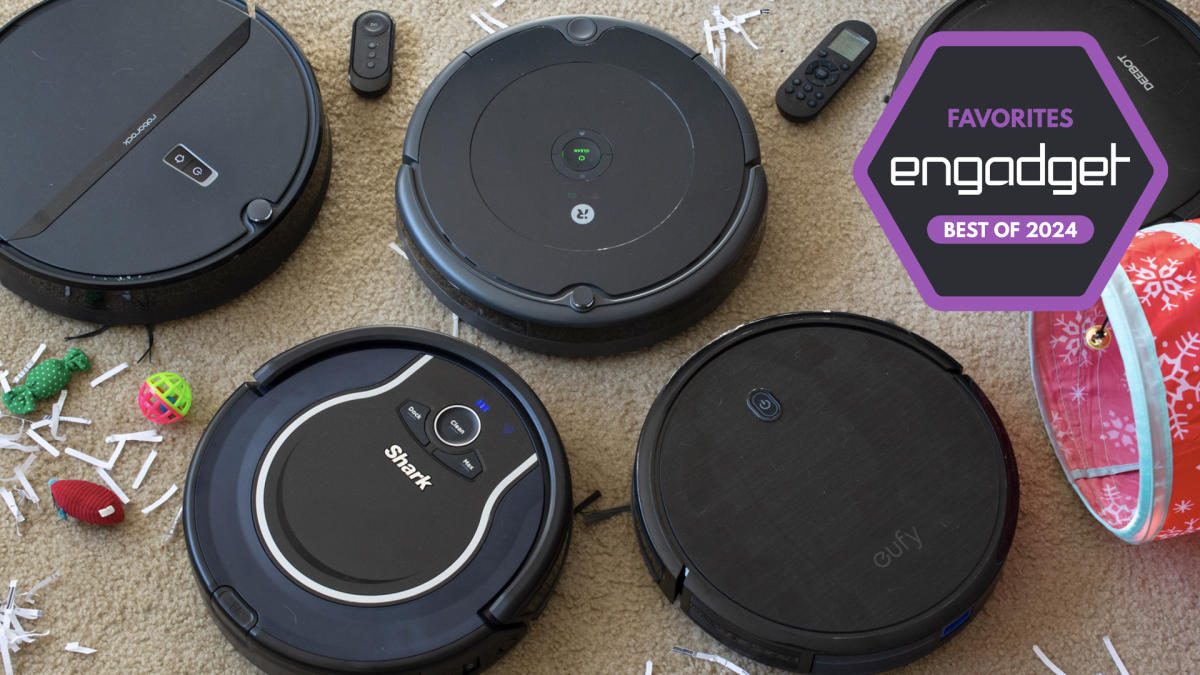
When we consider which robot vacuums to test, we look at each machine’s specs and feature list, as well as online reviews to get a general idea of its capabilities. With each robot vacuum we review, we set it up as per the instructions and use it for as long as possible — at minimum, we’ll use each for one week, running cleaning cycles daily. We make sure to try out any physical buttons the machine has on it, and any app-power features like scheduling, smart mapping and more.

Since we test robot vacuums in our own homes, there are obstacles already in the machine’s way like tables, chairs and other furniture — this helps us understand how capable the machine is at avoiding obstacles, and we’ll intentionally throw smaller items in their way like shoes, pet toys and more. With robot vacuums that include clean bases, we assess how loud the machine is while emptying contents into the base and roughly how long it takes for us to fill up the bag (or bagless) base with debris.

iRobot

Max mode: No | Wi-Fi capabilities: Yes | Object detection: Yes | Charging dock: Yes | Self-emptying dock: No

Both iRobot and Shark impressed with their affordable robo-vacs. But we think iRobot’s Roomba 694 will be the best cheap robot vacuum cleaner for most people thanks to its good cleaning power and easy-to-use mobile app. The Roomba 694 replaced the Roomba 675 last year but, aside from an updated exterior, it has the same build quality and is fundamentally the same vacuum. It looks much sleeker now with its new all-black design, giving it an aesthetic similar to some of the more expensive Roomba models. It has three physical buttons on it — start, dock and spot — and it connects to Wi-Fi so you can control it via the iRobot app. Unfortunately, your $274 gets you the vacuum and its necessary parts only so you’ll have to pay up immediately when you need a replacement filter or brushes.

Setting up this powerful robot vacuum is straightforward: Open the companion app and follow the instructions. Once it’s connected to your home Wi-Fi network, you’re able to use the app to control the vacuum whenever you don’t feel like using the physical buttons. However, the spot-clean function is only available as a button, which is a bit of a bummer.

iRobot’s app is one of the biggest selling points for any Roomba. It’s so easy to use that even someone with no prior experience will be able to quickly master the robot’s basic functions. iRobot’s app puts most pertinent controls on the homepage, so you rarely (if ever) need to navigate through its menu to do things like set a cleaning schedule.

We recommend setting cleaning schedules to really get the most out of the device. After all, these are semi-autonomous robots, so why not make it so you rarely have to interact with them? Doing so will ensure the Roomba runs through your home on a regular basis, so you’re always left with clean floors. The Roomba 694 in particular did a good job sucking up dirt and debris on my carpets as well as the tile flooring in my kitchen and bathrooms. The only thing I try to do before a cleaning job is get charging cables off of the floor – the Roomba will stop if it sucks something like that up and it’s relatively easy to extract a cable from the machine’s brushes, but I’d rather not have to do so if I can avoid it.

When it comes to battery life, the Roomba 694 ran for around 45 minutes before needing to dock and recharge. iRobot says run times will vary based on floor surfaces, but the 694 is estimated to have a 90-minute battery life when cleaning hardwood floors. While 45 minutes may be enough time for the robot to scuttle around most rooms in my apartment, those with larger homes may have to wait for it to recharge in order to clean everywhere.

iRobot has made a name for itself in the autonomous vacuum market for good reason. Its machines are polished, dead simple to use and the accompanying app is excellent. That ease of use (and the reputation of the iRobot name) comes with a slightly higher asking price, which many will be willing to pay. But there are plenty of solid options now that didn’t exist even just three years ago.

Pros

  • Simple yet attractive design
  • Good suction power for its size
  • Easy to use mobile app
Cons

  • Cannot fit under low furniture

$180 at Kohl’s

Shark

Max mode: Yes | Wi-Fi capabilities: Yes | Object detection: Yes | Cliff sensors: Yes | Charging dock: Yes | Self-emptying dock: No

The Shark RV765 is the updated version of the RV761 that we previously recommended. Like the Roomba 694, the Shark RV765 has a slightly different design and a longer run time than the RV761, but otherwise they’re the same vacuum. You can still find the RV761, but it’s a little difficult to do so now that the latest model is available. Although we haven’t tested the RV765, we feel comfortable recommending it since we found the previous version to be a great affordable robot vacuum.

One thing that the RV765 fixes about the previous version is the latter’s ugly bowling-shirt design. The new model nixes that and opts for a sleeker, all-black look with three buttons for docking, cleaning and max mode. You could rely just on the buttons, but it also connects to Wi-Fi so you can use the Shark Clean app. As for the longer run time, that’s just a bonus. The RV761 ran for about 90 minutes before needing to recharge, which was plenty of time for it to clean my two-bedroom apartment. The additional 30 minutes of battery life on the RV765 should allow it to clean larger spaces more efficiently.

Some other things we liked about the RV761 include its spot-clean feature; adjustable wheels, which raise and lower automatically depending on the “terrain” and the obstacles in its path; and its intuitive companion app that allows you to start and stop cleaning jobs, set schedules and more.

Pros

  • Sleek design
  • Improved battery life
  • Handy “spot clean” feature
  • Easy to use mobile app
Cons

  • Can be difficult to find across many retailers

$260 at Target

eufy

Max mode: Yes | Wi-Fi capabilities: No | Object detection: Yes | Charging dock: Yes | Self-emptying dock: No

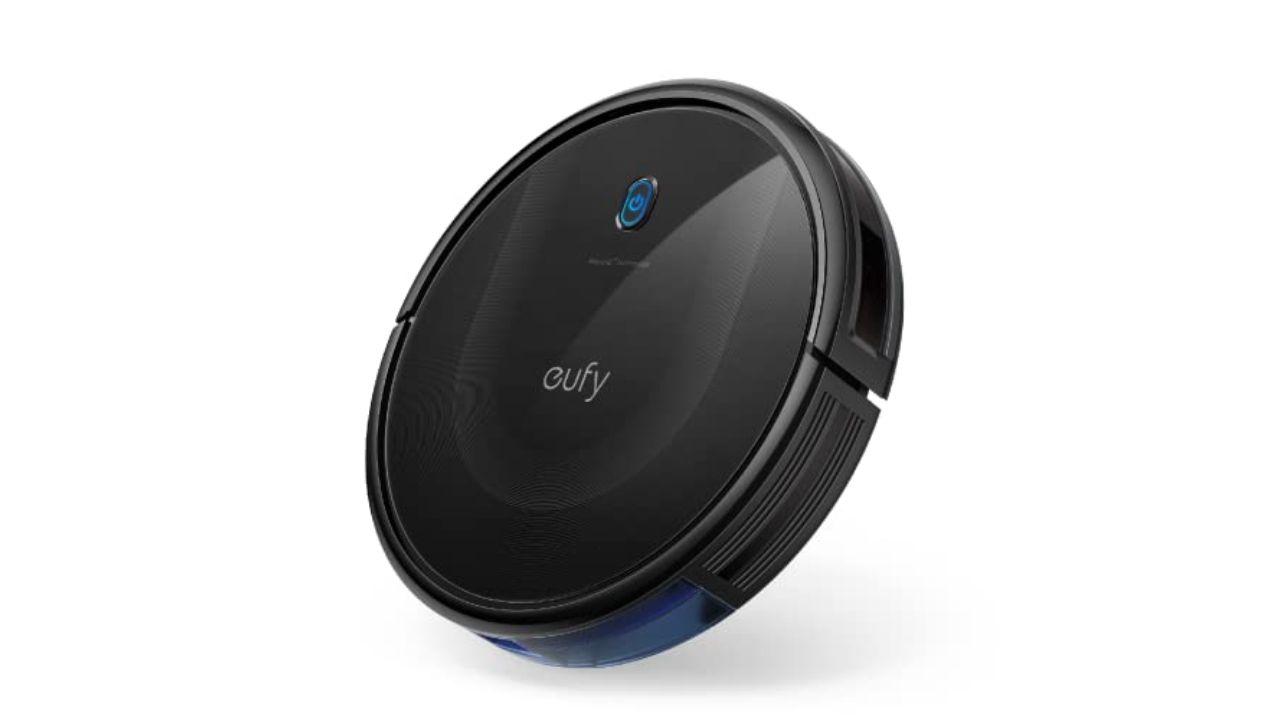
Anker’s $250 Eufy RoboVac 11S was one of the cheapest vacuums I tested but it also proved to be one of the most versatile. First thing to note: This robot vacuum doesn’t have Wi-Fi, but it does come with a remote that gives you most of the functions and smart features you’d find in an app (including a schedule feature). Eufy also includes additional brushes and filters in the box.

The “S” in this robot’s name stands for slim, and it’s roughly half an inch thinner than all of the other vacuums I tested. Not only does this make the 11S Max lighter, but it was the only one that could clean under my entryway table. This model has a physical on-off toggle on its underside plus one button on its top that you can press to start a cleaning. It always begins in auto mode, which optimizes the cleaning process as it putters around your home, but you can use the remote to select a specific cleaning mode like spot and edge clean.

The 11S Max has three power modes — Standard, BoostIQ and Max — and I kept mine on BoostIQ most of the time. It provided enough suction to adequately clean my carpeted floors, missing only a few crumbs or pieces of debris in corners or tight spaces around furniture. The cleaning session lasted for roughly one hour and 15 minutes when in BoostIQ mode and it has remarkable obstacle avoidance. Sure, it bumped into walls and some large pieces of furniture, but it was the only budget vac I tried that consistently avoided my cat’s play tunnel that lives in the middle of our living room floor.

As far as noise levels go, you can definitely hear the difference between BoostIQ and Max, but none of the three settings is offensively loud. In fact, I could barely hear the 11S Max when it was on the opposite end of my apartment running in BoostIQ mode. Thankfully, error alert beeps were loud enough to let me know when something went awry, like the machine accidentally getting tripped up by a rogue charging cable (which only happened a couple of times and neither robot nor cable were harmed in the process).

Overall, the Eufy RoboVac 11S Max impressed me with its smarts, despite its lack of Wi-Fi. The lack of wireless connectivity is arguably the worst thing about the robot and that’s saying a lot. At this point, though, the 11S Max is a few years old, so you could grab the RoboVac G20 if you want something comparable but a bit newer. We recommend getting the $280 G20 Hybrid if you’re just looking for a Eufy machine with some of the latest technology, but don’t want to spend a ton. It has 2500Pa of suction power, dynamic navigation and Wi-Fi connectivity with support for Alexa and Google Assistant voice commands.

Pros

  • Slim design lets it get under low furniture
  • Good suction power for its size
  • Long battery life
  • Super affordable

$250 at Amazon

roborock

Max mode: Yes | Wi-Fi capabilities: Yes | Object detection: Yes | Charging dock: Yes | Self-emptying dock: No

Roborock has made many improvements to its fleet of robot vacuums in recent years and the Roborock Q5 is a good, basic option that you can often find it on sale for between $200 and $300. There aren’t a ton of bells and whistles on this particular model, but it gets the basics right. It supports 2700Pa suction power, precision mapping with LiDAR and app and voice control, plus its dustbin is fairly large at 470ml. 

During my testing, I found the Roborock Q5 to be a capable cleaning machine, even on carpet that’s excellent at hiding a ton of cat hair. Its mapping capabilities are solid as well, and after each cleaning job, the Roborock mobile app shows you exactly where the machine went with small squiggly lines that follow its path. That’s handy because, if for some reason the vacuum doesn’t hit every single spot in a room that you want it to, you can send it back out to target using the “pin and go” feature.

Roborock’s app experience has improved as well: it’s no longer as confusing and nonsensical as it was in previous years. It’s still not the most polished app, but it’s much easier to find the controls for basic actions like starting a cleaning, choosing specific rooms or zones to clean and the like. I only wish the scheduling tool was more front-and-center — it’s buried in a menu, but also tucked away in that menu is a personal favorite feature that isn’t super common on robot vacuums: remote control. Roborock’s gives you the choice of on-screen buttons or a joystick to manually control the machine’s movements. While totally unnecessary, it’s a convenient feature to have if you’re very particular about where you want your robot vacuum to clean — or if you just miss the experience of driving an RC car.

$430 at Amazon

First and foremost, always empty your robot vacuum’s dustbin after every cleaning job. Simply detach and empty the dustbin as soon as the robot is done cleaning, and then reattach it so it’s ready to go for the next time. It’s also a good idea to take a dry cloth to the inside of the dustbin every once in a while to remove any small dust and dirt particles clinging to its insides.

In addition, you’ll want to regularly examine the machine’s brushes to see if any hair has wrapped around them, or if any large debris is preventing them from working properly. Some brushes are better than others at not succumbing to tangled hair, but it’s a good idea to check your robot’s brushes regardless — both their main brush and any smaller, corner brushes they have. These parts are often easy to pop off of the machine (because they do require replacements eventually) so we recommend removing each brush entirely, getting rid of any tangled hair or other debris attached to them and reinstalling them afterwards.

Robot vacuums also have filters that need replacing every couple of months. Check your machine’s user manual or the manufacturer’s website to see how long they recommend going in between filter replacements. Most of the time, these filters cannot be washed, so you will need to buy new ones either directly from the manufacturer or from other retailers like Amazon or Walmart.