Best $600 Gaming PC in April 2024


what you get for your $600 budget

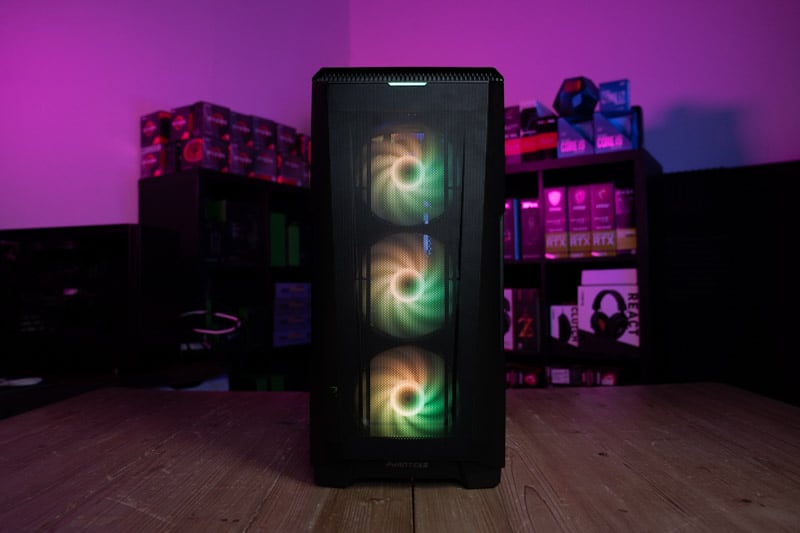
We’ve already touched upon budgetary constraints, but something we didn’t discuss was the correlation between a PC’s price and the performance it can provide. Almost every build has a different level of performance, therefore, choosing the right PC for your needs should start with its price. We set a target of under $600 and we believe we’ve extracted the maximum amount of performance available at this price point. Our build has the ability to provide an immersive gaming experience at 1080p over the most popular AAA game titles, over 60FPS in a lot of scenarios. If you’re a seriously competitive gamer, and like to lower resolutions down to 720p to get the most FPS, you can probably expect at least 150FPS depending on the game. However, if you’re looking for a PC to smash 4k games, VR, and multi-tasking extremely heavy workloads all at the same time, you might want to consider one of our premium builds. It’s easy to overestimate a build’s capabilities, especially when it’s your own money. It’s important for your experience that you stay grounded and only expect this $600 build to do what a $600 build can do.

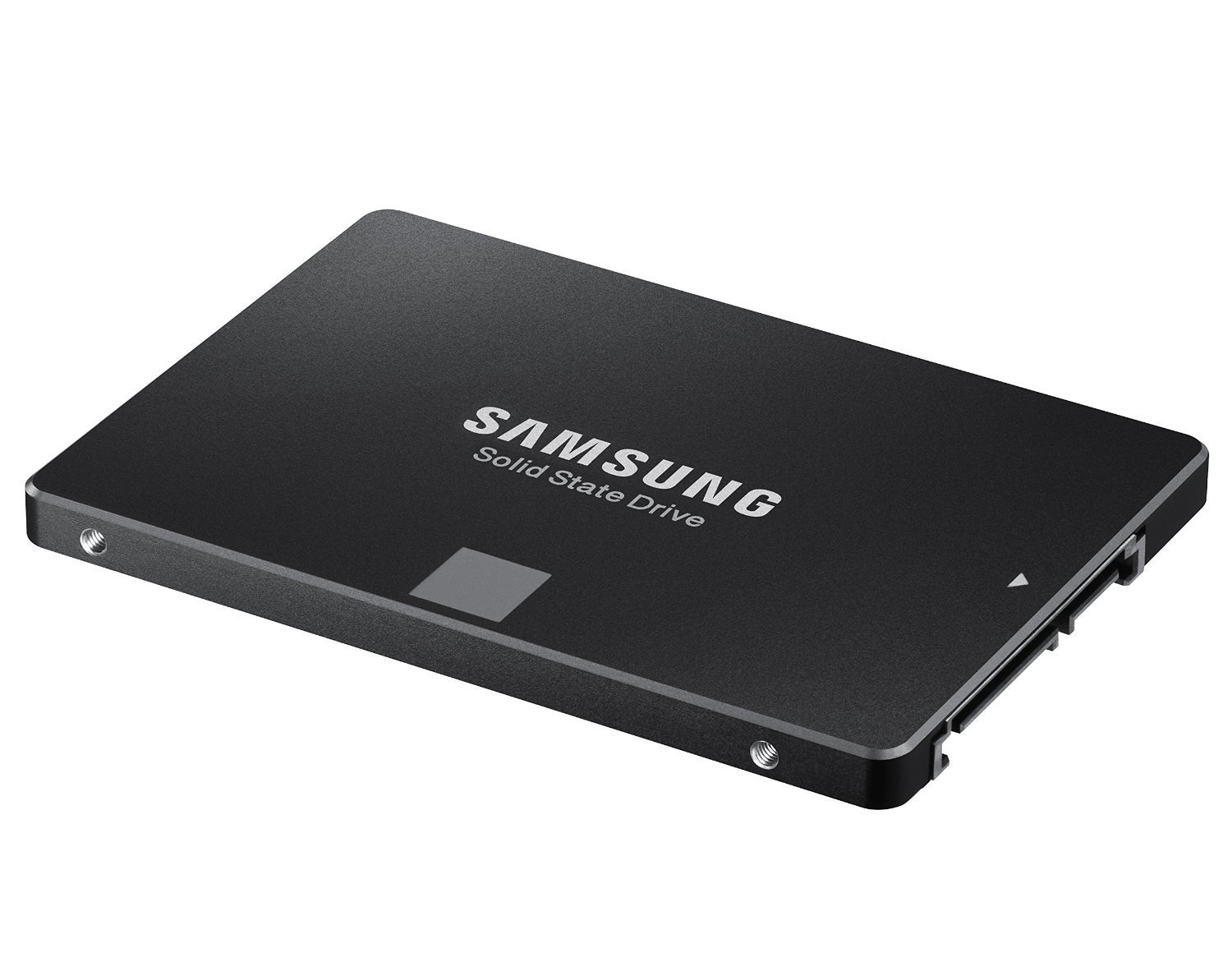
We had to make several compromises with this build to keep it within the $600 budget. An older CPU and GPU combination and smaller-sized SSD features to keep costs down. Despite this, the build currently offers the best performance we could find for under $600 and is very easy to upgrade should you wish in the future. (we highly recommend)

Non-gaming Performance

We have established that this build can perform pretty well in lesser demanding games, but what about your everyday use? This PC is perfect for office applications, if you’re a businessman who likes to game on a budget, then this PC would be perfect for you. Don’t expect it to be running any advanced simulations or anything, but it’ll do all your typical web browsing and document writing without skipping a beat. This is because entry-level builds don’t handle heavy workloads too well.

Upgrading this $600 PC build

We’ve left a lot of wiggle room when it comes to upgrading this $600 build. We’ve selected a CPU that stands well on its own but we’d have liked to have this system equipped with something a little more substantial. With that being said, the only reason we’ve chosen this CPU is to make way for a GPU that is very powerful for a $600 budget machine, if we were to recommend upgrading anything first it would be the CPU, and then the motherboard, then Memory or GPU.

Overclocking on a $600 budget

The components we have selected for this build can be overclocked, and the CPU, GPU, and Memory are all ready to be pushed further beyond their standard capabilities, however, this comes with a word of warning. Overclocking can be detrimental to your system if done improperly, it’s highly recommended that you take a look at our how-to overclock page and familiarize yourself with the methodology before attempting to push your system to the limit. Also, increasing performance also increases heat, so you’re going to have to make sure you have a powerful cooling solution

Finance and purchase options

now, we DO NOT recommend you get into debt, but a lot of PC component retailers now offer “pay in 3” or “0% finance” solutions to being strapped for cash. This can be a good way of getting an upgrade to the $600 PC build without having to worry about upfront costs. Similarly, there are a plethora of components available on the second-hand market, you can find plenty of used components there at a significantly discounted price. There are only a couple of components we recommend staying away from when buying second hand, these are HDDs and PSUs. Also, if you’re buying something like a GPU, it’s always best you ask for proof of working, or go to the seller and test the component yourself.

Remember to be safe when meeting strangers.

Build A Gaming PC By Price

Check out some of our price-focused custom PC build guides below.

Other Related Custom PC Guides:

Related Prebuilt Gaming PC Guides

Check out some of our related prebuilt PC guides below.


The Ins and Outs of PDFs and AutoCAD: Tuesday Tips With Frank | AutoCAD Blog


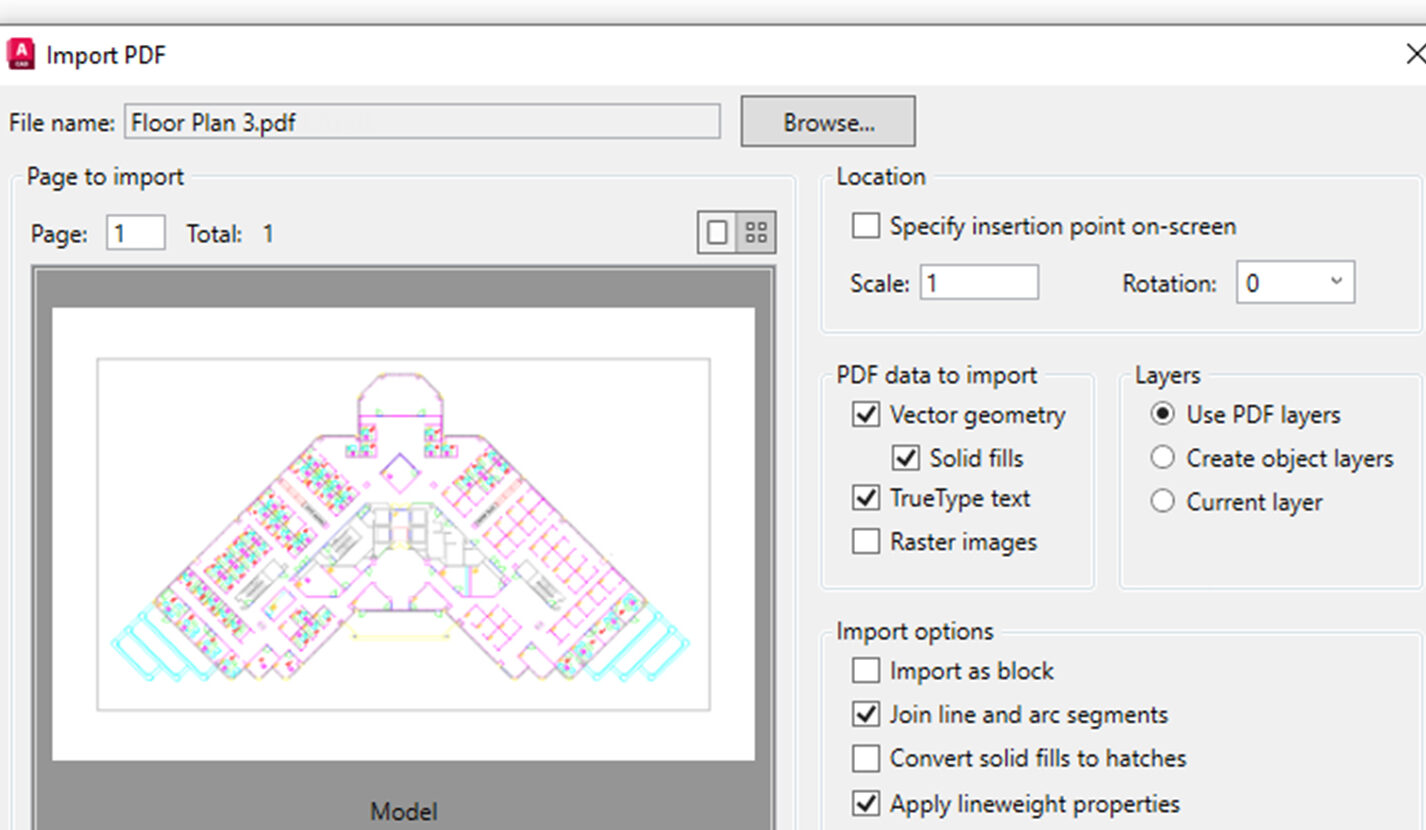
Screenshot of importing PDF to AutoCAD

When using PDFs in AutoCAD, your work can be classified into two categories. Quite simply, you’re either bringing them in or writing them out. For this Tuesday Tips, we’ll go over all the “ins and outs” of PDFs and AutoCAD.

The “Ins”

OK, I’ve got two more categories for you. Bringing a PDF into AutoCAD, also known as Importing, can be done in two ways. One is importing the PDF as an underlay. The other is to import the geometry of the PDF, turning it into editable lines, arcs, and circles in AutoCAD. We’ll look at importing as an underlay first.

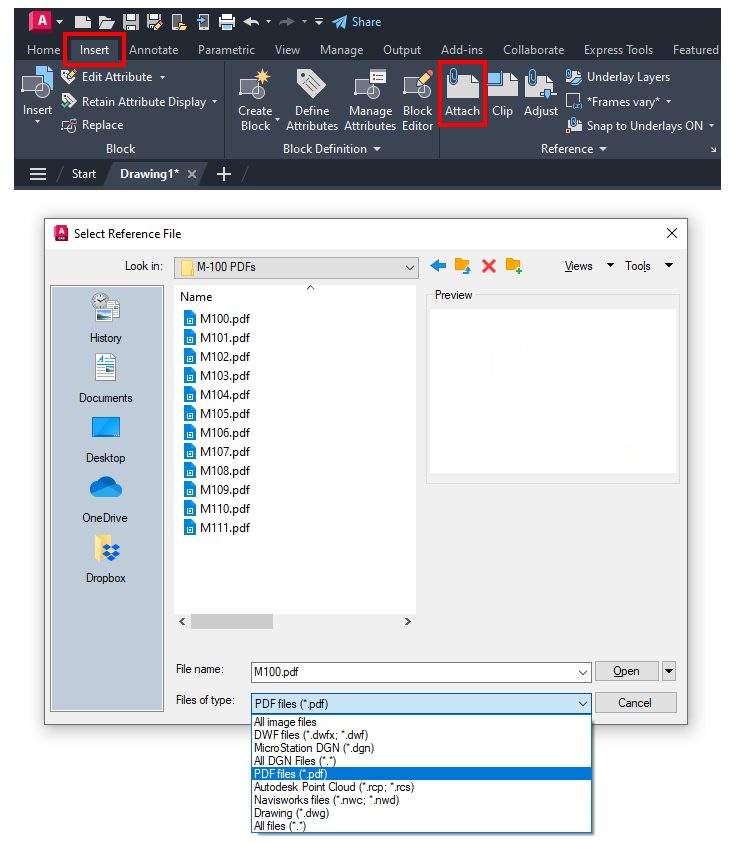
To get started with how to import a PDF to AutoCAD, go to the Insert tab of the Ribbon. There, you’ll find the Reference panel containing our target, the Attach command icon. Let’s back up a step. When you attach a PDF as an underlay, it is not actually part of your file. It’s a reference to the PDF itself. So, it’s very much like an Xref (external reference). As such, it will also have a path, so if the PDF is ever moved from where the path can find it, it won’t appear. Since this is a tips blog, I’ll have a workaround tip for you at the end.

Screenshot of AutoCAD ribbon

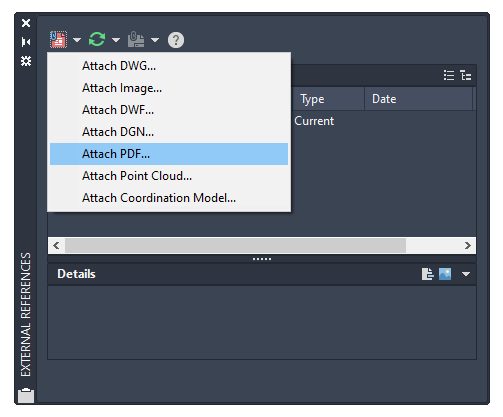
You can also access the command (the actual command name is PDFATTACH) from within the External References Palette. Use the attach pulldown menu to choose Attach PDF, and you’re off and running.

Screenshot of AutoCAD to access ATTACHPDF from within the External References Palette

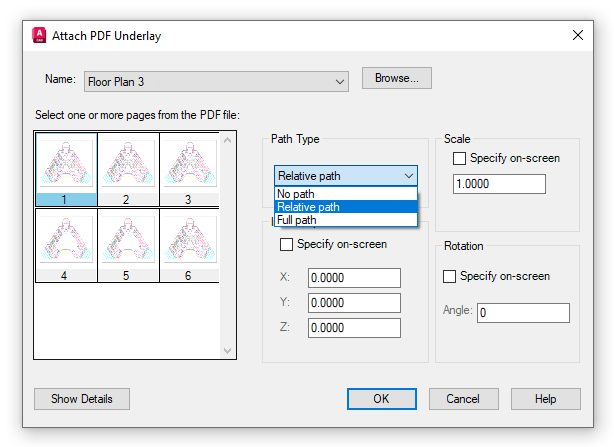
Either method will prompt you to select your desired PDF and subsequently display the Attach PDF Underlay dialog, as shown below. If it’s a multi-page PDF, you can choose one or more pages from the thumbnail menu. Set the path type, scale, rotation, and location, and you’re done!

Screenshot of AutoCAD to attach PDF underlay

So, that’s a brief overview of importing a PDF as an underlay. There’s one more way to do it, which can sometimes be a game changer for you. What if you needed more than just an underlay to reference? Maybe you need to edit it too? Perhaps your client can only provide PDFs of as-builts for your project. Don’t waste your entire budget recreating them when AutoCAD gives you a better way.

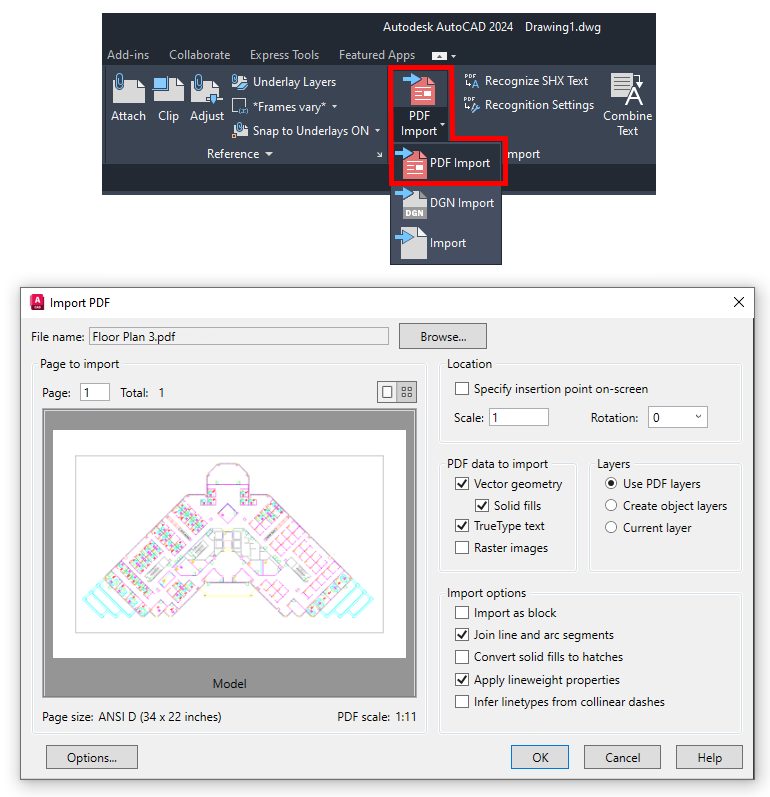
If the PDF was generated via a CAD or other vector-generating program, AutoCAD can import its geometry into your drawing, ready for you to modify and edit. To access a PDF file, you get started again in the Insert tab of the ribbon. In the Import panel, you’ll find the PDF Import tool. It’s a pulldown, so it might be set to Import DGN or just plain old Import. The command will display the Import PDF dialog, as shown below. There are lots of controls in it. I won’t go into all of it here, but that doesn’t mean I don’t have you covered in this previous article.

Screenshot of PDF import in AutoCAD

If the PDF you want to import is already attached as an underlay in your drawing, select it, right-click it, and choose PDF Import as Objects from the contextual popup menu. You’ll be prompted to select a rectangular area of the PDF to import. After a few moments of processing, you’ll be asked whether you want to keep, detach, or unload the original PDF. As usual, choose wisely.

The “Outs”

That’s it for bringing PDFs into your drawing to work with them. But there’s also the concept of creating a PDF, which is the second category we’ll look at today. Again, there are a couple of ways to do it.

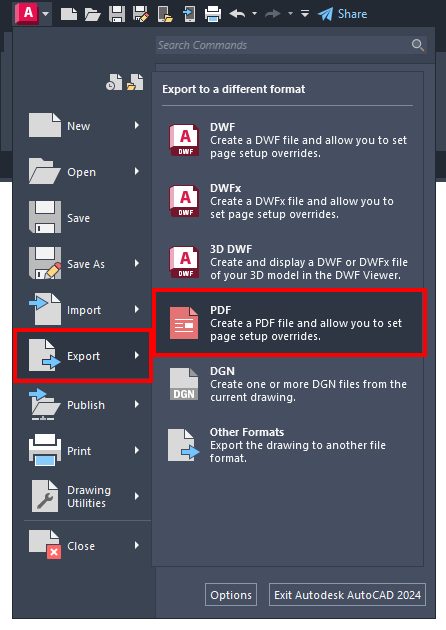
The first is to use the EXPORTPDF command, which can be found via the application menu shown below. You’ll give it a name, and the command will create a PDF of either the current layout or model space – whatever you’re currently in. That’s pretty easy.

Screenshot in AutoCAD to export PDF

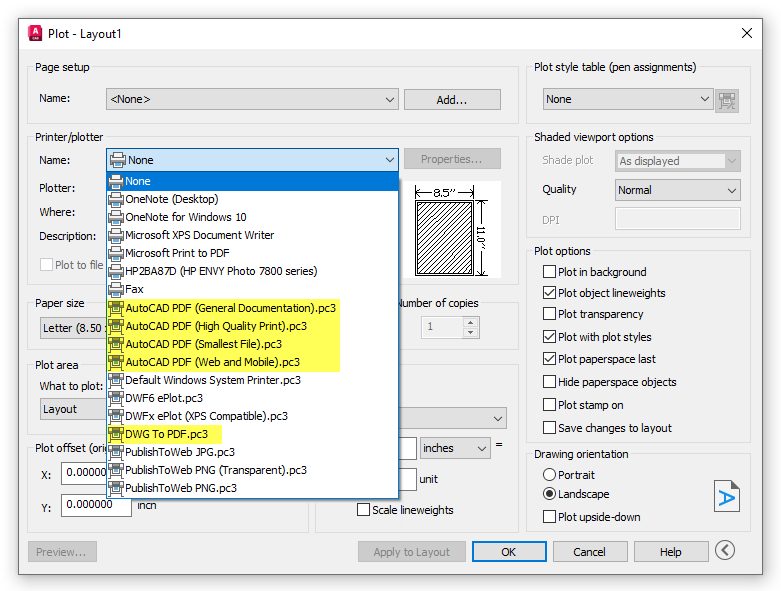
The other way to create a PDF is via the plotting mechanism. I phrased it that way as it also includes publishing. But I’ll concentrate on the plot command first. The plotter selection pulldown menu has five different built-in PDF pc3 files for you. They offer varying degrees of quality.

Screenshot in AutoCAD of how to create PDF with plot

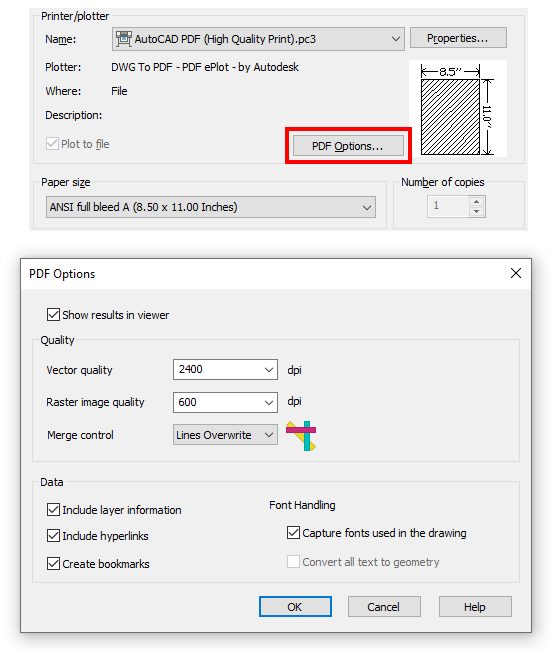
Choosing one of these (or an existing page setup that points to a PDF driver) will display the PDF Options button. This dialog is where you can specify the PDF quality and the data that the PDF will contain, such as layer info, hyperlinks, and fonts.

Screenshot of PDF options button in AutoCAD

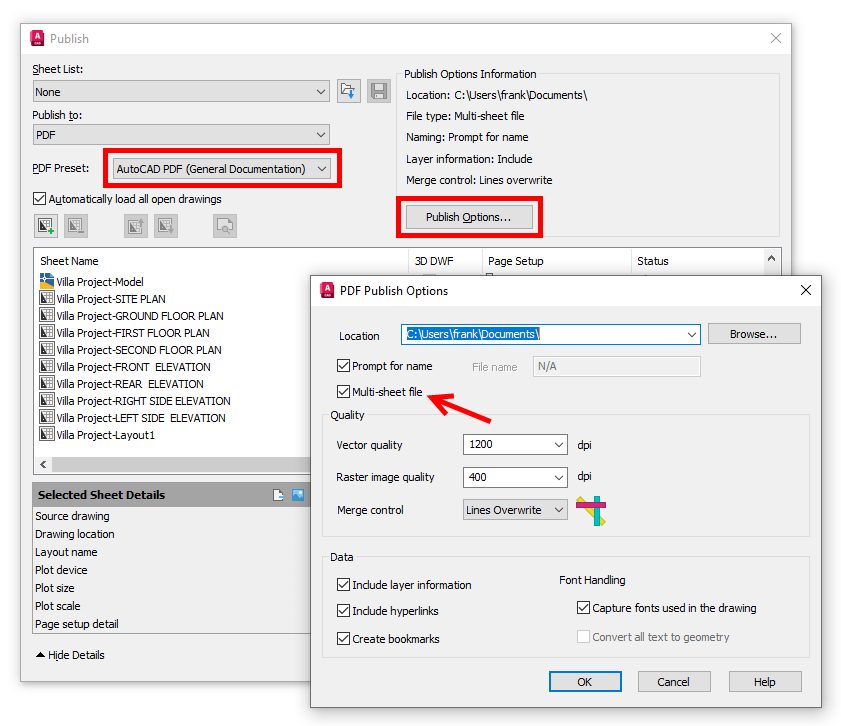
The publish command generally works the same way, but it gives you one very important additional option: the ability to generate a multi-sheet PDF. When the publish to PDF option is selected (or a page setup that points to a PDF driver), the Publish Options button will take you to the PDF Publish Options dialog. Here, you’ll find the same controls as the plot command, but you’ll also get a checkbox to let you create a multi-sheet file.

Screenshot in AutoCAD of publish options

Wrapping It Up

Remember back when I teased a workaround tip for underlay paths? If the reference path is problematic for you (like maybe a company logo in your title block), there is a way to do it. Open the PDF – or any image file – in an external graphics program, such as MS Paint. Select all and copy all. Now, go back to AutoCAD and paste the copied image into your drawing.

It will come in as an OLE object with no path. No, it’s technically not a PDF now, but I did say it’s a workaround. It will now be a part of your drawing, not a reference, so beware of file size if that’s an issue.

Now that you’re armed with the “ins and outs” of how AutoCAD handles PDFs, you’re ready to go. Whether you’re importing them into your drawing or generating them as electronic output, you’ll find that you have a lot of flexibility.

More Tuesday Tips

Check out our whole Tuesday Tips series for ideas on how to make AutoCAD work for you. Do you have any favorite AutoCAD tips? Tell us in the comments!

Business Intelligence & Analytics Examples: 3 Industries in Focus


In the business world, initiatives are usually locked unless they promise a decent return on investment. According to this scenario, BI initiatives have a high chance of being implemented. Judge for yourselves: ‘BI initiatives drive an average return on investment of 11% and are seen to generate revenue growth and cost savings from every business function’.[1]

With a ‘bring value’ principle in their DNA, ScienceSoft’s business intelligence implementation team puts best efforts for your BI project to generate an above-the-average ROI. In this article, we’ve compiled business intelligence examples so that you could get a real feel of BI capabilities in 3 industries. For each industry, you’ll find:

  • Typical insights that a BI solution helps to get.
  • Examples of dashboards implemented on Microsoft Power BI, a self-service analysis and visualization tool.
  • Real-life examples of BI solutions that ScienceSoft developed for the retail, healthcare, and real estate development industries.

business intelligence analytics examples

Business intelligence for retail: Focus on customers and performance

Retail-specific insights

With the help of business intelligence software, retail companies can:

  • Understand customer segments, their preferences and behavior across the channels (i.e., store, web, mobile, social media).
  • Analyze sales from different angles, i.e., like-for-like sales, sales by geography, by channel, by store, by category.
  • Measure the performance of retail stores, product categories, product lines, brands, SKUs, private label products, and identify best practices.
  • Create data-driven forecasts (i.e., for sales, for new product lines).
  • Analyze the performance of an online store: traffic, conversion rates, cart abandonment, wish list, promotion efficiency.
  • Map the number of employees to the customer traffic flow, and the inventory level to sales.

An example of a retail dashboard

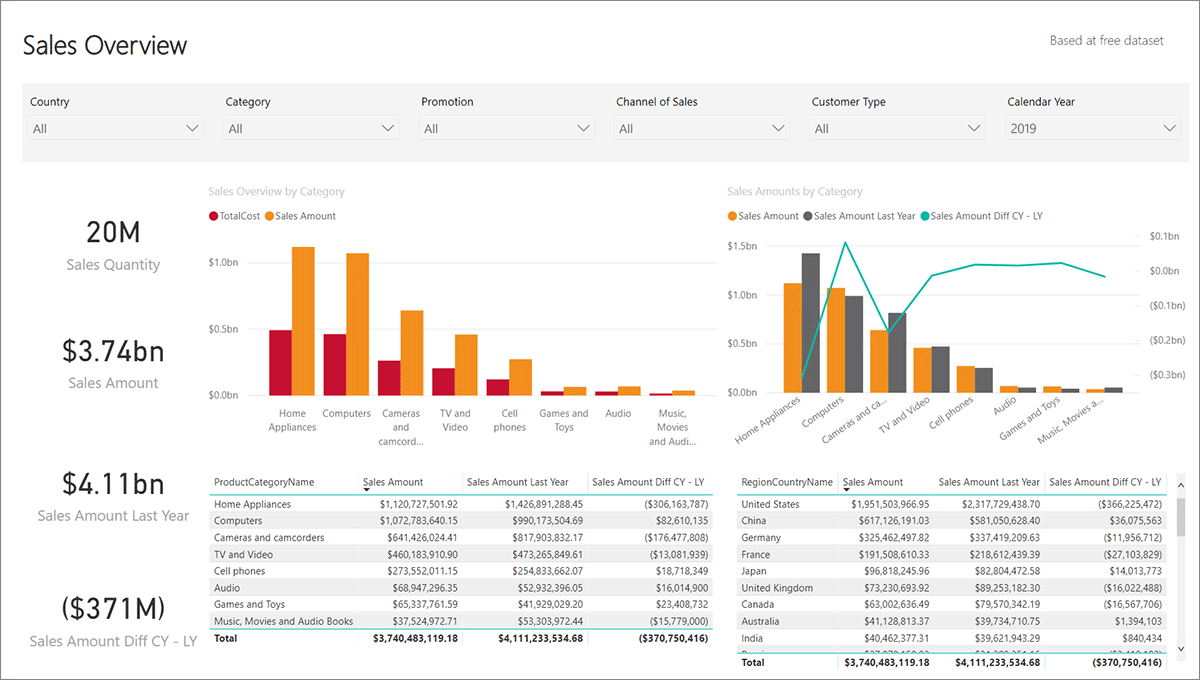
bi examples retail dashboard

Being that concise, the dashboard can show the retailer’s sales from different perspectives as it allows applying multiple filters. For example with a few clicks, a business user can choose a specific country, a product category and a sales channel, and see the graphs and values altered in line with their selection. To see how it works in practice, watch our BI demo.

A real-life business case for retail

For one of our customers, ScienceSoft developed a data analytics solution that enabled robust retail analytics. Aggregating data from CRM, Magento (ecommerce), and Google Analytics, the solution provided an undistorted picture of traffic and conversion rates, as well as allowed measuring the engagement of online store visitors.

Thanks to real-time analytics capabilities embedded in the solution, the customer was able to track the actual stock level both at the warehouse and in the stores, which was a huge step forward compared to the shared document previously used for that purpose.

Besides, the solution allowed for goal management and KPI tracking, which helped the customer to assess their employees’ quality of work (i.e., how much they cross-sell and up-sell).

Read also:

Business intelligence for healthcare: Focus on patients, control of financials and improvement

Healthcare-specific insights

With BI solutions, healthcare providers can aggregate electronic health records, patient-generated health data, and internal data on costs, staffing, and utilization (i.e., of beds, equipment, operating rooms) to:

  • Monitor patients’ health status, evaluate the treatment progress and reduce the rate of readmissions.
  • Analyze and improve patient outcomes (i.e., identify trends in disease development, find the dependencies between health risk factors and diagnoses, medications and outcomes).
  • Measure and control the financials, such as revenue cycle management, costs, return on investments and cash flow.
  • Improve internal processes based on analyzing medication use, equipment and bed utilization efficiency.

An example of a healthcare dashboard

bi examples healthcare dashboard

A real-life business case for healthcare

ScienceSoft implemented a BI solution for a health information exchange vendor. The solution aggregated data retrieved from the systems of multiple healthcare providers and allowed its comprehensive analysis. Our BI team also designed and implemented a set of dashboards to let the customer:

  • Check the patients’ profiles.
  • Analyze health problems the patients encountered, classify these problems (i.e., by type, time range, patients’ age), and identify the most frequent ones.
  • Track the medications used.
  • Find out dependencies, i.e., those existing between diagnoses, medications and health problems.

Business intelligence for real estate development: Focus on property and tenant management

Real estate-specific insights

With BI applications in place, real estate developers can:

  • Efficiently manage the property by analyzing property metrics, use, tenure, occupancy status.
  • Assess the location and availability of the property.
  • Improve space utilization by understanding occupancy (i.e., by geography, property type) and payable rent.
  • Monitor the financial health of the business (by tracking such KPIs as a net income, cash flow, profitability per square foot, market share growth).
  • Understand the tenants’ profiles and manage them.
  • Manage risks.

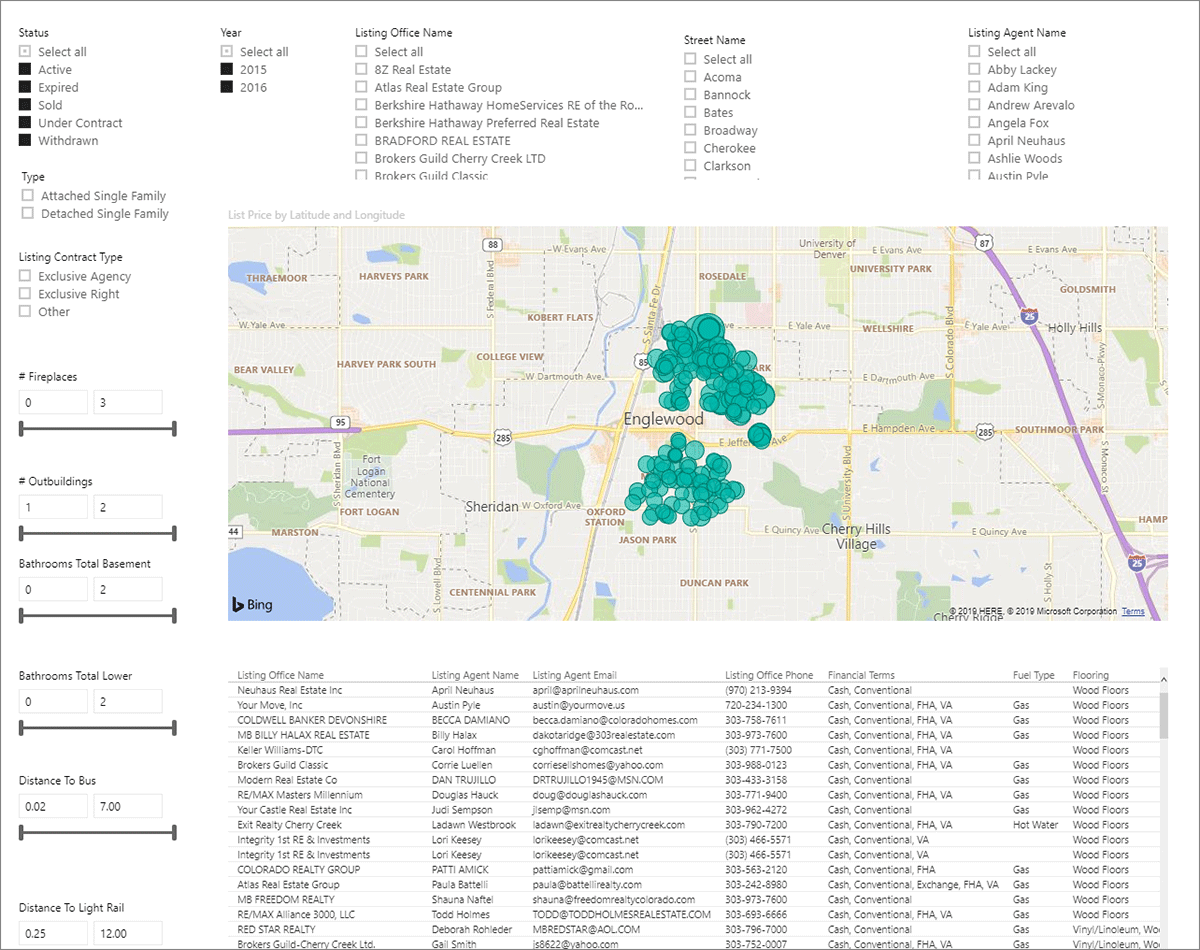
An example of a dashboard for a real estate developer

bi examples real estate dashboard

A real-life business case for real estate development

For a commercial and residential real estate developer, ScienceSoft implemented a BI solution that enabled comprehensive financial reporting based on the data aggregated from 40 diverse data sources. The reporting embraced main financial indicators like income, operating expenses, cash at the end of the period, assets and liabilities, and more, for both the entire company and its separate branches. 17 financial reports of different levels of detail provided the developer with a multifaceted view of their finances.

Though different, these BI examples have something in common

Despite a BI solution is always tailored to a certain business and its needs, we can still name two features shared by the three examples we considered:

  • Data aggregation is power: making use of data retrieved from multiple sources is a foundation for comprehensive and insightful reporting.
  • It’s convenient when a reporting tool allows for self-service business analytics with drill-down and filtering opportunities, as well as intuitive dashboards – this speeds up the path to insights.

[1] Source: Dresner Advisory Services LLC, accessed on 10/22/2019.


BI expertise since 2005. Full-cycle services to deliver powerful BI solutions with rich analysis options. Iterative development to bring quick wins.

So many people are downloading Fallout mods after watching the show that the Nexus is straining to support all the traffic


First reported by PCGamesN, ubiquitous videogame mod site NexusMods has been experiencing interruptions due to an influx of traffic as new and old Fallout fans check out the games after watching the show. Fallouts 4, New Vegas, and 3 are the third, fourth, and eighth all-time biggest games on the site, commanding over 2 billion total downloads across the three.

The NexusMods status page first flagged the problem on April 19, with a message explaining why users may encounter slow load times and downloads. “We are experiencing much more traffic than usual due to the popularity of the Fallout TV show,” the message reads. “We have deployed extra resources where possible and we are monitoring the uptime and performance across the network. We have staff on call at all times to deal with any problems.”

PTZOptics Hive Studio is Must Have Remote PTZ Control Solution


In the YouTube video “You Can Access ALL My PTZ Cameras REMOTELY!!”, Monte Weaver introduces PTZOptics’ game-changing software, Hive Studio. This cloud-based solution offers seamless remote control over multiple PTZ cameras, simplifying operations for individuals and teams. With features like remote access, sharing capabilities, and compatibility with over 400 camera drivers, Hive Studio revolutionizes video production. Plus, it centralizes control and offers excellent customer support. Experience the future of video production with Hive Studio today!

Watch the full video from Monte Weaver below:

visual studio – Blazor .Net 8 OnAfterRenderAsync


In Blazor .Net 8 I cannot implement OnAfterRenderAsync. It gives me the error “No suitable method found to override”.

I thought my project was corrupted so I created a new test project:

Blazor Web App
.Net 8
Authentication: none
Auto (Server and WebAssembly)
Per page/component

On Home.razor tried to add OnAfterRenderAsync and still get the same error. Here is the home page code. I tried InteractiveServer with prerendering and without prerendering. Same error.

@page "/"
@rendermode InteractiveServer
@* @rendermode @(new InteractiveServerRenderMode(prerender: false)) *@


<PageTitle>Home</PageTitle>

<h1>Hello, world!</h1>

Welcome to your new app.

@code {
protected override async Task OnAfterRenderAsync()
{

}
}

Has anyone else had this issue? I even updated to the latest Visual Studio before creating the new test project.

TLcom Capital closes second fund at $154M to back early-stage startups across Africa


Venture capital activity in Africa has shown resilience over the past six months, with major firms backing startups on the continent closing their funds despite the ongoing funding winter. 

In the latest development, TLcom Capital, an African VC firm with offices in Lagos and Nairobi and a focus on early-stage startups, has concluded fundraising for its second fund, TIDE Africa Fund II, totaling $154 million. The final close positions the firm as Africa’s largest investor across seed and Series A.

The oversubscribed fund, initially targeted to close at $150 million, attracted participation from over 20 limited partners. Notable investors include the European Investment Bank (EIB), Visa Foundation, Bertelsmann, and AfricaGrow, a joint venture between Allianz and DEG Impact.

This news comes two years and a few months after TLcom Capital announced the first close of the second fund at $70 million, matching the size of its first fund, TIDE Africa Fund I. While the broader slowdown affecting venture capital and startups globally contributed to the prolonged fundraising period, the VC firm can count a few positives, managing partner Maurizio Caio told TechCrunch in an interview. 

Notably, TLcom Capital closed the second fund in a shorter timeframe than its preceding fund despite being twice its size. Caio attributes this to an improved understanding and acceptance of venture capital in Africa among limited partners as a legitimate asset class. Additionally, a portfolio of companies exemplifying the firm’s investment strategy played a pivotal role in garnering investor confidence and support.

Unlike many VC firms that progress from backing startups in pre-seed and seed stages to later-stage investments with subsequent funds, TLcom Capital maintains a consistent strategy. The firm, which also has an office in London, continues to prioritize early-stage opportunities, particularly at the seed and Series A stages, while also considering opportunistic deals at growth and later stages. For example, the investor backed 10 out of the 11 companies from its first fund at seed or Series A. Yet, it has deployed capital in follow-on rounds at later stages across both funds (a Series C investment in Andela, a unicorn provider of global job placement for software developers, and partaking in a Series B extension round in FairMoney, a Nigerian digital bank.)

“We like to start early when the entrepreneur is raising seed or Series A and then to be with the entrepreneur along the journey and continue to invest if we think that the company deserves more capital deployed,” remarked Caio. “The reason is that we build our portfolio such that we back 20 to 25 companies that ‘if everything works out’ can return the fund individually.”

The managing partner further emphasizes that when TLcom evaluates early-stage opportunities, it assesses the potential of its portfolio companies to generate 10-20x returns. The approach, he says, is to ensure that successful companies compensate for losses and allow the firm to achieve 3-4x return on an aggregate basis.

One way the firm is bettering its risk in this regard is by backing repeat founders. Examples include Sim Shagaya (of uLesson and Konga), Etop Ikpe (Autochek and Cars45), and Grant Brooke (Shara and Twiga). Despite past ventures not achieving desired outcomes, Caio says these founders gained insights that will help them avoid repeating past mistakes and make better decisions in their new ventures. “When things don’t go as planned, it’s important to act swiftly, pivot, and move on to the next venture, knowing that lessons learned will pave the way for future success,” he noted. 

Another is by investing earlier in deals, at the pre-seed stage. In 2020, TLcom Capital invested in Autochek and Okra at the pre-seed stage and has since followed up in subsequent rounds. Two years later, the firm launched a pre-seed strategy that involved allocating $5 million to be disbursed in small check sizes and a low-touch approach, thereby creating a pipeline to its primary strategy at seed and Series A (Upskilling platform Talstack is its first recipient). A portion of this fund, $2 million, was also dedicated to co-investing in female-led startups through FirstCheck Africa, a female-focused pre-seed fund. The firm says its commitment to gender balance is evident in its majority-female partnership and investment committee, where three out of five partners are women.

TLcom Capital, which focuses on traditional sectors like fintech, mobility, agriculture, healthcare, education, and commerce, has already backed six companies from its new fund, making initial investments ranging from $1 million to $3 million. They include SeamlessHR, FairMoney, Zone, and Vendease. Additionally, the firm has expanded its portfolio to include ILLA, a middle-mile logistics platform, and Littlefish, which enable payments and banking products for SMEs, marking its first investments in Egypt and South Africa, respectively.

“For us, the Big Four markets always continue to produce the most valuable companies, so it was important to add Egypt and South Africa as destinations of our capital,” said Caio, noting that TLcom’s portfolio before now has primarily been startups based in Nigeria and Kenya, countries where the firm has since expanded its operational capacity and expertise. 

The multi-sector-focused firm and other notable venture capital firms like Norrsken22, Al Mada, Algebra Ventures and Partech Africa have raised significant funds to back African startups from pre-seed to Series C. However, as these funds are deployed across various stages of startup growth, attention will turn to the exit opportunities they facilitate and the tangible returns they deliver to their LPs, as these outcomes play a crucial role in driving the overall growth of the African tech ecosystem.

“Africa shouldn’t just be about how much money is going in but also about returns,” emphasizes Caio. “We need global capital to look at Africa and think of a place where good investments can be made and technology can generate much value. That’s still to be achieved at scale, so that’s our primary target.”

How to Make Money Teaching an Online Course on Udemy


Udemy is a marketplace where you can take a course or teach one online. Courses are on anything and everything, whenever and wherever you want them.Udemy is a marketplace where you can take a course or teach one online. Courses are on anything and everything, whenever and wherever you want them.Udemy is a marketplace where you can take a course or teach one online. Courses are on anything and everything, whenever and wherever you want them. Udemy’s mission is empowering learning on-demand, that is accessible, at affordable prices, and which are flexible and simple. Upon enrollment of a course, you get a lifetime access. If for any reason you are unsatisfied with the course, you can request for a full refund; this should be within 30 days of making a purchase.

Udemy makes it easy for individual instructors to start. All you need is to have some valuable thing you are competent at and are confident in instructing. The steps are as simple as creating your course, setting a price and starting your selling to the more than three million students already registered. These students enroll mainly due to the heavy promotion done by the website as well as the marketing done by the instructors.

Most instructors have one or two classes that are sparsely attended. A number of this utilizes multiple classes so as to enhance a modest business. A few instructors are able to make large sums of income. In the initial year of its operation, Udemy’s top ten teachers made earnings totaling to $1.6 million. You do not have to struggle any more with your courses. This article will show you how you can make more money on Udemy and join the list of top earners in the website.

How To Market Your Videos

Marketing begins way before you start on your production.  Ask for opinion from potential buyers on what kind of material they would like to access. Utilize social media such as your LinkedIn group, Facebook group, or your email list. This will help you achieve great marketing while getting an audience research. People like to be exposed to multiple channels to a product prior to purchasing it. Communication should not stop here; rather it should be consistent throughout the entire creation process of the product. Answer questions continually, monitor all feedback and create your course based on the information you collect.

Watch My Tutorial from YouTube

Make multiple courses

Want To Start Your Own Money-Making Blog?

My FREE 3 part-video series will show you why blogging is one of the best ways to make money online today. Watch now!

The first course you make on video will most likely not be your best. The best way to ensure quality is to make as many videos on courses as you can. Try as much as you can to match the same quality production values as TV documentary. The videos should be 4-5 minutes long. Do not merge your courses, each video should stand alone with instructions on how to accomplish tasks or alleviate a specific problem. The video should start with you stating what the audience should expect from it, do what you have alluded, and conclude by recapping what you have done.

Branding Your Video

The beginning and the end of the video should be branded with your face, logo brand and web address. This makes for great marketing as well as creating audience research. People need to be exposed to multiple channels of a product prior to purchasing. Communication should continue through the entire process of product creation. Answer questions continually, monitor your feedback, and create your course accordingly. Avoid concluding your video with a PowerPoint presentation. A PowerPoint presentation will dilute any impact your video may have on your target audience.

7+ Ways To Earn $1000 per Month by Teaching English Online

Course description

The course title should communicate what the course benefits are to the students.  The subtitle, lecture titles and description should be optimized with the audience’s benefit in mind. The content promotion should be eye-catching and attractive. Put yourself in the buyer’s shoes and communicate the value to the target market on the sales page of your course. If you are not good at designing, Udemy will create an image for your course.

Network

Work at creating relationships with other instructors on Udemy. The Udemy Studio Facebook Group is the best way to interact with the online instructors.  This will create opportunities for cross-promoting each course at a reduction. You will also need to create relationships with Udemy affiliates. Rakuten LinkShare manages the affiliate comprehensive Udemy scheme. Affiliates are able to create links to your Udemy courses by utilizing reduction coupons. Other sites you can woo affiliates include Facebook groups such as the unofficial Udemy Affiliate Partners, and the official Udemy Affiliate Program. Further, make sure that you have free students who will give positive feedback on your course.  Continual student engagement via the messaging system or discussion will ensure an increase in customer satisfaction which will most likely result in good feedback and good reviews.

Marketing your course

If Udemy directs a student to your course, your share of the revenue is 50%. If the student accesses your course through your own effort, you earn 100% of the revenue. The average instructor earns approximately $7000 from courses on Udemy, though there is a broad outcomes range. Instructors with large social media followings and who are capable of mobilizing their own audience to make purchases can earn six figures annually. To market your course, you need to be passionate about your subject matter. Your subject should also be something people would be willing to learn. The courses which perform well are those that have an outcome that is definite. Courses that teach on skills that are saleable or can earn students money are very popular. Marketing strategies include:

Email marketing. You need to create your own email list. Create discounts on the courses you are offering using the Udemy coupons and then offer to your email list, sometimes for a short specific time. Do this straight after you create a course. The initial sales rush will potentially appear good to Udemy, and will prompt the site to feature your course more favorably. It will also give a great picture on student numbers as well as social proof with 5-star reviews.

YouTube. This should be your first stop to learn your product as well as discover what people are interested in. You should invest in quality hardware such as a screen-casting camera and also a tool for video editing. This will help you shoot a good HD video. You will need a USB microphone for good quality audio. Ensure the microphone is positioned in a way that allows your mouth to be close and eliminate any background noise. Once you have created your video, put it on YouTube with a discounted price and a link to your Udemy account. You can also add the link to your Kindle book on the video.

Leverage on the existing Udemy Audience

It is much easier to make sales to students who are already Udemy users. Offer discount coupons to existing students in the platform, the take-up will be good. Udemy’s Announcements system will enable you to target students by start dates and completion percentage. The announcements are sent to the students’ inboxes, whose addresses you are in no possession of.  However, you can only give discounts to students in your paid courses and not those enrolled in the free courses. Alternatively, you can make your course free at first, get as many students as you can, then change the course to a paid one to promote to them. You may also get students with free coupons and on paid courses.

Go Here to visit Udemyand get started today!

NYT’s The Mini crossword answers for April 22


The Mini is a bite-sized version of The New York Times‘ revered daily crossword. While the crossword is a lengthier experience that requires both knowledge and patience to complete, The Mini is an entirely different vibe.

With only a handful of clues to answer, the daily puzzle doubles as a speed-running test for many who play it.

So, when a tricky clue disrupts a player’s flow, it can be frustrating! If you find yourself stumped playing The Mini — much like with Wordle and Connections — we have you covered.

Here are the clues and answers to NYT’s The Mini for Monday, April 22, 2024:

Across

Fly buzzing around the house, e.g.

The very first Wordle word (6/19/2021)

What two intersecting lines form

Shoplifted

Theater award

Down

Bean choice at Chipotle

The answer is pinto.

Provoke by saying “Do it, do it, do it!”

“When Harry Met ___”

Site of a stereotypical cat rescue

Theater group


Best $1,000 Star Wars Battlefront Gaming PC Build


battlefrontbuild

Now that EA DICE’s long-awaited shooter Star Wars Battlefront has finally arrived on PC, no doubt many of you are probably itching to build a new rig or upgrade your current one to meet the game’s fairly hefty requirements. While it’s easy to build a system that matches the game’s minimum system requirements or blow enormous amounts of money on a top of the line gaming machine, we decided to put together a system for those on a reasonable budget yet are still looking for that Premium Star Wars Battlefront experience.

That being said, lets set some expectations before we begin. This won’t be a PC enthusiast’s gaming powerhouse and isn’t designed to be. Instead, we’ll be focusing primarily on this build providing a great Star Wars Battlefront gaming experience at 1080p or 1440p, a relatively powerful gaming PC for playing other modern games at 1080p or 1440p, as well as a fantastic machine for everything in-between such as web browsing, video streaming and other daily activities.


Star Wars Battlefront Gaming PC Build Component Summary – Budget: $1,000

Core Component Details

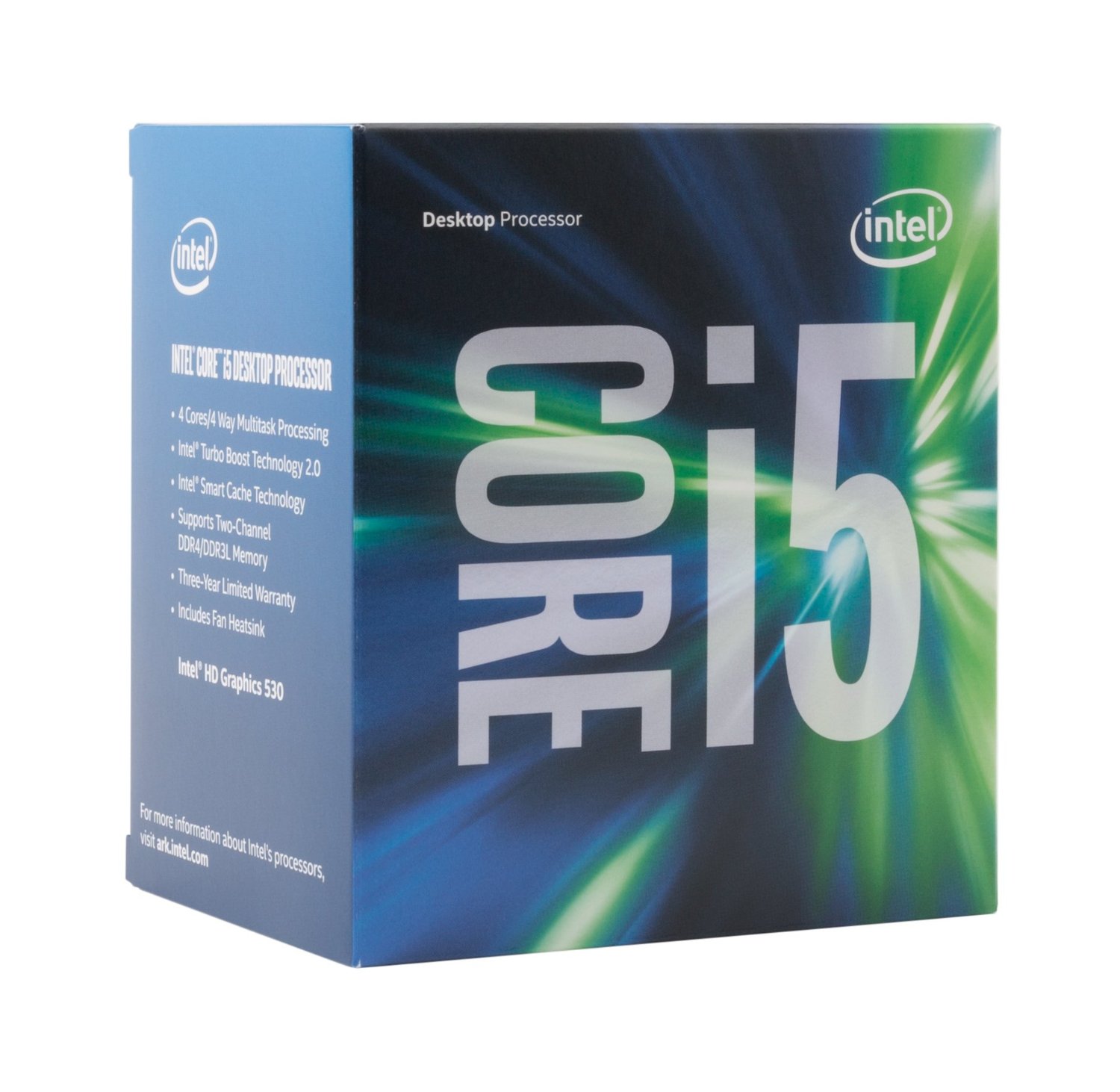
CPU – Intel Core i5-6500

81Yw6M6rLcL._SL1500_This was a bit of a tough decision, but ultimately it came down to getting the most out of our budget. We could have spent a few extra bucks, and gone with an unlocked Core i5-6600K, which would allow for overclocking and give us higher clock speeds out of the box. However, that would also require us to spend more on a CPU cooler, as the unlocked chip does not come with an Intel  stock cooler in the box. It also means having to spend more on an overclocking-ready motherboard, and that too just didn’t make much sense to us with a $1,000 budget.

Still, the Core i5 6500 has proven its abilities in a number of gaming benchmarks and we believe it’ll fit nicely in this system ensuring that the GPU is not bottlenecked when playing Battlefront or really any other game you throw at it.


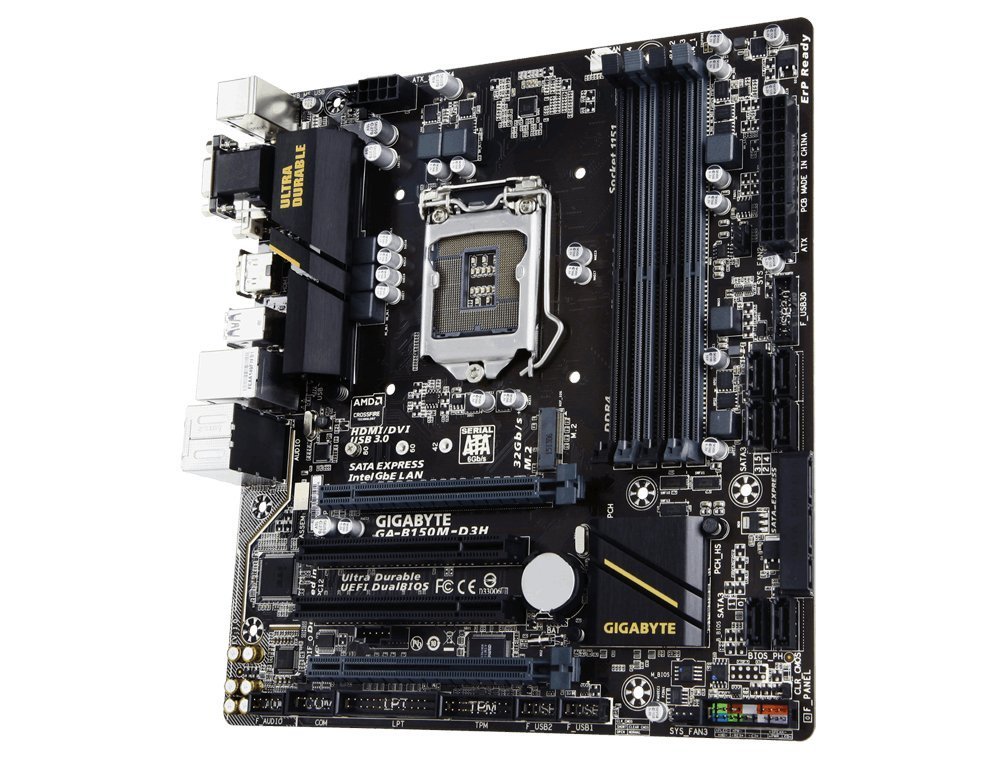
Motherboard – Gigabyte GA-B150M-D3H

Like with the CPU, for our motherboard choice, we also wanted to get the most out of our budget, spending enough to get a nice quality, and reliabl715iIGzvNsL._SL1000_e motherboard that offers enough expansion options for future upgrades without breaking the bank.

As such, we landed on the GIGABYTE B150M-D3H for a few reasons. One, it offers GIGABYTE’s Ultra Durable build quality, which means solid Japanese capacitors and reliability. Two, it offers everything most users could need including plenty up to to 12 USB ports (6x USB 3.0/2.0, and 6x USB 2.0/1.1), 6 SATA 6.0 Gbps ports, a SATA Express port, and a M.2 slot. It also has two PCI-E 3.0 x16 slots in additon to two PCI slots.


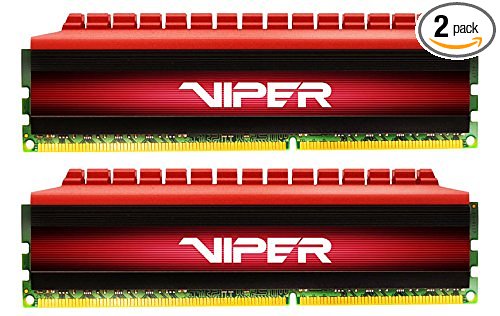
Memory – Patriot Viper 4 8GB (2x4GB) DDR4-2400

51kp3vfRnwL.SX500_SY316_CR,0,0,500,316_PIbundle-2,TopRight,0,0_SX500_SY316_CR,0,0,500,316_SH20_For memory, we went with the least expensive dual-channel 8GB kit of DDR4 we could find from a reputable brand. There isn’t a whole lot to say here as Patriot has always made some fine memory, and since we decided on the Intel Skylake platform, DDR4 is a must for future-proofing. Sure we could have gone with a DDR3 capable motherboard, but since Skylake processors only officially support DDR3L, we’d only be saving a few extra bucks by going with the older tech.

Although it was a difficult decision, we decided to go with 8GB of memory as that will suffice despite the game’s recommended requirements. This will also leave room in our budget for a better graphics card. As our motherboard is equipped with 4 memory slots, it also leaves additional expansion capability should you require another 8GB of memory later down the road.


Case – Phanteks Enthoo Pro M

81e3+5PZ5WL._SL1500_
There’s a lot of choices for cases out there, especially at our budget, but we settled on the Phanteks Enthoo Pro M as it offers lots of features, plenty of space, and a nice open side panel window, which gives us a great view of our components.

While it isn’t the cheapest case on the market, it offers the room for the system to grow with the user, without being too expensive. It is built on the same sturdy chassis as the Enthoo EVOLV ATX, and features the same design aesthetic as the company’s larger Enthoo Pro, which is a fantastic case with many innovative design features.


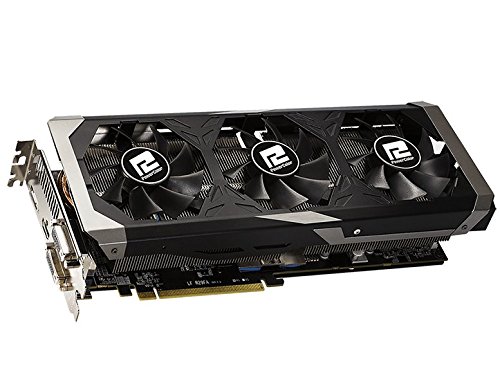
GPU – PowerColor Radeon R9 390 8GB PCS+

51iI0N5YGVLThe easiest choice for our build was no doubt the GPU as the Radeon R9 390 offers fantastic performance at both 1080p, and 1440p. Additionally, DICE’s Frostbite 3 engine is known to work incredibly well on AMD GPUs as the company worked heavily with DICE to optimize their graphics cards on the game engine.

That said, our choice for the graphics card is the PowerColor Radeon R9 390 PCS+ which brings PowerColors premium triple-fan cooling solution at a competitive price-point. While we could alternatively selected NVIDIA’s GTX 970, the Radeon R9 390 will offer more performance for about the same or less money.


Storage – Samsung 850 EVO 500GB SSD

Normally, at this price-point we’d go for the combo of a 250GB SSD, and a 1TB traditional mechanical hard drive, however with the ever decreasing samsung-850-evo-product-imageprices in SSDs, we thought it would be a good idea to go full on flash storage for this build. Sure there’s less overall capacity, but purchasing a higher capacity SSD gives us the ability to run more games and applications on the SSD. If space is an issue, we always have the option of adding an additional HDD for more disk space later as needed.

For our Star Wars Battlefront build, we selected the Samsung 850 EVO 500GB SSD, as it’s not only one of the lowest price to capacity SSDs on the market, but it’s also one of the fastest thanks to its next generation Samsung 32-Layer 3D V-NAND and TurboWrite caching technology.


Optional Components

For those of you looking for a complete build, we’ve taken the liberty of curating a few accessories and optional components such as monitor, keyboard, mouse, etc.  that we think will fit nicely with the overall build. I won’t be taking the time to explain our reasoning for these as they are fairly self-explanatory, but here are some suggestions that are a good fit based on the hardware above, and the system’s budget.


Final Thoughts

Remember, if you have any questions, need some help, or need to fit the build into your budget please feel free to post all questions in the forums! The community will be more than happy to help you out. If this build doesn’t fit your needs, be sure to drop by our Computer Builds section to find more computer builds. If you spot any issues with our build such as GPU/case incompatibilities, cooler/case incompatibilities, etc. please let us know as well so I may update the article.

Also, be sure to join us on Facebook, Twitter, Google Plus, or YouTube to be updated on the latest news, reviews, tutorials, custom computer builds, and more!