Apple’s Generative AI for iPhone May Not Use the Cloud


Any company that is even tangentially connected to technology has an AI strategy right now. They’re not all upfront about it, though. Ever since ChatGPT kicked off the new AI race, Apple has been biding its time. A new report claims that Cupertino is set to reveal its AI strategy, and it’ll be all about on-device processing.

That would be a stark departure from how Google, Microsoft, and others run large language models (LLMs) in the cloud. Local AI could be a boon for privacy, but dropping the cloud has its own thorny issues.

This is not the first time we’ve heard that Apple was working on a large language model for its phones. However, Bloomberg’s Mark Gurman now says that Apple will launch its AI model without a cloud component, which is how models like Google Gemini and ChatGPT operate. For most companies, the cloud is just where the AI lives.

Today’s latest generative AI systems require substantial computational power to tokenize and process inputs to generate new content on the other end. When you access ChatGPT or Gemini, your data is sent to a massive data center with row after row of expensive AI accelerator cards. Even with all that power, it takes a few seconds for the chatbot to generate a reply.

Apple has created some of the fastest Arm chips in the mobile space, but that’s still a far cry from the power of the cloud. Samsung recently released its Galaxy AI features for smartphones, almost all requiring an internet connection. You can force some Galaxy AI features to run locally, but they take longer, and the results will be lower quality even on the AI-optimized Snapdragon 8 Gen 3. Apple may be in a similar place with its local AI, but the company has released some research to suggest it’s made progress in adapting LLMs to run more efficiently on smartphones.

open AI servers

OpenAI uses data centers filled with AI accelerators to run ChatGPT. An iPhone is somewhat smaller.
Credit: OpenAI

Apple will reportedly focus on specific use cases where it believes generative AI can help users get things done. Still, users may find that Apple’s LLM doesn’t do as much as the systems they’ve used over the past few years. The upshot is that your data is secure on your device rather than bouncing around in the cloud. Apple likes to draw a distinction between it and other big tech firms when it comes to privacy, and this would be another opportunity to trot out that old chestnut.

There may still be hope for a robust cloud AI on the iPhone. A previous report claimed that Apple was in talks with Google to integrate Gemini into iOS 18. This could serve as a general AI option for less sensitive data. This is all speculation until Apple spills the beans, which we expect to happen in June at the annual WWDC event.

The 4 Best Services to Boost Your Instagram Followers


Home Business Magazine Online

Growing your Instagram following can be achieved through two methods: the long, arduous route of organic social media promotion or the efficient use of follower growth services. These services provide a rapid, cost-effective solution to boost your Instagram followers, bypassing traditional promotional methods. Although numerous websites offer bots, they’re ineffective and risk profile suspension.

Thankfully, there’s a superior alternative! Seek assistance from services focusing on genuine Instagram promotion, not peddling fake followers. These services first analyze your profile, then attract an authentic audience that actively engages with your content. As a result, your profile metrics improve, your engagement rate soars, and your chances of landing on the Explore page rise significantly. Best of all, you won’t have to wait months for results – these services deliver followers within just a few days.

This article handpicks the top services specializing in Instagram promotion. Let’s dive into their key features and benefits.

Velesty

Velesty is another service dedicated to connecting you with top-tier followers who actively engage with your content, instead of merely following and remaining inactive. This approach enables rapid Instagram profile growth, fostering an environment that draws in your desired audience. Your profile’s popularity will surge, bolstering credibility and creating trust among potential customers.

Velesty -
Photo credit: Velesty

Occasionally, you’ll desire impressive metrics for your Instagram profiles, especially during significant promotional campaigns. In such instances, it’s perfectly fine to enhance these numbers. Services specializing in likes, comments, and followers can help achieve this goal.

With Velesty’s focus on authentic audiences, your followers and commenters will be genuine individuals. Rest assured, your reputation remains intact as there won’t be any suspicion of purchasing fake followers. The surge in engagement will mirror the organic boost experienced when your content lands on the Explore page.

Velesty -
Photo credit: Velesty

To the calculator to estimate the cost of attracting followers. Input your desired follower count, and the system will compute the accompanying likes, comments, and views. Alongside, you’ll find the service cost based on your selected follower retention guarantee period for the order.

Velesty - Boost your Instagram followers
Photo credit: Velesty

Through your personal profile on the website, monitor your order status, follower retention guarantee period, and conveniently renew your contract once the service period concludes.

Velesty - Boost your Instagram followers
Photo credit: Velesty

Velesty ensures the fulfillment of its promises while maintaining a secure platform. Without requiring your login credentials or imposing hidden charges or recurring subscriptions, you can confidently rely on Velesty for a safe and efficient growth experience.

I-Famous

I-Famous is a reputable marketing agency dedicated to elevating Instagram profiles. With a track record of organically garnering over 72,000 followers for clients, their credibility is further affirmed by glowing testimonials showcased on their website.

They use a special computer program to study your Instagram and find the right people to follow you and boost your Instagram followers. Then, they send messages and show ads to bring new people to your profile.

These new followers will like, watch, and comment on your posts every day. This helps more people see your Instagram and could help you make more money from sponsors. Getting followers with I-Famous can help your Instagram grow no matter what your goals are.

I-Famous - Boost your Instagram followers
Photo credit: I-Famous

Is this service trustworthy? Absolutely, for several reasons:

  • The agency avoids spamming and mass following, ensuring your profile remains safe from a potential ban.
  • Your login credentials are secure, as I-Famous doesn’t require them. Just maintain a public account.
  • I-Famous targets real individuals in their ad campaigns, providing estimated follower counts since genuine engagement can’t be forced but nurtured.
  • Numerous positive customer reviews attest to I-Famous’ success and efficacy.
I-Famous - Boost your Instagram followers
Photo credit: I-Famous

I-Famous provides five distinct pricing plans to suit various needs to boost your Instagram followers. Each plan includes real followers, comments, likes, and views, while more premium plans offer extra benefits:

  • AI and/or expert analysis of your niche, growth potential, target audience, hashtags, and competitors.
  • Hashtag-based targeting and geo-targeting for precise audience reach.
  • Collaborations with influencers to boost exposure.
  • Expanded newsletters to maximize engagement.
  • Priority services and a dedicated personal manager for top-tier support.
I-Famous - Boost your Instagram followers
Photo credit: I-Famous

Your personal profile on the website allows you to monitor the execution timeline, observe follower growth, and review projected likes and comments.

I-Famous
Photo credit: I-Famous

I-Famous only uses real ways to help your Instagram grow. You’ll get real people who like your stuff, not fake accounts. This keeps your Instagram safe and won’t get you in trouble like some cheap ways might. With I-Famous, you pay for something that works well and keeps your Instagram safe.

Zamupa

Zamupa is another marketing agency offering Instagram growth services to boost your Instagram followers. They promise to bring you real followers, without any spam, fake accounts, or bots. Just like I-Famous, Zamupa uses artificial intelligence to analyze your profile and figure out what kind of followers you need. They look at things like your target audience, competitors, and hashtags. After that, they use this information to help you get real followers who are actually interested in your content.

Zamupa
Photo credit: Zamupa

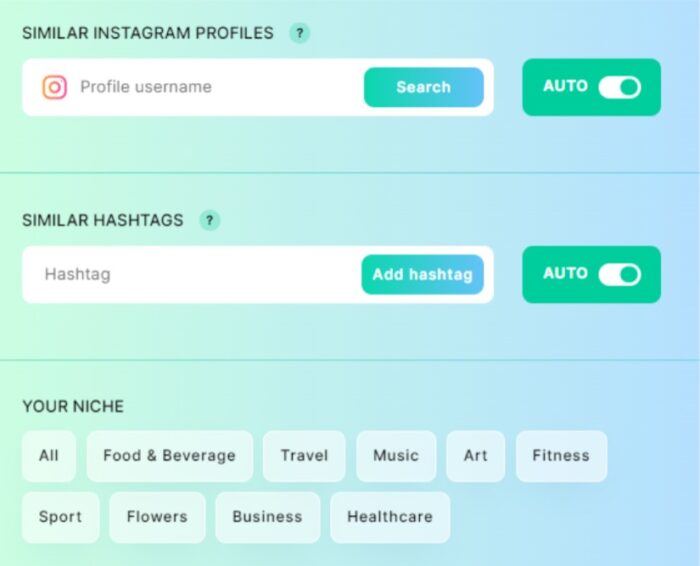
To get started, Zamupa’s specialized software studies your Instagram profile to learn about your followers’ age, location, and interests. Later on, you can add more information to your Zamupa profile, like your niche, top competitors, and favorite hashtags. This helps Zamupa find the best followers for your Instagram.

Zamupa - Boost your Instagram followers
Photo credit: Zamupa

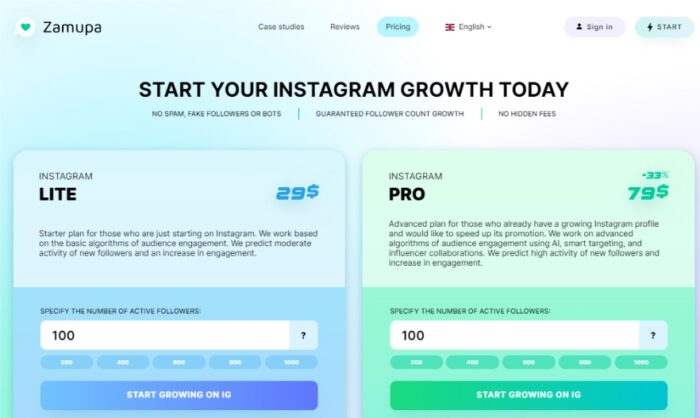
Zamupa can help you gain anywhere from 100 to 1,000 new followers at a time. Choosing the maximum number allows for a more gradual, natural increase in followers over time, but feel free to start small if you want to try out the service first and then upgrade to a larger package later.

The LITE plan ensures that your new followers will engage with your posts and Stories, giving them a like. With the PRO plan, you’ll get even more:

  • Comments on your posts
  • Shares and saves of your content
  • Expert analysis of your profile by marketing professionals
  • Smart targeting based on competitors, hashtags, and audience
  • Opportunities to team up with influencers
  • Auto blacklisting, which avoids connecting you with followers you’ve already reached out to
Zamupa - Boost your Instagram followers
Photo credit: Zamupa

Zamupa focuses on connecting you with high-quality followers. These are real Instagram users with genuine profiles, complete with photos, authentic profile pictures, and reasonable followings. They comply with Instagram’s rules, making the service risk-free. When visitors browse your profile, they’ll see authentic users among your followers, not bots, which fosters trust and credibility.

The agency’s team promotes your profile methodically and effectively. As likes and comments gradually accumulate, Instagram’s algorithms recognize your content as engaging, increasing its visibility. With the potential to land on the Explore page, you’ll have the chance for organic growth, meaning that ordering followers from Zamupa lays the groundwork for ongoing success.

You to Subs

You to Subs has earned its reputation as the top service in this field, as evidenced by countless positive reviews. Their process begins with social media marketing experts who study your profile and develop a customized promotion strategy based on their analysis. Once this strategy is in place, you’ll begin seeing an increase in followers.

This individualized approach sets You to Subs apart, ensuring the followers you gain align with your unique profile and content. Rather than offering a one-size-fits-all solution, they tailor their service to your specific needs, resulting in more meaningful, engaged followers who appreciate and interact with your posts.

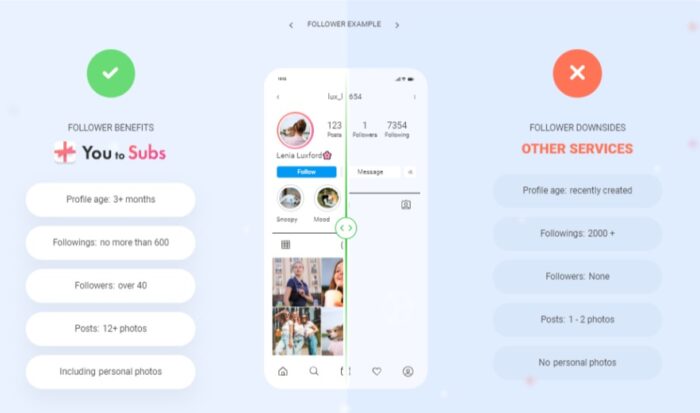
You to Subs ensures that the followers you gain are authentic and maintain active profiles. They adhere to strict criteria, including:

  • Personal photos in their profiles
  • A minimum of 12 posts on their feeds
  • No more than 600 followings and at least 40 followers
  • Profiles created at least three months ago

When ordering followers, don’t expect an immediate influx of thousands, as this could lead to a potential profile ban. Instead, followers will be added gradually over several days, mirroring organic growth patterns. These new followers will engage with your content, liking your posts and leaving thoughtful comments. The process resembles traditional promotion techniques but delivers faster, more convenient results.

You to Subs - Boost your Instagram followers
Photo credit: You to Subs

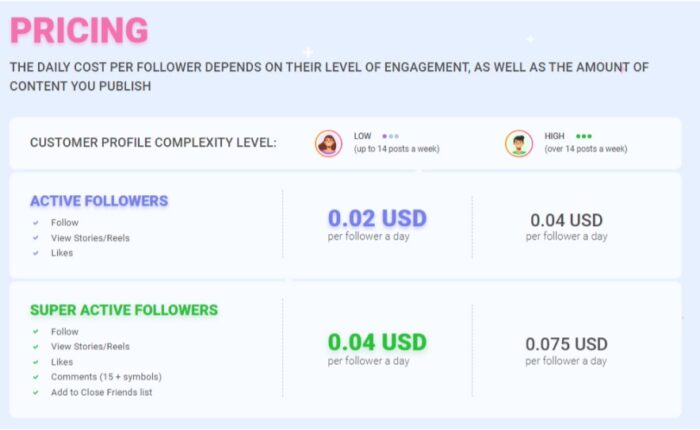
You to Subs’ pricing varies based on the number of posts in your feed and your preferred level of follower interaction. Profiles posting up to 14 times per week are considered “low difficulty,” while those posting over 15 times per week are designated “high difficulty.”

You to Subs offers two follower engagement options:

  1. The standard plan includes followers who engage with your content by following your profile, viewing Stories, posts, and Reels, and liking your content.
  2. The Super Active plan provides a more interactive experience, with followers leaving comments of 15 characters or more and adding your profile to their Close Friends list.

Selecting the appropriate plan ensures you receive the desired level of engagement and growth for your specific content and posting frequency.

You to Subs
Photo credit: You to Subs

You to Subs suggests a balanced combination of Active and Super Active followers, rather than exclusively opting for Super Active. This strategy maintains a natural ratio of likes to comments, as even accounts with millions of followers typically receive more likes than comments. Determine the cost for your desired number of followers by using the slider on their website, which instantly calculates the total price.

This recommendation helps maintain an authentic appearance for your Instagram profile. An unnatural number of comments compared to likes may raise suspicion among users and the platform, potentially harming your reputation and growth. By adhering to typical engagement patterns, You to Subs helps your profile achieve sustainable growth while preserving its integrity.

You to Subs - Boost your Instagram followers
Photo credit: You to Subs

<p>To begin using the service to boost your Instagram followers, you’ll need to create an account. Rest assured, this doesn’t require sharing your Instagram login information. Your account on the website allows you to monitor your active contracts, their status, available funds, and the freelancers associated with each contract. If a freelancer fails to meet their obligations, you have the option to remove them from the contract, and the system will automatically assign a new freelancer to take their place.

This account management system ensures transparency and control over your contracts, allowing you to make informed decisions and maintain satisfactory growth for your Instagram profile. By granting you direct oversight of the promotion process, You to Subs empowers you to steer your profile’s success and maintain effective collaborations with freelancers.

You to Subs - Boost your Instagram followers
Photo credit: You to Subs

By acquiring followers through You to Subs, your Instagram profile will flourish with a genuine audience. This authentic engagement positively influences organic growth, enhancing your analytics. Improved performance increases the likelihood of your posts appearing on the Explore page, further expanding your reach and attracting more followers who share a genuine interest in your blog or product.

Ultimately, the genuine growth provided by You to Subs enhances your Instagram presence, attracting like-minded users and fostering meaningful connections. This strong foundation of authentic engagement drives continued success, ensuring your profile remains visible and engaging for your target audience.

Conclusion

It’s clear that you can achieve authentic and valuable audience growth without breaking the bank. The key is to rely on trustworthy services that steer clear of scams and deliver genuine followers instead of bots. This article outlines four reputable options to consider to boost your Instagram followers. By starting with any of these services, you’ll witness firsthand the tangible, positive impact they can have on your Instagram growth journey.

These services provide the foundation for sustainable, organic growth on Instagram. By prioritizing authenticity and quality, they ensure your profile attracts engaged users who contribute meaningfully to your online presence. Ultimately, the success of your Instagram profile rests on the strength of your audience, and choosing a reliable service sets you on the path toward fostering a thriving community.

The post The 4 Best Services to Boost Your Instagram Followers appeared first on Home Business Magazine.

Rivian targets gas-powered Ford and Toyota trucks and SUVs with $5,000 ‘electric upgrade’ discount


Rivian is offering discounts up to $5,000 on its EVs — and a year of free charging — to customers willing to trade in their gas-powered trucks and SUVs.

The deal, which kicked off April 22, is aimed directly at some of the best-selling and most ubiquitous gas-powered trucks and SUVs on the market today, including the Ford F-150, Toyota Tacoma and Jeep Wrangler. Rivian is even going after German automakers Audi and BMW. The price cut varies between $1,000 and $5,000 depending on the model. Rivian is offering discounts on three R1T pickup truck trims and one R1S SUV model.

The company promoted Monday the “electric upgrade offer” in an email to prospective customers as well as posts on social media. The discounts come as demand for premium and luxury EVs has softened across the industry, prompting automakers such as Ford, Lucid and Tesla to reduce prices. Faced with uncertain demand, many legacy automakers have also pared down plans to shift their portfolios to only battery-electric vehicles. Gas-powered vehicles and hybrids are back en vogue, thanks to the steady sales and profit margins they provide.

Rivian, which is only expected to produce about 57,000 EVs in 2024, won’t unseat the best-selling trucks on the market. But the approach could help it win over a new batch of customers.

Only owners of specific gas-powered vehicles will be eligible for the trade in. Those include 2018 or newer Ford F-150 trucks, Ford Explorer, Ford Expedition and Bronco, with the exception of the Bronco Sport. Other eligible trade-ins are 2018 or newer Toyota Tacoma, Toyota Tundra, Toyota Highlander, Toyota 4Runner Jeep Grand Cherokee, Jeep Wrangler and Jeep Gladiator. The Audi Q5, Q7 and Q8 as well as the BMW X3, X5 and X7 also qualify.

The deals applies to customers who want to lease or buy a vehicle, although they must take delivery by June 30. Rivian is also throwing in a year of free charging at any Rivian-owned charger in the United States as an added sweetener. Rivian fast-chargers, which are branded the Rivian Adventure Network, are not nearly as plentiful as the Tesla Supercharging network. The company has installed 433 fast-chargers at 71 stations, including in Arizona, California, Oregon, Washington, Colorado and along the East Coast. Rivian has also installed 482 Level 2 chargers (called Waypoints) at 180 lives sites throughout the United States.

DIY vs Professional Virus Removal: What’s the Difference?


As more individuals and businesses become reliant on computers and the internet, the need for effective virus removal solutions becomes paramount. When faced with a virus infection, the decision to tackle the issue yourself or seek professional help can significantly impact the outcome. In this blog, we will explore DIY vs professional virus removal and discuss why opting for professional services is often the wiser choice.

DIY vs Professional Virus Removal: What's the Difference?

DIY Virus Removal:

Limited Expertise:

One of the primary challenges with DIY virus removal is the limited expertise of the average computer user. While many antivirus programs claim to be user-friendly, identifying and removing sophisticated malware requires a deep understanding of computer systems and virus behaviors.

Incomplete Solutions:

DIY methods often involve relying on free or basic antivirus software. While these tools can detect and remove common viruses, they may not be equipped to handle more advanced threats. Furthermore, professional virus removal services utilize advanced tools and techniques to ensure a comprehensive and thorough cleaning of your system.

Time-Consuming:

Attempting to remove a virus on your own can be a time-consuming process. Scanning your computer, researching the specific virus, and implementing removal steps can take hours. Meanwhile, the virus may continue to spread and cause further damage to your system.

Professional Virus Removal:

Expertise and Experience:

Professional virus removal services employ experts with in-depth knowledge of malware, viruses, and cybersecurity. Moreover, these professionals are trained to identify and eliminate a wide range of threats effectively. Their experience enables them to handle even the most complex infections.

Advanced Tools and Techniques:

Unlike consumer-grade antivirus software, professional services have access to advanced tools and techniques. This includes specialized malware scanners, forensic analysis, and real-time monitoring systems that can detect and remove threats that may go unnoticed by standard antivirus programs.

Comprehensive Security Solutions:

Professional virus removal is not just about eliminating existing threats; it also involves implementing robust security measures to prevent future infections. Also, this may include setting up firewalls, updating software regularly, and educating users about safe online practices.

Time-Efficient:

Professional virus removal services are designed to be efficient. Technicians are trained to quickly diagnose and address the problem, minimizing downtime for individuals and businesses. This contrasts with the potentially prolonged efforts of a DIY approach.

The answer to which one is better, DIY vs professional virus removal, is clear. While DIY virus removal may seem like a cost-effective and convenient solution, the potential risks and limitations should not be underestimated. Contact us at PC Geeks today and let us help you out in no time! When it comes to the security of your personal data and the smooth functioning of your computer, investing in professional virus removal is a prudent choice that pays off in the long run.

Cost To Develop An Online Shopping And Delivery App Like InstaShop


How Much Does It Cost To Develop An Online Shopping and Delivery App Like InstaShop?

How To Make An Instant Shopping & Delivery App Like InstaShop?

Instant shopping and delivery apps made online purchases of a wide range of products, including household, personal, and kitchen essentials easier and more convenient. People do need not to travel long to buy groceries, pharmacies, fresh flowers, food items & desserts, stationery products, cosmetics, perfumes, etc. Instant online shopping and delivery apps like InstaShop will bring everything to the fingertips of users.

InstaShop is one of the Top Online Shopping and Delivery Apps in The Middle East, incorporated in 2015. InstaShop Android app/iOS app offers nearly 100,000 products across various categories at store prices. Users can order products from their favorite nearby supermarkets, pharmacies, restaurants, and bakeries and get instant delivery within 30 minutes.

Its user-friendly features and instant deliveries have made it a popular grocery delivery app in the UAE. Wide Product Varieties from top brands, Instant Online Deliveries, location tracking facilities, and discounts on products are its core features that are playing a vital role in its successful journey in the Middle East.

Today, InstaShop is well-recognized by millions of users across the United Arab Emirates, Saudi Arabia, Oman, Bahrain, Qatar, Egypt, Lebanon & Greece.

Do you want to create an online grocery shopping app like InstaShop and grab the opportunities of the on-demand grocery delivery app market in the UAE or Saudi?

If yes, then our article will give you a detailed guide on features, technology stack, and development cost of InstaShop-like leading Instant Shopping and delivery app.     

Cost To Develop An App Like InstaShop

Must-Have Features and Functionalities In Online Grocery Delivery App Like InstaShop 

InstaShop is the most downloaded mobile app for grocery delivery in the UAE. Its simple design and set of easy-to-access features are the core reasons behind its success. Being a leading custom grocery app development company, our top mobile app developers in UAE, with their proven experience, have compiled a list of the top features that offer hassle-free online shopping experiences to users.

Let’s take a look at the best features of online grocery delivery apps for Android and iOS.

Must-have Features In InstaShop Clone App For Customer Panel 

  • Easy sign-up and login
  • Hassle-free Social media login
  • Location Tracking feature for delivering user’s location and offering quick delivery services
  • Search option with product or shop name
  • Customized filters to make the search easier and faster
  • Add To Cart for listing the products
  • Wish list
  • Secure Checkout
  • Multiple Payment Modes for user convenience
  • Real-time order tracking facility
  • My Orders to check previous and scheduled orders
  • User Profile to view, edit/modify profile details, account details, address details, language settings, etc.
  • Pickup or Door Delivery suppleness
  • Alerts on arrivals and push notifications
  • Ratings & Review facility for reporting the application performance and dropping their feedback on app experiences 

Must-Add Features of On-demand Delivery Apps like InstaShop For Store Owners 

  • Restaurant/Pharmacy/Supermarkets register and login facility
  • Product listings
  • Add/delete out of the stock products
  • Order accept or reject flexibility
  • Payment tracking
  • Orders history and Payments status checking
  • Read Ratings and Customer Feedback

Top Features Of Grocery Delivery Apps For Rider Panel Development 

  • Registration and login
  • Orders View and Accept/reject delivery requests
  • In-app map integration for tracking delivery locations
  • Delivery status updates features
  • In-app calling or chat facility for getting user assistance in reaching the delivery address
  • Rider Profile Management
  • Link bank account feature to get delivery charges directly to the accounts from restaurants and tips given by the customers


Recommend To Read: How Much Does It Cost To Develop A Walgreens-like E-Pharmacy Delivery App?


Must-Add Features To Develop Admin Panel For InstaShop-like Top Grocery Delivery App UAE 

  • Users Management
  • Supermarkets/Restaurants Management
  • Orders management
  • Rider Management
  • Content management
  • Reviews and ratings management
  • Exclusive discounts management
  • Returns and refund management
  • Personalized push notifications to Users
  • Payment tracking for ensuring secure transactions
  • Customer support and in-app assistance

Get a free quote for grocery delivery app development quote!


Tips To Remember For Building A Results-driven Online Grocery Delivery App Like InstaShop?

If you plan to invest in online grocery delivery apps, marketplace apps, E-commerce apps, food delivery apps, or online pharmacy ordering apps, app developers must consider a few things for creating a top-notch application that improves user experiences and generate sales.

  • Attractive and Simple User Interfaces (UIs)

The design of the marketplace application plays an essential role in increasing or decreasing app downloads and conversions as well. Since marketplace or e-commerce apps will comprise various products, the app interface must be clean and catchy with better organizing every feature at the fingertips of users. Hence, the application’s front end should not be messy and assist your app users in accessing the features smoothly.

  • Reliable In-App User Assistance

It is where you can improve the app as well as your brand’s reliability. To provide this facility, you must integrate Artificial Intelligence features into your novel grocery delivery app. AI-powered in-app customer assistant features will provide instant responses to customer issues and trigger auto notifications about deals, discounts, price drop alerts, etc.

  • Personalized Notifications For Clutch Sales

Using the capabilities of Ai and Machine Learning-based pattern recognition techniques, app developers can derive patterns into buyer preferences and interests. Hence, companies can trigger personalized product purchase recommendations to individuals and optimize sales.

  • Order Now or Schedule For Later

Adding this feature to your new online grocery delivery application will allow app users an instant delivery service or schedule their deliveries as per their preferences. This type of feature in on-demand delivery apps will increase the weightage of your application and deliver customer-friendly services.

  • Add Crazy Functionalities

Re-order is one of the craziest features that you can add to your Android/iOS grocery delivery application. Features like Re-order will save the users’ time in again choosing the restaurant and products.

App localization is the most important factor that you must remember. Let your application support users in their native language. It will increase app localization and customer loyalty.

  • Voice-based Search Is Added Plus Benefit

Grocery apps or marketplace apps with voice-based search features will grab the user’s attention. Such apps make users search faster and display the content they are looking for.

These are a few tips to make your application more unique and keep it out of the clone app world.


Recommend To Read: How Much Does It Cost To Develop An e-Commerce App like Amazon?


The Tech Stack You Need For Developing InstaShop-Like An On-Demand Grocery Delivery App

Being one of the top custom mobile app developers, InstaShop-like trending and most popular online grocery delivery clone application development need the below tech stack.

  • Programming Languages: Java and Kotlin for Android app development & Swift and Objective C for iOS app development
  • Database: MongoDB, MySQL
  • Storage: AWS, Azure, Google Cloud
  • In-app Payment Integrations: PayPal, Stripe
  • Location Tracking: Google Maps, Maps SDK for iOS
  • Push Notifications: Twilio
  • Frontend development: React and AngularJS
  • Backend Development: NodeJS


How Much Does It Cost To Develop An Online Grocery Delivery Platform like InstaShop? 

The cost of an on-demand grocery delivery app development will cost from $35,000 to $150,000 and above.

But, the final cost of a grocery delivery app like InstaShop will depend on the hourly rate of mobile app development companies, application development process, technology stack, app type, development platform, and design complexity, etc. The grocery delivery app development cost will be greatly impacted by these factors. 

If you are looking to hire the best online grocery delivery app development company USA, USM is your perfect partner. We build budget-friendly Android/iOS e-commerce and marketplace apps.

Get In Touch!

Key Monetization Strategies of On-demand Grocery Delivery Apps Like InstaShop

We have discussed grocery delivery app features, the technology stack for on-demand grocery app development, and also the cost to create the InstaShop clone app. Now, let’s discuss for a few seconds the best ways to monetize grocery apps like InstaShop. 

  1. In-app Advertisements 

It is one of the proven, evergreen, and best mobile app monetization strategies that let app owners generate revenues beyond app services. Let e-commerce or other brands post their ads on your application wall and collect fees for their brand promotion through your app.

  1. Commissions from Supermarkets or Stores

The most traditional way to generate revenues beyond actual sales. Not only app developers and customers will benefit from online services, but suppliers and retailers will also gain huge benefits. Listing services or products on InstaShop-like mobile apps, stores can expand brand reach and gain more customers. So, app owners can take commissions from stores, supermarkets, or restaurants for listing their products in your grocery app.

  1. Delivery Commissions From Customers

App owners can charge money from customers for convenient delivery services. Based on the proximity of the store to the customer’s location, the app owners can take delivery charges.         


Online Grocery Delivery Market Growth In UAE, Middle East

Let’s take a look at stats that tell you how online grocery delivery apps in UAE and other Middle Eastern countries are witnessing massive growth in the recent past.

Online grocery delivery demand and users switching to grocery shopping apps in the country has been witnessing tremendous growth in the past few years. The year 2021 is a landmark year for online businesses in the region. Due to COVID vibes in the country, grocery retailers have witnessed a basket full of online and offline sales.

According to Statista, the revenues from Online Grocery Delivery Apps will reach US$526.60 million by the end of 2022 and are anticipated to reach US$1,897.00 million by 2027. Since the future of online grocery delivery apps in the UAE is hopeful, it is the right time to introduce your new online grocery shopping and delivery app like InstaShop.


Why Is USM The Best Company For Grocery App Development? 

USM Business System is a #1 mobile app development company in the UAE. We have almost two decades of proven industry experience in the design, development, and deployment of on-demand grocery delivery apps like InstaShop.

Our expert custom mobile app developers in the Middle East have created bespoke app solutions for enterprises across various industries. Being the best App Development Company in UAE, we use next-generation technologies and build solutions that derive great value for your business. Our team of grocery app developers will do deep market research and develops a unique instant grocery delivery app with best-in-class features.

Let’s discuss your app requirements and build a dream project together!

Luxury CAD Home Office Design Ideas for Your Architectural Company or Firm


What’s the first thing that comes to mind when you hear luxury home office design? You may instantly think of a clean and stylish space with a cozy chair, ergonomic table, and chic accent lighting. If you associate these features with luxury home offices, you already know what luxury CAD home design services are. However, like other CAD design elements, individual preferences may come and go, and trends may change in a mere snap of a finger. Does your architectural company or firm plan to offer luxury CAD home office design as part of your services? If yes, here are a few ideas to help you get started and capture your client’s interest!

Luxury CAD home design ideas for your architectural company or firm

Incorporate a fish tank to the CAD home office design

There is something relaxing about watching fish as they swim in the water. Consider including a small fish tank to the CAD home office design. The fish tank could be on the desk or installed on the wall. There are numerous fish varieties that you can recommend to your clients. 

RELATED: 30 Architecture design inspiration resources

Aquascaping is also a significant consideration, with Dutch aquariums, Iwagami, and nature aquariums being the three most popular styles. Each offers something unique, so you can pick the one that best suits the luxury CAD home office design you are planning. However, if you add this element, ensure the fish tank is safe from drafty areas, windows, and electronics. 

Add a touch of elegance to function and form

Some clients may want their home office to double up as a guest room. An elegant CAD design twist will do the trick if this is the case. For example, a stylish sofa bed can add a sophisticated touch to welcome guests to a modern family home. It will also give clients a spot to sit down and relax. It can also be the perfect spot for reading. 

Install more mirrors in the 3D interior rendering

It’s uncommon for home offices to have mirrors, making it a unique idea to include as part of your interior design services. Mirrors are ideal as they help reflect natural lighting around the space, making the room seem more significant than its size. This makes mirrors a perfect option for smaller home offices. 

RELATED: What are the principles of architectural design?

The best thing here is that you can opt for mirrors with unique shapes or group several mirrors of different sizes together. There are lots of options available as far as adding mirrors is concerned. You can also explore exciting new trends to make the room more stylish. But ensure these are installed in areas that will keep your clients focused while working. 

3d home rendering services

Consider a luxury backyard home office

If your client has a roomy yard with lots of open space, a luxury backyard home office is a great idea to consider. Backyard home offices are often the size of a shed that can be decorated however the client sees fit. Most people also opt to install large glass sliding doors, allowing lots of natural light. Backyard home offices can also be decorated with different plant varieties with a nice rug to complement them. Some remote workers also want a small porch added to their home office where they can set up a table and chairs to relax during breaks. Your skills as landscape designer can also be well utilized here.

RELATED: What is architectural visualization and why architectural rendering services use it

Your architectural design company or firm can be as creative as you want with backyard home offices because of the different options that allow productivity and noise-free office calls. If you need inspiration, a 3D landscape rendering service can develop exterior landscaping designs that suit the space.

Concealing the workspace with 3D interior rendering

Hiding the workspace allows your client to enjoy downtime and dial out. All it takes is to close a cabinet or shut the door, and your client can instantly switch to a more relaxed mindset. You can create a secret door to the home office, hiding the entrance while creating a natural flow with the rest of the internal space. The door can be well-insulated and disguised as a bookcase, for example. 3D interior rendering services can draft various options for concealing the workspace.

This practical design can create a more peaceful environment. It is ideal for busy calls, privacy, and avoiding disruptions at home. A concealed space can also be added for office files and the printer. This 3D interior design option is one of the best luxury CAD home design ideas if your client wants the utmost privacy. 

RELATED: 3D Interior design renders and how they enrich your design business portfolio 

A cozy nook for reading 

Where do you move whenever you want to take a quick break from work? Most remote workers wish to have a reading nook in their home office. You can also incorporate some artwork that your client may love. Of course, magazines and books should also be kept nearby. This nook doesn’t need to occupy much room, making it another great 3D interior design idea to try. 

You can add a small sofa complete with blankets and a soft rug in the corner of the office. Some people also love to add bean bags. A small bookshelf nearby will encourage your client to read and relax during work breaks. A reading nook can also be ideal for your client to enjoy snacks. Since the reading nook will be exclusive and unique to your client, don’t hesitate to ask for their input so you can be more creative with the 3D interior visualization. Clients often request 3D architectural visualization professionals to add luxury items such as decors, plants, comfortable chairs, and carpets to the 3D interior design. 

RELATED: 3D Interior designs used by designers and companies to overcome creative block

3d-interior-design-services

Add an electric fireplace 

Most home offices today feature electric fireplaces. These lovely features are available in many different styles and colors, which allows the 3D architectural rendering artist and the client to choose from many options. The best thing about these electric fireplaces is that they have realistic-looking flames and produce warmth, which makes them ideal during colder months. 

An electric fireplace can give off a cozy vibe while your client works. Many people add them to help lower their stress levels. There is something wonderful and comforting about working while a crackling fire blazes right beside you. Freestanding electric fireplaces are a stunning addition to CAD home office design ideas. These are also available in different sizes, so you can find one that may fit in a smaller room without overfilling the space. 

Use fun lighting fixtures

You can also try experimenting with lighting fixtures. Some good options include fairy lights, hanging bulbs, chandeliers, and other lighting fixtures with unique shapes. There are also desk lights and floor lamps to choose from. You can try something different and creative to amaze your client. 

RELATED: 3D visualization: the future of architectural design

More lights in a home office will make it look and feel brighter and more open. It creates a unique effect that can help your client stay focused while working, not to mention that it also makes the space look so much nicer. With a high-end budget, you can employ freelance lighting fixture design service and have a truly unique lighting experience in your CAD home office design. 

Create a textured twist

If your client wants their home office to be instantly transformed into an after-work haven, careful planning is necessary to develop a good luxury CAD home office design. An open-plan space, for example, can create the kind of office where your client can have a place to work and take calls. 

A 3D floor plan designer can transform the space for retiring after a tiring day and relaxing while sipping a glass of wine. A defined color palette may be a great option that will blend well with the rest of the interior. Gorgeous textured wallpaper featuring soft, muted grey tones can also exude a stylish, snug design. You can enhance this contemporary look with a bespoke desk and lustrous leather top. 

RELATED: Benefits of 3D floor plan rendering and design services for architects and companies

Choose a theme

Your team can also let your imagination run wild as you create an office theme and help whisk off your client’s mind to another place or time. It shows how luxury CAD home office design ideas can encourage escapism. For example, if your client has a luxury flat, you can adopt an explorer-inspired theme for their home office space inspired by a compass. This will turn it into a room they will love working in where they can also read about travel and relax after work. 

For example, you can add a space with a 3D design service that showcases their art collection from their past adventures. This will help you create a place where your client can dream and escape the noises and distractions of the outside world. Carefully chosen items like an old world map will embrace the concept. Your team should research bespoke artwork to complement the design. 

RELATED: Types of 3D visualization for architectural design and CGI projects

Hire the best designers at Cad Crowd for luxury home office projects

When creating a luxury CAD home office design, looking for clever design ideas that ideally encourage work and work-life balance is essential. A 3D interior visualization company can create luxury CAD home offices that combine home and office life. Cad Crowd is the go-to platform for many architectural companies and firms searching for the best 3D interior rendering designers and 3D interior design services to help generate the most stunning ideas for their clients’ luxury home offices! 

Climate Startups Integrate AI for Sustainability Applications


Whether they’re monitoring miniscule insects or delivering insights from satellites in space, NVIDIA-accelerated startups are making every day Earth Day.

Sustainable Futures, an initiative within the NVIDIA Inception program for cutting-edge startups, is supporting 750+ companies globally focused on agriculture, carbon capture, clean energy, climate and weather, environmental analysis, green computing, sustainable infrastructure and waste management.

This Earth Day, discover how five of these sustainability-focused startups are advancing their work with accelerated computing and the NVIDIA Earth-2 platform for climate tech.

Earth-2 features a suite of AI models that help simulate, visualize and deliver actionable insights about weather and climate.

Insect Farming Catches the AI Bug

Image courtesy of Bug Mars

Amid a changing climate, a key component of environmental resilience is food security: the ability to produce and provide enough food to meet the nutrition needs of all people. Edible insects, such as crickets and black soldier flies, are one solution that could reduce humans’ reliance on resource-intensive livestock farming for protein.

Bug Mars, a startup based in Ontario, Canada, supports insect protein production with AI tools that monitor variables including temperature, pests and number of insects — and predict issues and recommend actions based on that data. It can help insect farmers increase yield by 30%.

The company uses NVIDIA Jetson Orin Nano modules to accelerate its work, and recently announced it’s using synthetic data and digital twin technology to further advance its AI solutions for insect agriculture.

Seeing the Forest for the Trees

Based in Truckee, Calif., Vibrant Planet is modeling trillions of trees and other flammable vegetation such as shrublands and grasslands to help land managers, counties and fire districts across North America build wildfire and climate resilience.

NVIDIA hardware and software has helped Vibrant Planet develop transformer models for forest and ecosystem management and AI-enhanced operational planning.

Visualization of forest
Visualization courtesy of Vibrant Planet

The startup collects and analyzes data from lidar sensors, satellites and aircraft to train AI models that can map vegetation with high precision, estimate canopy height and detect characteristics of forest and vegetation areas such as carbon, water, biodiversity and built infrastructure. Customers can use this data to understand fire and drought hazards, and, with these insights, conduct scenario planning to forecast the effects of potential forest thinning, prescribed fire or other actions.

Delivering Tomorrow’s Forecast

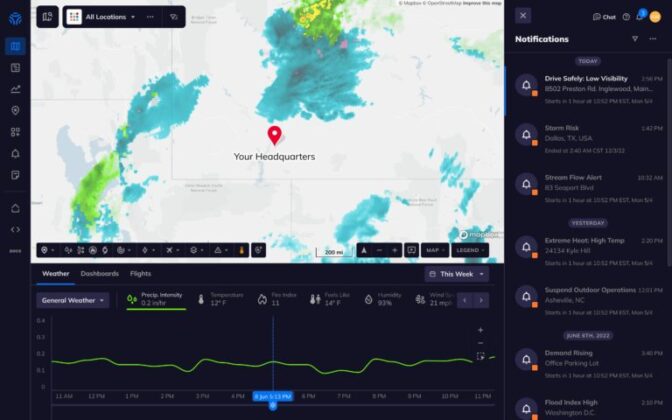
Tomorrow.io, based in Boston, is a leading resilience platform that helps organizations adapt to increasing weather and climate volatility. Powered by next-generation space technology, advanced AI models and proprietary modeling capabilities, the startup enables businesses and governments to proactively mitigate risk, ensure operational resilience and drive critical decision-making.

screen capture of tomorrow.io dashboard
Image courtesy of Tomorrow.io

The startup is developing weather forecasting AI and is launching its own satellites to collect environmental data to further train its models. It’s also conducting experiments using Earth-2 AI forecast models to determine the optimal configurations of satellites to improve weather-forecasting conditions.

One of Tomorrow.io’s projects is an initiative in Kenya with the Bill and Melinda Gates Foundation that provides daily alerts to 6 million farmers with insights around when to water their crops, when to spray pesticides, when to harvest or when to change crops altogether due to changes in the local climate. The team hopes to scale up their user base to 100 million farmers in Africa by 2030.

Winds of Change

Palo Alto, Calif.-based WindBorne Systems is developing weather-sensing balloons equipped with WeatherMesh, a state-of-the-art AI model for real-time global weather forecasts.

weather balloon against landscape
Image courtesy of WindBorne Systems

WeatherMesh predicts factors including surface temperature, pressure, winds, precipitation and radiation. The model has set world records for accuracy and is lightweight enough to run on a gaming laptop, unlike traditional models that run on supercomputers.

WindBorne uses NVIDIA GPUs to develop its AI and is an early-access user of Earth-2. The company’s weather balloon development is funded in part by the National Oceanic and Atmospheric Administration’s Weather Program Office.

Taking the Temperature of Global Cities

FortyGuard, a startup founded in Abu Dhabi with headquarters in Miami, is developing a system to measure urban heat with AI models that present insights for public health officials, city planners, landscape architects and environmental engineers.

FortyGuard presented in the Expo Hall Theater at NVIDIA GTC.

The company — an early-access user of the Earth-2 platform — aims for its temperature AI models to provide a more granular view into urban heat dynamics, providing data that can help industries and governments shape cooler and more livable cities.

FortyGuard’s technology, offered via application programming interfaces, could integrate with existing enterprise platforms to enable use cases including temperature-based route navigation, predictive enhanced EV performance and property insights.

To learn more about the Sustainable Futures program, watch the “AI Nations and Sustainable Futures Day” session from NVIDIA GTC

NVIDIA is a member of the U.S. Department of State’s Coalition for Climate Entrepreneurship, which aims to address the United Nations’ Sustainable Development Goals using emerging technologies. Learn more in the GTC session, “Global Strategies: Startups, Venture Capital, and Climate Change Solutions.”

Video at top courtesy of Vibrant Planet.

Visual Studio Code April 2023


Update 1.78.1: The update addresses this security issue.

Update 1.78.2: The update addresses these issues.

Downloads: Windows: x64 Arm64 | Mac: Universal Intel silicon | Linux: deb rpm tarball Arm snap


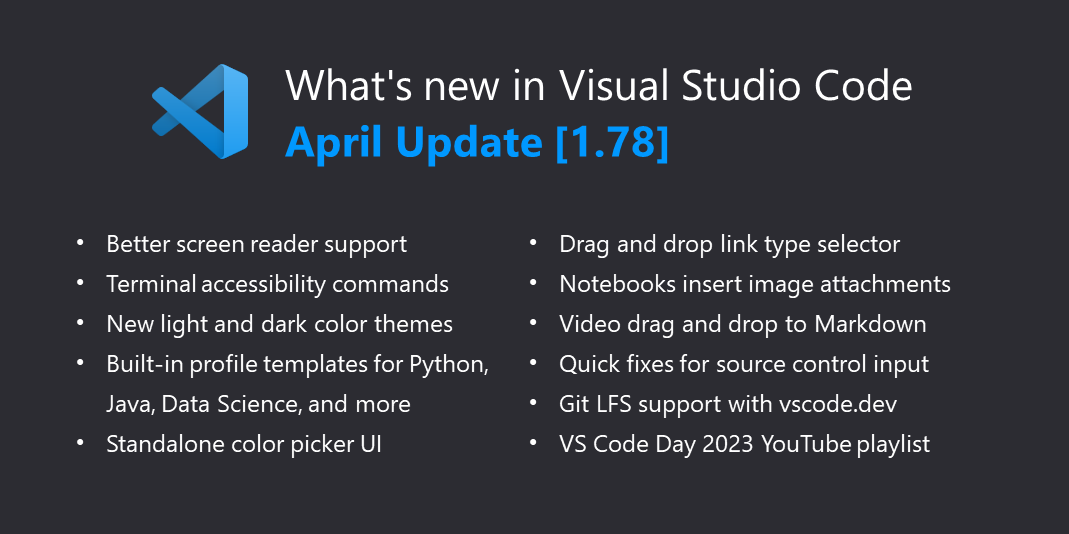
Welcome to the April 2023 release of Visual Studio Code. There are many updates in this version that we hope you’ll like, some of the key highlights include:

If you’d like to read these release notes online, go to Updates on code.visualstudio.com.

Insiders: Want to try new features as soon as possible? You can download the nightly Insiders build and try the latest updates as soon as they are available.

Accessibility

Aria verbosity settings

Screen reader users can exclude hints from a feature’s aria-label to decrease redundancy via the "accessibility.verbosity.diff-editor" and "accessibility.verbosity.terminal" settings.

Improved and aligned Quick Pick experience

Previously, users of accessibility mode experienced different behavior when working with the Command Palette and other Quick Picks. In accessibility mode, the first item of the Quick Pick wasn’t selected in order to be fully accessible. This iteration, we’ve introduced new behavior that allows you to have the best of both worlds: an accessible and fast Quick Pick workflow allowing you to hit Enter right away.

Note: One tradeoff with this approach is that if an item in the Quick Pick is selected, you are not able to hear ARIA changes to the Quick Pick input box, due to an ARIA limitation. To hear these changes, you can press Shift + Tab until no item of the list is selected.

Terminal

Terminal accessible buffer improvements

  • Jump between commands using ⌥↓ (Windows, Linux Alt+Down) and ⌥↑ (Windows, Linux Alt+Up).
  • Use Set Selection Anchor, Select from Anchor to Cursor, and page navigation via ⇧PageUp (Windows, Linux Shift+PageUp) and ⇧PageDown (Windows, Linux Shift+PageDown).
  • Preview the position when using Go to Symbol in Accessible View (⇧⌘O (Windows, Linux Ctrl+Shift+O)) before accepting a command to go to a new location.
  • Engage with the output while dynamic updates occur.

The terminal’s Accessibility Help menu can now be navigated using arrow keys.

Diff editor audio cue improvements

VS Code now caches audio cues so they only have to be loaded once, yielding better responsiveness, and have improved the tones used for the diff editor.

Go to Line/Column announcement

When Go to Line/Column… (⌃G (Windows, Linux Ctrl+G)) is invoked, the screen reader now reads the associated line content.

Workbench

New default Color Themes

New ‘Dark Modern’ and ‘Light Modern’ themes replace ‘Dark+’ and ‘Light+’ as the new default dark and light color themes.
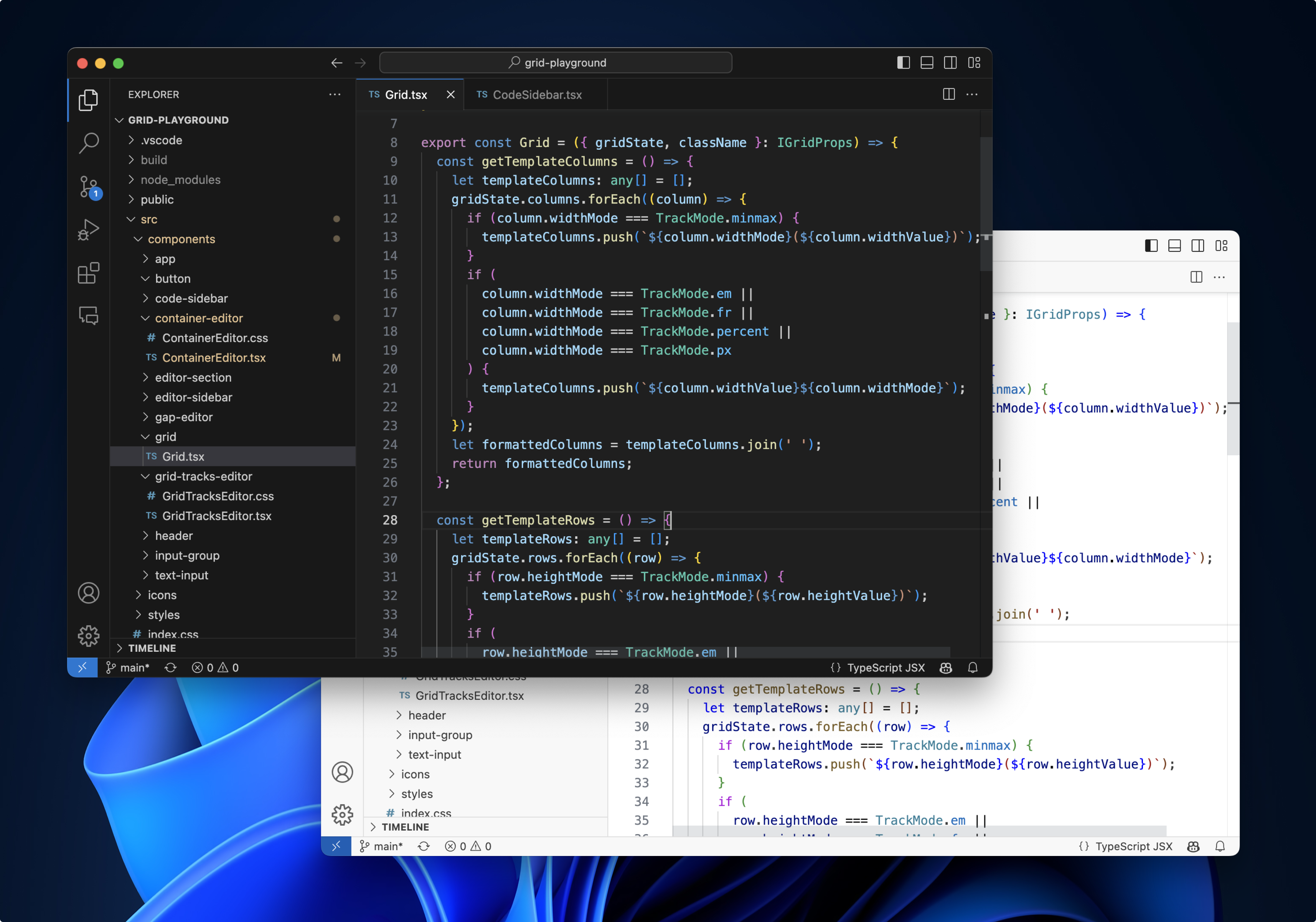
Dark Modern and Light Modern color themes

Profile templates

Profiles let you quickly switch your editor extensions, settings, and UI layout depending on your current project or task. To help you get started with profiles, we are shipping Profile Templates, which are curated profiles for different programming languages and scenarios. You can use a profile template as is or use it as a starting point to customize further for you own workflows.

You select a profile template through the Profiles > Create Profile… dropdown:
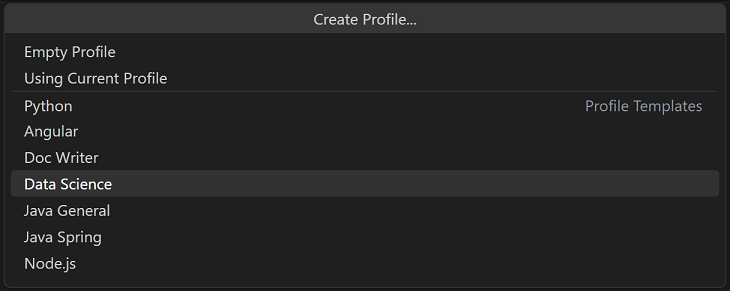
Create Profile dropdown with profile templates

Once you select a profile template, you can review the settings, extensions, and other data, and remove individual items if you don’t want to include them in your new Profile.
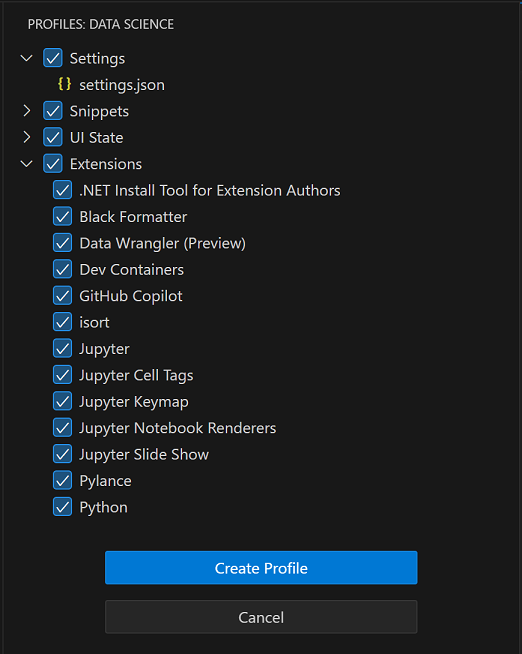
Profiles view showing the contents of the Data Science profile template

After you create the new profile based on a template, changes made to settings, extensions, or UI are persisted to your profile.

Glyph margin decoration rendering improvements

This month, we’ve improved the rendering of decorations that appear in the editor margin. Debugging-related decorations such as breakpoints and stack frame pointers will always render next to the editor line numbers. Additional decorations render to the left of any debugging-related decorations. This allows you to view your breakpoints even if there are other decorations on the same line, such as test decorations or bookmarks. Note that clicks are not yet scoped to individual decorations.
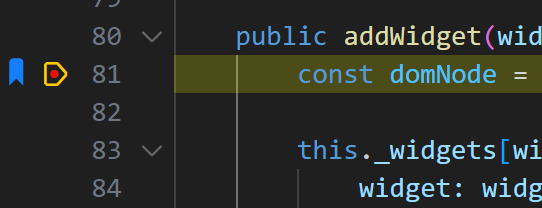
bookmarks displayed next to breakpoint and stack frame pointer decorations

Copy images from the image preview

You can now copy images from the built-in image preview using ⌘C (Windows, Linux Ctrl+C) or by right-clicking in the preview and selecting Copy. The copied image data can be pasted back into VS Code or into other applications.

Editor

Drop selector

VS Code lets you drop files and content into text editors by holding Shift before dropping. In this update, we’ve added UI that lets you change how this content is inserted into the file. After you drop an image into a Markdown file for example, this control lets you switch between inserting a Markdown image, a workspace relative path to the image, and the full path to the image:

The drop selector control appears whenever you drop content and there is more than one possible way it could be inserted. You can open the control by clicking on it or using ⌘. (Windows, Linux Ctrl+.). The drop selector goes away as soon as you start typing or move the cursor outside of the inserted text. You can also fully disable the drop selector control using "editor.dropIntoEditor.showDropSelector": "never".

VS Code includes a few built-in ways to drop common content formats. Extensions can also add their own drop options using the DocumentDropEditProvider API.

Standalone color picker

It is now possible to launch a standalone color picker in order to insert and replace colors. To open the color picker, select Show or Focus Standalone Color Picker from the Command Palette.
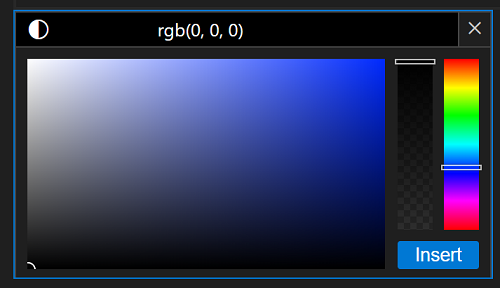
Standalone color picker control adjusted to blue color

When no colors or color formats are provided by extensions, the color-picker falls back to CSS-formatted colors. It is also now possible to visualize inline color decorators for CSS-formatted colors in all file types. To display these decorators, enable the Editor: Default Color Decorators (editor.defaultColorDecorators) setting.

New snippet variable for timezone offset

A new snippet variable, CURRENT_TIMEZONE_OFFSET, is now available. This variable returns the current timezone offset in the format +HH:MM or -HH:MM (for example -07:00). This complements other time-related snippet variables such as CURRENT_YEAR, CURRENT_MONTH, CURRENT_DAY_NAME, etc.

Diff algorithm improvements

We continued improving the new diff algorithm in VS Code and deprecated the old algorithm. While the old algorithm is still the default for the diff editor, we will slowly change the default to the new algorithm and measure its performance.

You can override the default by setting diffEditor.diffAlgorithm to advanced (new diff algorithm) or legacy (default).

The new algorithm produces better diffs in many cases, but might be slower for some documents.

Here are some examples (legacy vs. advanced):

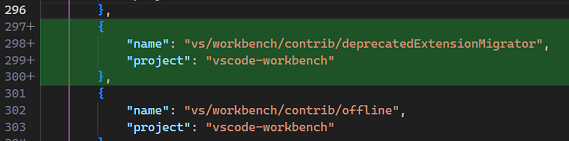
  • Improved line insertion diffs by considering indentation:
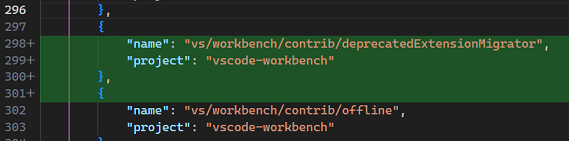
    JSON file diff result using legacy algorithm

    JSON file diff result using advanced algorithm

  • Improved word insertion diffs by considering space and separator characters:

    TypeScript imports word insertion diff using legacy algorithm

    TypeScript imports word insertion diff using advanced algorithm

  • More natural diffs by minimizing not just the length of the diff, but also the number of chunks:

    TypeScript added line diff using legacy algorithm

    TypeScript added line diff using advanced algorithm

  • Less noise by extending character level diffs to entire words if a part of the word changed significantly:
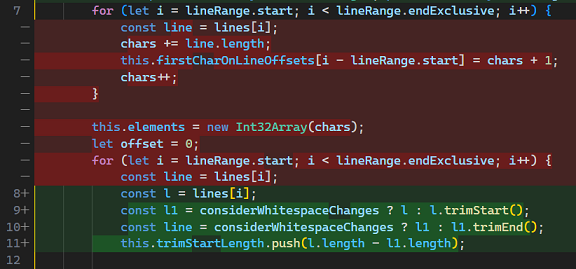
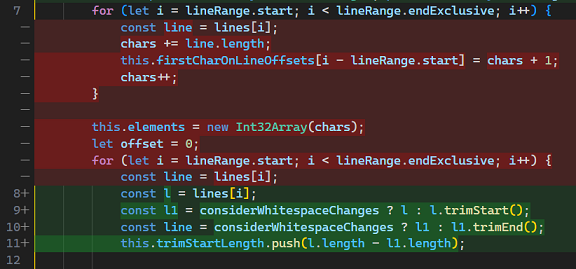
    TypeScript code change diff using legacy algorithm

    TypeScript code change diff using legacy algorithm

Diffing source code and even just evaluating the quality of a diff are hard problems and there is still room for improvement. If you encounter a diff where you think the algorithm could do better, try out our diff playground and share your feedback and ideas in our issue tracker!

Inline completion improvements

This iteration we rewrote the inline completion feature and fixed a lot of bugs.

Most notably, Accept Word now works across lines and there is a new command Accept Line. To support this feature, accepting the next word/line does not ask the extension again, as inline completion provider extensions would often report entirely different suggestions when asking for inline completions of the next line.

Extensions

Improved extension recommendations notification

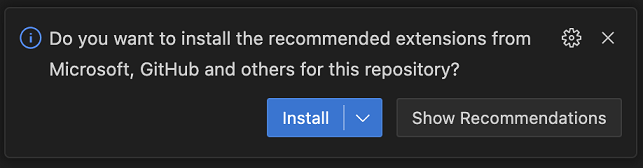
The extension recommendations notification now shows the publisher of the recommended extension. This helps you make a more informed decision before installing the extension. The following images show the new notification when there are recommendations for both a single extension and multiple extensions.
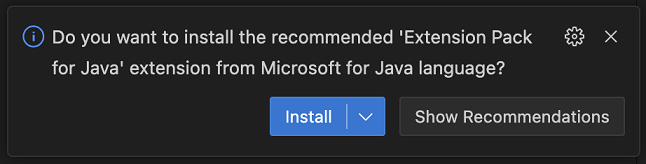
Extension recommendations notification with a single recommendation
Extension recommendations notification with multiple recommendations

Informing about installed deprecated extensions

If you have an extension installed that has been deprecated, you will now receive a notification informing you about it and suggesting alternatives. This is shown only once per deprecated extension.
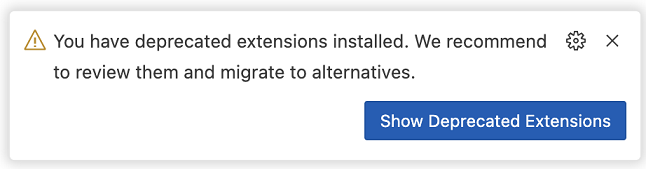
Notification about deprecated extension

Source Control

Quick Fixes in the Source Control input

Code Actions and Quick Fixes are now supported in the Source Control message box:

The Code Spell Checker extension, for example, adds spelling fixes to the Source Control input. Extensions can contribute additional fixes and Code Actions.

GitHub repository rulesets

VS Code already lets you define branch protection using the git.branchProtection setting. This milestone we added a new experimental feature that uses the recently announced GitHub repository rulesets to determine whether a branch is protected. If you are using GitHub repository rulesets, you can enable this feature using the github.branchProtection setting.

Notebooks

Drop image files into notebooks to create attachments

You can now drag and drop image files into notebook Markdown cells to create attachments. When you drop the image, use the new drop selector control to select Insert Image as Attachment:
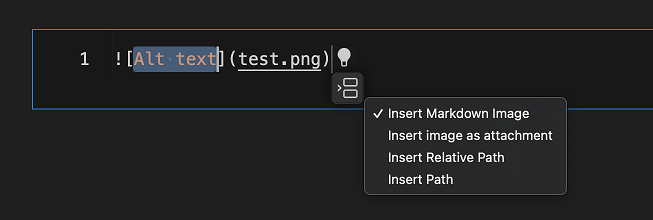
Using the drop selector in a notebook Markdown cell

This adds the image to the notebook as an attachment instead of simply adding a link to the image:
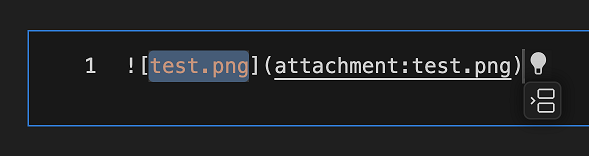
An image file added as an attachment

Toggle notebook output scrolling

You can now toggle individual cells to display output in a scrollable region either by command Notebook: Toggle Scroll Cell Output (⌘K Y (Windows, Linux Ctrl+K Y)) or the link in the truncation message.

Find control improvements

The notebook Find control now searches keywords on what’s visually presented by default. Users can change the search scope (Markdown source, Markdown preview, code source, and code outputs) through setting notebook.find.scope. Additionally, when replacing matches, the Markdown cell is converted to an editable cell so you can make the replacement. When you’re done, the cell is converted back to Markdown, and the preview is restored.

Languages

Drag and drop videos into Markdown files

Want to insert a video into your Markdown? Just drag it into the editor and then hold Shift to drop it into the file:

This inserts a <video> tag pointing to the video file. You can drag videos from VS Code’s Explorer or from your local operating system.

Strict nulls for JavaScript script blocks in HTML

You can now use the js/ts.implicitProjectConfig.strictNullChecks setting to enable strict nulls for JavaScript in HTML script blocks:
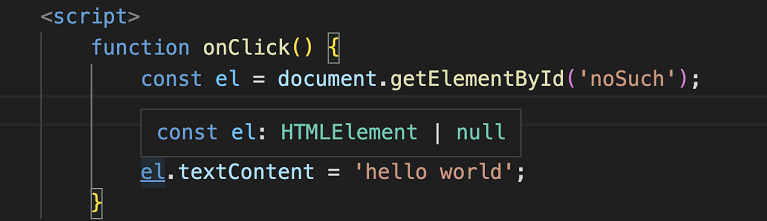
Strict nulls in a script block

With strict nulls enabled, hovers and other IntelliSense features show when a type can be nullable. For example, notice how el now has a type of HTMLElement | null. This is because document.getElementById returns null if it can’t find an element with that ID.

Testing

Continuous run can now be turned on for individual tests. This requires a test extension that supports continuous run and has adopted the supportsContinuousRun API finalized last iteration.
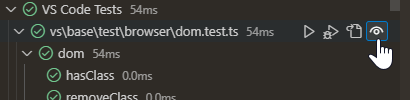
Continuous run button highlighted on an individual test

VS Code for the Web

Commit files to Git Large File Storage

Git Large File Storage (LFS) allows you to efficiently store large files in Git repositories. github.dev and vscode.dev now support committing files to Git LFS in repositories hosted on GitHub, enabling easy updates from your browser without needing to install the LFS extension for Git locally.

LFS commit support in github.dev and vscode.dev works out of the box when your repository already has a .gitattributes file in the root of your repository that specifies which file types should be stored with Git LFS. To set up your repository for Git LFS for the first time, consult the Git LFS documentation.

Remote Development

The Remote Development extensions, allow you to use a Dev Container, remote machine via SSH or Remote Tunnels, or the Windows Subsystem for Linux (WSL) as a full-featured development environment.

You can learn about new extension features and bug fixes in the Remote Development release notes.

And check out the Develop Anywhere with VS Code VS Code Day session.

Contributions to extensions

Python

Jupyter extension no longer installed by default

The Jupyter extension is no longer automatically installed alongside the Python extension by default. This change was made in response to feedback from Dev Container users who wanted a faster container creation process without the Jupyter extension installed by default.

If you have Dev Container definitions that only list the Python extension and wish to continue using the Jupyter notebooks features in your containers, you can add the Jupyter extension ID to your devcontainer.json file:

  "customizations": {
    "vscode": {
      "extensions": ["ms-python.vscode-pylance", "ms-python.python", "ms-toolsai.jupyter"]
    }
  }

Alternatively, you can create a Profile that includes the Python and Jupyter extensions, as well as any other of your favorite extensions.

Create environment command with microvenv

When the Python: Create environment command is invoked using a Python distribution that doesn’t have the venv package installed, the Python extension now uses microvenv as a fallback. This can be a hurdle for Python environments that are preinstalled on Unix-based systems.

Microvenv is a lightweight Python module that offers a minimalist approach to creating virtual environments for your Python projects. It is not equipped with traditional activation scripts like virtual environments, but it provides a good alternative for creating an isolated environment when the venv module is not available in your Python distribution.

The Create Environment command will also install pip into the environments created via microvenv.

Formatter extension recommendations

In previous releases, we announced new extensions for the Black Formatter and autopep8 that work in tandem with the Python extension through the Language Server Protocol (LSP) to provide formatting for Python files. In this release, we display a notification if you are still using the Python extension’s built-in formatting features, prompting you to install these new extensions.

In order to streamline the Python commands available when right-clicking on the editor, the Run Python File in Terminal and Run Selection/Line in Python Terminal commands are now submenu items under the Run Python entry.

Run Python option on context menu with "Run file in terminal" and "Run selection/line" options in the submenu

Automatic conversion of f-strings

There’s a new "python.analysis.autoFormatStrings" setting that enables automatic conversion of f-strings when using Pylance. Once enabled, Pylance will automatically insert an f at the beginning of a string when you insert { within quotes:

The default value for this setting is currently disabled, but will be enabled in an upcoming release pending positive feedback. If you have any comments or suggestions regarding this feature, feel free to share them on the Pylance GitHub repository.

Code navigation enabled on strings that contain paths

There’s another new experimental setting called "python.analysis.gotoDefinitionInStringLiteral" that enables Go to Definition from module-like string literals. This can be helpful if you’re working on web applications, such as Django apps, and want to navigate to modules or paths defined in string literals:

This new setting, like the autoFormatStrings setting mentioned earlier, is currently disabled by default. However, we plan to enable this behavior in a future release based on feedback. Eventually, we plan to remove this setting entirely.

Jupyter

Restart commands

The Jupyter extension now includes two new commands, enabling the user to restart the kernel and run cells directly. The commands are Restart Kernel and Run All Cells and Restart Kernel and Run Up To Selected Cell, and can be accessed via the command IDs jupyter.restartkernelandrunallcells and jupyter.restartkernelandrunuptoselectedcell respectively.

Reconnect to busy remote Jupyter kernels

In previous releases, when connecting to a remote Jupyter kernel session, the Jupyter extension would wait for the kernel to be idle before connecting. This could take a long time if the kernel was busy running a long-running computation. In this release, the Jupyter extension connects to the kernel immediately, even if it is busy. This allows you to interrupt the kernel while it is busy.

Platform-specific Jupyter extensions

The Jupyter extension now ships platform-specific extensions, with each VSIX built for a specific platform (Windows 64 bit, Windows 32 bit, Linux x64, Alpine x64, macOS Intel, macOS Apple Silicon, etc.). The download size of the Jupyter extension for individual platforms is smaller, resulting in faster download times and less disk space usage.

GitHub Pull Requests and Issues

There has been more progress on the GitHub Pull Requests and Issues extension, which allows you to work on, create, and manage pull requests and issues. Highlights include:

  • You can add team reviewers to a pull request.
  • All of the places where you can Checkout default branch now respect the git.pullBeforeCheckout setting.
  • GitHub’s file level commenting is supported.

Review the changelog for the 0.64.0 release of the extension to learn about the other highlights.

GitHub Copilot

Note: These features are available in the GitHub Copilot Chat extension.

Chat editors

Our first iteration on GitHub Copilot Chat enabled chat sessions in the sidebar. Now, we support opening the same chat view as an editor. This lets you customize the position of your chat session to be anywhere you want within your window layout.

You can open a chat editor by running the command Interactive Session: Open Editor and then move it between editor groups just as you would with any other editor.
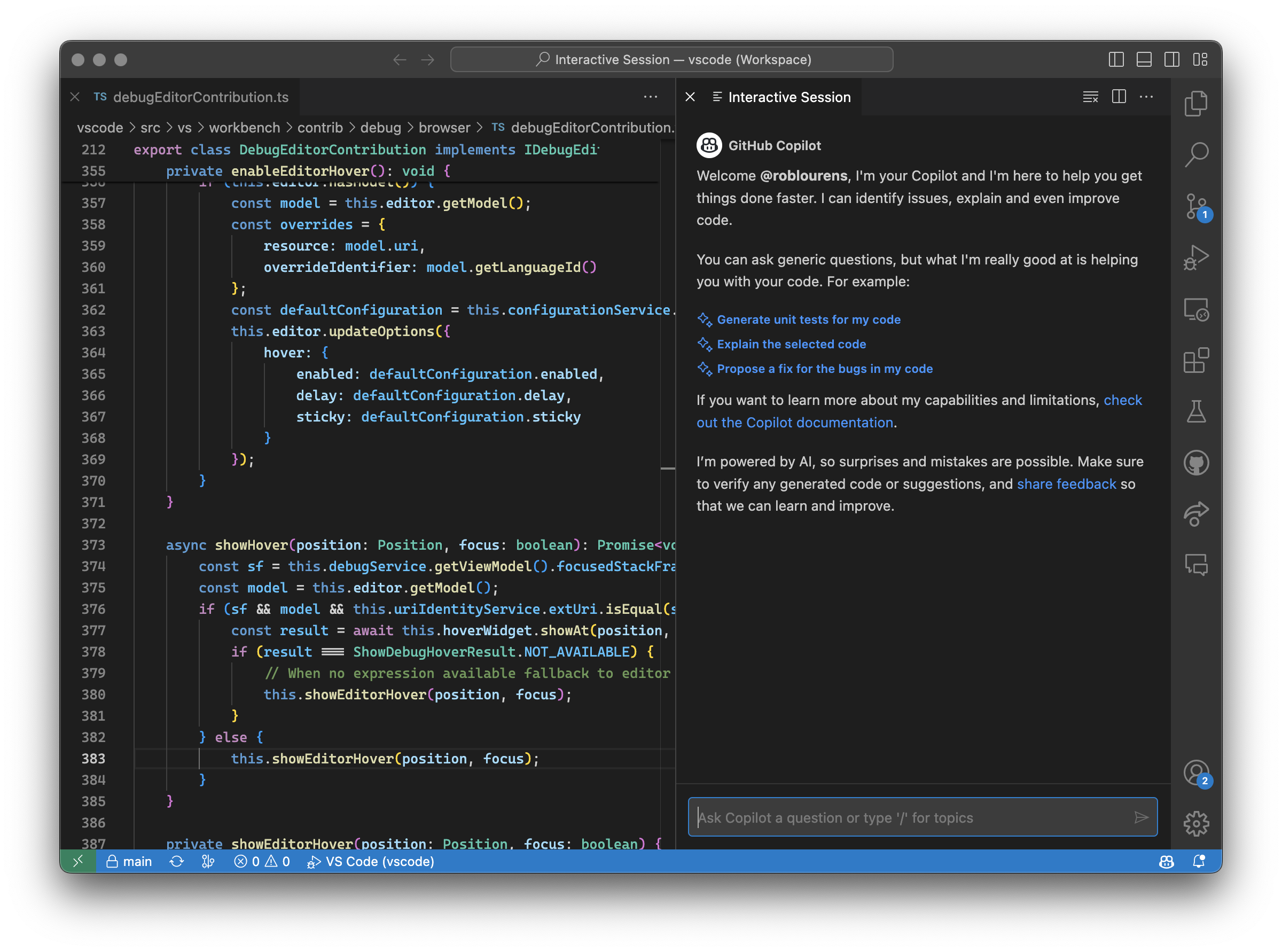
A chat view as an editor

Additional codeblock commands

There are two new commands in the codeblock toolbar, Insert into New File and Run in Terminal. These are next to the existing commands Copy and Insert at Cursor, and give you extra options for quickly taking action on the code suggestions that are returned from Copilot.
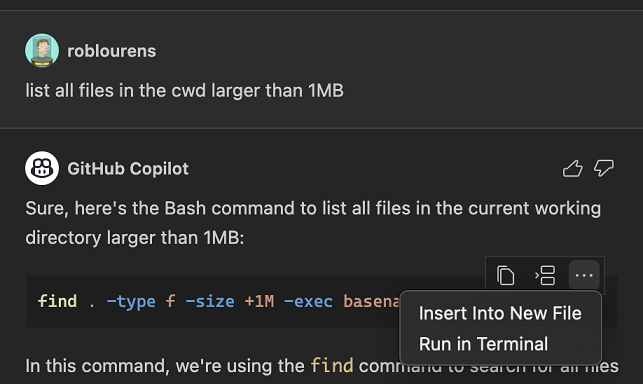
The codeblock toolbar showing the two new codeblock commands

Code Actions and inline chat

Editor chat sessions are now integrated with the Quick Fixes. Select the light bulb for a squiggle and there are options to fix or explain using Copilot.

In addition to Code Actions, inline chat is now also available from the editor context menu.

Inline chat modes

There is now a setting to change the different modes of inline chat: inlineChat.editMode.

The options are:

  • live – Apply AI suggested changes directly to the editor (default).
  • livePreview – Apply changes but renders them in an embedded diff editor.
  • preview – Show changes in a disconnected, embedded diff editor.

Similar commands in the Command Palette

With the power of Copilot, the Command Palette is now able to show similar command results. To enable this, you must have an active Copilot subscription, be in the private preview of the chat view, and apply the setting:

"workbench.commandPalette.experimental.useSemanticSimilarity": true

Here are some examples:

  • “turn on autosave” being interpreted as Toggle Auto Save

    query "turn on autosave" is correctly resolved to Toggle Auto Save

  • “add function” includes additional results at the bottom with contributions from extensions
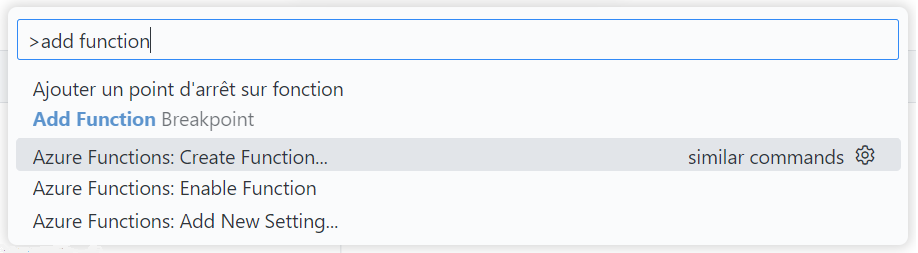
    query "add function" including Azure Functions Create Function command

  • Lastly, if your results yield no results, you can Ask GitHub Copilot, which puts what’s in your filter box in a new chat for Copilot to handle.

    Ask GitHub Copilot "no results" option in the Command Palette

We will be iterating in this space so stay tuned!

Preview Features

TypeScript 5.1 Support

This update includes support for the upcoming TypeScript 5.1 release. Read the TypeScript 5.1 Beta blog post and TypeScript 5.1 iteration plan for more details on what the TypeScript team is currently working on. Some editor tooling highlights:

  • Linked editing support for JSX tags.
  • Snippet completions for @param JSDoc tags.

To start using the TypeScript 5.1 nightly builds, install the TypeScript Nightly extension.

Rename matching JSX tags using F2

When you trigger rename on a JSX tag, VS Code now renames just the matching tag instead of trying to update all references to the tag:

This requires TypeScript 5.1+ and matches how rename works in HTML.

You can disable this behavior using javascript.preferences.renameMatchingJsxTags and typescript.preferences.renameMatchingJsxTags.

Extension authoring

Workspace edits can now create files directly from DataTransferFile

One of the primary uses of the drop into editor API is writing dropped files/content into the workspace. However in previous VS Code releases, this could be fairly slow for large files. This is because the file contents end up being copied between processes twice: first from the renderer to the extension host to read the file contents, and then back from the extension host to the renderer to write the file.

class CreateFileDropProvider implements vscode.DocumentDropEditProvider {
  async provideDocumentDropEdits(
    _document: vscode.TextDocument,
    _position: vscode.Position,
    dataTransfer: vscode.DataTransfer,
    _token: vscode.CancellationToken
  ): Promise<vscode.DocumentDropEdit | undefined> {
    const pngFile = dataTransfer.get('image/png')?.asFile();
    if (!pngFile) {
      return;
    }

    // Read file
    // This results in the entire file contents being copied over to the extension host.
    const contents = await pngFile.data();

    // Now create a workspace edit that writes the file into the workspace
    // This results in the same file contents from above being copied back again.
    const additionalEdit = new vscode.WorkspaceEdit();
    const path = vscode.Uri.joinPath(
      vscode.workspace.workspaceFolders![0].uri,
      'image.png'
    );
    additionalEdit.createFile(path, { contents });

    const edit = new vscode.DocumentDropEdit(path.fsPath);
    edit.additionalEdit = additionalEdit;
    return edit;
  }
}

Now you can avoid those extra copies though by passing a DataTransferFile directly to WorkspaceEdit.createFile:

additionalEdit.createFile(path, { contents: pngFile });

This should significantly improve performance, especially when working with larger files.

Resolve Code Action commands in resolveCodeAction

A CodeActionProvider can now lazily resolve the command of CodeAction in resolveCodeAction. Previously only the edits for the Code Action could be lazily resolved.

If the command is expensive to compute, this allows a CodeActionProvider to defer this work until the Code Action is going to be applied.

We have finalized the editor/lineNumber/context menu. This allows extension authors to contribute actions to a context menu anchored to the editor line number and glyph margin. Actions contributed to this menu receive the line number in command arguments and can reference the editorLineNumber context key in their when clauses.

Authentication API improvements

Authentication session preference is now workspace aware

For authentication providers that support being signed into multiple accounts at once (like Microsoft), the user is prompted to select an account to use when vscode.authentication.getSession with createIfNone: true is called.

Previous behavior:

This preference is remembered until vscode.authentication.getSession is called with the ClearSessionPreference flag.

New behavior:

This preference is remembered per-workspace until vscode.authentication.getSession is called in that workspace with the ClearSessionPreference flag.

This behavior was introduced to allow extensions to use different accounts for different workspaces and allow those preferences to be remembered.

Note: The preference is extension specific. So if one extension calls vscode.authentication.getSession, it will not affect the session preference for another extension calling vscode.authentication.getSession.

Microsoft Sovereign Cloud support in desktop

This iteration, we introduced a new Authentication Provider into the core product: Microsoft Sovereign Cloud. This provider is for authenticating users to Microsoft Cloud for Sovereignty like Azure US Government, Azure China, etc. Under the hood, it works identically to the Microsoft auth provider, only with different URLs. If you want to use this auth provider, you can guide the user through setting the microsoft-sovereign-cloud.endpoint value, which has a couple of defaults but also supports custom Sovereign Cloud URLs as well.

Keep in mind that most users do not have a Sovereign Cloud account. Our recommendation is that if you want to support Sovereign Clouds, you should make it possible for users to sign in via Sovereign Clouds, but not include it as part of the mainline workflow so as not to confuse users.

Proposed APIs

Every milestone comes with new proposed APIs and extension authors can try them out. As always, we want your feedback. Here are the steps to try out a proposed API:

  1. Find a proposal that you want to try and add its name to package.json#enabledApiProposals.
  2. Use the latest vscode-dts and run vscode-dts dev. It will download the corresponding d.ts files into your workspace.
  3. You can now program against the proposal.

You cannot publish an extension that uses a proposed API. There may be breaking changes in the next release and we never want to break existing extensions.

Format multiple ranges

The DocumentRangeFormattingEditProvider API has an optional proposed function to support formatting multiple ranges at once. By adopting this API, providers improve the format modified ranges flow because only a single request to a language service is needed.

Document drop metadata

This new proposal enriches the existing drop into editor API to support the new drop selector. Providers can use it to provide a better drop into editor experience.

The first part of this proposal adds a label property to DocumentDropEdit. This human readable label describes the edit and is shown in the drop selector UI:

Labels shown in the drop selector

The second part adds an extra metadata argument to registerDocumentDropEditProvider. This metadata argument identifies the provider and tells VS Code the types of content it applies to:

vscode.languages.registerDocumentDropEditProvider(
  'markdown',
  new InsertBase64ImageProvider(),
  {
    // Unique id that identities this provider
    id: 'insertBase64Image',

    // Array of mime types, such as `image/png` or `text/plain`, that this provider supports.
    // You can also use wildcards, such as `image/*` which matches any image content that is dropped.
    dropMimeTypes: ['image/*']
  }
);

The dropMimeTypes array can help improve performance as your provider is only called for relevant dropped content.

Engineering

Electron 22 update

In this milestone, we have finished our experiment with using a custom allocator for extension host and are ready to bundle Electron 22 into VS Code Desktop. We want to thank everyone involved with self-hosting on Insiders builds and provided early feedback. This update comes with Chromium 108.0.5359.215 and Node.js 16.17.1.

VS Code Day

You can catch up on all the highlights from VS Code Day with the VS Code Day 2023 YouTube playlist. There you will find sessions on topics such as GitHub Copilot, Data Science, and TypeScript, as well as the Keynote by Erich Gamma and Kai Maetzel, where they explain how the team builds and ships VS Code.

Thank you

Last but certainly not least, a big Thank You to the contributors of VS Code.

Issue tracking

Contributions to our issue tracking:

Pull requests

Contributions to vscode:

Contributions to vscode-js-debug:

Contributions to vscode-json-languageservice:

Contributions to vscode-pull-request-github:

Contributions to monaco-editor:

Contributions to devcontainers/cli:

20 Legit Work From Home Non-Phone Jobs


The demand for work-from-home opportunities has skyrocketed, driven by the need for flexibility and the wide acceptance of remote work arrangements. Among these opportunities, non-phone work-from-home jobs have gained significant attention.

You can find a variety of roles that cater to different skills and preferences, allowing you to work comfortably from your home without the need for telephone communication.

From writing and editing to data entry and graphic design, there are positions that can match your expertise while providing the convenience and flexibility that come with telecommuting. We have listed no of legitimate remote opportunities that can align with your career goals and personal lifestyle below.

20 Legit Remote Online Non-Phone Jobs

Exploring the realm of non-phone jobs opens up an expansive avenue for professionals seeking the comfort and flexibility of working from home. From numerical tasks such as bookkeeping to creative outlets like freelance writing, these roles not only offer autonomy but also cater to a wide array of skills and interests.

1. Bookkeeping and Accounting

If you have a knack for numbers and organization, bookkeeping and accounting positions allow you to manage financial records and transactions. These roles often require attentiveness and an eye for detail.

2. Data Entry Roles

Data entry jobs involve inputting information into databases, and it’s a starting point for those with basic computer skills. Accuracy and speed are key in these data entry positions which helps them enter or update data into a computer system, database, or spreadsheet, ensuring accuracy and efficiency in processing large volumes of information.

3. Freelance Writing

For those with a passion for writing, freelance writing opportunities abound. Websites like Textbroker offer a platform where you can tackle a variety of topics based on your expertise.

4. Proofreading and Editing

Proofreaders and editors are critical in the publishing process, ensuring written material is free of errors and flows smoothly. These roles are ideal if you possess strong language skills and want to work from home.

5. Blogging Prospects

Blogging can be a lucrative avenue for aspiring writers. Start your own blog or write for established ones to build your portfolio. Bloggers also work as freelancers, contribute to content creation companies, or be employed directly by businesses that maintain a blog as part of their marketing strategy. Non Phone Blogging jobs are ideal for individuals with strong writing skills, creativity, and a passion for sharing knowledge or telling stories

6. Virtual Assistant Roles

As a virtual assistant, manage multiple tasks such as scheduling, email correspondence, and social media management, all from your own home office.

7. Transcription

Do you have excellent listening skills and fast typing? Transcription may be your niche, converting audio into written content. Transcriptionists listen to recordings such as interviews, lectures, podcasts, or legal proceedings and accurately type what they hear

8. Data and Analysis Careers

Specialize in gathering, reviewing, and interpreting data, addressing the analytical needs in various sectors. These roles are critical in helping organizations make data-driven decisions and often involve remote or office-based work. Examples of such careers include:

  1. Data Analyst
  2. Business Intelligence Analyst
  3. Data Scientist
  4. Market Research Analyst
  5. Data Engineer

9. Social Media Marketers

Create and manage campaigns, content, and engagement for brands across social platforms as social media marketers. This remote-friendly job allows marketers to work from anywhere, provided they have a good internet connection and can maintain the online presence of the brands they represent.

10. Paralegal

Paralegals can work remotely, assisting attorneys with case preparation and legal research from anywhere. These roles focus on the behind-the-scenes aspects of legal work and can often be performed remotely. Examples include:

  1. Legal Research and Writing
  2. Document Review
  3. E-Discovery
  4. Contract Management
  5. Compliance

11. Paid Surveys

Earn extra cash by completing paid surveys. Although not a full-time job, it’s a flexible side gig, which can be done even if you don’t have a college degree. Participants can sign up with various survey platforms, provide demographic information, and then receive survey invitations that match their profile. The surveys can cover a wide range of topics, including product feedback, lifestyle, health, and more. Compensation varies by survey and can include cash, gift cards, points, or sweepstakes entries.

12. Website Tester

Offer feedback on websites’ usability as a website tester—a critical role in user experience (UX). Website testers need to have a keen eye for detail, good communication skills, and a basic understanding of web functionality. This job is typically project-based and can be done from home, offering flexibility to work on multiple projects for different clients.

13. Translator

If you’re multilingual, translating documents or media can be a dynamic and rewarding career, even when done from the comfort of your home.

14. Graphic Designer

Put your creative talents to use by crafting visual content as a graphic designer. Graphic Designers work on a diverse range of projects including logos, brochures, advertisements, websites, and packaging. They must have a strong aesthetic sense, an eye for detail, and the ability to translate client needs into compelling design solutions. Collaboration with other team members, such as marketers and writers, is often a key part of the role to ensure cohesive and impactful design outcomes.

15. Medical Coder and Biller

In medical coding and billing, you’ll assign codes to diagnoses and procedures for billing purposes.

16. Chat Agents

Work as a remote chat agent providing support and customer service, relying on written communication rather than phone calls. Remote chat agent jobs involve providing service through live chat platforms, allowing agents to assist customers from a home office or any remote location with a stable internet connection and remote work tools.

17. Non-Phone Remote Nursing Jobs

Remote nursing jobs offer a non-traditional pathway, focusing on case management or clinical data review. These roles often leverage a nurse’s expertise in ways that don’t require direct patient contact. Examples include:

  1. Telehealth Nursing (Chat-Based)
  2. Case Management
  3. Nursing Informatics
  4. Legal Nurse Consulting

18. Video Editor

A Video Editor is a professional tasked with assembling recorded footage into a finished project that matches the director’s vision and is suitable for broadcasting. This role involves cutting and editing video footage, adding music, sound effects, and special effects to enhance the visual narrative. Editing video content is key in digital marketing and storytelling, making video editing a sought-after skill.

19. Internet Researcher

Gather and analyze information on various topics as an internet researcher—an important task for content creation. Their job involves gathering, analyzing, and synthesizing information from the web to support decision-making, content creation, or market analysis. These researchers must possess strong analytical skills, be adept at using search engines, databases, and other digital resources, and be able to discern credible sources.

20. Search Engine Evaluator

A Search Engine Evaluator is a professional responsible for analyzing and rating the search results provided by search engines to ensure they are relevant and of high quality.

Maintain search quality by assessing the relevance and accuracy of search engine results as a search engine evaluator, one of the easy remote jobs to do from home. These evaluators perform searches using specific terms and then assess the accuracy, usefulness, and relevance of the results, including websites, images, and videos.

How to Find Non-Phone Work From Home Jobs?

Identify Your Skills And Interests

When searching for non-phone work from home jobs, start by identifying your skills and interests. Do you excel at writing? Are you a fast typist? Can you navigate various social platforms with ease? Recognizing your strengths will guide you toward the right job category.

Focus On Remote Specific Job Boards

Use reputable job boards dedicated to remote work. Websites like DailyRemote focus on listing remote opportunities, including many that do not require phone work. Make use of filters and keywords when searching on remote job sites. Terms like “non-phone jobs,” “email support,” “data entry,” and “content writer” can help narrow down your search to relevant listings that match your preference for no phone communication.

Scan Company Websites

Explore company websites known for offering remote positions. Some companies, like Concentrix and ModSquad, regularly hire for non-phone roles. They might offer positions such as chat support, email handling, or social media management.

Connect And Network

Connect with others in the field. Networking can often lead to learning about job openings before they are advertised widely. Platforms such as LinkedIn can also be valuable for networking and job searching.

Create Remote Job Specific Resume And Cover Letter

Keep your resume updated and tailor it to highlight skills relevant to non-phone jobs you’re applying for. Your resume should reflect your ability to communicate in writing and manage tasks independently.

Keep Applying

Lastly, consistency is key. Check for new listings regularly and apply as soon as you find a suitable match. The more proactive and persistent you are, the more likely you are to land a non-phone work from home job.

Conclusion

The landscape of work-from-home opportunities has broadened significantly, offering a diverse array of non-phone jobs that cater to different skills, interests, and lifestyles.

Whether you’re drawn to writing, data entry, design, or legal work, there is a remote job out there that can match your expertise while providing the flexibility and comfort of working from your own space. Our list of legit work-from-home non-phone jobs showcases just how varied and accessible remote work has become, breaking the misconception that all at-home jobs require a headset and a sales pitch.

As technology continues to evolve and companies become more open to remote arrangements, the potential for finding fulfilling, phone-free work from home is greater than ever. Embrace the opportunity to tailor your career path to your personal preferences and say goodbye to the traditional office environment if it’s not where you thrive. With the right approach, a quiet workspace, and a reliable internet connection, you can build a successful career right from the comfort of your home.


Meta starts licensing headset OS in battle with Apple


On the theme of opening up, Meta is also pushing for more ways to discover alternative app stores. It’s making its experimental App Lab store more prominent and even inviting Google to bring the Play Store to its operating system, which is now called Horizon OS. In a blog post, Meta additionally said that it’s working on a spatial framework for developers to more easily port their mobile apps to Horizon OS.

Crucially for Meta, Horizon OS includes the Horizon social layer, a 3D, Roblox-meets-The Sims open-world platform. After a buggy and sluggish start on the Quest, Meta has been working to improve Horizon and recently brought it to the web as a 2D experience. Now, any hardware company that wants to build a device with Horizon OS will help extend the reach of Horizon the social network, which Meta wants to eventually monetize with ads and commerce. (Yes, this is approaching Google levels of naming confusion.)

Meta has yet to share more on the business terms of its Horizon OS license, aside from that social network tie-in and requiring the use of Qualcomm chips. “You can imagine a lightweight headset that pairs with your computer on your desk to provide the best work experience at home or anywhere you go,” CEO Mark Zuckerberg said in a video announcing the news. “Or imagine one that’s fully focused on watching immersive entertainment like movies and videos with the highest resolution OLED screens out there.” Spokespeople for Lenovo, Asus, and Xbox didn’t respond to requests for comment.

Zuckerberg has been clear that he wants his company to be a more open platform than Apple’s. Here, he’s firmly positioning Meta’s Horizon OS as the Android alternative to Apple’s Vision Pro. Given how Android was more of a reaction to the iPhone, an analogy he’d probably prefer is how Microsoft built the early PC market by licensing Windows.

Meta’s move has been a long time coming. “In the open ecosystem, basically you have much broader partnerships,” Zuckerberg told me in an interview in the fall of 2022. “So Microsoft didn’t build the chips; they didn’t build the PCs; they didn’t build the App Store. It was all this key stuff that was developed around the ecosystem. Similar to Android. And that’s basically what we hope to build here — is the open ecosystem for the next generation of computing around virtual and augmented reality in the metaverse more broadly, which means that there are going to need to be all these partnerships.”