9 Aging Well and Seniors Magazines that Pay Freelancers


Seniors magazines and websites abound in the niche of aging well, although they don’t all pay writers. We found ones that both pay writers and have circulation rates in the millions. Examples: think AARP and Reader’s Digest.

If you’re interested in writing for seniors and aging well publications, we’ve put together a short list of magazines and websites for you to start pitching to.

How to Write for the Baby Boomer Generation (Born between 1946 and 1964)

It’s no secret the majority of people in the US are reaching senior status. In fact by 2050, the Population Reference Bureau (PRB) projects an increase in the 65+ age group from 58 million to 82 million. That’s 23% of the total population!

But senior moments—the fun, not the forgetful—are just getting started for those turning 50. 

If you’re part of this generation, then you already understand how to write in a way that communicates clearly and resonates. For those who aren’t, there are a few things to keep in mind as you write for this audience.

  • Although many people choose to retire at this life stage, baby boomers are staying in the workforce longer and are even returning to work in their “Golden Years”
  • This generation has enormous spending power and influence on the economy
  • Many people who are 65+ are healthy, fit, and live a full life
  • When writing, avoid slang, especially generation-specific slang (this is often taken as insincere by this generation)
  • Aim for simple, clear, concise writing
  • When writing, avoid alienating terms such as “elderly”
Seniors magazines and websites abound in the niche of aging well, although they don't all pay writers. We found ones that both pay writers and have circulation rates in the millions. Examples: think AARP and Reader's Digest.

If you're interested in writing for seniors and aging well publications, we've put together a short list of magazines and websites for you to start pitching to.

9 Aging Well and Seniors Magazines that Pay Freelance Writers

Some of the publications listed have been around for a century or more, others have cropped up in the last decade. 

BEFORE PITCHING: Read the magazine or the website you want to write for. See what hasn’t been done before, how long ago it was last discussed, and as always why you’re the writer to write about it. Look for fresh, unique perspectives and angles that haven’t been considered before.

3rd Act Magazine

3rd Act Magazine is a free, quarterly magazine for adults who follow the adage age is just a number. Though its regional focus is Western Washington, they’re also looking for general topics that cover family, community, memory health, aging, downsizing, caregiving, and living well regardless of age. 

Pitch tips: suggest a title and put that in the subject line. 

Articles are accepted on speculation and should include word count, your name, your bio, your contact information, and whether the article has been previously published. You can find detailed submission guidelines here.

Contact: Victoria Starr Marshall (Publisher/Editor)

Rate: Between $25 and $50 (USD) in print and web. Up to $0.25 per word for professional writers with well-researched articles that require little editing who have been added to their paid list of writers. Payment is made upon acceptance of submission.

AARP The Magazine

AARP‘s mission is to empower people to choose how they live as they age and AARP The Magazine the AARP Bulletin, and Sisters (from AARP) are helping meet their mission through articles, essays, and stories doing just that. 

These publications are looking for articles about investments, retirement, health and fitness, food and nutrition, travel tips, family, caregiving, living arrangements, and practical information and advice with fresh angles for people over 50.

Pitch Tips: Send your idea for a piece, explain your approach and why you’re the one to tell the story, and mention which section of the magazine your piece is intended. For more information, check out the detailed guidelines here. Please note you must be based in North America for your pitch to be accepted.

Contact: Email pubspitches@aarp.org or send snail mail to AARP The Magazine, c/o Editorial Submissions, 601 E St. NW, Washington, DC 20049 USA

Rate: Up to $1.50 USD per word at last report (2020)

Better After 50

BA50 is a blog and website by women for women to talk about and share all the things you may dish with your friends about as you navigate 50 years of you (and beyond).

The publication is looking for stories, essays, advice, and more about memory challenges, finances, relationships, and more. Think about the stories you tell your friends over coffee/wine/book club etc.

“We’re also interested in finds and must-haves, new products you love that make you look and feel Better After 50.”

Felicia Shapiro (Publisher/Managing Editor)

Contact: Email Felice Shapiro (Publisher/Managing Editor) or submit this form

Rate: Negotiated

Chatelaine Magazine

Chatelaine is a Canadian monthly women’s magazine that covers fashion, food, health and fitness, finance, and social issues aimed at women between ages 25 and 54.

Pitch tips: Include at least two writing samples when sending your one-page query letter. In your query, explain what section you think your article will fit, whether it’s for the print publication or the website, what format it will take, and why you’re the one to write it. Read the writers guidelines here.

Contact: Email Laura Brown (Managing Editor)

Rate: Average is about $1 USD per word

Custodia

Custodia.com is a website offering senior services in Southern Ontario, Canada. Its mission is to take the stress out of the day-to-day home maintenance, health care, and other issues affecting seniors. 

The publication is looking for pitches about home management for seniors, homecare, falls prevention, helping seniors live longer and happier lives at home, and profiles of seniors doing amazing things. 

Contact: Email Geoff Whitlock at geoff@custodia.com

Rate: Negotiated

Reader’s Digest

Reader’s Digest is a general-interest family magazine, published 10 times per year, and is found most easily in supermarket check-out lanes.  Over the years, it has been known to reach more readers with six figure incomes than Fortune, The Wall Street Journal, Business Week, and Inc. combined. And in its latest incarnation as a video-first company, it’s positioned for even more content consumed within a variety of channels.

In general, Reader’s Digest prefers to reach out to freelance writers who think they might fit what it is they need written, but they do accept pitches. 

Reader’s Digest does accept pitches and the rate is negotiated based on the topic, length, and depth of reporting required.  We accept pitches via this pitch form.” 

Aviva Patz (Executive Editor)

Contact: Aviva Patz (Executive Editor)

Rate: Negotiated

Sisters Magazine (from AARP)

Sisters From AARP is a free, weekly newsletter celebrating Black women. Anyone is welcome to read and subscribe. Their audience includes Black women of various backgrounds and ages, including those in their 40s, 50s, 60s and beyond.

The publication is looking for ideas around health and wellness, work and money, culture and style such as aging well, fashion, beauty, identity, and entertainment, self-care, and relationships such as friendship, family, romance, and caregiving. For detailed submission guidelines, click here.

Pitch Tips: Put “Pitch” + suggested headline in the subject line of your email and give the editors an idea of the nature of your pitch. Avoid one-line ideas. Subscribe to their newsletter to get an idea of their voice and the type of articles and essays they’re interested in. Don’t send attachments but do include links of your writing samples.

Contact: Claire McIntosh (Editor-in-Chief) or email sistersletter@aarp.org

Rate: Contracted and negotiated

Today’s Geriatric Medicine Magazine

Today’s Geriatric Medicine is interested in articles on all subjects of interest to healthcare professionals in the field of aging.

Pitch tips: Be sure to include the following if you want your query, abstract, or outline to be read—your full name, credentials, degree, title, affiliation (if any), your address, daytime phone number, and email address.

For more detailed guidelines, you can learn more here.

Contact: Email TGMeditor@gvpub.com

Rate: Negotiated

VFW Magazine

VFW Magazine is the official publication of the Veterans of Foreign Wars with a circulation of 1.3 million. Since 1904, it has been the voice of war veterans, and is included here because like many seniors magazines for people in their 50s and beyond, it offers stories and advice for aging well.

When pitching, introduce your article in one sentence that hits on The Five Ws—who, what, where, why, and when.

Pitch tips: Let the publication know upfront if you’re a VFW member. Include a short, three-sentence bio describing your military service (if applicable) and expertise in the field for the story you’re writing. For first-time contributors, articles should be submitted on speculation (spec). If your story coincides with an anniversary, submit it at least six months in advance of the anniversary.

Contact: Email Janie Dyhouse (Senior Editor)

Rate: Negotiated and contracted upon acceptance of article

Final Tips When Writing for Seniors Magazines 

If you’re interested in writing about seniors, aging well, and believe age is a number and everyone’s unlisted, then consider pitching article ideas to these publications.

Some want stories on speculation, some are more trade-publication focused, and some offer advice, tips, enlightening, and uplifting articles for the baby boomer generation.

Remember to:

  • Read past issues
  • Submit two to three links of published writing samples
  • Include a short bio
  • Be sure your pitch fits their publication
  • Explain why you’re the best writer for the story

The audience for these magazines is redefining what it means to be a senior in today’s world. Boomers hold their jobs longer than ever before. Gen-Xers are sandwiched between advice for boomers and millennials. The oldest millennials have just entered their 40s. And the radio generation, those born at the end of WWII, are finding their third act is filled with surprises as technology continues changing at a rapid pace.

Affordable Learning & Support banner ad for freelance writersAffordable Learning & Support banner ad for freelance writers

Lisa Street Rogers is a ghostwriter and freelancer based in Cleveland, Ohio.

The Tortured Poets Department and Eternal Sunshine


In this installment of what we’re listening to, Reviews Editor Cherlynn Low dives into new releases from Taylor Swift and Ariana Grande, and explores what music means to us when songs are consumed more like books and journal entries.

Cherlynn Low, Deputy Editor, Reviews

April 19 should have been declared a global holiday. It was, after all, the release day of Taylor Swift’s highly anticipated album, The Tortured Poets Department (TTPD). How could we be expected to work on this most hyped of Fridays, when there were lyrics to overanalyze and melodies to emo-walk to?

Taylor Swift – The Tortured Poets Department

The album cover for Taylor Swift's The Tortured Poets Department The AnthologyThe album cover for Taylor Swift's The Tortured Poets Department The Anthology

I’ll admit: I hate myself a bit for the eagerness with which I hit play on albums like TTPD and Ariana Grande’s Eternal Sunshine (ES). Both musicians had recently left long-term relationships and got together with new beaus, amid rabid press coverage and relentless speculation on Reddit. I usually prefer to hear from the people involved instead of reading tabloid articles based on what “friends close to” said, and for Swift and Grande, songs are usually as close as we’ll get to primary sources.

I saw these albums as opportunities to get their takes on what went down. Granted, it’s always wise to take their words with generous helpings of salt, the same way therapists tend to remember that their patients’ retelling of stories can be skewed or unreliable.

Both Grande and Swift have made their lives the subject of their music for years, and they often have an air of defensiveness. Titles like “Look What You Made Me Do” and “Yes, and?” make me think of people who blame others or don’t care about the consequences of their actions. Even songs like Swift’s “Anti-Hero” from her last album and Grande’s “Thank U, Next” seem at first glance to be about taking accountability, but really continue the theme of dodging real responsibility.

I’m not sure if music has always been rooted in scrutinizing the artist’s life, but it certainly seems to have become more popular in recent years. The level of interest and analysis around things as simple as word choice or order has probably never been as high, either. It’s also worth considering that these two much-hyped albums were released within two months of each other. Granted, Swift’s new music has only been out for about 40 hours, and there are 31 whole songs spanning a full 65 minutes and 8 seconds, so I will need to listen to it a few more times for it all to sink in.

Grande’s album, which dropped last month, was scrutinized by fans and critics alike. It was released shortly after her divorce from Dalton Gomez and her budding relationship (reportedly) with fellow Wicked cast member Ethan Slater.

When I first played through ES, I was mostly underwhelmed and annoyed. There was, as expected, no accountability for what her actions did to the mother of a newborn and a lot of romanticizing of her latest man. But even on just my second listening, I knew I had a few favorite tracks. Other Engadget staff members agree with me: ES is a solid album with quite a few bangers.

Ariana Grande – Eternal Sunshine

One of the album covers for Ariana Grande's album Eternal SunshineOne of the album covers for Ariana Grande's album Eternal Sunshine

I may not endorse Grande’s behavior — and no one asked me to — but damn, I can’t help liking her music. And it’s probably because I’m hooked on the melodies and production, not the lyrical content.

Swift, on the other hand, seems more of an aspiring wordsmith. Much has been said about her lyrical abilities, and I have no desire to retread those waters. I’ll just say that as an occasional aspiring poet myself, I have to admire the laissez faire approach of rhyming “department” with “apartment.”

I’m more intrigued by what seems to me like the priority of a song’s words over its tune and sound. Like Billboard states, TTPD’s title alone “calls even more attention to her lyricism than usual.”

Swift’s music has always felt like journal entries meant for the public, chock-full of inside references, Easter eggs and thinly veiled digs at former lovers. Her earlier works were therefore highly relatable for scores of teenagers around the world. But as her success ballooned, so has she grown out of touch with the average person, and her songs have consequently become more like glimpses into a life that mere mortals can only dream about. While her pieces continue to feel like blogs or Tumblr posts, Swift controls the narrative by carefully orchestrating not just synths, guitars and lyrics, but also pap walks and delicately timed public appearances.

Unlike Grande, who has mostly avoided appearing with Slater at high-profile events and also hasn’t hidden as many Easter eggs in her songs, Swift has not been afraid to show off and show up for her new partner. She’s not publicity-averse; she seems to anticipate and almost courts it.

With the general strategy around TTPD, like announcing it at the Grammy’s and slow teases of lyrics and cover art, it certainly seems like these days, the billionaire with a private jet problem is more focused on her myth and financial value than the art of songwriting.

Swift surprised everyone at 2AM on April 19 by releasing a whole 15 more songs alongside the initial 16 people were expecting for TTPD. This meant that anyone who pre-ordered the original album would miss out on basically an entire second album worth of tracks and need to spend more. The Swift team also made several versions of the physical album available, like collectors’ editions — all blatant cash grabs designed to maximize revenue.

Grande is guilty of this too, making so many different iterations of “Yes, and?” when that single was released in what seemed like an attempt to place the song at the top of streaming charts. ES also has different versions of cover art for fans to spend their hard-earned money on.

Here’s the thing. Do I care deeply about either of these albums? Nope. Did I eagerly listen to them, hoping to glean insight on their seemingly messy and chaotic relationships? Yes. But despite Swift’s marketing and positioning herself as a poet — and TTPD offering more of a look at her fling with Matty Healy from The 1975 — I realized I just didn’t quite like her album musically. In fact, my favorite Swift songs like “Wildest Dreams” and “Delicate” are beautiful symphonies of atmospheric synths and instrumentation.

Maybe I’m just learning that I care more about music than lyrics. Or maybe I think good songs are a combination of the two and should speak for themselves without having to rely on hype, gossip and marketing tactics. To be fair, that’s true of all art, whether it’s film, photography or poetry. And while the irony of my being sucked into playing TTPD and ES due to the promise of learning about their lives isn’t lost on me, I guess I just wish I could listen to music (and read books and watch movies) without having to worry or be so concerned about the creator’s choices and actions. But in 2024 (and beyond), that seems no longer feasible.

Tapping Into What Gamers Need From Their PC Keyboards


If you’re just using your PC for email writing and the occasional work task, then a standard keyboard is probably fit for the purpose. It’ll have everything you need on there, and your hands won’t be in position for long enough to suffer from things like poor ergonomic design. 

By comparison, PC gamers can spend potentially hours each day using their keyboards. As such, investing in a specific gaming keyboard is one of the best ways to enhance the experience. It’s also the best opportunity to ensure all-important hand health and game functionality.

Whether you’re in the market for a new gamer keyboard or want to buy your first-ever gamer keyboard right now, it’s important that you know what to look for. After all, there are loads of ‘best gamer keyboard’ lists out there. But, you’ll struggle to narrow down the options that suit your unique gaming style if you don’t take the time to consider the following essentials. 

1) Ergonomic Design

Most PC keyboards are designed for semi-regular usage and general typing patterns. But gamers use PCs in very different ways to the average typer. They also spend a lot longer with their hands in position than most other users. As such, ergonomic design is a crucial consideration for gaming keyboards. 

This is true whether a gamer intends to spend hours playing a PC pinball game, or wants to delve into a long-form PC epic like World of Warcraft. Ergonomic keyboards like the Logitech ERGO K860 are especially popular right now thanks to a curved design and a plush wrist rest. Split keyboards like the MoErgo Glove80 are also great for PC gaming enthusiasts, as they can be tailored to your specific seating preferences and wrist movements. 

2) Connectivity

Gamers should also spare a thought to keyboard connectivity, as this can be tailored to suit gaming styles. Wireless gaming keyboards like the Logitech G915 Lightspeed are particularly popular with gamers thanks to their potential for creating distance from PC screens. However, the need for recharging means that wireless may not be best for gamers who intend to play for extended periods. In that instance, a USB keyboard would likely be a better option. Consider how long you play, your preferred set-up and your general gaming needs to settle on the right keyboard connectivity. 

3) Size

Gaming keyboards are available in a variety of sizes, so it’s worth considering this priority, too. To some extent, the ‘best’ size for your gaming needs will depend simply on the games you’re playing. This is because compact keyboards like the Mountain Everest 60 don’t have a left-hand number pad (hence their smaller size). Many gamers find that this doesn’t affect play, and can make for a more subtle game setup in even a small space. However, if you have the space for a full-size keyboard, and you require the use of a left-hand number pad for the games you play, then full-size, or even a keyboard that has additional gaming buttons, could be a better choice. 

4) Operation

Operationally speaking, gamers face two prime keyboard choices – membrane or mechanical. With membrane keyboards like the Razer Cynosa Chroma, gamers can access a more affordable option that provides a soft typing touch. However, many gamers prefer mechanical keyboards, as these allow for more precise keystrokes, and are typically more durable. In light of that, however, they can also be more expensive. 

Choosing between these top operational options should see you considering things like your budget and your gaming frequency. A heavier-handed gamer who plays regularly and has the budget could certainly benefit from investing in a mechanical keyboard. By comparison, an occasional player with a limited budget and a need for comfort could get on well with a membrane keyboard. 

5) Backlighting

While laptops typically now include backlit keyboards as standard, the majority of PC keyboards don’t offer this feature upfront. There’s nothing wrong with this for daytime players who want to keep costs down. But, for gamers who don’t mind spending a little more, and who regularly play at night, a backlit gaming keyboard could prove transformative. If you are investing, consider things like adjustable lighting levels, the color of lighting used, and keyboard functionality as a whole to ensure that you make the right choice.

Conclusion

Investing in a gaming-specific keyboard can see you bringing your A-game to whatever you play on your PC. Make sure that the keyboard you buy ends up being money well spent by considering these essentials, and understanding how each of them could impact your unique gameplay preferences.

Integration AI in Schools: Understanding the Benefits, Challenges, and Best Practices


Artificial Intelligence (AI) provides a lot of benefits to various fields such as finance, retail, agriculture and farming, healthcare, and education. AI in schools has the potential to transform the way students learn and instructors teach. By implementing AI in the classroom, students are getting ready to compete in the digital world. AI curriculum helps improve the creativity of students and fosters critical thinking and problem-solving skills. AI curriculum for schools improves the learning process and makes things easier for teachers, allowing them to focus on students.


AI curriculum for schools, students, and teachers


  • Bringing AI into the classroom necessitates meticulous conceptualization. 
  • Developing a school policy that defines criteria for efficiently using AI is an essential starting point since it may provide students with strategies for knowing how to utilize AI technologies in an effective manner. 
  • Once these standards are in place, instructors will be able to integrate AI into the curriculum for a broad range of activities such as using ML algorithms for individualized analysis of student performance. 
  • In today’s digital world, where we are surrounded by AI-powered gadgets, having an AI curriculum is a must.


Benefits of using AI in schools

There are several benefits of using AI in schools for students, teachers, and schools.


For students

Personalized learning

  • The use of AI in classroom can help provide personalized learning experiences to students depending on their strengths and weaknesses. 
  • AI systems may perform an assessment of student data and adjust to their learning patterns, delivering personalized feedback and recommendations based on their specific needs and talents. 
  • This can help  keep learners interested and motivated, resulting in better academic achievement.


Interactive learning process

  • The use of AI in schools can make the learning process more fun, interactive, and engaging for learners.
  • Through the use of AI chatbots or virtual simulations generates curiosity in students and enables them to learn certain subjects better by creating immersive experiences.
  • For example, many students find math difficult and boring. However, by using AI in the classroom, learning math can be quite interesting.


Prepares students for the digital world

  • Another advantage of introducing AI in schools is that it allows students to have a better knowledge of this fast changing technology. 
  • Teachers may assist students acquire an informed viewpoint on AI by introducing it into the curriculum, preparing them for the hurdles and opportunities that lie ahead in the digital era. 


Developing 21st century skills

  • Using AI in the classroom can also help pupils learn essential 21st-century abilities like problem-solving, communication, leadership,  critical thinking, and collaboration. 
  • Such skills are vital to be successful in today’s age of technology.
  • These skills can be nurtured via hands-on experience with artificial intelligence tools and apps.


For schools and teachers


Make informed decisions

  • AI algorithms have the power to analyze a large number of data sets.
  • The results obtained from such analysis help teachers and the top management in school to make informed data-driven decisions.
  • The information may be pertaining to parameters such as attendance of students, their performance, demand for courses, etc.


Saves valuable time

  • Be it the teachers or school staff, a lot of time is unnecessarily spent on unproductive activities.
  • By implementing AI in schools, a lot of the administrative tasks can be automated.
  • Thus, time saved in monotonous activities can be utilized for doing something more productive.
  • For example, with AI in schools, teachers can focus on making learning more interactive and effective for students.


Improve security

  • Implementation of AI in school helps improve the safety and security through intelligent surveillance systems. 
  • The various AI systems and cameras in school ensure that the students and staff are safe from any threats and vulnerabilities.


Understanding the challenges of implementing AI in schools


There are numerous benefits of using AI in the classroom for everyone. However, there are certain challenges in its implementation.


Need for technical understanding

  • One of the major challenges in the implementation of AI in schools is the need for technical knowledge.
  • Many teachers lack practical hands-on knowledge of AI.
  • In order to effectively implement AI in their teaching practical, they require the necessary professional training and support.
  • The school must organize professional training programs to help teachers understand and adopt AI in the classroom.


Ethical issues

  • The adoption of AI in schools raises ethical concerns related to transparency, biasness, data privacy, security, etc.
  • It is important for educators to be aware of the ethical issues about AI, and ensure that the students are protected.
  • Responsible use of AI is what needs to be practiced in schools.


High cost

AI as a technology is quite expensive. Not all schools have the budget to purchase the AI resources and maintain them. Hence, they require 


Best practices for implementing AI in schools

Choose a trusted AI service provider

  • The first step towards effective implementation of AI in schools is choosing a reliable and trustworthy service provider.
  • The provider may be a startup company, a large organization, or even an NGO having practical knowledge about AI curriculum and use of AI in classroom.
  • The service provider can help provide training and guidance to teachers and enable seamless adoption of AI in the classroom.

Begin small

  • Rather than implementing an entire AI curriculum for schools, teachers must begin small and gradually make their way up.
  • For example, they can connect AI with real-world applications, use AI for checking the papers of students, etc.


Collaborate with research institutions

  • The field of AI is continuously expanding. 
  • It is important for schools and educators to remain up-to-date with the latest technological advancements.
  • Partnering with a research institution will help educators to the latest experiences and advancements in the classroom.

AI curriculum for schools has got tremendous scope and potential for transforming education for the learners. From providing personalized and immersive learning experiences to generating feedback for students, AI in schools can do a lot. Schools can unleash the revolutionary power of AI curriculum by carefully navigating the difficulties and implementing best practices, resulting in an equitable schooling system for all learners.

3D Scanning Services and Technology: How Companies Benefit in the Aerospace Industry


It wouldn’t be an exaggeration to say that aerospace is one of the world’s most demanding and critical industries. Many things are at stake here, so it only makes sense that the field requires intensive processes, from the planning stage to product development, product testing, and the final manufacturing stage. Fortunately, 3D scanning services and technology are here to improve further and simplify these processes. These technologies offer a more comprehensive and accurate view of the aircraft and its still-developing components.

Manufacturers can then use these data to identify flaws and correct them immediately before they create severe issues in the real world. 3D scanning application in reverse engineering also helps recreate or create new legacy parts.  3D scanning is also extensively used to produce complex casting parts and molds. It helps in the development of entire aircraft fuselages as well as other more extensive parts and components. This can also come in handy for creating customized accessories and parts for individual aircraft. 

RELATED: Top 10 applications of 3D scanning services used by companies and engineers

3D scanning services defined 

3D scanning involves the preparation of three-dimensional digital models with the help of imaging devices like digital laser scanners. The process typically uses two or more points of view to produce 3D modeling data. Subsequently, the 3D modeling design firm can utilize the data to create 3D models or visual depictions of objects. 3D scanning services are now used in various industries, changing and improving people’s lives. Since scanning objects is made faster and easier, manufacturers have started to use the process and technology more often.

This state-of-the-art technology helps save money and time, ensures better accuracy, and reduces the risks of human errors. Engineers and freelance 3D scanning service experts can use 3D scanning for inspection and quality control to create products that meet specifications before the start of mass production. 3D scanning services and technology have found their way into various production environments in different fields, including manufacturing, construction, medical, spacecraft part design, and aerospace industries.

RELATED: How reverse engineering services use 3D laser scanning for design

This application is also anticipated to grow bigger and better, with 3D scanning continuously influencing and revolutionizing new industries and, at the same time, cutting costs for all sizes and types of manufacturers across the globe.  The ever-increasing adoption and application of 3D scanning professionals and technology depend on the specific industry in which they are applied. But with the improved accessibility of this technology, it has started expanding into new fields and sectors with a positive impact on the world’s overall economy. 

One of the most common misconceptions about 3D scanners is that they only help copy object designs. Most people don’t know that engineers can use technology in many ways. The increasing number of 3D scanning software programs has allowed engineers, architects, and other professionals to turn vast amounts of information into visual models. Some companies even started to offer more budget-friendly 3D scanning services with growing popularity. 

RELATED: 3D modeling: an overview of history & industry applications

aerospace-engineering-services

3D scanning services for manufacturing 

3D scanning is a critical aspect of the design and manufacturing processes. Technology has continuously innovated and changed the manufacturing industry over the years. Since 3D scanning was first developed during the 1960s, 3D scanning has developed and improved to change traditional manufacturing methods. This function integrates convenience to use and application to supply chains in various industries, from movie production, aerospace design services, to automotive and more. 

3D scanning uses non-contact laser light to capture a 3D object and its precision points. It allows for capturing fine details digitally, measuring complex geometries, and creating free-form shapes. This data capture is usually referenced as point clouds with the precise points of an object displayed together in digital files. 

RELATED: Manufacturing services and tool design engineering

Different 3D scanning solutions for the aerospace industry 

Since the aerospace industry requires high-precision components and parts, 3D scanning services and technology play a significant role in design, assembly, manufacturing, and MRO or maintenance, repair, and overhaul. The non-contact measurement technology captures millions of data points to inspect and model complex parts, including spacecraft part design & freelance design engineering services. The remarkably high speed that 3D scanning uses to capture the data can further reduce airplane downtime. 

3D measurement of the engine inlet lip

Bird strikes and lightning strikes are unsurprisingly common in the aerospace industry. These incidents can lead to the fuselage deformation and other specific parts, such as the engine inlet lip. Timely maintenance and inspection are necessary to prevent potential accidents and ensure the airplane’s safe operation.

RELATED: Freelance aerospace engineering services, cost, rates, and pricing for companies

Technicians traditionally used pit gauges and visual inspections for detection. However, both methods depend a lot on the operator, not to mention that it may take hours to pinpoint wrinkles, dents, and bulges. With the help of 3D scanning, aerospace companies can accumulate more precise engine inlet lip data in 3D to quickly and efficiently identify deformed areas. These data can help operators prepare to act fast and implement the most effective maintenance. 

Inspection of the aircraft wing

During a flight, the wings of an aircraft deform because of the aerodynamic load. When a plane is in flight, this wing deformation significantly affects the aircraft’s overall aerodynamic performance, which cannot be qualified and checked more intuitively. Airplanes are traditionally subject to inspections according to the number of hours in flight or set timelines. 3D scanning technology helps with the inspection of the deformation of airplane wings.

The service provider can acquire the wing’s spatial positions and capture more in-depth 3D data using 3D scanners. After the complete measurement, the results will be compared to the original CAD model to pinpoint deformed areas. Actual parameters such as the defect’s depth, length, and width can undergo more intuitive observations. It results in a complete digital copy to ensure that everything is noticed. 

RELATED: How 3D modeling technology enhances aviation design services for aerospace companies

Assessment of flight damage and MRO

Air travel has always been considered the safest mode of long-distance travel because of the fewer accidents recorded. The International Civil Aviation Organization also sets strict international standards for efficiency, security, and safety for air travel. MRO (maintenance, repair, and overhaul) is critical in the aerospace industry.

In the case of in-service flights, a reduction in the time it is grounded for inspection and evaluation also lessens the potential loss in revenue it may cause for airlines, provided that the precision of the inspection is not jeopardized. Even an hour of downtime for an airplane can lead to colossal financial losses for an airline company because of the enormous investment involved. 3D scanning services and technology can offer an easy way out of this problem with its outstanding performance in terms of portability, efficiency, and precision. 

RELATED: How the aerospace industry is using CAD design services: drafting, modeling, and prototyping

design-engineering-services

Product development

Manufacturing companies in the aerospace industry is now shifting its focus to market-driven products with better cost-efficiency than traditional technology-driven products with improved performances. To adapt to these evolving needs, a growing number of aerospace engineering experts are crafting new models derived from the original ones, rather than starting the design process from scratch. Analysis methods, such as computational fluid dynamics, play a critical role in the design process. 

3D scanning services and technology allow the scanning of the structure of every designed aircraft element to produce 3D data. The data gets imported to professional software to develop CAD models that will then serve as the basis of data used by mechanical engineering firms for CFD analysis. CFD plays a role during the initial analysis, where different configurations are tested, which helps reduce the design costs. The data can also help measure and inspect minor structural deformations during flight operation tests to optimize airplane design.

CFD engineering services are available to companies needing assistance with configuration analysis. Precision is always the top priority in aerospace design because even the smallest flaw can compromise product development, leading to complete performance failure. 3D technology is an efficient way of capturing precise 3D data that helps improve the reverse engineering of the design of airplane structures. 

RELATED: Top 101 engineering and mechanical design firms in the United States

This serves as a helpful guide that allows engineers to understand better the intention and purpose of the design and the technical features to develop more efficient airplanes at a fraction of the cost. Due to the large surface area of airplanes, inspecting them using traditional methods can be challenging because of their limited measurement areas. 

More applications

3D scanning services and technology are also applicable to inspecting manufactured aircraft parts. It helps develop 3D models of various parts and elements for virtual assembly, including 3D modeling services for machine parts. The visual representations of the physical models can reduce the need for physical assembly prototypes. It helps with more efficient verification of the design’s accuracy, identification of potential errors in the assembly, and modification of the design model. 

RELATED: How to evaluate the quality of a 3D model for parts & products

How Cad Crowd prepares the future of aerospace with 3D scanning

Like other fields, the aerospace industry deals with different uncertainties now and in the future. It should be proactive and react fast to keep up with the changes to thrive and grow. 3D scanning services and technology are set to play a significant role in how the aerospace industry will embrace the uncertain future. Cad Crowd is the leading platform where you can find the best 3D scanning service experts to help your aerospace company adapt and grow.

Star Wars Outlaws Preview – Taking To The Stars


While visiting Massive Entertainment to be among the first to get my hands on Star Wars Outlaws, I enjoyed playing through stealth sequences, shootouts, conversations, and open-world speeder gameplay. However, one piece of the Star Wars Outlaws puzzle I did not get a chance to experience firsthand is the space gameplay. Thankfully, in addition to playing a chunk of Star Wars Outlaws during my time in Malmö, Sweden, I also had a chance to ask the developers how the game works once you jump into your ship and leave the planet or moon.

In Star Wars Outlaws, you play Kay Vess and her companion Nix as they travel around the galaxy to locales both familiar and new. Players can land on and explore planets and moons like Tatooine, Kijimi, Akiva, and Toshara, but when Kay enters her ship, the Trailblazer, she can enter orbit and explore. The Trailblazer was created in close collaboration with Lucasfilm Games to ensure it feels like it fits into the Star Wars galaxy. Elements like silhouettes, realism, and personality were all considered to make something believable within the galaxy.

For the Star Wars Outlaws team, having the basis of the game be about crafting a scoundrel adventure meant that space gameplay was a must to complement the on-world element. “What we were trying to work out is, ‘How do we create a gameplay experience with a multitude of different possibilities?’ because we always knew we wanted to do a huge open-world game and have space travel, hyperdriving, several planets, several locations to explore,” creative director Julian Gerighty says. “I think that’s the play of fancy for the outlaw. It really is when you think of, ‘What would I like to do as an outlaw in Star Wars?’ It is stealth. It is combat. It is fisticuffs. It is hanging out at the cantina and having choices – meaningful choices – as a scoundrel, as an outlaw. It is flying. It is jumping on your speeder and going from one settlement to another. It’s all of those things. So, it was important for us to have that ambition and push not just the technology but also the design team to have all of those things at the highest possible quality level.”

Star Wars Outlaws

Much of my gameplay session was spent exploring the underworld of Toshara within the city walls of Mirogana in particular. However, near the end, I had the opportunity to venture outside the walls on Kay’s speeder. “There is a huge element of exploration – the openness, the vibrancy, the boldness of landscapes, visuals, and all these elements that you get from it just going with your speeder outside to find locations and exploring bits of the world,” art and world director Benedikt Podlesnigg says. “And from this, you also have among the stars. We take our ship flying to space, which is vast but also very risky. It’s wondrous, it’s lucrative, but also there’s a lot of unknown about it.”

Though I don’t get to see it, Podlesnigg describes how one of his recent gameplay sessions went. After exploring Toshara, he jumps into the Trailblazer and takes it out into orbit because he heard some intel that somebody in a space station was looking for an item he had in his possession. As Gerighty explains to me, planets and moons have an orbit around them that serves as an explorable area for Kay while aboard the Trailblazer. Once you reach the edge of the explorable area surrounding the planet or moon, you hyperdrive into the orbit of your destination. 

“This is problem-solving for video games, basically,” Gerighty says. “We wanted to have an orbit around it with lots of different points of interest, things to do, battles to get in, places to explore. So, the orbits for each one of the moons or planets that we created had to be populated with lots of different things, and we didn’t want to create endless space, so you hyperdrive from the orbit of a planet to the orbit of a planet. So, all of the space areas that we have are full of things to do.”

As Podlesnigg arrived in space during his playthrough, he received an emergency signal that a freighter was being attacked, so he hurried to their location to help them fight off the attackers. Finally, he landed on a space station. While he can’t go too deep into how big these space stations are, there are things to do, including vendors for trades and potentially some side-quests.

I don’t get to touch a controller while Kay is piloting the Trailblazer, but the team hopes to appeal to a wide range of players by creating approachable gameplay for spaceflight. “We wanted to make spaceflight as accessible, fun, and action-packed as possible,” Gerighty says. “The controls are extremely easy to get into. There’s always something to do. It’s fast to travel; you can hyperdrive at any moment, and there’s combat, of course, both on an intimate dogfight scale but also on an epic scale too. And there’s exploration. There’s a lot of things to do in space.”

I assume we’ll eventually get our hands on the space gameplay before the release of Star Wars Outlaws, and outside of the intricate Reputation System, this element is one of my most intriguing parts of the game right now. Star Wars Outlaws arrives on August 30 for PlayStation 5, Xbox Series X/S, and PC. For more exclusive information on Massive Entertainment’s upcoming scoundrel adventure, visit our coverage hub at the banner below!

Visual Studio Code June 2023


Update 1.80.1: The update addresses these issues.

Update 1.80.2: The update addresses this security issue.

Downloads: Windows: x64 Arm64 | Mac: Universal Intel silicon | Linux: deb rpm tarball Arm snap


Welcome to the June 2023 release of Visual Studio Code. There are many updates in this version that we hope you’ll like, some of the key highlights include:

If you’d like to read these release notes online, go to Updates on code.visualstudio.com.

Insiders: Want to try new features as soon as possible? You can download the nightly Insiders build and try the latest updates as soon as they are available.

Accessibility

Accessible View

A new command Open Accessible View (⌥F2 (Windows Alt+F2, Linux Shift+Alt+F2)) allows screen reader users to inspect content character by character, line by line. Invoke this when a hover or chat panel response is focused.

Accessibility help improvements

A new command Open Accessibility Help (⌥F1 (Windows Alt+F1, Linux Shift+Alt+F1)) opens a help menu based on the current context. It currently applies to the editor, terminal, notebook, chat panel, and inline chat features.

Disable the accessibility help menu hint and open additional documentation, if any, from within the help menu.

Accessibility help for notebooks

A new accessibility help menu was added for notebooks to provide information about the editor layout and navigating and interacting with the notebook.

Chat audio cues

There are now audio cues for the GitHub Copilot chat experience and can be enabled via audioCues.chatRequestSent, audioCues.chatResponsePending, and audioCues.chatResponseReceived.

Chat accessibility improvements

Chat responses are provided to screen readers as soon as they come in and the inline and chat panel accessibility help menus contain more detailed information about what to expect and how to interact with each feature.

Settings editor alt text improvements

The Settings editor (accessible through the Preferences: Open Settings (UI) command) is now less verbose when navigating with a screen reader. In particular, the Settings scope switcher announces the actual name of the scope rather than a file path, and the settings description alt text has been cleaned up to not include raw Markdown formatting.
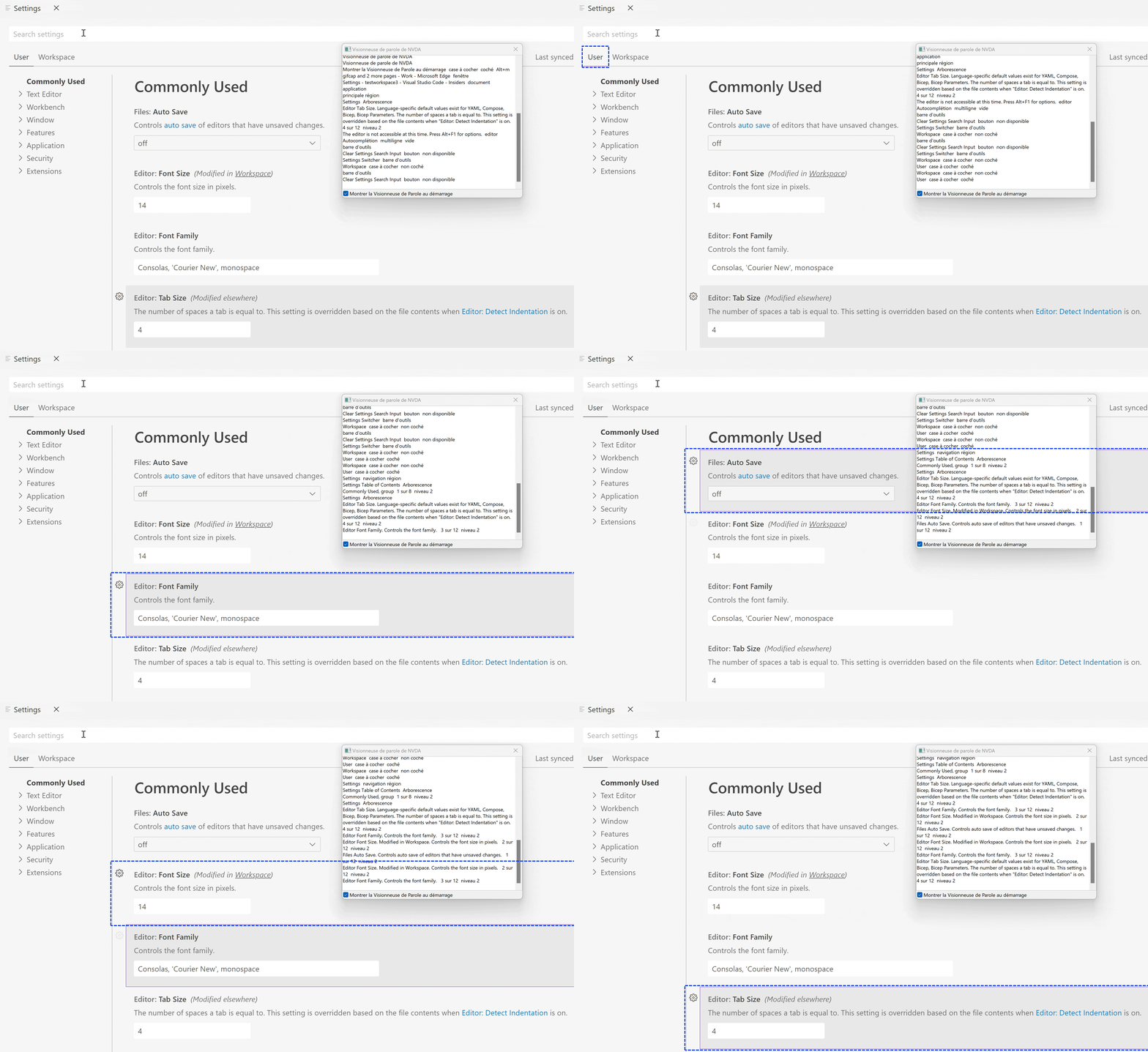
Navigating through the Settings editor with NVDA on Windows

Workbench

Auto playing and looping for previewed videos

You can now enable video autoplaying and looping for the built-in video file preview. The relevant settings are:

  • mediaPreview.video.autoPlay — Enable video autoplay. Autoplayed videos are automatically muted.
  • mediaPreview.video.loop — Enable video looping.

These settings are off by default.

More help when editor is readonly

With the introduction of readonly mode in VS Code last milestone, editors can be readonly due to workspace configuration.

This milestone, we enhanced the notification message in the editor when you try to type in a readonly editor and in some cases provide a link to change the files.readonly settings.

Default file dialog location

A new setting files.dialog.defaultPath can configure the default location that file dialogs (for example when opening or saving files or folders) should show when they open. This default is used only as a fallback when no other location is known, for example in empty VS Code windows.

Disable maximizing editor groups on tab double click

A new setting workbench.editor.doubleClickTabToToggleEditorGroupSizes disables toggling the size of an editor group from maximized to restored when double-clicking on a tab of that group.

Control minimal width of fixed width tabs

A new setting workbench.editor.tabSizingFixedMinWidth controls the minimum size of a tab when workbench.editor.tabSizing is set to fixed. Fixed tab widths are explained in more detail in the 1.79 release notes.

Editor group split sizing changed to ‘auto’

A new value for the workbench.editor.splitSizing setting called auto is the new default. In this mode, splitting an editor group distributes the available size evenly to all editor groups only if none of the editor groups has been resized. Otherwise, the space of the split editor group is divided in half and placed in the new editor group.

The intent of this change is to not break layouts that you have created when you split, but still preserve the previous default behavior of distributing the size evenly otherwise.

Search .gitignore exclude behavior

When search.useIgnoreFiles is set to true, the workspace’s .gitignore is now respected regardless of whether the workspace is initialized as a Git repository or not.

The setting comments.maxHeight lets you disable the max height restriction on the comments, such as those displayed for pull requests when using the GitHub Pull Requests and Issues extension.

Troubleshoot issues in VS Code

There is a new command Help: Troubleshoot Issue in the Command Palette to help you troubleshoot an issue in VS Code. The launched workflow helps you identify the cause for an issue using a special Troubleshoot profile and the extension bisect feature of VS Code. Extension bisect will enable and disable your installed extensions in a binary search while you indicate whether the issue reproduces or not. This narrows down the extension causing the issue and helps you provide the right information when reporting an issue.

Disable Chromium sandbox

If you have scenarios where launching VS Code desktop as an elevated user is unavoidable, for example you are launching VS Code with sudo on Linux or as administrator in an AppLocker environment on Windows, then you need to launch VS Code with the --no-sandbox --disable-gpu-sandbox command line options to have the application work as expected.

Based on the feedback in issue #184687, there are now two new settings to make it easier when you need to disable the Chromium sandbox:

  1. A new command line option --disable-chromium-sandbox to disable the Chromium sandbox for all processes in the application. This new option can be used as a replacement for --no-sandbox --disable-gpu-sandbox. This option applies to any new process sandboxes that might be added by the runtime in future releases.

  2. To persist disabling the Chromium sandbox across launches, do the following:

    • Open the Command Palette (⇧⌘P (Windows, Linux Ctrl+Shift+P)).
    • Run the Preferences: Configure Runtime Arguments command.
    • This command opens a argv.json file to configure runtime arguments. You might see some default arguments there already.
    • Add "disable-chromium-sandbox": true.
    • Restart VS Code.

Note: Do not use this setting unless you are seeing issues!

Editor

Skip subword when shrinking and expanding selection

The Expand and Shrink Selection commands can now be configured to skip subwords. This is done via the editor.smartSelect.selectSubwords setting. By default, subwords are selected but this can now be disabled.

  • true -> Co|deEditor selects [Code]Editor, then [CodeEditor]
  • false -> Co|deEditor selects [CodeEditor]

This setting comes in handy when you use expand and shrink selection frequently with multiple cursors and on heterogeneous words.

Improved Emmet support for CSS modules in JSX/TSX

Emmet supports a new set of abbreviations for JSX/TSX files. By typing ..test in a JSX or TSX file, and expanding the abbreviation, the line <div styleName={styles.test}></div> is added.

The attribute name and value prefix can be configured using the emmet.syntaxProfiles setting. By configuring the emmet.syntaxProfiles setting as follows:

"emmet.syntaxProfiles": {
    "jsx": {
        "markup.attributes": {
            "class*": "className",
        },
        "markup.valuePrefix": {
            "class*": "myStyles"
        }
    }
}

and then expanding the abbreviation ..test in a JSX or TSX file, you get the abbreviation <div className={myStyles.test}></div> instead.

Resizable content hover

It is now possible to resize the content hover control. You can hover over the control borders and drag the sashes to change the size of the hover.

Terminal

Image support

Images in the terminal, which were previewed last release, are now enabled by default. Images in a terminal typically work by encoding the image pixel data as text, which is written to the terminal via a special escape sequence. The current protocols supported are sixel and the inline images protocol pioneered by iTerm.

To test images manually, you can download and cat a .six example file from the libsixel repository:

Running cat with a sixel file will print an image

Or use the imgcat python package or imgcat script with a .png, .gif, or .jpg file:
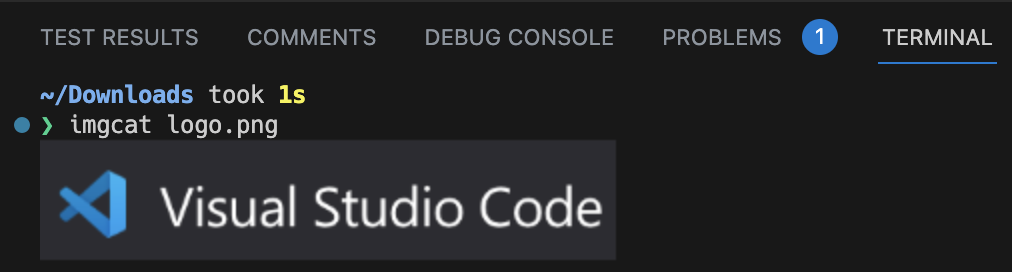
Running imgcat with a png file will print the image

This feature can be disabled by setting:

"terminal.integrated.enableImages": false

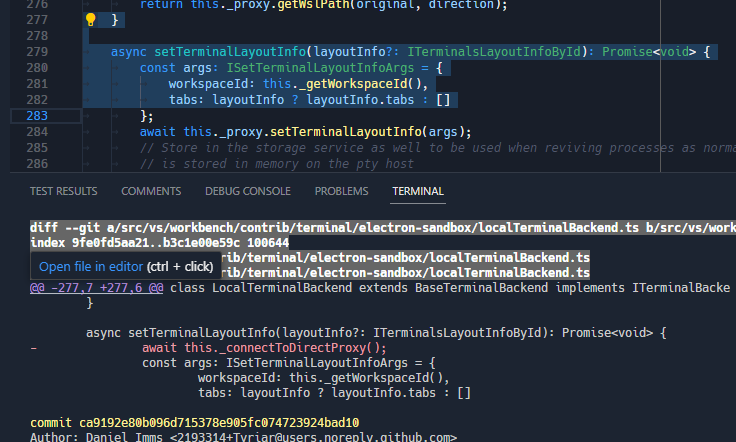
There is now support for new link formats, including links that need to scan upwards in order to find the file and links that have a range (line to line or character to character).

  • @@ git range links:

    Links from git in the style '@@ - + @@' are now detected

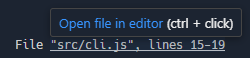
  • OCAML’s Dune-style range links:

    Links in the style 'File "src/cli.js", lines 15-19' are now detected
    Links in the style 'File "src/cli.js", line 15, characters 8-34' are now detected
    Links in the style 'File "src/cli.js", lines 15-19, characters 8-34' are now detected

  • ESLint-style multiple line links:

    Links from ESLint that prefix a result with 'line:col' now are detected

  • Ripgrep-style multiple line links:

    Links from ripgrep that prefix a result with 'line:' now are detected

Deprecated shell and shellArgs settings removed

The settings terminal.integrated.shell.* and terminal.integrated.shellArgs.* were replaced by terminal profiles over a year ago and have just been removed. If you’re still using the old shell and shellArgs settings, here is an example before/after to help with migrating:

// Before
{
  "terminal.integrated.shell.windows": "pwsh.exe",
  "terminal.integrated.shellArgs.windows": ["-Login"],

  "terminal.integrated.shell.osx": "bash",
  "terminal.integrated.shellArgs.osx": ["-l"],
}

// After
{
  "terminal.integrated.profiles.windows": {
    "PowerShell Login": {
      // Source is a special property that will use VS Code's logic to detect
      // the PowerShell or Git Bash executable.
      "source": "PowerShell",
      "args": ["-Login"],
      "icon": "terminal-powershell"
    },
  },

  "terminal.integrated.profiles.osx": {
    // This will override the builtin bash profile
    "bash": {
      "path": "bash",
      "args": ["-l"],
      "icon": "terminal-bash"
    }
  }
}

Testing

Terminal output support

Previously, test output shown in the Test Results view would always be shown in an embedded text editor. This stripped it of rich styling such as colors, styles, and symbols it may have had when run in a terminal. In this release, we show output in a real xterm.js terminal.

Results shown in the Tests Results panel with green checkmarks

Theme: Codesong (preview on vscode.dev)

Now that the Test Results view is fully featured, the commands to Show Test Output have been redirected to open the Test Results view instead of creating a temporary terminal.

Source Control

Close repository improvements

In the past, users could close a repository either using the Git: Close Repository command or the Close Repository action in the Source Control view but there were certain actions (for example, opening a file from the closed repository) that would reopen the closed repository. This milestone we have made some improvements so the fact that a repository is closed is now persisted per workspace. Users can reopen closed repositories using the Git: Reopen Closed Repositories… command.

Notebooks

Improved save performance for Remote Development

Previously, saving a notebook in VS Code’s Remote extension required sending the entire notebook to the extension host, which could be slow for large notebooks or slow network connections with auto save enabled. We have improved performance by only sending the changes to the notebook to the extension host, resulting in faster notebook saving and execution. While this feature is still disabled by default, we are confident that we will be able to enable it soon. To try it out, add "notebook.experimental.remoteSave": true to your settings. For more details, you can follow issue #172345.

Notebook global toolbar rework

The notebook editor’s global toolbar has been rewritten to adopt the workbench toolbar, allowing users greater customization of the toolbar actions. Users can now right-click and hide actions from the toolbar. Right-clicking on an action within the toolbar presents the option to hide that action, and also to reset the menu and bring back hidden actions.

The toolbar continues to work with all three label strategies: always, never, and dynamic. You can change the label strategy via the setting notebook.globalToolbarShowLabel.

Theme: Monokai Pro (Filter Ristretto) (preview on vscode.dev)

Interactive Window backup and restore

The Python Interactive Window is now fully integrated with the hot exit feature and restores the editor state between VS Code reloads. The interactiveWindow.restore setting no longer has any effect and was removed.

If hot exit is disabled, there is a prompt when closing VS Code giving you the option to save the editor state as a .ipynb file.

_Theme: Bearded Theme feat. Gold D Raynh (preview on vscode.dev)

Languages

Markdown copy image from preview

A new context menu for images in the Markdown preview allows you to copy the image from the preview and paste it into the Markdown editor. When copying the image, the preview editor must be focused.

The new markdown.editor.pasteUrlAsFormattedLink.enabled setting (default false) lets you insert links into the Markdown editor that are automatically formatted into Markdown links. If you select some text to be replaced with the pasted link, the selected text will automatically become the title of the link. If no text is selected, there will be a default link title. This feature applies to external browser links as well as files within the workspace.

You must enable the setting editor.pasteAs.enabled for this new setting to work.

Remote Development

The Remote Development extensions, allow you to use a Dev Container, remote machine via SSH or Remote Tunnels, or the Windows Subsystem for Linux (WSL) as a full-featured development environment.

You can learn about new extension features and bug fixes in the Remote Development release notes.

This milestone, we have updated the Remote menu with entries to help you quickly install and get started with remote connections (SSH, Remote Tunnels, GitHub Codespaces, etc.) by installing the necessary extensions. There is also a Connect to… start entry on the Welcome page to help you get started with remote connections from VS Code desktop.

We have also updated the Welcome page on vscode.dev with a start entry to connect to a Remote Tunnel.

WSL over Tunnels

Last iteration, we previewed connecting to WSL over Remote Tunnels. This feature is now stable this iteration. If you run a Remote Tunnel on a Windows machine with WSL installed, you have the option to connect to WSL directly from the Remote Explorer.
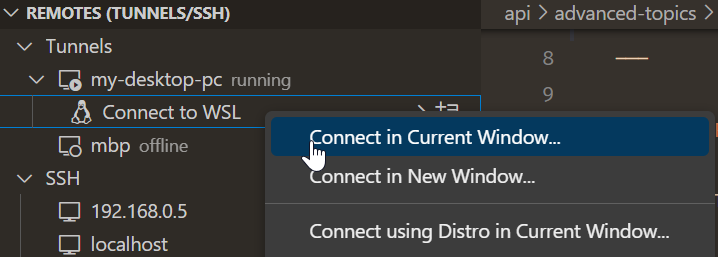
Remote Tunnels view with a Connect to WSL option

Theme: Codesong (preview on vscode.dev)

This feature now works on VS Code desktop as well as vscode.dev. If you’re already running a tunnel on your Windows device, make sure to update VS Code to the latest version to enable this feature.

Contributions to extensions

GitHub Copilot

We have introduced preview-only slash commands in the Chat view to help you create projects and notebooks and search for text in your workspace.

Note: To get access to the Chat view, inline chat, and slash commands (for example /search, /createWorkspace), you need to install the GitHub Copilot Chat extension.

Create workspaces

You can ask Copilot to create workspaces for popular project types with the /createWorkspace slash command. Copilot will first generate a directory structure for your request.

You can then use the Create Workspace button to create and open the project directory as a new workspace.
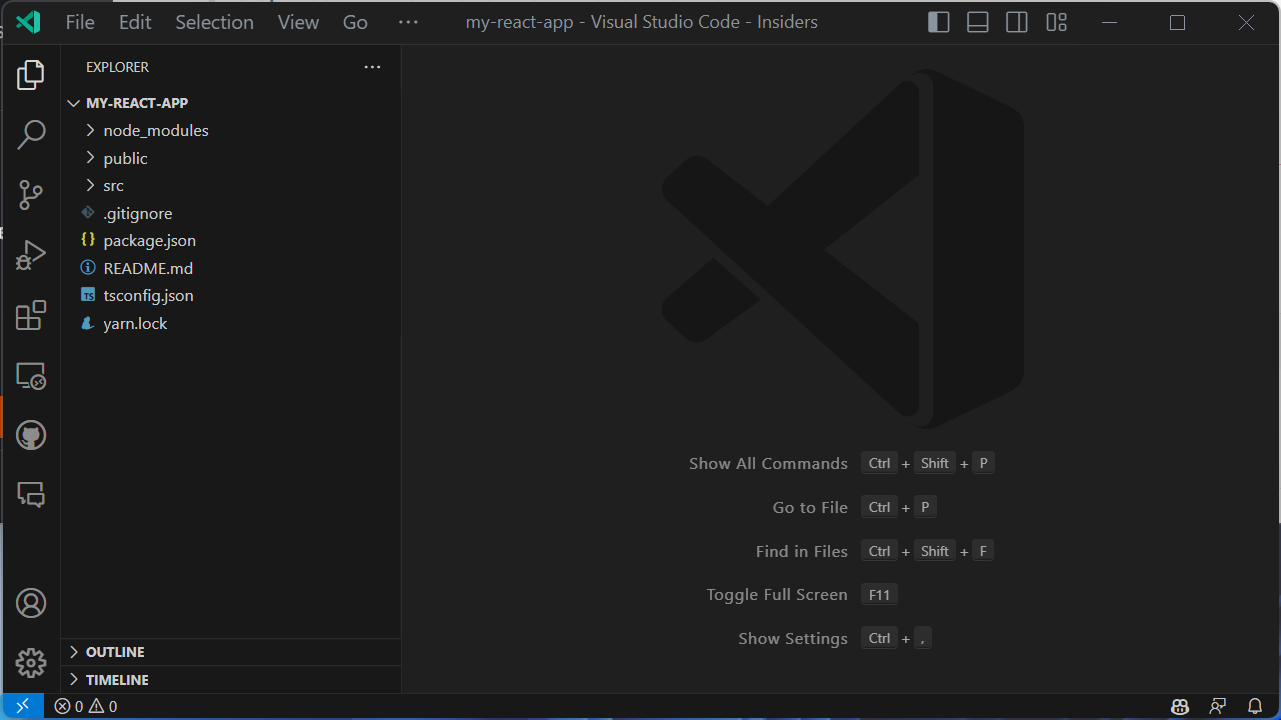
Create and open workspace using GitHub Copilot

Create notebooks

You can ask Copilot to create Jupyter notebooks based on your requirements with the /createNotebook slash command. Copilot will generate an outline of the notebook based on your requirements.

You can then use the Create Notebook command to create the notebook and fill in the code cells based on the suggested outline.

Generate search parameters

You can ask Copilot to autofill the search parameters in workspace search. To do this, use the /search command followed by a description of what you want to find in text.

These preview slash commands can be enabled by configuring github.copilot.advanced setting as follows:

"github.copilot.advanced": {
   "slashCommands": {
      "createWorkspace": true,
      "createNotebook": true,
      "search": true
   }
}

Copilot YouTube playlist

There is a new installment covering Copilot for PowerShell in the VS Code Copilot Series on YouTube. In case you missed the series, you’ll also find other language-specific talks and guidance on effective prompting when using Copilot for development.

Python

Mypy extension

There is now a Mypy Type Checker extension that provides type checking support for Python using mypy, available in preview as a pre-release version. This new extension offers errors and warnings on your entire codebase, instead of only the current file. It also uses dmypy for faster type checking.

If you have any issues with this new extension or wish to provide feedback, you can file an issue in the Mypy extension GitHub repo.

Debugpy extension

When support for Python 2.7 and Python 3.6 was removed from the Python extension, we received a lot of feedback from users who were unable to upgrade their codebase to the latest versions of Python and lost the ability to debug their applications with the latest versions of the Python extension. To work towards a solution for this, we have created a separate Python Debugger extension called Debugpy. By keeping the debugger separate from the Python extension, you will eventually be able to use the latest version of the Python extension while using an older version of the debugger (by disabling extensions auto-update). This extension is available in preview as a pre-release version using the latest version of debugpy. We plan to support older versions of debugpy in the near future.

Give it a try and let us know if everything works appropriately. Our plan is to deprecate the built-in debugging functionality in favor of this separate extension.

Pylance localization

The Pylance extension is now localized! This means settings, commands, and other text from the extension are translated to your preferred language if you have a Language Pack installed and set to active in VS Code.

Test discovery and run rewrite

This month we are continuing the rollout of our testing rewrite as an experiment. As a reminder, this rewrite redesigns the architecture behind test discovery and execution for both unittest and pytest in the extension. The rewrite is currently active for 100% of VS Code Insiders users and will begin ramping into stable this month. The rewrite will be adopted shortly, but for now the setting to opt in and out, pythonTestAdapter, still exists.

Dynamic run results for pytest and unittest

Rolling out with the new experiment is dynamic run results for pytest and unittest. Previously, our test results were only returned once all tests finished running, but now with this feature, test results are delivered individually allowing you to see your tests pass and fail in real time.

Index persistence for 3rd-party libraries

Pylance performs indexing of third-party libraries that are installed in your environment to enable IntelliSense features such as auto-completion, auto-import, code navigation, etc. Previously, Pylance would index these libraries every time you opened a workspace in VS Code. Now, Pylance persists the index for these libraries, reducing the need for repetitive indexing processes.

Deprecation of Python 3.7 support

Python 3.7 reached end-of-life (EOL) on 2023-06-27. As such, official support for Python 3.7 from the Python extension will stop in three months in the 2023.18 release of the extension (which corresponds with the September 2023 release of VS Code). There are no plans to actively remove support for Python 3.7, and so we expect the Python extension will continue to work unofficially with Python 3.7 for the foreseeable future.

With all other releases of Python now on an annual release cadence, we expect to stop official support for a Python release once it reaches EOL in the first Python extension release of the following calendar year. For example, Python 3.8 is scheduled to reach EOL in October 2024, so the first Python extension release in 2025 will stop official support.

GitHub Pull Requests and Issues

There has been more progress on the GitHub Pull Requests and Issues extension, which allows you to work on, create, and manage pull requests and issues.

  • Up to 1000 (from the previous 100) comment threads can be loaded in a pull request.
  • The new VS Code API proposal for a read-only message lets you check out a PR directly from an unchecked-out diff.
  • Avatars in trees and comments are circles instead of squares.

Review the changelog for the 0.68.0 release of the extension to learn about the other highlights.

Preview Features

TypeScript 5.2 support

This update includes support for the upcoming TypeScript 5.2 release. Check out the TypeScript 5.2 iteration plan for more details about what the TypeScript team is currently working on. Upcoming tooling highlights include:

  • A new Inline constant refactoring.
  • A new Move to file refactoring that lets you move a symbol into an existing file.

To start using the TypeScript 5.2 nightly builds, install the TypeScript Nightly extension.

New diff editor

This iteration we finished rewriting the diff editor. The rewrite allowed us to add a couple of new features, to improve the performance, and to fix several bugs.

To try out the new diff editor, add "diffEditor.experimental.useVersion2": true to your settings. The new diff editor is still experimental, but will eventually replace the current diff editor in a future update.

All presented features require the new diff editor.

Collapse unchanged regions

Use diffEditor.experimental.collapseUnchangedRegions to enable hiding unchanged regions in the new diff editor. This feature is useful when reviewing large diffs with a lot of unchanged code.

The borders of the hidden-lines blocks can be dragged or clicked to reveal code from the bottom or top.
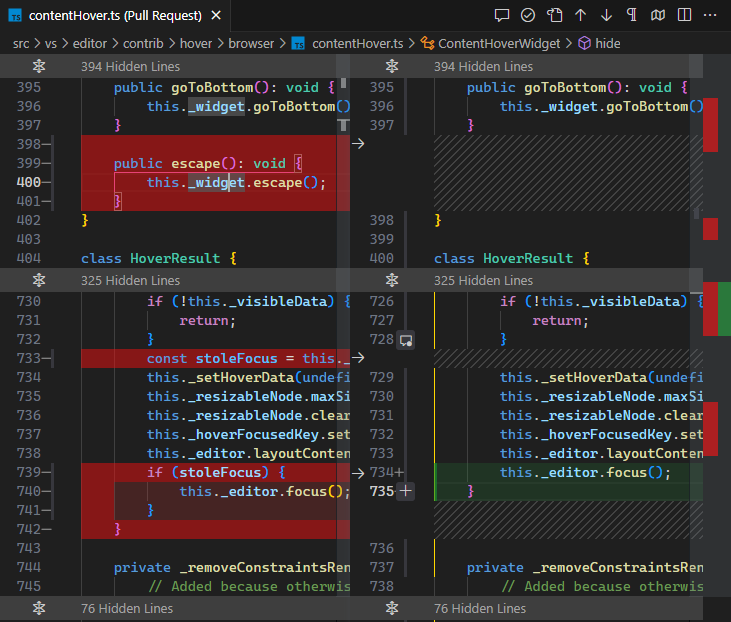
A screenshot of the "Collapse Unchanged Regions" feature in the new diff editor

Show insertion/deletion markers

Insertion/deletion markers indicate where in a line words were inserted or deleted, which is especially helpful when a line has both insertions and deletions.

Use diffEditor.experimental.showEmptyDecorations to enable/disable insertion and deletion markers.

Deletion markers

Improved decorations

Full line deletions/insertions now have a full width background color. This reduces noise significantly.

This is an example of how the new diff editor highlights changes:

New Diff Editor highlighted changes

This is how the old diff editor renders decorations (notice how the line 57 on the right does not have a full width background color):

Current Diff Editor highlighted changes

Synchronous diff update

When typing in the new diff editor, changes are heuristically applied immediately and trigger an asynchronous diff computation after some delay. In the old diff editor, changes were not applied immediately, causing visible flickering when typing.

New – the diffs update immediately when typing:

Diffs update immediately when typing

Old – there is some visible flickering:

Diffs did only update after a delay in the old diff editor

Move detection

This experimental feature detects moved code blocks within a file. Use diffEditor.experimental.showMoves to turn it on. At the moment, only simple moves are detected, but we plan to improve this feature in the future. Once a moved code block is selected, source and target locations are aligned and a diff between them is shown.
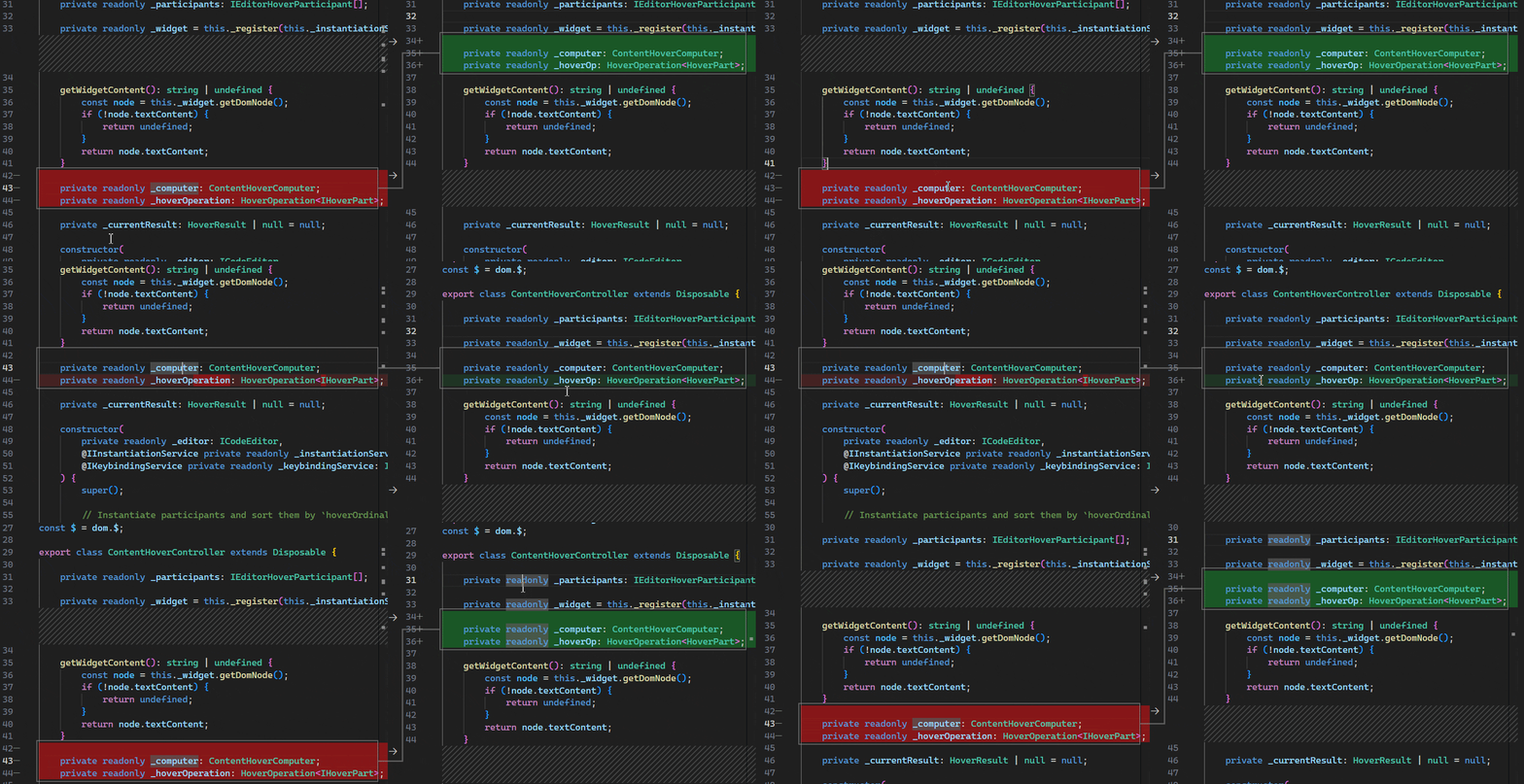
Move detection displays line connecting moved code block

Because move detection is still experimental, expect significant changes in future updates.

Extension authoring

SecretStorage API now uses Electron API over keytar

The SecretStorage API has been the recommended way to store secrets like passwords, access tokens, etc. for years now. Under the hood, it has been using keytar, an abstraction layer used to store secrets in the OS keyring. Due to the deprecation and archiving of keytar, we looked for other solutions for the problem, specifically looking to our runtime, Electron, for a solution.

This release, we’ve started the move from keytar to Electron’s safeStorage API. This switch should be transparent to you as secrets are retrieved from keytar and restored via Electron’s safeStorage API. In the future, we will remove this migration so that we can remove our dependency on keytar altogether.

keytar deprecation plan

For a while now, VS Code has had a large dependency on keytar, an abstraction layer used to store secrets in the OS keyring. Additionally, we have included a keytar shim in VS Code that extensions depended on before the introduction of the SecretStorage API. keytar itself is officially archived and not being maintained… In an effort to promote good security practices by not depending on an archived piece of software for storing secrets, we are working on a plan to remove this shim from VS Code.

We have already directly reached out to extension authors of popular extensions that still use this keytar shim and they are working on moving off of it. We want to communicate this here as well as in our GitHub Discussions for those we didn’t contact directly so we minimize the disruption due to this change. We know this isn’t the best news as we had a fair amount of work to remove our dependency on keytar as well, but we believe this is the right thing to do to ensure extensions are using secure APIs.

If you are using keytar directly in your extension, there are a couple of options for you to consider:

  • (recommended) Use the SecretStorage API that VS Code provides on the ExtensionContext. This API is cross-platform and works on all platforms that VS Code supports. It is also maintained by the VS Code team, will continue to be maintained, and has been a part of the VS Code API for years.
  • (not recommended) You can bundle the keytar module with your extension. Keep in mind that keytar is a native node module, which means that you will need to publish a platform specific extension for each platform you want to support.

Timeline: The current plan is to remove this shim from VS Code Insiders in early August, which means that September 2023’s stable release will be the first release without the shim.

Work for this is being tracked in issue #115215 and if you have any questions, feel free to ask them here in our GitHub Discussions.

Improved vscode.fs.writeFile performance for local files

When you are using vscode.fs.writeFile API to write data into files (you should!), write operations to files that are local to the extension host will now resolve much faster.

Previously the extension host would delegate the write operation to the VS Code client for execution, but now the operation executes directly inside the extension host, saving round trips.

Tree checkbox API

The TreeItem checkboxState API has been finalized. By default, tree items that have checkboxes will have their checked state managed by VS Code. This behavior can be changed by setting the TreeViewOptions property manageCheckboxStateManually to true. When manageCheckboxStateManually is set, the extension is responsible for managing checking and unchecking of parent and child checkboxes.

EnvironmentVariableCollection.description

This new API allows specifying a description for EnvironmentVariableCollection, displayed to the user in the terminal tab hover, to explain what exactly the change is doing.

// Example of what the Git extension could use
context.environmentVariableCollection.description =
  'An explanation of what the environment changes do';

You can see the API in action in the built-in Git extension, which now describes what the change does:
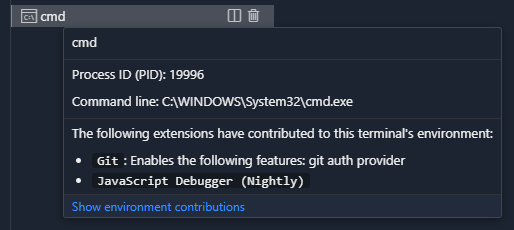
Environment variable collection descriptions are explained in a terminal tab's hover

Proposed APIs

Every milestone comes with new proposed APIs and extension authors can try them out. As always, we want your feedback. Here are the steps to try out a proposed API:

  1. Find a proposal that you want to try and add its name to package.json#enabledApiProposals.
  2. Use the latest @vscode/dts and run npx @vscode/dts dev. It will download the corresponding d.ts files into your workspace.
  3. You can now program against the proposal.

You cannot publish an extension that uses a proposed API. There may be breaking changes in the next release and we never want to break existing extensions.

Read-only message for file system providers

When you registerFileSystemProvider, you can provide a read-only message instead of simply marking a file system as read-only. The message below is displayed in the editor when a user tries to edit a file from that provider.
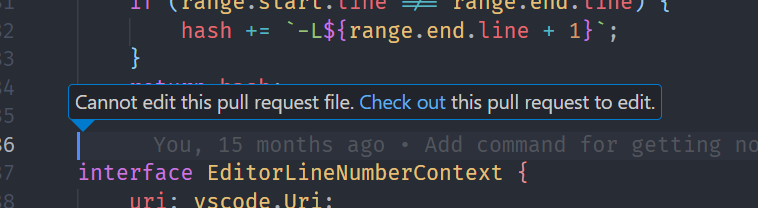
Read-only file system message

Engineering

Name mangling of exported symbols

Last year we started mangling the names of private properties and methods to reduce our code size. We now also mangle exported symbol names, which reduces the size of our main workbench JavaScript file a further 8%.

Our name mangling build step now saves a total of 3.9 MB of JavaScript across core VS Code and our built-in extensions. This reduction speeds up downloads, reduces VS Code’s install size, and speeds up code loading every time you start VS Code.

Checksum integrity checks for Node.js, built-in extensions, and Electron

As part of our build, we consume binary resources from other locations, such as Node.js for our remote server and built-in extensions from the Marketplace and Electron. This milestone, we ensure the integrity of these binary resources by validating against a SHA256 checksum that is checked into the vscode GitHub repository.

New Linux performance machine

We take the performance of VS Code very seriously, especially the elapsed time it takes to open a text editor and see a blinking cursor. To monitor that elapsed time, we run daily performance tests on Windows and macOS.

This milestone, we added a Linux machine to the test set, reporting the startup times on Ubuntu 22.

Linux performance machine

Event emitter optimizations

VS Code uses event emitters extensively throughout our codebase. We’ve optimized these emitters this iteration, which slightly improved startup time and memory usage.

You can read more about this improvement in issue #185789.

Terminal pty host improvements

The “Pty Host” process manages all shell processes launched by the terminal and several improvements were made:

  • Performance
    • There is now a direct channel of communication to the pty host process. The most significant change from this is the reduction of input latency of the terminal.
    • Reconnection (reload window) and process revival (restart) performance has been improved by reducing unneeded calls and parallelizing tasks when there are multiple terminals being restored.
    • We now gather performance metrics on terminal startup and reconnection, which can be viewed via the Developer: Startup Performance command.
  • Diagnostics
    • All terminal-related logs have moved out of the Window output channel and into the new Terminal output channel.
    • When trace log level is on the Pty Host output channel, the terminal will log all RPC calls, which will help in diagnosing terminal problems.

Documentation

New C# topics

You can learn about C# development in VS Code with the C# Dev Kit extension through a new set of C# articles. There you’ll find topics explaining how to get started, describing the extension’s language features (code navigation, refactoring, debugging), and aiding the development life cycle such as Project and Package management.

Glob patterns reference

VS Code has it’s own glob pattern implementation, which it uses for features like Search file and folder filtering, letting you customize the File Explorer view, etc. To learn the details, you can review the new Glob Patterns Reference.

Notable fixes

  • Loses text when maximizing the integrated terminal #134448
  • Support fish shell integration automatic injection #139400

Thank you

Last but certainly not least, a big Thank You to the contributors of VS Code.

Issue tracking

Contributions to our issue tracking:

Pull requests

Contributions to vscode:

Contributions to vscode-emmet-helper:

Contributions to vscode-livepreview:

Contributions to vscode-pull-request-github:

Top 7 Latest Technology Trends Shaping the Future in 2024


Advancements in the tech world continue to transform every aspect of our lives. From mainframe computers to cloud servers, the evolution in the tech space has been rapid. Regardless of how and when this evolution occurs, it brings simplicity, agility, and efficiency to businesses and the lives of those who utilize technology. In 2024, the latest technology trends reflect the innovation that continues to happen in the tech industry.

Since the advancement of existing technologies and the emergence of new ones can affect business performance and growth, companies must keep up with them to stay competitive. In this article, we explore the top technology trends that will shape the future of industries across the board in 2024.

7 Latest Trends and Technology to Look Out for in 2024

From artificial intelligence and 5G technology to green technology and edge computing, here are the latest trends in technology that will shape 2024:

1. Artificial Intelligence (AI) Becomes More Accessible

Artificial intelligence remains top on the list of 2024 technology trends after gaining prominence in 2023. An interesting aspect of AI that will be refined this year is generative AI. This type of AI is capable of creating new ideas and content, including images, conversations, videos, stories, and music. In 2024, generative AI will continue to drive advancements in healthcare, education, e-commerce, and the creative economy.

Open-source AI solutions like OpenAI’s ChatGPT, Google’s Bard, Microsoft’s Bing Chatbot, and Meta’s Large Language Model Meta AI will continue to make AI accessible to the masses. These solutions remove the high costs associated with AI development. This drives innovation from startups and independent developers and will push AI accessibility a notch higher in 2024.

2. Strong Focus on Sustainable Technology

Among the latest technology trends is the focus on sustainable technology. As countries and businesses work towards realizing net-zero commitments, tech investments will be focused on solutions that minimize the impact of technology on the environment.

Environmental-friendly innovations that will receive widespread support include electric bikes, cars, and public transport. Other innovations may include solutions to novel environmental problems like carbon capture and storage and renewable energy technologies. In 2024, companies will embrace the green cloud computing concept where IT infrastructure and services prioritize the reduction of carbon emissions and energy consumption.

3. Emphasis on AI Governance & Ethics

Among the key emerging technologies to look out for in 2024 are AI ethics and governance. Although AI brings unparalleled benefits and opportunities to companies, it comes with immense responsibility. When it comes to AI’s impact on people’s lives, questions about its ethics, legality, data governance, and trust. As businesses scale up AI usage, they must be mindful of existing and new regulations to ensure compliance. In 2024, AI ethics and governance will be a priority for countries and businesses.

As AI technology advances, countries that lack AI regulations will seek to develop them while those with existing frameworks will focus on enforcement. At the corporate level, businesses will define their mission and principles for AI and establish governance structures that inspire confidence in AI technologies. They’ll also strengthen their compliance with existing laws and regulations like the General Data Protection Regulation, monitor upcoming laws, and develop risk mitigation policies.

4. 5G Technology Will Drive Extended Reality Adoption

Immersive technologies coupled with expanding applications and the convergence of augmented reality (AR), virtual reality (VR), and mixed reality (MR) are driving the transformation of extended reality (ER). The presence of 5G technology will accelerate the adoption of ER by facilitating remote access to immersive training, simulations, and interactions.

With its enhanced connectivity and super-fast speeds, 5G technology facilitates data exchange between devices, laying a solid foundation for a highly connected, efficient society. In 2024, this technology will unleash the metaverse through immersive extended reality experiences as businesses leverage its seamless connectivity, ultra-low latency, and efficient resource allocation to maximize growth.

A combination of AR and VR, and the metaverse is already revolutionizing the way people work and live. It takes users from the real world to the virtual one. Businesses can use the technology to create a virtual version of their real world where staff can collaborate, close deals, and conduct demos or training seamlessly.

5. Emergence of AI-Internet-of-Things (AIoT)

Among the latest technology trends 2024 is the emergence of AI Internet-of-Things (AIoT). Increasingly, tech devices are designed with WiFi connectivity. This means they can be connected to the internet. IoT is already facilitating data exchange between gadgets, including home appliances, devices, and cars through the internet. In business, IoT promises efficiency, safety, and better decision-making through data utilization.

But current trends point to something bigger- a convergence between IoT technology and systems that leverage AI and machine learning to respond to questions and make decisions. Projections show that over 200 billion devices will be connected to the internet by the end of the year. The majority of these will be intelligent smart devices augmented with AI.

6. AI Integration Makes Devices Smarter

Technology has played an important role in making operations smoother and smarter. Besides simulating humans, technology makes life easier and hassle-free through smart devices. By developing AI appliances, home robots, wearables, and work devices, data scientists will continue to make devices smarter. As more and more companies work on transforming their digital spaces, the demand for smarter devices will increase in 2024.

7. Preference for Edge Computing Over Cloud Computing

Another important new technology trend to expect in 2024 is the rising preference for edge computing. Although cloud computing adoption continues to grow, companies are beginning to realize its shortcomings as their data volumes increase. Edge computing solves this challenge by eliminating latency, and pushing data processing closer to where it is generated instead of sending it to a centralized server. As businesses seek to process time-sensitive data remotely with limited connectivity, we’ll see a preference shift from cloud computing to edge computing in 2024.

Wrapping Up

2024’s new technology trends show that the future of tech is indeed exciting. The growth trajectory in AI’s integration and accessibility is expected to continue across sectors. Emerging technologies will continue to offer new solutions to businesses and societal challenges. With a strong focus on green technologies and responsible AI, there’s no doubt that these trends will create a more sustainable, efficient, and connected future that benefits society as a whole.

Honest Truth About The Rainmaker Challenge (My Story)


Jenny had no experience selling products on Amazon. She invested $20,000 and was able to earn over $100,000 in her first year with The Rainmaker Challenge.

Jenny shares that it is not a “get rich quick scheme” but the support she received from The Rainmakers made it worth it and how she was able to get her first organic sale in her first week!

1. Can you tell us a little bit about yourself and how you got started with The Rainmaker Family?

I am a physical therapist by profession but in March of 2020, because of the lockdown, I had no choice but to give up my job and stay home with our sons. I was looking for online opportunities and I came across an ad for the Rainmaker challenge on FB.

2. Were you hesitant about working with Rainmakers at the beginning?

I was very nervous to jump in and apply for the Mastermind not just because of the financial investment but also because all of the business ventures I’ve entered before have failed.

But Chelsey and Stephen and the entire Rainmaker community were very positive and I knew I needed to be surrounded by like-minded people.

3. There are different ways of approaching Amazon through private labeling, wholesale, etc. What route did you take and how would you explain the process of how the method you chose works to a friend?

I chose the private labeling route because I wanted to create something of my own. I’ve always wanted to be an entrepreneur and wondered how other people do it.

Rainmaker paved the way for me to realize these dreams and from concept to creation, they have guided me through the process.

Each step of the journey was well outlined in the course and there are several ways to get help (coaching calls, posting a question in the group, reaching out to Rainmakers privately, etc).

Rainmaker taught me how to choose a product that I can sell based on data, find a manufacturer and negotiate, launch my product and how to manage it after launching.

4. Did you have any experience with this before getting started?

Not at all. I only knew how to sell my used items on Ebay.

5. Any Pros or Cons to working with The Rainmaker Family? Anything you wish the course had, but didn’t? Anything you’re especially grateful for?

When I joined Rainmakers in October 2020, it was still in the early stages and the coaching calls were not as often as it is now. I remember I had to be early on the calls and raise my hand on Zoom as soon as Stephen starts because there’s limited opportunity to get your question answered live.

But it has gone a long way since then. Now there are coaching calls Monday to Friday (sometimes 2x/day) and it’s based on the phase of your business. Stephen and Chelsey and the entire coaching team have thought about everything and they seriously don’t stop improving.

I am especially grateful for the positivity that the group provides and the community. Being in the Amazon FBA business can be stressful sometimes, and having a “family” to run to especially helps pick you up when you’re down.

6. How much did you invest before you saw any results?

I invested about 20k initially and I was able to get my 100K sales award in my first year.

7. Knowing what you know now about Amazon, do you think it is necessary to work with a coaching program like Rainmakers to get started or could you have done this on your own?

Yes, definitely! Amazon FBA is not a walk in the park. It’s not a “get rich quick scheme”. You have to be in it for the long game. There are several ups and downs, and Rainmakers provide you with the necessary information and support to overcome these struggles. Without the Rainmakers, I would have probably quit after 1 month.

8. After joining Rainmakers how long did it take for you to get your first sale?

I got my first organic sale within the first week of launching my first product.

9. How much have you earned since joining Rainmakers?

Roughly 200K gross sales.

10.  What tools or resources are needed to become successful with the Amazon FBA program?

Helium 10 is a must have for all things Amazon from product research, to building your listing, to Pay-Per-Click ads to maintain your ranking. Fiverr is also my go-to for outsourcing parts of my business (designs, contracts, etc).

Of course, the Rainmaker app/dashboard because we pretty much have everything outlined there.

11. What does a typical day look like for you now?

I am typically selling about 1-2 per day now. My sales are a little slower than previous months. But that’s the thing about Amazon though, there’s ups and down. There’s days where I sell 8 units ($400+) and days where I sell 1-2 ($100+).

12. What advice would you give to someone who wants to become successful with Amazon FBA?

The key is to be consistent and keep building your business. Keep investing on improving yourself. Keep doing product research and you just might stumble upon some “golden keywords”.

13. What types of products do you sell, feel free to be as specific or broad as you’d like?

I sell the first ever Unicorn canopies and Mermaid canopies. I also sell Unicorn wall decals, Unicorn wall prints and Unicorn hair accesories

14. Would you like us to mention your brand for more exposure in the article? If YES, list your brand name here:

JENN & JOOS. Jenn & Joos is a family-owned small business from Southern California, established in October 2020 in the midst of the pandemic.

We are committed to creating products that will help you create magical memories with your kids. Jenn & Joos brand is a tribute to my 3 angels in heaven: Julia, Juliana, and Julieanne. I was blessed with two beautiful boys here on earth but my angels are never forgotten.

Storefront

Linktree


Thank you Jenny for such an honest review. Your success is inspiring. If you want to try the 7-day Rainmaker challenge click here (aff link)

If you want to check out other personal reviews of those who have taken the Rainmaker challenge, see below:

Buy Windows 11 Pro for just $40 right now


windows-11-pro-stack-social

Get Windows 11 Pro at a big discount right now.

StackSocial

Need an operating system upgrade? Windows 11 Pro puts productivity in your hands with features that make everything from hybrid work to streaming entertainment easy, and you can grab the software for a discounted price right now through StackSocial. A lifetime subscription for the software is $40 right now, saving you 79%.

Windows 11 Pro brings an improved user interface and heightened customization to the table. You’re getting more advanced security features with this software, like biometrics login, TPM 2.0 Smart App Control, and encrypted authentication and antivirus protection to keep your personal and business data secured. 

The system works great for users with refurbished computers in need of an up-to-date operating system. On top of all of that, you’ll also get Microsoft’s Copilot embedded into the software for answering queries and optimizing your workflow. Copilot can answer your questions like a virtual assistant, write emails for you, brainstorm creative work, generate code, and more. 

Also: Get Microsoft Office on sale now

Windows 11 Pro improves on productivity features from previous versions, like snap layouts for personalized window customization, upgraded redocking and voice typing, and enhanced search. 

The software doesn’t stop at productivity. With DirectX 12 Ultimate API, you’ll get gaming graphics that bring your favorite video games to life. 

It’s important to note, however, that while StackSocial offers “lifetime” access to Windows 11 Pro, Microsoft could end the license. But that’s not to say that it will. ZDNET managing editor Alison DeNisco Rayome bought StackSocial’s Microsoft Office package deal that has been on sale for years, and it’s still working on her personal laptop. The StackSocial deal on Windows 11 Pro has been running for many months, and verified reviews say the software is a worthy upgrade. 

Deals are subject to sell-out or expire at any time, though ZDNET remains committed to finding, sharing, and updating the best product deals for you to score the best savings. Our team of experts regularly checks in on the deals we share to ensure they are still live and obtainable. We’re sorry if you’ve missed out on this deal, but don’t fret — we’re constantly finding new chances to score savings and sharing them with you at ZDNET.com