A step-by-step guide to use GitHub Copilot Chat in Visual Studio
GitHub Copilot serves as an AI-powered coding assistant capable of operating across various development environments, assisting you with your everyday coding challenges. In this new series of content, we will demonstrate how GitHub Copilot functions in Visual Studio especially and how it boosts your efficiency.
We just published “Using GitHub Copilot Chat in Visual Studio”, the third short video in this series, to guide you through leveraging GitHub Copilot Chat effectively within Visual Studio.
Exploring code with GitHub Copilot Chat
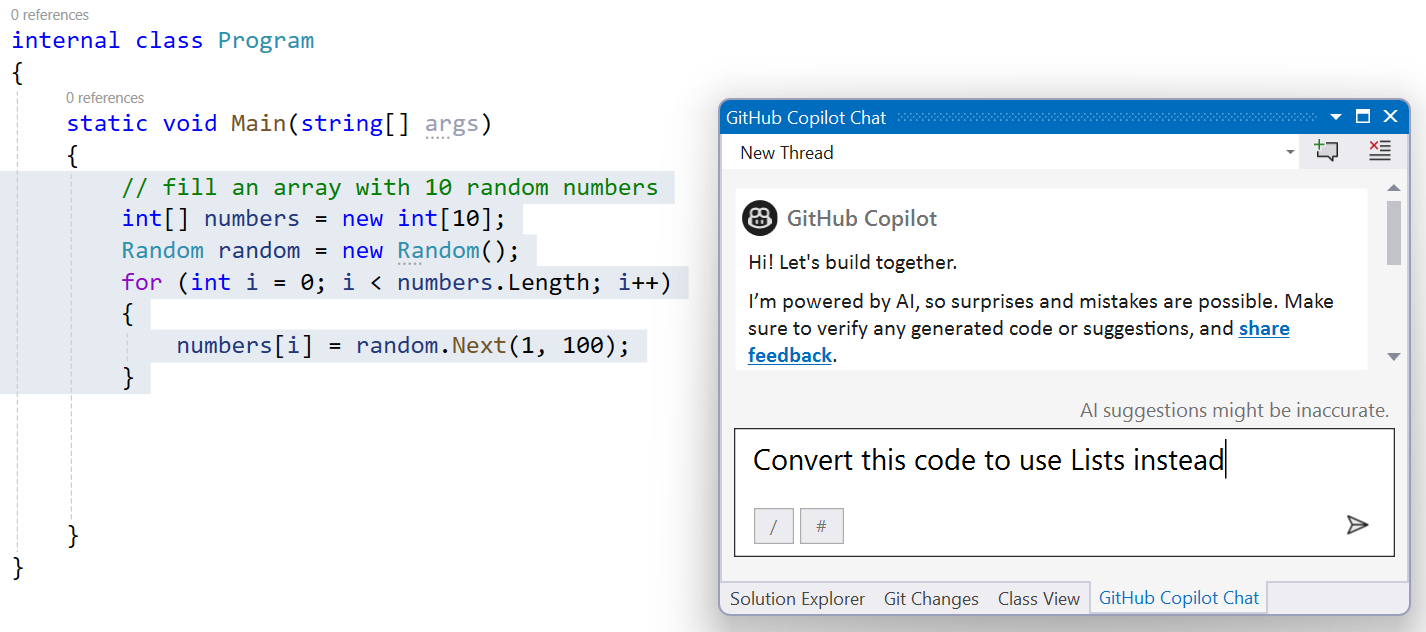
In the video, my coworker Bruno Capuano demonstrates how to populate an array with random numbers. Arrays are nice, but C# has more to offer and has other classes that can be used to make lists, with different features. GitHub Copilot Chat is a useful tool for this kind of investigations.
GitHub Copilot Chat can help you understand the difference between arrays and Lists. For example, it can list some of the differences, such as:
The size (an array has a fixed-size structure while a List can change its size at runtime).
The performance, a very important factor (arrays are usually more efficient than Lists because they don’t have to deal with dynamic sizing).
The functionality (a List has more methods than an array, allowing for data manipulation)
Also, it can show you some code examples that show how to create an array and a List, and how to add one element.
You don’t need to tell Copilot chat that you are using C# and .NET. It can figure that out from the solution and the file you are working on. This is similar to how you would talk to another coder when you are pair-programming.
Converting code
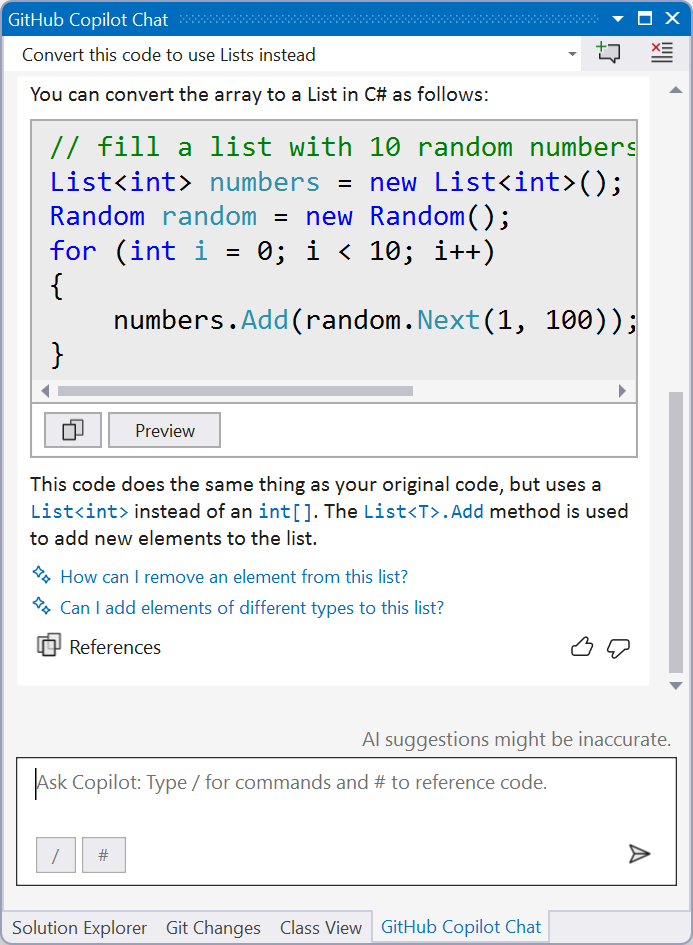
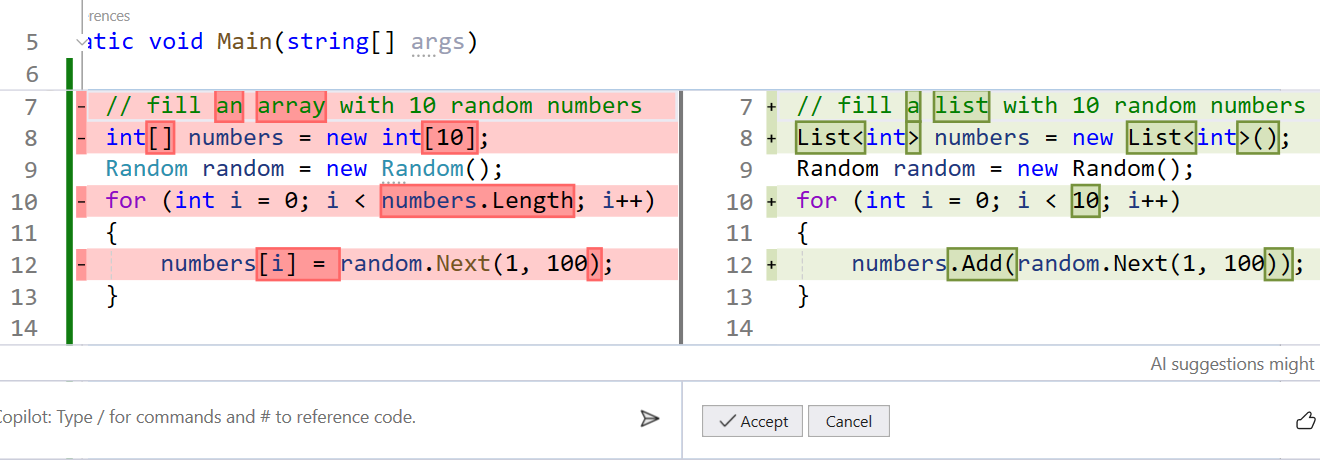
In the following example, Bruno wants Copilot Chat to change his code, which uses arrays at first, to use Lists instead. A very handy feature that I personally find very useful is the preview feature. You just need to click the Preview button, and the code will be displayed inline in the code file, in a nice “diff” view that looks like what you see when comparing code changes, for example after a GitHub commit.
I think it’s a great way to see exactly what code will be modified, and most importantly, to check the code generated by Copilot before applying the changes. As we always remind you in this series, this is a Copilot, but you are the Pilot in Command!
I followed the example that Bruno demonstrated, and here is the code that Copilot Chat suggested to me before and after the changes:
Before
// fill an array with 10 random numbers
int[] numbers = new int[10];
Random random = new Random();
for (int i = 0; i < numbers.Length; i++)
{
    numbers[i] = random.Next(1, 100);
}
After
// fill a list with 10 random numbers
List<int> numbers = new List<int>();
Random random = new Random();
for (int i = 0; i < 10; i++)
{
    numbers.Add(random.Next(1, 100));
}
Asking Copilot to convert the code
The proposed solution
The Preview feature
Conclusion
Now that you have successfully installed GitHub Copilot in Visual Studio, you can now enjoy the benefits of AI-powered coding assistance. GitHub Copilot can help you write code faster and you can also learn from the suggestions and examples that GitHub Copilot provides. To learn more about GitHub Copilot and how to use it, check our collection with resources here or via our full-length video.
Writing and editing are one of those great fields where you have the option of remote work. Unlike other professions which require people to be in the office, there’s a lot of flexibility that comes with this option.
We will dive into some of the best remote freelance jobs along with tips to find them.
In this article, we explore some of the best remote freelance jobs for writers and editors, along with tips on how to thrive in these roles.
Why work remote?
Remote work isn’t for everyone, but for those who love it, there is a lot of flexibility and freedom that comes with it.
Some of the benefits of remote work include:
Flexibility and work-life balance
Less commuting time each week
Able to work from anywhere you want
Lets you stay home with your children more
The ability to balance house chores and work to do’s
Access to more job opportunities since you do not need to be in the same location as your job
Ability to reduce stress in your life due to being able to create more of your work structure
Types of Remote Work You Can Do As A Writer
Content writing
Content writing is one of the most prevalent remote freelance jobs available today. Companies across various industries rely on skilled writers to create engaging content for their websites, blogs, social media, and marketing materials.
As a content writer, you might specialize in SEO-driven articles, product descriptions, whitepapers, or promotional copy. Remote content writers enjoy the flexibility of working from anywhere while honing their craft and expanding their portfolio.
Tips for Success: Develop versatile writing skills, stay updated on SEO best practices, and build a strong online presence through platforms like LinkedIn and Medium to attract clients.
Copywriting
Copywriting involves crafting persuasive and compelling content with the aim of driving sales and conversions. Remote copywriters create advertisements, email campaigns, landing pages, and sales copy for businesses.
Strong copywriting skills are essential for communicating brand messages effectively and persuading customers to take action.
Tips for Success: Hone your ability to write persuasive and concise copy, understand your target audience, and continuously refine your skills through online courses and practice.
Editing and proofreading
Editing and proofreading are indispensable services for authors, publishers, businesses, and academics. Remote editors polish written content by improving clarity, coherence, and overall quality.
They correct grammar, punctuation, and style errors to ensure that documents are error-free and professionally presented. Remote proofreaders play a critical role in maintaining the integrity and credibility of written material.
Tips for Success: Develop a keen eye for detail, stay updated on style guides (e.g., APA, MLA), and consider obtaining certifications (e.g., from the Editorial Freelancers Association) to enhance your credibility.
Technical Writing
Technical writers specialize in creating user manuals, instruction guides, documentation, and technical reports. This role requires the ability to translate complex information into clear and accessible content for diverse audiences. Many technical writers work remotely for software companies, engineering firms, and technology startups.
Tips for Success: Familiarize yourself with industry-specific terminology, cultivate strong research skills, and demonstrate your ability to simplify complex concepts through your writing samples.
Freelance journalism
Freelance journalists contribute articles, features, and investigative pieces to newspapers, magazines, online publications, and news websites. Remote journalism offers the opportunity to cover diverse topics, conduct interviews remotely, and work with editors on a freelance basis.
Tips for Success: Build relationships with editors and publications, pitch unique story ideas, and cultivate a niche or area of expertise to stand out in a competitive field.
Ghostwriting
Ghostwriters are hired to write books, articles, or content on behalf of clients who are credited as the author. This discreet role requires strong writing skills, the ability to adapt to different voices and styles, and a high level of professionalism and confidentiality.
Tips for Success: Develop a portfolio showcasing your writing versatility and discretion, and network with professionals in industries where ghostwriting is in demand (e.g., publishing, self-help).
Content strategy and consulting
Experienced writers can transition into content strategy and consulting roles, where they help businesses develop comprehensive content plans, editorial calendars, and brand messaging strategies. Remote content strategists combine writing expertise with analytical skills to optimize content performance and achieve business objectives.
Tips for Success: Gain experience in content management systems (e.g., WordPress, HubSpot), understand digital marketing principles, and demonstrate your ability to drive content initiatives that deliver measurable results.
Where To Find The Best Remote Freelance Jobs
Remote jobs are not too different from traditional jobs and a lot of the advice has some overlap.
For example, you will want to keep your resume up to date, write tailored cover letters, and keep networking with people in various industries.
By exploring these avenues, you can effectively kickstart your search for remote job opportunities and embark on a fulfilling remote career that aligns with your goals and lifestyle preferences.
Now that you’re equipped with an understanding of the diverse opportunities available, here are some effective ways to find remote freelance jobs in writing and editing:
1. Online job boards
There are a ton of job boards out there that gather and share various remote positions.
Some of these sites include:
Create profiles on these platforms, set up job alerts, and regularly check for new postings.
2. Company websites
Many companies now have dedicated remote job sections on their websites. Identify organizations you’re interested in working for and explore their career pages for remote positions.
This is why it can help a lot to pick a niche as a writer so you can keep tabs on companies you want to work with.
3. Freelance platforms
Websites like Upwork, Freelancer, and Fiverr connect freelancers with clients seeking remote services. These platforms are ideal for independent contractors looking to offer their skills on a project basis.
Many freelancers have said that they started working with clients on a per-project basis and then had it turn into full-time positions.
Freelancing can also be a great way to build your portfolio and work experience.
4. Content Mills
While controversial, content mills like Textbroker and WriterAccess offer a steady stream of writing assignments. These platforms are ideal for beginners looking to gain experience and build a portfolio.
5. Networking
Leverage your professional network through platforms like LinkedIn or industry-specific forums. Inform your connections that you’re seeking remote opportunities; sometimes, job openings are circulated within networks before being publicly advertised.
Leverage your professional network, attend virtual networking events, and connect with fellow writers and editors on social media platforms like LinkedIn and Twitter.
If you already have a full-time job, you might not be able to publicly advertise that you are looking for work, but you might be able to start reaching out to people in your network to see what they have heard about when it comes to opportunities.
6. Remote work communities
Join online communities and forums dedicated to remote work, such as Reddit’s r/digitalnomad or remote work-related groups on Facebook. These communities often share job leads and offer valuable insights into remote work lifestyles.
7. Skill-based platforms
If you have specialized skills, consider joining platforms like Toptal (for developers and designers) or Contently (for content creators). These platforms match highly skilled professionals with remote job opportunities.
8. Industry-Specific Job Boards
Explore industry-specific job boards such as ProBlogger (for bloggers and content creators) to find remote writing and editing gigs tailored to your interests.
9. Direct pitching
Research online publications and magazines that accept freelance submissions and pitch unique story ideas or articles. Many editors are open to working with remote writers and freelancers.
This is a great way to get your foot in at a company or publication you want to work for and work your way up to a full-time role.
10. Content Agencies and Content Marketing Firms
Explore opportunities with content agencies and marketing firms that specialize in providing remote writing and editing services to clients. These firms often have a steady flow of projects for freelance talent.
Next steps
Remote freelance jobs for writers and editors offer unparalleled flexibility, autonomy, and creative fulfillment. By identifying your strengths, honing your skills, and strategically navigating the remote job market, you can embark on a rewarding freelance career that aligns with your passions and lifestyle preferences.
Ready to grow your writing career even more?
Want to improve your writing skills? Want to learn how to create different types of content and find better remote gigs?
Then join The Freelance Writers’ Den, a community by freelance writers for freelance writers.
Now, clicking on a shows “This app is currently not available in your country or region.” This time, it wasn’t Apple that removed it but the developer. Over on MacRumors’ forums, the developer said it pulled the app “out of fear.”
“No one pressured me to, but I got more nervous about it as the day went on,” it wrote.
Welp.Screenshot: Wes Davis / The Verge
That’s a shame because this one was much more promising than iGBA, which had plenty to be concerned about where data collection is concerned and was rife with ads. Bimmy’s developer posted the GitHub link to its open-source code on the MacRumors forum and said Bimmy has “no ads or tracking of any kind.”
In our fast-paced digital age, multitasking has become an integral part of our daily computing needs. Whether you’re juggling multiple applications for work, streaming content while working on a project, or handling resource-intensive tasks simultaneously, having a PC that excels at multitasking will help you be more productive. In this guide, we will explore the key components that make a PC adept at handling multiple tasks efficiently.
Processor (CPU):
Multitasking prowess starts with a powerful processor. Opt for a multi-core CPU with simultaneous multithreading (SMT) or Hyper-Threading (HT) technology. AMD Ryzen 7 or Intel Core i7 processors are excellent choices, though even a current gen midrange processor like Intel Core i5 will have enough cores to handle the multitasking needs of most users. The hybrid core technology with its P and E cores that Intel now offers is hugely beneficial to multitasking workloads.
Memory (RAM):
Every open application uses memory, so to be able to run those processes in the background and switch between them smoothly, ample RAM is crucial. Choose a system with at least 32GB of RAM, and for more demanding tasks or heavy multitasking, consider upgrading to 64GB. DDR5 RAM will add additional speed, but make sure your platform supports it.
Storage:
A fast storage solution is key to keeping up with multiple applications. Invest in a Solid State Drive (SSD) for your operating system and frequently used applications to reduce load times significantly. We recommend an M.2 NVMe to maximize performance, although even a SATA based SSD will be a huge upgrade over a spinning HDD.
Graphics Card (GPU):
While a dedicated GPU is essential for gaming and graphics-intensive tasks, it can also contribute to smoother multitasking performance, though only to some extent. Integrated GPUs or more entry level dedicated GPUs are generally suitable for most multitasking on one or two displays. For users running three or more displays, a gaming card is your best bet. Something like the RTX 4060 would work.
Cooling:
Efficient cooling is essential to prevent overheating during prolonged multitasking sessions. Adequate airflow, quality fans, and potentially an aftermarket CPU cooler can help maintain optimal temperatures. For unlocked processors or CPUs with core counts of 10+, an AIO liquid cooler will keep temps lower and potentially increase the longevity of your system.
High-Speed Internet Connection:
A fast and reliable internet connection is crucial for seamless multitasking, especially if you are streaming content, participating in video calls, or working with cloud-based applications. For most users, 1GB ethernet will max out their available speeds, but you may want to consider 2.5GB for future proofing.
Building a PC optimized for efficient multitasking involves selecting components that work together harmoniously. A powerful CPU, ample RAM, fast storage, and a thoughtful approach to the overall system configuration are key. By investing in these components, you can create a multitasking powerhouse that handles everything from work to entertainment with ease, ensuring a smooth and efficient computing experience. If you’re ready to start configuring yours now, check out our website for a PC you can trust to do it all.
The following two tabs change content below.
This content was written by the expert Velocity Micro staff.
According to the stats, the manufacturing industry is among the laggards in terms of adopting BI tools. Our business intelligence implementation consultants believe that this happens mostly because manufacturers tend to be over-reliant on the capabilities of their ERP systems. Below, we explain why manufacturers should look beyond ERPs by illustrating what they are missing when not bringing BI on board.
Integrating data from disparate systems
ERP systems are powerful, though they are not tailored to analytics. Our team considers ERP as a vital, yet one of many data sources. In terms of data analysis, relying on one data source and disregarding a couple of others can result in misleading insights. We strongly believe that only a BI solution that integrates data from all the manufacturer’s systems and applications, such as ERP, CRM, SCM, and MES, can produce actionable and trustable insights.
Providing rich analysis options
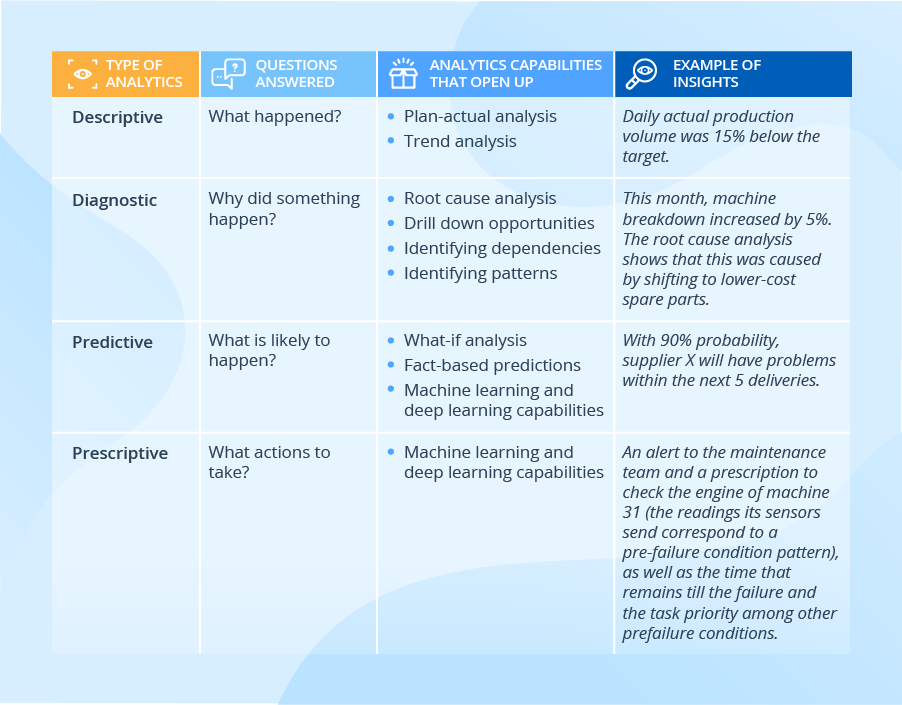
Our BI team also highlights that with the help of a BI solution, manufacturers can analyze both traditional and big data and benefit from all analytics types, including advanced ones. The table below shows more details of how a certain analytics type can contribute to fact-based decision-making:
Providing insights tailored to users
With the following 3 aspects of BI implementation considered, every employee, be they line workers or top managers, can get the insights they require in a convenient and timely manner:
Dashboards and reports tailored to different user roles
Line supervisors will make use of such KPIs as throughput, yield, and capacity utilization, for the lines they manage. In their turn, plant managers will analyze these values aggregated for all the production lines (with the possibility to drill down to individual lines if required). And top management will benefit from seeing these KPIs aggregated to the level of plants and regions.
Predefined reports and self-service analytics
With an intuitive self-service analysis and visualization tool, users can drill down to the data in search of insights, with no involvement from the IT or the data analytics department. For example, a sales manager can open a predefined report depicting total sales and easily drill down to the sales by product category in a few clicks. And this demo shows how a business user can perform root cause analysis within a couple of minutes.
Historical reports and real-time analytics, including alerts
A BI solution should also meet users’ expectations of the speed of delivering insights. For example, the purchasing department would be fine to get a weekly report on the machinery parts that most frequently go out of order and use this info to adjust the purchasing of spare parts accordingly. And when it comes to a machinery breakdown or a pre-failure condition, real-time analytics is required for a maintenance team, which should be immediately alerted to avoid or, at least, minimize equipment downtime.
So, should we expect BI adoption growth in manufacturing in the future?
We strongly believe that manufacturing will catch up with the current leading industries in BI adoption. Manufacturers just cannot stay aside and miss the opportunities that BI brings thanks to integrated data, rich analysis options, and insights tailored to users. This is especially important when manufacturers serve multiple markets, manage complicated supply chains, and set up transparent, controllable and manageable production processes.
With the arrival of Amazon’s Fallout TV series last week came the dropping of another bombshell: the possible truth behind a mystery that’s gone unanswered in the video games for over 25 years. Before you read on, please bear in mind that spoilers for the Fallout TV show’s season one finale follow!
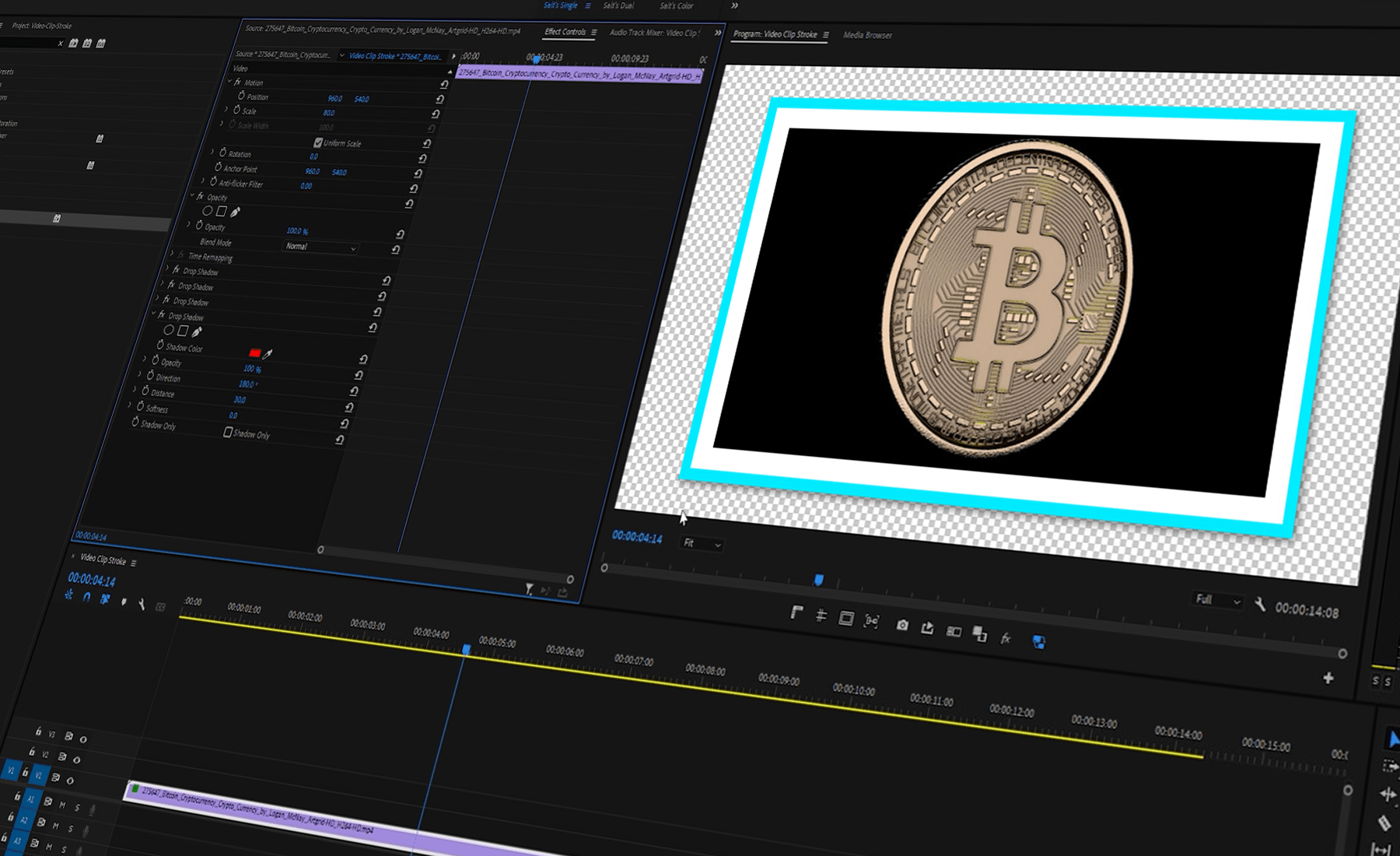
The work around might have a few steps and not be as easily editable as adding strokes in Photoshop or After Effects, but it is possible to add a stroke to video clips in Premiere Pro and DaVinci Resolve. To do so, we utilize four duplicates of the drop shadow effect in a very specific way. Crank the opacity to 100%, change the direction of each effect to either 0, 90, 180, or 270 degrees, and then adjust the softness, distance, and color to taste.
Same Method, Different Program
I’m a big fan of DaVinci Resolve and this post was honestly inspired by a need to create these borders inside of that program. Using the same method from Premiere Pro yields the same colorful border results in Resolve.
VS Code Day is our annual event where you’ll learn how to elevate your development workflow with the latest and greatest features of Visual Studio Code. This year, we’ll have a big focus on AI but not limited to just that. You’ll hear from the VS Code team and other industry experts on topics like AI-powered programming with GitHub Copilot, building and deploying generative AI apps to the cloud, enhancing the C# development experience, and more!
Expect to gain insights into the tools and practices shaping the future of coding, connect via Q&A’s with pioneers and peers, and find inspiration to tackle your next project.
Hosted by Senior Developer Advocates Reynald Adolphe and Gwyneth Peña-Siguenza, this event is for developers seeking to get the most out of VS Code to increase productivity and learn about its new features including those related to AI.
A Two-Day Event!
VS Code Day will be a 2-day event full of fun and learning. On the first day, join a preshow where Sonny Sangha will show you how to build a LinkedIn clone with Azure in 3–4 hours. On the second day, attend the main event of 5 hours, where you will learn from various speakers about VS Code and its features.
Day 1 – VS Code Day Preshow: Building a LinkedIn Clone with Azure
We’ll guide you through building a clone of LinkedIn.com. This session isn’t just about building an app; it’s a deep dive into using Microsoft Azure, GitHub Copilot, Cosmos DB, and TypeScript to craft robust, scalable web applications.
Sonny Sangha (@SonnySangha), also known as PAPA React, has built one of the largest developer communities on YouTube with over 250,000+ Subscribers. With this he’s grown his flagship course and community: Zero to Full Stack Hero to over 1000+ members. He is on a journey to bring more developers into coding while keeping things fun & engaging!
Day 2 – VS Code Day: Main Event
About the hosts
Host
Reynald Adolphe (@ReynaldAdolphe) comes from a background specializing in education, consulting and full stack development. He’s currently an advocate at Microsoft for the VS Code team. He’s also a speaker, personal technology coach helping programmers build their brand/career to the next level. You can follow him on his YouTube channel.
Gwyn (@madebygps) is a Senior Cloud Advocate at Microsoft focused on Azure developer tools, founder of LearnToCloud and YouTuber, blending her dedication to technology with a passion and commitment for community. Beyond tech, Gwyn enjoys video games, time with loved ones, and mint chocolate chip ice cream.
Make the most of your event
Bookmark the Channels: Subscribe to VS Code & Sonny’s channel hosting the event to get real-time updates.
Schedule Smart: With a packed agenda, plan ahead to catch live sessions or set aside time for replays.
Engage and Interact: Use this opportunity to engage with the community. Share your thoughts, ask questions, and make connections.
Register for the VS Code Day Skills Challenge! Kickstart or pivot your career with our program focused on VS Code and GitHub Copilot, covering areas like Data Science and Artificial Intelligence. Enjoy simple lessons, practical exercises, and live workshops to explore the latest in VS Code. Register at https://aka.ms/VSCodeDayChallenge!
So, get ready for two days filled with learning and discovery. VS Code Day is your portal to the latest in development, packed with sessions to inspire and challenge you. We can’t wait to see you there!
Tesla management told employees Monday that the recent layoffs — which gutted some departments by 20% and even hit high performers — were largely due to poor financial performance, a source familiar with the matter told TechCrunch.
The layoffs were announced to staff just a week before Tesla is scheduled to report its first-quarter earnings. The move comes as Tesla has seen its profit margin narrow over the past several quarters, the result of an EV price war that has persisted for at least a year. The company delivered a record 1.81 million vehicles in 2023. Its margins, however, took a hit after Tesla repeatedly slashed prices in a bid to drum up sales and undercut the competition.
Tesla informed employees that more than 10%, or about 14,000 workers, will be laid off across the global organization that has operations in the United States, Europe and China. In a regulatory filing, Tesla referred to the l layoffs as a “company-wide restructuring.” The layoffs, which affected employees across all departments and seniority levels, were made to reduce costs and increase productivity to prepare for its “next phase of growth,” according to an internal email from CEO Elon Musk that TechCrunch has viewed.
High performers also cut
Many of the laid-off employees were high performers, according to two sources who spoke to TechCrunch on condition of anonymity. One source expressed shock at the number of talented employees cut and noted that many of those affected were working on projects that have fallen lower on Tesla’s priority list. The source declined to specify which projects.
Some departments saw layoffs beyond the 10% outlined in the companywide email, according to sources. One manager told TechCrunch that 20% of their employees were cut.
“I lost 20% of my team, some really good players too,” they said.
The shakeup also comes as Musk continues to bend the company’s trajectory toward building fully self-driving cars. Tesla recently dropped plans to build a lower-cost EV that would retail starting at around $25,000, opting instead to use the underlying platform being developed to power an alleged robotaxi that Musk said will debut August 8.
Musk previously tried to prioritize the dedicated robotaxi vehicle project, according to his biographer, Walter Isaacson. In 2022, he told employees that he wanted a “clean robotaxi” with no steering wheel or pedals. Tesla lead designer Franz von Holzhausen and engineering VP Lars Moravy kept running the low-cost EV project in secret and eventually convinced him to make both — that is, until last week when it was reported that Musk changed his mind.
Top execs leave
Two high-profile executives — Drew Baglino, Tesla’s SVP of Powertrain and Energy, and Rohan Patel, VP of Public Policy and Business Development — also left the company.
Patel told TechCrunch he decided Sunday evening to leave Tesla because of “[b]ig overall changes” at the company. Patel, who had been engaging regularly with Tesla customers and fans on X in recent months, declined to be specific. He noted in a message that it would be “Better for me not to speculate.” “Tesla is going to be stronger than ever, and change is good,” he added.
Baglino told TechCrunch that after 18 years it was time to leave Tesla. “I feel good about the impact I’ve been able to achieve, my leadership team is strong, the energy businesses I’m responsible for are doing well, etc.,” he wrote in a message to TechCrunch.
“Baglino was in charge of powerdrives and new battery projects, and there’s a sense that there isn’t a whole lot of innovation that’s sustainable at this point, which is probably why Baglino is leaving,” Sandeep Rao, head of research at London-based financial services company Leverage Shares, theorized in an interview with TechCrunch.
Baglino’s departure comes just a few months after Tesla’s previous CFO, Zachary Kirkhorn, stepped down. In January, Musk posted on X, formerly Twitter, that he would want to have around 25% voting control of Tesla in order to focus more fully on the company, rather than on his other companies, and help the EV-maker become a leader in AI and robotics.
This article was updated to include information from a regulatory filing that refers to the layoffs as a “restructuring.”
Have you ever thought of buying and flipping a website? Or maybe even build your own?
Well, we interviewed Jared Bauman and he successfully does all three! Read on for the inside scoop of how to get started, what to look for when purchasing a website and how to not get scammed throughout the process.
Jared shares all you need to know about flipping websites and how anyone can do it. Enjoy!
1. Can you tell us a little bit about yourself and what inspired you to start your business?
My name is Jared Bauman, CEO and Co-Founder of 201 Creative, LLC. I have a 20+ year entrepreneurial career. I majored in Management Science from the University of California, San Diego, and have extensive experience in business management and digital marketing. Beyond that, my career has been a testament to my passion for helping businesses grow.
My journey began with founding Bauman Photographers during college, a venture that taught me the significance of customer focus and innovative business models. I ran that company for 12 years, and then sold it to dedicate myself entirely to ShootDotEdit, another company I had co-founded. I ended up exiting that business as well, and now run my digital marketing agency 201 Creative.
The inspiration to start 201 Creative stemmed from my desire to leverage my expertise in SEO, marketing, and business strategy to assist companies in enhancing their digital presence and achieving substantial growth.
I am also the host of the popular Niche Pursuits podcast, and blog/email about my experiences growing brands and websites at Weekend Growth.
2. How do you know when a website is worth purchasing? What are some of the criteria you look for?
I gauge a website’s potential by many critical factors, including its total traffic, traffic sources, traffic quality, revenue consistency, growth potential, niche competitiveness, and SEO strength. I prioritize websites with a solid track record of organic traffic, a loyal audience, and scalability. Analyzing financials for steady earnings and diversification of income streams also plays a crucial role in the decision-making process.
3. Could you walk us through the steps you took in creating Creative 201 and start building websites?
Balancing the workload in a digital marketing agency can be quite the juggling act. We’ve got a unique approach that keeps our team both busy and engaged, no matter the season.
Here’s the approach: The inner workings of agency work can be a rollercoaster. Some months, our content team swamped (for example); others, it feels like they’re fishing for things to do. Early on, we hit upon a strategy that turned this challenge into an opportunity. Instead of seeing downtime as a problem, we saw it as a chance to dive into our own projects—building and growing niche websites.
This move was a game-changer for us. It meant our team stayed sharp, engaged, and, most importantly, employed all year round. These internal projects weren’t just busy work. They became our playground for testing new SEO strategies and marketing ideas in real-time. What worked became gold for our client’s projects. It’s like having our cake and eating it too — our team gets to experiment, learn, and apply these insights directly to client work.
Plus, these “niche sites” turned into a good side revenue stream. They help smooth out the financial ups and downs that come with agency life. It’s been a win-win for us. Our team gets a variety of projects to sink their teeth into, and the agency grows both its client and internal portfolios.
Managing this dual focus takes some nimble planning and a knack for timing. We’re constantly assessing where the team’s efforts are needed most and shifting our focus accordingly. This flexibility keeps us on our toes and ensures that we’re always moving forward, whether it’s pushing client projects to new heights or growing our collection of niche sites.
4. What is the most common mistake you see when people are trying to get into this business?
For starting an agency, the most common mistake is not being able to manage the dual needs: client and team. On the client side, deliverables each and every month will change constantly, as do your overall client base. And then on the team side, you have to equally balance the intricacies of executing the varying deliverables. All of this is like a complicated and ever-changing puzzle.
For building websites on their own, the most common mistake is underestimating the importance of due diligence. Many newcomers focus solely on surface-level metrics like current revenue or traffic without assessing the website’s long-term viability, SEO health, or legal entanglements. This lack of thorough evaluation can lead to significant challenges post-purchase OR well along into the build phase.
5. After purchasing a website, how can someone make sure to keep the existing audience for a website loyal? Do have any advice?
Get out in front of it. Be honest about the transaction with the audience. Be the first to recognize that things will be different going forward but that’s not necessarily bad. Consistently show your face, become a part of the community. Go to conferences and other places that the audience hangs out in.
That is what I did when I purchased one website in particular. I believe it helped smooth the transition.
6. If you want to make big changes, how would you recommend someone do that without losing the current audience?
When implementing significant changes, communication and gradual implementation are crucial. Start by sharing your vision and upcoming changes with your audience, highlighting how these changes will benefit them. Implement changes in phases, soliciting feedback at each step. This approach not only minimizes resistance but also fosters a sense of community and inclusion.
7. What are your favorite ways to find websites to purchase?
I rely on a mix of website marketplaces, brokerages, and personal networks.
Marketplaces and brokerages are a great place to start, as there is a level of due diligence that they do before they publish a site to their marketplace. Some do it better than others, and it’s never enough to fully rely on. But it’s a good first pass.
Nowadays, most of my purchases come from my network. Granted, I’ve spent a lot of time building that up, but it’s a different type of transaction that I do prefer in the end.
To that point, staying active in relevant online communities can provide these types of leads on potential acquisitions. It’s about keeping a pulse on the market and identifying opportunities that align with our strategic goals.
8. How common is scamming in this area? Do you have any tips on how to avoid this?
Unfortunately, scamming is not uncommon. To mitigate risks, it’s essential to conduct thorough due diligence, verify all financials through independent audits, and use escrow services for transactions. Building relationships with reputable brokers and seeking legal advice when necessary can also protect your interests. Never trust anything at face value.
9. How much do you earn with your business?
I prefer to keep revenue details for the agency private, but I can say that 201 Creative is a low seven figure a year agency for revenue.
Our side hustles and websites make up a small percentage of that, but I share more financial information about those to encourage people. For example:
I share other case studies but those are a few highlights from 2023.
10. How do you know how much to pay for a website?
From a high level, the going rate for a content or affiliate website is 30-35x monthly profit. SAAS and e-commerce websites are often valued higher.
Valuing a website involves analyzing its revenue multiples, traffic trends, SEO rankings, niche competitiveness, and growth potential. I also consider the operational costs and the investments needed for future growth.
11. How can someone protect themselves when purchasing a website?
A combination of thorough due diligence, legal contracts, and secure payment methods. It’s also wise to engage with professionals, such as lawyers and accountants, who can provide expert guidance throughout the purchase process. They’ll be able to help you understand if something “looks weird”.
12. Do you have any products or services you sell?
201 Creative offers a range of SEO marketing services designed to increase sales, ROI, and lead generation for our clients. Our services include technical website audits, content strategy plans, link building, content creation, and comprehensive SEO strategies tailored to each client’s unique needs.
Weekend Growth is more catered towards bloggers, and offers website reviews, consulting, and a course to help content creators produce high quality photos for their website.
13. What is your vision for the future growth and development of your business?
Online marketing is at quite the crossroads, with the future of search hanging in the balance as AI, UGC, and other factors continue to change the landscape of how users interact with the web for information.
Luckily, I’m at the forefront of these changes. Between being involved with dozens of clients and their brands, to hosting a twice weekly podcast that discusses these changes, I’m on-the-ground for where we are going in online marketing.
I’m excited to continue to help brands and bloggers grow their online presence, while successfully navigating all of the online changes that we are living.
14. How can others find you- as we are all fans of you now?
Haha, sure thing. I’m active on Twitter, but the best place to get my content is through my weekly newsletter (free). If you’re a blogger who is interested in more help, you can find me at Weekend Growth. And businesses in need of online marketing and SEO help can learn more at 201 Creative. Thanks for having me!
Wow! That is pretty awesome. Thank you so much Jared for sharing all of this with us. Make sure to join his FREE weekly newsletter for more tips and tricks!