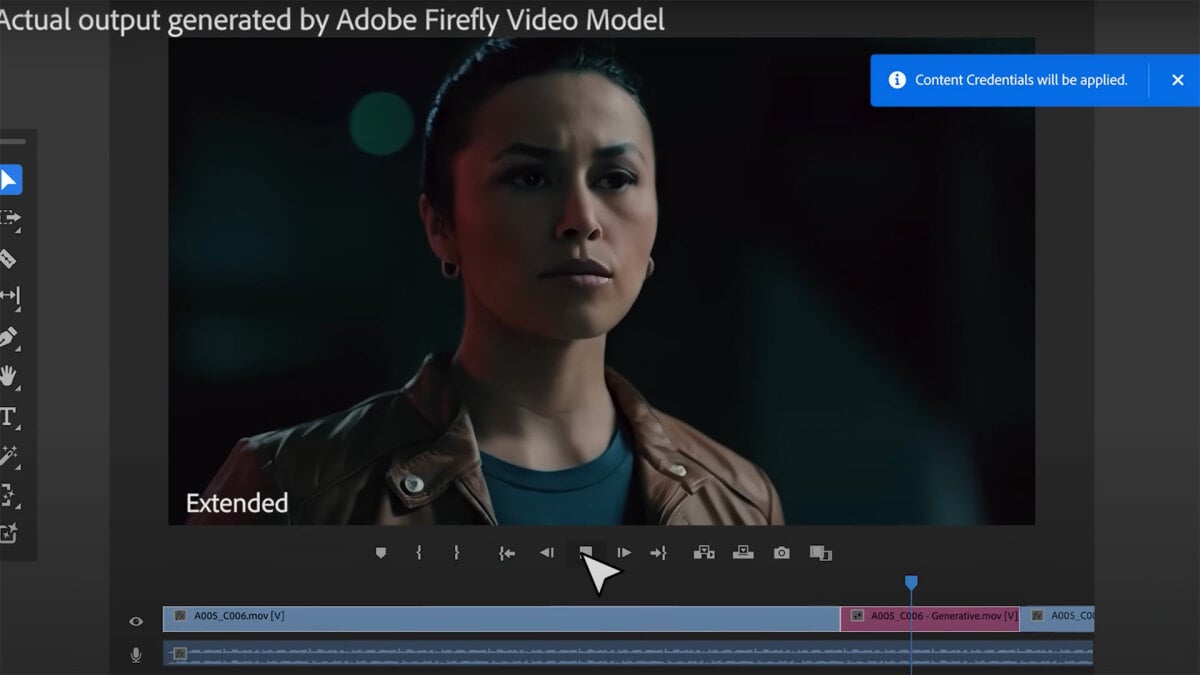
Oh, you thought the possibilities of generative AI were already terrifying enough? Well, we’ve got some bad news for you. Adobe has just released a video showcasing its Adobe Firefly video model, and it comes with a whole host of unnerving generative AI tricks.
“Adobe is using the power of generative AI to deliver the most advanced and precise editing tools ever in Premiere Pro,” says the cheerful over-the-top narration, before showcasing how AI will soon be used to generate objects that weren’t there before, delete unwanted objects, extend scenes and create generated backdrops.
The video stresses that “content credentials” will “always make transparent whether AI was used”, but obviously that only goes so far as the Adobe programme itself. With streamers and movies already coming under fire for sneaking AI into their final products, it seems inevitable that advancing technology like this is only going to make it harder and harder to tell what’s real on our screens.
In a tech-driven world, the efficiency of a business relies heavily on its computer systems. Whether you operate a small startup or manage a large corporation, investing in a professional computer setup can yield numerous benefits for your organization. In this blog, we’ll explore the advantages of computer setup for all types of businesses and industries.
Enhanced Performance and Productivity
A professional computer setup ensures that your employees have access to high-performance hardware and up-to-date software. This, in turn, leads to faster processing speeds, reduced downtime, and increased productivity. Employees can complete tasks more efficiently, allowing the business to operate smoothly and meet deadlines effectively.
Optimized Workflows
Tailoring your computer setup to your specific business needs can lead to optimized workflows. Customized software solutions, configured to streamline your processes, can result in a more cohesive and efficient work environment. This is especially crucial for industries with complex and specialized tasks.
Data Security and Privacy
Protecting sensitive data is a top priority for businesses in any industry. A professional computer setup includes robust security measures such as firewalls, antivirus software, and regular data backups. This helps safeguard your business against potential cyber threats, ensuring the privacy and integrity of your valuable information.
Scalability and Future-Proofing
As your business grows, so should your computer infrastructure. Investing in a professional setup allows for scalability, making it easier to expand your systems to accommodate increased workloads. Additionally, future-proofing your technology means staying ahead of the curve with the latest advancements, ensuring that your business remains competitive.
Collaboration and Communication
Effective communication and collaboration are essential for the success of any business. A professional computer setup often includes collaborative tools, communication platforms, and video conferencing solutions. These technologies facilitate seamless interactions among team members, regardless of their physical locations.
Customer Satisfaction
In industries where customer interaction is paramount, a professional computer setup can contribute to enhanced customer satisfaction. Efficient customer relationship management (CRM) systems, quick response times, and personalized service can all be achieved through a well-designed computer infrastructure.
Overall, investing in a professional computer setup all types of businesses and industries is very beneficial. Contact us at PC Geeks and learn more about our professional computer services. By prioritizing the efficiency of your computer systems, you position your business for sustained growth and competitiveness in today’s dynamic business landscape.
March 20, 2024: Nvidia, the US chipmaker with a market value of over $2 trillion, has extended its lead in the artificial intelligence sector with the announcement of several groundbreaking technologies at its annual developer conference on Monday.
The company unveiled the “Blackwell” series of AI chips, designed to power the expensive datacentres that train cutting-edge AI models such as the latest generations of GPT, Claude, and Gemini.
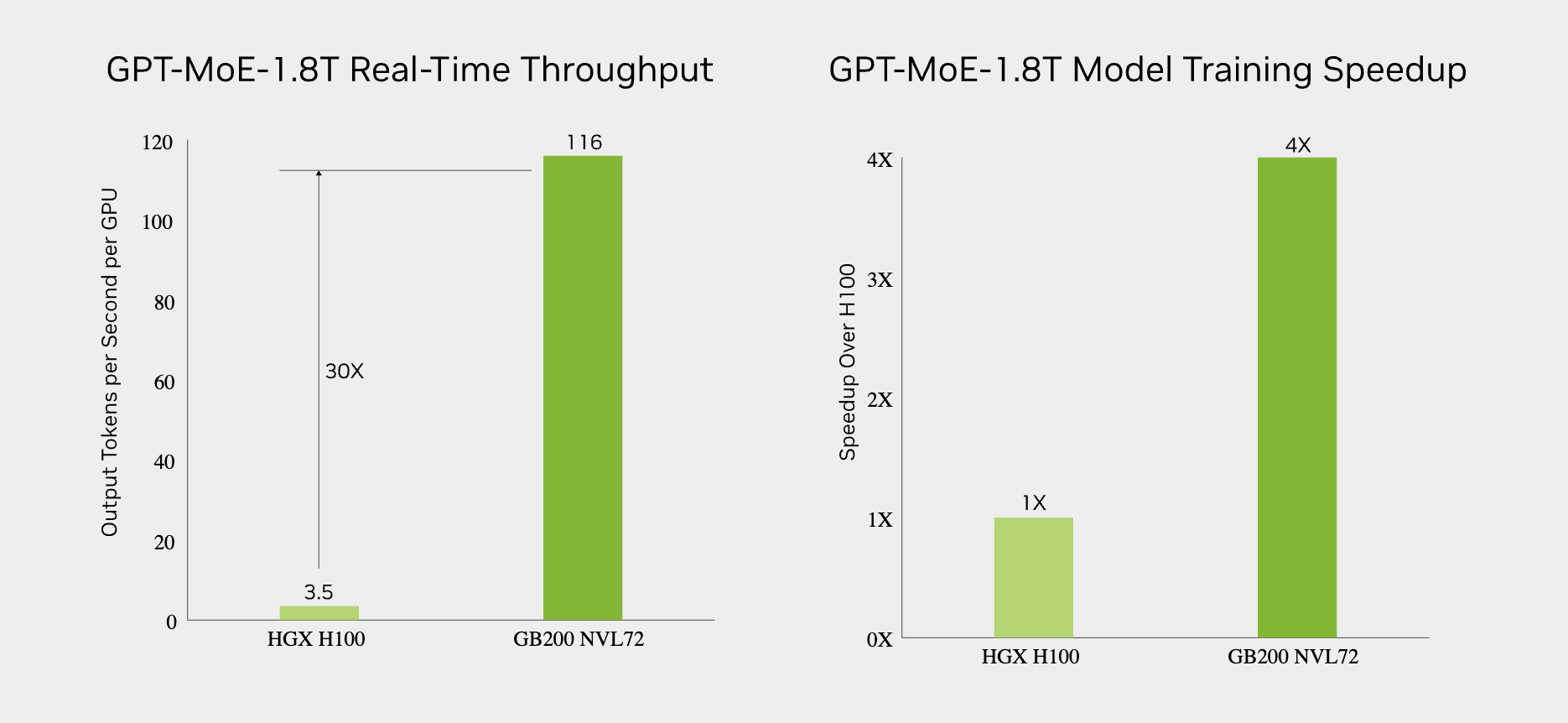
The Blackwell B200 chip is a significant upgrade over Nvidia’s previous H100 AI chip, reducing the number of chips and power required to train a massive AI model like GPT-4 by 75%.
The company also introduced the GB200 “superchip,” which combines two B200 chips and Nvidia’s Grace CPU on a single board, offering “30x the performance” for server farms that run chatbots like Claude or ChatGPT, while reducing energy consumption by up to 25 times.
LLM inference and energy efficiency
Nvidia CEO Jensen Huang showcased even larger configurations, such as the GB200 NVL72, a single server rack with 72 B200 chips connected by nearly two miles of cabling, and the DGX Superpod, which combines eight of these racks into a shipping-container-sized AI datacentre in a box.
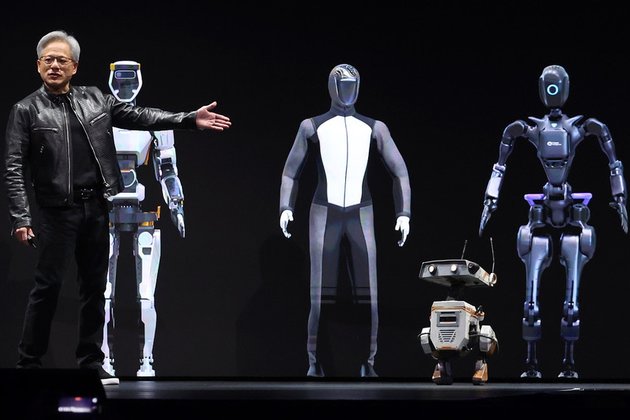
In addition to the new AI chips, Nvidia announced Project GR00T, a foundation model for controlling humanoid robots.
This model, paired with the Jetson Thor system-on-a-chip, aims to create autonomous machines that can be instructed using natural language to carry out general tasks, even those they haven’t been specifically trained for.
“Project GR00T will help robots understand natural language and emulate movements by observing human actions – quickly learning coordination, dexterity, and other skills in order to navigate, adapt, and interact with the real world,” Huang explained.
Nvidia also entered the quantum computing sector with the introduction of a cloud service that uses its AI chips to simulate quantum computers.
While the service will not initially be connected to a real quantum computer, it will allow researchers to test their ideas without the expense of accessing rare and costly quantum hardware.
In the future, Nvidia plans to provide access to third-party quantum computers through the platform.
As Nvidia continues to push the boundaries of artificial intelligence and robotics, the company’s latest innovations showcase its commitment to leading the industry and shaping the future of these transformative technologies.
To start today, I want to thank everyone who joined and has been participating in the CAD Support Community/Forum! we had some new members join over the last few days and I couldn’t be more excited for the group to grow and answer all of your CAD related questions!
It’s been awesome to meet everyone and looking forward to meeting/welcoming more of you in the coming weeks/months.
If you haven’t had a chance to take a look or you missed out on the initial announcement or want to learn more, you can check out this link here (http://cadintentions.com/cadsupport) to get all the info and join the current enrollment which I’ll keep open for a bit longer since I’ve had a few more questions come in through email.
If you had any questions about the CAD Support group please let me know how I can help!
XREFs are the building blocks of almost all AutoCAD drawings, particularly production drawings as they become more detailed and complicated. Xrefs allow use to keep track of different elements of the drawing and ensure everything stays up to date.
Using and understanding xrefs (External references) is not only helpful but typically a necessity of creating a complete drawing.
Not only do they help keep our drawings organized, but they also help to keep file sizes smaller and drawings easier to work on in teams.
In this week’s video, I wanted to go over a bit of everything XREFs.
How xrefs work in AutoCAD?
What an xref or external reference is?
Along with some great tips & tricks to save you time when working with them!
Once again, if you haven’t had a chance to take a look or want to learn more, you can check out this link here (http://cadintentions.com/cadsupport) to get all the info and join now!
That’s all for today, I hope you were able to take something away from the tutorial, and if you have any questions be sure to leave a comment below or reach out on Twitter @cadintentions.
As always, thank you so much for reading, I am excited to be back and posting regularly on the blog and hope you all will follow along.
Cheers, and happy Drafting!
PS. If you liked today’s video or any of my videos/tutorials and you want to learn over 15 years of AutoCAD Tips & Tricks in a hurry, you can use this link to get my AutoCAD Fundamentals Course and join 100’s of fellow drafters/designers and get started right now!
The following two tabs change content below.
Brandon is a Civil Designer, Aspiring Blogger/Creator, Husband, Father to two Amazing Kids and Tech Aficionado from a small town in Canada. He has been obsessed with design and technology since he can remember and working as a Civil Designer for nearly as long. Brandon’s blog and Youtube channel, CADIntentions.com has been his outlet and excuse for keeping up with new tech and trends in the CAD design world for the last 10 years growing to more than 60,000 subscribers and over 15,000,000 views, while also being the source of many great friendships and unique opportunities.
If you would like to Sponsor CAD Intentions or Work together in some way, Please visit my About Page and send me an email: http://cadintentions.com/about-me/
In our previous blog, we discussed the advantages of implementing AI for businesses. Now it’s time to discuss leveraging AI for Ecommerce marketing in various ways.
AI-driven marketing is a well-accepted mandate for businesses who are digital. According to SalesForce, 84% percent of marketers today are reported to be using AI, a 186% increase in adoption since 2018. So much that AI is being introduced in different forms at different stages of the marketing funnel. There is AI generated content for scaling content generation and SEO ranking as well as advanced AI-powered marketing analytics to target and retain customers .
The need for Hyper-Personalization in 2022
According to a report by McKinsey, over 70% of modern consumers want businesses to deliver personalized experiences to them, and personalization generates 40% more revenue for fast-growing businesses.
This is because customer churn rates, and acquisition rates are also incredibly higher for the businesses who haven’t leveraged AI analytics for enhanced consumer experience, thereby making a strong case for relevant product recommendations using Machine Learning capabilities.
This is where Amazon has excelled over all its competitors with their flagship ecommerce store that provides every user with a tailored experience the moment they enter the app or website (based on their interests and past shopping behavior). Plus, 35% of Amazon’s revenue is generated by its advanced recommendation engine.
No business has to be Amazon to make hyper-personalization work for them but it is crucial that they adopt modern analytics strategy and solutions to aid with fast growth and industry competition.
According to IMARC, a leading market research company, the global e-commerce market reached a value of US$ 13 Trillion in 2021. To penetrate faster and enjoy a good market share would require resolving the most depressing eCommerce challenges like conversions, high customer acquisition costs, high churn rates, among many others. Customer Retention will matter more than ever before.
Customer Sentiment Analysis
The first step is to be prepared, to know your target segment in and out. This helps with audience research, identifying opportunities and scope for improvement for all your products. Customer Sentiment Analysis uses Natural Language Processing (NLP) to scan across the internet and identify customer’s perception and sentiment towards the brand.
Brands use Customer Sentiment Analysis to build new products, improve existing services, audience research, and build better content around their audience. For a more in-depth understanding of how it works, you can read our blog on customer sentiment analysis, here.
AI-powered Recommendation System
We have reasons to believe that in 2023, the demand for real-time hyper personalization may grow exponentially. A result of increasing customer expectations and trend shifts in buying behavior. There are plenty of ways to implement real-time hyper personalization for your business.
The traditional recommendation systems that many e-commerce sites use still rely on collaborative filtering techniques, which use streams of historical customer data to deliver the recommendations. This process is however slowly moving out of trend and being replaced by real-time personalized recommendation engines thanks to the recent developments in the field of AI.
An AI chatbot is another good example of real-time hyper-personalization where AI enables real-time interaction with multiple users, providing them fast, and reliable communication from the brand. This results in increased customer satisfaction and retention.
Dynamic Pricing
Plenty of Ecommerce businesses exploit dynamic pricing techniques that align with their sales strategy. Hospitality, and transport sectors also take advantage of the same. Dynamic pricing is the concept of selling the same product at different price points in response to the shifting market conditions. The process enables businesses to instantly and continually change the prices of their products in real-time. This is why it is also called real-time pricing and is widely used in logistics, the industry most affected by volatile market conditions.
Dynamic pricing is used to strategically sell to different kinds of customers, especially by seasonal planning (holiday pricing, surge in demand pricing etc.), and by product life-cycle. This enables profit maximization and wider market access for the business.
Conclusion
There is a debate that simply refuses to die out. That robots and AI will be responsible for taking over this world. There is a long way to go to ascertain such theories, however, today, AI is somewhat responsible for slowly altering the changing consumer behavior trends taking place globally. Dynamic pricing, hyper-personalization by targeted offers, product recommendations, virtual assistants, chatbots, and other means are definitely working in favor of many organizations. It is in the best interest of e-commerce companies to invest in AI early and stay ahead of the fast-changing trends.
Keanu Reeves is joining the cast of Sonic the Hedgehog 3, according to a report by The Hollywood Reporter (and first broken by The John Campea Show). The outlet’s sources report that the John Wick and Matrix star is voicing Shadow the Hedgehog.
Sonic the Hedgehog 3 is set to premiere on December 20 and will pit Shadow alongside a returning Dr. Robotnik (played by Jim Carrey) against Sonic, Tails, and Knuckles. The returning cast includes Ben Schwartz, Idris Elba, James Marsden, and Colleen O’Shaughnessey. The film’s first trailer premiered in front of a select audience at Cinemacon in Las Vegas last week and it provided the first real look at Shadow. Unfortunately, the trailer has yet to be publically released.
Paramount has yet to officially confirm Reeves’ casting, but if this is true, he will join fellow new cast members, including Krysten Ritter, Alyla Browne, James Wolk, Sofia Pernas, Cristo Fernández, and Jorma Taccone. Shadow’s debut was teased at the end of Sonic the Hedgehog 2, but his voice performer has been a tantalizing mystery since the third film was announced in August 2022.
Meanwhile, the standalone Knuckles series premieres on Paramount Plus on April 26. You can watch the first full-length trailer for that here.
Discover how Teradek’s Reliable Transport (TRT) is transforming live video streaming with near real-time delivery and ultra-low latency over LAN, WAN, and bonded networks. Learn about TRT’s dynamic adaptation, superior quality, and applications in broadcasting, sports, news, and remote collaboration.
In this article by Matthew Allard for NewsShooter, explore how Teradek Reliable Transport (TRT) is making waves in the world of live video streaming. TRT offers near real-time delivery and ultra-low latency over LAN, WAN, and bonded networks, revolutionizing video production and broadcasting workflows with its cutting-edge features and benefits.
With TRT boasting latency as low as 4 frames, broadcasters, government agencies, enterprises, and other users can monitor, produce, and engage with video content instantly, enhancing efficiency and responsiveness. TRT’s dynamic adjustment capabilities optimize stream buffer size and forward error correction, ensuring seamless real-time delivery without compromising quality, even across diverse network environments.
Beyond traditional broadcasting, TRT shines in sports and news environments, providing video crews with reliable, real-time video contribution from virtually any location over bonded networks. Its two-way video communication functionality offers superior quality, making it an ideal choice for high-quality interviews and remote collaboration, akin to a broadcast-quality alternative to platforms like Zoom.
For those eager to leverage TRT’s capabilities, it’s available now on all Prism products. Teradek offers a comprehensive Reference Guide to facilitate seamless integration and utilization, empowering users to harness the power of TRT for their live video streaming needs.
Discover how Teradek’s Reliable Transport is reshaping the landscape of live video streaming, offering enhanced reliability, low latency, and superior quality across various network infrastructures. Stay ahead of the curve with TRT and unlock new possibilities in video production and broadcasting.
Read the full article by Matthew Allard for NewsShooter HERE
I was trying to debug using visual studio. It does opened a new tab on my browser but nothing came up (I saw that it was still loading). On output window in visual studio:
EventSource Error: ERROR: Exception during EventCounter cpu-usage metricProvider callback: Attempted to divide by zero.
The thread '[Thread Destroyed]' (13472) has exited with code 0 (0x0).
This went about several times. Until the debug stopped prematurely and at the end of the output window was:
The program '[9144] iisexpress.exe' has exited with code 0 (0x0).
When I check the new tab, it shows an error
HTTP Error 500.37 - ASP.NET Core app failed to start within startup time limit
As a side note, my memory was on 96%. I tried to lower it but it showed the same result.
BitLife – Life Simulator is a unique mobile game that is becoming more and more popular with each day that passes. Compared to the previous year, the reason people are more obsessed with the 2024 version, is its minigames. BitLife, being a game full of many puzzle games, will keep the players involved for hours.
The mini-game demands gamers to prison break from every single one of the game’s prisons. If you have acquired BitLife fondly, you, for sure, know that it is pretty much challenging to escape prison in the game, so many users keep asking questions as to how to escape the prison by solving these tricky trap puzzles.
Picture: Candywriter LLC, Moana Games
There are three types of jails in BitLife, arranged according to difficulty ranges. Hence the floor plan varies. If you are in lower or medium jails, BitLife, it is very easy to escape, but on the other hand, minimum security prisons will require you to work at all costs to escape.
For instance, consider you are in prison and trying to escape from there, then there will be certain offences added to your present sentence and you will have to spend more years in prison with felonies of attempted escape. Therefore, try it just when you are completely ready since you do not want to be in the position of facing unexpected situations or challenges.
How to Escape Prison In Bitlife 2024 – A Guide
Picture: Candywriter LLC, Moana Games
There are minigames that you can skip, with little to no consequences other than having to endure another year in the in-game prison. In jail maps, Expensive prisons are designed in a much more complex way with escape routes whereas smaller prisons have the basic plumbing and escape routes. Being in the same cell as the other inmates, there are both new puzzles and old ones. An officer or guard looking for escapees will most likely put the prisoners in a maximum-security prison.
As for the main part, there is a security officer on the chessboard and he will make two moves for any move you make. Not only does he face the opposite direction on the board but he actually moves two squares in either direction and they are the moves that go diagonally towards your square and start horizontally second.
The prison guard can pump some time into your sentence by snapping you while you are escaping, and further years will be added if they catch you trying run-away.
The trick here is to lock the security guard in so that his movement is limited and permits you to evade prison Beatlife. There will be three side door options in Bitlife Prison beside your cage so you can eventually find an escape. If the wall prevents the rook’s move in the move set, the side that is checked will not pose a threat to the current movement in the prison map layout.
If Our Characters Fail to Escape, then What is the Outcome?
Picture: Candywriter LLC, Moana Games
The player will be playing a game where they can stop the game by not taking part in a minigame that starts when the game starts. If the player is bold and attempts to flee from the room, they have to beat through the guard and get through the exit.
As the escape attempt fails and a guard catches the player or the player, being optionally able to surrender at any moment of even the first step toward freedom, they are shoved back into their cell, only this time with a longer sentence on their file due to the new felony charge for “Attempted escape” or other serious crimes.
If the player succeeds, it is by regaining his liberties, including the possibility of winning Houdini ribbons as a special achievement. In addition, even though they may find themselves well within the legal bounds of employment in a job, they might be handicapped from holding down another job due to their record of misconduct.
Leaving illegally to another country, the character is an escape-convict, there will be no crime tracked until the person returns back to the original town. Keep up with the official sites for more information on prison maps, prison layout, prison riots, paroles, jailbreaks and other achievements.
Remote work and entrepreneurship have turned homes into workplaces, which has advantages. However, sometimes, you must make adjustments to maximize your potential, including your lights.
Many homes have ambient lighting that includes overhead or recessed lights. However, they are not designed for functional lighting in the home office. The type, character, and lighting quality can affect your drive and productivity. Artificial lights are even more critical when considering workspace illumination if you don’t have much natural light.
Here are things to consider when revamping your home workspace with the proper lighting.
Understanding Color Temperature
Color temperature plays a critical role in setting the right mood. We measure light color temperature in Kelvins (K), a unit of absolute temperature. Generally, the higher the Kelvin, the whiter the light. A bulb’s Kelvin rating will determine the approximate hue it will provide. The description below also identifies the suitable fixture for each area based on the color temperature:
Below 2000K: Exudes a dim glow similar to candlelight; ideal for low-light areas, like an altar.
2000K-3000K: Exudes a soft yellow glow; ideal for most rooms in the home, including the bedrooms, living room, and outdoor areas.
3100K-4500K: Exudes a bright, white light; ideal for kitchens, home offices, other work areas, and anywhere requiring task lighting.
4600K-6500K: Exudes a bright, blue-white light, similar to daylight; ideal for display areas and work spaces requiring high illumination.
6500K and up: Exudes a bright bluish light, often found in commercial locations; ideal for task lighting.
Most household fixtures are warm to mid-cool (2700K to 3500K). Color temperatures over 3500K are typically used for commercial applications because the light has a bluish daylight cast that can seem harsh for home interiors. You may want task lighting at 4000K and above. When selecting ceiling lighting for your home or project, consider its color temperature to ensure the best outcome.
Light Revamping Tips
Your lighting strategy will depend on many factors, including your work and existing infrastructure. For example, it will be much easier to put designer ceiling lights if you already have wiring for it. However, there are general tips you should follow when revamping your home business space.
Use Natural Light
Let’s discuss finding the golden middle ground between natural and artificial office lighting. In a perfect world, you’re nestled in a cozy nook where sunshine constantly streams in. But the reality is that you will need artificial light sources at some point. The key to balanced lighting for your home office is to utilize natural light whenever possible and supplement it with various other light sources like task, overhead, and accent lights.
Take advantage of natural light coming from a window or skylight. Sunlight produces a warm glow that can improve the work environment. However, direct sunlight can also create overwhelming glare during specific times of the day.
Maximizing the power of natural light in your home office setup requires more than letting it in. The secret is strategically placing your workspace in the daylight without causing a glare on your screen.
Generally, natural light should be in front of or next to work surfaces and screens to prevent glare and provide an outside view. You can also position your workstation facing north or south so the sunlight doesn’t throw a shadow at any point in the day.
Consider using solar shades to soften and reduce the heat to accommodate varying brightness levels without compromising the view. Other alternatives are blinds and standing screens, which are excellent for diffusing sunlight through a window.
Choose Indirect Lighting
Avoid placing overhead lights directly over your workstation. Instead, look for ways to diffuse the ambient light. Lampshades soften and scatter light, while an upward-shining floor lamp bounces off ceilings and walls. The aim is to light up the entire space without creating glare and shadows.
Eliminate Glare and Shadows
Image by Arek Socha from Pixabay
Dodge that pesky glare by positioning your computer screen perpendicular to natural light sources, and avoid facing or opposing windows. Additionally, using matte screen covers and installing blinds or curtains can give you more control. Integrate task lighting with adjustable brightness to help ensure your space is glare-free.
Always consider where your light comes from. As you work on your computer, a light source behind you will likely create a distracting glare on your monitor. Take note of the location of windows when setting up your workspaces to ensure sunlight will not strike the computer screen directly.
You should also look out for unintended shadows cast by lamps. For instance, suppose you’re right-handed. Your hand and arm may cast shadows when you write if your task light is on the right.
Get the Right Temperature
Choosing the right color temperature for your home office lighting is a bit like selecting the perfect outfit — it all depends on the occasion (or the task, in this case).
With its cozy and relaxing vibe, warm light works wonders during brainstorming sessions or to prevent eye strain while reading. Conversely, bright blue-white light kicks productivity up a notch. It’s an excellent choice for tasks that require sharp focus, such as document editing or drafting designs.
When it comes down to deciding on how to light your workspace to bring out your most productive side, many people use cool, blue light. The key lies in the fact that blue light closely mimics natural daylight.
That is important because some of our bodies’ natural processes (like producing melatonin, a sleep hormone) are tied directly to our exposure to natural light. Basking in a cool blue glow while working will stop your body from going into sleep mode. That’ll give you the energy you need to complete even more work.
With the flexibility to select from over 16 million colors instantly, thanks to most smart lighting systems, you can tap into this productivity boost whenever necessary.
However, just because you can bio-hack your body into thinking it’s daytime well past sunset doesn’t mean you should. As many recent studies have shown, exposure to blue light, in particular, is more disruptive to your body’s sleep patterns than any other color (which is why it’s so helpful in keeping you productive!).
That’s why many offices worldwide are investing in transitional color lights. They start by producing cool, energizing blue light in the morning and gradually change to warmer yellow as it approaches quitting time. The transition can reduce burnout in the home office because it helps ease you out of the working mindset. It allows you to enjoy your time at home better and help you get a better night’s sleep.
If you own high-quality smart bulbs, you can reap these benefits by setting an eight-hour transition from cool-colored light to warmer tones. When revamping your home office space, it only takes a new light bulb to significantly affect your well-being.
Take Control
While you might assume that brighter lights mean more productivity, that is not always true. In fact, people may already be getting too much light in the workplace. Lighting that is too bright can cause fluctuations in your mood, resulting in irritability and discomfort. There are also unwanted physical effects, such as headaches and eye fatigue. On the other hand, dim lighting may lull you into a midday nap.
Achieving optimal lighting is the key. It involves selecting bulbs with the ideal brightness for various tasks. Consider the specific lighting needs: reading or writing may demand ample brightness in a home office, while tasks like Excel or internet research may require less illumination.
The solution is lighting fixtures that allow you to change the brightness levels to cater to your activities. When it comes to adaptable home office lighting, dimmers take center stage.
These devices let you modify the lighting according to the task or time of day, promoting optimal eye comfort and energy efficiency. You can create the ideal lighting scenario for every situation with a dimmer or dimmable lamp. It’s a minor adjustment that significantly impacts creating a harmonious setup when revamping your home business space.
Smart lighting is another option. Many smart bulbs allow you to save lighting settings, letting you quickly pick out the atmosphere that’ll fit the task at hand. You can also do it from your phone, so that’s total control at your fingertips.
Create Task Lighting
Task lights illuminate your work without creating shadows or glare. Desk and table lamps allow you to direct light exactly where you need it, preventing eye fatigue.
For focus-intensive tasks, choose an articulated desk lamp you can direct to illuminate precisely where you need it and support a variety of functions. Suppose your home office has multiple workstations like a desk for computer work, a filing area, and a table for reviewing photos and layouts. In that case, you should set up dedicated task lighting for each station.
Add Uniqueness with Accent Lighting
Your home office will feature ambient lighting diffused throughout your space and task lighting concentrating on your workstation. However, you can go beyond these two functional layers of light when revamping your home business space. Adding several decorative touches with accent lighting will make your office look great.
You can draw attention to your collections or other objects to add a spark of character. For example, try placing LED strips inside a shelving unit or adjustable downlights with a narrow beam angle to highlight pictures.
Illuminating the Path to Productivity
Revamping your home business space with the right lighting is more than just a matter of aesthetics. It creates an environment that boosts productivity, enhances mood, and supports health.
You can create a work area that looks good and promotes efficiency and well-being. Remember, the proper lighting can transform your work from feeling like a chore to a more enjoyable and fruitful endeavor. So, take the time to assess your lighting needs and make the necessary adjustments. Your home office isn’t just a place where you work; it’s a space where your best ideas can flourish.