As we expected, Apple is now offering free two-hour delivery on eligible, in-stock products ordered through December 24 in select countries. The offer is available for the iPhone, iPad, Mac, Apple Watch, AirPods, Apple TV, and Beats only.
Free two-hour delivery is available in most U.S. and Canadian metro areas for orders placed through Apple’s online store, until December 24. The items will be delivered from a local Apple retail store by a courier service such as Uber Eats at a time selected during checkout. Apple normally charges $9 for two-hour delivery.
Apple’s extended return policy remains in effect for the holiday shopping season. In the U.S., for example, most products purchased from Apple between November 8 and December 25 this year may be returned through January 8, 2025.
Apple released iOS 18.2 in the second week of December, bringing the second round of Apple Intelligence features to iPhone 15 Pro and iPhone 16 models. This update brings several major advancements to Apple’s AI integration, including completely new image generation tools and a range of Visual Intelligence-based enhancements. Apple has added a handful of new non-AI related feature controls as…
Wednesday December 18, 2024 11:39 am PST by Juli Clover
Apple is no longer planning to launch a hardware subscription service that would let customers “subscribe” to get a new iPhone each year, reports Bloomberg’s Mark Gurman.
Gurman first shared rumors about Apple’s work on a hardware subscription service back in 2022, and at the time, he said that Apple wanted to develop a simple system that would allow customers to pay a monthly fee to gain…
It’s looking like 2025 is going to be an important year for Apple, with the company planning to revamp the iPhone, push further into smart home products, and improve Apple Intelligence. There are tons of new products rumored for 2025, including new iPhones, M4 Macs, a smart home command center, and much more.
We’ve highlighted the top five Apple products that will have the biggest impact in…
Apple launched the controversial “trashcan” Mac Pro eleven years ago today, introducing one of its most criticized designs that persisted through a period of widespread discontentment with the Mac lineup.
The redesign took the Mac Pro in an entirely new direction, spearheaded by a polished aluminum cylindrical design that became unofficially dubbed the “trashcan” in the Mac community. All of …
Blackmagic today announced that its URSA Cine Immersive camera is now available for pre-order, with deliveries set to start late in the first quarter of 2025. Blackmagic says that this is the world’s first commercial camera system designed to capture 3D content for the Vision Pro.
The URSA Cine Immersive camera was first introduced in June, but it has not been available for purchase until…
The current Apple TV 4K was released more than two years ago, so the streaming device is becoming due for a hardware upgrade soon. Fortunately, it was recently rumored that a new Apple TV will launch at some point next year.
Below, we recap rumors about the next-generation Apple TV.
Bloomberg’s Mark Gurman last week reported that Apple has been working on its own combined Wi-Fi and…
Contrary to recent reports, the iPhone 17 Pro will not feature a horizontal camera layout, according to the leaker known as “Instant Digital.”
In a new post on Weibo, the leaker said that a source has confirmed that while the appearance of the back of the iPhone 17 Pro has indeed changed, the layout of the three cameras is “still triangular,” rather than the “horizontal bar spread on the…
Wednesday December 18, 2024 10:05 am PST by Juli Clover
Elevation Lab today announced the launch of TimeCapsule, an innovative and simple solution for increasing the battery life of Apple’s AirTag.
Priced at $20, TimeCapsule is an AirTag enclosure that houses two AA batteries that offer 14x more battery capacity than the CR2032 battery that the AirTag runs on. It works by attaching the AirTag’s upper housing to the built-in custom contact in the…
Let’s face it – we’ve all been there. Your computer starts acting up, and the first thought that crosses your mind is, “I can probably fix this myself.” While YouTube tutorials and online forums might make DIY computer repair look like a piece of cake, the reality is far more complicated. As the tech experts at PC Geeks, we’ve seen countless situations where well-intentioned DIY attempts have turned a minor issue into a full-blown tech disaster. That’s why we’ve put together a guide to highlight the main benefits and importance of professional computer repair.
The Illusion of DIY Simplicity
When your computer starts showing signs of trouble, the internet becomes a tempting resource. A few clicks, some random advice from forums, and suddenly you’re feeling like an amateur tech wizard. But here’s the harsh truth: modern computers are intricate machines with complex internal systems that require specialized knowledge and precision.
Professional computer repair isn’t just about plugging in the right cable or running a diagnostic tool. It’s about understanding the delicate ecosystem of hardware and software that keeps your device running smoothly. Our PC Geeks technicians go through rigorous training to diagnose issues that might not be visible to the untrained eye.
The Hidden Risks of DIY Repairs
Imagine this scenario: You’re watching a YouTube tutorial on how to replace a laptop hard drive. Sounds simple, right? One wrong move, and you could be looking at a technological nightmare. Inexperienced repairs can quickly escalate into catastrophic scenarios. You might accidentally damage sensitive internal components, completely void your device’s warranty, lose critical data permanently, or create electrical shorts that destroy your entire system.
Our professionals have seen it all. We’ve rescued computers from well-meaning owners who thought they could save a few bucks, only to end up spending significantly more on comprehensive repairs.
Cost: The Real Breakdown
Many people assume professional computer repair is more expensive. But when you dig deeper, the true cost of DIY becomes painfully clear. Consider the potential expenses: replacement parts purchased at retail prices, additional damage from inexperienced handling, countless hours spent troubleshooting, potential data loss, and the immeasurable stress and frustration that comes with it.
Professional computer repair might seem like a higher upfront cost, but it’s actually a smart investment. Our technicians diagnose the root cause, not just the symptom, saving you money and headaches in the long run.
Expertise That Goes Beyond Basic Troubleshooting
At PC Geeks, our technicians are more than just repair specialists – they’re tech detectives. We use advanced diagnostic tools and years of experience to identify underlying issues before they become major problems. We don’t just fix what’s broken; we provide preventative maintenance recommendations and offer tailored solutions specific to your device and usage patterns.
Data Protection: A Critical Consideration
One of the most significant advantages of professional computer repair is comprehensive data protection. Our technicians use specialized tools and techniques to safely recover data from failing drives, prevent data loss during repairs, and implement robust backup solutions. We understand that your data is often more valuable than the device itself.
The PC Geeks Difference
We don’t just repair computers; we provide peace of mind. Our comprehensive approach means transparent diagnostics, detailed explanations of issues, preventative maintenance advice, and a solid warranty on our repair work. We treat your device like it’s our own, with the utmost care and professional expertise.
When to Call the Professionals
While we admire the DIY spirit, some situations absolutely require professional intervention. If your computer is making strange noises, experiencing dramatically dropped performance, showing persistent blue screen errors, or potentially infected with viruses or malware, it’s time to call in the experts. Liquid damage is another critical scenario where professional repair is non-negotiable.
Expertise Matters
Professional computer repair isn’t a luxury – it’s a necessity in today’s tech-driven world. At PC Geeks, we combine cutting-edge technology with years of hands-on experience to provide solutions that go beyond simple repairs.
Don’t risk your valuable device and critical data. Trust the professionals who eat, sleep, and breathe technology. Your computer deserves expert care. Ready to get professional help? Contact PC Geeks today and experience the difference true expertise can make!
There’s a slight breeze and a comforting glow coming from the crack’s in today’s calendar door, the sound of merriment and many accents from all over the world. Better join in the campfire revelry, because whoever’s there won’t be staying for long.
Transforming tax and finance means optimizing your processes and technology to meet current business, compliance, and technical requirements while building scalability for the future.
View our on-demand webcast as a panel of Vertex experts shares insights from three tax transformation success stories. They’ll recap the key business challenges, goals, cloud solutions implemented, and results for three enterprise customers, discussing:
Reasons for tax transformation today
The importance of taking tax to the cloud in tandem with ERP migration projects
Global cloud solutions for the end-to-end tax lifecycle
Don’t miss this opportunity to hear best practices and case studies to assist you in your organization’s unique cloud journey.
Over the past 12 business days, OpenAI has announced a new product or demoed an AI feature every weekday, calling the PR event “12 days of OpenAI.” We’ve covered some of the major announcements, but we thought a look at each announcement might be useful for people seeking a comprehensive look at each day’s developments.
The timing and rapid pace of these announcements—particularly in light of Google’s competing releases—illustrates the intensifying competition in AI development. What might normally have been spread across months was compressed into just 12 business days, giving users and developers a lot to process as they head into 2025.
Humorously, we asked ChatGPT what it thought about the whole series of announcements, and it was skeptical that the event even took place. “The rapid-fire announcements over 12 days seem plausible,” wrote ChatGPT-4o, “But might strain credibility without a clearer explanation of how OpenAI managed such an intense release schedule, especially given the complexity of the features.”
Beasties’ teamwork is powered up by the relationships they form together. Whether they become BESTIES, PARTNERS, RIVALS or SWEETHEARTS they’ll get a powerful combo move that’s unique to every pair and can turn the tide in a tough match! Explore an open world and meet a diverse cast of Ranked coaches, each with their own story. You’ll have to defeat them and raise your ranking if you want to compete in the CROWN SERIES. Bosses are all revealed on your map from the start and can be defeated in any order. With each one you defeat, the others become stronger, so no matter which way you go you’ll have a tough and exciting rise to the top. C.A.S.T.
Play sports in strategic turn-based encounters on a tiny tactics grid. When you have the ball, you have multiple actions to pass and set up a devastating attack. When the other team has the ball, you’ll have to anticipate their attack and make a defense play. Every Beastie has unique traits, strengths and weaknesses and they have many ways to work together, lending a great deal of depth and strategy to every match. There’s more to making it in the Beastieball League than playing sports! Ranked coaches you defeat become available to hang out, allowing you to build your friendship and see extra story.
Features and System Requirements:
Develop strong bonds with your Beasties to unlock special skills and strengthen teamwork.
Team chemistry evolves based on how Beasties interact on and off the field.
Different relationships, such as friendships or rivalries, impact performance and strategies during matches.
Explore a vibrant, handcrafted world filled with unique regions and quirky characters.
Discover new Beasties, rival teams, and hidden challenges in a colorful, light-hearted setting.
Screenshots
System Requirements
Requires a 64-bit processor and operating system
OS: 7+
Processor: Not too shabby
Memory: 1 GB RAM
Graphics: Integrated Laptop graphics work OK
DirectX: Version 9.0
Storage: 2 GB available space
Sound Card: For sure
Support the game developers by purchasing the game on Steam
Installation Guide
Turn Off Your Antivirus Before Installing Any Game
1 :: Download Game 2 :: Extract Game 3 :: Launch The Game 4 :: Have Fun 🙂
One of the most crucial stages while designing a new product is the prototyping stage. This is where the magic happens. Prototypes take an abstract idea to a reality stage, hence making it tangible and testable.
They can be used for a great number of iterations, user-testing, and functionality testing before final decisions on large-scale production. However, such a critical stage can be costly; having an idea of some of the factors that add to prototyping expenses is very important in effective budgeting.
This blog discusses the cost of prototyping for product design services and some recommendations firms should make to budget for this process.
Table of contents
What’s prototyping and why is it necessary?
Prototyping refers to an early version or model of a product developed in order to give an image and test the design, functionality, and usability of the product. It is thought to be a proof of concept to help point out flaws in the design, improve its features, and fine-tune the overall user experience any final products are put into the market. There are various types of prototypes, such as functional prototype, among others depending on purpose.
Near-production prototype: Almost fully developed prototype, which has been subjected to final testing and marketing.
Proof of Concept (PoC): To test a simple idea or concept
Visual prototype: Focuses on the looks, and the product’s functionality isn’t that crucial Prototyping is essential for several reasons:
It avoids expensive manufacturing mistakes
Quality of your product would improve as it can be iterated on multiple times
It will attract investors, and fund raising since it will give an actual version of your idea.
It enhances the speed of decision making as it gives insight in user experience and also market viability.
The cost of prototyping ranges from a few hundred dollars to several thousands, and this depends on various factors, such as the level of complexity in design, the material used, the kind of prototype in question, and the method or manner of prototyping. Here is an outline of some of the main factors determining the cost of prototyping.
Design complexity
The complexity of your product design is one factor in costing your prototyping. A simple design with less part content, or whose shape can be easily replicated may be more readily prototyped and cheaper, but designs with a lot of mechanical or electrical complexity can run much more expensive. Again, the more detail in your design, the more time and work will go into creating a usable model, making cost go up.
For instance, a simple consumer product, such as a plastic container, will most likely just require fundamental 3D printing, probably inexpensive. On the other hand, a high-tech consumer product with embedded electronics or sensors or special materials will probably use advanced prototyping techniques most likely to be costly.
Materials
The type of material being used in the prototyping greatly determines the final cost. Prototypes can be made from any type of material, including plastics, metals, and composites, and the pricing and processing are also different for various materials. Aerospace-grade alloys or specially constructed polymers really drive the cost up drastically from standard plastics or 3D printing material.
• CNC Machining: High in precision, very well suited to the metal prototypes, though equipment and material costs will be steep in this type of prototype.
• Handcrafting: Handcrafting with inexpensive material is used for simple models.
• Injection Moulding: It can be applied for rugged prototypes. But it is expensive due to the development of moulds.
Prototyping technique
There are several ways a prototype can be prepared, each with related costs. Among some common techniques used include:
3D Printing (Additive Manufacturing): 3D printing is the most widely used technology in rapid prototyping. The payoff in using 3D printing is that it rapidly converts digital models into physical products through a wide array of materials, sometimes very quickly with short production time and flexible design but soon becomes expensive in material and machine time.
• Casting: Casting is used for a wide range of products. It is much more manual intensive than injection molding. Cost in casting depends upon the material and the complexity of the material.
• CNC Machining: Cutting, drilling, or milling of plastic, metal, or composites into a desired shape. This is a precise process to detail and has a cost to it, meaning it’s rather pricey. Thus, it’s more applicable for functional prototypes.
•Injection Moulding: Injection moulding is a very fast and cost-effective method of producing significant quantities of proto-typed items, especially for articles that require strength. However, the cost incurred when making design and building tooling is very great at the very beginning.
Finally, the greatest decision concerning prototyping has to do with whether the task should be outsourced to a professional service or done in-house. Each has its pros and cons.
In-house prototyping: Companies with appropriate and readily available equipment, such as 3D printers or CNC machines, etc. usually resort to in-house prototyping due to cost-cutting reasons. It is suitable for simpler prototypes or circumstances wherein the rate of iteration is high. It, however, requires significant investment in machinery, expertise, and maintenance, thus proved to be quite cost-effective for large companies or frequent prototyping requirements.
• Professional service contracting: Many product design houses are professional services firms specializing in prototyping. They can provide full service: from design consultancy, material selectivity, and production of the prototype. The tools, expertise, and resources it has are all among those that can lead to quality prototypes. It is very costly, around $1,000 to $20,000, depending on the level of complexity.
Prototype iteration and testing
Most products require many iterations to the final. Each iteration provides a chance to test the design, even up to the response from the users, as well as to make necessary adjustments or for some r`esults in the performance. This is costly because every version will be demanding new materials, labor, and other resources.
Testing is another prototyping activity. Testing may include performance in physical settings, usability by the users, or compatibility tests with other systems. The more intense testing will be the more expensive prototyping phase is going to be.
Timeline
The cost may also depend on how soon you need the prototype done. When there is a time constraint, sometimes it means hastening up the process, and this would cost more based on rushed shipping and more man-hours or faster production methods.
Estimating prototyping costs
It is great to estimate prototyping costs early in the development process so that budgets could align with needs. Normally, prototyping cost would be broken down as follows:
• Low-Cost Prototypes: The estimated range is from $100 up to $2,000, which depends on its simplicity, like 3D-printed prototypes or a basic functional model, depending on the materials and production method used.
• Mid-Level Prototypes: With CNC machining, in metal parts or with small runs of injection-molded products, the costs will run from $2,000 to $10,000.
• High-End Prototypes: More detailed or even complex prototypes with sophisticated materials or electronic components may reach between $10,000 and $50,000 or more for multiple iterations.
These costs differ based on the factors enumerated above, so it is essential to collaborate closely with your product development team to create a detailed budget.
To budget effectively for prototyping, consider the following steps:
1. Define goals and requirements: State exactly which kind of prototype is needed (proof of concept, functional, visual, or near-preproduction). Determine the level of detail, materials, or functionality that needs to be tested.
2. Choose the Right Prototyping Method Depending on your goals, choose the right prototyping method. Quick iterations can be ideal with 3D printing, while CNC machining or injection molding can be good options for functional or production-ready prototypes.
3. Iteration: Several prototypes can be expected, especially in the refinement phase. Since iteration impacts time and resources, keep these costs in your mind while planning your budget.
4. Collaboration with a Design Consultant: If after reading you are still unsure how to factor in the cost breakdown into your budget, then collaboration with a design consultant can further help break it down and clarify the options. Many product design services can offer affordable prototyping solutions based on individual needs.
5. Contingency fund: Always put aside some amount of your budget for unintended costs. Prototyping can be unpredictable sometimes, and having a contingency fund will always get you through those unknown costs.
6. Set for Long-term savings: Though an initial investment, prototyping will save one money in the long run as it limits production mistakes and maximizes the final product’s market success.
Wrap up
Prototyping is another development stage where huge involvement with costs and resources is incurred. Knowing what affects prototyping costs as well as how to plan a budget can help businesses prepare for this very important phase of their product design process.
How Cad Crowd can help
Regardless of whether you are manufacturing something that falls in the category of simple or is more complex, an investment in a proper prototype will mean better outcomes in terms of quality, product, and standing in the market. Cad Crowd will ensure you are at the top of the game. Request a quote today.
MacKenzie Brown is the founder and CEO of Cad Crowd. With over 18 years of experience in launching and scaling platforms specializing in CAD services, product design, manufacturing, hardware, and software development, MacKenzie is a recognized authority in the engineering industry. Under his leadership, Cad Crowd serves esteemed clients like NASA, JPL, the U.S. Navy, and Fortune 500 companies, empowering innovators with access to high-quality design and engineering talent.
The holiday season is fast approaching, and with it comes the excitement of finding the perfect gift for the kid(s) in your life. For some, this means considering an Xbox—an experience that can offer endless hours of fun, connection, creativity, and learning.
But navigating the gaming world can seem daunting to some – especially those that are new to gaming. From questions around online gaming communities, to regulating screen time, content appropriateness, and how to maintain safety – it can feel overwhelming at times. Fortunately, Xbox makes it easy for adults to make the right choices for their families.
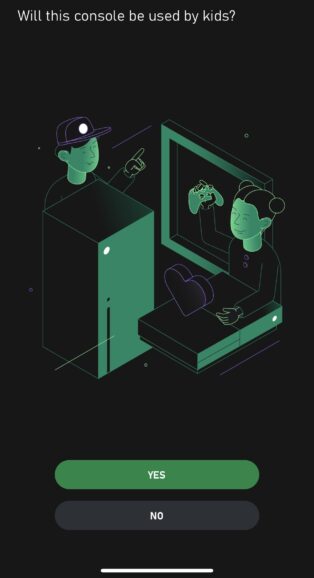
The single most important thing you can do when setting up a new Xbox console is to select Yes when asked “Will this console be used by kids?”
By spending just a few minutes setting up an Xbox Child Account (versus having them use your existing account), you’re building a safer, more tailored experience for them and one that’s right for your family (and that’s easy to adjust as your little one grows up). Don’t worry, you won’t have to buy your games again to allow your child to play on the same console*. You will, however, have control over which of these games they’re allowed to play, how long they can play, who they can communicate with, and more.
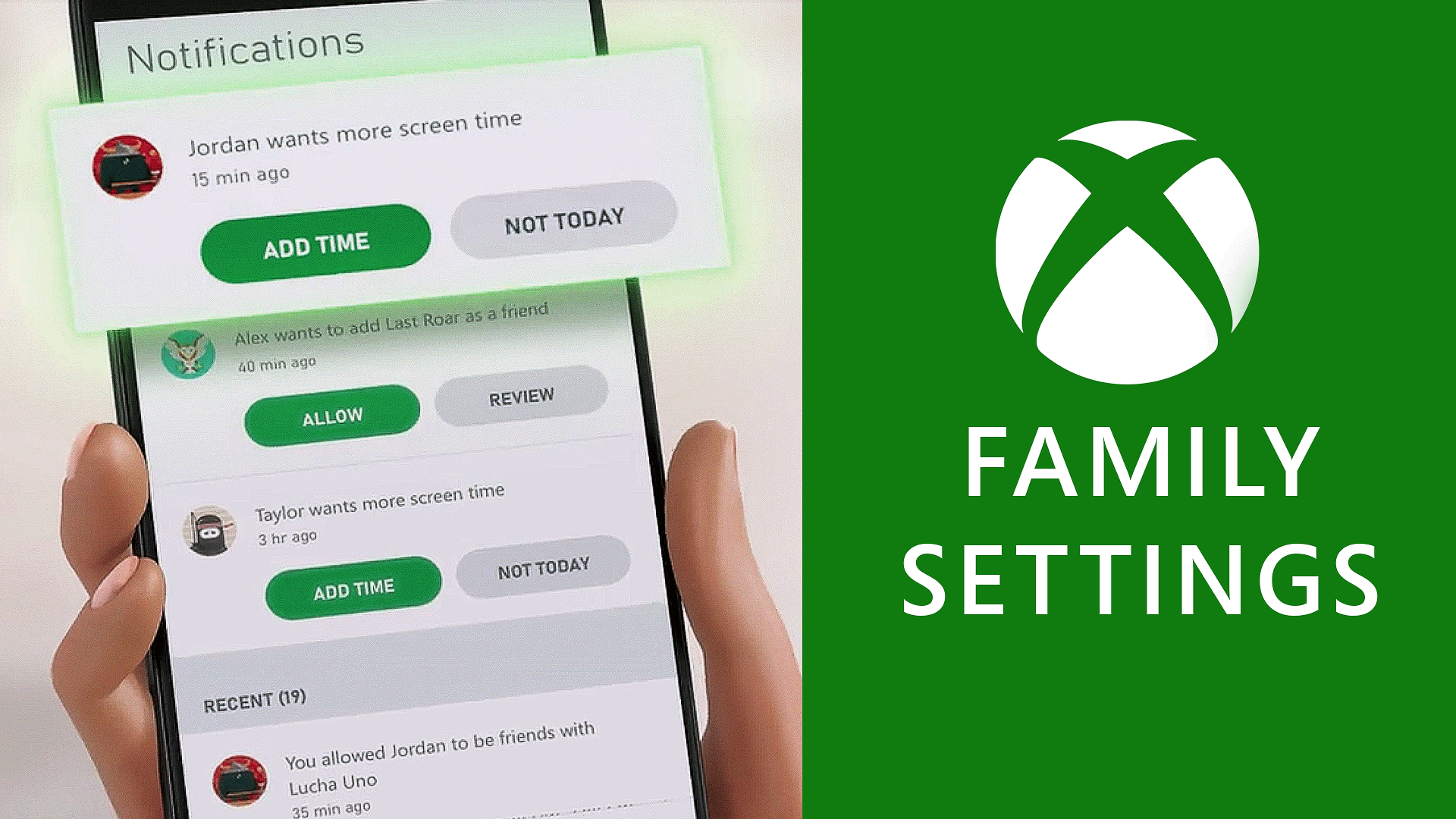
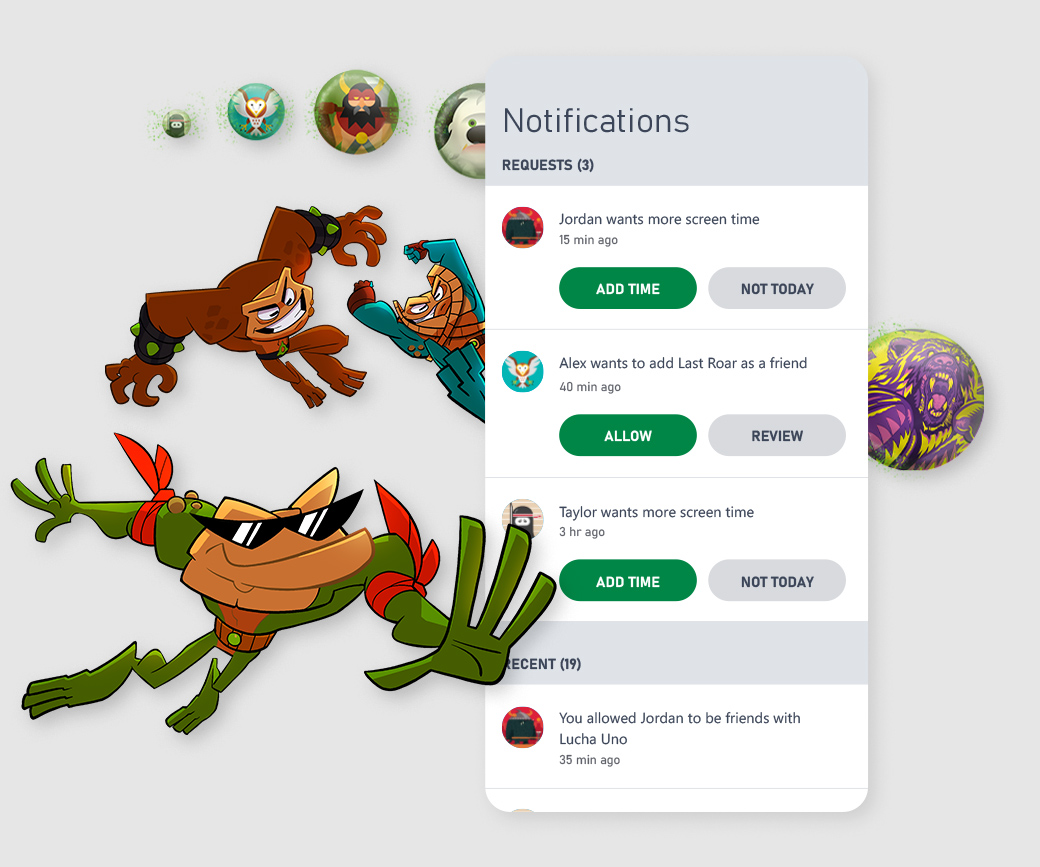
Screen Time Management: You can set time limits to manage how long your child can play each day. Parents (and grandparents, aunts and uncles!) tell us one of their favorite features is the ability for kids to request extra playtime, which you can easily approve – or reject – right from the app. You can even pause game time temporarily from the app; the perfect way to say “dinner’s ready!”
Content Filters: The app allows you to tailor the content your child can access, blocking games that are too mature and ensuring they only see age-appropriate content that you approve.
Purchase Limits and Approvals: Prevent unexpected purchases by approving each purchase through the ask-to-buy feature. To reward good behavior, you can easily add funds to a child’s account for future purchases.
Communication Controls: Decide who your child can communicate with during their gaming sessions through robust controls. You can manage your child’s friend list and review incoming requests, and can restrict communication to just friends, or block it entirely.
Activity Reporting: Stay informed with weekly activity reports that give you an overview of what your child is playing, how long they’ve played, and any requests they’ve made for additional time or new games. Pretty cool!
Additionally, the Xbox Series X|S offers numerous features designed to make gaming accessible for everyone. You can find the full range of accessibility settings on Xbox’s Accessibility site.
Once you’ve curated the experience you’d like your children to have, the only question is, what should you play together? Xbox Game Pass offers great value with access to hundreds of games for one monthly price, including a diverse range of family-friendly games that everyone can enjoy. From action-packed adventures to educational games, there’s something for everyone; check out an updated list of titles here – just click the Family & Kids box underneath Genres on the left rail or in the Game Pass area on your Xbox console.
Playing games can stimulate creativity, improve hand-eye coordination, and offer a sense of achievement. They can also be a fantastic way for children to unwind and connect with friends, or be the center of your family’s game night, especially in today’s digital age.
With the robust features built into your Xbox console and managed by the Xbox Family Settings app, you can ensure that your child’s gaming experience is as safe and controlled as you need it to be.
For more information about the Xbox Family Settings app, visit Xbox.com/family-app.
*Entitlements are shared only if child accounts are using the same console set as the “Home console.” More details on designating a Home console can be found here.
I can still build and test the web project in a browser, so studio is running, but as soon as I start debugging, a dialog pops up stating that the ‘ExtensionsPackage’ package did not load correctly. The dialog has Yes/No buttons to indicate whether it should continue to be shown, but neither works – it just makes the app freeze…but just the dialog portion. My app is still running in the browser and it’s functional, but I cannot debug. And if I hit an exception in the app, it can’t be viewed/addressed because the IDE is frozen. I’ve repaired vs, reinstalled, restructured my solutions (which worked at first, but then it started occurring again). The activity log has this as it’s last entry:












 Table of contents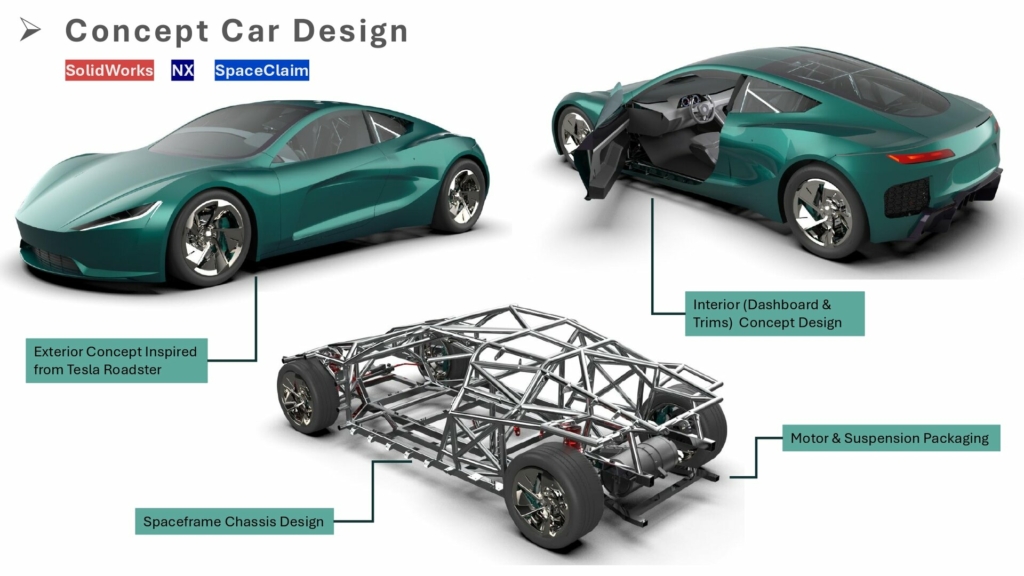


](https://www.fazb.com.sa/wp-content/uploads/2024/04/Run-a-SSIS-Package-through-A-JOB-in-SQL-Server.png)
