As I wipe the dust from my coffin I arise to tell you all that I was there when they first started mining the cryptocurrencies from the bowls of the digital frontier. I was there early enough to look at my old rig and wonder if it was worth setting up to see if it could score a few coins over the course of a month or so. I’ve known a few people who did things like acccidentally throw away drives full of BTC. I even knew people who got in early and cashed out fast, otherwise known as ‘bastards’.
Since its early days, crypto has been, to put it politely, an absolute shitshow of cryptoglogical proportions. Even when it was somewhat viable to put your rig to work it’d still be a long haul of wait and see before you might eventually unearth yourself a coin here and there. And of course your old GPU has been worked into dust and your power bill has skyrocketed for the trouble.
For those reasons it’s been a long time since I considered mining Bitcoin as a viable investment, and it looks like the landscape is finally shifting to meet my preconceptions. Even specialists such as CoinShares (via Overclockers) are starting to doubt this business investment, despite it recently reaching an all time high price.
New data tells us that mining a single Bitcoin or one BTC costs the largest public mining companies over $82,000 USD, which is nearly double the figure it did the previous quarter. Estimates for smaller organisations say you need to spend about $137,000 to get that single BTC in return. BTC is currently only valued at $94,703 USD, which seems to be a problem in the math department.
These costs can even get worse depending on the country you’re doing your mining. Germany is typically considered to be one of the worst places to mine BTC from a profit perspective. It costs around $200,000 USD to mine a single coin there.
So why would anyone be mining BTC in this day and age? Well the main reason, other than perhaps dim hopes that they’ll strike it rich, is about technology. Currently optimising farms to mine faster on lower power has been the goal. Plus seeking out places where electricity is cheaper to try to maximise those gains.
Once you’ve got these incredibly efficient, and hopefully relatively power friendly setups in place, you’ve not only dropped your potential mining overheads but you likely have a computation setup that could complete other tasks. This makes it an attractive option for larger companies who may look to lease their mining operations for other computations when they’re unable to make money from mining. Then they can swap back if and when the market picks up once again.
Keep up to date with the most important stories and the best deals, as picked by the PC Gamer team.
For now the big takeaway is that mining crypto isn’t going to be viable for individuals, possibly ever again. With huge centres being setup in key positions you just won’t be able to beat out the larger companies acting here. Any new coin that comes up they can point their rigs to it and begin the process all over again. It’s almost like you’re better off using your sweet rigs for gaming, not crypto mining, just like the good lord intended.
I came across this blog post about using different overload resolution methods to make compile errors more readable, and I’m wondering if there are any changes I can make as a caller of a templated function to get similar readability improvements. Specifically, I have a CMake project in Visual Studio 2022 that I’m compiling with MSVC, and calls to std::make_shared with invalid parameters are hard to read the logs for. The error generated is not in my source code:
G:\VisualStudio\VC\Tools\MSVC\14.43.34808\include\xutility(502): error C2672: 'std::construct_at': no matching overloaded function found
Since this is the line where the actual compile error is, it’s what Visual Studio shows in the Error List window, which doesn’t actually help me fix the error. Every time this happens, I have to skim through the notes of that compile error to somewhere in the middle where it says where the make_shared function template was instantiated, i.e. the line in my code that needs to be fixed:
23:34:01:880      G:\VisualStudio\VC\Tools\MSVC\14.43.34808\include\xutility(502): note: the template instantiation context (the oldest one first) is
23:34:01:880      C:\sourcefile.cpp(123): note: see reference to function template instantiation 'std::shared_ptr<MyClass> std::make_shared<MyClass,WrongParam>(WrongParam)' being compiled
(This particular error generates 49 lines of compiler output, and the location in my source code that actually has the problem only shows up here on line 22.) This is unnecessarily time-consuming, so I would like to not have to do it.
There are two possible approaches I’ve thought of to solving the problem that I have questions about:
Is there a better way to construct std::shared_ptrs that would result in more readable compile errors while still being idiomatic? Using new instead of make_shared does this, but isn’t idiomatic.
Can I customize how Visual Studio generates Error List entries from the raw compiler output and make it automatically find the line I’m looking for? This blog post says how to get things from stdout into the Error List, but I think I would need to configure CMake to run a post-build custom command that parses the build output, and I don’t know how to do that.
To be clear, this question is not about how to fix a particular compile error–I understand how to find the right information in the compiler output to do that. This question is about practices that minimize the amount of work it takes to find the right line in the compiler output, preferably by making Visual Studio find it instead of me.
Our expert reviewers spend hours testing and comparing products and services so you can choose the best for you. Find out more about how we test.
Nothing delivered a hit last year with the CMF Phone 1; the phone had an interesting design and modularity, and it nailed the basics. The brand is looking to build on that with the CMF Phone 2 Pro, which delivers decent upgrades in most areas. The most notable addition is a 50MP tele lens at the back as well as an 8MP wide-angle module that joins the main 50MP camera, and it gives the CMF Phone 2 Pro versatility like no other budget phone today.
You also get an AMOLED panel with ultra-thin bezels — similar to the Phone 2 and 3a Pro — a decent-sized battery, IP54 ingress protection, and the best software of any budget phone available today. The best part is that Nothing is continuing its value-focused push, and the Phone 2 Pro costs just a smidgen more than its predecessor.
Is this the budget phone of 2025, then? Without a shadow of a doubt.
Nothing unveiled the CMF Phone 2 Pro at a global launch event in India on April 28, and the phone is slated to go on sale in the country starting May 5. The good news is that it costs just ₹18,999 ($223) for the variant with 8GB of RAM and 128GB of storage, and that’s just ₹1,000 ($12) more than what the Phone 1 debuted at last year. Nothing is also selling the device in an 8GB/256GB configuration at ₹20,999 ($246), and both models retain the MicroSD card slot — a great move in 2025.
Annoyingly, the device isn’t launching in the U.S., with Nothing making the 8GB/256GB variant available as part of the beta initiative for $279. Thankfully, the device will be on sale in the U.K. and other markets in the region, debuting at £219 ($293) for the 8GB/128GB edition and £249 ($333) for the 8GB/256GB model. In Germany, it’s launching at €249 ($283) for the 8GB/128GB variant, and €279 ($317) for 8GB/256GB.
Swipe to scroll horizontally
Category
CMF Phone 2 Pro
Display
6.77-inch 120Hz AMOLED, 2392 x 1080, HDR10+, 1300 nits HBM
OS
Nothing OS 3.2, Android 15, three Android OS updates
Nothing’s mainline phones stand out for their designs, and the CMF Phone 2 Pro is no different. While it doesn’t feature a similar design language, the bold colors and vibrant accents give the phone a good presence, and the design belies the price tag. I haven’t used an entry-level phone that looks this good, and if you want a device that turns heads, you’ll need to get the orange model.
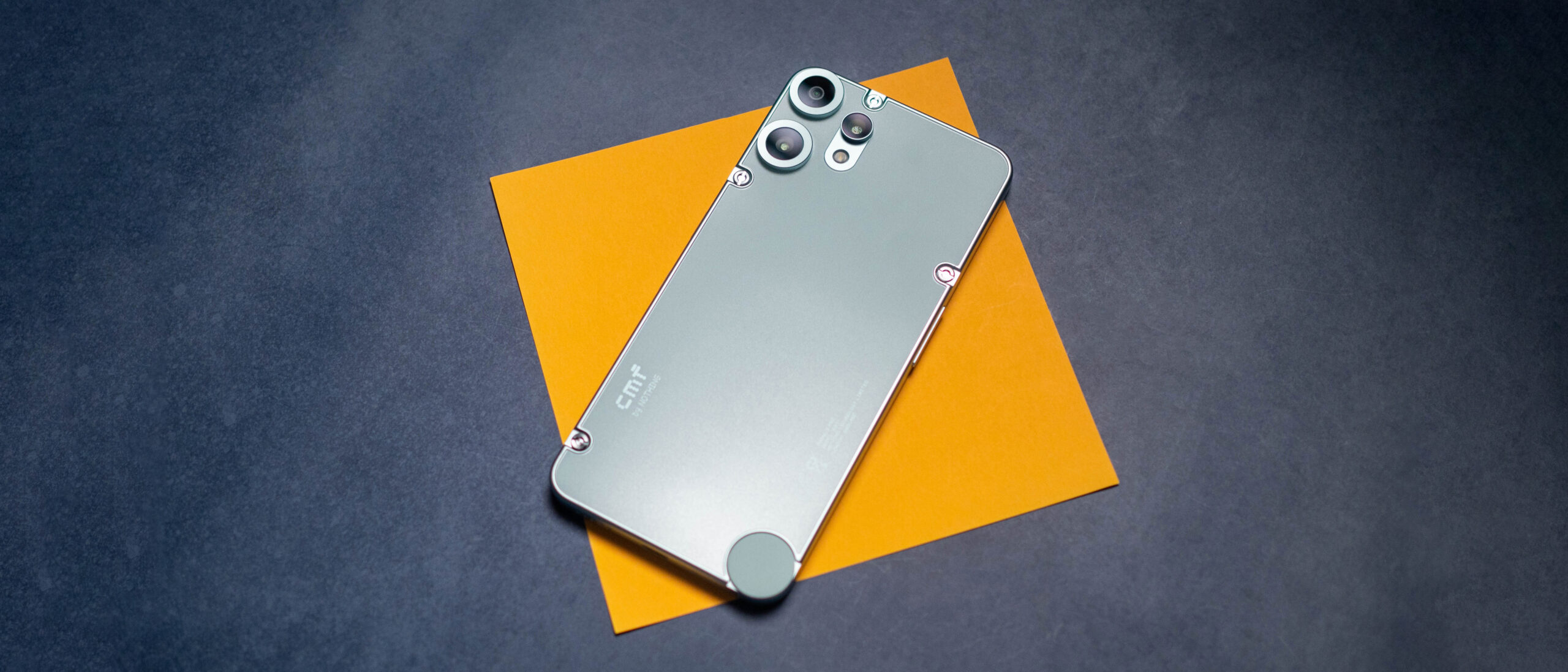
I got the green version of the CMF Phone 2 Pro, and it has a back that mimics a frosted-glass finish. The black version uses the same texture, with the white model delivering a sandstone-like matte texture instead. The orange color, meanwhile, has a metallic sheen, and looks very distinctive.
Another distinction is the dimensions; coming in at 7.8mm, the Phone 2 Pro is the thinnest Nothing phone yet, and at 185g, it is 12g lighter than the CMF Phone 1 — there’s a noticeable difference between the two when it comes to in-hand feel. The back has smooth curves where it meets the mid-frame, and it has good weight distribution.
Interestingly, Nothing added the Essential Key to the Phone 2 Pro as well; the dedicated button debuted on the Phone 3a Pro this year, and it allows you to launch Essential Space, a dashboard that lets you save notes, images, and just about anything else.
The rear camera design is accentuated by bright rings around each module, and it gives additional flair to the design — not that it needed it. A key difference this year is that the back is fully sealed; this allowed the brand to achieve an IP54 ingress protection. Nothing co-founder Akis Evangelidis revealed during a briefing that the device is water-resistant, but that it didn’t go through the requisite IP testing.
As the back cover is no longer detachable, the CMF Phone 2 Pro doesn’t quite have the same level of modularity as its predecessor. That said, Nothing is debuting a universal case that attaches to the back, and it enables the use of several accessories. This time around, the accessories include a kickstand that connects magnetically to the universal case, a macro lens, fisheye lens, and a lanyard.
Attaching the accessories is about as easy as it gets once you affix the universal case to the back of the Phone 2 Pro. While I generally liked using the universal case, it doesn’t confirm to the curves at the back, and it has a distinct plastic feel to it. It’s a good way to enable the use of custom accessories, and for what it’s worth, the Phone 2 Pro as a whole has a design that looks much more polished.
Nothing is using a similar-sized 6.77-inch FHD+ AMOLED panel as last year, but it went with a flexible AMOLED on the Phone 2 Pro, resulting in thinner and even bezels on all sides. Evangelidis noted that the switch to a flexible AMOLED added to the device’s manufacturing costs, but as the brand wanted to retain parity with its mainline phones, it used the costlier panel.
There’s also greater flexibility with panel refresh, with the Phone 2 Pro able to switch between 30Hz, 60Hz, 90Hz, and 120Hz. The device even gets 2,160Hz PWM dimming, and the panel itself is the best of any budget phone around. I didn’t run into any issues during regular use or while gaming, and Nothing did all the right things in this area.
My colleague Nick Sutrich tested the device’s PWM dimming, and noted that it was more than double that of the CMF Phone 1 at low brightness, which is great. When you boost the brightness to over 50%, you get DC dimming as standard.
Nothing is once again using MediaTek’s Dimensity 7300 Pro this generation, and the platform is clearly showing its age; I haven’t used a phone with the older Cortex A78 and A55 cluster in a while. That said, Nothing did a decent job optimizing the platform, and there isn’t any noticeable lag in regular use.
Swipe to scroll horizontally
Category
CMF Phone 2 Pro
POCO X7 Pro
Geekbench 6 (single-core)
1011
1573
Geekbench 6 (multi-core)
2898
5580
Geekbench AI
1998
2333
3DMark Wild Life Extreme (score)
850
1868
3DMark Wild Life Extreme (FPS)
5.09
11.19
3DMark Steel Nomad Light (score)
344
865
3DMark Steel Nomad Light (FPS)
2.55
6.41
PCMark Work 3.0 (Overall)
11641
12575
PCMark Work 3.0 (Web Browsing)
10549
11853
PCMark Work 3.0 (Video Editing)
5532
5450
PCMark Work 3.0 (Writing)
17355
18952
PCMark Work 3.0 (Photo Editing)
24051
11180
The phone is passable at gaming too, and while you don’t get smooth framerates, there isn’t too much jitter, and it is usable if you turn down the settings. That said, I’d strongly recommend picking up the Phone 3a Pro if you’re looking at a budget-focused gaming device — it does a much better job in this area.
Outside of that, the notable inclusion is a MicroSD slot; the base variant’s 128GB storage is decent enough, and while 8GB of memory is usable, Nothing should have rolled out a 12GB/256GB variant at least. You don’t get AptX codecs, but there’s the standard Bluetooth 5.3, and I didn’t see any problems with connectivity.
Nothing didn’t change anything on the battery side of things, and the CMF Phone 2 Pro retains a 5000mAh battery with 33W fast charging. Interestingly, the Indian model now includes a charger in the box — Nothing says its userbase in the country was vocal about its inclusion — but other regions miss out on the same. You can use any USB PD charger with the device, and in general, I got a day’s worth of use comfortably.
The CMF Phone 2 Pro gets a trio of cameras at the back, including a 50MP main lens, 50MP telephoto with 2x optical zoom, and an 8MP wide-angle lens. That’s a big deal in itself considering most phones in this category have just a single usable camera, and it’s good to see the brand providing decent versatility.
The camera interface is pretty basic, but you get access to all the shooting modes and toggles. It takes 4K30 video, and while the video quality isn’t particularly great, it is usable. There’s a decent number of shooting modes, and the phone does a passable job with portraits.
Daylight shots have good detail and color vibrancy, and I didn’t see any issues in this area. What I like the most is how well the CMF Phone 2 Pro handles low-light imagery; even in challenging conditions, it delivered photos with good colors and little to no visible noise. The wide-angle and 2x tele lenses are good in their own right, and if you need a little extra, Nothing has macro and fisheye lens attachments.
The fisheye lens is fun to use, but I didn’t see much utility out of the macro module. Overall, the camera on the CMF Phone 2 Pro is the best you’ll find on a sub-$300 phone, and Nothing deserves credit for bundling a strong package.
The CMF Phone 2 Pro runs Nothing OS 3.2 based on Android 15 out of the box, and the brand continues to do a stellar job with its UI. You get a clean interface with a distinct visual styling, and it makes using the device that much more enjoyable. Nothing’s exclusive widgets are a big part of why I like using its phones, and the design combined with usability makes the OS as a whole stand out.
You get a good amount of customizability as well, and the interface is fluid — I didn’t have issues in daily use. You get the usual AI-enabled utilities with on-device transcribing, and Nothing uses ChatGPT for any cloud-facing requests. On that note, a new addition is Essential Space, which basically makes it easy to organize information, including creating notes, taking memos, and saving things like billers.
The utility does a great job, and it’s another way that Nothing differentiates its devices. Switching over to updates, the CMF Phone 2 Pro will get three Android OS updates and six years of security updates, and that’s among the best of any budget phone today.
POCO’s X7 continues to be a good choice if you need a reliable budget phone. It has the same MediaTek Dimensity 7300 platform, a bigger 5500mAh battery with 45W charging, and IP68 ingress protection. The software isn’t as good as the CMF phone 2 Pro, and it won’t get as many updates, but if battery life is a priority, the X7 is a good option.
Last year’s CMF Phone 1 is still quite decent, and a viable alternative if you can get a good deal on the device. Obviously, you miss out on the upgrades that the CMF Phone 2 Pro offers, but the Phone 1 is a great device in its own right.
Nothing CMF Phone 2 Pro: Should you buy it?
You should buy this if:
You need a budget phone that looks great
You want good cameras
You need clean software on a budget device
You want timely software updates
You shouldn’t buy this if:
Nothing is making a habit of showing up other budget phones, and the CMF Phone 2 Pro is my go-to recommendation if you need a new sub-$300 phone in 2025. There’s a lot to like with the design, and the unique accessories give the device an edge. The AMOLED panel has good colors, and the thin bezels make the device feel premium.
You get a good set of cameras at the back, great battery life, and the software is easily the best you’ll find on any budget phone. The only limitation is around gaming; you’ll want to get the Phone 3a Pro if you need a bit of added power, but other than that, the CMF Phone 2 Pro is a fantastic all-rounder.
The CMF Phone 2 Pro is nothing short of the best budget phone available today. It doesn’t miss out on the basics, and you get a set of great cameras at the back, and enjoyable software with unique extras.
Amazon successfully launched 27 low-Earth orbit satellites on Monday night as part of Project Kuiper, which will provide satellite broadband services. The launch mission, KA-01 or Kuiper Atlas 1, utilized a United Launch Alliance Atlas V rocket, and began its journey from Florida’s Cape Canaveral Space Force Station.
Missed the launch? You can watch the replay on the project’s mission page or on YouTube.
On April 28, Amazon launched 27 low-orbit satellites into space as part of its efforts to start a satellite-internet business.
Amazon
The tech and space giant was forced to abandon its original rocket launch date of April 9 after poor weather conditions. “Weather is observed and forecast NO GO for liftoff within the remaining launch window at Cape Canaveral,” United Launch Alliance said at the time. “The stubborn cumulus clouds and persistent winds make liftoff not possible within the available window.”
Watch this: Amazon’s Project Kuiper Internet Satellites Take Flight on ULA Rocket
It’s a big step forward for the project, which Amazon announced in 2019 with promises of a $10 billion investment. Now, the company is entering the race to provide satellite internet service, a space currently dominated by SpaceX’s Starlink, which has about 7,000 satellites. Amazon’s plans call for 3,200 satellites to be deployed over 80 launches. The company intends to provide internet service with this technology later this year.
Watch this: Amazon’s Project Kuiper Internet Satellites Take Flight on ULA Rocket
More competition could improve satellite internet
The literal space race, which includes Starlink, Amazon and other companies such as Viasat, Hughesnet, Eutelsat and China’s SpaceSail, could mean more internet service availability in far-flung and rural areas with limited broadband options. Though Starlink is the leader in space, some of these other companies are continuing to launch satellites and working to deploy high-speed internet in more markets, such as Brazil. With more players in the market, that could mean faster and cheaper internet in more areas, although whether that actually bears out for consumers remains to be seen.
Mahdi Eslamimehr, executive vice president at Quandary Peak Research and adjunct professor at the Department of Computer Science at USC, said Amazon is well-positioned to compete with Starlink.
“Amazon has made extensive launch agreements with major providers such as ULA, Arianespace, Blue Origin, and even SpaceX itself, positioning Kuiper as a major challenger due to its expansive infrastructure and significant resources.”
He said, “While Starlink currently enjoys clear market leadership, it faces increasing competition from well-capitalized and strategically agile competitors, specifically from China, suggesting the market will become considerably more competitive in the near future.”
So far, Eslamimehr said, Amazon’s satellite efforts have been promising and successful, at least in the prototype stages. The company has also been testing Amazon Web Services in space. “These developments collectively underscore Amazon’s robust entry into the satellite internet market and reflect positive early momentum in its overall space strategy.”
Beyond how it fares against Starlink and other companies, the Amazon satellite launches are significant in other ways. Eslamimehr said, “Project Kuiper isn’t just about competition; it’s positioned as a critical step toward closing the global digital divide, promising to deliver high-speed internet to underserved communities worldwide.”
Correction, April 4: An earlier version of this story misspelled the name of the USC professor and Quandary Peak Research executive vice president. His name is Mahdi Eslamimehr.
It ain’t easy to lock down a Switch 2 pre-order, even if you’re closely tied with Nintendo. Folks like Smash Bros. director Masahiro Sakurai and Nintendo Direct narrator Yuichi Nakamura have to jump in the pre-order lottery for Nintendo Switch 2 just like everybody else, and as their numbers come up so has some friendly beef that can only be settled by an IRL meetup to recreate the most iconic image of the 1997 cinematic classic Men in Black.
It’s probably selling Nakamura a bit short to simply call him the “Nintendo Direct narrator,” as he’s a prolific voice actor who’s appeared in everything from JoJo’s Bizarre Adventure to Final Fantasy, but the fact that he’s the de facto voice of Nintendo marketing in Japan means that his struggles to secure the new console feel downright tragic.
Last week, Nakamura joked on Twitter that he’d be cutting ties with anybody who successfully secured a spot in the Switch 2 pre-order lottery, as noted by Automaton. When Sakurai announced that he’d grabbed a pre-order, Nakamura responded questioningly, prompting the Smash Bros. director to say (via Google Translate) “We need to quickly shine the light that will erase his memories…!”
That is, of course, a reference to Men in Black’s Neuralyzer – or “flashy thing,” as you may recall Will Smith’s Agent J calling it – a small gadget that erases memories with a bright light. Convenient both for explaining away alien encounters and preserving friendships that might otherwise be jeopardized by video game console jealousy.
Nakamura then posted a profoundly sad image of a standard Nintendo Switch with a “2” scrawled on the back in yellow marker. Clearly, Sakurai was going to have to make good on the Neuralization promise. And so he did, meeting up with Nakamura in real life to Neuralyze him with what looks like a karaoke microphone. I guess that counts as a happy ending to this goofy little saga.
Have you ever encountered unexpected issues due to file encoding when working in cross-platform environments? These frustrating problems can disrupt your workflow and consume valuable time. Visual Studio addresses these concerns with a new feature – the Default File Encoding option.
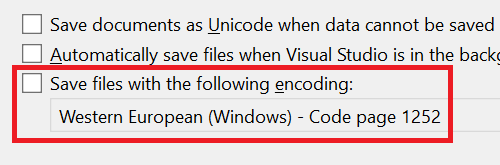
You can now specify the encoding Visual Studio should use when saving files. This ensures that files are saved with the correct encoding, minimizing potential issues.
Developers often work on projects across different platforms, each requiring specific file encodings. Incorrectly managed encodings can lead to various issues, from corrupted files to unreadable text. The Default File Encoding feature helps mitigate this issue by allowing you to set a default encoding, ensuring consistency and reducing the risk of character display issues or data corruption.
Setting the default file encoding
To configure the default file encoding, navigate to Tools > Options > Environment > Documents. You’ll find an option labeled Save files with the following encoding. If this option is checked, Visual Studio will attempt to save files using the encoding specified in the adjacent combo box. If unchecked, Visual Studio will revert to its default behavior for managing file encodings.
This feature is useful for maintaining consistency across projects and minimizing encoding-related issues. It’s a straightforward tool that enhances productivity and preserves file integrity.
Handling encoding conflicts
In cases where Visual Studio cannot save a file with the specified encoding, such as attempting to save a file with Unicode characters in ASCII format, a dialog will notify you of the issue. This proactive notification helps prevent data loss or file corruption, allowing you to address problems promptly.
As always, we appreciate your continuous feedback, which drives us to make Visual Studio better with each release. Happy coding!
There are plenty of good reasons to delete your X account, whether it’s because of a general desire to not do anything to help Elon Musk, a distaste for the curdled culture of the platform or the allure of greener social pastures like Bluesky or Threads. Whatever your reason, the process of deleting your account is simple, and by design, pretty hands-off. In order to get rid of your X account, you’ll first have to deactivate it. Once you go 30 days without logging in, it will be permanently deleted.
How to deactivate your X account
Ian Carlos Campbell for Engadget
Deactivating your X account makes your profile page, posts and associated username disappear, though posts you were tagged in before you shutdown in your account will still be viewable. Deactivating also makes it impossible for you to post or view your timeline, unless you reactivate. It’s one of the strongest ways to “take a break” from X, but also the only way you can get your account permanently deleted.
If you need any of your data before you deactivate and delete, you’ll want to make sure you initiate that process and receive your archive before you deactivate. X says it can’t send an archive from an account that’s been deactivated.
Open X.
Click on the More section in the sidebar menu.
Click on Settings and Privacy.
In the Your account section of Settings, click on Deactivate your account.
Read through X’s warnings and then click on Deactivate.
Enter your account password to confirm you want to deactivate, then click Deactivate.
Now just make sure that you don’t log in for 30 days, and your account will be permanently deleted. This won’t necessarily delete web search results that mention your X account or your posts, but it will eliminate records of you on X itself.
FAQs
How do you reactivate your account?
If you have a change of heart before your 30 days are up, it is possible to reactivate your account so you can use it again. To reactivate your account, head to X.com or the X app and login with your credentials. You’ll be asked if you want to reactive your account. Once you confirm that you do, you’ll be logged in and be able to post and view your timeline. X notes that some of your account features like followers and likes may take a while to fully restore.
Is all of your information actually deleted when your X account is deleted?
While deactivating your X account and letting it be deleted does remove all of the public-facing parts of your social media presence, X does keep some of your information to “ensure the safety and security of its platform and people using X.” The full list of data X collects and how it uses it is available in X’s data processing explainer, as far as you should be concerned, though, a deleted account is gone.
There’s an understandable and undeniable pall hanging over The Last of Us after last week’s shocker. And it’s the calm before the storm that’ll make up the rest of the season: Ellie and Dina’s trip to Seattle to track down Joel’s killers. But amid the sadness of that loss and the frustration of Ellie not getting the support of the town in her revenge plan is the absolute delight of seeing more of Ellie and Dina together.
They were probably the highlight of the first episode — their chemistry didn’t immediately hit Joel and Ellie levels, but Bella Ramsey and Isabela Merced were doing great work together right off the bat. Here, we get to see a lot more of them together, and Dina’s combination of playfulness and planning is a solid counter to Ellie’s dry humor and impulsive nature.
A great example is their trip to Seattle on horseback, as Dina challenges Ellie to name the best band she can think of for every letter of the alphabet, something Ellie eventually has quite enough of. Dina says she can come up with another game, and Ellie immediately quips they could just travel in silence, something Dina ignores and makes Ellie tell her about the first person she had to kill. Just the kind of lighthearted road trip companion Ellie needs right now.
Photograph by Liane Hentscher/HBO
Dina is at her best in this episode when she barges in on Ellie planning for a midnight escape from the city to bring Abby to justice on her own. Earlier in the episode, the Jackson town council votes down her proposal to assemble a large crew to go after the WLF group — primarily because the town was so ravaged by the Infected horde the same day Joel was killed that they can’t spare the people. Naturally, Ellie is ready to go rogue and go on her own, but she’s not really ready. Dina shows up at her place, teases her for not planning to bring anything but guns, and lays out exactly what they need and what they don’t. Oh, and she already has it all ready to go. It’s a little too mean to say Ellie is not the brains of the operation, but she’d almost certainly be in trouble without Dina.
Beyond her practical skills, Dina flirts with Ellie constantly throughout the episode, asking Ellie to rate their kiss at the New Year’s Eve dance, teasing her about wanting to wear her Converse on a lengthy journey, whispering in Ellie’s ear that she is a badass after Ellie makes a dorky, action movie-style proclamation. But perhaps the most telling comment she makes is after they very briefly discuss that NYE kiss — Ellie says Dina was high, Dina says Ellie was drunk, and they both agree it didn’t really mean anything. They then turn off the light in their tent, and Dina can’t help but say she wasn’t that high. Ramsey and Merced’s version of “will they, won’t they” brings some much-needed levity to their situation.
Photograph by Liane Hentscher/HBO
And to be clear, levity is much needed. Even though there isn’t much real action, the fallout from Joel’s death and the Infected siege is all over this episode. It starts with Tommy slowly cleaning Joel’s body before the camera pulls out and shows a whole room of bodies covered with sheets. That’s followed by Ellie awakening in a hospital with a tube coming out of her chest; she then screams bloody murder at remembering what happened to her. That’s not to mention the sunrise visit to Joel’s grave where Ellie briefly smiles as she puts some coffee beans by his side, or her walk through his empty house where she finds his signature watch, revolver and jacket. Keep the tissues handy.
While Ramsey’s Ellie is at her best when partnered with Dina, she also does some great work on her own — the aforementioned hospital scene is chilling, but my favorite Ellie moments in this episode are when she’s trying (and failing) to convince people she’s okay. Her speech to the town assembly encouraging them to go after the WLF is not the off-the-cuff anger that Jesse encouraged her to avoid, but you can tell Ellie is just trying to placate the masses instead of saying what she really wants. The same goes for her conversation with Gail the therapist when she leaves the hospital, though Ellie doesn’t even try to hide her therapy platitudes behind a veneer of belief.
Photograph by Liane Hentscher/HBO
Oddly enough, it’s Seth (the bigot who got bowled over by Joel in episode one) who says what Ellie is really feeling, interrupting the meeting when someone objects to the plan to go to Seattle. Seth is enraged by what happened to a member of his community and thinks they should pursue justice at any cost. It’s far from the most measured take, but it certainly feels like the most honest.
Thus it’s not a huge surprise when he’s ready to help Ellie and Dina as they slip out of town, offering them a load of supplies and insisting Ellie take his better rifle. He says he’d go with them except for catching some friendly fire during the Infected battle, to which Ellie replies “are you sure it was friendly?” She’s clearly not ready to forgive him for his words, but a better gun, some supplies and a shared desire for revenge gets her close enough. She shakes his offered hand as they ride out of town.
Infected Score: 0/10
The showrunners say season two will have more Infected than season one — let’s see if they’re sticking to their word.
No Infected to be seen here, aside from some charred corpses around Jackson. That’s just fine with me after last week’s showdown.
Unfortunately, the proposed solutions does not work anymore on Visual Studio 2022 (V17.11.6).
The Visual 2015 answer used a Visual Commander macro to do the job, but the comment now mention:
I found the issue. The script focuses on the Find Results 1 Window. Most likely when you use the Find All you have the result option to List Results in: Find results table When the script only reads from Find Results 1 window. –
Cristian Camilo Cabrera
Commented Jan 10, 2020 at 16:16
VS now uses new find result controls that don’t support extensibility. –
Sergey Vlasov
Commented Oct 13, 2020 at 15:03
Is there another way to solve this problem? Or a way to fix the macro?
I restate the question, which is independent of the historical consideration mentioned above :
How do I add Debug Breakpoints to all lines displayed in a “Find Results” window in VS 2019?
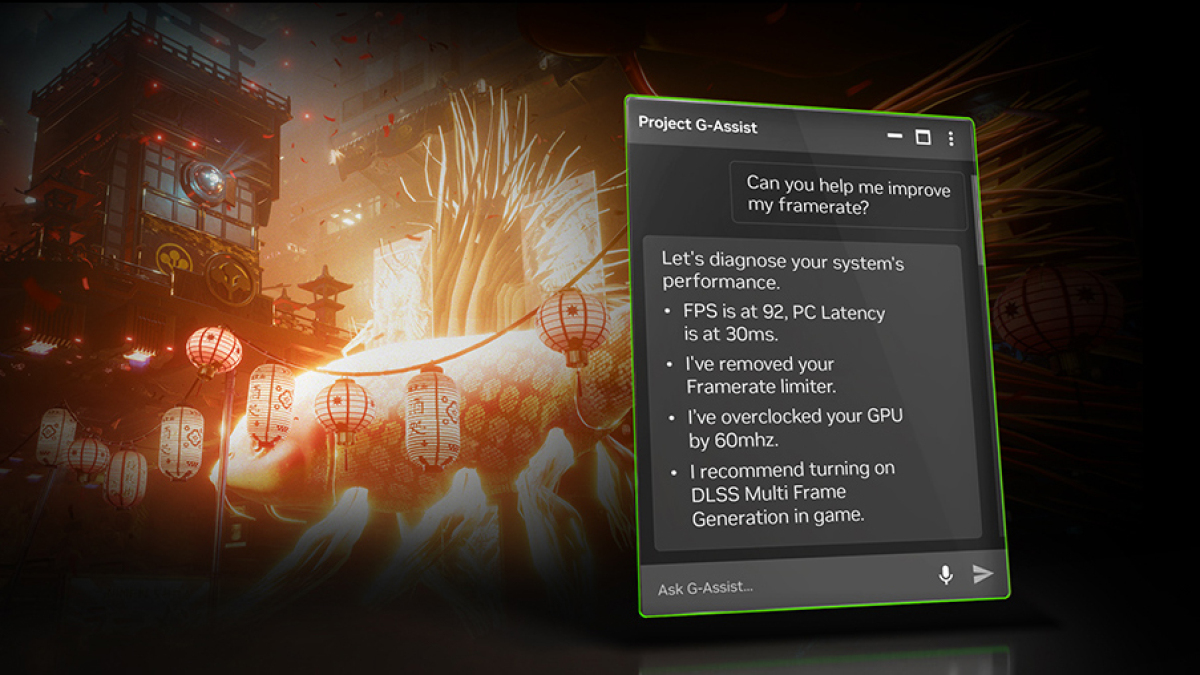
Nvidia released an update for Project G-Assist, an AI assistant that harnesses your GPU to answer your questions. The update introduces Plug-in Builder, which helps you customize your AI assistant. In other words, you don’t necessarily need to wait for Nvidia to introduce new features for G-Assist—you can make your own.
You can use JSON to define functions and put them into a folder from which G-Assist can pull them. Nvidia says that it has hundreds of APIs ready for developers. Part of the draw of the Plug-in Builder is that you can create tasks specific to your needs, but it’s also reasonable to expect that some developers will develop plug-ins that the general public might want. To support those developers, Nvidia has a review program for adding user-made plug-ins to the Nvidia GitHub repository.
That repository is where you’ll want to go for downloads and instructions, plus sample plug-ins like Google Gemini and Spotify. If you need more power than the local AI can provide, you can use Gemini to connect to a more powerful cloud AI. Nvidia highlighted a developer who built a plug-in that lets them ask G-Assist if a particular streamer is live.
Project G-Assist, which is part of the Nvidia App, accepts typed or voice commands. You can use it to quickly make changes to your computer that would otherwise take some time, like adjusting your PC fan speeds or overclocking your system. For many users, it might be their first real interaction with AI (or, at least, the first one they’re aware of using). The tool is fun to experiment with, but adding the Plug-In Builder and letting the public create customizations could lead to some interesting innovations.
One thing to keep in mind is that using G-Assist while you’re in a resource-intensive game might cause a brief drag on graphics performance. That’s to be expected when you ask for heavy graphics and an AI bot simultaneously. It shouldn’t be an issue in most cases, though. The requirements for running G-Assist are easy to meet—if you have a reasonably modern PC running an RTX 30, 40, or 50 series GPU, you’re probably ready to go. You can double-check the minimum requirements on Nvidia’s Project G-Assist page.