How Architectural CAD Drawings Help Modern Design and Construction Companies


Visualize a building’s layout without computer-aided design (CAD) files. It’s like trying to build something complicated using just rough sketches: you’d end up with a huge undertaking but no clear plan. Cad Crowd is an excellent service that helps companies find freelancers with the necessary skills to produce high-quality CAD design services. These digital blueprints transform abstract concepts into practical building plans; they are more than just drawings.

For what reasons has this technology grown so important in contemporary construction? In a nutshell, it merges imagination, precision, and velocity. There are a plethora of choices and details to keep track of from the time an architect is inspired until the day the last beam is installed. With CAD designs, there is no room for disarray or miscommunication.

You might think of computer-aided design (CAD) as the link between architects’ ideas and the built environment. Before building even begins, engineers and designers can examine their work in fine detail, try out various methods, and resolve any issues that may arise. They can digitally model something first rather than guessing how it might work. As a result, the whole building process will be more streamlined, with fewer unexpected obstacles and more efficient use of materials.


🚀 Table of contents


Breathing life into imagination

At the center of each great building or environment is imagination, by utilizing shapes, proper arrangement, and how individuals will experience the world around them. But having something incredible in mind is only the beginning. To bring those visions to life, architects require a strong method for expressing that vision clearly. That’s when 3D CAD design services, through computer-aided design software, enter the picture.

Those days are gone when it used to take a lot of effort to make hand-drawn sketches, which could be difficult to read or lack crucial details. With CAD, each line, angle, and curve is recorded exactly on a digital canvas. Not only does it make designs more visible, but also more accurate and easier to share.

What truly makes CAD magic is how it sparks imagination. Architects are free to experiment with various iterations of a design, changing sizes, materials, or configurations in a matter of seconds. Rather than deleting and redrawing whole blueprints, they simply click some buttons to experiment with new ideas. Such on-the-spot agility inspires a lively design process in which innovation happens. All at once, ideas that previously appeared impossible are suddenly completely possible, bringing life to imagination in the most useful and thrilling manner.

3D architectural site plan rendering and floor plan drawings by Cad Crowd architectural design experts

RELATED: 3 steps to hiring a reliable architecture firm & freelance services architects

Accuracy that saves time and money

Ever gazed in amazement at a giant skyscraper or a complex museum and marveled at how they got it all done so perfectly? The key is in the remarkable accuracy of architectural CAD drawings services. In contrast to freehand sketches, CAD provides layers of detail that remove guesswork. From plumbing and electrical systems to the structural support, these are carefully mapped out ahead of time before construction even begins.

Why does this amount of accuracy matter? Imagine building a sophisticated edifice with cryptic or divergent blueprints. It’s a formula for pricey errors, annoying delays, and costly redoing. CAD blueprints get around this by being one simple, trusted plan that involves engineers, contractors, and suppliers who are certain about. One coherent truth cuts through misunderstanding, keeps the entire team moving as one unit, and avoids errors, conserving precious time and money through the entire course of construction.

A visual language for all parties involved

Constructing a new building without trying to use a blueprint or any definitive blueprint would result in total chaos. That’s where architectural CAD drawings truly excel. They serve as a common visual language that all parties to the project can comprehend, regardless of their function. Whether you’re the architect dreaming up the design, the structural engineer making sure it stands strong, the interior designer picking the perfect finishes, or the contractor bringing it all to life onsite, CAD drawings lay it all out clearly.

By translating complicated ideas into precise visuals, CAD eliminates those frustrating misunderstandings that can lead to costly mistakes. Detailed annotations, 3D modeling design services, and cross-sectional views break down even the trickiest parts, making sure nothing is lost in translation. This shared clarity keeps the whole team in sync, turning a complicated project into a smoothly coordinated effort where collaboration thrives and confusion fades away.

Supercharging project management

Let’s discuss how CAD drawings are powering project management in construction and architecture. Not only does CAD make designs appear snappy, but it also merges seamlessly with project management software and BIM platforms, revolutionizing the manner in which teams manage complex projects. Think of this: without a single brick being laid, the whole construction process can be virtually simulated. This enables companies to identify problems such as a duct interfering with a beam long before they happen, saving expensive on-site drama.

Businesses, enterprises, or clients may now accurately and in real-time monitor every aspect using CAD and BIM. This covers logistics, supply chain management, and cost tracking data. As a result, service providers and clients alike gain from streamlined operations and more efficient methods of operation. In addition to keeping tabs on time and money, this can help them spot issues that may develop as the project progresses. Computer-aided design (CAD) is more than just a lovely picture; it’s a strong mechanism that keeps projects running smoothly.

RELATED: Turning concepts into stunning 3D renderings with architectural visualization at your services firm

The magic of 3D and beyond

Now let’s discuss the magic of 3D design and why it’s a game-changer for architectural design experts, builders, and clients. Sure, flat blueprints have worked for decades, but today, CAD technology takes it way beyond mere drawings. Imagine not only viewing a floor plan, but actually walking around a fully rendered 3D model of your future space from all sides. You actually get a sense of scale, volume, and even the appearance and texture of various materials.

Incentivizing sustainability and efficiency

Let’s discuss how architectural CAD drawings are gradually transforming sustainable building design. You may consider CAD to be some sort of posh drafting technology, but it’s more of a secret advantage for designing environmentally friendly buildings. By modeling every minute detail, CAD allows architects to mimic the way sunlight passes through a building or air circulates before the ground is even broken. That way, they can create buildings that automatically remain cooler or lighter, reducing the amount of artificial light and air conditioning needed.

Not only does this conserve energy and lower the bill, but it also minimizes the building’s carbon footprint. And because CAD’s accuracy makes it possible to measure materials precisely, builders use less and remain cost-effective. All these benefits make projects more likely to achieve green building certifications, leading the construction industry toward a brighter, greener future—one CAD drawing at a time.

Adaptability in a rapidly changing industry

It’s said that the defining factor of industrial design services is the fixation on mass production. Think of it as product design infused with DFM. Also, remember that you can only mass produce physical products. For instance, a manufacturing facility might be able to make millions of smartphones in a year, but it doesn’t actually create an operating system for every single device. The operating system itself is a digital product distributed by the developer.

Suppose the smartphone in question runs a version of Windows Mobile; does this mean Microsoft has to develop millions of the same operating system, too? No, the company only needs to build one and then distribute it to the devices. What about in the old days when Microsoft sold physical copies of the Windows OS? The media (CD or DVD) were mass-produced, but not the operating system they carried.

The construction industry is always evolving, with new materials, technologies, and building codes popping up constantly. Architectural CAD drawings provide a flexible foundation that adapts quickly to these changes. Instead of scrapping entire sets of plans, architects and engineers can update digital files rapidly to comply with the latest standards or incorporate new innovations.

This flexibility isn’t simply a luxury; it’s critical. The potential to react with speed to alterations guarantees projects are completed without delay and expense, making businesses competitive and resilient. And because of the combination of CAD with cloud technology, dispersed teams across the globe can instantly collaborate, converting the world into one giant creative workshop.

3D rendering of a luxury home and floor plan drawing by Cad Crowd design services

Training the next generation of Architects and Builders

In particular, computer-aided design (CAD) is revolutionizing the training of future building tradespeople as well as the construction and architectural design industries. It is currently considered a vital talent for the trade, and as a result, CAD capabilities are being prioritized in architecture schools and construction training programs.

Students and apprentices learn to navigate complex software systems, improve their technical correctness, and develop three-dimensional spatial thinking skills. They are more equipped with the digital literacy needed by a tech-centric sector and are ready for real tasks faster, thanks to this first exposure.

The human side: Creativity meets technology

Let’s discuss the human aspect of CAD, where technology and creativity come together. Yes, CAD software is robust. It can perform intricate calculations, draw accurate lines, and accelerate the design process like no other. But at the center of every CAD drawing is a genuine human being: an architect or designer who invests his or her passion and vision into the project.

Imagine CAD as a reliable sidekick that handles the drudgery and technical work. That allows architects to step back and think big, concerned with how their designs can make people’s lives better, celebrate cultures, and inspire. It’s that delicate balance between human imagination and machine accuracy that makes contemporary architecture so thrilling.

Except for digital products, there’s not much of a difference between product design services and industrial design services, especially considering the fact that nearly all modern product design services implement DFM principles.

RELATED: 6 types of residential design & CAD services for companies

Wrapping it up

Architectural CAD plans are much more than technical documents. They’re the unsung heroes of successful modern design and construction. They translate concepts into accurate plans, reduce mistakes, encourage teamwork, accelerate project completion, and define what buildings can be.

For design and construction firms looking to remain at the forefront of an increasingly fast-paced, sophisticated industry, adopting architectural CAD is not a choice—it’s essential. Whether designing signature skyscrapers, eco-friendly homes, or groundbreaking public spaces, CAD designs offer the clarity, precision, and freedom to create the future today.

Let Cad Crowd’s freelancers elevate your project

If you’ve ever admired the beauty and complexity of a well-designed building, know that architectural CAD drawings were probably at the heart of bringing that vision to life, until the dream stood tall in reality. Cad Crowd is at the heart of architectural design and engineering as the utmost freelance platform providing vetted design and engineering services.

Ready to transform your architectural ideas into a stunning reality? Contact us now for a free quote and start your journey with our expert team today!

author avatar

MacKenzie Brown is the founder and CEO of Cad Crowd. With over 18 years of experience in launching and scaling platforms specializing in CAD services, product design, manufacturing, hardware, and software development, MacKenzie is a recognized authority in the engineering industry. Under his leadership, Cad Crowd serves esteemed clients like NASA, JPL, the U.S. Navy, and Fortune 500 companies, empowering innovators with access to high-quality design and engineering talent.

Connect with me: LinkedInXCad Crowd

Isambard-AI, the UK’s Most Powerful AI Supercomputer, Goes Live


Isambard-AI, the UK’s Most Powerful AI Supercomputer, Goes Live | NVIDIA Blog


country_code

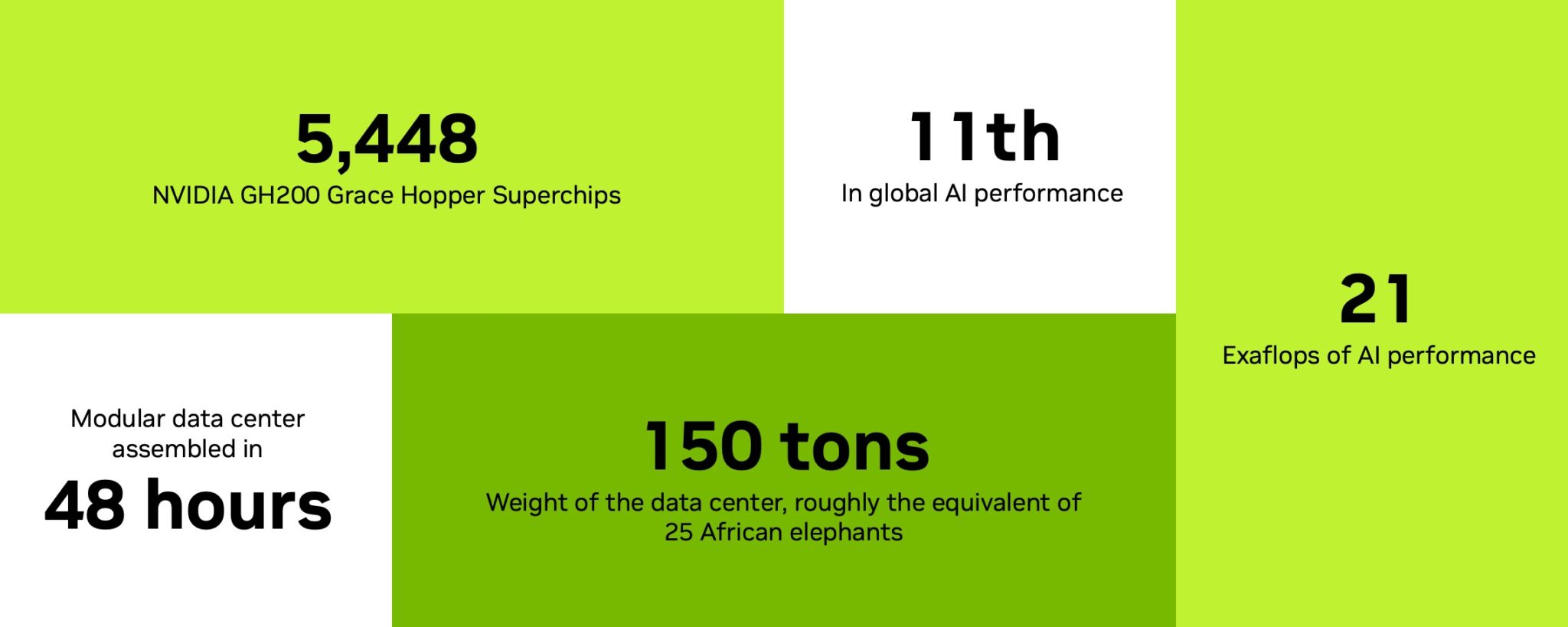
The University of Bristol’s Isambard-AI, powered by NVIDIA Grace Hopper Superchips, delivers 21 exaflops of AI performance, making it the fastest system in the U.K. and among the most energy-efficient globally.

The U.K. has officially joined the premier league of global AI infrastructure — and it’s not starting small.

At a ribbon-cutting ceremony at the Bristol Centre for Supercomputing (BriCS), leaders today unveiled Isambard-AI, the most powerful AI supercomputer ever built in the U.K.

U.K. Secretary of State Peter Kyle was joined by leaders from across academia, industry and government, including Simon McIntosh-Smith, director of the Bristol Centre for Supercomputing, and Neil MacDonald, executive vice president and general manager  for Hewlett Packard Enterprise’s server business.

And as we press this switch to activate the UK’s most powerful supercomputer, we are embarking on Britain’s super future where AI contributes towards the delivery of better public services, greater public prosperity, deeper scientific discovery and stronger national security,” Kyle said.

 The numbers back up Kyle’s statement:

  • 21 exaflops of AI performance
  • 5,448 NVIDIA GH200 Grace Hopper Superchips
  • Set to rank 11th worldwide on the latest TOP500 list of world’s fastest supercomputers
  • More than 10x faster than the next-fastest supercomputer in the U.K. More computing power than all other U.K. supercomputers combined
  • Ranked fourth globally for energy efficiency
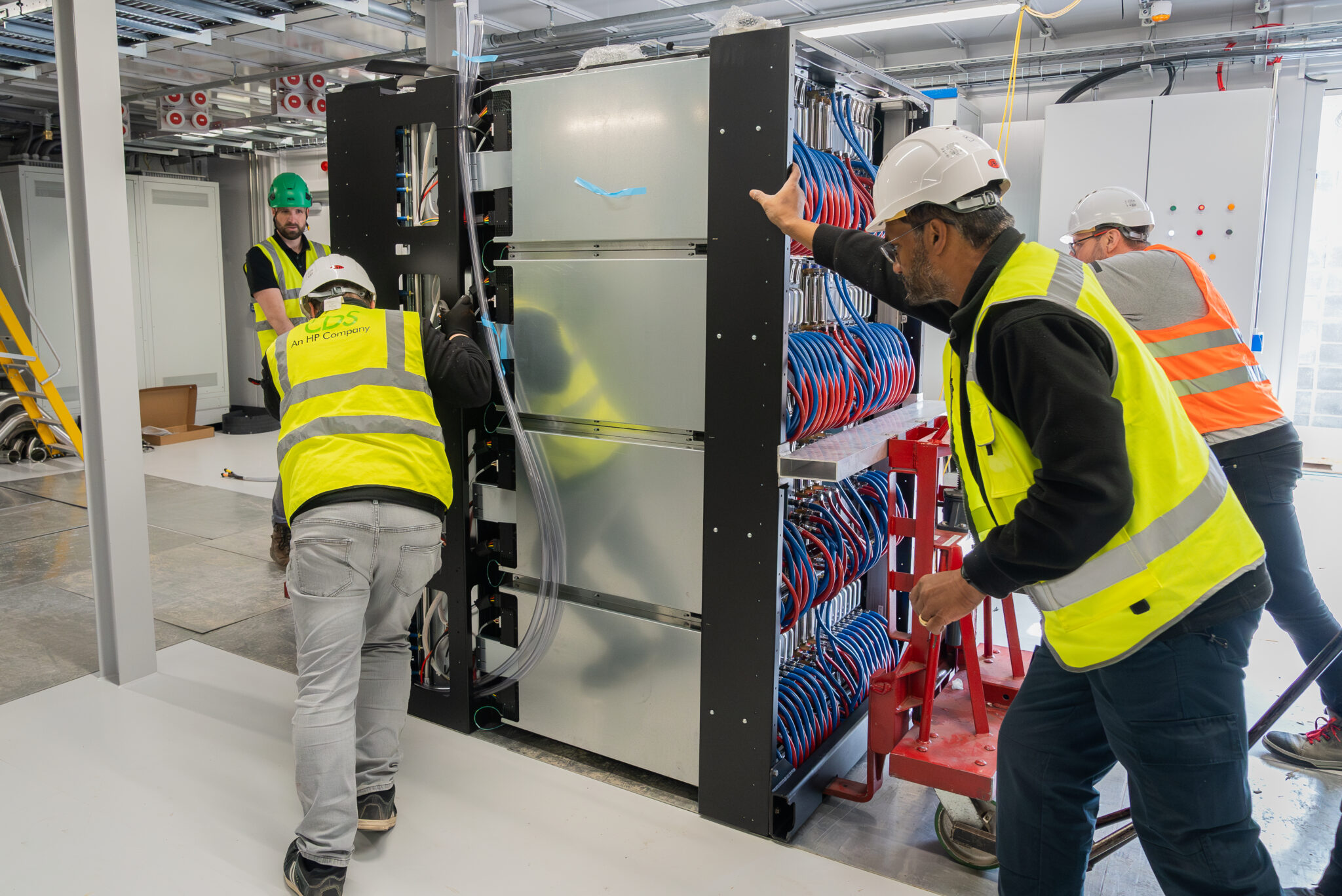
Engineering teams working collaboratively to maneuver and install components, illustrating the complex and coordinated effort behind the build.


Engineering teams working collaboratively to maneuver and install components within the supercomputer’s data hall, illustrating the complex and coordinated effort behind the build.

Why It Matters

Isambard-AI gives U.K. researchers and businesses a once-in-a-generation leap in computing power. It’s a platform to accelerate breakthroughs in:

  • AI-driven drug discovery
  • Advanced climate modeling
  • Materials science
  • Large language models (LLMs) tuned to U.K. languages and laws

Backed by £225 million in government investment and built with NVIDIA, HPE, the University of Bristol and others, Isambard-AI signals a clear ambition: to lead in AI, the U.K. must lead in compute.

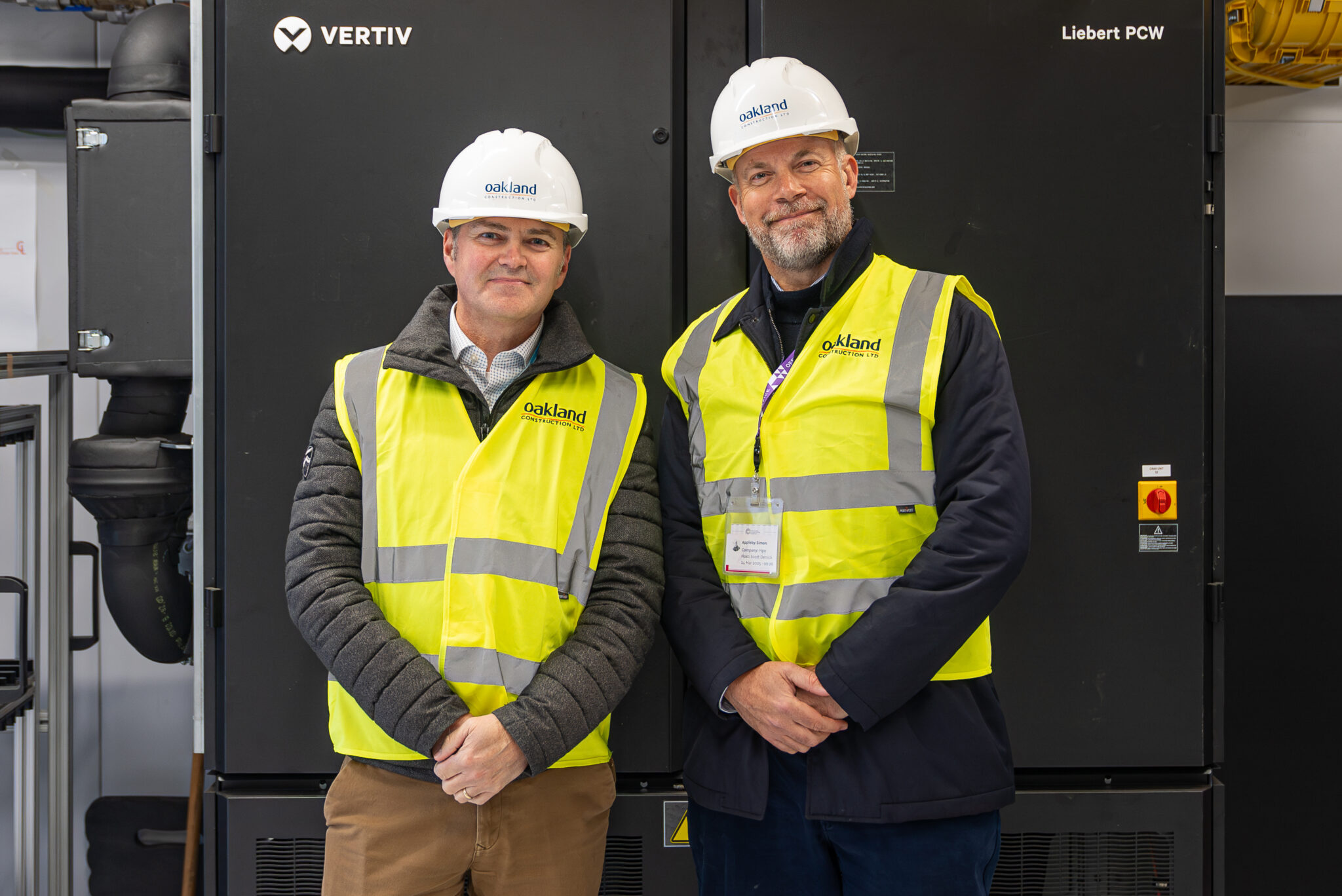
Simon McIntosh-Smith, director of the Bristol Centre for Supercomputing, with Simon Appleby, AI business lead at HPE.

Simon McIntosh-Smith, director of the Bristol Centre for Supercomputing, with Simon Appleby, AI business lead at HPE.

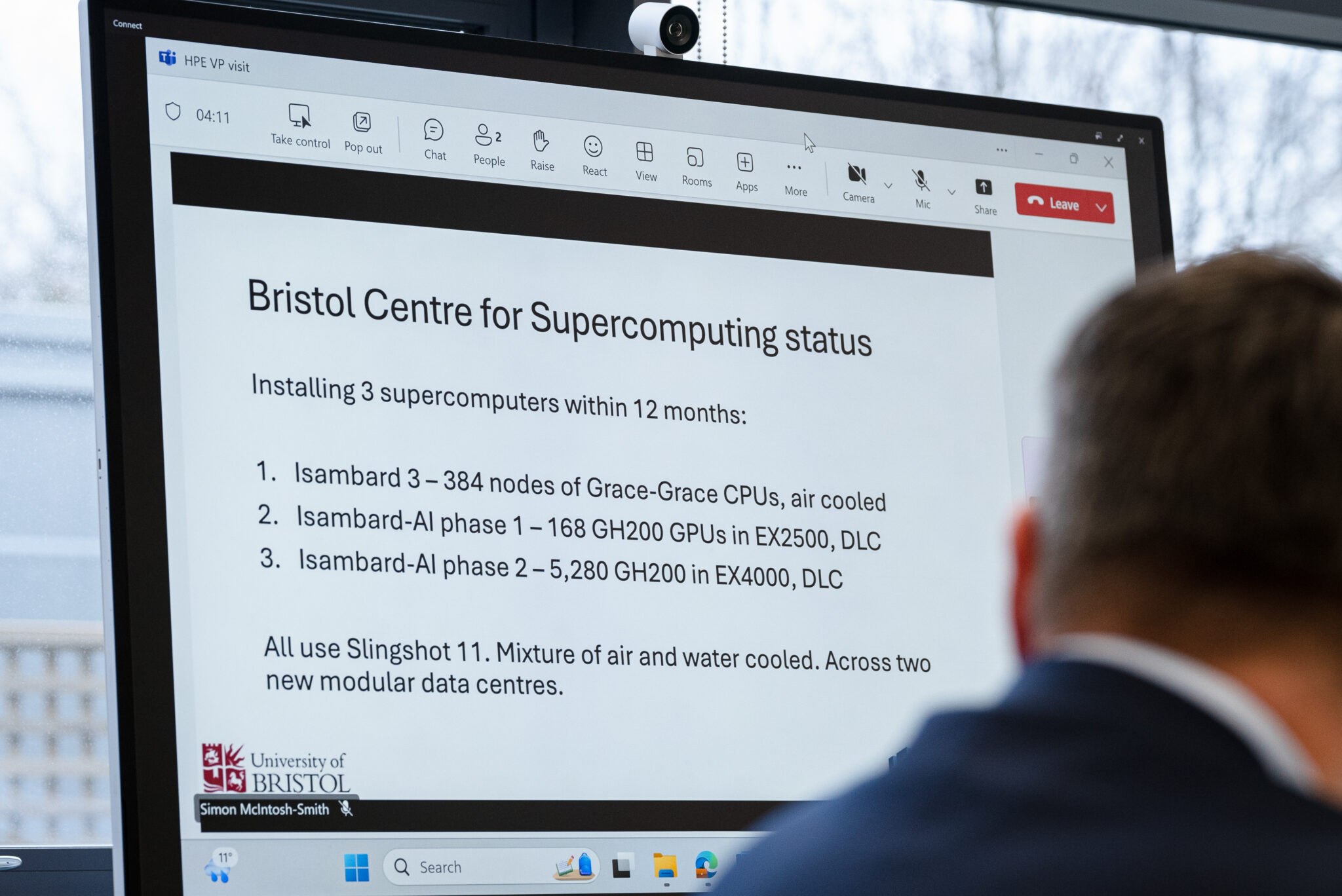
A glimpse into the project’s strategic planning, showing a screen outlining the ambitious goal of installing multiple supercomputers, including Isambard-AI’s phases, within 12 months.

A glimpse into the project’s strategic planning, showing a screen outlining the ambitious goal of installing multiple supercomputers, including Isambard-AI’s phases, within 12 months.

A Turning Point for UK Science

Named after Isambard Kingdom Brunel — the 19th-century engineer who reshaped Britain with railways, bridges and ships — Isambard-AI brings that same scale of ambition to AI research.

And like Brunel’s projects during his era, it moves fast. Having gone from conception to deployment in just under two years, including the construction of the modular data center in 48 hours, the supercomputer is already running live projects aligned with national priorities.

Early flagship projects include:

  • Nightingale AI: A sovereign, multimodal health foundation model trained on National Health Service (NHS) data to support earlier diagnoses and personalized care.
  • BritLLM: A U.K.-developed LLM project supporting British languages like Welsh, alongside English, to promote inclusivity and better public service delivery in healthcare, education and public services.
  • UCL Cancer Screening AI: Developing the first scalable AI system for prostate cancer detection via MRI, aiming for faster diagnoses and tailored treatments.
  • EIMCRYSTAL (University of Liverpool): Using AI to search 68 million chemical combinations to discover greener, more sustainable industrial materials — reducing reliance on rare or toxic inputs.
  • EgoAI (University of Bristol): Using AI to analyze recordings from wearable cameras and other smart devices to help people perform tasks better at home. This holds immense promise for assisting dementia patients in the future.
A technician carefully installs a server blade equipped with direct liquid cooling, demonstrating the hands-on precision involved in assembling Isambard-AI’s advanced computing infrastructure.


A technician carefully installs a server blade equipped with direct liquid cooling, demonstrating the hands-on precision involved in assembling Isambard-AI’s advanced computing infrastructure.

Built Fast, Built Smart

How do you build a supercomputer in half the usual time?

“We treated the project like a high-performance processor,” said Simon McIntosh-Smith, director at BriCS. “We executed everything in parallel.”

Key to this speed:

  • Parallelized project management
  • Early procurement of critical hardware, particularly GPUs
  • Prefabricated modular data halls shipped in and assembled in days
  • Relentless optimization of delivery timelines
  • Ground broke in June 2024. By June 2025, the full 5-megawatt system was live: built, tested and running at a global scale.
A close-up of the intricate network of liquid-cooling pipes, a crucial component of Isambard-AI’s world-class energy efficiency and ability to pack 440 GPUs per cabinet.


A close-up of the intricate network of liquid-cooling pipes, a crucial component of Isambard-AI’s world-class energy efficiency and ability to pack 440 GPUs per cabinet.

World-Class Efficiency

Isambard-AI is not just fast — it’s green.

  • Ranked fourth globally on the Green500 list
  • Powered by NVIDIA GH200 Superchips, among the most efficient chips available
  • Direct liquid-cooling architecture from HPE packs 440 GPUs per cabinet
  • Hybrid cooling towers enable >90% dry, waterless operation
  • Entirely powered by zero-carbon electricity
  • Engineered with the potential to recycle waste heat
  • Overall power usage effectiveness below 1.1, among the best ever achieved
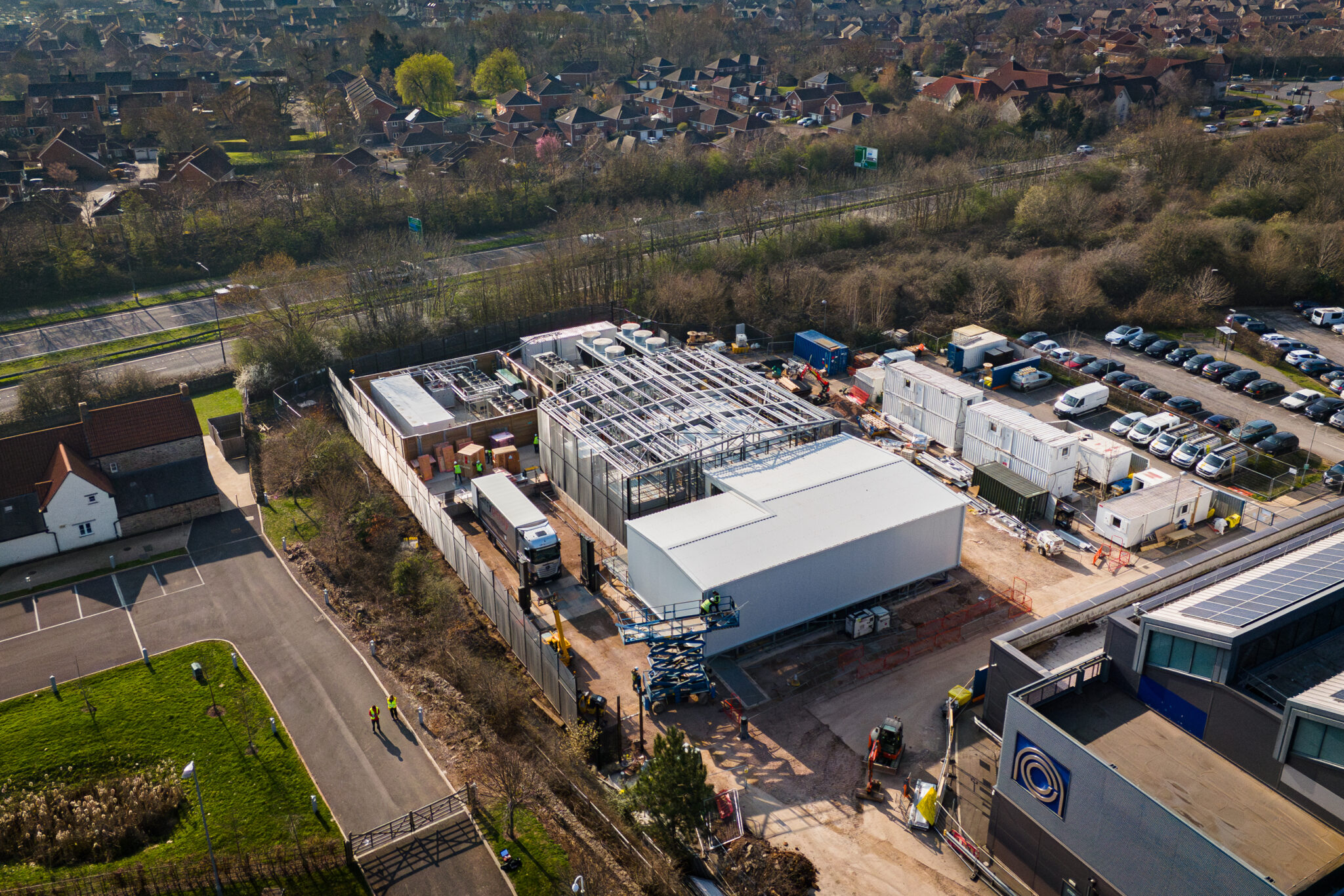
An aerial view of the Isambard-AI construction site, illustrating the scale of the modular data center build and the rapid progress made in creating the U.K.’s most powerful AI supercomputer.


An aerial view of the Isambard-AI construction site, illustrating the scale of the modular data center build and the rapid progress made in creating the U.K.’s most powerful AI supercomputer.

A National Asset

Access will be managed by the U.K. Department for Science, Innovation, and Technology and U.K. Research and Innovation, with an emphasis on aligning usage with national priorities, enabling smaller institutions and startups, and supporting both research and commercial innovation.

The U.K. now has an AI infrastructure asset that matches its ambitions, not just for headline moments but for deep, lasting national impact.

The UK’s AI Playbook: Infrastructure, Investment, Acceleration

The launch of Isambard-AI marks a big leap for the U.K., one part of a broader, coordinated push to put Britain at the forefront of AI.

From supercomputers to skills programs, Britain is building the tools to lead in AI — on its own terms.

Images and video courtesy of the Bristol Centre for Supercomputing

Related News

Could not load file or assembly System.Runtime.CompilerServices.Unsafe


I created a Visual Studio (Community 2019) project with C# using ServiceStack.Redis. Since it is C#, I use Windows 10 (there is a Redis version for Windows but it is really old and as I know, it is unofficial so I am afraid that might be the problem).
Here is an excerpt from my code:

public class PeopleStorage: IDisposable
{
    public PeopleStorage()
    {
        redisManager = new RedisManagerPool("localhost");
        redis = (RedisClient)redisManager.GetClient();
        facts = (RedisTypedClient<List<Fact>>)redis.As<List<Fact>>();
    }

    public List<Fact> GetFacts(int id)
    {
        string sid = id.ToString();
        if (facts.ContainsKey(sid))
            return facts[sid];
        return accessor.GetFacts(id);
    }

    private RedisTypedClient<List<Fact>> facts;
    private RedisClient redis;
    private RedisManagerPool redisManager;
}

In an attempt to connect to Redis in line return facts[sid];, an exception occurs:

System.IO.FileLoadException: "Could not load file or assembly
"System.Runtime.CompilerServices.Unsafe, Version=4.0.4.1,
Culture=neutral, PublicKeyToken=b03f5f7f11d50a3a" or one of it’s
dependences. The found Assembly’s manifest definition does not match
the Assembly reference. (Exception from HRESULT: 0x80131040)"

(May be inaccurate as I have translated it)

I have tried updating all the packages, starting with ServiceStack packages, ending with System.Runtime.CompilerServices.Unsafe itself. Moreover, you can’t choose 4.0.4.1 version in NuGet, the closest one there is 4.0.0, while the relevant is 4.0.7.

I do not understand why it uses this version and how I can fix this problem.
Even a clean reinstall of Visual Studio did not help.

Former Tesla president discloses the secret to scaling a company


Few companies have grown as quickly as Tesla, especially just before and after the company launched the Model 3, its first affordable EV.

“We scaled Tesla in 30 months from $2 billion in revenue to $20 billion in revenue,” Jon McNeil, the former president of Tesla who is now co-founder and CEO of DVx Ventures, told the crowd at TechCrunch’s All Stage event in Boston.

It wasn’t McNeil’s first time scaling companies, nor would it be his last. Previously, he founded six different companies, and after Tesla, he joined Lyft as COO before starting his own venture firm, where he’s launched a dozen startups.

Over the years, McNeil has developed a playbook that helps him identify when a company is ripe for scaling. He shared those insights last week with the audience at TechCrunch All Stage 2025.

When assessing a company’s potential to scale, McNeil primarily judges them on two different measures, product-market fit and go-to-market fit. It’s not unusual for investors to focus on those concepts, but McNeil has distilled them into two objective measures.

For product-market fit, he asks each startup, “do 40% of your customers say they cannot live without your product,” he said. If not, then the company isn’t ready. 

“We keep adding, adding, adding and tweaking the product until we get to 40% and then we say, okay, boom, now we’ve got product market fit,” McNeil said. “It’s actually objective and measured. It’s not a feeling, it’s not a sense. It’s a metric.”

Techcrunch event

San Francisco
|
October 27-29, 2025

McNeil added, “We did a study of businesses that actually achieved breakout, and those businesses achieved breakout at roughly that 40% acceptance level.”

Second, McNeil looks at whether the company has a mature go-to-market strategy. Specifically, he’s interested in whether the amount a company spends to acquire customers, known as customer acquisition cost (CAC), is sufficiently below the total lifetime value (LTV) that the customer will bring the company. 

When a company starts pulling in four times more money over the life of the customer than it spent to acquire them — an LTV to CAC ratio of four-to-one — that’s when he knows the company is ready.

“Then we pour in the cash. But before then, we’re doling out cash $100,000 at a time just to get to different stage gates,” he said.

‘The Purge’ Movies May Return to Keep America Violent


During the 2010s, Blumhouse’s The Purge series came out a reliable clip, and even had a TV show. It seemed to have wound down with 2021’s The Forever Purge, but since then, creator James DeMonaco has decided there’s at least one more story to tell in that universe.

While doing press for his new horror movie The HomeDeMonaco told Bloody Disgusting he and his wife wrote a script together that’s now in the hands of Blumhouse boss Jason Blum. He didn’t give the whole game away, but teased it would bring back “someone who I love and I think the audience loves,” likely referencing Frank Grillo’s Leo Barnes, the Punisher-esque lead of The Purge: Anarchy and its direct follow up, Election Year, but was nowhere to be found in Forever.

And as far as new material goes, DeMonaco added the script introduces “some really amazing women. We’ve had some great women in the past, but real warrior women come forth here in a way that we haven’t really explored on Purge night.” Of the whole script, he called it “cool and fun, and I hope they like it. We’re hoping next year would be great to shoot, maybe the end of this year if timing works out. But now it’s with the powers that be, so we’ll see what happens.”

If a sixth Purge gets the green light, it’ll be coming at the right time. There’s a lot going on in America for it to satirize, and Blumhouse could use a potential pick-me-up after its last few movies this year came out to more muted reactions than expected. But the real question is, is it possible for this movie to come out before GTA 6?

Want more io9 news? Check out when to expect the latest Marvel, Star Wars, and Star Trek releases, what’s next for the DC Universe on film and TV, and everything you need to know about the future of Doctor Who.

A jaw-dropping mod to remake part of Fallout 1 in Doom has resurfaced after 3 years of silence


Developer Alexander “Red888guns” Berezin has just released a new trailer for Fallout: Bakersfield, his project to recreate the ghoul city of Necropolis from Fallout 1 as an FPS campaign in the GZDoom Engine.

The last we saw of Fallout: Bakersfield was a 55-second teaser all the way back in September 2022. Berezin’s incredible art and familiarity with 2D Fallout immediately set the mod apart. But after two years and no further word, I had assumed Bakersfield had been mothballed entirely in favor of other projects.

Ubisoft CEO responds to the Stop Killing Games petition, stating the publisher is ‘working on’ improving its approach to end-of-life support, but that ‘nothing is eternal’


Ubisoft CEO Yves Guillemot has addressed the Stop Killing Games consumer rights campaign, stating that end-of-life support for old online games ‘a far reaching issue’ that the publisher is ‘working on’ but that ‘nothing is eternal’ when it comes to videogame services.

Guillemot was asked about Stop Killing Games—which advocates for increased regulations to prevent game developers and publishers from shutting down games after official support for them ends—at Ubisoft’s annual shareholder’s meeting. The question was posed in the context of Ubisoft’s online racer The Crew, the shutdown of which became the catalyst for the Stop Killing Games initiative.

Motorola Razr Plus 2025 review: The cover is the star of the show


Why you can trust Android Central


Our expert reviewers spend hours testing and comparing products and services so you can choose the best for you. Find out more about how we test.

When you go to a concert, you’re usually there to see a specific band play. Maybe it’s for a new album. Maybe it’s for nostalgia. But rarely would you expect to enjoy a cover band better than the original.

That’s how I feel about the Motorola Razr Plus 2025, a phone that looks identical to its predecessor, yet still somehow packs all the wonder and fun of the original without introducing anything new. Even stranger, it’s the small cover display that I found enjoying the most, not the large, beautiful inner display that folds in half like liquid glass magic.

16 Writer-Recommended Time Management Tools and Ideas


How are your time management skills as a freelancer? If you’re struggling, you’ll be glad to know there are time management tools available to help freelance writers turn chaos into organizational prowess.

Without structure, days vanish in a haze of emails, social media, research, and task switching. This is a drain, delaying assignment delivery and potentially risking income!

Between client projects, deadlines, marketing and a never-ending to-do list, staying on top of the day to day may feel impossible. But it’s not! Keep reading to discover 15 strategies and tools to transform the daily grind into a productive, sustainable freelance workflow.

Time management tools and others, such as project management tools and social media management tools, help content creators balance juggling multiple clients with real life.

During a Freelance Writers Den discussion, members described struggles fitting in marketing while meeting deadlines, handling family duties and protecting self-care. Packed schedules often push marketing aside, causing freelancers to spend valuable time on repetitive tasks instead of growth strategies.

The Den group recommended project management features, collaboration tools and time tracking to organize manageable tasks, support team projects and deliver detailed reports.

Below, we’ve listed our favorites to help you measure progress and block our distractions so you can make more money writing.

Time Management: CalendlyTime Management: Calendly

Calendly

Calendly is a scheduling and time management tool that helps people manage scheduling meetings without the hassle of going back and forth in email. This productivity tool lets users share their availability, allowing clients and collaborators to book meetings during open time slots.

Calendly is a superb time management tool because it helps reduce time spent setting up meetings, helping writers focus on money-making activities. The intuitive interface and calendar integration of this solution improve team collaboration and task progress.

With features like setting reminders and managing multiple schedules, Calendly helps freelancers stay organized and on schedule across different time zones and projects. Available on mobile devices and desktops, it’s a valuable management tool for streamlining communication and keeping project progress on track.

Time Management: Google CalendarTime Management: Google Calendar

Google Calendar

Google Calendar is a powerful time management tool that helps writers schedule interviews, set reminders and organize daily tasks with ease. This popular calendar app syncs with mobile devices and communication tools like Slack, providing timely notifications to keep writers on track.

With features like time blocking and color-coded events, Google Calendar helps prioritize important tasks to boost productivity. Integration with tools like Calendly further streamlines scheduling and team collaboration.

Google Calendar’s intuitive interface makes it easy to track progress on projects and stay focused on deadlines. It helps freelance writers and small teams manage their time entry and daily tasks effectively, ensuring valuable time is used efficiently across multiple projects.

Time Management: TogglTime Management: Toggl

Toggl Track

Toggl Track is a simple time tracking app that helps freelance writers and small teams log time spent on daily tasks and projects. With just a click of the play button, users can start tracking time on specific tasks and organize projects by client for streamlined and accurate project time tracking.

Toggl’s intuitive interface supports billable hours tracking and detailed timesheets, helping writers and project managers see how much time is spent on brainstorming, drafting and editing. The app’s reminders and time log features help avoid bad habits like forgetting to track time, improving time management and tracking task progress.

Integration with other productivity tools enhances team collaboration and project progress. Toggl’s detailed reports give in-depth insight into time spent, supporting better planning and tracking of important tasks.

SmartSuite

SmartSuite is a top time management tool for freelance writers and content teams. This all-in-one project management tool offers task management, project time tracking and time tracking software to help measure progress and manage daily tasks easily. The simple interface supports manageable tasks, Kanban boards and priority levels, helping writers organize their to-do list and stay focused.

SmartSuite’s native time tracking app automatically records time spent on billable hours and creates detailed timesheets and time logs, making it simple to separate billable from non-billable work. Team collaboration improves with built-in communication tools like group chats, task comments and @mentions, boosting team productivity.

Key features for project management include project phases, milestones, file attachments and version control, all supported by detailed reports and project progress dashboards. With unlimited users and mobile device support, SmartSuite helps small teams streamline workflows, block distracting websites and automate repetitive tasks—a user-friendly management tool for better employee time and task entry.

Trello

Trello is a versatile project management tool that helps freelance writers and small teams manage editorial workflows using Kanban boards. This time management tool organizes daily tasks visually with boards, lists, and cards, making it easy to monitor progress and focus on the most important tasks.

Trello’s beginner-friendly interface supports task management with customizable fields, to-do lists and priority levels. Writers can create manageable tasks, set reminders and use time tracking tools through Power-ups—integrations that improve project time tracking and automate repetitive tasks.

Collaboration tools enable real-time communication, note-taking and easy file attachments, boosting team productivity and supporting project progress. Trello connects with other apps such as Google Docs, Slack and Evernote to streamline workflows across desktop and mobile devices.

Trello’s flexible project management features include calendar, timeline and dashboard views, helping writers stay focused and block distracting websites.

Asana

Asana is a strong project management tool designed for medium to large editorial teams. This time management software combines task management, time tracking, and collaboration tools to keep project progress on track.

Writers and managers can use customizable templates to collect client info, detailed task lists with dependencies and time blocking to manage time spent on daily tasks. Asana’s project management features include work portfolios that organize multiple projects, showing a detailed view of content status, deadlines and milestones.

Team collaboration improves with task assignments, comments and integrations with popular apps like Slack, Dropbox and Google Calendar. Automatic tracking of billable hours and detailed reports help teams manage resources and avoid bad habits like losing track of repetitive tasks.

Asana’s intuitive interface works best for teams needing full control over task progress and employee time entry.

ClickUp

ClickUp is a flexible project management tool for large editorial teams that need a customizable interface to manage complex projects. This time management software combines task management, time tracking tools and collaboration features to boost team productivity and streamline workflows.

Writers can track project progress with Gantt charts, Kanban boards and calendar views. Custom fields, dependencies and task comments help manage important daily tasks and priority levels. ClickUp’s whiteboards provide a virtual space to plan workflows and map task progress.

Built-in time tracking apps support automatic tracking, time entry and detailed timesheets, making it easy to separate billable hours and track time spent on each task. With mobile device support and integrations with favorite productivity tools, teams can stay focused and manage employee time from anywhere.

ClickUp supports unlimited users and offers detailed reports, making it a user-friendly project management tool for automating repetitive tasks and keeping the bigger picture in view.

Todoist

Todoist is a straightforward task management tool perfect for freelance writers and small teams looking to organize daily tasks and improve productivity. The intuitive interface lets users create manageable tasks, set priority levels and build detailed to-do lists to track progress and focus on the most important tasks.

Features like due dates, reminders and task comments help avoid bad habits such as procrastination and multitasking. Integration with popular apps like Google Calendar, Gmail and Slack supports smooth communication and collaboration tools within team projects.

Available on mobile devices, desktops and web, Todoist supports time blocking and task scheduling, making time management easier. While it lacks additional features for project management, Todoist’s simplicity and extra productivity tools make it a favorite app for personal use and small teams.

Clockify

Clockify is a comprehensive time tracker that combines project management and team collaboration tools. It offers unlimited users, making it perfect for freelancers and small teams managing multiple client projects.

With Clockify, writers can track time spent on each project and task, organize daily tasks, and maintain detailed timesheets. The platform’s project time tracking and task management features help measure progress and billable hours accurately.

Clockify provides detailed reports and analytics that show how valuable time is allocated across projects, helping users avoid bad habits and focus on the most important tasks.

Notion

Notion is a flexible project management platform with a user-friendly interface, ideal for individual writers and small editorial teams. Notion’s customizable workspace combines task management, note-taking and collaboration tools to create a centralized hub for writing projects and educational resources.

Writers can organize daily tasks and to-do lists using Kanban boards, Gallery, List or Timeline views to track project progress and focus on the most important tasks. Notion’s native formulas and functions automate task updates, supporting smooth time blocking and project time tracking.

Collaboration tools boost team productivity with shared documents, tagging and feedback features, while detailed reports and time logs help monitor time spent and employee time entry. Integration with favorite apps enables seamless workflow management across mobile devices and desktops.

Monday.com

Monday.com is a comprehensive project management solution designed for writing teams seeking advanced reporting and customizable workflows. This platform combines managing tasks, tracking time and automation to help editorial teams plan resources, manage budgets and track project progress efficiently.

With a simple interface, Monday.com allows teams to break projects into manageable tasks, organize to-do lists and set priority levels. The no-code automation builder automates repetitive tasks, sends reminders and updates status in real time, boosting team productivity and helping writers stay focused on the most important tasks.

Portfolio management features provide a detailed view of multiple projects, enabling project managers to allocate employee time and monitor task progress through Gantt charts, Kanban boards and timeline views.

Custom feedback forms streamline communication between clients and writers, while integrations with popular productivity tools enhance collaboration and simplify workflow.

Wave Accounting

While not a time management tool per se, Wave Accounting helps freelancers and small teams organize invoices, expenses and payments efficiently. This user-friendly platform helps writers create professional invoices with custom logos and brand colors, making billing look polished and trustworthy.

With Wave’s mobile app, tracking expenses is easy—users can take pictures of receipts and keep detailed records for taxes and budgeting. The software supports managing billable hours, time entry and generating detailed reports, giving freelancers a full view of their finances and cash flow.

Wave Accounting helps freelance writers stay on top of their business tasks by streamlining invoicing and payment tracking, reducing time spent on repetitive financial tasks.

Google Docs

Google Docs is a user-friendly collaboration tool that helps writers and teams manage tasks and projects together. It allows easy note-taking, task lists and sharing documents with clients or team members.

With features like real-time comments and suggestions, Google Docs improves team collaboration and communication tools. The platform’s version history tracks task progress and lets users restore deleted content, keeping important work safe.

Google Docs supports managing daily tasks and smaller tasks with a highly intuitive interface accessible on mobile devices and desktops. It helps writers stay focused, organize valuable time and avoid bad habits like losing track of repetitive tasks.

Integrations with other favorite apps make it easy to connect workflows, manage time and track project progress efficiently.

Teamwork

Teamwork excels as a comprehensive project management solution combining time management with client operations, tailored for content marketing agencies and freelance writers managing multiple clients. This platform offers robust project management features alongside client onboarding, budget planning and time tracking to streamline workflows.

Writers and project managers benefit from collaboration tools such as built-in messaging, comments and mentions, which facilitate communication and client approvals. The intuitive interface supports task management, enabling teams to measure progress on daily tasks and manage important deadlines efficiently.

Teamwork’s time tracking app monitors billable hours and time spent, generating detailed timesheets and invoices directly within the platform. Project reporting features include burndown charts, profitability reports and resource allocation insights, helping teams maintain high productivity and avoid bad habits like losing track of repetitive tasks.

RescueTime

RescueTime is a time tracking tool that runs in the background on your computer and mobile device. It automatically tracks time spent on writing and other daily tasks, giving detailed reports on how time is used.

With this time management tool, writers can see how much time is spent on distractions like social media and set limits to block distractions. The app’s productivity scores and activity reports help track progress and improve time management.

This time tracking software makes it easy to monitor billable hours, avoid bad habits, and stay focused on important tasks. The simple interface and automatic tracking help freelancers and teams manage employee time and task entry more efficiently.

AppBlock

AppBlock is a productivity and time management tool that helps writers stay focused by blocking distracting websites and mobile apps during scheduled times. The user-friendly interface allows setting custom blocks, including strict modes that prevent uninstalling the app or bypassing restrictions, ideal for avoiding bad habits and staying on task.

By limiting access to social media and messaging apps, AppBlock supports time management and time blocking, helping freelance writers protect valuable time for important and daily tasks. The app’s schedule and reminder features keep users on track, improving task progress and overall project productivity.

Available on mobile devices, AppBlock works well for individuals who need help managing repetitive distractions and maintaining focus in both personal use and team projects.

How to manage your time as a writer

Just because you’ve got a new time management tool to play with doesn’t mean you’re automatically going to become a productive freelance writer. You’ve got to put some practices into place that go along with tech tools to get results. Here’s a list of helpful time-management tips from our Freelance Writers Den insiders.

Block time for important tasks

Use time blocking to schedule daily tasks like writing, pitching, marketing and client calls. Track time spent on each task to improve your estimates and build a manageable to-do list.

Turn off notifications

Minimize distractions by disabling alerts on your mobile device and computer. This helps you stay focused and avoid bad habits that reduce team productivity and personal output.

Use task management tools

Leverage project management solutions like Trello or Todoist to organize your task list, set priority levels and track task progress visually using Kanban boards or lists.

Work from dedicated spaces

Change your environment to increase focus. Consider co-working spaces or quiet cafes to separate work from home distractions, helping maintain valuable time and reduce interruptions.

Set reminders and deadlines

Utilize reminders in your time tracking app or calendar tools like Google Calendar to keep on top of daily tasks and prevent procrastination.

Track billable hours and time logs

Use time tracking software such as Toggl or Clockify to log billable hours and analyze how you spend your working day, improving future scheduling and project time tracking.

Automate repetitive tasks

Apply automation through platforms like SmartSuite or Monday.com to handle routine actions, saving time for creative work and improving team collaboration.

Prioritize smaller tasks

Break larger projects into smaller tasks and tackle the most important tasks first, ensuring steady project progress without feeling overwhelmed.

Use collaboration and communication tools

Stay connected with editors, clients or teammates via integrated communication tools to get quick feedback and keep all project updates centralized.

Review and adjust regularly

Analyze detailed reports from your time tracking tools to spot inefficiencies and refine your time management strategy continually. Also, consider using AI writing tools and proofreading tools to save even more time!

Work smarter, not harder

Mastering time management is essential for writers who want to boost productivity and meet deadlines consistently. Using the right project management solution and productivity tools helps streamline workflows, organize daily tasks and manage billable hours effectively.

Whether you prefer simple apps for managing tasks or advanced platforms with automation and detailed reports, the key is to find what fits your style and team size. Stay consistent, review your progress, and keep improving. By working smarter, not harder, with these tools and strategies, you’ll enhance your writing career and enjoy better control over your time and projects.

A vertical comic-style graphic with text that reads Crazy schedule? Time management tools for writes. The graphic is of a woman bursting through the page dressed in business casual and holding a briefcase. She looks frazzled.A vertical comic-style graphic with text that reads Crazy schedule? Time management tools for writes. The graphic is of a woman bursting through the page dressed in business casual and holding a briefcase. She looks frazzled.

FAQs

What are the 5 Ps of time management?

The 5 Ps of time management include Prioritize, Plan, Prepare, Perform and Pause. These key features help writers and teams stay focused on important tasks by building a clear to-do list and managing daily tasks efficiently.

  1. Prioritizing ensures manageable tasks receive attention first
  2. Planning involves scheduling and using time-blocking techniques
  3. Preparation readies resources
  4. Perform focuses on executing tasks
  5. Pause prevents burnout by managing valuable time

These principles support better management of tasks and improve overall project progress with the right tools.

What is the 7-8-9 rule for time management?

The 7-8-9 rule suggests allocating seven hours for work, eight hours for sleep and nine hours for personal time daily. This balance helps maintain productivity and avoid bad habits like overworking or multitasking. Using time management tools and a project management solution can help track time spent on tasks, ensuring the 7-8-9 balance is respected. By managing time and setting priority levels, writers can stay focused, improve team productivity and optimize their daily tasks effectively.

What is the 6-12-6 rule for time management?

The 6-12-6 rule breaks the day into three blocks: six hours for work, 12 hours for personal life and rest and six hours for sleep. This method promotes a healthy work-life balance, supporting better focus on the most important tasks during work hours. Freelancers can utilize time tracking apps and software to monitor time entry and time spent, ensuring that valuable time is not wasted on distractions. Integrating collaboration tools and task lists helps maintain project progress and manage repetitive tasks efficiently.

If you want to move up and earn more as a freelance writer, learning how to manage your time, set priorities and avoid distractions can dramatically improve your productivity and earning potential. Create a plan, use these time-management tools and get to work.

Learn to find, price & land great gigs! Banner ad for freelance writers den.Learn to find, price & land great gigs! Banner ad for freelance writers den.

Evan Jensen is a past editor for Make a Living Writing. When he’s not on a writing deadline or catching up on emails, he’s training to run another 100-mile ultra-marathon.

This is an updated version of a story that was previously published. We update our posts as often as possible to ensure they’re useful for our readers.

Xbox Game Pass Adds Grounded 2 and Others This Month


The award-winning, quirky survival game Grounded is like the game version of the classic ’80s comedy film Honey, I Shrunk the Kids. And Xbox Game Pass subscribers can get early access to that game’s sequel, Grounded 2, on July 29. 

Xbox Game Pass Ultimate, a CNET Editors’ Choice award pick, offers hundreds of games you can play on your Xbox Series X, Xbox Series S, Xbox One and PC or mobile device for $20 a month. A subscription gives you access to a large library of games, with new ones, including Doom: The Dark Ages, added monthly, plus other benefits such as online multiplayer and deals on non-Game Pass titles.

Here are the games Microsoft is bringing to Game Pass soon. You can also check out other games the company added to the service recently, like Tony Hawk’s Pro Skater 3 + 4.

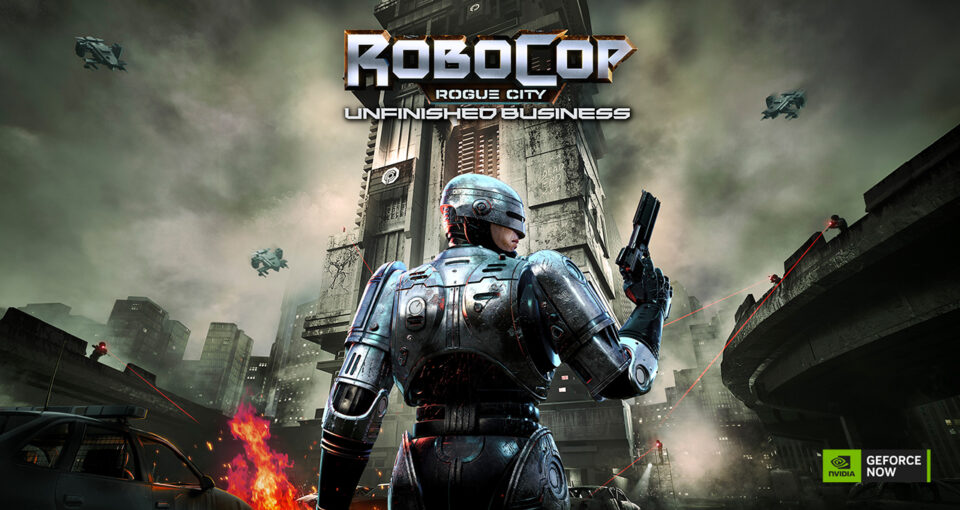
RoboCop: Rogue City

Game Pass Ultimate, PC Game Pass and Game Pass Standard subscribers can play now.

Serve the public, protect the innocent and uphold the law as the cyborg RoboCop. You’ll investigate crimes in Old Detroit before using your cyborg strength, cybernetic implants and arsenal of weapons to eradicate gangs from the area. This game is a whole new RoboCop story based on the film series, and Peter Weller, the original RoboCop himself, returns to voice the titular character.

My Friendly Neighborhood

Game Pass Ultimate and PC Game Pass subscribers can play now.

Something’s going on with everyone’s favorite Saturday morning puppet show, and it’s up to you to figure out what in this survival horror game. You’ll solve puzzles and use tools and improvised weapons to fend off your multicolored foes. So if you have anything against Barney or Big Bird, you can take out your feelings on them with this game. 

Back to the Dawn

Game Pass Ultimate and PC Game Pass subscribers can play now. 

This game is like if the series Prison Break took place in the Zootopia universe. You’ll play as either a fox named Thomas or a black panther named Bob as they try to navigate the prison system and escape with their lives. With multiple escape routes and over 100 quests you can complete, you can replay this game numerous times and have a different experience each time.

Abiotic Factor

Game Pass Ultimate and PC Game Pass subscribers can play on July 22.

Science meets violence in this 1990s-inspired sci-fi survival game. You and up to five other players can choose your areas of expertise, build your scientist and explore a massive, top-secret underground complex filled with artifacts and supernatural horrors that could tear you limb from limb. And remember, safety, security and secrecy are of the utmost importance… usually. 

Wheel World

Game Pass Ultimate and PC Game Pass subscribers can play on July 23.

If you want to take a nice, relaxing bike ride, this game is for you. Previously known as Ghost Bike, this game puts you behind the handlebars of one of the last ghost bikes around. These bikes can traverse between the lands of the living and the dead. You can explore these lands at your leisure while you race other riders and upgrade your ride with treasures you find along the way.

Wuchang: Fallen Feathers

Game Pass Ultimate and PC Game Pass subscribers can play on July 24.

This souls-like RPG is set during the final days of the Ming Dynasty. You play as an amnesiac pirate warrior named Wuchang on a quest to uncover the truth behind a world full of chaos. You’ll fight monstrous creatures in forgotten temples and overgrown ruins, unlock new weapons and master devastating techniques in order to bring peace to yourself and others. 

Grounded 2 (game preview)

Game Pass Ultimate and PC Game Pass subscribers can play on July 29.

You’ve been shrunk to the size of an ant — again — and you’ll have to survive the dangerous, miniature world. You’ll fight spiders and wasps, craft weapons and homes and even ride on your own insect friends to get around. You’ll unravel new mysteries along the way, but be careful. Something else is out there, and it hasn’t forgotten about you. 

Farming Simulator 25

Game Pass Ultimate, PC Game Pass and Game Pass Standard subscribers can play on Aug. 1.

Farming isn’t always as simple as games like Stardew Valley might make it out to be, but it can still be very rewarding. If you want a taste of what goes into building and maintaining your own farm, give Farming Simulator 25 a try. You’ll grow diverse crops, raise different animals and with the weather-changing, ground-deforming atmosphere, you’ll face all kinds of challenges along the way. 

Games leaving Game Pass on July 31

While Microsoft is adding those games to Game Pass soon, it’s also removing three other games on July 31. So you still have some time to finish your campaign or complete any side quests before you have to buy these games separately.

Gigantic: Rampage Edition
Kunitsu-Gami: Path of the Goddess
Turnip Boy Robs a Bank

For more on Xbox, discover other games available on Game Pass now, read our hands-on review of the gaming service and learn which Game Pass plan is right for you. You can also check out what to know about upcoming Xbox game price hikes.

Watch this: I Played Resident Evil 9 Requiem at Summer Game Fest, and It’s Extremely Messed Up