During the Marvel Comics: Avengers — Armageddon panel on July 23, Marvel announced the new series will debut this December. With the grand Armageddon event coming to a close soon, it appears Earth-616 will be left without its mightiest heroes to protect it. Storm, herself fresh off a stint with the Avengers, will fill that void by assembling a new X-team comprised of fan-favorite characters. Ororo will be joined by Wolverine, Colossus, Bishop, Iceman, Psylocke, Firestar, and Justice.
Image: Tony S. Daniel for Marvel Comics
Christopher Yost will handle writing duties, with Tony S. Daniel on art. Both Yost and Daniel are X-Men veterans. Yost had this to say about the new series:
I’ve worked on my fair share of X-Books over the years, but MAXIMUM X-MEN is everything I love about comics rolled into one— it’s underdog heroes saving the world from the biggest Avengers-level threats imaginable, it’s mind-breaking action and drama and everything people expect from X-Men, all with a classic Claremont vibe.
The team’s first challenge will be to face an invasion from the Negative Zone. The official announcement teases readers by asking if this is Annihilus again — or something far, far worse? Annihilus is one of Marvel’s most dangerous villains and was prominently featured as the antagonist of the 2006 event Annihilation.
One interesting reveal from the cover of Maximum X-Men #1 is just exactly who Psylocke is in the series. Longtime X-Men fans will know Psylocke has a complex history that’s not without controversy. To make a long story short, the codename refers to two characters — Betsy Braddock and Kwannon. For years, the former (a white woman) inhabited the latter’s body (an Asian woman) using the codename Psylocke after Kwannon died of the Legacy Virus while in Braddock’s body. It was a mess.
This was rectified in recent years, with both characters restored to their original bodies and Braddock taking the name Captain Britain. As recently as 2024, Kwannon has used the Pyslocke title in the main X-Men book as well as her own solo series. Yet Maximum X-Men‘s Psylocke is clearly Betsy Braddock. She’s in her own body but is again using the title reclaimed by Kwannon. Marvel didn’t directly address this during the panel, so readers will have to wait until December to find out what the deal is.
The European Commission issued its first-ever Digital Markets Act fines against Google, totaling €890 million ($1 billion) for anticompetitive practices.
Search took the biggest hit, with Google fined €460 million for allegedly giving its own services preferential placement over rival platforms.
Google Play wasn’t spared either, as the EU fined the company €430 million for restricting developers from steering users to cheaper payment options outside the Play Store.
Google’s battles with European regulators are far from over. After recently losing its fight against the EU’s record €4.1 billion antitrust fine over Android’s market dominance, the European Commission has now issued its first fines against the company under the Digital Markets Act (DMA).
The EU announced that it has fined the company €890 million (around $1 billion), saying that Google broke the Digital Markets Act (DMA) by giving its own services an unfair advantage in Search, and limiting how Android developers can reach customers outside the Play Store.
The penalties are divided into two parts. Google was fined €460 million for allegedly favoring its products, including Shopping, Hotels, Transport, and Sports results, over rival services in Google Search. EU regulators said that Google’s services were consistently given better placement and richer visual treatment than rival services, making it harder for competitors to get visibility.
Latest Videos FromAndroid Central
The second fine, worth €430 million, was imposed on Google Play. The Commission said Google blocked developers from directing users freely to cheaper offers or alternative payment methods outside the Play Store. Under the DMA, developers should be able to promote those options without facing restrictive conditions, and Google’s steering-related fees were also found to be higher than what regulators consider acceptable.
These are the first fines that Google has received under the DMA, Europe’s landmark law aimed at reigning in the power of the biggest “gatekeepers” in the tech industry. The ruling also orders Google to change its Search ranking practices and its Play Store policy to comply with the law. Failure to take corrective action within 60 days can result in additional penalties based on the company’s global revenue.
Android Central has contacted Google for a statement and will update this article when we hear back. Anyway, the tech giant is expected to appeal the decision but will continue discussing possible compliance measures with regulators.
Android Central’s Take
I don’t think most people will lose sleep over Google getting another billion dollar fine, but if these rulings push Google to give developers more freedom and make Search a little fairer, that’s ultimately a win for users. At the same time, I can’t help but notice the pattern here: Google changes its products, regulators object, Google appeals, and the process repeats itself. For years, you’d think we’d be talking about lasting fixes after billion-euro penalties instead of another chapter in the same regulatory saga.
Get the latest news from Android Central, your trusted companion in the world of Android
For many adult smokers, finding a smoke-free alternative can feel confusing at first. There are different devices, nicotine strengths, flavours, and styles to choose from, each offering a slightly different experience. One of the simplest options is the ecig, especially for adults who want something compact and familiar.
While vaping is not risk-free and is only intended for adults who already use nicotine, understanding how ecigs work with this guide can help adult smokers make more informed choices.
What Is an Ecig?
A Simple Introduction
An ecig is a small electronic device that heats vape liquid to create vapour. The user then inhales the vapour instead of tobacco smoke. Most vape liquids contain nicotine, although strengths can vary depending on the product.
Unlike traditional cigarettes, ecigs do not burn tobacco. This means there is no ash, no cigarette smoke, and no tobacco combustion involved.
Why Some Adult Smokers Choose Ecigs
Many adult smokers are drawn to ecigs because they are straightforward and portable. Some devices are designed to feel familiar in the hand, which can make the change from smoking feel less overwhelming.
A beginner-friendly Ecig can be especially appealing to adults who want a simple device without complicated buttons, tanks, or settings.
Common Types of Ecigs
Cigalike Devices
Cigalikes are designed to look and feel similar to traditional cigarettes. They are often slim, lightweight, and easy to carry. For beginners, this familiar format can make them a practical starting point.
Many cigalikes use replaceable cartridges, which helps keep maintenance simple.
Pod Systems
Pod systems are compact devices that use small pods instead of larger tanks. Some are refillable, while others use prefilled pods. They are popular because they are easy to use and usually require little setup.
Vape Pens
Vape pens are slightly larger and may offer longer battery life or more flexibility. They can be a good option for adults who want more choice in flavours and nicotine strengths.
What to Consider Before Choosing an Ecig
Nicotine Strength
Nicotine strength is one of the most important factors. Too little nicotine may not feel satisfying for someone switching from smoking, while too much may feel uncomfortable.
Adult users should read product labels carefully and choose a strength that reflects their current nicotine use.
Ease of Use
For beginners, simplicity matters. A device that is easy to charge, use, and maintain can make the experience smoother. Cigalikes and pod systems are often easier to manage than advanced vape kits.
Cost Over Time
The device itself is only part of the cost. Replacement cartridges, pods, coils, or liquids may need to be purchased regularly. Comparing ongoing costs can help users avoid surprises.
Portability
Some users want a small device they can carry easily throughout the day. Others may prefer a larger device with longer battery life. The best choice depends on daily routine and personal preference.
Responsible Use and Safety
Intended for Adults Only
Ecigs are intended for adult smokers and existing nicotine users. They are not suitable for children, teenagers, non-smokers, or anyone who does not already use nicotine.
Nicotine is addictive, so products should be used responsibly.
Store Devices and Liquids Safely
Vape liquids and devices should be stored away from children and pets. Nicotine-containing products can be harmful if swallowed or handled incorrectly.
Devices should also be charged using the correct charger and kept away from excessive heat.
Buy From Reputable Retailers
It is important to choose reputable retailers that provide clear product information, age checks, and proper labelling. Avoid unregulated products or sellers that make unrealistic claims.
Practical Tips for First-Time Users
Start Simple
A simple device can help new users focus on the basics. Once they understand what works for them, they can decide whether they want more advanced features later.
Pay Attention to Flavour and Feel
Flavour, vapour strength, and throat feel can all affect the experience. Some adult smokers prefer tobacco or menthol flavours at first because they feel familiar.
Follow Local Rules
Vaping is not allowed everywhere. Many workplaces, public spaces, transport services, and private venues have their own rules. Users should always check before vaping.
FAQ
Is an Ecig the Same as a Vape?
The terms are often used in similar ways. An ecig usually refers to a small electronic cigarette-style device, while vape can refer to a wider range of vaping devices.
Are Ecigs Risk-Free?
No. Ecigs are not risk-free and usually contain nicotine, which is addictive. They are intended for adult smokers or existing nicotine users only.
What Type of Ecig Is Best for Beginners?
Many beginners prefer cigalikes or pod systems because they are compact, simple, and easy to use.
Do Ecigs Contain Tobacco?
Most ecigs do not contain tobacco leaf, but many contain nicotine, which may be derived from tobacco. Always check the product details.
How Do I Choose the Right Nicotine Strength?
The right strength depends on your current smoking habits and personal comfort. Adult smokers who are unsure should ask a reputable retailer or healthcare professional for guidance.
Conclusion
Ecigs can offer adult smokers a simpler, smoke-free alternative to traditional cigarettes, but they should be chosen carefully with the help of a usage guide and used responsibly. Understanding device types, nicotine strengths, costs, and safety guidance can help users make better decisions.
For adult smokers considering the switch to ecigs, the best approach is to start with clear information mentioned in the guide, choose a reliable product, and use nicotine products responsibly.
A new memory cartoon is waiting for me. When I open the app, I see a multipanel strip called Big Little Moments. It appears as soon as I plug the Looki AI device back in to recharge, after almost a month not wearing it. It shows moments of me at a bar with my friend in LA, watching a stage presentation, eating a meal, seeing a demo, two women sitting across from me and then just me, walking with a phone in my hand.
These moments are from two days in June, when I wore the Looki to the Augmented World Expo in Long Beach, California. I’d been wearing it almost nonstop since April. I wore it to Apple’s WWDC, to Google I/O. I wore it to my Princeton college reunion. I wore it at home and commuting. And then I stopped.
The Looki L1 is a little black pendant, sort of watch-sized, with a camera on the front and microphones hidden somewhere. It has a clip and a lanyard. It can be worn around the neck or left propped on a desk. It’s an AI wearable but, unlike smart glasses, it has a battery that can run a whole day while intermittently recording audio and video clips. My colleague Katie Collins tried it last year, but I never got to test one out until this spring and summer.
The Looki is a round-with-spiky-bits pendant with a magnetic back clasp. Buttons to trigger recordings are studded around the sides. There’s also a touchpad. (Scott Stein/CNET)
AI wearables of all shapes and forms are everywhere now. OpenAI may be next to offer one. Some of these devices come in glasses form. Some are pendants. Some are pins. Some are earbuds. As AI keeps spreading everywhere and trying to absorb more of our personal information that it can craft into patterns and narratives, wearables are the physical form of trying to give AI eyes, ears and, increasingly, memories of your own life.
The Looki device follows in a long line of lifelogging wearables that go back over a decade. In 2014, I reviewed an occasionally recording lifelogging camera called the Narrative Clip, which promised to capture our memories. I found its memory, in practice, to be full of holes. In 2026, that’s pretty much still the case.
The Looki L1 promises a fun way to remember and record life’s moments, to have a companion to travel with you and save moments without having to record them. To be an all-day wearable camera.
But when I wore one, it made me feel awkward, like I was being a jerk or a spy. At best, it’s odd; at worst, it feels like I’m a guy with, well, an always-on camera. Which, in 2026, isn’t nearly as “fun” as it was in 2014, it turns out. I tested the Looki because I was curious, and because I’m legitimately interested in the future of assisted memory tech.
What the Looki L1 is, and isn’t
Looki L1 is an odd duck product, as many AI wearables are. The $250 lifelogging camera has no subscription, although the product team I chatted with suggested that some services could be subscription-based down the road. It uses its own proprietary AI service, and can’t hook into any other platforms such as Google Gemini, ChatGPT or Anthropic’s Claude, although it borrows models from several sources.
I do like the snap-on magnetic pendant strap that doubles as a charging dongle and can serve as a desktop stand if you want to perch it somewhere to take photos or video. The magnetic clasp works through clothing, too, so the pendant could look like a clip-on pin. But I don’t like that the Looki’s active recording LEDs are small. They’re less noticeable than those on Meta’s glasses by far.
There’s a phone app that the Looki pairs with, just as a smartwatch or pair of smart glasses would. That’s how the pendant gets its firmware updates and uploads its recorded clips to your phone and the cloud.
Looki’s highlight video compilations feel pretty random at the events I wore them at, and of course, no one really knew I was recording. (Scott Stein/CNET)
Looki has an “AI Mode” that stays on and intermittently records short video clips (no more than about 5 seconds each), apparently picking moments of interest. In my three months of use, it didn’t seem to have any pattern. There are dedicated buttons to trigger manual audio recordings, still photos or video recordings. There’s also a front touchpad, which I could hold down to summon a voice AI to chat with for feedback on what I’d recorded, or anything else. I rarely used it.
The Qualcomm chip on the Looki is an older watch-oriented model, but it still lasts a day on a charge. The future for pendants like these is likely even longer battery life, based on the specs of Qualcomm’s newest AI-optimized chips, released this year. These types of pendants are probably going to do even more on-device without relying on the cloud at all.
But, for the most part, the Looki is a repository. It sucks up images and videos, and then syncs them over to its companion phone app (which takes several minutes) and cloud-analyzes them later (which can take up to several hours). It’s like burying a time capsule and then digging it up later that day to see what you’ve got.
And what did I get? Mostly a hot, sometimes fascinating, often awkward mess.
As a memory maker, full of holes
The best thing the Looki does is generate comic book-like generative AI images based on things it automatically captures. The results vary in style and structure, with absolutely no discrete controls to make anything turn into a comic if you’d like it to. You just have to get lucky, I guess.
A few images of people I met, comic-transformed, are fun. A few story panel-type comics tried to distill a day, or several days, into a narrative. Sometimes they were clever (one, a map of New York and New Jersey showing me commuting, seeing tech demos and going to a Princeton reunion) felt sharable. One, of my trip to WWDC, was weirdly focused on my pre-event breakfast with my colleague Bridget Carey rather than all the hours I wore it during Apple’s keynote, which was the whole point of the day.
Sometimes the Looki auto-inserted me into images, inventing a narrative. (Since I’m wearing the pendant, I was clearly not in the picture.) My comic portrait ranged from oddly accurate to something more like Marc Maron. One comic picture of me buying a coffee at a Hyatt was inexplicably done in Minecraft-style blocks.
As for the rest of the recorded memories? There are AI-made supercuts of videos, set to odd preselected music. The tone often felt generic, and the captured videos are frequently at bad angles. When I had coffee with friends, several of the clips were accidental crotch shots. Other times, faces were cut out of the picture. (Did I need to wear the pendant higher up?)
The Looki seems to take video clips but not photos automatically, which were harder to download and share with friends. Also, a lot of the captured clips were either too brief or the people in them were discussing things that nobody approved sharing in the first place. If you’re wearing a Looki, prepare to do a lot of warning, explaining and apologizing.
Do I like having them to look over? Sort of, but so few are actually good. You can just take photos and videos when you want, rather than having the intermittently recording AI mode on. But then, if you do that, the device doesn’t feel like a true lifelog.
Sadly, a lot of the captured supercuts just showed me on my phone. Which, of course, just illustrated a sad state of my own life. I am on my phone a hell of a lot. Too much. And the comics, the autocaptures, they all tended to have at least one shot capturing me looking at my phone, since the pendant was around my neck, over and over and over.
Besides keeping these lifelog videos and autocaptures and creating comic strips, it weirdly tries to analyze meals I’ve eaten (not to any true success), and also pops occasional random notifications based on location, I think, and what the camera sees. These notifications are meant to be smart and context-aware. Sometimes they’re oddly on point (telling me I’m at AWE and reminding me of the start of the opening keynote, even though I never told it I was at AWE). Other times it just noted a store or maybe someone standing nearby. Again, like everything else the Looki does, these notifications can’t be customized at all.
As a public device, it’s embarrassing
My son has told me to take off the Looki pendant more times than I can count. My wife shamed me about my decision to wear it in a Japanese supermarket (I didn’t). People who saw it at public events, like WWDC or Google I/O, were either mildly curious or mildly offput. I awkwardly took it off a lot and stuck it in my pocket on trains, in bathrooms and, increasingly, many other places.
At a Whole Foods, someone next to me noticed it as I was shopping for chocolate bars and asked if it was recording. I explained it might be and that I test tech products for my job. They said they weren’t that upset, they knew that people are wearing cameras more and more. I didn’t believe they weren’t upset. And that reaction, too, has stuck with me. I wear smart glasses at least half the time now. Where does that put me on the socially acceptable spectrum? Don’t tell me.
I still find smart glasses less personally embarrassing, because they look and function like actual glasses. And, in reality, Meta’s glasses very infrequently record anything. While Meta has an autocapture mode for the glasses now, running it would wear out the battery fast.
The Looki, meanwhile, does nothing at all except be a AI-enabled camera pendant on your neck. To remember to charge that up and wear it, like an odd necklace that nobody asked for… I just can’t justify it. I made myself wear it for more weeks than I thought I would. Now, it’s out of batteries and sitting in a bag somewhere. I gave up.
The Looki was really just my Memory Cartoon Generator, for the most part, as you can see from all the images I shared. They’re interesting, but I can’t choose when they happen, or how they happen. And they’re not enough to keep me wearing the Looki. As you can see above, sometimes it even captured when I went to my home bathroom. (I never kept it on in an actual public bathroom, but this is exactly the nightmare stuff that the Looki embodies.)
If devices like the Looki could be actual memory assistants, deeply aware and able to help see and guide you — Or, if they were better cameras, taking photos I’d actually use — Or, if it could hook into AI services I actually semi-trusted and recognized — well, maybe. Right now, the Looki is more like a harbinger. Of glasses that really and truly will have longer battery life, someday soon, and be able to record all day long, if intermittently. And more AI pendants.
When that day happens, then yes, maybe my glasses will truly be recording all the time. And yes, that’s concerning. But even more concerning is the lack of any tech company efforts to manage privacy and deeper control over these random AI wearables. Or to elevate them beyond just gimmicks.
What I learned is I hit my limit. The Looki is not on me anymore. But the spirit of the Looki is everywhere else, coming fast.
Scott Stein
Editor at Large
I started with CNET reviewing laptops in 2009. Now I explore wearable tech, VR/AR, tablets, gaming and future/emerging trends in our changing world. Other obsessions include magic, immersive theater, puzzles, board games, cooking, improv and the New York Jets. My background includes an MFA in theater which I apply to thinking about immersive experiences of the future.
See full bio
A franchise inquiry that waits four hours for a response is usually gone.
Not officially. The candidate rarely withdraws. They just fill out three more forms on the same portal. The brand that calls back within ten minutes wins the conversation.
Everyone in franchise development knows this. Almost no pipeline is built for it.
That gap explains why AI has entered franchise development. The competitive pressure is real. The IFA’s 2026 Franchising Economic Outlook projects roughly 845,000 franchise establishments and $921.4 billion in output this year. The report states a clear theme: franchisors now recruit qualified operators instead of expanding at all costs. More brands compete for the same small pool of serious candidates. Meanwhile, McKinsey’s State of AI report puts regular AI use at 88% of organizations, up from 78% a year earlier. Franchisors no longer ask whether to use AI. They ask where AI improves franchise development without creating sales, legal, or brand risk.
We build AI systems for franchise organizations. So this is not a neutral survey. It reports what we saw work, what breaks, where automation should stop, and how teams roll it out safely.
Here is the short version. AI should not replace franchise sales. A candidate signs with people, not with an autoresponder. AI removes the work that blocks those conversations: slow response times, messy CRM records, manual follow-ups, and inconsistent messaging.
Read these two things first:
The “What to Automate First” table and the Franchise AI Readiness Scorecard below. Together, they show what to hand to AI, what to keep human, and whether your pipeline is ready.
What Franchise Development Really Means
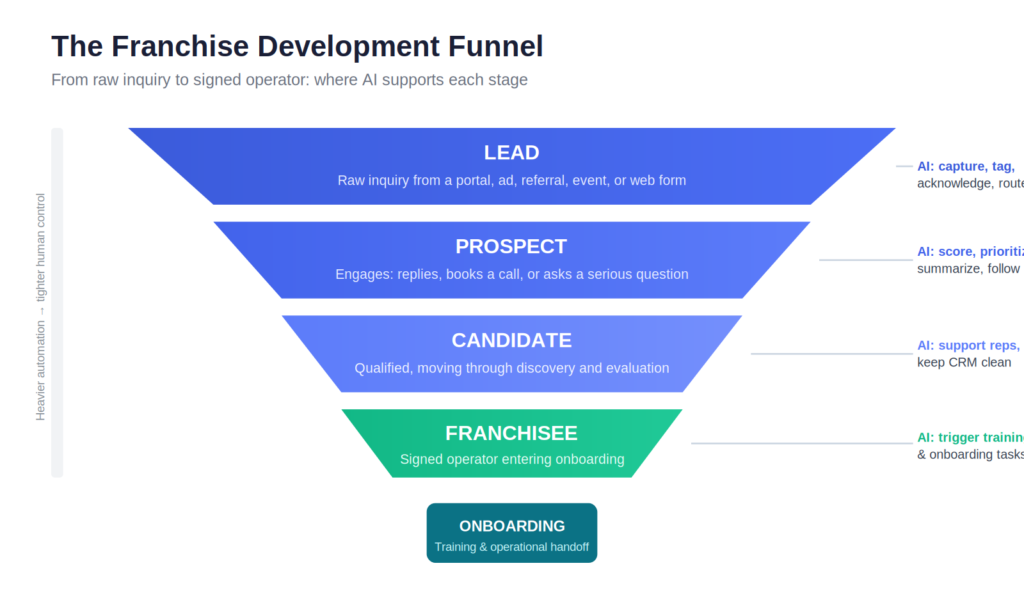
Franchise development is the process a franchisor uses to attract, evaluate, and onboard new franchisees. It runs from lead generation and qualification through discovery calls, franchisee validation, Franchise Disclosure Document (FDD) review, franchise sales, territory planning, signing, and onboarding.
Get the language right first. Your AI system should mirror the real franchise funnel, not a generic sales process:
Funnel Stage
What It Means
AI Role
Lead
A raw inquiry from a portal, ad, referral, event, or website form
Capture, tag, acknowledge, route
Prospect
A lead who engages: replies, books, or asks a serious question
Score, prioritize, summarize, follow up
Candidate
A qualified prospect moving through discovery and evaluation
Support reps, prepare notes, keep CRM clean
Franchisee
A signed operator entering onboarding
Trigger training, onboarding tasks, and operational handoff
The distinction matters. AI can do a lot with leads and prospects. AI needs tight control once a person becomes a candidate. This matters most when conversations touch the FDD, Item 19, financial expectations, or territory rights.
Figure 1: Franchise Development Funnel. Concept illustration of a franchise development funnel, from raw inquiry to signed franchisee and onboarding.
Where Franchise Development Funnels Actually Leak
We audit franchise pipelines. The same problems appear again and again.
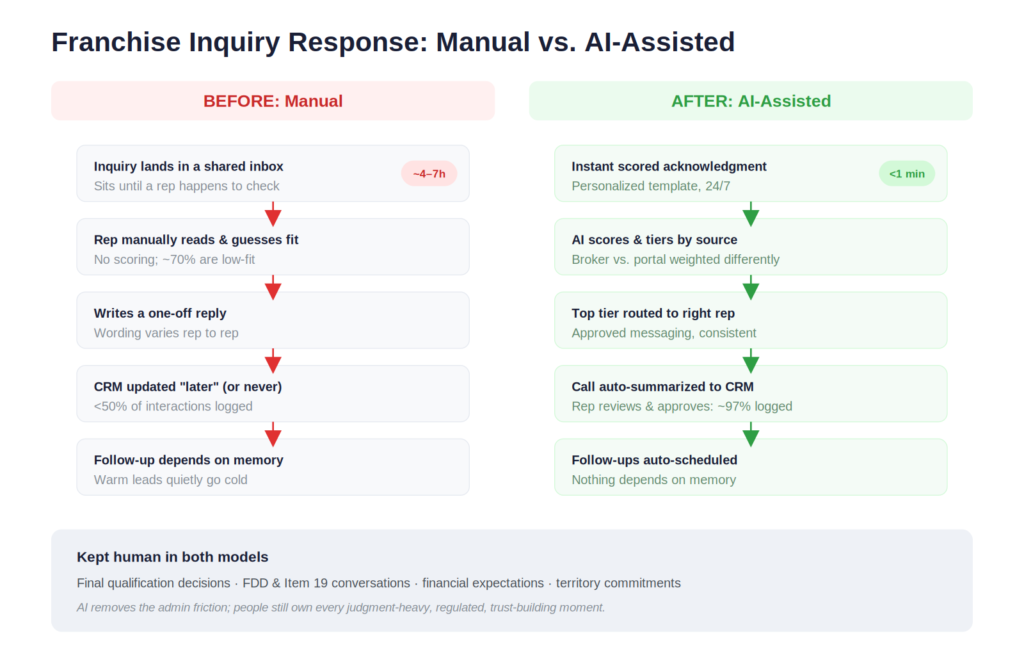
Roughly 70% of inbound leads are unqualified or exploratory. Reps burn hours sorting low-fit inquiries. Better candidates wait in the same queue. Median first response time sits between 4 and 7 hours. After an expo or an ad spike, it stretches past a day. That delay hands the first conversation to a competing brand.
The data side is usually worse. Fewer than half of candidate interactions reach the CRM. Leadership loses pipeline visibility. Reps lose context between calls. Follow-up depends on rep memory, so warm prospects go cold. Different reps explain fees, territories, and timelines differently. That inconsistency erodes trust and raises compliance risk.
The problem is not effort. The problem is fragmentation. A rep keeps portal leads in one place, referral emails in another, discovery calls on Zoom, FDD notes in a folder, and territory questions in Slack. CRM updates wait until Friday. This setup survives low volume. It breaks when serious inquiry flow arrives.
Where AI Actually Helps
AI helps most when it removes repetitive work and leaves judgment to people. The best use cases are not flashy. They are practical.
1. Lead qualification and candidate scoring
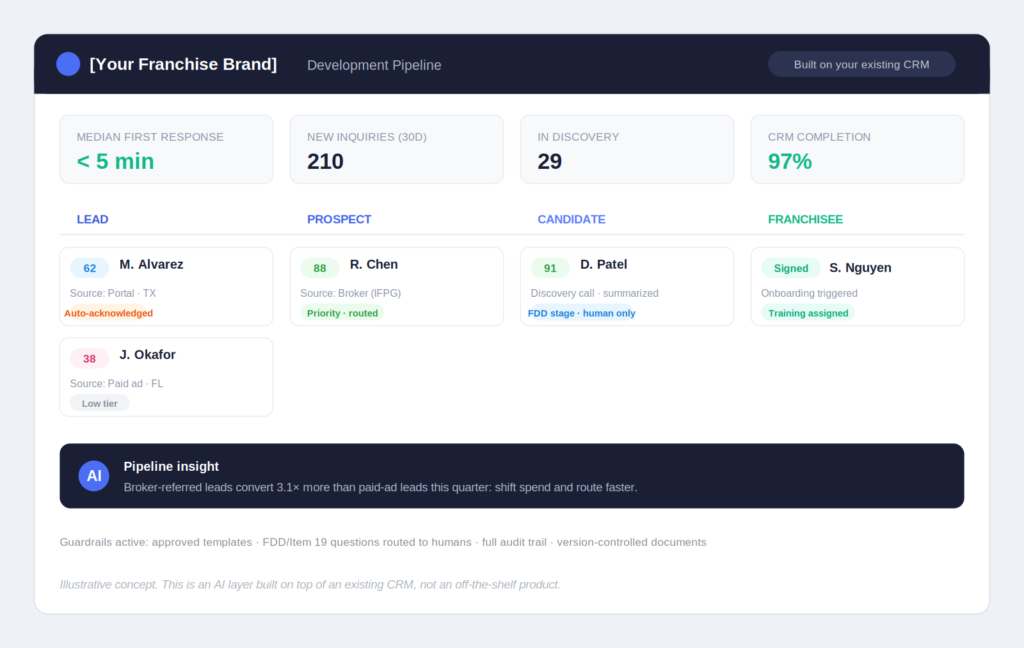
This automation delivers the most leverage. An AI scoring layer reviews every inbound lead against your ideal candidate profile: financial indicators, stated experience, geography, lead source, and engagement behavior. It then routes the top tier to the right rep within minutes. AI does not decide who becomes a franchisee. AI makes sure the right people talk to the right candidates first.
We learned three things while building these systems.
First, trusted form fields often give weak signals. Candidates overstate their liquid capital about one-third of the time. Behavioral signals reveal more. Watch how fast a person replies. Watch whether they open the brochure twice. Watch whether they ask real territory questions. Watch whether they reference the FDD after they receive it.
Second, lead source changes everything, and most franchisors overlook the broker ecosystem. Many franchise deals flow through broker and consultant networks such as IFPG, FranNet, and the Franchise Brokers Association. A broker-referred candidate arrives pre-screened and financially verified. That candidate often talks to three brands at once. A cold portal lead behaves differently. Score both the same way, and you rank them wrong. Broker referrals need faster human contact and lighter automation. Portal leads need heavier triage. Your scoring model must know the difference.
Third, a volume floor exists. Below roughly 50 inquiries per month, a scoring model may not pay off. A disciplined shared inbox and a same-day response rule can be enough. AI lead scoring earns its place when manual triage slows the team down.
2. Instant acknowledgment and follow-up
This fix costs the least and pays back the fastest. Every lead receives a personalized acknowledgment within a minute. The message confirms the inquiry, explains the next step, shares a scheduling link, and promises a review. The message stays simple. It arrives instantly and consistently, even outside business hours.
Control is the key. AI should not free-write franchise sales emails. A safer approach uses approved templates and structured prompts. AI personalizes by location or stated interest. AI cannot invent claims about earnings, success rates, or payback periods. Teams that already run approval-based workflows can connect this with AI prompts for franchise marketing managers with approval rules.
3. Meeting summaries and CRM hygiene
Franchise reps lose hours each week to call notes, CRM updates, and recap emails. AI meeting assistants transcribe discovery calls. They extract the fields that matter: budget range, timeline, territory preference, objections, and next step. They draft the CRM update. The rep approves and saves it.
In our builds, about 1 in 10 extractions still needs a human correction. That accuracy removes most manual logging. It does not justify skipping review on high-stakes fields. Draft, review, then save. Keep that order.
4. Internal knowledge assistants
Reps should not ping a senior teammate for every routine question. Candidates ask whether a territory is open, what the franchise fee is in Texas, or what training follows signing. An internal assistant trained on approved documents answers instantly. It answers identically for every rep. This consistency matters most for multi-location businesses, where the same questions repeat across markets. The same approach powers customer-facing voice agents at the franchise location level. The investment compounds across development and operations.
5. Document workflow and onboarding
Not every win needs an “AI strategy.” Some of the best wins are plumbing. The system sends FDD packages when a candidate reaches the right stage. It schedules validation calls. It drafts territory agreement inputs for legal review. It assigns onboarding modules after signing. It flags missing documents before launch. This is how a franchise business scales without depending on one person’s memory.
6. Pipeline reporting and drop-off analysis
Most franchisors count their leads. Few know where qualified candidates drop off, or why. AI-assisted reporting shows which lead sources create qualified candidates, not just inquiries. It shows which reps follow up slowly. It shows which objections precede drop-off. That insight also feeds marketing, including multi-location ad performance and franchise location pages, once new units go live.
Figure 2: AI-Assisted CRM Pipeline. Concept illustration of an AI-assisted CRM layer showing lead scoring, candidate status, and pipeline movement. Systems like this are built on top of a franchisor’s existing CRM; they are not an off-the-shelf product.
Picture a 60-unit home services franchisor. It averages 210 portal inquiries per month. Two development reps handle them. The team runs a CRM, but they call it “a suggestion.” Median first response takes 6 hours. Nine percent of inquiries reach a discovery call. Each rep loses about 11 hours a week to triage, logging, and follow-up admin.
We automate three tasks and leave two alone. We automate instant scored acknowledgment on every inquiry. We automate behavioral lead scoring with tiered routing. We automate call-summary-to-CRM extraction with rep review. We keep two tasks human: final qualification decisions, and every conversation that touches the FDD, Item 19, financial expectations, or territory commitments.
Metric
Before
After 90 Days
Median first response time
6 hours
Under 5 minutes
Inquiry-to-discovery-call rate
9%
14% (roughly 55% more candidates in discovery)
Rep admin time
~11 hrs/week per rep
~3 hrs/week per rep (~16 hrs/week recovered across the team)
CRM records
Inconsistent
Standardized summaries and field updates
Candidate messaging
Rep-dependent
Approved message framework
Headcount
2 reps
2 reps
Speed is not the number that matters most here. Consistency is. Both reps now say the same things. They use the same next steps. Leadership sees a clean view of the pipeline. That is where AI earns its place in franchise development. AI does not replace the sales team. AI gives the sales team a better operating system.
Figure 3: Before / After Response Workflow. Comparison of a manual franchise inquiry workflow versus an AI-assisted one.
Franchise AI Readiness Scorecard
Not every franchisor needs AI lead scoring today. Give yourself 1 point for every “yes.”
Question
Yes / No
Do you receive 50+ franchise inquiries per month?
Is your median first response time over 1 hour?
Are less than 80% of candidate interactions logged in your CRM?
Do reps manually write most follow-up emails?
Do candidates ask the same questions repeatedly across reps?
Do reps answer fee, territory, or FDD-related questions inconsistently?
Do you lack clear reporting on why candidates drop off?
Do you have multiple lead sources feeding into different systems?
Does your team spend 5+ hours/week per rep on CRM updates or admin work?
Are you planning to grow into new markets in the next 12 months?
Score
What It Means
Recommended Next Step
0–2
You may not need AI yet
Fix basic process, response time, and CRM discipline first
3–5
Ready for light automation
Start with instant response, CRM hygiene, and approved follow-ups
6–8
AI can create real leverage
Add lead scoring, routing, call summaries, and reporting
9–10
Ready for a full AI layer
Build a connected franchise development automation system
The scorecard stays practical on purpose. AI should follow operational pain, not hype.
What to Automate First
Start with high-volume, low-risk tasks. We use this priority order in franchise AI audits:
Task
Volume
Compliance Risk
Verdict
Initial inquiry acknowledgment
High
Low
Automate day one
Lead source tagging
High
Low
Automate day one
Lead scoring and routing
High
Low
Automate early if 50+ inquiries/month
CRM updates from calls/emails
High
Low
Automate with rep review
Follow-up reminders
Medium
Low
Automate early
Follow-up email sequences
Medium
Medium
Automate with approved templates only
Internal Q&A for reps
Medium
Low/Medium
Automate once docs are clean
Pipeline reporting
Medium
Low
Automate once CRM fields are reliable
Onboarding task assignment
Medium
Low
Automate after signing
FDD-related communication
Low
High
Keep human, always
Financial performance conversations
Low
High
Keep human, always
Final qualification decisions
Low
High
Keep human, always
Territory commitments
Low
High
Keep human, always
The pattern is simple. Automate speed, organization, routing, and reporting. Keep people in charge of judgment, legal, financial, and trust-heavy conversations. A structured AI cost-saving audit maps this table onto your own mix of volume, risk, and CRM maturity.
A 30/60/90-Day Rollout Plan
Many teams try to automate the entire process at once. That is a mistake. A better approach builds in layers.
Days 1–30 cover audit and guardrails. Map every lead source, form, inbox, CRM field, and follow-up path. Baseline your metrics: response time, discovery-call rate, CRM completion, and drop-off points. A baseline lets you prove the automation worked. Define what AI can and cannot say about the FDD, Item 19, fees, and territories. Get your first-response and follow-up templates approved. Clean up duplicate CRM records and inconsistent lead stages. Assign clear ownership for approvals and exceptions. By day 30, you know where automation pays back fastest and where it should not touch anything yet.
Days 31–60 build the first automation layer. This layer handles low-risk, high-volume work. It covers instant inquiry acknowledgment, lead source tagging, basic scoring, and rep routing. It adds follow-up reminders and automated CRM activity capture. It ships a first dashboard for response time and pipeline movement. Most teams see their first measurable wins here.
Days 61–90 make the system smarter. Behavioral scoring replaces reliance on form fields. Call summaries feed structured CRM notes. An internal knowledge assistant answers rep questions. Drop-off reporting exposes weak stages. A compliance review loop catches risky messages before they become habits. A weekly leadership report closes the loop. The goal by day 90 is not a perfect AI system. The goal is a faster, safer, and more consistent process.
A Simple Architecture (Without Rebuilding Your Stack)
You do not need to replace your tech stack. Most franchisors need a connected layer around the tools they already run.
The inputs already exist in your business. You have lead sources such as portals, ads, referrals, and events. You have a CRM such as HubSpot, Salesforce, Zoho, or FranConnect. You have communication channels such as email, SMS, and call recordings. You have documents such as the FDD, territory maps, and playbooks. You also have calendars and marketing data.
The AI layer sits on top. It enriches and scores leads. It routes candidates. It drafts approved messages. It summarizes calls into CRM notes. It answers rep questions from approved documents. It finds patterns in drop-off and conversion.
Most teams skip the guardrail layer. In franchise development, that layer is not optional. Approved templates block risky free-form claims. Restricted topics stop the AI from answering FDD or Item 19 questions without review. Human approval keeps reps in control. An audit trail records what was sent and when. Version control keeps the AI on the latest FDD. Escalation rules route sensitive questions to a person. Guardrails separate useful automation from unnecessary risk.
The Part Most AI Vendors Won’t Tell You: Compliance
Regulators govern franchise sales. Under the FTC Franchise Rule (16 C.F.R. Part 436), the franchisor must deliver the FDD at least 14 calendar days before a prospect signs or pays. The rule also limits financial performance representations to what Item 19 discloses.
This rule creates a real AI risk. A general-purpose AI tool can write “most of our owners recoup their investment in 18 months.” That single sentence becomes an earnings claim your legal team never approved.
Ask these questions before any AI system talks to candidates. Can it make financial or performance claims, or does the system block that? Does every outbound template pass legal or brand approval? Does the system keep a full audit trail of every message? Does automation pause during the FDD review stage? Can it flag questions that need human review? Who owns the fix when the system sends something wrong? How fast can you pull a message?
Not legal advice. Franchise counsel should review any AI workflow that touches candidate communication, FDD conversations, financial performance, or franchise agreements. The implementation rule is simple: never let AI improvise in regulated parts of franchise sales.
Safe vs. unsafe AI use in practice
Area
Safer AI Use
Risky AI Use
Initial response
Approved “we received your inquiry” message with next steps
Promising success, ROI, or fast payback
Lead scoring
Prioritizing leads for human review
Rejecting candidates automatically
FDD questions
Routing to a rep or legal-reviewed response
Summarizing FDD obligations freely
Financial expectations
Pointing candidates to the approved Item 19 process
Saying “owners usually earn X”
Territory questions
Flagging territory interest for rep review
Promising availability or exclusivity
Follow-up emails
Approved templates with limited personalization
Custom persuasive claims without review
CRM notes
Drafting notes for rep approval
Saving high-stakes fields without review
Internal Q&A
Answering from current approved documents
Using outdated FDDs or old sales decks
Onboarding
Assigning training tasks after signing
Interpreting legal or contractual terms
The Mistakes Franchise Development Teams Should Avoid
A bad AI rollout rarely fails because the model is weak. It fails because the process around it is weak.
Automating before fixing the funnel. Messy lead stages and different definitions of “qualified” only speed up the mess. Fix the process first. Then automate.
Treating all lead sources the same. A portal lead, a broker referral, a paid ad click, and an expo scan behave differently. Broker-referred candidates arrive pre-screened and time-sensitive. Score by source, or you optimize for volume over fit.
Letting AI make qualification decisions. AI ranks and organizes. People decide who qualifies to buy a franchise.
Letting AI free-write candidate emails. Free-form emails are the fastest route to compliance risk. Use approved templates, restricted language, and clear review rules.
Training AI on outdated documents. An assistant that runs on last year’s FDD or an old territory map gives confident wrong answers. Wrong answers are worse than no answers.
Measuring only speed. Track more than response time. Measure discovery-call rate, qualified candidate rate, show rate, CRM completion, drop-off by stage, and compliance exceptions. A faster bad process is still a bad process.
Ignoring rep adoption. Reps who distrust the system work around it. Involve them early. Let them review AI summaries. Show them how scoring works. Make the tool useful enough that they want it.
Questions to Ask Before Buying Franchise AI Tools
A good demo is not enough. Ask these questions before you hire a vendor or buy a tool:
Can the system structurally block financial performance claims?
Can every automated message be approved before launch, and can we pause or pull one quickly?
Does it keep a full audit trail of what was sent, when, and to whom?
Can automation pause or change behavior during FDD review stages?
Does it integrate with our existing CRM, or is it another disconnected system?
Can we see how lead scores are calculated, and can different sources be scored differently?
Can it route sensitive questions to humans instead of answering them?
Does it support version control so it never answers from an outdated FDD?
Who owns prompt updates and workflow changes, and what happens when the system is wrong?
Can we export reports and audit logs for leadership and compliance review?
A vendor who cannot answer these questions is not ready for franchise development. The demo does not matter.
Beyond Sales: What the Same AI Layer Does for the Rest of the Business
Better franchise development is the first win. The value then compounds. Once the data, workflows, and guardrails exist, the same layer improves brand consistency. Every candidate gets the same approved next steps. Every internal answer comes from one source of truth. The layer supports faster expansion without more headcount. It also cleans up the sales-to-operations handoff. It triggers onboarding, training, and launch checklists the moment a candidate signs.
It also fixes the marketing feedback loop. Accurate lead-source tracking lets marketing target qualified candidates instead of cheap inquiries. That focus improves portal spend, paid campaigns, and location-level advertising. Leadership gains real visibility too: pipeline health, rep follow-up speed, territory demand, and drop-off. That view replaces a patchwork of private rep notes.
What Humans Should Still Own
People keep the judgment-heavy work: final qualification, discovery calls, FDD conversations, financial performance discussions, territory negotiations, franchisee validation, final approval, and conflict handling. These parts are regulated and trust-building. They stay human-led.
The best AI systems make reps more present, not less. They remove the admin work. Reps then spend more time in the conversations that move a candidate forward.
FAQ: AI in Franchise Development
What is franchise development?
Franchise development is the process a franchisor uses to attract, qualify, sell, and onboard new franchisees. It includes lead generation, candidate qualification, discovery calls, FDD review, franchise sales, territory planning, signing, and onboarding.
How can AI help franchise development teams?
AI helps with lead scoring, instant inquiry response, follow-up reminders, CRM updates, call summaries, internal knowledge search, onboarding workflows, and pipeline reporting. The biggest gains are faster response time, cleaner data, and more consistent candidate communication.
Can AI qualify franchise leads?
AI can prioritize and score franchise leads. AI should not make the final qualification decision. A human reviews candidate fit, financial readiness, experience, territory interest, and brand alignment.
Should AI communicate directly with franchise candidates?
AI can support candidate communication with approved templates, limited personalization, and clear guardrails. AI should not free-write messages about earnings, Item 19, territory commitments, FDD interpretation, or financial expectations.
What franchise development tasks should not be automated?
Do not fully automate FDD conversations, financial performance discussions, final qualification decisions, territory commitments, legal questions, or final franchisee approval. AI can support these workflows. Humans stay in control.
When is a franchisor too small for AI lead scoring?
A franchisor with fewer than roughly 50 inquiries per month may not need full AI lead scoring yet. At that stage, better response time, CRM discipline, and follow-up create stronger ROI.
How are broker-referred franchise leads different from portal leads?
Broker and consultant networks such as IFPG or FranNet send pre-screened, financially verified candidates. These candidates often evaluate several brands at once. They need faster human contact and lighter automation than cold portal leads. Scoring models should treat the two sources differently.
What CRM data is needed before using AI?
You need clean lead-source data, candidate stage, territory interest, contact history, follow-up status, discovery-call notes, qualification criteria, and outcome tracking. AI performs poorly on incomplete or inconsistent data.
How do franchisors reduce AI compliance risk?
Franchisors use approved templates, block restricted topics, keep an audit trail, and require human approval for sensitive messages. They train AI only on current approved documents. They ask franchise counsel to review any workflow that touches the FDD, Item 19, financial performance, or franchise agreements.
What is the best first AI automation for franchise development?
Start with instant inquiry acknowledgment, lead source tagging, and rep routing. This automation carries low risk, measures easily, and improves speed-to-lead.
The Bottom Line
A serious candidate does not choose a franchise because of an impressive autoresponder. They choose because they trust the brand, the model, the people, and the process. AI removes the friction that blocks that trust: the 4-hour response gaps, the missing CRM records, the memory-based follow-ups, and the messaging that drifts as the business grows into a true multi-location operation.
Start small and start at the top of the funnel. Measure your current response time. Count the candidate interactions missing from your CRM. Automate the low-risk, high-volume work first. Keep humans in charge of qualification, FDD conversations, financial expectations, and every final decision. AI works best as an operating layer, not a replacement. It lets your team spend more time with the candidates worth pursuing.
Want to know which automation pays back fastest in your pipeline? Our franchise AI audit answers exactly that.
Brutal Casino, reconnu pour son ambiance immersive et ses offres généreuses, se distingue sur le marché des jeux en ligne. Cette plateforme attire les amateurs de jeux grâce à sa vaste sélection de jeux et à sa structure de bonus attractive qui permet aux joueurs de maximiser leur expérience. En intégrant brutal casino, les utilisateurs découvrent un monde dynamique où chaque partie est une aventure excitante.
Une Large Sélection de Jeux
Brutal Casino propose un vaste catalogue de jeux adaptés à tous les goûts. Des machines à sous aux jeux de table en passant par les options de casino en direct, les joueurs ont accès à une diversité impressionnante. Les titres sont offerts par des fournisseurs renommés, assurant ainsi qualité et innovation.
Machines à sous variées
Jeux de table classiques tels que le blackjack et la roulette
Expérience de casino en direct avec de véritables croupiers
Les jeux sont régulièrement mis à jour, garantissant aux joueurs de toujours trouver des nouveautés et des expériences palpitantes.
La Mécanique des Bonus
La structure de bonus de Brutal Casino est conçue pour attirer et fidéliser les joueurs. Les nouveaux utilisateurs peuvent bénéficier de bonus de bienvenue significatifs, tandis que les joueurs réguliers peuvent profiter de promotions régulières et de programmes de fidélité. Voici quelques types de bonus offerts :
Type de Bonus
Conditions
Récupération
Bonus de Bienvenue
Dépôt initial requis
100% jusqu’à 500€
Recharges Hebdomadaires
Validation chaque semaine
50% jusqu’à 200€
Programme de Fidélité
Accumulation de points
Échanges contre des bonus
Les modalités de mise sont claires et accessibles, permettant aux joueurs de se familiariser facilement avec l’écosystème de la plateforme.
Fiabilité et Sécurité
Brutal Casino place la sécurité des joueurs au centre de ses priorités. Licencié et réglementé, le casino utilise un cryptage avancé pour protéger les données des utilisateurs. Faisant également la promotion d’un jeu responsable, il offre des outils pour gérer le temps de jeu et les limites de dépôt.
Cette attention portée à la sécurité contribue à bâtir la confiance des joueurs, essentiel dans l’univers du jeu en ligne.
FAQ
Quels types de jeux puis-je trouver sur Brutal Casino? La plateforme propose des machines à sous, des jeux de table et une section de casino en direct avec des croupiers en temps réel.
Y a-t-il des bonus pour les nouveaux joueurs? Oui, Brutal Casino offre un bonus de bienvenue très attractif lors de l’inscription et du premier dépôt.
Comment la sécurité est-elle assurée sur cette plateforme? Brutal Casino est sous licence, utilise le cryptage des données et promeut un jeu responsable pour garantir une expérience sécurisée.
Four years ago, a developer called Jean Nguyen shared a short video on Dwitter of a spinosaurus pulling off a sick combo with Cloud Strife‘s Buster Sword. This, of course, blew up, but it wasn’t actually a game, just some animation work from the dev. And then, somewhere along the line, Nguyen decided to make it into an actual game. It’s now called Dinoblade, it’s out today, and it is jank and over top in exactly the right ways, and genuinely a rip roaring time.
The whole concept is deliciously silly. Some kind of cataclysmic event took place, and now dinosaurs all fight each other using various bladed weapons. You, still a spinosaurus, seemingly forge a pact with some kind of mysterious maybe evil but I’m not quite sure Other Dinosaur, and upon doing so the fighting begins. The best immediate comparison mechanically is Sekiro, as you can parry attacks, but there’s a bit more emphasis on the action element.
As ridiculous as the entire thing is, the combat genuinely feels good. Parrying is responsive, you’ve got quick and heavy attacks that make for some swish combos, and enemy animations are surprisingly readable. When it works, it works! There is that aforementioned jank though, which mostly comes from the environments.
It’s a little awkward, a touch clunky, but I forgive this given that you are a giant ass dinosaur, the feeling at least makes sense with that in mind. Though, sometimes the enemies were invisible and the environments wouldn’t quite load properly, but I think it was just one person making this to the end, so I can extend some grace there as well.
Perhaps my favourite moment was what came after beating the first boss, in which I discovered that doing so then allows you to summon said dinosaur you killed to perform a powerful attack for you. Absurd! I love it, especially when paired with other powers such as an energy beam you can shoot out from your sword, or a roar you can emit that freezes enemies in place.
You are not going to find a revolution here, but you won’t find something that wastes your time either. It’s rare for these sorts of games, ones born from a viral post, that materialise into something as cohesive and enjoyable as Dinoblad, and feels like it fits quite well into the echelons of obscure PS2 or Dreamcast games that never were.
If you are anything like me then what happens when you practice presenting a video to the camera, you look natural, approachable and someone worth listening to.
However the second you get in front of the camera, or at least the you become aware the camera is now recording, it all goes to hell in a handbasket!
From that point forward there are pretty much only two scenarios that follow.
The first is that you become stiff, unnatural and spend hours fumbling your way through the script only to end up looking like someone stiff, unnatural and fumbling through a script!
The second is that you end up delivering a lecture or like someone who is talking at the audience and not to it.
So to counter that here are a few tips for overcoming all of that and perhaps communicating to the audience instead!
I Ranked Every Video Upgrade (The #1 Might Surprise You)
This is a rather subjective experiment that Gabriel did on the most commonly recommended upgrades for creating social media videos.
Although the results are based on what he feels are important or unimportant, I can’t help but agree with what he is saying and the logic behind it.
See what you think.
Customize Moving a Graphic Object and Save as a Preset – PowerDirector
OK! Well this is pretty much what it says on the box!
It is a good example of how you can control movement of objects in PowerDirector but I think the more important point is that you can save setups like this and apply them to other projects.
For that purpose make sure you check out that part of the tutorial.
Speaker-Based Subtitles? Filmora Just Solved Your Biggest Editing Problem
To be honest I am still catching up on the recent updates to Filmora 15 as they rolled out pretty fast this time!
As I mentioned in previous posts on the subject, in this version of Filmora they have put the brakes on developing more A.I. driven features a little.
Instead they have been revisiting quite a few of the existing modules and either adding capabilities to them or as in the example below, totally revamping it entirely.
The one features this week is the subtitling module which on the surface may not seems so exciting.
However before you dismiss the need for comprehensive subtitling remember the number of users watching videos with NO AUDIO looks something like this:
Facebook: 85% of videos are watched completely muted.
Instagram: Between 80% and 85% of users consume Reels and video content silently.
LinkedIn: Approximately 79% to 80% of professionals watch videos with the sound turned off.
Mobile Devices: Up to 92% of consumers watch video content on mute when browsing on their phones.
That’s why you need to use subtitles and that’s why a good subtitling module is something you should be interested in!
How to Make a 3-layer Collage – Movavi Ideas
This is another in the basic series of How to videos from the folks at Movavi.
If you are using Movavi or are thinking of taking it up as your video editing app of choice then these video give a good understanding of what the program can do.
Of course their market is international so it makes sense that they use their own A.I. voices to narrate the video so lets just overlook that part!
Exposure Triangle Explained: ISO, Aperture Shutter Speed for Beginners
When you make the switch from shooting your videos in auto mode to manual there are a number of factors you have to understand.
If you don’t work these out the end result will be you thinking its all garbage because your auto footage looks better than your manual stuff!
One of those key points is the exposure triangle of ISO, Aperture and shutter speed as it all relates to video.
In this video you can see a good explanation of how it all works and if you are interested to learn more, there is a comprehensive article in the link below.
Being a Full Time Creator Isn’t What You Think (QA)
Many people start off with the possible goal of learning how to shoot and edit videos as well as creating an online profile in the process.
This often follows the path of creating a social media presence based on their own videos and building from there.
In reality those many people end up going nowhere on the whole process or end up becoming a slave to their own media channels!
These days getting started regardless of the intended outcome, is pretty easy.
The real task at hand if you have these intentions is to get a grip on the reality of what the day to day process really looks like.
The video below is a 20 min. or so discussion of what that reality actually looks like from a creator who is both successful in building a presence as well as getting freelance work.
Make Soccer Videos Look More Cinematic? Here’s How – Filmora
As much as we have access to a whole bunch of fancy schmancy A.I tools these days, the reality is that a good edit will always come down to the little details.
Just before you go any further no, this is not about making soccer videos, it’s about making any kind of video.
Even if you have good looking footage and enough of that footage to piece together a cohesive video, that is still not enough.
Of course you need to cut it appropriately but in the end those little fine tuning steps are the nose that will set your project apart.
Here’s a look at that process in Filmora using the available tool to address those things.
Master YouTube Lighting in 15 Minutes
If you are just about to fall into that old trap of thinking that the reason your footage doesn’t look as good as it should, so its time for an expensive camera, wait!
Check this video first because it gives an excellent rundown of how light works in a shot and how you can easily deal with it, no camera purchase necessary.
Amazing Effects in Classic Films – How Did They Pull It Off? – Part 14
I always love it when the guys from Film Riot deconstruct visual effects from classic movies.
They started of this series a while back and dealt mainly with movies from long ago when there was zero SFX technology to fall back on.
In other words all the effects were pretty much practical in their nature and showed just how inventive the early film makers were.
These days they look at some more recent examples but its always fun to peek behind the curtain and see how they were done.
Key Takeaways
Feeling natural on camera is challenging, but practicing presentation skills can help.
Upgrading video techniques can enhance social media content; viewers often overlook subtitling but it’s crucial.
Understanding the exposure triangle (ISO, aperture, shutter speed) is key for manual video shooting.
Realizing the realities of being a full-time creator is important and managing expectations can prevent burnout.
Mastering small editing details and lighting can dramatically improve the quality of your videos.
The breathalyzer identifies the amount of acetone in your breath to determine if your body is in ketosis.
Alivion
Smart scales and smartwatches often rely on bioelectrical impedance to calculate body fat percentage, a quick, though not necessarily accurate, way to get a sense of the amount of lean mass in your body without having to take multiple measurements. Accurately measuring when your body is burning fat is a whole other ball game, though, which makes new research into a handheld fat burning measurement device all the more intriguing.
In a study for the scientific journal Device spotted by New Scientist, researchers supervised by Andreas Güntner created a handheld breathalyzer that can detect when your body is burning fat by measuring the amount of acetone in your breath. The study measured when the bodies of 12 participants burned fat across a variety of diet and exercise scenarios, and found the breathalyzer closely matched traditional lab results.
Scientists identify ketosis, the term for when your body is burning fat for energy, by either measuring ketones in your blood or acetone in your breath — both are byproducts of fat being turned into fuel. As New Scientist notes, acetone tests are usually most accurate in a laboratory setting where things like humidity and breathing patterns can be controlled. The researchers in this study got around those limitations by creating a breathalyzer that can filter out excess moisture and contaminants, and using a companion app that can guide the user through the breathing process. The app was not only able to identify when users were applying too much or too little pressure, but also help adjust when the breathalyzer collected its sample to make sure the measurement was as close as possible to what would be observed with a blood-based test.
Nutrion, now the commercial name of the device the researchers used, is similar in concept to an older device called Lumen that aimed to spot fat burning using carbon dioxide rather than acetone. In either case, frequent metabolic measurements could be useful in a variety of health settings, from determining whether GLP-1 therapies are effective, to enabling athletes to fine-tune their metabolism.
The key to combat is one distinctive core mechanic: Focus. Use Focus to read an enemy, expose its weak point, and land a lethal strike. You play as Ruby, a princess on a journey of revenge to reclaim her home: The Scarlet Kingdom.
Fight the Bloodstained to the Death Ruby’s blade alone will barely wound them. Find their weak points, drive the lethal strike home, and make it out alive.
Your Bloodline: Both a Blessing and a Curse To take back the Scarlet Kingdom, Ruby must face the Bloodstained in every form they take, whether it be an ancient secret cult, undying parasites, or the source of a deadly plague. Grip your blade and challenge foes that grow deadlier with every step.
Exquisite Pixel Environments Step into beautifully crafted pixelated scenes, where the poignancy and grandeur of the Scarlet Kingdom come alive in every hazardous battle.
Absorb Pureblood, Forge Talismans Every Bloodstained you kill surrenders its power. Absorb it to grow stronger for the fight ahead, craft a wide range of Talismans, and build a combat style that’s entirely your own.
Screenshots
SystemRequirements
Minimum Requires a 64-bit processor and operating system
OS: Windows10
Processor: Intel(R) Core(TM) i5
Memory: 8 GB RAM
Storage: 2 GB available space
Support the game developers by purchasing the game on Steam
InstallationGuide
TurnOff Your Antivirus Before Installing Any Game
1 :: Download Game 2 :: Extract Game 3 :: Launch The Game 4 :: Have Fun 🙂