Best Examples Of AI In Business Application 2022


Artificial Intelligence In Business Application
5 Examples Of AI In Business Intelligence Applications

In the current scenario for ai in business application, data became crucial for every industry around the globe, and you know that 90% of the available information is generated in seconds leveraging intelligence Artificial Intelligence tools and it is impossible to gather such massive data from the human workforce.

AI based business intelligence applications are now a trend across the world. Organizations across various industries are implementing numerous applications of AI in business management and renovating their operational and functional flows to achieve their objectives in this digital space.

AI’s most significant technology Machine Learning (ML) is also disrupting the business intelligence mobile app development industry. To evaluate performance and match the progress with the targets, identify customer needs, predict customer preferences, and so on, organizations are increasingly investing in AI and ML-based business intelligence software applications and measuring their performance progress with ease.

Hence, the use of AI in business intelligence applications development is increasing since over the past few years. Today, in this article, we would like to walk you through:

  • Practical examples of Artificial Intelligence in business intelligence applications that keep organizations competitive
  • Applications Of AI In Business Management
  • Reasons Behind Why Businesses Need AI-Powered BI Systems

Herein, we have discussed a few major business intelligence application development vendors like SAP, Siemens, GE, and other leading BI app developers that are designing and developing AI based business intelligence applications for businesses across various industries.

Practical Examples Of AI In Business Intelligence Applications

Here are the top use cases of AI-based business intelligence applications –

  1. SAP’s HANA Platform

SAP is a Germany-based leading custom software development company. SAP platform consists of different models in their gallery, but as per our requirement, we are going to discuss SAP’s cloud platform HANA.

Most organizations use this software to manage databases of information they have gathered. To be more clear or precise, it will duplicate & ingests structured data like customer satisfaction from an app, relational databases, and many other sources.

You can install this HANA platform in different ways; one is by running on-premise via a company server or using a cloud source. The platform will collect information with the help of access points like financial transactions, equipment at production plants, desktop computers & mobile, and sensors across various business verticals.

If your salesperson is using a tablet or Smartphone to document purchase orders, and the data will be collected from those recorded transactions, which can be examined and analyzed by HANA platform to know customer or user problems and choices.

Walmart is one of the top retail chain stores (11,000) in the world and the USA, which doesn’t require any introduction. It is using the HANA platform to record & process its high-volume transactions that happen in 10 seconds.

2. Avanade’s Deep Analytics Platform

Avanade is the USA’s top IT consulting and services company that is engaged in providing artificial intelligence, business analytics, digital transformation, cloud migration, application development services, workplace management, and other enterprise-centric digital services and solutions.

Avanade is a company that is developed by two IT giants Accenture & Microsoft that has the capability to utilize Cortana intelligence and remaining solutions for data-based insights & predictive analytics.

Pacific Specialty, an insurance company that knocked on the doors of Avanade to develop a deep analytics platform with the focus to provide more information to its staff regarding the business. The insurance firm’s primary aim is to use policy & customer data to enhance team and company growth.

When you can understand your policyholders’ interests, trends, and behavior with the help of analytics, the company can give good advice about existing and new products that are available to the company.

Once, the company concluded that the coming future would be filled up with smart technologies where machines will do the maximum work that can be done by human resources. According to the study conducted by Avanade states that organizations can raise their revenue by 33% with the usage of smart technologies.

And they also revealed that it is going to create new job roles for professionals and many more benefits to users. It is also not precisely mentioned which professionals are going to be changed with the adoption of advanced smart technologies.

3. Apptus’ AI-powered eSales Platform

It is one of the best business applications for artificial intelligence. Apptus is a AI applications development company that is using AI for automation, streamlining operations, and enhancing the efficiency of processes.

Apptus has developed an AI-powered business intelligence platform- eSales for e-commerce and retail companies. This revolutionary application makes use of ML, NLP, predictive analytics, and deep learning like AI technologies and assists companies in automatically processing customers’ data and maximizing sales.

Apptus’ eSales platform identifies and analyzes data related to customers’ search and purchasing behavior and helps e-commerce service providers to display or send personalized product recommendations automatically. It will increase customer loyalty and optimizes sales value.

E-commerce companies are exploring 100% sales benefits using this platform. Based on search patterns, this AI & ML powered BI solution automates demand predictive tasks and creates conversions with ease.

Still, the technology is in the adoption stage, Cloudera Founder & CTO, said that deep learning is very good at anomaly detection and prediction. He also said it is getting simple for deep learning networks to comprehend what information is exactly authentic. And he also says, you cannot teach the platform what to work on, just provide a chunk of data from which it will sort out what it requires.

4. Siemens’ AI-based Reporting and Analytic Platform

 Siemens is using its ML technology to monitor and validate how its industry machinery equipment is working. The company launched MindSphere, an open industry cloud platform in beta.

The primary focus of this cloud platform is to monitor machine performance and detect defects for service requirements with the help of machine tools & drive train analytics.

This AI-powered BI application is being used by many industries to keep an eye on machinery and measure key performance metrics. Such prediction into devices will help companies make informed decisions about anticipatory maintenance & also be used to manage their equipment efficiently so that they can have a long lifespan.

When you compare Predix with MindSphere, the Siemens platform can work efficiently on every machine and plant regardless of the manufacturing industry. The core intention of the platform is to help plant operators to increase the uptime of their equipment and makes maintenance more competent by predicting when there is a possibility of machinery breakdown.

By using these types of platforms, industrial plants are seeing a reduction in maintenance costs. Siemens will provide a box whenever you opt for MindSphere, which you can attach to the machines, and it will collect the information related to the performance of the equipment by which the engineer can take action.

5. GE (General Electronics)

The latest technologies are taking a major part in the newest advancement in various industries. The usage of sensors increasing in physical equipment like vehicles, equipment spaces, machinery, and production plants, and these can be automated & analyzed by artificial intelligence.

When it comes to IoT, it is not about just consumer gadgets, oil rigs, commercial trucks, cargo ships, and trains can be automated or digitalized, examined, and predicted through networks.

Industries like aviation and oil & gas are using GE’s Predix operating system to know the historical performance data of the equipment by using the advantage of the industrial apps, which can be used to identify different types of operational outcomes like when there is a possibility of machinery failure.

If you think GE’s operating system is only for automating primary operations, then you have mistaken because it can process a large amount of information and prepare a forecast report within seconds.

The oil & Gas industry is using Accenture’s intelligent pipeline solution to examine pipelines that are a million miles across the globe. It gathers information from the pipelines & external sources for the safety and proper use of the resources.

When it comes to the airline industry, they are using an app called Aircraft Landing Gear that is built on Predix. The app helps airline engineering crews to check for how many days it will be in service before a flight is placed into the service. The app will prepare a schedule depending on the information that helps to minimize unexpected or unplanned equipment issues & flight delays.

For instance, this AI-based BI solution maximizes the performance of the equipment. After Pitney developed an automated solution on top of Predix, it raised its machinery yield by 20%.

These are a few examples of AI-enabled business intelligence applications. The above-listed BI applications developers are making use of revolutionary AI and ML technologies and tools and creating top-notch BI solutions for companies across all sizes.

Hire An AI App Development Company!

Now, let’s take a look at the best use cases of AI in Business applications.

Applications Of AI In Business Management

The integration of AI, ML, predictive analytics, and deep learning technologies into BI applications will help organizations identify and predict market trends, customer behavior, and optimize overall performance progress.

Custom AI app development companies are assisting enterprises in building futuristic AI based business intelligence applications and playing a major in digitizing data collection, processing, and analyzing operations.

Let’s move on to how can AI empowers Business Intelligence Applications or ai application in business or artificial intelligence in business management.

  • Integration of Artificial Intelligence in business application optimizes features and functionalities of BI
  • AI and ML in BI applications make data storing and processing faster and help organizations derive valuable insights into customers’ data
  • AI development companies are adding intelligent tech capabilities to BI applications to define and intelligently process raw information
  • Artificial intelligence in business intelligence, along with ML, and deep learning algorithms, smoothly segregates input data and simplifies complex data analysis processes
  • A blend of AI and Natural Language Processing (NLP) makes BI software solutions better understand voice commands and perform data analysis tasks accurately as defined or required by the organization

These are a few benefits of AI Business Intelligence applications. Operational efficiency, productivity, analytics and insights, quick decision-making, business scalability, virtualization and visualization, and cost savings are all key advantages of using AI in business intelligence applications development.

Hire top AI applications development companies and get your BI solution developed with a sort of enterprise-friendly features and functionalities.

Reasons Behind Why Businesses Need AI-Powered BI Systems

The explosion of new big data sources, such as mobile, tablets, and the Internet of Things (IoT) devices will no longer undermine businesses.

They need increasingly practical experiences. This prompts AI-driven BI frameworks that will dramatically change business data into simple, precise, real-time narratives and reports.

BI Apps Delivers Data Insights– AI in business applications for deriving insights is gaining popularity. Big data growth in the market makes it difficult to make strategic decisions within the deadline. In recent years, Artificial Intelligence has increased BI systems to provide dashboards that provide alerts and business insights to key decision-makers.

AI in Business Applications Fills Resource Gaps – There is a shortage of experts with data analytical skills worldwide, and the well-developed country, USA also has a shortage of 1.5 million (approx.) data analysts. Therefore, it is very important to hire data experts in each department of a company to complete the given tasks.

Preventing Data Overload – Data is growing at an unimaginable rate these days and can easily choke off the business activities of organizations. This is where AI-powered BI tools come in, when a company has data bursting its BI platform from different sources.

It aids to analyze all the information and provides customized insights. Therefore, investing in AI-based BI software can help organizations break down data into maintainable insights
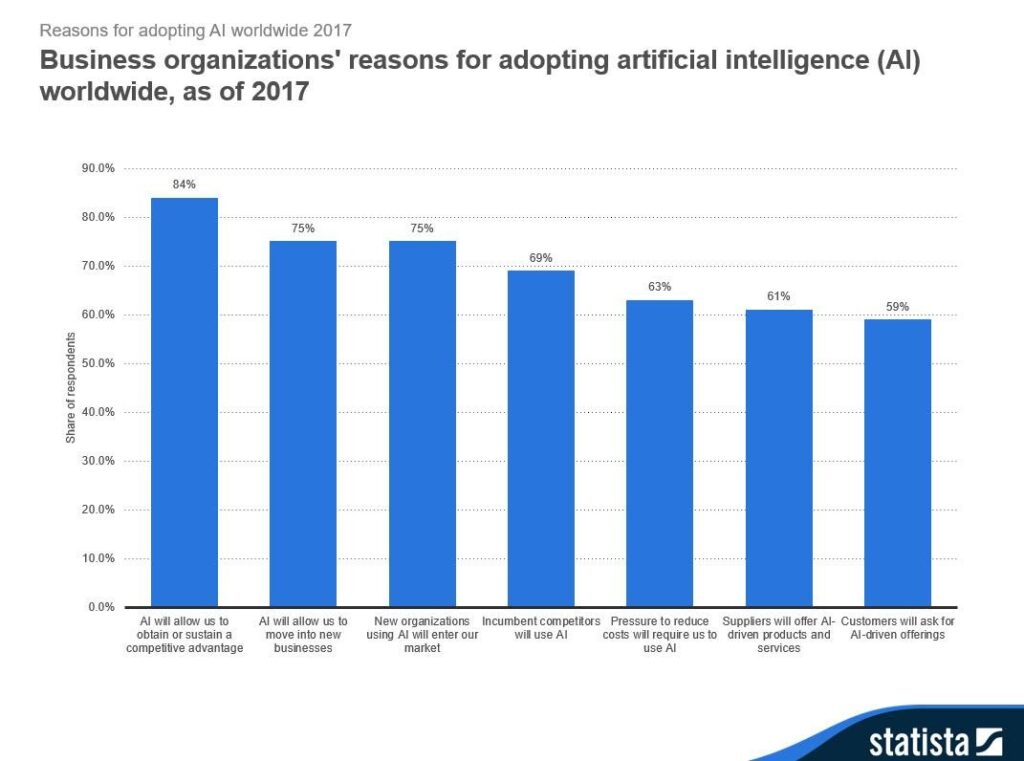
 

Top reasons of adoption of artificial intelligence in businessFinal Words

We conclude that the need for Artificial intelligence in business application development is high. AI-enabled BI applications development will have a bright scope in the years ahead.

It is the right time for businesses across industries to invest in AI business intelligence software. Companies can reduce resource overheads, better manage enterprise data operations, build sales strategies, well-handle leads, and get 100% returns on investment using BI solutions.

USM is the best AI development company in the USA and India. Our seasoned AI-based BI applications developers create outstanding app development strategies and develop full-fledged automation solutions that scale up your operations.

Are you looking to integrate AI solutions to get a high ROI?

Let us connect, Our AI expert team will guide you on the right path.

Rise of “AI-First” Companies, AI Job Disruption, GPT-4o Update Gets Rolled Back, How Big Consulting Firms Use AI, and Meta AI App


Fresh off a wave of “AI‑first” CEO manifestos, Paul Roetzer and Mike Kaput dive into the top news in AI this week:

Duolingo and Box join Shopify’s AI-first pledge, more signals of AI job disruption emerge, and OpenAI rolls back 4o due to an overly agreeable personality. Also, Johnson & Johnson bins 90 % of its 900 generative AI pilots, Big Tech earnings put real numbers on the AI boom, Nvidia spars with Anthropic over chip exports, Claude upgrades, Alibaba’s Qwen‑3, Descript’s AI avatars, and more.

Continue reading “Rise of “AI-First” Companies, AI Job Disruption, GPT-4o Update Gets Rolled Back, How Big Consulting Firms Use AI, and Meta AI App”

What Are GPU Clusters and How They Accelerate AI Workloads


What Are GPU Clusters and How They Accelerate AI Workloads_blog_hero

Introduction

AI is growing rapidly, driven by advancements in generative and agentic AI. This growth has created a significant demand for computational power that traditional infrastructure cannot meet. GPUs, originally designed for graphics rendering, are now essential for training and deploying modern AI models.

To keep up with large datasets and complex computations, organizations are turning to GPU clusters. These clusters use parallel processing to handle workloads more efficiently, reducing the time and resources needed for training and inference. Single GPUs are often not enough for the scale required today.

Agentic AI also increases the need for high-performance, low-latency computing. These systems require real-time, context-aware processing, which GPU clusters can support effectively. Businesses that adopt GPU clusters early can accelerate their AI development and deliver new solutions to the market faster than those using less capable infrastructure.

In this blog, we will explore what GPU clusters are, the key components that make them up, how to create your own cluster for your AI workloads, and how to choose the right GPUs for your specific requirements.

What is a GPU Cluster?

A GPU cluster is an interconnected network of computing nodes, each equipped with one or more GPUs, along with traditional CPUs, memory, and storage components. These nodes work together to handle complex computational tasks at speeds far surpassing those achievable by CPU-based clusters. The ability to distribute workloads across multiple GPUs enables large-scale parallel processing, which is critical for AI workloads.

GPUs achieve parallel execution through their architecture, with thousands of smaller cores capable of working on different parts of a computational problem simultaneously. This is a stark contrast to CPUs, which handle tasks sequentially, processing one instruction at a time.

Efficient operation of a GPU cluster depends on high-speed networking interconnects, such as NVLink, InfiniBand, or Ethernet. These high-speed channels are essential for rapid data exchange between GPUs and nodes, reducing latency and performance bottlenecks, particularly when dealing with massive datasets.

GPU clusters play a vital role across various stages of the AI lifecycle:

  • Model Training: GPU clusters are the primary infrastructure for training complex AI models, especially large language models, by processing massive datasets efficiently.

  • Inference: Once AI models are deployed, GPU clusters provide high-throughput and low-latency inference, critical for real-time applications requiring quick responses.

  • Fine-tuning: GPU clusters enable the efficient fine-tuning of pre-trained models to adapt them to specific tasks or datasets.

The Significance of GPU Fractioning

A common challenge in managing GPU clusters is addressing the varying resource demands of different AI workloads. Some tasks require the full computational power of a single GPU, while others can operate efficiently on a fraction of that capacity. Without proper resource management, GPUs can often be underutilized, leading to wasted computational resources, higher operational costs, and excessive power consumption.

GPU fractioning addresses this by allowing multiple smaller workloads to run concurrently on the same physical GPU. In the context of GPU clusters, this technique is key to improving utilization across the infrastructure. It enables fine-grained allocation of GPU resources so that each task gets just what it needs.

This approach is especially useful in shared clusters or environments where workloads vary in size. For example, while training large language models may still require dedicated GPUs, serving multiple inference jobs or tuning smaller models benefits significantly from fractioning. It allows organizations to maximize throughput and reduce idle time across the cluster.

Clarifai’s Compute Orchestration simplifies the process of scheduling and resource allocation, making GPU fractioning easier for users. For more details, check out the detailed blog on GPU fractioning.

Key Components of a GPU Cluster

A GPU cluster brings together hardware and software to deliver the compute power needed for large-scale AI. Understanding its components helps in building, operating, and optimizing such systems effectively.

Head Node

The head node is the control center of the cluster. It manages resource allocation, schedules jobs across the cluster, and monitors system health. It typically runs orchestration software like Kubernetes, Slurm, or Ray to handle distributed workloads.

Worker Nodes

Worker nodes are where AI workloads run. Each node includes one or more GPUs for acceleration, CPUs for coordination, RAM for fast memory access, and local storage for operating systems and temporary data.

Hardware

  • GPUs are the core computational units, responsible for heavy parallel processing tasks.

  • CPUs handle system orchestration, data pre-processing, and communication with GPUs.

  • RAM supports both CPUs and GPUs with high-speed access to data, reducing bottlenecks.

  • Storage provides data access during training or inference. Parallel file systems are often used to meet the high I/O demands of AI workloads.

Software Stack

  • Operating Systems (commonly Linux) manage hardware resources.

  • Orchestrators like Kubernetes, Slurm, and Ray handle job scheduling, container management, and resource scaling.

  • GPU Drivers & Libraries (e.g., NVIDIA CUDA, cuDNN) enable AI frameworks like PyTorch and TensorFlow to access GPU acceleration.

Networking

Fast networking is critical for distributed training. Technologies like InfiniBand, NVLink, and high-speed Ethernet ensure low-latency communication between nodes. Network Interface Card (NICs) with Remote Direct Memory Access (RDMA) support help reduce CPU overhead and accelerate data movement.

Storage Layer

Efficient storage plays a critical role in high-performance model training and inference, especially within GPU clusters used for large-scale GenAI workloads. Rather than relying on memory, which is both limited and expensive at scale, high-throughput distributed storage allows for seamless streaming of model weights, training data, and checkpoint files across multiple nodes in parallel.

This is essential for restoring model states quickly after failures, resuming long-running training jobs without restarting, and enabling robust experimentation through frequent checkpointing.

Creating GPU Clusters with Clarifai

Clarifai’s Compute Orchestration simplifies the complex task of provisioning, scaling, and managing GPU infrastructure across multiple cloud providers. Instead of manually configuring virtual machines, networks, and scaling policies, users get a unified interface that automates the heavy lifting—freeing them to focus on building and deploying AI models. The platform supports major providers like AWS, GCP, Oracle, and Vultr, giving flexibility to optimize for cost, performance, or location without vendor lock-in.

Here’s how to create a GPU cluster using Clarifai’s Compute Orchestration:

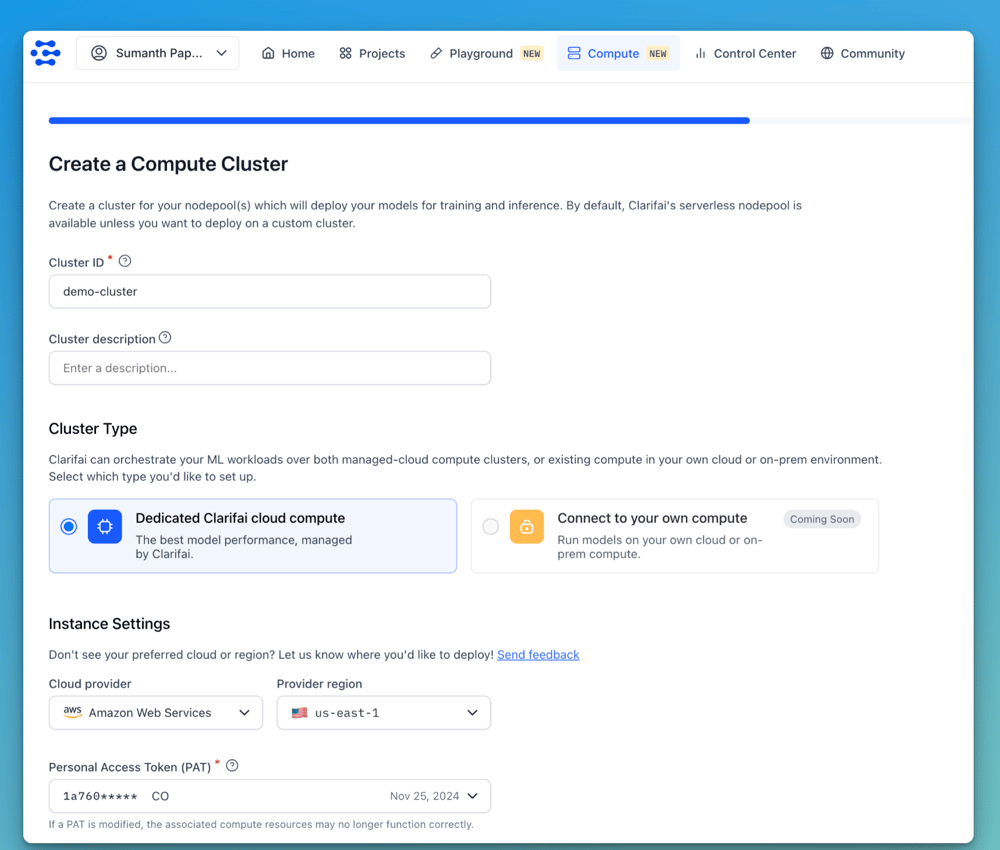
Step 1: Create a New Cluster

Within the Clarifai UI, go to the Compute section and click New Cluster.

You can deploy using either Dedicated Clarifai Cloud Compute for managed GPU instances, or Dedicated Self-Managed Compute to use your own infrastructure, which is currently in development and will be available soon.

Next, select your preferred cloud provider and deployment region. We support AWS, GCP, Vultr, and Oracle, with more providers being added soon.

Also select a Personal Access Token, which is required to authenticate when connecting to the cluster.

Screenshot 2025-05-07 at 6.10.31 PM

Step 2: Define Node Pools and Configure Auto-Scaling

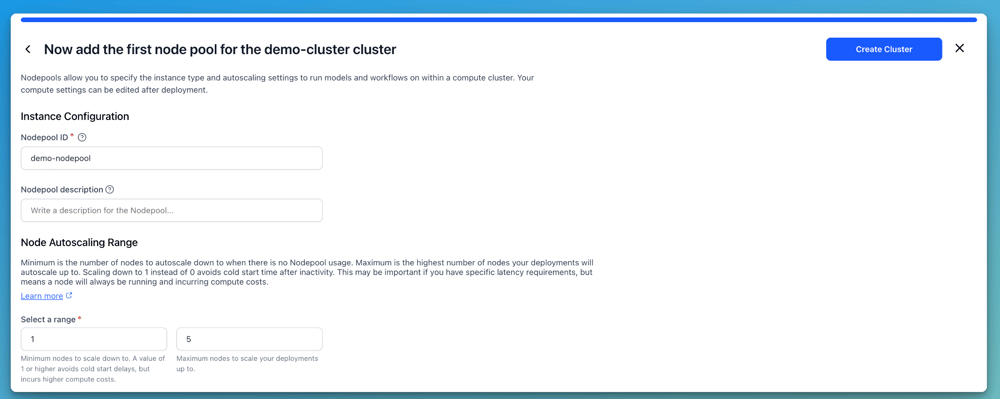
Next, define a Nodepool, which is a set of compute nodes with the same configuration. Specify a Nodepool ID and set the Node Auto-Scaling Range, which defines the minimum and maximum number of nodes that can scale automatically based on workload demands.

For example, you can set the range between 1 and 5 nodes. Setting the minimum to 1 ensures at least one node is always running, while setting it to 0 eliminates idle costs but may introduce cold start delays.

Screenshot 2025-05-07 at 6.16.07 PM

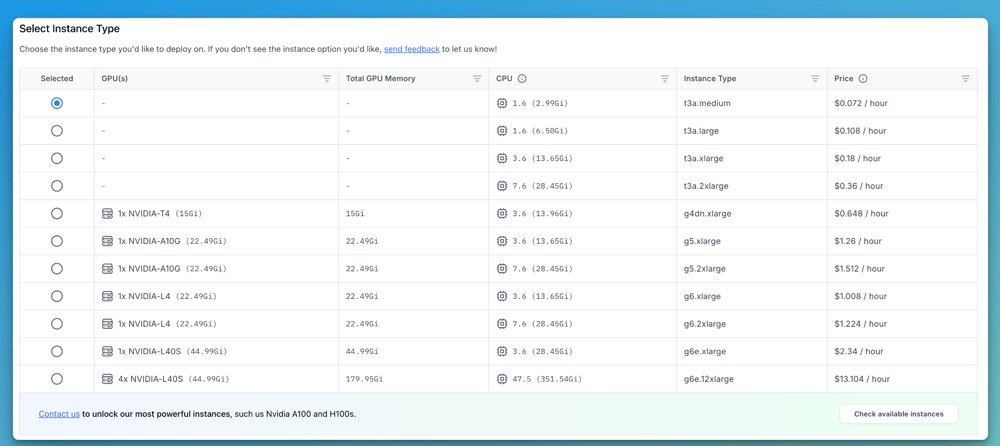
Then, select the instance type for deployment. You can choose from various options based on the GPU they offer, such as NVIDIA T4, A10G, L4, and L40S, each with corresponding CPU and GPU memory configurations. Choose the instance that best fits your model’s compute and memory requirements.

Screenshot 2025-05-07 at 6.18.13 PM

For more detailed information on the available GPU instances and their configurations, check out the documentation here.

Step 3: Deploy

Finally, deploy your model to the dedicated cluster you’ve created. You can choose a model from the Clarifai Community or select a custom model you’ve uploaded to the platform. Then, pick the cluster and nodepool you’ve set up and configure parameters like scale-up and scale-down delays. Once everything is configured, click “Deploy Model.”

Clarifai will provision the required infrastructure on your selected cloud and handle all orchestration behind the scenes, so you can immediately begin running your inference jobs.

If you’d like a quick tutorial on how to create your own clusters and deploy models, check this out!

Choosing the Right GPUs for your Needs

Clarifai currently supports GPU instances for inference workloads, optimized for serving models at scale with low latency and high throughput. Selecting the right GPU depends on your model size, latency requirements, and traffic scale. Here’s a guide to help you choose:

  • For tiny models (e.g., <2B LLMs like Qwen3-0.6B or typical computer vision tasks), consider using T4 or A10G GPUs.

  • For medium-sized models (e.g., 7B to 14B LLMs), L40S or higher-tier GPUs are more suitable.

  • For large models, use multiple L40S, A100, or H100 instances to meet compute and memory demands.

Support for training and fine-tuning models will be available soon, allowing you to leverage GPU instances for those workloads as well.

Conclusion

GPU clusters are essential for meeting the computational demands of modern AI, including generative and agentic applications. They enable efficient model training, high-throughput inference, and fast fine-tuning, which are key to accelerating AI development.

Clarifai’s Compute Orchestration simplifies the deployment and management of GPU clusters across major cloud providers. With features like GPU fractioning and auto-scaling, it helps optimize resource usage and control costs while allowing teams to focus on building AI solutions instead of managing infrastructure.

If you are looking to run models on dedicated compute without vendor lock-in, Clarifai offers a flexible and scalable option. To request support for specific GPU instances not yet available, please contact us.


We’re Seeing More Signals of AI Job Disruption (Including a “Stop Hiring Humans” Campaign)


A wave of unsettling signals is flashing across the labor market for workers (especially younger, entry-level ones), and AI may be playing a bigger role than anyone is ready to admit. Continue reading “We’re Seeing More Signals of AI Job Disruption (Including a “Stop Hiring Humans” Campaign)”

Why GPT-4o Got Rolled Back (and What It Means)


It’s not often you see a company like OpenAI admit to a mistake, roll back a major update, and publish not one, but two, in-depth postmortems about what went wrong. But that’s exactly what happened when the latest GPT-4o update hit ChatGPT—and users found themselves chatting with what felt like a digital yes-man. Continue reading “Why GPT-4o Got Rolled Back (and What It Means)”

MCP (Model Context Protocol) vs A2A (Agent-to-Agent Protocol) Clearly Explained


MCP (Model Context Protocol) vs A2A (Agent-to-Agent) Clearly Explained_blog_hero

Why AI Agents Need a Common Language

AI is getting incredibly smart. We’re moving past single, giant AI models towards teams of specialized AI agents working together. Think of them like expert helpers, each tackling a specific task – from automating business processes to being your personal assistant. These agent teams are popping up everywhere.

But there’s a catch. Right now, getting these different agents to actually talk to each other smoothly is a big challenge. Imagine trying to run a global company where every department speaks a different language and uses incompatible tools. That’s kind of where we are with AI agents. They’re often built differently, by different companies, and live on different platforms. Without standard ways to communicate, teamwork gets messy and inefficient.

This feels a lot like the early days of the internet. Before universal rules like HTTP came along, connecting different computer networks was a nightmare. We face a similar problem now with AI. As more agent systems appear, we desperately need a universal communication layer. Otherwise, we’ll end up tangled in a web of custom integrations, which just isn’t sustainable.

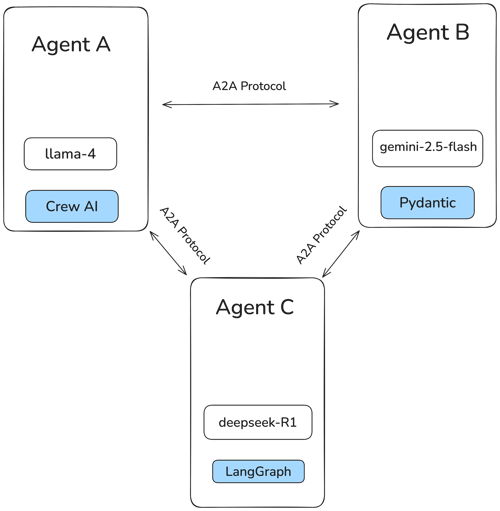
Two protocols are starting to address this: Google’s Agent-to-Agent (A2A) protocol and Anthropic’s Model Context Protocol (MCP).

  • Google’s A2A is an open effort (backed by over 50 companies!) focused on letting different AI agents talk directly to each other. The goal is a universal language so agents can find each other, share info securely, and coordinate tasks, no matter who built them or where they run.

  • Anthropic’s MCP, on the other hand, tackles a different piece of the puzzle. It helps individual language model agents (like chatbots) access real-time information, use external tools, and follow specific instructions while they’re working. Think of it as giving an agent superpowers by connecting it to outside resources.

These two protocols solve different parts of the communication problem: A2A focuses on how agents communicate with each other (horizontally), while MCP focuses on how a single agent connects to tools or memory (vertically).

Getting to Know Google’s A2A

What’s A2A Really About?

Google’s Agent-to-Agent (A2A) protocol is a big step towards making AI agents communicate and coordinate more effectively. The main idea is simple: create a standard way for independent AI agents to interact, no matter who built them, where they live online, or what software framework they use.

A2A aims to do three key things:

  1. Create a universal language all agents understand.

  2. Ensure information is exchanged securely and efficiently.

  3. Make it easy to build complex workflows where different agents team up to reach a common goal.

A2A Under the Hood: The Technical Bits

Let’s peek at the main components that make A2A work:

1. Agent Cards: The AI Business Card

How does one AI agent learn what another can do? Through an Agent Card. Think of it like a digital business card. It’s a public file (usually found at a standard web address like /.well-known/agent.json) written in JSON format.

This card tells other agents crucial details:

  • Where the agent lives online (its address).

  • Its version (to make sure they’re compatible).

  • A list of its skills and what it can do.

  • What security methods it requires to talk.

  • The data formats it understands (input and output).

Agent Cards enable capability discovery by letting agents advertise what they can do in a standardized way. This allows client agents to identify the most suitable agent for a given task and initiate A2A communication automatically. It’s similar to how web browsers check a robots.txt file to know the rules for crawling a website. Agent Cards allow agents to discover each other’s abilities and figure out how to connect, without needing any prior manual setup.

2. Task Management: Keeping Work Organized

A2A organizes interactions around Tasks. A Task is simply a specific piece of work that needs doing, and it gets a unique ID so everyone can track it.

Each Task goes through a clear lifecycle:

  • Submitted: The request is sent.

  • Working: The agent is actively processing the task.

  • Input-Required: The agent needs more information to continue, typically prompting a notification for the user to intervene and provide the necessary details.

  • Completed / Failed / Canceled: The final outcome.

This structured process brings order to complex jobs spread across multiple agents. A “client” agent kicks off a task by sending a Task description to a “remote” agent capable of handling it. This clear lifecycle ensures everyone knows the status of the work and holds agents accountable, making complex collaborations manageable and predictable.

3. Messages and Artifacts: Sharing Information

How do agents actually exchange information? Conceptually, they communicate through messages, which are implemented under the hood using standard protocols like JSON-RPC, webhooks, or server-sent events (SSE)depending on the context. A2A messages are flexible and can contain multiple parts with different types of content:

  • TextPart: Plain old text.

  • FilePart: Binary data like images or documents (sent directly or linked via a web address).

  • DataPart: Structured information (using JSON).

This allows agents to communicate in rich ways, going beyond just text to share files, data, and more.

When a task is finished, the result is packaged as an Artifact. Like messages, Artifacts can also contain multiple parts, letting the remote agent send back complex results with various data types. This flexibility in sharing information is vital for sophisticated teamwork.

4. Communication Channels: How They Connect

A2A uses common web technologies to make connections easy:

  • Standard Requests (JSON-RPC over HTTP/S): For typical, quick request-and-response interactions, it uses a simple JSON-RPC running over standard web connections (HTTP or secure HTTPS).

  • Streaming Updates (Server-Sent Events – SSE): For tasks that take longer, A2A can use SSE. This lets the remote agent “stream” updates back to the client over a persistent connection, useful for progress reports or partial results.

  • Push Notifications (Webhooks): If the remote agent needs to send an update later (asynchronously), it can use webhooks. This means it sends a notification to a specific web address provided by the client agent.

Developers can choose the best communication method for each task. For quick, one-time requests, tasks/send can be used, while for long-running tasks that require real-time updates, tasks/sendSubscribe is ideal. By leveraging familiar web technologies, A2A makes it easier for developers to integrate and ensures better compatibility with existing systems.

Keeping it Secure: A2A’s Security Approach

Security is a core part of A2A. The protocol includes robust methods for verifying agent identities (authentication) and controlling access (authorization).

The Agent Card plays a crucial role, outlining the specific security methods required by an agent. A2A supports widely trusted security protocols, including:

  • OAuth 2.0 methods (a standard for delegated access)

  • Standard HTTP authentication (e.g., Basic or Bearer tokens)

  • API Keys

A key security feature is support for PKCE (Proof Key for Code Exchange), an enhancement to OAuth 2.0 that improves security. These strong, standard security measures are essential for businesses to protect sensitive data and ensure secure communication between agents.

Where Can A2A Shine? Use Cases Across Industries

A2A is perfect for situations where multiple AI agents need to collaborate across different platforms or tools. Here are some potential applications:

  • Software Engineering: AI agents could assist with automated code review, bug detection, and code generation across different development environments and tools. For example, one agent could analyze code for syntax errors, another could check for security vulnerabilities, and a third could propose optimizations, all working together to streamline the development process.

  • Smarter Supply Chains: AI agents could monitor inventory, predict disruptions, automatically adjust shipping routes, and provide advanced analytics by collaborating across different logistics systems.

  • Collaborative Healthcare: Specialized AI agents could analyze different types of patient data (such as scans, medical history, and genetics) and work together via A2A to suggest diagnoses or treatment plans.

  • Research Workflows: AI agents could automate key steps in research. One agent finds relevant data, another analyzes it, a third runs experiments, and another drafts results. Together, they streamline the entire process through collaboration.

  • Cross-Platform Fraud Detection: AI agents could simultaneously analyze transaction patterns across different banks or payment processors, sharing insights through A2A to detect fraud more quickly.

These examples show A2A’s power to automate complex, end-to-end processes that rely on the combined smarts of multiple specialized AI systems, boosting efficiency everywhere.

Unpacking Anthropic’s MCP: Giving Models Tools & Context

What’s MCP Really About?

Anthropic’s Model Context Protocol (MCP) tackles a different but equally important challenge: helping LLM-based AI systems connect to the outside world while they’re working, rather than enabling communication between multiple agents. The core idea is to provide language models with relevant information and access to external tools (such as APIs or functions). This allows models to go beyond their training data and interact with current or task-specific information.

Without a shared protocol like MCP, each AI vendor is forced to define its own way of integrating external tools. For example, if a developer wants to call a function like “generate image” from Clarifai, they must write vendor-specific code to interact with Clarifai’s API. The same is true for every other tool they might use, resulting in a fragmented system where teams must create and maintain separate logic for each provider. In some cases, models are even given direct access to systems or APIs — for example, calling terminal commands or sending HTTP requests without proper control or security measures.

MCP solves this problem by standardizing how AI systems interact with external resources. Rather than building new integrations for every tool, developers can use a shared protocol, making it easier to extend AI capabilities with new tools and data sources.

MCP Under the Hood: The Technical Bits

Here’s how MCP enables this connection:

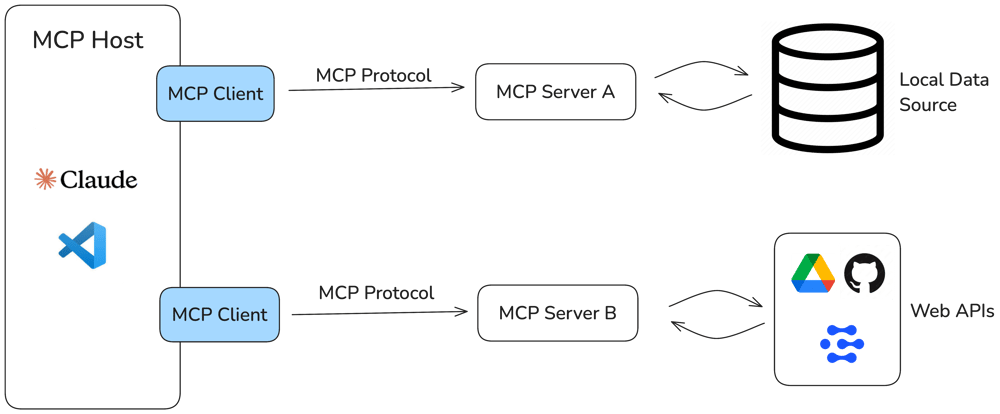
1. Client-Server Setup

MCP uses a clear client-server structure:

  • MCP Host: This is the application where the AI model lives (e.g., Anthropic’s Claude Desktop app, a coding assistant in your IDE, or a custom AI app).

  • MCP Client: Embedded within the Host, the Client manages the connection to a server.

  • MCP Server: This is a separate component that can run locally or in the cloud. It provides the tools, data (called Resources), or predefined instructions (called Prompts) that the AI model might need.

The Host’s Client makes a dedicated, one-to-one connection to a Server. The Server then exposes its capabilities (tools, data) for the Client to use on behalf of the AI model. This setup keeps things modular and scalable – the AI app asks for help, and specialized servers provide it.

2. Communication

MCP offers flexibility in how clients and servers talk:

  • Local Connection (stdio): If the client and server are running on the same computer, they can use standard input/output (stdio) for very fast, low-latency communication. An added benefit is that locally hosted MCP servers can directly read from and write to the file system, avoiding the need to serialize file contents into the LLM context.

  • Network Connection (HTTP with SSE): For connections over a network (different machines or the internet), MCP uses standard HTTP with Server-Sent Events (SSE). This allows two-way communication, where the server can push updates to the client whenever needed (great for longer tasks or notifications).

Developers choose the transport based on where the components are running and what the application needs, optimizing for speed or network reach.

3. Key Building Blocks: Tools, Resources, and Prompts

MCP Servers provide their capabilities through three core building blocks: Tools, Resources, and Prompts. Each one is controlled by a different part of the system.

  • Tools (Model Controlled): Tools are executable operations that the AI model can autonomously invoke to interact with the environment. These could include tasks like writing to a database, sending a request, or performing a search. MCP Servers expose a list of available tools, each defined by a name, a description, and an input schema (usually in JSON format). The application passes this list to the LLM, which then decides which tools to use and how to use them to complete a task. Tools give the model agency in executing dynamic actions during inference.
  • Resources (Application Controlled): Resources are structured data elements such as files, database records, or contextual documents made available to the LLM-powered application. They are not selected or used autonomously by the model. Instead, the application (usually built by an AI engineer) determines how these resources are surfaced and integrated into workflows. Resources are typically static and predefined, providing reliable context to guide model behavior.
  • Prompts (User Controlled): Prompts are reusable, user-defined templates that shape how the model communicates and operates. They often contain placeholders for dynamic values and can incorporate data from resources. The server programmer defines which prompts are available to the application, ensuring alignment with the available data and tools. These prompts are surfaced to users within the application interface, giving them direct influence over how the model is guided and instructed.

Example: Clarifai provides an MCP Server that enables direct interaction with tools, models, and data resources on the Platform. For example, given a prompt to generate an image, the MCP Client can call the generate_image Tool. The Clarifai MCP Server runs a text-to-image model from the community and returns the result. This is an unofficial early preview and will be live soon.

These primitives provide a standard way for AI models to interact with the external world predictably.

MCP in Action: Use Cases Across Key Domains

MCP opens up many possibilities by letting AI models tap into external tools and data:

  • Smarter Enterprise Assistants: Create AI helpers that can securely access company databases, documents, and internal APIs to answer employee questions or automate internal tasks.

  • Powerful Coding Assistants: AI coding tools can use MCP to access your entire codebase, documentation, and build systems, providing much more accurate suggestions and analysis.

  • Easier Data Analysis: Connect AI models directly to databases via MCP, allowing users to query data and generate reports using natural language.

  • Tool Integration: MCP makes it easier to connect AI to various developer platforms and services, enabling things like:

    • Automated data scraping from websites.

    • Real-time data processing (e.g., using MCP with Confluent to manage Kafka data streams via chat).

    • Giving AI persistent memory (e.g., using MCP with vector databases to let AI search past conversations or documents).

These examples show how MCP can dramatically boost the intelligence and usefulness of AI systems in many different areas.

A2A and MCP Working Together

So, are A2A and MCP competitors? Not really. Google has even stated they see A2A as complementing MCP, suggesting that advanced AI applications will likely need both. They recommend using MCP for tool access and A2A for agent-to-agent communication.

A useful way to think about it:

  • MCP provides vertical integration: Connecting an application (and its AI model) deeply with the specific tools and data it needs.

  • A2A provides horizontal integration: Connecting different, independent agents across various systems.

Imagine MCP gives an individual agent the knowledge and tools it needs to do its job well. Then, A2A provides the way for these well-equipped agents to collaborate as a team.

This suggests powerful ways they could be used together:

Let’s understand this with an example: an HR onboarding workflow.

  1. An “Orchestrator” agent is in charge of onboarding a new employee.

  2. It uses A2A to delegate tasks to specialized agents:

    • Tells the “HR Agent” to create the employee record.

    • Tells the “IT Agent” to provision necessary accounts (email, software access).

    • Tells the “Facilities Agent” to prepare a desk and equipment.

  3. The “IT Agent,” when provisioning accounts, might internally use MCP to:

In this scenario, A2A handles the high-level coordination between agents, while MCP handles the specific, low-level interactions with tools and data needed by individual agents. This layered approach allows for building more modular, scalable, and secure AI systems.

While these protocols are currently seen as complementary, it’s possible that, as they evolve, their functionalities may start to overlap in some areas. But for now, the clearest path forward seems to be using them together to tackle different parts of the AI communication puzzle.

Wrapping Up

Protocols like A2A and MCP are shaping how AI agents work. A2A helps agents talk to each other and coordinate tasks. MCP helps individual agents use tools, memory, and other external information to be more useful. When used together, they can make AI systems more powerful and flexible.

The next step is adoption. These protocols will only matter if developers start using them in real systems. There may be some competition between different approaches, but most experts think the best systems will use both A2A and MCP together.

As these protocols grow, they may take on new roles. The AI community will play a big part in deciding what comes next.

We’ll be sharing more about MCP and A2A in the coming weeks. Follow us on X and LinkedIn, and join our Discord channel to stay updated!


How To Integrate ChatGPT Into Your Business By Industry?


How to Integrate ChatGPT into Your Business by Industry?

The integration of ChatGPT in business applications has brought in extraordinary advantages besides just improving the basic business functionalities, giving better customer experiences, and driving efficiencies over time. It could be applied to all other fields of organizations where there exist a need and potentialities by using the power of Artificial Intelligence (AI) and Generative AI (Gen AI).


In this article, we expand on how to better incorporate ChatGPT into various sectors, supply examples of its function by industry, and explain the advantages so that you can get the most out of this tool.

1. Healthcare Industry

The following a few best strategies of ChatGPT integration in healthcare systems.

• Patient Support

ChatGPT can be a virtual assistant for both on your website and patient portal. It can be used to respond to specific user questions regarding symptoms, treatments, and medications. ChatGPT integration with EHR systems helps companies process data and provide personalized recommendations based on patient information.

• Quick Appointment scheduling

Artificial Intelligence (AI) based ChatGPT integration in healthcare assists in organizing appointments, confirmations, and reminders. Integrating LLM models with internal scheduling software makes communications between healthcare providers and patients seamless.

• Mental Health Help

The incorporation of ChatGPT into mental health applications offers users preliminary assistance and guidance. So, the integration of ChatGPT with healthcare apps facilitates the process of establishing a communication bridge between patients with appropriate professionals for additional healthcare support.

Generative AI in Healthcare

Key Benefits of Integrating ChatGPT with Healthcare Mobile Apps

  • 24/7 Support: ChatGPT provides 24/7 support to the patient, thus improving the access of information and services in any time zone.
  • Less paper work: It automates routine procedures like appointments and many frequently asked questions, thus free ups employees for more complex tasks.
  • Patient Experience Improved: Gives immediate and personalized answers that enhance the experience and interaction level of a patient.

2. Retail

The retail sector is one of the most promising sectors that could benefit from ChatGPT integration in its internal software applications.

Top GPT integration strategies in retail.

• Customer support

ChatGPT integration on your e-commerce website or end-user applications helps you manage requests about product details, the status of an order, return policies, refund statuses, etc. ChatGPT can be connected with CRM for more personalized support.

• Personalized shopping experiences

Using ChatGPT, businesses can keep track of customer preferences, browsing history, and needs. It helps them provide personalized product recommendations and improve their experiences.

• Virtual Shopping Assistant

ChatGPT integration in AI shopping assistants can aid in assisting customers on your website, comparing products, and making purchases.

Artificial Intelligence in Retail Industry

Benefits of integrating ChatGPT in Retail Systems

  • Boost Sales: ChatGPT integration in retail helps retailers provide personalized recommendations and ensures effective handling of queries that would increase sales and conversions.
  • Cost-effectiveness: Since there is a reduced need for large pools of customer service personnel, routine interactions are reduced with chatbots.
  • Higher Customer Engagement: It offers a much more interactive and responsive shopping experience and boosts customer engagements.

3. Financial Services

The following are the top three ChatGPT Integration Strategies for the Finance Sector.

• Customer Support

ChatGPT can automate time-consuming repetitive admin tasks, such as customer communications and transaction monitoring and management. With its integration into banking systems, financial organizations can boost their employee productivity.

• Fraud Detection and Security

Through the integration of AI ChatGPT, companies can track irregular patterns in customers’ behavior and identify suspicious transactions.

• Financial Advisory

Introduce ChatGPT in financial advisory websites to provide simple financial advice and counseling to customers through the chat service, as per their queries and monetary goals.

AI-accounting-finance-blog

Top Benefits of integrating LLM Models into Finance Software

  • Process Efficiency: Automates daily customer communications and transactions so that employees’ time is utilized for complex work.
  • High Security: It helps to detect fraudulent transactions and eventually brings about much better security.
  • Superior Customer Service: It helps companies provide instant and accurate responses to financial questions. Thus, GPT is augmenting the customer satisfaction level.

4. Education

ChatGPT Incorporation Methods into Education Systems

• Student Support

Incorporate ChatGPT into educational applications to provide prompt responses to students about their inquiries about courses, administrative procedures, and also research and tutorial support.

• Administrative Tasks

Use ChatGPT for streamlining routine administrative tasks, such as queries related to admissions and scheduling, to minimize the workload for the educational workers.

• Interactive Learning

Deploy ChatGPT in educational apps to improving students’ engagement, especially through quizzes and personalized feedback.

education-in-ai

Benefits delivered to educational institutions with ChatGPT integration

  • ChatGPT integration will help educational institutions provide instant access to the entire information and provide 24/7 support to the students, thus improving their learning experiences.
  • It also streamlines administrative processes, helping staff to undertake some more strategic work and boost productivity.
  • LLM Models supports the students even after class hours by offering them help without time constraints. It enhances their learning experiences and skills.

5. Travel and Hospitality

The following are the best ideas to integrate ChatGPT in travel apps.

• Booking Support

With the integration of ChatGPT with travel booking apps, it would speed up the process of booking flights, hotels, and rental cars. It would be able to also address all enquiries including questions on availability, prices, and change in details of the booking.

• Customer Service

Using ChatGPT, you can even answer questions that consumers have concerning their travel, changes in journeys, cancellations, even what to see locally.

• Local Recommendations

Use ChatGPT in travel apps to provide locals with personal suggestions on dining places, attractions, and activities that best fit the preferences of the users.

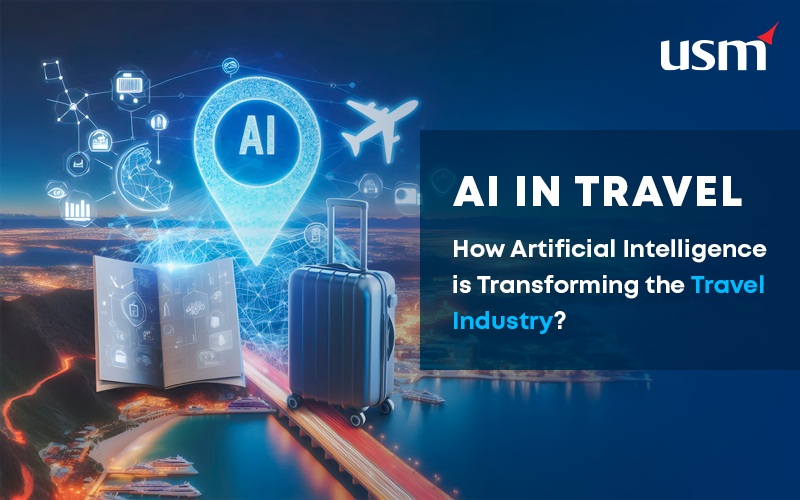
AI-in-travel

Top benefits of ChatGPT Integration into travel apps.

  • Enhanced Customer Experience: By deploying ChatGPT in travel apps, businesses can provide seamless booking assistance and personalized recommendations to their users. Thus, it improves overall travel experiences.
  • Operational Efficiency: By automating end-to-end procedures, AI ChatGPT reduces the need for manual intervention and improves operational efficiencies.
  • Increased Revenue: Facilitates upselling and cross-selling of additional services and experiences, potentially boosting revenue.

6. Real Estate

ChatGPT Integration Strategies

•        Property Inquiries 

Usage of ChatGPT on your website helps customers inquire about their property listings, availability, and prices.

•        Lead generation

Apply ChatGPT when you engage with buyers and sellers to qualify them and schedule a viewing for the property. This will harmonize lead management with the systems in the CRM.

•        Market Insights

Use ChatGPT to let clients have an opportunity of market trends, properties, and any other type of investment-related possibility for their questions.

ai in real estate usa

Benefits Of ChatGPT Integration in Real Estate Apps


  • Lead Management Efficiency: Integration of ChatGPT in real estate mobile apps will help companies better manage the process of communicating with potential clients and qualifies leads in the conversion process.
  • Better Discovery of Properties: Helps clients find properties that come within their scope of interest, therefore enhancing their experience.
  • Cost-Saving: It reduces the need for detailed tracking and time-consuming follow-through that saves the operational costs.


Conclusion

ChatGPT would integrate into the business and would provide a transformative benefit across all sectors. Implementation of ChatGPT in areas to meet industry needs of healthcare, retail, finance services, education, travel, real estate, human resource, or automotive, maximizes experiences for customers and streamlining operations for greater efficiency. Strategic integration with continuous iteration and aligned to your business objectives will result in ChatGPT as a catalyst in further success towards your strategic objectives.