How to Monitor and Control AI Workloads with Control Center


Monitor and Control AI Workloads with Control Center_blog_hero

Introduction

Managing AI infrastructure across an organization isn’t just complex — it can be chaotic. As teams scale their AI efforts, they’re often met with a fragmented mess of tools, dashboards, and spreadsheets just to answer basic questions:

  • How much are we spending?

  • Which models are running, and where?

  • What’s the current usage across teams or projects?

This kind of scattered visibility becomes a real bottleneck, especially for teams that are just trying to deploy models and get work done. Whether it’s budgeting, tracking compute hours, analyzing performance, or even knowing who triggered what action, having to manually piece this together from different tools can be overwhelming and error-prone.

For fast-moving AI teams, these operational gaps create friction across the organization, affecting engineers, data scientists, product managers, and finance teams. Without clear visibility, everything slows down.

In this blog, we’ll look at why visibility is often a challenge for AI teams and how a centralized solution can solve it. We’ll break down what’s not working today and show how a unified view can streamline your operations, bring real-time clarity, and give you complete insight into your platform usage.

Why It’s Hard to Manage AI Workflows Today

Building and running AI systems is already complex. But managing them day to day? That’s even harder. Many teams struggle to keep track of everything that’s happening — from model usage to compute spend.

Here are some of the common issues:

  • Too many tools: You have to jump between dashboards, cloud billing pages, and monitoring systems. There’s no single place to see what’s going on.

  • Hard to track compute: If you’re deploying models on your own GPU clusters or across cloud providers, it becomes difficult to monitor what’s running, where it’s running, and how much it’s costing you.

  • No clear usage history: Most platforms don’t let you easily see how often your models are being used, who is using them, or when training jobs are triggered.

  • Limited visibility into costs: Without a proper breakdown of usage and spend, it’s easy to go over budget without noticing until it’s too late.

  • Lack of transparency: When something goes wrong, like slow predictions or errors, it’s hard to know why it happened or how to fix it.

Even when tools offer some level of monitoring, they’re usually focused on one part of the system. You don’t get a full view of your models, data, teams, and spend in one place.

That’s where Clarifai’s Control Center comes in.

What is Control Center?

Control Center is a unified dashboard that gives you complete visibility into how your organization is using the Clarifai platform, all in one place.

It acts as your central command dashboard, bringing together metrics, usage data, financial insights, and team activity into a single, intuitive experience. Instead of juggling multiple tools or switching between tabs, the Control Center allows you to monitor and manage everything from a single screen.

With modular tabs, interactive charts, tables, and customizable filters, the Control Center provides a comprehensive view of your operations and evolves with your needs.

Here’s how the Control Center helps teams stay focused and in sync:

  • Streamline operations by consolidating all relevant information into a single screen, reducing context switching and improving decision-making efficiency.

  • Track resource utilization with visual tools like charts, graphs, and tables that reflect real-time activity across your AI workflows.

  • Centralize financial data to monitor costs, break down spending across projects, and identify opportunities for optimization.

  • Transform raw platform data such as model predictions, search operations, stored inputs, and training hours into actionable insights that guide development.

  • Understand team dynamics and how different users and departments are contributing to platform usage and overall spend.

  • Audit user activity by tracing events back to their origin, ensuring accountability and transparency across your deployments.

The Control Center is designed to be the single source of truth for your Clarifai usage. It gives teams a unified view of operations, model training, predictions, input data, and more.

Now that you know what the Control Center is and why it matters, let’s take a closer look at the different tabs inside it — each designed to give you visibility into a specific part of your AI operations.

Control Center Tabs

Now let’s dive into the different tabs within the Control Center. Each tab is purpose-built to help you monitor specific aspects of your AI workflows — from resource usage to team activity. Here’s a breakdown of what each tab offers and how you can use it to stay in control of your operations.

Overview Tab

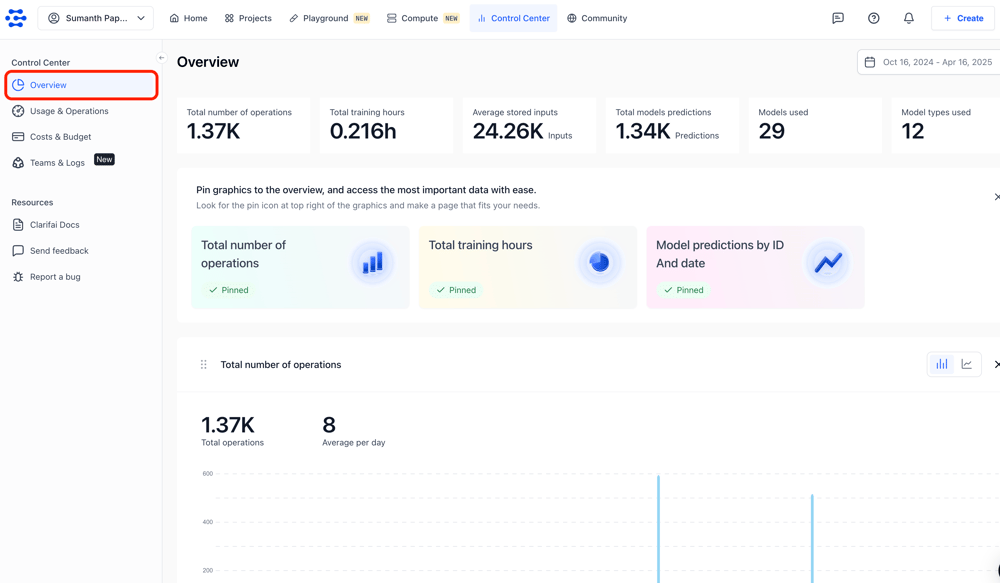
The Overview tab is the first thing you see when entering the Control Center. It acts as a customizable dashboard, allowing you to pin the most important data and charts from other tabs into one view. This helps you build a high-level summary of your account activity, tailored to what matters most to you or your team.

Key Metrics

Right at the top of the Overview, you’ll find a set of quick stats that summarize your platform usage for the selected date range. These include:

  • Total operations (such as model predictions and search requests)

  • Total training hours consumed

  • Average number of stored inputs

  • Number of models used

  • Types of models used

  • Total number of predictions made

These metrics are automatically updated based on the time filter, giving you instant insight into how your resources are being used.

Date Range Filters

To give you more control over the data you see, the Overview includes a date range selector. This lets you filter your view by selecting a preset range (like the current billing cycle or last 3 months) or setting a custom range using the date picker.

Even if you’re on the free plan, you can still track activity across these timeframes. Paid plans give you additional visibility and access to more detailed features.

Custom Charts

One of the most powerful features of the Overview tab is the ability to pin charts from other sections of the Control Center. This turns the Overview into your own personalized dashboard.

Pinned charts help you monitor the metrics you care about without having to navigate away. You can rearrange them to suit your workflow or remove charts as priorities shift. Whether you’re tracking model training trends or input data over time, the Overview gives you a flexible way to stay informed at a glance.
Screenshot 2025-04-16 at 4.19.01 PM

Usage & Operations Tab

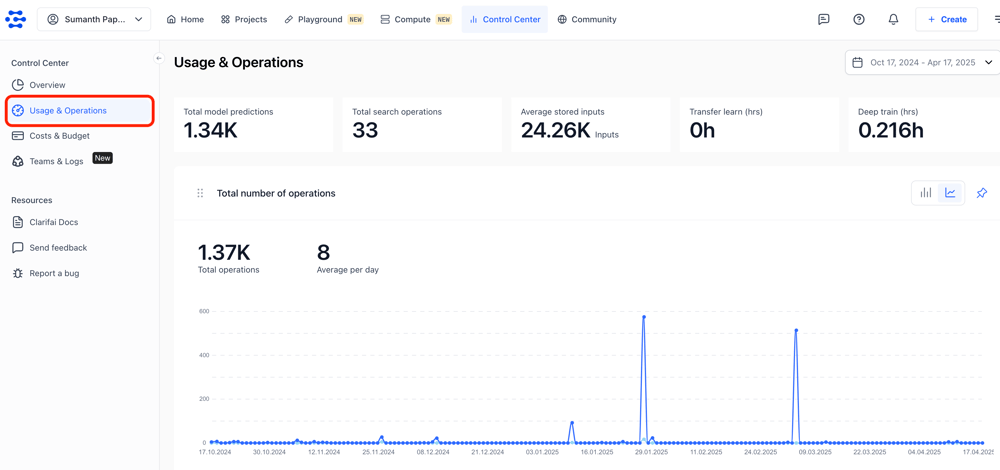
The Usage & Operations tab gives you a detailed view of how your organization is using the Clarifai platform. From predictions to training to data storage, it surfaces the metrics that matter most.

You can monitor:

  • Total number of operations, including model predictions and search activity

  • Training hours, broken down by model type (transfer learning and deep training)

  • Inputs stored, showing the total and average number of inputs you’ve added to the platform

  • Model predictions, filtered by type, model ID, and date

These insights are presented through interactive charts and summaries that make it easy to spot usage trends and operational patterns. You can filter everything by custom date ranges and pin specific charts to your Overview tab for quick access.

Each metric supports drill-down views so you can go from a high-level summary to detailed reports when needed. You can also change the chart type by clicking the icons in the upper-right corner. Choose the chart type that works best for you — bar chart or line chart.

This level of visibility helps teams stay informed and make better decisions about how they manage and scale their AI workflows.
Screenshot 2025-04-17 at 2.10.49 PM

Costs & Budget Tab

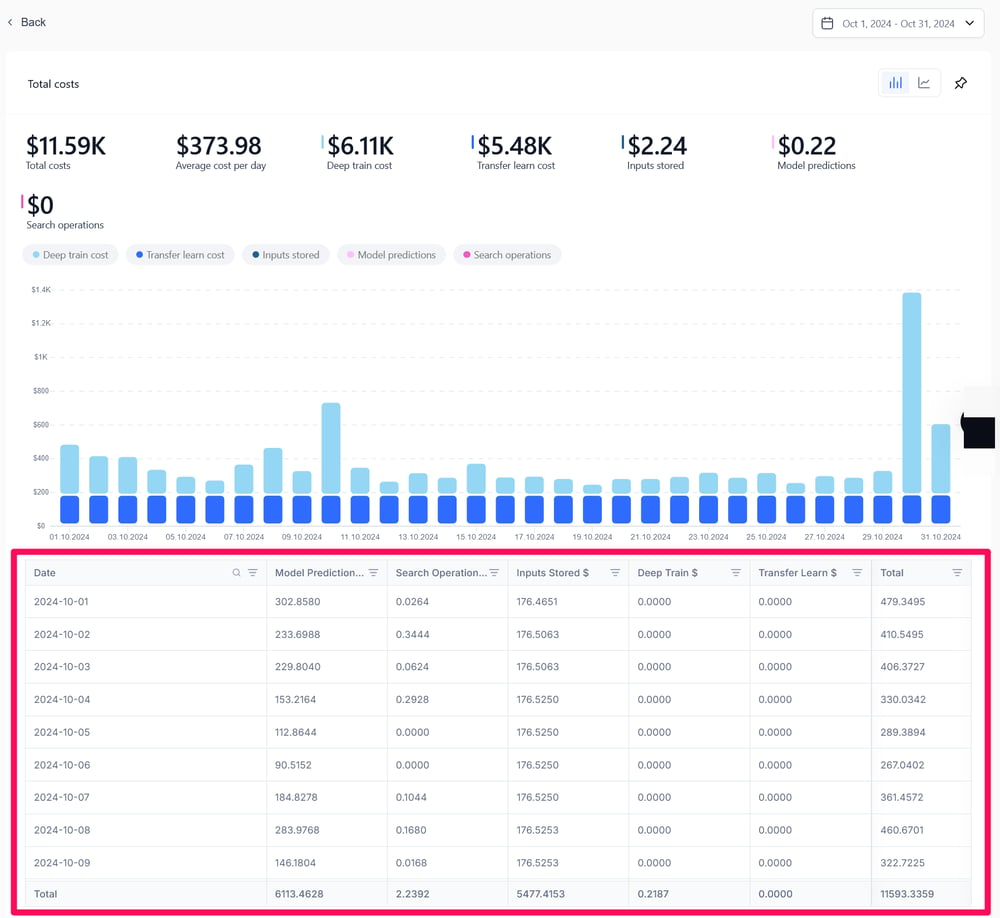
The Costs & Budget tab gives you a comprehensive look at the financial side of your operations on the Clarifai platform. It highlights where your spending is happening—across predictions, training, storage, and more—so you can manage costs with confidence.

You can monitor:

  • Total spend across all billable operations within a selected date range

  • Training costs, broken down by model type (transfer learning and deep training)

  • Model prediction costs, filtered by type, model ID, and date

  • Input storage costs, showing the cost of storing data on the platform

  • Operation costs, including predictions and search activity

Each category is visualized through interactive charts that let you track spend over time, filter by custom date ranges, and drill into specific cost types. You can also pin charts to your Overview tab for easier access to the insights that matter most.

Detailed reports are just a click away, giving your team a clear view into the cost breakdown behind each workflow—helping you stay within budget and scale usage efficiently.
costs_budget_3-c769ec10fc950fe64656f650ddc18bad

Teams & Logs

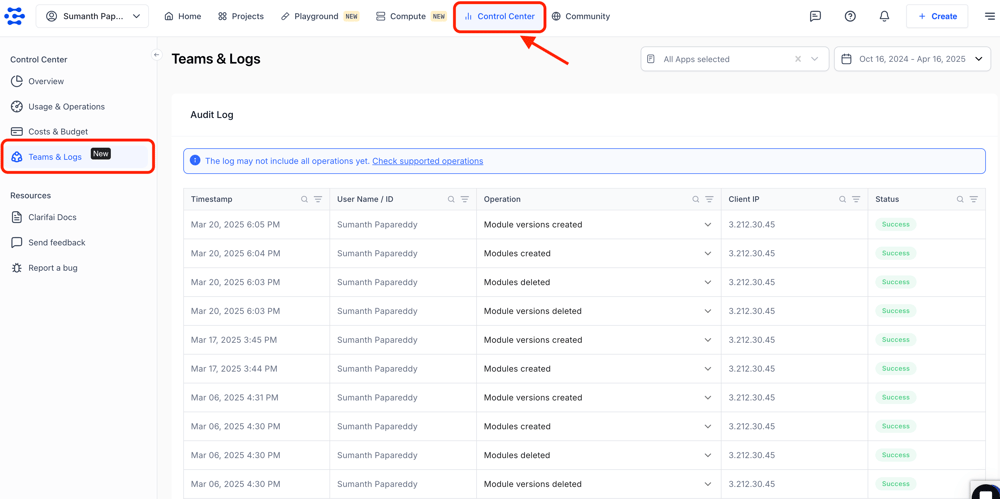
The Teams & Logs tab gives you full visibility into your organization’s activity on the Clarifai platform. It’s built for transparency and control—helping teams monitor key events, reinforce security, and maintain detailed audit trails.

You can monitor:

  • Organization and team membership activities, including creating teams, sending invites, and managing users

  • Collaborator changes, such as adding, editing, or removing collaborators

  • Application-level actions, like creating, updating, deleting, or duplicating apps

  • Model, workflow, and module operations, including training models, publishing workflows, or modifying modules

Each operation log captures essential context, including who performed the action, when it happened, what was done, where the request came from, and whether it succeeded. You can view logs across all your apps or narrow the focus using filters for specific apps and custom date ranges.

The interface includes expandable sections for each event—giving you the option to quickly skim through a summarized view or dive into the full operation details when needed.

This feature is currently available for users on Professional and Enterprise plans.

Want a deeper look at how audit logging works and how you can track every operation in detail? Check out our detailed blog post on audit logging.
Screenshot 2025-04-16 at 6.26.04 PM

Conclusion

Managing AI at scale doesn’t have to mean juggling dashboards and digging through logs. The Control Center brings everything into one place so you can quickly understand usage, track costs, monitor model performance, and see how teams are working across your platform.

From high-level overviews to detailed logs, it gives you the visibility you need to keep things running smoothly and make smarter decisions without the overhead. It’s built to reduce friction and give every team a clear view of what’s happening and why.

Also, once you deploy your own models to dedicated compute using Compute Orchestration, managing everything that comes after should be effortless. That’s why we’re launching a new Compute Orchestration tab in the Control Center in the coming weeks.

This new tab gives you full visibility and control over your compute environment — from managing deployed models and monitoring workloads to tracking GPU clusters and reviewing detailed spending breakdowns. Everything you need to manage and monitor your infrastructure will be centralized in one place.

Ready to give it a try? Sign up and explore the Control Center for yourself. Watch the tutorial below to see how the Control Center works.


Shopify’s CEO Just Issued a Bold AI Ultimatum to His Entire Team


Shopify’s CEO Tobi Lütke just gave his company a bold new directive on AI: Before asking for any new hires or more resources, Shopify employees now need to prove that AI can’t do the job first. Continue reading “Shopify’s CEO Just Issued a Bold AI Ultimatum to His Entire Team”

Use Cases And Future Outlook


Generative AI in Healthcare: Use Cases and Future Outlook

Generative AI originates content or information through Artificial Intelligence (AI) technologies based on learning knowledge from prompts. In recent years, incredible applications of the generative AI have been found within several sectors, primarily in healthcare as well. This article discusses the integration benefits of generative AI in healthcare, use cases, challenges, return on investment, and the outlook for the future.

Use Cases of Generative AI in Healthcare

  • Drug Discovery
    Generative AI basically comes up with novel molecular structures based on surveying huge chemical data after which it predicts those efficacy. This enhances the speed in drug discovery through rapid identification of promising compounds so that the expensive and time-consuming processes of making new drugs go down.
  • Medical Imaging
    Generative AI generates highly detailed medical images and also supports the diagnosis of anomalies including tumors, fractures, or any other pathology. Through enhanced image quality and resolution, generative AI helps deliver accurate diagnoses most of the time by identifying some problems that could easily be left unnoticed by a human eye; early disease detection is also ensured. 
  • Artificial Data Generation
    Generative AI can make synthetic medical datasets that reflect actual patient data while maintaining their privacy intact. These synthetic data become great means of model training, research, and development of AI-enabled solutions in ways that preserve patient confidentiality, thus allowing more representative and robust studies.
  • Virtual Assistants
    AI-powered virtual assistants give personalized health-related advices, reminders for medication intake, and answers to other health-related questions. Such assistants increase patient participation, provide persistent support, and lighten the burden of healthcare professionals by automatically responding to routine inquiries and administrative questions.
  • Administrative Automation
    Generative AI can automate administrative time-consuming tasks like scheduling appointments, managing patient records, and billing. This minimizes the burden of administrative tasks on healthcare providers, increases the efficiency of operations, and helps medical professionals to spend more time on patient care.

Challenges in the Acceptance of Generative AI Models

  • Data privacy and security
    It is a significant challenge as protecting sensitive patient information will be critical because generative AI needs extensive data sets. Such an operation could create serious data breaches and misuse of private health information. 
  • Regulatory Compliance
    Following healthcare regulations like HIPAA (Health Insurance Portability and Accountability Act) and other regional regulations is a complicated task since generative AI tools must be extensively tested and pass rigid regulatory compliance requirements before deployment. 
  • Bias and Fairness
    Generative AI models can inherit the biases present in training data, making the predictions unfair or inaccurate. These models have to be free of bias and equitable across the patient population being diverse. 
  • Integration with Existing Systems
    This results in integration into existing systems where legacy technologies abound, making generative AI tool integration into well-established workflows complicated and often frustrating for healthcare providers. 
  • Data Quality and Availability
    AI models operate best on structured data of high quality, and many health organizations face the problem of patient data being either incomplete or not consistent, leading to AI generating less accurate insights. 
  • Less availability of expertise
    Generative AI needs healthcare professionals and data scientists with the right skills. Shortage in AI and machine learning expertise in healthcare has limited its adoption. 
  • Implementation Cost
    Establishing and integrating generative AI will be very costly since it demands advanced technologies, infrastructure, and highly skilled employees, making it unaffordable to a considerable number of small-sized healthcare institutions.

Future of Generative AI in Healthcare

Generative AI, when combined with precision medicine and personalized treatment planning, will open new vistas into more accurate diagnostics, the ultimate being diseases predicted even before symptomatology begins to occur. Even surgical systems shall become much more precise and low risk and ensure a rapid return to life before the patient gets operated on with AI-based systems.

Generative AI will also have a great role in increasing the accessibility of healthcare to all corners of the globe, especially in underprivileged areas. Affordable quality care will be provided through AI-based remote consultation and diagnosis in resource-poor regions. Further, AI will lead to the more independent health systems where routine work is performed by AI and experts can deal with critical cases, thereby increasing the efficiency of the whole system.

Conclusion

Generative AI is a revolutionary factor within the health world, ranging from discovering drugs all the way through making personalized treatment plans, to say the least of making radiological imagines. Another problem that existed was with regards to data privacy. Often overcoming barriers brings additional regulatory burden with it. Here, higher return on investment for better efficiency besides cost-cutting in patient care was noticed. This is much more achievable when full integration and maturity through health care have taken place. Indeed, the future of healthcare is tied up with this promise of generative AI, which promises solutions to global health problems.

Connect with Us today for Generative AI models!

How Much Does It Cost To Develop A Chatbot App?


How Much Does it Cost to Develop A Chatbot App?

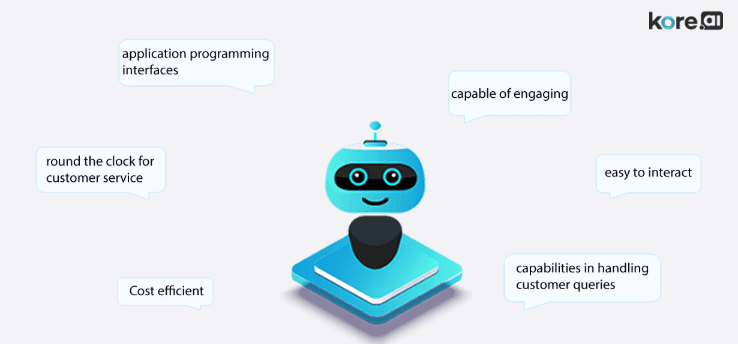
Chatbots are intelligent tools that interact and respond to customers’ queries like humans. These save a lot of time and money invested in providing 24*7 customer services.

Using Artificial Intelligence (AI), Natural Language Processing (NLP), and Machine Language (ML) languages, Chatbot apps instantly interpret user queries and respond in seconds. Further, the emotional intelligence of AI in bots detects the feelings behind the user messages and generates a matching response.

An online survey states that by the end of 2025, over 80% of businesses are expected to deploy chatbots apps. Hence, there is a high demand for chatbots, especially across eCommerce, healthcare, financial, insurance, travel, and telecom Industries.

AI Chat bot

Types of Chatbot Applications

It is important to differentiate the various types of chatbots available in the market to choose the appropriate one for your business. Here, we have listed three major types of chatbot apps that are best to integrate into existing mobile apps or web-based applications.

These are an advanced type of chatbots that uses the Artificial Intelligence and Machine Learning for self-learning. The bots upgrade the response system regularly depending upon the previous conversations. They ensure better customer satisfaction and provide a human-like conversational experience.

The rule-based chatbots use if/then logic to provide helps to users in clarifying their queries. These bots detect certain keywords in the user questions and validate them with many other questions and pre-defined answers to give an accurate reply to users.

  • Menu or Button-Based Chatbots

The structure of this type of chatbot is quite basic and widely used because of its simplicity. These bots offer several options in the form of a menu or buttons to the users and respond depending upon the user selection. However, these bots disappoint the users when the mentioned options do not match the query.

Best Features of Quick Responding Artificial Intelligence Chatbot Apps

The features included in the application rely on the needs of businesses. In this section, we have listed basic features that every business seeks to incorporate in their chatbots.

Keep an easy-to-use user interface or app design that can make your chatbots more engaging and appealing to the customers.

  • Conversational Maturity with NLP

Chatbots understand the user queries or the conversation and provide accurate responses using the power of Natural Language Processing (NLP) technology.

  • Chatbot with Emotional Quotient (EQ)

The emotional quotient (EQ) is an integral part of AI chatbots. It assists the bot in detecting emotions and tone in the customer query and responds appropriately like humans.  Hence, this feature provides a personalized user experience to customers.

chatbot app development features

Tracking the location of customers will help the chatbots to give more relevant responses during the conversation. For instance, they can provide the contact number of the sales executive of a nearby branch to users.

  • Free to Explore Solutions

Chatbots are capable of exploring vast data and find relative answers to customer problems. It can analyze the existing solutions from different sources for sending accurate responses.

  • Payment system integration

This feature suits for e-commerce chatbots to create secured payment methods.

Are you looking out for a chatbot application for your business?

USM is the best mobile apps development company in the USA. We develop custom AI apps for enterprises. Our chatbot app development services fuel your business growth and reform the way you interact with your customers.  

Get a free quote for chatbot apps development project!

Benefits of Interacting Chatbot apps for Your Business

  • Better Customer Experience

The ultimate advantage of chatbots is that they respond 24*7 instantly and ensure improved customer experience.

Apart from answering questions, bots automate the end-to-end sales process. Chatbots are the approach for brands to strengthen relationships with customers.  By analyzing consumer purchasing patterns and search patterns, marketplace chatbots generate leads for businesses. In this way, they help businesses to engage customers and make more sales.

  • Insight Into Customer Behaviour

Businesses can get valuable insights into customer behavior from chatbot conversations. Based on the customer queries, businesses can identify which products have more demand in the market. It helps to make market strategies for promoting goods and also optimize the chatbot content to provide the best answers.

Use Cases of AI  Chatbots in Business

You can book or schedule the appointment automatically with AI bots. When users book an appointment, it creates an event and sends reminders to both the customer and business representative. These bots are also available in the travel, recruiting, and entertainment industries.

  • Customer Support Chatbots

Customer support is the basic service of chatbots, and you can find these types of chatbots on every website. The features like availability, live chat, and quick response make them an ideal tool for customer service.

  • Chatbot Use Cases in Marketing

To generate leads, collect customer emails, simplify product prices to customers, most businesses are deploying chatbots across their marketing channels.

These intelligent chatbots improve audience engagement by giving personalized recommendations of events, shows, and movies.

Are you looking for chatbot apps developers?

USM has over two decades of industry experience in custom chatbot apps development. Get in Touch!

Cost to Develop an AI Chatbot Application

Now you know about all the benefits and use cases of chatbots, it’s time to check the cost to build a chatbot application for your business. The approximate cost to develop your bot with minimum functionalities cost around $30,000 to $80,000.

This estimated cost might vary based on the app’s platform (Android, iOS, Windows), App User Interface, app features, development team size, and location of mobile app developers you choose.

Conclusion

Chatbots are exciting and innovative tools to upgrade the customer experience. These give instant responses to the users and engage them like humans.

Build your Business Chatbot with Top Chatbot Development Company

Being the best mobile apps development company, USM develops full-fledged chatbot apps within your budget.

ChatGPT Revenue Surge, New AGI Timelines, Amazon’s AI Agent, Claude for Education, Model Context Protocol & LLMs Pass the Turing Test


OpenAI just raised an astounding $40B to build AGI—and it might not be as far off as you think. In this episode, Paul and Mike break down new predictions about AGI, why Google is bracing for AGI’s impact, and how Amazon is quietly stepping into the AI agent arms race. Plus: OpenAI’s going “open,” Claude launches a full-on AI education push, debate on whether AI can pass the Turing Test, and Runway raises $300M to rewrite Hollywood norms.

Continue reading “ChatGPT Revenue Surge, New AGI Timelines, Amazon’s AI Agent, Claude for Education, Model Context Protocol & LLMs Pass the Turing Test”

Artificial Industry In Food Processing Industry


Artificial Intelligence (AI) in Food Industry

Among all other sectors, the food and beverages processing industry still has not adopted revolutionizing digital technologies like AI, Machine Learning (ML), and Internet-of-Technology (IoT). The sector is progressing slowly and generating fewer contributions to the domestic and national economy.

But, since the past few years, food and beverage processing companies are highly switching to integrate AI capabilities in their systems or applications to enhance work efficiency. According to research reports, it is expected that the food processing industry will create over $150 billion business by the end of 2022 through leveraging AI capabilities.

AI technology will play a crucial role in the future of businesses across all sectors (The Significance Of AI Technology By Industry) and the food processing and handling industry is one of them. The use of Artificial Intelligence in Food Processing has been witnessing rapid growth in recent years.

Food and beverages processing companies are increasingly embracing AI technologies for improving operational efficiencies and delivering consumer products on time to catch up with the market demand opportunities. They are enjoying the benefits of AI in the Food Industry. In this article, we guide you few significant AI use cases in the food and beverages industry.

Recommend To Read: Artificial Intelligence In Agriculture & Food Process

AI Use Cases In Food and Beverages Industry

In this 21st century, modernizing food processing with AI technology is essential to balance the supply and demand, strengthen the distribution network, and build brand reliability on delivering products on time. Because a food processing company has to use AI-like technologies to fasten the production and monitor the entire inventory and warehouse operation virtually to never give a chance for a single disruption across their operations.

This is why AI in food and beverage industry has become a hot topic. Its automation and intelligence capabilities are flagging a green signal for the increasing use of artificial intelligence in the food processing industry.

Let us discuss a few popular applications of AI in food and beverage industry that assist companies in dealing with challenges related to supply, distribution and logistics, employee productivity, and warehouse management like operations.

Get in Touch

Key Applications Of Artificial Intelligence (AI) In Food Industry

  1. AI In Food Industry For Sorting Raw Products

It is the best application of Artificial Intelligence in the Food Industry. Proper sorting of food products is one of the greatest challenges for the consumer products manufacturing facilities because the feedstock we receive from various farmers is not identical or uniform.

Once you have a look at the different fruits & vegetables like carrot, apple, grapes, tomato, orange, and many more will have their shapes and sizes. Food processing plants are required to segregate millions of raw products depending on color, shape, and size. Manual grading, sorting, and peeling-like functions will consume hours of the time of labor. But, the use of Artificial Intelligence in food processing operations will automate all these functions and improve work efficiency. The automation systems use various tools and technologies and offer these benefits:

  • Enhancement of speed in sorting.
  • Yield improvement
  • Minimization of labor costs.
  • Reduces wastage and improves production

Hence, food growers, packers, and processors are all using AI and IoT sensor-based advanced equipment and machinery to sort or peel several fresh food products to exploit output and reduce wastage.

For instance, TOMRA is a top sensor-based food processing machine manufacturing company in the world. It offers a range of advanced processing machinery that use AI and are embedded with IoT sensors to improve productivity and save time in sorting, peeling, and other initial operations.

Besides, a Japanese food company is also using TensorFlow machine learning technology to detect the oddities instantly in their diced potatoes. The company found that these AI systems are working more accurately beyond expectations. It became a significant advantage in their production. The company is further planning to expand AI utilization to reap all the benefits of AI in the Food Industry.

Have any AI & ML Project idea visit: Artificial intelligence in Manufacturing

  1. AI in Food Industry For Ensuring Personal Hygiene

It is one of the best examples of Artificial Intelligence in the Food Industry. Since we are living in a COVID environment, all employees (who are involved in food processing) need to wear the mask, head caps, and hand gloves to ensure food safety.

As we care about our kitchen, food processing companies will also have to maintain hygiene to ensure the quality of the end products. On the other side, personal and plant hygiene is necessary to make sure that the plant is compliant with the rules and regulations of higher authorities.

The software development companies are making use of AI and ML to develop Facial recognition apps and solutions that monitor employees 24*7 to check whether they are following all hygiene protocols or not.

Hence, AI-powered facial and object recognition software solutions ensure 99.9% of accuracy in monitoring workers in real-time and taking screens of people who violate the safety precautions across the production line.

Recommend to Read: Best Facial Recognition Apps currently available on iOS and Android
  1. AI in Food Industry For Decision Making

The role of artificial intelligence in food industry has a high demand for instant decision making and optimizing business results.

AI is not only helping food processing companies in making sorting processes easier and creating the best flavor combinations. The role of AI in food industry is also engaged in assisting food companies in deriving valuable insights into sales and business growth tactics.

For instance, knowing customer taste preferences and producing products that ensure new tastes and match the preferences of consumers are two big deals for food products manufacturing companies.

Here, AI comes into the picture. AI software, coupled with ML and deep learning algorithms, involves extracting useful business insights from vast data input. Based on the data related to the previous product’s demand and ingredients added in it to enrich its flavor, AI applications will create extremely new combinations that enhance the product’s tastes.

Hence, AI in food and beverage industry would help companies take immediate decisions and improve production operations.

  1. AI For Faster Equipment Cleaning Process

It is one of the best AI use cases in food and beverages sector. In food processing industries, maintaining proper cleanliness is the most difficult task to handle or deal with.

Most of the food processing companies say they are very much clean like white paper because most of the process involves the automation process. No human labor is involved in the processing.

The method or procedure currently we are following has no sensors by which it cannot see what is happening inside the equipment. Due to this reason, companies are designing the procedure in such a way that it should run as long as required.

Companies are modernizing food processing with AI in many ways. AI-based self-optimizing clean-in-place tools are one of them. For the testing process, it uses optical fluorescence & ultrasonic sensing imaging technologies to know how much microbial debris & food is left in the equipment or inside the device.

Recommend To Read: Top 10 Use Cases Of Artificial Intelligence In The Manufacturing Industry
  1. Developing new products

It is a popular application of Artificial Intelligence in food industry. AI in food and beverage industry is gaining popularity for its intelligence in offering the best flavor combinations to increase sales and generate profits for companies.

Since food service industry deals will produce products in various spices, ingredients, and flavors, it is challenging for companies to manufacture products that what customers are exactly looking out for. But, advanced technologies like AI can tackle this with ease. With the help of AI in the production process, food service companies can derive the probability of customer preferences and create taste-rich products for consumers.

Yes. Most of the food processing and packaging industries use AI and produce the best products in the market.

For instance, in the USA, the world’s biggest beverages manufacturer and supplier Coca-Cola has installed self-service soft drink fountains and allowed customers to personalize their drink choice. As per their taste preferences, customers can create thousands of drinks by selecting different flavors to their base flavors.

These fountains are programmed with AI software that can process vast data sets related to consumer taste preferences. Thanks to such advanced AI technology-enabled machines. The core advantage of this AI system is it recommends new flavor combinations and lets customers enjoy a new taste.

6. Streamlining The Supply Chain

It is the best examples of Artificial Intelligence in the food industry. While automating the entire food processing functions, AI technology is widely used for making the supply chain operations compliant with the rules and regulations of the specific authorities.

This AI application for the food processing industry can modernize the supply chain operations and maintain transparency from load pickup and warehouse shifting to distribution.

Here are a few benefits of AI in supply chain management:

  • AI ensures high safety across the supply chain
  • AI offers a transparent supply chain management system
  • Better Inventory management
  • Efficient maintenance of warehouse
  • Low operational costs
  • 100% delivery is as scheduled
  • 24/7 product monitoring
  • Reduces operational downtime
  • Overall, AI augments end-to-end functions

Now, we will have a brief discussion on what challenges are hampering the use and growth of AI in food and beverage industry.

Challenges Of AI In The Food Industry

Though the impact of artificial intelligence in food industry is positive way, the technology is still facing a few challenges to roll out across the global food processing and handling sector. Here are a few challenges of AI in the food industry.

  • Lack of proper awareness of implementing the features of AI
  • Lack of knowledge on how AI technology improves processes and assists companies in achieving business objectives.
  • In the initial phase, companies are facing failures in training the AI machines, systems, and applications with the right set of data.
  • Lack of proper training to employees to work along with intelligent and advanced AI applications
  • Since the cost of AI implementation and integration is quite expensive, the food processing service companies are going back to adopting AI technologies for automating their processes.

These are a few core challenges of AI in the food industry. To bring a revolution in the growth of AI, the companies need to get advice from the AI development companies. Being the best AI services and solutions provider (USA, India, & UAE), USM Business systems builds an efficient and powerful automation solution for optimizing your food business.

Get a free app quote!

Final Words

The benefits of AI in the Food Industry are incredible. AI will modernize the food processing industry and take it to new heights. The food industry is at its initial phase to completely adopt AI technology.

The top mobile app development service providers would help you create results-driven AI consultancy and app development services and solutions.

Are you looking to integrate AI solutions to automate your food processing and packages business?

Let’s connect with our AI experts & discuss your app idea.


How to Run Multiple AI Workloads on a Single GPU


Benchmark_blog_hero (1)

Introduction: What is GPU Fractioning?

GPUs are in extremely high demand right now, especially with the rapid growth of AI workloads across industries. Efficient resource utilization is more important than ever, and GPU fractioning is one of the most effective ways to achieve it.

GPU fractioning is the process of dividing a single physical GPU into multiple logical units, allowing several workloads to run concurrently on the same hardware. This maximizes hardware utilization, lowers operational costs, and enables teams to run diverse AI tasks on a single GPU.

In this blog post, we will cover what GPU fractioning is, explore technical approaches like TimeSlicing and Nvidia MIG, discuss why you need GPU fractioning, and explain how Clarifai Compute Orchestration handles all the backend complexity for you. This makes it easy to deploy and scale multiple workloads across any infrastructure.

Now that we have a high-level understanding of what GPU fractioning is and why it matters, let’s dive into why it’s essential in real-world scenarios.

Why GPU Fractioning Is Essential

In many real-world scenarios, AI workloads are lightweight in nature, often requiring only 2-3 GB of VRAM while still benefiting from GPU acceleration. GPU fractioning enables:

  • Cost Efficiency: Run multiple tasks on a single GPU, significantly reducing hardware costs.

  • Better Utilization: Prevents under-utilization of expensive GPU resources by filling idle cycles with additional workloads.

  • Scalability: Easily scale the number of concurrent jobs, with some setups allowing 2 to 8 jobs on a single GPU.

  • Flexibility: Supports varied workloads, from inference and model training to data analysis, on one piece of hardware.

These benefits make fractional GPUs particularly attractive for startups and research labs, where maximizing every dollar and every compute cycle is critical. In the next section, we’ll take a closer look at the most common techniques used to implement GPU fractioning in practice.

Deep Dive: Common Techniques for Fractioning GPUs

These are the most widely used, low-level approaches to fractional GPU allocation. While they offer effective control, they often require manual setup, hardware-specific configurations, and careful resource management to prevent conflicts or performance degradation.

1. TimeSlicing

TimeSlicing is a software-level approach that allows multiple workloads to share a single GPU by allocating time-based slices. The GPU is virtually divided into a fixed number of slices, and each workload is assigned a portion based on how many slices it receives.

For example, if a GPU is divided into 20 slices:

  • Workload A: Allocated 4 slices → 0.2 GPU

  • Workload B: Allocated 10 slices → 0.5 GPU

  • Workload C: Allocated 6 slices → 0.3 GPU

This gives each workload a proportional share of compute and memory, but the system does not enforce these limits at the hardware level. The GPU scheduler simply time-shares access among processes based on these allocations.

Important characteristics:

  • No actual isolation: All workloads run on the same GPU with no guaranteed separation. On a 24GB GPU, for instance, Workload A should stay under 4.8GB of VRAM, Workload B under 12GB, and Workload C under 7.2GB. If any workload exceeds its expected usage, it can crash others.

  • Shared compute with context switching: If one workload is idle, others can temporarily utilize more compute, but this is opportunistic and not enforced.

  • High risk of interference: Since enforcement is manual, incorrect memory assumptions can lead to instability.

2. MIG (Multi-Instance GPU)

MIG is a hardware feature available on NVIDIA A100 and H100 GPUs that allows a single GPU to be split into isolated instances. Each MIG instance has dedicated compute cores, memory, and scheduling resources, providing predictable performance and strict isolation.

MIG instances are based on predefined profiles, which determine the amount of memory and compute allocated to each slice. For example, a 40GB A100 GPU can be divided into:

  • 4 instances using the 2g.10gb profile, each with around 10GB VRAM

  • 7 smaller instances using the 1g.5gb profile, each with about 5GB VRAM

Each profile represents a fixed unit of GPU resources, and workloads can only use one instance at a time. You cannot combine two profiles to give a workload more compute or memory. While MIG offers strict isolation and reliable performance, it lacks the flexibility to share or dynamically shift resources between workloads.

Key traits of MIG:

  • Strong isolation: Each workload runs in its own dedicated space, with no risk of crashing or affecting others.

  • Fixed configuration: You must choose from a set of predefined instance sizes.

  • No dynamic sharing: Unlike TimeSlicing, unused compute or memory in one instance cannot be borrowed by another.

  • Limited hardware support: MIG is only available on certain data center-grade GPUs and requires specialized setup.

How Compute Orchestration Simplifies GPU Fractioning

One of the biggest challenges in GPU fractioning is managing the complexity of setting up compute clusters, allocating slices of GPU resources, and dynamically scaling workloads as demand changes. Clarifai’s Compute Orchestration handles all of this for you in the background. You don’t need to manage infrastructure or tune resource settings manually. The platform takes care of everything, so you can focus on building and shipping models.

Rather than relying on static slicing or hardware-level isolation, Clarifai uses intelligent time slicing and custom scheduling at the orchestration layer. Model runner pods are placed across GPU nodes based on their GPU memory requests, ensuring that the total memory usage on a node never exceeds its physical GPU capacity.

Let’s say you have two models deployed on a single NVIDIA L40S GPU. One is a large language model for chat, and the other is a vision model for image tagging. Instead of spinning up separate machines or configuring complex resource boundaries, Clarifai automatically manages GPU memory and compute. If the vision model is idle, more resources are allocated to the language model. When both are active, the system dynamically balances usage to ensure both run smoothly without interference.

This approach brings several advantages:

  • Smart scheduling that adapts to workload needs and GPU availability

  • Automated resource management that adjusts in real time based on load

  • No manual configuration of GPU slices, MIG instances, or clusters

  • Efficient GPU utilization without overprovisioning or resource waste

  • A consistent and isolated runtime environment for all models

  • Developers can focus on applications while Clarifai handles infrastructure

Compute Orchestration abstracts away the infrastructure work required to share GPUs effectively. You get better utilization, smoother scaling, and zero friction moving from prototype to production. If you want to explore further, check out the getting started guide.

Conclusion

In this blog, we went over what GPU fractioning is and how it works using techniques like TimeSlicing and MIG. These methods let you run multiple models on the same GPU by dividing up compute and memory.

We also learned how Clarifai Compute Orchestration handles GPU fractioning at the orchestration layer. You can spin up dedicated compute tailored to your workloads, and Clarifai takes care of scheduling and scaling based on demand.

Ready to get started? Sign up for Compute Orchestration today and join our Discord channel to connect with experts and optimize your AI infrastructure!


How To Build An Excellent Voice Assistant App Like Siri?


#3 How to make a voice assistant like Siri

AI-powered mobile voice assistants can be designed by using any of the below three methods. In particular, to build an app like Siri, we can use three methods.

  • Junior method: This is an easy method. You can include voice assistant technology into the mobile app with some APIs (Application Program Interfaces) and AI app development tools.
  • Middle method: This method is a little bit tricky. By utilizing open-source services and APIs, you can develop a voice assistant.
  • Senior method: This method includes the complete development of a voice assistant from starting and integration into the mobile app.

1. Junior method

The development of a mobile AI app is tough, but the junior method makes it much easy. The junior method of app development is based upon the addition of important technologies from the top companies.

How to integrate Siri into a mobile app?

To incorporate Siri into your app, you’ll require Siri Kit of Apple. The SDK (software development kit) has two types of mobile app extensions including-

  • An Intents app extension: Manages all activities in your mobile app
  • An Intents UI app extension: Controls brand and custom content

2. Middle method

While making a voice assistant app, an external open-source solution is needed. Here are some of the tools that can help you while creating the AI-based voice assistant apps.

• Melissa

If you are a beginner in the development of voice assistant apps, then it is the perfect tool since it has several different parts that can be modified easily without any changes in the main algorithm. Melissa can take important notes, read the news, speaks, play music, uploads images, works on Windows, OSX, and Linux.

• Jasper

This tool is perfect for those individuals who want to create vital parts of artificial intelligence mobile apps without any external support. It runs on Raspberry Pi’s Model B. It can listen because of the active module and learn smartly because of the passive module.

• Dialogflow

This tool supports voice-to-text conversion technology, voice recognition to perform commands, and respond. It has both free as well as paid versions. The difference between these two is that the paid tool works on a private cloud. That’s why it is suitable for those individuals who have confidentiality on the priorities list.

• Wit.ai.

Wit.ai tool is the same as Dialogflow. It needs two components:
1) Requests of users (intents)
2) Characteristics of the requests (entities)
It has a good amount of intents. That’s why there is no need for building it. This tool is completely free for users.

3. Senior method

This method is suitable for those who are fully experienced in app development. If you utilize powerful and efficient computing resource services, the development of an independent voice assistant app becomes easier.