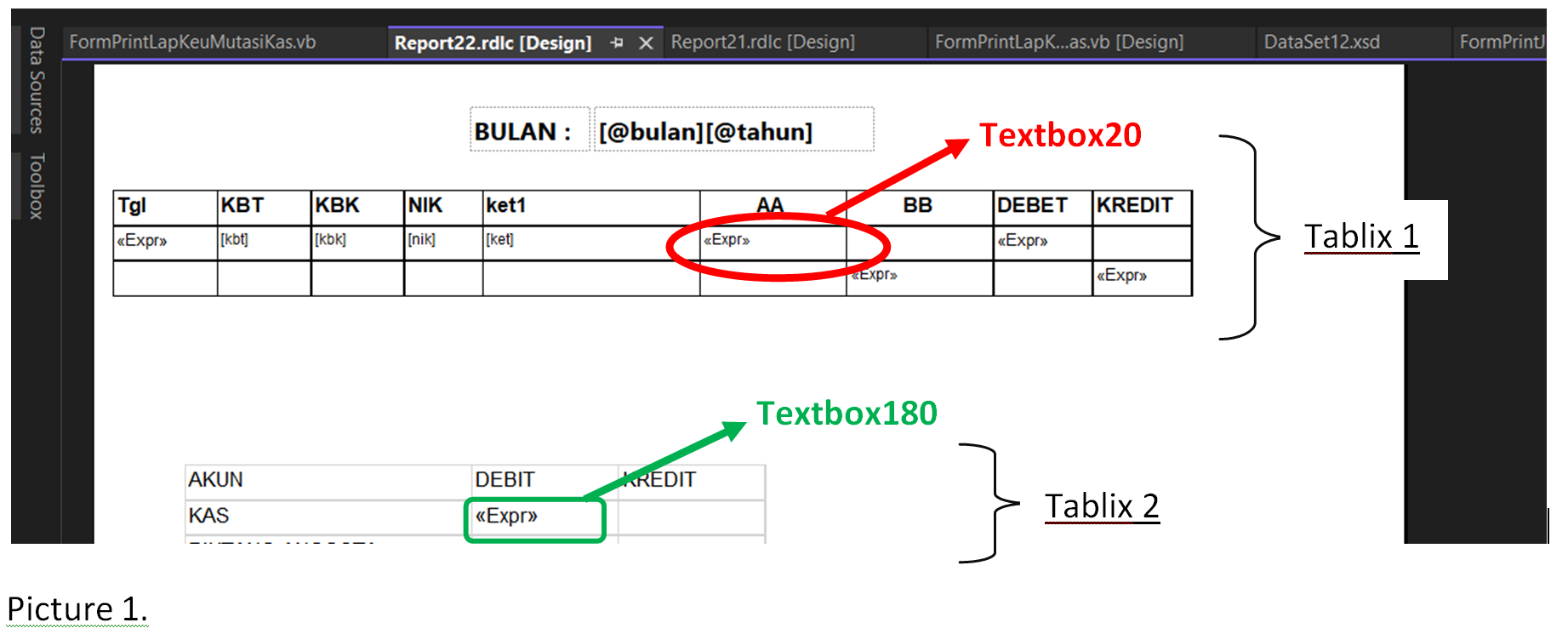
I am working with RDLC report. I have report design like this below:

and from report design above will display report like this (data source from this report is from MySQL database):

from report result above (Picture 2) I want to sum the value of DEBET column which have string in column AA “KAS”. From Picture 2 above will result sum = 3,060,000 + 5,000,000 = 8,060,000. The result of sum are displayed in Textbox180 as shown in Picture1.Tablix2.green rectangle.
To achieved this condition, I try write expression in Textbox180:
=Sum(IIF(reportItems!textbox20.Value Like "KAS", Fields!Debet.Value, 0))
as shown in Picture 3 below:

from above design, give error result:

I have used reportItems! instead of fields! In expression:

because fields! expression give error result:

As information, Picture 1.red circle is Textbox20 with expression:
=SWITCH(Fields!ket.Value Like "PINJAMAN*", "PIUTANG ANGGOTA", Fields!ket.Value Like "PENGAMBILAN SIMPANAN*", "SIMPANAN ANGGOTA", Fields!ket.Value Like "PELUNASAN PINJAMAN*", "KAS", True, "")
as shown in Picture4. below.

How to make expressions to calculate sum of value in DEBET Column which have AA column string “KAS” and the results are displayed in Textbox180 TAblix2?
I was trying this expression:
=Sum(IIF(reportItems!textbox20.Value Like "KAS", Fields!Debet.Value, 0))
in Textbox180 Tablix2, but give an error output. I was trying too replace reportItems! with fields! but still give an error output.