iOS 26: Eight New Features in Apple Music


Apple has made several updates to the Apple Music app in iOS 26, and it has AutoMix, which has become one of the most popular additions. ‌Apple Music‌ also features the Liquid Glass redesign like the rest of Apple’s apps, along with new translation features and other quality of life improvements.

iOS 26 Music Glass Feature

AutoMix

AutoMix is an upgrade to the crossfade feature in ‌Apple Music‌, and it is designed to provide more seamless song transitions. It transitions from one song to another as the song that’s playing ends, using time stretching and beat matching for an undetectable shift.

apple music automix ios 26apple music automix ios 26
Apple says that AutoMix is meant to work like a DJ, with songs transitioning at the “perfect moment” based on an on-device analysis of the key and tempo of the music.

AutoMix can be enabled when opening up the ‌Apple Music‌ app for the first time after installing ‌iOS 26‌.

The feature isn’t perfect and it works better with some genres than others, but it is a work in progress that Apple is improving over time. AutoMix is not an Apple Intelligence feature, but it does require an ‌Apple Music‌ subscription.

Lyric Translation

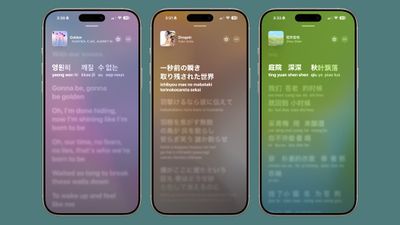
If you’re listening to a song in a different language, you can now open up the lyrics and get a real-time translation so you know what it’s about. The translated lyrics are displayed alongside the original lyrics.

ios 26 lyrics translationios 26 lyrics translation

Lyric Pronunciation

For songs in another language, you can also get a phonetic pronunciation guide for singing them aloud, which is useful when taking advantage of the ‌Apple Music‌ Sing karaoke feature.

ios 26 music app lyrics pronunciationios 26 music app lyrics pronunciation

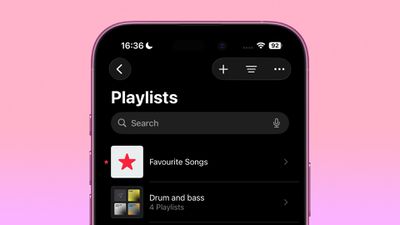
Pinned Favorites

There’s now an option to pin up to six playlists, albums, artists, or songs to the top of the ‌Apple Music‌ library.

pin apple music app iospin apple music app ios

Playlist Folders

Playlists can be organized into folders in the iOS ‌Apple Music‌ app, a feature that has previously been limited to the Mac.

music playlist foldersmusic playlist folders

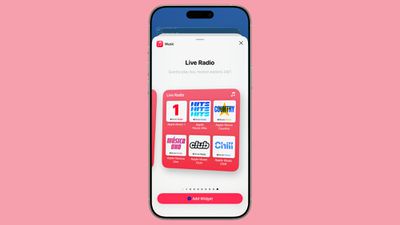
There are new Home Screen widgets that show your pinned ‌Apple Music‌ content. There’s a medium-sized widget and a larger widget for pins, along with a new large Live Radio widget.

ios 26 live radioios 26 live radio

Animated Lock Screen Artwork

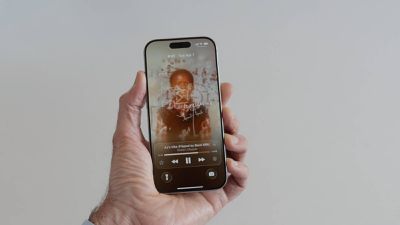
The Lock Screen now features full-screen animated art for the Now Playing widget while music is playing.

liquid glass music lock screenliquid glass music lock screen

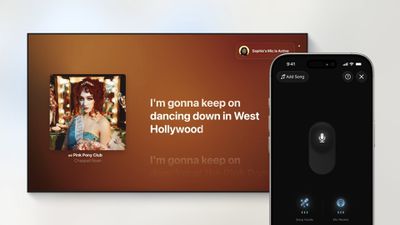
Karaoke Microphone

tvOS 26 and ‌iOS 26‌ turn the iPhone into a wireless microphone for karaoke on the Apple TV. When using ‌Apple Music‌ Sing, each participant can sing through their ‌iPhone‌, queue songs up, and send emoji reactions.

apple music sing tvos26apple music sing tvos26

Read More

More on the features that are available in ‌iOS 26‌ can be found in our iOS 26 roundup. ‌iOS 26‌ will launch in September.

Apple Maps in iOS 26: Track Your Location History and Get Smarter Route Alerts


The Apple Maps app in iOS 26 includes some useful new features for keeping track of where you’ve been and getting alerts if there are any delays that will impact your daily commute. In this guide, we’ve rounded up a list of everything new with Maps.

iOS 26 Maps Glass

Visited Places

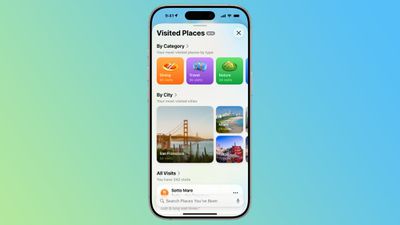
‌Apple Maps‌ is able to keep track of the places that you’ve visited, either in your hometown or while traveling. It can track the restaurants, shops, parks, and landmarks that you go to, so you can look back and remember where you’ve been.

ios 26 visited placesios 26 visited places
Google has long offered a timeline that automatically saves visits to places, and Apple’s new Visited Places option matches the functionality available in the Google Maps Timeline.

After you upgrade to ‌iOS 26‌, the Maps app pops up an alert letting you know about the new feature, so that you can opt in or opt out.

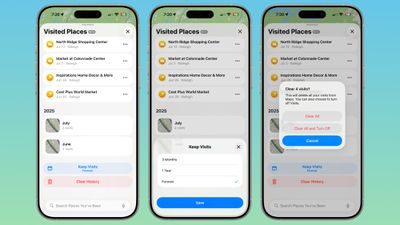
You can see your Visited Places by opening up the Maps app, tapping on your profile picture, tapping on Places, and then tapping into Visited Places. In this interface, the locations that you’ve visited are listed by month, plus there’s a search option.

There are options to change how long visits are kept (three months, one year, and forever), and to clear your current history. You can also remove locations one-by-one by tapping on them, and report incorrect location readings. When you clear your history, ‌Apple Maps‌ pops up an option that lets you clear everything or clear everything and turn off Visited Places entirely.

ios 26 maps app visited places overviewios 26 maps app visited places overview
If you want to turn Visited Places off or enable it at a later date, you can do so by going to Settings > Apps > Maps > Location. From there, toggle off Visited Places. You can also access the toggle by going to Privacy and Security > Location Services > Maps.

Precise Location needs to be toggled on for Visited Places to work, and places that you’ve been are stored on-device. The information is not uploaded to Apple’s servers.

Preferred Routes

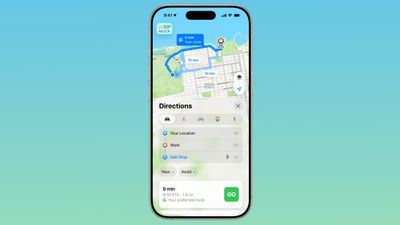
Using on-device intelligence, ‌Apple Maps‌ is able to learn the routes that you prefer to take to locations that you visit frequently, such as work, home, and school, and it keeps track of when you typically visit those places.

ios 26 maps app preferred routeios 26 maps app preferred route
If there’s a road closure or traffic that’s going to impact your commute, the Maps app is able to alert you about the issue and offer up an alternative route so you can get there on time.

A Maps Suggestions Home Screen widget shows the same information if there are any route issues. This is an under-the-hood feature that only shows up when it’s needed, so if you have a short commute that doesn’t involve roads that frequently see traffic, you might not have it pop up.

You can turn it on or off by going to Settings > Maps > Location and toggling off the “Preferred Routes and Predicted Destinations” setting.

Liquid Glass Redesign

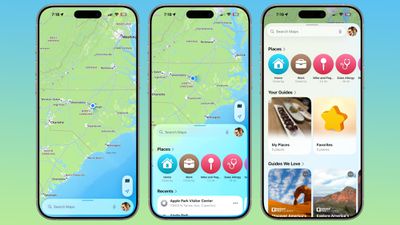
The Maps app has adopted Apple’s Liquid Glass redesign, and it brings some subtle interface changes. The search bar and navigation menu are translucent so you can see some of the Maps background behind it, and place icons are larger than before.

ios 26 maps app interfaceios 26 maps app interface
Icons have the layered glass look, and the various menus, cards, and buttons are more rounded than before. The Share Sheet has a popover design and it too is transparent.

The Library tab that was accessible when you tap your profile picture is now called Places, and it has improved spacing and a new Visited Places section.

Turn-by-turn directions are in a smaller pop-up bar rather than taking up the top of the Maps display, and time of arrival, length of travel, and distance are shown more prominently.

Voice Controls

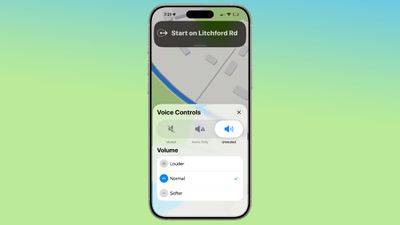
The Voice Volume section in the Maps app is now Voice Controls, and there are added toggles for Muted, Alerts Only, or Unmuted so adjusting how turn-by-turn directions are communicated is more intuitive.

ios 26 maps voice controlios 26 maps voice control
These controls did exist in iOS 18, but only as toggles that had no explanation on the right side of the display when turn-by-turn directions are in progress.

Place Information

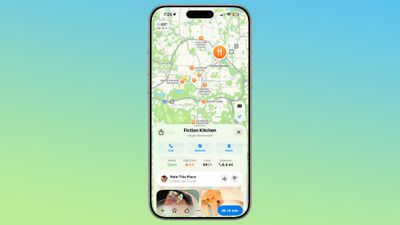
When you tap into or type a location on the Maps app, the Call, Menu, and Website buttons are now more prominently listed at the top of the interface, as are the location’s hours and the order option if one is available. There’s now a floating button to get directions to a place, and it’s always available at the bottom right of the app.

ios 26 maps place interfaceios 26 maps place interface

Improved Incident Reports

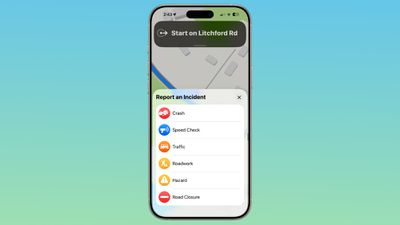
It’s easier to report an incident like a crash with a new incident button that’s located on the right side of the iPhone when getting turn-by-turn directions, and more incident types have been added.

ios 26 maps report incidentios 26 maps report incident
You can report a crash, speed check, traffic, roadwork, hazard, or road closure. In ‌iOS 18‌, options are limited to crash, speed check, and hazard.

Read More

We have a dedicated iOS 26 roundup that goes into detail on all of the new features that are available in the update.

6 AirPods Changes Coming in iOS 26


iOS 26 adds new functionality to the AirPods, which will be available this fall when Apple releases ‌iOS 26‌ and new AirPods firmware to the public.

6 AirPods Changes Coming in iOS 26 Feature

Camera Remote

The AirPods can be used as a camera remote for the Camera app or third-party iOS camera apps. Just connect your AirPods to your iPhone, open the Camera app, and then press and hold on the AirPods stem to take a photo or start a video recording.

When you’re finished, a second press and hold gesture will stop the recording. If you have an Apple Watch, you can already control your ‌iPhone‌ remotely from your wrist, but the AirPods have the potential to be even quicker since it’s a physical gesture rather than a series of steps that include opening an Apple Watch app.

Studio-Quality Recording

The AirPods 4 and the AirPods Pro 2 support recording studio-quality audio for interviews, podcasts, songs, videos, and more. Apple says that the feature can be used to record high-quality vocals while on the go, with background sounds filtered out thanks to Voice Isolation.

You can record higher-quality audio when making videos or using your devices to do things like record a podcast.

Improved Audio Quality

The H2 chip in the ‌AirPods 4‌ and ‌AirPods Pro‌ 2 brings more natural vocal texture and clarity to ‌iPhone‌ calls, FaceTime calls, and all CallKit-enabled apps like Zoom.

Studio-quality audio recording and improved call quality are available across ‌iPhone‌, iPad, and Mac, and support the Camera app, Voice Memos, Messages dictation, third-party camera apps, and video conferencing apps.

Beta Updates

With ‌iOS 26‌, Apple is adding an option to more easily install beta updates on AirPods. There’s a new update interface when you connect your AirPods to your ‌iPhone‌ and tap into them in the Settings app.

Pause Audio for Sleep

If you’re listening to music, a podcast, or a book while you’re in bed and you’re wearing AirPods, the AirPods will pause your audio when you fall asleep if you toggle on the new “Pause Media When Falling Asleep” option.

You’ll find it in the AirPods settings after connecting your AirPods to your ‌iPhone‌, but you’ll need the new AirPods firmware and ‌iOS 26‌. In addition to saving your spot in an audiobook or podcast, it will also preserve battery by turning your AirPods off so they’re not running all night.

This feature also works with Beats earbuds.

Keep Audio in Headphones

‌iOS 26‌ addresses an irritating issue that happens with CarPlay and AirPods. There’s a new “Keep Audio in Headphones” option that prevents audio from switching to car speakers or Bluetooth speakers when you’re listening to music through the AirPods.

With the option on, your music will continue playing in your AirPods when you get in the car. You can turn it on in ‌iOS 26‌ by going to Settings > General > AirPlay and Continuity.

Read More

We have a dedicated iOS 26 roundup that goes into detail on all of the new features that are available in the update.

Amazon Takes Up to $100 Off Huge Collection of Apple Watch SE/Series 10 Models


Amazon today is offering numerous discounts on Apple Watch Series 10 and Apple Watch SE, including both GPS and cellular models. These deals are being matched at Best Buy in most cases, and if you’re looking for bands to go with a new Apple Watch be sure to check out Woot’s massive sale on Solo Loop and Braided Solo Loop bands.

Apple Watch Series 10

apple watch series 10 purpleNote: MacRumors is an affiliate partner with Amazon. When you click a link and make a purchase, we may receive a small payment, which helps us keep the site running.

Amazon has the 42mm GPS Apple Watch Series 10 for $299.00, down from $399.00, as well as the 46mm GPS model for $329.00, down from $429.00. Both of these are record low prices on the Apple Watch Series 10, and they’re available in about 5-6 case colors and band styles.

Apple Watch SE

apple watch se purpleapple watch se purple

In addition to Series 10 deals, Amazon is discounting the 40mm GPS Apple Watch SE to $169.00 today, down from $249.00. This is the best price we’ve tracked so far in 2025, and it’s available in Starlight, Silver, and Midnight Aluminum color options.

Additionally, you can get the 44mm GPS Apple Watch SE for $199.00 today on Amazon, down from $279.00. This one is also available in Midnight, Silver, and Starlight Aluminum colors, and multiple band sizes.

If you’re on the hunt for more discounts, be sure to visit our Apple Deals roundup where we recap the best Apple-related bargains of the past week.


Deals Newsletter

Interested in hearing more about the best deals you can find in 2025? Sign up for our Deals Newsletter and we’ll keep you updated so you don’t miss the biggest deals of the season!

Popular Stories

Chase Sapphire Reserve Card Introduces New Perk for Apple Customers

Chase this week announced a series of new perks for its premium Sapphire Reserve credit card, and one of them is for a pair of Apple services. Specifically, the credit card now offers complimentary annual subscriptions to Apple TV+ and Apple Music, a value of up to $250 per year. If you are already paying for Apple TV+ and/or Apple Music directly through Apple, those subscriptions will…
Five Features Coming to AirPods Pro 3

Apple hasn’t updated the AirPods Pro since 2022, and the earbuds are due for a refresh. We’re counting on a new model this year, and we’ve seen several hints of new AirPods tucked away in Apple’s code. Rumors suggest that Apple has some exciting new features planned that will make it worthwhile to upgrade to the latest model. Subscribe to the MacRumors YouTube channel for more videos. Heal…

Foldable iPhone Leak Reveals New Camera Details

A new rumor today surfaced about Apple’s book-style foldable iPhone, set to be released next year, and this time it’s about the cameras. Mockup of foldable iPhone in its unfolded state (Image: Digital Chat Station) In a previous report, industry analyst Ming-Chi Kuo said he expects the foldable iPhone (or “iPhone Fold” for short) to include a dual-lens rear camera, but Kuo provided no other…

iPhone 17 Pro Launching in a Few Months With These 12 New Features

Apple’s next-generation iPhone 17 Pro and iPhone 17 Pro Max are around three months away, and there are plenty of rumors about the devices. Apple is expected to launch the iPhone 17, iPhone 17 Air, iPhone 17 Pro, and iPhone 17 Pro Max in September this year. Below, we recap key changes rumored for the iPhone 17 Pro models:Aluminum frame: iPhone 17 Pro models are rumored to have an…

Apple Watch Ultra 3 Finally Coming After Two-Year Hiatus

Apple will finally deliver the Apple Watch Ultra 3 sometime this year, according to analyst Jeff Pu of GF Securities Hong Kong (via @jukanlosreve). The analyst expects both the Apple Watch Series 11 and Apple Watch Ultra 3 to arrive this year (likely alongside the new iPhone 17 lineup, if previous launches are anything to go by), according to his latest product roadmap shared with…

PSA: Anker Recalls Multiple Power Banks Due to Fire Risk

Popular accessory maker Anker this month launched two separate recalls for its power banks, some of which may be a fire risk. The first recall affects Anker PowerCore 10000 Power Banks sold between June 1, 2016 and December 31, 2022 in the United States. Anker says that these power banks have a “potential issue” with the battery inside, which can lead to overheating, melting of plastic…

iPhone 17 Air Screen Protector Reveals a Potential Design Difference

A screen protector that is allegedly designed for Apple’s rumored ultra-thin iPhone 17 Air model has revealed a potential design difference. Based on an image shared today by a leaker known as Majin Bu, the iPhone 17 Air’s front camera may be positioned to the left of the Dynamic Island, rather than to the right of it like on iPhone models released over the past few years. It is unclear…

Here’s What Apple’s iPhone Could Look Like Every Year Through 2030

Earlier this week, reputable display analyst Ross Young of Counterpoint Research reignited discussion around recent reports about the display changes we should expect for next year’s iPhone 18 Pro, and perhaps more notably, broader changes coming to the 20th anniversary iPhone in 2027 – as well as what lies ahead for Apple’s flagship device for the rest of the decade. Contradicting a…

WWDC 2025: iOS 26 Rumored Features


The 2025 Worldwide Developers Conference is coming up quick, with less than a week to go before the big keynote event. We’re sharing a series of rumor recaps this week, for those who want to get a sneak peek at some of the features expected in Apple’s upcoming software updates.

iOS 26 Mock Rainbow Feature
iOS 26 is definitely the OS that we’ve heard the most about, and rumors suggest that it’s going to get a major design overhaul. We’ve highlighted everything we know below.

Naming

iOS 18 is not going to iOS 19, with Apple instead opting to change the numbering for its software updates. Instead, we’re going to get ‌iOS 26‌, which will be released alongside iPadOS 26, macOS 26, watchOS 26, tvOS 26, and visionOS 26.

iOS 19 to 26 Thumb 2iOS 19 to 26 Thumb 2
The “26” in the name marks the September 2025 to September 2026 release season for ‌iOS 26‌. Next year we’ll get iOS 27, then iOS 28, and so on. All software updates now share the same year number, which makes it easier to keep new releases straight.

Design Updates

‌iOS 26‌ is going to get a major design revamp, adopting some visual elements from the visionOS operating system. Inside Apple, the design project is referred to as “Solarium,” which hints at what we can expect.

iOS 19 visionOS UI ElementsiOS 19 visionOS UI Elements
A solarium is an all-glass room that’s designed to let in sunlight, and rumors suggest that ‌iOS 26‌ will adopt a more translucent, glass-inspired aesthetic.

visionOS has a translucent interface to allow people to see their surroundings in AR or VR while also interacting with app menus and windows. visionOS windows blend into the background for an unobtrusive look, and on the iPhone, Apple could adopt the same translucent focus to let content shine through.

‌iOS 26‌ is also expected to get some of the floating on-screen windows and menus that are used in visionOS, with rounded pop-up navigation and menu bars that float above the content on the display. Apple could use shading, shadowing, and subtle lighting effects to give buttons and other interface elements a slight lift.

App icons could be rounder, and notifications, menus in apps, search bars, card-style interfaces, and other parts of the iOS user interface could have more rounded corners than we’re used to. The floating navigation bars are expected to be pill-shaped, for example.

‌iOS 26‌ has been described as having a glossy or glass-like look, which is also how visionOS looks. Apple’s WWDC 2025 teaser images feature a frosted glass rainbow with soft colors, and those images might hint at what’s coming. Apple could use a soft, frosted glass style across ‌iOS 26‌.

Mockups that are allegedly based on real ‌iOS 26‌ designs were shared earlier this year by Front Page Tech, demonstrating some of the design changes that might be in store.

Alleged iOS 19 Camera App RenderAlleged iOS 19 Camera App RenderA render of ‌iOS 26‌’s alleged redesigned Camera app, from Front Page Tech

A mockup of the Camera app, for example, has translucent pop-out menus that better blend into the background to put the focus on the images.

Newer Apple apps like Apple Sports and Invites have simpler, translucent interface elements with expanding buttons, and could also serve as an example of the design language Apple is debuting in ‌iOS 26‌.

apple invites screenshotsapple invites screenshots

Apple is planning to overhaul its built-in apps with the updated design, though some will get bigger refreshes than others. Apple will also provide developers with design guidelines and assets so that third-party apps can adopt the new aesthetic as well.

Navigation Simplification and Streamlining

Along with a new look, Apple is also going to streamline navigation options in ‌iOS 26‌. Apple is tweaking menus, buttons, and navigation to make the operating system simpler to learn and navigate.

Some of the design and interface changes will also extend to macOS, iPadOS, tvOS, and watchOS, improving design consistency and navigation across Apple’s operating systems.

Apple Intelligence Features

There are several new Apple Intelligence features that are expected in ‌iOS 26‌.

AI Battery Management

An AI-powered battery management feature will analyze how you use your ‌iPhone‌ and make adjustments to maximize battery life. The option will be able to limit the power draw of apps and other system features based on device usage.

Battery management will be particularly useful for the iPhone 17 Air that will have a smaller battery than other iPhones, but it will be available on iPhones that are able to run ‌iOS 26‌.

Shortcuts App

Apple plans to update the Shortcuts app with ‌Apple Intelligence‌, allowing users to create actions that use ‌Apple Intelligence‌ models. With this functionality, Shortcuts could be easier to use, with even casual users able to create useful shortcuts using natural language.

Google Gemini

Apple and Google are close to establishing a deal that will add Google Gemini to the ‌iPhone‌ as an alternative to ChatGPT, and that’s a feature that we’ll likely see in ‌iOS 26‌. Google Gemini would integrate with Siri like ChatGPT, with ‌Siri‌ able to hand requests over to Gemini for more in-depth AI-powered answers.

Siri

We’re still waiting on all of the ‌Apple Intelligence‌ personalized ‌Siri‌ features that Apple debuted at WWDC 2024. Those updates are expected to come at some point in ‌iOS 26‌, but they may not be ready for the launch version of the software. If the functionality isn’t ready to go, Apple isn’t going to mention it at ‌WWDC 2025‌ to avoid further embarrassment.

Here’s what’s coming, eventually:

  • Personal Context – ‌Siri‌ will be able to keep track of everything on your device, like emails, messages, files, and more, helping you complete tasks and find things.
  • Onscreen awareness – ‌Siri‌ will know what’s on your screen and will be able to complete actions involving whatever you’re looking at.
  • Deeper App Integration – ‌Siri‌ will be able to do more in and across apps, performing actions and tasks that are not possible with the personal assistant right now. This will be a feature available for Apple’s apps and third-party apps.

Gaming App

Apple has a new gaming app planned, and it’ll replace Game Center and add more functionality than ever before. It’s going to house the games section of the App Store, so you’ll be able to find and launch games from one convenient gaming-centric spot.

The app is also expected to feature communication options for connecting with other players, in-game achievements, editorial content and recommendations, and leaderboards.

New Features for Existing Apps

Rumors suggest that there are several new features coming to existing Apple apps.

  • Messages – Automatic translations and support for polls.
  • Music – Full screen animated art on the Lock Screen.
  • Notes – Markdown support.
  • CarPlay – Updated user interface to match ‌iOS 26‌.

AirPods Live Translate

With an AirPods firmware update, an ‌iOS 26‌ feature will allow the AirPods to translate in-person conversations from one language to another. If an English speaker with AirPods is conversing with someone who is speaking Spanish, the ‌iPhone‌ will detect the audio, translate the speech, and relay it back in English to the AirPods wearer.

Connectivity

Apple is adding a new feature that will synchronize captive Wi-Fi portal login information across devices, so you’ll only need to enter login details for a captive Wi-Fi network once, and it’ll be available on all of your Apple products. Captive networks are common in hotels, airports, coffee shops, and other locations with shared or paid internet options.

Apple might also make it easier for ‌iPhone‌ users to transfer an eSIM to an Android smartphone.

Health App

There’s a new Health app coming, but it might not be ready when ‌iOS 26‌ launches, so Apple might not be planning to unveil it just yet. The revamped app will apparently offer AI-powered health coating features with personalized health recommendations.

There may also be new food tracking functionality that would allow users to keep track of their calorie intake each day.

Stage Manager

There’s a possibility that Apple will add a Stage Manager feature for ‌iPhone‌ models that have a USB-C port, with the feature activating when an ‌iPhone‌ is connected to an external display over USB-C.

‌Stage Manager‌ would allow multiple apps to be opened at once, offering a more Mac-like experience when an ‌iPhone‌ is used with a display.

Accessibility Features

Apple previewed new Accessibility features coming to ‌iOS 26‌ earlier this year, and there are some interesting new additions.

  • Music Haptics – Music Haptics will get customization options so haptics can be enabled for an entire song or just vocals, plus there will be options to adjust the intensity of taps, textures, and vibrations.
  • App Store Labels – ‌App Store‌ product pages will get Accessibility Nutrition Labels that highlight accessibility features in apps.
  • Accessibility Reader – Accessibility Reader is a systemwide reading mode that will make text easier to read thanks to customization features for adjusting font, color, spacing, and more.
  • CarPlayCarPlay is getting support for Large Text and Sound Recognition that will alert drivers to the sound of a crying baby, horns, and sirens.
  • Background Sounds – Background Sounds will be customizable with new EQ settings, timers, and automation actions in Shortcuts.
  • Personal Voice – Personal Voice will let users preserve their voice faster and more easily. It will use on-device machine learning to create a smoother, more natural-sounding voice in under a minute.
  • Tracking – Head tracking and eye tracking are getting updates, plus Apple is adding support for Brain Computer Interface devices.

iPadOS 26

iPadOS 26 is going to get the same design updates that are coming to the ‌iPhone‌, so it will have the same glass-like, translucent look.

Apple is also rumored to be working on adding new features that will make the iPad experience more like using a Mac, introducing improved productivity, new multitasking features, and expanded window management options.

iPadOS 26 may have a Mac-like menu bar when connected to a Magic Keyboard, plus Apple is adding a new reed calligraphy pen option for Apple Pencil users that need to write Arabic script.

Compatibility

Rumors suggest that ‌iOS 26‌ will not be available on the ‌iPhone‌ XR, ‌iPhone‌ XS, or the ‌iPhone‌ XS Max, but it will run on all other iPhones that support ‌iOS 18‌.

  • iPhone 16e
  • iPhone 16
  • ‌iPhone 16‌ Plus
  • iPhone 16 Pro
  • ‌iPhone 16 Pro‌ Max
  • iPhone 15
  • ‌iPhone 15‌ Plus
  • ‌iPhone 15‌ Pro
  • ‌iPhone 15‌ Pro Max
  • ‌iPhone‌ 14
  • ‌iPhone‌ 14 Plus
  • ‌iPhone‌ 14 Pro
  • ‌iPhone‌ 14 Pro Max
  • ‌iPhone‌ 13
  • ‌iPhone‌ 13 mini
  • ‌iPhone‌ 13 Pro
  • ‌iPhone‌ 13 Pro Max
  • ‌iPhone‌ 12
  • iPhone 12 mini
  • ‌iPhone‌ 12 Pro
  • iPhone 12 Pro Max
  • ‌iPhone‌ 11
  • ‌iPhone‌ 11 Pro
  • iPhone 11 Pro Max
  • ‌iPhone‌ SE (2nd generation or later)

While these iPhones will support ‌iOS 26‌, advanced features may be limited to newer iPhones with faster processors. ‌Apple Intelligence‌ in ‌iOS 18‌, for example, only runs on the ‌iPhone 15‌ Pro and the ‌iPhone 16‌ models.

Read More

More info on all of the rumored features that we know about so far can be found in our iOS 26 roundup.

WWDC 2025 Keynote

Apple’s ‌WWDC 2025‌ keynote will begin on Monday, June 9 at 10:00 a.m. Pacific Time. Apple will live stream the event on its website, on YouTube, and in the TV app.

If you’re not able to watch live, we’ll have a live blog and coverage of the announcements here at MacRumors, plus we’ll be live tweeting the event on the MacRumorsLive account.

Best Apple Deals of the Week: Memorial Day Sales Arrive With Savings on iPad, AirPods, iPhone Accessories, and Much More


It’s Memorial Day weekend, and retailers are hosting a wide variety of discount events online with big savings on everything from computer monitors to iPhones and charging accessories. We’re also still tracking numerous deals that happened during the week, including savings on iPad mini 7, Apple Watch, and AirPods Max, as well as a huge markdown on your first year of Peacock.

Best Apple Deals Feature Shelf Purple 1Note: MacRumors is an affiliate partner with some of these vendors. When you click a link and make a purchase, we may receive a small payment, which helps us keep the site running.

Memorial Day sales

  • Samsung – Save on monitors, storage solutions, and more. Special TV deals include the 65″ S90D OLED TV for $1,299 ($1,400 off) and the 77″ S95D OLED TV for $2,499 ($2,100 off)
  • Best Buy – Save sitewide on Apple products, appliances, headphones, and more
  • Logitech – Get up to $150 off with select purchase amounts
  • T-Mobile – Get an iPhone 16 Pro at no cost when switching
  • Belkin – Get up to $60 off with select purchase amounts
  • Burton Goods – Get 25% off sitewide
  • Casely – BOGO free sitewide
  • GRID Studio – Get 15% off sitewide
  • ZAGG – Get 35% off sitewide

Charging Accessories at Amazon

new jackery purplenew jackery purple

  • What’s the deal? Find great deals on iPhone charging stations and Jackery batteries
  • Where can I get it? Amazon

This week, we’re tracking a handful of solid discounts on a collection of iPhone charging stations and portable power stations. Regarding the former accessories, you’ll find up to $70 off charging stations from Twelve South and Belkin, with the Belkin devices requiring you to clip an on-page coupon.

For the Jackery accessories, there are big discounts on a few of the company’s portable power stations. We’ve listed all of these deals below.

Anker

anker purpleanker purple

  • What’s the deal? Get 20% off sitewide with our exclusive sale
  • Where can I get it? Anker
  • Where can I find the original deal? Right here

Anker is still offering our readers an exclusive 20 percent off this month, and the code works on nearly every accessory sitewide. In order to get this deal, head to Anker’s website and add an accessory to your cart, then enter the code Ankermacrumors2025 at checkout to see the discount.

Apple Watch Bands at Woot

new braided loopnew braided loop

  • What’s the deal? Buy one Solo/Braided Loop on sale, get up to two free
  • Where can I get it? Woot
  • Where can I find the original deal? Right here

Woot’s BOGO sale on Apple Watch Solo Loop and Braided Solo Loop bands is still happening this week, but it is poised to finally end later tonight. If enough stock still remains, Woot could extend the sale again, but now is your best chance to buy one Solo/Braided Loop at a huge discount and get up to two bands for free.

For more information on how this sale works, be sure to visit our original post.

Peacock

peacock purplepeacock purple

  • What’s the deal? Get 68% off your first year of Peacock
  • Where can I get it? Peacock
  • Where can I find the original deal? Right here

Peacock this week introduced one of its best offers so far in 2025, allowing new subscribers a chance to get a full year of the premium plan for $24.99, down from $79.99. You can read more about how to claim this offer in our original post.

OWC

owc purpleowc purple

  • What’s the deal? Save sitewide on Mac docks and more
  • Where can I get it? OWC
  • Where can I find the original deal? Right here

OWC’s “Spring productivity event” includes big deals on USB-C docks, memory cards, external drives and enclosures, and Mac accessories. The highlight of the sale is the popular 14-Port Thunderbolt Dock for Mac, available for $169.00 once you add it to your cart, down from $279.99.

iPad Mini 7

new ipad mini 7 purplenew ipad mini 7 purple

  • What’s the deal? Get $100 off iPad mini 7
  • Where can I get it? Amazon
  • Where can I find the original deal? Right here

Amazon is taking $100 off every Wi-Fi model of the iPad mini 7, as well as quite a few cellular models. Prices start at $399.00 for the 128GB Wi-Fi tablet, and these all represent record low prices on each device.

AirPods Max

airpods max purpleairpods max purple

  • What’s the deal? Get $69 off AirPods Max
  • Where can I get it? Amazon
  • Where can I find the original deal? Right here

Apple’s USB-C AirPods Max hit $479.99 in every color this week on Amazon, and all models are still available today.

Apple Watch

apple watch 10 purpleapple watch 10 purple

  • What’s the deal? Get up to $100 off Apple Watch Series 10 and SE
  • Where can I get it? Amazon
  • Where can I find the original deal? Right here

Amazon this week brought back a huge set of discounts across the Apple Watch Series 10 and Apple Watch SE, available for $100 off and $80 off, respectively.

If you’re on the hunt for more discounts, be sure to visit our Apple Deals roundup where we recap the best Apple-related bargains of the past week.


Deals Newsletter

Interested in hearing more about the best deals you can find in 2025? Sign up for our Deals Newsletter and we’ll keep you updated so you don’t miss the biggest deals of the season!

Apple Seeks to Pause ‘Extraordinary’ App Store Ruling in Epic Games Battle


Apple has filed an emergency motion asking the Ninth Circuit Court of Appeals to pause key parts of a recent ruling that dramatically changes how the App Store operates, following a contempt finding in its long-running legal battle with Fortnite maker Epic Games.

iOS App Store General Feature Dock 2
In court documents filed Wednesday, Apple called the district court’s order “extraordinary” and argued it unlawfully forces the company to permanently give up control over “core aspects of its business operations.”

“A federal court cannot force Apple to permanently give away free access to its products and services, including intellectual property,” Apple’s lawyers wrote in the motion.

Apple is specifically seeking to halt two major provisions while its appeal moves forward: a ban on charging any commissions for purchases made through external links, and restrictions on Apple’s ability to set conditions for how those links appear in iOS apps.

The emergency filing comes after Judge Yvonne Gonzalez Rogers found Apple in contempt last week for violating her 2021 injunction, which required the company to allow developers to include links to alternative payment methods. The judge determined that internal company documents showed Apple deliberately violated her earlier order.

Apple complied with the latest ruling immediately but is now asking for relief from what it describes as “punitive” measures that would cost it “hundreds of millions to billions” of dollars annually. The company wants the appeals court to issue a ruling by May 28.

“These new rules are not temporary sanctions for non-compliance that Apple can purge,” the filing states. “Instead, the district court took the highly irregular step of imposing new, different, and permanent restrictions.”

At the heart of the dispute is how Apple implemented the original 2021 injunction. After losing at trial, Apple created a new entitlement system that allowed developers to include links to external payment options, but imposed a 12-27% commission on purchases made through those links and restricted where the links could appear.

Epic Games argued this framework violated both the letter and spirit of the court’s order, and Judge Gonzalez Rogers ultimately agreed, finding that Apple’s approach “undermine[d] the spirit of the injunction by limiting competition.”

In its emergency motion, Apple contends the judge exceeded her authority by essentially setting its prices at zero and taking control over how developers can present alternative payment options within apps.

Several major apps including Spotify, Kindle, and Patreon have already updated their iOS apps to include direct links to external payment methods since the ruling took effect.

Epic Games responded to Apple’s emergency motion by calling it “a last ditch effort to block competition and extract massive junk fees at the expense of consumers and developers.” The company added that it was “full speed ahead to bring Fortnite to iPhones and iPads in the U.S. this week.”

Note: Due to the political or social nature of the discussion regarding this topic, the discussion thread is located in our Political News forum. All forum members and site visitors are welcome to read and follow the thread, but posting is limited to forum members with at least 100 posts.

iPhone 17: What’s New With the Cameras


We’ve still got months to go before the new iPhone 17 models come out, but a combination of dummy models and leaks have given us some insight into what we can expect in terms of camera changes.

iPhone 17 Pro Blue Feature Tighter Crop
Apple is adding new camera features, and changing the design of the camera bump for some models. You might be skeptical of dummy models, but over the years, they’ve proven to be a highly accurate reflection of Apple’s design changes. It’s case makers who suss out the info used for these dummy models, because there’s big money in being the first to market with a case for a new device.

We’ve rounded up everything that we’ve heard so far about Apple’s upcoming camera tweaks.

All iPhones

All four of the iPhones coming in 2025 are expected to have an upgraded 24-megapixel front-facing camera, which marks a major improvement over the current 12-megapixel front camera.

You’ll be able to crop in further on selfies without a loss of quality with that size increase, plus we can also expect better low light performance and more detail in images.

iPhone 17 Pro

For the first time, the iPhone 17 Pro and Pro Max will have a trio of 48-megapixel lenses, with a 48-megapixel Fusion lens, a 48-megapixel Ultra Wide lens, and a new 48-megapixel Tetraprism Telephoto lens. The new Ultra Wide lens was introduced in the iPhone 16 Pro, and the upgraded Telephoto lens will be 2025’s standout camera feature.

With 48 megapixels, it will be possible to crop in further on Telephoto images without losing detail, for even closer shots.

iPhone 17 Pro in Hand Feature 1iPhone 17 Pro in Hand Feature 1
Apple plans to focus camera marketing on video this year, and the ‌iPhone 17 Pro‌ models could support 8K video recording, up from 4K in the ‌iPhone 16 Pro‌ models. There might also be support for dual video recording, which would let users record video with both the front and rear cameras at the same time for sharing on social media.

There have been rumors suggesting the ‌iPhone 17 Pro‌ models might have a mechanical aperture that will let users adjust the amount of light reaching the lens. Apple has only used fixed apertures to date, but a variable aperture would allow for more customizable images with a shallower depth-of-field.

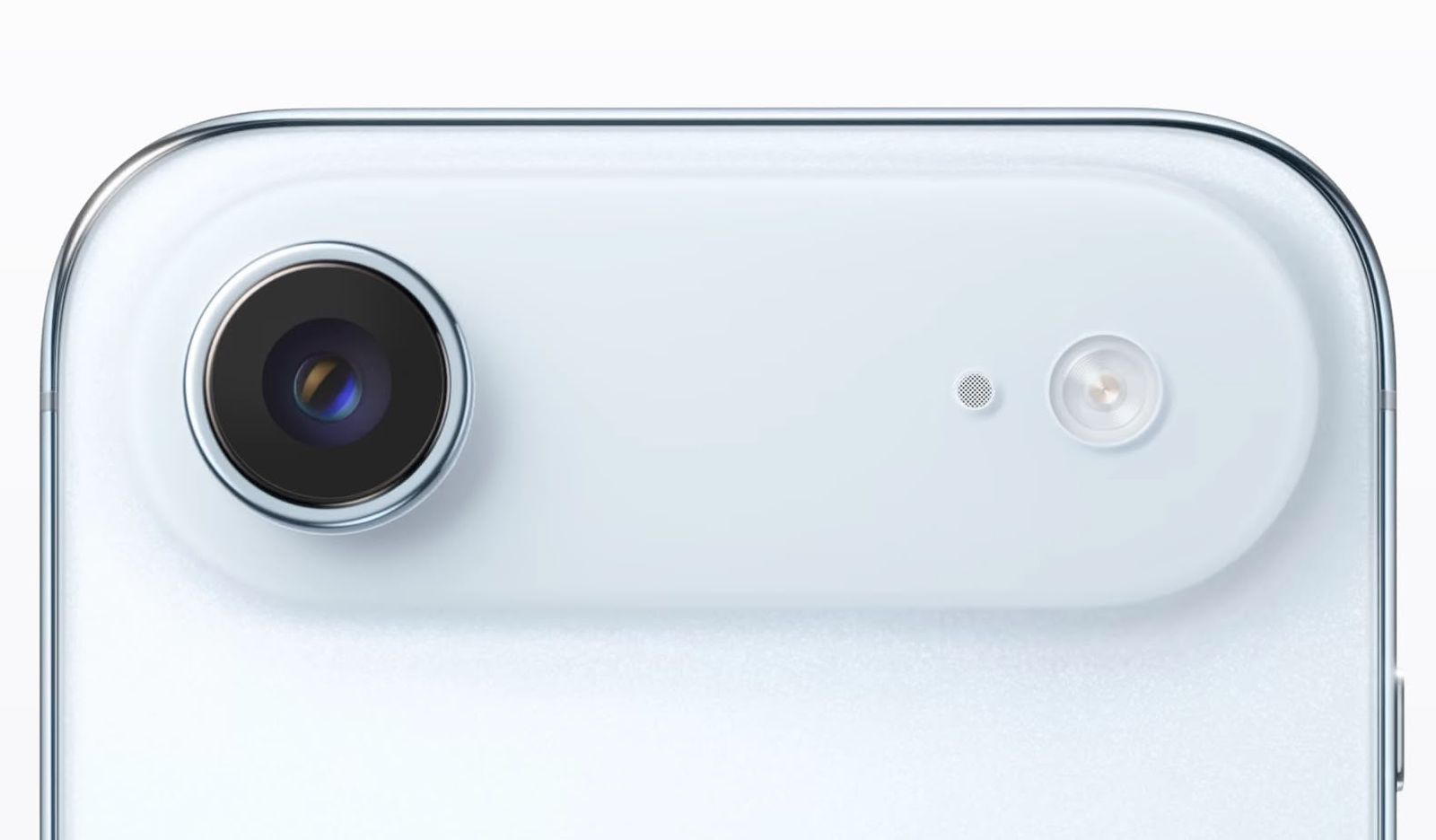
Along with all of these camera improvements, it looks like there’s going to be a major camera redesign. Instead of a square camera bump, Apple’s going to turn it into a rectangle. There will be a horizontal camera bar across the back of the ‌iPhone 17 Pro‌ and ‌iPhone 17 Pro‌ Max, and it’ll house the cameras.

The lenses are still going to be in the same general orientation, apparently, with a triangular setup that packs them close together. The flash, microphone, and the LiDAR sensor will be moved further to the right at the other end of the rectangle. It’s not clear why Apple is making this design change.

iPhone 17 Air

Because of interior space constraints, the iPhone 17 Air will have just one 48-megapixel Fusion camera. It won’t have the room for an Ultra Wide lens or a Telephoto lens, because Apple is making the ‌iPhone 17 Air‌ super thin. Rumors suggest it’ll be just 5.5mm thick.

iPhone 17 Air Pastel FeatureiPhone 17 Air Pastel Feature
The ‌iPhone 17 Air‌ is getting the same horizontal rear camera bar as the ‌iPhone 17 Pro‌, but it won’t be as tall since it only needs to accommodate one lens. The camera lens will be on the left, and the flash and microphone will be on the right.

With just one camera, the ‌iPhone 17 Air‌ won’t be able to capture spatial video or spatial photos, unless Apple has a new method for using a single-lens camera to capture that kind of footage.

iPhone 17

Aside from that 24-megapixel front-facing camera improvement, we haven’t heard anything about the ‌iPhone 17‌. The ‌iPhone 17‌’s rear camera seems to look the same as the iPhone 16‘s rear camera, with two lenses in a vertical arrangement at the left side of the device.

iphone 16 tealiphone 16 teal
It doesn’t look like the standard ‌iPhone 17‌ will get the same horizontal camera bar that Apple is introducing for the ‌iPhone 17 Pro‌ and ‌iPhone 17 Air‌ models.

We also haven’t heard anything about sensor improvements, but that doesn’t mean it’s not a possibility. The ‌iPhone 17‌ is expected to continue to feature a 48-megapixel Fusion lens and a 12-megapixel Ultra Wide lens.

Read More

For more on all of the features that are coming to the 2025 iPhone lineup, we have dedicated iPhone 17, iPhone 17 Air, and iPhone 17 Pro roundups.

Anker Offers MacRumors Readers 20% Off Collection of Chargers, Hubs, Batteries, and More


MacRumors readers have a chance to get 20 percent off a collection of Anker’s best chargers, power banks, cables, hubs, and docks this weekend. In order to get this deal, head to Anker’s website and add an accessory to your cart, then enter the code Ankermacrumors2025 at checkout to see the discount.

anker gradientNote: MacRumors is an affiliate partner with Anker. When you click a link and make a purchase, we may receive a small payment, which helps us keep the site running.

Our exclusive 20 percent off code works on most accessories sitewide, including Anker’s new “high power” charging accessories. This exclusive discount code does not stack with existing discounts on Anker’s website, but it can be used on multiple items in the same cart.

In the lists below, we’ve collected a few examples of the best products available at a discount with our exclusive promo code, but remember that it works sitewide. You have until April 30 to take advantage of this promotion, so be sure to browse Anker’s best products on its website before the end of the month.

It’s also worth noting that Anker is still hosting its Earth Day sale, and some of the discounts in that event are steeper than our 20 percent sitewide discount. Be sure to check and compare both discounts in your cart before you place your order to ensure you have the best deal.

Portable Chargers

Wall Chargers

Charging Stations

Hubs

If you’re on the hunt for more discounts, be sure to visit our Apple Deals roundup where we recap the best Apple-related bargains of the past week.


Deals Newsletter

Interested in hearing more about the best deals you can find in 2025? Sign up for our Deals Newsletter and we’ll keep you updated so you don’t miss the biggest deals of the season!

Popular Stories

iPhone 17 Pro Launching Later This Year With These 13 New Features

While the iPhone 17 Pro and iPhone 17 Pro Max are not expected to launch until September, there are already plenty of rumors about the devices. Below, we recap key changes rumored for the iPhone 17 Pro models as of April 2025: Aluminum frame: iPhone 17 Pro models are rumored to have an aluminum frame, whereas the iPhone 15 Pro and iPhone 16 Pro models have a titanium frame, and the iPhone …

iPhone 17 Air Almost as Thin as Its Buttons, New Images Show

If you missed the video showing dummy models of Apple’s all-new super thin iPhone 17 Air that’s expected later this year, Sonny Dickson this morning shared some further images of the device in close alignment with the other dummy models in the iPhone 17 lineup, indicating just how thin it is likely to be in comparison. The iPhone 17 Air is expected to be around 5.5mm thick – with a thicker …

iPhone 17 Air Launching Later This Year With These 16 New Features

While the so-called “iPhone 17 Air” is not expected to launch until September, there are already plenty of rumors about the ultra-thin device. Overall, the iPhone 17 Air sounds like a mixed bag. While the device is expected to have an impressively thin and light design, rumors indicate it will have some compromises compared to iPhone 17 Pro models, including only a single rear camera, a…

Apple Stores Giving Away a Limited-Edition Pin For Free Today

Starting today, April 24, Apple Stores around the world are giving away a special pin for free to customers who request one, while supplies last. Photo Credit: Filip Chudzinski The enamel pin’s design is inspired by the Global Close Your Rings Day award in the Activity app, which Apple Watch users can receive by closing all three Activity rings today. The limited-edition pin is the physical…

What’s Next for the Apple Watch Ultra 3 and Apple Watch SE 3

This week marks the 10th anniversary of the Apple Watch, which launched on April 24, 2015. Yesterday, we recapped features rumored for the Apple Watch Series 11, but since 2015, the Apple Watch has also branched out into the Apple Watch Ultra and the Apple Watch SE, so we thought we’d take a look at what’s next for those product lines, too. 2025 Apple Watch Ultra 3 Apple didn’t update the…

AirPods Pro 3 Just Months Away – Here’s What We Know

Despite being more than two years old, Apple’s AirPods Pro 2 still dominate the premium wireless‑earbud space, thanks to a potent mix of top‑tier audio, class‑leading noise cancellation, and Apple’s habit of delivering major new features through software updates. With AirPods Pro 3 widely expected to arrive in 2025, prospective buyers now face a familiar dilemma: snap up the proven…

White House Hits Back at Apple’s Massive EU Fine

Apple’s $570 million fine from the EU has triggered a sharp rebuke from the White House, which called the fine a form of economic extortion, Reuters reports. The fine was announced on Wednesday by the European Commission, following a formal investigation into Apple’s compliance with the bloc’s Digital Markets Act (DMA), a landmark piece of legislation aimed at curbing the market dominance of …

iPadOS 19 Rumored to Show Mac-Like Menu Bar When Connected to Magic Keyboard

When an iPad running iPadOS 19 is connected to a Magic Keyboard, a macOS-like menu bar will appear on the screen, according to the leaker Majin Bu. This change would further blur the lines between the iPad and the Mac. Bloomberg’s Mark Gurman previously claimed that iPadOS 19 will be “more like macOS,” with unspecified improvements to productivity, multitasking, and app window management,…

Top Stories: iOS 18.4 Released, New AirPods Max Features, and More


We’re just two months away from WWDC where we’ll get our first glimpses of iOS 19 and related updates, but this week saw the public release of iOS 18.4 with a number of changes and improvements including some audio improvements for the USB-C AirPods Max.

top stories 2025 04 05
This week also saw the first beta of iOS 18.5, a new rumor about iOS 19 compatibility, and Apple’s work on haptic buttons that have yet to surface on the iPhone, so read on below for all the details!

iOS 18.4 Released: Here’s Everything New

Apple this week released iOS 18.4 to the general public, following more than a month of beta testing. While the personalized Siri features that were originally expected to debut in iOS 18.4 have been delayed, the software update still includes a handful of new features and changes for iPhones, so be sure to check out our list of everything new.

iOS 18iOS 18

Apple also released iPadOS 18.4, macOS 15.4, watchOS 11.4, tvOS 18.4, visionOS 2.4, and a few other updates, and the iWork apps Keynote, Numbers, and Pages have received new features too.

iOS 19 Rumored to Drop Support for These iPhones

A private account on X that accurately shared iOS 18 compatibility details last year is back with a list of iPhone models that iOS 19 will allegedly support.

iOS 19 Mock WWDC25 FeatureiOS 19 Mock WWDC25 Feature
Unlike iOS 18, which maintained compatibility with the same iPhone models that can run iOS 17, the upcoming iOS 19 update is expected to drop support for three older iPhone models, so be sure to check out the list to see if the device that you use might be affected.

The first iOS 19 beta should be available on June 9, and the update should be released to the general public in September.

Apple Releases New Firmware for AirPods Max With Lossless Audio Support

After a false alarm, Apple has followed through with releasing an AirPods Max firmware update that enables support for lossless audio and ultra low-latency audio on the over-ear headphones.

airpods max 2024 colorsairpods max 2024 colors
These features are only available on the newer version of the AirPods Max with a USB-C port, with the older version of the headphones that still have the Lightning port unfortunately missing out on these free upgrades.

Apple Reportedly Hasn’t Given Up on Haptic Buttons for a Future iPhone

Apple is still exploring solid-state buttons with haptic feedback for future iPhones, according to information shared recently by a known leaker.

iPhone 15 Pro Multi Purpose button Mute Switch Feature Green 2iPhone 15 Pro Multi Purpose button Mute Switch Feature Green 2
It was widely reported that Apple intended to introduce solid-state buttons on the iPhone 15 Pro models in 2023, but it canceled the plan at a late stage. The buttons were again rumored for the iPhone 16 Pro models, before being shelved indefinitely. They are not expected on the iPhone 17 Pro models, but it seems like the project is still alive.

Everything New in the iOS 18.5 Beta

Following the release of iOS 18.4 earlier this week, Apple has already moved on to the next version, with the first iOS 18.5 beta already available to developers for testing. So far, iOS 18.5 includes only a few minor changes, as outlined in our list of everything new.

iOS 18iOS 18
iOS 18.5 could gain new features and other changes in later betas, but it is currently shaping up to be a minor update, as Apple starts shifting its focus towards iOS 19.

MacRumors Newsletter

Each week, we publish an email newsletter like this highlighting the top Apple stories, making it a great way to get a bite-sized recap of the week hitting all of the major topics we’ve covered and tying together related stories for a big-picture view.

So if you want to have top stories like the above recap delivered to your email inbox each week, subscribe to our newsletter!