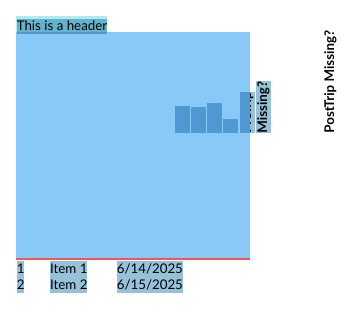
I’m using .NET 8, C#, Blazor server, VS 2022 and QuestPDF Version="2025.5.1".
I have been unable to get the header cells to provide Rotate(-90) correctly. I am new to QuestPDF. I have queried MS CoPilot and ChatGPT and those answers did not work or would not compile.
I have uploaded the PDF image that the code has produced and is incorrect. It appears to me that there is something peculiar with the "width" and "height" and… if we look carefully at the image, we can see that some of the header text is folded and behind the blue background color. I need your assistance.

The C# code is as follows:
using QuestPDF.Fluent;
using QuestPDF.Helpers;
using QuestPDF.Infrastructure;
using IContainer = QuestPDF.Infrastructure.IContainer;
using System;
using System.Collections.Generic;
using System.ComponentModel;
using System.IO;
using System.Reflection.PortableExecutable;
Here is the QuestPDF table code:
container.Table(table => {
    table.ColumnsDefinition(columns => {
        columns.ConstantColumn(25); // ID
        columns.ConstantColumn(50); // Name
        columns.ConstantColumn(100); // Date
    });

    table.Header(header => {
        string[] headers = { "Manager Check?", "PreTrip Missing?", "PostTrip Missing?" };

        foreach (var theCaption in headers)
        {
            header.Cell().MinWidth(20).MinHeight(170).Background(Colors.Blue.Lighten3).BorderBottom(1).BorderColor(Colors.Red.Lighten1).Padding(0)
            .Element(container => container.Rotate(-90).TranslateX(-75).AlignBottom().PaddingBottom(5)).Text(theCaption).Bold(); // Rotates text 90 degrees
        }
    });

    foreach (var item in items)
    {
        table.Cell().Text(item.Id.ToString());                    //.Padding(5);
        table.Cell().Text(item.Name);                             //.Padding(5);
        table.Cell().Text(item.Date.ToShortDateString());         //.Padding(5);
    }
});