In our previous post, we discussed GitHub Copilot’s Slash Commands, which allow you to trigger specific actions within Visual Studio with simple text-based inputs. Now, let’s explore the /optimize command and its potential to improve code quality in Visual Studio.
Refactoring with /optimize
In a recent exploration by Bruno Capuano, we see the transformative capabilities of GitHub Copilot’s /optimize command. Bruno demonstrates its prowess by refactoring a code snippet, showcasing how simple text-based inputs can yield significant improvements in code structure and performance.
One of the prime examples showcased by Bruno involves the conversion of a traditional for loop utilizing numerical indices into a more readable and intuitive foreach loop. While foreach loops in .NET might seem more verbose, they often offer better readability, a crucial aspect in maintaining code quality and ease of understanding.
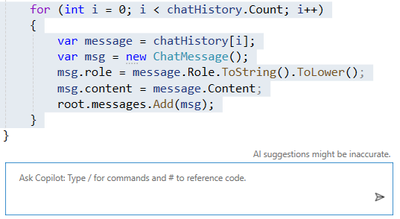
Here’s a glimpse of the original for loop snippet:
for(int i =0; i < chatHistory.Count; i++){var message = chatHistory[i];var msg =newChatMessage();
msg.role = message.Role.ToString().ToLower();
msg.content = message.Content;
root.messages.Add(msg);}
To provide context to Copilot, Bruno selects the entire loop. He then initiates the inline chat dialog by typing “Alt-/”.
To guide Copilot in refactoring the code, Bruno types a Slash ‘/’, which opens the previously discussed dialog. He chooses the Optimize command from the menu and sends the command to Copilot.
Copilot responds with several optimization suggestions:
The ChatMessage instance can be initialized during construction, enhancing efficiency.
A foreach loop is utilized.
The refactored code appears as follows:
foreach(var message in chatHistory){var msg =newChatMessage{
role = message.Role.ToString().ToLower(),
content = message.Content
};
root.messages.Add(msg);}
Learn from Copilot: Give it a Try!
The most effective way to comprehend a tool’s functionality is to use it firsthand. I find it fascinating to apply the /optimize command to my production projects. At times, the modifications are minor, affirming the quality of my original code. However, there are instances when Copilot suggests ingenious alterations, often introducing me to new syntaxes.
Validating the output of GitHub Copilot is also crucial to ensure it hasn’t introduced any errors or regressions. Unit tests can serve as a safety net for these changes, just as they do during the refactoring of any piece of code.
Additional Resources
We offer a wealth of resources to further your understanding of GitHub Copilot for Visual Studio. We encourage you to explore this collection, you can watch the full video here and regularly visit this blog for more content.
The holiday season seems to creep up faster and faster as each year passes. And because of this, it’s never too soon to get a jump-start on planning, content creation, and revenue strategizing. This guide covers multiple topics related to all things holiday email campaigns to help make this season your best yet.
When thinking about the holiday season, it’s extremely easy for a sense of overwhelm to creep in. All the emails. All the promotions. All the things! And that’s on top of all the activities outside your email marketing.
But have no fear — your planning guide is here! We break holiday campaign prep into four steps:
Strategize – Take note of everything you did last year, the big wins, and everything that missed the mark. Then on a separate sheet of paper, brainstorm all the things you’d like to create this year.
Map – Gather all your strategizing notes and consider your available time and resources. This is where you will map out how many campaigns, their timing, and their content. This ensures you’ll have time to create, send, and manage everything over the coming months.
Create – Now it’s time to sit down and hammer out the content. Create the funnels and the forms, add the tags, and do as much prep work as possible now, so you’re not left typing out emails at midnight thirty on a winter’s night.
Test – Test, test, and test again! The more you can test your content before sending it, the better you can address any unexpected formatting or timing issues.
With FeedBlitz, you can send test emails straight from the editor or the campaign summary page or clone your mailing list (because you’ll have unlimited mailing lists!) to create a test list and have only yourself as a subscriber.
Dive into even more detail on the above steps here: Holiday Email Campaigns Made Easy, and be sure to download the holiday campaign planner to help with the mapping stage.
2. Creative campaign ideas for the holiday season.
Whether you’re an email veteran or this is your first time sending holiday campaigns, figuring out what to send can be the most difficult part. Below you’ll find four ideas to help jump-start your planning and strategizing efforts.
Offer exclusivity. Your email list is a cherished file of readers, customers, and clients who’ve agreed to receive content from you, and the holiday season is an excellent time to remind them of this. Offer exclusivity to your list by sending a holiday gift such as content designated only for your subscribers. This can look like:
– Something created just for them, which won’t be posted to your site or social and only be offered free in your email. – Early access to a brand new PDF or email course. – A piece of retired content from your vault.
Embrace the art of the countdown. You’re already working on a countdown to the holidays, so why not send a countdown series of emails? Think of shorter content snippets such as small surprises or treats, daily quotes/prompts/questions, your favorite recipes or moves, and so on to send in these countdowns.
Essentially, you’re breaking up larger, longer emails into smaller, bite-sized pieces of content. This is excellent for recipes, hobbies, events, and coupon bloggers. Some countdowns to consider:
– 10 days of Fright Nights – 5 days of Thanksgiving prep – 8 days of Hanukkah – 12 days of Christmas
Give a contest or a collaboration a try. This is a space where your creativity can really soar, and not just in the contests you run but in the collaborations you work with. Think about a contest for the best pet costume in your audience. At a minimum, that could be one email calling for entries, one to call for votes on the top three to five submitted, and one to announce the winner. One idea = three different emails!
The holiday season paves the way for more creative endeavors, so if you’ve been itching to branch out a little with your emails, this could be your opportunity to do so. Some ideas for contests and collaborations can include:
Don’t discount the discounts and promos. Sales are abundant during the holiday season, and you can easily work this into your holiday email strategy. Other than offering standard discounts and special days on your site, think in terms of what you can also offer through your email lists, as well:
– Holiday presale offers – Reminders of your affiliate promotions and codes – Subscribers-only discount(s) on special days (This ties back to offering exclusivity, too!) – Drawings for a gift card
These are just a few ideas to help with your holiday email marketing strategy. While you can send any one of these types of campaigns throughout the year, they’re excellent to have in the back of your mind when working specifically on your holiday campaigns.
And if you’re concerned about inboxes being crowded and your emails getting lost in the shuffle, check out Inbox Activity Detection — a FeedBlitz Accel feature that lets you jump to the top of the inbox queue while your subscribers are checking their emails. Learn more about Inbox Activity Detection.
3. Design shortcuts for your holiday emails.
FeedBlitz offers many design shortcuts you can take when it comes to creating your holiday email campaigns — and they’re all in the Visual Mailing Editor (VME) right now, waiting for you to take advantage of them.
Every FeedBlitz client has a template library packed with pre-made email templates for most of the upcoming holidays. Simply scroll through your template library to the Holiday and Seasonal sections, choose a template to work with, add your logo or images, update the content, and you’re well on your way.
You can also search for keywords to see which templates populate for holidays, seasonal, sales, and promotions.
There are a variety of content layouts with the flexibility of adding/removing content blocks as needed. And if you’re ready to boost your holiday revenue with ads this season, drag and drop advertising blocks — after turning ads on in your account settings — and let the system take care of things from there. (We’ll be talking more about ads in tomorrow’s email.)
And the design help doesn’t stop there. If you’re interested in spicing things up with your images, remember your image library in the VME has direct integrations with Unsplash, Pixabay, and Tenor, giving you access to millions of royalty-free commercial use images!
Fourth-quarter advertising revenues are often some of the highest of the year.
Not only are many people in their inboxes checking emails, but the ad inventory is well-stocked as well. Both of these factors lead to prime revenue-generating opportunities from the emails you’re already sending.
Take a deep dive into all things ad program-related in this blog post: Your Guide to the FeedBlitz Ad Program. In it, you’ll find example ads from client emails, earnings from three clients in three different genres for 2021 and 2022, and some ways to refine your ad practices to maximize revenues.
In the post, pay special attention to the fourth quarter earnings of all three clients shown. Even if you’re feeling things out, the holiday season is a great time to test the waters, especially if you’re already hosting ads on your site!
The ad program is available to all FeedBlitz clients, and you can sign up in a matter of minutes. This also won’t impact or compromise any of your current web-based advertising efforts.
Plan and prep now to avoid the extra stress, confusion, and last-minute pitches.
It’s common to feel dread or overwhelmed when thinking about end-of-the-year email campaigns, but it doesn’t have to be that way! As you can see, we’re big fans of planning for future success and are happy to help provide the resources and tools to enable yours. Early steps taken now set the pace for you to Win the Inbox this holiday season.
Send your holiday campaigns with FeedBlitz: Head to this page to start your free trial. Questions? Feel free to reach out with any questions through our Support Page. Live support is available Monday to Friday, 9 AM to 5 PM Eastern, and you can always find helpful information 24-7 at the resources linked here.
Hard drive failure can be a demoralizing disaster, resulting in system crashes or even permanent data loss. And there’s nothing worse than losing a lifetime’s worth of family photos, videos, and important documents. The good news is that there are warning signs that can indicate an impending hard drive failure, giving you time to take action. In this post, we’ll explore the top signs of failure, so you can take proactive measures to protect your data.
Strange Noises
A failing drive can oftentimes produce strange noises, such as the following. Bear in mind though, these are more applicable to HDD (aka mechanical drives) rather than SSD:
Clicking or ticking sounds: Indicating a mechanical failure or a faulty head assembly.
Whirring or grinding sounds: Signaling a motor or bearing failure.
Beeping or buzzing sounds: A sign of a failing power supply or electrical issue.
Corrupted Data
If you notice files are becoming corrupted, can’t be opened, or just missing altogether, it’s a sign that your hard drive is experiencing errors. This could mean failure is imminent, but it could also be a sign of more benign issues like fragmentation or corrupted sectors. We’d recommend running some other disk check utilities like System File Checker or chkdsk to pinpoint the extent of the issue.
Blue Screens of Death (BSODs)
BSODs can occur due to various reasons, including hard drive failure. If you’re experiencing frequent BSODs, you can usually find the cause by Googling the error code produced. If it’s hard drive related, the interwebs will tell you. If it’s not, well, now you have another problem to fix…
SMART Errors
Your system should have an included utility called SMART (Self-Monitoring, Analysis, and Reporting Technology), a built in BIOS application designed to monitor and alert to potential hard drive failures. If you receive a SMART alert, especially after a crash of some type, don’t ignore it! It’s extremely likely that’s an indication that hard drive failure is imminent.
Checking for SSD Failures
Generally speaking, SSDs have better longevity than do HDDs, but that doesn’t mean they’re infallible. For example, all SSD have a finite number of TBW (Total Bytes Written) which is essentially the amount of times they can be written/rewritten before wearing out.
Most SSDs come with a proprietary utility for monitoring drive health, unique to each manufacturer (Samsung Magician for Samsung, Crucial Storage Executive for Crucial, etc). If yours is a Velocity Micro PC, this utility will be preinstalled but if not, you may need to download and install it yourself. Each utility is a little different, but all will rate the drive health, TBW, and usage of each drive. These are handy for proactively monitoring your hardware.
Other Errors Indicating Hard Drive Failure
New message indicating drive is not formatted (can be caused by software or by electrical surges)
Boot loops: possible virus or Trojan in the boot sector
System lock ups and freezes: possible bad sectors or can be software or resources related
Drive not found: Check connectors (SATA and Power), BIOS settings, RAID settings if appropriate
Operating System not found: Check BIOS settings, possibly a Hard Drive priority is the cause
If you experience any of these signs, it’s a good idea to back up your data immediately and start making plans for a hard drive replacement. Remember, all Velocity Micro systems come with a lifetime upgrade program to help with issues like this!
Josh has been with Velocity Micro since 2007 in various Marketing, PR, and Sales related roles. As the Director of Sales & Marketing, he is responsible for all Direct and Retail sales as well as Marketing activities. He enjoys Seinfeld reruns, the Atlanta Braves, and Beatles songs written by John, Paul, or George. Sorry, Ringo.
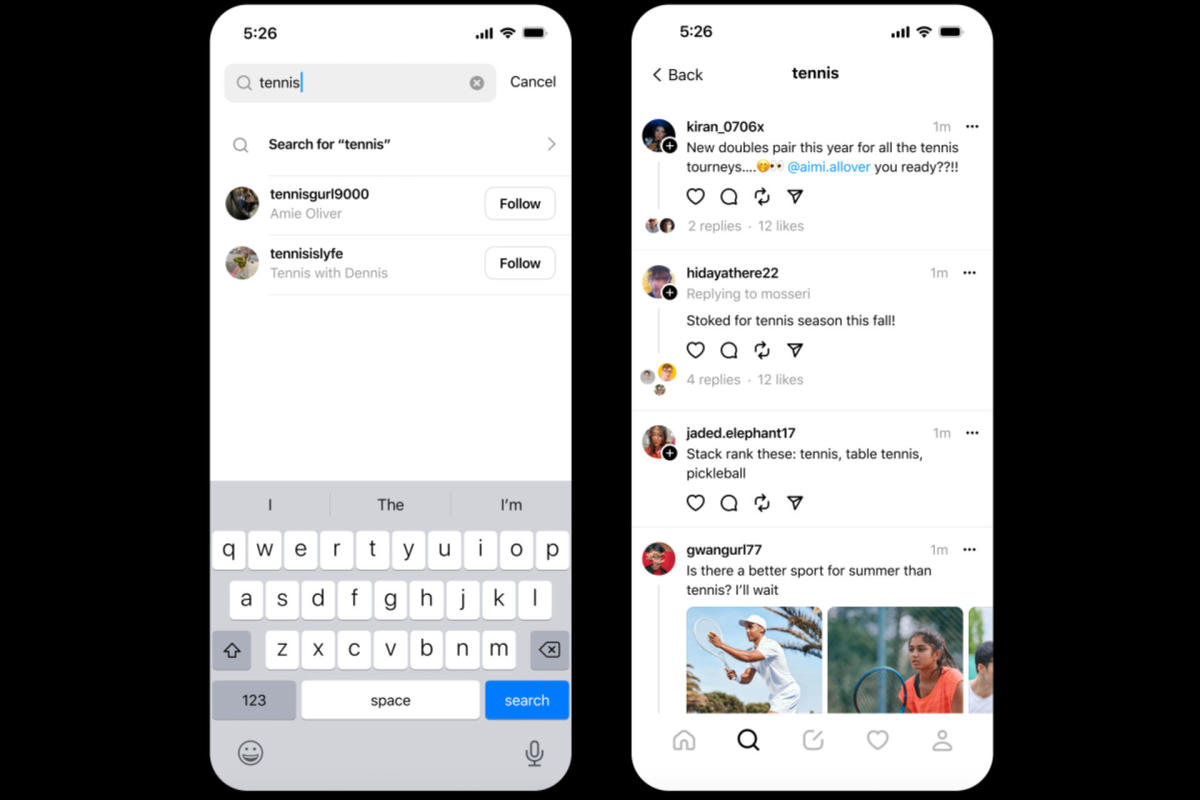
Threads is inching closer to becoming an actually useful source for real-time news and updates. The app is finally rolling out the ability to search posts in order of recency, after the feature last month.
“In an effort to make it easier to find timely, relevant content on Threads, we’re introducing a Recent tab for your searches,” Instagram’s Adam Mosseri wrote in . “Search results here are still evaluated for quality, but you can now see them in chronological order.”
The change has been a long requested one from users hoping Meta’s app will one day be a source of breaking news and real-time information the way that Twitter historically functioned. Being able to search for topics and keywords and find the most recent results is key to finding up-to-date details and commentary about breaking news, sports and anything else happening in real time.
On the other hand, Meta has also made it clear that it would prefer “news” to not be what Threads is known for. Mosseri has said he doesn’t want to “encourage” hard news on Threads and the company actively political content. Threads’ default “for you” algorithm is also known for surfacing days-old posts, random personal stories and other content that’s not exactly timely.
It’s also worth pointing out that Threads’ new recency filter in search is not the same as the “latest” search filter on X. As Mosseri noted in his post, Meta still hides an unknown number of posts in search results that have been “evaluated for quality,” so Threads search will never surface all of the posts containing your search terms. But being able to at least find posts that aren’t a few days old should make looking for timely information a lot less frustrating.
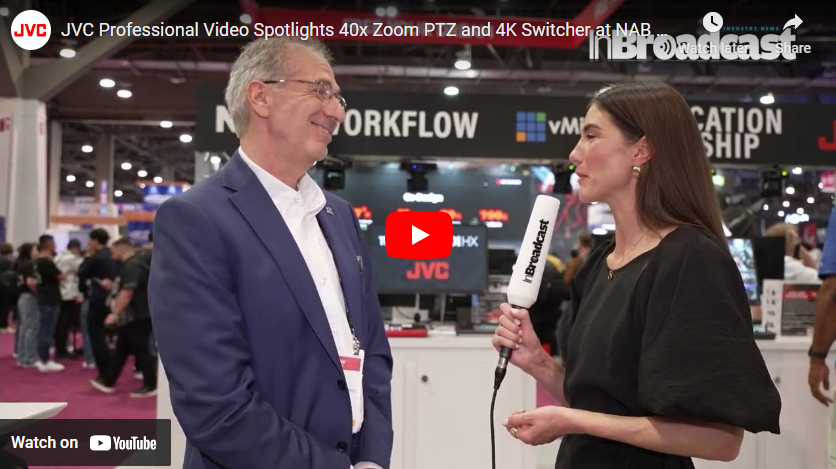
In an exclusive interview with InBroadcast at NAB 2024, Joseph D’Amico, Vice President of JVC Professional Video, revealed exciting insights into JVC’s latest solutions and upcoming plans. Here’s a breakdown of the standout highlights from the discussion.
Among the headline announcements at NAB 2024 were the KY-PZ540 Series PTZ cameras from JVC. These cutting-edge cameras boast JVC’s signature 4K imager and pioneering Variable Scan Mapping technology. Notably, they are JVC’s inaugural PTZ cameras to offer an impressive 40x Zoom capability, promising unmatched flexibility for video professionals.
Joseph D’Amico’s interview sheds light not only on JVC’s current offerings but also hints at the brand’s commitment to pushing boundaries in the video industry. Stay tuned for more updates and insights from JVC as they continue to shape the future of professional video solutions.
I upgraded the Java version to 17.0 and installed Android Studio Jellyfish 2023.3.1, downloading SDK tools latest. Consequently, I noticed that the sdkmanager command line no longer
Error: A JNI error has occurred, please check your installation and try again
Exception in thread "main" java.lang.UnsupportedClassVersionError: com/android/sdklib/tool/sdkmanager/SdkManagerCli has been compiled by a more recent version of the Java Runtime (class file version 61.0), this version of the Java Runtime only recognizes class file versions up to 52.0
    at java.lang.ClassLoader.defineClass1(Native Method)
    at java.lang.ClassLoader.defineClass(ClassLoader.java:756)
    at java.security.SecureClassLoader.defineClass(SecureClassLoader.java:142)
    at java.net.URLClassLoader.defineClass(URLClassLoader.java:473)
    at java.net.URLClassLoader.access$100(URLClassLoader.java:74)
    at java.net.URLClassLoader$1.run(URLClassLoader.java:369)
    at java.net.URLClassLoader$1.run(URLClassLoader.java:363)
    at java.security.AccessController.doPrivileged(Native Method)
    at java.net.URLClassLoader.findClass(URLClassLoader.java:362)
    at java.lang.ClassLoader.loadClass(ClassLoader.java:418)
    at sun.misc.Launcher$AppClassLoader.loadClass(Launcher.java:352)
    at java.lang.ClassLoader.loadClass(ClassLoader.java:351)
    at sun.launcher.LauncherHelper.checkAndLoadMain(LauncherHelper.java:621)
A long-running working group in the Senate has issued its policy recommendation for federal funding for AI: $32 billion yearly, covering everything from infrastructure to grand challenges to national security risk assessments.
This “roadmap” is not a bill or detailed policy proposal, but nevertheless it gives a sense of the scale lawmakers and “stakeholders” are looking at whenever they get around to the real thing — though the likelihood of that occurring during an election year is vanishingly small.
In a final report published by the office of Sen. Chuck Schumer (D-NY), the bipartisan working group identifies the most important areas of investment to keep the U.S. competitive with its rivals abroad.
Here are a few top-line items on the roadmap:
“A cross-government AI R&D effort, including relevant infrastructure,” meaning getting the DOE, NSF, NIST, NASA, Commerce and half a dozen other agencies and departments to format and share data in an AI-friendly way. In a way this relatively simple-sounding task is the most daunting of all, and will likely take years to accomplish.
Fund American AI hardware and software work at the semiconductor and architecture level, both through the CHIPS act and elsewhere.
Further fund and expand the National AI Research Resource, still in its naissance.
“AI grand challenges” to spur innovation through competition in “applications of AI that would fundamentally transform the process of science, engineering, or medicine, and in foundational topics in secure and efficient software and hardware design.”
“Support AI readiness and cybersecurity” in elections, particularly to “mitigate AI-generated content that is objectively false, while still protecting First Amendment rights.” Probably harder than it sounds!
“Modernize the federal government and improve delivery of government services” by “updating IT infrastructure to utilize modern data science and AI technologies and deploying new technologies to find inefficiencies in the U.S. code, federal rules, and procurement programs.” I get what they’re saying here, but that’s a lot to bite off for an AI program.
A lot of vague but large defense-related things like “Assessment and mitigation of Chemical, Biological, Radiological, and Nuclear (CBRN) AI-enhanced threats by DOD, Department of Homeland Security (DHS), DOE, and other relevant agencies.”
Look into the “regulatory gap” in finance and housing, where AI-driven processes can be used to further marginalize vulnerable groups.
“Review whether other potential uses for AI should be either extremely limited or banned.” After a section on potentially harmful stuff like AI-driven social scores.
Legislation prohibiting AI-generated child sexual abuse material and other non-consensual imagery and media.
Ensure the NIH, HHS, and FDA have the tools necessary to evaluate AI tools in healthcare and medical applications.
“Establish a coherent approach to public-facing transparency requirements for AI systems,” private and public.
Improve the general availability of “content provenance information,” i.e. training data. What was used to make a model? Is your use of the model being used to train it further? And so on. AI makers will fight this tooth and nail until they can sufficiently sanitize the ill-gotten hoards of data they used to create today’s AIs.
Look at the risks and benefits of using private vs. open-source AI (should the latter ever exist in a form that can scale).
You can read the full report here; there are plenty more bullet points where the above (a longer list than I anticipating writing) came from. No budget numbers are suggested.
Given that the next six months will be mostly given over to election-related rigmarole, this document serves more to plant a stake in a lot of general ideas than to spur actual legislation. Much of what is proposed would require months if not years of research and iteration before a law or rule is arrived at.
The AI industry moves faster than the rest of the technology sector, which means it outpaces the federal government by several orders of magnitude. Though the priorities listed above are mostly prudent, one wonders how many of them will remain relevant by the time Congress or the White House actually take action.
Pressing play on a Conner O’Malley video is a disorienting experience.
Could it be a continuation of a previous character or universe? Could it be another installation of Truth Hunters host Mark Seevers, O’Malley’s creation for the 2016 election that resembled Alex Jones if he were locked in a Wisconsin basement for two years, subsisting only on hot dog relish and stale buns? Sure. Could it be another video featuring the version of O’Malley hosting a late-night show on a bike, cruising through the streets of New York City while also in a blood feud with Greg Kinnear? Of course.
But the video could also be a one-off bit of brilliance, like “Endorphin Port,” a perfect and bizarre send-up of tech’s strange obsession with VR.
So when I saw O’Malley was dropping a stand-up special on his YouTube channel — an increasingly common move for comics — I had no clue what to expect. It was far from your average comedy special.
If you’re unfamiliar with the background and lore of O’Malley’s work, I’ve covered it for Mashable in the past. In general, his work is interested in the absurdity of the modern world. He often makes comedy centered on tech. But, instead of lampooning the companies or billionaires at the helm, he usually portrays a deranged everyman completely besotted by technocrats’ promises. Frequently, these characters intersect with the weird, rightwing manosphere that exists online, the folks who cosplay being in the military, eat far too much meat, and treat capitalism as some sort of religion.
“Imagine Joe Rogan without the money,” O’Malley’s character says in his latest work, which was a surprise moment of crowd-work clarity.
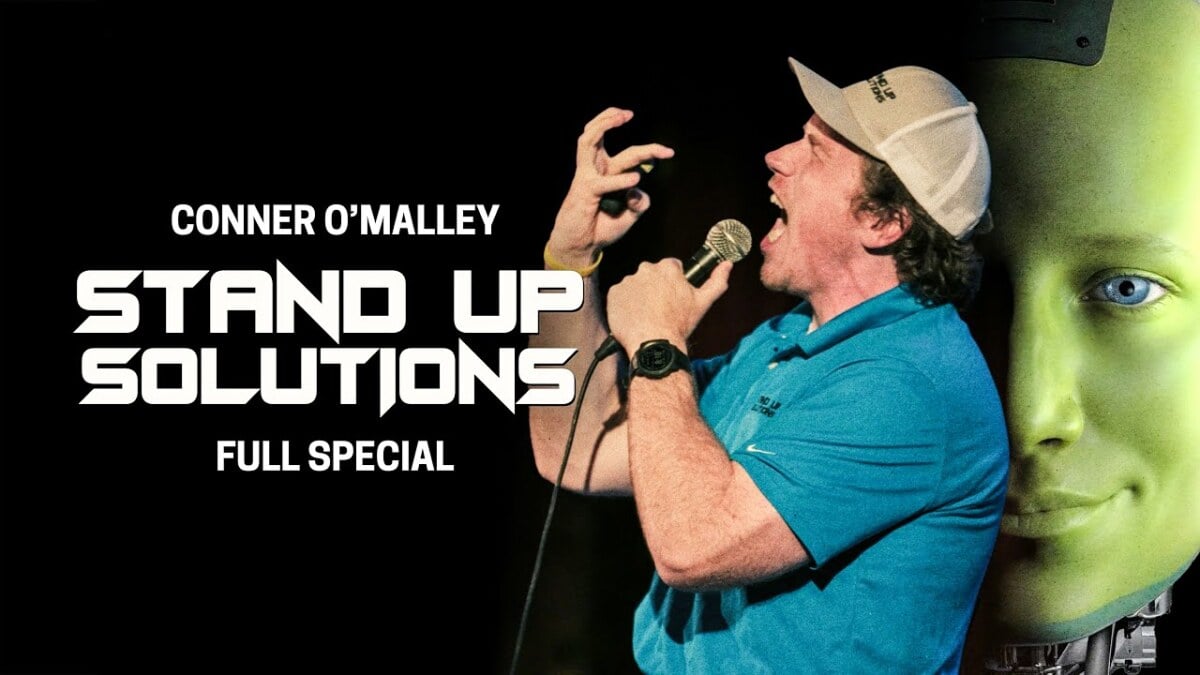
In the traditional sense, Stand Up Solutions is hardly a stand-up special, even if it was filmed in front of a live Brooklyn audience. O’Malley plays a character named Richard Eagleton, who gives a presentation on a 5G-powered AI avatar he created to do stand-up. If that sounds boring, I promise it is anything but.
I cannot begin to explain the avenues this video takes. There are lamentations on the Toyota Rav-4, background info on Des Plaines, Illinois, and so much about McDonald’s. There are some of the most vulgar images imaginable and a weird, somewhat touching backstory for why Eagleton embarked on his AI quest. There are moments of cultural criticism that somehow arise naturally from this deranged man onstage.
During the hour, O’Malley does a gonzo performance of stand-up, and there are moments where you feel like you’re actually watching a small-time AI evangelist do a real investor pitch. And, as someone who writes about the internet and tech, there are moments where things sound a hell of a lot like, say, a two-hour presentation from a tech giant promising how great AI will be for everyone.
There is a pitch-perfect reveal of what O’Malley’s character believes his AI tech could ultimately do — effectively force-feeding Americans AI politicians — and what it will do, which is help create prisons. And yes, again, I promise this special is funny as shit. It may also be the crassest you have ever watched.
Anyway, enough from me. I’ll embed the special at the bottom of this post. But if you’ve looked at all the AI headlines lately and felt a bit skeptical, this special is for you.
There’s a perfect little moment that totally sold me. O’Malley’s character is talking to the crowd, asking them to guess a problem with the AI he created. “Nobody wants it,” an audience member yells out.
O’Malley doesn’t break from his evangelist character. “Well, you have a negative attitude,” he answers. He then immediately goes on to eulogize a pair of Croatia’s leading vaping artists. It’s all nonsensical and exactly like the world we live in.
At PC Geeks, we understand the frustration of a slow computer. Whether you’re battling sluggish boot times, experiencing program crashes, or simply noticing a decline in overall performance, a sluggish PC can disrupt your workflow and hinder your productivity. The good news is that keeping your computer running smoothly doesn’t require a degree in computer science. By following a few simple tips and incorporating them into your regular routine, you can prevent performance issues and ensure your PC runs like a champ.
Declutter Your Digital Space: Free Up Disk Space
Just like a cluttered room can feel overwhelming, a cluttered hard drive can slow down your computer. Regularly review your files and remove anything you no longer need. This includes old documents, unused downloads, and temporary files.
Utilizing Built-in Tools: Most operating systems come with built-in disk cleanup utilities that can help identify and remove unnecessary files. Additionally, consider uninstalling programs you no longer use. Unused programs can take up valuable storage space and even run background processes, further contributing to slowdowns.
Embrace the Power of Updates: Keep Software Current
Software updates often include performance enhancements, bug fixes, and security patches. Keeping your operating system, applications, and drivers up-to-date is crucial for maintaining optimal performance and protecting your system from vulnerabilities.
Windows users: Access updates through Settings > Update & Security > Windows Update.
Mac users: Updates are available through System Preferences > Software Update.
Stop Startup Slowdown: Manage Startup Programs
Many programs like chat applications or media players are configured to launch automatically when you boot your computer. While convenient, these programs can slow down your startup time.
Windows users: Disable unnecessary startup programs through Task Manager (Ctrl+Shift+Esc) > Startup tab.
Mac users: Manage startup programs through System Preferences > Users & Groups > (Your User) > Login Items.
Give Your PC a Breather: Restart Regularly
Just like us, computers benefit from an occasional reboot. Restarting your PC clears temporary files from memory (RAM) and allows for a fresh start. Aim to restart your computer at least once a week, or more frequently if you use it heavily.
Protect Your System: Utilize Antivirus and Anti-Malware Software
Malicious software (malware) can significantly slow down your computer and even damage your files. A robust antivirus and anti-malware solution can protect your system from these threats and ensure smooth operation.
Consider a Hardware Upgrade: Invest in More RAM (if necessary)
While software optimization can significantly improve performance, there are limitations. If your computer is constantly running low on memory (RAM), it can lead to slowdowns and sluggishness. Upgrading your RAM can provide a noticeable performance boost, especially for users who run memory-intensive programs.
Bonus Tip: For a Deeper Clean (Advanced Users)
Disk Defragmentation (HDDs only): This process reorganizes fragmented files on your hard disk drive (HDD) for faster access times. Note that this is not necessary for solid-state drives (SSDs).
By following these tips and incorporating them into your regular routine, you can keep your computer running smoothly and efficiently. If you continue to experience performance issues or require further assistance, don’t hesitate to contact the expert technicians at PC Geeks and use our computer repair service. We’re always happy to help!