How do Architectural BIM Services for Companies Complement the MEP/FP Design Process?


There’s no question about the significant growth in popularity that BIM or Building Information Modeling has been getting these past few years. On the off chance that it’s your first time learning about BIM, it’s often described as a new way of going about the documentation and design of construction projects.

BIM comprises the virtual representations of actual pieces and parts used to construct a building. These BIM elements have the logical and physical characteristics of their counterparts in the real world. Simply put, BIM elements are digital prototypes of the physical elements of a building. With the help of BIM, you can build something virtually before you build it physically.

Users of BIM list several benefits it offers at different phases of the construction project, including estimation, scheduling, risk analysis, more effective management of facilities, and developing a more collaborative process among all stakeholders. However, BIM can offer more in other specific aspects and areas. One particular case is how it provides substantial advantages to contractors who work on mechanical, electrical, plumbing, and fire protection or MEP/FP design and construction. Using BIM in MEP/FP modeling streamlines projects improves collaboration, and reduces waste and risk.

BIM proves beneficial in MEP/FP through its application in 3D modeling design services, shop drawing services, fabrication drawing services, builder’s working drawings, comprehensive section reviews, collision detection, bill of materials, scheduling, and more. These benefits are equally applicable to both electrical and mechanical fields.

RELATED: Industry Rates for BIM Services & Building Information Modeling Costs

Benefits of integration of architectural BIM services in the MEP/FP design process

Complete BIM integration has been proven to be greatly beneficial. If you’re still unsure as to how architectural BIM services can complement the MEP/FP design process, here are a few points to convince you further:

The 3D advantage

The first is the most basic BIM modeling service benefit. However, 3D designs of ductwork and piping can help MEP/FP contractors save more effort and time. Thanks to these designs, they can better visualize and understand their clearances and know how to add equipment or make adjustments before its final implementation in the field.

They can also view the model from all possible angles, for example, which include the interface of the processes. It can also be used for redesigning the model and making further enhancements along the way.

BIM1

Interference prevention

How often have you heard horror stories about electrical trays and plumbing being installed haphazardly? This clash, mainly when several players are involved in the project’s different facets, is typical in construction projects.

The bright side is that it is possible to detect these clashes with the help of BIM during the design stage to solve them immediately. Clash detection includes but is not limited to Hard Clash, Soft Clearance Clash, 4D/Workflow Clash, and the like. You can imagine how much money and time you can save if delays are prevented before they happen.

RELATED: Building Information Modeling (BIM) Freelance Contractors on Cad Crowd

Improved estimation of costs

BIM software consists of tools for budget management and cost estimation. It simplifies estimating their work’s cost more simplified for MEP/FP engineers to ensure that they stick to their budget. With the help of BIM, MEP/FP engineers can also pinpoint areas where they can further lower costs and enhance their systems’ efficiency in general.

Improved visualization

BIM offers a building representation in 3D that allows MEP/FP engineers to visualize how the finished product will look. It makes it possible for MEP engineers to detect potential problems early on in the process and make the necessary adjustments before the start of construction. BIM also offers MEP/FP engineers an enhanced understanding of how their systems and the rest of the building will interact to improve the overall quality of their work.

Gain total control

MEP/FP contractors can also use BIM to get a bird’s eye view of different components, including ceiling elevations, the plumbing layout, the walls with electrical wires, and the rest. They only need to use a single platform to access these details.

The common platform also serves as the single version of truth for every stakeholder involved in the project. It gives them total control over the project’s scope of work and saves them from more agony since flaws can be detected early on. All of these mean that there will no longer be unwanted wastage of resources because of errors.

Enhanced collaboration

BIM modeling & design services allow MEP/FP engineers to work hand in hand in real-time with contractors, architects, and the rest of the stakeholders. It enhances their communication lines and ensures everyone stays on the same page from construction to completion. BIM also allows MEP engineers to corroborate their work with other trades and pinpoint possible conflicts early on to reduce the risk of delays and rework.

BIM2

Better management of the project

BIM modeling & design offers a centralized single platform for managing each aspect of a building project, from design to construction. MEP/FP engineers can then use it to efficiently manage resources, track progress, and coordinate with the rest of the stakeholders.

Architectural BIM services can also help MEP/FP engineers meet their deadlines, project requirements, and budgets to improve their work’s overall efficiency.

Higher safety levels

BIM also comes in handy in simulating various construction scenarios, such as possible safety hazards. It lets MEP/FP engineers determine and address risks before the start of construction to improve worksite safety for all workers. MEP/FP engineers can also use architectural BIM modeling services to ensure the correct installation of their systems and compliance with all relevant standards for safety.

Augmented accuracy

BIM software allows MEP/FP engineers to develop accurate models and visualize their systems, including plumbing and electrical systems. It helps ensure the correct installation of the systems and lowers the risk of rework and errors. BIM also makes it easier for the MEP/FP engineers to confirm that their systems adhere to all relevant standards and codes to help improve their work and its overall quality.

Procurement and logistical planning

It’s no secret that MEP/FP work is rather complex. Several large and small components like pipes and wires occupy space, financial resources, and planning bandwidth. To prevent chaos, BIM can help streamline different activities, including material procurement and procurement planning. It helps ensure that elements made offsite will fit perfectly in their respective spots.

It also helps MEP/FP contractors order and deliver only the required materials on-site. It results in better estimates to help you save money by eliminating over-ordering. In addition, it also gets rid of the hassles of offsite or on-site bulk storage of materials.

BIM3

Prototypes made faster

In the ever-evolving field of construction, integrating 3D printing services and rapid prototyping services is a game-changer. Since the first 3D-printed house milestone in 2017, MEP/FP contractors have been blending 3D printing with BIM for groundbreaking results. This fusion enables the creation of rapid prototypes, providing stakeholders with a tangible, detailed representation of complex designs and enhancing communication and project clarity. This innovative approach streamlines the construction process and offers cost-effective, efficient solutions, revolutionizing building and design.

Address challenges

There are instances when smaller components can become significant challenges for MEP/FP contractors. It’s easier for them to model the bigger components to their precise measurements instead of handling the smaller ones. BIM modeling can solve this challenge for contractors by allowing them to design, model, and eventually develop the smaller parts quickly in the most detailed way possible.

Streamlined processes for design and construction

Architectural BIM services allow MEP/FP engineers to create accurate and detailed models of their systems that reduce the need for site visits and manual calculations. MEP/FP engineers can also use BIM to harmonize their work with the rest of the trades and manage the construction process to cut down on the possibilities of rework and delays.

Sustainable benefits

MEP/FP contractors who wish to go green can also use BIM modeling services and make the most of their sustainable benefits. Since the BIM model offers a common platform where stakeholders can collaborate, they can easily use it to consider the energy properties and materials throughout the design stage. This is where the inputs of MEP/FP design can substantially impact. Better integrated BIM designs can help in the construction of more energy-efficient buildings.

RELATED: Affordable Building Information Modeling from CAD Crowd Freelance Contractors

Welcoming BIM innovations in the MEP/FP design process

BIM has a significant potential to become the most powerful partner for MEP/FP contractors. It offers a long list of benefits. However, the exciting technology’s improved collaboration and planning capacities can drive better control of resources, early detection and solving of problem areas, and more integrated efforts.

How Cad Crowd can help

Cad Crowd can link you with the best and top-of-the-line architectural BIM services to complement your company’s MEP/FP design process to generate better results.

Major Pros and Cons to Consider


Editor’s note: Do you wonder whether Microsoft Power BI is the right self-service analytics solution for you? Marina shares her vision on its major pros and cons, which can influence your decision. To learn how we support our customers in their business intelligence projects, check ScienceSoft’s Power BI consulting services.

When ScienceSoft’s customers ask for more agility and independence in their analytics and reporting, I recommend considering Microsoft Power BI. Rather than forcing them into an implementation project right away, my suggestion is for them to start with the careful mapping of their business analytics needs against Power BI advantages and disadvantages. Here is the list of Power BI strong sides and limitations I share with the companies to take into consideration in the first place.

What I like about Power BI

Data integration and visualization capabilities

In my everyday practice, I see how handy Power BI is for creating meaningful data stories by importing data of various formats from a diversity of external and internal data sources. It is especially beneficial for the companies that don’t have a data warehouse solution – Power BI acts as a facilitator that enables data sets processing.

Also, with the possibility of creating reports and personalized dashboards, business users of every level can use Power BI to make quick and confident decisions. To get an idea of how personalized reports and dashboards may look, check ScienceSoft’s project where we enabled the international real estate developer to gain in-depth insight into their business and spot trends for new business opportunities.

Affordability

I believe Power BI suits every pocket. It enables creating self-explanatory dashboards and reports at the lowest possible price. With Power BI Desktop, it is free of charge – you just download the free version and create reports. However, a Power BI Desktop limitation to be taken into account is the inability to collaborate on the insights with your colleagues within a single space. For that, you’ll need amending Desktop with Power BI service, which is available at a relatively low price – $9.99/user/month or at no additional cost for Office 365 E5 users.
Data analytics capabilities

When customers turn to ScienceSoft to upgrade their old and rigid enterprise DWHs to perform particular analytics, Power BI is one of the options we offer them, as it enables necessary analytics within days or even hours and eliminates the need for lengthy development and implementation.
If you want to read about Power BI value in more detail, don’t hesitate to explore our article dedicated to Power BI benefits.

Let us show you the Power BI potential!

If you want to see how Power BI translates raw data into meaningful data stories, have a look at our Power BI Demo.

What I don’t like about Power BI

Complexity

Power BI is intuitive enough when it comes to importing data and creating simple reports. However, I always warn the customers who require advanced analytics within the Power BI suite that they will need additional tools to master (Power Pivot, Power Query, etc.) and an external consultant to hire for conducting complex analysis.

Costly on-premises storage and processing

When our clients need to keep their data and reports on-premises because of legal regulations or specifics of their industry, I advise them to deploy Power BI Report Server. However, the solution is only available in the Power BI Premium plan, so they will have to pay starting from $4,995/month for the possibility of keeping their Power BI content in-house.

Limitations to face when dealing with huge data sets

When employing Power BI for deriving insights out of massive data sets, you must remember about data set limits. For example, the size of a data set you can import into Power BI Pro is 1GB, which can naturally limit the complexity of reports and dashboards. If you want to import and analyze larger data sets with Power BI, you can try creating multiple queries to process the entire data set or shift to Power BI Premium.

Is Microsoft Power BI the right solution for you?

Even though Power BI is one of the most powerful facilitators for self-service business intelligence, I believe that the feasibility of each Power BI project should be estimated individually. In case you need assistance with defining the right set of Power BI functions or advising on Power BI implementation, I am ready to answer your questions.


Do you need to get an expert opinion on Microsoft Power BI? Our consultants will analyze your current reporting capabilities and offer an optimal solution to meet your business needs.

Bandai Namco Revives Popular Tamagotchi Connection Virtual Pets For 20th Anniversary


Though Bandai Namco releases new Tamagotchi devices fairly regularly these days, its next major release is a blast from the past. To celebrate the 20th anniversary of Tamagotchi Connection, a refreshed set of the multiplayer-focused virtual pets is set to release on July 9. Not only will you be able to raise you pixelated pet, but they will be able venture out into the world to mingle with other little aliens who also happen to be trapped inside keychain devices. Four different color variants are available to preorder now for $30 each. Alternatively, you can preorder a two-pack for $58 to ensure your little guy makes friends and maybe even finds love. Just please don’t forget to feed your digital pet this time.

Tamagotchi Connection

Tamagotchi Connection – $30 each

While you might be familiar with the original Tamagotchi released in 1997 in the US, the Tamagotchi Connection was a serious upgrade in comparison to when they debuted in 2004. Along with brand-new designs for the digital critters, the big draw here was the infrared “connection” that could be used to link up with friends. Once a connection was established, you could play games, exchange gifts, and even breed your Tamagotchi after they became married to each other. What a wild time, the early 2000s were.

All of those original features have been retained for this new line of Tamagotchi Connection toys, and these eggs also allow you to meet more than 50 characters, play more games, and earn Gotchi Points to spend on food and other items, as part of the new extras being introduced here. You can even find passwords to unlock special items.

If that’s not enough Tamagotchi for you, then check out this new line of Hello Kitty Tamagotchis.

Available for $20 on July 9 in red and blue shell designs, these cute accessories come with a clasping carrying chain and batteries.

There are plenty of other themed Tamagotchis you can buy, and many of them are discounted at Amazon.

More Tamagotchi

Get Ready for Visual Studio at Build 2024: Join Thousands Online!


Watch it Live! or On-Demand – Starting Next Tuesday!

Next week, from May 21st, I’ll be diving into Microsoft Build 2024, and I invite you to come along for the ride—virtually! We’ll explore cutting-edge developments in Visual Studio, Azure, and AI development from wherever we are, no travel required. It’s your chance to join live discussions and connect with tech enthusiasts from around the world, all from your home or office.

This year, I’m particularly excited about charting new paths with AI and copilots. Whether you’re looking to boost your efficiency, secure your projects, or simply expand your tech horizons, the keynotes and breakout sessions are set to deliver. And if you have questions, the experts—yes, the real wizards behind Microsoft’s innovations—will be there to answer them in the session chat rooms.

To give you a head start, I’ve shared a few of the sessions I plan to attend below. Hopefully, they’ll inspire your own choices as you start building your ‘Session Planner’ today.

Banner for Microsoft Build 2024

Must See Sessions at Build 2024:

  • Microsoft Build Opening Keynote: Join Satya Nadella, Rajesh Jha, and Kevin Scott on Tuesday, May 21, from 9:00 AM to 11:00 AM PDT. Learn how this era of AI will unlock new opportunities, transform how developers work, and drive business productivity across industries.
  • Next Generation AI for Developers with the Microsoft Cloud: Join Scott Guthrie and leaders across Microsoft on Wednesday, May 22, from 8:30 AM to 10:00 AM PDT. Learn how to build secure and responsible AI solutions with the foundation of the Microsoft Cloud. Featuring a fireside chat with John Lambert and Julia Liuson to learn what you can do to create secure solutions in today’s threat landscape.
  • Maximize Joy, Minimize Toil with Great Developer Experiences: Join Amanda Silver and friends on Tuesday, May 21, from 1:00 PM to 1:45 PM PDT. At Microsoft, enhancing the developer experience is central to our mission. In this session, delve into the latest advancements in developer tools and learn about our collaborative efforts across the technology spectrum. Discover how these innovations are shaping the development of modern, intelligent apps.

Visual Studio at Build 2024:

Browse all the Build sessions online, but here’s a sampling of some of the Visual Studio sessions that will offer an in-depth look into what we’re currently developing and enhancing, with a strong technical focus:

  • What’s New in GitHub Copilot and Visual Studio: Explore enhancements in AI-assisted coding with Damian Brady and Filisha Shah on Wednesday, May 22, from 6:00 PM to 6:45 PM PDT. GitHub Copilot is your AI coding assistant, and when paired with Visual Studio, so much more! We’ll take you through tips and tricks, special integrations, and other recent enhancements to make sure you’re getting the most out of GitHub Copilot, including things that you can only do with Visual Studio.
  • Build Apps from the Cloud with Microsoft Dev Box, Visual Studio & More: Dive into cloud-native development with Anthony Cangialosi and Denizhan Yigitbas on Tuesday, May 21, from 2:15 PM to 3:00 PM PDT. Learn how to unify ready-to-code development environments with best-in-class dev tools to deliver an unparalleled coding experience for building intelligent applications and more. Give developers the flexibility to use the tools they want within IT guardrails and enable self-service by integrating Microsoft Dev Box with top-tier developer tools like Visual Studio and GitHub Copilot. Plus, streamline test environment provisioning with Azure Deployment Environments.
  • Demystify Cloud-Native Development with .NET Aspire: Damian Edwards and David Fowler will introduce you to .NET Aspire on Wednesday, May 22, from 1:00 PM to 1:45 PM PDT, focusing on tools and components for building intelligent cloud services. Explore the groundbreaking .NET Aspire technology stack designed for cloud-native development. We’ll explore the Orchestration, Components, Tooling and more. We’ll even show you how to integrate the Azure Open AI component to add intelligent functionality to your distributed services.
  • .NET Aspire Development on Any OS with the Visual Studio Family: Discover the flexibility of .NET Aspire with Wendy Breiding and Brady Gaster on Wednesday, May 22, from 2:15 PM to 3:00 PM PDT, including seamless Azure integration. Explore the core features of .NET Aspire and how it enhances the developer experience for building cloud-native applications. This session will demonstrate building .NET Aspire apps with Visual Studio and VS Code, so you can choose the best tool for your workflow. We’ll then cover Azure Developer CLI (AZD) integration and the “azd up” experience, showcasing how .NET Aspire and AZD work together to seamlessly move your locally-running app to the cloud!
  • What’s New in C# 13: Mads Torgersen and Dustin Campbell will reveal the latest features in C# 13 on Thursday, May 23, from 8:30 AM to 9:15 AM PDT. Join Mads and Dustin as they show off a long list of features and improvements coming in C# 13. This year brings long-awaited new features like extensions and field access in auto-properties, as well as a revamped approach to breaking changes to ensure cleaner language evolution in years to come. Additionally, we take collection expressions to the next level by facilitating dictionary creation and opening params to new collection types.
  • Infusing Your .NET Apps with AI: Practical Tools and Techniques: Join Vin Kamat, Luis Quintanilla, and Stephen Toub on Thursday, May 23, from 11:00 AM to 11:45 AM PDT. Learn how to incorporate AI into your .NET applications using tools, libraries, and best practices. This session will demonstrate practical examples of leveraging Azure AI services and the .NET AI ecosystem to create “intelligent apps.” Ideal for developers looking to enhance their apps with advanced AI capabilities.
  • Diagnostic Techniques for .NET Running on Linux and Within Containers: Join Mark Downie and Sam Spencer for a pre-recorded session available on Monday, May 21, from 8:30 AM PDT. Learn the essential tips and tricks for diagnosing .NET applications running on Linux and within container environments such as Kubernetes. From local diagnostics in WSL to debug sidecars, this session will unveil how .NET has tools designed to help you tackle the trickiest diagnostic challenges. Discover diagnostic techniques that enhance your ability to maintain robust, efficient applications across diverse environments.

Profile picture of Scott Hanselman

For Hanselman Fans

  • Scott and Mark Learn AI: Join Scott Hanselman and Mark Russinovich on Wednesday, May 22, from 3:30 PM to 4:15 PM PDT. Learn how to use AI tools to make smarter apps on Windows. You will learn how to use AI in your app, consume models both local and in the cloud, and how to use LLMs to make your apps even more awesome for users. They may even clean up Scott’s messy desktop that has been bothering Mark for some time now.
  • “Highly Technical Talk” with Hanselman and Toub: Don’t miss Scott Hanselman and Stephen Toub for a 100% LIVE demo session on Thursday, May 23, from 12:30 PM to 1:15 PM PDT. With zero slides and just code, they’ll dive deep into the internals of .NET, tackling performance issues and optimizations live on stage. This session is perfect for advanced developers looking to level up their debugging and performance skills using Microsoft’s own tools.
  • Level Up Your Dev Box, How Devs at Microsoft are Productive on Windows: Join Scott Hanselman, Vicky Harp, and Maddy Montaquila on Wednesday, May 22, from 6:00 PM to 6:45 PM PDT. Discover how Microsoft developers enhance their productivity through custom setups and tools. This session will showcase a variety of tips, including using aliases, the best VS Code extensions, customizing the Windows Terminal, and efficient ways to set up new computers. Learn valuable shortcuts, apps, and systems to optimize your development workflow.

In-Person Only Demos – These demos are available only in Seattle and will not be recorded.

For those of you joining us in Seattle, you’ll want to catch these live demos in the Demo Theaters on Level 5.

  • Tips & Tricks for Visual Studio and GitHub: Join Harshada Hole and Jessie Houghton for an exclusive demo session on Tuesday, May 21, from 4:45 PM to 5:00 PM PDT. Discover how to unlock the full potential of Visual Studio with expert tips and tricks. Learn to enhance your workflow by integrating powerful community extensions for peak efficiency.
  • What’s New for Copilot in Visual Studio 17.10: Catch Rhea Patel on Thursday, May 23, from 9:00 AM to 9:15 AM PDT for a demo on enhancing your Copilot chat experience in Visual Studio. This session will showcase cutting-edge generative AI applications, including a new interaction model and context improvements in Copilot Chat. Note:
  • VisualStudio.Com – Unlocking Your Benefits & Diamond: Attend this demo with Jason Chlus and Jacqueline Widdis on Wednesday, May 22, from 5:45 PM to 6:00 PM PDT. Learn about all the benefits included in your Visual Studio Subscription through a demo-filled tour. Discover how to easily access Azure credits, software downloads, training resources, and support to maximize your development potential.
  • Customize Dev Box for You and Your Team: Join Dhruv Muttaraju and David Obando on Wednesday, May 22, from 3:30 PM to 3:45 PM PDT. Learn how to configure and deploy customized Dev Boxes, tailored to the specific needs of individual teams, at scale using config-as-code templates and leveraging package management.
  • Microsoft Dev Box for Accessibility: On Wednesday, May 22, from 5:00 PM to 5:15 PM PDT, explore how to build Dev Boxes that cater to accessibility needs. This session will introduce the new config-as-code customization starters that showcase all the accessibility options available, ensuring your Dev Box is as comfortable and familiar as your local environment.

Ready to join thousands of developers at Build 2024? Don’t miss out on these exciting sessions and more! Click the link below to register today and secure your spot to experience Build 2024 virtually, alongside a global community of developers. Embrace the opportunity to learn, connect, and grow at this incredible event!

Register for Build 2024 and Join Us Online for Free!

Follow Us at Microsoft Build on TikTok!

The Visual Studio TikTok team will be going Live! from Build. Check out @VisualStudio on TikTok


Moondrop MIAD01 review: A unique phone that’s aimed at audiophiles


When phone manufacturers ditched the 3.5mm jack on their devices, the justification was to create room to slot in larger batteries and bigger antennae. That excuse doesn’t hold up in 2024, particularly when you consider that a small phone like the Zenfone 10 somehow has a 3.5mm jack, a 5000mAh battery, and all the extras you need in a modern phone.

But all other brands already moved away from the analog jack, and are instead pushing their wireless earbuds as a way to listen to music on the go. Outside of a few budget and mid-range devices, you won’t find the 3.5mm jack on most phones these days. This is what Moondrop wants to fix. The audio manufacturer is nothing if not bold in its vision, and its latest product is the MIAD01, an Android phone that has a 3.5mm jack as well as a balanced 4.4mm port — which is unheard of.


Onomatopoeia Examples in 7 Different Types of Writing


An onomatopoeia is much simpler than it sounds. It is a word that imitates a sound like whack or meow. So if you are trying to find a new way to make your words pop off the page, try incorporating more onomatopoeia examples into your work.

This is not just for fiction and children’s book writers, onomatopoeia can be easily and effectively used in all kinds of writing. So whether you are a copywriter, blogger, or poet you can absolutely benefit from using this literary device.  

Onomatopoeia examples in different types of writing 

Writers from all genres can benefit from infusing sound into their work to captivate readers. Here we will look at onomatopoeia examples in fiction, non-fiction, poetry, songs, children’s literature, marketing, and social media content to see the different ways it can be done. 

Fiction

Fairy tales and general fiction are where onomatopoeia thrives! Adding the imagery of sound creates depth and a sense of realism that helps immerse readers into the story. 

4 onomatopoeia examples in fiction

“If they keep quiet they can hear it in the distance: Bang-bang-bang. Bang. Bang…This is a hockey town, and there are plenty of things you can say about those, but at least they are predictable. You know what to expect if you live here. Day after day after day. Bang.”

pg. 10 Beartown by Fredrik Backman

“I thought I’d wake up one day and look her in the eyes and then it would click, like that mythical puzzle piece had finally snapped into place.”

pg. 453 Verity by Colleen Hoover

“In all its weighty, two-volume splendor, our old professor William James’s Principles of Psychology—these and more were dropped on our desks, producing loud, ponderous booms.”

pg. 158 The Alienist by Caleb Carr

“You are currently a citizen of a hospital. A machine is breathing for you. Regularly spaced chirps indicate that you are still alive. You are not awake, but you are not asleep either.” 

pg. 624 Tomorrow, and Tomorrow, and Tomorrow by Gabrielle Zevin

Non-fiction

Just like in fiction writing, it is important to paint vivid descriptions in non-fiction texts to engage readers. Incorporating onomatopoeia into non-fiction writing can transport readers to real events and places. 

2 onomatopoeia examples in non-fiction

“Well, they don’t really make that ‘zip’ noise. There are two-by-fours nailed to the back of these sliding doors and two guys pull them open and closed.”

pg. 166 Pufnstuf & Other Stuff: The Wonderful World of Sid & Marty Krofft by David Martindale

“It is a bit like old age, when our bodies become creaky and stiff.”

pg. 237 The China Study by T. Colin Campbell and Thomas M. Campbell II

Poetry

Poets know how to use the power of onomatopoeia to not only tell a story but also add rhythm and musicality to their verses. 

2 onomatopoeia examples in poetry

“I shall be telling this with a sigh
Somewhere ages and ages hence:
 Two roads diverged in a wood, and I—
 I took the one less traveled by,
 And that has made all the difference.”

“The Road Not Taken” by Robert Frost

“His acts being seven ages. At first the infant,
Mewling and puking in the nurse’s arms;
And then the whining school-boy, with his satchel”

“The Road Not Taken” by Robert Frost

Songs

Musicians, lyricists, and songwriters are masters of sound. You can find onomatopoeia examples sprinkled throughout a lot of your favorite songs. 

9 onomatopoeia examples in songs

  • Ding, dong, ding, dong Christmas bells are ringing” (“Caroling, Caroling” by Nat King Cole)
  • Pop, six, squish, uh-oh, cicero, Lipschitz” (“Cell Block Tango” from Chicago)
  • “I’m on that supersonic boom, y’all hear that spaceship? Zoom” (“Boom Boom Pow” by The Black Eyed Peas)
  • Tick tock on the clock but the party don’t stop, no” (“Tick Tock” by Kesha)
  • Boom clap, the sound of my heart” (“Boom Clap” by Charli XCX)
  • “Louder, louder than a lion ‘cause I am a champion, and you’re gonna hear me roar” (“Roar” by Katy Perry)
  • Splish splash, I was taking a bath” (“Splish Splash” by Bobby Darin)
  • Beep-beep, beep-beep, yeah” (“Drive My Car” by The Beatles) 
  • “While the honeybee hums and the cricket fiddles, the donkey brays and the pony neighs and the old gray badger sighs…listen to the bass, it’s the one on the bottom where the bullfrog croaks and the hippopotamus moans and groans with a big t’do and the old cow just goes moo” (“Place in the Choir” by Bill Staines)

Children’s literature

Onomatopoeia is particularly engaging for younger readers. So much so that you’ll be hard-pressed to find a picture book without a gluttony of sound words

3 onomatopoeia examples from children’s literature

“Back in their sleeping bags, Cairo, Benny, and Miles closed their eyes and listened to the shhh shhh, the plonk plonk, and the ting ting of the wind chime.” 

Everybody in the Red Brick Building by Anne Wynter

Zoom-zoom, zim-zam, clip-clop, hip-hop, what a trip–don’t stop!”

Joy by Yasmeen Ismail

“He might be small but Little Hedgehog has a big appetite. Sometimes he walks a whole mile in one night…sniff-sniff-sniffing for things to eat.”

Prickly Porcupine by Jane McGuinness

Marketing content

Guess what marketers and copywriters? This applies to you too! Onomatopoeia has the unique ability to grab readers’ and audiences’ attention to create memorable names, slogans, tag lines, and jingles. 

6 onomatopoeia examples in advertising and marketing content

  • “Snap! Crackle! Pop!” (Rice Krispies)
  • “Plop plop fizz fizz, oh what a relief it is!” (Alka-Seltzer)
  • Boom Chicka Pop (popcorn)
  • Cap’n Crunch (cereal)
  • Slurpee (7-11 drink)
  • Pop rocks (candy)

Instagram captions

Attention-getting posts are king on all social media platforms. Instagram bios, stories, and photo captions need to be carefully crafted and by adding onomatopoeia you can liven up your content. To hook your audience and stand out in a crowded feed, sometimes you need to be loud! 

5 onomatopoeia examples from Instagram

  • “Still buzzing about the new project that we launched last February…” (@carlossainz55)
  • “Zingbot is back and better than ever in tonight’s episode! Tell us your favorite zing of all time down below…” (@bigbrothercbs)
  • Swish with Listerine Cool Mint Antiseptic Mouthwash twice daily for a cleaner, healthier mouth!” (@listerinecanada)
  • “Let’s raise the woof this #WorldTheatreDay” (@the_globe Instagram)
  • “The Great Gatsby roars into their Broadway opening night curtain call!…” (@broadwaycom)

Onomatopoeia examples in titles 

Onomatopoeic words not only add depth and engagement to writing content but they can also be used to create an interesting title. Titles that use this sound symbolism can instantly hook readers and evoke a sensory experience, making them more memorable. 

  • Chicka Chicka Boom Boom (by Bill Martin Jr.)
  • Chitty Chitty Bang Bang (by Ian Fleming)
  • Click (2006 film)
  • Click, Clack, Moo: Cows That Type (by Doreen Cronin)
  • Huff (2004-2006 TV series)
  • One Flew Over the Cuckoo’s Nest (by Ken Kesey)
  • Puff the Magic Dragon (1978 film, song by Peter Paul & Mary)
  • The Ring (2002 film)
  • Splash (1984 film)
  • Splat the Cat (by Rob Scotton)
  • Tick, TickBoom! (Musical by Jonathan Larson, 2021 film)
  • Under the Whispering Door (by TJ Klune)

Onomatopoeia is a versatile literary device that makes a great addition to any type of writing.

Playing with sound can amp up your writing style and increase memorability, engagement, and interest in your words. So next time you sit down to write your next masterpiece or your next Instagram caption, try using some of these onomatopoeia examples and don’t be afraid to make some noise! 

If you are trying to find a new way to make your words pop off the page, try incorporating more onomatopoeia examples into your work.

I Went Undercover as a Secret OnlyFans Chatter. It Wasn’t Pretty


I liked the idea that my foremost duty as an OnlyFans chatter should be to comfort the afflicted rather than wheedle the sexually frustrated into buying pricey “nudes and lewds” content. But I balked when the founder suggested that I start as his intern, an arrangement I suspected would lead to weeks of unpaid labor. I didn’t want to end up like so many of my peers on r/OnlyFansChatter, who called out deadbeats in angry posts littered with all caps text.

Good news finally arrived in the form of a kind email from an agency representative I’ll call Janko. After I confirmed that I’d be willing to work for $5 per hour plus a 0.5 percent sales commission, Janko had me take a brief test. The trickiest of the three short-answer questions asked me to imagine that I was chatting with a 34-year-old construction site inspector who is a lonely virgin and cat owner. If this man was droning on and on about how much he hates his job, how would I nudge our chat in a happier direction?

I thought back to something Bel, the Argentinian chatter, had told me about her approach to such situations. A longtime writer of fan fiction about the Yakuza video games as well as a connoisseur of erotic audio stories, Bel had an excellent feel for how to get a chat back on track. “You can say, ‘Oh, I had this really hot dream,’” she said, “or, ‘Oh, I just saw this porn video.’ And you guide the conversation from there.”

I took the first of Bel’s recommended approaches, keeping in mind that my customer seemed to be a sensitive soul. I told the subscriber I had dreamed of him cooking for me in his apartment as I snuggled up on the sofa with his cat. “And I was watching you in the kitchen making me dinner, except now you were wearing something different—these gray sweatpants that really showed off your body,” I wrote. “I felt so happy in that moment.”

Janko pronounced himself a fan of my cringey work, a bit of validation that I relished too much. He followed that praise, however, with a rude surprise: He didn’t have a job to give me. His agency had vetted me so that I could be placed in the recruiting pool for an entirely different agency, a firm that manages some of OnlyFans’ biggest accounts. So I couldn’t get to work right away, but would instead be admitted to a Discord server with scores of other candidates from around the world. It was there that we would receive the training and testing required to become chatters for the sorts of superstar models who have a million-plus followers on Instagram and TikTok.

“We wish you luck and the only advice I have for you is feel free to be greedy and push for sales as much as you can,” wrote Janko. “We like the approach you have and have high hopes for you.”

ANIMATION: EMILY LOPEZ; GETTY IMAGES

There were supposedly three steps to securing a full-time job with the big agency. The first was to attend a series of tutorials led by one of the firm’s principals, a master chatter whom I’ll call Luka. I would then have to take yet another test—a longer, more in-depth version of the one I’d aced for Janko. If I scored high enough, I’d be assigned to shadow some accomplished chatters as they handled major accounts. Once I’d observed a few of these pros function in real time, I would finally be slotted into an eight-hour shift.

At the onset of my initial training session, held in a Discord voice channel, Luka distributed a link to a Google Doc that contained his collected wisdom on the subject of chatting. It included a quote attributed to Benjamin Franklin, who was identified as an American president: “The potential is untapped, dealing with PEOPLE, you may never know what’s awaiting behind the next chat.”

Best mini ITX gaming PC build In April 2024


Our best Mini-ITX gaming PC build is for the space-conscious gamer with limited desk space or someone who just loves a clean-looking setup. This may be a small form factor system, but the components offer big performance. This custom mini build is even capable of 4K gaming, with some incredible FPS counts thanks to the powerful CPU/GPU combination. So throw out your console, and let’s get building this mini gaming rig.

With airflow, cooling, and affordability all improving over recent years, it is finally viable to build a mini-ITX gaming PC without breaking the bank or creating a mini oven. We haven’t built this with a budget in mind, but we were aiming to keep this high-end build as cost-effective as possible, without compromising on performance.

PC hardware deals

If you are planning on building out your next gaming PC, then finding deals on some components is the best way to get something better for cheaper. In that case, you can find deals on GPUsCPUscoolersmotherboardspower supplies, and cases. There are always some discounts to be found even if it’s not any special sales time so you can save a few bucks here and there.

What you get for your money

While a small form factor PC build isn’t everyone’s cup of tea, a Mini-ITX gaming PC is a great option for space-conscious gamers or users who are frequently on the move with their system. In the past, it could often be too costly to build a mini ITX PC and, in some instances, not worth the trade-off with limited component compatibility. Now though, with many motherboard manufacturers offering excellent quality ITX boards, the mini build is certainly worth a look but beware ITX components could increase the budget.

Performance

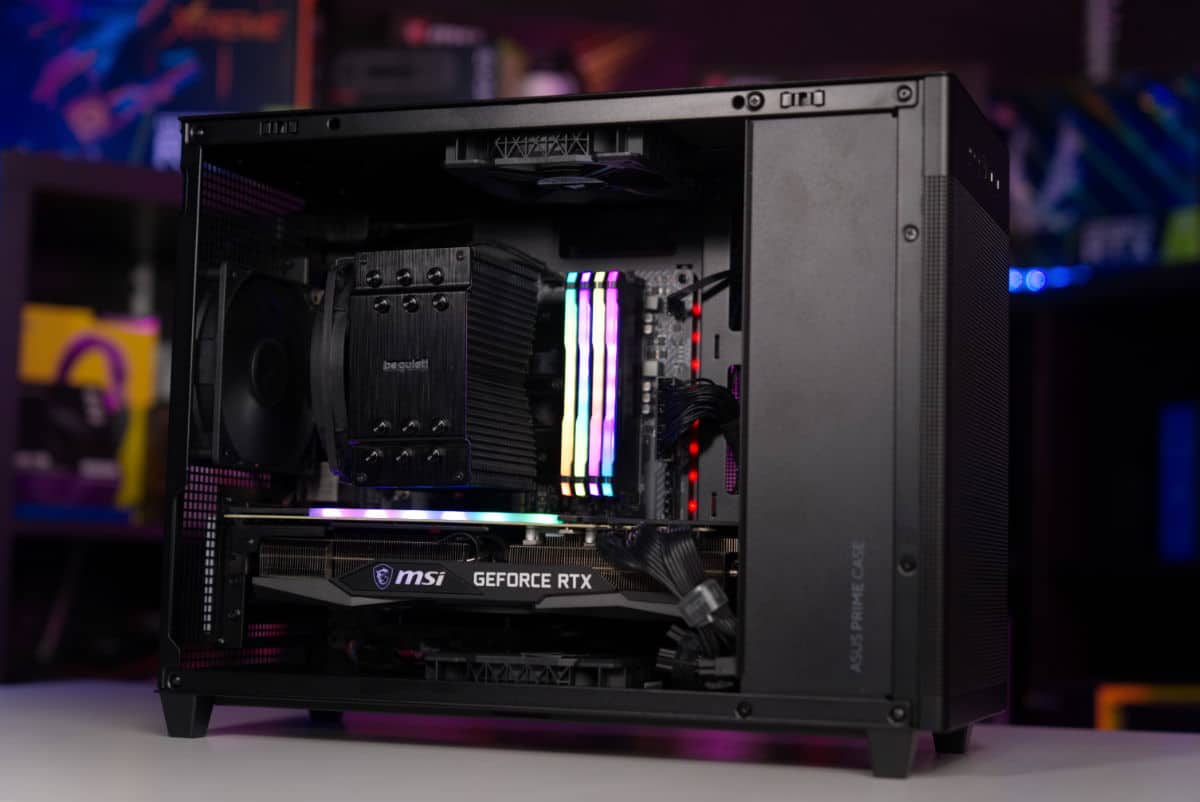
As mentioned, this PC is made to be powerful, and this machine’s gaming performance alone is of stellar quality. Inside we see one of the best price to performance CPUs on the market, the AMD Ryzen 5 7600X. This multi-threaded CPU comes with 6 cores running at 4.7GHz out of the box and 12 threads. Furthermore, the processor can be overclocked to an impressive 5.3GHz for improved performance. This CPU won’t let you down, and it also offers some workstation performance too!

Backing up the CPU is very powerful graphics card, which will easily run any AAA game you throw at it in immense detail. This GPU will smash anything in 1080p but impressively has shown to perform well while playing in 1440p and 4K, without getting poor FPS counts on those demanding titles.

Reinforcing those strong components, we see a reliable, feature-packed motherboard. This mobo will handle overclocks without a sweat, giving you the reassurance you need to push this system to its full potential. To help boost the overall gaming performance, we have included 16GB of fast RAM, which works hand in hand with the Ryzen CPU. Lastly, a generous 1TB M.2 SSD has been included, to store your operating system, applications, and games, while also saving on space.

AMD vs Intel

We wanted to get the absolute most out of this Mini-ITX build, so naturally went for AMD over Intel. This isn’t to say Intel would be a bad choice. After all, they offer fantastic single-core performance for gaming and generally have cheaper ITX boards, but AMD’s value is undeniable. You are simply getting more for your money with the AMD CPU, and the added benefit of multi-threading with your day-to-day tasks is always a great addition to any build. While a small form factor PC build isn’t everyone’s concern, a Mini-ITX gaming PC is a great option for space-conscious gamers or users who are frequently on the move with their system. In the past, it would often be too costly and not worth the trade-off with limited component options suited to fit. Now though with many motherboard manufacturers offering excellent quality ITX boards, the mini build is certainly worth a look.

Why should you consider a small form factor ITX PC?

An ITX form factor PC can be a great option for several reasons:

  1. Size: ITX form factor PCs are smaller in size compared to traditional PCs, making them easy to fit in tight spaces, such as small apartments, home offices, or living rooms.
  2. Portability: Due to their smaller size, ITX form factor PCs are more portable, making it easier to take them to different locations, such as trade shows, LAN parties, or friends’ houses.
  3. Energy efficiency: Smaller PCs often use less power, which can lead to lower electricity bills and less impact on the environment.
  4. Customization: ITX form factor PCs can be customized to suit specific needs, such as gaming, media center, or home server.
  5. Cost-effective: ITX form factor PCs can be more cost-effective than larger PCs, as they typically have a lower price point and use fewer components.
  6. High-performance: Despite its smaller size, ITX form factor PCs can have high-performance components, such as powerful CPUs and GPUs, that allow them to handle demanding tasks, such as gaming, video editing and 3D rendering.

In summary, ITX form factor PCs are a great option for those who are looking for a compact, portable, energy-efficient, customizable, cost-effective, and high-performance PC.

AutoCAD Fields and Dynamic Data: Tuesday Tips With Frank | AutoCAD Blog


In my last post, we used AutoCAD fields and custom sheet set properties to automate title block information. Today, I’m going to demonstrate a way to automate a callout or label by using a little-used but very powerful feature of fields.  

I’ll assume you have at least a working knowledge of using AutoCAD fields, so this won’t be a deep dive into them but instead focus on a particular feature. Let’s set up a simple scenario and let your imagination turn it into something you’re familiar with. You have a closed object of some kind in your drawing. Maybe it’s a pool, a pond, or a parking lot… and you have to label its total area in some way. That may be via a multileader, a label block with attributes, or it may be somewhere in a block of notes. Have I got you thinking yet? 

Now, here’s the kicker. During the design phase, that closed feature will change its shape, thus changing its total area. Or maybe it’s in a prototypical drawing and changes for every project it’s used in.  

If you’re using a static callout of that area, you’ll need to query the feature whenever it changes and subsequently edit the callout to reflect the new area. Trust me when I tell you that it won’t take very many times doing that to make it get old. This is where an AutoCAD field can come to your rescue. 

The Object Is Your Objective

By my count, there are 50 field names available from the Field dialog box, and they fall within seven categories. You can leave the category set to All and choose what you want from the entire list, but most people prefer to find and set their category first, thus paring down the list. Since the enclosed feature in our drawing is an AutoCAD object, choose the Objects category.

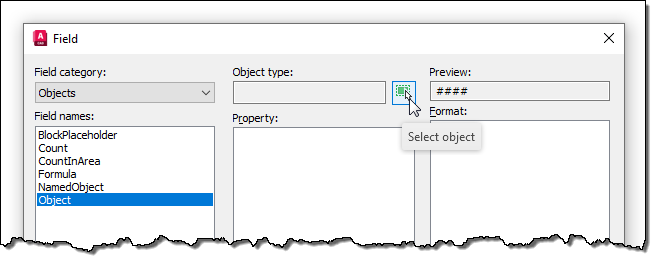
Screenshot of objects category for AutoCAD fields

You should now see only the six field names in the category. All are useful in their own way, but we’re after the Object field for this exercise. When selected, the dialog will change to offer other options. Our next step will be to select the closed feature we’re working with, so select the small select icon next to the Object Type box and select the closed feature. The middle property panel will now be populated with all the properties of the polyline available to you.

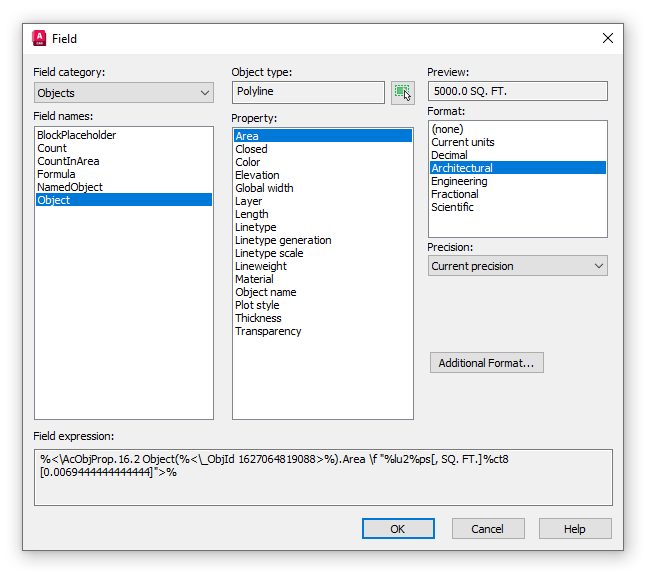
Screenshot of Object Type Box with AutoCAD Fields

In this example, we’re labeling the total area of the object we’ve selected, and conveniently, Area is at the top of the list. Select it, and make sure the formatting is what you want from the Format box on the right.

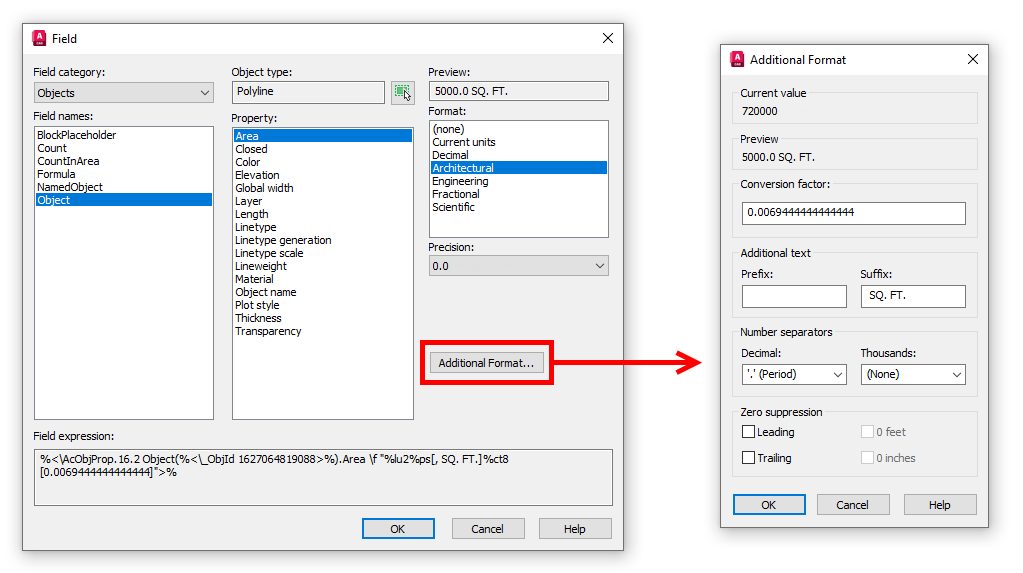
Pro Tip: Need some additional text like a prefix or suffix? Click the Additional Format button for these options and more!

Screenshot of Additional Format with AutoCAD field

Now, with the proper field applied to the callout of your closed feature, it will update whenever its shape is edited. (Just remember the rules on updating fields. I suggest a quick regen).

Not only does this method cut out the continual querying and editing steps, but it also removes the possibility of typing in the wrong value. We humans are quite prone to mistakes, you know – at least this one is.

My example used the area property of a polyline. It could have been the length of a path through a park or even the name of an Xref. The point is to keep this nugget in mind should you ever have to call out a property of an object. It might just save you a lot of work and keep those pesky typos out of your valuable drawings.

More Tuesday Tips

Check out our whole Tuesday Tips series for ideas on how to make AutoCAD work for you. Do you have any favorite AutoCAD tips? Tell us in the comments!

‘Zero Hour’ quest walkthrough in Destiny 2 to get Outbreak Perfected


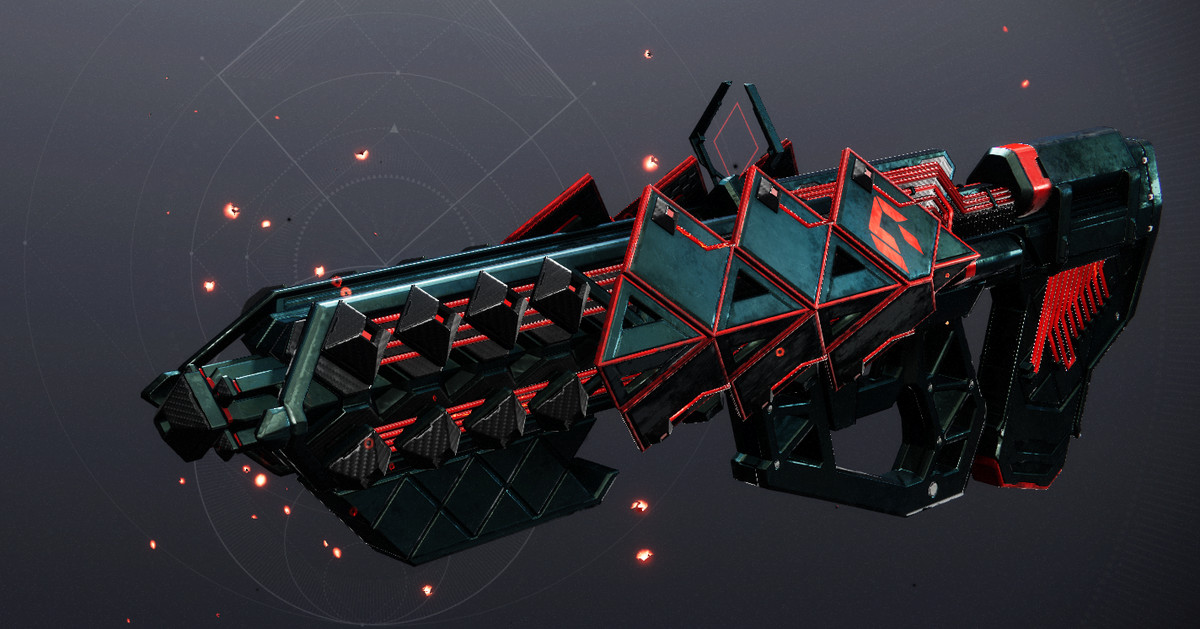
“Zero Hour” is the second secret mission to ever come to Destiny 2, and it’s finally back in the game as part of the Into the Light update and the May 14 reset. Much like the reprised “The Whisper” mission and its Whisper of the Worm reward, the updated version of “Zero Hour” rewards a fully craftable version of the Exotic pulse rifle Outbreak Perfected.

In this Destiny 2 guide, I’ll walk you through how to complete “Zero Hour” and get the pattern for Outbreak Perfected. Whether this is your first time experiencing “Zero Hour” or it’s just been too many years for you to remember the path, I’ve got you covered.


How to start ‘Zero Hour’ in Destiny 2

The Guardian in Destiny 2 makes their way to Ada-1 in the Tower

Image: Bungie via Polygon

To start “Zero Hour,” all you need to do now is talk to Ada-1.

Head to the Tower Annex — the landing point over by the Drifter — and head up to Ada-1, the vendor who normally just handles transmog. She’ll give you the “Asset Protection” quest. With the quest in hand, all you need to do is open up the “Into the Light” submenu in the Director and select “Zero Hour.”

Completing the Exotic mission and finishing the quest at Ada-1 will reward you with the pattern for Outbreak Perfected.


‘Zero Hour’ walkthrough in Destiny 2

You have 40 minutes to beat this mission on the Normal difficulty.

Navigating the Destiny 1 Tower in ‘Zero Hour’

“Zero Hour” starts out with a lot of combat as you first adventure through the Destiny 1 Tower. You’ll be dealing with some powerful Fallen here, so make sure to put on your best gear and an assortment of ad-clearing weapons. As with all dense Fallen encounters, the Riskrunner Exotic submachine gun will serve you well if you’re having trouble.

Bungie via Polygon

Make your way through the bazaar and into the small vent. On the other side, you’ll be where the Speaker’s chambers once were. Clear the enemies, and move through the sweeper bot hallway.

You’ll find yourself in the courtyard, which is filled with enemies of varying type and power. There’s even a Brig here now, an enemy type that didn’t exist when the original mission came out. Take them all down to unlock the rest of the path.

Bungie via Polygon

Continue through the old tower until you reach the flaming scaffolding where the original opening mission of Destiny 2 takes place. Slide under the big door next to the M and drop down the elevator shaft. Climb in the vent and follow it.

Bungie via Polygon

You’ll emerge in a giant shipyard. Turn immediately left, and you’ll see a ship sitting below you. Run up to it and crouch under its nose. Follow the path and take a right into the vent. Follow the hallway you drop into and take the other vent above you. Take a left and enter another vent behind the toolbox.

Bungie via Polygon

Follow the vent and take your first right. There are a few doorways below, but you only need to take the one directly under you. If you’re the first player to arrive, you’ll have a handy metal lip to stand on. If you’re following a teammate, it’ll have broken off by now. Step off the ledge, turn around, and push forward against the wall as you fall. Climb into the ledge and follow the vent.

Bungie via Polygon

Jump onto the first piece of yellow scaffolding and then onto the next. Look toward the tower. There are two drain openings and a platform to your left. Depending on your class, you can either jump straight to the landing or hop your way to the landing through the drain openings.

Bungie via Polygon

On the landing, look off and down toward the tower. You’ll see a small protrusion. This is your target. Jump off the landing and move toward the wall. Land on the antenna.

Bungie via Polygon

Look out toward where the city and turn left. Jump on the pipes until you reach the next landing. You can pull a switch here to help your friends catch up.

Bungie via Polygon

Jump onto the scaffolding above you and run up to the open vent. Jump in and follow the path. You’ll be in a big elevator shaft. Start climbing up a few flights until you’re at the second from the top. Shoot open the vent on the right and climb through.

Bungie via Polygon

Now you’ll be surrounded by spinning fans, each of which have an Explosive Shank in the middle. Look for the red lights and jump into them. If you hold against the wall, you’ll save yourself from the fans. When you land, be careful — don’t hit the ground too hard and skid off into another fan. Repeat this process, carefully taking out or maneuvering around the Shanks, until you’re at the bottom of the shaft. Climb in another vent.

Bungie via Polygon

You’ll now find yourself in a long hallway that looks completely blank. Jump off the ledge and onto the silver vents hanging off the wall. These are tricky to stand on, so limit your movement. Jump to the next one and finally into the open door on the far side. Once again, there is a switch here to help your friends through the puzzle if they’re lagging behind.

How to navigate the ‘Zero Hour’ maze

Bungie via Polygon

Follow the vents until you get to Ventilation. Walk forward and take a look at the map, which you can see clearly in the image above.

This is the maze section of “Zero Hour,” and it looks much scarier than it actually is. The white lines represent hallways you can walk through, with the red arrows denoting switches you need to hit. You start the map in the center of the bottom-most rectangle’s southern white line. When you’ve had a good look at the map, turn around and drop down two floors of vents.

You’re in the maze now, just like in the picture. We recommend sending one player right and another left, just to speed the process up. The instructions below are for the right-side player, so left-side players should just mirror my instructions.

Bungie via Polygon

  1. Run forward and take a left. Keep running until you find a split in the hall.
  2. Turn right and into another rectangle.
  3. Follow the path and hit the first switch.
  4. Keep running until you reach the original hallway.

Bungie via Polygon

Here, you’ll likely have to wait for a wall of electricity to pass. If the electricity is just starting to arc, you can run through. Otherwise, you’ll have to sit and brood — Darth Maul style.

Bungie via Polygon

When the electricity drops, take a right turn. You should start hearing an unsettling sound about now. An electric shredder is also running the maze with you, named TR3-VR by Bungie and the Destiny community. There are some alcoves to hide in so it can pass, but just to your left you should see a giant cavern with pipes in it.

Jump on the pipes and wait for the machine to pass. You can tell if the shredder is chasing you by its sound or giant red light.

Bungie via Polygon

With the machine gone, jump back over to your hallway and take a left. Follow the path until a hallway opens on the right. Go hit the switch like last time and return to your normal hallway.

Bungie via Polygon

Take a right and follow the path until you can take another right. This is the exit. If you’ve hit all four switches, the doors will be open.

Run into the new room and hop on one of the elevators to your right or left. Hit the button and wait for them to slowly lift you into the rafters.

Bungie via Polygon

Jump onto the platform and shoot out the vent. Head down the chute and stay in the center of the slide. Jump to slow your momentum, or risk death by splattering against a wall. When you come out of the chute, turn left and then immediately right. Crawl through the vent on the floor.

How to navigate the vault maze in ‘Zero Hour’

Bungie via Polygon

You’ll be in the old Cryptarch Vault now, and the mission is nearly done.

On the opposite side of the Vault’s door, you’ll see some pipes on the wall. Next to the pipe, you’ll see the Cryptarch symbol. Go stand by it and the secret door will open. Run forward until you reach the section with white floor panels. You’ll need to step on these in the correct order or you’ll get incinerated.

There are six rows of panels, each are five panels across. We’ve numbered the panels below in order, so R1 – 1 is the farthest left panel on the first row, R1 – 2 is the farthest left panel in the second row, R3 – 5 is the farthest right of the third row, and so on.

You’ll start on the second tile from the right on the first row. From there, here’s the order you should follow, with the direction you need to head in in parentheses:

  • R1 – 4 (Start)
  • R2 – 4 (Forward)
  • R2 – 3 (Left)
  • R2 – 2 (Left)
  • R2 – 1 (Left)
  • R3 – 1 (Forward)
  • R4 – 1 (Forward)
  • R5 – 1 (Forward)
  • R5 – 2 (Right)
  • R5 – 3 (Right)
  • R4 – 3 (Back)
  • R4 – 4 (Right)
  • R4 – 5 (Right)
  • R5 – 5 (Forward)
  • R6 – 5 (Forward)

Once you’re through the panels, head to the end of the vault.

Bungie via Polygon

At the broken case, take a right and you’ll see a burned hole in the ground. Drop through it. Run forward and hop into another vent. It’s time to fight.

How to defeat Siriks in ‘Zero Hour’

Bungie via Polygon

When you drop down, you’ll find a Fallen Captain wielding a Scorch Cannon: Siriks. They’re surrounded by an army of Fallen.

Take out Siriks’ Fallen allies. They’ll summon turrets, big Servitors that grant immune shields to everything (these are very annoying, so kill them first) and a ton of Shanks. Just keep killing everything until Siriks’ health is about one-third full. You’ll get a message on your screen that says “Siriks retreats… for now” and the boss will disappear.

Two Fallen Walker tanks will appear on the raised platforms on your left and right, along with some additional Fallen. Take everything out and you’ll get another ominous message: “Siriks returns… heavily armed.”

Siriks will drop back into the area in a massive Brig mech. This thing has full health, so it’s going to take some time and work to take it out. Once you manage to blast off theshield on the Brig, the boss will start lobbing massive tank and constant airstrikes. Just keep moving to dodge these attacks and you’ll eventually take it down.

With Siriks dead, head up to the chest that spawns, say hi to Mithrax, and grab the Outbreak Perfected schematic. Head back to the Tower and talk to Ada-1. She’ll give you the Outbreak Perfected, complete with the pattern attached. Ada-1 will also give you the “Outbreak Refined 1” quest, which you can complete for some additional crafted perk options on your new Outbreak Perfected.

If you already have the Catalyst for Outbreak Perfected from the original version of “Zero Hour,” you’ll instantly be able to place it on your newly crafted gun. However, if this is your first time running the mission, you’ll need to hop back in on Heroic mode in order to pick up the Catalyst and improve your Outbreak Perfected.