Scripture Writing Binder {415+ pages}


If you’re wanting to deepen your relationship with the Lord, this 415+ page Scripture Writing Binder is the perfect place to start!

Do you feel like your Bible study time is in a rut? Do you want to improve your knowledge of the Bible? How often do you wish you could memorize more Bible verses?

According to studies done, and published in the “Journal of Educational Psychology”, writing something down helps us retain the information better, and we have better recall of it too.

There are pages in this Scripture Writing Binder for every day of the year, and ways to build your Bible knowledge that are encouraging and fun. There are wall arts to decorate your home and space as well as hand lettering sheets to trace.

Use this for your kids, yourself, your whole family!

You can print off the whole binder, or just a few sheets at a time as you need them.

Plus, if you already have a binder, there are different sizes of spines to fit whatever size you have on hand…no need to go out and buy another binder. Just use one you already have and you’re good to go.

If you do need a binder, here are the appropriate ones on Amazon:

Scripture Writing Binder StarsScripture Writing Binder Stars

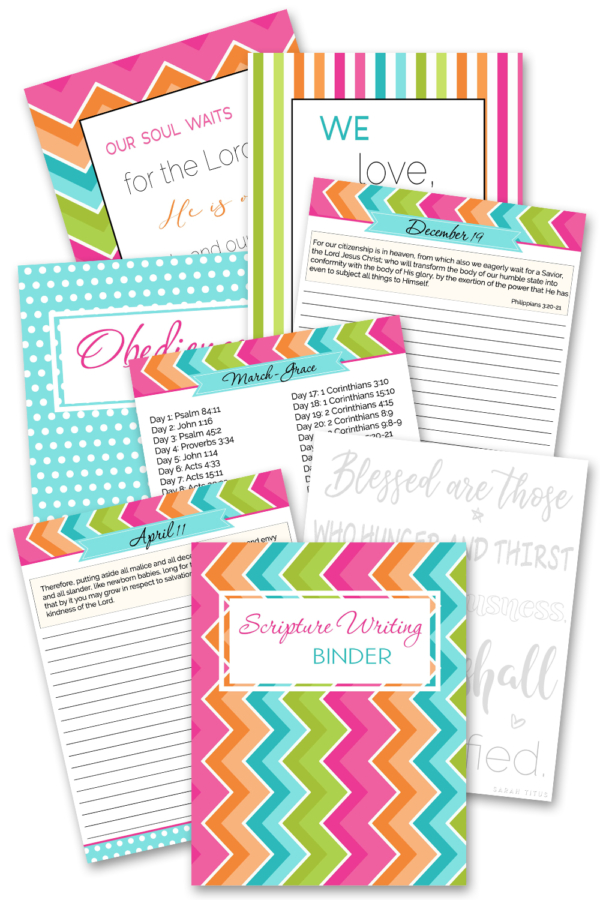
This wonderful 415+ page Scripture Writing Binder includes the following:

  • 365 pages of daily Scriptures to write and meditate on
  • 12 hand lettering Scripture sheets to practice hand lettering
  • 12 Christian Scripture wall art designs to hang in your home or give as a gift to loved ones
  • Cover pages for each month to keep everything organized
  • …and more

Topics in the Scripture Writing Binder include:

  • January – Obedience
  • February – Bible Verses About Love
  • March – Grace
  • April – Salvation
  • May – Forgiveness
  • June – Bible Verses About Faith
  • July – Joy
  • August – Give Thanks
  • September – Scriptures On Peace
  • October – Prayer
  • November – Righteousness
  • December – Waiting on the Lord

My Favorite Pages

It’s kind of hard to choose favorite pages because they are all very helpful, but I do have a few favs. 🙂

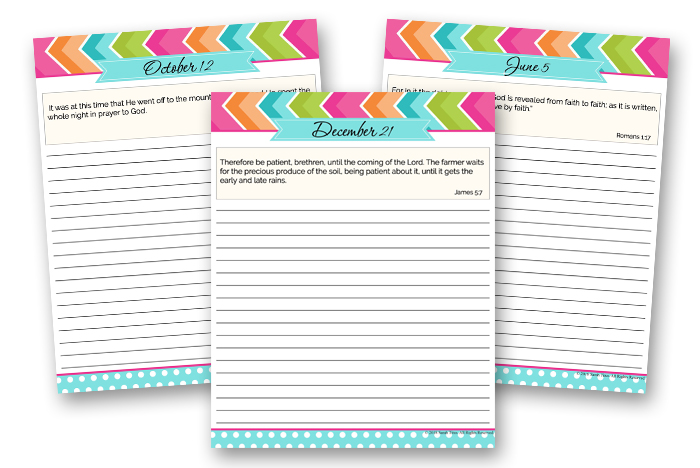
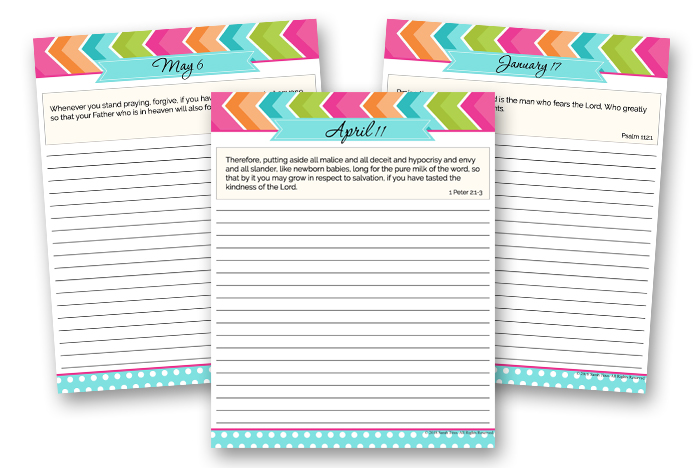
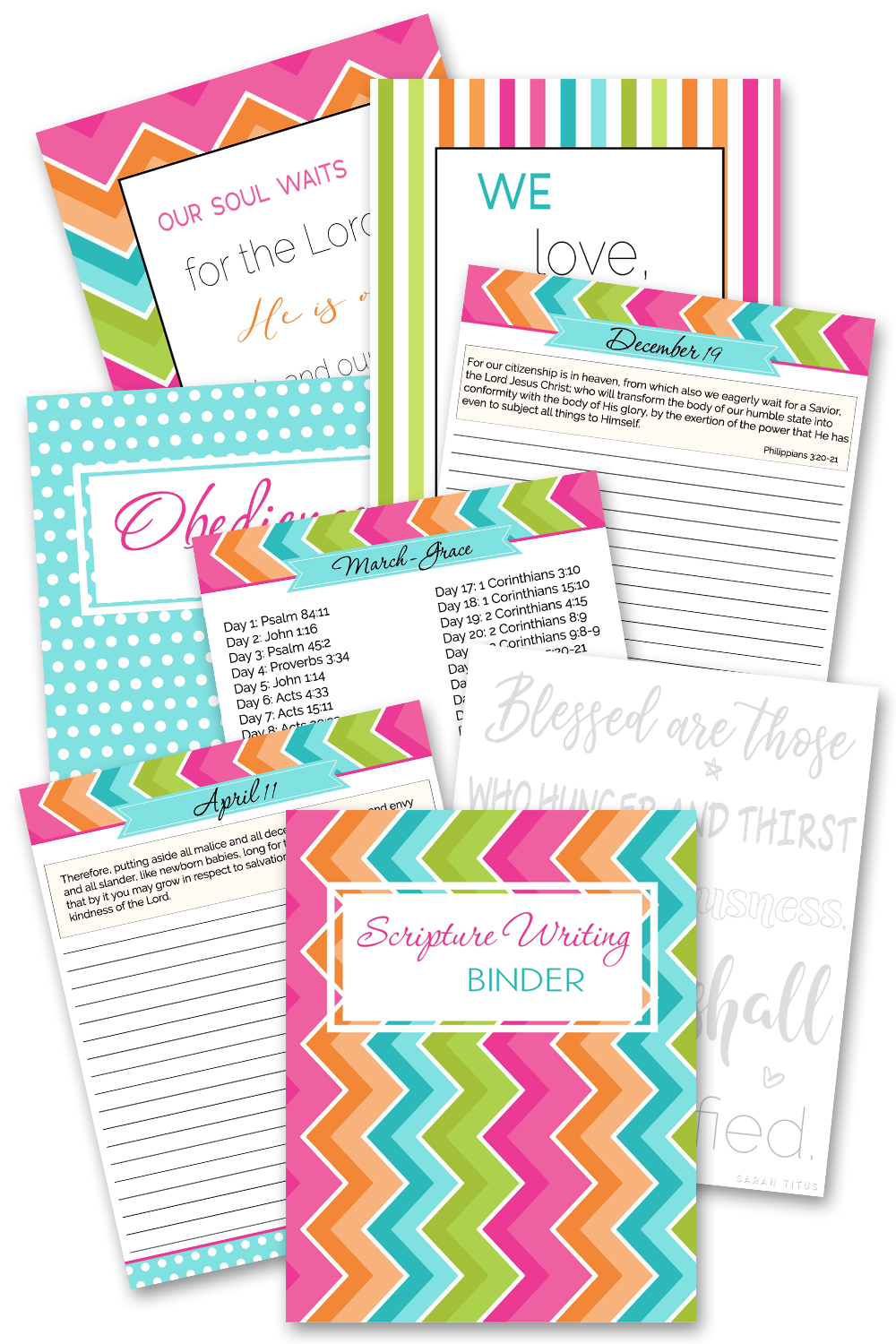
These Daily Scripture printables are the perfect way to write and meditate on God’s Word every day. The Scripture Writing Binder includes 365 pages of the Bible verse of the day. Below is an example of a few of the Scripture writing journals …  

Scripture Writing Binder - Daily Scripture PrintablesScripture Writing Binder - Daily Scripture Printables

Scripture Writing Binder - Daily ScriptureScripture Writing Binder - Daily Scripture

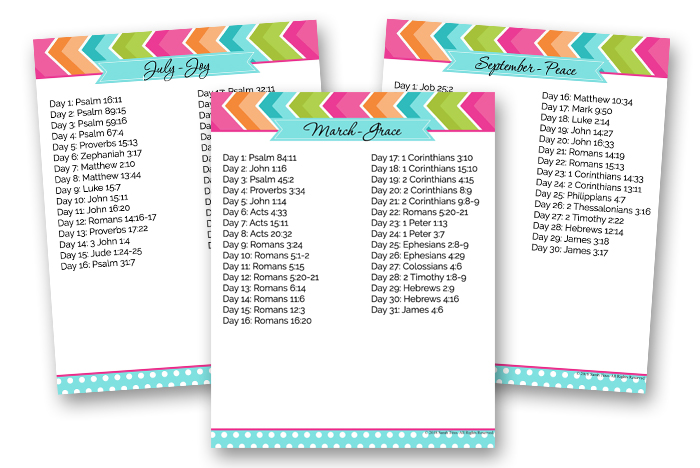
Each month focuses on a specific topic.  Each Monthly Topic printable provides a verse each day pertaining to that topic.  Great way to learn the Word of God.

Scripture Writing Binder - Monthly TopicsScripture Writing Binder - Monthly Topics


This Wall Art is perfect to hang in your home or give as a gift to someone you love. Here are a few examples…

Scripture Writing Binder - Wall ArtScripture Writing Binder - Wall Art

Scripture Writing Binder - Wall Art PrintablesScripture Writing Binder - Wall Art Printables


Hand Lettering Scripture

This Hand Lettering Scripture printable is a great way to practice your hand lettering and memorize scripture.

Scripture Writing Binder - Hand LetteringScripture Writing Binder - Hand Lettering

See what others are saying about the binder…

Scripture Writing Binder ReviewsScripture Writing Binder Reviews

Grab Your 415+ Page Scripture Writing Binder here.


Scripture Writing BinderScripture Writing Binder

If you enjoy this Scripture Writing Binder, be sure to check out all of my other binders, here.

Google patches its fifth zero-day vulnerability of the year in Chrome


Extreme close-up photograph of finger above Chrome icon on smartphone.

Google has updated its Chrome browser to patch a high-severity zero-day vulnerability that allows attackers to execute malicious code on end user devices. The fix marks the fifth time this year the company has updated the browser to protect users from an existing malicious exploit.

The vulnerability, tracked as CVE-2024-4671, is a “use after free,” a class of bug that occurs in C-based programming languages. In these languages, developers must allocate memory space needed to run certain applications or operations. They do this by using “pointers” that store the memory addresses where the required data will reside. Because this space is finite, memory locations should be deallocated once the application or operation no longer needs it.

Use-after-free bugs occur when the app or process fails to clear the pointer after freeing the memory location. In some cases, the pointer to the freed memory is used again and points to a new memory location storing malicious shellcode planted by an attacker’s exploit, a condition that will result in the execution of this code.

On Thursday, Google said an anonymous source notified it of the vulnerability. The vulnerability carries a severity rating of 8.8 out of 10. In response, Google said, it would be releasing versions 124.0.6367.201/.202 for macOS and Windows and 124.0.6367.201 for Linux in subsequent days.

“Google is aware that an exploit for CVE-2024-4671 exists in the wild,” the company said.

Google didn’t provide any other details about the exploit, such as what platforms were targeted, who was behind the exploit, or what they were using it for.

Counting this latest vulnerability, Google has fixed five zero-days in Chrome so far this year. Three of the previous ones were used by researchers in the Pwn-to-Own exploit contest. The remaining one was for a vulnerability for which an exploit was available in the wild.

Chrome automatically updates when new releases become available. Users can force the update or confirm they’re running the latest version by going to Settings > About Chrome and checking the version and, if needed, clicking on the Relaunch button.

The latest Vampire Survivors release is a straight-up crossover with Contra


Vampire Survivors continues to roll out new DLC in ever weirder, more delightful packages this month with Operation Guns, a full-on crossover between the worlds of Vampire Survivors and long-running shoot-em-up slash bullet hell slash action arcade series Contra. 

“Are you a bad enough Vampire Survivor to save the President’s cousin’s sister’s dog from the traitor squadrons of Red Falcon?” asks the DLC description. Which I suppose is a legitimate question to ask in the context of Vampire Survivors and also the skepticism-crushing enjoyment of recent reboot Contra: Operation Galuga.

Top 3D Architectural Rendering Books, Magazines, and Blogs for Companies to Follow


If you think you already know everything there is to know about 3D architectural rendering services, you might want to think again. The thing about this unique field is that discoveries pop up daily, which means you also have new things to learn. Whether you want to brush up on your team’s existing knowledge or your company is poised for growth, here are some of the top 3D architectural rendering books, magazines, and blogs you should follow.

Brian M. Crisp’s Architectural Rendering with Mental Ray

Brian M. Crisp’s “Architectural Rendering with Mental Ray” is a book that covers almost everything that might interest you, from proper setup of lighting to texturing, rendering, and more, with lots of helpful tips on every page. This is the best 3D architectural rendering book for someone who wants to master using Mental Ray for 3DS Max or Maya architectural rendering.

Brian M. Crisp’s Architectural Rendering with V-Ray

This is another book by Brian M. Crisp, but V-Ray is its primary focus this time. This literature covers various topics, just like the first book on mental ray. The key difference is that it reviews more details on the capabilities and features of V-Ray that set it apart from its predecessor.

Sarah Jones and Michael Secrist’s Architectural Visualization: Its Relevance to the Unbuilt World

Sarah Jones and Michael Secrist’s book, published in 2018, is not a technical book written as a tutorial and guide for 3D architects, artists, or designers. Instead, this book delves into 3D architectural visualization services and their importance for any renovation or building project.

The authors explain how the success of a project is dependent on the communication between the 3D architectural rendering designers and architects. It also uncovers the secrets behind effective communication with CGI artists, making it a fantastic read that benefits architects and employers alike.

Readers of the book will better understand 3D architectural visualization and rendering and all the essential steps it involves. This way, architects lacking 3D architectural visualization proficiency can refer to this book to learn how to communicate more effectively with visualization companies to ensure a smoother project. Employers can also use the book to understand their projects better, learn why some things should happen, and participate in the process if needed.

RELATED: What are Architectural 3D Visualization Costs, Service Fees & Rates for Companies?

Light: Science and Magic

book1-1

Light: Science and Magic is mainly meant for professional photographers as it discusses a comprehensive analysis of various options for photographic lighting. But don’t worry because the book works wonders even for architects, particularly in 3D architectural rendering and 3D architectural visualization. The book captures the very essence of the effect of various lighting conditions on the quality of the final image. No matter how expensive the equipment you’re using might be, it won’t provide excellent results if you are not knowledgeable about appropriate lighting.

The same rule applies to 3D architectural rendering because even the most state-of-the-art tech software and advanced tools will never produce amazing 3D renders independently. You still need to have a certain level of expertise and knowledge, especially regarding lighting.

Adding this book to your must-read list can drastically increase the 3D modeling skills of an architect, which is critical to come up with eye-catching and appealing 3D renders. Whether your company is looking to elevate your team’s lighting proficiency or refine your architectural 3D modeling services to produce standout 3D renders, this book is a valuable resource not to be missed.

RELATED: What are Architectural Rendering Costs, Rates, and Pricing for Companies?

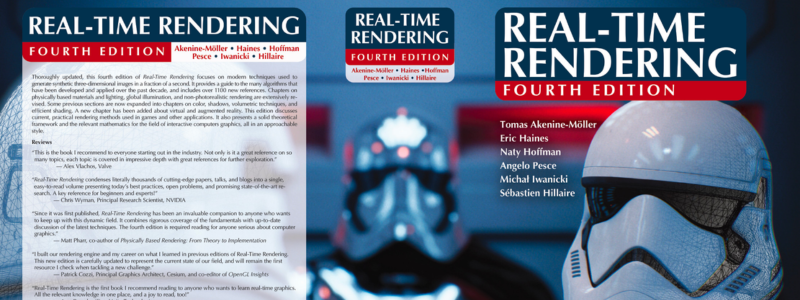
Real-Time Rendering

Real-Time Rendering is a collection of four editions and is an amalgamation of different experts who combined their forces and joined together to come up with this work. With three books already behind it, this newest edition delves into the most modern methods for exemplary results in rendering. The book is also written in a way that is easy to understand, complete with helpful examples and references to other examples.

You don’t need any prior 3D rendering knowledge to understand this book because it starts with the basics of mathematics and slowly progresses to more advanced techniques typically used in the finest quality games. While its primary focus is video game rendering, only a few architectural books can match this book as it details the 3D rendering field. All the methods that the book covers are universal and are also applicable to different rendering purposes.

Featuring 24 chapters, the book’s authors go into great detail as they describe every single step of the complicated process. After reading this book, you can expect to learn more about 3D rendering, transformation, processing, illumination, light, colors, texture, shading, AR, VR, and other elements. Real-time rendering is your best choice to learn more about detailed rendering.

book2

Eric Wing’s Revit 2020 for Architecture: No Experience Required

Revit 2020 for Architecture: No Experience Required is precisely what its title suggests. This is a must-read book for any beginner without experience using Revit for architecture. With Autodesk Revit considered the top architectural BIM software, it’s no surprise that many architects use it for 3D visualization. If you plan to use Autodesk for your 3D renders, this book, written by Eric Wing, a BIM Services Manager, is something you should read.

The book will guide you through the world of Revit and help you develop high-quality architectural renderings and visualizations. It opens with critical elements like familiarizing yourself with the interface of Revit and using its fundamental features as an example. It begins with model creation, progressing to door and window placement and various perspectives, views, plans, angles, and 3D perspectives. After you finish this book with 17 chapters alongside your project creation, you will soon master all the essential tools for high-quality and detailed 3D architectural renders.

RELATED: Architectural VR/AR 3D Rendering Costs, Rates & 3D Modeling Pricing for Design Firms

The RenderMan Companion: A Programmer’s Guide to Realistic Computer Graphics by Steve Upstill

Steve Upstill’s book covers everything, including the fundamentals of materials and lighting, to more advanced subjects like global illumination, motion blur, and depth of field. This also includes several chapters that discuss procedural modeling techniques and generating textures. The book is also a helpful resource for those who wish to learn and master techniques for computer graphics programming to create photorealistic images in different 3D applications such as Cinema 4D and Maya.

book3

Michael Brightman’s The SketchUp Workflow for Architecture

3D architects, 3D landscape architects, and 3D interior designers worldwide use the premier 3D design software SketchUp. Michael Brightman, the man behind this guide on SketchUp, is a successful architect and is now the Lead Instructor and President at a SketchUp Authorized Training Center based in Denver.
This book tackles modeling buildings, design visualizations, and developing construction documents using LayOut and SketchUp Pro. Published in 2013, this guide rose to popularity as one of the best books about software. The high demand for this book resulted in its recent update in 2018.

It also teaches field professionals how to harness the program’s power for all project sizes, types, and styles. It provides step-by-step guidelines on using the software at different stages of the architectural design process. Those who buy the volume will also gain access to tutorial videos on several advanced methods of architectural rendering. The guide teaches how architecture professionals can take advantage of SketchUp in different stages of their work.

RELATED: 3D Interior Design Costs, Modeling Pricing, and Rendering Rates for Buildings

CGarchitect

CGarchitect is an online open community that caters to enthusiasts and professionals in architectural rendering and visualization. This blog boasts a constantly growing showcase gallery of more than 100,000 renderings. They also regularly promote the newest job openings in the architectural visualization field.

The blog also features an impressive selection of articles that include insights from experts in the industry and the latest news about the constantly changing field of architectural rendering. You can also check out the bustling online forum where readers can share tips, raise questions, share their work, and ask for advice from other community members.

Enscape Blog

book4

The Enscape Blog, launched in 2017, has quickly become the leading blog on architecture and architectural rendering. It contains top-quality feature articles on various topics for AEC students and professionals and renders tips straight from visualization experts. It doesn’t matter if you’re an architect, 3D architectural rendering specialist, 3D designer, or just a 3D architectural visualization fan; this blog is something you should check out.

Ronen Bekerman Architectural Visualization Blog

The Ronen Bekerman Architectural Visualization Blog is directly relevant to people who work on architectural renditions. Aside from the available tutorials and resources to advance your skills in rendering, you can also explore different projects, showcase your work, and even follow weekly podcasts to learn the latest industry trends.

How Cad Crowd can help

Aside from these top 3D architectural rendering books, magazines, and blogs, Cad Crowd is another platform where you can find a blog section filled with helpful articles to gain more insights about the 3D architectural rendering industry.

7 Major Big Data Challenges and Ways to Solve Them


Before going to battle, each general needs to study his opponents: how big their army is, what their weapons are, how many battles they’ve had and what primary tactics they use. This knowledge can enable the general to craft the right strategy and be ready for battle.

Just like that, before going big data, each decision maker has to know what they are dealing with. Here, our big data consultants cover 7 major big data challenges and offer their solutions. Using this ‘insider info’, you will be able to tame the scary big data creatures without letting them defeat you in the battle for building a data-driven business.

Big data challenges

Challenge #1: Insufficient understanding and acceptance of big data

Oftentimes, companies fail to know even the basics: what big data actually is, what its benefits are, what infrastructure is needed, etc. Without a clear understanding, a big data adoption project risks to be doomed to failure. Companies may waste lots of time and resources on things they don’t even know how to use.

And if employees don’t understand big data’s value and/or don’t want to change the existing processes for the sake of its adoption, they can resist it and impede the company’s progress.

Solution:

Big data, being a huge change for a company, should be accepted by top management first and then down the ladder. To ensure big data understanding and acceptance at all levels, IT departments need to organize numerous trainings and workshops.

To see to big data acceptance even more, the implementation and use of the new big data solution need to be monitored and controlled. However, top management should not overdo with control because it may have an adverse effect.

Challenge #2: Confusing variety of big data technologies

Variety of big data technologies

It can be easy to get lost in the variety of big data technologies now available on the market. Do you need Spark or would the speeds of Hadoop MapReduce be enough? Is it better to store data in Cassandra or HBase? Finding the answers can be tricky. And it’s even easier to choose poorly, if you are exploring the ocean of technological opportunities without a clear view of what you need.

Solution:

If you are new to the world of big data, trying to seek professional help would be the right way to go. You could hire an expert or turn to a vendor for big data consulting. In both cases, with joint efforts, you’ll be able to work out a strategy and, based on that, choose the needed technology stack.

Read more:

Challenge #3: Paying loads of money

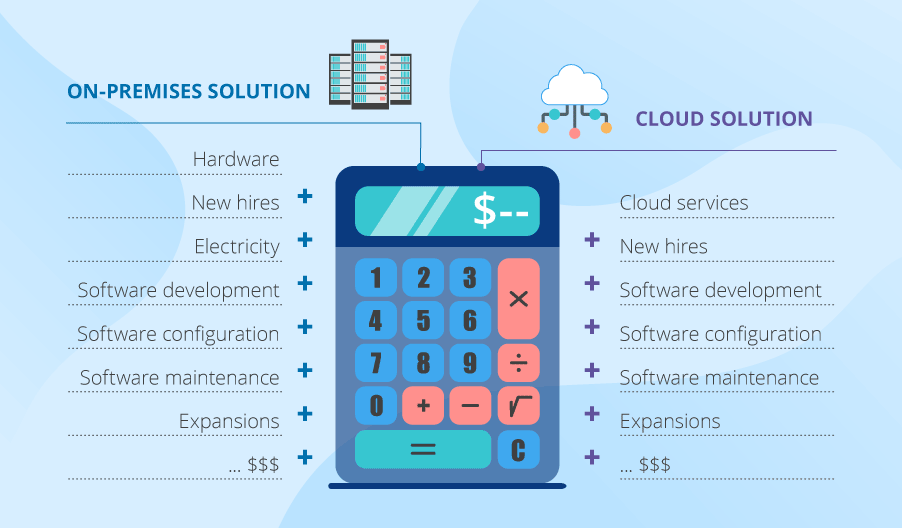
Big data on-premises vs. in-cloud costs

Big data adoption projects entail lots of expenses. If you opt for an on-premises solution, you’ll have to mind the costs of new hardware, new hires (administrators and developers), electricity and so on. Plus: although the needed frameworks are open-source, you’ll still need to pay for the development, setup, configuration and maintenance of new software.

If you decide on a cloud-based big data solution, you’ll still need to hire staff (as above) and pay for cloud services, big data solution development as well as setup and maintenance of needed frameworks.

Moreover, in both cases, you’ll need to allow for future expansions to avoid big data growth getting out of hand and costing you a fortune.

Solution:

The particular salvation of your company’s wallet will depend on your company’s specific technological needs and business goals. For instance, companies who want flexibility benefit from cloud. While companies with extremely harsh security requirements go on-premises.

There are also hybrid solutions when parts of data are stored and processed in cloud and parts – on-premises, which can also be cost-effective. And resorting to data lakes or algorithm optimizations (if done properly) can also save money:

  1. Data lakes can provide cheap storage opportunities for the data you don’t need to analyze at the moment.
  2. Optimized algorithms, in their turn, can reduce computing power consumption by 5 to 100 times. Or even more.

All in all, the key to solving this challenge is properly analyzing your needs and choosing a corresponding course of action.

Challenge #4: Complexity of managing data quality

Data from diverse sources

Sooner or later, you’ll run into the problem of data integration, since the data you need to analyze comes from diverse sources in a variety of different formats. For instance, ecommerce companies need to analyze data from website logs, call-centers, competitors’ website ‘scans’ and social media. Data formats will obviously differ, and matching them can be problematic. For example, your solution has to know that skis named SALOMON QST 92 17/18, Salomon QST 92 2017-18 and Salomon QST 92 Skis 2018 are the same thing, while companies ScienceSoft and Sciencesoft are not.

Unreliable data

Nobody is hiding the fact that big data isn’t 100% accurate. And all in all, it’s not that critical. But it doesn’t mean that you shouldn’t at all control how reliable your data is. Not only can it contain wrong information, but also duplicate itself, as well as contain contradictions. And it’s unlikely that data of extremely inferior quality can bring any useful insights or shiny opportunities to your precision-demanding business tasks.

Solution:

Big data quality

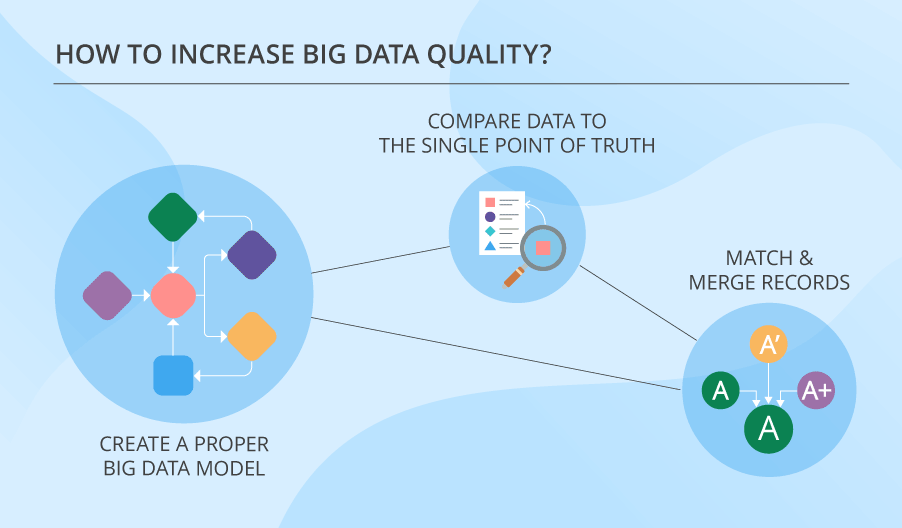
There is a whole bunch of techniques dedicated to cleansing data. But first things first. Your big data needs to have a proper model. Only after creating that, you can go ahead and do other things, like:

  • Compare data to the single point of truth (for instance, compare variants of addresses to their spellings in the postal system database).
  • Match records and merge them, if they relate to the same entity.

But mind that big data is never 100% accurate. You have to know it and deal with it, which is something this article on big data quality can help you with.

Challenge #5: Dangerous big data security holes

Security challenges of big data are quite a vast issue that deserves a whole other article dedicated to the topic. But let’s look at the problem on a larger scale.

Quite often, big data adoption projects put security off till later stages. And, frankly speaking, this is not too much of a smart move. Big data technologies do evolve, but their security features are still neglected, since it’s hoped that security will be granted on the application level. And what do we get? Both times (with technology advancement and project implementation) big data security just gets cast aside.

Solution:

The precaution against your possible big data security challenges is putting security first. It is particularly important at the stage of designing your solution’s architecture. Because if you don’t get along with big data security from the very start, it’ll bite you when you least expect it.

Challenge #6: Tricky process of converting big data into valuable insights

Valuable insights with big data

Here’s an example: your super-cool big data analytics looks at what item pairs people buy (say, a needle and thread) solely based on your historical data about customer behavior. Meanwhile, on Instagram, a certain soccer player posts his new look, and the two characteristic things he’s wearing are white Nike sneakers and a beige cap. He looks good in them, and people who see that want to look this way too. Thus, they rush to buy a similar pair of sneakers and a similar cap. But in your store, you have only the sneakers. As a result, you lose revenue and maybe some loyal customers.

Solution:

The reason that you failed to have the needed items in stock is that your big data tool doesn’t analyze data from social networks or competitor’s web stores. While your rival’s big data among other things does note trends in social media in near-real time. And their shop has both items and even offers a 15% discount if you buy both.

The idea here is that you need to create a proper system of factors and data sources, whose analysis will bring the needed insights, and ensure that nothing falls out of scope. Such a system should often include external sources, even if it may be difficult to obtain and analyze external data.

Challenge #7: Troubles of upscaling

The most typical feature of big data is its dramatic ability to grow. And one of the most serious challenges of big data is associated exactly with this.

Your solution’s design may be thought through and adjusted to upscaling with no extra efforts. But the real problem isn’t the actual process of introducing new processing and storing capacities. It lies in the complexity of scaling up so, that your system’s performance doesn’t decline, and you stay within budget.

Solution:

The first and foremost precaution for challenges like this is a decent architecture of your big data solution. As long as your big data solution can boast such a thing, less problems are likely to occur later. Another highly important thing to do is designing your big data algorithms while keeping future upscaling in mind.

But besides that, you also need to plan for your system’s maintenance and support so that any changes related to data growth are properly attended to. And on top of that, holding systematic performance audits can help identify weak spots and timely address them.

Win or lose?

As you could have noticed, most of the reviewed challenges can be foreseen and dealt with, if your big data solution has a decent, well-organized and thought-through architecture. And this means that companies should undertake a systematic approach to it. But besides that, companies should:

  • Hold workshops for employees to ensure big data adoption.
  • Carefully select technology stack.
  • Mind costs and plan for future upscaling.
  • Remember that data isn’t 100% accurate but still manage its quality.
  • Dig deep and wide for actionable insights.
  • Never neglect big data security.

If your company follows these tips, it has a fair chance to defeat the Scary Seven.


Big data is another step to your business success. We will help you to adopt an advanced approach to big data to unleash its full potential.

The Most Iconic Moms In Video Games


Cooking Mama


GameSpot may receive revenue from affiliate and advertising partnerships for sharing this content and from purchases through links.

Windows 11: The Best Hidden Features, Tips, and Tricks for 2024


Mention the words “Windows 11” to any tech-savvy person these days, and you’ll get either an eye roll or a brief shrug that’s physically the same as uttering “Meh.” It has not won over the masses, to say the least. Many feel it doesn’t do anything better than Windows 10 while offering a new interface that repels Windows diehards.

Thankfully, many changes can be reversed or tweaked to make the OS easier to use, and we’re here to walk you through them. You’ll also want to look at some cool new features. Here are our top Windows 11 tips.

1. Restore Your Right-Click Options

One of Microsoft’s most infuriating changes to Windows 11 is the redesigned right-click menus. The company removed most previously available options from the default view to make it more compact. However, it did keep the full list of options around. It moved them one layer deeper in the UI, forcing you to click “Show More Options” to see it.

Right-Click menu

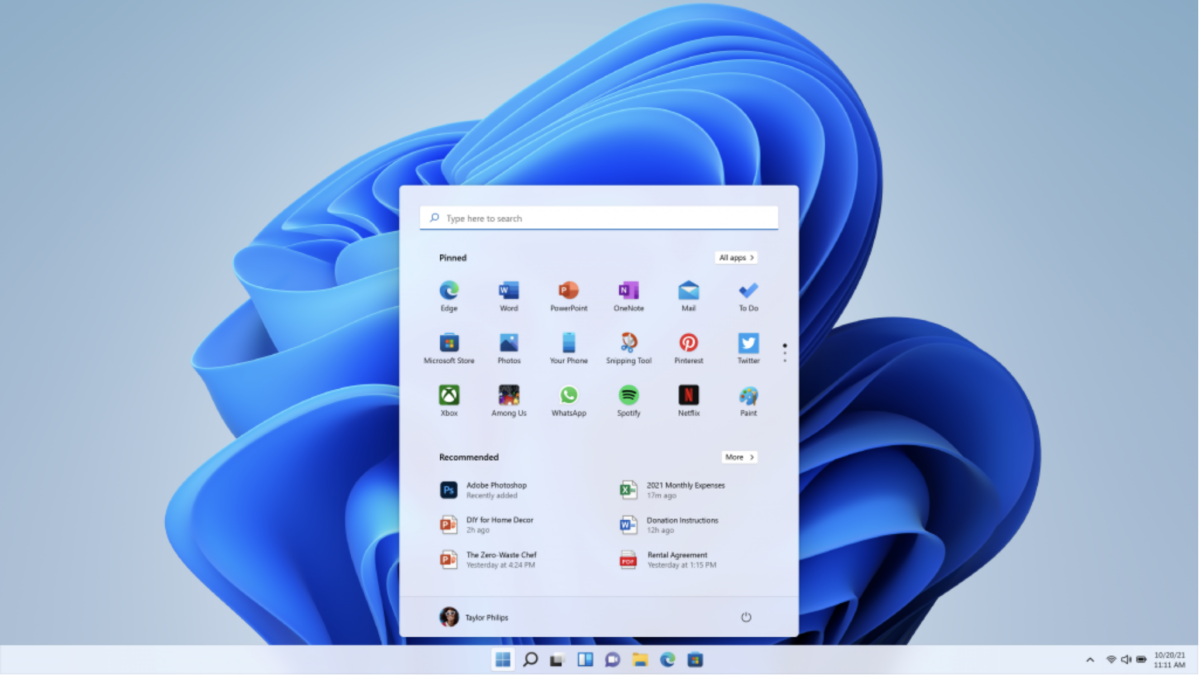
The new simplified right-click menu is the bane of our existence. Thankfully, it’s easy to get the old one back.
Credit: Microsoft

Some of us have to use this every time we right-click, which is highly annoying. Thankfully, there’s a way to revert to the old menu permanently. All it involves is adding an entry to the registry via the command line. Here’s what you must do to get the old right-click menus back via Microsoft:

  • Right-click the Start button and choose Windows Terminal

  • Copy and paste this into the window: reg.exe add “HKCU\Software\Classes\CLSID\{86ca1aa0-34aa-4e8b-a509-50c905bae2a2}\InprocServer32” /f /ve

  • Close Terminal

To see the changes, reboot your PC or restart File Explorer. You can restart it by killing it in Task Manager, then clicking “Run new task” and typing “explorer.exe” in the window without quotes.

2. Customize Your Quick Settings

If you glance at the System Tray in Windows 11, you’ll notice a small “gear” icon next to it, along with the icon for your speakers. A menu pops up if you click the icon, giving you quick access to frequently toggled items. It’s like a control panel on your smartphone. The options let you cast your screen, change Wi-Fi networks, enable Airplane mode, and more.

Many of these seem more relevant to mobile users, though, which might be your cup of tea. On the desktop, they’re not so helpful. Thankfully, you can remove most of them or add ones not currently shown. Click the gear and the “pencil” icon to customize the menu to your heart’s content.

Quick Settings

You can quickly change your, uh, quick settings here.
Credit: Windows

3. Use the Xbox Game Bar

Don’t be like your humble author and ignore this feature if you don’t have an Xbox. It’s incredibly useful and something that has been missing from gaming for ages. It’s a built-in toolbar for gaming that drops down from the top of the screen when you press Windows + G. The most valuable feature, in this PC gamer’s opinion, is it provides a moveable, transparent overlay on the screen showing your CPU, GPU, VRAM, and system RAM usage, along with your current frames-per-second as well.

Yes, you could previously use MSI Afterburner for this, but you had to download, run, and configure the software to do it, and that’s a bridge too far for many. Plus, it’s stuck in the corner of your game, which is not always an ideal location to glance at.

Xbox Game Bar

The Xbox Game Bar is actually quite useful for PC gaming, despite its name.
Credit: Microsoft

But that’s just the tip of the iceberg for the Game Bar. You can also use it to adjust your audio settings, snap a screenshot or record your gameplay, view your current system resources, and chat with Xbox friends (supposedly, as we did not test last this feature). Our favorite is each of the modules (performance, resources, audio, capture, etc.) can be pinned to the desktop and made transparent. If you have a big monitor, you can easily stash them on the edges of your game and keep tabs on what your PC is doing without them getting in the way. And of course, make sure Game Mode is enabled under Settings -> Gaming > Game Mode for maximum performance and no interruptions about updates.

4. Use Multiple Desktops

This is a returning feature from Windows 10, but it’s been upgraded. To use it, you need to enable the Task View icon in your taskbar (Settings -> Personalization -> Taskbar). Click it to add a new desktop. You can then easily switch between them by hovering over the icon and selecting the desktop you want to use.

Two desktops

You can setup one desktop with work apps, and another with apps that are more for after work.
Credit: Josh Norem

What makes this feature great is that you can easily separate your preferred apps for work and not work, and quickly swap them when needed. New for Windows 11, you can also change the wallpaper for each desktop to make it easier to identify at a glance. Whatever theme you’ve selected will be applied across the board, though.

5. Tweak Your Privacy Settings

We’ve always worried about third parties tracking us as we use our computers. But in Windows 11, Microsoft has become the tracker (insert Captain Phillips meme here). The company has begun touting that the more it’s aware of your activities, the more it can personalize suggestions, ads, and the overall experience. It’s similar to the line companies like Facebook use, where they say they can only serve you relevant ads if they know what apps you’re using.

It makes sense, sure—but that doesn’t mean we have to like it or even allow it. Thankfully in Windows 11, you can disable these settings. First, head to Settings and click Privacy & Security > General. From there, you can disable all the settings below, as they will serve you ads from Microsoft.

Microsoft Ads

Turn this crap off ASAP.
Credit: Microsoft

Next, click back to Privacy & Security and go to Diagnostics & Feedback. In this box, Microsoft says it is required to collect data on you to keep your Windows 11 PC “secure, up to date, and working as expected.” Sadly, there’s no way to opt out of this, but at the bottom is a box that should be unchecked if you care about privacy. It lets Microsoft uses your diagnostic data (excluding website traffic) to show you personalized tips, ads, and recommendations. You can safely turn this off.

More Microsoft Ads

Sorry Microsoft, but we don’t need our experience to be “enhanced” with ads.
Credit: Microsoft

6. Try Out Live Captions 

Microsoft has added Live Captions to Windows 11 for videos. It’s a neat feature, if not consistently accurate. By default, the captions appear in a bar on the top of your display, but you can change its location and have it appear as a floating box. Although you might expect it to work only with Microsoft’s media player or Edge browser, it works with almost anything, including Google Chrome and VLC. 

Live Captions

Live Captions also work in Chrome as well.
Credit: Microsoft/Colonel Nathan Jessup

For people with hearing impairments, it also works in games that don’t offer subtitles. A Redditor discovered this cool trick, and the thread notes there are some caveats for games. The biggest is it doesn’t work in full-screen mode, only windowed mode. It also has a slight delay, as it has to hear the words before transcribing them, so there can’t be any music playing in the background. It’s only in English and struggles with music videos where people are screaming/growling (sorry, metal fans).

Still, if you find a game that doesn’t offer subtitles, it’s worth a shot.

7. Try Focus Mode

You don’t need to be a writer on deadline all day to appreciate the new Focus mode in Windows 11. It was rolled out with the 22H2 Windows update, and it’s a great way to shut the outside world out for a bit and get some work done. You can enable a session by going to Settings -> System -> Focus and clicking Start Focus Session.

Once enabled, your PC will go into Do Not Disturb mode for the allotted time. Apps in the taskbar will not flash when notifications arrive, and badge notifications in the taskbar will also be disabled.

Windows 11 focus mode

You can also add Spotify to your Focus timer.
Credit: Microsoft

Once it begins, an on-screen timer appears in the corner. It includes a built-in notification for when you need to take a break, which is on a 20-minute timer by default. You can add Spotify to the app to listen to music while working. Additionally, the app lets you add various tasks from Microsoft To Do. 

8. Move the Start button Back to the Left Corner

The above list of Windows 11 tips is a collection of features you should check out when first using the OS. There are several other pitstops we believe every Windows 11 user should make, but these last three tweaks are subjective, so you might not want to do any of them. Regardless, these are the things we’d change immediately upon first booting Windows 11.

First up is the Start button. By default, it’s in the center now, and we hate it. To move it back, go to Settings -> Personalization -> Taskbar. Under Taskbar Behaviors, you can change the location of the Start Menu. 

Start button

Back to where you belong.
Credit: Microsoft

9. Experiment With Dark Mode

Though it’s not everyone’s cup of tea, we appreciate Dark mode since Light mode is too bright for our tastes, so don’t skip this new feature in Windows 11. To fiddle with it, click Settings -> Personalization -> Colors and enable it under “Choose Your Mode.” Click Custom to adjust it the way you prefer.

Dark Mode

You can choose light, dark, or a blend.
Credit: Microsoft

10. Boost Your Power (Settings)

Microsoft hasn’t really figured out where to put this collection of options. As a result, in Windows 11, power settings exist in three different locations. Go into Settings -> System -> Power to start, but the most important ones are still in Control Panel.

But even when you go to Control Panel -> Power Options, you must click “Change Plan Settings” and then “Change Advanced Power Settings.” You’ll see a box that looks like it’s from Windows XP. In that window, you can customize your power settings at a granular level, whether you prefer maximum performance on a desktop PC or want your laptop to sip battery.

Power options

The control panel is still where you can make granular changes to power settings.
Credit: Microsoft

For more, read How to Speed Up Your Slow Computer.
The Impact of Technology on Small Businesses: Navigating the Opportunities and Challenges


Home Business Magazine Online

Technology is an indispensable tool for small businesses; from streamlining operations to enhancing customer experiences, the impact of technology is palpable. However, the great aspects and impact of technology on small businesses can be overshadowed by the challenges. Having a solid understanding of the different technologies available and their nuances can be the tipping point for many small businesses, leading to a skyrocket upwards or a complete stumbling block to their growth. So, let’s explore the opportunities, challenges, and one specific aspect – the role of “smart” solutions for commercial building management – to get a better understanding of the technology landscape today.

Types of Smart Software Solutions for Small Businesses:

  1. Cloud Computing and SaaS (Software as a Service):
    • Opportunities: Enables remote access to data, enhances collaboration, reduces infrastructure costs.
    • Challenges: Data security concerns, potential for reliance on third-party services.
  2. E-commerce Platforms:
    • Opportunities: Global reach, easy setup, personalized marketing opportunities.
    • Challenges: Competition from larger players, technical complexities.
  3. Digital Marketing Tools:
    • Opportunities: Targeted advertising, analytics for insights, cost-effective promotion.
    • Challenges: Keeping up with trends, algorithm changes, data privacy regulations.
  4. Customer Relationship Management (CRM) Software:
    • Opportunities: Improved customer service, personalized interactions, streamlined sales processes.
    • Challenges: Implementation costs, user adoption, data management.
  5. Cybersecurity Solutions:
    • Opportunities: Protects sensitive data, builds trust with customers, prevents financial losses.
    • Challenges: Evolving threats, resource constraints, complexity of solutions.

Types of Smart Solutions for Commercial Building Management:

In addition to online/digital operations, the integration of smart technologies has revolutionized the way businesses operate in person.

impact of technology on small businesses
Deposit Photos

Smart Lighting Technology

Most offices and small retail spaces have suspended/drop ceilings, making it simple to switch to smart LED lighting for suspended ceilings. Some of the top reasons to make the upgrade include:

  1. Energy Efficiency
    • LED lights consume significantly less energy compared to traditional lighting systems, leading to reduced electricity bills for businesses.
    • Smart controls allow for precise management of lighting, enabling automated adjustments based on occupancy, natural light levels, and time of day.
    • Integration with building management systems provides centralized control and monitoring, optimizing energy usage across the facility.
  2. Cost Savings
    • While the initial investment in LED lighting and smart controls may seem higher than alternatives, the long-term savings far outweigh the upfront costs.
    • Energy efficiency rebates are available in many zip codes, helping offset the initial costs and reduce payback periods.
    • LED lights last many years and predictive maintenance features in smart systems help identify issues early, minimizing repair costs and downtime.
  3. Enhanced Comfort & Productivity
    • Proper lighting plays a crucial role in creating a comfortable and productive work environment.
    • LED lights with adjustable color temperatures can mimic natural light, promoting employee well-being and productivity.
    • Smart controls allow employees to customize lighting preferences, fostering a more personalized workspace experience.
  4. Environmental Sustainability
    • By reducing energy consumption, businesses contribute to environmental sustainability efforts and reduce their carbon footprint.
    • LED lights are free of toxic materials such as mercury, making them environmentally friendly and easier to dispose of responsibly.
    • Smart building management systems enable data-driven decision-making, facilitating ongoing improvements in energy efficiency and sustainability practices.

Smart Security Technology

In today’s rapidly evolving business landscape, security is a top priority for small businesses. Fortunately, advancements in smart security technology offer innovative solutions to address these concerns effectively. Next, explore some key aspects of smart security technology:

  1. Surveillance Systems:
    • Smart surveillance systems utilize high-definition cameras equipped with advanced features such as motion detection, facial recognition, and night vision capabilities.
    • These systems can be integrated with cloud-based platforms, allowing business owners to access live video feeds and recorded footage remotely from their smartphones or computers.
    • Real-time alerts notify business owners of any suspicious activity, enabling prompt response and potential prevention of security breaches.
  2. Access Control Systems:
    • Traditional key-based access systems are increasingly being replaced by smart access control solutions, which utilize technologies such as keycards, biometrics, or mobile credentials.
    • Smart access control systems provide businesses with greater control over who can enter their premises and at what times.
    • Integration with centralized management platforms allows for easy administration of access permissions and tracking of employee movements.
  3. Intrusion Detection and Alarm Systems:
    • Smart intrusion detection systems use a combination of sensors, including motion detectors, door/window sensors, and glass break detectors, to detect unauthorized entry attempts.
    • When triggered, these systems activate loud alarms and send alerts to designated individuals or monitoring centers, enabling swift response to potential security breaches.
    • Integration with mobile apps enables business owners to receive notifications and remotely arm/disarm the alarm system as needed.

As small businesses continue to embrace technology, they must carefully evaluate the opportunities and challenges presented by different technological solutions. From cloud computing to e-commerce platforms, each tool has the potential to propel business growth when implemented strategically. For commercial building managers, the integration of LED lights with smart controls and adding smart security features stand out as prime examples of how technology can drive important day-to-day aspects in large commercial buildings. By leveraging the right smart solutions, small businesses can enhance operations, energy efficiency, and safety.

The post The Impact of Technology on Small Businesses: Navigating the Opportunities and Challenges appeared first on Home Business Magazine.

The Panicked Email That Sparked Microsoft’s Billion-Dollar Bet on OpenAI


A newly unsealed email has shed light on one possible reason Microsoft made its initial billion-dollar bet on OpenAI…

Sheer panic over how much progress Google had made on AI. Continue reading “The Panicked Email That Sparked Microsoft’s Billion-Dollar Bet on OpenAI”

JTB World Blog: JTB XClipClean 4.0.0 released


JTB XClipClean 4.0.0 has been released.

  • Upgrade from VBA to .NET improving performance and stability.
  • Remove messages about uninstallation in very-silent installation mode.

If you are using clipped xrefs or blocks you may find this app useful.

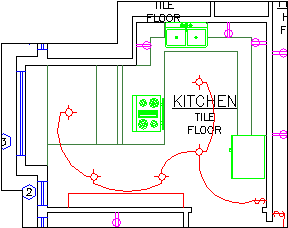
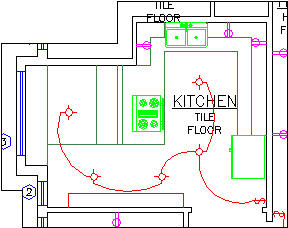
Kitchen with the xclip boundary visible

JTB XClipClean is an Xclip-cutter app for AutoCAD to clean up xrefs or blocks that been clipped so that the information that is outside the clip is removed. This is useful when you need to remove hidden geometry and minimize DWG file size.

AutoCAD allows blocks and xrefs to be clipped using the XCLIP command. Sometimes for different reasons you have to clean up the blocks or xrefs that have been clipped. JTB XClipClean can help you with that by deleting and trimming geometry that is outside the xclip boundary.

Revit does not handle xclipped blocks and xrefs so XClipClean can be useful to run on drawings before taking them into Revit.