AM4 vs AM5 – Learn the difference between AMD’s latest sockets


AM4 and AM5 back to back

AM4 and AM5 are the two most recent socket designs for AMD processors. Introduced in late 2022, AM5 is the latest revision and apparent future socket for all upcoming Ryzen processors on their roadmap. But how do AM4 vs AM5 compare?

AMD Sockets – A little History

The CPU socket is the physical connection between motherboard and processor, essentially defining how the CPU communicates with the rest of the system components and how power is delivered to the processor. While Intel is known for refreshing its CPU socket every 2-3 processor generations, AMD has taken a much more steady approach, using a a longer life cycle, focusing on significant feature and performance updates. Here’s a brief outline of the previous sockets.

Socket A Socket 754 Socket 939 AM2/AM2+ AM3/AM3+ AM4
Release Year 1999 2003 2004 2006 2009 2016
Pins 462 754 939 940 938 1331
CPU Width 32 bit 64-bit 64-bit 64-bit 64-bit 64-bit
Notable Chipsets AMD 750 AMD 750 580X 790 890FX X470
AMD 760 AMD 760 570X 780 990FX X570
Notable Processors Athlon Athlon 64 Athlon 64 Athlon II Athlon II Ryzen
Athlon XP Sempron AMD Athlon 64 X2 Phenom II

What is AM5

AM5

AM5 is AMD’s first consumer desktop socket refresh since AM4 in 2016. It supports the latest Ryzen 7000 series processors and X670 chipsets. While it’s currently relegated more to the enthusiast segment at the time of this writing, it’s slated to become AMD’s new socket standard as AM4 becomes phased out.

AM4 vs AM5 – How do Features Compare?

From a consumer standpoint, there are two very notable new features that AM5 offers that are worth considering, and one additional feature that will impact future top end CPU performance.

  1. DDR5 Support – AM5 is the first AMD socket to support DDR5. Unlike Intel’s newer Z690 and Z790 chipsets, the AM5 socket will not have a DDR4 option.
  2. PCIe – Like Intel’s new chipsets, AM5 now supports PCIe Gen 5 within the expansion slots as well as M.2 ports, meaning more throughput for next gen graphics and support for Gen 5 NVMe storage (when those become available).
  3. Higher TDP support – This feature doesn’t directly impact the performance of additional components or peripherals, but does affect the total performance headroom available for future AM5 processors. By supporting up to 230W total power delivery, AM5 processors can potentially offer significantly higher frequencies and total core count than its predecessors.

Here’s a full breakdown of AM4 vs. AM5 specs and features:

AM4 AM5
Processors Ryzen 1000 – 5000 series Ryzen 7000 series
Architecture Zen, Zen 2, Zen 3 Zen 4
Pins 1331 1718
Chipsets X470, X570 X670
Socket Power Delivery 142W TDP 230W TDP
Supported Memory DDR4 DDR5
PCIe Gen Gen 3.0, Gen 4.0 Gen 5.0

AM4 vs AM5 – Which to Choose?

AM4 vs AM5

Which platform is right for you really depends on what type of PC you’re in the market for. If top-end performance, support for the latest technology, and upgrade path are a priority, AM5 with Ryzen 7000 is the obvious choice. But if value is a priority, you can still find some deals on on Ryzen 5000 and AM4 based systems, though we anticipate that supply will be drying up soon.

Configure your AM5 based Z95A here.

“Raptor Z95 is a high-performing desktop well-suited for those who want the best in terms of components and performance.” – Tech Radar

The following two tabs change content below.

Josh has been with Velocity Micro since 2007 in various Marketing, PR, and Sales related roles. As the Director of Sales & Marketing, he is responsible for all Direct and Retail sales as well as Marketing activities. He enjoys Seinfeld reruns, the Atlanta Braves, and Beatles songs written by John, Paul, or George. Sorry, Ringo.


AutoCAD Text Arrows/Leaders Tips, Tricks & Styles! Multi Leader Tutorial


Hey Everybody,

Brandon here and this week we are looking at how to work with and use MultiLeaders or MLeaders in AutoCAD.

Whether you’re new to AutoCAD or just looking for a refresher, this video will help get you up to speed when adding arrows or leaders to our text.

If you’re unfamiliar, an MLeader is a piece of MText (Multi Line Text ie text that spans multiple lines in AutoCAD) that has a Leader (Line with an Arrow or other block at the end of it) and Arrow (or other shape) pointing to something in a drawing. MLeaders are typically used to callout or bring attention to a specific item, object or area of a drawing allowing additional detail to be added in the multiline text portion while accurately pointing to the specific object.

In today’s video, we walk through how to use and add an MLeader to a drawing along with how to choose and modify the various settings that go along with them. Everything from changing up the properties of the leader like the landing distance to adjusting the style, sizes, and much more!

We also get to try out a few cool tricks to keep your drawings looking organized and clean!

Master these great MultiLeader tricks to Save Time in AutoCAD. Draft faster and Smarter!

Check out: AutoCAD Text Arrows/Leaders Tips, Tricks & Styles! Multi Leader Tutorial | 2 Minute Tuesday

That’s all for today’s post, I hope you all were able to take something away from it and able to add a new tool to your CAD toolbox!

Be sure to subscribe and follow on Twitter @cadintentions to keep up to date and be the first to get updates on the newest videos, posts, and downloads.

As always, thank you so much for reading and watching, I am super excited to be back and posting regularly on the blog and hope you all will follow along.
Cheers and happy Drafting!

PS. In case you missed out or are interested in the brand new AutoCAD Fundamentals & Workflows Course, check it out here (Available for Instant Download NOW): https://gum.co/learnautocad


The following two tabs change content below.

Brandon is a Civil Designer, Aspiring Blogger/Creator, Husband, Father to two Amazing Kids and Tech Aficionado from a small town in Canada. He has been obsessed with design and technology since he can remember and working as a Civil Designer for nearly as long. Brandon’s blog and Youtube channel, CADIntentions.com has been his outlet and excuse for keeping up with new tech and trends in the CAD design world for the last 10 years growing to more than 60,000 subscribers and over 15,000,000 views, while also being the source of many great friendships and unique opportunities.

If you would like to Sponsor CAD Intentions or Work together in some way, Please visit my About Page and send me an email: http://cadintentions.com/about-me/


twins or just strangers with similar looks?


Apache Cassandra and Apache HBase are much like two strangers whom you meet in the street and think to be twins. You don’t really know them, but their similar height, clothes and hairstyles make you see no differences between them. However, after having a closer look, you realize that these two looked identical only at a distance.

Having numerous similarities, like being NoSQL wide-column stores and descending from BigTable, Cassandra and HBase do differ. For instance, HBase doesn’t have a query language, which means that you’ll have to work with JRuby-based HBase shell and involve extra technologies like Apache Hive, Apache Drill or something of the kind. While Cassandra can boast its own CQL (Cassandra Query Language), which Cassandra specialists find most helpful.

Cassandra vs. HBase

1. Data model

HBase

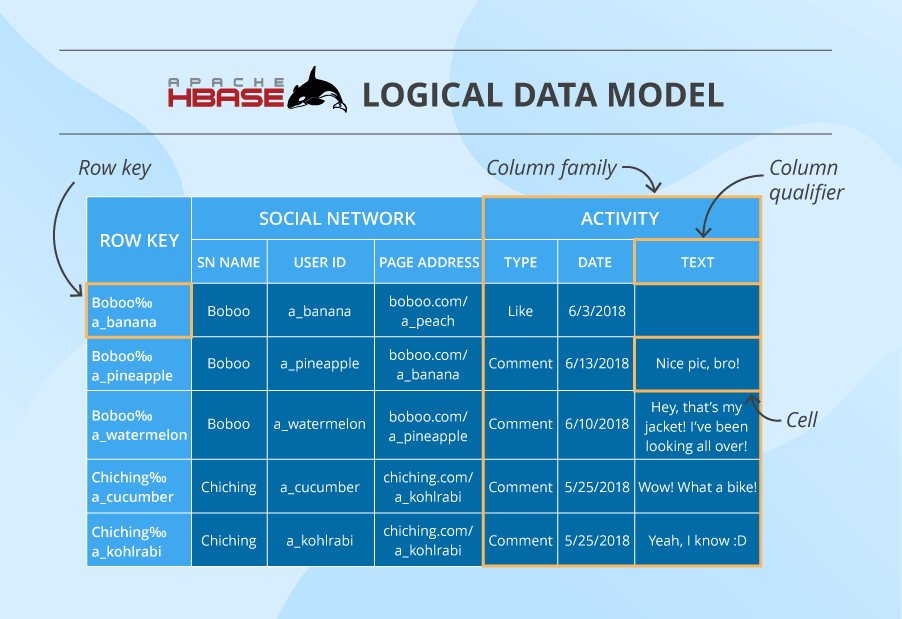
HBase data model

Here we have a table that consists of cells organized by row keys and column families. Sometimes, a column family (CF) has a number of column qualifiers to help better organize data within a CF.

A cell contains a value and a timestamp. And a column is a collection of cells under a common column qualifier and a common CF.

Within a table, data is partitioned by 1-column row key in lexicographical order, where topically related data is stored close together to maximize performance. The design of the row key is crucial and has to be thoroughly thought through in the algorithm written by the developer to ensure efficient data lookups.

Cassandra
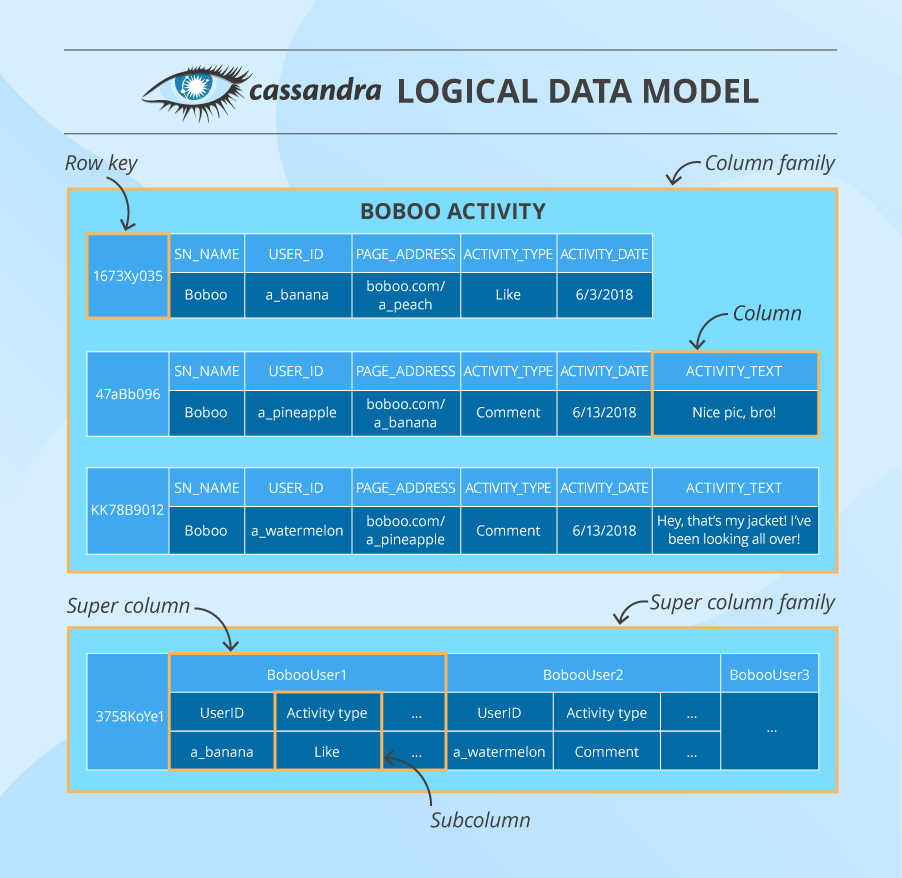
Cassandra data model

Here we have a column family that consists of columns organized by row keys. A column contains a name/key, a value and a timestamp. In addition to a usual column, Cassandra also has super columns containing two or more subcolumns. Such units are grouped into super column families (although these are rarely used).

In the cluster, data is partitioned by a multi-column primary key that gets a hash value and is sent to the node whose token is numerically bigger than the hash value. Besides that, the data is also written to an additional number of nodes that depends on the replication factor set by Cassandra practitioners. The choice of additional nodes may depend on their physical location in the cluster.

HBase vs. Cassandra (data model comparison)

The terms are almost the same, but their meanings are different. Starting with a column: Cassandra’s column is more like a cell in HBase. A column family in Cassandra is more like an HBase table. And the column qualifier in HBase reminds of a super column in Cassandra, but the latter contains at least 2 subcolumns, while the former – only one.

Besides, Cassandra allows for a primary key to contain multiple columns and HBase, unlike Cassandra, has only 1-column row key and lays the burden of row key design on the developer. Also, Cassandra’s primary key consist of a partition key and clustering columns, where the partition key also can contain multiple columns.

Despite these ‘conflicts,’ the meaning of both data models is pretty much the same. They have no joins, which is why they group topically related data together. They both can have no value in a certain cell/column, which takes up no storage space. They both need to have column families specified while schema design and can’t change them afterwards, while allowing for columns’ or column qualifiers’ flexibility at any time. But, most importantly, they both are good for storing big data.

2. Architecture

Cassandra has a masterless architecture, while HBase has a master-based one. This is the same architectural difference as between Cassandra and HDFS.

This means that HBase has a single point of failure, while Cassandra doesn’t. An HBase client does communicate directly with the slave-server without contacting the master, which gives the cluster some working time after the master goes down. But, this can hardly compete with the always-available Cassandra cluster. So, if you can’t afford any downtimes, Cassandra is your choice.

However, to ensure availability, Cassandra replicates and duplicates data, which leads to data consistency problems. This makes Cassandra a bad choice if your solution depends heavily on data consistency, unlike the strongly consistent HBase. Because the latter writes data only to one place and always knows where to find it (data replication is done ‘externally’ in HDFS).

Besides, Cassandra’s architecture supports both data management and storage, while HBase’s architecture is designed for data management only. By its nature, HBase relies heavily on other technologies, such as HDFS for storage, Apache Zookeeper for server status management and metadata. And again, it needs extra technologies to run queries.

3. Performance

Cassandra’s and HBase’s on-server write paths are very much alike. There’re only slight differences: names for data structures and the fact that, unlike Cassandra, HBase doesn’t write to the log and cache simultaneously (it makes writes slower).

On the higher architectural level, HBase has even more disadvantages:

  1. Before getting to the needed server, the client has to ‘ask’ Zookeeper which server has the hbase:meta table containing info about all tables’ locations in the cluster. Then, the client asks the meta-table-holding server ‘who’ stores the actual table it needs to write to. And only after that the client writes the data to the needed place. If such writes (and also reads) are frequent, this info is of course cached. But if a table region is moved to another server, the client needs to do the full round again. While Cassandra’s data distribution and partitioning based on consistent hashing is much cleverer and quicker than that.
  2. As soon as the in-HBase write path ends (cached data gets flushed to the disk), HDFS also needs time to physically store the data.
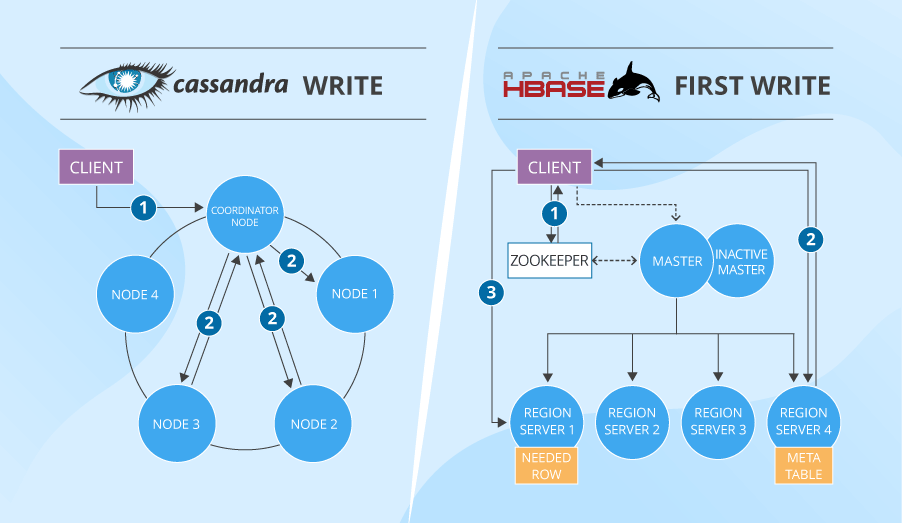
Cassandra vs. HBase write

Moreover, the actual measurements of Cassandra’s write performance (in a 32-node cluster, almost 326,500 operations per second versus HBase’s 297,000) also prove that Cassandra is better at writes than HBase.

If you need lots of fast and consistent reads (random access to data and scans), then you can opt for HBase. It writes only on one server, so there is no need to compare different nodes’ data versions. HBase servers also don’t have too many data structures to check before finding your data. You may think that HBase’s read is inefficient since the data is actually stored in HDFS, and HBase needs to get it out of there every time. But HBase has a block cache that has all frequently accessed HDFS data, plus bloom filters with all other data’s approximate ‘addresses,’ which speeds up data retrieval. Essentially, HBase and HDFS’s index system is multi-layered, which is much more efficient than Cassandra’s indexes (check out our article on Cassandra performance to find out more about reads).

If you’ve read that Cassandra is also very good at reads, you may be bewildered by the conclusion that HBase is better. Especially if you saw this benchmarking experience where Cassandra handles 129,000 reads per second against HBase’s just 8,000 (in a 32-node cluster). The thing is, these reads are targeted (based on known primary keys) and, chances are, they are also quite inconsistent. So, Cassandra’s huge numbers fade, if we’re speaking about scans and consistency.

4. Security

Like all NoSQL databases, HBase and Cassandra have their security issues (the main one being that securing data spoils performance making the system heavy and inflexible). But it’s safe to say that both databases have some features to ensure data security: authentication and authorization in both and inter-node + client-to-node encryption in Cassandra. HBase, in its turn, provides the much-needed means for secure communication with other technologies it relies upon.

A bit more detail:

Both Cassandra and HBase provide not just database-wide access control but allow a certain level of granularity. Cassandra enables row-level access and HBase goes as deep as cell-level. Cassandra defines user roles and sets conditions for these roles which later determine whether a user can see particular data or not. While HBase has an inverse ‘move.’ Its administrators assign a visibility label to data sets and then ‘tell’ users and user groups what labels they can see.

5. Application areas

Judging by how Cassandra and HBase organize their data models, they are both really good with time-series data: sensor readings in IoT systems, website visits and customer behavior, stock exchange data, etc. They both store and read such values nicely. Besides that, scalability is the property they both have: Cassandra – linear, HBase – linear and modular ones.

However, when it comes to scanning huge volumes of data to find a small number of results, due to having no data duplications, HBase is better. For instance, this reason applies to HBase’s ability to handle text analysis (based on web pages, social network posts, dictionaries and so on). Plus, HBase can do well with data management platforms and basic data analysis (counting, summing and such; due to its coprocessors in Java).

Cassandra is good for huge volumes of data ingestion, since it’s an efficient write-oriented database. With it, you’ll build a reliable and available data store. In addition, Cassandra enables you to create data centers in different countries and keep them running in sync. Besides, if you couple Cassandra with Spark, you can also achieve good scan performance.

But the main difference between applying Cassandra and HBase in real projects is this. Cassandra is good for ‘always-on’ web or mobile apps and projects with complex and/or real-time analytics. But if there’s no rush for analysis results (for instance, doing data lake experiments or creating machine learning models), HBase may be a good choice. Especially if you’ve already invested in Hadoop infrastructure and skill set.

Cassandra vs. HBase – a recap

Cassandra is a ‘self-sufficient’ technology for data storage and management, while HBase is not. The latter was intended as a tool for random data input/output for HDFS, which is why all its data is stored there. Besides, HBase uses Zookeeper as a server status manager and the ‘guru’ that knows where all metadata is (to avoid immediate cluster failures, when the metadata-containing master goes down). Consequently, HBase’s complex interdependent system is more difficult to configure, secure and maintain.

Cassandra is good at writes, whereas HBase is good at intensive reads. Cassandra’s weak spot is data consistency, while HBase’s pain is data availability, although both try to mitigate the adverse consequences of these problems. Also, both don’t stand frequent data deletes and updates.

So, Cassandra and HBase are definitely not twins but just two strangers with a similar hairstyle. To choose between the two, you should thoroughly analyze your tasks. And then, try to find a way to strengthen the database’s weak spots without affecting its performance.


Need professional advice on big data and dedicated technologies? Get it from ScienceSoft, big data expertise since 2013. 

Roblox ML Engineer Xiao Yu Receives Test of Time Award


We are pleased to congratulate Roblox machine learning engineer Xiao Yu and his co-authors on receiving the Test of Time award at the 17th ACM International Conference on Web Search and Data Mining (WSDM 2024). The Test of Time Award is a mark of historical impact and recognition that the research has changed the trends and direction of the discipline. It recognizes a research publication from 10 years ago that has had a lasting influence.

The winning paper, “Personalized Entity Recommendation: A Heterogeneous Information Network Approach” was first presented at WSDM 2014, while Yu was a researcher at the University of Illinois at Urbana-Champaign. Yu joined Roblox in 2022 and has worked on natural language, computer vision, large language models, and Generative AI, including our recent work on real-time AI chat translation and real-time voice moderation

Roblox ML Engineer Xiao Yu

Yu says the award-winning paper “introduces the concept of meta-path-based latent features as the representations for users and items. This was before representation learning became state-of-the-art for recommender systems. Though it predates the widespread use of embeddings in heterogeneous networks and recommender systems, the observations and philosophy presented in this paper inspired many researchers to reexamine this problem and sparked a wave of innovative research in this domain.”

The research published by Yu and colleagues has gained significant recognition over the past decade as recommendation engines have become increasingly ubiquitous. “By incorporating diverse relationship information, our method personalizes recommendations to a greater extent, leading to more accurate, relevant, and customized suggestions for users. This is crucial in today’s information overload scenario, where people are bombarded with irrelevant recommendations,” Yu says.

“Prior to this paper, graph-based hybrid recommender systems often utilized a single type of relationship, like whether a user had purchased a certain item before. This was one of the first approaches to leverage the relationship heterogeneity within a network. By modeling various relationships, the proposed recommender system can capture a richer and more nuanced understanding of user preferences and item characteristics.”

Learn about recent AI research at Roblox here.

Jack Dorsey departs Bluesky board


Bluesky’s most prominent backer has left its board.

On Saturday, Jack Dorsey posted on X about grants for open protocols from his philanthropic Start Small initiative. This prompted someone to ask Dorsey if he was still on the Bluesky board, and he responded with a terse “no.” Dorsey did not answer any of the follow-up posts asking him to explain his departure.

It’s not clear when Dorsey left the board; as of Sunday morning, Bluesky’s corporate FAQ still identified him as a board member. Later that afternoon, the company published the following statement:

We sincerely thank Jack for his help funding and initiating the bluesky project. Today, Bluesky is thriving as an open source social network running on atproto, the decentralized protocol we have built.

With Jack’s departure, we are searching for a new board member for the Bluesky public benefit company who shares our commitment to building a social network that puts people in control of their experience. More to come!

Dorsey first announced Bluesky in 2019, back when he was still CEO of Twitter. He wrote that Twitter (now X) was “funding a small independent team of up to five open source architects, engineers, and designers to develop an open and decentralized standard for social media.”

Since then, Bluesky has become an independent public benefit corporation, led by CEO Jay Graber, with VC backing, and it opened to the general public in February.

Dorsey appears to have deleted his Bluesky account at some point last year, though his departure was only acknowledged at the time by a smattering of social media posts. (He also deleted his Instagram account.) Despite this, he remained the biggest name associated with the project.

Back on X, Dorsey has had a pretty active weekend. In addition to dropping corporate news, he’s also weighed in on the beef between Drake and Kendrick Lamar, unfollowed nearly every other account, and posted, “don’t depend on corporations to grant you rights. defend them yourself using freedom technology. (you’re on one)”

This story has been updated with a statement from Bluesky confirming Dorsey’s departure.


Get Into the Spirit with Free Holiday GIFs and Images


Have a little fun this holiday season with millions of free stock images and GIFs to add to your emails.

Adding fun new images and GIFs is a simple and easy way to bring the holidays into your email marketing. And the best part is that you can quickly drop them into your emails through FeedBlitz’s Visual Mailing Editor (VME)!

But where do these images and GIFs come from, you ask? FeedBlitz is directly integrated with Unsplash, Tenor, and Pixabay — opening the door to millions of free-use images, graphics, illustrations, and GIFs to add to your emails.

Unsplash offers 3+ million high-resolution images, all uploaded by photographers and free for you to use. By searching the “Royalty-Free Images“ option in your image library, you can search and add any of your choosing.

Whether you opt for funny, scenic, explosive, or sentimental, Tenor has you covered in their massive selection of GIFs. Searchable in your FeedBlitz image library under Animated GIFs, these are added to your template in the same manner images are and will play automatically for subscribers when viewing your email. The below GIFs are both from Tenor and can be found in your FeedBlitz image library:

If you’re interested in adding images in the background of your email (to add content on top of the images as some of our templates do), search under Vectors & Illustrations to connect to Pixabay.

And if you want to send a full holiday-themed email, you can start with one of our themed Quick Start email templates available in your template library. Search for your keyword, choose your template, and start adding content and customizing away!

Not interested in a themed template? No problem. Your Template Library has 100+ Quick Start templates covering various themes to choose from.

These images, GIFs, and more are available to all FeedBlitz clients. This is just one of the many perks of emailing with FeedBlitz!

Not a FeedBlitz client? Head to this page to start your free trial. Questions? Feel free to reach out with any questions through our Support Page. While live support is available Monday to Friday, 9 AM to 5 PM Eastern, you can always find helpful information 24-7 at the resources linked here.

Best budget gaming PC build under $500 in 2024


Now you’ve taken a look at our selection of components, you should have a pretty good idea of whether or not this build suits your needs. We’ve discussed exactly what this build offers in terms of performance, and have gone into more detail on how each of the hardware choices impacts this build. Now, let’s go over the areas that need to be considered before buying this build.

What you get for your $500

One of the most important areas to consider before any PC purchase is your budget. By that, we mean will you be able to build a PC that meets your performance requirements with the funds you have set aside. $500 is a decent chunk of money, and whilst a $500 gaming PC won’t be powering through 4K at 100FPS, it represents a simpler PC that gives you incredible value for money. If you need more power, it’s always better to save up and shoot for something like a $1000 gaming PC. Buying the parts now and then upgrading later will cost you more in the long run.

As you can imagine, putting together the best custom PC build for under $500 was no easy task. Many compromises were made along the way to be able to extract the maximum level of performance out of this build. It is entirely possible to craft a gaming PC with a dedicated GPU at this price point. The performance difference between the $400 and the $500 builds is considerable as you move away from integrated graphics. Around the $500 mark, large M2 SSDs and 16GB of RAM are now achievable.

The case isn’t our favorite on the market, but it’s a great affordable option. Even though the case may not be one of the best, we still opted for one that was user-friendly for first-time builders without sacrificing airflow and the Cooler Master MasterBox Q300L fits this perfectly. It’s incredibly important to us that we select user-friendly components that make building a PC as simple as possible. 

Performance

You can expect this $500 build to handle 1080p/60FPS gaming across a few AAA titles with higher settings. This RX 6600 will also handle a lot of popular esports games with ease, giving you a wide variety of entry-level options. High FPS is obtainable in esports titles with lowered settings, so overall this budget $500 PC is very versatile. We have bolstered performance with the included 16GB of RAM, a solid amount for gaming, and an SSD storage device. You can expect snappy boot times for Windows and your games, along with some future-proofing from the RAM.

Non-gaming performance

Remember, this build isn’t solely designed for gaming, although budget gaming is its main focus. We’ve also taken into consideration its ability to handle stressful workstation tasks and multi-core processes. Thanks to the impressive CPU and RAM pairing this build should be more than sufficient to handle tasks such as live streaming and video editing with minimal interruption.

Of course, browsing and media tasks don’t phase this build, however, where you will start to see diminishing performance is when rendering large video files. If editing is part of this $500 PC’s intended workload, we would recommend upgrading the processor to something a little beefier, like an i5-12600F.

$500 Custom Gaming PC vs $500 Prebuilt

Building your gaming PC is always going to offer more value, however, we understand that not everyone wants to tackle the challenge of a custom gaming PC. Well, this is where a $500 prebuilt gaming PC could be worth your while but there are a few things to consider before you pull the trigger on a prebuild.

The first thing to note is that you are probably never going to get a prebuilt gaming PC that offers the same performance at the same price. If you were to spend your $500 on a prebuilt, you are likely to see a lower-end CPU with fewer cores/threads, possibly smaller capacity RAM and storage, and lesser quality PC cases and supplies. It’s also a given that you’d get a lesser GPU, the main driver behind your gaming performance.

The reason is not because prebuilt manufacturers are crooks, it’s because prebuilt manufacturers are a business, and they make money through prebuilt PCs by adding a markup (labor costs). This is understandable but it can impact the value you get, you probably know all too well that at the lower end, every penny counts.

Financing and purchase options

Nowadays, there is more than one way to pay for your PC, there are several finance options available on most retailers’ websites where you can purchase your parts. you could build a $500 PC and finance an upgrade option, or the whole build entirely, although, we don’t recommend taking out finance on a $500 build, it’s better to spread the cost of a larger purchase.

Note: There are many kinds of finance, some of which have a higher interest rate than others. While some lenders offer 0% interest we aren’t recommending you get into debt, and it is your decision whether or not you wish to get into finance as this comes with risk.

If finance isn’t for you, there’s always a sea of second-hand parts available to purchase. The biggest influx of parts usually occurs when major releases happen, it’s this time that people choose to upgrade and list their used hardware to regain some capital. There is no guarantee that the part you are going to get is working, however, we recommend you pick the part up in person and test it if possible. The only components we do not recommend you purchase second-hand are power supplies and hard drives. SSDs and M.2 drives are much more robust and have a longer life span, so it’s okay to pick those up secondhand.

How to upgrade your $500 gaming PC

Another major factor to consider when building a custom PC is how easily you can upgrade it down the line. We have built this $500 build with upgradability in mind, choosing the LGA 1700 socket means you can upgrade to any CPU up to the Intel Core i9-14900K theoretically – not that’ we’d recommend that on the H610 chipset, as it lacks certain features and seems like a bit of a waste to populate it with such a high-end CPU. Since you’d have to upgrade your Motherboard anyway, you might as well upgrade your motherboard and memory.

We recommend the i5-13600K as the next logical CPU update, it’s up to you if you want to keep the same motherboard and stay on DDR4, or upgrade to a better one for DDR5 and a better chipset. Of course, this will come at a significant cost. But that’s a future problem.

Overclocking on a $500 budget

Overclocking is a way of increasing the performance of your build by manually boosting the clock speed, voltage, and timings of your hardware, this can be done at no extra cost to you. However, not all hardware is geared toward overclocking.

You need to exercise caution when overclocking your hardware, as pushing your build too far can only lead to overall instability and damage on the extreme end. The Intel chip we have chosen has been pretty well optimized, so extracting any further real-world performance might be a little tricky – but not impossible.

Build a gaming PC by price

Check out some of our price-focused custom PC build guides below.

Other Related Custom PC Guides:

Related prebuilt gaming PC guides

Check out some of our related prebuilt PC guides below.


Next Week on Xbox: New Games for May 6 to 10


Welcome to Next Week on Xbox! In this weekly feature we cover all the games coming soon to Xbox Series X|S, Xbox One, Windows, and Game Pass! Get more details on these upcoming games below and click their profiles for further info (release dates subject to change). Let’s jump in!


Xbox Live

Brocula

DESTROYER DOGGO


Brocula – May 7

Embark on an epic journey as Brocula, a vampire awoken from a 500-year slumber in a world unrecognizable to him. Stripped of his wealth, he must navigate the daunting maze of capitalism, taking on part-time jobs at the local garage, coffee shop, and restaurant to earn a meager living.


Xbox Live
Xbox Play Anywhere

15in1 Solitaire

Silesia Games Sp. z o.o.


15in1 Solitaire – May 8
Xbox Play Anywhere

Dive deep into the world of Solitaire in the largest Solitaire combo released yet. The common goal of all the solitaire variants is to eliminate all the cards, which are on the table. Move them to the corresponding pile based on the rules of particular mode. Every variant have different rules and allows different card movements.


Xbox Live

Gift (Xbox Series X|S Edition)

Toydium Inc., Million Edge Inc., Bushiroad Inc.


$24.99

Gift – May 8
Optimized for Xbox Series X|S

An old man wakes up and finds himself on a luxury cruise ship. He encounters passengers that he feels nostalgic for as he attempts to escape from the sinking ship. Make strategic use of these changes to construct an escape route.


Xbox Live

I Am Your President

Ultimate Games S.A.


I Am Your President – May 8

Get into the character of Mister President and choose the answers that best suit the situation. Different options can help you make allies, but also enrage your previous supporters. Be careful with words and make sure that you don’t neglect any of the prominent groups or important people… or do and deal with the problems later.


Xbox Live

INDIKA

11 bit studios


Indika – May 8
Optimized for Xbox Series X|S

A third-person, story-driven game set in a strange world where religious visions clash with harsh reality. It tells the story of a young nun who sets off on a journey of self-discovery with the most unusual, horn-headed companion by her side.


Xbox Live
Xbox Play Anywhere

MIDNIGHT Remastered

Mad Jackal Games


$1.99

Midnight Remastered – May 8
Xbox Play Anywhere

A remastered version of the 2017 web game Midnight, where you collect the seven letters of the deadly sins and repent your past offences in this horror game. Featuring a non-linear storyline where the game takes place after major events, you must collect and read optional documents if you wish to understand the story.


Xbox Live

PAC-MAN Mega Tunnel Battle: Chomp Champs

Bandai Namco Entertainment America Inc.


Pac-Man Mega Tunnel Battle: Chomp Champs – May 8
Optimized for Xbox Series X|S / Smart Delivery

Pac-Man Mega Tunnel Battle: Chomp Champs is an online-only Pac-Man eating competition! Eat your way through multiple interconnected mazes using Power Pellets and a variety of Power Items to chomp the Ghosts and opponent Pac-Man players! Be the last Pac standing at the end of each match in this 64-player battle royale to be the Chomp Champ!


Xbox Live

Prison of Illusion

DERIK D.F


Prison of Illusion – May 8

A young white-haired vampire was walking through the darkness of the forest and saw a large castle on top of the mountain. He then decides to go inside and explore the environment. But he discovers that the magic present in the castle makes him trapped. Help the young vampire overcome traps, challenges and find the way out in this platforming adventure.


Xbox Live

Tennis Elbow 4

Mana Games


Tennis Elbow 4 – May 8

Created by and for tennis fans, Tennis Elbow 4 is a tennis simulation with an easy and intuitive learning curve, but with exceptional gameplay depth. Show all your tactical skills, use an iron mind and quick reflexes, as well as a sharp eye to guess the ball trajectories, all of this to choose your next strike wisely.


Xbox Live

The Prisoner of the Night

Eastasiasoft Limited


The Prisoner of the Night – May 8
Optimized for Xbox Series X|S / Smart Delivery

The Prisoner of the Night is a side-scrolling action platformer presented in nightmarish 2.5D style, where the lovely girl Nartide must survive terrible monsters and traps in the darkest, scariest night of her life. Prepare to guide little Nartide through 159 insane and terrifying stages, where every step could lead to a painful death!


Xbox Live
Xbox Play Anywhere

CorpoNation: The Sorting Process

Playtonic Friends


$14.49

$11.59

CorpoNation: The Sorting Process – May 9
Optimized for Xbox Series X|S / Smart Delivery / Xbox Play Anywhere

You have been tasked with sorting the Ringo CorpoNation’s genetic samples. With the credits that you earn, you can shop, game and pay your bills on time. Rogue workers may try to entice you into betraying your beloved employer, but we know you’ll give 110%.


Xbox Live

Crow Country

SFB Games


Crow Country – May 9
Optimized for Xbox Series X|S

A survival horror game where you’ll test yourself against puzzles and riddles as you investigate the eerie tranquility of the abandoned theme park. Don’t be deceived by the whimsical surroundings; something is awfully wrong in Crow Country.


Xbox Live
Xbox Play Anywhere

Little Kitty, Big City

Double Dagger Studio


Little Kitty, Big City – May 9
Game Pass / Optimized for Xbox Series X|S / Smart Delivery / Xbox Play Anywhere

Will you make your way home or will you explore what the big city has to offer first? Getting home is obviously your main priority. Obviously. Well, it’s one of your priorities. Maybe more of a guideline… It’s definitely on your To-Do list somewhere! But first? Exploration!


Xbox Live

Rainbow Cotton

ININ GAMES


$19.99

Rainbow Cotton – May 9

Originally released in 2000 on Sega’s Dreamcast, Rainbow Cotton takes you on an arcade-inspired journey through a number of fantastically designed, enchanting stages. Clothed in charming 3D graphics these levels include massive bosses as well as alternative routes to explore.


Xbox Live

Aquarium Designer

RockGame S.A., Games Operators


Aquarium Designer – May 10
Optimized for Xbox Series X|S / Smart Delivery

Aquarium Designer gives you an opportunity to create the aquarium of your dreams! Become a professional whose job is to design it, build it, and fill it with the various underwater wildlife! All types, all sizes – your creativity is your only limit.


Xbox Live

Chronicles of Magic: Divided Kingdom (Xbox Version)

Artifex Mundi


Chronicles of Magic: Divided Kingdom – May 10
Optimized for Xbox Series X|S / Smart Delivery / Xbox One X Enhanced

Long ago, the twin kingdoms destroyed each other in war. During your dangerous journey you will meet the inhabitants of both the White and Black Kingdoms. It won’t be immediately clear who is trustworthy. The boundaries between good and evil, magic and technology, and black and white will begin to blur in this hidden object adventure game.


Xbox Live

Farlands Journey

Desert Water Games


Farlands Journey – May 10
Optimized for Xbox Series X|S / Smart Delivery

A colorful classic adventure platformer game where you play as a little witch fighting the evil forces. Embark on an adventure to recover the stolen heart of your Magical Academy. Discover various magic spells and hats with unique effects. Defeat monsters and their bosses. Solve puzzles by combining platforming skills and magical spells. Collect gems and spend them on upgrades in Magical Academy.


Xbox Live

Kinduo 2 – Frostbite

Ratalaika Games S.L.


Kinduo 2 – Frostbite – May 10
Optimized for Xbox Series X|S / Smart Delivery

A local co-op game where two elemental friends with unique abilities need to help each other to overcome obstacles! Create blocks of ice, burn or melt things, and combine your skills to create plants in this cute and colorful co-op game! Each character has their unique skill which makes the game more challenging and fun.


Xbox Live

Paper Flight – Future Battles

EpiXR Games


$9.99

Paper Flight – Future Battles – May 10

jump into the role of a little paper plane that is supposed to rescue the world from evil balloon demons by dashing through them. You are free to enjoy the game any way you see fit as the only enemies of the game are balloons which generally are not well known for being too dangerous.


Xbox Live

THE ORIGIN: Blind Maid

Waraní Studios


The Origin: Blind Maid – May 10
Optimized for Xbox Series X|S / Smart Delivery

Decades after the events that generated The Origin, a corrupt politician on the run from justice takes refuge in an inhospitable region plagued by terrible legends. His assistant disappears with the car keys he needs to escape. During the search for him, he will be confronted with space and time, being forced to return to the past and find the Origin of the Blind Maiden as he seeks redemption from him.


Xbox Live

WW2 Rebuilder

PlayWay S.A.


WW2 Rebuilder – May 10
Optimized for Xbox Series X|S

It’s 1945, the end of World War II. Now people must leave their hometowns to rebuild their countries. Motivated by different reasons, they get set on the same quest – to repair and renovate places completely destroyed during the war.


Hive Wins Best Remote Production Product of the Year at NAB


Pioneering Excellence at NAB
At this year’s NAB Show, the spotlight was on PTZOptics’ Hive, which clinched the “Best Remote Production Product of the Year.” This prestigious accolade highlights Hive’s innovative approach, blending state-of-the-art camera control with efficient cloud-based operations to transform remote video production. In this article, we dive into the key features that garnered Hive this top honor, illustrating its pivotal role in advancing remote production capabilities and setting industry benchmarks for quality and flexibility in video production.

Centralized Control for Streamlined Workflows
Hive by PTZOptics dramatically enhances remote video production workflows through its centralized control system. This platform enables teams to synchronize seamlessly, whether they are on-site or dispersed across different locations, bringing everyone onto the same page in real-time. By embedding these capabilities directly into PTZOptics cameras, Hive eliminates the need for additional hardware, making setup quicker and reducing the complexity typically associated with remote productions. This not only boosts efficiency but also opens up creative avenues, allowing producers to focus on crafting superior content.

Hive-Linked Hardware: A Seamless Integration
The PTZOptics Hive system marks a significant leap forward by embedding essential control features directly into the cameras. This integration facilitates instant access to cloud-based controls without the necessity for extra hardware or software, streamlining the setup process. Such direct integration not only simplifies the technical side of video production but also enhances reliability, ensuring that producers can focus on creativity and content delivery without technical distractions.

Advanced Camera Control: Remote Mastery
PTZOptics Hive elevates remote video production with unparalleled camera control capabilities accessible from any global location. Its suite of advanced tools for framing and color correction empowers operators to optimize visual output effortlessly. With features designed to automate complex camera movements, Hive ensures cinematic quality is easily achievable, even in dynamic filming environments. This level of control is essential for maintaining broadcast quality from afar, making Hive a critical tool for any remote production setup.

Innovative Features: Enhancing Production Dynamics
Hive’s innovative features significantly enhance the capabilities of remote video production. The platform integrates cutting-edge tracking algorithms and facial recognition technology, providing industry-leading performance across any PTZ camera brand. These features allow for precise auto-tracking and automated camera movements, simplifying complex shot compositions. Additionally, Hive’s real-time color adjustments and advanced color matching tools ensure a consistent and professional look across multiple camera feeds, elevating the overall production quality.

Cloud Control and Low Latency: Effortless Remote Management
PTZOptics Hive revolutionizes remote production with its cloud control capabilities, ensuring seamless management of camera settings from any global location with impressively low latency. Sub-300ms latency rates make adjustments almost instantaneous, mirroring the responsiveness of on-site control. This crucial feature supports real-time decision-making during live broadcasts, enhancing the production’s overall flow and reducing the challenges typically associated with remote video setups.

Enhanced Connectivity and Compatibility: Bridging Devices and Platforms
Hive’s connectivity and compatibility features significantly broaden the scope of its utility in remote production. Supporting RTMP streaming, Hive enables direct live broadcasts to platforms like YouTube, Facebook, Twitch, and others, facilitating wider audience engagement. Additionally, its compatibility with NDI® outputs allows for integration into popular production software like OBS and vMix. This flexibility makes Hive an ideal solution for a variety of production scenarios, accommodating a vast array of equipment and enhancing workflow efficiency across different brands and technologies.

User-Friendly Interface and Customization: Streamlining Control
Hive’s user-friendly interface is designed to simplify the complexities of remote production. It accommodates various camera makes and models, ensuring a smooth, intuitive control experience for users. The customization features are equally impressive, offering the ability to set up personalized hotkeys and control interfaces, whether using an Xbox controller or StreamDeck. This adaptability enhances the operational efficiency of productions, allowing quick, tailored adjustments that fit the specific needs and preferences of the production team.

Conclusion: Setting New Standards in Remote Video Production
PTZOptics’ Hive has not only won accolades but has also fundamentally changed the landscape of remote video production. By seamlessly blending advanced camera control, cloud-based operations, and user-friendly interfaces, Hive enables broadcasters to produce high-quality content from anywhere in the world. Its innovative features, like real-time tracking and color correction, support dynamic and professional productions, making it a pivotal tool for industry professionals looking to push the boundaries of what remote production can achieve. Thank you to Paul Richards from PTZOptics for giving us this in depth look at Hive.

Learn more about PTZOptics Hive below:

Learn more about PTZOptics below:

How to automatically run one CS file on Visual Studio Code using “CMD + B”?


I have a folder called z-lib structured as:

z-lib
   cpp
   java
   python
   csharp
         a.cs
         ...

I want to run a.cs file using CMD + B keyboard combo on VS Code (macbook).

Tried

In my settings.json, I have so far set up:

"csharp": "dotnet build $dir$fileName && dotnet run $dir$fileName",

which returns:

MSBuild version 17.9.8+b34f75857 for .NET
/Users/4a/Downloads/z-lib/csharp/a.cs(1,1): error MSB4025: The project file could not be loaded. Data at the root level is invalid. Line 1, position 1.

Build FAILED.

/Users/4a/Downloads/z-lib/csharp/a.cs(1,1): error MSB4025: The project file could not be loaded. Data at the root level is invalid. Line 1, position 1.
    0 Warning(s)
    1 Error(s)

Time Elapsed 00:00:00.04

also tried:

    // "csharp": "cd $dir && dotnet run --project $dir$fileName",
    // "csharp": "cd $dir && dotnet build $fileName && dotnet run $fileName",
    // "csharp": "dotnet build $fileName && dotnet run $fileNameWithoutExt",

a.cs

using System;

public class b {
    public static void Main() 
    {
        Console.WriteLine("Hello world!");
    }
}

How do I automatically run a cs file using CMD + B? What do I change in the settings.json?