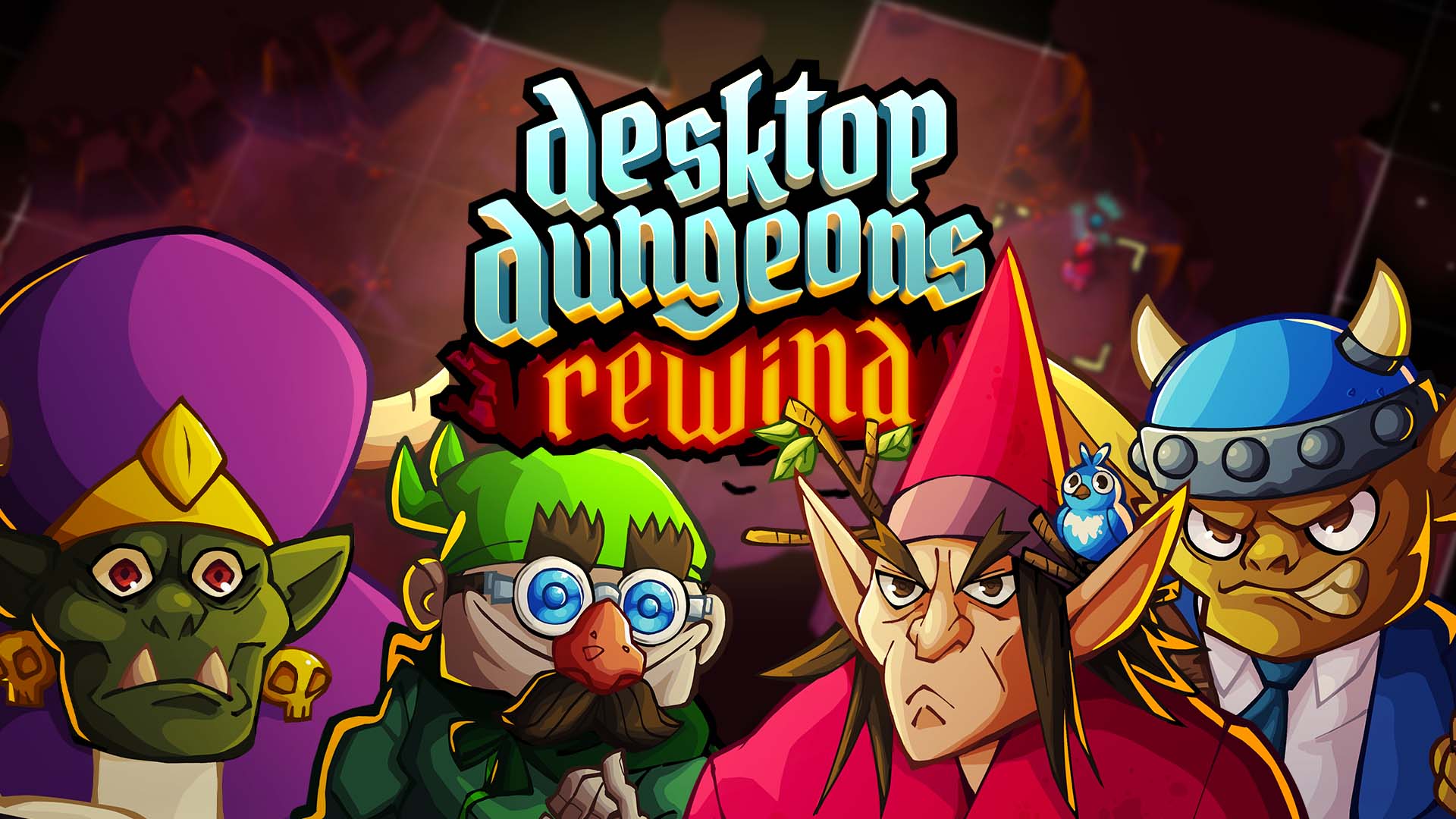
I’m Jean-Luc, Community Manager for Desktop Dungeons: Rewind, here to give you some advice for kickstarting your kingdom and dungeon diving.
The Rundown
Desktop Dungeons: Rewind is a turn based roguelike where every move matters. Every dungeon has a boss (or several) that must be defeated to return to your kingdom with the spoils. Resources are limited, but everything is a resource.
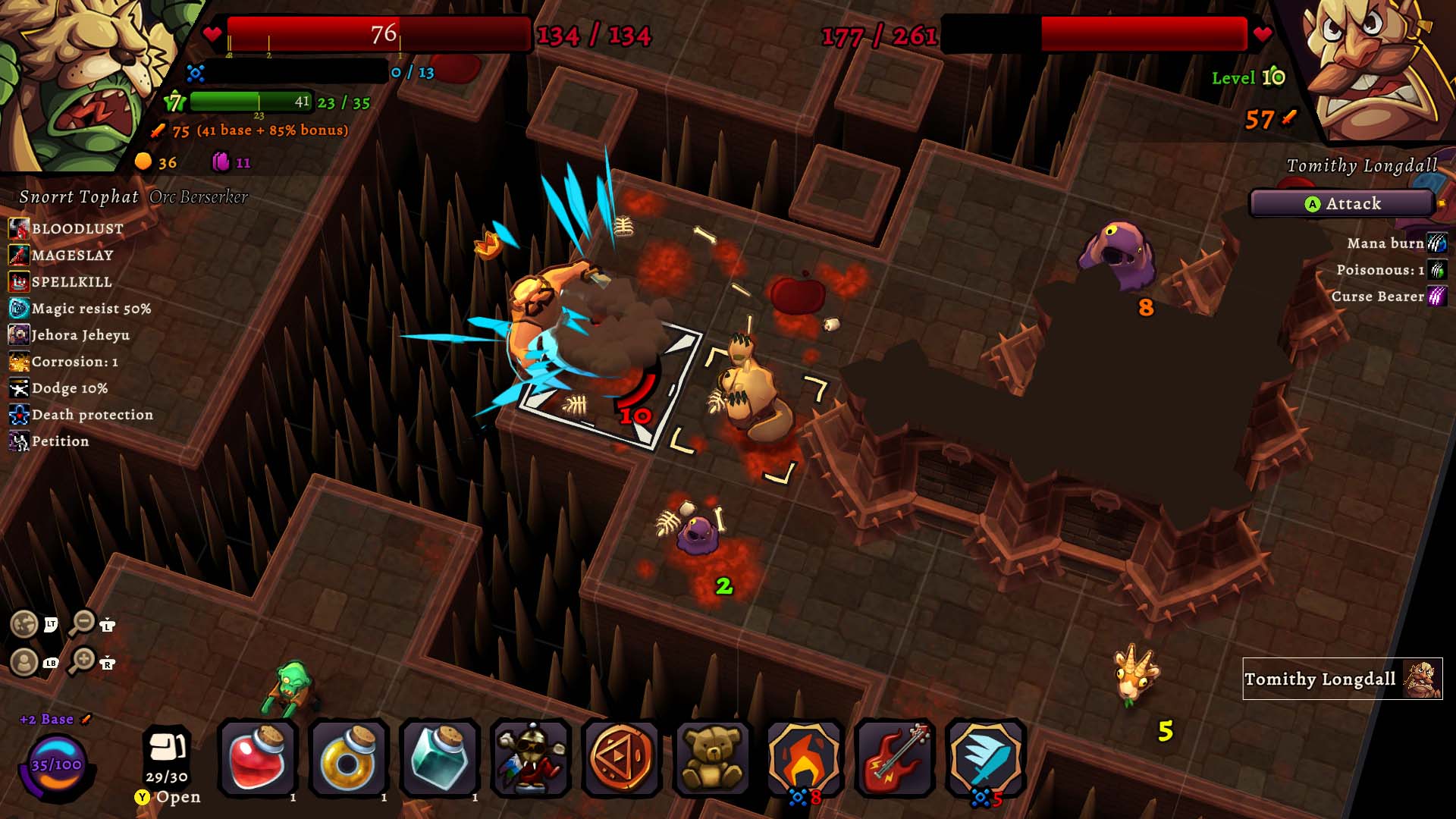
Exploring darkness heals you and your enemies. The amount healed is based on the level of whatever is healing. This is your main way of regaining health and mana, so save it when possible!
The boss is the objective. You’ll need a lot of firepower to take them down, so be ready to spike as hard as possible through items, conversions, and level-ups while fighting them!
Your Kin and Class will change the way you play. Halflings will pump you full of potions, while Goblins can skyrocket your XP. Sorcerers sling spells, while Berserkers beat the shhh- will to live out of enemies.
Effective Dungeoneering
Alright, but how do we make the most out of our resources? Good question! Look at you go.
Fight higher level enemies. In video game, fight enemy to get XP. Yes, knowledge. Fight stronger enemy? Get stronger XP. Very yes! Simple. Enemies are limited, so getting the most out of them is important.
Convert items you no longer need. Converting an item or Glyph destroys it, but will give you Conversion Points! At a certain amount of conversion points, you’ll gain a bonus based on your Kin.
Leveling up is important. Not only for the long term goal of not being turned to paste by a particularly peeved Goat, but for the full health and mana restore it gives! Leveling up will also remove the Poison and Manaburn conditions.
Kingdom Cultivation
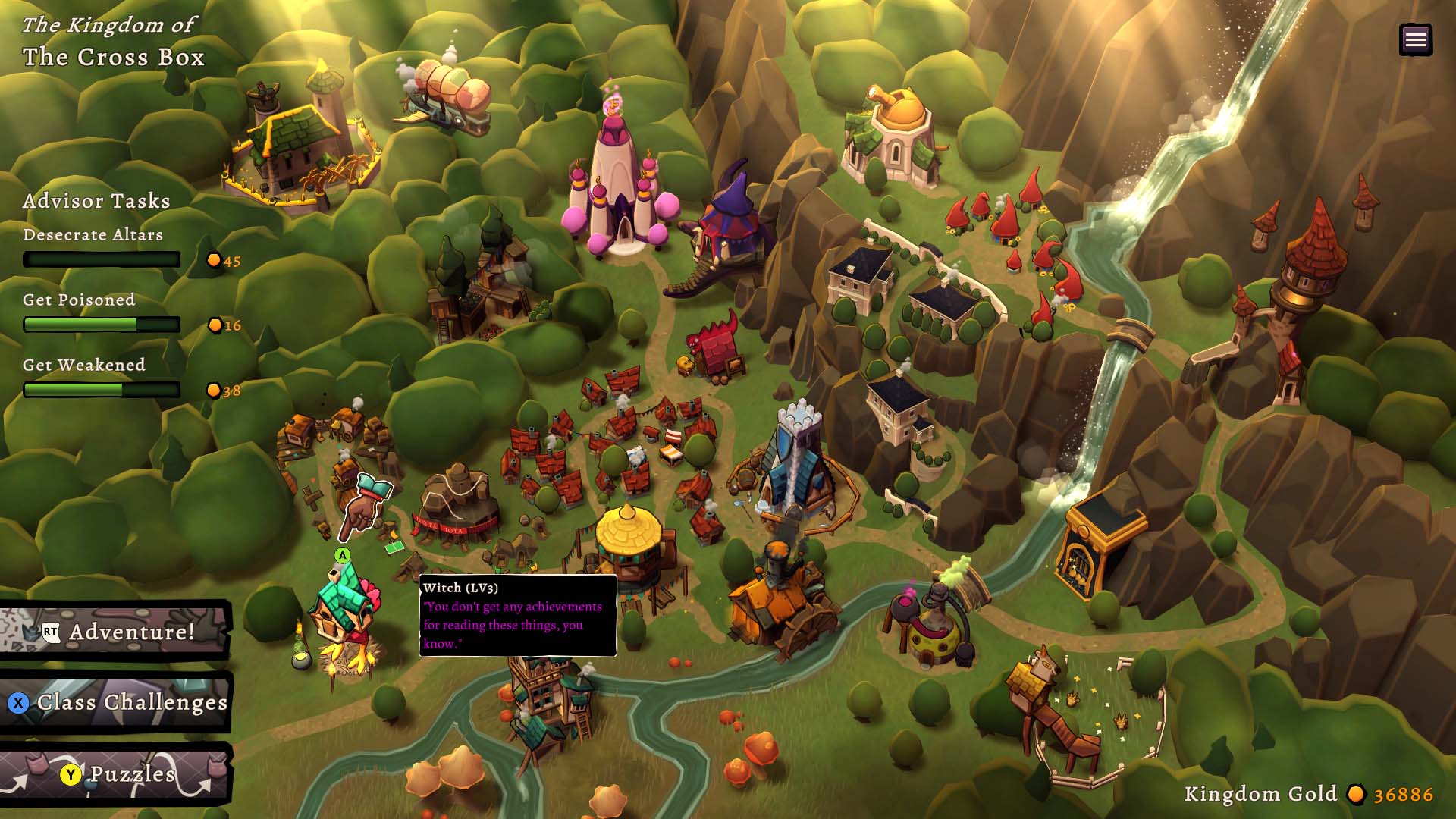
Well now that I have the bone of this voraciously violent Goblin, what am I to do with it? Sell it for money! What am I to do with money? A statue!* Or upgrading buildings.
New Classes! The basic classes can be unlocked in any order, but I’d recommend picking up the Sorcerer as your first tier 2 class. The devs didn’t know what they were doing with that one, it’s so broken*.
New Kin! Once rescued from Dungeons, you can build a settlement for new Kin to move into your kingdom and volunteer them for service in the realm. After all, you can’t spell “kingdom” without “gdom.” Wait…
Preparations! After upgrading the Guild, you can send your adventurers into dungeons with better gear. You’ll be paying for it, but it’s very worthwhile.
Small print
Okay, that’s all the broad stroke advice we have for you, Administrator. You’re a smart cookie* and you should now be ready to play Desktop Dungeons: Rewind. Here are some simple strategies to supplement your slaughter of innocent monsters:
When in doubt, do the puzzles! These brain teasers will explain some of the more advanced concepts of the game in a low stakes environment. What do these statuses mean? Strike order? Slowed? Salami*?
Check your Codex! Accessed from the pause menu, the Codex has all the information you need. Details about Kin, Classes, bosses, badges, anything you could need.
Complete the class challenges! Class challenges come with a lick of lore and are the perfect place to discover the strengths and weaknesses of a new class.
Keep an eye open for quests! These quests will help you upgrade your kingdom. From slaying soulsucking Vampires, to growing your banking capacity, to doing complicated tasks for a cat, the rewards are bountiful.
Keep going! The beginning of this game is fairly easy, but the difficulty ramps up and will require you to master new systems (we haven’t even talked about Gods or Popcorn in the article!) You’ll probably die and have to restart a dungeon at some point. This is the developer’s fault, not yours. Remember, play the damn puzzles!
That’s all I’ve got for you today! Best of luck out there in the realm of Desktop Dungeons: Rewind!
Lots of love from myself and the QCF Design team.
* Please note that anything with an asterisk has the potential to be a lie*.
Desktop Dungeons: Rewind
Prismatika
☆☆☆☆☆ 6
★★★★★
$19.99
Desktop Dungeons: Rewind is a modern remastering of Desktop Dungeons, the award-winning, bite-sized, tactical dungeon crawler. Now on XBox for the first time!
Founding a new kingdom isn’t easy: it takes cunning, manpower, and lots and lots of gold. How will you pay for the outrageously overpriced taverns and banks? Good thing these dungeons are full of rare creatures whose taxidermied remains are valuable on the black market!
Features:
● Embark on an adventure: Choose from a diverse cast of replaceable adventures. Explore bite-sized dungeons.
● Heal by exploring: Reveal hidden terrain to regain health and mana. But plan your route carefully or you’ll have nothing left to face the final enemy.
● Die. Rewind. And try again. New to DD:R, your death is no longer quite so inevitable. After death, you can replay a dungeon from an earlier point to try a different strategy.
● Build your kingdom: Trade monstrous trophies for gold and upgrade your settlement to attract the most skilled adventurers.
● Show your friends who’s boss: Daily online challenges.
● Discover everything that earned Desktop Dungeons a cult following: innovative game design, hundreds of hours of content, daily online challenges, the amazing soundtrack by Danny Baranowsky and Grant Kirkhope, including all the original DLC, and more!
Bob Kovacs, former Technology Editor for TV Tech recently wrote an article for TV Technology “NBC Rises to the Tech Challenges of the 2024 Olympics.” Kovacs highlights how NBC will leverage NDI, HDR, ST 2110 and REMI workflows to broadcast the 2024 Olympics.
According to Darryl Jefferson, senior vice president of engineering and technology for NBC Olympics and Sports, NBC, the official U.S. broadcaster for the Olympic games has been working for almost two years in both Paris & the NBC Sports Hub in Stamford, Connecticut to ensure a broadcast that is swifter, higher and stronger.
This will be Jefferson’s first games as head of NBC Olympics’ tech operations. Jefferson has been with NBC Olympics since 2008 in Post Production and Asset Management teams.
“We started design and peer review about 20 months ago, with build, configure and test in our integration facility. We tested video paths, workflows, delivery mechanisms and failure modes all before items shipped out. We ship gear mostly pre-configured, pre-installed, and pre-tested, for both speed of deployment and for peace of mind.” Darryl Jefferson
The Broadcast is going to be complex, with numerous venues and the the need to integrate feeds from the primary Olympics video system. There are a lot of moving parts. Their goal is for viewers to experience a seamless broadcast. So seamless viewers won’t notice that many of the on-air talent is in Stamford, while the bustle is happening in Paris.
“The biggest leap is splitting large parts of our team between Paris and Stamford. Transporting large quantities of cameras, effects gear and studios full of equipment all the way home has historically not been financially viable. In some cases, the latency was unacceptable. That split approach allows us to cover more sports with fewer total people traveling than just a few Games ago.” Darryl Jefferson
Darryl Jefferson(Image credit: NBC)
NBC Is prepared to give the viewers a seamless broadcast with the revolution in connectivity and capability.
“With new tools, robust networks, capacity with cloud infrastructure, and the ability to approach signal transport differently, there exists a whole host of new options today” Darryl Jefferson
The Oylmpics will be broadcasted in 4K/HDR and 5.1.4 immersive audio. Jefferson says “It may be a tie between getting HDR support everywhere we may need it, and the large cut over to support IP in many places. Although we’ve had important experience with both, there exist so many devices, solutions, vendors and third parties that do not support wide color gamut today, or equipment through which color information doesn’t survive.”
One of NBC’s most basic decisions assembling a system of this size is where to use the SMPTE ST 2110 IP video standard and where to use the older SMPTE SDI standard. “We have a healthy mixture of both, but are about 60% ST 2110 handoff, venue and core orchestration,” Jefferson said. “In some cases, we support both formats within a Tech Center, or gateway translation to convert one to the other. Fortunately, we have spent the last few Games [since Tokyo] making the transition over time, and certainly learning all the lessons.”
In addition to SDI and ST 2110, NBC is also using some NDI. “We are using NDI in some areas, specifically NDI v6, with support of HDR and enhanced audio,” Jefferson said.
“We have a whole trove of new technology, some of which is well behind the camera [ST 2110 and Dante, HDR and ATMOS everywhere], new encoding mezzanine formats, and also a good deal of enhancements to bring viewers further behind the scenes. Backstage cameras, audio from coaches, cameras in the stands with families, even biometrics on family and coaches. The goal of all this technology is to bring more elements of storytelling around each athlete’s journey.” Darryl Jefferson
In the .net project, I get the svc file not found error on localhost. I made IIS settings. http activation vs. I also reviewed my web.config file but nothing worked.
I need to solve this problem myself, because I am making a request to the service from another computer.
SAVE $20: Grab an Amazon Fire TV Soundbar with DTS Virtual:X and Dolby Audio for $99.99, which is a $20 (or 17%) down from a list price of $119.99.
Amazon’s Prime Day is over, but there are a ton of deals still ongoing, even on Amazon’s own products. If you’re a fan of Amazon’s ecosystem, and own a few Echo or Fire TV devices already, then this Amazon Fire TV Soundbar might be worth your money.
As of July 22, the Amazon Fire TV Soundbar is back to its lowest price of $99.99. That’s a $17% discount, knocking off $20 off the list price of $119.99. Good soundbars are expensive, so this Amazon pick which lands under $100 is a great way to add some zest to your home theatre setup.
The key highlight here is that despite the budget price, this soundbar packs in a ton of features. You get dual speakers, which means proper stereo sound. In addition, this has all the Dolby bells and whistles, including Dolby Atmos for deep, crisp sound. You also get support for DTS Virtual:X, which promises three-dimensional virtual audio. What this means is you can expect clear, booming sound that fills your living room.
Mashable Deals
Picking a soundbar can be difficult because of the number of options available. The Amazon Fire TV soundbar is an easy pick for those who have Amazon Fire TV, letting you control the two devices with a single remote.
SCHiM is a game about jumping from shadow to shadow, while interacting with a relaxing and lively environment. A schim is the soul and spirit of an object, thing, or living being. Everything in the world has one. A schim should never be separated from their thing! This does happen to your schim, this schim who is attached to a human being is separated from them early on in the game. Can you get back to them before it’s too late? Before I say anything else about this game I want to acknowledge what I’m sure must have been a painstakingly difficult process the developers of this game went through in order to get this game out the door with the level of quality shown throughout. It is genuinely impressive to me how much they crammed into this while maintaining not only the vibes but also the art and music never getting old.
There are some games that you play cover to cover and really have to wonder how there was such a consistently high level of artistic flair, games like Gris, games like Ape Out, and now, SCHiM SCHiM is fantastic, its one of the more gorgeous games I’ve played in recent memory and I will absolutely be downloading the OST to use in youtube videos when its out. This is a really relaxed game with a story that I wont spoil for you, but one that I thoroughly enjoyed I highly recommend SCHiM and will keep an eye out for what these devs have in store for future games down the road.
Features and System Requirements:
Unique 3D platforming through shadows.
Animated shadow platforms and environments.
Each level has its own scenery with small stories.
A story of a person losing their shadow.
A beautiful abstract world.
1 :: Operating System :: Windows XP/7/8/8./10. 2 :: Processor: Intel Core2Quad Q6600 2,40 GHz 3 :: Ram :: 2 GB RAM 4 :: DirectX: Version 9.0 5 :: Graphics:: GeForce GTX 650 (1024 MB Ram) 6 :: Space Storage:: 2 GB space
Turn Off Your Antivirus Before Installing Any Game
1 :: Download Game 2 :: Extract Game 3 :: Launch The Game 4 :: Have Fun 🙂
Technological innovations and advancements are the catalysts behind the rapid evolution of the property development industry. 3D rendering services are the perfect example of these advancements, changing how planners, developers, and architects approach rezoning and development applications. 3D rendering offers an interactive and vivid visualization of projects to give all the stakeholders involved an excellent and thorough view and understanding of the nuances of the suggested development. This article delves into how freelance rendering services have impacted property development companies.
Limitations and challenges of traditional property development methods
Historically, Property development involved developers, architects, and investors collaborating on physical models, blueprints, and paper-based plants. Developers also relied on text descriptions, 2D drawings, and even rudimentary models whenever they presented their plans to the community, local authorities, and planning commissions. Unfortunately, these conventional methods and static representations left much to the imagination and more room for interpretation, which may result in delays, misunderstandings, and complete project rejections. They also made it more difficult for all stakeholders to grasp the project’s potential.
Below are other common limitations of traditional property development methods:
Creating physical models that require several revisions can be time-consuming and expensive.
Physical models and 2D drawings need help conveying the depth and realism of a property.
The stakeholders are left with no choice but to rely on their skill and ability to interpret, which usually leads to gaps in communication and misunderstandings.
Marketers needed help to showcase their properties to prospective buyers using static visuals alone.
Slower decision-making process
The required time for approvals and revisions delayed the timelines of projects.
The rise of 3D rendering technology made a significant turning point in the property development industry. The tool introduced highly realistic, interactive, and dynamic visualizations that remarkably improved properties’ conceptualization, design, marketing, and selling. 3D renderings offer a higher level of detail and a more interactive experience. These are outstandingly realistic and provide a virtual walkthrough that allows people to experience the space even before its actual construction.
The following are the main areas where freelance 3D rendering services can make a big difference:
Designing and visualizing concepts
During the initial stages of designing and conceptualizing the design, you can feel the primary impacts of freelance 3D rendering services for property development companies. Designers and architects can create complex three-dimensional representations of ideas. 3D renderings can offer unmatched realism and detail, allowing stakeholders to explore the entire project before it is constructed. Furthermore, 3D rendering can bring clarity to concepts of design that were once challenging to communicate. These renderings offer a more complete view that allows better decision-making, from the spatial flow in the building to the texture of materials and the play of the natural light through the windows.
More immersive experiences and advanced visuals
Freelance 3D rendering services and their transformative power are integral to property development as they provide enhanced visualization and a sneak peek of the project’s future. Unlike traditional drawings that often leave room for ambiguity now and then, 3D rendering offers endless options in three dimensions. 3D rendering also allows companies to provide visual walkthroughs and breathe life into their architectural plans before they are built. This provides a holistic representation that architects, developers, and potential investors can view and check.
The blend of small details, the sense of scale, and the way shadow and light play create a unique visual experience. The materials’ lifelike representation can also offer an initial estimate of the property’s maintenance expenses. This enhanced visualization is even better because it doesn’t just stop at the aesthetics alone; it also permeates other aspects of the project. It helps streamline the decision-making process, from layout optimization to meticulous tweaks in the design. Freelance 3D rendering services are like guiding stars that smooth down the development process and increase confidence every step of the way.
3D rendering and its digital nature also allow for more rapid iterations. Tweaks to the design elements, such as façade details, color schemes, and room layouts, can be implemented immediately to reduce the cost and time associated with design revisions.
Strategies for marketing and sales
3D rendering services have always significantly affected property marketing and sales. Today’s real estate professionals take advantage of 3D renderings to come up with enticing marketing materials and offer immersive experiences to potential buyers.
Photorealistic materials for marketing
Top-of-the-line photorealistic rendering services can help generate photorealistic materials that can be used for marketing, including promotional videos, websites, and brochures. These materials give prospective buyers a clearer understanding of the property’s appearance upon completion, making it easier for them to visualize themselves in the space.
Interactive experiences and virtual tours
Augmented reality and virtual reality technologies with 3D rendering often power them, allowing potential buyers to tour the properties virtually. The immersive experiences enable users to walk through the property and inspect each detail, from finishing to layouts, as if they were physically correct.
Effective collaboration and communication among stakeholders are essential for property development companies. Freelance 3D rendering services facilitate these aspects by offering a common visual language that can be easily understood by everyone involved. Marketing teams, investors, developers, and architects can use 3D renderings to convey ideas more effectively, reducing misinterpretations and misunderstandings.
Conventional public hearings usually involve complex plans that the public may need help understanding. 3D renderings make conveying the developer’s vision easier, helping the community better grasp the project’s impact, design, and scale. This enhanced level of transparency can result in higher support for the project.
Facilitate decision-making for the authorities
3D renderings are invaluable tools that help planning authorities make informed decisions. With the help of the renders, they can quickly evaluate how a new development will fit into an existing urban landscape. They can also check shadow studies and understand traffic flow, which are critical to ensure the plan’s success.
Approvals made more streamlined
3D renderings speed up the approval process through clear and realistic presentation of designs. These tools simplify how stakeholders and authorities review the projects and approve them accordingly after they grasp the result.
Real-world applications of freelance 3D rendering services
Here are two real-world applications of freelance 3D rendering services:
Adaptive reuse and historical preservation
New property development projects are just some of the ones that benefit from freelance 3D rendering services. These services also play a critical role in adaptive reuse and historic preservation projects. Think of a historic landmark that requires repurposing and renovation. Freelance 3D rendering projects can recreate the original glory of the structure and, at the same time, show how this will be turned into a functional modern space. The renderings can help preservationists secure support and funding by clearly defining the project’s potential. They guide builders and architects to retain historical accuracy while incorporating modern amenities.
Pre-construction visualization
For example, a developer plans to build a posh condominium complex in a prime urban location. Traditional methods require architects to create models and blueprints that convey limited information. Freelance 3D rendering services, on the other hand, allow the creation of photorealistic animations and images that represent the whole development. Potential buyers can take virtual tours of the units, visit the penthouse for scenic views, and meticulously explore the carefully designed common spaces. This sheer level of realism and attention to detail allows buyers to make informed decisions that often result in faster sales.
Freelance 3D rendering services and their future possibilities and trends in property development
With the continuous evolution of technology, the impact of freelance 3D rendering services on property development is expected to grow and expand further. The following are some of the future possibilities and critical trends that lie ahead in the future of the industry:
AI or artificial intelligence will be more prominent in 3D freelance rendering services. The efficiency and speed of rendering will improve thanks to AI algorithms while also improving realism through automated features such as more realistic textures and lighting.
Integration of augmented reality
Integrating 3: services into property development projects will allow stakeholders to view 3D renderings overload on physical spaces. A construction site, for example, can be overlaid with the completed building’s digital rendering to aid in quality control and construction.
Real-time rendering technology allows developers and architects to make changes to the design while on the go during client meetings. The instant feedback streamlines the decision-making and design processes.
Sustainable visualization
Sustainability is expected to become a critical aspect of 3D rendering. To help promote sustainable building practices, the renderings will highlight eco-friendly features, including energy-efficient designs, solar panels, and green roofs.
Cad Crowd is the leading platform for freelancers specializing in 3D rendering services. Contact us today, and let us connect you with the right professional for your next property development project!
“Just like git-bisect, but for VS Code extensions.”
The true power of Visual Studio Code is its extensions: theme extensions add colors and icons, language extensions enable smart code completion (IntelliSense) and navigation, debugger extensions enable you to run your code and easily find bugs. There are extensions that play music, some that show stock tickers, and there are extensions that enable collaborative work across locations and time zones. The VS Code Marketplace hosts more than 28,000 extensions and it is not uncommon that users have 50 or more extensions installed. With so many extensions out there, bugs are inevitable. Instead of denial, we want to make troubleshooting easy.
“Bad” extensions
We love extensions and don’t really think there are any “bad” extensions. However, like all software, extensions have bugs and feature gaps. So, for reading ease and artificial drama, let’s use the term “bad extensions”, which is an extension that might crash or simply show unwanted behavior. Fortunately, we designed VS Code with “bad” extensions in mind and therefore run them in a separate process. This isolation guarantees that VS Code keeps running, the cursor always blinks, and that you can always save your work.
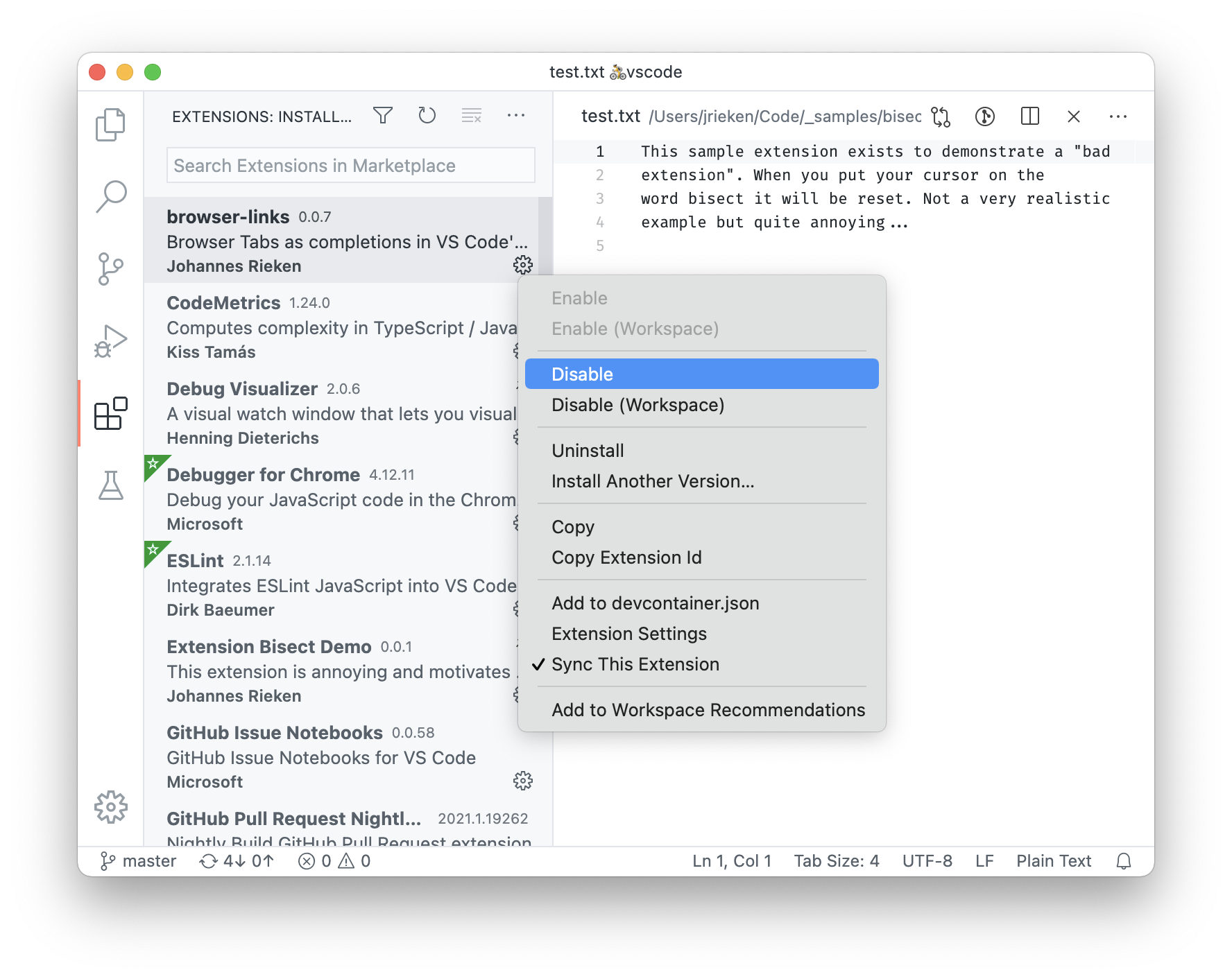
For fun, and to make it easier to demonstrate extension bisect, we have created and published the Extension Bisect Demo extension. When installed, it will annoyingly reset your cursor whenever you reach the word “bisect”. You can use this extension to follow along in this blog post.
Finding a “bad” extension the hard way
Today, finding a “bad” extension can be easy or hard. Open the Extensions view (⇧⌘X (Windows, Linux Ctrl+Shift+X)), disable an extension, reload the window (Developer: Reload Window), and check to see if the problem still exists. If the problem is gone, that extension is “bad” and you are done. Otherwise, re-enable the extension and repeat the process with the next extension.
If you are lucky, the first extension is the “bad” one; if you are unlucky, it’s the last extension. Using computer science language, this means with N extensions, you have a worst-case of repeating the process O(N) (order N), and an average-case of O(N/2). Because this algorithm is operated by a human (you), even small values of N are laborious. This is where the extension bisect utility comes in handy. It is much better in the worst and average cases because it disables extensions by halves.
Welcome extension bisect
The Extension bisect utility in VS Code was inspired by the git bisect command. For those familiar with Git, this command is helpful for finding out which commit in the repository introduced an issue.
Let’s use a sample: I have 24 extensions installed and the 8th extension is “bad”. We know that the iterative approach requires 8 steps. What about bisect?
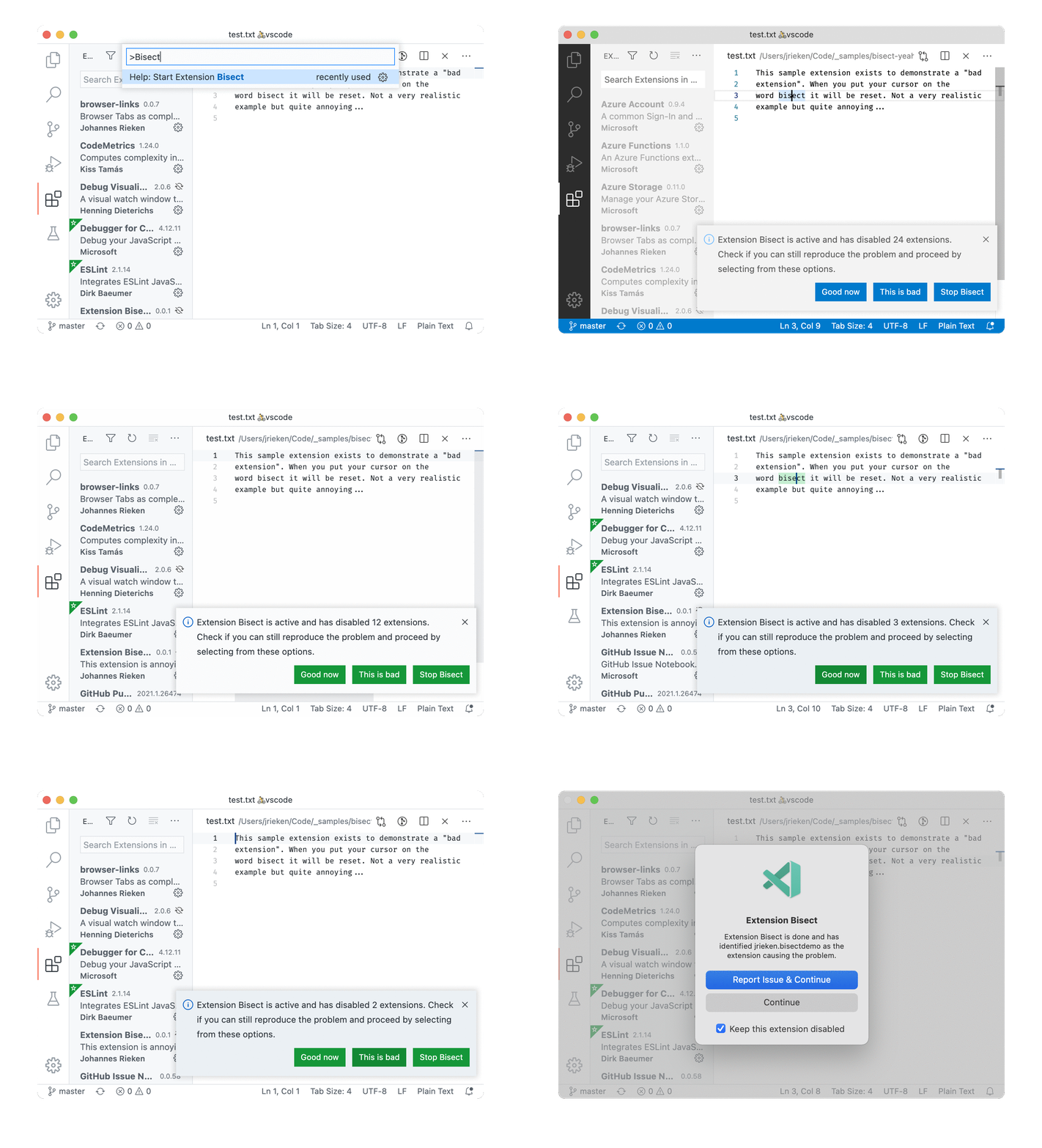
The video below shows starting extension bisect via the Help: Start Extension Bisect command and then selecting either Good now or This is bad until the “bad” extension is identified. Once identified, you have the option to report an issue for that extension.
Here’s step by step how the “bad” extension was found:
Bisect divides 24 extensions into two halves of 12 extensions each, and it disables all 12 extensions of the second half.
In this sample, the 8th extension is the “bad” one, so it is the first half and not disabled. Things are still not working as we’d expect. Because there is still an issue, extension bisect repeats the process, dividing the first 12 extensions into two parts: 6 are enabled and 6 are disabled. All other extensions are also re-enabled.
The 8th extension is now disabled. Things are good now. That means bisect can proceed on the second half (extensions 6-11), and divides them into 3 enabled and 3 disabled extensions.
Now, the 8th extension is re-enabled, and the issue has reappeared. This means bisect proceeds on the first half. It divides them into 1 enabled and 2 disabled extensions.
The 8th extension is now disabled, things are good again and bisect proceeds on the second half, dividing it into 1 enabled and 1 disabled extension.
The 8th extension is the only disabled extension, and the issue is gone. This means we have found the “bad” extension and that we are done.
Troubleshoot faster
We see that in each step, bisect reduces the search space by half. The steps now it runs in logarithmic time, resulting in average and worst case performance of O(log N). That’s pretty good because it scales well. With 24 extensions, you have 4 to 5 steps to find a “bad” extension, with 38 extensions, it only takes 1 more step. However, best-case is worse because with the iterative approach, you can get lucky and find the “bad” in the first round.
Keep in mind that extension bisect relies on you giving correct feedback. You can easily fool it, and yourself, by always answering Good now (blames the last extension) or This is bad (won’t find an extension).
Another useful insight is that extension bisect starts off considering the full list of enabled extensions. That means you can exclude a known “good” extension from bisect by disabling it before starting and by re-enabling it after. However, only do that when you are certain that extension isn’t the “bad” one.
Lastly, you might notice that bisect is taking one extra step (log2(N) + 1). That’s because it starts the first round by disabling all extensions. This first step is done because you might be seeing an issue that’s caused by VS Code itself, not by an extension, and we don’t want to send you down the rabbit hole unnecessarily.
That’s it. We hope that you never need to use extension bisect. However, if you do encounter an issue possibly related to an extension, then we hope we can make troubleshooting easier, faster, and more pleasant.
Happy Coding,
Johannes Rieken, VS Code Principal Software Engineer @johannesrieken
Editing videos for your growing YouTube gaming account? Working professionally as a videographer? If you’re still trying to edit videos for your social media or clients on your laptop, you’re getting the short end of the stick.
Sure, laptops are great for bringing your content or video editing on the go, but they don’t offer much processing power or storage. What could make your experience more seamless and efficient is a desktop like the HP Pavilion. Designed with 512GB SSD, 12GB of RAM, and compatible with other content creation software, this desktop is the ideal device for any creative at only $349.99 (reg. $599).
While looks aren’t the only thing that matters, this HP desktop is impressive. Say goodbye to the dreary, clunky desktops of yesteryear—this one arrives in a stylish snow-white finish and has easy-to-access front ports for connecting peripherals. Plus, its construction is sustainable, as it’s EPEAT Silver registered and ENERGY STAR-certified!
Specs-wise, the HP Pavilion offers performance-driven features like the following:
512GB of storage: for content creators, graphic designers, and videographers to save their media locally for easier access
Windows 11 Home: for other professionals or students to open multiple webpages, apps, and software without lagging
Videographers, YouTubers, and other creatives will love this desktop’s 5.1 surround sound while they listen to their voiceovers or edit, as well as its Intel UHD Graphics 730.
To get you editing, working, or even gaming on this HP Pavilion right away, it comes with HP Quick Drop, a wireless keyboard, and a mouse (the latter matching the stylish white of the tower perfectly!).
It’s important to note that this desktop is from 2023 and is new open-box. No, that doesn’t mean it’s been used, but its packaging may have signs of extra handling. However, this desktop has been verified to be in still new condition.
Improve your workflow, whether you’re a creative or office professional, when you get this HP Pavilion desktop for $349.99 — over 40% off the regular price.
Overnight remote jobs are great for night owls. They’re also a good option for anyone who needs an alternative schedule. However, third-shift gigs aren’t always easy to come by.
But, there are still plenty of options to choose from. For starters, certain industries have more overnight opportunities than others. Plus, there’s always the option of creating your own flexible remote-friendly job.
Let’s cover the basics of overnight work before we get into the nitty gritty.
What is Considered an Overnight Remote Job?
First, let’s discuss what overnight remote jobs actually are. In the US, work schedules are split into three different shifts:
First Shift – 9:00 a.m. to 5:00 p.m.
Second Shift – 5:00 p.m. to 1:00 a.m.
Third Shift – 12:00 a.m. to 8:00 a.m.
So, a business open 24 hours a day has three sets of workers to cover all three shifts. In this case, we’re talking about the third shift which runs from 12:00 a.m. to 8:00 a.m. As a result, it’s commonly referred to as “overnight” or the “graveyard” shift.
Types of Overnight Remote Jobs
Like all remote jobs, overnight ones are broken down into two main types:
Employee
Self-Employment
As a reminder, an employee position is like a traditional job. In other words, you work for a company. As a result, you are given specific rights like:
Steady pay
Benefits eligibility
Taxes withheld from pay
However, you (as the employee) are expected to follow the company’s policies and procedures like working assigned shifts and requesting time off.
On the other hand, self-employment is working for yourself. That is you are your own boss. For example, business owners, freelancers, and independent contractors are all self-employed.
As a self-employed worker you’re responsible for:
Finding work
Paying estimated taxes
Collecting payments
Health insurance
As a result, you create your schedule and come and go as you please.
Of course, each type have their pros and cons, and you’re likely to come across both while searching for overnight remote work. So, it’s important to know the difference ahead of time. Needless to say, please know your remote work type BEFORE you start your remote job search.
Remember, knowing your “type” (besides tall, dark, and handsome or Henry Cavill) simplifies your job search and makes it easier to find work.
Which Industries Hire Overnight Remote Workers?
Next, let’s consider some remote-friendly overnight positions. But first, it’s helpful to think of industries that would hire overnight workers in the first place.
After all, not all businesses are open 24/7. However, tons of companies with online or virtual footprints are “open” any time, day or night.
Healthcare & Social Work
Medical questions pop up at any time. As a result, many insurance companies and medical centers have 24-hour hotlines patients can call to ask questions. And, thanks to telehealth, more and more users readily turn to phones and computers to solve health concerns without going to the hospital.
Tele-nurse, phone-triage, counselors, therapists, and crisis line operators are all common healthcare overnight remote jobs. Of course, a medical background or social work experience is required!
REAL OVERNIGHT REMOTE JOBS IN HEALTHCARE & SOCIAL WORK
Tech Support
Many software companies have around the clock support for its users. For example, Apple provides 24/7/365 for its products and iTunes. (Check out Apple work from home jobs to learn more about working remotely for the tech giant!).
Additionally, hosting providers, internet services, online schools, and financial institutions employ overnight tech support professionals to assist website owners, students, and customers.
Help desk, service desk, and tech support representative are readily available remote positions. As a bonus, many are entry-level and provide room for advancement.
Insurance
Is there ever a good time for an accident? Of course not. However, it seems like many accidents happen at the most inopportune times like, say, overnight. As a result, insurance companies have agents available 24/7 to answer calls and help policyholders file claims. There’s also a need for all hours roadside assistance. For example, U-Haul and AAA have remote overnight dispatchers to assist stranded motorists.
Customer Service
As always, there are a lot of remote customer service jobs. And this includes overnight remote jobs too. Banks, like Discover and American Express, offer 24/7 support for card holders. As a matter of fact, there are a number of work from home American Express jobs.
Similarly, online retailers, like Amazon, and shipping companies, like FedEx, employ constant customer support teams. Additionally, work from home staffing agencies contract with corporations to provide day and night support.
When it comes to remote customer service, you never know what you’ll find. For example, there are even third-shift Customer Care Associate positions with dating apps:
Writers
The news never sleeps! In fact, news outlets follow a 24/7 coverage cycle. So, it makes sense that online publications look for writers to post breaking news no matter what time it is.
As a result, there are journalist, blogger, and content writing positions open to night-loving remote workers. Additionally, freelance writing is so flexible that assignments can be completed day or night!
Hospitality
Likewise, the hospitality industry operates nonstop. As such, hotels and airlines use remote agents to answer guest questions and make reservations. Plus, large agencies have travel agents on staff 24/7 to make travel arrangements.
Needless to say, overnight remote jobs in hospitality include Travel Agent, Reservations, Ticketing, and Travel Consultant.
Community Engagement, Social Media, & Moderation
Lastly, there’s the nonstop world of social media to consider. In fact, many companies use social media as a means of support and customer service. A recent survey of US consumers found 80% turned to a brand’s social media for support.
Accordingly, brands rely on community managers and moderators to respond to social mentions at any given time. As a matter of fact, ModSquad is in the business of hiring overnight remote jobs in social media moderation!
Remote Overnight Jobs: Create Your Own
Companies aren’t always hiring remote overnight workers. In that case, create your own. By that I mean freelance.
What is Freelancing?
As I mentioned earlier, there are two types of remote jobs:
Employee
Self-Employment
Freelancing falls under the self-employment category. Additionally, freelancers sell services and bill for those services. For example, a client hires a freelance writer to create 500-word blog posts at $50 per post. Now, the beauty of freelancing is the ability to set a schedule that works for you.
In other words, you create your own overnight remote jobs. In fact, freelancing offers enough flexibility that work can be done at 2:00 a.m. or 2:00 p.m. or any time in between.
Benefits of Freelance Overnight Remote Jobs
Additional benefits of freelancing include:
Unlimited earning potential – Pay rates are not set in stone. Therefore, freelancers aren’t stuck making a fixed amount per hour or annual salary. As a result, freelancers earn more per hour than 70% of traditional (employee) workers in the US.
Accessibility – Freelancing offers an opportunity for individuals limited by personal circumstances, i.e., health, the ability to work. For example, workers living with chronic illnesses, autoimmune diseases, or disabilities often find it difficult to work outside the home or maintain a traditional schedule. Fortunately, freelance jobs allow work to happen at odd hours or different locations like a hospital or health center.
Freelance Resources for Beginners
I previously mentioned how flexible freelancing. As a result, freelancing lends itself well to working any time and anywhere, including overnight and remotely. However, I always want to be super transparent about the difficulties freelancers face. Although freelancers are higher paid, generally happier, and enjoy flexibility – it takes a lot of work to get there.
Back in the day, I quit my well-paying corporate job to freelance full time. At the time, I had no professional writing experience or any clue how to properly manage myself as a business of one.
Unfortunately, I learned the ins and outs of freelancing the hard way. My first year was rough. At times, I was ready to throw in the towel and crawl back to my cubicle begging for mercy and a paycheck.
But, I kept myself afloat with remote jobs hiring immediately and eventually learned enough about freelancing to make it on my own.
So, please learn from my experience and educate yourself about freelancing before you jump in. Or, better yet, invest in freelance training that teaches you a freelance skill AND how to run a successful freelance business – win, win.
TranscribeAnywhere
TranscribeAnywhere teaches aspiring typists how to start their own freelance transcription biz. First, students pass a series of transcription lessons. Then they’re prepared for the reality of freelancing full time. As a matter of fact, get a glimpse into the world of remote transcribing by signing up for the Free Seven-Lesson Mini Course.
ProofreadAnywhere
Another program built with freelancers in mind is ProofreadAnywhere. To start, students learn the ins and outs of proofreading professionally. From there, lessons teach business building skills like finding clients and tackling finances.
Admittedly, I’m not the best with numbers and that’s exactly why I’m not a bookkeeper. However, bookkeeping may just be right up your alley. To find out, take a free three-part training series to learn about building a bookkeeping business. Hurry! Seats are limited:
Virtual Assistant
Similarly, tackling to-do lists isn’t my forte. Thankfully, Virtual Assistants (VAs) exist! VAs help professionals manage day-to-day happenings. For example, clearing inboxes, reservations, customer service, social media, and more. Needless to say, it’s a big business in the world of freelancing. And you can get it on it too by learning how to become a VA.
Edit Republic
My friend, Phon, is a self-employed editor (and nice human being). Her career first started as a professional romance novel reader. Then she launched her own freelance proofreading and copyediting business. Now she teaches others how to turn their love of reading into an online editorial business. Sign up for the free masterclass for the 4-step framework needed to start a freelance editorial biz of your own.
SmartBlogger
As I previously mentioned, writing lends itself well to overnight remote jobs. In fact, I’ve written at odd hours for the better part of a decade as a self-employed blogger. However, it wasn’t exactly smooth sailing to get to that point. So, I highly recommend joining the Paid to Write Club. The program provides the support you need (and wish I had at the time!) to get your first paying freelance writing client.
Where Can I Search for Overnight Remote Jobs?
Finally, let’s quickly talk about places to search for overnight remote jobs on your own. But, first, let’s recap what we’ve learned so far…
Some industries have more overnight remote jobs than others
Freelancing is flexible enough that you can create your own overnight remote job
You should always determine your remote work type BEFORE you start a job search
Got it? Good!
Now, here are places you can look for remote overnight jobs on your own.
Remote Job Boards
Previously, I’ve written a lot about remote job boards. Please check out Top 10 Remote Job Boards for Thousands of Real Leads. This list will keep you plenty busy no matter your remote work type.
However, there are two standouts I highly recommend: FlexJobs and SolidGigs. Both sites are paid membership sites. For the most part, these two sites have greater quality leads than others and thus save time for job seekers.
FlexJobs
First is FlexJobs. This is a membership site but it’s well worth the monthly fee. To start, FlexJobs hand screens every single listing (and there are a lot of them). It’s guaranteed that all posted positions are 100% legit. In other words, you don’t have to worry about scams. Plus, there are both employee and self-employment job leads here. So, no matter your remote work type, there are plenty of leads!
SolidGigs
Next up is SolidGigs. This is a job leads website specifically built for freelancers. As I said before, it takes a lot of work to get started and stay afloat as a freelancer. After all, you have to find clients and spend countless hours looking for leads. That’s where SolidGigs comes in. They take care of lead generation by providing a roundup of high-quality freelance gigs in your inbox every single day. Now you can focus on producing great work and less time scouring job boards.
How Can I Help You Find Remote Overnight Jobs?
Lastly, how can I help? It’s never easy to look for a new job. Please feel free to reach out to me and introduce yourself. I’m always happy to help point you in the right direction.
I was harsh on the original Asus ROG Ally. Maybe a little too harsh, since many of the problems I had with it are inherent to the very concept of a Windows-based handheld gaming console. So, when I got my hands on the new ROG Ally X, I tried to be a bit more open-minded. It wasn’t hard, because the newer model is a substantial improvement. But some hurdles just can’t be overcome.
The ROG Ally X looks almost identical to its predecessor, save for a new coat of black paint. There are subtle differences, like rounded-out grips that are more comfortable to hold, slightly elevated ABXY buttons, and an eight-direction D-pad that handles diagonal movements a bit better. If you didn’t look too closely though, you’d be forgiven for thinking little has changed.
But under the hood, Asus has made some massive improvements. Most notably, the battery size has doubled. The original ROG Ally had a 40-Wh battery, roughly comparable to the original Steam Deck. The ROG Ally X, on the other hand, somehow packs a massive 80-Wh battery. That’s larger than the battery in Asus’s Zephyrus G14 gaming laptop, which I loved for its lengthy battery life. Despite this massive increase, the Ally X is only about 70 grams heavier.
Asus also beefed up the storage capacity—it now comes with a 1-terabyte SSD instead of 512 GB—and 8 more gigabytes of DDR5 RAM. The company also swapped out the XG Mobile port that’s only really useful for Asus’ external GPUs for a USB4 port that can reach speeds up to 40 Gbps, making it ideal for connecting to external docking stations. But specs can’t tell the whole story.
Photograph: Eric Ravenscraft
The Insurmountable Wall of Windows
Windows isn’t designed to be run on a handheld. That’s just a simple, unavoidable truth. Microsoft expects you to come to its operating system with a mouse and keyboard, or at least a large touch screen. Trying to navigate the OS with a controller is always going to be an exercise in frustration. No matter how hard I try, I can’t seem to escape the basic problem of trying to interact with things on the screen.
One prominent example of this is the Xbox app. Asus has made some solid strides with its Armoury Crate SE app that’s meant to be the bridge between all the other game libraries on your system. Armoury Crate launches at startup, there’s a dedicated button next to the right control stick to open it when you need it, and it has shortcuts to apps like Steam (which launches in the controller-friendly Big Picture mode) or Xbox so you can access any game you own.